dsh-super-kanban 0.4.1 → 0.5.0
This diff represents the content of publicly available package versions that have been released to one of the supported registries. The information contained in this diff is provided for informational purposes only and reflects changes between package versions as they appear in their respective public registries.
- package/CHANGELOG.md +189 -1
- package/README.en.md +58 -253
- package/README.md +58 -253
- package/client.js +1624 -732
- package/cordis.patch.yml +5 -3
- package/index.mjs +29 -26
- package/package.json +5 -2
- package/server/analyzer-llm.mjs +223 -259
- package/server/analyzer-rules.mjs +104 -18
- package/server/auth.mjs +40 -0
- package/server/http.mjs +151 -0
- package/server/native-llm.mjs +34 -0
- package/server/service.mjs +977 -361
- package/server/sessions.mjs +31 -27
- package/server/store.mjs +274 -46
- package/server/titles.mjs +48 -0
package/CHANGELOG.md
CHANGED
|
@@ -7,6 +7,193 @@ and this project adheres to [Semantic Versioning](https://semver.org/spec/v2.0.0
|
|
|
7
7
|
|
|
8
8
|
## [Unreleased]
|
|
9
9
|
|
|
10
|
+
## [0.5.0] - 2026-11-08
|
|
11
|
+
|
|
12
|
+
### Added
|
|
13
|
+
|
|
14
|
+
- **AI analysis through the DSH native model service**: analysis requests now go
|
|
15
|
+
through DSH's `llm` service instead of the plugin's built-in DeepSeek API
|
|
16
|
+
client. Model catalogue, default model, third-party providers and credentials
|
|
17
|
+
are all managed by DSH; the plugin no longer reads `.credentials.yaml` or
|
|
18
|
+
hard-codes a model endpoint, and old DSH builds without the service fall back
|
|
19
|
+
to the rules engine with an explicit scan message.
|
|
20
|
+
- **AI model selection**: new board settings `aiProvider`/`aiModel` (empty =
|
|
21
|
+
follow the DSH default model, which is a live reference), an “AI 研判模型”
|
|
22
|
+
block in the settings dialog with a native grouped select and a refresh
|
|
23
|
+
button, and support for models configured in **DSH Settings → Models**
|
|
24
|
+
(catalogue providers or custom OpenAI/Anthropic-compatible endpoints), which
|
|
25
|
+
become selectable without restarting the board.
|
|
26
|
+
- **Model catalogue endpoint** `GET /super-kanban/api/ai/models` (flat
|
|
27
|
+
`{ok, catalogAvailable, default, providers, models, failures, fetchedAt}`,
|
|
28
|
+
owner-only, 30s host cache, per-provider failure isolation) and
|
|
29
|
+
`task.ai.provider` for the drawer (“provider / model”; rules results now carry
|
|
30
|
+
`model:""`, `provider:null`).
|
|
31
|
+
- **Automatic AI budget**: new `settings.aiBudgetMode` (`"auto"` default =
|
|
32
|
+
min(sessions due this scan, daily remainder) or `"fixed"`); the per-scan limit
|
|
33
|
+
`maxAiCallsPerScan` can now be set up to **150** (5–150, fixed mode only), the
|
|
34
|
+
daily limit stays 150 budget units, and a 10-minute AI-phase wall clock plus a
|
|
35
|
+
5-minute per-session failure cooldown keep long scans bounded.
|
|
36
|
+
- **Budget observability and continuation**: new optional scan fields
|
|
37
|
+
`aiDue/aiBudget/aiAttempts/aiPending/aiDeferredReason`; scans prioritise
|
|
38
|
+
never-analysed sessions, then changed, then most recently active; messages
|
|
39
|
+
such as “剩余 N 个会话下次扫描继续” / “今日 AI 预算已用完(150/150)· 剩余 N 个会话明日继续”
|
|
40
|
+
explain deferred work, and the settings page shows used/limit/remaining,
|
|
41
|
+
tokens and the last scan.
|
|
42
|
+
|
|
43
|
+
- **Task-level AI review and re-analysis**: the drawer shows an “AI 研判 / 规则推断”
|
|
44
|
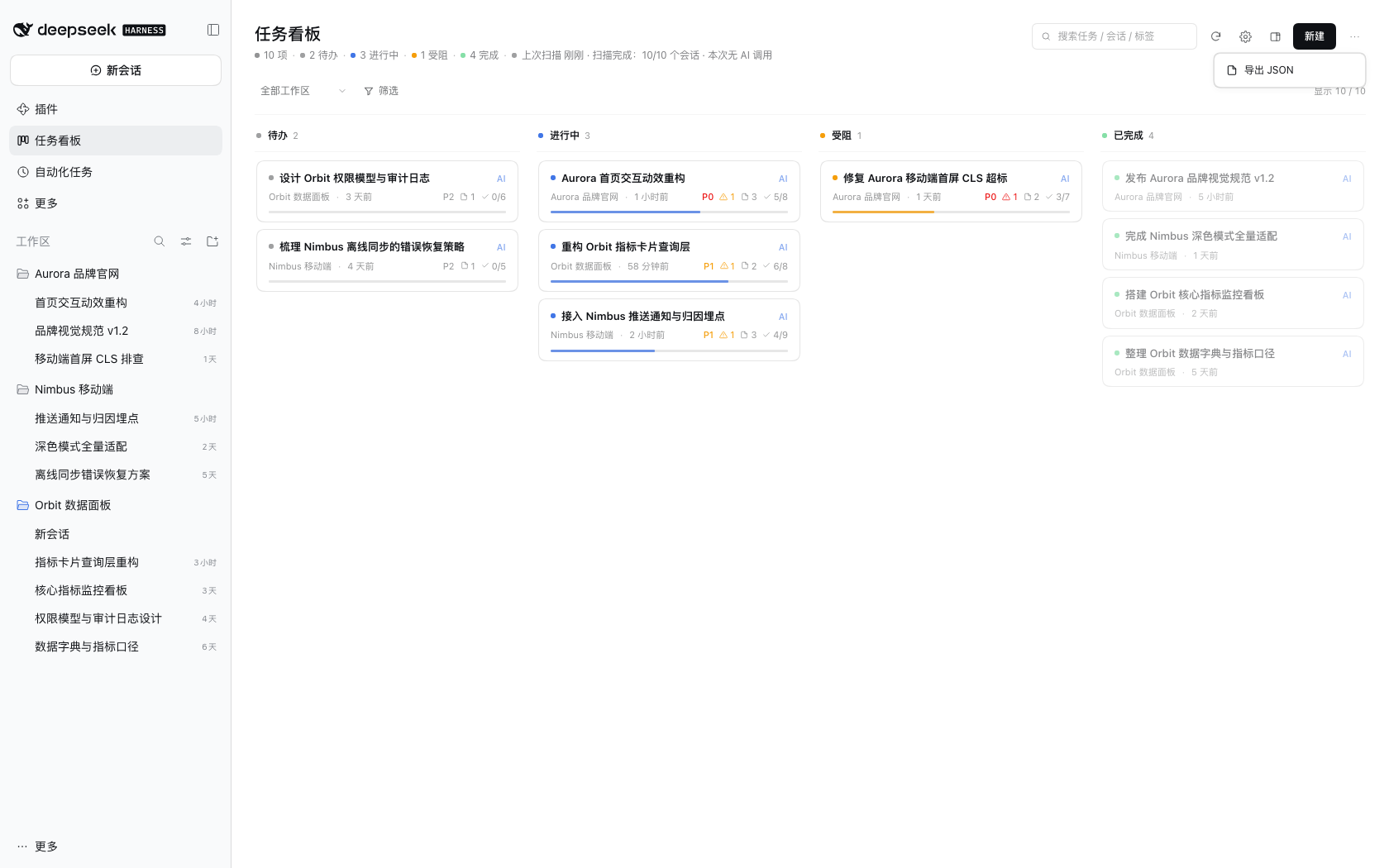
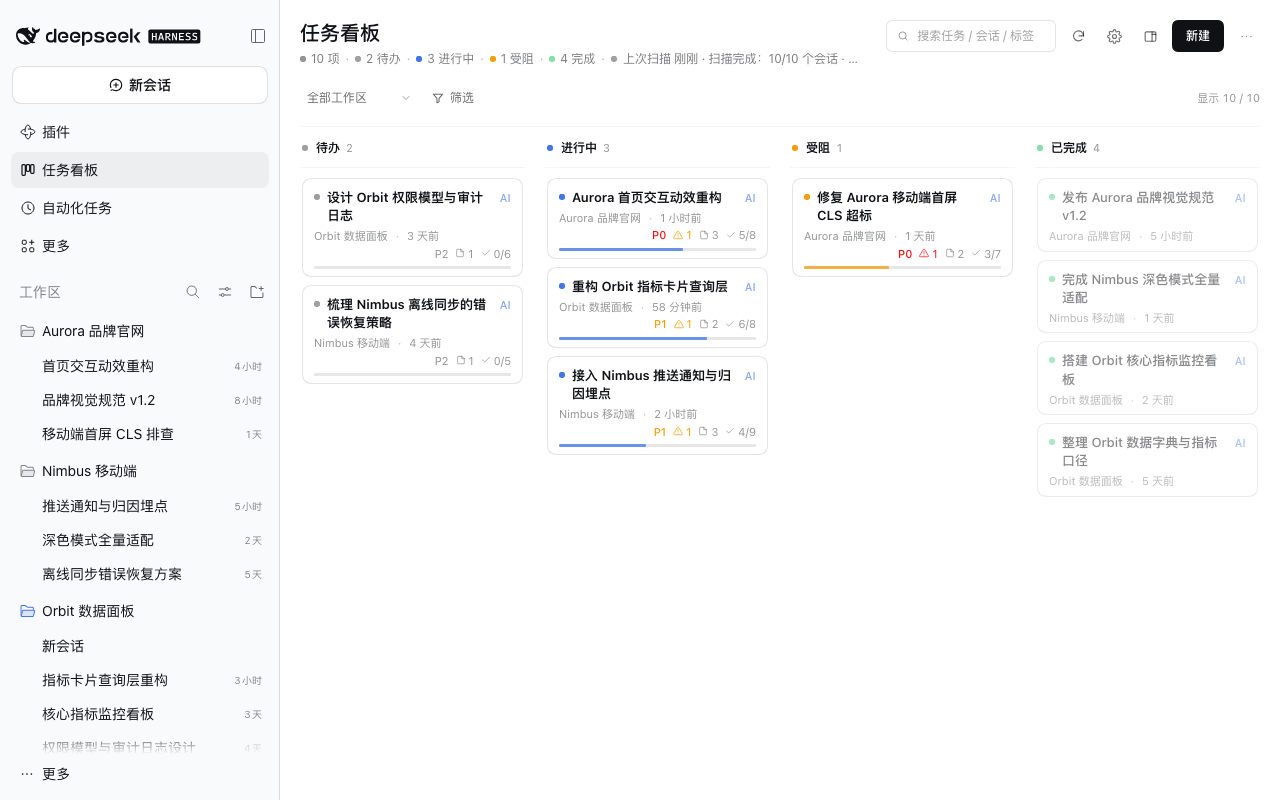
+
block (engine, model, confidence, last-analysis time, one-line reason) and a
|
|
45
|
+
“重新研判” action in the ⋯ menu that reruns `task.analyze` for a single card.
|
|
46
|
+
“可能已过期” appears only when the source session has activity newer than the
|
|
47
|
+
analysis; re-analysis reports engine/calls/tokens in a toast.
|
|
48
|
+
- **Persistent scan outcome** in the board header: the last-scan line keeps the
|
|
49
|
+
host message (sessions processed, AI calls/tokens, “本次无 AI 调用”, budget
|
|
50
|
+
fallback, cancellation, failure + retry), and the scan button reads
|
|
51
|
+
“扫描(仅规则)” when AI is disabled.
|
|
52
|
+
- **Accessibility and keyboard support**: dialogs/drawer use `role="dialog"` +
|
|
53
|
+
`aria-modal` + `aria-labelledby` with a focus trap and focus restore; cards are
|
|
54
|
+
keyboard-openable with visible focus rings; icon-only buttons have
|
|
55
|
+
`aria-label`s; subtask rows are real toggle + delete buttons; toasts and scan
|
|
56
|
+
state are announced via `aria-live`; Esc closes the topmost layer.
|
|
57
|
+
- **Board and drawer usability**: backlog/archived counts in the summary (zero
|
|
58
|
+
values hidden), expand-all for issues/next steps, draft edits survive
|
|
59
|
+
background polls (with a quiet “后台已更新” note), the continue prompt keeps
|
|
60
|
+
user edits when the target changes, search covers goal/key facts/issues/next
|
|
61
|
+
steps, completed cards no longer draw the coloured progress line, archived
|
|
62
|
+
cards get a “已归档” marker, and the right-sidebar workspace filter stays
|
|
63
|
+
visible at every width.
|
|
64
|
+
- **Backend**: new test-covered modules `server/auth.mjs`, `server/http.mjs` and
|
|
65
|
+
`server/titles.mjs`; the host test suite grew from 55 to 177 tests
|
|
66
|
+
(`sessions`, `service`, `store-robustness`, `http`, `auth`, `titles`,
|
|
67
|
+
`host-entry`, `analyzer-llm`); `server/sessions.mjs` now parses session-event
|
|
68
|
+
payloads from `event.data` (lineage/cwd had silently fallen back to the
|
|
69
|
+
projection cache).
|
|
70
|
+
- **CI/CD**: `scripts/check-docs.mjs` and `scripts/check-version.mjs` with
|
|
71
|
+
`npm run check` / `check:docs` / `check:version` aggregates wired into CI and
|
|
72
|
+
the release workflow; non-blocking coverage report; stricter `npm pack`
|
|
73
|
+
contents assertions; Dependabot for GitHub Actions.
|
|
74
|
+
- Maintainer documentation for the git-ignored `dev/` and
|
|
75
|
+
`internal/docs-internal/` trees, plus reproducible dev scripts.
|
|
76
|
+
|
|
77
|
+
### Changed
|
|
78
|
+
|
|
79
|
+
- **AI budget default behaviour change**: upgrading from 0.4.x switches the AI
|
|
80
|
+
budget from a fixed 40 calls to “auto” (up to the daily remainder). The daily
|
|
81
|
+
limit (150), the local-day rollover and the rules-engine fallback are
|
|
82
|
+
unchanged; pick “固定 40 次” in settings to restore the old behaviour.
|
|
83
|
+
- **Analysis results record the provider**: the drawer shows provider / model
|
|
84
|
+
for new analyses; `task.ai.model` is empty and `task.ai.provider` is `null`
|
|
85
|
+
for rules results (the rules engine no longer copies the deprecated
|
|
86
|
+
`settings.model`). Existing tasks are not rewritten and keep rendering with
|
|
87
|
+
the model they show today.
|
|
88
|
+
- **Old clients stay compatible**: a `settings.update` whose patch contains
|
|
89
|
+
only the budget keys (`maxAiCallsPerScan`/`dailyAiCallLimit`, no
|
|
90
|
+
`aiBudgetMode`) is treated as `"fixed"` for that update; a legacy page saving
|
|
91
|
+
its full settings form no longer silently switches an auto budget to fixed.
|
|
92
|
+
Loading an old `state.json` still defaults to `"auto"`.
|
|
93
|
+
- `settings.model` is deprecated and no longer used for analysis; it is kept
|
|
94
|
+
only for old-state / old-client compatibility and will be removed in v0.6.
|
|
95
|
+
- README (zh/en), SECURITY, CONTRACT, ARCHITECTURE, DESIGN, INSTALL, MARKET and
|
|
96
|
+
TROUBLESHOOTING now describe the DSH-native model path, third-party data
|
|
97
|
+
recipients, the new budget semantics and the 0.5 upgrade notes.
|
|
98
|
+
- Text limits are now a single source of truth (`TEXT_LIMITS` in
|
|
99
|
+
`server/store.mjs`): title 80, goal 280, tags 4×12, subtasks 12×60,
|
|
100
|
+
issues/next steps 5×160, milestones 20×120, key facts 6×60, evidence 8
|
|
101
|
+
(text 200 / quote 160), artifact name 80; client forms use the same maxima so
|
|
102
|
+
edits are no longer silently truncated.
|
|
103
|
+
- Evidence/issue/key-fact/subtask/milestone `seq` may be `null` when a citation
|
|
104
|
+
cannot be resolved against the session timeline (never a misleading `#0`); the
|
|
105
|
+
UI hides unresolved `#N` badges.
|
|
106
|
+
- “今日” AI usage and the daily budget roll over at the user’s local midnight
|
|
107
|
+
instead of UTC.
|
|
108
|
+
- AI/rules “done” is kept as `in_progress` (with a history note) while unfinished
|
|
109
|
+
manual or locked subtasks remain; locked status always wins; generated
|
|
110
|
+
subtasks still auto-close on done.
|
|
111
|
+
- HTTP edge validation: malformed command bodies, unknown/prototype-inherited
|
|
112
|
+
ops, malformed session ids and oversized bodies now return 400 instead of 500;
|
|
113
|
+
routes and successful response shapes are unchanged.
|
|
114
|
+
- README.zh/README.en, INSTALL, CONTRACT, DESIGN, ARCHITECTURE, DEVELOPMENT,
|
|
115
|
+
TROUBLESHOOTING and the market landing page were re-checked against the code
|
|
116
|
+
(export filenames, `/ping`, `/session` limits, `TEXT_LIMITS`, nullable `seq`,
|
|
117
|
+
trust rule, local-day budget, the real re-analysis path, and an explicit
|
|
118
|
+
roadmap for features that are not available yet). `docs/screenshots/*.png`
|
|
119
|
+
were regenerated from the synthetic demo dataset and pass the demo privacy
|
|
120
|
+
audit (no forbidden strings in visible text).
|
|
121
|
+
|
|
122
|
+
### Fixed
|
|
123
|
+
|
|
124
|
+
- The budget-exhausted scan message no longer reports pre-scan “used/limit”
|
|
125
|
+
numbers (it could show e.g. 23/24 while the scan had actually used 24/24);
|
|
126
|
+
all counters in the scan message are now post-scan.
|
|
127
|
+
- A failed analysis no longer leaves the session to be retried on every scan:
|
|
128
|
+
failures write `llmError`/`aiErrorAt` and honour the 5-minute cooldown, while
|
|
129
|
+
a cancelled scan no longer records a failure.
|
|
130
|
+
- `task.analyze` now counts analyses that decide “no card needed” (ignore/empty)
|
|
131
|
+
against the budget and reports the consumption honestly.
|
|
132
|
+
- The “budget used up” flag is now set for mixed success/failure batches too, so
|
|
133
|
+
the scan message no longer silently omits that the budget ran out.
|
|
134
|
+
- Clicking “锁定字段” in the task drawer no longer throws (`EDITABLE_FIELDS` was
|
|
135
|
+
referenced but never defined).
|
|
136
|
+
- Scan finalization can no longer leave the scan mutex locked (and emit an
|
|
137
|
+
unhandled rejection) when the host logger or persistence throws.
|
|
138
|
+
- Corrupt/partially written session logs no longer force a full re-parse on
|
|
139
|
+
every scan; unchanged sessions are not re-parsed just because AI is enabled
|
|
140
|
+
without credentials.
|
|
141
|
+
- Single-task “AI 润色” reports failure honestly instead of claiming success when
|
|
142
|
+
AI is disabled/unavailable.
|
|
143
|
+
- Background polling no longer discards unsaved drawer edits or continue-prompt
|
|
144
|
+
edits.
|
|
145
|
+
- Search matches goal text again (it previously compared against
|
|
146
|
+
`[object Object]`).
|
|
147
|
+
- SSE clients that half-close are dropped (plus a client cap), request bodies
|
|
148
|
+
have byte/time limits, and store loading sanitizes hostile-but-valid JSON;
|
|
149
|
+
backup retention also prunes `.migrate-failed` files.
|
|
150
|
+
- Duplicate-title merge helpers were consolidated (a duplicate `dedupeByText`
|
|
151
|
+
definition silently overrode the first).
|
|
152
|
+
- Privacy scanner no longer flags long kebab-case `sk-*` UI ids as API keys.
|
|
153
|
+
- `scripts/release.mjs` regenerates the market index before running checks.
|
|
154
|
+
- The new-task dialog no longer claims sessions can be linked from the drawer
|
|
155
|
+
(relinking is a documented roadmap item).
|
|
156
|
+
- **AI commands and scans are now mutually exclusive**: `task.analyze` and
|
|
157
|
+
`task.polishPrompt` share one in-process mutex with scans, so a long
|
|
158
|
+
re-analysis can no longer race an automatic scan, overwrite the shared
|
|
159
|
+
analyzer budget or skew daily usage; concurrent explicit commands return 409
|
|
160
|
+
with a specific message, and auto scans simply defer to the next tick.
|
|
161
|
+
- **“重新研判” re-judges exactly one session**: it now targets the card's
|
|
162
|
+
`primarySessionId` (falling back to the first linked session), consuming at
|
|
163
|
+
most one budget unit; previously a multi-session/relinked card ran up to 12
|
|
164
|
+
analyses and kept only the last result. A broken source log now returns
|
|
165
|
+
`400 session-parse-failed` instead of silently producing a rules result.
|
|
166
|
+
- SSE clients that stop reading are dropped on backpressure (1MB buffer or a
|
|
167
|
+
failed write) instead of growing the host buffer without bound.
|
|
168
|
+
- The legacy-client budget inference is now limited to budget-only patches
|
|
169
|
+
(see “Changed”); unrelated saves from an old page keep the current mode.
|
|
170
|
+
- Token accounting falls back to input+output+cache tokens when a provider
|
|
171
|
+
omits `totalTokens`.
|
|
172
|
+
- Host logs no longer print the DSH home path or task titles; merge/build logs
|
|
173
|
+
use ids and the ready line only reports counts.
|
|
174
|
+
- The bundle patch no longer carries an unused `config:` block (settings live in
|
|
175
|
+
the board state), and the validator now requires `server/native-llm.mjs` in
|
|
176
|
+
the shipped server files; CI's `npm pack` assertions also cover it.
|
|
177
|
+
- README.md/README.en.md were rewritten to a ~110-line user-first quick start
|
|
178
|
+
(install → first steps → features → model/privacy → FAQ), and public docs
|
|
179
|
+
were corrected after a pre-release accuracy/privacy review (third-party data
|
|
180
|
+
recipients, polling vs SSE, `/session` status enum, workspace source enum,
|
|
181
|
+
release flow, settings order and version examples).
|
|
182
|
+
|
|
183
|
+
### Security
|
|
184
|
+
|
|
185
|
+
- **Third-party model disclosure**: the compressed session digest (≤1.5KB per
|
|
186
|
+
session, including session excerpts) is sent to the model provider selected
|
|
187
|
+
through DSH; explicitly choosing a third-party provider sends it to that
|
|
188
|
+
provider. The settings dialog, README and SECURITY document this, and the
|
|
189
|
+
previous “nothing is sent to third-party servers” wording has been removed.
|
|
190
|
+
- **Credential handling moved to DSH**: the plugin no longer reads or parses
|
|
191
|
+
`.credentials.yaml`, no longer holds a DeepSeek token and no longer
|
|
192
|
+
hard-codes an API endpoint; requests go through DSH's native model service
|
|
193
|
+
and its credentials seam, so the plugin never sees provider credentials.
|
|
194
|
+
- **No session-log upload**: analysis requests do not pass a `sessionId`, so
|
|
195
|
+
DSH's official session-log extension is not attached to model requests.
|
|
196
|
+
|
|
10
197
|
## [0.4.1] - 2026-11-05
|
|
11
198
|
|
|
12
199
|
Documentation-only patch release: the plugin code is unchanged from 0.4.0.
|
|
@@ -106,7 +293,8 @@ workspace into a maintainable task board.
|
|
|
106
293
|
with the local DSH account token; tokens are never logged or persisted by the
|
|
107
294
|
plugin. See [SECURITY.md](./SECURITY.md).
|
|
108
295
|
|
|
109
|
-
[Unreleased]: https://github.com/topmindspace/dsh-super-kanban/compare/v0.
|
|
296
|
+
[Unreleased]: https://github.com/topmindspace/dsh-super-kanban/compare/v0.5.0...HEAD
|
|
110
297
|
[0.3.0]: https://github.com/topmindspace/dsh-super-kanban/releases/tag/v0.3.0
|
|
111
298
|
[0.4.0]: https://github.com/topmindspace/dsh-super-kanban/releases/tag/v0.4.0
|
|
112
299
|
[0.4.1]: https://github.com/topmindspace/dsh-super-kanban/releases/tag/v0.4.1
|
|
300
|
+
[0.5.0]: https://github.com/topmindspace/dsh-super-kanban/releases/tag/v0.5.0
|
package/README.en.md
CHANGED
|
@@ -1,303 +1,108 @@
|
|
|
1
1
|
# Super Kanban · AI Task Command Center
|
|
2
2
|
|
|
3
|
+
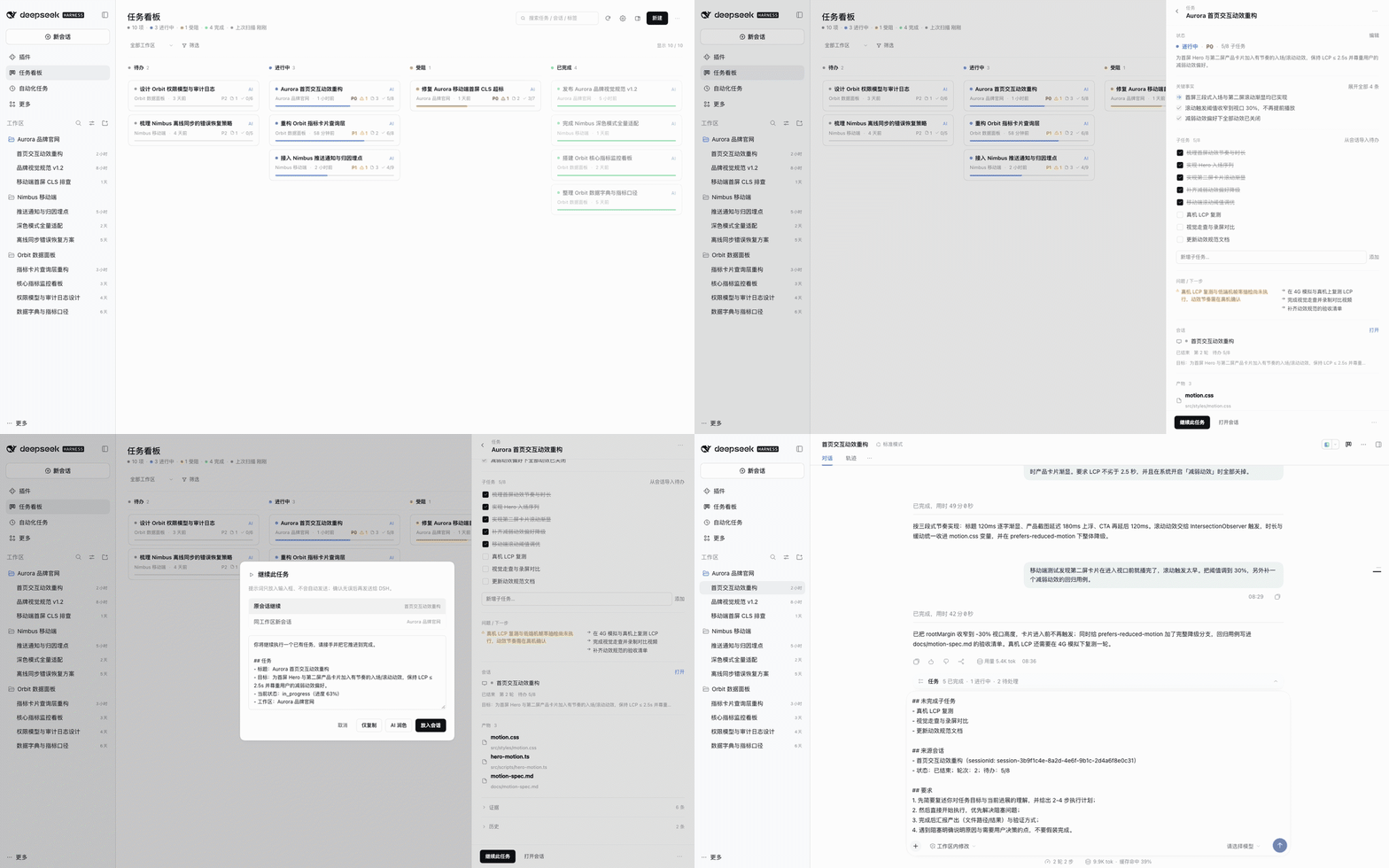
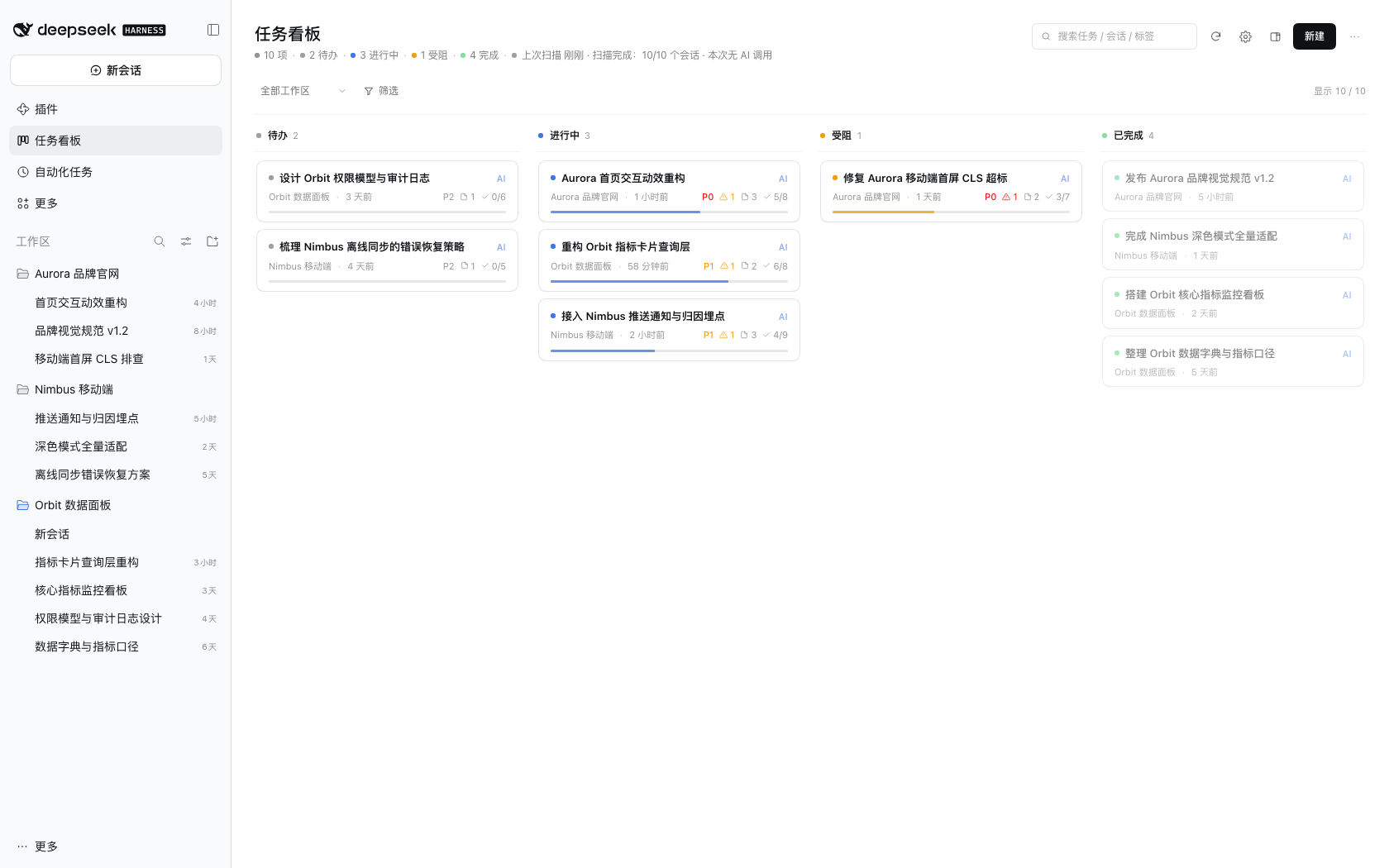
**Turns your DSH sessions into a task board that keeps itself up to date.** It reads the real sessions across your local workspaces and infers each task's goal, progress, completion and blockers — or you can manage everything by hand. Every card traces back to a specific session and a specific sentence.
|
|
4
|
+
|
|
3
5
|
[](https://github.com/topmindspace/dsh-super-kanban/actions/workflows/ci.yml)
|
|
4
6
|
[](https://www.npmjs.com/package/dsh-super-kanban)
|
|
5
7
|
[](https://github.com/topmindspace/dsh-super-kanban/blob/main/LICENSE)
|
|
6
8
|
|
|
7
|
-
An AI task board that **lives inside the DeepSeek Harness UI**. It reads the real DSH sessions across your workspaces and infers each task's goal, progress, completion state and open issues — and you can also maintain the board entirely by hand. Every card can be traced back to a specific session and a specific sentence.
|
|
8
|
-
|
|
9
|
-
- **Where it lives**: "任务看板" (Task board) in the DSH sidebar, or the compact form in the right sidebar of a conversation.
|
|
10
|
-
- **Data**: sessions are scanned read-only on your machine; board data stays on your machine.
|
|
11
|
-
- **Intelligence**: reuses the model quota of the DSH account already signed in on this machine — zero configuration. Turn AI off and it falls back to local rule-based analysis.
|
|
12
|
-
|
|
13
9
|
**English** | [简体中文](https://github.com/topmindspace/dsh-super-kanban/blob/main/README.md)
|
|
14
10
|
|
|
15
|
-
|
|
16
|
-
|
|
17
|
-
|
|
18
|
-
|
|
19
|
-
## Contents
|
|
20
|
-
|
|
21
|
-
- [Why Super Kanban](#why-super-kanban)
|
|
22
|
-
- [Features](#features)
|
|
23
|
-
- [Two layouts](#two-layouts)
|
|
24
|
-
- [Installation](#installation)
|
|
25
|
-
- [Usage](#usage)
|
|
26
|
-
- [AI and privacy](#ai-and-privacy)
|
|
27
|
-
- [Screenshots](#screenshots)
|
|
28
|
-
- [Compatibility](#compatibility)
|
|
29
|
-
- [FAQ](#faq)
|
|
30
|
-
- [Troubleshooting](https://github.com/topmindspace/dsh-super-kanban/blob/main/docs/TROUBLESHOOTING.md)
|
|
31
|
-
- [Development and contributing](#development-and-contributing)
|
|
32
|
-
- [License](#license)
|
|
33
|
-
|
|
34
|
-
## Why Super Kanban
|
|
35
|
-
|
|
36
|
-
You keep several workspaces and many sessions going in DSH at the same time, and task state is scattered across conversations: how far did this get? Where is it stuck? Was anything delivered? Did it quietly die?
|
|
37
|
-
|
|
38
|
-
Super Kanban turns those conversations into a maintainable board:
|
|
39
|
-
|
|
40
|
-
| Capability | Description |
|
|
41
|
-
| --- | --- |
|
|
42
|
-
| 🎯 Goal extraction | Derives the task title and goal from the real request in a session instead of using the whole prompt as a title |
|
|
43
|
-
| 📈 Progress estimation | Prefers todo completion inside the session, combined with deliverables and turn state |
|
|
44
|
-
| ✅ Completion detection | Combines the last assistant reply, deliverables (present / file writes) and whether the user asked for more changes |
|
|
45
|
-
| ⚠️ Issue detection | Tool errors, user corrections and unresolved questions are attached to the card as "issues" |
|
|
46
|
-
| 🔗 Traceability | Every card carries its source workspace / session / evidence timeline, with a jump back to the session |
|
|
47
|
-
| 🤝 Session hand-off | "Continue this task" builds a structured prompt and (after your confirmation) puts it in the original or a new session input — never sends automatically |
|
|
48
|
-
| ✅ Subtasks and goals | Subtask checklists (importable from session todos, writes back progress), task goal, and DSH Session Goal tracking |
|
|
49
|
-
| 📦 Artifact tracking | Collects deliverables and written files; click to open them in the DSH document preview |
|
|
50
|
-
| 🧾 Key facts first | Cards keep only title / meta / progress; the drawer leads with 3–6 key facts and keeps raw evidence collapsed |
|
|
51
|
-
| ✍️ Manual control | Create, edit, drag between columns, archive, delete, lock fields — AI never overwrites what you locked |
|
|
52
|
-
| 🔄 Continuous maintenance | First scan in seconds, then incremental scans; new sessions join automatically and old tasks keep updating |
|
|
53
|
-
| 🧠 Explainable | Every inference carries a confidence and a one-line reason — no black-box status changes |
|
|
54
|
-
|
|
55
|
-
## Features
|
|
56
|
-
|
|
57
|
-
### Two analysis engines: better with AI, always usable offline
|
|
58
|
-
|
|
59
|
-
1. **Collect (local)**: reads `workspace.json` and each session's `session.v4.jsonl.zstd`, parsing user requests, assistant replies, tool calls, todo snapshots, deliverables, errors and turn-end reasons.
|
|
60
|
-
2. **Rules engine (always available, zero tokens)**: local heuristics derive status, progress, issues and evidence. When you are signed out, offline, or AI is disabled, the board keeps working.
|
|
61
|
-
3. **LLM analysis (optional, online)**: sends a compressed session digest to the DeepSeek inference API and receives structured JSON (tasks, status, progress, issues, evidence, confidence, reason).
|
|
62
|
-
4. **Merge (local)**: merges results back by session anchor; locked fields are never overwritten; every change is recorded in task history.
|
|
63
|
-
|
|
64
|
-
### Token efficiency
|
|
65
|
-
|
|
66
|
-
- Session digests sent to the model are capped at **≤1.5KB per session**, containing only recent changes and key signals.
|
|
67
|
-
- Structured output is bounded: ≤6 key facts, ≤8 evidence items, `max_tokens` ≤ 2200, with per-session limits.
|
|
68
|
-
- **Incremental gating**: the model is called only when user messages increase, a turn ends, or the session is analyzed for the first time. Live turns are never re-analyzed, and there is a minimum interval per session.
|
|
69
|
-
- **Controllable budget**: per-scan and daily AI call limits are configurable; exceeding them automatically falls back to the rules engine. The settings page shows today's calls and tokens.
|
|
70
|
-
- Re-scanning already analyzed sessions results in **zero AI calls**.
|
|
71
|
-
|
|
72
|
-
### Data and privacy
|
|
73
|
-
|
|
74
|
-
- Board data is written only to `~/.dsh/storages/super-kanban/` on your machine. No third-party servers, no telemetry.
|
|
75
|
-
- Online analysis sends **compressed digests only**: never full session text, never file contents, never account credentials.
|
|
76
|
-
- All AI features can be disabled in settings and take effect immediately, falling back to local rules.
|
|
77
|
-
|
|
78
|
-
### Interface (v0.4)
|
|
79
|
-
|
|
80
|
-
- DSH-native light/dark themes, typography and spacing; "monochrome first with restrained accents": color only appears in status dots, thin progress lines, priority text and type icons.
|
|
81
|
-
- The header keeps frequent actions visible (search / scan / settings / open in right sidebar / new task); the "⋯" menu only contains "Export JSON".
|
|
82
|
-
- Full visual and interaction rules: [DESIGN.md](https://github.com/topmindspace/dsh-super-kanban/blob/main/docs/DESIGN.md).
|
|
83
|
-
|
|
84
|
-
## Two layouts
|
|
85
|
-
|
|
86
|
-
The same board can be opened in two ways:
|
|
87
|
-
|
|
88
|
-
| Layout | How to open | Characteristics |
|
|
89
|
-
| --- | --- | --- |
|
|
90
|
-
| **Full-page panel** | "任务看板" in the left sidebar | Full four-column board + filters + stats line, best for focused review |
|
|
91
|
-
| **Right sidebar** | Board icon in the conversation header, or "任务看板" in the right sidebar's "+" tools list | Board next to the chat; width-adaptive: narrow (single column + status segments) / medium / wide (four columns) |
|
|
92
|
-
|
|
93
|
-
- **Right sidebar fullscreen**: the fullscreen control on the right sidebar header expands the board to the whole viewport; you can leave it at any time.
|
|
94
|
-
- **Switching**: the "open in right sidebar" icon in the full-page header, or the "open as full page" icon in the right sidebar board.
|
|
95
|
-
- **Entry preferences**: board settings → "Display and entry" offers "Both (default) / Full page only / Right sidebar only"; refresh the window after changing.
|
|
96
|
-
|
|
97
|
-
## Installation
|
|
98
|
-
|
|
99
|
-
> Prerequisites: DSH desktop installed and opened at least once (`~/.dsh/profiles/desktop` exists); DSH version `>= 0.2.1-rc.5 < 0.3.0`.
|
|
100
|
-
|
|
101
|
-
### Option A: Plugin market index (recommended)
|
|
102
|
-
|
|
103
|
-
> "Discover" comes from DSH's experimental plugin market capability: first enable **Plugin market** under **Plugins → Experimental plugins** and reload DSH as prompted. If your DSH build does not offer it, use Option B/C/D.
|
|
104
|
-
|
|
105
|
-
1. DSH → **Plugins** → **Discover**
|
|
106
|
-
2. **Add index source** and paste:
|
|
107
|
-
`https://topmindspace.github.io/dsh-super-kanban/index.json`
|
|
108
|
-
3. Find **Super Kanban** in the list → open its page (the index lists every available version) → **Install** the version you want → enable
|
|
109
|
-
4. Press `Cmd+R` in the DSH window (restart DSH if needed)
|
|
110
|
-
|
|
111
|
-
> The market index becomes available after the first release is published to GitHub Pages; its content comes from this repository's `docs/`.
|
|
112
|
-
|
|
113
|
-
### Option B: npm package
|
|
114
|
-
|
|
115
|
-
DSH → Plugins → Add plugin → enter the package name — `dsh-super-kanban` for npm latest, or an **exact version** such as `dsh-super-kanban@0.4.1` (recommended when upgrading) → install → enable → reload the window.
|
|
11
|
+
> Requires DSH `>= 0.2.1-rc.5 < 0.3.0` · Node.js `>= 22.19.0` · zero third-party dependencies · no telemetry
|
|
116
12
|
|
|
117
|
-
|
|
118
|
-
|
|
119
|
-
### Option C: Git repository
|
|
120
|
-
|
|
121
|
-
Plugins → Add plugin → paste `https://github.com/topmindspace/dsh-super-kanban` → install (DSH pins the source to a commit) → enable → reload the window.
|
|
122
|
-
|
|
123
|
-
### Option D: Local directory / source install
|
|
124
|
-
|
|
125
|
-
For developers and users who want to track the source:
|
|
126
|
-
|
|
127
|
-
```bash
|
|
128
|
-
git clone https://github.com/topmindspace/dsh-super-kanban.git
|
|
129
|
-
cd dsh-super-kanban
|
|
130
|
-
./install.sh -y # link into the default desktop profile and register the plugin
|
|
131
|
-
```
|
|
132
|
-
|
|
133
|
-
Or choose "local directory" in the DSH plugin page and point it at this repository root. After installing, reload the window and "任务看板" appears in the left sidebar.
|
|
134
|
-
|
|
135
|
-
### Updating the plugin (important)
|
|
136
|
-
|
|
137
|
-
Third-party plugins have **no automatic upgrade**: updating means **uninstall the old version → install the target version**, then reload DSH (fully quit and reopen if the UI still looks stale).
|
|
138
|
-
|
|
139
|
-
- **Cross-minor upgrades need an exact version**: going from `0.3.x` to `0.4.x` requires an exact install such as `dsh-super-kanban@0.4.1`. An old range such as `^0.3.0` **never** resolves to 0.4.x under semantic versioning — the most common cause of "updated but the UI is still old".
|
|
140
|
-
- **Within 0.4.x**: if the profile dependency is `^0.4.0`, patch releases (0.4.1, 0.4.2, …) resolve normally; plugin-page installs record an exact version, so those still require uninstall + reinstall.
|
|
141
|
-
- After updating press `Cmd+R`; if nothing changed, **fully quit and reopen DSH**, then verify the real installed version as described in [INSTALL.md](https://github.com/topmindspace/dsh-super-kanban/blob/main/docs/INSTALL.md#2-验证安装与版本).
|
|
142
|
-
|
|
143
|
-
### Uninstall
|
|
144
|
-
|
|
145
|
-
- **Uninstall**: remove it from the plugin page, or run `./uninstall.sh -y` in the source directory.
|
|
146
|
-
- Uninstalling **does not delete** board data; to wipe it, delete `~/.dsh/storages/super-kanban/`.
|
|
147
|
-
|
|
148
|
-
Detailed install / update / verification / rollback steps are in [docs/INSTALL.md](https://github.com/topmindspace/dsh-super-kanban/blob/main/docs/INSTALL.md); if something breaks see [docs/TROUBLESHOOTING.md](https://github.com/topmindspace/dsh-super-kanban/blob/main/docs/TROUBLESHOOTING.md).
|
|
149
|
-
|
|
150
|
-
## Usage
|
|
151
|
-
|
|
152
|
-
1. Click **任务看板** in the left sidebar (or the board icon in a conversation header for the right-sidebar form).
|
|
153
|
-
2. **Board**: four columns — Backlog / In progress / Blocked / Done; column headers show counts and status colors.
|
|
154
|
-
3. **Cards**: status dot, title with an AI/rules marker, source workspace and last-activity time, plus restrained priority, issue count, artifact count, subtask progress and a progress line.
|
|
155
|
-
4. **Detail drawer** (click a card):
|
|
156
|
-
- One-line status summary (click "Edit" to change fields)
|
|
157
|
-
- **Key facts** (3–6 items: key progress / decisions / issues from the session)
|
|
158
|
-
- **Subtasks**: check / add / delete; "import todos from session"; progress writes back automatically
|
|
159
|
-
- **Issues / next steps**
|
|
160
|
-
- **Session linkage**: continue this task / open session
|
|
161
|
-
- **Artifacts**: click to open in the DSH right-sidebar document preview
|
|
162
|
-
- Evidence and history (collapsed by default)
|
|
163
|
-
5. **Filters**: workspace, priority, origin, tags, keyword search, show archived.
|
|
164
|
-
6. **Toolbar** (persistent in the header): search, scan, settings gear, open in right sidebar, new task; the "⋯" menu only contains "Export JSON".
|
|
165
|
-
7. **Scan**: click the scan button to trigger an incremental scan immediately; progress is shown live.
|
|
166
|
-
8. **Settings** (gear icon): AI toggle, auto-scan, scan interval, initial scan range, AI budget, display and entry, excluded workspaces.
|
|
167
|
-
|
|
168
|
-
### How "Continue this task" works
|
|
169
|
-
|
|
170
|
-
1. Open any card → click **"继续此任务"** in the drawer;
|
|
171
|
-
2. The dialog contains a structured prompt (task goal / progress / key facts / issues / next steps / source session) that you can edit;
|
|
172
|
-
3. Choose **original session** or **new session in the same workspace**;
|
|
173
|
-
4. Click **"放入会话"**: DSH switches to the target session and puts the prompt into the input box — **it is never sent automatically**; review or edit it and press send yourself. You can also "copy only" or "polish with AI".
|
|
174
|
-
|
|
175
|
-
> The prompt is assembled locally from a template — **0 tokens by default**. Only "Polish with AI" spends one model call.
|
|
176
|
-
|
|
177
|
-
### Manual and automatic side by side
|
|
13
|
+
|
|
178
14
|
|
|
179
|
-
|
|
180
|
-
- Fields you edit and lock (editing locks by default) are never overwritten by AI; unlock them in the drawer to hand them back.
|
|
181
|
-
- Manual tasks (origin = manual) are never changed by automatic scans.
|
|
182
|
-
- New cards do not need a session; once linked, AI fills in the analysis on the next scan.
|
|
15
|
+
## Quick start
|
|
183
16
|
|
|
184
|
-
###
|
|
17
|
+
### Install (pick one)
|
|
185
18
|
|
|
186
|
-
|
|
187
|
-
|
|
188
|
-
|
|
189
|
-
| `n` | New task |
|
|
190
|
-
| `Esc` | Close the topmost overlay / drawer |
|
|
191
|
-
| `Cmd+R` | Reload the DSH window (needed after plugin updates) |
|
|
19
|
+
1. **Plugin market (recommended)**: DSH → Plugins → Discover → add the index source `https://topmindspace.github.io/dsh-super-kanban/index.json` → install **Super Kanban** → enable and reload the window.
|
|
20
|
+
2. **npm**: DSH → Plugins → Add plugin → enter `dsh-super-kanban` (use an exact version when upgrading) → install → enable and reload the window.
|
|
21
|
+
3. **Git repository**: Plugins → Add plugin → paste `https://github.com/topmindspace/dsh-super-kanban` → install → enable and reload the window.
|
|
192
22
|
|
|
193
|
-
|
|
23
|
+
Local/source install, version verification, updates and rollback: [installation guide](https://github.com/topmindspace/dsh-super-kanban/blob/main/docs/INSTALL.md).
|
|
194
24
|
|
|
195
|
-
###
|
|
25
|
+
### First run
|
|
196
26
|
|
|
197
|
-
|
|
198
|
-
|
|
199
|
-
|
|
200
|
-
|
|
201
|
-
|
|
202
|
-
│ │
|
|
203
|
-
└──────────── structured JSON ◄────────────────────┘
|
|
204
|
-
```
|
|
27
|
+
1. Click **任务看板** (Task board) in the left sidebar (or the board icon in a conversation header for the right-sidebar layout).
|
|
28
|
+
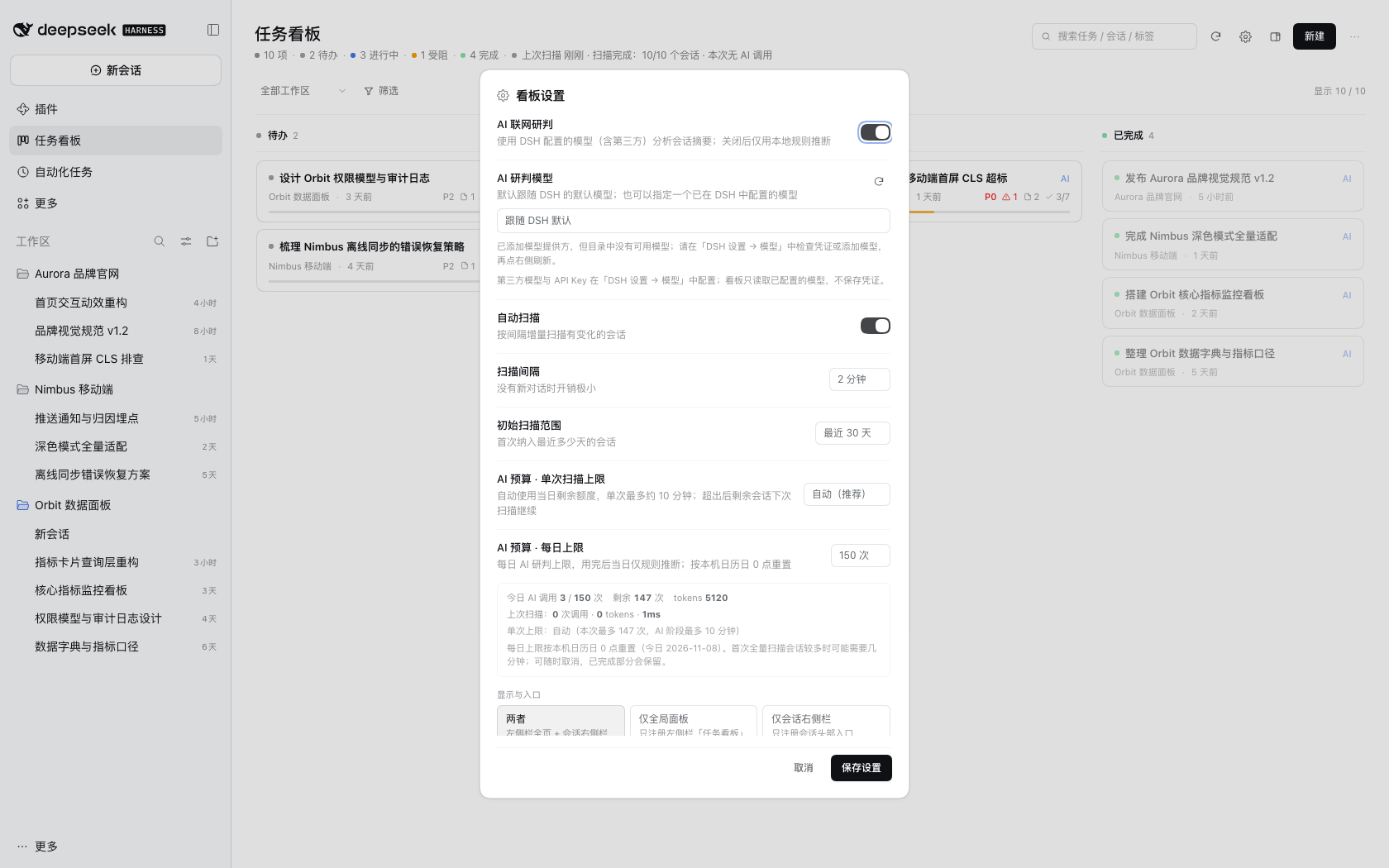
2. Open **Settings** from the board header: keep "AI 联网研判" (online AI) enabled, and leave "AI 研判模型" following the DSH default.
|
|
29
|
+
3. Click **Scan**; the first scan takes seconds to minutes depending on session count, and the outcome stays in the stats line.
|
|
30
|
+
4. Cards appear automatically — click one to open the drawer; the header "⋯" menu can re-analyze a single card at any time.
|
|
31
|
+
5. To continue the work: click **"继续此任务"** in the drawer — the prompt is placed in the original session input and never sent automatically, so review it and press send yourself.
|
|
205
32
|
|
|
206
|
-
|
|
33
|
+
## What it does
|
|
207
34
|
|
|
208
|
-
-
|
|
209
|
-
-
|
|
210
|
-
-
|
|
35
|
+
- **Automatic cards that stay fresh**: derives title, goal, status, progress, issues and next steps from local DSH sessions, then keeps them updated on incremental scans without creating duplicates.
|
|
36
|
+
- **AI analysis with a model you choose**: follows the DSH default model by default, or uses a third-party model configured in DSH; when AI is off or unavailable it falls back to local rules.
|
|
37
|
+
- **Continue a task with zero tokens**: assembles a structured prompt locally and, after your confirmation, puts it into the original session or a new one in the same workspace — never sends it for you.
|
|
38
|
+
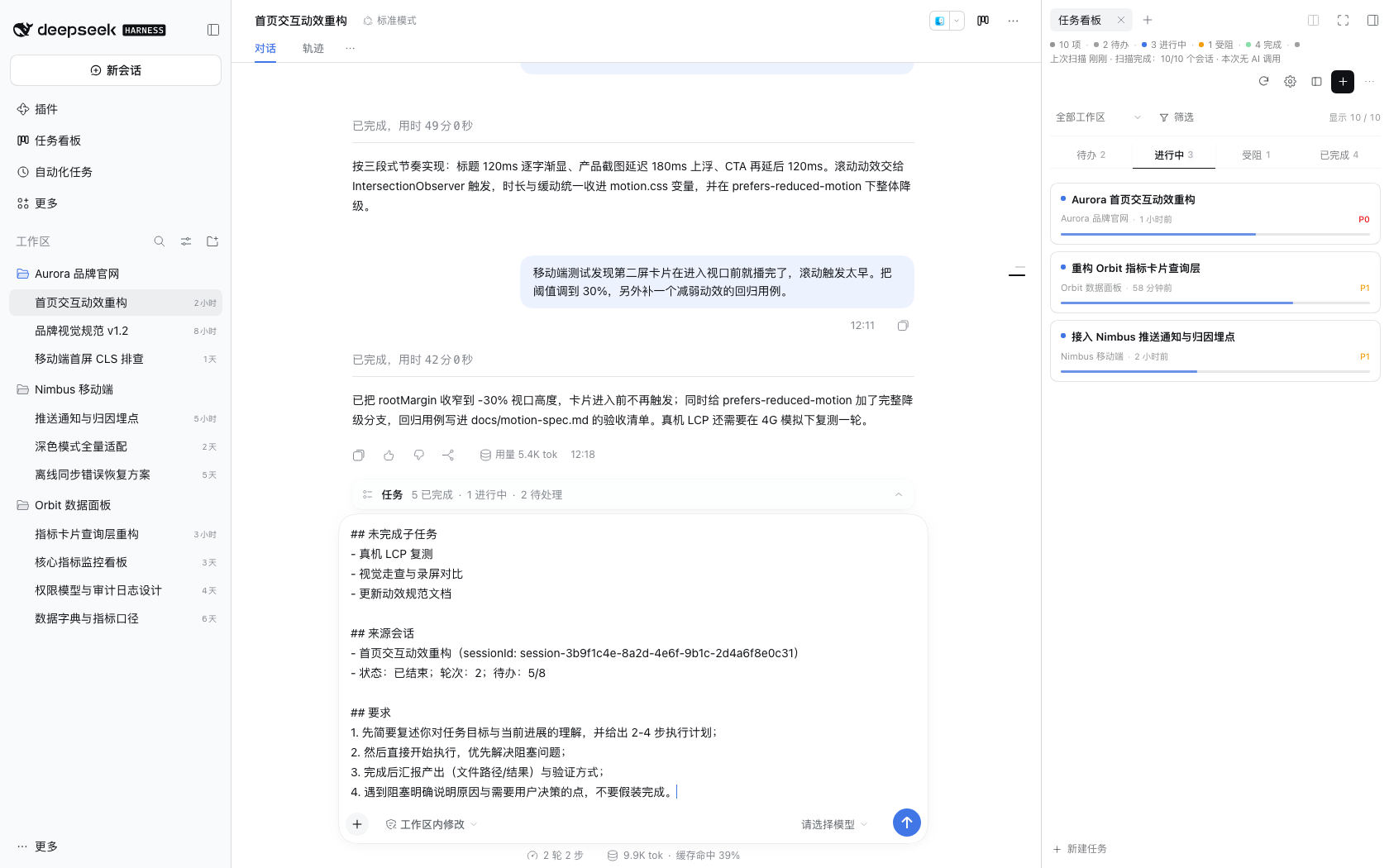
- **Two layouts**: a full four-column board, or a compact board in the conversation's right sidebar that adapts to its width.
|
|
39
|
+
- **Local-first**: board data is written only to `~/.dsh/storages/super-kanban/` on your machine, and the board itself has no telemetry.
|
|
40
|
+
- **Zero third-party dependencies**: neither the plugin nor the validators ship runtime dependencies; no build step, no external resources.
|
|
41
|
+
- **Manual control**: create / edit / drag / archive / delete / lock fields — AI never overwrites fields you changed.
|
|
42
|
+
- **Fully traceable**: key facts, issues, artifacts and the evidence timeline all link back to the source session.
|
|
211
43
|
|
|
212
|
-
|
|
44
|
+
## AI and models
|
|
213
45
|
|
|
214
|
-
|
|
46
|
+
- **Follows the DSH default model by default** — you do not enter any key in the board.
|
|
47
|
+
- **Using a third-party model**: add a model provider in **DSH Settings → Models** (OpenAI / Anthropic / OpenRouter and similar, or a custom compatible endpoint) and enter its API key; then pick it under board Settings → "AI 研判模型", or keep following the default.
|
|
48
|
+
- **Without a native model service** (old DSH or a minimal composition) the board switches to the local rules engine automatically and explains why in the scan outcome.
|
|
49
|
+
- **Privacy**: AI analysis only sends a compressed session digest (≤1.5KB per session) to the model provider you configured in DSH — choosing a third-party provider sends it there; the board never reads or stores credentials and has no telemetry. See [SECURITY.md](https://github.com/topmindspace/dsh-super-kanban/blob/main/SECURITY.md).
|
|
215
50
|
|
|
216
|
-
|
|
51
|
+
## Settings and budget
|
|
217
52
|
|
|
218
|
-
|
|
53
|
+
- **AI budget**: "Auto" by default = use up to the daily remainder per scan; or fix it at 20 / 40 / 80 / 150 calls.
|
|
54
|
+
- **Daily limit**: 150 budget units by default, reset at local midnight (budget units are not a hard cost cap).
|
|
55
|
+
- **Scanning**: the auto-scan interval is configurable; sessions a scan could not finish continue on the next scan, and the outcome says "remaining N sessions continue next scan" — nothing is lost.
|
|
56
|
+
- **Entry preferences**: "Display and entry" offers both / full page only / right sidebar only; changes take effect after reloading the window.
|
|
219
57
|
|
|
220
58
|
## Screenshots
|
|
221
59
|
|
|
222
|
-
| Board (
|
|
223
|
-
| --- | --- |
|
|
224
|
-
|  |  |
|
|
225
|
-
|
|
226
|
-
| Task details (light) | Task details (dark) |
|
|
227
|
-
| --- | --- |
|
|
228
|
-
|  |  |
|
|
229
|
-
|
|
230
|
-
| Continue-task dialog | Prompt placed into the session input |
|
|
60
|
+
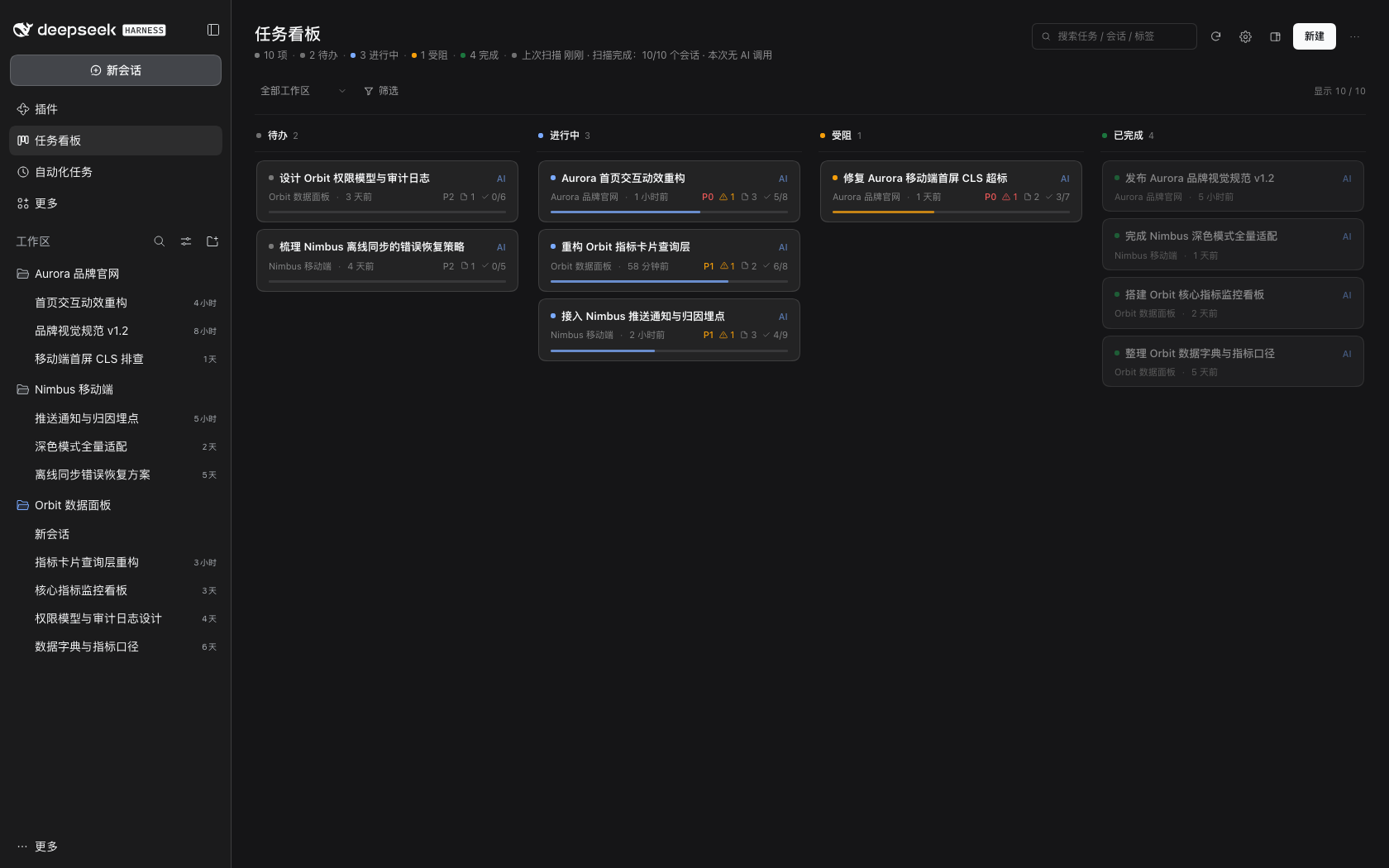
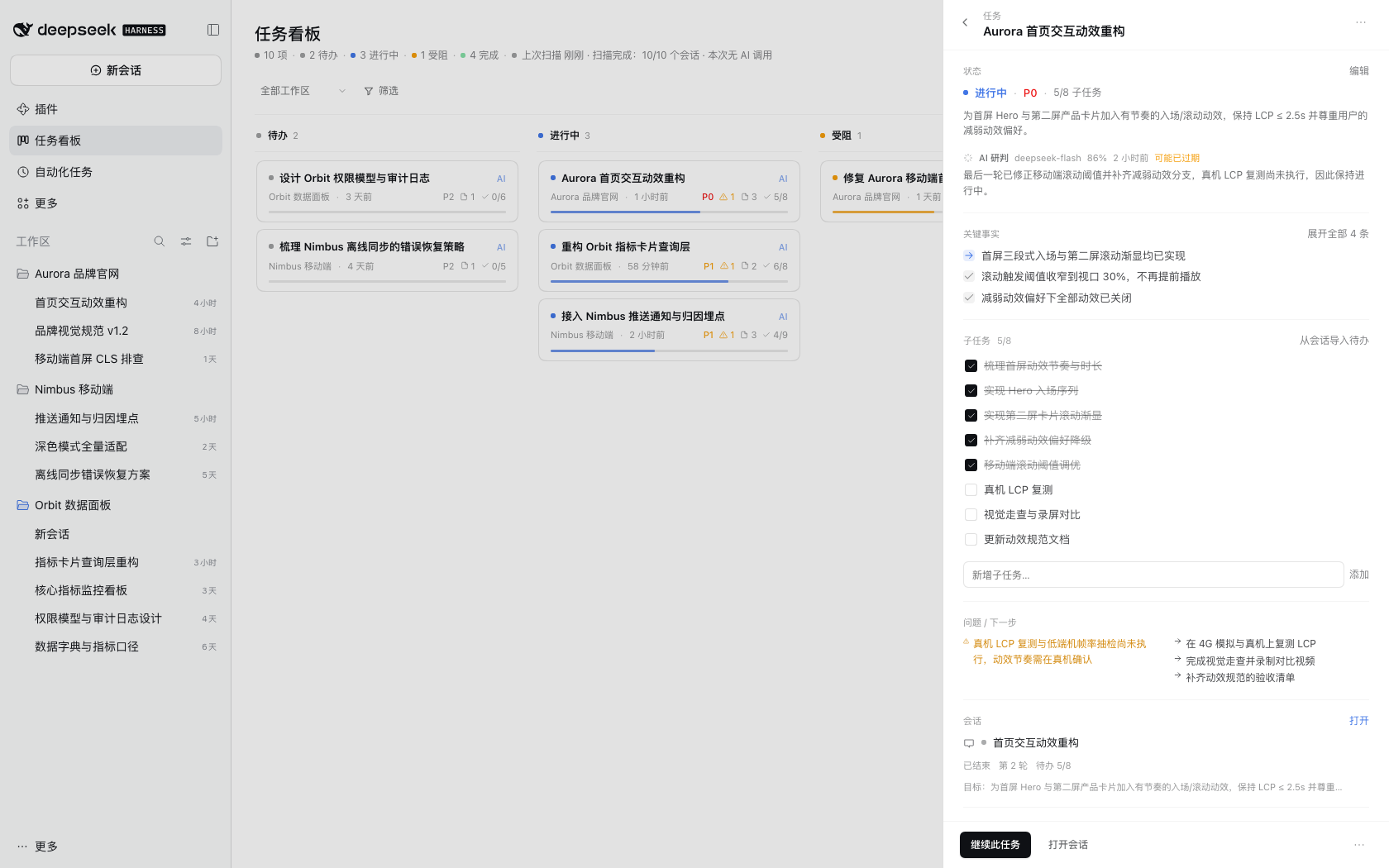
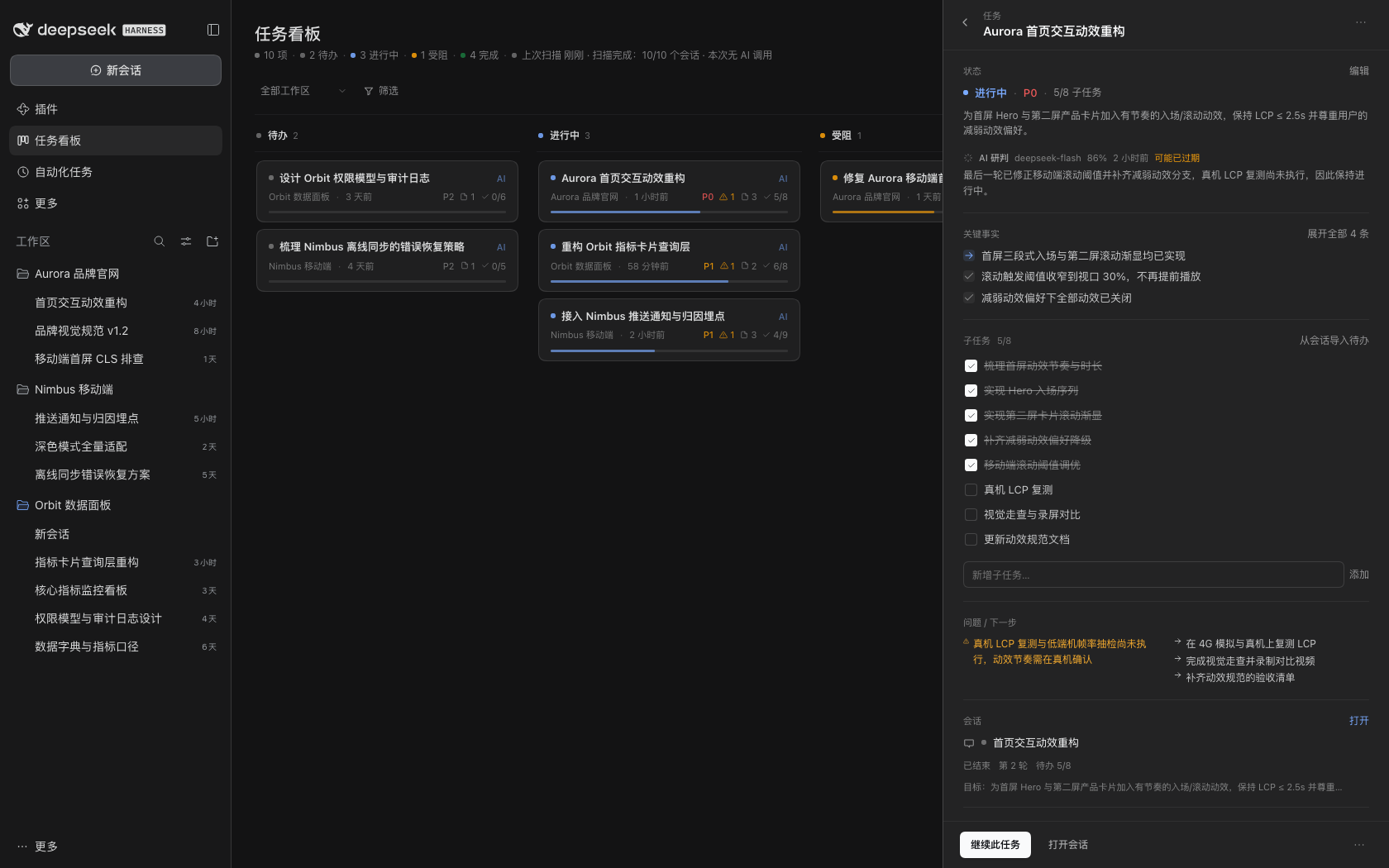
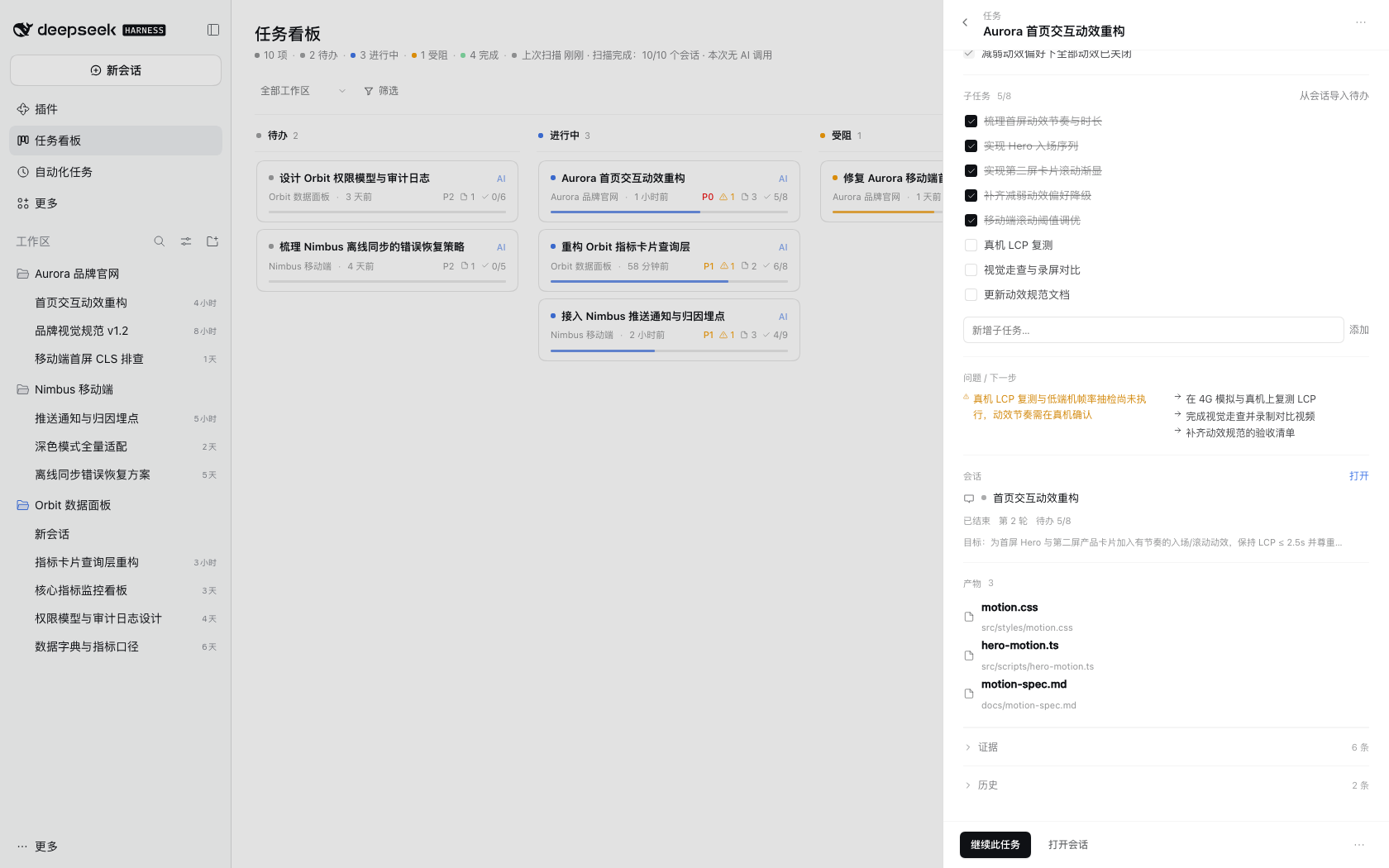
| Board (dark) | Task details |
|
|
231
61
|
| --- | --- |
|
|
232
|
-
|  |  |
|
|
233
63
|
|
|
234
|
-
|
|
|
64
|
+
| Settings and budget | Right sidebar |
|
|
235
65
|
| --- | --- |
|
|
236
|
-
|  |  |
|
|
237
67
|
|
|
238
|
-
|
|
239
|
-
| --- | --- |
|
|
240
|
-
|  |  |
|
|
241
|
-
|
|
242
|
-
| "⋯" menu (export JSON only) | 1280px window |
|
|
243
|
-
| --- | --- |
|
|
244
|
-
|  |  |
|
|
68
|
+
More screenshots: [demo GIF](https://raw.githubusercontent.com/topmindspace/dsh-super-kanban/main/docs/screenshots/demo.gif), [task details (dark)](https://raw.githubusercontent.com/topmindspace/dsh-super-kanban/main/docs/screenshots/drawer-dark.png), [continue task](https://raw.githubusercontent.com/topmindspace/dsh-super-kanban/main/docs/screenshots/continue-modal.png), [prompt placed](https://raw.githubusercontent.com/topmindspace/dsh-super-kanban/main/docs/screenshots/continue-placed.png), [right sidebar fullscreen](https://raw.githubusercontent.com/topmindspace/dsh-super-kanban/main/docs/screenshots/side-fullscreen.png), [artifacts](https://raw.githubusercontent.com/topmindspace/dsh-super-kanban/main/docs/screenshots/drawer-artifacts.png), [toolbar menu](https://raw.githubusercontent.com/topmindspace/dsh-super-kanban/main/docs/screenshots/toolbar-menu.png), [1280px window](https://raw.githubusercontent.com/topmindspace/dsh-super-kanban/main/docs/screenshots/board-1280.png).
|
|
245
69
|
|
|
246
|
-
> All screenshots
|
|
70
|
+
> All screenshots use a fully fictional demo dataset and contain no real user or workspace information.
|
|
247
71
|
|
|
248
72
|
## Compatibility
|
|
249
73
|
|
|
250
74
|
| Item | Requirement |
|
|
251
75
|
| --- | --- |
|
|
252
|
-
| DeepSeek Harness | `>= 0.2.1-rc.5 < 0.3.0`
|
|
253
|
-
| Node.js | `>= 22.19.0` (
|
|
76
|
+
| DeepSeek Harness | `>= 0.2.1-rc.5 < 0.3.0` |
|
|
77
|
+
| Node.js | `>= 22.19.0` (bundled with DSH, no separate install needed) |
|
|
254
78
|
| Platform | Verified on macOS desktop; other desktop platforms should work but are not individually verified |
|
|
255
|
-
| Third-party dependencies | None (plugin and
|
|
79
|
+
| Third-party dependencies | None (plugin and `scripts/` validators are dependency-free) |
|
|
80
|
+
| AI models | Provided by DSH's native model service: follows the DSH default model, or a third-party provider |
|
|
256
81
|
|
|
257
|
-
|
|
82
|
+
Security fixes land on the current minor line; cross-minor upgrades need an exact version, see [INSTALL.md](https://github.com/topmindspace/dsh-super-kanban/blob/main/docs/INSTALL.md#3-更新插件升级). If the entry disappears after a DSH major upgrade, reinstall the plugin first — board data is not lost.
|
|
258
83
|
|
|
259
84
|
## FAQ
|
|
260
85
|
|
|
261
|
-
**Q:
|
|
262
|
-
A:
|
|
263
|
-
|
|
264
|
-
**Q: There is no "任务看板" in the left sidebar.**
|
|
265
|
-
A: Press `Cmd+R` to reload the window; restart DSH if it is still missing. If it remains missing, check the diagnostics on the DSH plugin page (a failed plugin load usually reports a reason).
|
|
86
|
+
**Q: There is no "任务看板" in the left sidebar?**
|
|
87
|
+
A: Press `Cmd+R` to reload the window; if it is still missing, fully quit and reopen DSH. Still missing? Check the plugin page diagnostics, or see the [troubleshooting guide](https://github.com/topmindspace/dsh-super-kanban/blob/main/docs/TROUBLESHOOTING.md#入口缺失).
|
|
266
88
|
|
|
267
|
-
**Q:
|
|
268
|
-
A:
|
|
89
|
+
**Q: AI does not work / the board always shows "rules"?**
|
|
90
|
+
A: Make sure "AI 联网研判" is enabled in settings and that a model is configured in DSH Settings → Models (sign in, or enter an API key); board Settings → "AI 研判模型" can also pin a specific model. Old DSH builds without the native model service always use the rules engine until DSH is upgraded.
|
|
269
91
|
|
|
270
|
-
**Q:
|
|
271
|
-
A:
|
|
272
|
-
|
|
273
|
-
**Q: I don't want certain workspaces on the board.**
|
|
274
|
-
A: Settings gear in the board header → Excluded workspaces (multi-select).
|
|
275
|
-
|
|
276
|
-
**Q: How much quota will this use?**
|
|
277
|
-
A: An incremental scan calls `deepseek-flash` once per **changed** session; the settings page shows today's calls and tokens. With AI disabled the cost is zero.
|
|
92
|
+
**Q: How do I update?**
|
|
93
|
+
A: Third-party plugins have no automatic upgrade: uninstall the old version → install the target version (exact version for cross-minor upgrades) → reload the window. See [INSTALL.md](https://github.com/topmindspace/dsh-super-kanban/blob/main/docs/INSTALL.md#3-更新插件升级).
|
|
278
94
|
|
|
279
95
|
**Q: Where is the data? Is it lost after uninstalling?**
|
|
280
|
-
A: `~/.dsh/storages/super-kanban/` (`state.json` / `sessions-cache.json` / `backups/`). Uninstalling the plugin does not delete it.
|
|
96
|
+
A: `~/.dsh/storages/super-kanban/` (`state.json` / `sessions-cache.json` / `backups/`). Uninstalling the plugin does not delete it; to wipe it completely see the [troubleshooting guide](https://github.com/topmindspace/dsh-super-kanban/blob/main/docs/TROUBLESHOOTING.md#卸载与数据保留).
|
|
281
97
|
|
|
282
|
-
**Q:
|
|
283
|
-
A:
|
|
98
|
+
**Q: How do I uninstall?**
|
|
99
|
+
A: Remove it from the plugin page, or run `./uninstall.sh -y` in the source directory, then reload the window.
|
|
284
100
|
|
|
285
101
|
## Development and contributing
|
|
286
102
|
|
|
287
|
-
- Zero third-party dependencies
|
|
288
|
-
-
|
|
289
|
-
|
|
290
|
-
```bash
|
|
291
|
-
npm test # unit tests
|
|
292
|
-
npm run validate # manifest, cordis patch, files and market index checks
|
|
293
|
-
npm run check:privacy # scan for personal paths / credentials / session ids
|
|
294
|
-
npm run market:index # regenerate docs/index.json
|
|
295
|
-
```
|
|
296
|
-
|
|
297
|
-
- For the development setup, repository layout and debugging, see [CONTRIBUTING.md](https://github.com/topmindspace/dsh-super-kanban/blob/main/CONTRIBUTING.md) and [docs/DEVELOPMENT.md](https://github.com/topmindspace/dsh-super-kanban/blob/main/docs/DEVELOPMENT.md).
|
|
298
|
-
- Architecture: [docs/ARCHITECTURE.md](https://github.com/topmindspace/dsh-super-kanban/blob/main/docs/ARCHITECTURE.md). Interface contract: [docs/CONTRACT.md](https://github.com/topmindspace/dsh-super-kanban/blob/main/docs/CONTRACT.md). Visual spec: [docs/DESIGN.md](https://github.com/topmindspace/dsh-super-kanban/blob/main/docs/DESIGN.md).
|
|
299
|
-
- Release and distribution flow (market index, npm, Git): [docs/MARKET.md](https://github.com/topmindspace/dsh-super-kanban/blob/main/docs/MARKET.md).
|
|
300
|
-
- User-facing troubleshooting guide: [docs/TROUBLESHOOTING.md](https://github.com/topmindspace/dsh-super-kanban/blob/main/docs/TROUBLESHOOTING.md).
|
|
103
|
+
- Zero third-party dependencies, no build: the host is Node ESM and the browser half is a single `client.js`; run `npm test` for tests and `npm run check` for every validator at once.
|
|
104
|
+
- Repository layout, debugging and commands: [CONTRIBUTING.md](https://github.com/topmindspace/dsh-super-kanban/blob/main/CONTRIBUTING.md) and [docs/DEVELOPMENT.md](https://github.com/topmindspace/dsh-super-kanban/blob/main/docs/DEVELOPMENT.md).
|
|
105
|
+
- Architecture and interfaces: [ARCHITECTURE.md](https://github.com/topmindspace/dsh-super-kanban/blob/main/docs/ARCHITECTURE.md), [CONTRACT.md](https://github.com/topmindspace/dsh-super-kanban/blob/main/docs/CONTRACT.md); visual rules: [DESIGN.md](https://github.com/topmindspace/dsh-super-kanban/blob/main/docs/DESIGN.md).
|
|
301
106
|
- For security issues, please follow [SECURITY.md](https://github.com/topmindspace/dsh-super-kanban/blob/main/SECURITY.md) and report privately instead of opening a public issue.
|
|
302
107
|
|
|
303
108
|
## License
|