dsh-super-kanban 0.3.0 → 0.4.1
This diff represents the content of publicly available package versions that have been released to one of the supported registries. The information contained in this diff is provided for informational purposes only and reflects changes between package versions as they appear in their respective public registries.
- package/CHANGELOG.md +54 -1
- package/README.en.md +305 -0
- package/README.md +55 -31
- package/client.js +168 -51
- package/package.json +1 -1
package/CHANGELOG.md
CHANGED
|
@@ -7,6 +7,57 @@ and this project adheres to [Semantic Versioning](https://semver.org/spec/v2.0.0
|
|
|
7
7
|
|
|
8
8
|
## [Unreleased]
|
|
9
9
|
|
|
10
|
+
## [0.4.1] - 2026-11-05
|
|
11
|
+
|
|
12
|
+
Documentation-only patch release: the plugin code is unchanged from 0.4.0.
|
|
13
|
+
|
|
14
|
+
### Added
|
|
15
|
+
|
|
16
|
+
- **Upgrade guide**: how to update an installed plugin, how to verify the
|
|
17
|
+
installed version, the SemVer-range pitfall (`^0.3.0` never resolves 0.4.x;
|
|
18
|
+
cross-minor upgrades need an exact version or a reinstall), and how to roll
|
|
19
|
+
back.
|
|
20
|
+
- **Troubleshooting guide** (`docs/TROUBLESHOOTING.md`): stale UI after an
|
|
21
|
+
update, missing entry point, blank board, 401/403, scanning and AI issues,
|
|
22
|
+
artifact previews, sidebar widths, uninstall/data retention and diagnostics.
|
|
23
|
+
- **Absolute README asset and document links**, so screenshots, the demo GIF
|
|
24
|
+
and docs links render correctly on the npm package page as well as GitHub.
|
|
25
|
+
|
|
26
|
+
### Changed
|
|
27
|
+
|
|
28
|
+
- README (Chinese and English), INSTALL, MARKET, DESIGN, ARCHITECTURE,
|
|
29
|
+
DEVELOPMENT and CONTRACT were re-checked against the 0.4 UI and updated where
|
|
30
|
+
they still described earlier behaviour (toolbar actions, accent marks, board
|
|
31
|
+
status markers).
|
|
32
|
+
|
|
33
|
+
## [0.4.0] - 2026-11-05
|
|
34
|
+
|
|
35
|
+
UI refinement release: put the frequently used toolbar actions back on the
|
|
36
|
+
toolbar and bring back restrained emphasis and status marks without returning
|
|
37
|
+
to the earlier visual clutter.
|
|
38
|
+
|
|
39
|
+
### Added
|
|
40
|
+
|
|
41
|
+
- **Toolbar actions are visible**: Settings and "open in right sidebar" are
|
|
42
|
+
now persistent icon buttons in the board header and the compact right-panel
|
|
43
|
+
header. The overflow menu keeps only **Export JSON**.
|
|
44
|
+
- **Restrained emphasis and status marks**: cards show a small status dot and a
|
|
45
|
+
state-tinted progress line (backlog neutral, in progress brand, blocked
|
|
46
|
+
amber, done green), colored priority text (P0 error, P1 amber), issue count,
|
|
47
|
+
artifact count, subtask progress and a low-key AI/rules marker. Column
|
|
48
|
+
headers and the summary line carry matching status dots.
|
|
49
|
+
- **Task drawer depth**: colored status/priority text, type icons for key
|
|
50
|
+
facts, severity-colored issues, and a brand-colored session link, while the
|
|
51
|
+
primary button and DSH typography stay neutral.
|
|
52
|
+
- **English README** (`README.en.md`) alongside the Chinese README.
|
|
53
|
+
|
|
54
|
+
### Changed
|
|
55
|
+
|
|
56
|
+
- Color is now limited to dots, thin progress lines, small icons and short
|
|
57
|
+
labels; there are no colored blocks, gradients or glow effects. Light and
|
|
58
|
+
dark themes, the full board, the compact sidebar and narrow windows were all
|
|
59
|
+
checked against the DSH type scale and spacing.
|
|
60
|
+
|
|
10
61
|
## [0.3.0] - 2026-11-05
|
|
11
62
|
|
|
12
63
|
First public release. Super Kanban turns the sessions of a DeepSeek Harness
|
|
@@ -55,5 +106,7 @@ workspace into a maintainable task board.
|
|
|
55
106
|
with the local DSH account token; tokens are never logged or persisted by the
|
|
56
107
|
plugin. See [SECURITY.md](./SECURITY.md).
|
|
57
108
|
|
|
58
|
-
[Unreleased]: https://github.com/topmindspace/dsh-super-kanban/compare/v0.
|
|
109
|
+
[Unreleased]: https://github.com/topmindspace/dsh-super-kanban/compare/v0.4.1...HEAD
|
|
59
110
|
[0.3.0]: https://github.com/topmindspace/dsh-super-kanban/releases/tag/v0.3.0
|
|
111
|
+
[0.4.0]: https://github.com/topmindspace/dsh-super-kanban/releases/tag/v0.4.0
|
|
112
|
+
[0.4.1]: https://github.com/topmindspace/dsh-super-kanban/releases/tag/v0.4.1
|
package/README.en.md
ADDED
|
@@ -0,0 +1,305 @@
|
|
|
1
|
+
# Super Kanban · AI Task Command Center
|
|
2
|
+
|
|
3
|
+
[](https://github.com/topmindspace/dsh-super-kanban/actions/workflows/ci.yml)
|
|
4
|
+
[](https://www.npmjs.com/package/dsh-super-kanban)
|
|
5
|
+
[](https://github.com/topmindspace/dsh-super-kanban/blob/main/LICENSE)
|
|
6
|
+
|
|
7
|
+
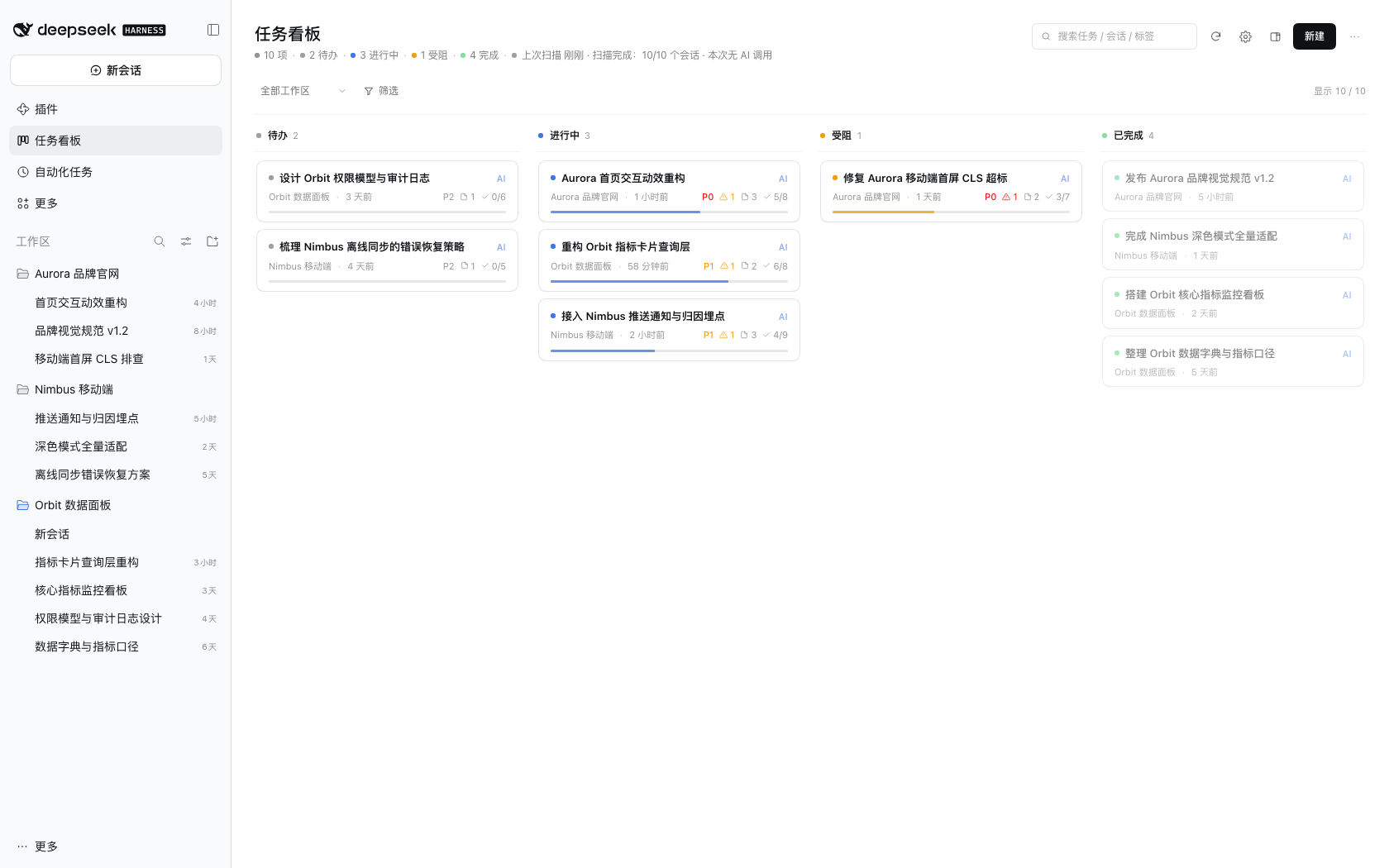
An AI task board that **lives inside the DeepSeek Harness UI**. It reads the real DSH sessions across your workspaces and infers each task's goal, progress, completion state and open issues — and you can also maintain the board entirely by hand. Every card can be traced back to a specific session and a specific sentence.
|
|
8
|
+
|
|
9
|
+
- **Where it lives**: "任务看板" (Task board) in the DSH sidebar, or the compact form in the right sidebar of a conversation.
|
|
10
|
+
- **Data**: sessions are scanned read-only on your machine; board data stays on your machine.
|
|
11
|
+
- **Intelligence**: reuses the model quota of the DSH account already signed in on this machine — zero configuration. Turn AI off and it falls back to local rule-based analysis.
|
|
12
|
+
|
|
13
|
+
**English** | [简体中文](https://github.com/topmindspace/dsh-super-kanban/blob/main/README.md)
|
|
14
|
+
|
|
15
|
+
|
|
16
|
+
|
|
17
|
+
|
|
18
|
+
|
|
19
|
+
## Contents
|
|
20
|
+
|
|
21
|
+
- [Why Super Kanban](#why-super-kanban)
|
|
22
|
+
- [Features](#features)
|
|
23
|
+
- [Two layouts](#two-layouts)
|
|
24
|
+
- [Installation](#installation)
|
|
25
|
+
- [Usage](#usage)
|
|
26
|
+
- [AI and privacy](#ai-and-privacy)
|
|
27
|
+
- [Screenshots](#screenshots)
|
|
28
|
+
- [Compatibility](#compatibility)
|
|
29
|
+
- [FAQ](#faq)
|
|
30
|
+
- [Troubleshooting](https://github.com/topmindspace/dsh-super-kanban/blob/main/docs/TROUBLESHOOTING.md)
|
|
31
|
+
- [Development and contributing](#development-and-contributing)
|
|
32
|
+
- [License](#license)
|
|
33
|
+
|
|
34
|
+
## Why Super Kanban
|
|
35
|
+
|
|
36
|
+
You keep several workspaces and many sessions going in DSH at the same time, and task state is scattered across conversations: how far did this get? Where is it stuck? Was anything delivered? Did it quietly die?
|
|
37
|
+
|
|
38
|
+
Super Kanban turns those conversations into a maintainable board:
|
|
39
|
+
|
|
40
|
+
| Capability | Description |
|
|
41
|
+
| --- | --- |
|
|
42
|
+
| 🎯 Goal extraction | Derives the task title and goal from the real request in a session instead of using the whole prompt as a title |
|
|
43
|
+
| 📈 Progress estimation | Prefers todo completion inside the session, combined with deliverables and turn state |
|
|
44
|
+
| ✅ Completion detection | Combines the last assistant reply, deliverables (present / file writes) and whether the user asked for more changes |
|
|
45
|
+
| ⚠️ Issue detection | Tool errors, user corrections and unresolved questions are attached to the card as "issues" |
|
|
46
|
+
| 🔗 Traceability | Every card carries its source workspace / session / evidence timeline, with a jump back to the session |
|
|
47
|
+
| 🤝 Session hand-off | "Continue this task" builds a structured prompt and (after your confirmation) puts it in the original or a new session input — never sends automatically |
|
|
48
|
+
| ✅ Subtasks and goals | Subtask checklists (importable from session todos, writes back progress), task goal, and DSH Session Goal tracking |
|
|
49
|
+
| 📦 Artifact tracking | Collects deliverables and written files; click to open them in the DSH document preview |
|
|
50
|
+
| 🧾 Key facts first | Cards keep only title / meta / progress; the drawer leads with 3–6 key facts and keeps raw evidence collapsed |
|
|
51
|
+
| ✍️ Manual control | Create, edit, drag between columns, archive, delete, lock fields — AI never overwrites what you locked |
|
|
52
|
+
| 🔄 Continuous maintenance | First scan in seconds, then incremental scans; new sessions join automatically and old tasks keep updating |
|
|
53
|
+
| 🧠 Explainable | Every inference carries a confidence and a one-line reason — no black-box status changes |
|
|
54
|
+
|
|
55
|
+
## Features
|
|
56
|
+
|
|
57
|
+
### Two analysis engines: better with AI, always usable offline
|
|
58
|
+
|
|
59
|
+
1. **Collect (local)**: reads `workspace.json` and each session's `session.v4.jsonl.zstd`, parsing user requests, assistant replies, tool calls, todo snapshots, deliverables, errors and turn-end reasons.
|
|
60
|
+
2. **Rules engine (always available, zero tokens)**: local heuristics derive status, progress, issues and evidence. When you are signed out, offline, or AI is disabled, the board keeps working.
|
|
61
|
+
3. **LLM analysis (optional, online)**: sends a compressed session digest to the DeepSeek inference API and receives structured JSON (tasks, status, progress, issues, evidence, confidence, reason).
|
|
62
|
+
4. **Merge (local)**: merges results back by session anchor; locked fields are never overwritten; every change is recorded in task history.
|
|
63
|
+
|
|
64
|
+
### Token efficiency
|
|
65
|
+
|
|
66
|
+
- Session digests sent to the model are capped at **≤1.5KB per session**, containing only recent changes and key signals.
|
|
67
|
+
- Structured output is bounded: ≤6 key facts, ≤8 evidence items, `max_tokens` ≤ 2200, with per-session limits.
|
|
68
|
+
- **Incremental gating**: the model is called only when user messages increase, a turn ends, or the session is analyzed for the first time. Live turns are never re-analyzed, and there is a minimum interval per session.
|
|
69
|
+
- **Controllable budget**: per-scan and daily AI call limits are configurable; exceeding them automatically falls back to the rules engine. The settings page shows today's calls and tokens.
|
|
70
|
+
- Re-scanning already analyzed sessions results in **zero AI calls**.
|
|
71
|
+
|
|
72
|
+
### Data and privacy
|
|
73
|
+
|
|
74
|
+
- Board data is written only to `~/.dsh/storages/super-kanban/` on your machine. No third-party servers, no telemetry.
|
|
75
|
+
- Online analysis sends **compressed digests only**: never full session text, never file contents, never account credentials.
|
|
76
|
+
- All AI features can be disabled in settings and take effect immediately, falling back to local rules.
|
|
77
|
+
|
|
78
|
+
### Interface (v0.4)
|
|
79
|
+
|
|
80
|
+
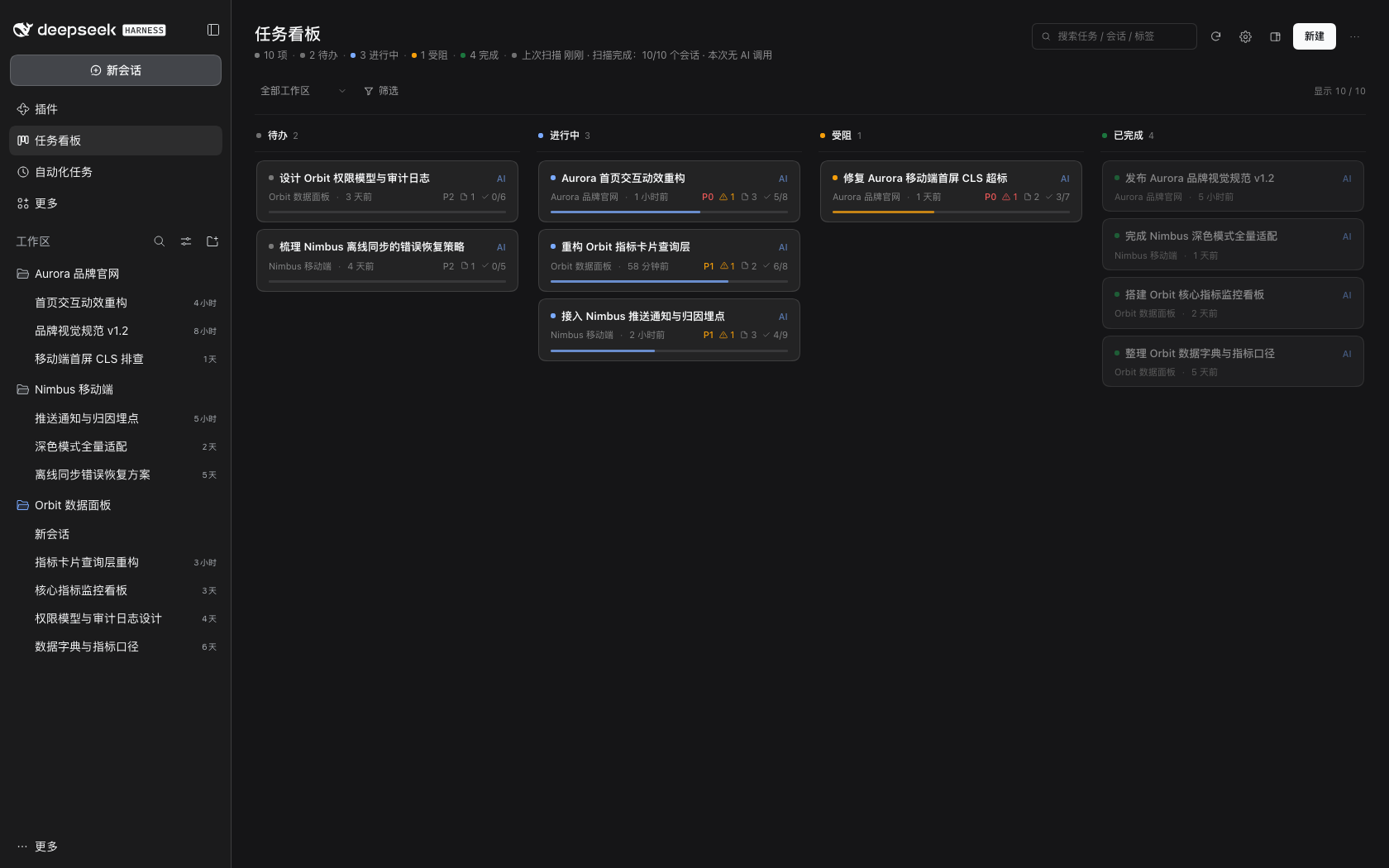
- DSH-native light/dark themes, typography and spacing; "monochrome first with restrained accents": color only appears in status dots, thin progress lines, priority text and type icons.
|
|
81
|
+
- The header keeps frequent actions visible (search / scan / settings / open in right sidebar / new task); the "⋯" menu only contains "Export JSON".
|
|
82
|
+
- Full visual and interaction rules: [DESIGN.md](https://github.com/topmindspace/dsh-super-kanban/blob/main/docs/DESIGN.md).
|
|
83
|
+
|
|
84
|
+
## Two layouts
|
|
85
|
+
|
|
86
|
+
The same board can be opened in two ways:
|
|
87
|
+
|
|
88
|
+
| Layout | How to open | Characteristics |
|
|
89
|
+
| --- | --- | --- |
|
|
90
|
+
| **Full-page panel** | "任务看板" in the left sidebar | Full four-column board + filters + stats line, best for focused review |
|
|
91
|
+
| **Right sidebar** | Board icon in the conversation header, or "任务看板" in the right sidebar's "+" tools list | Board next to the chat; width-adaptive: narrow (single column + status segments) / medium / wide (four columns) |
|
|
92
|
+
|
|
93
|
+
- **Right sidebar fullscreen**: the fullscreen control on the right sidebar header expands the board to the whole viewport; you can leave it at any time.
|
|
94
|
+
- **Switching**: the "open in right sidebar" icon in the full-page header, or the "open as full page" icon in the right sidebar board.
|
|
95
|
+
- **Entry preferences**: board settings → "Display and entry" offers "Both (default) / Full page only / Right sidebar only"; refresh the window after changing.
|
|
96
|
+
|
|
97
|
+
## Installation
|
|
98
|
+
|
|
99
|
+
> Prerequisites: DSH desktop installed and opened at least once (`~/.dsh/profiles/desktop` exists); DSH version `>= 0.2.1-rc.5 < 0.3.0`.
|
|
100
|
+
|
|
101
|
+
### Option A: Plugin market index (recommended)
|
|
102
|
+
|
|
103
|
+
> "Discover" comes from DSH's experimental plugin market capability: first enable **Plugin market** under **Plugins → Experimental plugins** and reload DSH as prompted. If your DSH build does not offer it, use Option B/C/D.
|
|
104
|
+
|
|
105
|
+
1. DSH → **Plugins** → **Discover**
|
|
106
|
+
2. **Add index source** and paste:
|
|
107
|
+
`https://topmindspace.github.io/dsh-super-kanban/index.json`
|
|
108
|
+
3. Find **Super Kanban** in the list → open its page (the index lists every available version) → **Install** the version you want → enable
|
|
109
|
+
4. Press `Cmd+R` in the DSH window (restart DSH if needed)
|
|
110
|
+
|
|
111
|
+
> The market index becomes available after the first release is published to GitHub Pages; its content comes from this repository's `docs/`.
|
|
112
|
+
|
|
113
|
+
### Option B: npm package
|
|
114
|
+
|
|
115
|
+
DSH → Plugins → Add plugin → enter the package name — `dsh-super-kanban` for npm latest, or an **exact version** such as `dsh-super-kanban@0.4.1` (recommended when upgrading) → install → enable → reload the window.
|
|
116
|
+
|
|
117
|
+
> The npm package is published: `dsh-super-kanban` (https://www.npmjs.com/package/dsh-super-kanban). See [docs/MARKET.md](https://github.com/topmindspace/dsh-super-kanban/blob/main/docs/MARKET.md) for the release and index-refresh flow.
|
|
118
|
+
|
|
119
|
+
### Option C: Git repository
|
|
120
|
+
|
|
121
|
+
Plugins → Add plugin → paste `https://github.com/topmindspace/dsh-super-kanban` → install (DSH pins the source to a commit) → enable → reload the window.
|
|
122
|
+
|
|
123
|
+
### Option D: Local directory / source install
|
|
124
|
+
|
|
125
|
+
For developers and users who want to track the source:
|
|
126
|
+
|
|
127
|
+
```bash
|
|
128
|
+
git clone https://github.com/topmindspace/dsh-super-kanban.git
|
|
129
|
+
cd dsh-super-kanban
|
|
130
|
+
./install.sh -y # link into the default desktop profile and register the plugin
|
|
131
|
+
```
|
|
132
|
+
|
|
133
|
+
Or choose "local directory" in the DSH plugin page and point it at this repository root. After installing, reload the window and "任务看板" appears in the left sidebar.
|
|
134
|
+
|
|
135
|
+
### Updating the plugin (important)
|
|
136
|
+
|
|
137
|
+
Third-party plugins have **no automatic upgrade**: updating means **uninstall the old version → install the target version**, then reload DSH (fully quit and reopen if the UI still looks stale).
|
|
138
|
+
|
|
139
|
+
- **Cross-minor upgrades need an exact version**: going from `0.3.x` to `0.4.x` requires an exact install such as `dsh-super-kanban@0.4.1`. An old range such as `^0.3.0` **never** resolves to 0.4.x under semantic versioning — the most common cause of "updated but the UI is still old".
|
|
140
|
+
- **Within 0.4.x**: if the profile dependency is `^0.4.0`, patch releases (0.4.1, 0.4.2, …) resolve normally; plugin-page installs record an exact version, so those still require uninstall + reinstall.
|
|
141
|
+
- After updating press `Cmd+R`; if nothing changed, **fully quit and reopen DSH**, then verify the real installed version as described in [INSTALL.md](https://github.com/topmindspace/dsh-super-kanban/blob/main/docs/INSTALL.md#2-验证安装与版本).
|
|
142
|
+
|
|
143
|
+
### Uninstall
|
|
144
|
+
|
|
145
|
+
- **Uninstall**: remove it from the plugin page, or run `./uninstall.sh -y` in the source directory.
|
|
146
|
+
- Uninstalling **does not delete** board data; to wipe it, delete `~/.dsh/storages/super-kanban/`.
|
|
147
|
+
|
|
148
|
+
Detailed install / update / verification / rollback steps are in [docs/INSTALL.md](https://github.com/topmindspace/dsh-super-kanban/blob/main/docs/INSTALL.md); if something breaks see [docs/TROUBLESHOOTING.md](https://github.com/topmindspace/dsh-super-kanban/blob/main/docs/TROUBLESHOOTING.md).
|
|
149
|
+
|
|
150
|
+
## Usage
|
|
151
|
+
|
|
152
|
+
1. Click **任务看板** in the left sidebar (or the board icon in a conversation header for the right-sidebar form).
|
|
153
|
+
2. **Board**: four columns — Backlog / In progress / Blocked / Done; column headers show counts and status colors.
|
|
154
|
+
3. **Cards**: status dot, title with an AI/rules marker, source workspace and last-activity time, plus restrained priority, issue count, artifact count, subtask progress and a progress line.
|
|
155
|
+
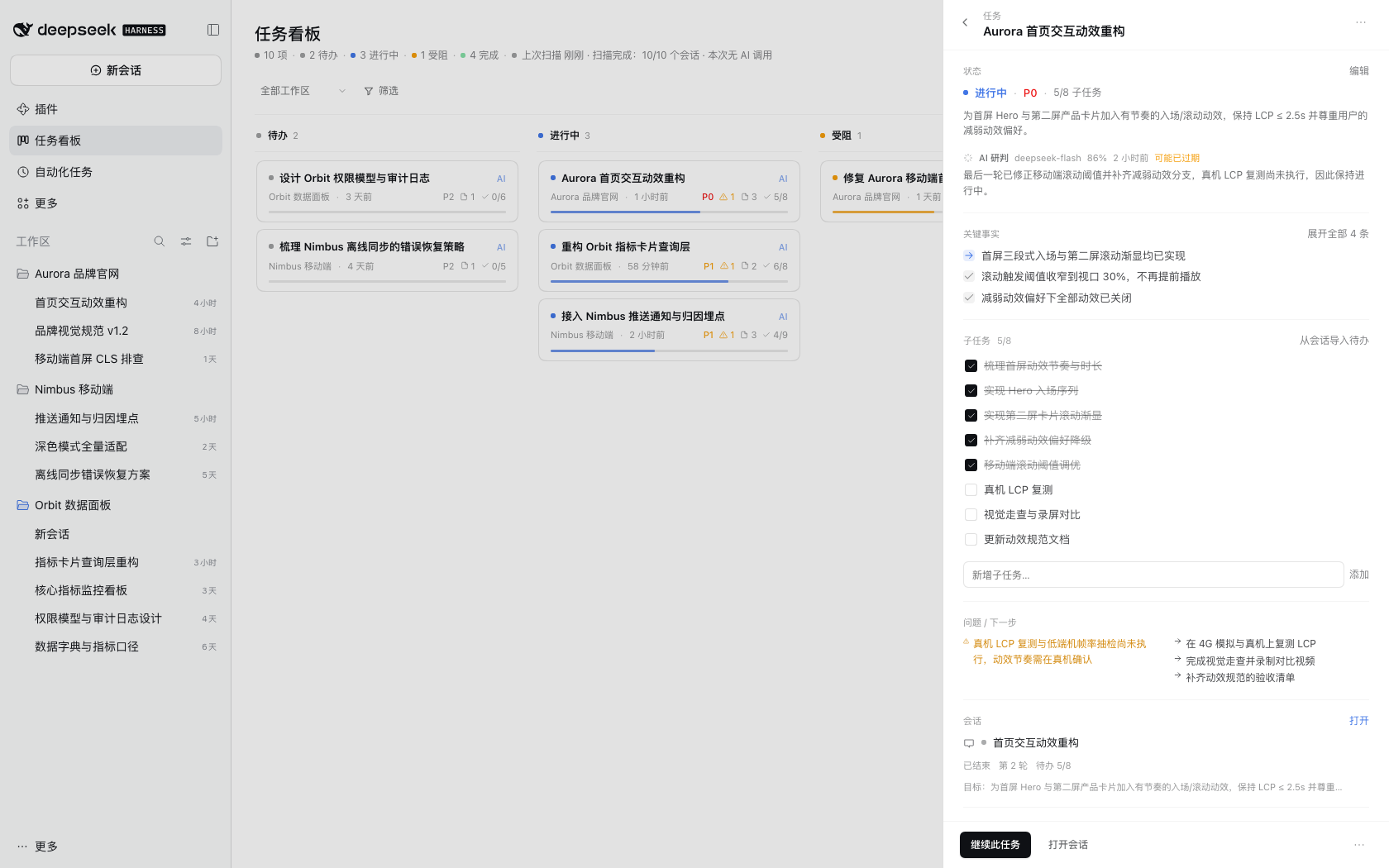
4. **Detail drawer** (click a card):
|
|
156
|
+
- One-line status summary (click "Edit" to change fields)
|
|
157
|
+
- **Key facts** (3–6 items: key progress / decisions / issues from the session)
|
|
158
|
+
- **Subtasks**: check / add / delete; "import todos from session"; progress writes back automatically
|
|
159
|
+
- **Issues / next steps**
|
|
160
|
+
- **Session linkage**: continue this task / open session
|
|
161
|
+
- **Artifacts**: click to open in the DSH right-sidebar document preview
|
|
162
|
+
- Evidence and history (collapsed by default)
|
|
163
|
+
5. **Filters**: workspace, priority, origin, tags, keyword search, show archived.
|
|
164
|
+
6. **Toolbar** (persistent in the header): search, scan, settings gear, open in right sidebar, new task; the "⋯" menu only contains "Export JSON".
|
|
165
|
+
7. **Scan**: click the scan button to trigger an incremental scan immediately; progress is shown live.
|
|
166
|
+
8. **Settings** (gear icon): AI toggle, auto-scan, scan interval, initial scan range, AI budget, display and entry, excluded workspaces.
|
|
167
|
+
|
|
168
|
+
### How "Continue this task" works
|
|
169
|
+
|
|
170
|
+
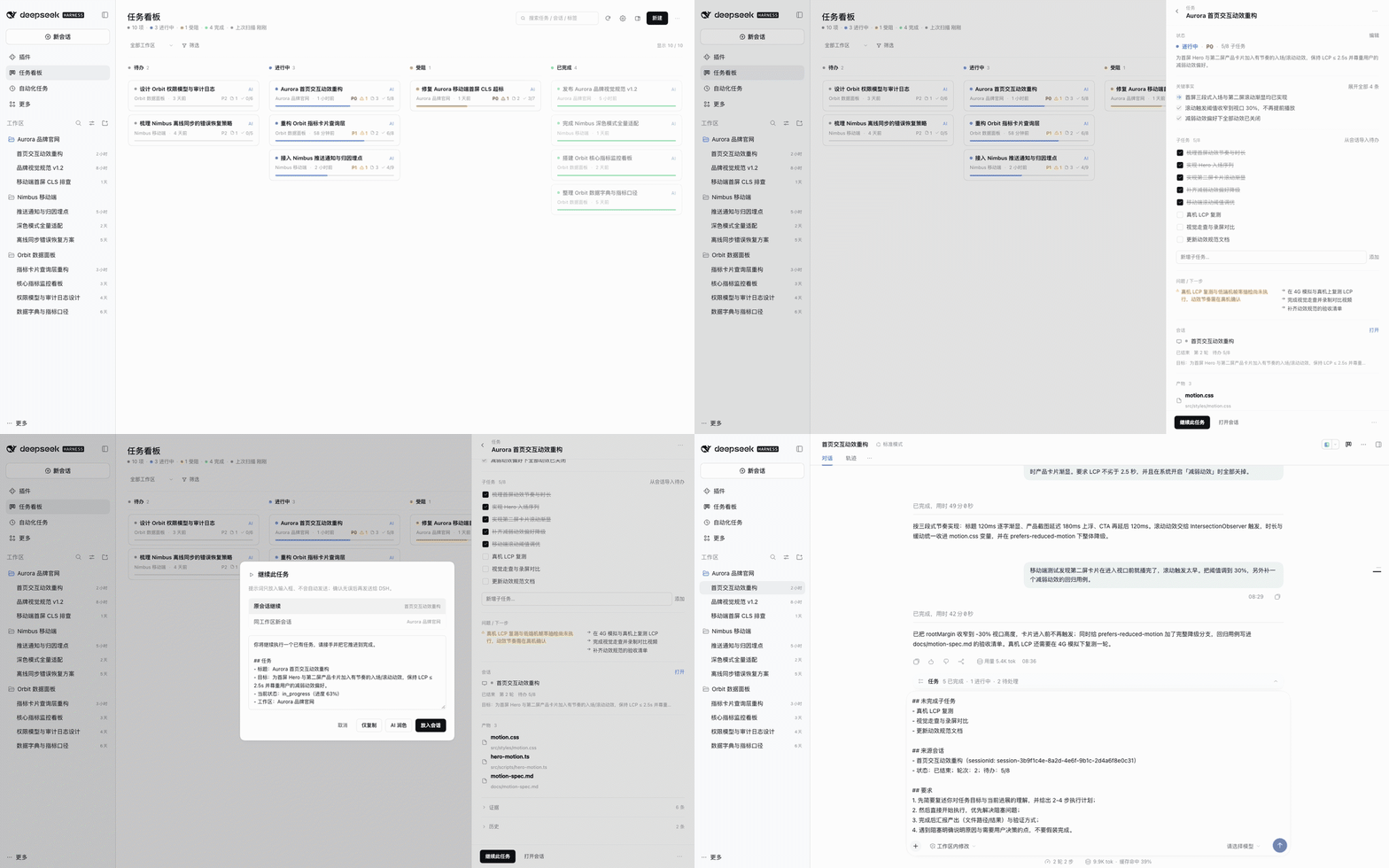
1. Open any card → click **"继续此任务"** in the drawer;
|
|
171
|
+
2. The dialog contains a structured prompt (task goal / progress / key facts / issues / next steps / source session) that you can edit;
|
|
172
|
+
3. Choose **original session** or **new session in the same workspace**;
|
|
173
|
+
4. Click **"放入会话"**: DSH switches to the target session and puts the prompt into the input box — **it is never sent automatically**; review or edit it and press send yourself. You can also "copy only" or "polish with AI".
|
|
174
|
+
|
|
175
|
+
> The prompt is assembled locally from a template — **0 tokens by default**. Only "Polish with AI" spends one model call.
|
|
176
|
+
|
|
177
|
+
### Manual and automatic side by side
|
|
178
|
+
|
|
179
|
+
- Automatic tasks are anchored to their source session; repeated scans update the same card instead of creating duplicates.
|
|
180
|
+
- Fields you edit and lock (editing locks by default) are never overwritten by AI; unlock them in the drawer to hand them back.
|
|
181
|
+
- Manual tasks (origin = manual) are never changed by automatic scans.
|
|
182
|
+
- New cards do not need a session; once linked, AI fills in the analysis on the next scan.
|
|
183
|
+
|
|
184
|
+
### Shortcuts
|
|
185
|
+
|
|
186
|
+
| Key | Action |
|
|
187
|
+
| --- | --- |
|
|
188
|
+
| `/` | Focus search |
|
|
189
|
+
| `n` | New task |
|
|
190
|
+
| `Esc` | Close the topmost overlay / drawer |
|
|
191
|
+
| `Cmd+R` | Reload the DSH window (needed after plugin updates) |
|
|
192
|
+
|
|
193
|
+
## AI and privacy
|
|
194
|
+
|
|
195
|
+
### Data flow
|
|
196
|
+
|
|
197
|
+
```
|
|
198
|
+
DSH sessions (local, read-only)
|
|
199
|
+
│ local parsing / rules engine
|
|
200
|
+
▼
|
|
201
|
+
local board storage ──(optional)digest ≤1.5KB ──► DeepSeek inference API
|
|
202
|
+
│ │
|
|
203
|
+
└──────────── structured JSON ◄────────────────────┘
|
|
204
|
+
```
|
|
205
|
+
|
|
206
|
+
### What is never uploaded
|
|
207
|
+
|
|
208
|
+
- Full session transcripts, file contents, attachments
|
|
209
|
+
- Account credentials / tokens (read locally for the request header only, never included in the payload)
|
|
210
|
+
- Anything to third-party servers (no telemetry, no usage reporting)
|
|
211
|
+
|
|
212
|
+
### Turning AI off
|
|
213
|
+
|
|
214
|
+
Settings gear in the board header → turn off "AI 联网研判" (online AI analysis); it takes effect immediately. The board keeps running on the local rules engine — no missing features, just coarser inference.
|
|
215
|
+
|
|
216
|
+
### Cost
|
|
217
|
+
|
|
218
|
+
By default incremental scans only analyze **changed sessions**; the per-scan AI call limit defaults to 40 and the default model is `deepseek-flash`. On days without new conversations the cost is close to zero. You can lower the daily limit or disable AI entirely in settings.
|
|
219
|
+
|
|
220
|
+
## Screenshots
|
|
221
|
+
|
|
222
|
+
| Board (light) | Board (dark) |
|
|
223
|
+
| --- | --- |
|
|
224
|
+
|  |  |
|
|
225
|
+
|
|
226
|
+
| Task details (light) | Task details (dark) |
|
|
227
|
+
| --- | --- |
|
|
228
|
+
|  | 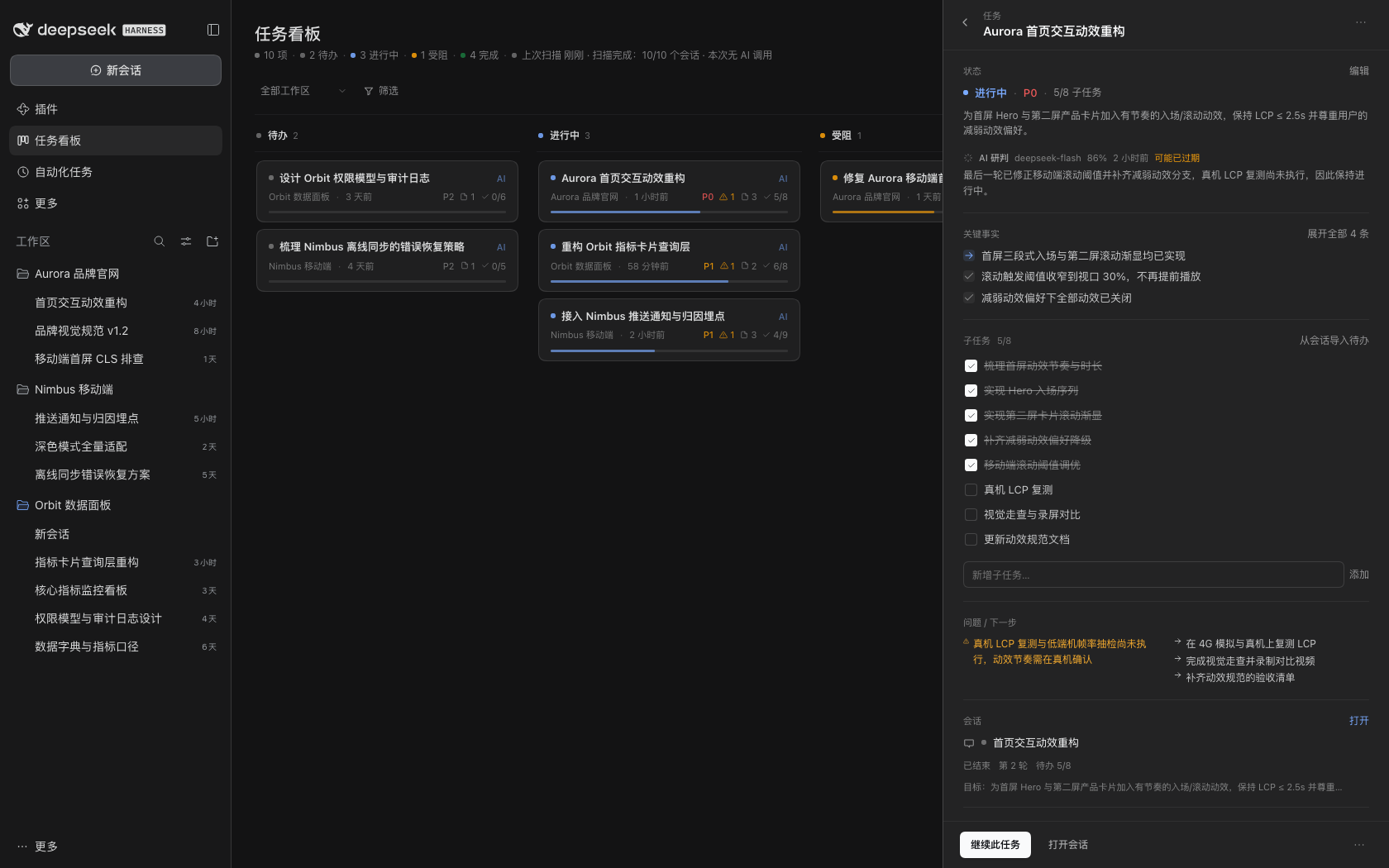 |
|
|
229
|
+
|
|
230
|
+
| Continue-task dialog | Prompt placed into the session input |
|
|
231
|
+
| --- | --- |
|
|
232
|
+
| 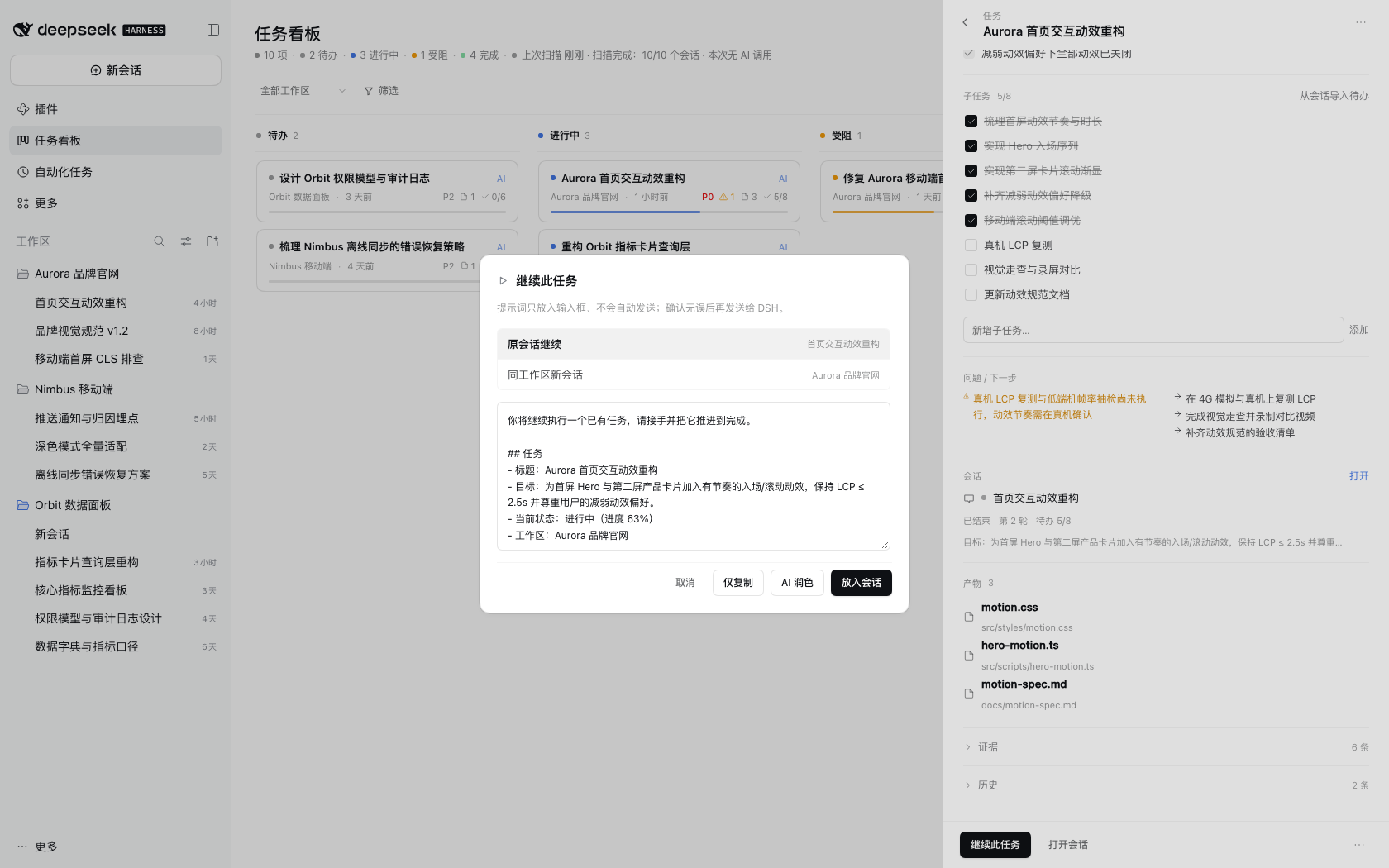 | 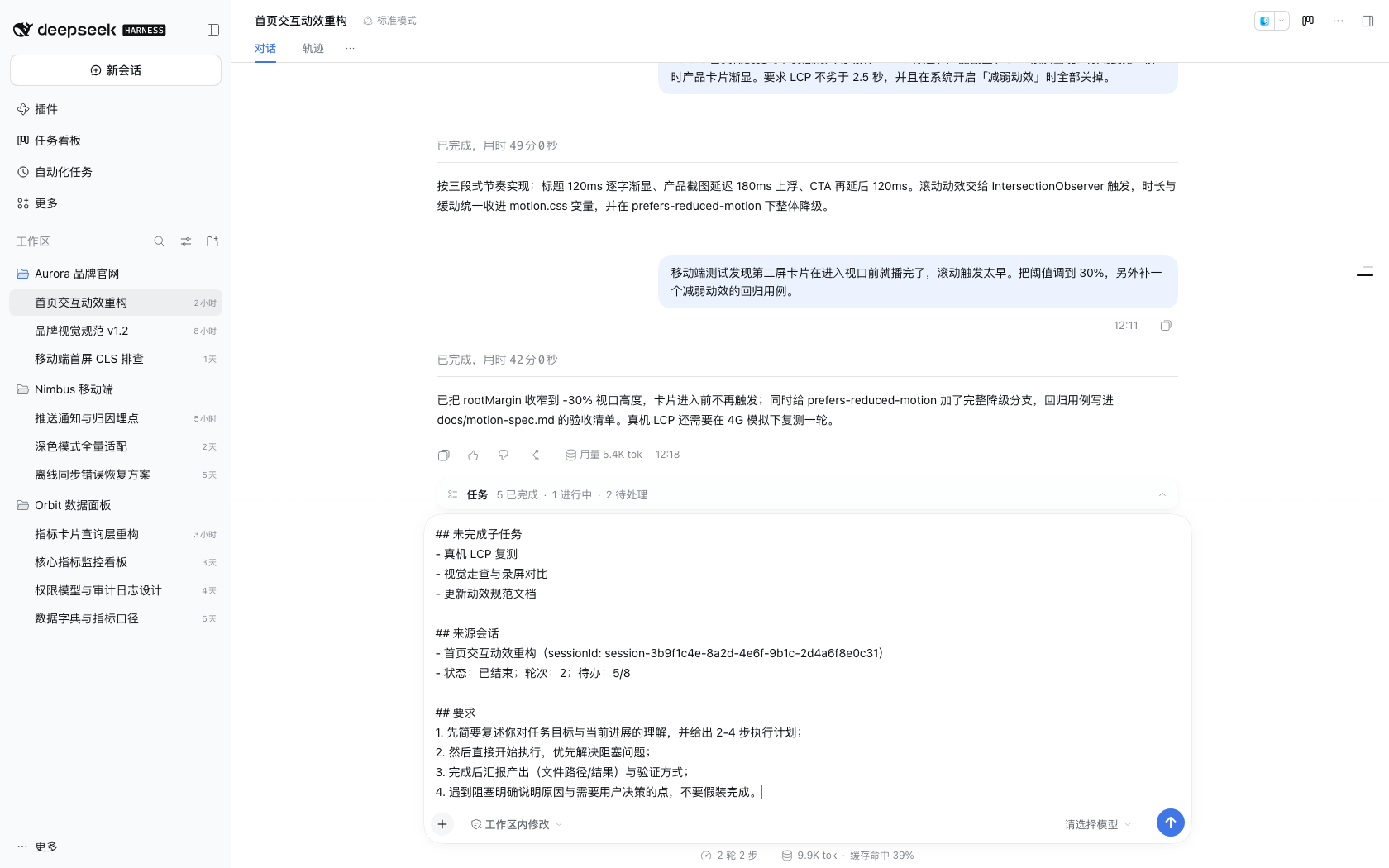 |
|
|
233
|
+
|
|
234
|
+
| Right sidebar (narrow) | Right sidebar fullscreen |
|
|
235
|
+
| --- | --- |
|
|
236
|
+
| 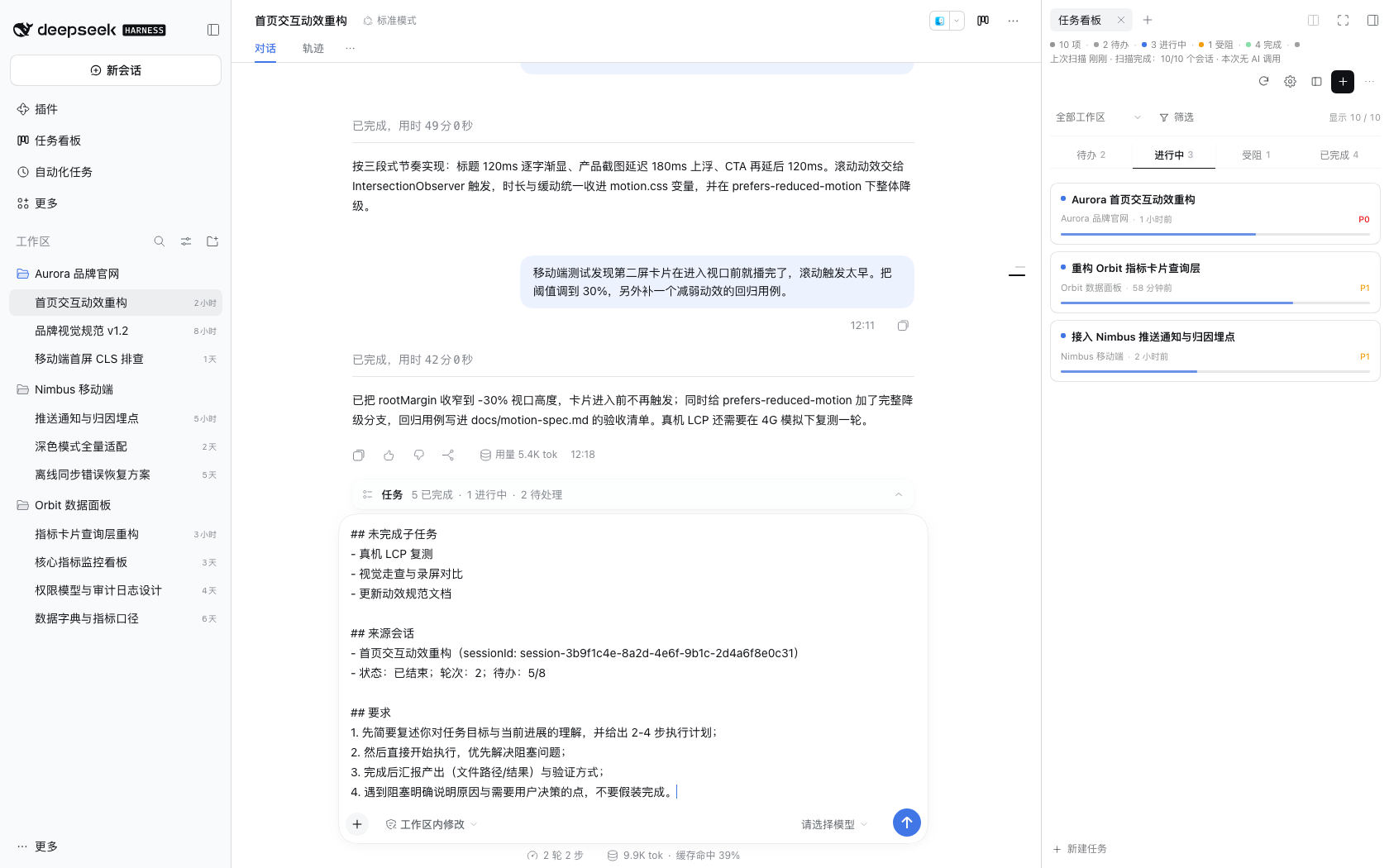 | 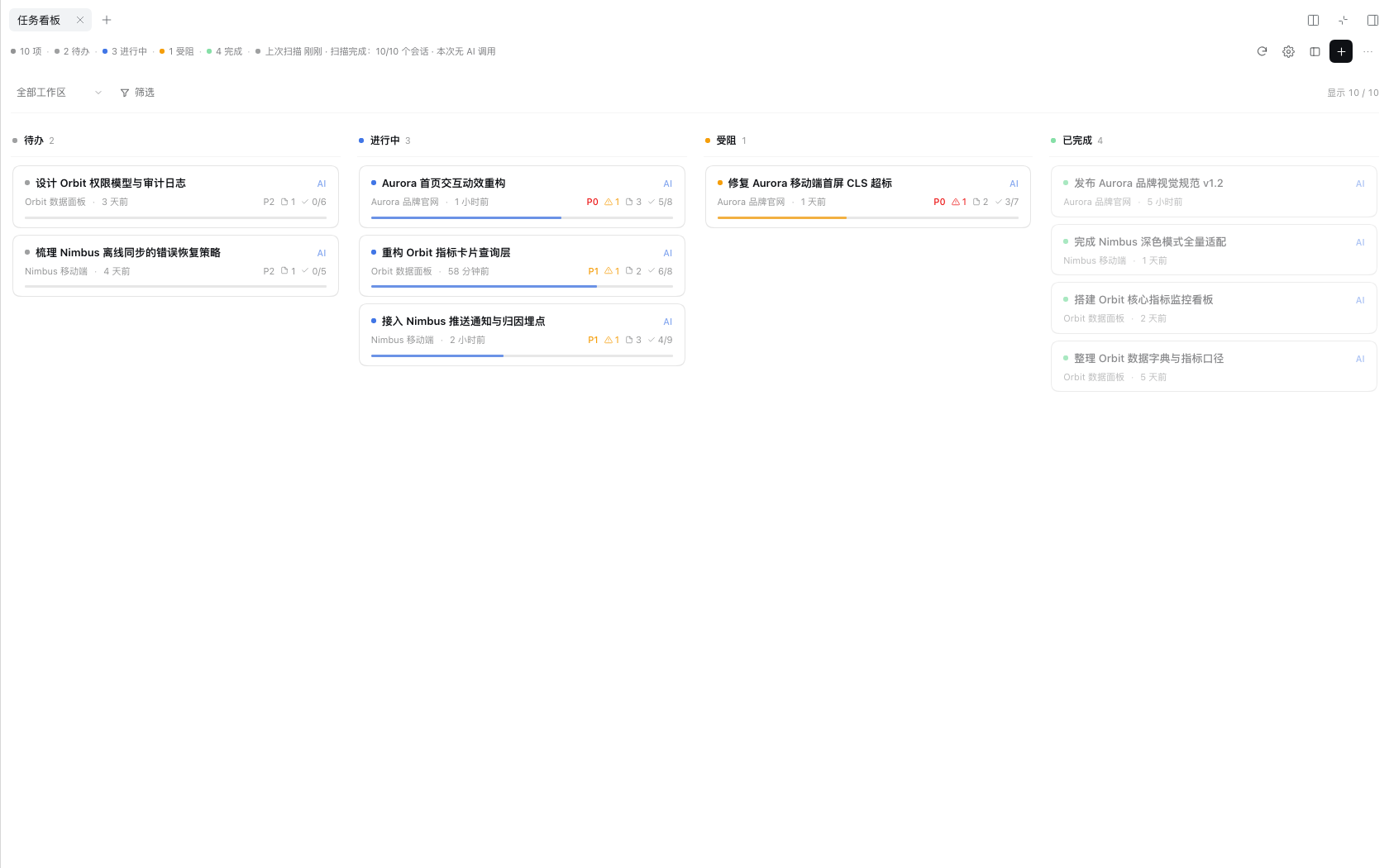 |
|
|
237
|
+
|
|
238
|
+
| Artifact preview entries | Settings (persistent gear) |
|
|
239
|
+
| --- | --- |
|
|
240
|
+
| 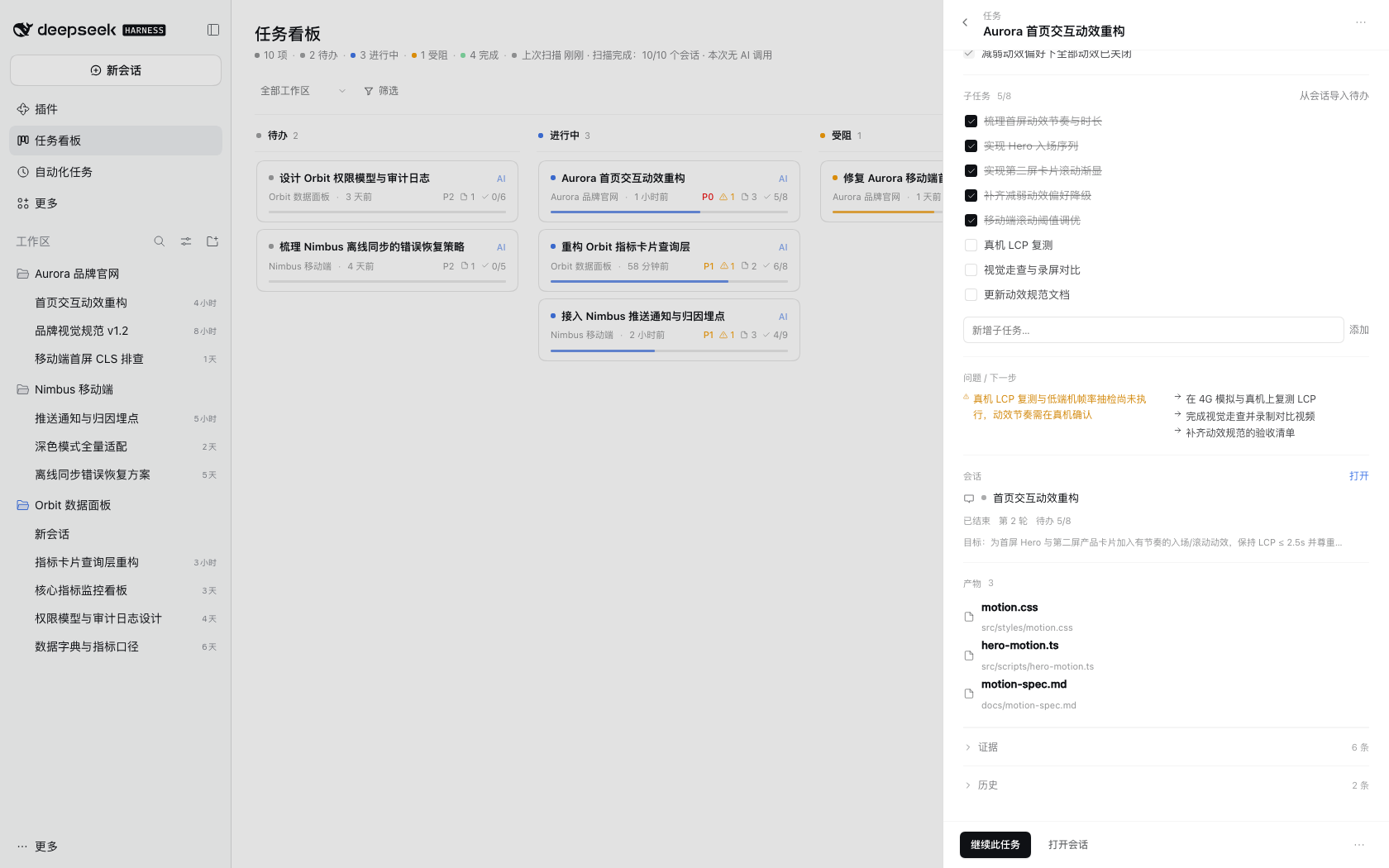 | 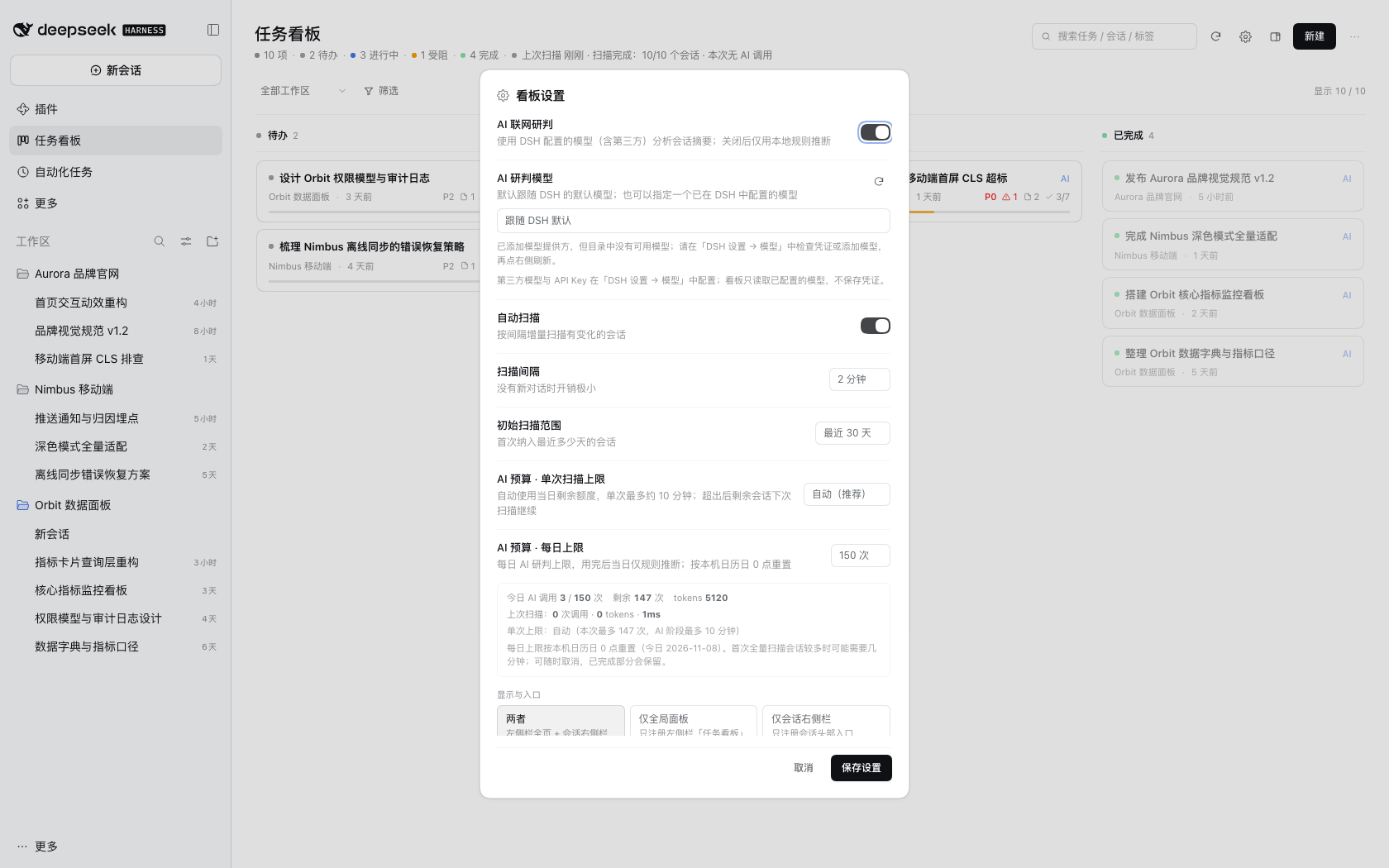 |
|
|
241
|
+
|
|
242
|
+
| "⋯" menu (export JSON only) | 1280px window |
|
|
243
|
+
| --- | --- |
|
|
244
|
+
| 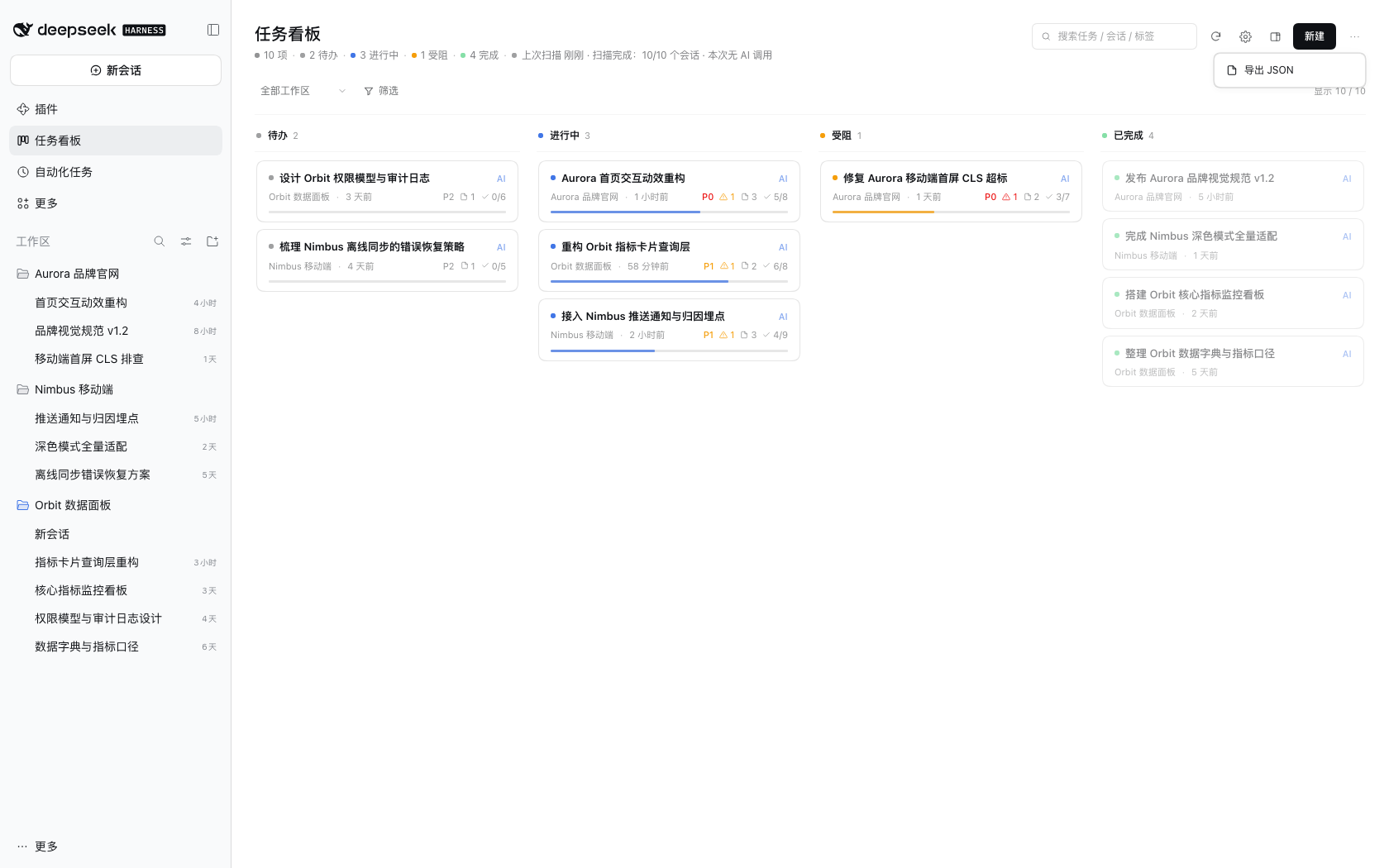 | 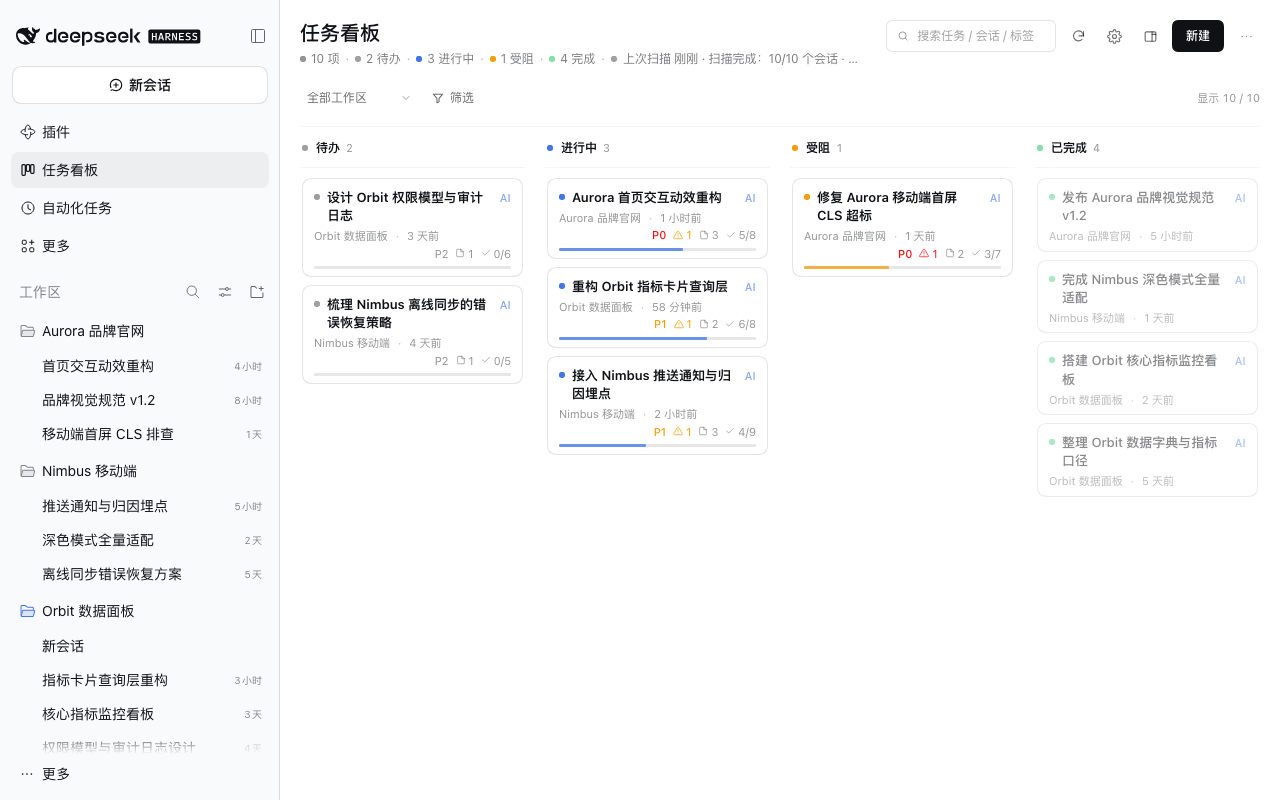 |
|
|
245
|
+
|
|
246
|
+
> All screenshots above use a fully fictional demo dataset (invented workspaces / sessions / tasks) and contain no real user or workspace information.
|
|
247
|
+
|
|
248
|
+
## Compatibility
|
|
249
|
+
|
|
250
|
+
| Item | Requirement |
|
|
251
|
+
| --- | --- |
|
|
252
|
+
| DeepSeek Harness | `>= 0.2.1-rc.5 < 0.3.0` (verified on 0.2.1-rc.5 desktop) |
|
|
253
|
+
| Node.js | `>= 22.19.0` (uses the built-in `node:zlib` zstd API) |
|
|
254
|
+
| Platform | Verified on macOS desktop; other desktop platforms should work but are not individually verified |
|
|
255
|
+
| Third-party dependencies | None (plugin and tooling scripts are dependency-free) |
|
|
256
|
+
|
|
257
|
+
> The plugin relies on DSH's third-party plugin interfaces; major DSH upgrades may break compatibility. If the entry disappears after upgrading DSH, reinstall the plugin first — board data will not be lost.
|
|
258
|
+
|
|
259
|
+
## FAQ
|
|
260
|
+
|
|
261
|
+
**Q: I updated the plugin but the UI still looks old / new features are missing.**
|
|
262
|
+
A: The usual cause is an old profile dependency range (e.g. `^0.3.0`); cross-minor upgrades require an **exact version** such as `dsh-super-kanban@0.4.1`. Press `Cmd+R` first, then fully quit and reopen DSH. If it is still old, follow [docs/TROUBLESHOOTING.md](https://github.com/topmindspace/dsh-super-kanban/blob/main/docs/TROUBLESHOOTING.md#更新后-ui-未变) to check the real installed version and dependency spec.
|
|
263
|
+
|
|
264
|
+
**Q: There is no "任务看板" in the left sidebar.**
|
|
265
|
+
A: Press `Cmd+R` to reload the window; restart DSH if it is still missing. If it remains missing, check the diagnostics on the DSH plugin page (a failed plugin load usually reports a reason).
|
|
266
|
+
|
|
267
|
+
**Q: Cards are not updating / still show an old status.**
|
|
268
|
+
A: Click the scan button in the header to trigger a manual scan, or check that "Auto scan" is enabled in settings.
|
|
269
|
+
|
|
270
|
+
**Q: The AI judgment is wrong.**
|
|
271
|
+
A: Open the card and edit the fields directly (editing locks them, so AI won't overwrite them later). To make AI re-judge it, continue the source session and wait for the next scan — the card updates automatically.
|
|
272
|
+
|
|
273
|
+
**Q: I don't want certain workspaces on the board.**
|
|
274
|
+
A: Settings gear in the board header → Excluded workspaces (multi-select).
|
|
275
|
+
|
|
276
|
+
**Q: How much quota will this use?**
|
|
277
|
+
A: An incremental scan calls `deepseek-flash` once per **changed** session; the settings page shows today's calls and tokens. With AI disabled the cost is zero.
|
|
278
|
+
|
|
279
|
+
**Q: Where is the data? Is it lost after uninstalling?**
|
|
280
|
+
A: `~/.dsh/storages/super-kanban/` (`state.json` / `sessions-cache.json` / `backups/`). Uninstalling the plugin does not delete it.
|
|
281
|
+
|
|
282
|
+
**Q: Can I export the board?**
|
|
283
|
+
A: "⋯" in the board header → Export JSON, which downloads `super-kanban-YYYYMMDD.json`.
|
|
284
|
+
|
|
285
|
+
## Development and contributing
|
|
286
|
+
|
|
287
|
+
- Zero third-party dependencies; tests run with `node --test`; `scripts/` contains validators, the privacy scanner and the market index generator.
|
|
288
|
+
- Common commands:
|
|
289
|
+
|
|
290
|
+
```bash
|
|
291
|
+
npm test # unit tests
|
|
292
|
+
npm run validate # manifest, cordis patch, files and market index checks
|
|
293
|
+
npm run check:privacy # scan for personal paths / credentials / session ids
|
|
294
|
+
npm run market:index # regenerate docs/index.json
|
|
295
|
+
```
|
|
296
|
+
|
|
297
|
+
- For the development setup, repository layout and debugging, see [CONTRIBUTING.md](https://github.com/topmindspace/dsh-super-kanban/blob/main/CONTRIBUTING.md) and [docs/DEVELOPMENT.md](https://github.com/topmindspace/dsh-super-kanban/blob/main/docs/DEVELOPMENT.md).
|
|
298
|
+
- Architecture: [docs/ARCHITECTURE.md](https://github.com/topmindspace/dsh-super-kanban/blob/main/docs/ARCHITECTURE.md). Interface contract: [docs/CONTRACT.md](https://github.com/topmindspace/dsh-super-kanban/blob/main/docs/CONTRACT.md). Visual spec: [docs/DESIGN.md](https://github.com/topmindspace/dsh-super-kanban/blob/main/docs/DESIGN.md).
|
|
299
|
+
- Release and distribution flow (market index, npm, Git): [docs/MARKET.md](https://github.com/topmindspace/dsh-super-kanban/blob/main/docs/MARKET.md).
|
|
300
|
+
- User-facing troubleshooting guide: [docs/TROUBLESHOOTING.md](https://github.com/topmindspace/dsh-super-kanban/blob/main/docs/TROUBLESHOOTING.md).
|
|
301
|
+
- For security issues, please follow [SECURITY.md](https://github.com/topmindspace/dsh-super-kanban/blob/main/SECURITY.md) and report privately instead of opening a public issue.
|
|
302
|
+
|
|
303
|
+
## License
|
|
304
|
+
|
|
305
|
+
[MIT](https://github.com/topmindspace/dsh-super-kanban/blob/main/LICENSE) © topmindspace
|
package/README.md
CHANGED
|
@@ -1,7 +1,8 @@
|
|
|
1
1
|
# Super Kanban · 智能任务指挥台
|
|
2
2
|
|
|
3
3
|
[](https://github.com/topmindspace/dsh-super-kanban/actions/workflows/ci.yml)
|
|
4
|
-
[![
|
|
4
|
+
[](https://www.npmjs.com/package/dsh-super-kanban)
|
|
5
|
+
[](https://github.com/topmindspace/dsh-super-kanban/blob/main/LICENSE)
|
|
5
6
|
|
|
6
7
|
一个**生长在 DeepSeek Harness 界面里**的 AI 任务看板:它读取你各个工作区的真实 DSH 会话,自动研判任务的目标、进度、完成情况与问题,也可以完全手动管理。每张任务卡都能追溯到具体会话与具体一句话。
|
|
7
8
|
|
|
@@ -9,7 +10,11 @@
|
|
|
9
10
|
- **数据**:只读扫描本机 DSH 会话;看板数据保存在本机,不出本机
|
|
10
11
|
- **智能**:复用本机 DSH 已登录账号的模型额度,零配置;关闭后自动降级为本地规则分析
|
|
11
12
|
|
|
12
|
-
|
|
13
|
+
**简体中文** | [English](https://github.com/topmindspace/dsh-super-kanban/blob/main/README.en.md)
|
|
14
|
+
|
|
15
|
+

|
|
16
|
+
|
|
17
|
+

|
|
13
18
|
|
|
14
19
|
## 目录
|
|
15
20
|
|
|
@@ -22,6 +27,7 @@
|
|
|
22
27
|
- [界面截图](#界面截图)
|
|
23
28
|
- [兼容性](#兼容性)
|
|
24
29
|
- [常见问题](#常见问题)
|
|
30
|
+
- [故障排查](https://github.com/topmindspace/dsh-super-kanban/blob/main/docs/TROUBLESHOOTING.md)
|
|
25
31
|
- [开发与贡献](#开发与贡献)
|
|
26
32
|
- [License](#license)
|
|
27
33
|
|
|
@@ -41,7 +47,7 @@ Super Kanban 把这些对话转成一张可持续维护的看板:
|
|
|
41
47
|
| 🤝 会话联动 | 「继续此任务」生成结构化提示词,确认后放入原会话或同工作区新会话输入框,不自动发送 |
|
|
42
48
|
| ✅ 子任务与目标 | 子任务清单(可从会话待办导入、勾选自动回写进度)、任务目标、DSH Session Goal 追踪 |
|
|
43
49
|
| 📦 产物跟踪 | 自动收集会话交付物与写出的文件,点击在 DSH 文档预览中打开 |
|
|
44
|
-
| 🧾 关键事实优先 |
|
|
50
|
+
| 🧾 关键事实优先 | 卡片只保留标题/元信息/进度三层;抽屉先看 3–6 条关键事实,完整证据默认折叠 |
|
|
45
51
|
| ✍️ 手动维护 | 新建 / 编辑 / 拖拽换列 / 归档 / 删除 / 锁定字段;你改过的字段 AI 不再覆盖 |
|
|
46
52
|
| 🔄 持续维护 | 首次约数秒完成扫描,之后按间隔增量扫描;新会话自动纳入,旧任务自动更新 |
|
|
47
53
|
| 🧠 解释得清 | 每条研判带置信度与一句话理由,避免「黑箱改状态」 |
|
|
@@ -59,7 +65,7 @@ Super Kanban 把这些对话转成一张可持续维护的看板:
|
|
|
59
65
|
|
|
60
66
|
- 送模型的会话摘要(digest)压到 **≤1.5KB/会话**,只含最近变化与关键信号。
|
|
61
67
|
- 输出结构化:关键事实 ≤6、证据 ≤8、`max_tokens` ≤2200,单个会话解析结果有明确上限。
|
|
62
|
-
- **增量门控**:只在「用户消息增加 / 轮次结束 /
|
|
68
|
+
- **增量门控**:只在「用户消息增加 / 轮次结束 / 首次分析」时调用模型;同一活跃 turn 内不重复分析,同一会话有最小间隔。
|
|
63
69
|
- **预算可控**:设置里可配「单次扫描 AI 调用上限」与「每日上限」,超限自动降级规则引擎;设置页显示今日调用数与 tokens。
|
|
64
70
|
- 反复全量扫描已分析的会话时,**0 次 AI 调用**。
|
|
65
71
|
|
|
@@ -69,6 +75,12 @@ Super Kanban 把这些对话转成一张可持续维护的看板:
|
|
|
69
75
|
- 联网研判只发送**压缩摘要**:不发送完整会话原文、不发送文件内容、不发送账号凭证。
|
|
70
76
|
- 所有 AI 功能可在设置中一键关闭,立即降级为本地规则分析。
|
|
71
77
|
|
|
78
|
+
### 界面(v0.4)
|
|
79
|
+
|
|
80
|
+
- 与 DSH 同源的深浅色、字体与间距;"单色为底、克制的强调色":颜色只出现在状态点、细进度线、优先级小字与类型图标上。
|
|
81
|
+
- 页头常驻常用动作(搜索 / 扫描 / 设置 / 在右侧栏打开 / 新建),「⋯」只保留「导出 JSON」。
|
|
82
|
+
- 更多视觉与交互规则见 [DESIGN.md](https://github.com/topmindspace/dsh-super-kanban/blob/main/docs/DESIGN.md)。
|
|
83
|
+
|
|
72
84
|
## 两种形态
|
|
73
85
|
|
|
74
86
|
同一个看板支持两种打开方式:
|
|
@@ -79,7 +91,7 @@ Super Kanban 把这些对话转成一张可持续维护的看板:
|
|
|
79
91
|
| **右侧侧边栏** | 会话右上角看板图标,或会话右侧栏「+」工具列表里的「任务看板」 | 边聊边看板;宽度自适应:窄(单列 + 状态分段)/ 中 / 宽(四列) |
|
|
80
92
|
|
|
81
93
|
- **右侧栏全屏**:右侧栏顶部的全屏按钮,面板铺满视口,仍可随时退出。
|
|
82
|
-
-
|
|
94
|
+
- **互相切换**:全页看板页头的「在右侧栏打开」图标;右侧栏看板的「在全页面板打开」图标。
|
|
83
95
|
- **入口偏好**:看板「设置 → 显示与入口」可选「两者(默认)/ 仅全局面板 / 仅会话右侧栏」,修改后刷新窗口生效。
|
|
84
96
|
|
|
85
97
|
## 安装
|
|
@@ -100,9 +112,9 @@ Super Kanban 把这些对话转成一张可持续维护的看板:
|
|
|
100
112
|
|
|
101
113
|
### 方式 B:npm 包名
|
|
102
114
|
|
|
103
|
-
DSH → 插件 → 添加插件 → 输入包名 `dsh-super-kanban
|
|
115
|
+
DSH → 插件 → 添加插件 → 输入包名 `dsh-super-kanban`(可附加版本号,如 `dsh-super-kanban@<version>`)→ 安装 → 启用 → 刷新窗口。
|
|
104
116
|
|
|
105
|
-
> npm
|
|
117
|
+
> npm 包已发布:`dsh-super-kanban`(https://www.npmjs.com/package/dsh-super-kanban)。发布与索引更新流程见 [docs/MARKET.md](https://github.com/topmindspace/dsh-super-kanban/blob/main/docs/MARKET.md)。
|
|
106
118
|
|
|
107
119
|
### 方式 C:Git 仓库
|
|
108
120
|
|
|
@@ -120,19 +132,26 @@ cd dsh-super-kanban
|
|
|
120
132
|
|
|
121
133
|
或在 DSH 插件页选择「本地目录」指向本仓库根目录。安装完成后刷新窗口,左侧栏出现「任务看板」。
|
|
122
134
|
|
|
123
|
-
###
|
|
135
|
+
### 更新插件(重要)
|
|
136
|
+
|
|
137
|
+
第三方插件**没有“自动升级”**:更新 = **卸载旧版 → 安装目标版本**,然后刷新 DSH 窗口(必要时完全退出重开)。
|
|
138
|
+
|
|
139
|
+
- **跨 minor 必须用精确版本**:`0.3.x → 0.4.x` 要安装 `dsh-super-kanban@0.4.1` 这类精确版本;旧的范围依赖 `^0.3.0` 在语义化版本下**永远不会**解析到 0.4.x(这是“更新后界面仍是旧版”的常见原因)。
|
|
140
|
+
- **0.4.x 内的小版本**:若 profile 依赖写的是 `^0.4.0`,0.4.1、0.4.2 等补丁版可被正常解析;若插件页安装写的是精确版本,则同样需要卸载后安装目标版本。
|
|
141
|
+
- 更新后先按 `Cmd+R`;界面没变则**完全退出 DSH 再打开**,再按 [INSTALL.md 的“验证版本”](https://github.com/topmindspace/dsh-super-kanban/blob/main/docs/INSTALL.md#2-验证安装与版本) 检查实际版本与依赖规格。
|
|
142
|
+
|
|
143
|
+
### 卸载
|
|
124
144
|
|
|
125
|
-
- **升级**:插件市场 / npm / Git 安装的,在插件页更新即可;源码安装的 `git pull` 后刷新窗口。
|
|
126
145
|
- **卸载**:插件页移除,或源码目录执行 `./uninstall.sh -y`。
|
|
127
146
|
- 卸载**不会删除**看板数据;彻底清空请删除 `~/.dsh/storages/super-kanban/`。
|
|
128
147
|
|
|
129
|
-
|
|
148
|
+
更详细的安装、更新、验证、回滚与排障说明见 [docs/INSTALL.md](https://github.com/topmindspace/dsh-super-kanban/blob/main/docs/INSTALL.md);遇到问题见 [docs/TROUBLESHOOTING.md](https://github.com/topmindspace/dsh-super-kanban/blob/main/docs/TROUBLESHOOTING.md)。
|
|
130
149
|
|
|
131
150
|
## 使用
|
|
132
151
|
|
|
133
152
|
1. 左侧栏点 **任务看板**(或会话右上角看板图标走右侧栏形态)。
|
|
134
153
|
2. **看板**:四列——待办 / 进行中 / 受阻 / 已完成;列头显示数量与状态色。
|
|
135
|
-
3.
|
|
154
|
+
3. **卡片**:状态点、标题与 AI/规则标记、来源工作区与最近活动时间,以及克制的优先级、问题数、产物数、子任务进度与进度线。
|
|
136
155
|
4. **详情抽屉**(点卡片打开):
|
|
137
156
|
- 一句话状态摘要(点「编辑」可改字段)
|
|
138
157
|
- **关键事实**(3–6 条,来自会话的关键进展 / 决策 / 问题)
|
|
@@ -142,8 +161,9 @@ cd dsh-super-kanban
|
|
|
142
161
|
- **产物**:点击在 DSH 右侧栏文档预览中打开
|
|
143
162
|
- 证据与历史(默认折叠)
|
|
144
163
|
5. **筛选**:工作区、优先级、来源、标签、关键词搜索、显示归档。
|
|
145
|
-
6.
|
|
146
|
-
7.
|
|
164
|
+
6. **工具栏**(页头常驻):搜索、扫描、设置齿轮、在右侧栏打开、新建;「⋯」只保留「导出 JSON」。
|
|
165
|
+
7. **扫描**:点扫描按钮立即增量扫描;扫描进度实时显示。
|
|
166
|
+
8. **设置**(齿轮图标):AI 开关、自动扫描、扫描间隔、初始扫描天数、AI 预算、显示与入口、排除工作区。
|
|
147
167
|
|
|
148
168
|
### 「继续此任务」怎么用
|
|
149
169
|
|
|
@@ -191,7 +211,7 @@ DSH 会话(本机只读)
|
|
|
191
211
|
|
|
192
212
|
### 关闭 AI
|
|
193
213
|
|
|
194
|
-
|
|
214
|
+
看板页头的设置齿轮 → 关闭「AI 联网研判」,立即生效。关闭后看板继续用本地规则引擎运行,功能不缺失,只是研判颗粒度更粗。
|
|
195
215
|
|
|
196
216
|
### 成本
|
|
197
217
|
|
|
@@ -201,27 +221,27 @@ DSH 会话(本机只读)
|
|
|
201
221
|
|
|
202
222
|
| 看板(浅色) | 看板(深色) |
|
|
203
223
|
| --- | --- |
|
|
204
|
-
|  |  |
|
|
224
|
+
|  |  |
|
|
205
225
|
|
|
206
226
|
| 任务详情(浅色) | 任务详情(深色) |
|
|
207
227
|
| --- | --- |
|
|
208
|
-
|  |  |
|
|
228
|
+
|  |  |
|
|
209
229
|
|
|
210
230
|
| 继续此任务弹窗 | 提示词放入原会话输入框 |
|
|
211
231
|
| --- | --- |
|
|
212
|
-
|  |  |
|
|
232
|
+
|  |  |
|
|
213
233
|
|
|
214
234
|
| 右侧栏形态(窄) | 右侧栏全屏 |
|
|
215
235
|
| --- | --- |
|
|
216
|
-
|  |  |
|
|
236
|
+
|  |  |
|
|
217
237
|
|
|
218
|
-
| 产物预览入口 |
|
|
238
|
+
| 产物预览入口 | 设置(齿轮常驻) |
|
|
219
239
|
| --- | --- |
|
|
220
|
-
|  |  |
|
|
240
|
+
|  |  |
|
|
221
241
|
|
|
222
|
-
| 1280 宽窗口 |
|
|
242
|
+
| 「⋯」菜单(仅导出 JSON) | 1280 宽窗口 |
|
|
223
243
|
| --- | --- |
|
|
224
|
-
|  |
|
|
244
|
+
|  |  |
|
|
225
245
|
|
|
226
246
|
> 以上截图来自一套完全虚构的演示数据(虚构工作区 / 会话 / 任务),不含任何真实用户或工作区信息。
|
|
227
247
|
|
|
@@ -238,6 +258,9 @@ DSH 会话(本机只读)
|
|
|
238
258
|
|
|
239
259
|
## 常见问题
|
|
240
260
|
|
|
261
|
+
**Q:更新插件后界面还是旧版 / 看不到新功能?**
|
|
262
|
+
A:最常见原因是 profile 依赖仍是旧范围(如 `^0.3.0`),跨 minor 需要安装**精确版本**(如 `dsh-super-kanban@0.4.1`)。先 `Cmd+R` 刷新,再完全退出 DSH 重开;仍无效则按 [docs/TROUBLESHOOTING.md](https://github.com/topmindspace/dsh-super-kanban/blob/main/docs/TROUBLESHOOTING.md#更新后-ui-未变) 检查实际安装版本与依赖规格。
|
|
263
|
+
|
|
241
264
|
**Q:左侧栏没有「任务看板」?**
|
|
242
265
|
A:按 `Cmd+R` 刷新窗口;仍没有则重启 DSH。仍没有请查看 DSH 插件页的诊断信息(插件加载失败会提示原因)。
|
|
243
266
|
|
|
@@ -245,19 +268,19 @@ A:按 `Cmd+R` 刷新窗口;仍没有则重启 DSH。仍没有请查看 DSH
|
|
|
245
268
|
A:点右上角扫描按钮手动触发;或检查设置中的「自动扫描」是否开启。
|
|
246
269
|
|
|
247
270
|
**Q:AI 判断错了怎么办?**
|
|
248
|
-
A
|
|
271
|
+
A:点开卡片直接改字段(编辑即锁定),AI 之后不会再覆盖;如需重新判定,在来源会话中继续对话后等待下一次扫描,插件会自动更新这张卡。
|
|
249
272
|
|
|
250
273
|
**Q:不想让某些工作区进看板?**
|
|
251
|
-
A
|
|
274
|
+
A:看板页头设置齿轮 → 排除工作区(可多选)。
|
|
252
275
|
|
|
253
276
|
**Q:会消耗我多少额度?**
|
|
254
|
-
A:扫描时对**有变化的**会话各调用一次 `deepseek-flash
|
|
277
|
+
A:扫描时对**有变化的**会话各调用一次 `deepseek-flash`;设置页可查看今日调用数与 tokens。关闭 AI 后完全零额度。
|
|
255
278
|
|
|
256
279
|
**Q:数据在哪里?卸载会丢吗?**
|
|
257
280
|
A:`~/.dsh/storages/super-kanban/`(`state.json` / `sessions-cache.json` / `backups/`)。卸载插件不删除数据。
|
|
258
281
|
|
|
259
282
|
**Q:能导出吗?**
|
|
260
|
-
A
|
|
283
|
+
A:看板页头「⋯」→ 导出 JSON,下载 `super-kanban-YYYYMMDD.json`。
|
|
261
284
|
|
|
262
285
|
## 开发与贡献
|
|
263
286
|
|
|
@@ -271,11 +294,12 @@ npm run check:privacy # 扫描个人路径 / 凭证 / 会话 id 等敏感内容
|
|
|
271
294
|
npm run market:index # 重新生成 docs/index.json
|
|
272
295
|
```
|
|
273
296
|
|
|
274
|
-
- 开发环境搭建、目录结构与调试方法见 [CONTRIBUTING.md](CONTRIBUTING.md) 与 [docs/DEVELOPMENT.md](docs/DEVELOPMENT.md)。
|
|
275
|
-
- 架构说明见 [docs/ARCHITECTURE.md](docs/ARCHITECTURE.md),接口契约见 [docs/CONTRACT.md](docs/CONTRACT.md),视觉规范见 [docs/DESIGN.md](docs/DESIGN.md)。
|
|
276
|
-
- 发布与分发流程(市场索引、npm、Git)见 [docs/MARKET.md](docs/MARKET.md)。
|
|
277
|
-
-
|
|
297
|
+
- 开发环境搭建、目录结构与调试方法见 [CONTRIBUTING.md](https://github.com/topmindspace/dsh-super-kanban/blob/main/CONTRIBUTING.md) 与 [docs/DEVELOPMENT.md](https://github.com/topmindspace/dsh-super-kanban/blob/main/docs/DEVELOPMENT.md)。
|
|
298
|
+
- 架构说明见 [docs/ARCHITECTURE.md](https://github.com/topmindspace/dsh-super-kanban/blob/main/docs/ARCHITECTURE.md),接口契约见 [docs/CONTRACT.md](https://github.com/topmindspace/dsh-super-kanban/blob/main/docs/CONTRACT.md),视觉规范见 [docs/DESIGN.md](https://github.com/topmindspace/dsh-super-kanban/blob/main/docs/DESIGN.md)。
|
|
299
|
+
- 发布与分发流程(市场索引、npm、Git)见 [docs/MARKET.md](https://github.com/topmindspace/dsh-super-kanban/blob/main/docs/MARKET.md)。
|
|
300
|
+
- 用户侧排障手册见 [docs/TROUBLESHOOTING.md](https://github.com/topmindspace/dsh-super-kanban/blob/main/docs/TROUBLESHOOTING.md)。
|
|
301
|
+
- 安全问题请按 [SECURITY.md](https://github.com/topmindspace/dsh-super-kanban/blob/main/SECURITY.md) 私下报告,不要开公开 issue。
|
|
278
302
|
|
|
279
303
|
## License
|
|
280
304
|
|
|
281
|
-
[MIT](LICENSE) © topmindspace
|
|
305
|
+
[MIT](https://github.com/topmindspace/dsh-super-kanban/blob/main/LICENSE) © topmindspace
|
package/client.js
CHANGED
|
@@ -1265,6 +1265,73 @@ body[data-ds-dark-theme] .sk-btn-primary-v3:hover{background:var(--dsw-alias-but
|
|
|
1265
1265
|
.sk-page.is-side.sk-tier-narrow .sk-narrow-list{padding-top:10px}
|
|
1266
1266
|
.sk-page.is-side .sk-slimbar{padding-bottom:10px}
|
|
1267
1267
|
|
|
1268
|
+
|
|
1269
|
+
/* ======================= v0.4:克制的强调色 ======================= */
|
|
1270
|
+
.sk-page{--sk-brand-accent:var(--dsw-alias-state-business-primary,#4176e6)}
|
|
1271
|
+
.sk-dot{width:6px;height:6px;border-radius:50%;flex:none;display:inline-block}
|
|
1272
|
+
.sk-dot.is-total{background:color-mix(in srgb,var(--sk-ink) 45%,transparent)}
|
|
1273
|
+
.sk-dot.is-backlog{background:color-mix(in srgb,var(--sk-ink) 40%,transparent)}
|
|
1274
|
+
.sk-dot.is-in_progress{background:var(--sk-brand-accent)}
|
|
1275
|
+
.sk-dot.is-blocked{background:var(--dsw-alias-state-warn-primary,#f59e0b)}
|
|
1276
|
+
.sk-dot.is-done{background:color-mix(in srgb,var(--dsw-alias-state-success-primary,#22c55e) 55%,transparent)}
|
|
1277
|
+
.sk-stats-group{display:inline-flex;align-items:center;gap:5px}
|
|
1278
|
+
.sk-stats-v3 .sk-status-dot{background:color-mix(in srgb,var(--sk-ink) 40%,transparent);box-shadow:none;width:6px;height:6px;opacity:1}
|
|
1279
|
+
.sk-stats-v3 .sk-status-dot.is-running{background:var(--sk-brand-accent);animation:skPulse 1.6s ease-in-out infinite}
|
|
1280
|
+
.sk-stats-v3 .sk-status-dot.is-error{background:var(--sk-red)}
|
|
1281
|
+
.sk-header-actions .sk-iconbtn-v3{width:28px;height:28px;border-radius:8px;color:color-mix(in srgb,var(--sk-ink) 62%,transparent)}
|
|
1282
|
+
.sk-header-actions .sk-iconbtn-v3:hover{background:color-mix(in srgb,var(--sk-ink) 6%,transparent);color:var(--sk-ink)}
|
|
1283
|
+
.sk-header-actions .sk-iconbtn-v3.is-primary{background:var(--dsw-alias-button-primary-fill);color:var(--dsw-alias-label-primary-foreground);border:1px solid transparent}
|
|
1284
|
+
.sk-header-actions .sk-iconbtn-v3.is-primary:hover{background:var(--dsw-alias-button-primary-hover);color:var(--dsw-alias-label-primary-foreground)}
|
|
1285
|
+
.sk-card-v3{padding:11px 14px 10px}
|
|
1286
|
+
.sk-card-v3.is-done{opacity:.7}
|
|
1287
|
+
.sk-card-v3.is-done .sk-card-title-v3{font-weight:500}
|
|
1288
|
+
.sk-card-v3-head{display:flex;align-items:flex-start;gap:7px;min-width:0}
|
|
1289
|
+
.sk-card-v3-head .sk-dot{margin-top:6px}
|
|
1290
|
+
.sk-card-v3-head .sk-card-title-v3{flex:1;min-width:0}
|
|
1291
|
+
.sk-ai-mark{font-size:11px;line-height:1;font-weight:500;letter-spacing:.02em;flex:none;white-space:nowrap;margin-top:4px}
|
|
1292
|
+
.sk-ai-mark.is-ai{color:color-mix(in srgb,var(--sk-brand-accent) 65%,transparent)}
|
|
1293
|
+
.sk-ai-mark.is-rules{color:color-mix(in srgb,var(--sk-ink) 45%,transparent)}
|
|
1294
|
+
.sk-card-meta-v3 .sk-card-metrics{gap:7px}
|
|
1295
|
+
.sk-card-metric{display:inline-flex;align-items:center;gap:3px;white-space:nowrap;color:color-mix(in srgb,var(--sk-ink) 45%,transparent);font-size:11px}
|
|
1296
|
+
.sk-card-metric .sk-icon{opacity:.9}
|
|
1297
|
+
.sk-card-metric.is-warn{color:var(--dsw-alias-state-warn-primary,#f59e0b)}
|
|
1298
|
+
.sk-card-metric.is-error{color:var(--sk-red)}
|
|
1299
|
+
.sk-card-metric.is-done{color:color-mix(in srgb,var(--dsw-alias-state-success-primary,#22c55e) 75%,transparent)}
|
|
1300
|
+
.sk-card-metrics .sk-prio-text{font-size:11px;font-weight:500}
|
|
1301
|
+
.sk-prio-text.is-p0{color:var(--sk-red)}
|
|
1302
|
+
.sk-prio-text.is-p1{color:var(--dsw-alias-state-warn-primary,#f59e0b)}
|
|
1303
|
+
.sk-prio-text.is-rest{color:color-mix(in srgb,var(--sk-ink) 45%,transparent);font-weight:400}
|
|
1304
|
+
.sk-card-progress-v3{height:3px;border-radius:1.5px;background:color-mix(in srgb,var(--sk-ink) 10%,transparent)}
|
|
1305
|
+
.sk-card-progress-v3 i{background:color-mix(in srgb,var(--sk-ink) 20%,transparent);border-radius:1.5px}
|
|
1306
|
+
.sk-card-v3.is-in_progress .sk-card-progress-v3 i{background:color-mix(in srgb,var(--sk-brand-accent) 75%,transparent)}
|
|
1307
|
+
.sk-card-v3.is-blocked .sk-card-progress-v3 i{background:color-mix(in srgb,var(--dsw-alias-state-warn-primary,#f59e0b) 75%,transparent)}
|
|
1308
|
+
.sk-card-v3.is-done .sk-card-progress-v3{display:block}
|
|
1309
|
+
.sk-card-v3.is-done .sk-card-progress-v3 i{background:color-mix(in srgb,var(--dsw-alias-state-success-primary,#22c55e) 55%,transparent)}
|
|
1310
|
+
.sk-col-dot{width:6px;height:6px;border-radius:50%;flex:none;margin-right:2px}
|
|
1311
|
+
.sk-col-head .sk-dot{margin-right:2px}
|
|
1312
|
+
.sk-summary-status{font-weight:600}
|
|
1313
|
+
.sk-summary-status.is-in_progress{color:var(--sk-brand-accent)}
|
|
1314
|
+
.sk-summary-status.is-blocked{color:var(--dsw-alias-state-warn-primary,#f59e0b)}
|
|
1315
|
+
.sk-summary-status.is-done{color:color-mix(in srgb,var(--dsw-alias-state-success-primary,#22c55e) 72%,transparent)}
|
|
1316
|
+
.sk-summary-prio{font-weight:500}
|
|
1317
|
+
.sk-summary-prio.is-p0{color:var(--sk-red)}
|
|
1318
|
+
.sk-summary-prio.is-p1{color:var(--dsw-alias-state-warn-primary,#f59e0b)}
|
|
1319
|
+
.sk-summary-prio.is-rest{color:color-mix(in srgb,var(--sk-ink) 55%,transparent);font-weight:400}
|
|
1320
|
+
.sk-fact{display:flex;align-items:flex-start;gap:8px;font-size:13px;line-height:1.5;color:color-mix(in srgb,var(--sk-ink) 78%,transparent);min-width:0}
|
|
1321
|
+
.sk-fact-icon{width:14px;height:14px;flex:none;display:grid;place-items:center;margin-top:2px;color:var(--fact-tone,color-mix(in srgb,var(--sk-ink) 45%,transparent))}
|
|
1322
|
+
.sk-fact-text{flex:1;min-width:0;display:-webkit-box;-webkit-line-clamp:2;-webkit-box-orient:vertical;overflow:hidden;overflow-wrap:anywhere}
|
|
1323
|
+
.sk-link-text{color:var(--sk-brand-accent)!important;text-decoration:none}
|
|
1324
|
+
.sk-link-text:hover{color:var(--sk-brand-accent);text-decoration:underline;text-underline-offset:2px}
|
|
1325
|
+
.sk-session-line .sk-session-icon{flex:none;color:color-mix(in srgb,var(--sk-ink) 55%,transparent);margin-top:1px}
|
|
1326
|
+
.sk-duo-item{display:flex;align-items:flex-start;gap:5px;font-size:12px;line-height:1.55;color:color-mix(in srgb,var(--sk-ink) 78%,transparent);overflow-wrap:anywhere}
|
|
1327
|
+
.sk-duo-item .sk-icon{flex:none;margin-top:2px;color:color-mix(in srgb,var(--sk-ink) 40%,transparent)}
|
|
1328
|
+
.sk-duo-item.is-warn{color:color-mix(in srgb,var(--dsw-alias-state-warn-primary,#f59e0b) 85%,var(--sk-ink))}
|
|
1329
|
+
.sk-duo-item.is-warn .sk-icon{color:var(--dsw-alias-state-warn-primary,#f59e0b)}
|
|
1330
|
+
.sk-duo-item.is-error{color:var(--sk-red)}
|
|
1331
|
+
.sk-duo-item.is-error .sk-icon{color:var(--sk-red)}
|
|
1332
|
+
.sk-page.is-side.sk-tier-narrow .sk-card-v3-head .sk-dot{margin-top:5px}
|
|
1333
|
+
.sk-page.is-side.sk-tier-narrow .sk-ai-mark{display:none}
|
|
1334
|
+
|
|
1268
1335
|
`;
|
|
1269
1336
|
|
|
1270
1337
|
function ensureStyle() {
|
|
@@ -1417,25 +1484,22 @@ body[data-ds-dark-theme] .sk-btn-primary-v3:hover{background:var(--dsw-alias-but
|
|
|
1417
1484
|
function TaskCard({ task, onOpen, onDragStart, onDragEnd, dragging }) {
|
|
1418
1485
|
const progress = progressOf(task);
|
|
1419
1486
|
const subtasks = subtasksOf(task);
|
|
1420
|
-
const
|
|
1487
|
+
const issueList = Array.isArray(task.issues) ? task.issues : [];
|
|
1488
|
+
const issues = issueList.length;
|
|
1421
1489
|
const artifacts = artifactsOf(task);
|
|
1422
1490
|
const priority = task.priority || "P2";
|
|
1423
1491
|
const taskStatus = statusOf(task);
|
|
1424
1492
|
const done = taskStatus === "done";
|
|
1425
|
-
const
|
|
1426
|
-
const highIssue = (Array.isArray(task.issues) ? task.issues : []).some((issue) => issue && issue.severity === "high");
|
|
1493
|
+
const highIssue = issueList.some((issue) => issue && issue.severity === "high");
|
|
1427
1494
|
const subtaskDone = subtasks.filter((item) => item.done).length;
|
|
1428
|
-
const
|
|
1429
|
-
|
|
1430
|
-
|
|
1431
|
-
|
|
1432
|
-
: artifacts.length
|
|
1433
|
-
? `${artifacts.length} 产物`
|
|
1434
|
-
: "";
|
|
1495
|
+
const allSubtasksDone = subtasks.length > 0 && subtaskDone === subtasks.length;
|
|
1496
|
+
const engine = task.ai && task.ai.engine === "llm" ? "AI" : "规则";
|
|
1497
|
+
const showEngine = Boolean(task.ai) || task.origin === "auto" || task.origin === "auto+edited";
|
|
1498
|
+
const prioClass = priority === "P0" ? "is-p0" : priority === "P1" ? "is-p1" : "is-rest";
|
|
1435
1499
|
return h(
|
|
1436
1500
|
"article",
|
|
1437
1501
|
{
|
|
1438
|
-
className: cx("sk-card", "sk-card-v3", done && "is-done", dragging && "dragging"),
|
|
1502
|
+
className: cx("sk-card", "sk-card-v3", "is-" + taskStatus, done && "is-done", dragging && "dragging"),
|
|
1439
1503
|
draggable: true,
|
|
1440
1504
|
tabIndex: 0,
|
|
1441
1505
|
onDragStart: (event) => {
|
|
@@ -1456,13 +1520,11 @@ body[data-ds-dark-theme] .sk-btn-primary-v3:hover{background:var(--dsw-alias-but
|
|
|
1456
1520
|
h(
|
|
1457
1521
|
"div",
|
|
1458
1522
|
{ className: "sk-card-v3-head" },
|
|
1459
|
-
|
|
1460
|
-
? h("span", {
|
|
1461
|
-
className: cx("sk-card-warn-dot", highIssue && !blocked && "is-error"),
|
|
1462
|
-
title: blocked ? "受阻" : "存在高优先级问题",
|
|
1463
|
-
})
|
|
1464
|
-
: null,
|
|
1523
|
+
h("span", { className: cx("sk-dot", "is-" + taskStatus), title: STATUS_META[taskStatus].label }),
|
|
1465
1524
|
h("h3", { className: "sk-card-title-v3" }, task.title),
|
|
1525
|
+
showEngine
|
|
1526
|
+
? h("span", { className: cx("sk-ai-mark", engine === "AI" ? "is-ai" : "is-rules"), title: engine === "AI" ? "AI 研判" : "规则推断" }, engine)
|
|
1527
|
+
: null,
|
|
1466
1528
|
),
|
|
1467
1529
|
h(
|
|
1468
1530
|
"div",
|
|
@@ -1473,11 +1535,19 @@ body[data-ds-dark-theme] .sk-btn-primary-v3:hover{background:var(--dsw-alias-but
|
|
|
1473
1535
|
h(
|
|
1474
1536
|
"span",
|
|
1475
1537
|
{ className: "sk-card-metrics" },
|
|
1476
|
-
h("span", { className: cx("sk-prio-text",
|
|
1477
|
-
|
|
1538
|
+
h("span", { className: cx("sk-prio-text", prioClass), title: "优先级" }, priority),
|
|
1539
|
+
issues > 0
|
|
1540
|
+
? h("span", { className: cx("sk-card-metric", "is-warn", highIssue && "is-error"), title: `${issues} 个问题${highIssue ? "(含高优先级)" : ""}` }, h(Icon, { name: "alert", size: 10 }), issues)
|
|
1541
|
+
: null,
|
|
1542
|
+
artifacts.length > 0
|
|
1543
|
+
? h("span", { className: "sk-card-metric", title: `${artifacts.length} 个产物` }, h(Icon, { name: "file", size: 10 }), artifacts.length)
|
|
1544
|
+
: null,
|
|
1545
|
+
subtasks.length > 0
|
|
1546
|
+
? h("span", { className: cx("sk-card-metric", allSubtasksDone && "is-done"), title: `${subtaskDone}/${subtasks.length} 子任务` }, h(Icon, { name: "check", size: 10 }), `${subtaskDone}/${subtasks.length}`)
|
|
1547
|
+
: null,
|
|
1478
1548
|
),
|
|
1479
1549
|
),
|
|
1480
|
-
|
|
1550
|
+
h("div", { className: "sk-card-progress-v3" }, h("i", { style: { width: `${progress}%` } })),
|
|
1481
1551
|
);
|
|
1482
1552
|
}
|
|
1483
1553
|
|
|
@@ -1506,6 +1576,7 @@ body[data-ds-dark-theme] .sk-btn-primary-v3:hover{background:var(--dsw-alias-but
|
|
|
1506
1576
|
h(
|
|
1507
1577
|
"header",
|
|
1508
1578
|
{ className: "sk-col-head" },
|
|
1579
|
+
h("span", { className: cx("sk-dot", "is-" + status) }),
|
|
1509
1580
|
h("span", { className: "sk-col-title" }, meta.label),
|
|
1510
1581
|
h("span", { className: "sk-col-count" }, tasks.length),
|
|
1511
1582
|
h("span", { className: "sk-col-head-spacer" }),
|
|
@@ -2128,9 +2199,10 @@ body[data-ds-dark-theme] .sk-btn-primary-v3:hover{background:var(--dsw-alias-but
|
|
|
2128
2199
|
: h(
|
|
2129
2200
|
"div",
|
|
2130
2201
|
{ className: "sk-summary-line" },
|
|
2131
|
-
h("span",
|
|
2202
|
+
h("span", { className: cx("sk-dot", "is-" + statusOf(task)) }),
|
|
2203
|
+
h("span", { className: cx("sk-summary-status", "is-" + statusOf(task)) }, STATUS_META[statusOf(task)].label),
|
|
2132
2204
|
h("span", { className: "sk-sep" }, "·"),
|
|
2133
|
-
h("span",
|
|
2205
|
+
h("span", { className: cx("sk-summary-prio", task.priority === "P0" ? "is-p0" : task.priority === "P1" ? "is-p1" : "is-rest") }, task.priority || "P2"),
|
|
2134
2206
|
h("span", { className: "sk-sep" }, "·"),
|
|
2135
2207
|
h("span", { className: "sk-muted" }, subtasks.length ? `${subtaskDone}/${subtasks.length} 子任务` : `进度 ${progress}%`),
|
|
2136
2208
|
goal && goal.text ? h("span", { className: "sk-goal-text" }, goal.text) : null,
|
|
@@ -2147,7 +2219,27 @@ body[data-ds-dark-theme] .sk-btn-primary-v3:hover{background:var(--dsw-alias-but
|
|
|
2147
2219
|
facts.length > 3 ? h("button", { type: "button", className: "sk-text", onClick: () => setFactsExpanded((value) => !value) }, factsExpanded ? "收起" : `展开全部 ${facts.length} 条`) : null,
|
|
2148
2220
|
),
|
|
2149
2221
|
facts.length
|
|
2150
|
-
? h(
|
|
2222
|
+
? h(
|
|
2223
|
+
"div",
|
|
2224
|
+
{ className: "sk-facts" },
|
|
2225
|
+
(factsExpanded ? facts : facts.slice(0, 3)).map((fact) => {
|
|
2226
|
+
const meta = factMeta(fact.kind);
|
|
2227
|
+
const tone =
|
|
2228
|
+
fact.kind === "progress"
|
|
2229
|
+
? "var(--sk-brand-accent)"
|
|
2230
|
+
: fact.kind === "issue"
|
|
2231
|
+
? "var(--dsw-alias-state-warn-primary,#f59e0b)"
|
|
2232
|
+
: fact.kind === "artifact"
|
|
2233
|
+
? "color-mix(in srgb,var(--dsw-alias-state-success-primary,#22c55e) 80%,transparent)"
|
|
2234
|
+
: "color-mix(in srgb,var(--sk-ink) 45%,transparent)";
|
|
2235
|
+
return h(
|
|
2236
|
+
"div",
|
|
2237
|
+
{ key: fact.id, className: "sk-fact" },
|
|
2238
|
+
h("span", { className: "sk-fact-icon", style: { "--fact-tone": tone } }, h(Icon, { name: meta.icon, size: 14 })),
|
|
2239
|
+
h("span", { className: "sk-fact-text" }, fact.text),
|
|
2240
|
+
);
|
|
2241
|
+
}),
|
|
2242
|
+
)
|
|
2151
2243
|
: h("div", { className: "sk-note-tiny" }, "暂无关键事实"),
|
|
2152
2244
|
),
|
|
2153
2245
|
h(
|
|
@@ -2199,14 +2291,32 @@ body[data-ds-dark-theme] .sk-btn-primary-v3:hover{background:var(--dsw-alias-but
|
|
|
2199
2291
|
"div",
|
|
2200
2292
|
{ className: "sk-duo-col" },
|
|
2201
2293
|
issues.length
|
|
2202
|
-
? issues.slice(0, 3).map((issue, index) =>
|
|
2294
|
+
? issues.slice(0, 3).map((issue, index) =>
|
|
2295
|
+
h(
|
|
2296
|
+
"div",
|
|
2297
|
+
{
|
|
2298
|
+
key: issue.id || index,
|
|
2299
|
+
className: cx("sk-duo-item", issue.severity === "high" ? "is-error" : issue.severity === "medium" ? "is-warn" : ""),
|
|
2300
|
+
title: issue.text,
|
|
2301
|
+
},
|
|
2302
|
+
h(Icon, { name: "alert", size: 11 }),
|
|
2303
|
+
h("span", null, issue.text),
|
|
2304
|
+
),
|
|
2305
|
+
)
|
|
2203
2306
|
: h("div", { className: "sk-note-tiny" }, "暂无"),
|
|
2204
2307
|
),
|
|
2205
2308
|
h(
|
|
2206
2309
|
"div",
|
|
2207
2310
|
{ className: "sk-duo-col" },
|
|
2208
2311
|
nextSteps.length
|
|
2209
|
-
? nextSteps.slice(0, 3).map((step, index) =>
|
|
2312
|
+
? nextSteps.slice(0, 3).map((step, index) =>
|
|
2313
|
+
h(
|
|
2314
|
+
"div",
|
|
2315
|
+
{ key: index, className: "sk-duo-item", title: step },
|
|
2316
|
+
h(Icon, { name: "arrow", size: 11 }),
|
|
2317
|
+
h("span", null, step),
|
|
2318
|
+
),
|
|
2319
|
+
)
|
|
2210
2320
|
: h("div", { className: "sk-note-tiny" }, "暂无"),
|
|
2211
2321
|
),
|
|
2212
2322
|
),
|
|
@@ -2220,11 +2330,12 @@ body[data-ds-dark-theme] .sk-btn-primary-v3:hover{background:var(--dsw-alias-but
|
|
|
2220
2330
|
{ className: "sk-drawer-sec-head" },
|
|
2221
2331
|
h("span", { className: "sk-drawer-sec-title" }, "会话"),
|
|
2222
2332
|
h("span", { className: "sk-grow" }),
|
|
2223
|
-
h("button", { type: "button", className: "sk-text", onClick: openSession, disabled: !session.sessionId }, "打开"),
|
|
2333
|
+
h("button", { type: "button", className: "sk-text sk-link-text", onClick: openSession, disabled: !session.sessionId }, "打开"),
|
|
2224
2334
|
),
|
|
2225
2335
|
h(
|
|
2226
2336
|
"div",
|
|
2227
2337
|
{ className: "sk-session-line" },
|
|
2338
|
+
h(Icon, { name: "chat", size: 14, className: "sk-session-icon" }),
|
|
2228
2339
|
h("span", { className: cx("sk-live-dot", !session.isLive && "off") }),
|
|
2229
2340
|
h("span", { className: "sk-session-title", title: session.title }, session.title || "未关联会话"),
|
|
2230
2341
|
),
|
|
@@ -2944,13 +3055,13 @@ body[data-ds-dark-theme] .sk-btn-primary-v3:hover{background:var(--dsw-alias-but
|
|
|
2944
3055
|
const statsLine = h(
|
|
2945
3056
|
React.Fragment,
|
|
2946
3057
|
null,
|
|
2947
|
-
`${stats.total || tasks.length}
|
|
3058
|
+
h("span", { className: "sk-stats-group" }, h("span", { className: "sk-dot is-total" }), `${stats.total || tasks.length} 项`),
|
|
2948
3059
|
h("span", { className: "sk-sep" }, "·"),
|
|
2949
|
-
`${(stats.byStatus && stats.byStatus.in_progress) || 0}
|
|
3060
|
+
h("span", { className: "sk-stats-group" }, h("span", { className: "sk-dot is-in_progress" }), `${(stats.byStatus && stats.byStatus.in_progress) || 0} 进行中`),
|
|
2950
3061
|
h("span", { className: "sk-sep" }, "·"),
|
|
2951
|
-
`${(stats.byStatus && stats.byStatus.blocked) || 0}
|
|
3062
|
+
h("span", { className: "sk-stats-group" }, h("span", { className: "sk-dot is-blocked" }), `${(stats.byStatus && stats.byStatus.blocked) || 0} 受阻`),
|
|
2952
3063
|
h("span", { className: "sk-sep" }, "·"),
|
|
2953
|
-
`${(stats.byStatus && stats.byStatus.done) || 0}
|
|
3064
|
+
h("span", { className: "sk-stats-group" }, h("span", { className: "sk-dot is-done" }), `${(stats.byStatus && stats.byStatus.done) || 0} 完成`),
|
|
2954
3065
|
h("span", { className: "sk-sep" }, "·"),
|
|
2955
3066
|
scanRunning
|
|
2956
3067
|
? h(
|
|
@@ -2997,19 +3108,7 @@ body[data-ds-dark-theme] .sk-btn-primary-v3:hover{background:var(--dsw-alias-but
|
|
|
2997
3108
|
if (!ok) pushToast("当前环境不支持全屏切换", "error");
|
|
2998
3109
|
};
|
|
2999
3110
|
|
|
3000
|
-
const
|
|
3001
|
-
{ label: "设置", icon: "settings", onClick: () => setSettingsOpen(true) },
|
|
3002
|
-
{ label: "在右侧栏打开", icon: "panelRight", onClick: openSideFromPage },
|
|
3003
|
-
{ label: "导出 JSON", icon: "file", onClick: exportJson },
|
|
3004
|
-
];
|
|
3005
|
-
const sideMenuItems = [
|
|
3006
|
-
{ label: "新建任务", icon: "plus", onClick: () => setNewTaskStatus("backlog") },
|
|
3007
|
-
{ label: "设置", icon: "settings", onClick: () => setSettingsOpen(true) },
|
|
3008
|
-
{ label: "在全页面板打开", icon: "layout", onClick: openPageFromSide },
|
|
3009
|
-
{ label: "全屏", icon: "maximize", onClick: goFullscreen },
|
|
3010
|
-
"divider",
|
|
3011
|
-
{ label: "导出 JSON", icon: "file", onClick: exportJson },
|
|
3012
|
-
];
|
|
3111
|
+
const exportMenuItems = [{ label: "导出 JSON", icon: "file", onClick: exportJson }];
|
|
3013
3112
|
|
|
3014
3113
|
const scanButton = h(
|
|
3015
3114
|
"button",
|
|
@@ -3022,16 +3121,28 @@ body[data-ds-dark-theme] .sk-btn-primary-v3:hover{background:var(--dsw-alias-but
|
|
|
3022
3121
|
},
|
|
3023
3122
|
h(Icon, { name: scanRunning ? "stop" : "refresh", size: 15 }),
|
|
3024
3123
|
);
|
|
3124
|
+
const actionIcon = (name, title, onClick, extraClass) =>
|
|
3125
|
+
h(
|
|
3126
|
+
"button",
|
|
3127
|
+
{ type: "button", className: cx("sk-iconbtn-v3", extraClass), title, "aria-label": title, onClick },
|
|
3128
|
+
h(Icon, { name, size: 15 }),
|
|
3129
|
+
);
|
|
3025
3130
|
const moreButton = (items) =>
|
|
3026
3131
|
h(
|
|
3027
3132
|
DropMenu,
|
|
3028
3133
|
{ open: moreOpen, onClose: () => setMoreOpen(false), items },
|
|
3029
3134
|
h(
|
|
3030
3135
|
"button",
|
|
3031
|
-
{ type: "button", className: "sk-iconbtn-v3", title: "
|
|
3136
|
+
{ type: "button", className: "sk-iconbtn-v3", title: "更多(导出)", onClick: () => setMoreOpen((value) => !value) },
|
|
3032
3137
|
h(Icon, { name: "more", size: 15 }),
|
|
3033
3138
|
),
|
|
3034
3139
|
);
|
|
3140
|
+
const settingsButton = actionIcon("settings", "设置", () => setSettingsOpen(true));
|
|
3141
|
+
const newTextButton = h(
|
|
3142
|
+
"button",
|
|
3143
|
+
{ type: "button", className: "sk-btn-primary-v3", onClick: () => setNewTaskStatus("backlog"), title: "新建任务(n)" },
|
|
3144
|
+
"新建",
|
|
3145
|
+
);
|
|
3035
3146
|
|
|
3036
3147
|
const headerNode =
|
|
3037
3148
|
surface === "side"
|
|
@@ -3039,7 +3150,15 @@ body[data-ds-dark-theme] .sk-btn-primary-v3:hover{background:var(--dsw-alias-but
|
|
|
3039
3150
|
"header",
|
|
3040
3151
|
{ className: "sk-header-v3" },
|
|
3041
3152
|
h("p", { className: "sk-stats-v3" }, statsLine),
|
|
3042
|
-
h(
|
|
3153
|
+
h(
|
|
3154
|
+
"div",
|
|
3155
|
+
{ className: "sk-header-actions" },
|
|
3156
|
+
scanButton,
|
|
3157
|
+
settingsButton,
|
|
3158
|
+
prefs.fullEntry ? actionIcon("layout", "在全页面板打开", openPageFromSide) : null,
|
|
3159
|
+
actionIcon("plus", "新建任务", () => setNewTaskStatus("backlog"), "is-primary"),
|
|
3160
|
+
moreButton(exportMenuItems),
|
|
3161
|
+
),
|
|
3043
3162
|
)
|
|
3044
3163
|
: h(
|
|
3045
3164
|
"header",
|
|
@@ -3065,12 +3184,10 @@ body[data-ds-dark-theme] .sk-btn-primary-v3:hover{background:var(--dsw-alias-but
|
|
|
3065
3184
|
}),
|
|
3066
3185
|
),
|
|
3067
3186
|
scanButton,
|
|
3068
|
-
|
|
3069
|
-
|
|
3070
|
-
|
|
3071
|
-
|
|
3072
|
-
"新建",
|
|
3073
|
-
),
|
|
3187
|
+
settingsButton,
|
|
3188
|
+
prefs.sideEntry ? actionIcon("panelRight", "在右侧栏打开", openSideFromPage) : null,
|
|
3189
|
+
newTextButton,
|
|
3190
|
+
moreButton(exportMenuItems),
|
|
3074
3191
|
),
|
|
3075
3192
|
);
|
|
3076
3193
|
|
package/package.json
CHANGED
|
@@ -1,6 +1,6 @@
|
|
|
1
1
|
{
|
|
2
2
|
"name": "dsh-super-kanban",
|
|
3
|
-
"version": "0.
|
|
3
|
+
"version": "0.4.1",
|
|
4
4
|
"description": "AI task kanban for DeepSeek Harness: derives task goals, progress, completion and issues from DSH sessions, with key facts, subtasks, artifacts, session hand-off and a dual full-page/right-sidebar UI.",
|
|
5
5
|
"type": "module",
|
|
6
6
|
"main": "./index.mjs",
|