dsh-subusage 0.10.11 → 0.11.0
This diff represents the content of publicly available package versions that have been released to one of the supported registries. The information contained in this diff is provided for informational purposes only and reflects changes between package versions as they appear in their respective public registries.
- package/README.md +89 -37
- package/lib/client.js +92 -56
- package/lib/index.js +185 -39
- package/package.json +3 -3
package/README.md
CHANGED
|
@@ -1,16 +1,44 @@
|
|
|
1
|
-
|
|
1
|
+
<div align="center">
|
|
2
|
+
<img src="https://raw.githubusercontent.com/KouzakiUmi/dsh-subusage/main/assets/title.png" width="100%" alt="dsh-subusage —— 模型选择器旁的余量药丸,右侧是同一界面的浅色与深色用量弹层(真实渲染截图)">
|
|
2
3
|
|
|
3
|
-
|
|
4
|
+
# 订阅用量显示
|
|
4
5
|
|
|
5
|
-
|
|
6
|
+
**选中的模型还剩多少额度,输入框旁边一眼可见。**
|
|
6
7
|
|
|
7
|
-
|
|
8
|
+
dsh-subusage 把你订阅的 30 家模型服务商额度装进 DeepSeek Harness 的输入框旁边——不切控制台、不猜百分比、不等报错。
|
|
8
9
|
|
|
9
|
-
[](#license--security--许可与安全)
|
|
11
|
-
[](https://www.npmjs.com/package/dsh-subusage)
|
|
11
|
+
[](#license--security--许可与安全)
|
|
12
|
+
[](#compatibility--兼容性)
|
|
12
13
|
|
|
13
|
-
|
|
14
|
+
**安装只需一条命令** → [快速开始](#快速开始)
|
|
15
|
+
</div>
|
|
16
|
+
|
|
17
|
+
---
|
|
18
|
+
|
|
19
|
+
## 为什么需要它
|
|
20
|
+
|
|
21
|
+
| 没有它 | 有了它 |
|
|
22
|
+
|---|---|
|
|
23
|
+
| 额度散落在五六家控制台,查一次余额要开五个标签页 | 药丸常驻输入框旁:选中哪家模型就看哪家,多窗口自动取最差一窗 |
|
|
24
|
+
| Agent 跑到一半撞上 429,才知道额度用尽 | 弹层先给结论再给依据:「即将用尽 · 最紧张:每周 · 剩 5% · 3 天后重置」 |
|
|
25
|
+
| Cookie、OAuth 悄悄过期,报错才发现 | MiMo Cookie 提前 2 小时变黄、30 分钟变橙、过期变红;认证失效直说原因与修法 |
|
|
26
|
+
| 每家插件各管各的凭据,格式五花八门 | 一个设置页集中管理 30 条路由的开关与凭据,缺什么补什么 |
|
|
27
|
+
|
|
28
|
+
## 15 种状态,一眼分清
|
|
29
|
+
|
|
30
|
+
药丸不写字也能传达状态:每个额度窗口一根彩条(绿 / 黄 / 橙 / 红,满格 = 100% 剩余),需要留意时才追加一个词。下面是全部状态的离线预览(虚构用量数据):
|
|
31
|
+
|
|
32
|
+
<img src="https://raw.githubusercontent.com/KouzakiUmi/dsh-subusage/main/assets/screenshots/pill-states-light.png" width="100%" alt="药丸 15 种状态(浅色,离线预览)">
|
|
33
|
+
|
|
34
|
+
<details>
|
|
35
|
+
<summary>深色主题</summary>
|
|
36
|
+
|
|
37
|
+
<img src="https://raw.githubusercontent.com/KouzakiUmi/dsh-subusage/main/assets/screenshots/pill-states-dark.png" width="100%" alt="药丸 15 种状态(深色,离线预览)">
|
|
38
|
+
|
|
39
|
+
</details>
|
|
40
|
+
|
|
41
|
+
## 三块能力,一个设置页
|
|
14
42
|
|
|
15
43
|
| 能力 | 解决什么问题 | 入口 |
|
|
16
44
|
|---|---|---|
|
|
@@ -18,10 +46,45 @@
|
|
|
18
46
|
| 设置页 | 开关与凭据集中管理;缺凭据、Cookie 过期时把修复入口直接送到卡片上 | 设置 → 订阅用量 → 提供商管理 |
|
|
19
47
|
| 只读额度 API | 其他插件与 Agent 复用同一份额度数据,不必各自对接各家接口 | Agent 工具 `subusage_quota`、Host 服务 `subUsage.quota()` |
|
|
20
48
|
|
|
21
|
-
药丸只画图形:每个额度窗口一根彩色余量条(绿 / 黄 / 橙 / 红,满 = 100% 剩余),正常时不写字;需要留意时追加一个词,如 `周 偏少`、`5时
|
|
49
|
+
药丸只画图形:每个额度窗口一根彩色余量条(绿 / 黄 / 橙 / 红,满 = 100% 剩余),正常时不写字;需要留意时追加一个词,如 `周 偏少`、`5时 已用尽`、`需配置`、`拉取失败`。成功结果按提供商缓存 **60 秒**,手动刷新可跳过普通 TTL(仍遵守上游限流退避与 `Retry-After`)。
|
|
22
50
|
|
|
23
51
|
本插件**不注册模型路由**,药丸按 provider id 匹配;因此使用哪个插件提供该模型路由不影响匹配,id 对不上时才不显示。
|
|
24
52
|
|
|
53
|
+
## 30 家提供商,默认开箱即用 10 家
|
|
54
|
+
|
|
55
|
+
DeepSeek、火山方舟(Agent / Coding Plan 个人版与企业版席位)、Z.ai(中国与国际)、Kimi、小米 MiMo、OpenCode Go、Command Code、SuperGrok、Codex(ChatGPT 订阅)、MiniMax(中国与国际)、Synthetic、NanoGPT、SiliconFlow、OpenRouter、Novita、Hyperbolic、DeepInfra、Chutes、Ollama Cloud、Vercel AI Gateway、ZenMux、LiteLLM——订阅窗口、余额、周期额度池都支持。**新安装默认开启 10 条**,其余在设置页一键开启;完整清单、额度类型与鉴权方式见[下方技术文档](#支持的数据--supported-data)。
|
|
56
|
+
|
|
57
|
+
## 快速开始
|
|
58
|
+
|
|
59
|
+
```console
|
|
60
|
+
dsh plugin --profile <profile> add dsh-subusage
|
|
61
|
+
```
|
|
62
|
+
|
|
63
|
+
1. 安装并启用 bundle,按部署方式重载或重启(只刷新页面不保证 Host 升级)。
|
|
64
|
+
2. 打开 **设置 → 订阅用量 → 提供商管理**,开启需要的提供商并填凭据——每类凭据的官网入口与填入位置见[凭据获取指引](docs/credentials.md);MiMo 用「登录并自动导入」。
|
|
65
|
+
3. 回到会话,选中该提供商的模型:输入区左侧出现药丸,点开看窗口明细。
|
|
66
|
+
4. 排障:点「立即刷新」→ 看设置页顶部 `X/Y 家数据获取成功`(可点击,直接跳到第一家没读成功的)。
|
|
67
|
+
|
|
68
|
+
可复现的最小示例(DeepSeek,余额型,默认开启,与推理同一把 Key):
|
|
69
|
+
|
|
70
|
+
```powershell
|
|
71
|
+
# 任选一种凭据来源
|
|
72
|
+
$env:DEEPSEEK_API_KEY = "<你的 DeepSeek API Key>" # 启动环境;改完需按部署方式重启
|
|
73
|
+
# 或在 设置 → 订阅用量 → DeepSeek →「连接与凭据」里手动填写
|
|
74
|
+
```
|
|
75
|
+
|
|
76
|
+
重启后在会话中选中 DeepSeek 模型,药丸显示账户余额;也可以直接让 Agent 调用 `subusage_quota(providers: ["deepseek"])` 验证(无需界面)。
|
|
77
|
+
|
|
78
|
+
## 先说清楚:哪些是实测过的
|
|
79
|
+
|
|
80
|
+
**7 家在真实账号上跑通**:火山方舟 Agent Plan、火山方舟 Coding Plan、Kimi Coding、小米 MiMo、Command Code、SuperGrok、Codex (ChatGPT)。**其余只经过桩测试**——响应形态取自公开文档、第三方实现或抓包,没有在真实账号上跑通,可能随接口变化而失效;失效时在设置页关掉那一家即可,其余不受影响。验证范围与主要风险见[实测覆盖](#support-status--实测覆盖)。额度数字仅供参考,不要当计费依据。
|
|
81
|
+
|
|
82
|
+
---
|
|
83
|
+
|
|
84
|
+
# 技术文档
|
|
85
|
+
|
|
86
|
+
> 安装、配置、排障的完整参考。快速上手看上面就够了。
|
|
87
|
+
|
|
25
88
|
## 支持的数据 / Supported data
|
|
26
89
|
|
|
27
90
|
共 **30 条 provider id**:新安装**默认开启 10 条、默认关闭 20 条**(数字与清单取自 [`lib/index.js`](lib/index.js) 顶部的 `PROVIDERS`,展示顺序与短名取自 [`lib/client.js`](lib/client.js) 顶部的 `PROVIDER_META` / `PROVIDER_ORDER`)。
|
|
@@ -103,12 +166,12 @@
|
|
|
103
166
|
|---|---|---|
|
|
104
167
|
| 核心 peer 范围 | `@deepseek-ai/dsh` 及各核心包均为 `>=0.2.0-rc.1 <0.2.1-0 \|\| >=0.2.1-0 <0.3.0-0` | [`package.json`](package.json) 的 `peerDependencies` |
|
|
105
168
|
| Node.js | `>=22.19.0` | `engines` 与 `dsh.compatibility.node` |
|
|
106
|
-
| 已验证的 Core 版本 | `0.2.1-alpha.1` |
|
|
107
|
-
| 最后验证日期 | `2026-10-
|
|
169
|
+
| 已验证的 Core 版本 | `0.2.0-rc.2`、`0.2.1-alpha.1`、`0.2.1-alpha.2` | 实机运行;逐版本状态与验证方式见 `dsh.compatibility.dshReleases` |
|
|
170
|
+
| 最后验证日期 | `2026-10-11` | [开发与验证说明](docs/development.md) |
|
|
108
171
|
|
|
109
172
|
> **范围里那个 `||` 分支不是冗余。** node-semver 只有在范围中**某个比较符与该版本的 `major.minor.patch` 元组完全一致、且自身带预发布标签**时,才放行预发布版本。所以 `>=0.2.0-rc.1 <0.3.0-0` 这种看起来覆盖 0.2.x 的写法会**静默排除** `0.2.1-alpha.1`——而它正是当前活跃版本。必须为每个 minor 元组各写一个带预发布标签的分支。
|
|
110
173
|
|
|
111
|
-
`dsh.compatibility.dshReleases` 逐版本声明已知状态:**只有实际验证过的标 `compatible`**,其余一律 `unknown
|
|
174
|
+
`dsh.compatibility.dshReleases` 逐版本声明已知状态:**只有实际验证过的标 `compatible`**,其余一律 `unknown`——没有证据不猜。本插件只依赖 Core 的**公开扩展 API 面**(Cordis 服务 `llm`/slots/locale/remote/settings/modelDirectories、4 个核心包的公开导出、client 基座的公开模块),不碰内部组件、不依赖桌面壳版本——这是 0.2.x 各版本实际全兼容的原因;`dshReleases` 记录的是**实测证据**,不是依赖声明。实际验证范围(在线接口、真实账号、浏览器像素验收等)见 [开发与验证说明](docs/development.md)。这是树外 Host / Client bundle,通过 `cordis.patch.yml` 插入,不修改 DSH 核心、安装树或 ASAR。
|
|
112
175
|
|
|
113
176
|
## Install / 安装
|
|
114
177
|
|
|
@@ -146,24 +209,6 @@ dsh plugin --profile <profile> remove dsh-subusage
|
|
|
146
209
|
- 只取压缩包:`npm pack dsh-subusage`;核对发布结果:`npm view dsh-subusage version dist-tags`。
|
|
147
210
|
- 本包**没有** `preinstall` / `install` / `postinstall` / `prepare` 脚本,安装期不执行任何代码;也不需要 pnpm 的 `allowBuilds` 授权。
|
|
148
211
|
|
|
149
|
-
## Quick start / 快速开始
|
|
150
|
-
|
|
151
|
-
1. 安装并启用 bundle,按部署方式重载或重启。
|
|
152
|
-
2. 打开 **设置 → 订阅用量 → 提供商管理**,开启需要的提供商(默认关闭的 19 条需手动开启)。
|
|
153
|
-
3. 为它配置凭据:在卡片里展开「连接与凭据」填 Key / AK-SK,或把 Key 放进凭据服务 / 启动环境;MiMo 用「登录并自动导入」。**不知道去哪拿、或填了不生效** → 见[凭据获取指引](docs/credentials.md)。
|
|
154
|
-
4. 回到会话,选中该提供商的模型:输入区左侧出现余量药丸(绿色成功 / 红色失败),点开看窗口明细。
|
|
155
|
-
5. 排障顺序:点「立即刷新」→ 看设置页顶部 `X/Y 家数据获取成功`(可点击,跳到第一家没读成功的)。
|
|
156
|
-
|
|
157
|
-
可复现的最小示例(DeepSeek,余额型,默认开启,与推理同一把 Key):
|
|
158
|
-
|
|
159
|
-
```powershell
|
|
160
|
-
# 任选一种凭据来源
|
|
161
|
-
$env:DEEPSEEK_API_KEY = "<你的 DeepSeek API Key>" # 启动环境;改完需按部署方式重启
|
|
162
|
-
# 或在 设置 → 订阅用量 → DeepSeek →「连接与凭据」里手动填写
|
|
163
|
-
```
|
|
164
|
-
|
|
165
|
-
重启后在会话中选中 DeepSeek 模型,药丸显示账户余额;也可以直接让 Agent 调用 `subusage_quota(providers: ["deepseek"])` 验证(无需界面)。
|
|
166
|
-
|
|
167
212
|
## 前置:这几家需要提供方插件
|
|
168
213
|
|
|
169
214
|
绝大多数提供商只要一把 API Key 就能用。但下面几家要先装**提供方插件**——它们负责注册模型路由、完成登录并持有凭据;本插件只**读取**同一份凭据,不代为登录、也不保存它们。
|
|
@@ -172,7 +217,7 @@ $env:DEEPSEEK_API_KEY = "<你的 DeepSeek API Key>" # 启动环境;改完需
|
|
|
172
217
|
| --- | --- | --- |
|
|
173
218
|
| Command Code | [`@mars-sea/dsh-commandcode-provider`](https://www.npmjs.com/package/@mars-sea/dsh-commandcode-provider) | 在该插件的设置页登录,或运行 `cmd login`(兜底读 `~/.commandcode/auth.json`) |
|
|
174
219
|
| SuperGrok | [`dsh-grok-kit`](https://github.com/KouzakiUmi/dsh-grok-kit) | 运行 `grok login`,登录文件 `~/.grok/auth.json` |
|
|
175
|
-
| Codex(ChatGPT 订阅) |
|
|
220
|
+
| Codex(ChatGPT 订阅) | [`dsh-codex-connect`](https://github.com/franksong2702/dsh-codex-connect)(npm 同名包) | 运行 `codex login`,登录文件 `$CODEX_HOME/auth.json` 或 `~/.codex/auth.json` |
|
|
176
221
|
|
|
177
222
|
> **Codex 默认关闭**:它的提供方插件本身就带一个用量药丸,两个并排只是重复信息。想要本插件这一份(比如想把 Codex 和别家放在一起看)可以在**提供商管理**里手动开启。
|
|
178
223
|
>
|
|
@@ -303,6 +348,8 @@ ark-coding-plan-byteplus ARK_CODING_PLAN_BYTEPLUS_API_KEY
|
|
|
303
348
|
|
|
304
349
|
- 模型手里的名字往往不是这里的 provider id(它更可能看到 DSH 的路由名,例如 `zai`),所以匹配是**宽松**的:一个名字命中多条路由时**全部返回**(`zai` → 中国版 + 国际版,`ark` → 5 条),每条各自带着真实 `state`(没启用的如实标 `disabled`),由调用方自己判断要看哪条。
|
|
305
350
|
- 一个名字都认不出时,返回里会**先**给一条说明(写明可用写法),**再附上全部 30 条数据**——数据先给出去,判断交给调用方,而不是回一个空结果。
|
|
351
|
+
- **点名的家原样返回,其余按「有没有数据」收起**:`providers: ["kimi"]` 时被点中的家即使没配凭据也照原样给出(用户问的正是「它为什么没数据」);**不点名时**——以及名字一个都没认出来、走全量兜底时——省略检测已关闭、未配置凭据、以及接口没报告任何额度的条目,省略条数按**家**写进 `omitted`(同一家的多个 Command Code 账户只算一家),否则三十来条路由会把真正的数字淹掉。**读取失败的条目会保留**——那是「这次没读到」,不是「没配置」,省略掉只会把排障方向带偏;认不出的名字自己那行也保留。
|
|
352
|
+
- **Command Code 按账户各回一条**:账户清单读自提供方插件的 `llm-commandcode` 设置,每条带 `account`(账户名)、`accountActive`(当前激活的那个)与 `accountMode`(`fixed` 固定账户 / `auto` 自动轮换),激活账户排在最前。「还剩多少」与「现在实际用哪个账户」一次问清。
|
|
306
353
|
|
|
307
354
|
**Host 服务**(Cordis `Service`,key 为 `subUsage`):
|
|
308
355
|
|
|
@@ -311,16 +358,19 @@ const service = ctx.get("subUsage");
|
|
|
311
358
|
const view = await service.quota({ providerIds: ["deepseek"], force: false });
|
|
312
359
|
// view = {
|
|
313
360
|
// updatedAt,
|
|
314
|
-
// providers: [{ providerId, label, state, windows, extras, coverage?, freshness?, lastSuccessAt?, error
|
|
361
|
+
// providers: [{ providerId, label, state, windows, extras, coverage?, freshness?, lastSuccessAt?, error?,
|
|
362
|
+
// account?, accountActive?, accountMode? }]
|
|
315
363
|
// }
|
|
316
364
|
```
|
|
317
365
|
|
|
318
366
|
- `state`:`ok` | `no-key` | `no-cookie` | `error` | `disabled`
|
|
319
367
|
- `windows[].percent` 是**已用**百分比(0–100);`extras` 放余额与套餐名等补充项
|
|
320
|
-
-
|
|
368
|
+
- `account` / `accountActive` / `accountMode` 只在多账户的 Command Code 上出现(见下);此时同一条路由会有**多条**条目(每个账户一条,`providerId` 相同),消费方按 `account` 区分
|
|
369
|
+
- 视图**刻意精简**:不返回设置,也不返回 `keySource` / `apiDetected` / 继承变量名等内部状态,第三方消费者拿不到任何与 Key 相关的字段。多账户路由(Command Code)连错误文案里的**凭据引用名**也会换成账户标签(`Account 2`),内部 `apiKeyEnv` 只留在本机界面那条通道里(用户要靠它定位该往哪个 ref 写凭据)
|
|
321
370
|
- 视图里**不出现值为 `undefined` 的字段**:字段缺席表示「这家没有报告」,而不是「报告了空」——带 `undefined` 的键会被调用方的 schema 校验判成型别错误
|
|
322
371
|
- 单家读取失败只影响它自己的条目,其余照常返回
|
|
323
|
-
- 与设置页共用同一份缓存(TTL 60
|
|
372
|
+
- 与设置页共用同一份缓存(TTL 60 秒),频繁调用不会反复请求各家接口;多账户各按「路由 id + 账户引用名」占一份缓存,读全部账户不会互相驱逐
|
|
373
|
+
- `quota()` 本身**不过滤**条目(第三方可能正需要「这家没配」这个事实);`subusage_quota` 工具的不点名调用才省略空条目
|
|
324
374
|
|
|
325
375
|
## Troubleshooting / 常见问题
|
|
326
376
|
|
|
@@ -341,7 +391,7 @@ const view = await service.quota({ providerIds: ["deepseek"], force: false });
|
|
|
341
391
|
| 保存成功但验证失败 | 凭据已保存,检查网络、区域或账号后重试;保存与在线验证分别反馈 |
|
|
342
392
|
| 保存提示配置已改变 | 另一窗口或实例更新了设置;重新读取配置后再编辑,避免旧表单覆盖新值 |
|
|
343
393
|
| 升级后仍是旧界面或 RPC 不匹配 | 确认运行中的 Host 和 Client 都已重载;仅刷新页面不能保证 Host 升级 |
|
|
344
|
-
| Command Code 额度与实际账户不同 |
|
|
394
|
+
| Command Code 额度与实际账户不同 | 在 设置 → 订阅用量 的 Command Code 面板或用量的药丸弹层里都能切换提供方插件的服务账户(同一开关):「自动轮换」时显示默认账户(顶层 Key)的用量,不跟随轮换中的实际服务账户,提供方自定义 `apiBase` 也不跟随。想一次看全部账户的余量与当前激活项,可让 Agent 调 `subusage_quota(providers: ["commandcode"])` |
|
|
345
395
|
| SuperGrok 提示认证失效 | 登录文件里的 OAuth token 会过期;在 设置 → Grok Kit 重新登录、运行 `grok login`,或让 Grok 侧使用一次以刷新共享登录文件后重试。API Key(`XAI_API_KEY`)取不到订阅周池 |
|
|
346
396
|
| 火山方舟报签名或权限错误 | AK 与 SK 必须来自同一个 IAM 用户(跨来源拼凑只会 401 且看不出根因);确认用的是 IAM Access Key 而不是方舟推理 API Key;403 多为未订阅或权限不足 |
|
|
347
397
|
|
|
@@ -381,7 +431,7 @@ node scripts/check-browser-runtime.mjs # 需要工作区可解析 playwright-c
|
|
|
381
431
|
|
|
382
432
|
文档入口:[凭据获取指引](docs/credentials.md)(每类凭据的官网入口、环境变量与填入位置、报错对照)、[开发与验证](docs/development.md)(RPC 契约、缓存与凭据约定、离线预览与实机验收范围)、[提供商清单与额度语义](docs/providers.md)、[提供商覆盖与取舍](docs/provider-coverage.md)、[UX 设计](docs/design-ux.md)、[发布与市场收录](docs/publish.md)、[更新记录](docs/changelog.md)、[审查记录](docs/code-review.md)。
|
|
383
433
|
|
|
384
|
-
> 打包说明:`package.json` 的 `files` 白名单是 `lib` / `
|
|
434
|
+
> 打包说明:`package.json` 的 `files` 白名单是 `lib` / `cordis.patch.yml` / `README.md` / `LICENSE`,因此 `assets/title.svg`、`assets/screenshots/` 与 `docs/` **不进 npm 包**——顶部 title 图与下面的界面预览只在 GitHub 页面显示。改动白名单属于发布决策,需单独处理。
|
|
385
435
|
|
|
386
436
|
### 界面预览
|
|
387
437
|
|
|
@@ -395,7 +445,9 @@ node scripts/check-browser-runtime.mjs # 需要工作区可解析 playwright-c
|
|
|
395
445
|
|
|
396
446
|
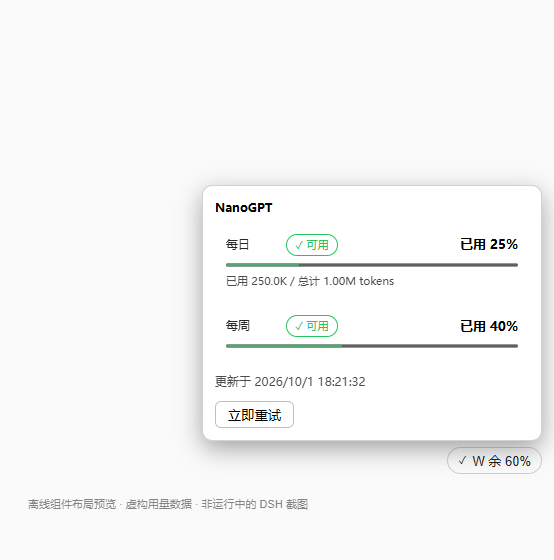
|
|
397
447
|
|
|
398
|
-
|
|
448
|
+
药丸 15 种状态一览(浅色 / 深色)见[开头的能力展示](#15-种状态一眼分清)。
|
|
449
|
+
|
|
450
|
+
截图声明见根目录 [`screenshots.json`](screenshots.json)。这些图都是**当前版本**的离线组件预览(虚构用量、桩网络、无凭据),已随本版本重做,底部水印明确标注「非运行中的 DSH 截图」。真实 DSH Loader、实际账号在线接口与多账户映射仍未验收,截图不代表已通过这些检查。
|
|
399
451
|
|
|
400
452
|
## License & security / 许可与安全
|
|
401
453
|
|
package/lib/client.js
CHANGED
|
@@ -58,7 +58,6 @@ window.__ModuleLoader__.load({
|
|
|
58
58
|
resets: "重置于",
|
|
59
59
|
limited: "已达限额",
|
|
60
60
|
cascadeLimited: "(受更长周期限额连累,暂不可用)",
|
|
61
|
-
retry: "立即重试",
|
|
62
61
|
loading: "正在读取用量…",
|
|
63
62
|
unavailable: "暂不可用",
|
|
64
63
|
planLabel: "套餐",
|
|
@@ -128,14 +127,14 @@ window.__ModuleLoader__.load({
|
|
|
128
127
|
pillNeedGrok: "需登录 —— 可在 设置 → Grok Kit(xAI OAuth)登录或运行 grok login(共享登录文件 ~/.grok/auth.json)。",
|
|
129
128
|
accountLabel: "账户",
|
|
130
129
|
commandcodeManaged: "凭据由 Command Code 提供方插件(设置 → Command Code)管理;本页只读、不保存凭据。用量由本插件直接拉取其计费接口,取用同一凭据来源(凭据服务 COMMANDCODE_API_KEY → 启动环境 → ~/.commandcode/auth.json)。",
|
|
131
|
-
commandcodeHelp: "并行读取 /alpha/billing/credits 和 /alpha/billing/subscriptions(默认 API 地址 https://api.commandcode.ai
|
|
130
|
+
commandcodeHelp: "并行读取 /alpha/billing/credits 和 /alpha/billing/subscriptions(默认 API 地址 https://api.commandcode.ai)。月总额按已知套餐快照推算,未知套餐只显示月剩余;月池耗尽不代表已购/赠送池不可用。显示选中账户的额度(未选择时为默认账户/顶层 Key),可能与实际服务账户不同;插件里自定义 apiBase 不会被跟随。账户切换就在下方「Command Code 账户」区,与药丸弹层同一开关;模型查询额度工具时会同时给出全部账户的余量与当前激活项。",
|
|
132
131
|
grokManaged: "凭据由 dsh-grok-kit / Grok CLI 的 OAuth 登录文件(~/.grok/auth.json)管理;本页只读、不保存凭据、不刷新 token。用量由本插件取同一凭据直连 Grok CLI 计费代理(cli-chat-proxy.grok.com)拉取。",
|
|
133
132
|
grokHelp: "并行读取 /v1/billing?format=credits 与 /v1/settings。creditUsagePercent 是统一用量池的已用百分比(通常为周池,重置于 currentPeriod.end,剩余 = 100 − 已用);套餐名取 subscription_tier_display;已购加量余额 prepaidBalance 以美元显示。API Key(XAI_API_KEY)路线取不到订阅周池,必须 OAuth 登录。",
|
|
134
133
|
ccAccountsTitle: "Command Code 账户",
|
|
135
134
|
ccAccountAuto: "自动轮换",
|
|
136
135
|
ccAccountDefault: "默认账户",
|
|
137
136
|
ccAccountActive: "使用中",
|
|
138
|
-
ccAccountsHint: "切换对 Command Code
|
|
137
|
+
ccAccountsHint: "切换对 Command Code 提供方插件全局生效(与其设置页同一开关);上方用量与药丸同步切换为所选账户的额度。设置页与药丸弹层用的是同一个开关。",
|
|
139
138
|
ccAccountsUnavailable: "账户列表不可用(需要 Command Code 提供方插件在运行)",
|
|
140
139
|
ccUsageAccount: "上方用量:{account}",
|
|
141
140
|
ccUsageAutoNote: "自动轮换时上方用量仍是默认账户(顶层 Key),不跟随实际服务账户",
|
|
@@ -182,7 +181,6 @@ window.__ModuleLoader__.load({
|
|
|
182
181
|
resets: "Resets",
|
|
183
182
|
limited: "Limit reached",
|
|
184
183
|
cascadeLimited: " (blocked by a larger window's limit)",
|
|
185
|
-
retry: "Retry now",
|
|
186
184
|
loading: "Loading usage…",
|
|
187
185
|
unavailable: "Unavailable",
|
|
188
186
|
planLabel: "Plan",
|
|
@@ -251,14 +249,14 @@ window.__ModuleLoader__.load({
|
|
|
251
249
|
pillNeedGrok: "Login required — sign in under Settings → Grok Kit (xAI OAuth) or run grok login (shared login file ~/.grok/auth.json).",
|
|
252
250
|
accountLabel: "Account",
|
|
253
251
|
commandcodeManaged: "Credentials are managed by the Command Code provider plugin (Settings → Command Code); this page is read-only and stores nothing. Usage is fetched directly by this plugin from its billing endpoint, using the same credential sources (credential service COMMANDCODE_API_KEY → launch environment → ~/.commandcode/auth.json).",
|
|
254
|
-
commandcodeHelp: "Parallel requests to /alpha/billing/credits and /alpha/billing/subscriptions (default API base https://api.commandcode.ai). Monthly totals use a known-plan snapshot; unknown plans show remaining credits only. Monthly-pool depletion does not imply purchased/free credits are unusable. Shows the
|
|
252
|
+
commandcodeHelp: "Parallel requests to /alpha/billing/credits and /alpha/billing/subscriptions (default API base https://api.commandcode.ai). Monthly totals use a known-plan snapshot; unknown plans show remaining credits only. Monthly-pool depletion does not imply purchased/free credits are unusable. Shows the selected account's quota (the default/top-level key account when none is selected), which may differ from the serving account; a custom apiBase in the provider plugin is not followed. Account switching lives in the “Command Code accounts” block below — the same switch as the pill popover; the quota tool reports every account plus which one is active.",
|
|
255
253
|
grokManaged: "Credentials are the OAuth login file shared by dsh-grok-kit / Grok CLI (~/.grok/auth.json); this page is read-only — it stores nothing and never refreshes the token. Usage is fetched directly by this plugin from the Grok CLI billing proxy (cli-chat-proxy.grok.com) with the same credential.",
|
|
256
254
|
grokHelp: "Parallel requests to /v1/billing?format=credits and /v1/settings. creditUsagePercent is the USED percentage of the unified usage pool (usually weekly, resetting at currentPeriod.end; remaining = 100 − used). The plan name comes from subscription_tier_display; the purchased top-up balance prepaidBalance is shown in USD. An API key (XAI_API_KEY) cannot read the subscription pool — OAuth sign-in is required.",
|
|
257
255
|
ccAccountsTitle: "Command Code accounts",
|
|
258
256
|
ccAccountAuto: "Automatic (rotation order)",
|
|
259
257
|
ccAccountDefault: "Default account",
|
|
260
258
|
ccAccountActive: "in use",
|
|
261
|
-
ccAccountsHint: "Switching applies globally to the Command Code provider plugin (same switch as its settings page); the usage above
|
|
259
|
+
ccAccountsHint: "Switching applies globally to the Command Code provider plugin (same switch as its settings page); the usage above and the pill follow the selected account. This page and the pill popover share one switch.",
|
|
262
260
|
ccAccountsUnavailable: "Account list unavailable (requires the Command Code provider plugin to be running)",
|
|
263
261
|
ccUsageAccount: "Usage above: {account}",
|
|
264
262
|
ccUsageAutoNote: "with automatic rotation the usage above stays on the default (top-level key) account, not the serving one",
|
|
@@ -377,24 +375,6 @@ window.__ModuleLoader__.load({
|
|
|
377
375
|
if (w.percent >= 71) return { icon: "⚠", badge: "badgeHigh", color: "#eab308", num: null, rank: 2 };
|
|
378
376
|
return { icon: "✓", badge: "badgeOk", color: "#22c55e", num: null, rank: 1 };
|
|
379
377
|
}
|
|
380
|
-
/** tag 圆点色:最差窗口档位色(绿/黄/橙/红);拉取失败红。 */
|
|
381
|
-
function tagColor(entry) {
|
|
382
|
-
if (!entry || entry.state === "loading") return "#94a3b8";
|
|
383
|
-
if (entry.state !== "ok") return "#ef4444";
|
|
384
|
-
if ((entry.windows || []).some((w) => w.status === "rate-limited")) return "#ef4444";
|
|
385
|
-
if (entry.coverage === "partial" || entry.freshness === "stale") return "#eab308";
|
|
386
|
-
const rank = { "#22c55e": 0, "#eab308": 1, "#f97316": 2, "#ef4444": 3 };
|
|
387
|
-
let worst = "#22c55e";
|
|
388
|
-
for (const w of entry.windows || []) {
|
|
389
|
-
const c = usageTier(w).color;
|
|
390
|
-
if (rank[c] > rank[worst]) worst = c;
|
|
391
|
-
}
|
|
392
|
-
return worst;
|
|
393
|
-
}
|
|
394
|
-
/** 数字色:0–70 白(前景),其余随档位。 */
|
|
395
|
-
function numColor(w) {
|
|
396
|
-
return usageTier(w).rank === 1 ? "inherit" : usageTier(w).color;
|
|
397
|
-
}
|
|
398
378
|
/** 最差窗:档位最高者优先;同档时根因(非连坐)优先,再取已用更多者。 */
|
|
399
379
|
function worstWindow(windows) {
|
|
400
380
|
let worst = null;
|
|
@@ -672,14 +652,6 @@ window.__ModuleLoader__.load({
|
|
|
672
652
|
const worst = worstWindow(windows);
|
|
673
653
|
return `${statusText(entry, t)}${worst ? " · " + pillText(worst, windows.length > 1, t) : " · " + t("noUsageData")}`;
|
|
674
654
|
}
|
|
675
|
-
function providerIcon(entry) {
|
|
676
|
-
if (!entry || entry.state === "loading") return "…";
|
|
677
|
-
if ((entry.windows || []).some((w) => w.status === "rate-limited")) return "✕";
|
|
678
|
-
if (entry.state !== "ok") return "!";
|
|
679
|
-
if (entry.coverage === "partial" || entry.freshness === "stale") return "?";
|
|
680
|
-
const worst = worstWindow(entry.windows || []);
|
|
681
|
-
return worst ? usageTier(worst).icon : "?";
|
|
682
|
-
}
|
|
683
655
|
function cacheAge(entry, t) {
|
|
684
656
|
if (!entry || entry.freshness !== "stale" || !canShowUsage(entry)) return null;
|
|
685
657
|
const at = Date.parse(entry.lastSuccessAt);
|
|
@@ -767,7 +739,10 @@ window.__ModuleLoader__.load({
|
|
|
767
739
|
return value;
|
|
768
740
|
};
|
|
769
741
|
const setCommandCodeAccount = (id) => {
|
|
770
|
-
|
|
742
|
+
// "default" 与空串在 Host 端是同一个账户(同一缓存键、同一指纹,见 providerCacheKey):
|
|
743
|
+
// 归一后就不必为「固定到默认账户」多打一次强制刷新。
|
|
744
|
+
const raw = typeof id === "string" ? id.trim() : "";
|
|
745
|
+
const next = raw === "default" ? "" : raw;
|
|
771
746
|
if (disposed || ccAccount === next) return Promise.resolve(snapshot);
|
|
772
747
|
ccAccount = next;
|
|
773
748
|
// 账户变了:旧账户的在途/缓存数据立即失效,强制按新账户重拉。
|
|
@@ -827,11 +802,15 @@ window.__ModuleLoader__.load({
|
|
|
827
802
|
const list = [{ id: "default", label: "default" }];
|
|
828
803
|
const accounts = Array.isArray(value?.accounts) ? value.accounts : [];
|
|
829
804
|
const tasks = Array.isArray(value?.accountEnrollmentTasks) ? value.accountEnrollmentTasks : [];
|
|
805
|
+
const seen = new Set(["default"]);
|
|
830
806
|
accounts.forEach((account, index) => {
|
|
831
807
|
const refName = typeof account?.apiKeyEnv === "string" && account.apiKeyEnv.trim() !== "" ? account.apiKeyEnv.trim() : void 0;
|
|
832
808
|
// 与 slots() 一致:无凭据引用的槽位不显示;登记任务未完成的账户暂不可选。
|
|
833
809
|
if (refName === void 0) return;
|
|
810
|
+
// 配置被手改出重复引用名时只列一次:否则同一账户出现两个选项,切换后读的还是同一份额度。
|
|
811
|
+
if (seen.has(refName)) return;
|
|
834
812
|
if (tasks.some((task) => task?.ref === refName && task.phase !== "naming")) return;
|
|
813
|
+
seen.add(refName);
|
|
835
814
|
list.push({ id: refName, label: typeof account.label === "string" && account.label.trim() !== "" ? account.label.trim() : `Account ${index + 2}` });
|
|
836
815
|
});
|
|
837
816
|
return list;
|
|
@@ -851,6 +830,10 @@ window.__ModuleLoader__.load({
|
|
|
851
830
|
let disposed = false;
|
|
852
831
|
const listeners = new Set();
|
|
853
832
|
let state = { status: "idle", accounts: [], activeId: "", revision: null, writable: false, baseActive: "", switching: false, error: null };
|
|
833
|
+
// 设置页与药丸弹层共用同一个控制器,可能同时驱动它:`loadSequence` 标记「哪一次读取才是当前的」,
|
|
834
|
+
// `inflightLoad` 把同一代的并发 load 合并成一次 describe。没有这两样时,切换账户(mutate)在途
|
|
835
|
+
// 期间返回的旧 describe 会把 activeId/revision 覆盖回切换前的快照,两处界面一起显示旧账户。
|
|
836
|
+
let loadSequence = 0, inflightLoad = null;
|
|
854
837
|
const emit = () => { for (const fn of [...listeners]) fn(state); };
|
|
855
838
|
const parseRow = (row) => {
|
|
856
839
|
const accounts = commandCodeAccountList(row?.value);
|
|
@@ -858,18 +841,29 @@ window.__ModuleLoader__.load({
|
|
|
858
841
|
};
|
|
859
842
|
const load = async (keepError = false) => {
|
|
860
843
|
if (disposed) return state;
|
|
844
|
+
// 同一代的并发 load 合并:两处界面同时挂载时只发一次 describe。
|
|
845
|
+
if (inflightLoad?.sequence === loadSequence) return inflightLoad.promise;
|
|
846
|
+
const sequence = ++loadSequence;
|
|
861
847
|
state = { ...state, status: "loading", error: keepError ? state.error : null }; emit();
|
|
862
|
-
|
|
863
|
-
|
|
864
|
-
|
|
865
|
-
|
|
866
|
-
|
|
867
|
-
|
|
868
|
-
|
|
869
|
-
|
|
870
|
-
|
|
871
|
-
|
|
872
|
-
|
|
848
|
+
const task = (async () => {
|
|
849
|
+
try {
|
|
850
|
+
const response = await describe();
|
|
851
|
+
if (!response?.ok) throw new Error(response?.error?.message || "settings describe failed");
|
|
852
|
+
// 切换账户(mutate)或更晚的 load 已经给出更新的状态:这次的结果一律作废,
|
|
853
|
+
// 既不用旧快照覆盖,也不把状态留在 loading(mutate 那边已写回 ready)。
|
|
854
|
+
if (disposed || sequence !== loadSequence) return state;
|
|
855
|
+
const row = response.value?.namespaces?.find((candidate) => candidate?.ns === COMMANDCODE_SETTINGS_NS);
|
|
856
|
+
if (!row) throw new Error("Command Code settings namespace not found");
|
|
857
|
+
state = { ...state, status: "ready", writable: response.value.writable === true, ...parseRow(row) };
|
|
858
|
+
} catch (error) {
|
|
859
|
+
if (disposed || sequence !== loadSequence) return state;
|
|
860
|
+
state = { ...state, status: "unavailable", error: String(error?.message || error) };
|
|
861
|
+
}
|
|
862
|
+
emit();
|
|
863
|
+
return state;
|
|
864
|
+
})();
|
|
865
|
+
inflightLoad = { sequence, promise: task };
|
|
866
|
+
try { return await task; } finally { if (inflightLoad?.promise === task) inflightLoad = null; }
|
|
873
867
|
};
|
|
874
868
|
const switchTo = async (id) => {
|
|
875
869
|
if (disposed || state.status !== "ready" || state.switching) return state;
|
|
@@ -882,7 +876,10 @@ window.__ModuleLoader__.load({
|
|
|
882
876
|
try {
|
|
883
877
|
const response = await mutate(ops, state.revision);
|
|
884
878
|
if (!response?.ok) throw new Error(response?.error?.message || "settings mutate failed");
|
|
885
|
-
|
|
879
|
+
// 写入成功就是权威状态:作废在途的旧 describe,并把 status 明确拉回 ready
|
|
880
|
+
// (load 开始时置的 loading 不该留在这里)。
|
|
881
|
+
loadSequence++;
|
|
882
|
+
state = { ...state, status: "ready", switching: false, ...parseRow(response.value) };
|
|
886
883
|
} catch (error) {
|
|
887
884
|
const message = String(error?.message || error);
|
|
888
885
|
state = { ...state, switching: false, error: message };
|
|
@@ -899,13 +896,20 @@ window.__ModuleLoader__.load({
|
|
|
899
896
|
};
|
|
900
897
|
}
|
|
901
898
|
|
|
902
|
-
|
|
899
|
+
// 未注入 cc(提供方插件未运行)时给 useSyncExternalStore 一对稳定引用:每次都新建函数
|
|
900
|
+
// 会让 React 反复重新订阅。
|
|
901
|
+
const NO_CC_STATE = () => null;
|
|
902
|
+
const NO_CC_SUBSCRIBE = () => () => {};
|
|
903
|
+
/** 弹层与设置页共用的 Command Code 账户区:自动轮换 + 默认账户 + 各额外账户。 */
|
|
903
904
|
function CommandCodeAccountSwitch({ cc, ccState, t }) {
|
|
904
905
|
if (!cc || !ccState) return null;
|
|
906
|
+
// 状态没 ready(正在读账户配置 / 不可用)时按钮不可点:switchTo 在这种状态下会直接返回,
|
|
907
|
+
// 可点的按钮换来的只是「点了没反应」。
|
|
908
|
+
const locked = ccState.switching || ccState.status !== "ready" || !ccState.writable;
|
|
905
909
|
const optionButton = (id, labelText) => h("button", {
|
|
906
910
|
type: "button",
|
|
907
911
|
onClick: () => void cc.switchTo(id),
|
|
908
|
-
disabled:
|
|
912
|
+
disabled: locked,
|
|
909
913
|
"aria-pressed": ccState.activeId === id,
|
|
910
914
|
style: {
|
|
911
915
|
display: "flex", alignItems: "center", gap: 6, width: "100%", textAlign: "left",
|
|
@@ -913,7 +917,7 @@ window.__ModuleLoader__.load({
|
|
|
913
917
|
border: `1px solid ${ccState.activeId === id ? "rgba(59,130,246,.55)" : "rgba(128,128,128,.3)"}`,
|
|
914
918
|
background: ccState.activeId === id ? "rgba(59,130,246,.10)" : "transparent",
|
|
915
919
|
color: "inherit", font: "inherit",
|
|
916
|
-
cursor:
|
|
920
|
+
cursor: locked ? "default" : "pointer"
|
|
917
921
|
}
|
|
918
922
|
},
|
|
919
923
|
h("span", { "aria-hidden": "true" }, ccState.activeId === id ? "●" : "○"),
|
|
@@ -922,10 +926,13 @@ window.__ModuleLoader__.load({
|
|
|
922
926
|
);
|
|
923
927
|
// 账户多时这一坨会把上方的额度顶出视野:折进 details,summary 只留「当前账户 + 数量」,
|
|
924
928
|
// 展开后列表自身限高滚动,弹层高度不随账户数增长。
|
|
925
|
-
const
|
|
926
|
-
: ccState.activeId === "" ? t("ccAccountAuto")
|
|
929
|
+
const activeName = ccState.status !== "ready" ? null
|
|
927
930
|
: ccState.activeId === "default" ? t("ccAccountDefault")
|
|
928
931
|
: (ccState.accounts.find(account => account.id === ccState.activeId)?.label ?? ccState.activeId);
|
|
932
|
+
// summary 直接回答「现在是哪一个账户」:固定账户写账户名 + 使用中,自动轮换写模式名。
|
|
933
|
+
const activeLabel = ccState.status !== "ready" ? null
|
|
934
|
+
: ccState.activeId === "" ? t("ccAccountAuto")
|
|
935
|
+
: `${activeName} · ${t("ccAccountActive")}`;
|
|
929
936
|
const optionCount = ccState.status === "ready" ? ccState.accounts.length + 1 : 0;
|
|
930
937
|
return h("details", { style: { marginTop: 10, paddingTop: 8, borderTop: "1px solid rgba(128,128,128,.25)" } },
|
|
931
938
|
h("summary", { style: { cursor: "pointer", fontSize: 11, opacity: 0.8 } },
|
|
@@ -1128,7 +1135,8 @@ window.__ModuleLoader__.load({
|
|
|
1128
1135
|
const root = react.useRef(null);
|
|
1129
1136
|
const retry = react.useRef(() => {});
|
|
1130
1137
|
// Command Code 账户区:cc 由装配层注入(提供方插件未运行时为 null,区块整体隐藏)。
|
|
1131
|
-
|
|
1138
|
+
// 兜底用模块级稳定引用(NO_CC_*):内联箭头函数每次渲染都是新引用,会让 React 反复重新订阅。
|
|
1139
|
+
const ccState = react.useSyncExternalStore(cc ? cc.subscribe : NO_CC_SUBSCRIBE, cc ? cc.getSnapshot : NO_CC_STATE, cc ? cc.getSnapshot : NO_CC_STATE);
|
|
1132
1140
|
react.useEffect(() => { if (open && cc) void cc.load(); }, [open, cc]);
|
|
1133
1141
|
// 挂载即读一次账户配置:提供方插件固定了账户时,药丸本体不必等弹层打开就跟随。
|
|
1134
1142
|
react.useEffect(() => { if (providerId === "commandcode" && cc) void cc.load(); }, [providerId, cc]);
|
|
@@ -1205,7 +1213,9 @@ window.__ModuleLoader__.load({
|
|
|
1205
1213
|
// 药丸只回答「订阅现在怎么样」:状态图形 + 至多一个词。正常时只剩彩色余量条——
|
|
1206
1214
|
// 厂商名就是旁边的模型选择器,具体百分比点开再看;文字与数字都收进 title / aria-label。
|
|
1207
1215
|
const tip = `${label}: ${st.title}${st.key === "ok" || st.key === "low" || st.key === "tight" || st.key === "blocked" || st.key === "degraded" ? " · " + summary : ""}${expiring && st.key !== "cookie" && st.key !== "blocked" ? " · " + expiry.label : ""}`;
|
|
1208
|
-
|
|
1216
|
+
// 有窗口就画迷你余量条:Cookie 到期等行动项通过 short 文案表达,不牺牲余量信息;
|
|
1217
|
+
// 只有没有任何额度窗口时(需配置 / 失败 / 仅余额)才退回状态字形。
|
|
1218
|
+
const glyph = windows.length ? miniBars(windows, degraded) : statusGlyph(st.color, st.icon, 16);
|
|
1209
1219
|
return h("span", { ref: root, style: { position: "relative", display: "inline-flex", alignItems: "center" } },
|
|
1210
1220
|
h("button", {
|
|
1211
1221
|
type: "button",
|
|
@@ -1327,8 +1337,11 @@ window.__ModuleLoader__.load({
|
|
|
1327
1337
|
}
|
|
1328
1338
|
return patch;
|
|
1329
1339
|
}
|
|
1330
|
-
function SubusageSection({ usageStore, t, getLocale }) {
|
|
1340
|
+
function SubusageSection({ usageStore, t, getLocale, cc }) {
|
|
1331
1341
|
const result = react.useSyncExternalStore(usageStore.subscribe, usageStore.getSnapshot, usageStore.getSnapshot);
|
|
1342
|
+
// Command Code 账户区:与弹层共用同一个控制器与组件;cc 由装配层注入,
|
|
1343
|
+
// 提供方插件未运行时为 undefined,区块整体隐藏。
|
|
1344
|
+
const ccState = react.useSyncExternalStore(cc ? cc.subscribe : NO_CC_SUBSCRIBE, cc ? cc.getSnapshot : NO_CC_STATE, cc ? cc.getSnapshot : NO_CC_STATE);
|
|
1332
1345
|
const [tab, setTab] = react.useState(initialTab);
|
|
1333
1346
|
const [draft, setDraft] = react.useState(() => draftFor(result.settings, tab));
|
|
1334
1347
|
const [dirty, setDirty] = react.useState(false);
|
|
@@ -1500,6 +1513,21 @@ window.__ModuleLoader__.load({
|
|
|
1500
1513
|
void usageStore.refresh([usageId], false).catch(() => {});
|
|
1501
1514
|
return deactivate;
|
|
1502
1515
|
}, [usageStore, usageId]);
|
|
1516
|
+
// 设置页里的账户区与弹层共用同一个控制器:挂载即读一次账户配置,切到 Command Code
|
|
1517
|
+
// 那一屏就有数据可显示(读取只是一次 settings describe,不发任何计费请求)。
|
|
1518
|
+
react.useEffect(() => {
|
|
1519
|
+
if (!cc) return;
|
|
1520
|
+
void cc.load();
|
|
1521
|
+
}, [cc]);
|
|
1522
|
+
// 账户区 ready 后把当前固定账户同步为显示账户:设置页里切换账户后,上方面板与药丸
|
|
1523
|
+
// 一起改看所选账户的额度(与弹层的同步行为一致)。自动轮换(activeId 为空)同步为
|
|
1524
|
+
// 默认账户,store 内部对相同账户去重,不产生多余请求。
|
|
1525
|
+
react.useEffect(() => {
|
|
1526
|
+
if (usageId !== "commandcode" || !ccState || ccState.status !== "ready") return;
|
|
1527
|
+
// 旧 store stub / 更早版本的客户端装配没有这个方法:缺了就不同步,不影响其他功能。
|
|
1528
|
+
if (typeof usageStore.setCommandCodeAccount !== "function") return;
|
|
1529
|
+
void usageStore.setCommandCodeAccount(ccState.activeId).catch(() => {});
|
|
1530
|
+
}, [usageStore, usageId, ccState && ccState.status, ccState && ccState.activeId]);
|
|
1503
1531
|
const meta = PROVIDER_META[tab];
|
|
1504
1532
|
const source = entry && entry.keySource || "none";
|
|
1505
1533
|
// auth-file 有三家(Grok / Codex / Command Code),凭据来源文件各不相同,不能只特判一家。
|
|
@@ -1619,6 +1647,9 @@ window.__ModuleLoader__.load({
|
|
|
1619
1647
|
h("div", { className: "subusage-provider-tabs", role: "tablist", "aria-label": text("模型商", "Providers"), style: { display: "flex", flexWrap: "wrap", gap: 4, marginTop: 14 } },
|
|
1620
1648
|
visibleIds.map((id, index) => {
|
|
1621
1649
|
const e = entries.find((item) => item.providerId === id), active = usageId === id;
|
|
1650
|
+
// 标签圆标与面板/药丸读同一个 computeStatus:缺凭据是蓝 ⚙ 而不是红 !,
|
|
1651
|
+
// 无窗口成功是中性 ℹ 而不是绿 ?(没有额度窗口不能默认标绿)。
|
|
1652
|
+
const tabStatus = computeStatus(e, { failed: e && e.state !== "ok" ? e.error || e.state : null, failState: e && e.state, providerId: id, t, getLocale });
|
|
1622
1653
|
return h("button", { key: id, id: `subusage-tab-${id}`, role: "tab", type: "button", tabIndex: active || (!visibleIds.includes(usageId) && index === 0) ? 0 : -1, "aria-selected": active,
|
|
1623
1654
|
"aria-controls": "subusage-provider-panel", title: `${PROVIDER_META[id].label}: ${providerDescription(e, t)}`, "aria-label": `${PROVIDER_META[id].short}: ${providerDescription(e, t)}`,
|
|
1624
1655
|
onClick: () => chooseUsage(id), onKeyDown: (event) => {
|
|
@@ -1629,7 +1660,7 @@ window.__ModuleLoader__.load({
|
|
|
1629
1660
|
event.preventDefault(); chooseUsage(visibleIds[next]);
|
|
1630
1661
|
const button = event.currentTarget.parentElement.querySelectorAll('[role="tab"]')[next]; if (button) button.focus();
|
|
1631
1662
|
}, style: { ...btnStyle, display: "inline-flex", alignItems: "center", gap: 6, minWidth: 0, padding: "5px 12px 5px 8px", whiteSpace: "nowrap", fontSize: 12, fontWeight: active ? 600 : 400, borderRadius: 999, border: "1px solid transparent", background: active ? alpha(INFO, ".16") : "transparent" }
|
|
1632
|
-
}, statusGlyph(
|
|
1663
|
+
}, statusGlyph(tabStatus.color, tabStatus.icon, 14), PROVIDER_META[id].short);
|
|
1633
1664
|
})),
|
|
1634
1665
|
!!usageId ? h("section", { role: "tabpanel", id: "subusage-provider-panel", "aria-label": usageMeta.label, style: { marginTop: 12, border: "1px solid rgba(128,128,128,.25)", borderRadius: 14, padding: 16 } },
|
|
1635
1666
|
h("div", { style: { display: "flex", alignItems: "center", gap: 8 } },
|
|
@@ -1643,13 +1674,18 @@ window.__ModuleLoader__.load({
|
|
|
1643
1674
|
h("span", { style: { flex: 1, minWidth: 150, fontSize: 12 } }, usageAction === "mimo-relogin" ? text("Cookie 已过期,重新登录即可恢复。", "Cookie expired — sign in again to restore.") : usageAction === "mimo-login" ? text("需要登录 MiMo(或 Cookie 即将到期)。", "MiMo sign-in needed (or the cookie is about to expire).") : text("这家还没有可用的凭据。", "No usable credentials for this provider.")),
|
|
1644
1675
|
usageAction !== "credentials" ? h("button", { type: "button", style: primary, disabled: busy || loginActive, onClick: startLogin }, usageAction === "mimo-relogin" ? text("重新登录", "Sign in again") : text("登录并自动导入", "Sign in & import")) : null,
|
|
1645
1676
|
h("button", { type: "button", style: usageAction === "credentials" ? primary : btnStyle, disabled: busy, onClick: () => revealEditor(usageId) }, usageAction === "credentials" ? text("配置凭据", "Configure credentials") : text("手动填写", "Enter manually"))) : null,
|
|
1646
|
-
|
|
1677
|
+
// 无窗口时的占位只给「成功但既无窗口也无余额」:余额/加载/需配置/失败等状态横幅已经说明,不再叠加「暂无额度数据」。
|
|
1678
|
+
canShowUsage(usageEntry) && (usageEntry.windows || []).length ? UsageWindowList({ windows: usageEntry.windows, t, getLocale, uncertain: usageEntry.coverage === "partial" || usageEntry.freshness === "stale" || usageEntry.state !== "ok" })
|
|
1679
|
+
: usageStatus.key === "balance" && !(usageStatus.entry && balanceText(usageStatus.entry, t)) ? h("p", { style: { opacity: .75 } }, t("noUsageData")) : null,
|
|
1647
1680
|
canShowUsage(usageEntry) && usageEntry.extras && usageEntry.extras.some((x) => x.kind !== "plan")
|
|
1648
1681
|
? h("div", { style: { marginTop: 10, padding: "6px 12px", borderRadius: 10, background: "rgba(128,128,128,.07)" } },
|
|
1649
1682
|
usageEntry.extras.filter((x) => x.kind !== "plan").map((x) => h("div", { key: x.kind, style: { display: "flex", justifyContent: "space-between", gap: 12, padding: "3px 0" } },
|
|
1650
1683
|
h("span", { style: { opacity: 0.7 } }, extraLabel(x, t)),
|
|
1651
1684
|
h("strong", { style: { fontWeight: 600, textAlign: "right" } }, x.value))))
|
|
1652
1685
|
: null,
|
|
1686
|
+
// 账户区与药丸弹层同一个组件、同一个控制器:设置页里也能切换 activeAccount,
|
|
1687
|
+
// 不必再跳去 Command Code 提供方插件的设置页。提供方插件未运行时整区降级。
|
|
1688
|
+
usageId === "commandcode" ? h(CommandCodeAccountSwitch, { cc, ccState, t }) : null,
|
|
1653
1689
|
usageEntry?.lastAttemptAt ? h("p", { style: { opacity: .65 } }, `${t("lastUpdated")} ${new Date(usageEntry.lastAttemptAt).toLocaleString(getLocale())}`) : null
|
|
1654
1690
|
) : null,
|
|
1655
1691
|
providerManagement
|
|
@@ -1702,7 +1738,7 @@ window.__ModuleLoader__.load({
|
|
|
1702
1738
|
ctx.inject(["remote.settings"], (settingsCtx) => { ccSettingsNamespace = settingsCtx.remote.settings; });
|
|
1703
1739
|
ctx.effect(() => () => cc.dispose(), "dsh-subusage: commandcode account switch");
|
|
1704
1740
|
try {
|
|
1705
|
-
ctx.slots.inject("settings.section", () => ctx.slots.register({ name: "settings.section", id: "subusage", order: 22, label: () => t("nav"), inject: () => ({ usageStore, t, getLocale }) }, SubusageSection));
|
|
1741
|
+
ctx.slots.inject("settings.section", () => ctx.slots.register({ name: "settings.section", id: "subusage", order: 22, label: () => t("nav"), inject: () => ({ usageStore, t, getLocale, cc }) }, SubusageSection));
|
|
1706
1742
|
} catch (error) { console.error("[dsh-subusage] 设置页注册失败:", error); }
|
|
1707
1743
|
ctx.inject(["modelDirectories"], (scope) => {
|
|
1708
1744
|
try {
|
package/lib/index.js
CHANGED
|
@@ -162,6 +162,9 @@ const VOLC_SECRET_KEY_ENV = "VOLC_SECRETKEY";
|
|
|
162
162
|
// 与 @mars-sea/dsh-commandcode-provider 一致的 CLI 版本标识(其常量 COMMAND_CODE_CLI_VERSION)。
|
|
163
163
|
const COMMAND_CODE_CLI_VERSION = "1.73.0";
|
|
164
164
|
const COMMAND_CODE_API_BASE = "https://api.commandcode.ai";
|
|
165
|
+
// 提供方插件(@mars-sea/dsh-commandcode-provider)注册的 settings namespace:账户列表、当前固定账户
|
|
166
|
+
// 与登记任务都在这里。Host 端只读它,不写(切换动作由 Client 走 settings remote)。
|
|
167
|
+
const COMMAND_CODE_SETTINGS_NS = "llm-commandcode";
|
|
165
168
|
const COMMAND_CODE_AUTH_FILE = join(homedir(), ".commandcode", "auth.json");
|
|
166
169
|
// 月总额快照与提供方插件 KNOWN_SUBSCRIPTION_PLANS 对齐(而非月剩余余额)。
|
|
167
170
|
// 来源:https://github.com/Mars-Sea/dsh-commandcode-provider/blob/main/src/capabilities.ts
|
|
@@ -880,6 +883,23 @@ export const subUsageRemote = {
|
|
|
880
883
|
]
|
|
881
884
|
};
|
|
882
885
|
|
|
886
|
+
/**
|
|
887
|
+
* 某条 provider 的缓存键。Command Code 是多账户的:额外账户(凭据引用名)各占一份缓存,
|
|
888
|
+
* 否则账户 A 的结果会被账户 B 顶掉——每读一次全部账户就把前面几家的缓存驱逐一遍,
|
|
889
|
+
* 60 秒 TTL 形同虚设。默认账户(""/"default")与其它 provider 仍按 id 单键。
|
|
890
|
+
*/
|
|
891
|
+
function providerCacheKey(id, account = "") {
|
|
892
|
+
return id === "commandcode" && account !== "" && account !== "default" ? `${id}@${account}` : id;
|
|
893
|
+
}
|
|
894
|
+
/**
|
|
895
|
+
* 把 no-key 文案里的**凭据引用名**(`apiKeyEnv`)换成账户标签。
|
|
896
|
+
* 对外额度视图承诺不返回继承变量名/凭据引用,而错误文案里嵌了引用名(「...无引用 COMMANDCODE_ACCOUNT_WORK」);
|
|
897
|
+
* Client 通道(read/refresh)**保留**引用名——那是本机界面,用户要靠它定位该往哪个 ref 里写凭据。
|
|
898
|
+
*/
|
|
899
|
+
function redactAccountRef(message, ref, label) {
|
|
900
|
+
if (typeof message !== "string" || typeof ref !== "string" || ref === "" || !message.includes(ref)) return message;
|
|
901
|
+
return message.split(ref).join(label);
|
|
902
|
+
}
|
|
883
903
|
// 可注入仅供隔离测试;生产仍由当前 manifest 的 Cordis ctx.plugin 注册。
|
|
884
904
|
export class SubUsageService extends TypertRemoteService {
|
|
885
905
|
constructor(ctx, options = {}) {
|
|
@@ -899,7 +919,12 @@ export class SubUsageService extends TypertRemoteService {
|
|
|
899
919
|
// 默认账户仍走上面的 envName 链(凭据服务 → 启动环境 → ~/.commandcode/auth.json)。
|
|
900
920
|
this.accountCredentials = options.resolveAccountCredentials ?? (async ref => await ctx.get("credentials")?.resolve(credentialRef(ref)));
|
|
901
921
|
this.accountEnvironment = options.resolveAccountEnvironment ?? (ref => launchEnvironmentOf(ctx).get(ref));
|
|
902
|
-
|
|
922
|
+
// Command Code 多账户:账户列表与当前固定账户由提供方插件写在它自己的 settings namespace
|
|
923
|
+
// (llm-commandcode)里,Host 端经 settings 服务读取。服务未挂载(提供方插件未运行)时读不到,
|
|
924
|
+
// 工具退回单账户模式;options.settingsService 供隔离测试注入。
|
|
925
|
+
this.settingsService = options.settingsService;
|
|
926
|
+
try { ctx.inject?.(["settings"], (scope) => { if (scope.settings !== undefined) this.settingsService = scope.settings; }); } catch { /* settings 服务不可用:保持单账户模式 */ }
|
|
927
|
+
this.authFile = options.resolveAuthFile ?? (async () => commandCodeAuthFileKey(this.io));
|
|
903
928
|
// SuperGrok 只读共享登录文件(~/.grok/auth.json 等)取 OAuth Bearer;可注入仅供隔离测试。
|
|
904
929
|
this.grokAuth = options.resolveGrokAuth ?? (async () => grokAuthFileCredentials(this.io));
|
|
905
930
|
// Codex 只读共享登录文件($CODEX_HOME/auth.json 或 ~/.codex/auth.json)取 OAuth access token。
|
|
@@ -1129,6 +1154,49 @@ export class SubUsageService extends TypertRemoteService {
|
|
|
1129
1154
|
if (usageError) data.usageError = usageError;
|
|
1130
1155
|
return data;
|
|
1131
1156
|
}
|
|
1157
|
+
/**
|
|
1158
|
+
* Command Code 的多账户清单与当前激活项,读自提供方插件的 settings namespace(llm-commandcode)。
|
|
1159
|
+
* id/label 规则与 Client 的 commandCodeAccountList 完全一致:默认账户固定 id "default"(label 用人读
|
|
1160
|
+
* 文案),额外账户 id 取其凭据引用名(apiKeyEnv)、label 空白回退 `Account N`;无凭据引用与登记未完成
|
|
1161
|
+
* (phase 非 naming)的账户不列。
|
|
1162
|
+
* 与提供方插件 slots() 的**唯一差异**:它额外支持 `accounts[].apiKey` 字面 Key 账户(id `account-N`),
|
|
1163
|
+
* 本插件**不支持**——那种 Key 只存在提供方自己的配置里,按引用名解析不到(identity() 也没有字面 Key
|
|
1164
|
+
* 分支),列出来只会选中即 no-key。Client 侧同样跳过,两端口径因此保持一致。
|
|
1165
|
+
* activeAccount 为空、为 "auto" 或指向已消失的账户时都按**自动轮换**处理(与其 preferredId 同义)。
|
|
1166
|
+
* 读不到(settings 服务未挂载 / namespace 不存在)返回 null,调用方退回单账户模式。
|
|
1167
|
+
*/
|
|
1168
|
+
commandCodeAccountPlan() {
|
|
1169
|
+
try {
|
|
1170
|
+
// redactSecrets:本插件只读这几个非秘密字段,但提供方配置里可能存在手写的字面 apiKey
|
|
1171
|
+
// (role "secret");带上它就只剥离秘密字段(apiKeyEnv 是 credential-ref,不受影响),
|
|
1172
|
+
// 字面 Key 不会进到本插件的内存里。
|
|
1173
|
+
const rows = this.settingsService?.describe?.({ redactSecrets: true });
|
|
1174
|
+
const row = Array.isArray(rows) ? rows.find(item => item?.ns === COMMAND_CODE_SETTINGS_NS) : undefined;
|
|
1175
|
+
if (!row) return null;
|
|
1176
|
+
const value = row.value && typeof row.value === "object" ? row.value : {};
|
|
1177
|
+
const tasks = Array.isArray(value.accountEnrollmentTasks) ? value.accountEnrollmentTasks : [];
|
|
1178
|
+
const accounts = [{ id: "default", label: "默认账户" }];
|
|
1179
|
+
const seen = new Set(["default"]);
|
|
1180
|
+
for (const [index, account] of (Array.isArray(value.accounts) ? value.accounts : []).entries()) {
|
|
1181
|
+
const ref = typeof account?.apiKeyEnv === "string" && account.apiKeyEnv.trim() !== "" ? account.apiKeyEnv.trim() : void 0;
|
|
1182
|
+
if (ref === void 0) continue;
|
|
1183
|
+
// 同一个引用名出现两次(配置被手改过)时只列一次:否则同账户会出两行、还会多打一份计费请求。
|
|
1184
|
+
if (seen.has(ref)) continue;
|
|
1185
|
+
if (tasks.some(task => task?.ref === ref && task.phase !== "naming")) continue;
|
|
1186
|
+
seen.add(ref);
|
|
1187
|
+
accounts.push({ id: ref, label: typeof account.label === "string" && account.label.trim() !== "" ? account.label.trim() : `Account ${index + 2}` });
|
|
1188
|
+
}
|
|
1189
|
+
const raw = typeof value.activeAccount === "string" ? value.activeAccount.trim() : "";
|
|
1190
|
+
const activeId = raw !== "" && accounts.some(account => account.id === raw) ? raw : "";
|
|
1191
|
+
return { mode: activeId === "" ? "auto" : "fixed", activeId, accounts: accounts.map(account => ({ ...account, active: account.id === activeId })) };
|
|
1192
|
+
} catch { return null; }
|
|
1193
|
+
}
|
|
1194
|
+
/** 按 id 失效一家 provider 的**全部账户**缓存:凭据/开关变化不能只影响默认账户那一条。 */
|
|
1195
|
+
invalidateProvider(id) {
|
|
1196
|
+
const keys = new Set([id]);
|
|
1197
|
+
for (const map of [this.cache, this.inflight, this.fingerprints, this.generations]) for (const key of map.keys()) if (key.startsWith(`${id}@`)) keys.add(key);
|
|
1198
|
+
for (const key of keys) { this.generations.set(key, (this.generations.get(key) ?? 0) + 1); this.cache.delete(key); this.inflight.delete(key); }
|
|
1199
|
+
}
|
|
1132
1200
|
base(id, source, settings, account = "") {
|
|
1133
1201
|
// MiMo 会话 Cookie 自签发起 24 小时有效;到期时间随每条 entry 下发,供药丸与设置页倒计时。
|
|
1134
1202
|
const expiresAt = id === "xiaomi-token-plan-cn" ? isoStamp(settings?.xiaomi?.expiresAt) : null;
|
|
@@ -1137,7 +1205,10 @@ export class SubUsageService extends TypertRemoteService {
|
|
|
1137
1205
|
return { providerId: id, label: PROVIDERS[id].label, envName: PROVIDERS[id].envName, keySource: source, apiDetected: source === "none" ? null : true, coverage: "partial", freshness: "unknown", lastSuccessAt: null, lastAttemptAt: new Date(this.now()).toISOString(), retryable: false, retainPrevious: false, ...shown, ...(expiresAt ? { cookieExpiresAt: expiresAt } : {}) };
|
|
1138
1206
|
}
|
|
1139
1207
|
async provider(id, settings, force, account = "") {
|
|
1140
|
-
|
|
1208
|
+
// 缓存/inflight/fingerprint 都按**账户**分键:Command Code 的多账户各占一份,
|
|
1209
|
+
// 读取全部账户时不会互相驱逐缓存(见 providerCacheKey)。
|
|
1210
|
+
const cacheKey = providerCacheKey(id, account);
|
|
1211
|
+
const startedGeneration = this.generations.get(cacheKey) ?? 0;
|
|
1141
1212
|
let identity;
|
|
1142
1213
|
// identity 解析依赖凭据服务/登录文件读取,可能像 HTTP 一样永久挂起:套上与 fetchJson 同量级
|
|
1143
1214
|
// 的超时。超时不等于凭据失效——不清 Cookie、不用 subusage/credentials(client 的
|
|
@@ -1147,25 +1218,25 @@ export class SubUsageService extends TypertRemoteService {
|
|
|
1147
1218
|
try { identity = await withTimeout(this.identity(id, settings, account), this.identityTimeoutMs, () => failure("subusage/identity-timeout", `凭据解析超时(${Math.round(this.identityTimeoutMs / 1000)} 秒无响应):凭据服务或登录文件读取未返回,请稍后重试`)); }
|
|
1148
1219
|
catch (e) {
|
|
1149
1220
|
const timedOut = e?.code === "subusage/identity-timeout";
|
|
1150
|
-
this.cache.delete(
|
|
1221
|
+
this.cache.delete(cacheKey);
|
|
1151
1222
|
return { ...this.base(id, "none", settings, account), state: "error", errorCode: timedOut ? "subusage/identity-timeout" : "subusage/credentials", error: timedOut ? e.message : "无法解析凭据" };
|
|
1152
1223
|
}
|
|
1153
1224
|
if (this.disposed) throw failure("subusage/disposed", "服务已卸载");
|
|
1154
|
-
if (startedGeneration !== (this.generations.get(
|
|
1225
|
+
if (startedGeneration !== (this.generations.get(cacheKey) ?? 0)) return this.provider(id, this.load(), force, account);
|
|
1155
1226
|
if (!providerEnabled(settings, id)) {
|
|
1156
|
-
this.cache.delete(
|
|
1227
|
+
this.cache.delete(cacheKey); this.inflight.delete(cacheKey);
|
|
1157
1228
|
return { ...this.base(id, identity.source, settings, account), state: "disabled", apiDetected: !!identity.key, windows: [], extras: [] };
|
|
1158
1229
|
}
|
|
1159
1230
|
// fingerprint 计入账户选择:切换账户后同 id 缓存/inflight 不串账(不同账户 key 必不同);
|
|
1160
1231
|
// 空串与 "default" 同为默认账户,归一后共享缓存。
|
|
1161
1232
|
const fingerprint = hash([identity.key ?? "", identity.secret ?? "", identity.source, settings.keyModes[id], id === "zai-coding-cn" ? settings.zai : null, id === "commandcode" ? (account && account !== "default" ? account : "default") : null]);
|
|
1162
|
-
if (this.fingerprints.has(
|
|
1163
|
-
this.fingerprints.set(
|
|
1164
|
-
const generation = this.generations.get(
|
|
1165
|
-
const cached = this.cache.get(
|
|
1166
|
-
if (cached && cached.fingerprint !== fingerprint) this.cache.delete(
|
|
1233
|
+
if (this.fingerprints.has(cacheKey) && this.fingerprints.get(cacheKey) !== fingerprint) this.generations.set(cacheKey, (this.generations.get(cacheKey) ?? 0) + 1);
|
|
1234
|
+
this.fingerprints.set(cacheKey, fingerprint);
|
|
1235
|
+
const generation = this.generations.get(cacheKey) ?? 0;
|
|
1236
|
+
const cached = this.cache.get(cacheKey);
|
|
1237
|
+
if (cached && cached.fingerprint !== fingerprint) this.cache.delete(cacheKey);
|
|
1167
1238
|
const previous = cached?.fingerprint === fingerprint ? cached : undefined;
|
|
1168
|
-
const active = this.inflight.get(
|
|
1239
|
+
const active = this.inflight.get(cacheKey);
|
|
1169
1240
|
if (active?.fingerprint === fingerprint && active.generation === generation) return active.promise;
|
|
1170
1241
|
const now = this.now();
|
|
1171
1242
|
const resetDue = previous?.entry.windows?.some(w => Number.isFinite(Date.parse(w.resetsAt)) && Date.parse(w.resetsAt) > previous.at && Date.parse(w.resetsAt) <= now);
|
|
@@ -1187,12 +1258,12 @@ export class SubUsageService extends TypertRemoteService {
|
|
|
1187
1258
|
failures++;
|
|
1188
1259
|
if (temporary) retryAt = this.now() + Math.max(e.details?.retryAfterMs ?? 0, Math.min(300000, 1000 * 2 ** Math.min(failures, 8)));
|
|
1189
1260
|
}
|
|
1190
|
-
if (!this.disposed && generation === (this.generations.get(
|
|
1191
|
-
if (this.disposed || generation !== (this.generations.get(
|
|
1261
|
+
if (!this.disposed && generation === (this.generations.get(cacheKey) ?? 0)) this.cache.set(cacheKey, { fingerprint, entry, at: this.now(), retryAt, failures });
|
|
1262
|
+
if (this.disposed || generation !== (this.generations.get(cacheKey) ?? 0)) return { ...this.base(id, "none", settings, account), state: "error", errorCode: "subusage/config-changed", error: "读取期间配置已改变,请刷新" };
|
|
1192
1263
|
return entry;
|
|
1193
1264
|
})();
|
|
1194
|
-
this.inflight.set(
|
|
1195
|
-
try { return await promise; } finally { if (this.inflight.get(
|
|
1265
|
+
this.inflight.set(cacheKey, { fingerprint, generation, promise });
|
|
1266
|
+
try { return await promise; } finally { if (this.inflight.get(cacheKey)?.promise === promise) this.inflight.delete(cacheKey); }
|
|
1196
1267
|
}
|
|
1197
1268
|
// 对外只读额度视图:供其他插件(ctx.get("subUsage").quota(...))与 subusage_quota 工具使用。
|
|
1198
1269
|
// **刻意不返回 settings,也不返回 keySource / apiDetected**:第三方消费者只需要额度,
|
|
@@ -1207,7 +1278,18 @@ export class SubUsageService extends TypertRemoteService {
|
|
|
1207
1278
|
const wanted = matched.length || !unknown.length ? matched : [...IDS];
|
|
1208
1279
|
const settings = this.load();
|
|
1209
1280
|
const force = request?.force === true;
|
|
1210
|
-
|
|
1281
|
+
// Command Code 是多账户的:一次把**每个账户**都读一遍,并标出当前激活的是哪一个(或自动轮换)。
|
|
1282
|
+
// 账户清单来自提供方插件的 settings namespace(llm-commandcode);读不到时退回单账户模式。
|
|
1283
|
+
const plan = wanted.includes("commandcode") ? this.commandCodeAccountPlan() : null;
|
|
1284
|
+
// 激活账户排最前:调用方第一眼要看的就是「现在实际在用的是哪一个」。
|
|
1285
|
+
const planAccounts = plan ? (plan.mode === "fixed" ? [...plan.accounts].sort((a, b) => Number(b.active) - Number(a.active)) : plan.accounts) : null;
|
|
1286
|
+
const read = (id, account = "") => this.provider(id, settings, force, account).catch(() => ({ ...this.base(id, "none", settings, account), state: "error", errorCode: "subusage/internal", error: "读取用量失败" }));
|
|
1287
|
+
const tasks = [];
|
|
1288
|
+
for (const id of wanted) {
|
|
1289
|
+
if (planAccounts && id === "commandcode") tasks.push(...planAccounts.map(account => read(id, account.id)));
|
|
1290
|
+
else tasks.push(read(id));
|
|
1291
|
+
}
|
|
1292
|
+
const entries = await withTimeout(Promise.all(tasks), 30000, () => failure("subusage/timeout", "额度查询超过 30 秒仍未完成,请稍后重试或缩小 providers"));
|
|
1211
1293
|
// 认不出的名字要回一条**可读**条目而不是静默丢掉:调用方(尤其是模型)无从知道本插件用的是
|
|
1212
1294
|
// 路由 id,丢掉之后它只看到空列表,会当成「本机没配任何额度」——真正的原因只是名字没对上。
|
|
1213
1295
|
// 放在最前面,免得淹没在几十条数据后面。
|
|
@@ -1217,19 +1299,28 @@ export class SubUsageService extends TypertRemoteService {
|
|
|
1217
1299
|
}));
|
|
1218
1300
|
return {
|
|
1219
1301
|
updatedAt: new Date(this.now()).toISOString(),
|
|
1220
|
-
providers: [...unknownEntries, ...entries.map(entry =>
|
|
1221
|
-
providerId
|
|
1222
|
-
|
|
1223
|
-
|
|
1224
|
-
|
|
1225
|
-
|
|
1226
|
-
|
|
1227
|
-
|
|
1228
|
-
|
|
1229
|
-
|
|
1230
|
-
|
|
1231
|
-
|
|
1232
|
-
|
|
1302
|
+
providers: [...unknownEntries, ...entries.map(entry => {
|
|
1303
|
+
const account = planAccounts && entry.providerId === "commandcode" ? planAccounts.find(item => item.id === (entry.account ?? "default")) : undefined;
|
|
1304
|
+
const extras = Array.isArray(entry.extras) ? entry.extras : [];
|
|
1305
|
+
return {
|
|
1306
|
+
providerId: entry.providerId,
|
|
1307
|
+
label: entry.label,
|
|
1308
|
+
state: entry.state,
|
|
1309
|
+
windows: Array.isArray(entry.windows) ? entry.windows : [],
|
|
1310
|
+
// 账户标注进 extras:单独读 JSON 也能知道这条数字属于哪个账户(文本层把它并进标题行)。
|
|
1311
|
+
extras: account ? [...extras.filter(item => item?.kind !== "account"), { kind: "account", value: account.label }] : extras,
|
|
1312
|
+
// 激活状态是「现在实际用哪一个」的唯一答案:固定账户给 accountActive,自动轮换给 accountMode=auto。
|
|
1313
|
+
...(account ? { account: account.label, accountActive: account.active === true, accountMode: plan.mode } : {}),
|
|
1314
|
+
// 只输出真正有值的字段:视图里带 `undefined` 的键会被调用方的 schema 校验判成型别错误
|
|
1315
|
+
// (DSH 就会),而且「字段缺席」本来就该表示「这家没报告」,不是「报告了空」。
|
|
1316
|
+
...(typeof entry.coverage === "string" ? { coverage: entry.coverage } : {}),
|
|
1317
|
+
...(typeof entry.freshness === "string" ? { freshness: entry.freshness } : {}),
|
|
1318
|
+
...(typeof entry.lastSuccessAt === "string" ? { lastSuccessAt: entry.lastSuccessAt } : {}),
|
|
1319
|
+
// 对外视图里不能出现内部凭据引用名:no-key 文案嵌了它,这里换成账户标签
|
|
1320
|
+
// (client 通道仍保留引用名——那是本机排障要用的定位信息)。
|
|
1321
|
+
...(entry.error ? { error: account ? redactAccountRef(entry.error, account.id, account.label) : entry.error } : {})
|
|
1322
|
+
};
|
|
1323
|
+
})]
|
|
1233
1324
|
};
|
|
1234
1325
|
}
|
|
1235
1326
|
async read(request) { return this.refresh(request && request.providerIds ? request : { providerIds: IDS, force: false }); }
|
|
@@ -1301,10 +1392,10 @@ export class SubUsageService extends TypertRemoteService {
|
|
|
1301
1392
|
updateVolc("secretAccessKey", patch.secretKeyUpdate);
|
|
1302
1393
|
try { this.io.mkdirSync(dirname(this.path), { recursive: true, mode: 0o700 }); this.io.writeFileSync(`${this.path}.tmp`, JSON.stringify(stored, null, 2), { encoding: "utf8", mode: 0o600 }); this.io.chmodSync(`${this.path}.tmp`, 0o600); this.io.renameSync(`${this.path}.tmp`, this.path); }
|
|
1303
1394
|
catch { throw failure("subusage/config", "无法保存订阅设置"); }
|
|
1304
|
-
for (const
|
|
1395
|
+
for (const id of affected) this.invalidateProvider(id);
|
|
1305
1396
|
return this.result(stored, []);
|
|
1306
1397
|
}
|
|
1307
|
-
dispose() { this.login.dispose(); this.disposed = true; this.controller.abort(); this.cache.clear(); this.inflight.clear(); this.fingerprints.clear(); for (const
|
|
1398
|
+
dispose() { this.login.dispose(); this.disposed = true; this.controller.abort(); this.cache.clear(); this.inflight.clear(); this.fingerprints.clear(); for (const key of [...this.generations.keys(), ...IDS]) this.generations.set(key, (this.generations.get(key) ?? 0) + 1); }
|
|
1308
1399
|
}
|
|
1309
1400
|
function registerRemotes(ctx) {
|
|
1310
1401
|
ctx.inject(["typert"], scope => { scope.effect(() => scope.typert.register({ package: subUsageRemote.package, face: "host", schemas: [], model: { services: [], events: [], objects: [] }, invocations: subUsageRemote.descriptors })); });
|
|
@@ -1314,12 +1405,20 @@ function apply(ctx) { registerRemotes(ctx); ctx.plugin(SubUsageService, {}); reg
|
|
|
1314
1405
|
* 工具结果的人读文本:一行一个 provider,先给窗口再给余额,异常与未配置直说。
|
|
1315
1406
|
* 这段文本才是模型真正读到的东西,所以**任何情况下都不返回空**:读不到数据时也要给出
|
|
1316
1407
|
* 「怎么才能读到」的下一步,否则模型只会回一句「没有额度」,而原因其实是个可以修的动作项。
|
|
1408
|
+
* Command Code 有多个账户时按账户各给一行,标题里标出当前激活的是哪一个
|
|
1409
|
+
* (`accountActive`)或处于自动轮换(`accountMode === "auto"`)——「还剩多少」与
|
|
1410
|
+
* 「现在实际用哪个账户」本来就是同一个问题的两面。
|
|
1317
1411
|
*/
|
|
1318
1412
|
function formatQuotaText(value) {
|
|
1319
1413
|
const providers = Array.isArray(value?.providers) ? value.providers : [];
|
|
1320
|
-
|
|
1321
|
-
const
|
|
1322
|
-
|
|
1414
|
+
const omitted = Number.isFinite(value?.omitted) && value.omitted > 0 ? value.omitted : 0;
|
|
1415
|
+
const tail = omitted ? `\n(另有 ${omitted} 家未启用、未配置凭据或没有可读额度,已省略;需要时用 providers 点名查询某一家的状态。)` : "";
|
|
1416
|
+
if (!providers.length) return omitted
|
|
1417
|
+
? `没有可显示的额度:${omitted} 家都未启用、未配置凭据或没有可读数据。用 providers 点名查询某一家的状态,或在 dsh-subusage 设置页确认「检测」开关与凭据。`
|
|
1418
|
+
: `没有读到任何提供商。请不带 providers 参数再调用一次以查询全部 ${IDS.length} 条;若仍为空,在设置页确认「检测」开关与凭据。`;
|
|
1419
|
+
const lines = providers.map((entry, index) => {
|
|
1420
|
+
const repeat = providers[index - 1]?.providerId === entry.providerId;
|
|
1421
|
+
const head = `${entry.label || entry.providerId} [${entry.state}]${accountSuffix(entry, repeat)}`;
|
|
1323
1422
|
if (entry.state === "no-key" || entry.state === "no-cookie") return `${head}:未配置凭据`;
|
|
1324
1423
|
if (entry.state === "disabled") return `${head}:检测已关闭`;
|
|
1325
1424
|
if (entry.state !== "ok") return `${head}:${entry.error || "读取失败"}`;
|
|
@@ -1327,7 +1426,12 @@ function formatQuotaText(value) {
|
|
|
1327
1426
|
for (const window of entry.windows || []) {
|
|
1328
1427
|
parts.push(`${window.kind} ${window.status === "rate-limited" ? "已达限额" : `${Math.round(Math.max(0, 100 - window.percent) * 10) / 10}% 剩余`}${window.resetsAt ? `(重置 ${window.resetsAt})` : ""}`);
|
|
1329
1428
|
}
|
|
1330
|
-
|
|
1429
|
+
// 账户名已经在标题行里了;再打一遍只会把额度挤出视野。
|
|
1430
|
+
// **只对多账户行跳过**(顶层 account 字段 = Command Code 的账户标注):火山方舟的席位标注
|
|
1431
|
+
// 同样用 kind "account"(`席位 seat-xxx(共 N 个席位)`),那是唯一能看出「读的是哪个席位」的
|
|
1432
|
+
// 信息,跟着一起丢就等于把额度说成不属于任何席位。
|
|
1433
|
+
const skipAccountExtra = typeof entry.account === "string" && entry.account !== "";
|
|
1434
|
+
for (const extra of entry.extras || []) { if (skipAccountExtra && extra.kind === "account") continue; parts.push(`${extra.kind}: ${extra.value}`); }
|
|
1331
1435
|
if (entry.freshness === "stale") parts.push("缓存数据");
|
|
1332
1436
|
return `${head}:${parts.length ? parts.join(";") : "暂无额度数据"}`;
|
|
1333
1437
|
});
|
|
@@ -1337,7 +1441,35 @@ function formatQuotaText(value) {
|
|
|
1337
1441
|
const off = providers.filter(entry => entry.state === "disabled").length;
|
|
1338
1442
|
lines.push(`(这 ${providers.length} 条都没读到额度:未配置凭据 ${missing} 条、检测已关闭 ${off} 条;其余为读取失败。凭据与开关都在 dsh-subusage 设置页,或参考 docs/credentials.md。)`);
|
|
1339
1443
|
}
|
|
1340
|
-
return lines.join("\n");
|
|
1444
|
+
return lines.join("\n") + tail;
|
|
1445
|
+
}
|
|
1446
|
+
/**
|
|
1447
|
+
* 多账户 provider 的账户后缀:账户名 +(当前激活 | 自动轮换 | 轮换候选)。
|
|
1448
|
+
* 同一家的后续行不重复模式词——三行都写一遍「自动轮换」只会白占宽度。
|
|
1449
|
+
*/
|
|
1450
|
+
function accountSuffix(entry, repeat = false) {
|
|
1451
|
+
if (typeof entry?.account !== "string" || entry.account === "") return "";
|
|
1452
|
+
if (repeat && entry.accountMode === "auto") return `(账户 ${entry.account})`;
|
|
1453
|
+
const state = entry.accountMode === "auto" ? "自动轮换" : entry.accountActive === true ? "当前激活" : "轮换候选";
|
|
1454
|
+
return `(账户 ${entry.account} · ${state})`;
|
|
1455
|
+
}
|
|
1456
|
+
/**
|
|
1457
|
+
* 「这条值不值得占一行」(只在调用方**没有点名厂商**时用)。
|
|
1458
|
+
* 省略的是「没启用」「没配凭据」与「成功了但确实没有可读额度」三类:本机登记着三十来条路由,
|
|
1459
|
+
* 这三类只会把真正的数字淹掉。
|
|
1460
|
+
* **读取失败(state=error)刻意保留**:那是一次「没读到」,不是「没配置」——把它一起省略,
|
|
1461
|
+
* 一次网络抖动就会被说成「这家还没配凭据」,把排障方向带偏。
|
|
1462
|
+
* `plan` 是套餐名、`account` 是账户标注,都不算额度数据——「本月没有可读额度」这种占位说明
|
|
1463
|
+
* 正是用户不想看到的空行。但**顶层 account 才是账户标注行**:火山方舟的席位标注也用
|
|
1464
|
+
* kind `account`(`席位 seat-xxx(共 N 个席位)`),那是身份信息而不是账户标注,照旧算数据。
|
|
1465
|
+
*/
|
|
1466
|
+
function hasQuotaData(entry) {
|
|
1467
|
+
if (!entry) return false;
|
|
1468
|
+
if (entry.state === "error") return true;
|
|
1469
|
+
if (entry.state !== "ok") return false;
|
|
1470
|
+
if (Array.isArray(entry.windows) && entry.windows.length) return true;
|
|
1471
|
+
const metadata = typeof entry.account === "string" && entry.account !== "" ? ["account", "plan"] : ["plan"];
|
|
1472
|
+
return (Array.isArray(entry.extras) ? entry.extras : []).some(item => !metadata.includes(item?.kind));
|
|
1341
1473
|
}
|
|
1342
1474
|
/**
|
|
1343
1475
|
* 注册 subusage_quota 工具:模型可以直接问「额度还剩多少」,不必自己逐个厂商请求。
|
|
@@ -1347,7 +1479,7 @@ function registerQuotaTool(ctx) {
|
|
|
1347
1479
|
ctx.inject(["tools"], toolCtx => {
|
|
1348
1480
|
toolCtx.tools.register(defineTool({
|
|
1349
1481
|
name: "subusage_quota",
|
|
1350
|
-
description: "Read the remaining quota and balance of the AI subscriptions configured on this machine (DeepSeek, Z.ai, Kimi, MiMo, OpenCode Go, Command Code, Codex, SuperGrok, MiniMax, Volcengine Ark, OpenRouter, SiliconFlow, ...). Call it with no arguments to read every provider — that is the usual call. `providers` is an optional filter that accepts both this plugin's provider ids and plain vendor names (\"zai\", \"kimi\", \"mimo\", \"minimax\", \"commandcode\", \"grok\", \"codex\", \"ark\", \"deepseek\"); one name can match several routes and every match is returned with its own state, and a name that matches nothing still returns the full data plus an explanation instead of an empty result. Read-only: it never returns credentials and never changes settings. Each entry has state (ok | no-key | no-cookie | error | disabled), windows (percent is the USED percentage; absent resetsAt means the provider does not report one) and extras (plan name, balance). Results may come from a cache up to 60 seconds old; pass refresh=true only when the user explicitly needs up-to-date numbers.",
|
|
1482
|
+
description: "Read the remaining quota and balance of the AI subscriptions configured on this machine (DeepSeek, Z.ai, Kimi, MiMo, OpenCode Go, Command Code, Codex, SuperGrok, MiniMax, Volcengine Ark, OpenRouter, SiliconFlow, ...). Call it with no arguments to read every provider — that is the usual call. `providers` is an optional filter that accepts both this plugin's provider ids and plain vendor names (\"zai\", \"kimi\", \"mimo\", \"minimax\", \"commandcode\", \"grok\", \"codex\", \"ark\", \"deepseek\"); one name can match several routes and every match is returned with its own state, and a name that matches nothing still returns the full data plus an explanation instead of an empty result. Read-only: it never returns credentials and never changes settings. Each entry has state (ok | no-key | no-cookie | error | disabled), windows (percent is the USED percentage; absent resetsAt means the provider does not report one) and extras (plan name, balance). When a known provider is named, its entries are returned as-is so its status is visible (including why it has no data). When nothing is named — or the names you pass are not recognized, in which case the full data set comes back as a fallback — entries whose detection is off, that have no credentials configured, or that succeed without reporting any quota data are left out and counted in `omitted`; entries that failed to fetch, and the explanation row for an unrecognized name, are kept. Command Code is multi-account: it is reported once per account, each entry carrying account (the account label), accountActive and accountMode (fixed = an account is pinned; auto = the provider rotates accounts). Results may come from a cache up to 60 seconds old; pass refresh=true only when the user explicitly needs up-to-date numbers.",
|
|
1351
1483
|
parameters: {
|
|
1352
1484
|
providers: { type: "array", items: { type: "string" }, description: "Optional filter. Either a provider id this tool reports back (\"deepseek\", \"zai-coding-cn\", \"kimi-coding\") or a plain vendor name (\"zai\", \"kimi\", \"mimo\", \"minimax\", \"commandcode\", \"grok\", \"codex\", \"ark\"). Case and separators do not matter; an unmatched name is reported with the full data rather than dropped." },
|
|
1353
1485
|
refresh: { type: "boolean", description: "Force a fresh fetch instead of the up-to-60s cache. Use only when the user asks for the latest numbers." }
|
|
@@ -1402,10 +1534,14 @@ function registerQuotaTool(ctx) {
|
|
|
1402
1534
|
coverage: { type: "string", description: "complete | partial" },
|
|
1403
1535
|
freshness: { type: "string", description: "fresh | stale" },
|
|
1404
1536
|
lastSuccessAt: { type: "string" },
|
|
1537
|
+
account: { type: "string", description: "Account label this entry reports (Command Code only, when the provider has several accounts)." },
|
|
1538
|
+
accountActive: { type: "boolean", description: "true when this account is the one currently pinned as active (Command Code only)." },
|
|
1539
|
+
accountMode: { type: "string", description: "fixed | auto — whether an account is pinned or the provider rotates accounts (Command Code only)." },
|
|
1405
1540
|
error: { type: "string", description: "Failure reason when state is error." }
|
|
1406
1541
|
}
|
|
1407
1542
|
}
|
|
1408
|
-
}
|
|
1543
|
+
},
|
|
1544
|
+
omitted: { type: "number", description: "How many distinct providers were left out of `providers` (counted by provider id) because detection is off, no credentials are configured, or they reported no quota data. Entries that failed to fetch, and the explanation row for an unrecognized name, are never left out. Only set when nothing was named or no name was recognized." }
|
|
1409
1545
|
}
|
|
1410
1546
|
},
|
|
1411
1547
|
render: (_args, value) => [{ type: "text", text: formatQuotaText(value) }]
|
|
@@ -1414,7 +1550,17 @@ function registerQuotaTool(ctx) {
|
|
|
1414
1550
|
exec?.signal?.throwIfAborted?.();
|
|
1415
1551
|
const service = toolCtx.get("subUsage");
|
|
1416
1552
|
if (!service || typeof service.quota !== "function") throw new Error("dsh-subusage 服务尚未就绪:Host 端可能还在启动或刚更新完还没重启。请稍后重试;持续失败就重启 DSH。");
|
|
1417
|
-
|
|
1553
|
+
const asked = Array.isArray(args?.providers) ? args.providers.filter(name => typeof name === "string" && name.trim() !== "") : [];
|
|
1554
|
+
const value = await service.quota({ providerIds: args?.providers, force: args?.refresh === true });
|
|
1555
|
+
if (!Array.isArray(value?.providers)) return value;
|
|
1556
|
+
// 点名的家原样保留(用户问的正是它,包括「为什么没数据」);但**一个名字都没认出来**时,quota()
|
|
1557
|
+
// 会兜底把全量数据一并给出——那次全量仍然要过滤,否则模型拼错一个名字,换来的正是三十条
|
|
1558
|
+
// 未启用条目(本工具最该避免的输出)。认不出的名字自己的说明行照旧保留。
|
|
1559
|
+
const named = new Set(asked.length ? resolveProviderIds(asked).ids : []);
|
|
1560
|
+
const kept = value.providers.filter(entry => named.has(entry.providerId) || !IDS.includes(entry.providerId) || hasQuotaData(entry));
|
|
1561
|
+
// 省略计数按**家**(providerId)去重:多账户的 Command Code 有 N 个未配置账户时报「另有 N 家」是错的。
|
|
1562
|
+
const omitted = new Set(value.providers.filter(entry => !kept.includes(entry)).map(entry => entry.providerId)).size;
|
|
1563
|
+
return omitted ? { ...value, providers: kept, omitted } : { ...value, providers: kept };
|
|
1418
1564
|
}
|
|
1419
1565
|
}));
|
|
1420
1566
|
});
|
package/package.json
CHANGED
|
@@ -1,6 +1,6 @@
|
|
|
1
1
|
{
|
|
2
2
|
"name": "dsh-subusage",
|
|
3
|
-
"version": "0.
|
|
3
|
+
"version": "0.11.0",
|
|
4
4
|
"displayName": "订阅用量显示",
|
|
5
5
|
"description": "显示 DeepSeek 官方余额、火山方舟(arkcli 官方 CLI 路由:Agent / Coding Plan 个人版与企业版席位,设置页合并为一组)、Z.ai(中国与国际)、Kimi、MiMo、OpenCode Go、Command Code、SuperGrok、Codex(ChatGPT 订阅,默认关闭)、MiniMax(中国)、Synthetic、NanoGPT、SiliconFlow、OpenRouter、Novita、Hyperbolic、DeepInfra、Chutes、Ollama Cloud、Vercel AI Gateway、ZenMux、LiteLLM 的订阅余量与余额;共享刷新与凭据管理,默认关闭 17 家。",
|
|
6
6
|
"keywords": [
|
|
@@ -61,9 +61,9 @@
|
|
|
61
61
|
"node": ">=22.19.0",
|
|
62
62
|
"dshReleases": {
|
|
63
63
|
"0.2.0-rc.1": "unknown",
|
|
64
|
-
"0.2.0-rc.2": "
|
|
64
|
+
"0.2.0-rc.2": "compatible",
|
|
65
65
|
"0.2.1-alpha.1": "compatible",
|
|
66
|
-
"0.2.1-alpha.2": "
|
|
66
|
+
"0.2.1-alpha.2": "compatible"
|
|
67
67
|
}
|
|
68
68
|
},
|
|
69
69
|
"client": {
|