dsh-split-workspace 0.9.0 → 0.11.1
This diff represents the content of publicly available package versions that have been released to one of the supported registries. The information contained in this diff is provided for informational purposes only and reflects changes between package versions as they appear in their respective public registries.
- package/CHANGELOG.md +118 -0
- package/README.md +122 -44
- package/docs/screenshots/help-footer-menu.png +0 -0
- package/docs/screenshots/help-session-menu.png +0 -0
- package/docs/screenshots/help-settings.png +0 -0
- package/docs/screenshots/system-window.png +0 -0
- package/lib/client.js +923 -140
- package/lib/index.js +260 -110
- package/native/system-window.jxa +91 -0
- package/package.json +4 -2
package/CHANGELOG.md
ADDED
|
@@ -0,0 +1,118 @@
|
|
|
1
|
+
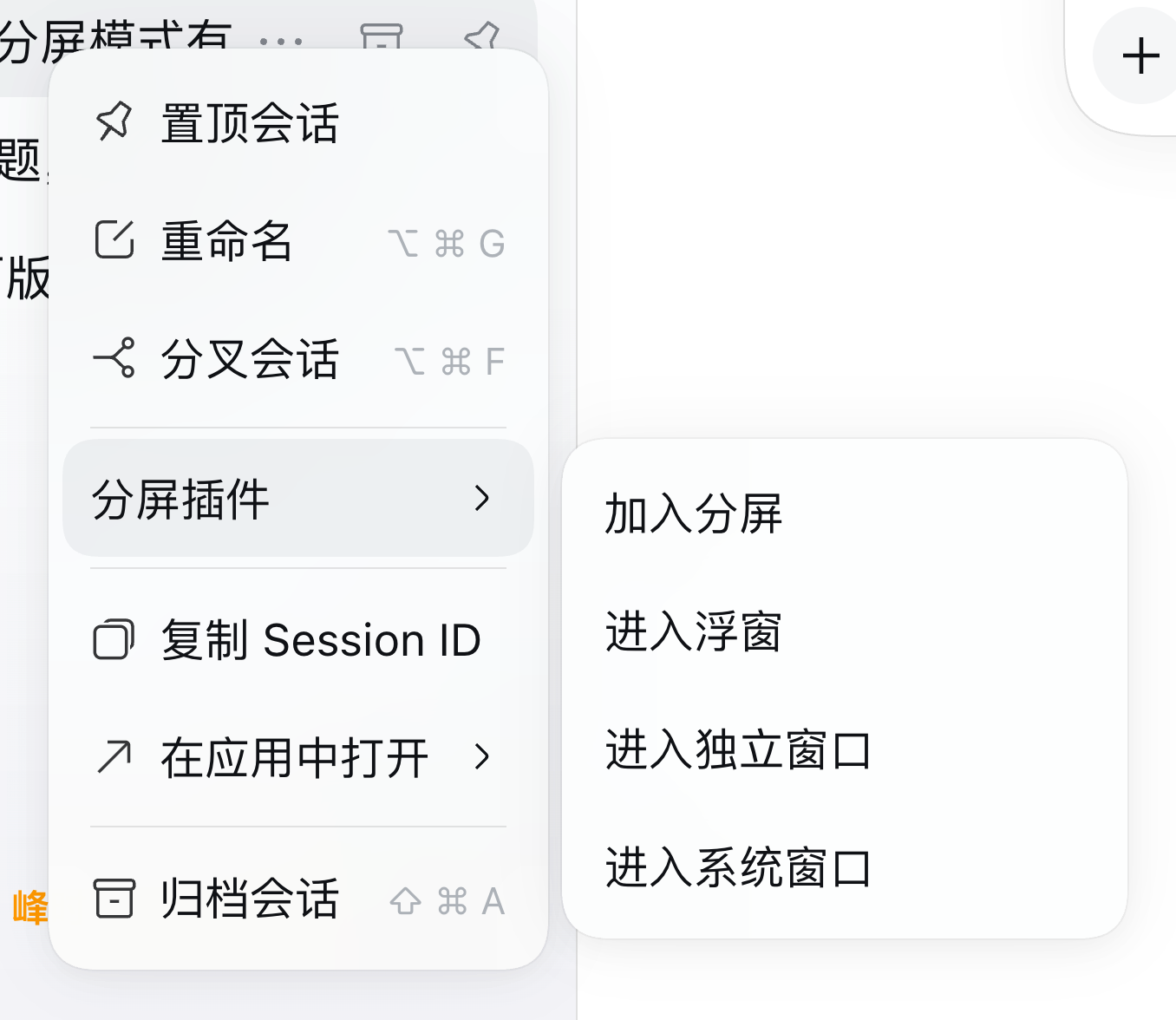
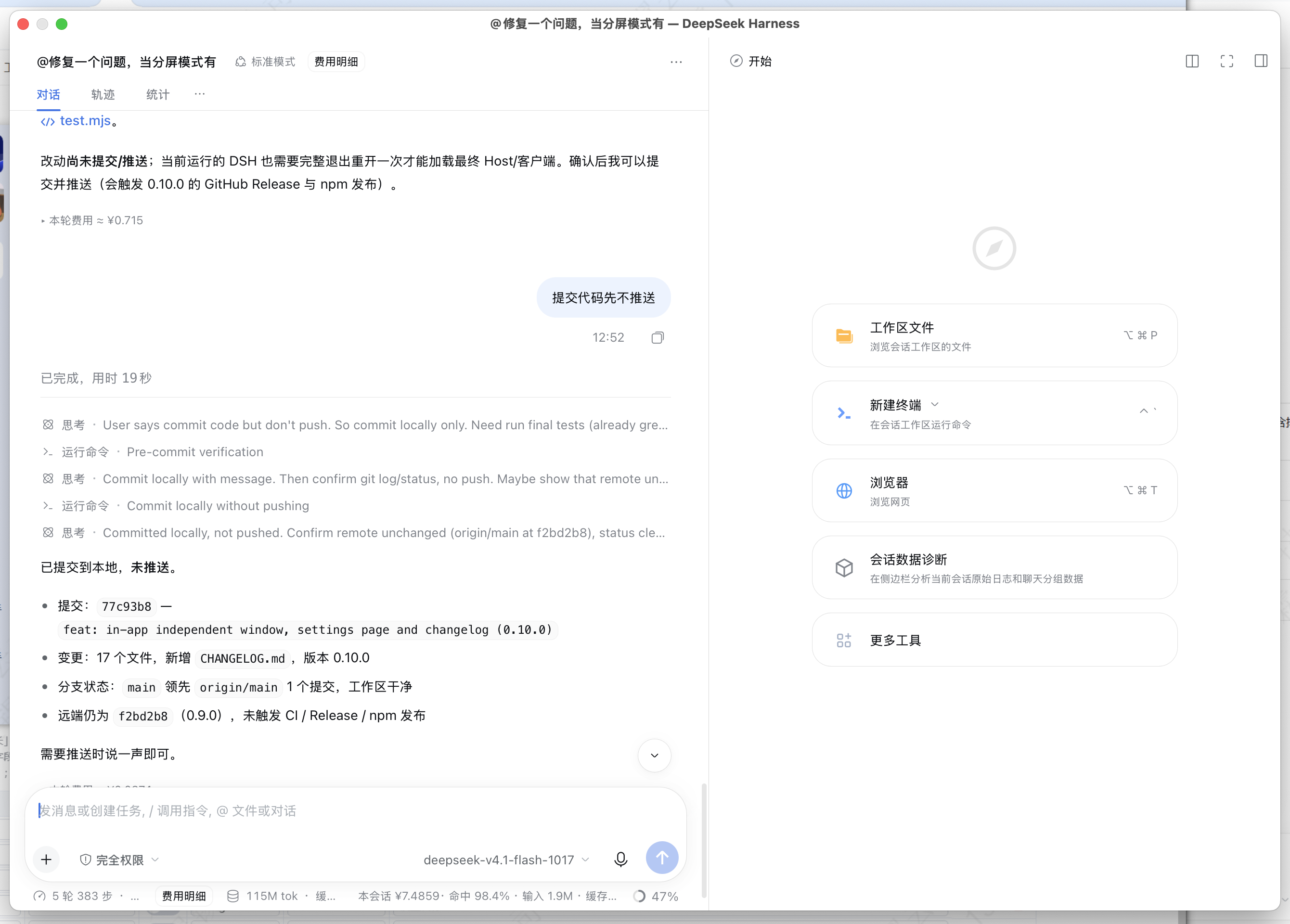
# Changelog
|
|
2
|
+
|
|
3
|
+
本文件记录 `dsh-split-workspace` 的公开版本变更,格式参考 [Keep a Changelog](https://keepachangelog.com/zh-CN/1.1.0/),版本号遵循 [Semantic Versioning](https://semver.org/lang/zh-CN/)。
|
|
4
|
+
|
|
5
|
+
This file records public releases of `dsh-split-workspace`; each version ends with a one-line English summary.
|
|
6
|
+
|
|
7
|
+
## [0.11.1] - 2026-11-18
|
|
8
|
+
|
|
9
|
+
### Fixed
|
|
10
|
+
|
|
11
|
+
- **修复重建后的客户端 bundle 无法热替换、必须刷新页面或重启 DSH 才能恢复菜单的问题。** 插件在浏览器端的工厂每次执行都会把只读诊断接口 `__test` 定义到 `window.__dshSplitWorkspace` 上(`configurable: false`)。DSH 在打开的页面里热替换重建后的客户端 bundle 时会再次执行同一个工厂,第二次定义抛出 `TypeError: Cannot redefine property: __test`,整个工厂就此中断:**左下角分屏按钮、会话右键「分屏插件」菜单和「设置 → 分屏工作区」同时消失**,DSH 把该插件记为“本页面的插件未能完成同步”,只能刷新页面或重启才能恢复。此前为了让改动生效而反复重启 DSH,原因就是这个异常,而不是 DSH 的热加载不生效。
|
|
12
|
+
- 现在每次 bundle 执行都创建一个**新的** `window.__dshSplitWorkspace` 对象,`__test` / `__svc` 等诊断成员改为通过带保护的安装函数定义:任何诊断接口都不能再让插件加载失败,被替换的 bundle 也不会再把上一次加载的闭包(`health()`、`retry()`、`__test` 里的各个函数)继续暴露出去。
|
|
13
|
+
- 覆盖的路径:热替换重建后的客户端 bundle、在设置 → 插件里禁用后再启用、以及从 0.11.0 热升级到 0.11.1——三种情况都在同一个页面内就地生效,不需要刷新或重启。
|
|
14
|
+
- 新增离线断言,防止重新引入“在继承的旧全局对象上重复定义成员”的写法。
|
|
15
|
+
|
|
16
|
+
**English summary:** Fixed the client bundle failing to hot-swap after a rebuild: the factory re-defined the read-only `__test` diagnostics seam on the inherited `window.__dshSplitWorkspace` object and threw `Cannot redefine property: __test`, which aborted the whole factory and left the footer button, session menus and Settings page missing until the page reloaded. Each bundle execution now publishes a fresh API object, and `__test` / `__svc` are installed through a guarded helper, so bundle replacement, disable→enable and the 0.11.0→0.11.1 hot upgrade all apply in place.
|
|
17
|
+
|
|
18
|
+
## [0.11.0] - 2026-11-18
|
|
19
|
+
|
|
20
|
+
### Added
|
|
21
|
+
|
|
22
|
+
- **系统窗口(macOS 原生独立窗口)**:会话右键菜单新增 **分屏插件** 一级菜单,把 **加入分屏 / 退出分屏**、**进入浮窗 / 退出浮窗**、**进入独立窗口 / 退出独立窗口**、**进入系统窗口 / 退出系统窗口** 都收进它的二级菜单。其中「加入分屏 / 退出分屏」合并为同一个按状态显示的开关(在分屏/待分屏中显示「退出分屏」,否则显示「加入分屏」)。系统窗口打开一个真正的操作系统窗口(AppKit `NSWindow` + `WKWebView`,由 Host 通过 `osascript` 启动 `native/system-window.jxa`),可以拖到 DSH 主窗口之外、独立缩放和关闭;**不打开浏览器**,窗口内**不显示左侧栏**,右侧栏等其他区域照常保留。
|
|
23
|
+
- **窗口菜单状态跟随窗口开关**:浮窗、独立窗口、系统窗口都在打开后把菜单项变成 **退出浮窗 / 退出独立窗口 / 退出系统窗口**;关闭窗口(包括点窗口自身的关闭按钮,或关闭系统窗口 Helper)后菜单自动回到“进入”状态。独立窗口跟随时运行时 store,系统窗口状态由 Host 维护并通过 `/dsv/system-window` 查询(菜单打开期间轮询),退出/关闭立即更新。
|
|
24
|
+
- 新增 Host 侧 `nativeWindowSessions()` 与关闭动作:`POST /dsv/system-window` 支持 `{ sessionId, action: "open" | "close" }`,`GET` 返回当前系统窗口的会话列表;同一会话只保留一个系统窗口。
|
|
25
|
+
- 窗口加载 Host 本机认证的 Web 客户端:认证 URL 由 Host 在进程内生成并只交给本机 Helper,**不会返回给渲染层**;URL 哈希标记让同一份客户端代码在窗口内进入「系统窗口模式」——隐藏左侧栏与其网格轨道、隐藏插件自己的入口,并激活目标会话。
|
|
26
|
+
- **左下角分屏菜单新增「分屏帮助」入口**:底部分屏按钮菜单里可以直接打开带截图的帮助卡片。
|
|
27
|
+
- **分屏帮助新增界面指引截图**:帮助卡片(「分屏帮助」/窗格 `?` / 设置页「分屏帮助」)里新增三张截图缩略图——会话右键「分屏插件」菜单、左下角分屏按钮菜单、设置 → 分屏工作区;点击缩略图打开大图(Esc 或点击遮罩关闭)。Host 新增同源静态路由 `/dsv/help/...`,从 `docs/screenshots/` 读取,桌面端与 Web 客户端均可显示。
|
|
28
|
+
- 新增 API `window.__dshSplitWorkspace.openNativeWindow(sessionId)`、`closeNativeWindow(sessionId)` 与 `nativeWindows()`。
|
|
29
|
+
- Windows / Linux 点击时提示改用「在独立窗口打开」,不会退回浏览器;关闭窗口会结束后台 Helper 进程,退出 DSH 时也会关闭这些窗口。
|
|
30
|
+
|
|
31
|
+
### Changed
|
|
32
|
+
|
|
33
|
+
- Host 新增 `/dsv/system-window` 路由(POST + 确认头 + 同源校验 + 会话 id 白名单),平台不支持时返回 `unsupported-platform`;新增 `native/system-window.jxa` 并加入 npm 发布文件清单。
|
|
34
|
+
- README 增加系统窗口章节、限制说明与平台注意事项;测试补充系统窗口、Helper 与客户端入口断言。
|
|
35
|
+
|
|
36
|
+
**English summary:** Session context menu gains **Open in system window**: on macOS the Host opens a real OS window (AppKit NSWindow + WKWebView, no browser) showing one conversation with no left sidebar and the stock right sidebar intact. Adds the `/dsv/system-window` Host route, `openNativeWindow()`, and a packaged `native/system-window.jxa` helper.
|
|
37
|
+
|
|
38
|
+
## [0.10.0] - 2026-11-18
|
|
39
|
+
|
|
40
|
+
### Changed
|
|
41
|
+
|
|
42
|
+
- **「在系统窗口打开」改为应用内独立窗口,不再打开浏览器。** 右键会话 → **在独立窗口打开** 会在 DSH 应用内部显示该会话,提供关闭 / 最小化 / 最大化-还原 / 全屏;双击标题栏切换最大化,最小化后收成左下角的恢复胶囊。会话仍从分屏 / 浮窗 / 待分屏中移出,关闭窗口后仍在侧栏里。
|
|
43
|
+
- 说明:DSH Desktop 的 Electron 主进程拒绝 `window.open` 创建原生窗口,Host 进程也没有 `BrowserWindow` API,当前 DSH 没有插件可用的原生多窗口接口。因此独立窗口是**应用内窗口**(无地址栏、不依赖浏览器),但仍在 DSH 主窗口内部;未来 DSH 开放原生窗口能力时可直接替换这一层。
|
|
44
|
+
- **新增系统设置入口**:除侧边栏底部菜单外,插件现在注册 **设置 → 分屏工作区** 页面(`settings.section`)。页面提供版本 / 窗格 / 待分屏 / 浮窗 / 独立窗口状态,性能模式开关,以及添加、退出、最小化、重置分屏、刷新界面、重启 DSH、帮助等操作。
|
|
45
|
+
- 删除浏览器独立页与 Host 的 `/dsv/system-window` 路由、`#dsvWindow` 标记;`/dsv/version` 与 `/dsv/restart` 保留。
|
|
46
|
+
- 新增 `window.__dshSplitWorkspace.openIndependentWindow(sessionId)`(`openSystemWindow` 的别名)与 `appWindow()` 状态查询。
|
|
47
|
+
- 帮助卡片补充独立窗口说明;README、测试与发布文件清单同步更新。
|
|
48
|
+
|
|
49
|
+
### Added
|
|
50
|
+
|
|
51
|
+
- `CHANGELOG.md`。
|
|
52
|
+
|
|
53
|
+
**English summary:** The session context menu's “system window” is now an in-app independent window (close / minimize / maximize / fullscreen, no browser); a new Settings → Split workspace page mirrors the split menu; the old browser standalone page and Host route were removed.
|
|
54
|
+
|
|
55
|
+
## [0.9.0] - 2026-11-18
|
|
56
|
+
|
|
57
|
+
### Added
|
|
58
|
+
|
|
59
|
+
- **重启入口**:桌面版分屏菜单、更新提示和 `restartApp()` API 都可以关闭并重新打开 DSH。Host 半边执行系统级重启——macOS 通过 AppleScript 正常退出,Windows 关闭窗口后终止进程并重新启动。生产版 DSH 没有内置重启菜单,这个入口用来应用需要完整重启的插件变更。
|
|
60
|
+
- **兜底分屏入口**:侧边栏 footer 没有渲染或被隐藏时,对话区左下角显示「分屏视图」按钮,菜单仍可打开。
|
|
61
|
+
- 更新提示在桌面版直接提供「重启 DSH」按钮;Web 版提供「刷新页面」。
|
|
62
|
+
|
|
63
|
+
### Changed
|
|
64
|
+
|
|
65
|
+
- **性能模式默认开启**:只有显式关过一次(存储值 `"0"`)才保持关闭。
|
|
66
|
+
- **性能模式下完全不渲染拖动缩略图**:不再克隆对话 DOM、不再逐帧移动预览窗口;拖入目标、布局预览和放置反馈保留。
|
|
67
|
+
- 更新 README:DSH 0.2.x 通过 HMR 热加载新安装的插件和重建的客户端 bundle,大多数安装/更新不需要重启;补充开发者工具刷新页面、重启入口和 HMR 的说明。
|
|
68
|
+
|
|
69
|
+
**English summary:** Added restart actions (menu, update chip, API) with OS-level quit/relaunch, a fallback split launcher, performance mode on by default, and no drag-preview thumbnail in performance mode.
|
|
70
|
+
|
|
71
|
+
## [0.8.0] - 2026-11-17
|
|
72
|
+
|
|
73
|
+
### Added
|
|
74
|
+
|
|
75
|
+
- **系统窗口(浏览器承载)**:右键会话 → 在系统窗口打开,由 Host 生成带 token 的 DSH Web 地址,在系统默认浏览器里打开只显示该会话的窗口。
|
|
76
|
+
- **性能模式**:关闭动画、阴影、跑马灯和多个后台观察器/轮询,适合低配机器与 Windows 多窗格场景。
|
|
77
|
+
- **更新提示**:运行中的页面读取磁盘上的 `package.json`,检测到新版本时显示更新提示。
|
|
78
|
+
- **`client.js` 工程化拆分**:拆成 `src/client/` 下的 18 个有序片段,由 `scripts/build-client.mjs` 拼回单文件;`npm test` 会检查产物是否过期。
|
|
79
|
+
- 修复分屏窗格标题栏拖动吞掉关闭按钮点击的问题(标题栏按落点动态启用拖动)。
|
|
80
|
+
|
|
81
|
+
**English summary:** Added system windows (browser-hosted), performance mode, update notice, modular client sources/build script, and the pane close-button click fix.
|
|
82
|
+
|
|
83
|
+
## [0.5.0] - 2026-11-17
|
|
84
|
+
|
|
85
|
+
### Added
|
|
86
|
+
|
|
87
|
+
- 侧边栏底部分屏菜单:添加分屏 / 退出分屏 / 最小化分屏 / 重置分屏。
|
|
88
|
+
- 「添加分屏」多选弹框:可搜索、预选当前窗格、取消或追加会话。
|
|
89
|
+
- 会话右键菜单集成:加入分屏 / 退出分屏;未分屏时先进入待分屏,满两个会话才分屏。
|
|
90
|
+
|
|
91
|
+
**English summary:** Added the sidebar-footer split menu, multi-select add dialog, and session context-menu split actions with a pending split.
|
|
92
|
+
|
|
93
|
+
## [0.4.3] - 2026-10-21
|
|
94
|
+
|
|
95
|
+
### Fixed
|
|
96
|
+
|
|
97
|
+
- 把页面级单例的 composer 插件作用域限定到当前活动窗格。
|
|
98
|
+
- 键盘焦点窗格内的浮层保持可见并重新锚定。
|
|
99
|
+
- 提示浮层锚定到聚焦窗格,拖动分屏更平滑。
|
|
100
|
+
|
|
101
|
+
### Added
|
|
102
|
+
|
|
103
|
+
- 中英双语文档与快速开始。
|
|
104
|
+
- GitHub Actions:测试通过且 npm 版本可解析后才创建 GitHub Release。
|
|
105
|
+
|
|
106
|
+
**English summary:** Fixed composer-plugin scoping and pane-overlay anchoring, added bilingual docs and safer CI release gating.
|
|
107
|
+
|
|
108
|
+
## [0.4.0] - 2026-10-21
|
|
109
|
+
|
|
110
|
+
### Added
|
|
111
|
+
|
|
112
|
+
- 分屏工作区首个公开发布:原生 `ChatPane` 多窗格、自动左右 / L 形 / 田字 / 网格布局、拖动重排、持久化布局、Alt+T 紧凑输入行、Alt+Shift+方向键切换窗格。
|
|
113
|
+
|
|
114
|
+
**English summary:** First public release of the native multi-pane split workspace with automatic layouts, drag reordering and persisted layouts.
|
|
115
|
+
|
|
116
|
+
## Earlier versions
|
|
117
|
+
|
|
118
|
+
`0.1.x`–`0.3.x` were pre-public iterations of the split workspace and were not published as separate tagged releases.
|
package/README.md
CHANGED
|
@@ -2,7 +2,7 @@
|
|
|
2
2
|
|
|
3
3
|
**中文(默认)** · [English](#english)
|
|
4
4
|
|
|
5
|
-
把 DeepSeek Harness 的对话区拆成原生多窗格工作区——左右分屏、上下分屏、田字 2×2 或自动网格,窗口放得下多少会话就开多少。每个窗格都是真实会话,拥有自己的输入框、流式输出、停止、队列、待办、附件、`/` 命令、`ask_user_question`、审批与视图页,桌面端(`dsh-app
|
|
5
|
+
把 DeepSeek Harness 的对话区拆成原生多窗格工作区——左右分屏、上下分屏、田字 2×2 或自动网格,窗口放得下多少会话就开多少。每个窗格都是真实会话,拥有自己的输入框、流式输出、停止、队列、待办、附件、`/` 命令、`ask_user_question`、审批与视图页,桌面端(`dsh-app://`)同样可用。还可以把任意会话变成可拖动、可缩放的**浮窗**,在分屏与浮窗两种模式之间来回切换;或把它放进**应用内独立窗口**(关闭 / 最小化 / 最大化 / 全屏),macOS 桌面版还可以把它放进**真正的系统窗口**(系统 WebView,独立于 DSH 主窗口,不经过浏览器);并支持从侧边栏菜单和**系统设置**两个入口操作。版本历史见 [CHANGELOG.md](CHANGELOG.md)。
|
|
6
6
|
|
|
7
7
|
## 快速开始
|
|
8
8
|
|
|
@@ -79,9 +79,19 @@ dsh --profile web
|
|
|
79
79
|
- 拖动侧边栏会话经过窗格边缘时,窗格会预览放下后的布局,并用虚线占位标出即将加入的会话;松开即应用该布局。
|
|
80
80
|
- **重置分屏** 会清空本插件在 localStorage / sessionStorage 里的分屏相关键、已保存布局、崩溃保护、最小化标记和窗格临时缓存(性能模式偏好会保留);当分屏因为缓存或异常状态怎么都起不来时,点它即可恢复到干净状态。
|
|
81
81
|
- 右键任意会话(或点行尾的「⋯」)→ **进入浮窗**,即可把该会话变成一个可自由摆放的浮窗;浮窗标题栏可以拖动、边缘可以缩放,点 **⇲ 回到分屏** 放回分屏,点 **✕** 直接关闭浮窗。同一会话不会同时出现在分屏和浮窗里:进入浮窗时会自动从分屏/待分屏中移出。
|
|
82
|
-
- 右键会话 →
|
|
82
|
+
- 右键会话 → **分屏插件**:一级菜单集中了会话的分屏与窗口操作,二级菜单包括 **加入分屏 / 退出分屏**(同一个开关,按当前状态显示)、**进入浮窗 / 退出浮窗**、**进入独立窗口 / 退出独立窗口**、**进入系统窗口 / 退出系统窗口**。每个条目都按当前状态显示“进入”或“退出”;窗口关闭(包括点窗口自身的关闭按钮)后,菜单会自动回到“进入”状态。
|
|
83
83
|
- **关闭窗格(标题栏 ✕)或退出分屏时,只要剩余会话少于两个就整体退出分屏**:窗格树和所有会话的分屏状态会一起清空,不会留下「菜单里显示分屏中、却没有被选中」的残留状态。只剩一个窗格的分屏不成立,所以不保留隐藏的单窗格树。
|
|
84
84
|
|
|
85
|
+
## 使用帮助(界面指引)
|
|
86
|
+
|
|
87
|
+
插件内的 **分屏帮助**(菜单里的「分屏帮助」、窗格标题栏的 `?`,或设置页的「分屏帮助」)现在已经带三张界面指引截图,点击缩略图可以查看大图:
|
|
88
|
+
|
|
89
|
+
| 会话右键菜单(分屏插件) | 左下角分屏按钮菜单 | 设置 → 分屏工作区 |
|
|
90
|
+
| --- | --- | --- |
|
|
91
|
+
| [](https://raw.githubusercontent.com/mhlywxl/dsh-split-workspace/main/docs/screenshots/help-session-menu.png) | [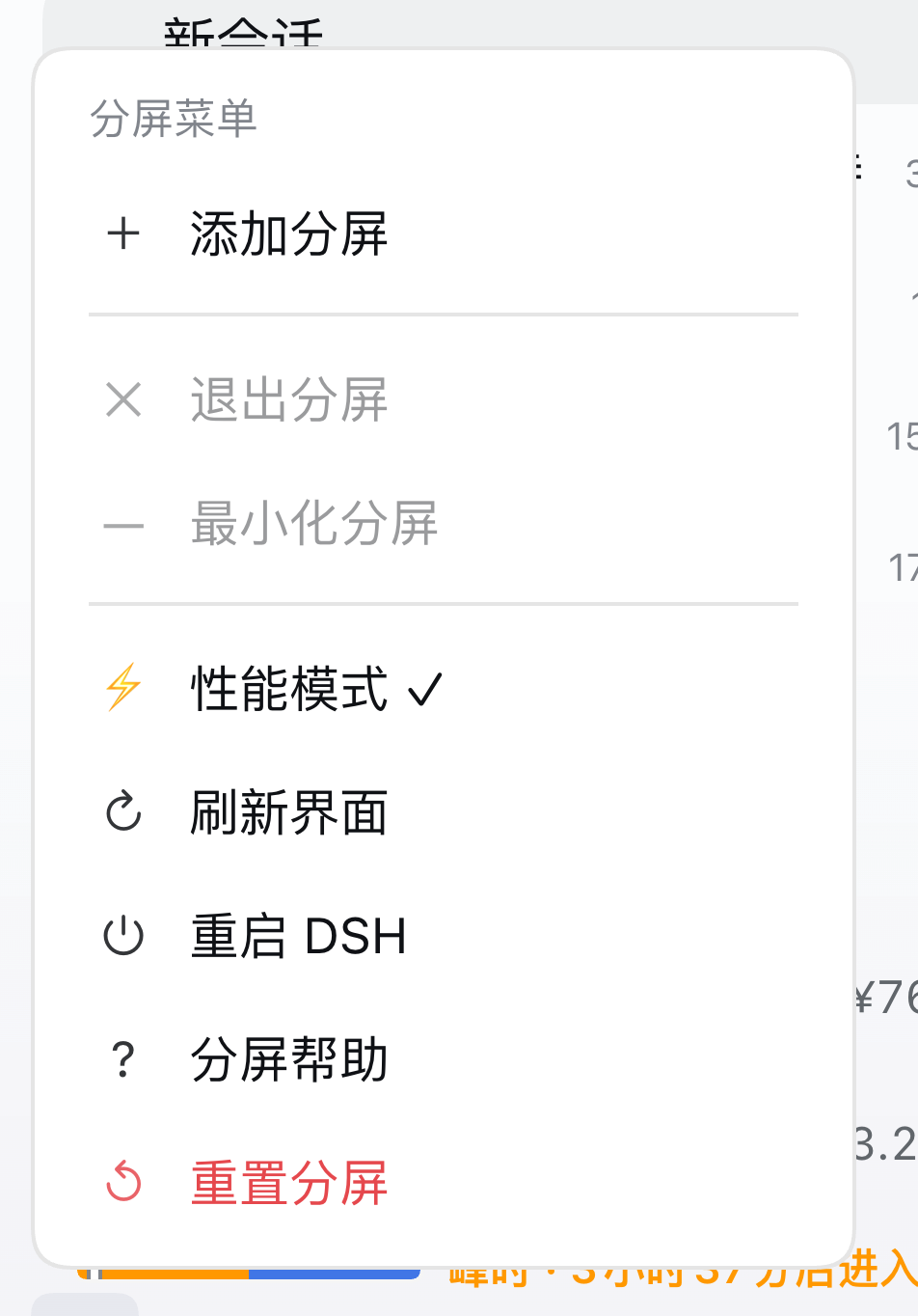](https://raw.githubusercontent.com/mhlywxl/dsh-split-workspace/main/docs/screenshots/help-footer-menu.png) | [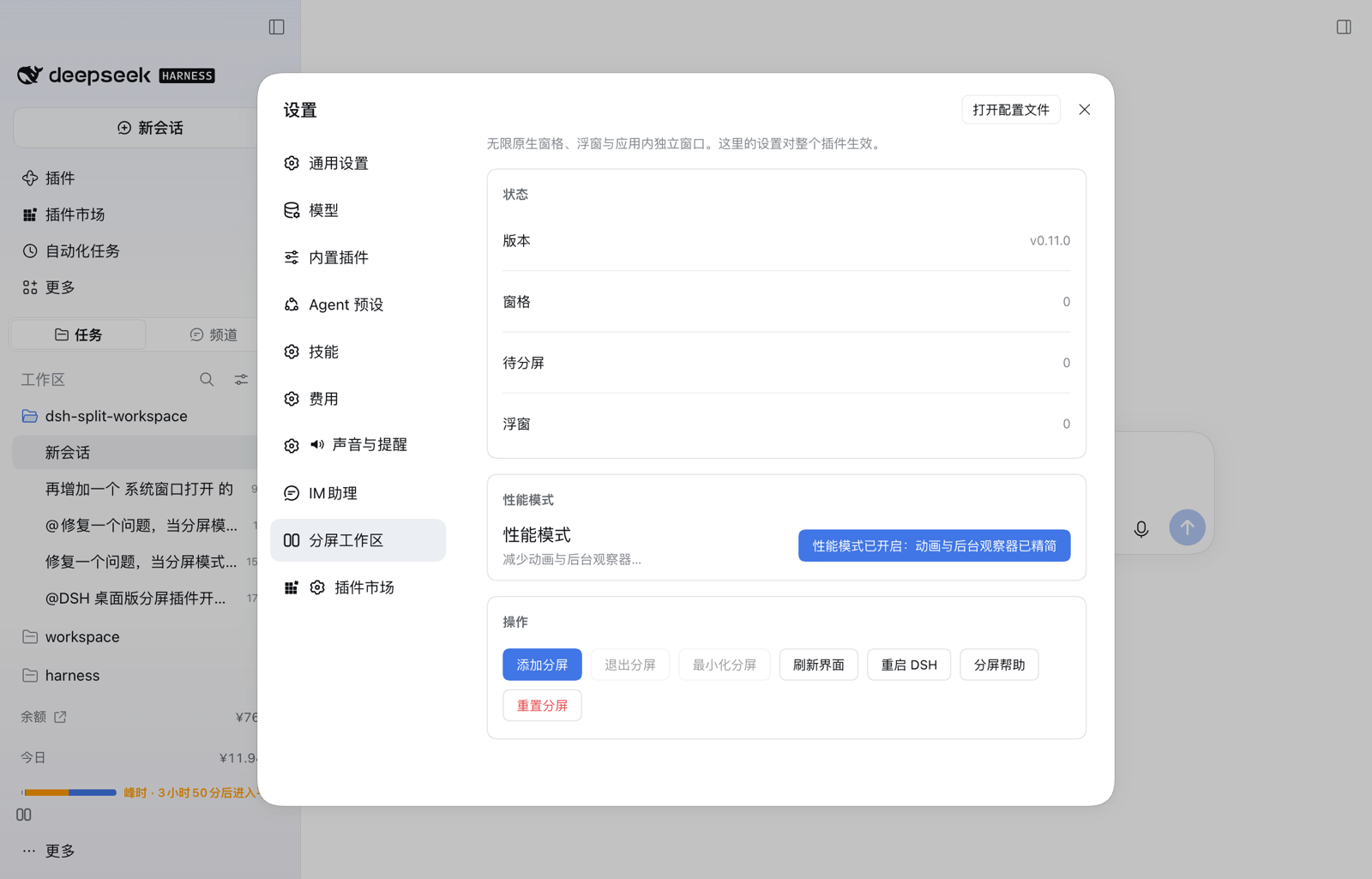](https://raw.githubusercontent.com/mhlywxl/dsh-split-workspace/main/docs/screenshots/help-settings.png) |
|
|
92
|
+
|
|
93
|
+
截图由插件 Host 从 `docs/screenshots/` 以同源路径 `/dsv/help/...` 提供,因此桌面端(`dsh-app://`)和 Web 客户端都能直接显示,无需外网。
|
|
94
|
+
|
|
85
95
|
## 浮窗模式(独立窗口)
|
|
86
96
|
|
|
87
97
|
分屏和浮窗是同一个工作区的两种形态,可以随时互相切换:
|
|
@@ -102,13 +112,33 @@ dsh --profile web
|
|
|
102
112
|
|
|
103
113
|
如果 DSH 未来开放原生多窗口能力,浮窗层可以直接换成原生窗口,而“分屏 ⇄ 浮窗”的会话切换逻辑不需要改。
|
|
104
114
|
|
|
105
|
-
##
|
|
115
|
+
## 独立窗口(应用内,不依赖浏览器)
|
|
116
|
+
|
|
117
|
+
- **进入独立窗口**(0.11.0 起收在「分屏插件」二级菜单;早期版本为「在独立窗口打开」):在 DSH 应用内部打开一个只显示该会话的窗口,提供 **关闭 / 最小化 / 最大化-还原 / 全屏**;双击标题栏切换最大化,最小化后收成左下角的恢复胶囊。该会话已经在这个窗口里时,菜单显示 **退出独立窗口**;关闭窗口后菜单回到「进入独立窗口」。
|
|
118
|
+
- 打开时该会话会从分屏 / 浮窗 / 待分屏中移出,避免同一会话同时被两个输入框编辑;关闭独立窗口不会删除会话,它仍在侧栏里,可随时重新加入分屏。
|
|
119
|
+
- **为什么不是 Electron 原生窗口?** DSH Desktop 的 Electron 主进程只保留一个应用窗口,主窗口的 `setWindowOpenHandler` 拒绝用 `window.open` 创建第二个原生窗口(http/https 只交给系统浏览器);插件的 Host 进程是 Node 子进程,没有 Electron `BrowserWindow` API。所以 0.10.0 把这一层做成**应用内独立窗口**(不再打开浏览器、没有地址栏,窗口控制由插件自己绘制);macOS 上另见下一节的「系统窗口」,用系统 WebView 实现真正的独立窗口。
|
|
120
|
+
- 限制:它仍在 DSH 主窗口内部(不是操作系统级第二窗口),不能拖到 DSH 窗口之外。
|
|
121
|
+
|
|
122
|
+
## 系统窗口(macOS 原生独立窗口,0.11.0)
|
|
123
|
+
|
|
124
|
+
- 右键会话 → **分屏插件** → **进入系统窗口**:在 macOS 上打开一个**真正的操作系统窗口**。它不是 DSH 主窗口里的一层浮层,可以拖到主窗口之外、单独缩放和关闭,不会打开浏览器,也没有地址栏。该会话的系统窗口已经打开时,菜单显示 **退出系统窗口**;在窗口里点关闭(或从菜单退出)后,菜单会自动回到「进入系统窗口」。
|
|
125
|
+
- 窗口内容仍然是这个会话的真实客户端:**左侧栏不显示**(会话占满窗口),**右侧栏、对话头部、输入框、视图页等都照常保留**,右上角的「打开右侧边栏」依然可用。
|
|
126
|
+
- **实现方式**:DSH 没有向插件开放 Electron `BrowserWindow`,所以插件 Host 用系统自带的 AppKit `NSWindow` + `WKWebView`(`osascript` 运行 `native/system-window.jxa`)打开窗口,并让这个 WebView 加载 Host 的**本机认证 Web 客户端**。认证 URL 由 Host 在进程内生成,只传给本机 Helper,**不会返回给渲染层**;哈希标记让同一份客户端代码在窗口内切换成「系统窗口模式」。
|
|
127
|
+
- **平台**:目前仅 macOS。Windows / Linux 上点击会提示改用「在独立窗口打开」,不会退回浏览器。窗口标题跟随会话标题;关闭窗口即结束 Helper 进程,退出 DSH 时也会一并关闭这些窗口。
|
|
128
|
+
- 窗口是辅助型进程,不占 Dock 图标,因此**没有最小化按钮**(避免最小化后无法从 Dock 恢复);提供关闭、缩放和标题栏拖动,可用「调度中心」或窗口本身切换。
|
|
129
|
+
- **注意**:系统窗口是独立的 Web 客户端,所以桌面端专属能力(如原生文件拖拽、系统目录选择器)在窗口内的行为以 Web 客户端为准;会话数据与主窗口共享同一个 Host,输入、流式输出和右侧栏功能正常。
|
|
130
|
+
|
|
131
|
+
|
|
132
|
+
|
|
133
|
+
## 系统设置入口
|
|
106
134
|
|
|
107
|
-
|
|
108
|
-
|
|
109
|
-
-
|
|
110
|
-
-
|
|
111
|
-
-
|
|
135
|
+
除了侧边栏底部的分屏按钮,插件还在 **设置 → 分屏工作区** 注册了一个设置页(`settings.section`),方便在菜单不可见时进入。页面包括:
|
|
136
|
+
|
|
137
|
+
- **状态**:插件版本、窗格数、待分屏数、浮窗数、当前独立窗口。
|
|
138
|
+
- **性能模式**:开关(默认开启),影响动画、后台观察器和拖动缩略图。
|
|
139
|
+
- **操作**:添加分屏、退出分屏、最小化分屏、重置分屏、刷新界面、重启 DSH(桌面版)、帮助。
|
|
140
|
+
|
|
141
|
+
设置页里的“添加分屏”会先关闭设置面板再打开多选弹框,避免弹框被设置面板遮挡;其余操作就地执行并实时刷新状态。
|
|
112
142
|
|
|
113
143
|
## 性能模式与卡顿排查
|
|
114
144
|
|
|
@@ -118,7 +148,7 @@ dsh --profile web
|
|
|
118
148
|
- 关闭**每个窗格的 composer 几何测量 MutationObserver**。这是最可疑的开销之一:流式输出每个 token 都会改动窗格 DOM,旧逻辑会在每次改动时排队测量(`getBoundingClientRect` + 样式读取),窗格越多越明显;性能模式改为 ResizeObserver + 1.5s 轮询。
|
|
119
149
|
- 暂停 TOC 握把同步(`dsh-prompt-history` 的 ☰ 定位)、压缩结果监听、浮窗位置巡检、右侧栏 800ms 轮询(保留 resize 监听),几何测量从 1s 降到 3.5s,侧栏会话扫描从 200ms 降到 1s。
|
|
120
150
|
- 拖动会话/窗格时**完全不渲染缩略图预览**(不克隆对话 DOM,也没有逐帧移动的预览窗口);拖入目标、布局预览和放置反馈仍然保留。
|
|
121
|
-
- 真实会话、输入、停止、审批、分屏 / 浮窗 /
|
|
151
|
+
- 真实会话、输入、停止、审批、分屏 / 浮窗 / 独立窗口功能全部保留。
|
|
122
152
|
|
|
123
153
|
**仍然可能卡的原因**:每个窗格都是一个完整的原生对话视图,N 个会话同时流式输出就是 N 份 React/DOM 渲染与滚动更新,这是 DSH 客户端本身的主要成本,插件无法消除(除非上游支持离屏暂停/虚拟化)。在 Windows + 低单核性能的机器上,建议同时保持 2–3 个活动窗格、少开浮窗、把不用的分屏最小化;输入框可切到紧凑 TUI 模式;如果装了 `dsh-prompt-history`,它的 TOC 同步在性能模式下会被暂停。
|
|
124
154
|
|
|
@@ -131,6 +161,8 @@ DSH 0.2.x(含 Desktop 0.2.2-rc.3)带 HMR:新安装的插件会被热加载
|
|
|
131
161
|
- 插件管理器明确提示 `restart-required`(Host 半边、被链接包的宿主模块发生变化,或包目录被移动);
|
|
132
162
|
- 安装后侧边栏底部几秒内没有出现分屏图标(少数没有 HMR 的旧版 DSH)。
|
|
133
163
|
|
|
164
|
+
**0.11.1 修复:重建客户端 bundle 后不再需要重启。** 之前每次重建 `lib/client.js` 后分屏按钮、右键菜单和「设置 → 分屏工作区」都会消失,必须刷新页面或重启 DSH 才回来——原因是插件工厂重复定义只读诊断接口 `__test` 时抛出 `Cannot redefine property`,整次加载被中断(DSH 会把它记为“本页面的插件未能完成同步”)。现在每次 bundle 执行都会创建一个新的公开对象,所以**热替换重建后的 bundle、在设置 → 插件里禁用后再启用、以及从 0.11.0 热升级到 0.11.1,都在同一个页面内就地生效**,不需要刷新或重启。
|
|
165
|
+
|
|
134
166
|
DSH **生产版没有内置的“重启”菜单项**(开发版才有 `Restart App and Host`)。从本插件的 0.9.0 起:
|
|
135
167
|
|
|
136
168
|
- 侧边栏底部 **分屏菜单 → 重启 DSH**:先确认(运行中的任务会中断),再由 Host 半调用系统级“退出并重新打开”(macOS 通过 AppleScript 正常退出,Windows 关闭窗口后终止进程并重启)。
|
|
@@ -142,12 +174,13 @@ DSH **生产版没有内置的“重启”菜单项**(开发版才有 `Restart
|
|
|
142
174
|
|
|
143
175
|
## 功能
|
|
144
176
|
|
|
145
|
-
- **侧边栏分屏菜单**:底部分屏按钮弹出「添加分屏 / 退出分屏 / 最小化分屏 /
|
|
177
|
+
- **侧边栏分屏菜单**:底部分屏按钮弹出「添加分屏 / 退出分屏 / 最小化分屏 / 性能模式 / 刷新界面 / 重启 DSH / 分屏帮助 / 重置分屏」,其中退出和最小化与顶部工具栏完全一致,「分屏帮助」直接打开带截图的帮助卡片。
|
|
146
178
|
- **多选添加分屏**:弹框可搜索、可多选;已分屏时默认勾选当前窗格,可取消或追加,按最终勾选结果分屏。
|
|
147
|
-
-
|
|
179
|
+
- **会话右键集成**:原生右键菜单新增「分屏插件」二级菜单,其中「加入分屏 / 退出分屏」按状态显示为同一个开关;未分屏时先进入待分屏,满两个才分屏,退出到只剩一个自动退出分屏。
|
|
148
180
|
- **浮窗模式**:右键会话 → 「进入浮窗」,把会话变成可拖动、可缩放的独立窗口;标题栏 ⇲ 放回分屏、✕ 关闭,浮窗位置/大小/层叠顺序持久化。
|
|
149
181
|
- **分屏 ⇄ 浮窗双向切换**:同一会话互斥存在于一种形态;进入浮窗自动移出分屏,回到分屏自动关闭浮窗。
|
|
150
|
-
-
|
|
182
|
+
- **独立窗口(应用内)**:右键会话 → 「在独立窗口打开」,在应用内单独显示该会话,提供关闭 / 最小化 / 最大化 / 全屏;不打开浏览器,打开时自动从分屏和浮窗移出。
|
|
183
|
+
- **系统设置入口**:除了侧边栏底部分屏菜单,**设置 → 分屏工作区** 也提供同一组操作(添加 / 退出 / 最小化 / 重置分屏、性能模式、刷新、重启 DSH、帮助和状态)。
|
|
151
184
|
- **性能模式(默认开启)**:一键关闭动画、阴影、跑马灯和多个后台轮询/观察器,适合低配或 Windows 上多窗格卡顿的场景;设置持久化。性能模式下**不再渲染拖动会话时的缩略图预览**(拖入目标与放置反馈保留),可以再明显减少拖动时的 DOM/合成开销。
|
|
152
185
|
- **更新提示 / 重启 DSH / 刷新界面**:检测到磁盘上的新版本时右下角提示,并提供「重启 DSH」(桌面版)或「刷新页面」(Web 版);分屏菜单同时提供「刷新界面」与「重启 DSH」。
|
|
153
186
|
- **兜底分屏入口**:如果所在 DSH 布局没有渲染侧边栏 footer(或 footer 被隐藏),插件会在对话区左下角显示一个分屏按钮,保证菜单仍可打开。
|
|
@@ -190,7 +223,11 @@ DSH **生产版没有内置的“重启”菜单项**(开发版才有 `Restart
|
|
|
190
223
|
- `window.__dshSplitWorkspace.dockFloat(sessionId)`:把浮窗放回分屏(没有分屏时进入待分屏)。
|
|
191
224
|
- `window.__dshSplitWorkspace.closeFloat(sessionId)`:关闭浮窗(不放回分屏)。
|
|
192
225
|
- `window.__dshSplitWorkspace.floats()`:当前浮窗的会话 id 列表(按创建顺序)。
|
|
193
|
-
- `window.__dshSplitWorkspace.openSystemWindow(sessionId)
|
|
226
|
+
- `window.__dshSplitWorkspace.openSystemWindow(sessionId)`:在应用内独立窗口打开该会话(`openIndependentWindow` 是同一功能的别名)。
|
|
227
|
+
- `window.__dshSplitWorkspace.openNativeWindow(sessionId)`:在 macOS 系统窗口(原生独立窗口)打开该会话;其他平台会提示不支持。
|
|
228
|
+
- `window.__dshSplitWorkspace.closeNativeWindow(sessionId)`:关闭该会话的系统窗口。
|
|
229
|
+
- `window.__dshSplitWorkspace.nativeWindows()`:当前已打开系统窗口的会话 id 列表。
|
|
230
|
+
- `window.__dshSplitWorkspace.appWindow()`:当前独立窗口状态(`{ id, minimized, maximized }` 或 `null`)。
|
|
194
231
|
- `window.__dshSplitWorkspace.setPerformanceMode(true/false)`:开关性能模式(持久化)。
|
|
195
232
|
- `window.__dshSplitWorkspace.performanceMode()`:当前是否处于性能模式。
|
|
196
233
|
- `window.__dshSplitWorkspace.reloadClient()`:刷新页面。
|
|
@@ -225,8 +262,9 @@ DSH **生产版没有内置的“重启”菜单项**(开发版才有 `Restart
|
|
|
225
262
|
| `13-drag-bridge` | 未激活时的拖入分屏桥 |
|
|
226
263
|
| `14-launcher` | 底部菜单、多选添加分屏弹框、会话菜单集成 |
|
|
227
264
|
| `15-float-window` | 浮窗组件与图层 |
|
|
228
|
-
| `16-standalone` |
|
|
265
|
+
| `16-standalone` | 应用内独立窗口组件、窗口层与恢复胶囊,以及系统窗口的模式切换与请求 |
|
|
229
266
|
| `17-api-apply` | `window.__dshSplitWorkspace` API、`apply()` 与导出 |
|
|
267
|
+
| `native/system-window.jxa` | macOS 系统窗口 Helper(AppKit `NSWindow` + `WKWebView`,由 Host 通过 `osascript` 启动) |
|
|
230
268
|
|
|
231
269
|
- `npm run build`:重新生成 `lib/client.js`;`npm test` 会先跑 `build:check`,源码/产物不一致会失败。
|
|
232
270
|
- 为什么不用打包器:DSH 客户端只加载一个 `<plugin>/client.js`,片段共享同一个 module-loader 闭包,按顺序拼接即可;这样发布包保持零依赖、无构建依赖。
|
|
@@ -254,7 +292,7 @@ will land:
|
|
|
254
292
|
- 没有窗格数量上限;持久化树会校验(会话唯一、深度),损坏的树会被丢弃,而不是恢复一个坏掉的工作区。
|
|
255
293
|
- 「浮窗」是应用内窗口,不是 Electron 原生第二窗口:DSH Desktop 主窗口禁用了 `window.open`,Web 客户端也没有会话深链;浮窗复用真实会话组件、可拖动缩放,但仍在 DSH 主窗口内渲染(详见上面的「为什么浮窗不是系统级独立窗口?」)。
|
|
256
294
|
- 浮窗和分屏窗格互斥;同一会话不会同时以两种形态渲染,避免共享编辑器冲突。
|
|
257
|
-
-
|
|
295
|
+
- 「独立窗口」是应用内窗口:它不打开浏览器、没有地址栏,但不能移出 DSH 主窗口。macOS 桌面版另提供「系统窗口打开」(系统 WebView,独立窗口);DSH 本身仍未向插件开放 Electron `BrowserWindow`。独立窗口内的会话同样互斥于分屏和浮窗。
|
|
258
296
|
- 持久化递归深度上限为 32 层,是为了手改数据时的栈安全,不是窗格上限。
|
|
259
297
|
- 隐藏的原生会话仍在遮罩下流式运行;窗格重新挂载原生输入框,所以每个窗格自己的输入框拥有该会话的编辑器。
|
|
260
298
|
- 窗格重命名拒绝空会话(原生重命名对话框同样如此)。
|
|
@@ -270,8 +308,15 @@ MIT。见 `THIRD-PARTY-NOTICES.md`。
|
|
|
270
308
|
|
|
271
309
|
**Split screen for DeepSeek Harness (DSH) Desktop — open as many conversations
|
|
272
310
|
as you need, side by side, stacked, or in a 2×2 / automatic grid.** Any
|
|
273
|
-
conversation can also become a movable, resizable **floating window**,
|
|
274
|
-
two modes
|
|
311
|
+
conversation can also become a movable, resizable **floating window**, switch
|
|
312
|
+
between the two modes at any time, move into an **in-app independent window**
|
|
313
|
+
(close / minimize / maximize / fullscreen), or — on macOS Desktop — open a real
|
|
314
|
+
**native OS window** (system WebView, no browser, no left sidebar) for one
|
|
315
|
+
conversation. The session menu's **Split plugin** submenu holds the
|
|
316
|
+
`Join split / Leave split` toggle together with all three window surfaces,
|
|
317
|
+
each showing **Exit …** while that surface is open.
|
|
318
|
+
Both the sidebar menu and the system **Settings** page expose the controls.
|
|
319
|
+
Version history: [CHANGELOG.md](CHANGELOG.md).
|
|
275
320
|
|
|
276
321
|
`dsh-split-workspace` turns the DeepSeek Harness conversation area into a native
|
|
277
322
|
multi-pane workspace, including in the **Desktop app** (`dsh-app://` shell). Each
|
|
@@ -280,11 +325,13 @@ attachments, `/` commands, `ask_user_question`, approvals and view tabs.
|
|
|
280
325
|
|
|
281
326
|
**中文简介**:把 DeepSeek Harness 的对话区拆成任意数量的原生窗格,支持左右分屏、
|
|
282
327
|
上下分屏、田字 2×2 和自动网格;每个窗格都是真实会话,拥有自己的输入框、流式输出、
|
|
283
|
-
停止、队列、待办、附件、斜杠命令、审批和视图页。适用于 DSH
|
|
328
|
+
停止、队列、待办、附件、斜杠命令、审批和视图页。适用于 DSH 桌面端;侧边栏菜单与
|
|
329
|
+
系统设置均可操作,版本历史见 CHANGELOG。
|
|
284
330
|
|
|
285
331
|
**Search terms / 搜索关键词**:split screen, split view, split pane, multi-pane,
|
|
286
332
|
multi-session, multi-window, tiled workspace, unlimited panes, DSH Desktop,
|
|
287
|
-
分屏, 分屏插件, 多窗格, 多窗口, 多会话, 左右分屏, 上下分屏, 并排,
|
|
333
|
+
分屏, 分屏插件, 多窗格, 多窗口, 多会话, 左右分屏, 上下分屏, 并排, 田字布局,
|
|
334
|
+
系统窗口, 原生窗口, macOS system window, native window.
|
|
288
335
|
|
|
289
336
|
The pane engine is derived from
|
|
290
337
|
[dsh-split-screen](https://github.com/YEYEYEYESHIFU/dsh-split-screen) 1.7.0
|
|
@@ -364,7 +411,14 @@ dsh --profile web
|
|
|
364
411
|
- **Reset split** clears the plugin's split-related localStorage / sessionStorage keys, the saved layout, the crash guard, the minimized flag and pane caches, so a split stuck by stale state can always start again (the performance-mode preference is kept).
|
|
365
412
|
- Closing a pane (header **✕**) or leaving the split via the context menu exits the split as soon as fewer than two conversations remain: the whole pane tree and every conversation's split membership are cleared, so nothing is left tagged “in split” while unselected.
|
|
366
413
|
- Right-click any conversation (or its row `⋯` button) → **Enter floating window** to detach it into a movable window. Drag its title bar to move it, drag any edge to resize, use **⇲ Dock to split** to put it back into a split, or **✕** to close the float. A conversation is never hosted in both modes: entering a float removes it from the split / pending split first.
|
|
367
|
-
- Right-click a conversation → **Open in
|
|
414
|
+
- Right-click a conversation → **Open in independent window** to open it alone in an in-app window with close / minimize / maximize-restore / fullscreen controls — no browser is opened.
|
|
415
|
+
|
|
416
|
+
### Usage help (screenshots)
|
|
417
|
+
|
|
418
|
+
The in-app **Split help** card now carries three annotated screenshots — the
|
|
419
|
+
session right-click menu, the bottom-left split button menu, and Settings →
|
|
420
|
+
Split workspace — with click-to-enlarge thumbnails. The Host serves them
|
|
421
|
+
same-origin from `docs/screenshots/` under `/dsv/help/...`.
|
|
368
422
|
|
|
369
423
|
### Floating windows
|
|
370
424
|
|
|
@@ -411,27 +465,36 @@ inside the same DSH page. If DSH later exposes native multi-window support, the
|
|
|
411
465
|
float layer can be swapped for real windows while the split⇄float switching
|
|
412
466
|
logic stays unchanged.
|
|
413
467
|
|
|
414
|
-
###
|
|
468
|
+
### Independent window (in-app, no browser)
|
|
415
469
|
|
|
416
|
-
- Right-click a conversation → **Open in
|
|
417
|
-
|
|
418
|
-
|
|
419
|
-
|
|
420
|
-
native window's own controls.
|
|
470
|
+
- Right-click a conversation → **Open in independent window**: it opens inside
|
|
471
|
+
the DSH application as a window that shows only that conversation, with
|
|
472
|
+
**close / minimize / maximize-restore / fullscreen**. Double-click the title
|
|
473
|
+
bar toggles maximize; minimizing leaves a restore chip at the bottom-left.
|
|
421
474
|
- Opening it detaches the conversation from the split / float / pending pick, so
|
|
422
|
-
one conversation is never edited through two composers. Closing the
|
|
423
|
-
|
|
424
|
-
-
|
|
425
|
-
|
|
426
|
-
- **Why a browser window?** The DSH Desktop Electron main process keeps a single
|
|
427
|
-
application window and its `setWindowOpenHandler` refuses `window.open`
|
|
475
|
+
one conversation is never edited through two composers. Closing the window
|
|
476
|
+
keeps the conversation — it stays in the sidebar and can rejoin a split.
|
|
477
|
+
- **Why not a native OS window?** The DSH Desktop Electron main process keeps a
|
|
478
|
+
single application window and its `setWindowOpenHandler` refuses `window.open`
|
|
428
479
|
(http/https is handed to the system browser); the plugin Host runs in a Node
|
|
429
|
-
child process with no Electron `BrowserWindow` API.
|
|
430
|
-
|
|
431
|
-
|
|
432
|
-
|
|
433
|
-
|
|
434
|
-
|
|
480
|
+
child process with no Electron `BrowserWindow` API. Current DSH exposes no
|
|
481
|
+
plugin-facing native multi-window API, so the 0.8.0 “system window” had to use
|
|
482
|
+
the browser. 0.10.0 replaces it with an **in-app independent window**: no
|
|
483
|
+
browser, no address bar, all window controls drawn by the plugin.
|
|
484
|
+
- Limitation: it stays inside the DSH main window (not an OS-level second
|
|
485
|
+
window) and cannot be dragged outside it. If DSH later exposes native
|
|
486
|
+
multi-window support, this layer can become a real system window without
|
|
487
|
+
changing the conversation-switching logic.
|
|
488
|
+
|
|
489
|
+
### Settings entry
|
|
490
|
+
|
|
491
|
+
Besides the sidebar-footer split button, the plugin registers a **Settings → Split workspace** page (`settings.section`) so the controls remain reachable when the footer entry is hidden. The page shows:
|
|
492
|
+
|
|
493
|
+
- **Status**: plugin version, pane count, pending split, floating windows, and the current independent window.
|
|
494
|
+
- **Performance mode**: the persisted switch (on by default) for animations, background observers and the drag preview.
|
|
495
|
+
- **Actions**: add split, exit split, minimize split, reset split, refresh interface, restart DSH (Desktop), help.
|
|
496
|
+
|
|
497
|
+
“Add split” closes the Settings panel before opening the multi-select dialog so the dialog is never hidden behind it; the other actions run in place and refresh the status live.
|
|
435
498
|
|
|
436
499
|
### Performance mode and lag analysis
|
|
437
500
|
|
|
@@ -477,6 +540,16 @@ installs/updates therefore need **no restart**. A restart is only needed when:
|
|
|
477
540
|
- the footer split icon still has not appeared a few seconds after install (some
|
|
478
541
|
older DSH builds without HMR).
|
|
479
542
|
|
|
543
|
+
**Fixed in 0.11.1: rebuilding the client bundle no longer needs a restart.** A
|
|
544
|
+
rebuild of `lib/client.js` used to make the footer button, the session menus and
|
|
545
|
+
**Settings → Split workspace** disappear until the page was reloaded, because the
|
|
546
|
+
plugin factory re-defined the read-only `__test` seam on the inherited
|
|
547
|
+
`window.__dshSplitWorkspace` object and threw `Cannot redefine property` — DSH
|
|
548
|
+
reported the entry as a failed page synchronization. Each bundle execution now
|
|
549
|
+
publishes a fresh public object, so **a rebuilt bundle hot-swaps, a disable →
|
|
550
|
+
enable cycle and the 0.11.0 → 0.11.1 hot upgrade all apply in place** without a
|
|
551
|
+
reload or restart.
|
|
552
|
+
|
|
480
553
|
Production DSH has **no built-in Restart menu item** (development builds do).
|
|
481
554
|
Since dsh-split-workspace 0.9.0:
|
|
482
555
|
|
|
@@ -507,7 +580,8 @@ Since dsh-split-workspace 0.9.0:
|
|
|
507
580
|
- **Session-menu integration** — the stock right-click menu gains Add to split / Leave split. Outside split mode the first pick waits in a pending split until a second conversation is added; removing down to one pane exits the split.
|
|
508
581
|
- **Floating windows** — right-click a conversation → Enter floating window turns it into a movable, resizable window; Dock to split / ✕ in its header switch it back or close it, and geometry persists.
|
|
509
582
|
- **Split ⇄ float switching** — one conversation lives in exactly one mode; entering a float detaches it from the split, docking it back closes the float.
|
|
510
|
-
- **
|
|
583
|
+
- **Independent window (in-app)** — right-click → Open in independent window shows the conversation alone in an in-app window with close / minimize / maximize / fullscreen; no browser, and it is detached from split and float first.
|
|
584
|
+
- **Settings entry** — besides the sidebar-footer split menu, **Settings → Split workspace** offers the same actions (add / exit / minimize / reset split, performance mode, refresh, restart DSH, help and status).
|
|
511
585
|
- **Performance mode (on by default)** — one switch drops animations, shadows, shimmer and several background observers/polls for low-power or laggy Windows machines; the setting persists. In this mode the floating drag-preview thumbnail is not rendered at all (drop targets and placement feedback stay).
|
|
512
586
|
- **Update chip / Restart DSH / Refresh interface** — a newer on-disk version shows a corner chip with **Restart DSH** on Desktop or **Reload page** in the Web GUI; the split menu also offers Restart DSH and Refresh interface.
|
|
513
587
|
- **Fallback split entry** — when the host layout does not render the sidebar footer action (or hides it), the plugin shows a split button at the conversation area's bottom-left corner so the menu stays reachable.
|
|
@@ -607,7 +681,10 @@ architecture the upstream plugin uses.
|
|
|
607
681
|
- `window.__dshSplitWorkspace.floats()` — current floating-window session ids,
|
|
608
682
|
in creation order.
|
|
609
683
|
- `window.__dshSplitWorkspace.openSystemWindow(sessionId)` — open the
|
|
610
|
-
conversation in
|
|
684
|
+
conversation in the app-internal independent window (`openIndependentWindow`
|
|
685
|
+
is an alias).
|
|
686
|
+
- `window.__dshSplitWorkspace.appWindow()` — current independent-window state
|
|
687
|
+
(`{ id, minimized, maximized }` or `null`).
|
|
611
688
|
- `window.__dshSplitWorkspace.setPerformanceMode(true/false)` /
|
|
612
689
|
`performanceMode()` — toggle/inspect the persisted performance mode.
|
|
613
690
|
- `window.__dshSplitWorkspace.reloadClient()` — reload the page.
|
|
@@ -676,10 +753,11 @@ architecture the upstream plugin uses.
|
|
|
676
753
|
same DSH page (see “Why not a real OS-level window?” above).
|
|
677
754
|
- A conversation is either a split pane or a floating window — never both — so
|
|
678
755
|
two composers can never share one session's editor.
|
|
679
|
-
- The **
|
|
680
|
-
Desktop refuses plugin-created native
|
|
681
|
-
has no Electron
|
|
682
|
-
|
|
756
|
+
- The **independent window** is an in-app surface, not an OS-level second
|
|
757
|
+
window: DSH Desktop refuses plugin-created native windows and the Host process
|
|
758
|
+
has no Electron `BrowserWindow` API. It opens no browser and has no address
|
|
759
|
+
bar, but it cannot leave the DSH main window; a conversation in it is likewise
|
|
760
|
+
detached from split and float.
|
|
683
761
|
- The persisted recursion depth is capped at 32 levels as a stack-safety guard
|
|
684
762
|
for hand-edited payloads, not as a pane limit.
|
|
685
763
|
- The hidden stock conversation still streams under the overlay; panes re-host
|
|
Binary file
|
|
Binary file
|
|
Binary file
|
|
Binary file
|