dsh-scnet-connect 1.1.0 → 1.2.0
This diff represents the content of publicly available package versions that have been released to one of the supported registries. The information contained in this diff is provided for informational purposes only and reflects changes between package versions as they appear in their respective public registries.
- package/README.md +70 -7
- package/cordis.patch.yml +3 -2
- package/lib/client.js +45 -11
- package/lib/index.js +159 -38
- package/lib/scnet-catalog.js +54 -11
- package/lib/scnet-credential.js +5 -15
- package/lib/scnet-login.js +46 -38
- package/lib/scnet-models.js +33 -5
- package/lib/scnet-platform.js +315 -329
- package/lib/scnet-web-login.js +479 -404
- package/package.json +4 -2
- package/screenshots.json +4 -0
- package/tools/check-classify.mjs +63 -0
- package/tools/check-fetch.mjs +91 -0
- package/tools/check.mjs +156 -0
- package/tools/fake-gateway.mjs +73 -0
- package/tools/repro/asar-extract.mjs +84 -0
- package/tools/repro/direct-capabilities.mjs +77 -0
- package/tools/repro/direct-effort.mjs +59 -0
- package/tools/repro/direct-probe.mjs +82 -0
- package/tools/repro/direct-verify.mjs +229 -0
- package/tools/repro/effort-burst.mjs +25 -0
- package/tools/repro/effort-effect.mjs +29 -0
- package/tools/repro/image-tools-burst.mjs +28 -0
- package/tools/repro/pixel.png +0 -0
- package/tools/repro/probe-scnet.mjs +61 -0
- package/tools/repro/scnet-chat.mjs +77 -0
- package/tools/repro/scnet-llm-call.mjs +186 -0
- package/tools/repro/search-asar.mjs +58 -0
- package/tools/repro/slice-asar.mjs +13 -0
package/README.md
CHANGED
|
@@ -9,10 +9,10 @@
|
|
|
9
9
|
- **零客户端**:不装 SCNet 桌面客户端,用手机短信登录即可使用
|
|
10
10
|
- **零配置**:装了客户端的话,自动读凭据、自动发现免费模型
|
|
11
11
|
- **设置页管理**:账号、登录、模型开关都在 DSH 设置里
|
|
12
|
-
- **1M 上下文**:`SCNet-Max` 按平台真实能力声明 `contextWindow: 1048576` / `maxTokens: 131072`(实测 104.5 万 token 输入通过、1.06M
|
|
12
|
+
- **1M 上下文**:`SCNet-Max` 按平台真实能力声明 `contextWindow: 1048576` / `maxTokens: 131072`(实测 104.5 万 token 输入通过、1.06M 被拒;同样的直连调用方式见 [`tools/repro/scnet-chat.mjs`](tools/repro/scnet-chat.mjs))
|
|
13
13
|
- **抖动自愈**:平台偶发的 `503 + 10008`(路由切换)会被归一化成可重试错误,自动退避重试而不是整轮失败
|
|
14
14
|
|
|
15
|
-

|
|
15
|
+
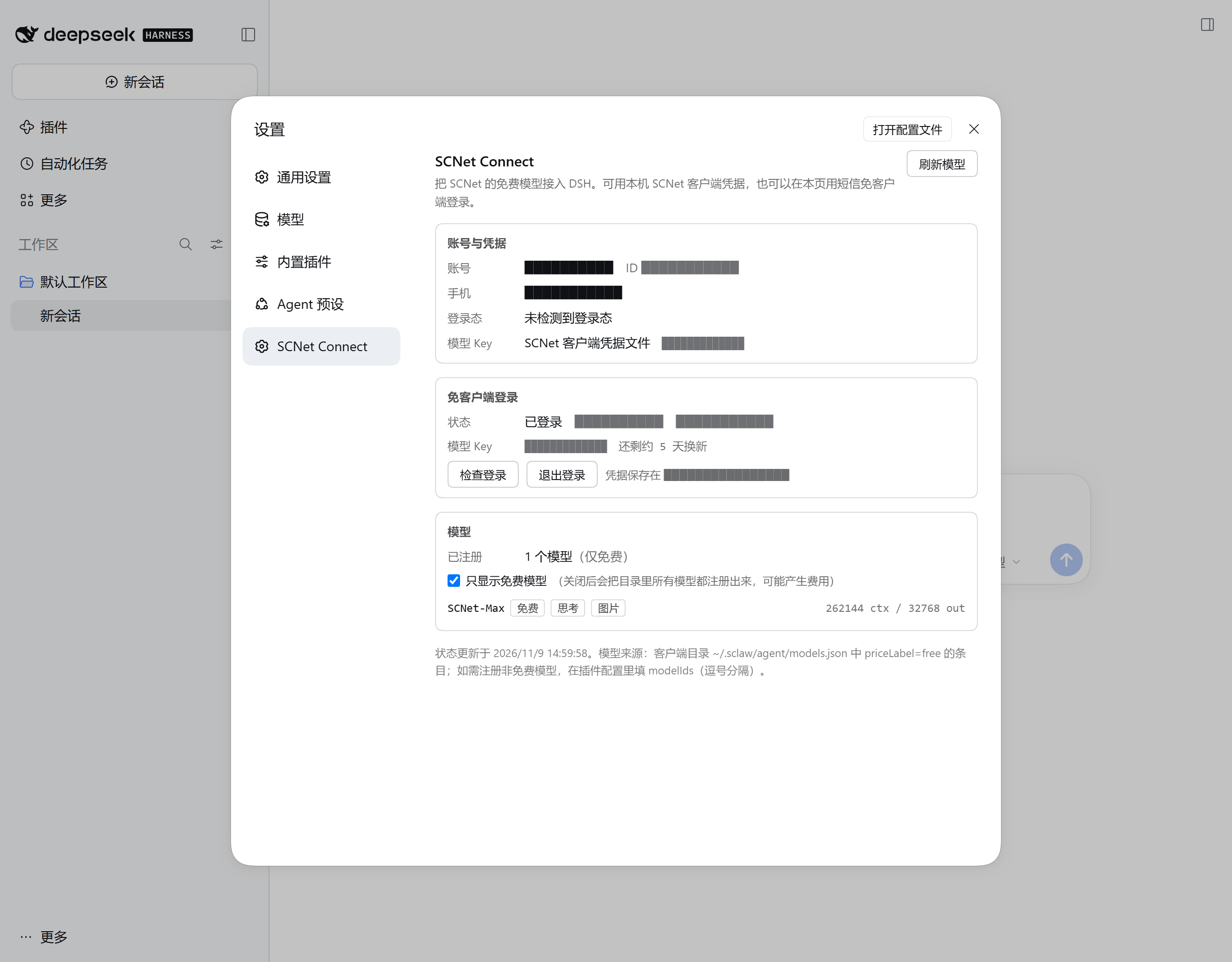
|
|
16
16
|
|
|
17
17
|
---
|
|
18
18
|
|
|
@@ -141,6 +141,27 @@ dsh plugin --profile desktop add link:.
|
|
|
141
141
|
|
|
142
142
|
登录成功后插件会自动换取模型 Key,无需其他操作。
|
|
143
143
|
|
|
144
|
+
**没有 SCNet 账号也能用。** 插件会根据平台返回的「该手机号是否已注册」自动选路:
|
|
145
|
+
|
|
146
|
+
| 手机号状态 | 插件行为 |
|
|
147
|
+
| --- | --- |
|
|
148
|
+
| 已注册 | 走短信快捷登录,直接进入 |
|
|
149
|
+
| 未注册 | **自动为你注册一个 SCNet 账号**,然后继续登录 |
|
|
150
|
+
|
|
151
|
+
注册由平台完成(等同于你在官网用手机号注册),插件只负责发起与跟随跳转。
|
|
152
|
+
完成后设置页会提示「登录成功,已为你自动注册 SCNet 账号」,不会静默建号。
|
|
153
|
+
|
|
154
|
+
新账号第一次换取模型 Key 时,平台会回「模型服务尚未开通」;插件会自动调用
|
|
155
|
+
平台的 `account/config/authorize` 完成开通再重试,全程无需你去控制台操作。
|
|
156
|
+
|
|
157
|
+
> **如果提示「平台把这次提交当成了账号密码登录」**:说明平台把这次短信提交
|
|
158
|
+
> 落到了它的密码分支。请点「刷新验证码」重新获取图形验证码,再重新发送一次
|
|
159
|
+
> 短信码重试。插件会把平台返回的原始码与原文记进
|
|
160
|
+
> `$DSH_HOME/scnet-connect-status.json` 的 `login.lastFailure`,
|
|
161
|
+
> 方便反馈问题时定位。
|
|
162
|
+
>
|
|
163
|
+
> 登录页面的报错一律显示中文;平台原始英文文案只进诊断文件,不会出现在界面上。
|
|
164
|
+
|
|
144
165
|
### 方式二:用本机 SCNet 客户端
|
|
145
166
|
|
|
146
167
|
先装好 SCNet 客户端并登录,正常发起一次对话(让客户端把凭据落到本地)。
|
|
@@ -161,7 +182,7 @@ dsh plugin --profile desktop add link:.
|
|
|
161
182
|
| 只显示免费模型 | 默认开启。关闭后会把目录里所有模型都注册出来(可能产生费用) |
|
|
162
183
|
| 刷新模型 | 重新读模型目录并用网关校验可用性 |
|
|
163
184
|
|
|
164
|
-

|
|
185
|
+
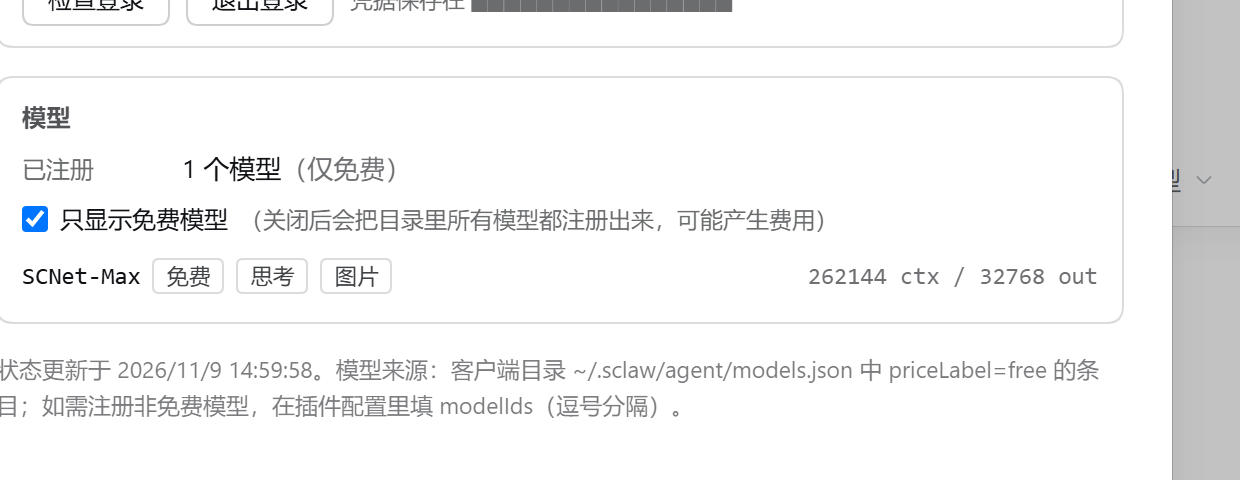
|
|
165
186
|
|
|
166
187
|
---
|
|
167
188
|
|
|
@@ -200,6 +221,23 @@ dsh plugin --profile desktop add link:.
|
|
|
200
221
|
|
|
201
222
|
</details>
|
|
202
223
|
|
|
224
|
+
### 运行时开关与清单位置
|
|
225
|
+
|
|
226
|
+
| 状态 | 文件 | 说明 |
|
|
227
|
+
| --- | --- | --- |
|
|
228
|
+
| 「只显示免费模型」 | `$DSH_HOME/scnet-connect-preferences.json` | 设置页切换后会记住;**优先级高于配置文件里的 `freeOnly`**。想回到配置文件的值,删掉这个文件 |
|
|
229
|
+
| 「退出登录 / 恢复使用」 | `$DSH_HOME/scnet-connect-suspended.json` | 退出后连客户端凭据一并停用,重启 DSH 仍生效 |
|
|
230
|
+
| 免客户端登录会话 | `$DSH_HOME/scnet-session.json` | 含 Cookie 与 `sk-` key(创建时按 `0600`),退出即删 |
|
|
231
|
+
| 诊断快照 | `$DSH_HOME/scnet-connect-status[.<profile>].json` | 只读排障用,`registered` / 模型 / 掩码 key;文件名带 profile,多个 profile 不会互相覆盖 |
|
|
232
|
+
|
|
233
|
+
### 关于模型元数据
|
|
234
|
+
|
|
235
|
+
模型描述符的字段来源是**配置 > 客户端目录 > 内置默认**,但有两处按目录的真实语义读:
|
|
236
|
+
|
|
237
|
+
- **输入能力**:目录里没写 `input` 就按纯文本处理(不会凭空给陌生模型加图片能力);
|
|
238
|
+
- **思考等级**:目录里 `thinkingMode: "levels"` 或 `reasoning: true` 才算支持思考。当前 `SCNet-Max` 的目录条目是 `reasoning: false` + `thinkingMode: "levels"` —— 客户端 UI 也是按分等级展示的,所以插件判为支持;
|
|
239
|
+
- **工具调用**:目录标 `toolCalling: false` 的模型仍会注册(DSH 是 agent,无法在描述符里表达「不下发工具」),但设置页会给它打「不支持工具」标,选中前请留意。
|
|
240
|
+
|
|
203
241
|
### 关于 `retryOnTransientErrors`
|
|
204
242
|
|
|
205
243
|
SCNet 在推理实例切换/回收时会返回这种响应:
|
|
@@ -242,9 +280,10 @@ HTTP 503
|
|
|
242
280
|
## 安全
|
|
243
281
|
|
|
244
282
|
- **不接收账号密码**:只走短信验证码,密码从不经过插件。
|
|
245
|
-
- 登录会话存于 `$DSH_HOME/scnet-session.json
|
|
283
|
+
- 登录会话存于 `$DSH_HOME/scnet-session.json`,创建时按 `0600` 打开、退出登录即删除。Windows 上 `chmod` 只切只读位,实际可读性由该目录的 ACL 决定,请自行确认 ACL 没有放开。
|
|
246
284
|
- **这两样东西等价于你的账号权限**:不要复制给他人,不要提交进仓库。
|
|
247
|
-
-
|
|
285
|
+
- 插件只在本机回环地址上暴露设置页路由,响应里**不返回** Key / Cookie / 验证码明文(只给掩码 `sk-NTM4L…MjM=`)。
|
|
286
|
+
- 这些路由当前**没有额外的来源校验**:能访问本机 `127.0.0.1:<port>` 的进程(含本机其他程序)可以读取状态、触发刷新/登出。不要把这个端口通过反向代理暴露到局域网。
|
|
248
287
|
- 若用 `apiKey` 配置项,它以明文存在 profile 的 `cordis.patch.yml` 里,请自行控制权限。
|
|
249
288
|
|
|
250
289
|
> `sk-` Key 是账号级凭据、与 SCNet 客户端共用,平台没有吊销接口。
|
|
@@ -252,12 +291,33 @@ HTTP 503
|
|
|
252
291
|
|
|
253
292
|
---
|
|
254
293
|
|
|
294
|
+
## 卸载
|
|
295
|
+
|
|
296
|
+
```bash
|
|
297
|
+
dsh plugin --profile desktop remove dsh-scnet-connect
|
|
298
|
+
```
|
|
299
|
+
|
|
300
|
+
插件自己的状态文件不会跟着删掉(它们是本机排障/偏好数据,不是包内容),需要时手动清理:
|
|
301
|
+
|
|
302
|
+
```powershell
|
|
303
|
+
Remove-Item "$env:USERPROFILE\.dsh\scnet-connect-status*.json" -ErrorAction SilentlyContinue
|
|
304
|
+
Remove-Item "$env:USERPROFILE\.dsh\scnet-connect-suspended.json" -ErrorAction SilentlyContinue
|
|
305
|
+
Remove-Item "$env:USERPROFILE\.dsh\scnet-connect-preferences.json" -ErrorAction SilentlyContinue
|
|
306
|
+
Remove-Item "$env:USERPROFILE\.dsh\scnet-session.json" -ErrorAction SilentlyContinue
|
|
307
|
+
```
|
|
308
|
+
|
|
309
|
+
`scnet-session.json` 里有 `sk-` key 与平台 Cookie,不再使用本插件时建议一并删除。
|
|
310
|
+
|
|
311
|
+
---
|
|
312
|
+
|
|
255
313
|
## 已知限制
|
|
256
314
|
|
|
257
315
|
- 免费模型取决于平台:目前只有 `SCNet-Max` 标记为 `free`。
|
|
258
316
|
- 「免费」是平台侧的**限时**政策,不是永久免费;本插件不提供额度,也不绕过计费。
|
|
259
317
|
- 插件内**不提供微信扫码**(平台二维码接口对非微信客户端恒返回 402)。
|
|
260
318
|
- 用的是未公开的客户端内部接口,SCNet 客户端升级后可能变化。
|
|
319
|
+
- 模型功能要求 DSH `>=0.2.0-rc.1`;**设置页**需要 `0.2.2` 及以上(`settings.section` slot)。低版本上模型照常可用,只是没有设置页卡片,登录要在配置里指定 `apiKey`。
|
|
320
|
+
- 上下文窗口按平台实测值声明 1M,但单次请求的 `prompt + max_tokens` 仍受 1,048,576 总量约束;DSH 的自动压缩阈值通常留有余量,若手动调大压缩阈值,接近上限的长对话可能被上游以 `10013` 拒绝。
|
|
261
321
|
|
|
262
322
|
---
|
|
263
323
|
|
|
@@ -265,19 +325,22 @@ HTTP 503
|
|
|
265
325
|
|
|
266
326
|
```bash
|
|
267
327
|
git clone https://github.com/Phoeky/dsh-scnet-connect.git && cd dsh-scnet-connect
|
|
268
|
-
node tools/check.mjs
|
|
269
|
-
node tools/check.mjs --live
|
|
328
|
+
node tools/check.mjs # 自检:凭据、模型目录、账号
|
|
329
|
+
node tools/check.mjs --live # 额外请求一次 /models
|
|
330
|
+
npm run check:fetch # 错误归一化 + 归类(离线,无需凭据)
|
|
270
331
|
```
|
|
271
332
|
|
|
272
333
|
```text
|
|
273
334
|
lib/index.js 插件入口:注册 provider、设置页路由
|
|
274
335
|
lib/client.js 浏览器侧:设置页卡片
|
|
336
|
+
lib/scnet-fetch.js 上游 5xx 抖动的错误归一化(可重试)
|
|
275
337
|
lib/scnet-login.js 免客户端登录状态机
|
|
276
338
|
lib/scnet-platform.js 平台接口封装
|
|
277
339
|
lib/scnet-web-login.js 短信登录与验证码
|
|
278
340
|
lib/scnet-catalog.js 模型目录发现与过滤
|
|
279
341
|
lib/scnet-credential.js 客户端凭据读取
|
|
280
342
|
lib/scnet-models.js 模型描述符
|
|
343
|
+
tools/fake-gateway.mjs 本地假网关(前 N 次 chat 返回 503/10008,用于复现重试)
|
|
281
344
|
```
|
|
282
345
|
|
|
283
346
|
## License
|
package/cordis.patch.yml
CHANGED
|
@@ -24,6 +24,7 @@
|
|
|
24
24
|
# maxTokens: 0 # 0 = 跟随客户端目录 / 内置默认
|
|
25
25
|
# inputImages: true
|
|
26
26
|
# reasoning: true
|
|
27
|
-
# verifyWithGateway: true
|
|
28
|
-
#
|
|
27
|
+
# verifyWithGateway: true # 刷新模型时用 GET /models 校验可用性
|
|
28
|
+
# retryOnTransientErrors: true # 把 5xx 却自称 invalid_request 的抖动改写成可重试错误
|
|
29
|
+
# freeOnly: true # 只注册免费模型(默认开;设置页切换会覆盖它)
|
|
29
30
|
# credentialSource: auto # auto | client | login
|
package/lib/client.js
CHANGED
|
@@ -247,6 +247,9 @@ window.__ModuleLoader__.load({
|
|
|
247
247
|
function AccountGroup({ data }) {
|
|
248
248
|
const account = data && data.account;
|
|
249
249
|
const credential = data && data.credential;
|
|
250
|
+
// 账号可能来自 SCNet 客户端(带 loggedIn),也可能来自设置页的免客户端登录
|
|
251
|
+
// (没有 loggedIn)。不区分来源就会把「已登录」显示成「未检测到登录态」。
|
|
252
|
+
const viaLogin = Boolean(account) && (account.source === 'login' || account.fromLogin === true);
|
|
250
253
|
const rows = [];
|
|
251
254
|
|
|
252
255
|
if (account) {
|
|
@@ -281,8 +284,8 @@ window.__ModuleLoader__.load({
|
|
|
281
284
|
h(
|
|
282
285
|
'span',
|
|
283
286
|
{ style: styles.value },
|
|
284
|
-
account.loggedIn ? 'SCNet 客户端已登录' : '未检测到登录态',
|
|
285
|
-
account.tokenExpiresAt
|
|
287
|
+
viaLogin ? '免客户端登录已登录' : account.loggedIn ? 'SCNet 客户端已登录' : '未检测到登录态',
|
|
288
|
+
!viaLogin && account.tokenExpiresAt
|
|
286
289
|
? h('span', { style: styles.muted }, `(平台 token ${formatExpiry(account.tokenExpiresAt)})`)
|
|
287
290
|
: null,
|
|
288
291
|
),
|
|
@@ -395,6 +398,11 @@ window.__ModuleLoader__.load({
|
|
|
395
398
|
Array.isArray(model.input) && model.input.includes('image')
|
|
396
399
|
? h('span', { style: styles.badge }, '图片')
|
|
397
400
|
: null,
|
|
401
|
+
// 目录明确说「不支持工具调用」时标出来:DSH 是 agent,仍然会下发
|
|
402
|
+
// 工具定义,用户选它之前值得知道这个模型可能忽略工具。
|
|
403
|
+
model.toolCalling === false
|
|
404
|
+
? h('span', { style: { ...styles.badge, ...styles.warn } }, '不支持工具')
|
|
405
|
+
: null,
|
|
398
406
|
),
|
|
399
407
|
h(
|
|
400
408
|
'span',
|
|
@@ -550,6 +558,11 @@ window.__ModuleLoader__.load({
|
|
|
550
558
|
setSmsCode('');
|
|
551
559
|
setSmsSent(false);
|
|
552
560
|
setCooldown(0);
|
|
561
|
+
// 未注册手机号走注册通道:账号是这次顺带建出来的,必须告知用户,
|
|
562
|
+
// 否则他只会疑惑「我没注册过,怎么就能用了」。
|
|
563
|
+
if (result.via === 'register') {
|
|
564
|
+
setNotice({ kind: 'ok', text: '登录成功,已为你自动注册 SCNet 账号' });
|
|
565
|
+
}
|
|
553
566
|
} else if (result && result.error) {
|
|
554
567
|
setNotice({ kind: 'error', text: result.error });
|
|
555
568
|
}
|
|
@@ -590,7 +603,10 @@ window.__ModuleLoader__.load({
|
|
|
590
603
|
];
|
|
591
604
|
|
|
592
605
|
// 已退出登录:本插件整体停用(连客户端凭据也不再供 key)。
|
|
593
|
-
|
|
606
|
+
// 但仍然把登录表单留在下面 —— 退出后想直接换个账号登录是常见动作,
|
|
607
|
+
// 逼用户先点「恢复使用」再登录只是多余的一步(登录成功本身就会恢复供 key)。
|
|
608
|
+
const suspendedView = Boolean(data && data.suspended);
|
|
609
|
+
if (suspendedView) {
|
|
594
610
|
children.push(
|
|
595
611
|
h(
|
|
596
612
|
'div',
|
|
@@ -607,10 +623,13 @@ window.__ModuleLoader__.load({
|
|
|
607
623
|
{ type: 'button', style: buttonStyle(busy !== null), disabled: busy !== null, onClick: resume },
|
|
608
624
|
busy === 'resume' ? '恢复中…' : '恢复使用',
|
|
609
625
|
),
|
|
610
|
-
h(
|
|
626
|
+
h(
|
|
627
|
+
'span',
|
|
628
|
+
{ style: styles.hint },
|
|
629
|
+
'恢复后按「当前凭据来源」重新供 key;也可以直接在下面重新登录。',
|
|
630
|
+
),
|
|
611
631
|
),
|
|
612
632
|
);
|
|
613
|
-
return h('div', { style: styles.group }, h('div', { style: styles.groupTitle }, '免客户端登录'), children);
|
|
614
633
|
}
|
|
615
634
|
|
|
616
635
|
if (login.maskedKey) {
|
|
@@ -645,7 +664,8 @@ window.__ModuleLoader__.load({
|
|
|
645
664
|
);
|
|
646
665
|
}
|
|
647
666
|
|
|
648
|
-
|
|
667
|
+
// 停用状态下优先展示登录表单(重新登录即恢复供 key),不展示「检查/退出」。
|
|
668
|
+
if (authorized && !suspendedView) {
|
|
649
669
|
children.push(
|
|
650
670
|
h(
|
|
651
671
|
'div',
|
|
@@ -681,9 +701,11 @@ window.__ModuleLoader__.load({
|
|
|
681
701
|
h(
|
|
682
702
|
'div',
|
|
683
703
|
{ style: styles.hint, key: 'intro' },
|
|
684
|
-
|
|
685
|
-
? '
|
|
686
|
-
:
|
|
704
|
+
suspendedView
|
|
705
|
+
? '重新登录会同时恢复本插件供 key。'
|
|
706
|
+
: expired
|
|
707
|
+
? '平台会话已过期,重新用手机验证码登录一次即可(不需要客户端)。'
|
|
708
|
+
: '不安装 SCNet 客户端也能用:用手机号收一条短信验证码登录平台,插件会自己换到模型 Key。',
|
|
687
709
|
),
|
|
688
710
|
);
|
|
689
711
|
|
|
@@ -777,9 +799,21 @@ window.__ModuleLoader__.load({
|
|
|
777
799
|
const status = useStatus();
|
|
778
800
|
const { loading, data, error, refreshing, refresh } = status;
|
|
779
801
|
const [override, setOverride] = react.useState(null);
|
|
780
|
-
//
|
|
802
|
+
// 登录/切换开关会带回新的 status;优先显示它,直到下一次 load/refresh。
|
|
781
803
|
const view = override || data;
|
|
782
804
|
|
|
805
|
+
/**
|
|
806
|
+
* 「刷新模型」必须先把 override 清掉。
|
|
807
|
+
*
|
|
808
|
+
* 否则一旦本页做过登录/退出/切换开关(`override` 被写入),
|
|
809
|
+
* 之后每次刷新都只是更新 `data`,而 `view` 仍然取 `override` ——
|
|
810
|
+
* 请求确实发出去了,界面却停在旧状态(连「状态更新于」的时间都不动)。
|
|
811
|
+
*/
|
|
812
|
+
const doRefresh = react.useCallback(async () => {
|
|
813
|
+
setOverride(null);
|
|
814
|
+
await refresh();
|
|
815
|
+
}, [refresh]);
|
|
816
|
+
|
|
783
817
|
const buttonStyle = refreshing ? { ...styles.button, ...styles.buttonDisabled } : styles.button;
|
|
784
818
|
|
|
785
819
|
return h(
|
|
@@ -804,7 +838,7 @@ window.__ModuleLoader__.load({
|
|
|
804
838
|
type: 'button',
|
|
805
839
|
style: buttonStyle,
|
|
806
840
|
disabled: refreshing,
|
|
807
|
-
onClick:
|
|
841
|
+
onClick: doRefresh,
|
|
808
842
|
title: '重新读取模型目录,并用网关校验可用性',
|
|
809
843
|
},
|
|
810
844
|
refreshing ? '刷新中…' : '刷新模型',
|
package/lib/index.js
CHANGED
|
@@ -51,6 +51,8 @@ export const PROVIDER_NAME = 'SCNet Connect';
|
|
|
51
51
|
export const ROUTE_PREFIX = '/plugins/dsh-scnet-connect';
|
|
52
52
|
/** 单条流允许的最大空闲时间。 */
|
|
53
53
|
const STREAM_IDLE_TIMEOUT_MS = 300_000;
|
|
54
|
+
/** 设置页请求体上限(只会发很小的 JSON;超过按 413 拒绝)。 */
|
|
55
|
+
const MAX_JSON_BODY_BYTES = 64 * 1024;
|
|
54
56
|
/** 与 pi-ai 约定的图片预算(SCNet 支持图片输入)。 */
|
|
55
57
|
const REQUEST_IMAGE_BUDGETS = {
|
|
56
58
|
maxRequestImageBytes: 20_971_520,
|
|
@@ -177,17 +179,46 @@ function parseModelIds(...values) {
|
|
|
177
179
|
return ids;
|
|
178
180
|
}
|
|
179
181
|
|
|
180
|
-
/**
|
|
181
|
-
|
|
182
|
+
/**
|
|
183
|
+
* 给 route handler 用的 JSON 响应。
|
|
184
|
+
*
|
|
185
|
+
* `head` 为真时只发头、不发体:HEAD 请求带 body 既违反语义,也会让
|
|
186
|
+
* `content-length` 与实际传输长度对不上(抓包工具会报协议错误)。
|
|
187
|
+
*
|
|
188
|
+
* @param {import('node:http').ServerResponse} res
|
|
189
|
+
* @param {number} status
|
|
190
|
+
* @param {any} body
|
|
191
|
+
* @param {{ head?: boolean }} [options]
|
|
192
|
+
*/
|
|
193
|
+
function sendJson(res, status, body, options = {}) {
|
|
182
194
|
const payload = `${JSON.stringify(body, null, 2)}\n`;
|
|
183
195
|
res.writeHead(status, {
|
|
184
196
|
'content-type': 'application/json; charset=utf-8',
|
|
185
197
|
'cache-control': 'no-store',
|
|
186
198
|
'content-length': Buffer.byteLength(payload),
|
|
187
199
|
});
|
|
200
|
+
if (options.head) {
|
|
201
|
+
res.end();
|
|
202
|
+
return;
|
|
203
|
+
}
|
|
188
204
|
res.end(payload);
|
|
189
205
|
}
|
|
190
206
|
|
|
207
|
+
/** 本插件的 `$DSH_HOME`(与 DSH 自身一致:环境变量优先,否则 ~/.dsh)。 */
|
|
208
|
+
function dshHome() {
|
|
209
|
+
return process.env.DSH_HOME?.trim() || path.join(os.homedir(), '.dsh');
|
|
210
|
+
}
|
|
211
|
+
|
|
212
|
+
/**
|
|
213
|
+
* 当前 profile 名(诊断文件名用它区分实例)。
|
|
214
|
+
*
|
|
215
|
+
* `DSH_PROFILE` 由 DSH 启动器注入;拿不到时退回空串,文件名保持旧形状。
|
|
216
|
+
*/
|
|
217
|
+
function dshProfileName() {
|
|
218
|
+
const raw = process.env.DSH_PROFILE?.trim() || '';
|
|
219
|
+
return raw.replace(/[^\w.-]/g, '_');
|
|
220
|
+
}
|
|
221
|
+
|
|
191
222
|
/**
|
|
192
223
|
* @param {any} ctx cordis context
|
|
193
224
|
* @param {any} config 由 Config schema 校验后的配置
|
|
@@ -208,6 +239,40 @@ export async function apply(ctx, config) {
|
|
|
208
239
|
freeOnly: config?.freeOnly !== false,
|
|
209
240
|
};
|
|
210
241
|
|
|
242
|
+
/**
|
|
243
|
+
* 设置页可写的偏好(**持久化**)。
|
|
244
|
+
*
|
|
245
|
+
* 目前只有「只显示免费模型」。这个开关是运行时切换的,但用户按过一次之后
|
|
246
|
+
* 期望它一直生效;只放内存的话重启 DSH 就悄悄回到配置默认值,
|
|
247
|
+
* 用户看到的现象是「我关掉的开关自己回来了」。
|
|
248
|
+
*
|
|
249
|
+
* 优先级:设置页写入的偏好 > 配置文件里的 `freeOnly` > 内置默认(true)。
|
|
250
|
+
* 想回到配置文件的值,删掉 `$DSH_HOME/scnet-connect-preferences.json` 即可。
|
|
251
|
+
*/
|
|
252
|
+
const preferencesFile = () => path.join(dshHome(), 'scnet-connect-preferences.json');
|
|
253
|
+
function readPreferences() {
|
|
254
|
+
try {
|
|
255
|
+
const raw = JSON.parse(fs.readFileSync(preferencesFile(), 'utf8'));
|
|
256
|
+
return raw && typeof raw === 'object' ? raw : {};
|
|
257
|
+
} catch {
|
|
258
|
+
return {};
|
|
259
|
+
}
|
|
260
|
+
}
|
|
261
|
+
function writePreferences(patch) {
|
|
262
|
+
try {
|
|
263
|
+
const file = preferencesFile();
|
|
264
|
+
fs.mkdirSync(path.dirname(file), { recursive: true });
|
|
265
|
+
const next = { ...readPreferences(), ...patch, updatedAt: new Date().toISOString() };
|
|
266
|
+
fs.writeFileSync(file, `${JSON.stringify(next, null, 2)}\n`, 'utf8');
|
|
267
|
+
} catch {
|
|
268
|
+
// 写不了不影响本次运行;只是重启后会丢这次切换。
|
|
269
|
+
}
|
|
270
|
+
}
|
|
271
|
+
const storedPreferences = readPreferences();
|
|
272
|
+
/** 生效的「只注册免费模型」:设置页写过的值优先于配置文件。 */
|
|
273
|
+
const initialFreeOnly =
|
|
274
|
+
typeof storedPreferences.freeOnly === 'boolean' ? storedPreferences.freeOnly : options.freeOnly;
|
|
275
|
+
|
|
211
276
|
/**
|
|
212
277
|
* 「用户主动停用」开关(**持久化**)。
|
|
213
278
|
*
|
|
@@ -218,10 +283,7 @@ export async function apply(ctx, config) {
|
|
|
218
283
|
* 必须落盘:只在内存里的话,重启 DSH / 换个进程就又活了,
|
|
219
284
|
* 「退出登录」变成一次性的假动作。
|
|
220
285
|
*/
|
|
221
|
-
const suspendedFile = () =>
|
|
222
|
-
const home = process.env.DSH_HOME?.trim() || path.join(os.homedir(), '.dsh');
|
|
223
|
-
return path.join(home, 'scnet-connect-suspended.json');
|
|
224
|
-
};
|
|
286
|
+
const suspendedFile = () => path.join(dshHome(), 'scnet-connect-suspended.json');
|
|
225
287
|
function readSuspended() {
|
|
226
288
|
try {
|
|
227
289
|
const raw = JSON.parse(fs.readFileSync(suspendedFile(), 'utf8'));
|
|
@@ -252,15 +314,19 @@ export async function apply(ctx, config) {
|
|
|
252
314
|
};
|
|
253
315
|
|
|
254
316
|
/**
|
|
255
|
-
* 诊断快照:写到 `$DSH_HOME/scnet-connect-status.json
|
|
317
|
+
* 诊断快照:写到 `$DSH_HOME/scnet-connect-status[.<profile>].json`。
|
|
256
318
|
*
|
|
257
319
|
* 目的:DSH 的 host 日志不落盘,用户(和插件作者)需要一种确认「插件是否真的
|
|
258
320
|
* 被装配、provider 是否注册、凭据是否找到、注册了哪些模型」的方式。
|
|
259
|
-
* 该文件不含 key
|
|
321
|
+
* 该文件不含 key 明文;卸载时会被标记为未注册,避免留下过期的 `registered: true`。
|
|
322
|
+
*
|
|
323
|
+
* 文件名带 profile:同一 `DSH_HOME` 下同时跑 desktop 与 tui 时,
|
|
324
|
+
* 两个实例不会互相覆盖对方刚写的快照(`DSH_PROFILE` 拿不到时退回旧文件名)。
|
|
260
325
|
*/
|
|
261
326
|
function statusFilePath() {
|
|
262
|
-
const
|
|
263
|
-
|
|
327
|
+
const profile = dshProfileName();
|
|
328
|
+
const suffix = profile ? `.${profile}` : '';
|
|
329
|
+
return path.join(dshHome(), `scnet-connect-status${suffix}.json`);
|
|
264
330
|
}
|
|
265
331
|
function writeStatus(fields) {
|
|
266
332
|
try {
|
|
@@ -269,7 +335,13 @@ export async function apply(ctx, config) {
|
|
|
269
335
|
fs.writeFileSync(
|
|
270
336
|
file,
|
|
271
337
|
`${JSON.stringify(
|
|
272
|
-
{
|
|
338
|
+
{
|
|
339
|
+
plugin: 'dsh-scnet-connect',
|
|
340
|
+
pid: process.pid,
|
|
341
|
+
profile: dshProfileName() || undefined,
|
|
342
|
+
updatedAt: new Date().toISOString(),
|
|
343
|
+
...fields,
|
|
344
|
+
},
|
|
273
345
|
null,
|
|
274
346
|
2,
|
|
275
347
|
)}\n`,
|
|
@@ -366,24 +438,27 @@ export async function apply(ctx, config) {
|
|
|
366
438
|
}
|
|
367
439
|
|
|
368
440
|
/**
|
|
369
|
-
*
|
|
441
|
+
* 模型目录用的 key:客户端凭据优先,其次登录会话(必要时现换,可能打一次平台)。
|
|
370
442
|
*
|
|
371
|
-
* 真正的解析在请求期由 `resolveCredential()` 异步完成(免客户端模式下可能要
|
|
372
|
-
* 向平台换 key);这里只读本地已有的东西,避免启动时打网络。
|
|
373
|
-
*/
|
|
374
|
-
const resolveCurrentApiKey = () => (suspended ? '' : login.currentKey() || '');
|
|
375
|
-
|
|
376
|
-
/**
|
|
377
|
-
* 模型目录用的同步 key:客户端凭据优先,其次登录缓存。
|
|
378
443
|
* 网关校验只是「锦上添花」,拿不到 key 时目录退回本地/内置,不影响使用。
|
|
444
|
+
* 这里允许 `await`:登录缓存的 key 过期时,`/refresh`(用户主动动作)应当
|
|
445
|
+
* 换一个新 key 再校验,否则会拿过期 key 去请求网关、误报「校验失败」。
|
|
379
446
|
*/
|
|
380
|
-
const catalogApiKey = () => {
|
|
447
|
+
const catalogApiKey = async () => {
|
|
381
448
|
if (suspended) return '';
|
|
382
449
|
try {
|
|
383
450
|
const resolved = resolveApiKey({ credentialDir: options.credentialDir, apiKey: options.apiKey });
|
|
384
451
|
if (resolved.key && credentialSource !== 'login') return resolved.key;
|
|
385
452
|
} catch {
|
|
386
|
-
//
|
|
453
|
+
// 客户端不可用:继续看登录会话。
|
|
454
|
+
}
|
|
455
|
+
if (login.hasSession()) {
|
|
456
|
+
try {
|
|
457
|
+
const key = await login.ensureKey();
|
|
458
|
+
if (key) return key;
|
|
459
|
+
} catch {
|
|
460
|
+
// 换 key 失败:退回缓存值(可能已过期),让网关校验如实失败。
|
|
461
|
+
}
|
|
387
462
|
}
|
|
388
463
|
return login.currentKey() || options.apiKey.trim();
|
|
389
464
|
};
|
|
@@ -393,7 +468,7 @@ export async function apply(ctx, config) {
|
|
|
393
468
|
modelIds: options.modelIds,
|
|
394
469
|
resolveApiKey: catalogApiKey,
|
|
395
470
|
verifyWithGateway: options.verifyWithGateway,
|
|
396
|
-
freeOnly:
|
|
471
|
+
freeOnly: initialFreeOnly,
|
|
397
472
|
});
|
|
398
473
|
|
|
399
474
|
const buildModels = () => {
|
|
@@ -408,6 +483,8 @@ export async function apply(ctx, config) {
|
|
|
408
483
|
: modelLabel(meta, meta.id),
|
|
409
484
|
baseUrl: options.baseUrl,
|
|
410
485
|
meta,
|
|
486
|
+
// provider 名从常量来,避免描述符里再写一份字面量。
|
|
487
|
+
provider: PROVIDER_ID,
|
|
411
488
|
contextWindow: options.contextWindow,
|
|
412
489
|
maxTokens: options.maxTokens,
|
|
413
490
|
inputImages: options.inputImages,
|
|
@@ -570,16 +647,25 @@ export async function apply(ctx, config) {
|
|
|
570
647
|
const credential = registered ? await describeCredential() : credentialInfo;
|
|
571
648
|
const models = buildModels();
|
|
572
649
|
const loginState = login.snapshot();
|
|
650
|
+
// 账号来源要显式标注:客户端账号带 loggedIn,登录账号没有。
|
|
651
|
+
// 不标的话设置页会把「免客户端登录已登录」显示成「未检测到登录态」。
|
|
652
|
+
const clientAccount = accountInfo();
|
|
653
|
+
const account = clientAccount
|
|
654
|
+
? { ...clientAccount, source: 'client' }
|
|
655
|
+
: loginState.account
|
|
656
|
+
? { ...loginState.account, source: 'login' }
|
|
657
|
+
: null;
|
|
573
658
|
return {
|
|
574
659
|
plugin: 'dsh-scnet-connect',
|
|
575
660
|
updatedAt: new Date().toISOString(),
|
|
576
661
|
registered,
|
|
662
|
+
profile: dshProfileName() || undefined,
|
|
577
663
|
provider: PROVIDER_ID,
|
|
578
664
|
providerName: PROVIDER_NAME,
|
|
579
665
|
baseUrl: options.baseUrl,
|
|
580
666
|
credentialSource,
|
|
581
667
|
suspended,
|
|
582
|
-
account
|
|
668
|
+
account,
|
|
583
669
|
login: {
|
|
584
670
|
phase: loginState.phase,
|
|
585
671
|
source: loginState.source,
|
|
@@ -590,9 +676,14 @@ export async function apply(ctx, config) {
|
|
|
590
676
|
lastValidatedAt: loginState.lastValidatedAt,
|
|
591
677
|
pending: loginState.pending,
|
|
592
678
|
error: loginState.error,
|
|
679
|
+
// 平台原始失败信息(码 + 原文)。界面只用中文提示,这里是排查依据:
|
|
680
|
+
// 「短信登录却回 Username or password is incorrect」这类问题,
|
|
681
|
+
// 没有原始码就只能靠猜。
|
|
682
|
+
lastFailure: loginState.lastFailure,
|
|
593
683
|
loginPageUrl: loginState.loginPageUrl,
|
|
594
684
|
sessionFile: login.sessionFilePath(),
|
|
595
|
-
|
|
685
|
+
// 现读,不沿用启动时的快照:用户中途装了客户端也要如实反映。
|
|
686
|
+
hasClientCredential: describeClientCredential().source !== 'unavailable',
|
|
596
687
|
},
|
|
597
688
|
catalog: {
|
|
598
689
|
source: snapshot.source,
|
|
@@ -604,9 +695,9 @@ export async function apply(ctx, config) {
|
|
|
604
695
|
error: snapshot.error,
|
|
605
696
|
},
|
|
606
697
|
models: models.map((model) => {
|
|
607
|
-
// `buildModel()` 是给 provider
|
|
608
|
-
//
|
|
609
|
-
// 免费的 SCNet-Max
|
|
698
|
+
// `buildModel()` 是给 provider 用的描述符,不带价格/工具能力字段;
|
|
699
|
+
// 它们来自 catalog 元数据,必须在这里补,否则设置页会把
|
|
700
|
+
// 免费的 SCNet-Max 标成「计费」、把不支持工具的模型标成可用。
|
|
610
701
|
const meta = snapshot.models.find(
|
|
611
702
|
(entry) => entry.id.toLowerCase() === model.id.toLowerCase(),
|
|
612
703
|
);
|
|
@@ -618,6 +709,7 @@ export async function apply(ctx, config) {
|
|
|
618
709
|
input: model.input,
|
|
619
710
|
reasoning: model.reasoning,
|
|
620
711
|
priceLabel: meta?.priceLabel,
|
|
712
|
+
toolCalling: meta?.toolCalling,
|
|
621
713
|
};
|
|
622
714
|
}),
|
|
623
715
|
credential,
|
|
@@ -684,15 +776,28 @@ export async function apply(ctx, config) {
|
|
|
684
776
|
});
|
|
685
777
|
}
|
|
686
778
|
|
|
687
|
-
/**
|
|
779
|
+
/**
|
|
780
|
+
* 读取并限制大小的 JSON 请求体(设置页只会发很小的对象)。
|
|
781
|
+
*
|
|
782
|
+
* 超限时返回 `null`(而不是 `{}`):把「请求体非法」和「请求体是空对象」
|
|
783
|
+
* 区分开,否则一个 1MB 的请求会被当成 `{}` 继续执行,违反调用方意图。
|
|
784
|
+
*
|
|
785
|
+
* @returns {Promise<object | null>} `null` = 请求体超限
|
|
786
|
+
*/
|
|
688
787
|
function readJsonBody(req) {
|
|
689
788
|
return new Promise((resolve) => {
|
|
690
789
|
const chunks = [];
|
|
691
790
|
let size = 0;
|
|
791
|
+
let settled = false;
|
|
792
|
+
const finish = (value) => {
|
|
793
|
+
if (settled) return;
|
|
794
|
+
settled = true;
|
|
795
|
+
resolve(value);
|
|
796
|
+
};
|
|
692
797
|
req.on('data', (chunk) => {
|
|
693
798
|
size += chunk.length;
|
|
694
|
-
if (size >
|
|
695
|
-
|
|
799
|
+
if (size > MAX_JSON_BODY_BYTES) {
|
|
800
|
+
finish(null);
|
|
696
801
|
req.destroy();
|
|
697
802
|
return;
|
|
698
803
|
}
|
|
@@ -701,22 +806,22 @@ export async function apply(ctx, config) {
|
|
|
701
806
|
req.on('end', () => {
|
|
702
807
|
const text = Buffer.concat(chunks).toString('utf8').trim();
|
|
703
808
|
if (!text) {
|
|
704
|
-
|
|
809
|
+
finish({});
|
|
705
810
|
return;
|
|
706
811
|
}
|
|
707
812
|
try {
|
|
708
813
|
const parsed = JSON.parse(text);
|
|
709
|
-
|
|
814
|
+
finish(parsed && typeof parsed === 'object' ? parsed : {});
|
|
710
815
|
} catch {
|
|
711
|
-
|
|
816
|
+
finish({});
|
|
712
817
|
}
|
|
713
818
|
});
|
|
714
|
-
req.on('error', () =>
|
|
819
|
+
req.on('error', () => finish({}));
|
|
715
820
|
});
|
|
716
821
|
}
|
|
717
822
|
|
|
718
823
|
/** 登录动作结束后统一回一套「状态 + 动作结果」。 */
|
|
719
|
-
const loginResponse = (action) => async (res
|
|
824
|
+
const loginResponse = (action) => async (res) => {
|
|
720
825
|
const status = await buildStatus(true);
|
|
721
826
|
writeStatus(status);
|
|
722
827
|
// 登录状态变了,模型目录的网关校验也可能要重来。
|
|
@@ -728,7 +833,7 @@ export async function apply(ctx, config) {
|
|
|
728
833
|
route(
|
|
729
834
|
'/status',
|
|
730
835
|
async (req, res) => {
|
|
731
|
-
sendJson(res, 200, await buildStatus(true));
|
|
836
|
+
sendJson(res, 200, await buildStatus(true), { head: req.method === 'HEAD' });
|
|
732
837
|
},
|
|
733
838
|
{ methods: ['GET', 'HEAD'] },
|
|
734
839
|
),
|
|
@@ -745,12 +850,17 @@ export async function apply(ctx, config) {
|
|
|
745
850
|
}),
|
|
746
851
|
);
|
|
747
852
|
|
|
748
|
-
//
|
|
853
|
+
// 运行时切换「只显示免费模型」:不需要改配置、不需要重启,且会记住。
|
|
749
854
|
disposers.push(
|
|
750
855
|
route('/catalog/free-only', async (req, res) => {
|
|
751
856
|
const body = await readJsonBody(req);
|
|
857
|
+
if (body === null) {
|
|
858
|
+
sendJson(res, 413, { error: '请求体过大' });
|
|
859
|
+
return;
|
|
860
|
+
}
|
|
752
861
|
const next = body.freeOnly !== false;
|
|
753
862
|
catalog.setFreeOnly(next);
|
|
863
|
+
writePreferences({ freeOnly: next });
|
|
754
864
|
await catalog.refresh();
|
|
755
865
|
rebuild();
|
|
756
866
|
const status = await buildStatus(true);
|
|
@@ -770,6 +880,10 @@ export async function apply(ctx, config) {
|
|
|
770
880
|
disposers.push(
|
|
771
881
|
route('/login/sms', async (req, res) => {
|
|
772
882
|
const body = await readJsonBody(req);
|
|
883
|
+
if (body === null) {
|
|
884
|
+
sendJson(res, 413, { error: '请求体过大' });
|
|
885
|
+
return;
|
|
886
|
+
}
|
|
773
887
|
const result = await login.sendSmsCode(body.phone, body.captcha);
|
|
774
888
|
sendJson(res, result.ok ? 200 : 400, result);
|
|
775
889
|
}),
|
|
@@ -778,6 +892,10 @@ export async function apply(ctx, config) {
|
|
|
778
892
|
disposers.push(
|
|
779
893
|
route('/login/submit', async (req, res) => {
|
|
780
894
|
const body = await readJsonBody(req);
|
|
895
|
+
if (body === null) {
|
|
896
|
+
sendJson(res, 413, { error: '请求体过大' });
|
|
897
|
+
return;
|
|
898
|
+
}
|
|
781
899
|
const result = await login.loginWithSms({
|
|
782
900
|
phone: typeof body.phone === 'string' ? body.phone : undefined,
|
|
783
901
|
smsCode: typeof body.smsCode === 'string' ? body.smsCode : undefined,
|
|
@@ -790,7 +908,10 @@ export async function apply(ctx, config) {
|
|
|
790
908
|
await catalog.refresh();
|
|
791
909
|
rebuild();
|
|
792
910
|
}
|
|
793
|
-
await loginResponse(
|
|
911
|
+
await loginResponse(
|
|
912
|
+
// `via` 会把「这次是登录还是顺手注册了新账号」带到设置页。
|
|
913
|
+
result.ok ? { ok: true, via: result.via } : { ok: false, error: result.error },
|
|
914
|
+
)(res);
|
|
794
915
|
}),
|
|
795
916
|
);
|
|
796
917
|
|