dsh-remote 1.4.1 → 1.6.0
This diff represents the content of publicly available package versions that have been released to one of the supported registries. The information contained in this diff is provided for informational purposes only and reflects changes between package versions as they appear in their respective public registries.
- package/README.en.md +1 -1
- package/README.md +1 -1
- package/lib/binding.js +100 -84
- package/lib/boot.js +1 -0
- package/lib/client.js +252 -46
- package/lib/connect-summary.js +28 -0
- package/lib/file-reference.js +63 -7
- package/lib/forwards.js +72 -23
- package/lib/host-api.js +26 -37
- package/lib/hostkey.js +128 -10
- package/lib/http-transport.js +72 -5
- package/lib/ignore.js +64 -21
- package/lib/index.js +1 -0
- package/lib/main.js +221 -231
- package/lib/mirror-paths.js +107 -2
- package/lib/openssh.js +55 -2
- package/lib/pool.js +23 -1
- package/lib/registry.js +50 -6
- package/lib/remote-fs.js +43 -19
- package/lib/remote-git.js +53 -5
- package/lib/remote-shell-child.cjs +9 -1
- package/lib/routes-fs.js +159 -7
- package/lib/routes-machines.js +16 -8
- package/lib/routes-web-attach.js +115 -43
- package/lib/routes-workspace.js +15 -9
- package/lib/search.js +96 -16
- package/lib/sftp-surface.js +5 -1
- package/lib/sshconfig.js +62 -7
- package/lib/sync-status.js +3 -2
- package/lib/sync.js +109 -48
- package/lib/terminal.js +7 -3
- package/lib/update.js +65 -10
- package/lib/web-attach.js +184 -22
- package/lib/workspace-cleanup.js +85 -60
- package/lib/workspace-files-remote.js +154 -3
- package/package.json +2 -2
|
@@ -49,7 +49,7 @@
|
|
|
49
49
|
import { listDirStructured } from './remote-fs.js'
|
|
50
50
|
import { missingRemoteFile } from './remote-write.js'
|
|
51
51
|
import {
|
|
52
|
-
normalizeRemotePath, joinRemoteRel, remoteDirname, relPathUnder, resolveRemoteWorkspacePath,
|
|
52
|
+
normalizeRemotePath, joinRemoteRel, remoteDirname, relPathUnder, resolveRemoteWorkspacePath, shq,
|
|
53
53
|
} from './paths.js'
|
|
54
54
|
|
|
55
55
|
// Defaults mirror dsh-api-workspace-files' Config so behavior holds even when
|
|
@@ -80,6 +80,8 @@ const notDirectory = (path, kind) =>
|
|
|
80
80
|
remoteError('workspace-file/not-directory', `"${path}" is a ${kind}`, { path, kind })
|
|
81
81
|
const outsideWorkspace = (path) =>
|
|
82
82
|
remoteError('workspace-file/outside-workspace', `"${path}" is outside the workspace`, { path })
|
|
83
|
+
const searchFailed = (message) =>
|
|
84
|
+
remoteError('workspace-file/search-failed', message, {})
|
|
83
85
|
|
|
84
86
|
const NUL = String.fromCharCode(0)
|
|
85
87
|
const isMissingError = (error) =>
|
|
@@ -405,10 +407,156 @@ const remoteImpl = {
|
|
|
405
407
|
truncated: entries.length > caps.maxEntries,
|
|
406
408
|
}
|
|
407
409
|
},
|
|
410
|
+
|
|
411
|
+
/**
|
|
412
|
+
* Issue #228: the core `search` (added on the host after #194) lists files
|
|
413
|
+
* under the LOCAL MIRROR with ripgrep, so a remote file that has not been
|
|
414
|
+
* synced yet is invisible to the core workspace search. Serve the same
|
|
415
|
+
* query shape from the remote: enumerate with `rg --files` over the remote
|
|
416
|
+
* root, admit name/path matches exactly as the core does (case-insensitive
|
|
417
|
+
* substring; with `/` the query matches the relative path), infer ancestor
|
|
418
|
+
* directories, and answer { matches, truncated, incomplete } in the core's
|
|
419
|
+
* vocabulary. Paths in the result are workspace-relative, never remote
|
|
420
|
+
* absolutes.
|
|
421
|
+
*/
|
|
422
|
+
async search(binding, [request, signal], service, deps) {
|
|
423
|
+
throwIfAborted(signal)
|
|
424
|
+
const query = String(request && request.query || '').trim()
|
|
425
|
+
if (!query) throw badRequest('query is required')
|
|
426
|
+
const excluded = Array.isArray(request && request.excludedPaths) ? request.excludedPaths.map(String) : []
|
|
427
|
+
const includeHidden = !!(request && request.includeHidden)
|
|
428
|
+
const respectGitignore = !request || request.respectGitignore !== false
|
|
429
|
+
const limits = (service && service.config && service.config.search) || {}
|
|
430
|
+
const maxResults = Number.isFinite(Number(limits.maxResults)) && Number(limits.maxResults) > 0 ? Number(limits.maxResults) : 200
|
|
431
|
+
const maxEntries = Number.isFinite(Number(limits.maxEntries)) && Number(limits.maxEntries) > 0 ? Number(limits.maxEntries) : 20000
|
|
432
|
+
const graceMs = Number.isFinite(Number(limits.graceMs)) && Number(limits.graceMs) > 0 ? Number(limits.graceMs) : 2000
|
|
433
|
+
const timeoutMs = Number.isFinite(Number(limits.timeoutMs)) && Number(limits.timeoutMs) > 0 ? Number(limits.timeoutMs) : 30000
|
|
434
|
+
|
|
435
|
+
// Confirm the workspace root itself (core: not-found / not-directory).
|
|
436
|
+
const pool = deps.poolForMachine(binding.machine)
|
|
437
|
+
const sftp = await pool.sftp()
|
|
438
|
+
const root = binding.remotePath
|
|
439
|
+
const rootEntry = await lstatEntry(sftp, root, root)
|
|
440
|
+
if (attrKind(rootEntry) === 'symlink') {
|
|
441
|
+
const resolved = await statEntry(sftp, root, root)
|
|
442
|
+
if (attrKind(resolved) !== 'directory') throw notDirectory(root, 'symlink')
|
|
443
|
+
} else if (attrKind(rootEntry) !== 'directory') throw notDirectory(root, attrKind(rootEntry))
|
|
444
|
+
|
|
445
|
+
// Enumerate with ripgrep when present (the core's own vocabulary); fall
|
|
446
|
+
// back to `find` on hosts without rg — the same file set, but native
|
|
447
|
+
// ignore rules only apply where rg exists, so the fallback reports itself
|
|
448
|
+
// incomplete whenever the caller asked for them.
|
|
449
|
+
const excludeGlobs = excluded.map((p) => `--glob=!${shq(p.includes('/') ? '/' + p : p)}`).join(' ')
|
|
450
|
+
const rgFlags = ['--files', '--sort=path', '--null', '--path-separator=/',
|
|
451
|
+
includeHidden ? '--hidden' : '',
|
|
452
|
+
respectGitignore ? '' : '--no-ignore',
|
|
453
|
+
excludeGlobs,
|
|
454
|
+
].filter(Boolean).join(' ')
|
|
455
|
+
const rgScript = `cd ${shq(root)} && if command -v rg >/dev/null 2>&1; then rg ${rgFlags}; else printf 'DSH_REMOTE_SEARCH_FALLBACK\\n' >&2; find . -type f -print0; fi`
|
|
456
|
+
|
|
457
|
+
// The pool truncates buffered stdout at maxOutputChars (200k by default),
|
|
458
|
+
// and parsing that blob silently loses every record past the cut while
|
|
459
|
+
// still reporting incomplete=false. Consume the stream instead and stop one
|
|
460
|
+
// record past maxEntries, which also makes the entry cap honest.
|
|
461
|
+
const stop = new AbortController()
|
|
462
|
+
const combined = signal ? AbortSignal.any([signal, stop.signal]) : stop.signal
|
|
463
|
+
const records = []
|
|
464
|
+
let listed = 0
|
|
465
|
+
let capped = false
|
|
466
|
+
let streamed = false
|
|
467
|
+
let pending = ''
|
|
468
|
+
const admit = (record) => {
|
|
469
|
+
if (!record) return true
|
|
470
|
+
listed += 1
|
|
471
|
+
if (listed > maxEntries) { capped = true; stop.abort(); return false }
|
|
472
|
+
records.push(record)
|
|
473
|
+
return true
|
|
474
|
+
}
|
|
475
|
+
const consume = (chunk) => {
|
|
476
|
+
streamed = true
|
|
477
|
+
pending += String(chunk)
|
|
478
|
+
let end
|
|
479
|
+
while (!capped && (end = pending.indexOf('\u0000')) !== -1) {
|
|
480
|
+
const record = pending.slice(0, end)
|
|
481
|
+
pending = pending.slice(end + 1)
|
|
482
|
+
if (!admit(record)) return
|
|
483
|
+
}
|
|
484
|
+
}
|
|
485
|
+
let res
|
|
486
|
+
try {
|
|
487
|
+
res = await pool.exec(rgScript, {
|
|
488
|
+
timeoutMs: Math.min(timeoutMs, 600000),
|
|
489
|
+
signal: combined,
|
|
490
|
+
onData: (channel, chunk) => { if (channel === 'stdout') consume(chunk) },
|
|
491
|
+
})
|
|
492
|
+
} catch (error) {
|
|
493
|
+
// A backstop that rejects on abort is fine once the cap already fired.
|
|
494
|
+
if (!(capped && stop.signal.aborted)) throw error
|
|
495
|
+
res = { code: null, signal: 'ABORTED', stdout: '', stderr: '' }
|
|
496
|
+
}
|
|
497
|
+
if (!capped) {
|
|
498
|
+
if (res.signal === 'ABORTED') {
|
|
499
|
+
if (signal && signal.aborted) throwIfAborted(signal)
|
|
500
|
+
if (!stop.signal.aborted) throw searchFailed('workspace file search was aborted')
|
|
501
|
+
}
|
|
502
|
+
if (res.signal === 'TIMEOUT') throw searchFailed(`workspace file search timed out after ${timeoutMs}ms`)
|
|
503
|
+
if (streamed) {
|
|
504
|
+
if (pending) admit(pending)
|
|
505
|
+
} else {
|
|
506
|
+
// Older adapters (and the unit harness) hand back buffered stdout and
|
|
507
|
+
// never tap onData; accept the same two separators there.
|
|
508
|
+
for (const record of String(res.stdout || '').split(/\r?\n|\u0000/)) {
|
|
509
|
+
if (!admit(record)) break
|
|
510
|
+
}
|
|
511
|
+
}
|
|
512
|
+
if (res.code !== null && res.code !== 0 && res.code !== 1 && res.code !== 2) {
|
|
513
|
+
throw searchFailed(`workspace file search failed (exit ${res.code}): ${String(res.stderr || '').trim().slice(0, 200)}`)
|
|
514
|
+
}
|
|
515
|
+
}
|
|
516
|
+
const fallback = /DSH_REMOTE_SEARCH_FALLBACK/.test(String(res.stderr || ''))
|
|
517
|
+
const incomplete = capped || res.code === 2 || (fallback && respectGitignore)
|
|
518
|
+
|
|
519
|
+
const needle = query.toLowerCase()
|
|
520
|
+
const byPath = query.includes('/')
|
|
521
|
+
const entries = new Map()
|
|
522
|
+
const isHidden = (path) => path.split('/').some((part) => part.startsWith('.'))
|
|
523
|
+
const isExcluded = (path) => excluded.some((p) => path === p || path.startsWith(p + '/'))
|
|
524
|
+
for (const record of records) {
|
|
525
|
+
// rg and find both print paths relative to the root we cd into; other
|
|
526
|
+
// adapters may hand back absolute or './'-prefixed ones. The ancestor
|
|
527
|
+
// walk below must never see a leading slash (lastIndexOf('/', 0) would
|
|
528
|
+
// keep returning 0 and loop forever).
|
|
529
|
+
const cleaned = record.replace(/^\.\//, '').trim()
|
|
530
|
+
if (!cleaned) continue
|
|
531
|
+
const relative = cleaned.startsWith(root + '/') ? cleaned.slice(root.length + 1) : cleaned
|
|
532
|
+
if (!relative) continue
|
|
533
|
+
// rg applied --hidden/--glob itself; only the find fallback needs the
|
|
534
|
+
// local filter (it cannot express those flags portably).
|
|
535
|
+
if (fallback && ((!includeHidden && isHidden(relative)) || isExcluded(relative))) continue
|
|
536
|
+
entries.set(relative, { path: relative, type: 'file' })
|
|
537
|
+
let end = relative.lastIndexOf('/')
|
|
538
|
+
while (end > 0) {
|
|
539
|
+
entries.set(relative.slice(0, end), { path: relative.slice(0, end), type: 'directory' })
|
|
540
|
+
end = relative.lastIndexOf('/', end - 1)
|
|
541
|
+
}
|
|
542
|
+
}
|
|
543
|
+
const matches = [...entries.values()].filter((entry) => {
|
|
544
|
+
const candidate = byPath ? entry.path : entry.path.slice(entry.path.lastIndexOf('/') + 1)
|
|
545
|
+
return candidate.toLowerCase().includes(needle)
|
|
546
|
+
}).sort((a, b) => {
|
|
547
|
+
const da = a.path.split('/').length, db = b.path.split('/').length
|
|
548
|
+
return da !== db ? da - db : (a.path < b.path ? -1 : a.path > b.path ? 1 : 0)
|
|
549
|
+
})
|
|
550
|
+
return {
|
|
551
|
+
matches: matches.slice(0, maxResults),
|
|
552
|
+
truncated: matches.length > maxResults,
|
|
553
|
+
incomplete,
|
|
554
|
+
}
|
|
555
|
+
},
|
|
408
556
|
}
|
|
409
557
|
|
|
410
558
|
/** Methods wrapped, and the wire's positional arguments after the scope. */
|
|
411
|
-
const WRAPPED_METHODS = ['read', 'readBytes', 'stat', 'list']
|
|
559
|
+
const WRAPPED_METHODS = ['read', 'readBytes', 'stat', 'list', 'search']
|
|
412
560
|
|
|
413
561
|
/**
|
|
414
562
|
* Wrap the core `workspaceFiles` service so mirror sessions are served from
|
|
@@ -456,7 +604,10 @@ export function installWorkspaceFilesRemote(ctx, opts = {}) {
|
|
|
456
604
|
}
|
|
457
605
|
installed = { restore }
|
|
458
606
|
if (typeof scope.effect === 'function') {
|
|
459
|
-
|
|
607
|
+
// cordis runs an effect body immediately and keeps its RETURN VALUE as
|
|
608
|
+
// the disposer. Running restore() in the body undid every wrapper in the
|
|
609
|
+
// same tick, so the seam never actually served a mirror session.
|
|
610
|
+
scope.effect(() => () => {
|
|
460
611
|
unregistered = true
|
|
461
612
|
restore()
|
|
462
613
|
})
|
package/package.json
CHANGED
|
@@ -1,6 +1,6 @@
|
|
|
1
1
|
{
|
|
2
2
|
"name": "dsh-remote",
|
|
3
|
-
"version": "1.
|
|
3
|
+
"version": "1.6.0",
|
|
4
4
|
"description": "SSH remote workspaces for DeepSeek Harness: parallel projects across hosts, remote file browsing and editing, recursive search, terminals, Git diffs, and workspace-bound Agent tools to edit, build and test remotely. Optional IDE layout.",
|
|
5
5
|
"license": "MIT",
|
|
6
6
|
"author": "flymysql <flyphp@outlook.com>",
|
|
@@ -103,6 +103,6 @@
|
|
|
103
103
|
"test:coverage": "node scripts/coverage-union.mjs",
|
|
104
104
|
"test:coverage:gate": "node scripts/coverage-union.mjs --gate 70 --file-gate 60"
|
|
105
105
|
},
|
|
106
|
-
"readme": "[English](https://github.com/flymysql/dsh-remote/blob/main/README.en.md) · **中文**\n\n# dsh-remote\n\n[](https://www.npmjs.com/package/dsh-remote)\n[](https://www.npmjs.com/package/dsh-remote)\n[](https://www.npmjs.com/package/dsh-remote)\n[](https://github.com/flymysql/dsh-remote/blob/main/LICENSE)\n[](https://github.com/topics/dsh-plugin)\n\n由 [@flymysql](https://github.com/flymysql) 维护 · [主页](https://flymysql.github.io/dsh-remote/) · [用量统计](https://flymysql.github.io/dsh-remote/stats/) · [博客](https://gitpull.cn) · [讨论区](https://github.com/flymysql/dsh-remote/discussions) · [Issue](https://github.com/flymysql/dsh-remote/issues) · [English](https://github.com/flymysql/dsh-remote/blob/main/README.en.md)\n\n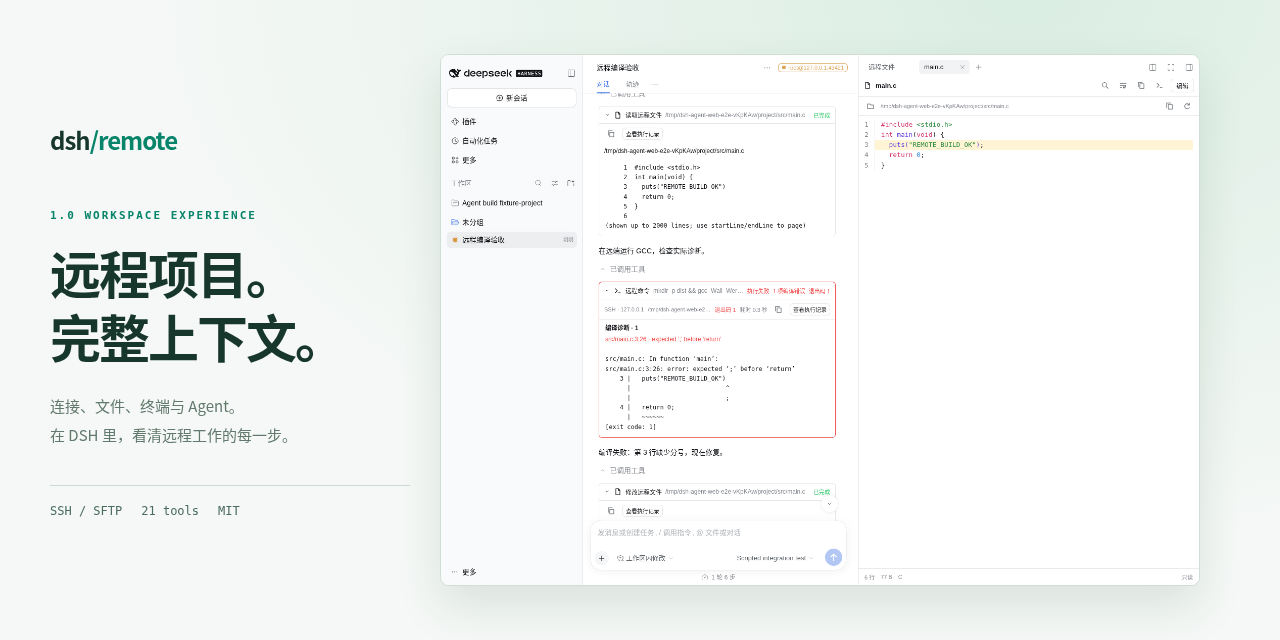\n\n在 [DeepSeek Harness](https://github.com/deepseek-ai/deepseek-harness) 中,把 SSH 主机变成日常开发工作区:管理多主机项目,浏览和编辑远程文件、递归搜索文件与内容、使用终端、查看 Git 差异、建立本地/反向端口隧道;让 Agent 在所属远程工作区中读写文件、执行命令、构建和测试。多个工作区可独立并行。\n\n可按习惯使用普通布局,或切换 **IDE 三栏布局**,并排查看远程文件、编辑器与原生 Agent 会话;切换时保留任务和未保存编辑。\n\n<img src=\"https://raw.githubusercontent.com/flymysql/dsh-remote/main/docs/shots/workbench-ide.png\" alt=\"DSH 远程工作区 IDE 模式:远程文件树、代码编辑器和原生 Agent 会话三栏\" width=\"1200\"/>\n\n## 安装\n\n```bash\ndsh plugin --profile web add dsh-remote\n```\n\n安装或升级后,重启 DSH Web 并刷新页面。自动更新状态在设置 → 远程工作区 → 插件偏好中查看。\n\n[1.
|
|
106
|
+
"readme": "[English](https://github.com/flymysql/dsh-remote/blob/main/README.en.md) · **中文**\n\n# dsh-remote\n\n[](https://www.npmjs.com/package/dsh-remote)\n[](https://www.npmjs.com/package/dsh-remote)\n[](https://www.npmjs.com/package/dsh-remote)\n[](https://github.com/flymysql/dsh-remote/blob/main/LICENSE)\n[](https://github.com/topics/dsh-plugin)\n\n由 [@flymysql](https://github.com/flymysql) 维护 · [主页](https://flymysql.github.io/dsh-remote/) · [用量统计](https://flymysql.github.io/dsh-remote/stats/) · [博客](https://gitpull.cn) · [讨论区](https://github.com/flymysql/dsh-remote/discussions) · [Issue](https://github.com/flymysql/dsh-remote/issues) · [English](https://github.com/flymysql/dsh-remote/blob/main/README.en.md)\n\n\n\n在 [DeepSeek Harness](https://github.com/deepseek-ai/deepseek-harness) 中,把 SSH 主机变成日常开发工作区:管理多主机项目,浏览和编辑远程文件、递归搜索文件与内容、使用终端、查看 Git 差异、建立本地/反向端口隧道;让 Agent 在所属远程工作区中读写文件、执行命令、构建和测试。多个工作区可独立并行。\n\n可按习惯使用普通布局,或切换 **IDE 三栏布局**,并排查看远程文件、编辑器与原生 Agent 会话;切换时保留任务和未保存编辑。\n\n<img src=\"https://raw.githubusercontent.com/flymysql/dsh-remote/main/docs/shots/workbench-ide.png\" alt=\"DSH 远程工作区 IDE 模式:远程文件树、代码编辑器和原生 Agent 会话三栏\" width=\"1200\"/>\n\n## 安装\n\n```bash\ndsh plugin --profile web add dsh-remote\n```\n\n安装或升级后,重启 DSH Web 并刷新页面。自动更新状态在设置 → 远程工作区 → 插件偏好中查看。\n\n[1.6.0 更新说明](https://github.com/flymysql/dsh-remote/blob/main/docs/release/1.6.0.md):远程提交图、IDE 按钮可见性偏好,以及搜索/同步/自更新/转发等一大批健壮性修复。\n\n## 3 步开始\n\n1. **配置主机**:设置 → 远程工作区,编辑 SSH 配置或保存主机凭据;直接写在 `~/.ssh/config` 里的 Host 会出现在主机列表中,点该行的「…」菜单 →「编辑」即可保存成机器并填写登录密码(保存前后入口都是同一个「…」菜单)。打开设置会自动检查连通性,无需手动“连接”。\n2. **创建工作区**:添加工作区 → 远程,选择主机与目录。每个工作区独立绑定主机,设置页不选目录或“当前远程机”。\n3. **开始开发**:打开工作区文件或切换 IDE 模式,文件打开即可编辑并显示语法高亮,在远端搜索、运行命令并与 Agent 协作。\n\n<img src=\"https://raw.githubusercontent.com/flymysql/dsh-remote/main/docs/shots/workspace-picker-browse.png\" alt=\"选择远程目录:固定路径与确认栏,目录列表占据弹窗主要区域\" width=\"720\"/>\n\n## 本地工作区也能用\n\n打开普通本地项目后,点击 **IDE 模式** 或 **工作区文件**,即可使用同一套文件树、高亮编辑、递归搜索、Git 差异与本地终端。无需配置 SSH;Agent 继续使用宿主原生文件和命令工具,多个本地、远程项目可并行工作。\n\n<img src=\"https://raw.githubusercontent.com/flymysql/dsh-remote/main/docs/shots/workbench-local.png\" alt=\"本地工作区:文件搜索、高亮编辑和原生 Agent 会话,Agent 已实际完成本地构建\" width=\"1200\"/>\n\n## 日常开发\n\n### 搜索远端文件与内容\n\n文件、目录和内容递归搜索,无需先展开目录或同步镜像。默认界面只显示搜索范围与进度摘要;按需展开搜索选项、扫描详情,支持大小写、忽略项、停止与重试。点击结果进入目录或文件对应行。\n\n<img src=\"https://raw.githubusercontent.com/flymysql/dsh-remote/main/docs/shots/workbench-search-results.png\" alt=\"简洁远程搜索:名称搜索结果包含嵌套目录与文件\" width=\"675\"/>\n\n### 查看远端 Git 改动\n\n分别查看工作区和已暂存 diff,筛选文件,点击改动行定位源码。面板只读,不提交或修改暂存区。\n\n<img src=\"https://raw.githubusercontent.com/flymysql/dsh-remote/main/docs/shots/workbench-git.png\" alt=\"远端 Git 工作区与已暂存改动、文件列表和源码 diff\" width=\"675\"/>\n\n### 在远端运行终端\n\n终端进入当前会话的远程目录;像素鱼欢迎图后接真实 SSH shell。已保存凭据可自动应答,支持多终端并行。\n\n<img src=\"https://raw.githubusercontent.com/flymysql/dsh-remote/main/docs/shots/workbench-terminal.png\" alt=\"DSH 远程终端:像素鱼欢迎图与实际 SSH 命令输出\" width=\"1000\"/>\n\n### 端口转发(SSH 隧道)\n\n谁要发起访问,就在谁那边开监听口:监听口开在本机是本地转发(`ssh -L`),开在远端是远程转发(`ssh -R`)。可同时运行多条;添加转发时可以选择「主机」,每条转发只属于一台机器——给还没连接的主机也能先存下转发,连上后再启动。每条转发都可以点「编辑」调整方向、端口、目标或所属主机,运行中的会先停止、保存后按新配置重新启动。每行能直接勾选「自动重连」——只恢复上次运行中的转发,且按机器隔离,反向转发首次勾选会提示远端监听风险。\n\n从旧版本升级:旧版没有 `lastActive` 的「自动重连」配置会暂停,行上显示「需重新确认」;重新勾选后才会参与自动恢复(反向转发需重新确认远端监听)。\n\n<img src=\"docs/shots/port-forwards.png\" alt=\"端口转发面板:本地/反向方向、自动重连勾选框与添加转发表单\" width=\"900\"/>\n\n### 与 Agent 一起修改和构建\n\n工具卡展示已应用改动、实际退出码和构建输出,编译诊断可跳转源码。编辑器保存会检测远端冲突、保留 CRLF,并保护保存期间继续输入的内容。\n\n<img src=\"https://raw.githubusercontent.com/flymysql/dsh-remote/main/docs/shots/workbench-applied-diff.png\" alt=\"Agent 远程编辑成功后的已应用 diff、路径与增删行数\" width=\"485\"/>\n\n## 兼容与边界\n\n- 主要面向 **DSH Web 0.2.x**;0.2.2 需要 **Node.js ≥24.9**。旧版宿主回退、Desktop/TUI 与 Agent diff 差异见[兼容说明](https://github.com/flymysql/dsh-remote/blob/main/docs/reference.zh.md#dsh-版本兼容性)。\n- 文件栏直接访问远端;镜像按需同步。草稿在当前页面内存,崩溃或强制退出仍可能丢失。\n- 不提供远端语言服务、扩展宿主或调试器。Agent 使用配置的 SSH 身份执行命令,请只配置可信主机。\n\n## 文档与社区\n\n[完整工具与配置参考](https://github.com/flymysql/dsh-remote/blob/main/docs/reference.zh.md) · [排障](https://github.com/flymysql/dsh-remote/blob/main/docs/troubleshooting.md) · [自更新修复](https://github.com/flymysql/dsh-remote/blob/main/docs/self-heal.md) · [升级指南](https://github.com/flymysql/dsh-remote/blob/main/docs/migration-1.0.md) · [更新记录](https://github.com/flymysql/dsh-remote/blob/main/CHANGELOG.md)\n\n[主页](https://flymysql.github.io/dsh-remote/) · [讨论区](https://github.com/flymysql/dsh-remote/discussions) · [反馈问题](https://github.com/flymysql/dsh-remote/issues) · [贡献指南](https://github.com/flymysql/dsh-remote/blob/main/CONTRIBUTING.md) · [贡献者与致谢](#贡献者与致谢)\n\n由 [@flymysql](https://github.com/flymysql) 与社区共同维护 · [MIT](https://github.com/flymysql/dsh-remote/blob/main/LICENSE)\n\n### 贡献者与致谢\n\n感谢每一位让这个项目更好的朋友(头像可点进主页;按提交数排序,机器人不计):\n\n<p align=\"left\">\n <a href=\"https://github.com/flymysql\"><img src=\"https://avatars.githubusercontent.com/u/37113068?s=80&v=4\" width=\"40\" height=\"40\" alt=\"@flymysql\" title=\"@flymysql\" /></a>\n <a href=\"https://github.com/baiseraku\"><img src=\"https://avatars.githubusercontent.com/u/139727690?s=80&v=4\" width=\"40\" height=\"40\" alt=\"@baiseraku\" title=\"@baiseraku\" /></a>\n <a href=\"https://github.com/glzhangzhi\"><img src=\"https://avatars.githubusercontent.com/u/36995275?s=80&v=4\" width=\"40\" height=\"40\" alt=\"@glzhangzhi\" title=\"@glzhangzhi\" /></a>\n <a href=\"https://github.com/hjwsm1989\"><img src=\"https://avatars.githubusercontent.com/u/1067541?s=80&v=4\" width=\"40\" height=\"40\" alt=\"@hjwsm1989\" title=\"@hjwsm1989\" /></a>\n <a href=\"https://github.com/j10ha0\"><img src=\"https://avatars.githubusercontent.com/u/72346906?s=80&v=4\" width=\"40\" height=\"40\" alt=\"@j10ha0\" title=\"@j10ha0\" /></a>\n <a href=\"https://github.com/FoolishWiser\"><img src=\"https://avatars.githubusercontent.com/u/104308087?s=80&v=4\" width=\"40\" height=\"40\" alt=\"@FoolishWiser\" title=\"@FoolishWiser\" /></a>\n <a href=\"https://github.com/kakaa-nju\"><img src=\"https://avatars.githubusercontent.com/u/79886619?s=80&v=4\" width=\"40\" height=\"40\" alt=\"@kakaa-nju\" title=\"@kakaa-nju\" /></a>\n <a href=\"https://github.com/4FMTWRV\"><img src=\"https://avatars.githubusercontent.com/u/190457700?s=80&v=4\" width=\"40\" height=\"40\" alt=\"@4FMTWRV\" title=\"@4FMTWRV\" /></a>\n <a href=\"https://github.com/dahaipeng\"><img src=\"https://avatars.githubusercontent.com/u/25660610?s=80&v=4\" width=\"40\" height=\"40\" alt=\"@dahaipeng\" title=\"@dahaipeng\" /></a>\n <a href=\"https://github.com/davidlin2k\"><img src=\"https://avatars.githubusercontent.com/u/17074619?s=80&v=4\" width=\"40\" height=\"40\" alt=\"@davidlin2k\" title=\"@davidlin2k\" /></a>\n <a href=\"https://github.com/FlintyLemming\"><img src=\"https://avatars.githubusercontent.com/u/19165511?s=80&v=4\" width=\"40\" height=\"40\" alt=\"@FlintyLemming\" title=\"@FlintyLemming\" /></a>\n <a href=\"https://github.com/GDWhisper\"><img src=\"https://avatars.githubusercontent.com/u/129148123?s=80&v=4\" width=\"40\" height=\"40\" alt=\"@GDWhisper\" title=\"@GDWhisper\" /></a>\n <a href=\"https://github.com/YiHui-Liu\"><img src=\"https://avatars.githubusercontent.com/u/30190271?s=80&v=4\" width=\"40\" height=\"40\" alt=\"@YiHui-Liu\" title=\"@YiHui-Liu\" /></a>\n <a href=\"https://github.com/Minggle\"><img src=\"https://avatars.githubusercontent.com/u/35053182?s=80&v=4\" width=\"40\" height=\"40\" alt=\"@Minggle\" title=\"@Minggle\" /></a>\n <a href=\"https://github.com/nekomona\"><img src=\"https://avatars.githubusercontent.com/u/25474483?s=80&v=4\" width=\"40\" height=\"40\" alt=\"@nekomona\" title=\"@nekomona\" /></a>\n <a href=\"https://github.com/shis23\"><img src=\"https://avatars.githubusercontent.com/u/189869650?s=80&v=4\" width=\"40\" height=\"40\" alt=\"@shis23\" title=\"@shis23\" /></a>\n</p>\n\n<details>\n<summary>贡献记录与早期贡献者</summary>\n\n近期的亮点贡献(欢迎随时加入这个名单):\n\n| 贡献者 | 做了什么 |\n| --- | --- |\n| [@baiseraku](https://github.com/baiseraku) | 整个 dsh-tui 适配层([#92](https://github.com/flymysql/dsh-remote/pull/92))+ 底栏机器名修正([#98](https://github.com/flymysql/dsh-remote/pull/98)) |\n| [@hjwsm1989](https://github.com/hjwsm1989) | 远程 .md 渲染连环两道:memo 守卫([#102](https://github.com/flymysql/dsh-remote/pull/102))+ labels 契约([#107](https://github.com/flymysql/dsh-remote/pull/107)) |\n| [@shis23](https://github.com/shis23) | rw_sync 路径映射纠偏 + SFTP 超时韧性([#105](https://github.com/flymysql/dsh-remote/pull/105)) |\n| [@davidlin2k](https://github.com/davidlin2k) | 无凭据机器走用户自有 ssh([#100](https://github.com/flymysql/dsh-remote/pull/100)) |\n| [@GDWhisper](https://github.com/GDWhisper) | 目录补全逐字符重连修复([#42](https://github.com/flymysql/dsh-remote/pull/42),issue #41) |\n| [@glzhangzhi](https://github.com/glzhangzhi) | 多远端会话的连接池隔离(issue #25 的主体修复) |\n\n早期已合并 PR 的贡献者(考古名单):\n\n\n\n[@dahaipeng](https://github.com/dahaipeng) (#31) ·\n[@YiHui-Liu](https://github.com/YiHui-Liu) (#28) ·\n[@nekomona](https://github.com/nekomona) (#24) ·\n[@zhz1667](https://github.com/zhz1667) (#43) ·\n[FoolishWiser](https://github.com/FoolishWiser) (#17) ·\n[@jace1cch](https://github.com/jace1cch) (#16) ·\n[@Minggle](https://github.com/Minggle) (#10) ·\n[4FMTWRV](https://github.com/4FMTWRV) (#6) ·\n[glzhangzhi](https://github.com/glzhangzhi)(per-session SSH 连接池修复)\n\n> 名单随版本更新;头像墙之外的每一份 issue 报告、复现步骤、根因线索同样珍贵——\n> 本仓库近半修复的起点都是一条写清楚的 issue。\n\n</details>\n",
|
|
107
107
|
"readmeFilename": "README.md"
|
|
108
108
|
}
|