dsh-remote 1.1.1 → 1.2.0
This diff represents the content of publicly available package versions that have been released to one of the supported registries. The information contained in this diff is provided for informational purposes only and reflects changes between package versions as they appear in their respective public registries.
- package/README.en.md +11 -3
- package/README.md +11 -3
- package/lib/client.js +550 -93
- package/lib/index.js +71 -11
- package/lib/local-copy.js +129 -0
- package/lib/local-mutation.js +8 -0
- package/lib/local-workspace.js +103 -0
- package/lib/mirror-paths.js +34 -0
- package/lib/remote-git.js +6 -4
- package/lib/routes-fs.js +39 -51
- package/lib/sftp-surface.js +16 -0
- package/lib/telemetry.js +64 -25
- package/package.json +3 -3
package/README.en.md
CHANGED
|
@@ -10,9 +10,11 @@
|
|
|
10
10
|
|
|
11
11
|
Maintained by [@flymysql](https://github.com/flymysql) · [Homepage](https://flymysql.github.io/dsh-remote/) · [Usage stats](https://flymysql.github.io/dsh-remote/stats/) · [Blog](https://gitpull.cn) · [Discussions](https://github.com/flymysql/dsh-remote/discussions) · [Issues](https://github.com/flymysql/dsh-remote/issues) · [中文说明](https://github.com/flymysql/dsh-remote/blob/main/README.md)
|
|
12
12
|
|
|
13
|
-
|
|
13
|
+
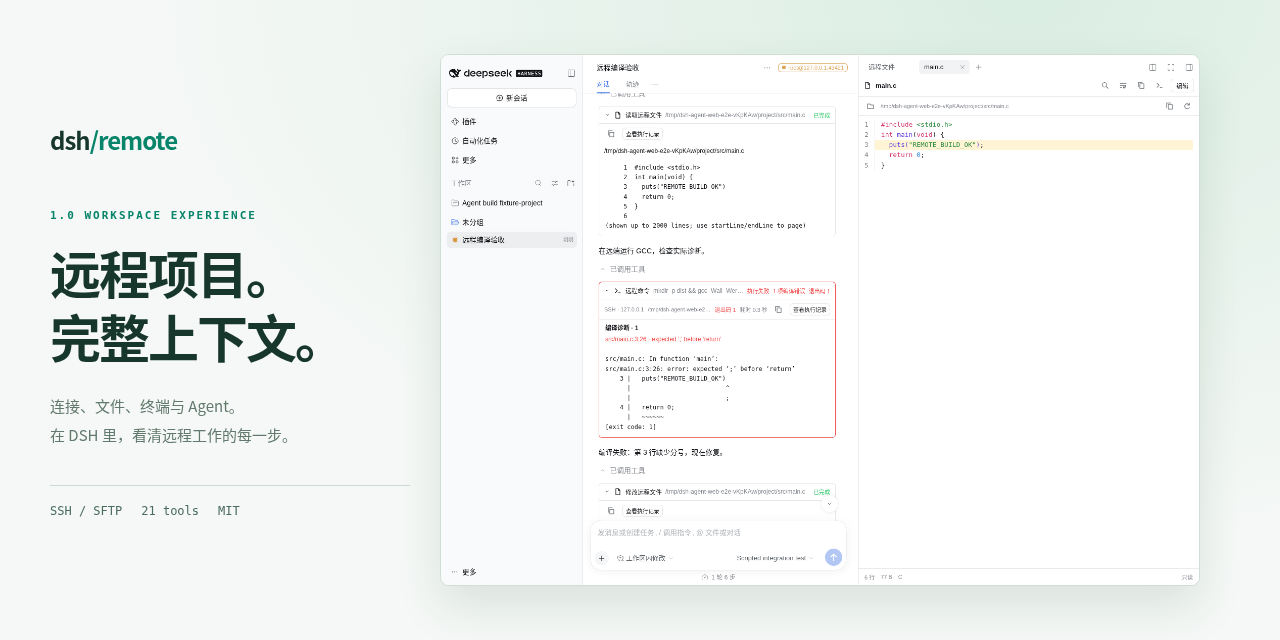
|
|
14
14
|
|
|
15
|
-
|
|
15
|
+
Turn SSH hosts into everyday development workspaces in [DeepSeek Harness](https://github.com/deepseek-ai/deepseek-harness): manage projects across hosts, browse and edit remote files, search names and contents, use terminals and inspect Git diffs. Agents read and write files, run commands, build and test in their assigned remote workspace. Multiple workspaces can run independently in parallel.
|
|
16
|
+
|
|
17
|
+
Use the normal layout or choose the optional **three-column IDE layout** to view remote files, the editor and the native Agent conversation side by side. Switching layouts retains tasks and unsaved edits.
|
|
16
18
|
|
|
17
19
|
<img src="https://raw.githubusercontent.com/flymysql/dsh-remote/main/docs/shots/workbench-ide.png" alt="DSH remote IDE with file tree, native code editor and agent conversation" width="1200"/>
|
|
18
20
|
|
|
@@ -28,10 +30,16 @@ After installation or an upgrade, restart DSH Web and refresh the page. Check au
|
|
|
28
30
|
|
|
29
31
|
1. **Configure a host**: open Settings → Remote workspaces to edit SSH configuration or save credentials. Connectivity checks run automatically; no manual connection step is required.
|
|
30
32
|
2. **Create a workspace**: Add workspace → Remote, then choose a host and folder. Each workspace binds its own host; settings have no folder selection or global active host.
|
|
31
|
-
3. **Develop remotely**: open workspace files or enter IDE mode to edit, search, run commands and collaborate with the agent.
|
|
33
|
+
3. **Develop remotely**: open workspace files or enter IDE mode to edit with syntax highlighting, search, run commands and collaborate with the agent. Files open ready to edit.
|
|
32
34
|
|
|
33
35
|
<img src="https://raw.githubusercontent.com/flymysql/dsh-remote/main/docs/shots/workspace-picker-browse.png" alt="Remote folder picker with fixed path and confirmation controls and a large directory list" width="720"/>
|
|
34
36
|
|
|
37
|
+
## Local workspaces too
|
|
38
|
+
|
|
39
|
+
Open a normal local project and choose **IDE mode** or **Workspace files** to use the same file tree, highlighted editor, recursive search, Git diffs and local terminal. No SSH setup is required. Agents keep using the host’s native file and command tools; local and remote projects can run in parallel.
|
|
40
|
+
|
|
41
|
+
<img src="https://raw.githubusercontent.com/flymysql/dsh-remote/main/docs/shots/workbench-local.png" alt="Local workspace with file search, highlighted editing and a native Agent conversation after an actual local build" width="1200"/>
|
|
42
|
+
|
|
35
43
|
## Everyday development
|
|
36
44
|
|
|
37
45
|
### Search remote names and contents
|
package/README.md
CHANGED
|
@@ -10,9 +10,11 @@
|
|
|
10
10
|
|
|
11
11
|
由 [@flymysql](https://github.com/flymysql) 维护 · [主页](https://flymysql.github.io/dsh-remote/) · [用量统计](https://flymysql.github.io/dsh-remote/stats/) · [博客](https://gitpull.cn) · [讨论区](https://github.com/flymysql/dsh-remote/discussions) · [Issue](https://github.com/flymysql/dsh-remote/issues) · [English](https://github.com/flymysql/dsh-remote/blob/main/README.en.md)
|
|
12
12
|
|
|
13
|
-
|
|
13
|
+

|
|
14
14
|
|
|
15
|
-
|
|
15
|
+
在 [DeepSeek Harness](https://github.com/deepseek-ai/deepseek-harness) 中,把 SSH 主机变成日常开发工作区:管理多主机项目,浏览和编辑远程文件、递归搜索文件与内容、使用终端并查看 Git 差异;让 Agent 在所属远程工作区中读写文件、执行命令、构建和测试。多个工作区可独立并行。
|
|
16
|
+
|
|
17
|
+
可按习惯使用普通布局,或切换 **IDE 三栏布局**,并排查看远程文件、编辑器与原生 Agent 会话;切换时保留任务和未保存编辑。
|
|
16
18
|
|
|
17
19
|
<img src="https://raw.githubusercontent.com/flymysql/dsh-remote/main/docs/shots/workbench-ide.png" alt="DSH 远程工作区 IDE 模式:远程文件树、代码编辑器和原生 Agent 会话三栏" width="1200"/>
|
|
18
20
|
|
|
@@ -28,10 +30,16 @@ dsh plugin --profile web add dsh-remote
|
|
|
28
30
|
|
|
29
31
|
1. **配置主机**:设置 → 远程工作区,编辑 SSH 配置或保存主机凭据;打开设置会自动检查连通性,无需手动“连接”。
|
|
30
32
|
2. **创建工作区**:添加工作区 → 远程,选择主机与目录。每个工作区独立绑定主机,设置页不选目录或“当前远程机”。
|
|
31
|
-
3. **开始开发**:打开工作区文件或切换 IDE
|
|
33
|
+
3. **开始开发**:打开工作区文件或切换 IDE 模式,文件打开即可编辑并显示语法高亮,在远端搜索、运行命令并与 Agent 协作。
|
|
32
34
|
|
|
33
35
|
<img src="https://raw.githubusercontent.com/flymysql/dsh-remote/main/docs/shots/workspace-picker-browse.png" alt="选择远程目录:固定路径与确认栏,目录列表占据弹窗主要区域" width="720"/>
|
|
34
36
|
|
|
37
|
+
## 本地工作区也能用
|
|
38
|
+
|
|
39
|
+
打开普通本地项目后,点击 **IDE 模式** 或 **工作区文件**,即可使用同一套文件树、高亮编辑、递归搜索、Git 差异与本地终端。无需配置 SSH;Agent 继续使用宿主原生文件和命令工具,多个本地、远程项目可并行工作。
|
|
40
|
+
|
|
41
|
+
<img src="https://raw.githubusercontent.com/flymysql/dsh-remote/main/docs/shots/workbench-local.png" alt="本地工作区:文件搜索、高亮编辑和原生 Agent 会话,Agent 已实际完成本地构建" width="1200"/>
|
|
42
|
+
|
|
35
43
|
## 日常开发
|
|
36
44
|
|
|
37
45
|
### 搜索远端文件与内容
|