dsh-remote 0.8.94 → 1.0.1
This diff represents the content of publicly available package versions that have been released to one of the supported registries. The information contained in this diff is provided for informational purposes only and reflects changes between package versions as they appear in their respective public registries.
- package/LICENSE +21 -21
- package/README.en.md +408 -370
- package/README.md +391 -355
- package/cordis.patch.yml +9 -9
- package/lib/audit.js +45 -45
- package/lib/auto-update.js +70 -0
- package/lib/binding.js +172 -172
- package/lib/boot.js +42 -42
- package/lib/client.js +5615 -4662
- package/lib/credential.js +277 -270
- package/lib/errors.js +141 -141
- package/lib/exec-job.js +245 -242
- package/lib/file-reference.js +457 -457
- package/lib/forwards.js +258 -258
- package/lib/host-api.js +822 -822
- package/lib/hostkey.js +108 -108
- package/lib/http-transport.js +201 -201
- package/lib/ignore.js +202 -202
- package/lib/index.js +4564 -4488
- package/lib/instructions-dynamic.js +415 -415
- package/lib/instructions.js +288 -288
- package/lib/open-folder.js +56 -56
- package/lib/openssh.js +950 -940
- package/lib/paths.js +292 -292
- package/lib/pool.js +1029 -1029
- package/lib/posix-shell.cjs +34 -34
- package/lib/registry.js +296 -296
- package/lib/remote-fs.js +173 -173
- package/lib/remote-sandbox.js +183 -183
- package/lib/remote-shell-child.cjs +413 -397
- package/lib/remote-shell.js +697 -697
- package/lib/remote-skills.js +312 -312
- package/lib/routes-audit.js +58 -58
- package/lib/routes-forwards.js +72 -72
- package/lib/routes-fs.js +251 -251
- package/lib/routes-machines.js +217 -186
- package/lib/routes-misc.js +187 -187
- package/lib/routes-term.js +169 -169
- package/lib/routes-update.js +147 -143
- package/lib/routes-web-attach.js +121 -112
- package/lib/routes-workspace.js +325 -312
- package/lib/search.js +235 -235
- package/lib/self-heal.js +130 -130
- package/lib/sftp-surface.js +119 -119
- package/lib/sshconfig.js +779 -779
- package/lib/sync-status.js +31 -0
- package/lib/sync.js +350 -350
- package/lib/tasks.js +95 -95
- package/lib/telemetry.js +247 -247
- package/lib/terminal.js +205 -205
- package/lib/tui/flow.js +130 -130
- package/lib/tui/format.js +380 -380
- package/lib/tui/i18n.js +350 -350
- package/lib/tui/index.js +531 -531
- package/lib/tui/provider.js +344 -344
- package/lib/tui/scene.js +986 -986
- package/lib/update.js +497 -490
- package/lib/web-attach.js +1081 -860
- package/lib/workspace-cleanup.js +337 -337
- package/node_modules/buildcheck/.eslintrc.js +5 -0
- package/node_modules/buildcheck/.github/workflows/ci.yml +88 -0
- package/node_modules/buildcheck/.github/workflows/lint.yml +27 -0
- package/node_modules/buildcheck/.npmignore +3 -0
- package/node_modules/buildcheck/LICENSE +19 -0
- package/node_modules/buildcheck/README.md +106 -0
- package/node_modules/buildcheck/deps/Find-VisualStudio.cs +250 -0
- package/node_modules/buildcheck/lib/findvs.js +361 -0
- package/node_modules/buildcheck/lib/index.js +738 -0
- package/node_modules/buildcheck/package.json +36 -0
- package/node_modules/buildcheck/test/test.js +8 -0
- package/node_modules/cpu-features/.eslintrc.js +5 -0
- package/node_modules/cpu-features/.github/workflows/ci.yml +74 -0
- package/node_modules/cpu-features/.github/workflows/lint.yml +27 -0
- package/node_modules/cpu-features/LICENSE +19 -0
- package/node_modules/cpu-features/README.md +59 -0
- package/node_modules/cpu-features/binding.gyp +16 -0
- package/node_modules/cpu-features/buildcheck.js +32 -0
- package/node_modules/cpu-features/deps/cpu_features/.clang-format +4 -0
- package/node_modules/cpu-features/deps/cpu_features/.dockerignore +31 -0
- package/node_modules/cpu-features/deps/cpu_features/.github/workflows/Dockerfile +5 -0
- package/node_modules/cpu-features/deps/cpu_features/.github/workflows/aarch64_linux_cmake.yml +30 -0
- package/node_modules/cpu-features/deps/cpu_features/.github/workflows/amd64_freebsd_cmake.yml +22 -0
- package/node_modules/cpu-features/deps/cpu_features/.github/workflows/amd64_linux_bazel.yml +26 -0
- package/node_modules/cpu-features/deps/cpu_features/.github/workflows/amd64_linux_cmake.yml +31 -0
- package/node_modules/cpu-features/deps/cpu_features/.github/workflows/amd64_macos_cmake.yml +43 -0
- package/node_modules/cpu-features/deps/cpu_features/.github/workflows/amd64_windows_cmake.yml +25 -0
- package/node_modules/cpu-features/deps/cpu_features/.github/workflows/arm_linux_cmake.yml +31 -0
- package/node_modules/cpu-features/deps/cpu_features/.github/workflows/clang_format.yml +24 -0
- package/node_modules/cpu-features/deps/cpu_features/.github/workflows/mips_linux_cmake.yml +30 -0
- package/node_modules/cpu-features/deps/cpu_features/.github/workflows/power_linux_cmake.yml +29 -0
- package/node_modules/cpu-features/deps/cpu_features/.github/workflows/riscv_linux_cmake.yml +28 -0
- package/node_modules/cpu-features/deps/cpu_features/.github/workflows/s390x_linux_cmake.yml +27 -0
- package/node_modules/cpu-features/deps/cpu_features/.grenrc.yml +21 -0
- package/node_modules/cpu-features/deps/cpu_features/BUILD.bazel +329 -0
- package/node_modules/cpu-features/deps/cpu_features/CMakeLists.txt +261 -0
- package/node_modules/cpu-features/deps/cpu_features/CONTRIBUTING.md +23 -0
- package/node_modules/cpu-features/deps/cpu_features/LICENSE +230 -0
- package/node_modules/cpu-features/deps/cpu_features/README.md +272 -0
- package/node_modules/cpu-features/deps/cpu_features/WORKSPACE +19 -0
- package/node_modules/cpu-features/deps/cpu_features/bazel/ci/README.md +5 -0
- package/node_modules/cpu-features/deps/cpu_features/bazel/platforms.bzl +11 -0
- package/node_modules/cpu-features/deps/cpu_features/cmake/CpuFeaturesConfig.cmake.in +3 -0
- package/node_modules/cpu-features/deps/cpu_features/cmake/CpuFeaturesNdkCompatConfig.cmake.in +3 -0
- package/node_modules/cpu-features/deps/cpu_features/cmake/README.md +30 -0
- package/node_modules/cpu-features/deps/cpu_features/cmake/ci/Makefile +252 -0
- package/node_modules/cpu-features/deps/cpu_features/cmake/ci/README.md +40 -0
- package/node_modules/cpu-features/deps/cpu_features/cmake/ci/doc/docker.dot +64 -0
- package/node_modules/cpu-features/deps/cpu_features/cmake/ci/doc/docker.svg +312 -0
- package/node_modules/cpu-features/deps/cpu_features/cmake/ci/doc/generate_image.sh +7 -0
- package/node_modules/cpu-features/deps/cpu_features/cmake/ci/docker/amd64/Dockerfile +48 -0
- package/node_modules/cpu-features/deps/cpu_features/cmake/ci/docker/toolchain/Dockerfile +34 -0
- package/node_modules/cpu-features/deps/cpu_features/cmake/ci/sample/CMakeLists.txt +22 -0
- package/node_modules/cpu-features/deps/cpu_features/cmake/ci/sample/main.cpp +11 -0
- package/node_modules/cpu-features/deps/cpu_features/cmake/ci/vagrant/freebsd/Vagrantfile +107 -0
- package/node_modules/cpu-features/deps/cpu_features/cmake/googletest.CMakeLists.txt.in +15 -0
- package/node_modules/cpu-features/deps/cpu_features/cpu_features.gyp +105 -0
- package/node_modules/cpu-features/deps/cpu_features/include/cpu_features_cache_info.h +54 -0
- package/node_modules/cpu-features/deps/cpu_features/include/cpu_features_macros.h +384 -0
- package/node_modules/cpu-features/deps/cpu_features/include/cpuinfo_aarch64.h +259 -0
- package/node_modules/cpu-features/deps/cpu_features/include/cpuinfo_arm.h +121 -0
- package/node_modules/cpu-features/deps/cpu_features/include/cpuinfo_mips.h +74 -0
- package/node_modules/cpu-features/deps/cpu_features/include/cpuinfo_ppc.h +149 -0
- package/node_modules/cpu-features/deps/cpu_features/include/cpuinfo_riscv.h +72 -0
- package/node_modules/cpu-features/deps/cpu_features/include/cpuinfo_s390x.h +108 -0
- package/node_modules/cpu-features/deps/cpu_features/include/cpuinfo_x86.h +288 -0
- package/node_modules/cpu-features/deps/cpu_features/include/internal/bit_utils.h +40 -0
- package/node_modules/cpu-features/deps/cpu_features/include/internal/cpuid_x86.h +37 -0
- package/node_modules/cpu-features/deps/cpu_features/include/internal/filesystem.h +39 -0
- package/node_modules/cpu-features/deps/cpu_features/include/internal/hwcaps.h +240 -0
- package/node_modules/cpu-features/deps/cpu_features/include/internal/stack_line_reader.h +49 -0
- package/node_modules/cpu-features/deps/cpu_features/include/internal/string_view.h +110 -0
- package/node_modules/cpu-features/deps/cpu_features/include/internal/windows_utils.h +70 -0
- package/node_modules/cpu-features/deps/cpu_features/ndk_compat/CMakeLists.txt +60 -0
- package/node_modules/cpu-features/deps/cpu_features/ndk_compat/README.md +4 -0
- package/node_modules/cpu-features/deps/cpu_features/ndk_compat/cpu-features.c +205 -0
- package/node_modules/cpu-features/deps/cpu_features/ndk_compat/cpu-features.h +320 -0
- package/node_modules/cpu-features/deps/cpu_features/ndk_compat/ndk-compat-test.c +12 -0
- package/node_modules/cpu-features/deps/cpu_features/patches/0001-Add-Apple-Silicon-Support.patch +456 -0
- package/node_modules/cpu-features/deps/cpu_features/scripts/generate_badges.d +165 -0
- package/node_modules/cpu-features/deps/cpu_features/scripts/make_release.sh +75 -0
- package/node_modules/cpu-features/deps/cpu_features/scripts/run_integration.sh +490 -0
- package/node_modules/cpu-features/deps/cpu_features/scripts/test_integration.sh +79 -0
- package/node_modules/cpu-features/deps/cpu_features/src/copy.inl +19 -0
- package/node_modules/cpu-features/deps/cpu_features/src/define_introspection.inl +86 -0
- package/node_modules/cpu-features/deps/cpu_features/src/define_introspection_and_hwcaps.inl +26 -0
- package/node_modules/cpu-features/deps/cpu_features/src/equals.inl +22 -0
- package/node_modules/cpu-features/deps/cpu_features/src/filesystem.c +62 -0
- package/node_modules/cpu-features/deps/cpu_features/src/hwcaps.c +169 -0
- package/node_modules/cpu-features/deps/cpu_features/src/impl_aarch64__base_implementation.inl +88 -0
- package/node_modules/cpu-features/deps/cpu_features/src/impl_aarch64_linux_or_android.c +79 -0
- package/node_modules/cpu-features/deps/cpu_features/src/impl_aarch64_macos_or_iphone.c +82 -0
- package/node_modules/cpu-features/deps/cpu_features/src/impl_aarch64_windows.c +138 -0
- package/node_modules/cpu-features/deps/cpu_features/src/impl_arm_linux_or_android.c +212 -0
- package/node_modules/cpu-features/deps/cpu_features/src/impl_mips_linux_or_android.c +93 -0
- package/node_modules/cpu-features/deps/cpu_features/src/impl_ppc_linux.c +163 -0
- package/node_modules/cpu-features/deps/cpu_features/src/impl_riscv_linux.c +111 -0
- package/node_modules/cpu-features/deps/cpu_features/src/impl_s390x_linux.c +120 -0
- package/node_modules/cpu-features/deps/cpu_features/src/impl_x86__base_implementation.inl +2055 -0
- package/node_modules/cpu-features/deps/cpu_features/src/impl_x86_freebsd.c +68 -0
- package/node_modules/cpu-features/deps/cpu_features/src/impl_x86_linux_or_android.c +58 -0
- package/node_modules/cpu-features/deps/cpu_features/src/impl_x86_macos.c +57 -0
- package/node_modules/cpu-features/deps/cpu_features/src/impl_x86_windows.c +58 -0
- package/node_modules/cpu-features/deps/cpu_features/src/stack_line_reader.c +132 -0
- package/node_modules/cpu-features/deps/cpu_features/src/string_view.c +192 -0
- package/node_modules/cpu-features/deps/cpu_features/src/utils/list_cpu_features.c +461 -0
- package/node_modules/cpu-features/deps/cpu_features/test/CMakeLists.txt +114 -0
- package/node_modules/cpu-features/deps/cpu_features/test/bit_utils_test.cc +53 -0
- package/node_modules/cpu-features/deps/cpu_features/test/cpuinfo_aarch64_test.cc +396 -0
- package/node_modules/cpu-features/deps/cpu_features/test/cpuinfo_arm_test.cc +384 -0
- package/node_modules/cpu-features/deps/cpu_features/test/cpuinfo_mips_test.cc +176 -0
- package/node_modules/cpu-features/deps/cpu_features/test/cpuinfo_ppc_test.cc +131 -0
- package/node_modules/cpu-features/deps/cpu_features/test/cpuinfo_riscv_test.cc +180 -0
- package/node_modules/cpu-features/deps/cpu_features/test/cpuinfo_s390x_test.cc +82 -0
- package/node_modules/cpu-features/deps/cpu_features/test/cpuinfo_x86_test.cc +1729 -0
- package/node_modules/cpu-features/deps/cpu_features/test/filesystem_for_testing.cc +103 -0
- package/node_modules/cpu-features/deps/cpu_features/test/filesystem_for_testing.h +61 -0
- package/node_modules/cpu-features/deps/cpu_features/test/hwcaps_for_testing.cc +52 -0
- package/node_modules/cpu-features/deps/cpu_features/test/hwcaps_for_testing.h +31 -0
- package/node_modules/cpu-features/deps/cpu_features/test/stack_line_reader_test.cc +132 -0
- package/node_modules/cpu-features/deps/cpu_features/test/string_view_test.cc +202 -0
- package/node_modules/cpu-features/lib/index.js +5 -0
- package/node_modules/cpu-features/package.json +40 -0
- package/node_modules/cpu-features/src/binding.cc +151 -0
- package/node_modules/cpu-features/test/test.js +12 -0
- package/node_modules/nan/tools/1to2.js +0 -0
- package/package.json +106 -103
package/README.md
CHANGED
|
@@ -1,355 +1,391 @@
|
|
|
1
|
-
[English](
|
|
2
|
-
|
|
3
|
-
---
|
|
4
|
-
|
|
5
|
-
# dsh-remote
|
|
6
|
-
|
|
7
|
-
[](https://www.npmjs.com/package/dsh-remote)
|
|
8
|
-
[](https://www.npmjs.com/package/dsh-remote)
|
|
9
|
-
[](https://www.npmjs.com/package/dsh-remote)
|
|
10
|
-
[](LICENSE)
|
|
11
|
-
[](https://github.com/topics/dsh-plugin)
|
|
12
|
-
|
|
13
|
-
由 [@flymysql](https://github.com/flymysql) 维护 · [主页](https://flymysql.github.io/dsh-remote/) · [用量统计](https://flymysql.github.io/dsh-remote/stats/) · [博客](https://gitpull.cn) · [讨论区](https://github.com/flymysql/dsh-remote/discussions) · [Issue](https://github.com/flymysql/dsh-remote/issues) · [English](
|
|
14
|
-
|
|
15
|
-

|
|
16
|
-
|
|
17
|
-
**为 [DeepSeek Harness](https://github.com/deepseek-ai/deepseek-harness)(DSH)打造的远程工作助手。**
|
|
18
|
-
|
|
19
|
-
维护多台 SSH 机器,然后在「选择工作区」时选一个**远程工作区**(或**本地工作区**),Agent 就能在不离开 harness 的情况下直接操作——列文件、读代码、在远程主机上跑构建/命令,并把远程目录镜像成一个真实的本地工作区对象。
|
|
20
|
-
|
|
21
|
-
DSH 的 Web 界面刻意只监听 `127.0.0.1`(CLI 为安全拒绝 `--host 0.0.0.0`)。本插件反过来:**由你主动连出**到你维护的机器,选一个工作区,然后通过 DSH 原生的工作区 + 文件流来工作——**不改动 `dsh-workspace` 核心**。
|
|
22
|
-
|
|
23
|
-
反过来也成立:**你可以把远端那台机器的 DSH 网页界面,当成本机浏览器里的一个页面打开**——同样不需要在远端开放任何端口(详见 [在本地打开远程机器上的 DSH 界面](#在本地打开远程机器上的-dsh-界面))。远端 dsh 需要你先装好(插件不再代装)。
|
|
24
|
-
|
|
25
|
-
##
|
|
26
|
-
|
|
27
|
-
|
|
28
|
-
|
|
29
|
-
|
|
30
|
-
|
|
31
|
-
|
|
32
|
-
|
|
33
|
-
|
|
34
|
-
|
|
35
|
-
|
|
36
|
-
|
|
37
|
-
-
|
|
38
|
-
|
|
39
|
-
|
|
40
|
-
|
|
41
|
-
|
|
42
|
-
|
|
43
|
-
|
|
44
|
-
|
|
45
|
-
|
|
46
|
-
|
|
47
|
-
|
|
48
|
-
|
|
49
|
-
-
|
|
50
|
-
|
|
51
|
-
|
|
52
|
-
|
|
53
|
-
|
|
54
|
-
|
|
55
|
-
|
|
56
|
-
|
|
57
|
-
|
|
58
|
-
|
|
59
|
-
-
|
|
60
|
-
-
|
|
61
|
-
-
|
|
62
|
-
-
|
|
63
|
-
|
|
64
|
-
|
|
65
|
-
|
|
66
|
-
|
|
67
|
-
|
|
68
|
-
|
|
69
|
-
|
|
70
|
-
|
|
71
|
-
|
|
72
|
-
|
|
73
|
-
|
|
74
|
-
|
|
75
|
-
|
|
76
|
-
|
|
77
|
-
|
|
78
|
-
|
|
79
|
-
|
|
80
|
-
|
|
81
|
-
|
|
82
|
-
|
|
83
|
-
|
|
84
|
-
|
|
85
|
-
|
|
86
|
-
|
|
87
|
-
|
|
88
|
-
```
|
|
89
|
-
dsh
|
|
90
|
-
```
|
|
91
|
-
|
|
92
|
-
|
|
93
|
-
|
|
94
|
-
|
|
95
|
-
|
|
96
|
-
|
|
97
|
-
|
|
98
|
-
|
|
99
|
-
|
|
100
|
-
|
|
101
|
-
|
|
102
|
-
|
|
103
|
-
|
|
104
|
-
|
|
105
|
-
|
|
106
|
-
|
|
107
|
-
|
|
108
|
-
|
|
109
|
-
|
|
110
|
-
|
|
111
|
-
|
|
112
|
-
|
|
113
|
-
|
|
114
|
-
|
|
115
|
-
|
|
116
|
-
|
|
117
|
-
|
|
118
|
-
|
|
119
|
-
|
|
120
|
-
|
|
121
|
-
|
|
122
|
-
|
|
123
|
-
|
|
124
|
-
|
|
125
|
-
|
|
126
|
-
|
|
127
|
-
|
|
128
|
-
|
|
129
|
-
|
|
130
|
-
|
|
131
|
-
|
|
132
|
-
|
|
133
|
-
|
|
134
|
-
|
|
135
|
-
|
|
136
|
-
|
|
137
|
-
|
|
138
|
-
|
|
139
|
-
|
|
140
|
-
|
|
141
|
-
|
|
142
|
-
|
|
143
|
-
|
|
144
|
-
|
|
145
|
-
|
|
146
|
-
|
|
147
|
-
|
|
148
|
-
|
|
149
|
-
|
|
150
|
-
|
|
151
|
-
|
|
152
|
-
|
|
153
|
-
|
|
154
|
-
|
|
155
|
-
|
|
156
|
-
|
|
157
|
-
|
|
158
|
-
|
|
159
|
-
|
|
160
|
-
|
|
161
|
-
|
|
162
|
-
|
|
163
|
-
|
|
164
|
-
|
|
165
|
-
|
|
166
|
-
|
|
167
|
-
|
|
168
|
-
|
|
169
|
-
|
|
170
|
-
|
|
171
|
-
|
|
172
|
-
|
|
173
|
-
|
|
174
|
-
|
|
175
|
-
|
|
176
|
-
|
|
177
|
-
|
|
178
|
-
|
|
179
|
-
|
|
180
|
-
|
|
181
|
-
|
|
182
|
-
|
|
183
|
-
|
|
184
|
-
|
|
185
|
-
|
|
186
|
-
dsh
|
|
187
|
-
|
|
188
|
-
|
|
189
|
-
|
|
190
|
-
|
|
191
|
-
dsh
|
|
192
|
-
|
|
193
|
-
|
|
194
|
-
|
|
195
|
-
|
|
196
|
-
|
|
197
|
-
|
|
198
|
-
#
|
|
199
|
-
|
|
200
|
-
|
|
201
|
-
|
|
202
|
-
|
|
203
|
-
|
|
204
|
-
|
|
205
|
-
|
|
206
|
-
|
|
207
|
-
|
|
208
|
-
|
|
209
|
-
```
|
|
210
|
-
|
|
211
|
-
|
|
212
|
-
|
|
213
|
-
|
|
214
|
-
|
|
215
|
-
|
|
216
|
-
|
|
217
|
-
|
|
218
|
-
|
|
219
|
-
|
|
220
|
-
|
|
221
|
-
|
|
222
|
-
|
|
223
|
-
|
|
224
|
-
|
|
225
|
-
|
|
226
|
-
|
|
227
|
-
|
|
228
|
-
|
|
229
|
-
|
|
230
|
-
|
|
231
|
-
|
|
232
|
-
|
|
233
|
-
|
|
234
|
-
|
|
235
|
-
|
|
236
|
-
|
|
237
|
-
|
|
238
|
-
|
|
239
|
-
|
|
240
|
-
|
|
241
|
-
|
|
242
|
-
|
|
243
|
-
|
|
244
|
-
|
|
245
|
-
|
|
246
|
-
|
|
247
|
-
|
|
248
|
-
|
|
249
|
-
|
|
250
|
-
|
|
251
|
-
|
|
252
|
-
|
|
253
|
-
|
|
254
|
-
|
|
255
|
-
|
|
256
|
-
|
|
257
|
-
|
|
258
|
-
|
|
|
259
|
-
|
|
|
260
|
-
| `
|
|
261
|
-
| `
|
|
262
|
-
| `
|
|
263
|
-
| `
|
|
264
|
-
| `
|
|
265
|
-
| `
|
|
266
|
-
| `
|
|
267
|
-
| `
|
|
268
|
-
| `
|
|
269
|
-
| `
|
|
270
|
-
| `
|
|
271
|
-
| `
|
|
272
|
-
|
|
273
|
-
|
|
274
|
-
|
|
275
|
-
|
|
276
|
-
|
|
277
|
-
|
|
278
|
-
|
|
279
|
-
|
|
280
|
-
|
|
281
|
-
|
|
282
|
-
|
|
283
|
-
|
|
284
|
-
|
|
285
|
-
|
|
286
|
-
-
|
|
287
|
-
|
|
288
|
-
|
|
289
|
-
|
|
290
|
-
|
|
291
|
-
|
|
292
|
-
|
|
293
|
-
|
|
294
|
-
|
|
295
|
-
|
|
296
|
-
|
|
297
|
-
|
|
298
|
-
|
|
299
|
-
|
|
300
|
-
|
|
301
|
-
|
|
302
|
-
|
|
303
|
-
|
|
304
|
-
|
|
305
|
-
|
|
306
|
-
|
|
307
|
-
|
|
308
|
-
|
|
309
|
-
|
|
310
|
-
|
|
311
|
-
|
|
312
|
-
|
|
313
|
-
|
|
314
|
-
|
|
315
|
-
|
|
316
|
-
|
|
317
|
-
|
|
318
|
-
|
|
319
|
-
|
|
320
|
-
|
|
321
|
-
|
|
322
|
-
|
|
323
|
-
|
|
324
|
-
|
|
325
|
-
|
|
326
|
-
|
|
327
|
-
|
|
328
|
-
|
|
329
|
-
|
|
330
|
-
|
|
331
|
-
|
|
332
|
-
|
|
333
|
-
|
|
334
|
-
|
|
335
|
-
|
|
336
|
-
|
|
337
|
-
|
|
338
|
-
|
|
339
|
-
|
|
340
|
-
|
|
341
|
-
|
|
342
|
-
|
|
343
|
-
|
|
344
|
-
|
|
345
|
-
|
|
346
|
-
|
|
347
|
-
|
|
348
|
-
|
|
349
|
-
|
|
350
|
-
|
|
351
|
-
|
|
352
|
-
|
|
353
|
-
|
|
354
|
-
|
|
355
|
-
|
|
1
|
+
[English](https://github.com/flymysql/dsh-remote/blob/main/README.en.md) · **中文**
|
|
2
|
+
|
|
3
|
+
---
|
|
4
|
+
|
|
5
|
+
# dsh-remote
|
|
6
|
+
|
|
7
|
+
[](https://www.npmjs.com/package/dsh-remote)
|
|
8
|
+
[](https://www.npmjs.com/package/dsh-remote)
|
|
9
|
+
[](https://www.npmjs.com/package/dsh-remote)
|
|
10
|
+
[](https://github.com/flymysql/dsh-remote/blob/main/LICENSE)
|
|
11
|
+
[](https://github.com/topics/dsh-plugin)
|
|
12
|
+
|
|
13
|
+
由 [@flymysql](https://github.com/flymysql) 维护 · [主页](https://flymysql.github.io/dsh-remote/) · [用量统计](https://flymysql.github.io/dsh-remote/stats/) · [博客](https://gitpull.cn) · [讨论区](https://github.com/flymysql/dsh-remote/discussions) · [Issue](https://github.com/flymysql/dsh-remote/issues) · [English](https://github.com/flymysql/dsh-remote/blob/main/README.en.md)
|
|
14
|
+
|
|
15
|
+
|
|
16
|
+
|
|
17
|
+
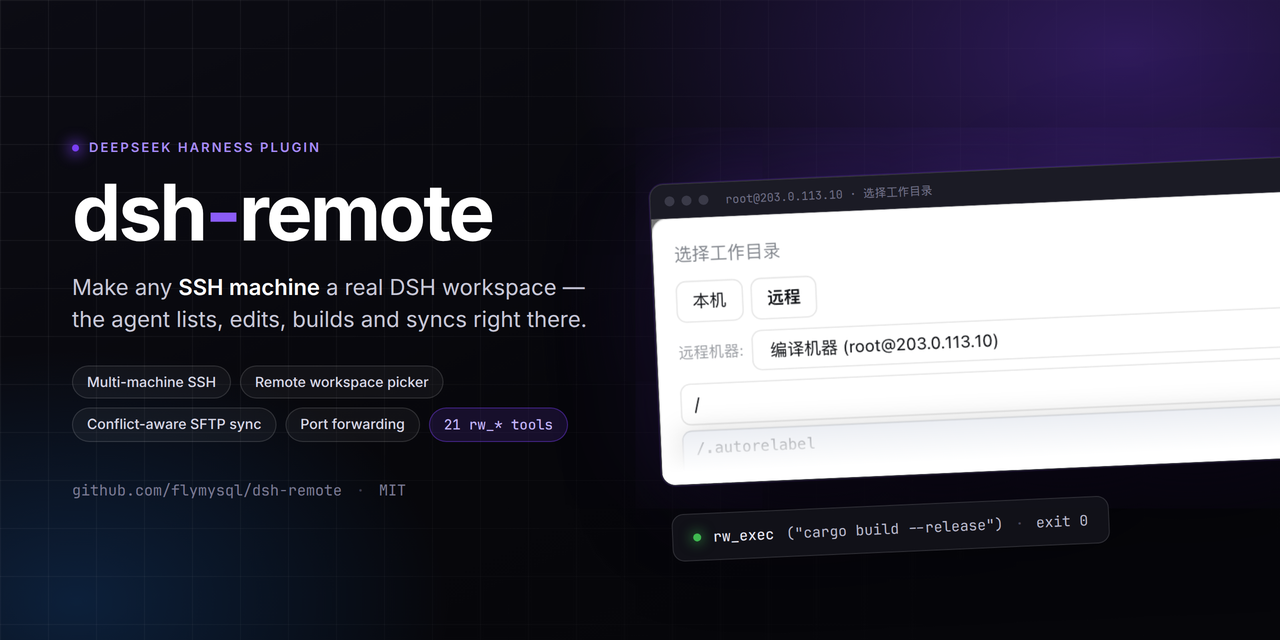
**为 [DeepSeek Harness](https://github.com/deepseek-ai/deepseek-harness)(DSH)打造的远程工作助手。**
|
|
18
|
+
|
|
19
|
+
维护多台 SSH 机器,然后在「选择工作区」时选一个**远程工作区**(或**本地工作区**),Agent 就能在不离开 harness 的情况下直接操作——列文件、读代码、在远程主机上跑构建/命令,并把远程目录镜像成一个真实的本地工作区对象。
|
|
20
|
+
|
|
21
|
+
DSH 的 Web 界面刻意只监听 `127.0.0.1`(CLI 为安全拒绝 `--host 0.0.0.0`)。本插件反过来:**由你主动连出**到你维护的机器,选一个工作区,然后通过 DSH 原生的工作区 + 文件流来工作——**不改动 `dsh-workspace` 核心**。
|
|
22
|
+
|
|
23
|
+
反过来也成立:**你可以把远端那台机器的 DSH 网页界面,当成本机浏览器里的一个页面打开**——同样不需要在远端开放任何端口(详见 [在本地打开远程机器上的 DSH 界面](#在本地打开远程机器上的-dsh-界面))。远端 dsh 需要你先装好(插件不再代装)。
|
|
24
|
+
|
|
25
|
+
## 1.0 工作区体验
|
|
26
|
+
|
|
27
|
+
最近远程项目可直接搜索并打开;文件树保留会话上下文,文件以原生标签页查看和编辑。Agent 的远程命令展示实际退出码、耗时和编译诊断,点击诊断可打开远程文件对应行。文件支持查找、换行、Markdown 预览和保存快捷键,重新打开会读取 Agent 的最新修改。
|
|
28
|
+
|
|
29
|
+
未保存草稿保存在当前页面内存,离开页面前会提醒;浏览器崩溃或强制退出仍可能丢失。文件栏直接访问远端;镜像通过 `rw_sync` / `rw_push` 按需同步,或显式启用 autoPush。同步完成表示该次操作的结果,不保证之后两端持续相等。
|
|
30
|
+
|
|
31
|
+
新界面以 DSH Web 0.2.x 为主要验收目标;DSH 0.2.2 要求 Node.js ≥24.9。旧宿主缺少扩展接口时使用现有回退路径。本插件不提供远端语言服务、扩展宿主或远端 Git/调试器托管。
|
|
32
|
+
|
|
33
|
+
## 界面预览
|
|
34
|
+
|
|
35
|
+
**Agent 编译诊断与远程源码定位** —— 查看实际退出码和错误,点击诊断进入远程文件对应行:
|
|
36
|
+
|
|
37
|
+
<img src="https://raw.githubusercontent.com/flymysql/dsh-remote/main/docs/shots/workbench-agent.png" alt="Agent 远程编译错误、退出码与源码行定位" width="1000"/>
|
|
38
|
+
|
|
39
|
+
**文件查看与查找** —— 行号、语法高亮、匹配跳转和自动换行:
|
|
40
|
+
|
|
41
|
+
<img src="https://raw.githubusercontent.com/flymysql/dsh-remote/main/docs/shots/workbench-file.png" alt="远程文件中的查找、匹配计数、换行和高亮" width="620"/>
|
|
42
|
+
|
|
43
|
+
**原生远程终端** —— 明确启动 remote ssh,进入当前会话的远程目录:
|
|
44
|
+
|
|
45
|
+
<img src="https://raw.githubusercontent.com/flymysql/dsh-remote/main/docs/shots/workbench-terminal.png" alt="DSH 原生远程终端实际输入与命令输出" width="1000"/>
|
|
46
|
+
|
|
47
|
+
**主机设置** —— 自动检测连通性与耗时,配置和工作区操作分开:
|
|
48
|
+
|
|
49
|
+
<img src="https://raw.githubusercontent.com/flymysql/dsh-remote/main/docs/shots/settings-panel.png" alt="远程主机设置:独立连接检测与耗时,编辑和删除主机,无全局当前主机或目录选择" width="1000"/>
|
|
50
|
+
|
|
51
|
+
## 功能
|
|
52
|
+
|
|
53
|
+
|
|
54
|
+
|
|
55
|
+
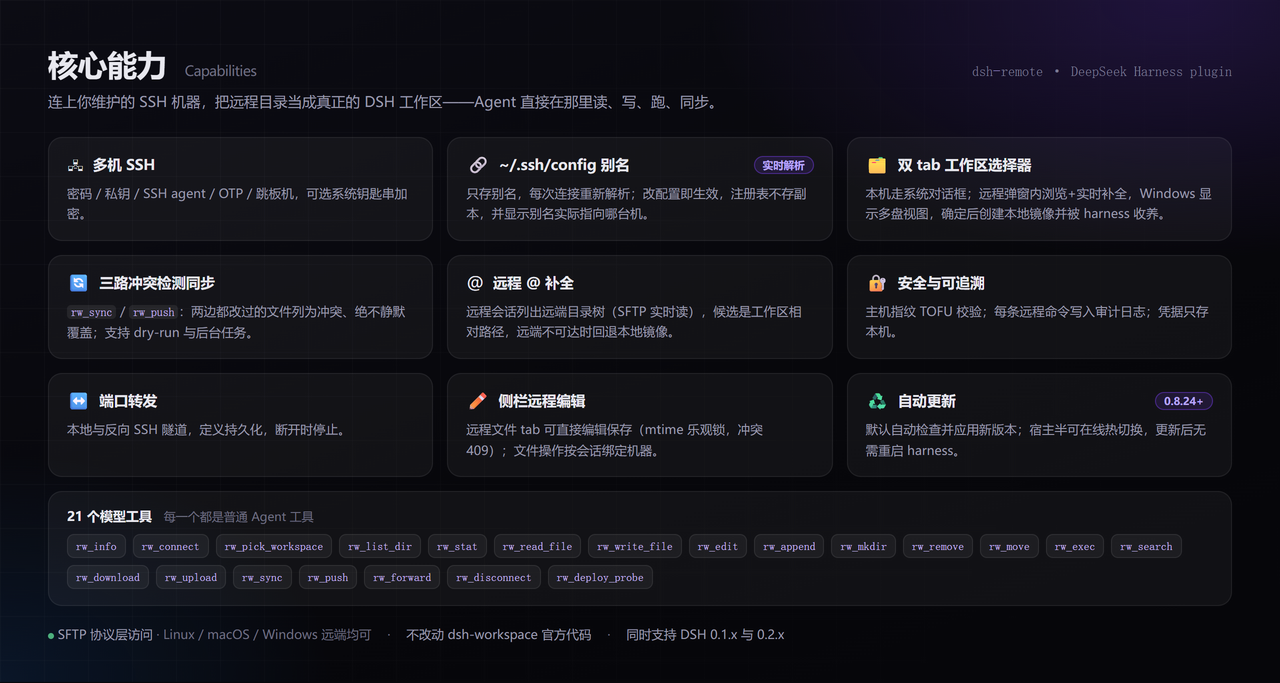
上图是能力总览;下面只列**上图没说清、但用起来需要知道**的部分。
|
|
56
|
+
|
|
57
|
+
其余要点:
|
|
58
|
+
|
|
59
|
+
- **21 个模型工具**(便于复制/检索):`rw_info`、`rw_connect`、`rw_machines`、`rw_pick_workspace`、`rw_list_dir`、`rw_stat`、`rw_read_file`、`rw_write_file`、`rw_edit`、`rw_append`、`rw_mkdir`、`rw_remove`、`rw_move`、`rw_exec`、`rw_search`、`rw_download`、`rw_upload`、`rw_sync`、`rw_push`、`rw_forward`、`rw_disconnect`。
|
|
60
|
+
- **会话列表里区分本地/远程**(`0.8.43+`)—— 远程会话的行首有一个**绿点**,悬停显示 `user@host:port` 与远端路径;打开该会话后,标题栏还会常显一个主机标签(本地会话两者都没有)。判定只看会话 cwd 是否落在 `$DSH_HOME/remote-workspaces/…` 镜像里,所以「保存过但没在用」的机器不会给本地会话打标。
|
|
61
|
+
- **远程会话的终端开箱即在远端**(`0.8.75+`)—— 侧栏终端的 shell 菜单里有插件贡献的 **remote ssh**:按 cwd 智能路由(远程镜像 → `ssh` 进远端工作目录;本地会话 → 自动回落本地 shell),在没人占位时它还是**默认 shell**。已保存的密码由本机凭据桥自动应答(`0.8.81+`,含操作系统钥匙串里的),不会再每次开终端都问一遍 `password:`。
|
|
62
|
+
- **远程文件预览带行号与语法高亮**(`0.8.86+`)—— 代码文件用宿主自家的 Shiki 引擎着色;AI 回答里的 `文件:行号`(或 `#L行号`)链接点开直接落到那一行并闪烁提示。
|
|
63
|
+
- **远程项目技能无需先同步**(issue #120)—— 远程工作区的 `.dsh/skills` 与 `.agents/skills` 会直接进入 DSH 技能目录,支持目录型 `SKILL.md` 和顶层 `.md`,完整正文按需经 SFTP 加载;同名时远端内容优先于本地镜像副本。技能里引用相邻资源时用 `rw_list_dir` / `rw_read_file` 读取。写入、推送、autoPush 会立即失效目录缓存;后台或外部进程的修改由每 5 分钟一次的**只失效、不联网**刷新兜底,不会制造定时 SFTP 流量。普通本地会话仍只使用宿主原有技能目录。
|
|
64
|
+
- **把远端机器的 DSH 界面挂到本机**(`0.8.36+`)—— 不用在远端开任何端口:插件主动 SSH 连过去,在远端**只监听 `127.0.0.1`** 地起一个 `dsh web`,再把端口经隧道搬回本机的一个 loopback 端口。地址带一次性登录令牌,只在本机这次跳转里用一次。
|
|
65
|
+
- **审计日志可以在本机直接打开** —— 面板里预览最近条目,另有「打开日志文件」「在文件夹中显示」直接调用本机程序打开那个日志(日志在运行 DSH 的机器上,浏览器打不开它)。
|
|
66
|
+
- **远端跨平台** —— 文件访问走 SFTP 协议层(不依赖 POSIX shell),Linux/macOS/Windows 远端都能列/读/写/搜索/同步。
|
|
67
|
+
- **Windows 主机** —— 自动探测平台并定位 Git Bash,命令经 `bash -s` 走 stdin 执行,不受引号/反斜杠转义困扰(`config.shell` 可指定或设 `native` 关闭);`C:\Users\dev` 与 `/c/Users/dev` 两种写法都接受。
|
|
68
|
+
- **长任务异步化** —— `rw_sync`/`rw_push` 传 `async: true` 返回 `taskId`,可查询进度/结果/取消。
|
|
69
|
+
- **数据跟随 Harness 根目录** —— 机器清单与镜像在 `$DSH_HOME/remote-workspaces`;0.6 之前的数据首次启动自动迁移。
|
|
70
|
+
- **`~/.ssh/config` 是连接四字段的唯一来源**(`0.8.50+`,issue #50)—— 保存机器时把 主机/用户/端口/私钥 写入 `~/.ssh/config` 的受管块(`# dsh-remote: managed` 标记,只动自己的块;你手写的同名 Host 块绝不覆盖,会提示冲突)。之后**改这个文件立即生效**:任何 Host 块点名的主机(含字面 IP),连接都按文件解析(裸 `Host *` 是通用默认,不算点名);机器记录里的副本只做兜底,插件自己的状态(最近工作区/延迟等)仍存注册表。
|
|
71
|
+
- **不改动 `dsh-workspace` 官方代码** —— 全部作为普通插件实现。
|
|
72
|
+
- **终端界面(dsh-tui)里也有页面** —— `/dsh-remote` 打开服务器管理页(增删改/连接/浏览远端目录),浏览时按 `w` 把当前目录设为工作区;同样不改 dsh-tui 本体。见下文「在 TUI 里使用」。
|
|
73
|
+
|
|
74
|
+
## 1.0.1 升级修复
|
|
75
|
+
|
|
76
|
+
自动更新支持运行中切换模式、立即检查、默认每 30 分钟检查、失败重试与状态提示;磁盘已升级时会尝试切换运行版本。
|
|
77
|
+
|
|
78
|
+
支持 DSH 0.2.1-rc.5。升级时会替换页面残留的旧样式;“编辑 SSH 配置”直接打开内置编辑器,支持保存、快捷键与外部修改冲突保护。远程会话点击原生“工作区文件”入口,会显示并读取该会话的远程目录;无需先同步到本地镜像。
|
|
79
|
+
|
|
80
|
+
通过 CLI 更新插件后,请完整重启 DSH Web 并刷新浏览器,使前后端同时切换。设置页会提示仍在运行的旧服务版本。
|
|
81
|
+
|
|
82
|
+
## 安装
|
|
83
|
+
|
|
84
|
+
### DSH 版本兼容性
|
|
85
|
+
|
|
86
|
+
同时支持 `0.1.x` 与 `0.2.x` 两条 DSH 线。DSH 会在导入 bundle **之前**校验所有 `@deepseek-ai/dsh-*` 的 peer 范围,**任一条不匹配就整包丢弃**(没有设置页、没有 `rw_*` 工具):
|
|
87
|
+
|
|
88
|
+
```
|
|
89
|
+
dsh: skipping profile bundle "dsh-remote": Error: Plugin dsh-remote@… is incompatible …
|
|
90
|
+
```
|
|
91
|
+
|
|
92
|
+
caret 在 `0.x` 上会锁死小版本线(`^0.1.x` 容不下 `0.2.x`,反之亦然),所以自 **0.8.29** 起改为跨线区间 `>=0.1.0-rc.6 <0.3.0`。1.0 另为 npm 安装补充明确的预发布范围,覆盖 0.1.5、0.1.7、0.2.0、0.2.1 与 0.2.2 的 RC 版本。**低于 0.8.29 请在升级 DSH 前先升级本插件**。
|
|
93
|
+
|
|
94
|
+
### 官方 Desktop 兼容适配(实验性)
|
|
95
|
+
|
|
96
|
+
对 [DeepSeek 官方 Desktop](https://github.com/deepseek-ai/deepseek-harness) 的适配(以 `0.1.5-rc.2` Host 协议验证,不修改 Harness 核心):
|
|
97
|
+
|
|
98
|
+
- 经 `ctx.connection.fetch` 注册 `/api/dsh-remote/*`,由 Desktop 的 `dsh-app:` 通道承载,不启动 Web Server。
|
|
99
|
+
- 经 `sidebarRightTabs` 提供原生「远程文件」入口,不把远端路径传给本地预览器。
|
|
100
|
+
- `dsh-better-sidebar` 不再内置;官方 Desktop 用原生右侧栏,不需要它。
|
|
101
|
+
|
|
102
|
+
已验证 Host 启动、IPC 请求、真实 SSH 的只读连接/列目录/读文件,以及双机会话路由(侧栏 `/ls` `/read` `/write` `/fs` 带 `sessionId` 时按会话选机)。原生文件 tab 的完整 GUI、失败/取消交互、非 macOS 宿主仍属实验性。Desktop 安装器可能需为 `ssh2` / `cpu-features` 可选构建脚本配置策略。
|
|
103
|
+
|
|
104
|
+
### 已发布的 Web bundle
|
|
105
|
+
|
|
106
|
+
```bash
|
|
107
|
+
dsh plugin add dsh-remote
|
|
108
|
+
```
|
|
109
|
+
|
|
110
|
+
插件只安装并挂载自身。DSH Web 的原生侧栏支持远程文件浏览、编辑和终端;[dsh-better-sidebar](https://www.npmjs.com/package/dsh-better-sidebar) 为可选集成,无需安装即可使用工作区与 Agent 工具。
|
|
111
|
+
|
|
112
|
+
> **从 0.7.2–0.8.17 升级:** 内嵌侧边栏会消失,旧 profile 里 `id: dsh-remote-sidebar` 的覆盖可以删除。
|
|
113
|
+
|
|
114
|
+
(或 `npm install dsh-remote`,再在 `cordis.patch.yml` 加 `- id: dsh-remote / name: dsh-remote`。)
|
|
115
|
+
|
|
116
|
+
## 快速上手
|
|
117
|
+
|
|
118
|
+
1. **配置主机** —— 设置 → 远程工作区:列出 `~/.ssh/config` 与已保存的主机,打开页面自动检测 SSH 连通性并显示耗时。检测只验证连接,不选目录、不切换工作区,也不要求先“连接”。点「编辑 SSH 配置」添加 Host 段,再「刷新」;已保存主机的更多菜单可编辑密码、认证方式等配置。
|
|
119
|
+
2. **新建远程工作区** —— 从侧栏「添加工作区」进入远程项目选择器,选择主机与远程目录,或直接打开最近项目。确认后创建/复用本地镜像并由宿主打开工作区。每个工作区独立绑定主机,可同时在多台远程主机上工作,设置页没有“当前远程机”。本机项目仍可通过系统文件夹选择或内置目录浏览器打开。
|
|
120
|
+
3. **让 Agent 工作** —— 当作普通工作区使用,例如 `rw_read_file` / `rw_write_file` / `rw_edit` / `rw_exec` / `rw_search` / `rw_sync` / `rw_push` / `rw_forward`(完整列表见上文)。
|
|
121
|
+
|
|
122
|
+
> **Remote context 是 session 级的**:只有当前 session 的工作区是某个远程镜像时,system prompt 才注入「Remote workspace」段落;普通本地 session 不受影响,模型也不会主动调 `rw_*`。
|
|
123
|
+
|
|
124
|
+
## 在本地打开远程机器上的 DSH 界面
|
|
125
|
+
|
|
126
|
+
远程机器上那个 `dsh web` 也可以**当成本机的一个页面打开**(issue #46)。方向仍然是「本地主动连出去」:
|
|
127
|
+
|
|
128
|
+
> **远端不需要开放任何端口**。DSH 刻意拒绝 `--host 0.0.0.0`(它会把远程代码执行能力暴露到网络上),
|
|
129
|
+
> 所以正确的做法是由本机 SSH 连过去,在远端**只监听 127.0.0.1** 地起一个 `dsh web`,
|
|
130
|
+
> 再把它的端口经 SSH 隧道搬回本机的一个 loopback 端口。
|
|
131
|
+
|
|
132
|
+
用法:设置 → 远程工作区 → **「远程 DSH 界面」** → 选一台机器 → **连接并打开**。
|
|
133
|
+
浏览器会新开一个标签页,显示的就是**那台远端机器**的完整 DSH 界面(聊天、工具树、设置都在)。
|
|
134
|
+
|
|
135
|
+
- 界面地址形如 `http://127.0.0.1:3088/?token=…`。那个 token 是远端进程启动时打印的一次性凭据,
|
|
136
|
+
只在**本机**的这次跳转里用一次:DSH 会把它换成 30 天有效的签名 cookie 并跳转到干净的 `/`。
|
|
137
|
+
**请不要把这个带 token 的地址外发**。
|
|
138
|
+
- 「断开」只关隧道,**不会**杀掉远端进程(它可能是你在别处也在用的实例);
|
|
139
|
+
要连远端进程一起停,用「断开并停止远端」——它只会结束**本次由插件启动**的那个进程。
|
|
140
|
+
- 若远端已经在跑一个界面(比如你自己在终端里起的),可以选机器后把它的
|
|
141
|
+
`http://127.0.0.1:<端口>/?token=…` 粘进输入框,点「连接已有实例」,插件不会再去启第二个。
|
|
142
|
+
- 如果远端有**开机自启 / 常驻的 DSH**,不必每次手工粘贴:在机器卡片 →「高级」→「常驻实例发现命令」
|
|
143
|
+
配置 `webAttachDiscoverCommand`(仅按机器设置,留空则保持原来的总是新启行为)。点「连接并打开」时,
|
|
144
|
+
插件先在远端执行这条命令,取 stdout 中最后一个带端口和 token 的 `http(s)://…` 地址;探活成功就复用
|
|
145
|
+
常驻实例,不启动第二个进程,断开时也绝不会停掉它。无输出、命令失败或超过 8 秒、地址探活失败,
|
|
146
|
+
都会回退到原来的新启流程,并在界面上说明原因。发现命令的原始输出和 token 不写入审计日志。
|
|
147
|
+
|
|
148
|
+
让常驻实例的启动脚本把启动地址保存到 `$HOME/.dsh-web-url`(Windows 为 `%USERPROFILE%\.dsh-web-url`),
|
|
149
|
+
文件内容就是一行 `http://127.0.0.1:<端口>/?token=…`,然后按远端平台配置:
|
|
150
|
+
|
|
151
|
+
```bash
|
|
152
|
+
# Linux / macOS(sh / bash)
|
|
153
|
+
cat "$HOME/.dsh-web-url" 2>/dev/null
|
|
154
|
+
|
|
155
|
+
# Windows 远端(PowerShell;cmd 或 PowerShell 作为默认 SSH shell 均可)
|
|
156
|
+
powershell -NoProfile -Command "Get-Content $env:USERPROFILE\.dsh-web-url -ErrorAction SilentlyContinue"
|
|
157
|
+
```
|
|
158
|
+
|
|
159
|
+
发现命令按远端的**登录 shell** 原样执行,不由插件改写成 POSIX 命令,因此 Windows 远端可以直接用
|
|
160
|
+
PowerShell;文件不存在时 PowerShell 安静返回空输出,插件随即新启一个实例。
|
|
161
|
+
- 远端 `dsh` 不在 SSH 登录 PATH 时,用 `webAttachCommand` 指向它的绝对路径;
|
|
162
|
+
想让它别污染远端用户自己的会话/设置,用 `webAttachDshHome` 指一个临时目录。
|
|
163
|
+
**按机器设**:设置 → 远程工作区 → 机器卡片 → 展开「高级」→「远端 dsh 命令」,
|
|
164
|
+
填绝对路径即可(例如
|
|
165
|
+
`/home/you/.nvm/versions/node/v22.19.0/bin/node /home/you/.dsh-remote/dsh/node_modules/@deepseek-ai/dsh/lib/bin.js`);
|
|
166
|
+
留空则用全局的 `webAttachCommand`。
|
|
167
|
+
- 隧道跟着 SSH 连接走:连接断了界面会显示「连接已断开」,**不会**影响本机 DSH 进程;
|
|
168
|
+
池自动重连后插件会重新解析远端端口(必要时重启它自己启动的那个远端进程),界面点「重连」即可继续用。
|
|
169
|
+
- 远端 node 需要 **≥ 20.12**(dsh 启动要用 `node:util` 的 `parseEnv`,该导出从 20.12 起才有)。
|
|
170
|
+
更旧的 node 上 npm 只会给 EBADENGINE 警告、照样把包装完,直到启动才崩在
|
|
171
|
+
`does not provide an export named 'parseEnv'`,所以装之前先确认版本。
|
|
172
|
+
|
|
173
|
+
## 在 TUI(dsh-tui)里使用
|
|
174
|
+
|
|
175
|
+
插件自带 TUI 适配层:装进 `dsh-tui` profile 后,同一份机器清单、SSH 池和远程工作区在
|
|
176
|
+
终端界面里也能用,**不修改 dsh-tui 本体**(全部通过它的插件接缝注册)。
|
|
177
|
+
|
|
178
|
+
```bash
|
|
179
|
+
# 已装好 dsh-tui 的机器只需这一条;本地开发可直接给绝对路径
|
|
180
|
+
dsh plugin --profile dsh-tui add dsh-remote
|
|
181
|
+
# 或:dsh plugin --profile dsh-tui add /path/to/dsh-remote
|
|
182
|
+
```
|
|
183
|
+
|
|
184
|
+
装完重启 dsh-tui 生效。装好之后你会得到:
|
|
185
|
+
|
|
186
|
+
- `/dsh-remote` 全屏服务器管理页(增删改 / 连接 / 探测 / 浏览远端目录 / 设为工作区 / 清理);
|
|
187
|
+
- `/workspace` 选择器里直接列远程项目(或用 `dshremote://<机器>/<远端路径>` 直达);
|
|
188
|
+
- 底栏状态行显示当前远程机器(仅远程会话,悬停有详情)。
|
|
189
|
+
|
|
190
|
+
Web profile 不受影响:TUI 层在缺少终端接缝时静默关闭。按键速查、三档清理语义、宿主 API
|
|
191
|
+
契约与限制都在 **[docs/tui.md](https://raw.githubusercontent.com/flymysql/dsh-remote/main/docs/tui.md)**。
|
|
192
|
+
|
|
193
|
+
## 可选:CLI 默认机
|
|
194
|
+
|
|
195
|
+
可在 `cordis.patch.yml` 提供默认机:
|
|
196
|
+
|
|
197
|
+
```yaml
|
|
198
|
+
# 示例:请换成你自己的机器
|
|
199
|
+
- id: dsh-remote
|
|
200
|
+
name: dsh-remote
|
|
201
|
+
config:
|
|
202
|
+
host: 203.0.113.10 # 或你的真实主机 / hostname
|
|
203
|
+
port: 22
|
|
204
|
+
username: dev
|
|
205
|
+
privateKeyPath: ~/.ssh/id_rsa
|
|
206
|
+
# 或用密码登录:
|
|
207
|
+
# password: '…'
|
|
208
|
+
workspace: ~/project
|
|
209
|
+
```
|
|
210
|
+
|
|
211
|
+
若 `host` 为空,插件启动时处于断开状态,在 UI 里配置机器即可。
|
|
212
|
+
|
|
213
|
+
## 常用命令(安装 / 查看 / 启动)
|
|
214
|
+
|
|
215
|
+
DSH 的 `dsh` 可能不在某些 shell 的 PATH(比如 Windows PowerShell 里在某个仓库目录下),所以同时列出 `dsh` 与 `npx` 两种写法。操作都要用 `--profile <name>` 指定 profile(一般 `web`):
|
|
216
|
+
|
|
217
|
+
```bash
|
|
218
|
+
# 安装(从 npm 拉到 profile)
|
|
219
|
+
dsh plugin --profile web add dsh-remote
|
|
220
|
+
# 同一效果:当 `dsh` 不在 PATH 时用 npx
|
|
221
|
+
npx --yes @deepseek-ai/dsh plugin --profile web add dsh-remote
|
|
222
|
+
|
|
223
|
+
# 确认已装
|
|
224
|
+
dsh plugin --profile web list
|
|
225
|
+
npx --yes @deepseek-ai/dsh plugin --profile web list
|
|
226
|
+
|
|
227
|
+
# 启动 web 界面(重载 profile,新插件在启动时生效)
|
|
228
|
+
dsh --profile web
|
|
229
|
+
npx --yes @deepseek-ai/dsh --profile web # 访问 http://127.0.0.1:3080
|
|
230
|
+
|
|
231
|
+
# 迭代用本地源码替换 npm 版(便于改 dsh 插件代码后即测)
|
|
232
|
+
npx --yes @deepseek-ai/dsh plugin --profile web add D:/path/to/dsh-remote
|
|
233
|
+
npx --yes @deepseek-ai/dsh plugin --profile web remove dsh-remote # 恢复用发行版
|
|
234
|
+
```
|
|
235
|
+
|
|
236
|
+
启动成功后,设置 →「远程工作区」会出现;「Add workspace」流程会带「本机 / 远程」两个 tab(见上方效果图)。
|
|
237
|
+
|
|
238
|
+
## 开发(沙箱优先,勿改产品)
|
|
239
|
+
|
|
240
|
+
迭代一律在沙箱里做——手工改产品 profile 会被插件管理器在重装时还原:
|
|
241
|
+
|
|
242
|
+
```bash
|
|
243
|
+
scripts/dev-run.sh --restart # 启动 / 重启隔离沙箱
|
|
244
|
+
scripts/dev-run.sh --stop # 停止
|
|
245
|
+
scripts/dev-run.sh --status # 是否在运行
|
|
246
|
+
```
|
|
247
|
+
|
|
248
|
+
- 沙箱自带独立 DSH 实例(仓库内 `dev-harness/harness`),UI 在 `http://127.0.0.1:50599`。
|
|
249
|
+
- **宿主半**(`lib/index.js`)改动需 `--restart`;**客户端半**(`lib/client.js`)改动刷新页面即可。
|
|
250
|
+
- 脚本用**硬链接拷贝**把 `lib/` 放进沙箱而非软链——软链会破坏 `@deepseek-ai/*` 的解析。
|
|
251
|
+
- 提交前跑 `node check.mjs`(框架约束闸门)与 `npm test`;`scripts/boot-smoke.sh` 证明插件仍能启动。
|
|
252
|
+
- 完整规则见 `scripts/dev-standards.md`。
|
|
253
|
+
|
|
254
|
+
部署到产品 profile 是单独的受控动作(`./sync.sh`),只在确定要发布时做。
|
|
255
|
+
|
|
256
|
+
## 配置
|
|
257
|
+
|
|
258
|
+
| 键 | 类型 | 默认 | 说明 |
|
|
259
|
+
| --- | --- | --- | --- |
|
|
260
|
+
| `host` | string | `''` | 默认 SSH 主机(空=断开) |
|
|
261
|
+
| `port` | int | `22` | 默认 SSH 端口 |
|
|
262
|
+
| `username` | string | `''` | 默认 SSH 用户 |
|
|
263
|
+
| `password` | string | `''` | 默认 SSH 密码(非空覆盖 key) |
|
|
264
|
+
| `privateKeyPath` | string | `''` | 私钥路径(仅在显式提供时使用) |
|
|
265
|
+
| `passphrase` | string | `''` | 加密私钥的 passphrase |
|
|
266
|
+
| `workspace` | string | `''` | 默认远程工作区路径 |
|
|
267
|
+
| `shell` | string | `''` | 远程命令终端策略:`''`=自动检测(Windows 找 Git Bash)、`'git-bash'`=优先 Git Bash、`'native'`=不包装、其他=显式 bash.exe 路径(如 `C:\Program Files\Git\bin\bash.exe`) |
|
|
268
|
+
| `commandTimeoutMs` | int | 20000 | 单条远程命令超时 |
|
|
269
|
+
| `connectTimeoutMs` | int | 15000 | SSH 连接超时 |
|
|
270
|
+
| `maxOutputChars` | int | 200000 | 单条远程命令捕获的 stdout/stderr 上限 |
|
|
271
|
+
| `maxFileBytes` | int | 52428800 | 镜像同步时跳过超过该大小的文件(0=不设上限) |
|
|
272
|
+
| `hostKeyMode` | string | `accept-new` | 主机指纹策略:`accept-new`(首次信任)、`verify`(拒绝未知主机)、`off`(跳过校验) |
|
|
273
|
+
| `useAgent` | bool | `false` | 用 OpenSSH agent(`SSH_AUTH_SOCK`)认证 |
|
|
274
|
+
| `keyboardInteractive` | bool | `false` | 允许 keyboard-interactive 认证(OTP/MFA)并复用配置的密码 |
|
|
275
|
+
| `backend` | string | `native` | SSH 传输后端(issue #51)。`native`=内置 ssh2(密码/私钥/agent/动态码);`openssh`=**调用本机 `ssh` 命令**,因此支持 GSSAPI/Kerberos(`kinit` 后免密)以及 `ProxyCommand`、`PKCS11Provider`、`Match` 等 OpenSSH 专有特性。**可按机器单独设置**。代价:每条命令新建一次连接(比 native 慢);SFTP 仍复用单条长连接。主机名会被**原样**交给 ssh(`~/.ssh/config` 是配置唯一来源),主机密钥也由 ssh 用你自己的 `known_hosts` 校验 |
|
|
276
|
+
| `sshBinary` | string | `''` | `openssh` 后端调用的 `ssh` 可执行文件(留空=用 PATH 里的 `ssh`) |
|
|
277
|
+
| `proxy` | object | — | 跳板机:`{ host, port?, username?, password?, privateKeyPath? }`;语义是「在跳板机上连目标 host:port」,所以也能用来连跳板机上 docker 容器的 sshd(见「常见问题」里的 issue #56) |
|
|
278
|
+
| `autoPush` | bool | `false` | 镜像内文件被编辑后自动推回远端(watcher,带防抖) |
|
|
279
|
+
| `auditLog` | bool | `true` | 把执行的命令追加到 `$DSH_HOME/remote-workspaces/audit.log` |
|
|
280
|
+
| `encoding` | string | `utf-8` | 远程文件读写的文本编码(如 `gbk`) |
|
|
281
|
+
| `fileReference` | bool | `true` | 远程 `@` 补全:远程会话的 `@` 列出**远端**目录树(issue #39);关闭则只有本地镜像 |
|
|
282
|
+
| `fileReferenceMaxResults` | int | `20` | 一次 `@` 查询最多返回多少候选 |
|
|
283
|
+
| `fileReferenceMaxEntries` | int | `3000` | 一棵远程工作区索引最多保留多少条目 |
|
|
284
|
+
| `fileReferenceExcludedDirectories` | string[] | `[.git, node_modules, dist, build, out, coverage, target, .next, .nuxt, .turbo, .venv, __pycache__, .pytest_cache, .mypy_cache, .gradle]` | 远程 `@` 遍历跳过的目录名 |
|
|
285
|
+
| `fileReferenceTimeoutMs` | int | `4000` | 一次远程索引遍历的墙钟预算(超时用已扫到的部分结果,不让光标等) |
|
|
286
|
+
| `searchTimeoutMs` | int | `60000` | `rw_search` 的协作式预算(ms):既作为工具声明的 `timeoutMs` 交给 DSH 的 timeout-policy,也是搜索自身的墙钟上限;到点返回部分结果并标 `TRUNCATED`(issue #44)。 |
|
|
287
|
+
| `searchMaxEntries` | int | `50000` | `rw_search` 在返回部分结果前最多扫描多少个文件。 |
|
|
288
|
+
| `updateMode` | string | `auto` | 自更新模式:`auto`=加载、切换到自动时立即检查,此后默认每 30 分钟检查并自动应用、`manual`=仅在手动检查时查、`off`=完全不查。**0.8.27 起默认 `auto`**——之所以现在才安全,是因为 0.8.24 补上了宿主半热切换 |
|
|
289
|
+
| `updateCheckIntervalMs` | int | 1800000(30 分钟) | `auto` 模式检查 npm 的间隔(下限 60000) |
|
|
290
|
+
| `updateAutoReload` | bool | `true` | 更新落地后自动热切换宿主半;`false` 则留到下次启动,设置页会显示 `pendingReload` |
|
|
291
|
+
| `webAttachPortStart` | int | `3088` | 「远程 DSH 界面」在本机监听的起始端口(占用则顺延,仅监听 127.0.0.1) |
|
|
292
|
+
| `webAttachCommand` | string | `dsh` | 在远端启动 `dsh web` 用的命令;远端 `dsh` 不在 SSH 登录 PATH 时改这里(也可按机器在设置页「高级」里单独设,机器级优先) |
|
|
293
|
+
| `webAttachDshHome` | string | `''` | 远端启动时导出的 `DSH_HOME`;留空则复用远端用户自己的 harness home |
|
|
294
|
+
| `webAttachWaitSeconds` | int | `45` | 等待远端 `dsh web` 打印启动令牌的秒数 |
|
|
295
|
+
| `localTools` | string | `bootstrap` | 本地 session(cwd 不在远程镜像里)暴露哪些 `rw_*` 工具(issue #63):`bootstrap`=只暴露配置闭环 `rw_machines`/`rw_connect`/`rw_pick_workspace`(其余 19 个在本地 session 必然报 "this session is LOCAL",暴露只是白占 schema);`none`=完全不暴露 `rw_*`(远程配置只能走设置页);`all`=旧的 full 暴露。远程 session(cwd 在镜像里)不受影响,始终全量;非法值按 `bootstrap` 处理 |
|
|
296
|
+
| `telemetry` | bool | `true` | 匿名安装心跳(日活统计,每天至多一次;内容为插件专属 HMAC 伪名+版本号,不含机器信息)。`false` 关闭(管理员路径);0.8.78 曾有的设置页复选框已于 0.8.81 移除——已存在的用户关闭选择仍被尊重 |
|
|
297
|
+
| `remoteTerminalDefault` | bool | `true` | 让 shell 菜单里的「remote ssh」启动器成为终端**默认 shell**(宿主未配置、用户未手动选择时):远程会话开终端即落到远端工作目录,本地会话自动回落本地 shell(issue #55);`false` 则只保留菜单项 |
|
|
298
|
+
| `tui` | bool | `true` | TUI 适配层(dsh-tui)总开关;`false` 时不注册 `/dsh-remote` 页面、工作区 provider 与状态行字段 |
|
|
299
|
+
| `tuiProviderListRecent` | bool | `true` | TUI 工作区选择器里是否列出每台机器最近的远程项目 |
|
|
300
|
+
| `tuiProviderRecentLimit` | int | `5` | 每台机器列出的最近远程项目数(1–20) |
|
|
301
|
+
| `tuiAutoSwitchWorkspace` | bool | `true` | 在浏览目录里按 `w`「设为工作区」后立即把会话切过去 |
|
|
302
|
+
| `tuiLang` | string | `''` | TUI 层文案语言:`''`=自动(中文;`DSH_TUI_LANG=en` 时英文),`zh` / `en` 固定 |
|
|
303
|
+
| `remoteSandbox` | string | `inherit` | 远程操作套用哪套 sandbox 语义(0.8.54+):`inherit`=读取本机 `ctx.sandboxPolicy` 已解析的模式(read-only 拒远端写入/命令/转发,workspace-write 把远端写入围在 workspace 根内,danger-full-access 全放行);`off`=不设围栏(旧行为);也可显式写某一模式。**这是遏制不是安全边界**,硬边界请在远端一侧做 |
|
|
304
|
+
| `credentialFallback` | string | `refuse` | 系统密钥库写密码失败时怎么办(0.8.54+):`refuse`=不保存该密码(机器照常保存,界面报出失败原因,绝不把明文写进 machines.json);`plain`=旧的明文回退(会警告)。主动关掉加密(`backend: plain`)不受影响 |
|
|
305
|
+
|
|
306
|
+
> 权威清单是 `lib/index.js` 里的 `Config` schema,本表与之一致。
|
|
307
|
+
|
|
308
|
+
## 常见问题 / 排查
|
|
309
|
+
|
|
310
|
+
快速自救(每条一行;根因故事与设计权衡的完整版搬到了 [docs/troubleshooting.md](https://raw.githubusercontent.com/flymysql/dsh-remote/main/docs/troubleshooting.md)):
|
|
311
|
+
|
|
312
|
+
- **侧边栏「文件」面板显示的是本地目录** —— 那是镜像工作副本(地基如此);看远端实时树用
|
|
313
|
+
「远程文件」页签(0.8.82 起进入远程会话自动展开,两个右栏世界都算)。
|
|
314
|
+
- **远程终端还要输密码吗?** —— 不用:存过的密码由本机凭据桥自动应答(0.8.81+);OTP 动态码除外。
|
|
315
|
+
- **远程会话的终端开箱即在远端** —— shell 菜单的 remote ssh 是默认终端(0.8.75+,
|
|
316
|
+
`remoteTerminalDefault: false` 可关)。
|
|
317
|
+
- **主机指纹变了** —— `/remote forget-key`(或设置页 → 机器 → 重新信任)。
|
|
318
|
+
- **连接报「认证失败」** —— 检查用户名/密码/私钥路径;加密私钥要填 Passphrase;OTP 勾选 keyboard-interactive。
|
|
319
|
+
- **连不上内网机器** —— 填「跳板机」主机(可把跳板机本身先配成一台机器);多级链路也支持。
|
|
320
|
+
- **想拿容器当工作空间** —— 可以,按容器有没有暴露端口二选一,详见排障手册。
|
|
321
|
+
|
|
322
|
+
完整排查手册:**[docs/troubleshooting.md](https://raw.githubusercontent.com/flymysql/dsh-remote/main/docs/troubleshooting.md)**(含「远程 DSH 界面连不上」专题)。
|
|
323
|
+
|
|
324
|
+
## 安全提醒
|
|
325
|
+
|
|
326
|
+
把凭据交给插件等于允许 Agent 以你的用户身份在该主机执行 **shell 命令**——只添加可信机器。密码存在本机文件(或钥匙串),请当作敏感数据。开启 `auditLog` 时每条命令都会记入审计日志。
|
|
327
|
+
|
|
328
|
+
## License
|
|
329
|
+
|
|
330
|
+
MIT
|
|
331
|
+
|
|
332
|
+
## 参与贡献与致谢
|
|
333
|
+
|
|
334
|
+
使用交流与缺陷反馈见 [SUPPORT.md](https://github.com/flymysql/dsh-remote/blob/main/SUPPORT.md),迁移说明见 [1.0 升级指南](https://github.com/flymysql/dsh-remote/blob/main/docs/migration-1.0.md)。
|
|
335
|
+
|
|
336
|
+
|
|
337
|
+
欢迎贡献,请先阅读 [CONTRIBUTING.md](https://github.com/flymysql/dsh-remote/blob/main/CONTRIBUTING.md)。使用问题、环境配置、「支持 XX 吗」这类讨论请走 [讨论区](https://github.com/flymysql/dsh-remote/discussions);可复现的缺陷请提 [Issue](https://github.com/flymysql/dsh-remote/issues)。
|
|
338
|
+
|
|
339
|
+
|
|
340
|
+
感谢每一位让这个项目更好的朋友(头像可点进主页;按提交数排序,机器人不计):
|
|
341
|
+
|
|
342
|
+
<p align="left">
|
|
343
|
+
<a href="https://github.com/flymysql"><img src="https://avatars.githubusercontent.com/u/37113068?s=80&v=4" width="40" height="40" alt="@flymysql" title="@flymysql" /></a>
|
|
344
|
+
<a href="https://github.com/baiseraku"><img src="https://avatars.githubusercontent.com/u/139727690?s=80&v=4" width="40" height="40" alt="@baiseraku" title="@baiseraku" /></a>
|
|
345
|
+
<a href="https://github.com/glzhangzhi"><img src="https://avatars.githubusercontent.com/u/36995275?s=80&v=4" width="40" height="40" alt="@glzhangzhi" title="@glzhangzhi" /></a>
|
|
346
|
+
<a href="https://github.com/hjwsm1989"><img src="https://avatars.githubusercontent.com/u/1067541?s=80&v=4" width="40" height="40" alt="@hjwsm1989" title="@hjwsm1989" /></a>
|
|
347
|
+
<a href="https://github.com/j10ha0"><img src="https://avatars.githubusercontent.com/u/72346906?s=80&v=4" width="40" height="40" alt="@j10ha0" title="@j10ha0" /></a>
|
|
348
|
+
<a href="https://github.com/FoolishWiser"><img src="https://avatars.githubusercontent.com/u/104308087?s=80&v=4" width="40" height="40" alt="@FoolishWiser" title="@FoolishWiser" /></a>
|
|
349
|
+
<a href="https://github.com/kakaa-nju"><img src="https://avatars.githubusercontent.com/u/79886619?s=80&v=4" width="40" height="40" alt="@kakaa-nju" title="@kakaa-nju" /></a>
|
|
350
|
+
<a href="https://github.com/4FMTWRV"><img src="https://avatars.githubusercontent.com/u/190457700?s=80&v=4" width="40" height="40" alt="@4FMTWRV" title="@4FMTWRV" /></a>
|
|
351
|
+
<a href="https://github.com/dahaipeng"><img src="https://avatars.githubusercontent.com/u/25660610?s=80&v=4" width="40" height="40" alt="@dahaipeng" title="@dahaipeng" /></a>
|
|
352
|
+
<a href="https://github.com/davidlin2k"><img src="https://avatars.githubusercontent.com/u/17074619?s=80&v=4" width="40" height="40" alt="@davidlin2k" title="@davidlin2k" /></a>
|
|
353
|
+
<a href="https://github.com/FlintyLemming"><img src="https://avatars.githubusercontent.com/u/19165511?s=80&v=4" width="40" height="40" alt="@FlintyLemming" title="@FlintyLemming" /></a>
|
|
354
|
+
<a href="https://github.com/GDWhisper"><img src="https://avatars.githubusercontent.com/u/129148123?s=80&v=4" width="40" height="40" alt="@GDWhisper" title="@GDWhisper" /></a>
|
|
355
|
+
<a href="https://github.com/YiHui-Liu"><img src="https://avatars.githubusercontent.com/u/30190271?s=80&v=4" width="40" height="40" alt="@YiHui-Liu" title="@YiHui-Liu" /></a>
|
|
356
|
+
<a href="https://github.com/Minggle"><img src="https://avatars.githubusercontent.com/u/35053182?s=80&v=4" width="40" height="40" alt="@Minggle" title="@Minggle" /></a>
|
|
357
|
+
<a href="https://github.com/nekomona"><img src="https://avatars.githubusercontent.com/u/25474483?s=80&v=4" width="40" height="40" alt="@nekomona" title="@nekomona" /></a>
|
|
358
|
+
<a href="https://github.com/shis23"><img src="https://avatars.githubusercontent.com/u/189869650?s=80&v=4" width="40" height="40" alt="@shis23" title="@shis23" /></a>
|
|
359
|
+
</p>
|
|
360
|
+
|
|
361
|
+
近期的亮点贡献(欢迎随时加入这个名单):
|
|
362
|
+
|
|
363
|
+
| 贡献者 | 做了什么 |
|
|
364
|
+
| --- | --- |
|
|
365
|
+
| [@baiseraku](https://github.com/baiseraku) | 整个 dsh-tui 适配层([#92](https://github.com/flymysql/dsh-remote/pull/92))+ 底栏机器名修正([#98](https://github.com/flymysql/dsh-remote/pull/98)) |
|
|
366
|
+
| [@hjwsm1989](https://github.com/hjwsm1989) | 远程 .md 渲染连环两道:memo 守卫([#102](https://github.com/flymysql/dsh-remote/pull/102))+ labels 契约([#107](https://github.com/flymysql/dsh-remote/pull/107)) |
|
|
367
|
+
| [@shis23](https://github.com/shis23) | rw_sync 路径映射纠偏 + SFTP 超时韧性([#105](https://github.com/flymysql/dsh-remote/pull/105)) |
|
|
368
|
+
| [@davidlin2k](https://github.com/davidlin2k) | 无凭据机器走用户自有 ssh([#100](https://github.com/flymysql/dsh-remote/pull/100)) |
|
|
369
|
+
| [@GDWhisper](https://github.com/GDWhisper) | 目录补全逐字符重连修复([#42](https://github.com/flymysql/dsh-remote/pull/42),issue #41) |
|
|
370
|
+
| [@glzhangzhi](https://github.com/glzhangzhi) | 多远端会话的连接池隔离(issue #25 的主体修复) |
|
|
371
|
+
|
|
372
|
+
早期已合并 PR 的贡献者(考古名单):
|
|
373
|
+
|
|
374
|
+
|
|
375
|
+
|
|
376
|
+
[@dahaipeng](https://github.com/dahaipeng) (#31) ·
|
|
377
|
+
[@YiHui-Liu](https://github.com/YiHui-Liu) (#28) ·
|
|
378
|
+
[@nekomona](https://github.com/nekomona) (#24) ·
|
|
379
|
+
[@zhz1667](https://github.com/zhz1667) (#43) ·
|
|
380
|
+
[FoolishWiser](https://github.com/FoolishWiser) (#17) ·
|
|
381
|
+
[@jace1cch](https://github.com/jace1cch) (#16) ·
|
|
382
|
+
[@Minggle](https://github.com/Minggle) (#10) ·
|
|
383
|
+
[4FMTWRV](https://github.com/4FMTWRV) (#6) ·
|
|
384
|
+
[glzhangzhi](https://github.com/glzhangzhi)(per-session SSH 连接池修复)
|
|
385
|
+
|
|
386
|
+
> 名单随版本更新;头像墙之外的每一份 issue 报告、复现步骤、根因线索同样珍贵——
|
|
387
|
+
> 本仓库近半修复的起点都是一条写清楚的 issue。
|
|
388
|
+
|
|
389
|
+
## 变更记录
|
|
390
|
+
|
|
391
|
+
见 [CHANGELOG.md](https://github.com/flymysql/dsh-remote/blob/main/CHANGELOG.md)。
|