dsh-prompt-rewriter 1.7.0 → 1.8.0
This diff represents the content of publicly available package versions that have been released to one of the supported registries. The information contained in this diff is provided for informational purposes only and reflects changes between package versions as they appear in their respective public registries.
- package/CHANGELOG.md +18 -0
- package/README.en.md +33 -5
- package/README.md +34 -6
- package/client.js +577 -191
- package/docs/images/03-settings-en.png +0 -0
- package/docs/images/03-settings.png +0 -0
- package/index.js +398 -106
- package/intent-first-rules.mjs +59 -0
- package/legacy-rules.mjs +24 -0
- package/package.json +4 -1
- package/workbuddy-rules.mjs +59 -0
package/CHANGELOG.md
CHANGED
|
@@ -2,6 +2,24 @@
|
|
|
2
2
|
|
|
3
3
|
记录每个**已发布**版本对使用者可见的变化。插件内只维护中文条目;对外发布(GitHub Release / npm)的双语正文由发布方据此撰写,其中中文以本文件为准。
|
|
4
4
|
|
|
5
|
+
## 1.8.0
|
|
6
|
+
|
|
7
|
+
**中文**
|
|
8
|
+
|
|
9
|
+
- **增强规则可选**:设置页新增三套规则。**旧版**逐字沿用 1.7.1 发布的规则原文,手感与老版本一致;**意图优先**先推断你真正想干什么,再把话写明白、写全;**WorkBuddy** 逐字沿用 WorkBuddy 随包发布的原始提示词。三套都只调用一次模型,区别只在改写力度;每套的定位与取舍在设置页里可直接对照。
|
|
10
|
+
- **输入框里的附件会被读取**:增强时可参考当前输入框中最多 2 个非图片附件(每个不超过 5 MiB;文本类发送 6000 字符预览),关闭开关后只读文件名、不读内容。图片参考的开关与行为不变。
|
|
11
|
+
- **改写不再反问你**:模型若在改写旁边夹了问句,问句会被就地删掉、改写保留;若整条回复只有问句,会用旧版规则再跑一次;仍不行就保留原草稿——问句不会出现在结果里。
|
|
12
|
+
- **修复:发送消息时点增强不再失败**:此前在改写进行中按了发送,输入框处于冻结态会拒绝写入,改写被丢弃并提示「输入框没有接受替换,草稿保持不变」;现在会等到输入框空闲后自动写入,并照常提供「回退」。
|
|
13
|
+
- **修复:增强按钮被同槽位的第三方控件覆盖约 4px**(#4):去掉了「右邻一定是宿主自己的模型触发器」这一负边距假设,改用不参与布局的 7px 视觉偏移。
|
|
14
|
+
- **设置页顶部改为反馈入口**:原来那句「只影响增强提示词按钮」的说明换成「遇到问题?到 GitHub 提 issue ↗」,点开直接进本项目的 issue 列表;版本号仍在同一行右侧。
|
|
15
|
+
- **设置页顶部新增 Star 入口**:第一行改为「点个 Star ⭐ · 遇到问题?提 issue ↗」,整行沿用次要色与 13px 字号,只有行尾的 ⭐ 自带颜色;版本号仍在右侧,不新增设置项。
|
|
16
|
+
- **文档:两半的加载方式写明**——只改客户端(按钮、交互、提示文案)由 Harness 的 client HMR 自动替换,不必重启;宿主侧(增强接口与提示词规则)改动仍需重启一次。
|
|
17
|
+
|
|
18
|
+
## 1.7.1
|
|
19
|
+
|
|
20
|
+
**中文**
|
|
21
|
+
|
|
22
|
+
- **OpenCode 渠道的增强请求不再返回 400**:此前请求没有把会话号透传给模型层,OpenCode 目标缺少 `x-opencode-session` 路由头,接口直接返回 `400 MissingSessionID`;现在会话号随请求一起下发,其余渠道的行为不变。(感谢 @xutiannuo 报告并给出修复方向)
|
|
5
23
|
## 1.7.0
|
|
6
24
|
|
|
7
25
|
**中文**
|
package/README.en.md
CHANGED
|
@@ -5,6 +5,10 @@ English | [中文](README.md)
|
|
|
5
5
|
[](https://www.npmjs.com/package/dsh-prompt-rewriter)
|
|
6
6
|
[](LICENSE)
|
|
7
7
|
[](https://dsh-plugin.org/plugins/huaguoxingkong/dsh-prompt-rewriter)
|
|
8
|
+
[](https://awesome-dsh-plugin.com)
|
|
9
|
+
[](https://dshpluginhub.ai/plugins/dsh-prompt-rewriter)
|
|
10
|
+
[](https://deepseekharnessplugins.com/plugins/huaguoxingkong/dsh-prompt-rewriter)
|
|
11
|
+
[](https://www.dsh.so/artifact/dsh-prompt-rewriter/?ref=badge)
|
|
8
12
|
|
|
9
13
|
Turns the half-formed draft in your composer into a task instruction you can actually run.
|
|
10
14
|
**It rewrites the box, it never sends.** Don't like it? `Ctrl+Z` and you're back.
|
|
@@ -31,7 +35,7 @@ The third column is not something you wrote. It read your sentence and filled it
|
|
|
31
35
|
## How to use it
|
|
32
36
|
|
|
33
37
|
1. Type any draft in the composer — shorter is fine.
|
|
34
|
-
2. Click the **whale-tail icon
|
|
38
|
+
2. Click the **whale-tail icon** in the right-hand control group of the composer (a small blue dot means it will use conversation context). It shares that group with the model picker and send button, and other plugins may add controls between them. It isn't there when the box is empty.
|
|
35
39
|
3. A second later the draft is replaced with the rewritten prompt.
|
|
36
40
|
4. Not what you wanted? `Ctrl+Z`, or click the undo arrow the button turned into.
|
|
37
41
|
|
|
@@ -53,6 +57,14 @@ Come back and the result is already in the composer; if it hasn't finished, the
|
|
|
53
57
|
|
|
54
58
|
That wasn't true in 1.0.x: switching sessions aborted the task, and coming back showed nothing.
|
|
55
59
|
|
|
60
|
+
### When the composer has attachments or links
|
|
61
|
+
|
|
62
|
+
Attachments and links are things you already said — the rewrite only touches the sentence beside them.
|
|
63
|
+
|
|
64
|
+
- Attachment references and link chips stay in place when the rewritten text lands in the composer.
|
|
65
|
+
- Undo restores only the words you typed; your attachments are not swept away with it.
|
|
66
|
+
- What goes into the prompt is the **readable file name**, not the full `@D:\...` path, and a link keeps only its host name. Your local directory layout never travels with the prompt.
|
|
67
|
+
|
|
56
68
|
### Keyboard shortcut (off by default)
|
|
57
69
|
|
|
58
70
|
Turn it on at **Settings → Prompt Enhance → Shortcut**. Desktop uses `Ctrl+E` (`Cmd+E` on macOS); the browser uses `Ctrl+Alt+E` (`Cmd+Alt+E`).
|
|
@@ -95,21 +107,26 @@ Only images **currently sitting in the composer** — **never images from earlie
|
|
|
95
107
|
|
|
96
108
|
## Settings
|
|
97
109
|
|
|
98
|
-
`Settings → Prompt Enhance`.
|
|
110
|
+
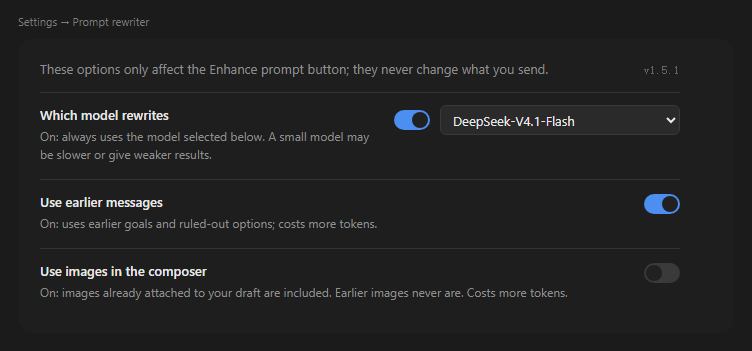
`Settings → Prompt Enhance`. Five switches, a model dropdown and a rule-set dropdown, affecting **only this button, never normal sending**. The changelog sits at the bottom of the page.
|
|
99
111
|
|
|
100
112
|
|
|
101
113
|
|
|
102
114
|
| Option | Default | What turning it on does |
|
|
103
115
|
|---|---|---|
|
|
104
116
|
| Use a fixed model | Off | Off: follow the model of the current conversation. On: always use the model picked below. |
|
|
117
|
+
| Enhancement rule set | **Legacy (stable)** | Three choices: **Legacy** ships the 1.7.1 playbook verbatim (15 rows, 10 of them rules; about 1.2–3× the draft); **intent-first** works out what the user actually wants, then writes it out more clearly and more completely (the six dimensions are covered wherever the task needs them: goal / inputs / scope / method / output / quality bar; where the draft is silent the executor is told to decide and state its assumption; a sparse draft usually grows to 2–5× its length, never beyond 5×); **WorkBuddy** uses its shipped prompt verbatim (analyse objective, ambiguity, clarity and missing context, then rewrite against its seven principles; the cap is around 800 characters and this set has no verbatim-fact clause, so long drafts get compressed). |None of them answer the request itself; legacy and intent-first explicitly forbid asking the user, and any question WorkBuddy returns is dropped by the plugin. |
|
|
105
118
|
| Reference the conversation | **On** | Read earlier turns. More accurate, but extra tokens and slower on long chats. |
|
|
106
119
|
| Reference composer images | Off | Images in the composer take part. Earlier messages' images are never read. |
|
|
120
|
+
| Reference attachment contents | **On** | On: reads up to 2 non-image files from the composer, up to 5 MiB each; text files send a preview capped at 6,000 characters. Off: file contents are not read or sent; up to 8 filenames may be included as context. |
|
|
107
121
|
| Shortcut | Off | Lets the keyboard trigger a rewrite. Off by default, so no global key fires unasked. |
|
|
108
122
|
|
|
109
123
|
- The model dropdown lists **the providers and models you actually have** — you can't type in one that doesn't exist.
|
|
110
124
|
- Turning the model switch off does not clear your selection; flipping it back on shows the same choice.
|
|
111
|
-
- Images still uploading are skipped
|
|
125
|
+
- Images still uploading or over the Host attachment service's per-image or per-message limit are skipped; the status area reports how many were missed. A rewrite never fails because of an image.
|
|
126
|
+
- Files over the count or size limit are skipped and reported in the result status.
|
|
112
127
|
- The **current version** sits in the top-right of the settings page; clicking it opens the project home page. Check it before reporting a problem — it makes the issue much easier to pin down.
|
|
128
|
+
- The first row is the entry point: "Star ⭐ · problems? open an issue ↗", leading to the project home page and this project's issue list.
|
|
129
|
+
- The **changelog** at the bottom folds by version, newest open by default; it is read from the shipped `CHANGELOG.md`, so it works offline.
|
|
113
130
|
|
|
114
131
|
## Install
|
|
115
132
|
|
|
@@ -144,11 +161,13 @@ Download the zip from [Releases](https://github.com/huaguoxingkong/dsh-prompt-re
|
|
|
144
161
|
|
|
145
162
|
**Can I undo the whole rewrite?** One `Ctrl+Z`. It's an ordinary edit step in the composer.
|
|
146
163
|
|
|
164
|
+
**Do my attachments survive a rewrite?** Yes. Attachment references and links stay as they were; only the text is replaced.
|
|
165
|
+
|
|
147
166
|
**Does it change messages I already sent?** No. It only edits the draft, and it never sends.
|
|
148
167
|
|
|
149
168
|
## Configuration
|
|
150
169
|
|
|
151
|
-
Every `config` key on the profile plugin line is optional. The first
|
|
170
|
+
Every `config` key on the profile plugin line is optional. The first eight are managed by the settings page; the last seven are operational ceilings and are not exposed in the UI.
|
|
152
171
|
|
|
153
172
|
```yaml
|
|
154
173
|
- id: dsh-prompt-rewriter
|
|
@@ -158,7 +177,9 @@ Every `config` key on the profile plugin line is optional. The first six are man
|
|
|
158
177
|
useCustomModel: false # pin enhanceProvider/enhanceModel
|
|
159
178
|
enhanceProvider: "" # empty = follow the session model
|
|
160
179
|
enhanceModel: ""
|
|
180
|
+
ruleSet: legacy # enhancement rule set: legacy / intent-first / workbuddy
|
|
161
181
|
referenceImages: false # read composer images
|
|
182
|
+
referenceFiles: true # read composer file contents
|
|
162
183
|
referenceContext: true # read earlier turns
|
|
163
184
|
shortcutEnabled: false # keyboard shortcut (off by default)
|
|
164
185
|
|
|
@@ -194,7 +215,14 @@ Three designs worth calling out:
|
|
|
194
215
|
|
|
195
216
|
## Development
|
|
196
217
|
|
|
197
|
-
The plugin has a Host half and a Client half. The Host depends only on host services such as `ctx.connection`, `ctx.llm` and `ctx.settings`; the Client registers slot components through `window.__ModuleLoader__`.
|
|
218
|
+
The plugin has a Host half and a Client half. The Host depends only on host services such as `ctx.connection`, `ctx.llm` and `ctx.settings`; the Client registers slot components through `window.__ModuleLoader__`. **The two halves load differently, so they are verified differently**:
|
|
219
|
+
|
|
220
|
+
| What changed | How it takes effect | Host restart |
|
|
221
|
+
| --- | --- | --- |
|
|
222
|
+
| `client.js` (button, interaction, wording, styles) | Client HMR polls each front-end bundle every 500 ms and pushes the change over `/plugins/events`; the open window swaps that plugin entry in place | Not needed; refreshing the window is only a fallback |
|
|
223
|
+
| `index.js`, `*-rules.mjs` (enhancement route, prompt rules, settings storage) | Imported once when the Host starts | Required |
|
|
224
|
+
|
|
225
|
+
Client HMR comes from `@deepseek-ai/dsh-client-hmr`, which the Web composition always mounts. It is not the Host's `hmr`: this machine's profile sets the Host `hmr` to `disabled: true` (see the note in `cordis.patch.yml`), so Host **code** is not hot-reloaded. Settings changed in the UI still take effect immediately (they go through the settings service, not file watching); editing `cordis.patch.yml` by hand is what needs a restart.
|
|
198
226
|
|
|
199
227
|
**Unit tests are not published with this repository.** Development-time tests depend on the host's private `@deepseek-ai/schemastery`, a copy of the host's React, and this machine's profile layout — publishing them would hand users files that cannot run.
|
|
200
228
|
|
package/README.md
CHANGED
|
@@ -5,6 +5,10 @@
|
|
|
5
5
|
[](https://www.npmjs.com/package/dsh-prompt-rewriter)
|
|
6
6
|
[](LICENSE)
|
|
7
7
|
[](https://dsh-plugin.org/plugins/huaguoxingkong/dsh-prompt-rewriter)
|
|
8
|
+
[](https://awesome-dsh-plugin.com)
|
|
9
|
+
[](https://dshpluginhub.ai/plugins/dsh-prompt-rewriter)
|
|
10
|
+
[](https://deepseekharnessplugins.com/plugins/huaguoxingkong/dsh-prompt-rewriter)
|
|
11
|
+
[](https://www.dsh.so/artifact/dsh-prompt-rewriter/?ref=badge)
|
|
8
12
|
|
|
9
13
|
把输入框里那句没头没尾的草稿,原地改成能直接执行的任务说明。
|
|
10
14
|
**只改内容,不发送、不运行。** 不满意就 `Ctrl+Z` 回去。
|
|
@@ -32,7 +36,7 @@
|
|
|
32
36
|
## 怎么用
|
|
33
37
|
|
|
34
38
|
1. 在输入框里写下草稿,多短都行。
|
|
35
|
-
2.
|
|
39
|
+
2. 点输入栏右侧那一排控件里的**鲸鱼尾巴图标**(带蓝色小圆点表示会参考上下文)。它和模型名、发送按钮同属右侧控件区,中间可能还有其它插件的按钮;输入框为空时它不出现。
|
|
36
40
|
3. 一秒多之后,草稿被换成改写后的提示词。
|
|
37
41
|
4. 不满意?`Ctrl+Z`,或点按钮变成的回退箭头。
|
|
38
42
|
|
|
@@ -54,6 +58,14 @@
|
|
|
54
58
|
|
|
55
59
|
这一点在 1.0.x 里不是这样:那时切换会话会直接中断任务,回来什么也没有。
|
|
56
60
|
|
|
61
|
+
### 输入框里有附件或链接时
|
|
62
|
+
|
|
63
|
+
附件和链接算「你已经说过的东西」——改写只动旁边那句文字,不会把它们吃掉。
|
|
64
|
+
|
|
65
|
+
- 附件引用、链接芯片原样保留;改写结果落回输入框时它们还在原位。
|
|
66
|
+
- 撤销也只恢复你自己敲的字,不会把附件一起删掉。
|
|
67
|
+
- 写进提示词的是**可读的文件名**,不是 `@D:\...` 这样的完整路径;链接同样只保留域名。你本机的目录结构不会跟着提示词被复制出去。
|
|
68
|
+
|
|
57
69
|
### 键盘快捷键(默认关闭)
|
|
58
70
|
|
|
59
71
|
到 **设置 → 提示词增强 → 快捷键** 打开开关。桌面端为 `Ctrl+E`(macOS `Cmd+E`),浏览器端为 `Ctrl+Alt+E`(macOS `Cmd+Alt+E`)。
|
|
@@ -96,25 +108,30 @@
|
|
|
96
108
|
|
|
97
109
|
## 设置
|
|
98
110
|
|
|
99
|
-
`设置 →
|
|
111
|
+
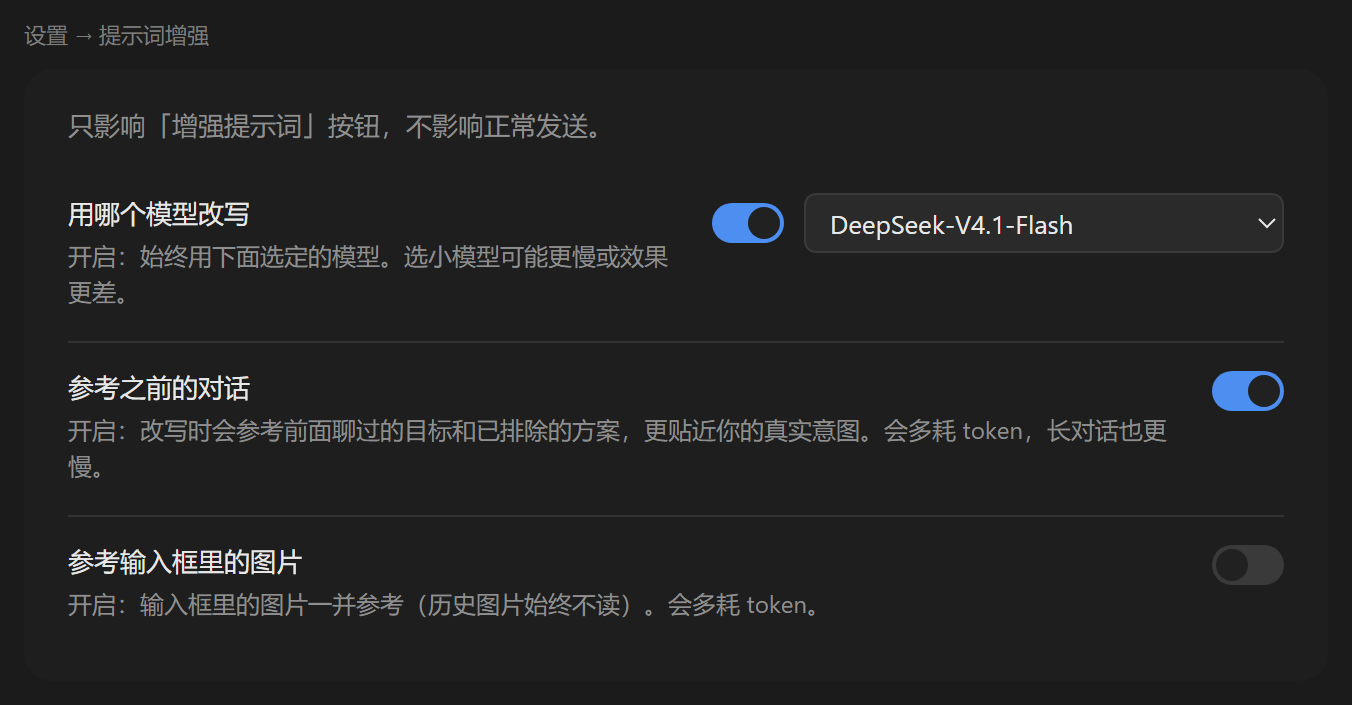
`设置 → 提示词增强`。五个开关、模型下拉和规则下拉,**只影响这个按钮,不影响正常发送**。页面底部是更新日志。
|
|
100
112
|
|
|
101
113
|
|
|
102
114
|
|
|
103
115
|
| 选项 | 默认 | 打开会怎样 |
|
|
104
116
|
|---|---|---|
|
|
105
117
|
| 用哪个模型改写 | 关 | 关:跟随当前对话的模型。开:固定用下拉选定的模型。 |
|
|
118
|
+
| 增强规则版本 | **旧版(稳定)** | 三选一:**旧版**逐字沿用 1.7.1 发布的规则原文(15 行、其中 10 条规则,约为原文 1.2–3 倍);**意图优先**先推断用户真正想干什么,再把话写得更明白更全(六个维度按任务需要覆盖:目标 / 输入 / 范围 / 方法 / 输出 / 质量标准;草稿没说的地方交给执行者自己决定并要求它声明假设,稀疏草稿通常扩到 2–5 倍、上限 5 倍);**WorkBuddy** 逐字沿用它随包发布的原始提示词(先分析目标、歧义、清晰度与缺失上下文,再按七条原则重写;上限约 800 字符,这套没有逐字保真条款,长草稿会被压缩)。三者都不回答请求本身;旧版与意图优先的规则明文禁止反问,WorkBuddy 原文只禁「回答问题」,它若回问句由插件丢弃。 |
|
|
106
119
|
| 参考之前的对话 | **开** | 读前面的内容。更准,但多耗 token、长对话更慢。 |
|
|
107
120
|
| 参考输入框里的图片 | 关 | 输入框里的图一起参与。历史消息里的图片始终不读。 |
|
|
121
|
+
| 参考附件内容 | **开** | 开:最多读取当前输入框中的 2 个非图片附件,每个不超过 5 MiB;文本类只发送最多 6000 字符的预览。关:不读取或发送附件内容,只把最多 8 个文件名作为上下文。 |
|
|
108
122
|
| 快捷键 | 关 | 打开后可用键盘触发改写。默认关闭,不会在你没要求时抢占按键。 |
|
|
109
123
|
|
|
110
124
|
- 模型下拉列出你**实际拥有**的渠道与模型,填不进不存在的模型。
|
|
111
125
|
- 关掉模型开关不会清空你的选择,重新打开还是同一个。
|
|
112
|
-
-
|
|
126
|
+
- 上传中的图片或超出附件服务单图/单消息限额的图片会被跳过,状态区会告诉你少读了几张。不会因为一张图让整次改写失败。
|
|
127
|
+
- 附件超出数量或大小上限时会跳过,并在结果状态中提示。
|
|
113
128
|
- 设置页右上角显示**当前版本号**,点一下会打开项目主页。遇到问题时先看一眼版本,反馈时也更好定位。
|
|
129
|
+
- 顶上一行是入口:「点个 Star ⭐ · 遇到问题?提 issue ↗」,分别进项目主页与本项目的 issue 列表。
|
|
130
|
+
- 底部「更新日志」按版本折叠,默认展开当前版本;内容取自随包发布的 `CHANGELOG.md`,不联网也能看。
|
|
114
131
|
|
|
115
132
|
## 安装
|
|
116
133
|
|
|
117
|
-
需要 DeepSeek Harness,`node >= 22
|
|
134
|
+
需要 DeepSeek Harness,`node >= 22`。**首次安装后重启一次 Harness**:宿主半边(增强接口与提示词规则)只在宿主启动时加载。装好之后只改 `client.js`(按钮、交互、提示文案)不必重启——Harness 的 client HMR 每 500ms 轮询插件的前端 bundle,变更经 `/plugins/events` 推送到已打开的窗口并就地替换,通常 1 秒内生效;刷新窗口只是兜底。
|
|
118
135
|
|
|
119
136
|
### 从 npm(推荐)
|
|
120
137
|
|
|
@@ -145,11 +162,13 @@ dsh plugin --profile web add github:huaguoxingkong/dsh-prompt-rewriter
|
|
|
145
162
|
|
|
146
163
|
**改写完想全撤?** 一次 `Ctrl+Z` 就回到原文,它只是输入框里一个普通编辑步。
|
|
147
164
|
|
|
165
|
+
**改写完,我贴的附件还在吗?** 在。附件引用和链接原样保留,改写只替换文字部分。
|
|
166
|
+
|
|
148
167
|
**会把我已经发出去的消息也改了吗?** 不会。它只改草稿,从不发送。
|
|
149
168
|
|
|
150
169
|
## 配置
|
|
151
170
|
|
|
152
|
-
profile 插件行的 `config`
|
|
171
|
+
profile 插件行的 `config` 全部可选。前八项由设置页托管,后七项是运维上限,不暴露在界面上:
|
|
153
172
|
|
|
154
173
|
```yaml
|
|
155
174
|
- id: dsh-prompt-rewriter
|
|
@@ -159,7 +178,9 @@ profile 插件行的 `config` 全部可选。前六项由设置页托管,后
|
|
|
159
178
|
useCustomModel: false # 是否固定使用 enhanceProvider/enhanceModel
|
|
160
179
|
enhanceProvider: "" # 空 = 跟随会话模型
|
|
161
180
|
enhanceModel: ""
|
|
181
|
+
ruleSet: legacy # 增强规则版本:legacy(旧版)/ intent-first(意图优先)/ workbuddy
|
|
162
182
|
referenceImages: false # 是否参考输入框图片
|
|
183
|
+
referenceFiles: true # 是否参考输入框附件内容
|
|
163
184
|
referenceContext: true # 是否参考前文
|
|
164
185
|
shortcutEnabled: false # 键盘快捷键(默认关闭)
|
|
165
186
|
|
|
@@ -195,7 +216,14 @@ profile 插件行的 `config` 全部可选。前六项由设置页托管,后
|
|
|
195
216
|
|
|
196
217
|
## 开发
|
|
197
218
|
|
|
198
|
-
插件分 Host 与 Client 两半:Host 只依赖 `ctx.connection`、`ctx.llm`、`ctx.settings` 等宿主服务,Client 通过 `window.__ModuleLoader__`
|
|
219
|
+
插件分 Host 与 Client 两半:Host 只依赖 `ctx.connection`、`ctx.llm`、`ctx.settings` 等宿主服务,Client 通过 `window.__ModuleLoader__` 注册槽位组件。**两半的加载方式不同,验证方式也不同**:
|
|
220
|
+
|
|
221
|
+
| 改了什么 | 生效方式 | 要不要重启宿主 |
|
|
222
|
+
| --- | --- | --- |
|
|
223
|
+
| `client.js`(按钮、交互、提示文案、样式) | client HMR 每 500ms 轮询前端 bundle,变更经 `/plugins/events` 推送,窗口就地替换该插件条目 | 不要;刷新窗口只是兜底 |
|
|
224
|
+
| `index.js`、`*-rules.mjs`(增强接口、提示词规则、设置存储) | 宿主启动时一次性 import | 要 |
|
|
225
|
+
|
|
226
|
+
client HMR 由 `@deepseek-ai/dsh-client-hmr` 提供,Web 组合里始终挂载;它与宿主侧的 `hmr` 是两套东西——本机 profile 把宿主 `hmr` 设成了 `disabled: true`(见 `cordis.patch.yml` 里的注释),所以宿主**代码**没有热重载。设置页里改的配置项仍会立即生效(走设置服务,不经文件监听);手工改 `cordis.patch.yml` 才需要重启。
|
|
199
227
|
|
|
200
228
|
**单元测试未随本仓库发布。** 开发期测试依赖宿主私有的 `@deepseek-ai/schemastery`、宿主 React 副本与本机 profile 目录结构,直接开源会让使用者拿到跑不起来的文件。
|
|
201
229
|
|