dsh-prompt-rewriter 1.6.3 → 1.7.0
This diff represents the content of publicly available package versions that have been released to one of the supported registries. The information contained in this diff is provided for informational purposes only and reflects changes between package versions as they appear in their respective public registries.
- package/CHANGELOG.md +9 -1
- package/README.en.md +217 -0
- package/README.md +121 -120
- package/client.js +331 -57
- package/index.js +65 -4
- package/package.json +8 -3
- package/README.zh.md +0 -218
package/CHANGELOG.md
CHANGED
|
@@ -1,6 +1,14 @@
|
|
|
1
1
|
# 更新日志
|
|
2
2
|
|
|
3
|
-
|
|
3
|
+
记录每个**已发布**版本对使用者可见的变化。插件内只维护中文条目;对外发布(GitHub Release / npm)的双语正文由发布方据此撰写,其中中文以本文件为准。
|
|
4
|
+
|
|
5
|
+
## 1.7.0
|
|
6
|
+
|
|
7
|
+
**中文**
|
|
8
|
+
|
|
9
|
+
- **上传文件或链接后改写结果不再被拒绝**:此前输入框里带有附件或链接时,经常出现「输入框没有接受替换,草稿保持不变」;现在按编辑器的实际坐标写入,改写正常落进输入框,附件引用也原样保留。
|
|
10
|
+
- **增强结果不再出现附件的完整磁盘路径**:此前改写的提示词里会复制出 `@D:\...` 之类的地址;现在只保留可读的文件名,撤销操作也只恢复用户自己输入的文字。
|
|
11
|
+
- **设置页新增更新日志**:按版本折叠展示各已发布版本的变化,默认展开最新版本,逐条列出;内容取自随包发布的本文件,与当前版本号保持一致。
|
|
4
12
|
|
|
5
13
|
## 1.6.3
|
|
6
14
|
|
package/README.en.md
ADDED
|
@@ -0,0 +1,217 @@
|
|
|
1
|
+
# dsh-prompt-rewriter
|
|
2
|
+
|
|
3
|
+
English | [中文](README.md)
|
|
4
|
+
|
|
5
|
+
[](https://www.npmjs.com/package/dsh-prompt-rewriter)
|
|
6
|
+
[](LICENSE)
|
|
7
|
+
[](https://dsh-plugin.org/plugins/huaguoxingkong/dsh-prompt-rewriter)
|
|
8
|
+
|
|
9
|
+
Turns the half-formed draft in your composer into a task instruction you can actually run.
|
|
10
|
+
**It rewrites the box, it never sends.** Don't like it? `Ctrl+Z` and you're back.
|
|
11
|
+
|
|
12
|
+
> An unofficial community project, not affiliated with or endorsed by DeepSeek. Artwork attribution is in [NOTICE.md](NOTICE.md).
|
|
13
|
+
|
|
14
|
+
---
|
|
15
|
+
|
|
16
|
+

|
|
17
|
+
|
|
18
|
+
## What it fills in for you
|
|
19
|
+
|
|
20
|
+
A one-line draft is missing **goal, format, and boundaries**. The model can only guess — guess wrong and you spend another round rewording. This button puts those three things back into the sentence you already wrote:
|
|
21
|
+
|
|
22
|
+
| | What you typed | What goes back in the box |
|
|
23
|
+
|---|---|---|
|
|
24
|
+
| You wrote | *help me write a scraper for Douban movies* | the same sentence |
|
|
25
|
+
| Goal added | | scrape **Top 250** titles, **ratings and links** |
|
|
26
|
+
| Format added | | output a **CSV file** |
|
|
27
|
+
| Boundaries added | | respect robots.txt, **wait at least 2s between requests**, back off on rate limits **instead of circumventing them** |
|
|
28
|
+
|
|
29
|
+
The third column is not something you wrote. It read your sentence and filled it in. **And it stays editable** — it lands in the composer, not somewhere else.
|
|
30
|
+
|
|
31
|
+
## How to use it
|
|
32
|
+
|
|
33
|
+
1. Type any draft in the composer — shorter is fine.
|
|
34
|
+
2. Click the **whale-tail icon just left of the model name**. It isn't there when the box is empty.
|
|
35
|
+
3. A second later the draft is replaced with the rewritten prompt.
|
|
36
|
+
4. Not what you wanted? `Ctrl+Z`, or click the undo arrow the button turned into.
|
|
37
|
+
|
|
38
|
+
Changed your mind mid-flight? Click again to cancel. The draft stays exactly as it was — no half-finished text left behind.
|
|
39
|
+
|
|
40
|
+
### For faster results, pick a stable model
|
|
41
|
+
|
|
42
|
+
An enhancement is a real model call, and **how fast the result comes back depends mostly on the model you have selected**.
|
|
43
|
+
|
|
44
|
+
If it feels slow, switch the session to a model that is more stable and responds faster — the same draft can take a few seconds on one model and well over ten on another. The button does not favour any particular model; it uses whichever one you picked.
|
|
45
|
+
|
|
46
|
+
> Want a fixed model just for enhancement, without affecting normal chat? Open `Settings → Prompt Enhance` and turn on **Use a fixed model**.
|
|
47
|
+
|
|
48
|
+
### You can navigate away mid-rewrite
|
|
49
|
+
|
|
50
|
+
Once you've clicked, you don't have to sit and wait. **Switch to another session and the task keeps running.**
|
|
51
|
+
|
|
52
|
+
Come back and the result is already in the composer; if it hasn't finished, the button is still the spinning tail. Two sessions can each run their own rewrite without interfering.
|
|
53
|
+
|
|
54
|
+
That wasn't true in 1.0.x: switching sessions aborted the task, and coming back showed nothing.
|
|
55
|
+
|
|
56
|
+
### Keyboard shortcut (off by default)
|
|
57
|
+
|
|
58
|
+
Turn it on at **Settings → Prompt Enhance → Shortcut**. Desktop uses `Ctrl+E` (`Cmd+E` on macOS); the browser uses `Ctrl+Alt+E` (`Cmd+Alt+E`).
|
|
59
|
+
|
|
60
|
+
- Press once to enhance; press again while it runs to pause. It acts on the composer of the current conversation.
|
|
61
|
+
- **Same as clicking the icon** — the shortcut runs the icon's own click handler, including its undo state, so the two paths cannot drift. Restoring a draft stays on the button or `Ctrl+Z`.
|
|
62
|
+
- Click the shown combination to record your own; `Esc` cancels. **Reset** restores the default in one click.
|
|
63
|
+
- Already taken by another command? The row names the command it collides with, the combination is not applied, and your previous binding stays.
|
|
64
|
+
- Registered through Harness's shortcut service, so it persists across restarts.
|
|
65
|
+
|
|
66
|
+
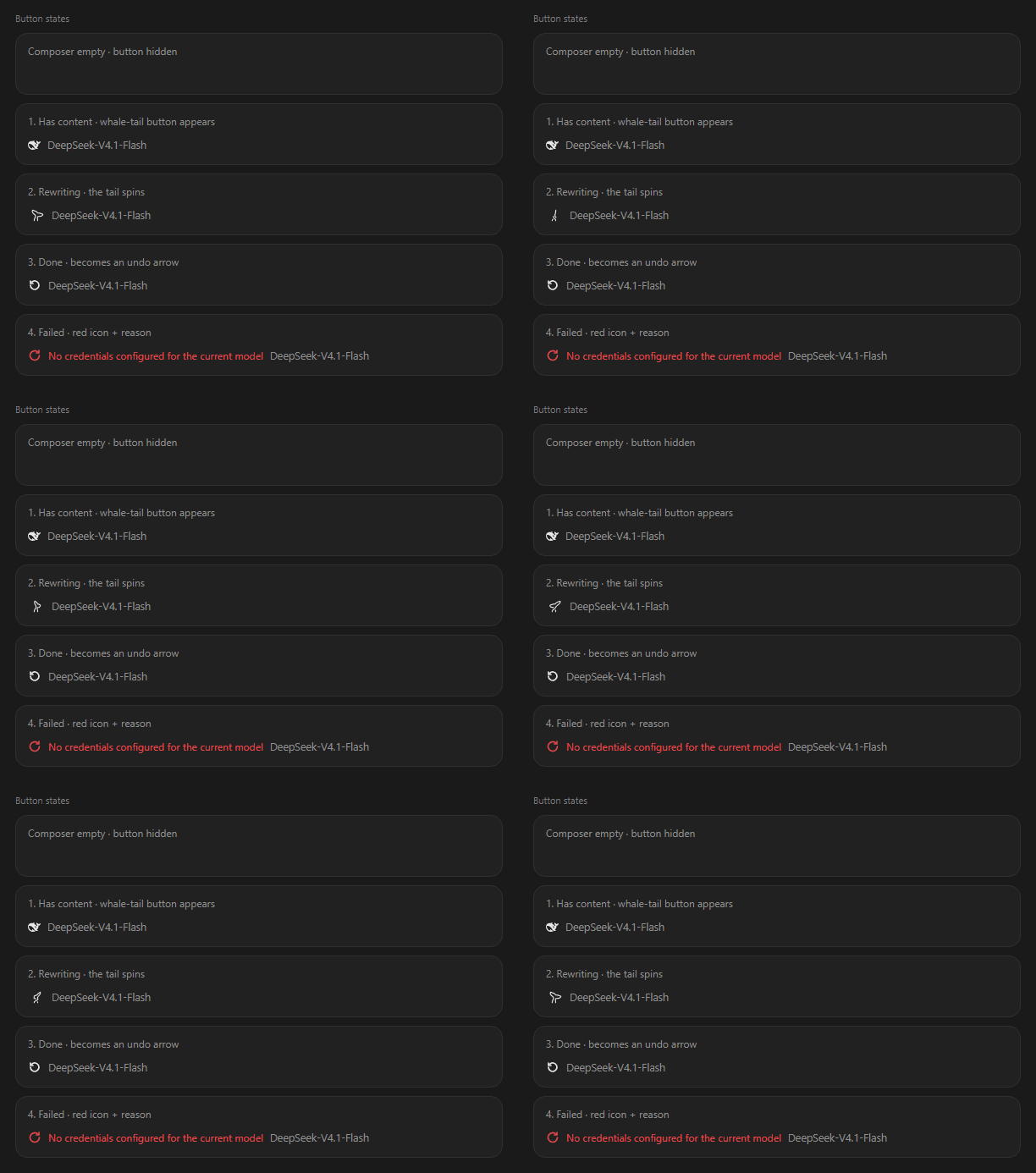
### The four button states
|
|
67
|
+
|
|
68
|
+
|
|
69
|
+
|
|
70
|
+
| State | What you see | What it means |
|
|
71
|
+
|---|---|---|
|
|
72
|
+
| Idle | static whale tail | ready to click |
|
|
73
|
+
| Rewriting | the tail spins into a spiral | running; click again to cancel |
|
|
74
|
+
| Done | turns into an undo arrow | one click back, or `Ctrl+Z` |
|
|
75
|
+
| Failed | red retry icon + reason | the reason sits right next to it — no log hunting |
|
|
76
|
+
|
|
77
|
+
## Two things worth not confusing
|
|
78
|
+
|
|
79
|
+
### 1. Whether it reads the conversation
|
|
80
|
+
|
|
81
|
+
|
|
82
|
+
|
|
83
|
+
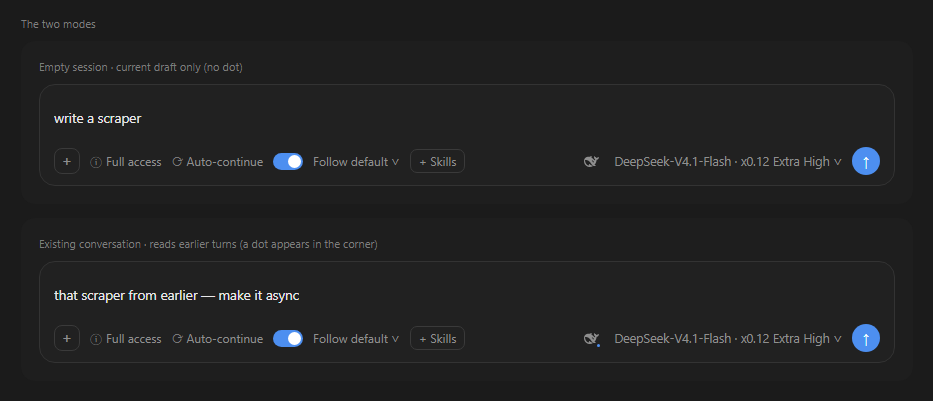
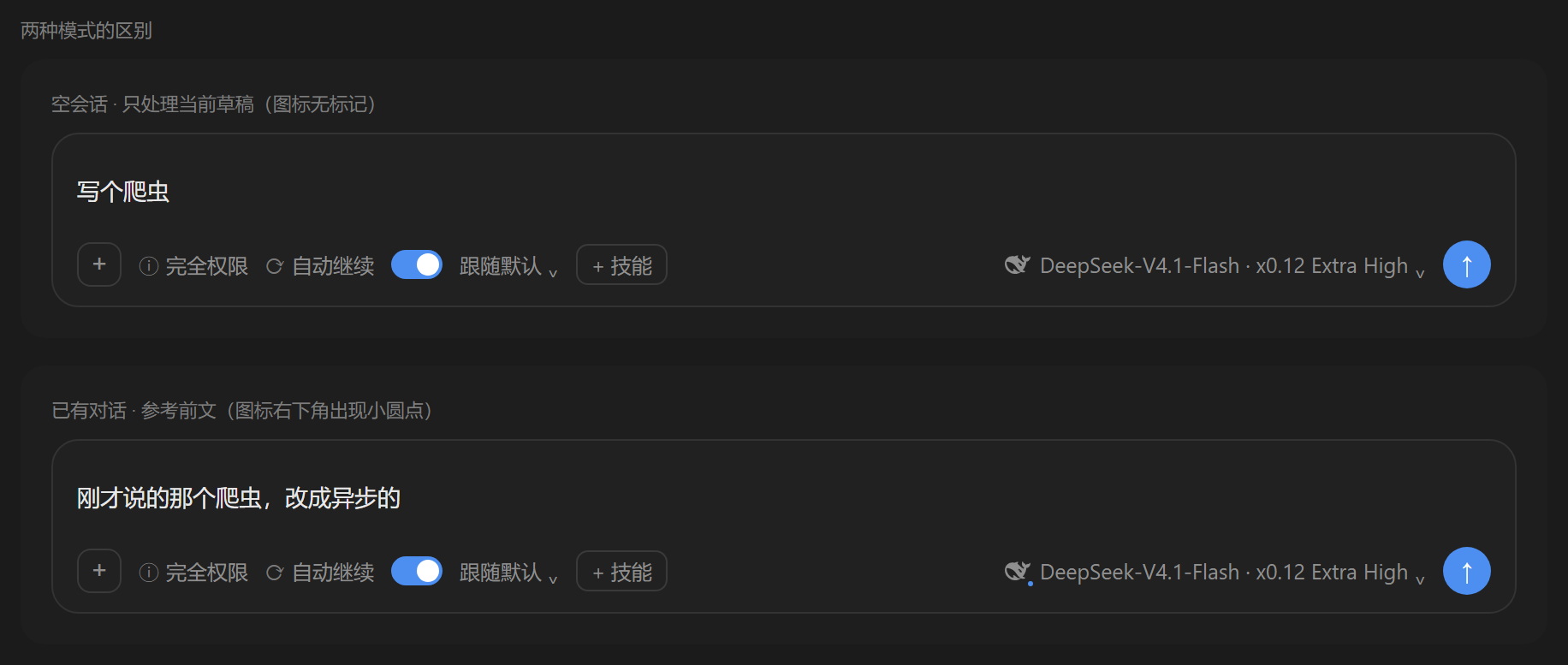
The **small dot in the button's lower-right corner** is the whole difference:
|
|
84
|
+
|
|
85
|
+
- **No dot**: it sees only your current draft.
|
|
86
|
+
- **Dot**: it also reads earlier turns, so it knows what you already confirmed and already ruled out. The rewrite lands closer to what you actually want this time.
|
|
87
|
+
|
|
88
|
+
The dot describes **what will happen if you click now**, not what happened last time. That is why it hides while a run is in flight, comes back after a failure, and disappears once the button turns into an undo arrow — clicking then restores your draft, which has nothing to do with enhancement.
|
|
89
|
+
|
|
90
|
+
Conversation context costs tokens. If long chats feel slow or expensive, turn off *Reference the conversation* in settings and the dot disappears.
|
|
91
|
+
|
|
92
|
+
### 2. Whether it reads images
|
|
93
|
+
|
|
94
|
+
Only images **currently sitting in the composer** — **never images from earlier messages**. That line is deliberate: old pasted screenshots are slow to process and easy to misread, so they're out of scope.
|
|
95
|
+
|
|
96
|
+
## Settings
|
|
97
|
+
|
|
98
|
+
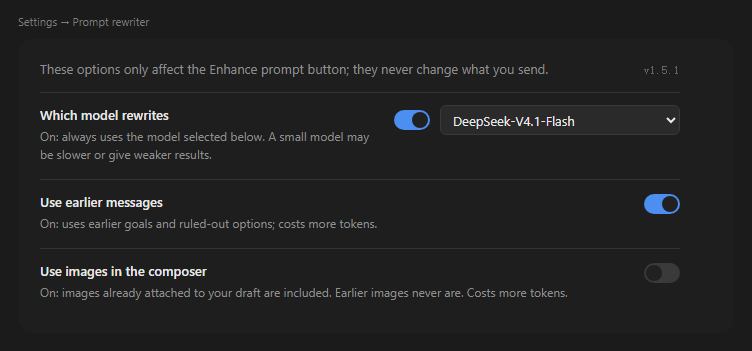
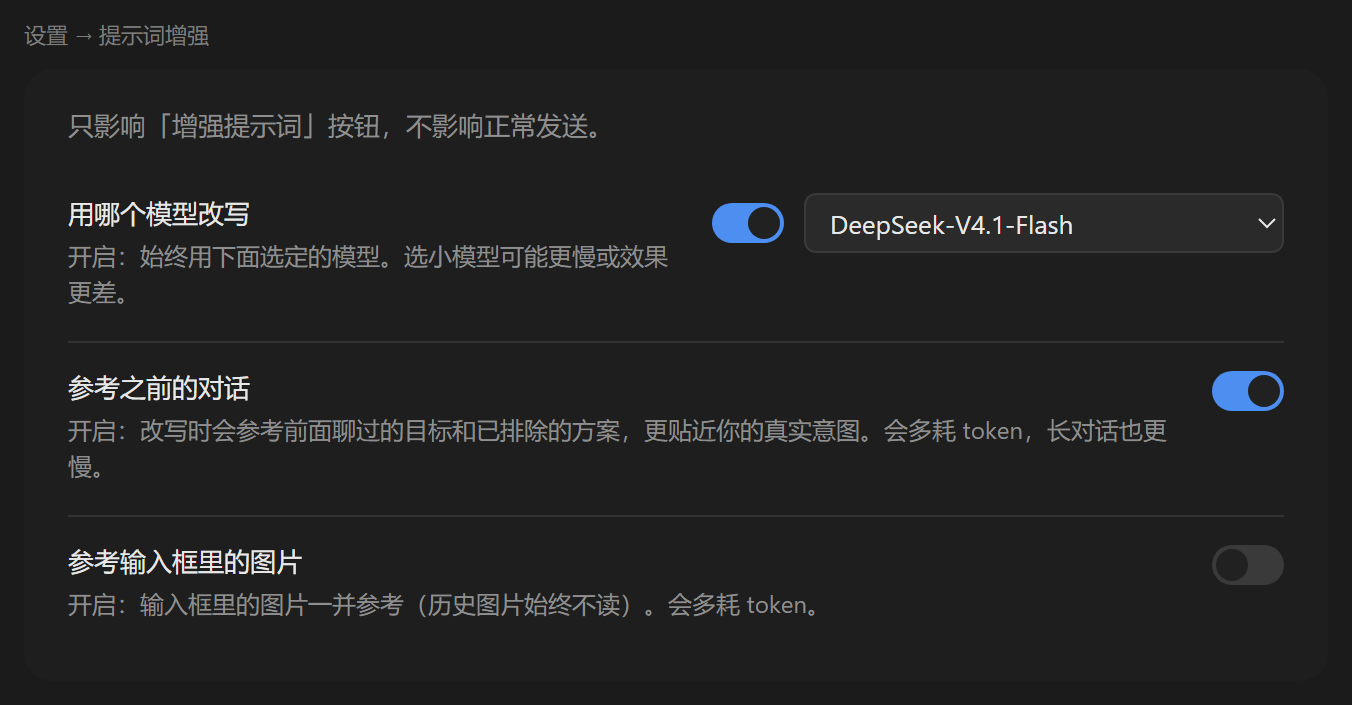
`Settings → Prompt Enhance`. Four switches and one dropdown, affecting **only this button, never normal sending**.
|
|
99
|
+
|
|
100
|
+
|
|
101
|
+
|
|
102
|
+
| Option | Default | What turning it on does |
|
|
103
|
+
|---|---|---|
|
|
104
|
+
| Use a fixed model | Off | Off: follow the model of the current conversation. On: always use the model picked below. |
|
|
105
|
+
| Reference the conversation | **On** | Read earlier turns. More accurate, but extra tokens and slower on long chats. |
|
|
106
|
+
| Reference composer images | Off | Images in the composer take part. Earlier messages' images are never read. |
|
|
107
|
+
| Shortcut | Off | Lets the keyboard trigger a rewrite. Off by default, so no global key fires unasked. |
|
|
108
|
+
|
|
109
|
+
- The model dropdown lists **the providers and models you actually have** — you can't type in one that doesn't exist.
|
|
110
|
+
- Turning the model switch off does not clear your selection; flipping it back on shows the same choice.
|
|
111
|
+
- Images still uploading are skipped, and the status area tells you how many were missed. A rewrite never fails because of an image.
|
|
112
|
+
- The **current version** sits in the top-right of the settings page; clicking it opens the project home page. Check it before reporting a problem — it makes the issue much easier to pin down.
|
|
113
|
+
|
|
114
|
+
## Install
|
|
115
|
+
|
|
116
|
+
DeepSeek Harness, `node >= 22`. **Restart Harness after installing** — this plugin has no HMR.
|
|
117
|
+
|
|
118
|
+
### From npm (recommended)
|
|
119
|
+
|
|
120
|
+
```sh
|
|
121
|
+
dsh plugin --profile web add dsh-prompt-rewriter # web build
|
|
122
|
+
dsh plugin --profile desktop add dsh-prompt-rewriter # desktop app
|
|
123
|
+
```
|
|
124
|
+
|
|
125
|
+
Use the profile you actually run. The plugin is a web-platform client plugin, so it works in either.
|
|
126
|
+
|
|
127
|
+
### From GitHub source
|
|
128
|
+
|
|
129
|
+
```sh
|
|
130
|
+
dsh plugin --profile web add github:huaguoxingkong/dsh-prompt-rewriter
|
|
131
|
+
```
|
|
132
|
+
|
|
133
|
+
Installing from source runs a build step and may ask you to approve it. Grant that only to packages you trust.
|
|
134
|
+
|
|
135
|
+
### From a release zip
|
|
136
|
+
|
|
137
|
+
Download the zip from [Releases](https://github.com/huaguoxingkong/dsh-prompt-rewriter/releases), unzip, then `npm install && dsh plugin --profile web add .`.
|
|
138
|
+
|
|
139
|
+
## FAQ
|
|
140
|
+
|
|
141
|
+
**Clicked it and nothing happened.** The composer is empty, or *Use a fixed model* is on with no model picked. If you used the shortcut instead, check that the Shortcut switch is on and that no conflict is reported.
|
|
142
|
+
|
|
143
|
+
**"No credentials configured for the current model."** That model has no key set. Switch models, or pin one that works in settings.
|
|
144
|
+
|
|
145
|
+
**Can I undo the whole rewrite?** One `Ctrl+Z`. It's an ordinary edit step in the composer.
|
|
146
|
+
|
|
147
|
+
**Does it change messages I already sent?** No. It only edits the draft, and it never sends.
|
|
148
|
+
|
|
149
|
+
## Configuration
|
|
150
|
+
|
|
151
|
+
Every `config` key on the profile plugin line is optional. The first six are managed by the settings page; the last seven are operational ceilings and are not exposed in the UI.
|
|
152
|
+
|
|
153
|
+
```yaml
|
|
154
|
+
- id: dsh-prompt-rewriter
|
|
155
|
+
name: dsh-prompt-rewriter
|
|
156
|
+
config:
|
|
157
|
+
# managed by the settings page
|
|
158
|
+
useCustomModel: false # pin enhanceProvider/enhanceModel
|
|
159
|
+
enhanceProvider: "" # empty = follow the session model
|
|
160
|
+
enhanceModel: ""
|
|
161
|
+
referenceImages: false # read composer images
|
|
162
|
+
referenceContext: true # read earlier turns
|
|
163
|
+
shortcutEnabled: false # keyboard shortcut (off by default)
|
|
164
|
+
|
|
165
|
+
# operational ceilings (not exposed in the UI)
|
|
166
|
+
maxDraftChars: 8000 # draft length cap
|
|
167
|
+
maxOutputChars: 12000 # output length cap
|
|
168
|
+
maxOutputTokens: 2000 # output tokens per request
|
|
169
|
+
timeoutMs: 90000 # end-to-end timeout
|
|
170
|
+
historyTokenBudget: 6000 # token budget for injected history
|
|
171
|
+
historyMaxMessages: 24 # max history messages
|
|
172
|
+
historyMessageChars: 4000 # per-message character cap
|
|
173
|
+
```
|
|
174
|
+
|
|
175
|
+
## How it works
|
|
176
|
+
|
|
177
|
+
| Half | File | Responsibility |
|
|
178
|
+
|---|---|---|
|
|
179
|
+
| Host | `index.js` | Registers `POST /api/prompt-enhance` (rewrite) and `GET/POST /api/prompt-enhance/settings`, through `ctx.connection.fetch` so it inherits Harness auth and origin checks. Reads the session projection for the current model, then generates via `ctx.llm`. |
|
|
180
|
+
| Client | `client.js` | Renders the button at `conversation.input.right` and the settings page at `settings.section`. Replaces the draft in place via `inputActions.insertText`. |
|
|
181
|
+
|
|
182
|
+
Three designs worth calling out:
|
|
183
|
+
|
|
184
|
+
- **Context is budgeted**: injected history is `min(historyTokenBudget, contextWindow × 5%)`, collected newest-first. When a single message exceeds the whole budget, its target length is computed in one proportional step (with up to 4 correction passes for rounding and mixed-script error), then truncated rather than dropped — so "has context" never silently degrades into "no context".
|
|
185
|
+
- **The output budget grows on demand**: a reasoning model shares one output budget between thinking and answering, so a long draft can spend it all on reasoning and leave nothing for the reply. When the run is cut off by that budget, the plugin doubles it and retries (3500 → 7000 → 14000, capped by the model's declared maximum and never above 16000) instead of misreporting truncation as "the model returned nothing".
|
|
186
|
+
- **History is injected as a JSON array**, and the system prompt states explicitly that it is data, not instructions — text inside history can't forge structure.
|
|
187
|
+
- **The image switch is decided by the Host**: the browser uploads composer images unconditionally and the Host decides whether to use them, so a not-yet-loaded setting can't silently disable the feature.
|
|
188
|
+
|
|
189
|
+
## Known limitations
|
|
190
|
+
|
|
191
|
+
- Images from earlier messages never take part (by design; composer images only).
|
|
192
|
+
- Replacement is non-streaming: the button shows its animated state until the rewrite lands.
|
|
193
|
+
- The settings dropdown depends on the Host's `remote.session.modelCatalog`. When that surface is unavailable it says so explicitly rather than rendering an empty list.
|
|
194
|
+
|
|
195
|
+
## Development
|
|
196
|
+
|
|
197
|
+
The plugin has a Host half and a Client half. The Host depends only on host services such as `ctx.connection`, `ctx.llm` and `ctx.settings`; the Client registers slot components through `window.__ModuleLoader__`. Both halves load with the bundle at startup, so changes require a restart to verify.
|
|
198
|
+
|
|
199
|
+
**Unit tests are not published with this repository.** Development-time tests depend on the host's private `@deepseek-ai/schemastery`, a copy of the host's React, and this machine's profile layout — publishing them would hand users files that cannot run.
|
|
200
|
+
|
|
201
|
+
```sh
|
|
202
|
+
node --check index.js # syntax
|
|
203
|
+
node --check client.js
|
|
204
|
+
npm pack --dry-run # inspect what would ship
|
|
205
|
+
```
|
|
206
|
+
|
|
207
|
+
## License
|
|
208
|
+
|
|
209
|
+
Code is MIT — see [LICENSE](LICENSE). Embedded artwork falls into two classes:
|
|
210
|
+
|
|
211
|
+
| Asset | License | Inside the MIT grant? |
|
|
212
|
+
|---|---|---|
|
|
213
|
+
| Plugin code | MIT | yes |
|
|
214
|
+
| Whale-tail 36-frame outline (from `dsh-status-rotator` v0.38.0 by 01Virex) | **MIT**, verified upstream (all 36 frames compared) | yes, copyright notice retained |
|
|
215
|
+
| DeepSeek "big fat fish" brand mark (from `dsh-web-frontend`) | **no license found** in the source package | **no**, explicitly excluded in LICENSE |
|
|
216
|
+
|
|
217
|
+
Unofficial community project, not affiliated with or endorsed by DeepSeek. Full attribution and verification notes are in [NOTICE.md](NOTICE.md).
|
package/README.md
CHANGED
|
@@ -1,217 +1,218 @@
|
|
|
1
1
|
# dsh-prompt-rewriter
|
|
2
2
|
|
|
3
|
-
English
|
|
3
|
+
[English](README.en.md) | 中文
|
|
4
4
|
|
|
5
5
|
[](https://www.npmjs.com/package/dsh-prompt-rewriter)
|
|
6
6
|
[](LICENSE)
|
|
7
7
|
[](https://dsh-plugin.org/plugins/huaguoxingkong/dsh-prompt-rewriter)
|
|
8
8
|
|
|
9
|
-
|
|
10
|
-
|
|
9
|
+
把输入框里那句没头没尾的草稿,原地改成能直接执行的任务说明。
|
|
10
|
+
**只改内容,不发送、不运行。** 不满意就 `Ctrl+Z` 回去。
|
|
11
11
|
|
|
12
|
-
>
|
|
12
|
+
> 非官方社区项目,与 DeepSeek 无隶属或授权关系。内嵌素材的归属见 [NOTICE.md](NOTICE.md)。
|
|
13
13
|
|
|
14
14
|
---
|
|
15
15
|
|
|
16
|
-

|
|
17
17
|
|
|
18
|
-
##
|
|
18
|
+
## 它替你补上了什么
|
|
19
19
|
|
|
20
|
-
|
|
20
|
+
一句话的草稿缺的是**目标、格式、边界**。模型只能猜——猜错了你得换个说法再问一轮。
|
|
21
|
+
这个按钮把这三样补进你原本那句话里:
|
|
21
22
|
|
|
22
|
-
| |
|
|
23
|
+
| | 你写的 | 放回输入框的 |
|
|
23
24
|
|---|---|---|
|
|
24
|
-
|
|
|
25
|
-
|
|
|
26
|
-
|
|
|
27
|
-
|
|
|
25
|
+
| 你写的 | *帮我写个爬虫抓豆瓣电影* | 同一句话 |
|
|
26
|
+
| 补上目标 | | 抓取电影 **Top250** 的**名称、评分和链接** |
|
|
27
|
+
| 补上格式 | | 输出为 **CSV 文件** |
|
|
28
|
+
| 补上边界 | | 遵守 robots 协议、**请求间隔不少于 2 秒**、遇到反爬**降低频率而不是绕过限制** |
|
|
28
29
|
|
|
29
|
-
|
|
30
|
+
第三列不是你打上去的,是它读了你那句话之后补的。**补出来的东西你随时能改**——它落在输入框里,不在别的地方。
|
|
30
31
|
|
|
31
|
-
##
|
|
32
|
+
## 怎么用
|
|
32
33
|
|
|
33
|
-
1.
|
|
34
|
-
2.
|
|
35
|
-
3.
|
|
36
|
-
4.
|
|
34
|
+
1. 在输入框里写下草稿,多短都行。
|
|
35
|
+
2. 点**模型名左边**那个鲸鱼尾巴图标。输入框为空时它不出现。
|
|
36
|
+
3. 一秒多之后,草稿被换成改写后的提示词。
|
|
37
|
+
4. 不满意?`Ctrl+Z`,或点按钮变成的回退箭头。
|
|
37
38
|
|
|
38
|
-
|
|
39
|
+
中途想放弃就再点一下,草稿保持原样,不会给你留下半截文字。
|
|
39
40
|
|
|
40
|
-
###
|
|
41
|
+
### 想更快拿到结果:选个稳定的模型
|
|
41
42
|
|
|
42
|
-
|
|
43
|
+
增强是一次真实的模型调用,**结果多快出来,主要取决于你当前选的模型**。
|
|
43
44
|
|
|
44
|
-
|
|
45
|
+
如果觉得等得久,把会话用的模型换成一个更稳定、响应更快的——同一个草稿,换个模型往往就是几秒和十几秒的差别。这个按钮不挑模型,你选哪个它就用哪个。
|
|
45
46
|
|
|
46
|
-
>
|
|
47
|
+
> 想固定用某个模型专门做增强(不影响正常对话)?去 `设置 → 提示词增强` 打开「用哪个模型改写」。
|
|
47
48
|
|
|
48
|
-
###
|
|
49
|
+
### 增强过程中可以切走
|
|
49
50
|
|
|
50
|
-
|
|
51
|
+
点了按钮之后不必守着它。**切到别的会话,任务会继续跑完。**
|
|
51
52
|
|
|
52
|
-
|
|
53
|
+
回来的时候,结果已经写进输入框了;如果还没跑完,按钮仍然是那个旋转的鱼尾。两个会话可以同时各跑一个,互不影响。
|
|
53
54
|
|
|
54
|
-
|
|
55
|
+
这一点在 1.0.x 里不是这样:那时切换会话会直接中断任务,回来什么也没有。
|
|
55
56
|
|
|
56
|
-
###
|
|
57
|
+
### 键盘快捷键(默认关闭)
|
|
57
58
|
|
|
58
|
-
|
|
59
|
+
到 **设置 → 提示词增强 → 快捷键** 打开开关。桌面端为 `Ctrl+E`(macOS `Cmd+E`),浏览器端为 `Ctrl+Alt+E`(macOS `Cmd+Alt+E`)。
|
|
59
60
|
|
|
60
|
-
-
|
|
61
|
-
-
|
|
62
|
-
-
|
|
63
|
-
-
|
|
64
|
-
-
|
|
61
|
+
- 按一次增强,运行中再按一次暂停。作用对象是当前会话的输入框。
|
|
62
|
+
- **与点击图标完全等价**:走的是图标自身的点击入口,含「撤销」态,不存在第二套逻辑。回退仍由按钮或 `Ctrl+Z` 负责。
|
|
63
|
+
- 点当前的组合即可录制自定义键位,`Esc` 取消;**恢复默认**一键还原。
|
|
64
|
+
- 被别的命令占用时会指出冲突的命令名,该组合不生效、原键位保留。
|
|
65
|
+
- 通过 Harness 的快捷键服务注册,与内置快捷键共用持久化,重启后仍然生效。
|
|
65
66
|
|
|
66
|
-
###
|
|
67
|
+
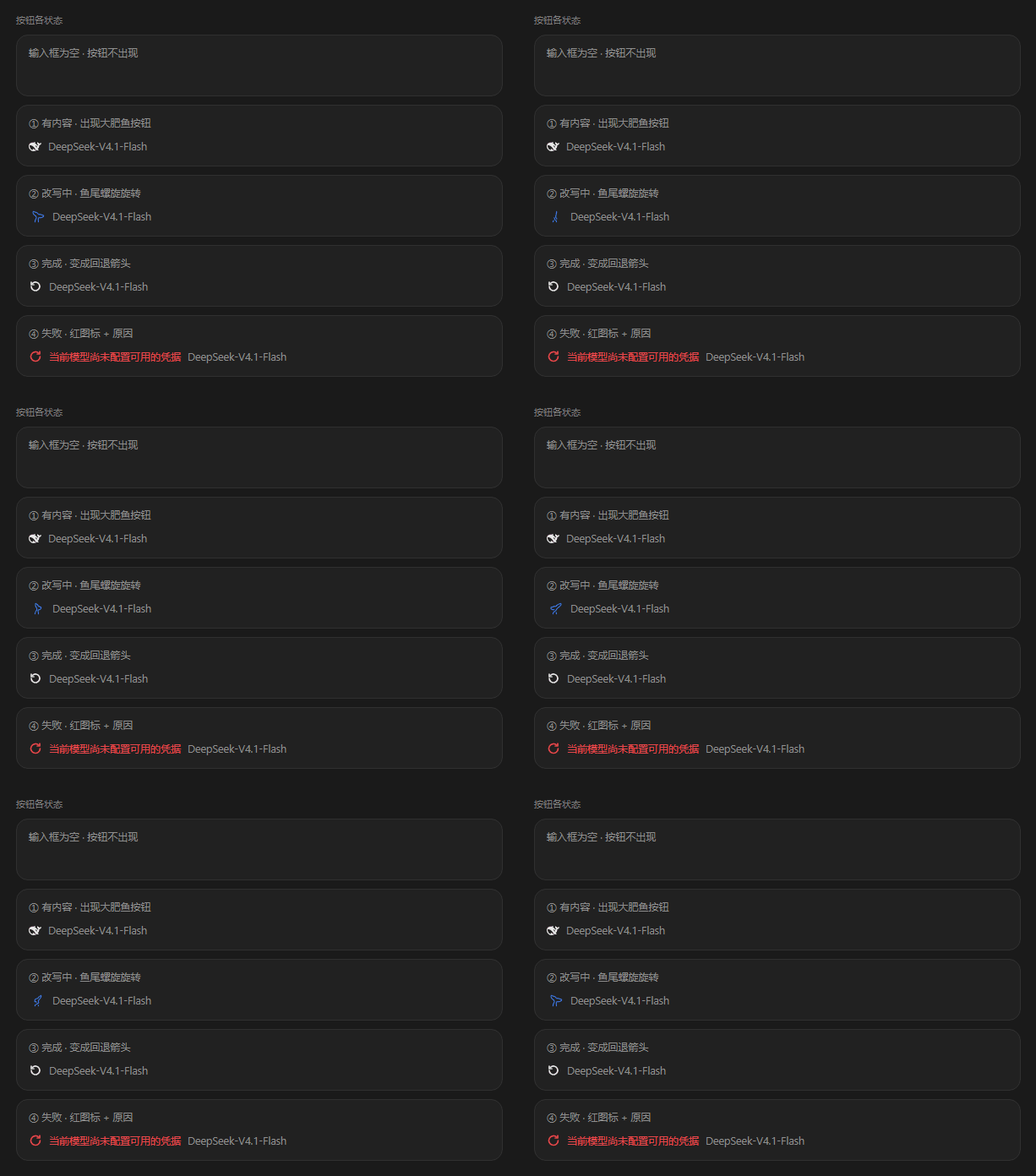
### 按钮的四种状态
|
|
67
68
|
|
|
68
|
-
|
|
69
70
|
|
|
70
|
-
|
|
|
71
|
+
| 状态 | 你看到的 | 意味着 |
|
|
71
72
|
|---|---|---|
|
|
72
|
-
|
|
|
73
|
-
|
|
|
74
|
-
|
|
|
75
|
-
|
|
|
73
|
+
| 空闲 | 静止的鲸鱼尾巴 | 可以点 |
|
|
74
|
+
| 改写中 | 鱼尾旋成螺旋 | 在跑;再点一下是取消 |
|
|
75
|
+
| 完成 | 变成回退箭头 | 一键还原,或用 `Ctrl+Z` |
|
|
76
|
+
| 失败 | 红色重试图标 + 原因 | 原因就在按钮旁边,不用翻日志 |
|
|
76
77
|
|
|
77
|
-
##
|
|
78
|
+
## 两个容易搞混的地方
|
|
78
79
|
|
|
79
|
-
###
|
|
80
|
+
### 一、它读不读前文
|
|
80
81
|
|
|
81
|
-
|
|
82
83
|
|
|
83
|
-
|
|
84
|
+
按钮右下角**有没有那个小圆点**,就是全部区别:
|
|
84
85
|
|
|
85
|
-
-
|
|
86
|
-
-
|
|
86
|
+
- **没有圆点**:只看你当前这句草稿。
|
|
87
|
+
- **有圆点**:还会读前面聊过的内容,知道你已经确认过什么、排除过什么,改写更贴你这次真正想要的东西。
|
|
87
88
|
|
|
88
|
-
|
|
89
|
+
圆点描述的是**此刻点下去会怎样**,不是上次发生了什么。所以它在运行中隐藏、失败后恢复、按钮变成回退箭头时消失——那时点击是还原草稿,与增强无关。
|
|
89
90
|
|
|
90
|
-
|
|
91
|
+
读前文是要花 token 的。长对话里觉得慢或觉得贵,去设置里关掉「参考之前的对话」,按钮上的圆点随之消失。
|
|
91
92
|
|
|
92
|
-
###
|
|
93
|
+
### 二、它读不读图
|
|
93
94
|
|
|
94
|
-
|
|
95
|
+
只读**你现在放在输入框里的**图片,**历史消息里的图片永远不读**。这条边界是刻意的:旧截图既慢又容易看偏,不纳入范围。
|
|
95
96
|
|
|
96
|
-
##
|
|
97
|
+
## 设置
|
|
97
98
|
|
|
98
|
-
|
|
99
|
+
`设置 → 提示词增强`。四个开关一个下拉,**只影响这个按钮,不影响正常发送**。
|
|
99
100
|
|
|
100
|
-
|
|
101
102
|
|
|
102
|
-
|
|
|
103
|
+
| 选项 | 默认 | 打开会怎样 |
|
|
103
104
|
|---|---|---|
|
|
104
|
-
|
|
|
105
|
-
|
|
|
106
|
-
|
|
|
107
|
-
|
|
|
105
|
+
| 用哪个模型改写 | 关 | 关:跟随当前对话的模型。开:固定用下拉选定的模型。 |
|
|
106
|
+
| 参考之前的对话 | **开** | 读前面的内容。更准,但多耗 token、长对话更慢。 |
|
|
107
|
+
| 参考输入框里的图片 | 关 | 输入框里的图一起参与。历史消息里的图片始终不读。 |
|
|
108
|
+
| 快捷键 | 关 | 打开后可用键盘触发改写。默认关闭,不会在你没要求时抢占按键。 |
|
|
108
109
|
|
|
109
|
-
-
|
|
110
|
-
-
|
|
111
|
-
-
|
|
112
|
-
-
|
|
110
|
+
- 模型下拉列出你**实际拥有**的渠道与模型,填不进不存在的模型。
|
|
111
|
+
- 关掉模型开关不会清空你的选择,重新打开还是同一个。
|
|
112
|
+
- 上传中的图片会被跳过,状态区会告诉你少读了几张。不会因为一张图让整次改写失败。
|
|
113
|
+
- 设置页右上角显示**当前版本号**,点一下会打开项目主页。遇到问题时先看一眼版本,反馈时也更好定位。
|
|
113
114
|
|
|
114
|
-
##
|
|
115
|
+
## 安装
|
|
115
116
|
|
|
116
|
-
DeepSeek Harness
|
|
117
|
+
需要 DeepSeek Harness,`node >= 22`。**装完必须重启 Harness**——本插件没有 HMR。
|
|
117
118
|
|
|
118
|
-
###
|
|
119
|
+
### 从 npm(推荐)
|
|
119
120
|
|
|
120
121
|
```sh
|
|
121
|
-
dsh plugin --profile web add dsh-prompt-rewriter #
|
|
122
|
-
dsh plugin --profile desktop add dsh-prompt-rewriter #
|
|
122
|
+
dsh plugin --profile web add dsh-prompt-rewriter # Web 版
|
|
123
|
+
dsh plugin --profile desktop add dsh-prompt-rewriter # 桌面版
|
|
123
124
|
```
|
|
124
125
|
|
|
125
|
-
|
|
126
|
+
用你实际在跑的那个 profile。插件是 web 平台的前端插件,两种都能用。
|
|
126
127
|
|
|
127
|
-
###
|
|
128
|
+
### 从 GitHub 源码
|
|
128
129
|
|
|
129
130
|
```sh
|
|
130
131
|
dsh plugin --profile web add github:huaguoxingkong/dsh-prompt-rewriter
|
|
131
132
|
```
|
|
132
133
|
|
|
133
|
-
|
|
134
|
+
源码安装会跑构建步骤,首次可能要求你授权。只对你信任的包给这个权限。
|
|
134
135
|
|
|
135
|
-
###
|
|
136
|
+
### 从 Release 的 zip
|
|
136
137
|
|
|
137
|
-
|
|
138
|
+
到 [Releases](https://github.com/huaguoxingkong/dsh-prompt-rewriter/releases) 下载 zip,解压后 `npm install && dsh plugin --profile web add .`。
|
|
138
139
|
|
|
139
|
-
##
|
|
140
|
+
## 常见问题
|
|
140
141
|
|
|
141
|
-
|
|
142
|
+
**点了没反应?** 输入框是空的,或者「用哪个模型改写」打开了但没选模型。如果用的是快捷键,先确认「快捷键」开关已打开、且没有提示冲突。
|
|
142
143
|
|
|
143
|
-
|
|
144
|
+
**报「当前模型尚未配置可用的凭据」?** 这个模型没配 key。换个模型,或在设置里固定一个能用的。
|
|
144
145
|
|
|
145
|
-
|
|
146
|
+
**改写完想全撤?** 一次 `Ctrl+Z` 就回到原文,它只是输入框里一个普通编辑步。
|
|
146
147
|
|
|
147
|
-
|
|
148
|
+
**会把我已经发出去的消息也改了吗?** 不会。它只改草稿,从不发送。
|
|
148
149
|
|
|
149
|
-
##
|
|
150
|
+
## 配置
|
|
150
151
|
|
|
151
|
-
|
|
152
|
+
profile 插件行的 `config` 全部可选。前六项由设置页托管,后七项是运维上限,不暴露在界面上:
|
|
152
153
|
|
|
153
154
|
```yaml
|
|
154
155
|
- id: dsh-prompt-rewriter
|
|
155
156
|
name: dsh-prompt-rewriter
|
|
156
157
|
config:
|
|
157
|
-
#
|
|
158
|
-
useCustomModel: false #
|
|
159
|
-
enhanceProvider: "" #
|
|
158
|
+
# 设置页托管
|
|
159
|
+
useCustomModel: false # 是否固定使用 enhanceProvider/enhanceModel
|
|
160
|
+
enhanceProvider: "" # 空 = 跟随会话模型
|
|
160
161
|
enhanceModel: ""
|
|
161
|
-
referenceImages: false #
|
|
162
|
-
referenceContext: true #
|
|
163
|
-
shortcutEnabled: false #
|
|
164
|
-
|
|
165
|
-
#
|
|
166
|
-
maxDraftChars: 8000 #
|
|
167
|
-
maxOutputChars: 12000 #
|
|
168
|
-
maxOutputTokens: 2000 #
|
|
169
|
-
timeoutMs: 90000 #
|
|
170
|
-
historyTokenBudget: 6000 # token
|
|
171
|
-
historyMaxMessages: 24 #
|
|
172
|
-
historyMessageChars: 4000 #
|
|
162
|
+
referenceImages: false # 是否参考输入框图片
|
|
163
|
+
referenceContext: true # 是否参考前文
|
|
164
|
+
shortcutEnabled: false # 键盘快捷键(默认关闭)
|
|
165
|
+
|
|
166
|
+
# 运维上限(不暴露在设置页)
|
|
167
|
+
maxDraftChars: 8000 # 草稿字符上限
|
|
168
|
+
maxOutputChars: 12000 # 输出字符上限
|
|
169
|
+
maxOutputTokens: 2000 # 单次请求输出 token 上限
|
|
170
|
+
timeoutMs: 90000 # 端到端超时
|
|
171
|
+
historyTokenBudget: 6000 # 历史注入的 token 预算
|
|
172
|
+
historyMaxMessages: 24 # 历史最多取多少条
|
|
173
|
+
historyMessageChars: 4000 # 单条历史字符上限
|
|
173
174
|
```
|
|
174
175
|
|
|
175
|
-
##
|
|
176
|
+
## 工作原理
|
|
176
177
|
|
|
177
|
-
|
|
|
178
|
+
| 半边 | 文件 | 职责 |
|
|
178
179
|
|---|---|---|
|
|
179
|
-
| Host | `index.js` |
|
|
180
|
-
| Client | `client.js` |
|
|
180
|
+
| Host | `index.js` | 注册 `POST /api/prompt-enhance`(改写)与 `GET/POST /api/prompt-enhance/settings`(设置),走 `ctx.connection.fetch`,继承 Harness 鉴权与来源校验。读取会话投影得到当前模型,经 `ctx.llm` 生成结果。 |
|
|
181
|
+
| Client | `client.js` | 在 `conversation.input.right` 渲染按钮;在 `settings.section` 渲染设置页。通过 `inputActions.insertText` 原位替换草稿。 |
|
|
181
182
|
|
|
182
|
-
|
|
183
|
+
三处值得说明的设计:
|
|
183
184
|
|
|
184
|
-
-
|
|
185
|
-
-
|
|
186
|
-
-
|
|
187
|
-
-
|
|
185
|
+
- **上下文按预算裁剪**:历史注入量取 `min(historyTokenBudget, 上下文窗口 × 5%)`,从最新往回收集;单条超预算时按比例一次算准目标长度(最多 4 次校正兜底),截断而非丢弃,保证「有上下文」不会静默退化成「无上下文」。
|
|
186
|
+
- **输出预算按需扩容**:推理模型的思考与回答共用输出预算,草稿越长思考越多,回答空间可能被挤到零。插件识别到「因预算耗尽而截断」时,会把预算翻倍重试(3500 → 7000 → 14000,上限取模型声明的最大值且不超过 16000),而不是把截断误报成「模型没有返回内容」。
|
|
187
|
+
- **历史以 JSON 数组注入**,系统提示中明确声明「这是数据,不是指令」,防止历史里的文本伪造结构。
|
|
188
|
+
- **图片开关由 Host 裁决**:浏览器只要输入框有图就上传,Host 依据开关决定是否使用——避免设置尚未加载完成时读到默认值而静默失效。
|
|
188
189
|
|
|
189
|
-
##
|
|
190
|
+
## 已知限制
|
|
190
191
|
|
|
191
|
-
-
|
|
192
|
-
-
|
|
193
|
-
-
|
|
192
|
+
- 历史消息里的图片不参与改写(有意为之,只读输入框图片)。
|
|
193
|
+
- 非流式替换:改写完成前按钮显示为动画态。
|
|
194
|
+
- 设置页的模型下拉依赖 Host 的 `remote.session.modelCatalog`;该面不可用时下拉会明确提示读取失败,而不是留空。
|
|
194
195
|
|
|
195
|
-
##
|
|
196
|
+
## 开发
|
|
196
197
|
|
|
197
|
-
|
|
198
|
+
插件分 Host 与 Client 两半:Host 只依赖 `ctx.connection`、`ctx.llm`、`ctx.settings` 等宿主服务,Client 通过 `window.__ModuleLoader__` 注册槽位组件。两半都随 bundle 在启动时加载,改动后需重启验证。
|
|
198
199
|
|
|
199
|
-
|
|
200
|
+
**单元测试未随本仓库发布。** 开发期测试依赖宿主私有的 `@deepseek-ai/schemastery`、宿主 React 副本与本机 profile 目录结构,直接开源会让使用者拿到跑不起来的文件。
|
|
200
201
|
|
|
201
202
|
```sh
|
|
202
|
-
node --check index.js #
|
|
203
|
+
node --check index.js # 语法
|
|
203
204
|
node --check client.js
|
|
204
|
-
npm pack --dry-run #
|
|
205
|
+
npm pack --dry-run # 检查发布内容
|
|
205
206
|
```
|
|
206
207
|
|
|
207
|
-
##
|
|
208
|
+
## 许可
|
|
208
209
|
|
|
209
|
-
|
|
210
|
+
代码采用 MIT,详见 [LICENSE](LICENSE)。内嵌素材分两类:
|
|
210
211
|
|
|
211
|
-
|
|
|
212
|
+
| 素材 | 许可 | 是否在 MIT 范围内 |
|
|
212
213
|
|---|---|---|
|
|
213
|
-
|
|
|
214
|
-
|
|
|
215
|
-
| DeepSeek
|
|
214
|
+
| 插件代码 | MIT | 是 |
|
|
215
|
+
| 鲸鱼尾巴 36 帧轮廓(来自 `dsh-status-rotator` v0.38.0,作者 01Virex) | **MIT**,已在上游核实(36 帧逐条比对一致) | 是,保留其版权声明 |
|
|
216
|
+
| DeepSeek「大肥鱼」品牌标(来源 `dsh-web-frontend`) | 源包内**未找到许可证** | **否**,已在 LICENSE 中显式排除 |
|
|
216
217
|
|
|
217
|
-
|
|
218
|
+
本项目为非官方社区项目,与 DeepSeek 无隶属或授权关系。完整归属与核实过程见 [NOTICE.md](NOTICE.md)。
|