dsh-prompt-rewriter 1.4.1 → 1.6.0
This diff represents the content of publicly available package versions that have been released to one of the supported registries. The information contained in this diff is provided for informational purposes only and reflects changes between package versions as they appear in their respective public registries.
- package/CHANGELOG.md +89 -0
- package/README.md +19 -4
- package/README.zh.md +19 -4
- package/client.js +913 -39
- package/docs/images/03-settings-en.png +0 -0
- package/docs/images/03-settings.png +0 -0
- package/index.js +62 -3
- package/package.json +3 -2
package/CHANGELOG.md
ADDED
|
@@ -0,0 +1,89 @@
|
|
|
1
|
+
# 更新日志
|
|
2
|
+
|
|
3
|
+
记录每个**已发布**版本对使用者可见的变化。中英双语并列,中文在前。
|
|
4
|
+
|
|
5
|
+
## 1.6.0
|
|
6
|
+
|
|
7
|
+
**中文**
|
|
8
|
+
|
|
9
|
+
- 新增键盘快捷键,可一键增强、运行中再按一次暂停;默认关闭,可在设置里打开、录制自定义键位或一键恢复默认。
|
|
10
|
+
- 录入的键位若已被其它命令占用,会指出冲突的命令名且不生效,原有键位保持不变。
|
|
11
|
+
|
|
12
|
+
**English**
|
|
13
|
+
|
|
14
|
+
- Added a keyboard shortcut: press once to enhance, again to pause. Off by default; enable it in settings, record your own combination, or reset to the default.
|
|
15
|
+
- A combination already taken by another command is reported with that command's name and is not applied; your previous binding stays.
|
|
16
|
+
|
|
17
|
+
## 1.5.1
|
|
18
|
+
|
|
19
|
+
**中文**
|
|
20
|
+
|
|
21
|
+
- 修正版本号链接指向的项目地址。
|
|
22
|
+
|
|
23
|
+
**English**
|
|
24
|
+
|
|
25
|
+
- Corrected the project address the version number links to.
|
|
26
|
+
|
|
27
|
+
## 1.5.0
|
|
28
|
+
|
|
29
|
+
**中文**
|
|
30
|
+
|
|
31
|
+
- 设置页显示当前版本号,点击可打开项目主页。
|
|
32
|
+
- 「参考之前的对话」旁补充说明,解释输入框上蓝点的含义。
|
|
33
|
+
|
|
34
|
+
**English**
|
|
35
|
+
|
|
36
|
+
- The settings page shows the current version; clicking it opens the project page.
|
|
37
|
+
- The reference-context row now explains the blue dot on the composer icon.
|
|
38
|
+
|
|
39
|
+
## 1.4.1
|
|
40
|
+
|
|
41
|
+
**中文**
|
|
42
|
+
|
|
43
|
+
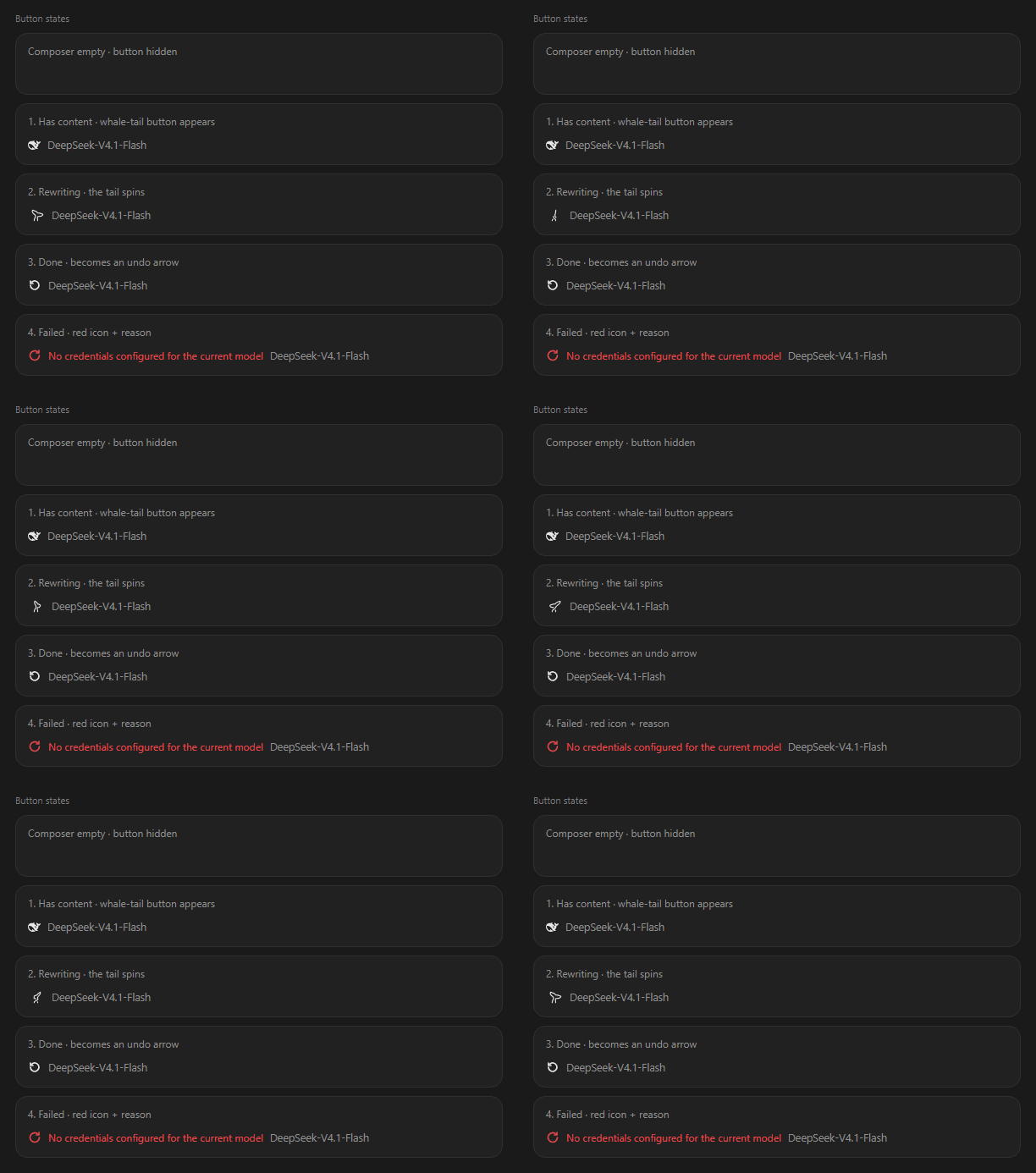
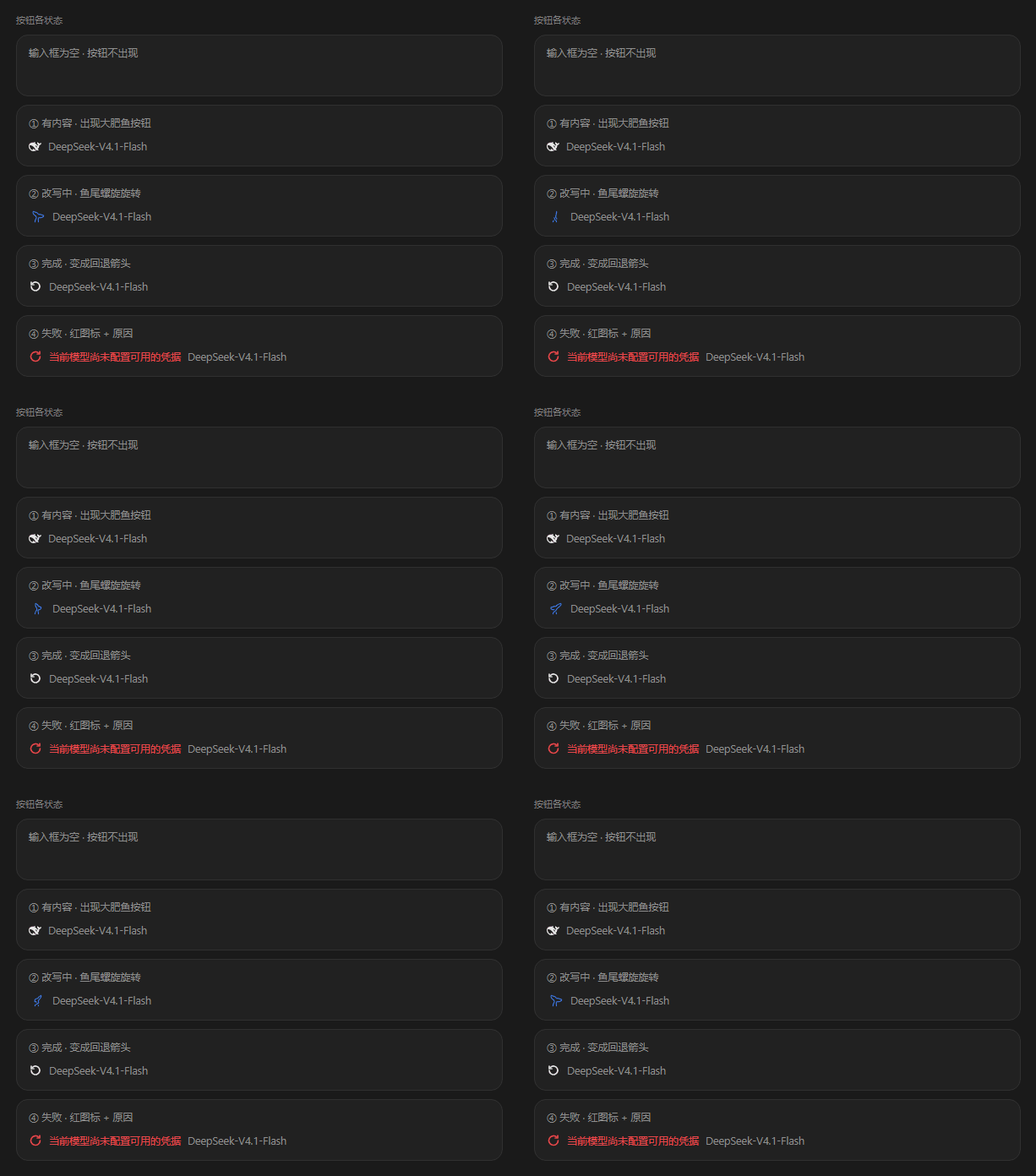
- 输入框为空时不再显示增强按钮。
|
|
44
|
+
|
|
45
|
+
**English**
|
|
46
|
+
|
|
47
|
+
- The Enhance button no longer appears while the composer is empty.
|
|
48
|
+
|
|
49
|
+
## 1.2.1
|
|
50
|
+
|
|
51
|
+
**中文**
|
|
52
|
+
|
|
53
|
+
- 长草稿、含链接的草稿不再因输出预算不足而失败:模型触顶时会自动扩大预算重试。
|
|
54
|
+
|
|
55
|
+
**English**
|
|
56
|
+
|
|
57
|
+
- Long drafts and drafts containing links no longer fail on a small output budget: a truncated run is retried with a larger one.
|
|
58
|
+
|
|
59
|
+
## 1.2.0
|
|
60
|
+
|
|
61
|
+
**中文**
|
|
62
|
+
|
|
63
|
+
- 改写速度提升约 3 倍。
|
|
64
|
+
- 改写结果更贴近真实意图:把该由你决定的选择留开,上下文模式下的结果可独立成立。
|
|
65
|
+
|
|
66
|
+
**English**
|
|
67
|
+
|
|
68
|
+
- Rewriting is about 3× faster.
|
|
69
|
+
- Results follow intent more closely: choices that belong to you stay open, and a context-aware result stands on its own.
|
|
70
|
+
|
|
71
|
+
## 1.1.0
|
|
72
|
+
|
|
73
|
+
**中文**
|
|
74
|
+
|
|
75
|
+
- 切换会话不再中断进行中的增强:离开会话只是解除界面关注,请求继续跑完,回来时结果自动写入。
|
|
76
|
+
|
|
77
|
+
**English**
|
|
78
|
+
|
|
79
|
+
- Switching sessions no longer cancels a running enhancement: leaving the conversation only detaches the UI, and the result is applied when you return.
|
|
80
|
+
|
|
81
|
+
## 1.0.3
|
|
82
|
+
|
|
83
|
+
**中文**
|
|
84
|
+
|
|
85
|
+
- 补全中英双语 README 与截图,修复 npm 包内缺失的图片与中文说明。
|
|
86
|
+
|
|
87
|
+
**English**
|
|
88
|
+
|
|
89
|
+
- Added the bilingual README and screenshots; fixed images and the Chinese guide missing from the npm package.
|
package/README.md
CHANGED
|
@@ -4,6 +4,7 @@ English | [中文](README.zh.md)
|
|
|
4
4
|
|
|
5
5
|
[](https://www.npmjs.com/package/dsh-prompt-rewriter)
|
|
6
6
|
[](LICENSE)
|
|
7
|
+
[](https://dsh-plugin.org/plugins/huaguoxingkong/dsh-prompt-rewriter)
|
|
7
8
|
|
|
8
9
|
Turns the half-formed draft in your composer into a task instruction you can actually run.
|
|
9
10
|
**It rewrites the box, it never sends.** Don't like it? `Ctrl+Z` and you're back.
|
|
@@ -52,6 +53,16 @@ Come back and the result is already in the composer; if it hasn't finished, the
|
|
|
52
53
|
|
|
53
54
|
That wasn't true in 1.0.x: switching sessions aborted the task, and coming back showed nothing.
|
|
54
55
|
|
|
56
|
+
### Keyboard shortcut (off by default)
|
|
57
|
+
|
|
58
|
+
Turn it on at **Settings → Prompt rewriter → Shortcut**. Desktop uses `Ctrl+E` (`Cmd+E` on macOS); the browser uses `Ctrl+Alt+E` (`Cmd+Alt+E`).
|
|
59
|
+
|
|
60
|
+
- Press once to enhance; press again while it runs to pause. It acts on the composer of the current conversation.
|
|
61
|
+
- **Same as clicking the icon** — the shortcut runs the icon's own click handler, including its undo state, so the two paths cannot drift. Restoring a draft stays on the button or `Ctrl+Z`.
|
|
62
|
+
- Click the shown combination to record your own; `Esc` cancels. **Reset** restores the default in one click.
|
|
63
|
+
- Already taken by another command? The row names the command it collides with, the combination is not applied, and your previous binding stays.
|
|
64
|
+
- Registered through Harness's shortcut service, so it persists across restarts.
|
|
65
|
+
|
|
55
66
|
### The four button states
|
|
56
67
|
|
|
57
68
|
|
|
@@ -97,28 +108,32 @@ Only images **currently sitting in the composer** — **never images from earlie
|
|
|
97
108
|
- The model dropdown lists **the providers and models you actually have** — you can't type in one that doesn't exist.
|
|
98
109
|
- Turning the model switch off does not clear your selection; flipping it back on shows the same choice.
|
|
99
110
|
- Images still uploading are skipped, and the status area tells you how many were missed. A rewrite never fails because of an image.
|
|
111
|
+
- The **current version** sits in the top-right of the settings page; clicking it opens the project home page. Check it before reporting a problem — it makes the issue much easier to pin down.
|
|
100
112
|
|
|
101
113
|
## Install
|
|
102
114
|
|
|
103
|
-
DeepSeek Harness
|
|
115
|
+
DeepSeek Harness, `node >= 22`. **Restart Harness after installing** — this plugin has no HMR.
|
|
104
116
|
|
|
105
117
|
### From npm (recommended)
|
|
106
118
|
|
|
107
119
|
```sh
|
|
108
|
-
dsh plugin --profile
|
|
120
|
+
dsh plugin --profile web add dsh-prompt-rewriter # web build
|
|
121
|
+
dsh plugin --profile desktop add dsh-prompt-rewriter # desktop app
|
|
109
122
|
```
|
|
110
123
|
|
|
124
|
+
Use the profile you actually run. The plugin is a web-platform client plugin, so it works in either.
|
|
125
|
+
|
|
111
126
|
### From GitHub source
|
|
112
127
|
|
|
113
128
|
```sh
|
|
114
|
-
dsh plugin --profile
|
|
129
|
+
dsh plugin --profile web add github:huaguoxingkong/dsh-prompt-rewriter
|
|
115
130
|
```
|
|
116
131
|
|
|
117
132
|
Installing from source runs a build step and may ask you to approve it. Grant that only to packages you trust.
|
|
118
133
|
|
|
119
134
|
### From a release zip
|
|
120
135
|
|
|
121
|
-
Download the zip from [Releases](https://github.com/huaguoxingkong/dsh-prompt-rewriter/releases), unzip, then `npm install && dsh plugin --profile
|
|
136
|
+
Download the zip from [Releases](https://github.com/huaguoxingkong/dsh-prompt-rewriter/releases), unzip, then `npm install && dsh plugin --profile web add .`.
|
|
122
137
|
|
|
123
138
|
## FAQ
|
|
124
139
|
|
package/README.zh.md
CHANGED
|
@@ -4,6 +4,7 @@
|
|
|
4
4
|
|
|
5
5
|
[](https://www.npmjs.com/package/dsh-prompt-rewriter)
|
|
6
6
|
[](LICENSE)
|
|
7
|
+
[](https://dsh-plugin.org/plugins/huaguoxingkong/dsh-prompt-rewriter)
|
|
7
8
|
|
|
8
9
|
把输入框里那句没头没尾的草稿,原地改成能直接执行的任务说明。
|
|
9
10
|
**只改内容,不发送、不运行。** 不满意就 `Ctrl+Z` 回去。
|
|
@@ -53,6 +54,16 @@
|
|
|
53
54
|
|
|
54
55
|
这一点在 1.0.x 里不是这样:那时切换会话会直接中断任务,回来什么也没有。
|
|
55
56
|
|
|
57
|
+
### 键盘快捷键(默认关闭)
|
|
58
|
+
|
|
59
|
+
到 **设置 → 提示词改写 → 快捷键** 打开开关。桌面端为 `Ctrl+E`(macOS `Cmd+E`),浏览器端为 `Ctrl+Alt+E`(macOS `Cmd+Alt+E`)。
|
|
60
|
+
|
|
61
|
+
- 按一次增强,运行中再按一次暂停。作用对象是当前会话的输入框。
|
|
62
|
+
- **与点击图标完全等价**:走的是图标自身的点击入口,含「撤销」态,不存在第二套逻辑。回退仍由按钮或 `Ctrl+Z` 负责。
|
|
63
|
+
- 点当前的组合即可录制自定义键位,`Esc` 取消;**恢复默认**一键还原。
|
|
64
|
+
- 被别的命令占用时会指出冲突的命令名,该组合不生效、原键位保留。
|
|
65
|
+
- 通过 Harness 的快捷键服务注册,与内置快捷键共用持久化,重启后仍然生效。
|
|
66
|
+
|
|
56
67
|
### 按钮的四种状态
|
|
57
68
|
|
|
58
69
|
|
|
@@ -98,28 +109,32 @@
|
|
|
98
109
|
- 模型下拉列出你**实际拥有**的渠道与模型,填不进不存在的模型。
|
|
99
110
|
- 关掉模型开关不会清空你的选择,重新打开还是同一个。
|
|
100
111
|
- 上传中的图片会被跳过,状态区会告诉你少读了几张。不会因为一张图让整次改写失败。
|
|
112
|
+
- 设置页右上角显示**当前版本号**,点一下会打开项目主页。遇到问题时先看一眼版本,反馈时也更好定位。
|
|
101
113
|
|
|
102
114
|
## 安装
|
|
103
115
|
|
|
104
|
-
需要 DeepSeek Harness
|
|
116
|
+
需要 DeepSeek Harness,`node >= 22`。**装完必须重启 Harness**——本插件没有 HMR。
|
|
105
117
|
|
|
106
118
|
### 从 npm(推荐)
|
|
107
119
|
|
|
108
120
|
```sh
|
|
109
|
-
dsh plugin --profile
|
|
121
|
+
dsh plugin --profile web add dsh-prompt-rewriter # Web 版
|
|
122
|
+
dsh plugin --profile desktop add dsh-prompt-rewriter # 桌面版
|
|
110
123
|
```
|
|
111
124
|
|
|
125
|
+
用你实际在跑的那个 profile。插件是 web 平台的前端插件,两种都能用。
|
|
126
|
+
|
|
112
127
|
### 从 GitHub 源码
|
|
113
128
|
|
|
114
129
|
```sh
|
|
115
|
-
dsh plugin --profile
|
|
130
|
+
dsh plugin --profile web add github:huaguoxingkong/dsh-prompt-rewriter
|
|
116
131
|
```
|
|
117
132
|
|
|
118
133
|
源码安装会跑构建步骤,首次可能要求你授权。只对你信任的包给这个权限。
|
|
119
134
|
|
|
120
135
|
### 从 Release 的 zip
|
|
121
136
|
|
|
122
|
-
到 [Releases](https://github.com/huaguoxingkong/dsh-prompt-rewriter/releases) 下载 zip,解压后 `npm install && dsh plugin --profile
|
|
137
|
+
到 [Releases](https://github.com/huaguoxingkong/dsh-prompt-rewriter/releases) 下载 zip,解压后 `npm install && dsh plugin --profile web add .`。
|
|
123
138
|
|
|
124
139
|
## 常见问题
|
|
125
140
|
|