dsh-ppt 0.22.1 → 0.23.0
This diff represents the content of publicly available package versions that have been released to one of the supported registries. The information contained in this diff is provided for informational purposes only and reflects changes between package versions as they appear in their respective public registries.
- package/CHANGELOG.md +9 -0
- package/README.en.md +33 -19
- package/README.md +34 -19
- package/docs/REFERENCE.en.md +3 -3
- package/docs/REFERENCE.zh.md +3 -3
- package/docs/USAGE.en.md +3 -3
- package/docs/USAGE.md +3 -3
- package/docs/WORKBENCH.md +2 -2
- package/docs/assets/intro/screen-en.webp +0 -0
- package/docs/assets/intro/screen-zh.webp +0 -0
- package/lib/client.js +399 -24
- package/lib/config.d.ts +1 -1
- package/lib/config.js +6 -0
- package/lib/tools.js +17 -9
- package/lib/types.d.ts +10 -3
- package/lib/workbench-language.js +4 -0
- package/lib/workbench.js +132 -17
- package/package.json +1 -1
- package/skills/dsh-ppt/SKILL.md +6 -6
- package/skills/dsh-ppt/package.json +17 -5
- package/skills/dsh-ppt/references/advanced.md +4 -3
- package/skills/dsh-ppt/references/syntax.md +1 -1
- package/skills/dsh-ppt/references/themes.md +10 -4
- package/skills/dsh-ppt/scripts/build-deck.mjs +4 -4
- package/skills/dsh-ppt/scripts/deck-absorb.mjs +419 -110
- package/skills/dsh-ppt/scripts/deck-advanced.mjs +22 -12
- package/skills/dsh-ppt/scripts/deck-core.mjs +4 -0
- package/skills/dsh-ppt/scripts/deck-director.mjs +343 -3
- package/skills/dsh-ppt/scripts/deck-layouts.mjs +116 -0
- package/skills/dsh-ppt/scripts/deck-themes.mjs +364 -13
package/CHANGELOG.md
CHANGED
|
@@ -1,5 +1,14 @@
|
|
|
1
1
|
# 更新记录
|
|
2
2
|
|
|
3
|
+
## 0.23.0 (2026-11-18)
|
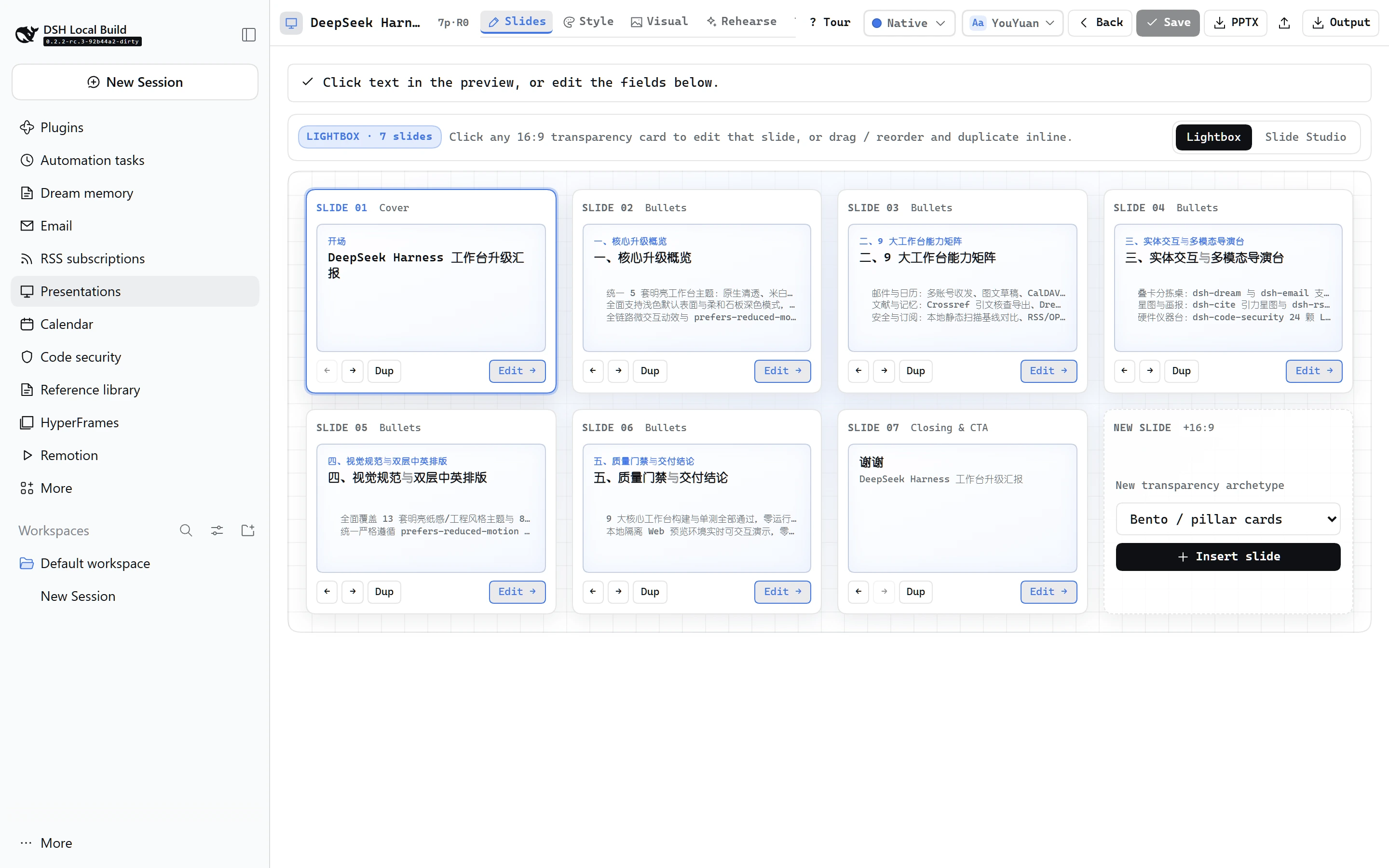
|
4
|
+
|
|
5
|
+
- **24 套大师主题、8 套名家范本预设与 20 套行业蓝图**:新增 `bcg-emerald`(翡翠战略)、`economist-brief`(经济学人简报)、`venture-daylight`(红杉日间备忘录)、`stripe-craft`(云靛工坊)、`aurora-stage`(极光发布会)、`obsidian-amber`(黑曜终端)6 套主题(共 16 浅 + 8 深),内置 8 套免上传一键直吸名家范本预设;场景蓝图扩展至 20 套(新增 `quarterly-okr`、`product-prd`、`vc-daylight`、`industry-research`),并新增咨询价值链咬合五边形箭头(`chevron` / `value-chain`)原生可编辑图示。
|
|
6
|
+
- **深度 `.pptx` 吸收引擎升级**:支持递归拆解嵌套组合形状(`<p:grpSp>`)并换算子图元坐标,补全 `<a:sysClr>`、`<a:prstClr>` 与 `hueMod`/`hueOff` 修饰色解析,自动识别「深色庄重封面 + 浅色正文」双极性(`coverMode: "inverted-accent"`)、主辅双品牌强调色(`secondaryColor`)、中英标题/正文字体配对(`headingFont`)、表格风格提示及 24+ 版式序列诊断(`narrativeProfile`),面板上传上限提升至 24 MiB。
|
|
7
|
+
- **工作台自助起稿与品牌库沉淀**:工作台新增自助「新建演示文稿」向导(支持选蓝图、填大纲或传参考 `.pptx` 复刻骨架)、`localStorage` 持久化「我的品牌库」跨工程一键复用、预览画面文字/卡片/表格点击直达编辑框、哈维球 `● ◕ ◑ ◔ ○` 快捷填入按钮、原生取色器、顶栏直出下载 PPTX 与可折叠四步人类使用指引。
|
|
8
|
+
- Add 6 curated themes (`bcg-emerald`, `economist-brief`, `venture-daylight`, `stripe-craft`, `aurora-stage`, `obsidian-amber` for 24 total), 8 1-click World-Class Reference Presets, 4 scenario blueprints (`quarterly-okr`, `product-prd`, `vc-daylight`, `industry-research` for 20 total), and interlocking native-editable `chevron` (`value-chain`) diagrams.
|
|
9
|
+
- Upgrade `.pptx` absorption (up to 24 MiB in Workbench) to recursively unwrap nested `<p:grpSp>` group shapes, resolve `sysClr`/`prstClr`/`hueMod` color transforms, detect dark-cover + daylight-body polarity (`coverMode: "inverted-accent"`), extract `secondaryColor` and `headingFont` pairings, classify all 24+ slide archetypes, and report `narrativeProfile`.
|
|
10
|
+
- Add a self-serve **New presentation** wizard, persistent **My Brand Library**, expanded click-to-focus preview targets, 1-click Harvey ball insertion chips, color pickers, direct PPTX download, and a collapsible 4-step workflow guide.
|
|
11
|
+
|
|
3
12
|
## 0.22.1 (2026-11-18)
|
|
4
13
|
|
|
5
14
|
- 更新区底部新增克制、无打扰的 GitHub 点赞与问题反馈快捷链接,并完善中英文检索关键词。
|
package/README.en.md
CHANGED
|
@@ -17,34 +17,44 @@
|
|
|
17
17
|
|
|
18
18
|
## Features
|
|
19
19
|
|
|
20
|
-
- **Zero-taste-burden Auto-Director**: Automatically selects from **
|
|
21
|
-
- **Deep Reference `.pptx`
|
|
22
|
-
- **
|
|
20
|
+
- **Zero-taste-burden Auto-Director**: Automatically selects from **24 curated themes** (16 projector-safe daylight + 8 stage dark — spanning McKinsey, BCG Emerald, Economist Brief, FT Salmon, Sequoia Daylight Memo, Stripe Craft, Apple Spatial Light, and Gov Ceremonial), **6 distinct Master Chrome Skeletons**, **20 industry blueprints**, and **24+ native editable layouts & pro diagrams** (including interlocking **Value-Chain Chevrons**, Bento cards, KPI hero metrics, 2×2 matrices, comparisons, process/flywheel/funnel flows, Gantt roadmaps, layered architecture diagrams, Harvey-ball competitor matrices, concentric TAM/SAM/SOM, org/team charts, academic 3-line tables, and 13 publication-grade chart types including vector waterfall bridges).
|
|
21
|
+
- **Deep Reference `.pptx` Absorption & Master Presets**: Ships **8 1-click World-Class Reference Presets** plus **Deep `.pptx` Absorption** (`ppt_absorb`, `referencePptx` with `cloneStructure: true`, or drag-and-drop up to `24 MiB` in Style Studio) — recursively unwrapping nested `<p:grpSp>` group shapes, resolving OOXML `sysClr`/`prstClr`/`hueMod` color transforms, dual brand accents, heading/body font pairings, dark-cover + daylight-body polarity, master logos, `recommendedChrome`, and 24-layout `slideSkeleton` sequences with WCAG ≥4.5:1 sanitization and reusable **My Brand Library** presets.
|
|
22
|
+
- **Human-first Workbench & Self-Serve Creation**: Adapted for DeepSeek Harness `>=0.2.2-rc.3` with 5 switchable light UI themes; launch **New presentation** directly inside the workbench from a blueprint, rough notes, or uploaded `.pptx`; click text/cards/tables in the live preview to jump straight to their editor inputs, insert Harvey balls (`● ◕ ◑ ◔ ○`) in 1 click, compare HTML ↔ rendered PPTX side-by-side, and undo up to 20 revisions.
|
|
23
23
|
- **Optional verification & coaching**: Traceable numbers with live what-if sliders across diagrams and tables, 24-slide two-tier Vision QA (12 lossless formatting actions + full-width before/after canvas diff), and executive storyline coaching / defense rehearsal.
|
|
24
24
|
|
|
25
25
|
## Style previews
|
|
26
26
|
|
|
27
|
-
Rendered from PPTX files made with dsh-ppt. Select an image to enlarge it.
|
|
27
|
+
Rendered from native editable PPTX files made with dsh-ppt across distinct master chrome skeletons and domain diagrams. Select an image to enlarge it.
|
|
28
28
|
|
|
29
29
|
<table>
|
|
30
30
|
<tr>
|
|
31
|
-
<th>
|
|
32
|
-
<th>
|
|
33
|
-
<th>
|
|
31
|
+
<th>Layered Architecture + Sidecar</th>
|
|
32
|
+
<th>Multi-Quarter PMO Gantt</th>
|
|
33
|
+
<th>Phase-III Clinical Booktabs</th>
|
|
34
34
|
</tr>
|
|
35
35
|
<tr>
|
|
36
|
-
<td width="33%"><a href="https://raw.githubusercontent.com/STARDUSTLC666/dsh-ppt/master/assets/gallery/
|
|
37
|
-
<td width="33%"><a href="https://raw.githubusercontent.com/STARDUSTLC666/dsh-ppt/master/assets/gallery/
|
|
38
|
-
<td width="33%"><a href="https://raw.githubusercontent.com/STARDUSTLC666/dsh-ppt/master/assets/gallery/
|
|
36
|
+
<td width="33%"><a href="https://raw.githubusercontent.com/STARDUSTLC666/dsh-ppt/master/assets/gallery/v22-arch-en.webp"><img src="https://raw.githubusercontent.com/STARDUSTLC666/dsh-ppt/master/assets/gallery/v22-arch-en.webp" alt="Three-tier decoupled AI platform architecture diagram with full-height zero-trust observability sidecar" width="100%"></a></td>
|
|
37
|
+
<td width="33%"><a href="https://raw.githubusercontent.com/STARDUSTLC666/dsh-ppt/master/assets/gallery/v22-gantt-en.webp"><img src="https://raw.githubusercontent.com/STARDUSTLC666/dsh-ppt/master/assets/gallery/v22-gantt-en.webp" alt="Four-quarter five-swimlane cloud-native migration Gantt roadmap with bar-end and standalone diamond milestones" width="100%"></a></td>
|
|
38
|
+
<td width="33%"><a href="https://raw.githubusercontent.com/STARDUSTLC666/dsh-ppt/master/assets/gallery/v22-clinical-en.webp"><img src="https://raw.githubusercontent.com/STARDUSTLC666/dsh-ppt/master/assets/gallery/v22-clinical-en.webp" alt="Medical Clean Beamer header band with NEJM-grade three-line booktabs clinical endpoint table and 3-zone footer" width="100%"></a></td>
|
|
39
|
+
</tr>
|
|
40
|
+
<tr>
|
|
41
|
+
<th>CFO EBIT Waterfall (FT Salmon)</th>
|
|
42
|
+
<th>Enterprise Harvey Matrix</th>
|
|
43
|
+
<th>Governance & Org Tree (Gov Chrome)</th>
|
|
44
|
+
</tr>
|
|
45
|
+
<tr>
|
|
46
|
+
<td width="33%"><a href="https://raw.githubusercontent.com/STARDUSTLC666/dsh-ppt/master/assets/gallery/v22-finance-en.webp"><img src="https://raw.githubusercontent.com/STARDUSTLC666/dsh-ppt/master/assets/gallery/v22-finance-en.webp" alt="Financial FT Salmon theme pairing vector EBIT waterfall bridge with dense driver attribution cards" width="100%"></a></td>
|
|
47
|
+
<td width="33%"><a href="https://raw.githubusercontent.com/STARDUSTLC666/dsh-ppt/master/assets/gallery/v22-harvey-en.webp"><img src="https://raw.githubusercontent.com/STARDUSTLC666/dsh-ppt/master/assets/gallery/v22-harvey-en.webp" alt="6x4 enterprise procurement Harvey ball capability matrix with highlighted Ours column and native vector symbols" width="100%"></a></td>
|
|
48
|
+
<td width="33%"><a href="https://raw.githubusercontent.com/STARDUSTLC666/dsh-ppt/master/assets/gallery/v22-gov-org-en.webp"><img src="https://raw.githubusercontent.com/STARDUSTLC666/dsh-ppt/master/assets/gallery/v22-gov-org-en.webp" alt="Gov Ceremonial double-rule header with bracketed ribbon kicker and CDO four-center organizational tree" width="100%"></a></td>
|
|
39
49
|
</tr>
|
|
40
50
|
</table>
|
|
41
51
|
|
|
42
|
-
|
|
52
|
+
All previews are LibreOffice-rendered from native OOXML `.pptx` outputs using sample metrics.
|
|
43
53
|
|
|
44
54
|
<details>
|
|
45
55
|
<summary>View the workbench</summary>
|
|
46
56
|
|
|
47
|
-
|
|
57
|
+
|
|
48
58
|
|
|
49
59
|
Actual interface with controlled validation data; the PPTX image is a rendered sample when shown.
|
|
50
60
|
|
|
@@ -62,15 +72,19 @@ For the web profile, replace `desktop` with `web`. Restart that DSH profile afte
|
|
|
62
72
|
|
|
63
73
|
## Start using it
|
|
64
74
|
|
|
65
|
-
|
|
66
|
-
|
|
67
|
-
|
|
68
|
-
|
|
69
|
-
|
|
75
|
+
Four intuitive steps — start either in chat or directly inside the workbench:
|
|
76
|
+
|
|
77
|
+
1. **Draft in seconds (two ways)**:
|
|
78
|
+
- **Self-serve in the Workbench**: Open **Presentations** in the sidebar and click **New presentation** to start from any of the 20 scenario blueprints (Quarterly OKR, Product PRD, Investor Memo, Industry Research, Project Update, Defense, etc.), paste rough Markdown notes, or upload a reference `.pptx`.
|
|
79
|
+
- **Ask in Chat**: Share your notes, data, or reference `.pptx` path (or copy a ready-made prompt from the workbench guide) — Auto-Director picks a projector-safe theme and varied layouts automatically.
|
|
80
|
+
2. **Click-to-edit & upgrade layouts**: Click any title, card, or table in the live preview to focus its editor field; switch bullets into **KPI hero metrics, Value-Chain Chevrons, Gantt timelines, Architecture diagrams, Harvey-ball matrices, or academic 3-line tables** in one click, then press `Ctrl/⌘+S` or **Save slide**.
|
|
81
|
+
3. **Absorb reference `.pptx` & save your brand**: In **Style Studio**, apply **8 built-in Master Reference Presets** in 1 click, or drop a corporate `.pptx` (`≤24 MiB`) to extract dual brand colours, heading/body fonts, cover polarity, logo, and skeleton — then save it to **My Brand Library** for 1-click reuse on future decks.
|
|
82
|
+
4. **Verify & deliver**: Render the current PPTX for **side-by-side HTML & PPTX inspection** (or optionally run AI storyline coaching, rehearsal, or 24-slide visual repair), then click **Download PPTX** or export the Share ZIP bundle.
|
|
70
83
|
|
|
71
|
-
|
|
84
|
+
Ready-to-copy chat prompts:
|
|
72
85
|
|
|
73
|
-
|
|
86
|
+
- **Quarterly / OKR review**: `Turn these notes into a Quarterly OKR review deck with action titles, KPI cards, value-chain chevrons, and issue-action comparisons (HTML + editable PPTX).`
|
|
87
|
+
- **Clone a corporate `.pptx`**: `Absorb the palette, logo, chrome skeleton, and slide cadence of company-template.pptx, and turn this document into an executive presentation.`
|
|
74
88
|
|
|
75
89
|
## Before you start
|
|
76
90
|
|
package/README.md
CHANGED
|
@@ -17,34 +17,44 @@
|
|
|
17
17
|
|
|
18
18
|
## 功能
|
|
19
19
|
|
|
20
|
-
- **零品味负担自动导演**:无需懂排版配色,一句话或文档自动匹配 **
|
|
21
|
-
-
|
|
22
|
-
-
|
|
20
|
+
- **零品味负担自动导演**:无需懂排版配色,一句话或文档自动匹配 **24 套大师主题**(16 套明亮投影友好 + 8 套沉浸深色,涵盖麦肯锡、BCG 翡翠战略、经济学人、金融时报、红杉创投、Stripe 工程、Apple 空间白与故宫霁蓝政务)与 **6 套差异化母版骨架**,覆盖 **20 套行业场景蓝图** 与 **24+ 种原生可编辑版式与专业图示**(新增咨询价值链五边形咬合箭头 `chevron`,以及 Bento 网格、KPI 大数字、2×2 矩阵、痛点对比、飞轮/漏斗流程、甘特图路线图、分层系统架构、哈维球竞品矩阵、TAM/SAM/SOM 同心圆、组织/团队图谱、学术三线表、13 种出版级图表与矢量瀑布桥)。
|
|
21
|
+
- **深度吸收优质 `.pptx` 与名家范本**:内建 **8 套名家范本一键直吸**(免上传文件即可切换顶级演示 DNA),同时支持通过 `ppt_absorb`、`referencePptx`(`cloneStructure: true`)或工作台拖拽外部 `.pptx`(≤24 MiB)递归拆解嵌套组合形状(`<p:grpSp>`)、解析 OOXML `sysClr`/`prstClr`/`hueMod` 修饰色板、主辅双强调色、标题/正文字体配对、深色庄重封面+浅色正文极性、母版 Logo、骨架几何(`extractedSkeleton` / `recommendedChrome`)与 24 版式逐页序列(`slideSkeleton`),自带 WCAG ≥4.5:1 对比度净化,并支持收藏至「我的品牌库」跨项目一键复用。
|
|
22
|
+
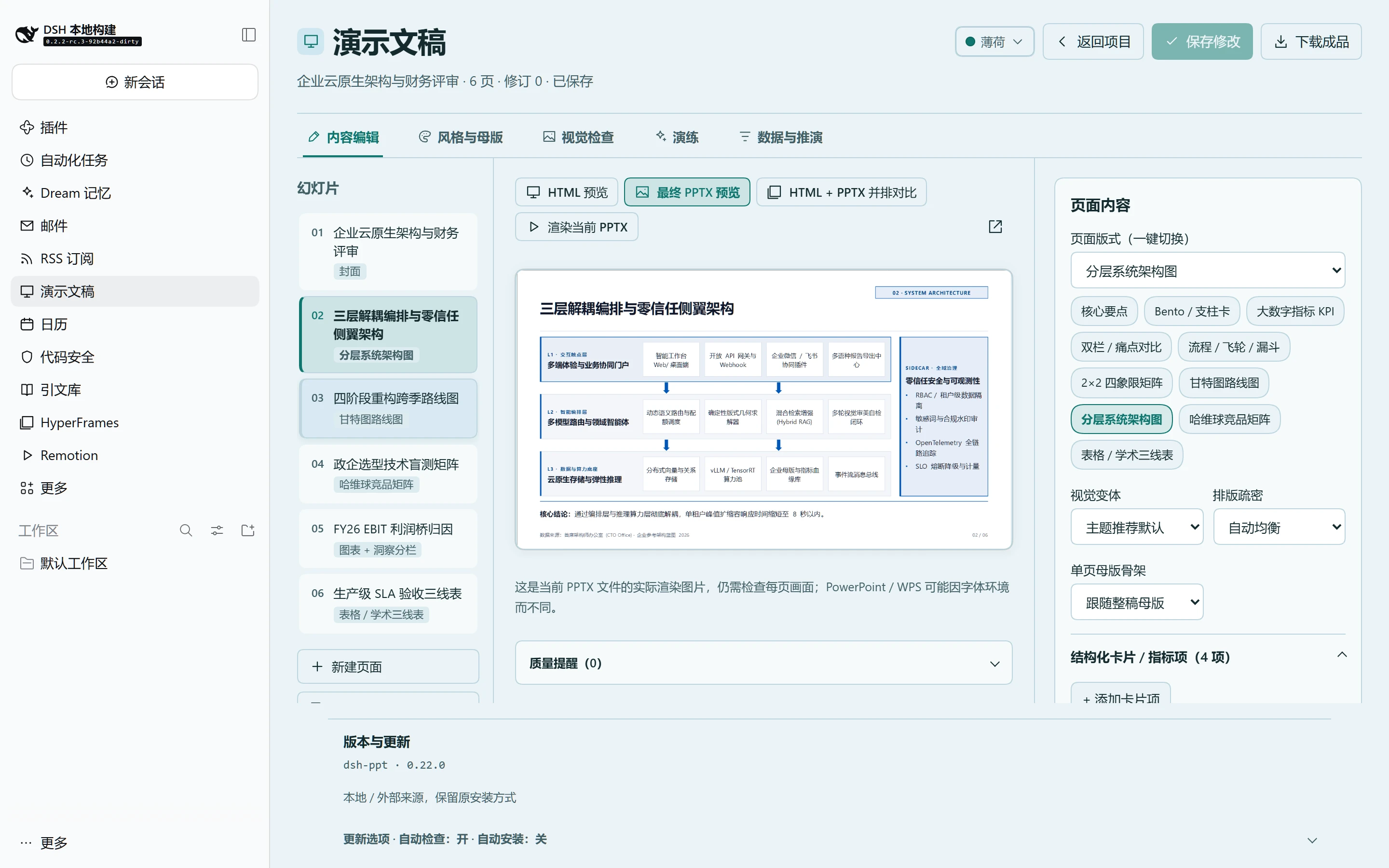
- **符合直觉的工作台与双入口起稿**:适配 DeepSeek Harness `>=0.2.2-rc.3`,内置五套明亮主题切换;支持在工作台直接点击「**新建演示文稿**」选蓝图/填大纲/传参考 `.pptx` 零代码生成,或在对话中一键发指令生成;在「风格与母版」一键套用名家范本、收藏企业品牌或切换 24 套演示主题,在「内容编辑」点击画面文字直接定位输入框、用哈维球快捷按钮 `● ◕ ◑ ◔ ○` 填表、一键下载 PPTX 或开启 HTML ↔ PPTX 并排对比与撤销。
|
|
23
23
|
- **可选高阶能力**:数字溯源与现场推演(支持卡片/甘特图/TAM/哈维球/架构绑定)、24 页双层 AI 视觉审查(含 12 种无损排版修复与全宽前后对比)、高管叙事预审与模拟答辩。
|
|
24
24
|
|
|
25
25
|
## 风格预览
|
|
26
26
|
|
|
27
|
-
这些画面来自插件生成的 PPTX
|
|
27
|
+
这些画面来自插件生成的 PPTX(覆盖 6 套母版骨架与高密度专业图示)。点击查看大图。
|
|
28
28
|
|
|
29
29
|
<table>
|
|
30
30
|
<tr>
|
|
31
|
-
<th
|
|
32
|
-
<th
|
|
33
|
-
<th
|
|
31
|
+
<th>系统架构评审(Architecture)</th>
|
|
32
|
+
<th>研发 PMO 跨季排期(Gantt)</th>
|
|
33
|
+
<th>医学临床三期试验(Beamer 三线表)</th>
|
|
34
34
|
</tr>
|
|
35
35
|
<tr>
|
|
36
|
-
<td width="33%"><a href="https://raw.githubusercontent.com/STARDUSTLC666/dsh-ppt/master/assets/gallery/
|
|
37
|
-
<td width="33%"><a href="https://raw.githubusercontent.com/STARDUSTLC666/dsh-ppt/master/assets/gallery/
|
|
38
|
-
<td width="33%"><a href="https://raw.githubusercontent.com/STARDUSTLC666/dsh-ppt/master/assets/gallery/
|
|
36
|
+
<td width="33%"><a href="https://raw.githubusercontent.com/STARDUSTLC666/dsh-ppt/master/assets/gallery/v22-arch-zh.webp"><img src="https://raw.githubusercontent.com/STARDUSTLC666/dsh-ppt/master/assets/gallery/v22-arch-zh.webp" alt="Consulting 直角母版三层解耦智能编排架构图与全域零信任安全侧翼" width="100%"></a></td>
|
|
37
|
+
<td width="33%"><a href="https://raw.githubusercontent.com/STARDUSTLC666/dsh-ppt/master/assets/gallery/v22-gantt-zh.webp"><img src="https://raw.githubusercontent.com/STARDUSTLC666/dsh-ppt/master/assets/gallery/v22-gantt-zh.webp" alt="四季度五泳道云原生重构甘特图,含条尾与独立菱形里程碑" width="100%"></a></td>
|
|
38
|
+
<td width="33%"><a href="https://raw.githubusercontent.com/STARDUSTLC666/dsh-ppt/master/assets/gallery/v22-clinical-zh.webp"><img src="https://raw.githubusercontent.com/STARDUSTLC666/dsh-ppt/master/assets/gallery/v22-clinical-zh.webp" alt="Medical Clean Beamer 通栏页眉配 NEJM 级临床终点三线表与三区学术底栏" width="100%"></a></td>
|
|
39
|
+
</tr>
|
|
40
|
+
<tr>
|
|
41
|
+
<th>CFO 财务利润桥与归因(FT Waterfall)</th>
|
|
42
|
+
<th>政企选型技术盲测矩阵(Harvey)</th>
|
|
43
|
+
<th>集团治理与双线政务章回(Org Tree)</th>
|
|
44
|
+
</tr>
|
|
45
|
+
<tr>
|
|
46
|
+
<td width="33%"><a href="https://raw.githubusercontent.com/STARDUSTLC666/dsh-ppt/master/assets/gallery/v22-finance-zh.webp"><img src="https://raw.githubusercontent.com/STARDUSTLC666/dsh-ppt/master/assets/gallery/v22-finance-zh.webp" alt="Financial FT 暖鲑底色配 EBIT 利润桥矢量瀑布图与财务动因拆解卡片" width="100%"></a></td>
|
|
47
|
+
<td width="33%"><a href="https://raw.githubusercontent.com/STARDUSTLC666/dsh-ppt/master/assets/gallery/v22-harvey-zh.webp"><img src="https://raw.githubusercontent.com/STARDUSTLC666/dsh-ppt/master/assets/gallery/v22-harvey-zh.webp" alt="6×4 政企技术盲测哈维球矩阵,含高亮主列与矢量饼形哈维球" width="100%"></a></td>
|
|
48
|
+
<td width="33%"><a href="https://raw.githubusercontent.com/STARDUSTLC666/dsh-ppt/master/assets/gallery/v22-gov-org-zh.webp"><img src="https://raw.githubusercontent.com/STARDUSTLC666/dsh-ppt/master/assets/gallery/v22-gov-org-zh.webp" alt="霁蓝政务双线页眉配【05 · 组织保障】绶带标签与 CDO 组织架构树" width="100%"></a></td>
|
|
39
49
|
</tr>
|
|
40
50
|
</table>
|
|
41
51
|
|
|
42
|
-
|
|
52
|
+
以上画面均由原生可编辑 PPTX 经 LibreOffice 渲染生成,使用示例脱敏数据。
|
|
43
53
|
|
|
44
54
|
<details>
|
|
45
55
|
<summary>查看工作台界面</summary>
|
|
46
56
|
|
|
47
|
-

|
|
57
|
+
|
|
48
58
|
|
|
49
59
|
图片来自验证环境的真实界面或示例 PPTX 渲染,使用示例数据。
|
|
50
60
|
|
|
@@ -62,15 +72,20 @@ dsh plugin --profile desktop add dsh-ppt
|
|
|
62
72
|
|
|
63
73
|
## 开始使用
|
|
64
74
|
|
|
65
|
-
|
|
66
|
-
|
|
67
|
-
|
|
68
|
-
|
|
69
|
-
|
|
75
|
+
符合直觉的四步工作流(无需记参数,对话或工作台均可直接起步):
|
|
76
|
+
|
|
77
|
+
1. **快速起稿(二选一)**:
|
|
78
|
+
- **直接在面板起稿**:从左侧栏打开「演示文稿」,点击右上角 **「新建演示文稿」**,从 20 套行业蓝图(周报、季度 OKR、PRD 评审、路演 BP、行业研究、政务述职、学术答辩等)任选一套,或粘贴粗略要点 / 上传参考 `.pptx` 直接生成三件套。
|
|
79
|
+
- **在对话中交给助手**:把文档、数据或参考 `.pptx` 发给助手(也可直接在工作台顶部复制场景指令),自动导演会按听众匹配明亮投影风与多版式节奏。
|
|
80
|
+
2. **点哪改哪 & 换版式**:在「内容编辑」直接点击预览画面里的标题、卡片或表格即可定位到右侧编辑框;顶部可一键把普通要点切换成 **KPI 大数字、价值链五边形箭头(Chevron)、甘特图、系统架构图、哈维球竞品矩阵或学术三线表**,改完按 `Ctrl/⌘+S` 或点击「保存此页」同步更新 HTML 与 PPTX。
|
|
81
|
+
3. **吸收外部优质 PPT 与沉淀品牌**:在「风格与母版」可一键套用 **8 套名家范本**,或把公司模板 / 喜欢的优质 `.pptx` 拖入解析框——自动提取双品牌色、标题/正文字体、深色封面反白、Logo 与页面骨架,点击「收藏到我的品牌库」后以后每份 PPT 都能一键换上公司皮肤。
|
|
82
|
+
4. **核对与交付**:需要精检排版时点「渲染当前 PPTX」开启 **HTML + PPTX 并排对比**(或按需开启 AI 叙事预审、模拟答辩与 24 页视觉看图修复);确认无误后直接点顶部「**下载 PPTX**」或「下载成品」导出分享包 ZIP。
|
|
70
83
|
|
|
71
|
-
|
|
84
|
+
常用对话指令示例(可直接复制告诉助手):
|
|
72
85
|
|
|
73
|
-
|
|
86
|
+
- **日常汇报 / OKR 复盘**:`请把这份材料整理成季度 OKR 复盘演示文稿,结论先行,用 KPI 卡片、价值链箭头和痛点对比排版,生成 HTML 和可编辑 PPTX。`
|
|
87
|
+
- **吸收公司模板做新稿**:`参考工作区里的 company-template.pptx 吸收配色、Logo、母版骨架与版式节奏,把这份纪要做成一套可直接投影的正式汇报 PPT。`
|
|
88
|
+
- **产品方案 / 融资路演**:`按明亮易读的投资备忘录风格把这份产品方案做成 10 页路演 PPT,包含 TAM 市场空间、竞品哈维球矩阵和里程碑甘特图。`
|
|
74
89
|
|
|
75
90
|
## 开始前要知道
|
|
76
91
|
|
package/docs/REFERENCE.en.md
CHANGED
|
@@ -18,9 +18,9 @@ Open the workbench from the native DSH sidebar. See the [workbench guide](WORKBE
|
|
|
18
18
|
|
|
19
19
|
## What it does
|
|
20
20
|
|
|
21
|
-
- **Zero-taste-burden Auto-Director,
|
|
22
|
-
- **Deep Reference `.pptx`
|
|
23
|
-
- **24 Native Editable Layouts/Diagrams & 13 Pro Chart Kinds**: Build Bento/pillar `cards`, hero `kpi` grids, `comparison`, `matrix` (2×2), `process` (steps / timeline / layers / funnel / flywheel), `callout`, `gantt` roadmaps, `architecture` layered diagrams, `harvey`-ball competitor matrices, `tam` concentric circles, `org`/team charts, `table` (`consulting | booktabs | minimal | banded | harvey`), `chart-split`, and 13 Economist/FT chart variants
|
|
21
|
+
- **Zero-taste-burden Auto-Director, 24 Master Themes & 6 Chrome Skeletons**: Ships 16 projector-safe daylight themes (including `bcg-emerald`, `economist-brief`, `venture-daylight`, `stripe-craft`, `consulting`, `cobalt-cream`, `exec-jilan`, `exec-palace`, `academic`, `editorial-forest`, `cartesian`, `course-sage`, `soft`, `keynote-light`, `financial-ft`, `medical-clean`) and 8 stage dark themes (including `aurora-stage`, `obsidian-amber`, `linear-dark`, `swiss`, `velvet`, `data`, `bold`, `luxury-noir`), paired with **6 Master Chrome Skeletons** and **20 industry scenario blueprints**. When `theme` is omitted in `ppt_create`, `auto` routes content to the best-fit persona theme and chrome.
|
|
22
|
+
- **Deep Reference `.pptx` Absorption & Master Presets**: Includes **8 World-Class Reference Presets** plus external `.pptx` absorption via `ppt_absorb`, `referencePptx` (`cloneStructure: true`), or drag-and-drop (`≤24 MiB`) in **Style Studio** — unwrapping nested `<p:grpSp>` group shapes and resolving OOXML `sysClr`/`prstClr`/`hueMod` modifiers, dual brand accents, heading/body font pairings, dark-cover + daylight-body polarity, master logos, `recommendedChrome`, and 24-layout `slideSkeleton[]` sequences with WCAG ≥4.5:1 clamping.
|
|
23
|
+
- **24+ Native Editable Layouts/Diagrams & 13 Pro Chart Kinds**: Build interlocking **Value-Chain Chevrons** (`chevron`), Bento/pillar `cards`, hero `kpi` grids, `comparison`, `matrix` (2×2), `process` (steps / timeline / chevron / layers / funnel / flywheel), `callout`, `gantt` roadmaps, `architecture` layered diagrams, `harvey`-ball competitor matrices, `tam` concentric circles, `org`/team charts, `table` (`consulting | booktabs | minimal | banded | harvey`), `chart-split`, and 13 Economist/FT chart variants.
|
|
24
24
|
- **Rich Workbench & Style Studio**: Search and filter projects with theme/page metadata; switch slide archetypes and per-slide chrome skeletons in one click, edit Gantt timelines, Harvey matrices, structured `items`, and tables, add/duplicate/reorder slides, compare HTML ↔ rendered PPTX side-by-side, jump directly from quality findings to slides, and undo up to 20 revisions.
|
|
25
25
|
- **Traceable Data & What-If Scenarios**: Bind `{{metricId}}` across titles, bullets, `items` (including `gantt`, `tam`, `architecture`, `org`), `harvey`/table `rows`, `takeaway`, `source`, and charts; adjust declared assumptions live in HTML and save confirmed snapshots to PPTX. See [the data guide](DATA.md#english).
|
|
26
26
|
- **Optional 24-Slide Two-Tier Vision QA**: Inspect rendered PPTX images for both layout bugs and aesthetic hierarchy, apply 12 lossless formatting actions on a copy, and compare full-width before/after renders on the canvas. See [visual review](VISUAL.md#english).
|
package/docs/REFERENCE.zh.md
CHANGED
|
@@ -18,9 +18,9 @@
|
|
|
18
18
|
|
|
19
19
|
## 功能
|
|
20
20
|
|
|
21
|
-
- **零品味负担自动导演、
|
|
22
|
-
- **深度吸收外部 `.pptx`
|
|
23
|
-
- **24 种原生可编辑版式/专业图示与 13
|
|
21
|
+
- **零品味负担自动导演、24 套大师主题与 6 套母版骨架**:内建 16 套明亮投影友好主题(含新增翡翠战略 `bcg-emerald`、经济学人简报 `economist-brief`、红杉创投简报 `venture-daylight`、云靛工坊 `stripe-craft`,以及 `consulting`、`cobalt-cream`、`exec-jilan`、`exec-palace`、`academic`、`editorial-forest`、`cartesian`、`course-sage`、`soft`、`keynote-light`、`financial-ft`、`medical-clean`)与 8 套深色舞台主题(含新增极光发布会 `aurora-stage`、黑曜终端 `obsidian-amber`,以及 `linear-dark`、`swiss`、`velvet`、`data`、`bold`、`luxury-noir`),匹配 **6 套差异化母版骨架**与 **20 套行业场景蓝图**。未指定主题时 `ppt_create` 默认启用 `auto` 场景导演。
|
|
22
|
+
- **深度吸收外部 `.pptx` 骨架与名家范本**:内置 **8 套名家范本一键直吸**,并支持 `ppt_absorb` 工具、`referencePptx`(含 `cloneStructure: true` 结构复刻)或工作台「风格与母版」面板直接上传参考 `.pptx`(≤24 MiB),自动递归拆解嵌套组合形状 `<p:grpSp>`、解析 OOXML `sysClr`/`prstClr`/`hueMod` 修饰色板、主辅双强调色、标题/正文字体配对、深色封面+浅色正文极性、母版 Logo、骨架几何(`extractedSkeleton` / `recommendedChrome`)与 24 版式逐页序列(`slideSkeleton[]`),支持收藏到工作台品牌库复用。
|
|
23
|
+
- **24+ 种原生可编辑版式/专业图示与 13 种出版级图表**:新增咨询价值链五边形咬合箭头(`chevron` / `process[chevron]`),并覆盖 Bento/支柱卡片(`cards`)、大数字指标(`kpi`)、双栏/痛点举措对比(`comparison`)、四象限矩阵(`matrix`)、流程/里程碑轴/漏斗/飞轮(`process`)、定理/行动清单(`callout`)、甘特图路线图(`gantt`)、分层系统架构(`architecture`)、哈维球竞品矩阵(`harvey`)、TAM/SAM/SOM 同心圆(`tam`)、组织架构/团队图谱(`org`)、咨询表与学术三线表(`table` `booktabs` `harvey`)、图表+洞察分栏(`chart-split`)及矢量瀑布桥(`waterfall`)等。
|
|
24
24
|
- **工程库与增强工作台**:按关键词/主题搜索排序,展示主题与页数标签;支持单页版式与单页母版骨架一键无损切换、结构化卡片/甘特图时间轴/哈维球与表格编辑、新增页面、HTML ↔ PPTX 并排分屏对比、点击质量提醒直接跳页,以及最多 20 步撤销。
|
|
25
25
|
- **可选数字溯源与现场推演**:点击数字追到原始材料、CSV 单元格或公式(全面支持 `items`、甘特图、`tam`、架构、哈维球矩阵、`takeaway`、`source` 与图表绑定);调整假设、预览影响并确认保存。见[数据说明](DATA.md)。
|
|
26
26
|
- **可选双层 AI 视觉检查(最多 24 页)**:看实际 PPTX 渲染图,兼顾排版溢出检测与审美层级把关,支持 12 种零文本篡改排版动作、全宽画布前后对比、停止与撤销。见[看图修复](VISUAL.md)。
|
package/docs/USAGE.en.md
CHANGED
|
@@ -15,10 +15,10 @@
|
|
|
15
15
|
| --- | --- |
|
|
16
16
|
| `ppt_create` tool | Markdown / structured `slides` → `*.html` + `*.pptx` + `*.json`; defaults to `theme: "auto"` and accepts `referencePptx` + `cloneStructure: true` for deep palette, chrome & skeleton cloning |
|
|
17
17
|
| `ppt_absorb` tool | Read-only local extraction of OOXML modified palette colors, fonts, aspect ratio, chrome geometry (`extractedSkeleton`, `recommendedChrome`), slide sequence (`slideSkeleton[]`), and optional logo from a reference `.pptx` |
|
|
18
|
-
| `ppt_themes` tool | Lists all
|
|
19
|
-
| 24 layouts & diagrams | `cover` / `agenda` / `section` / `bullets` / `statement` / `quote` / `kpi` / `cards` / `comparison` / `matrix` / `process` / `callout` / `gantt` / `architecture` / `harvey` / `tam` / `org` / `table` / `closing` / `image` / `image-left` / `image-right` / `chart` / `chart-split` (plus `waterfall`, `gallery`, and `flywheel` aliases) |
|
|
18
|
+
| `ppt_themes` tool | Lists all 24 built-in themes (16 daylight + 8 dark) paired with 6 chrome skeletons; pass `preview: true` with `outputDir` to generate a side-by-side HTML gallery and SVG palette cards |
|
|
19
|
+
| 24+ layouts & diagrams | `cover` / `agenda` / `section` / `bullets` / `statement` / `quote` / `kpi` / `cards` / `comparison` / `matrix` / `process` / `callout` / `gantt` / `architecture` / `harvey` / `tam` / `org` / `table` / `closing` / `image` / `image-left` / `image-right` / `chart` / `chart-split` (plus `chevron`, `value-chain`, `waterfall`, `gallery`, and `flywheel` aliases) |
|
|
20
20
|
| 13 chart kinds | `column` / `bar` / `stacked-column` / `stacked-bar` / `percent-column` / `percent-bar` / `line` / `area` / `pie` / `doughnut` / `scatter` / `combo` / `waterfall` with `highlight` focal emphasis |
|
|
21
|
-
| `ppt_templates` |
|
|
21
|
+
| `ppt_templates` | 20 scenario blueprints: `weekly`, `defense`, `project`, `pitch`, `consulting`, `keynote`, `gov-report`, `workshop`, `architecture-review`, `financial-earnings`, `medical-case`, `postmortem`, `marketing-campaign`, `promotion-review`, `legal-compliance`, `creative-lookbook`, `quarterly-okr`, `product-prd`, `vc-daylight`, `industry-research` |
|
|
22
22
|
| `ppt_edit` / `ppt_undo` | Edit selected slides, switch deck `theme` / `brand` / `referencePptx`, append/duplicate/remove/reorder slides with 20-step undo and revision guards |
|
|
23
23
|
| `ppt_check` | Read-only layout & aesthetic density check (including action-title, bullet overload, and monotony hints) plus optional render-receipt verification |
|
|
24
24
|
| `ppt_render` | Optional official LibreOffice Kit PNG / PDF page rendering with missing-font diagnostics |
|
package/docs/USAGE.md
CHANGED
|
@@ -15,10 +15,10 @@
|
|
|
15
15
|
| --- | --- |
|
|
16
16
|
| `ppt_create` 工具 | Markdown / 结构化 `slides` → `*.html` + `*.pptx` + `*.json` 三件套;默认 `theme: "auto"` 自动匹配主题与骨架,支持 `referencePptx` 与 `cloneStructure: true` 深度复用参考结构 |
|
|
17
17
|
| `ppt_absorb` 工具 | 本地只读解析参考 `.pptx` 的主题修饰色板、字体、画幅比例、母版骨架几何(`extractedSkeleton` / `recommendedChrome`)、逐页序列(`slideSkeleton`)与可选嵌入 Logo |
|
|
18
|
-
| `ppt_themes` 工具 | 列出
|
|
19
|
-
| 24 种页型与图示 | `cover` / `agenda` / `section` / `bullets` / `statement` / `quote` / `kpi` / `cards` / `comparison` / `matrix` / `process` / `callout` / `gantt` / `architecture` / `harvey` / `tam` / `org` / `table` / `closing` / `image` / `image-left` / `image-right` / `chart` / `chart-split`(兼容 `waterfall`、`gallery`、`flywheel` 别名) |
|
|
18
|
+
| `ppt_themes` 工具 | 列出 24 套内置主题(16 明亮 + 8 深色)与 6 套母版骨架;传 `preview: true, outputDir: "dist"` 生成主题对比页 + 每套 SVG 色板卡 |
|
|
19
|
+
| 24+ 种页型与图示 | `cover` / `agenda` / `section` / `bullets` / `statement` / `quote` / `kpi` / `cards` / `comparison` / `matrix` / `process` / `callout` / `gantt` / `architecture` / `harvey` / `tam` / `org` / `table` / `closing` / `image` / `image-left` / `image-right` / `chart` / `chart-split`(兼容 `chevron`、`value-chain`、`waterfall`、`gallery`、`flywheel` 别名) |
|
|
20
20
|
| 13 类原生图表 | `column` / `bar` / `stacked-column` / `stacked-bar` / `percent-column` / `percent-bar` / `line` / `area` / `pie` / `doughnut` / `scatter` / `combo` / `waterfall`,支持 `highlight` 焦点项染色 |
|
|
21
|
-
| `ppt_templates` |
|
|
21
|
+
| `ppt_templates` | 20 套场景蓝图:`weekly`、`defense`、`project`、`pitch`、`consulting`、`keynote`、`gov-report`、`workshop`、`architecture-review`、`financial-earnings`、`medical-case`、`postmortem`、`marketing-campaign`、`promotion-review`、`legal-compliance`、`creative-lookbook`、`quarterly-okr`、`product-prd`、`vc-daylight`、`industry-research` |
|
|
22
22
|
| `ppt_edit` / `ppt_undo` | 按页或整套切换主题/品牌/参考 `.pptx`、增删改排页面,支持最多 20 次历史与修订号冲突保护 |
|
|
23
23
|
| `ppt_check` | 只读版面与信息密度检查(含标题动作化、密度过载、连续同构页等提醒),定位具体页;可复核当前渲染收据 |
|
|
24
24
|
| `ppt_render` | 可选官方引擎生成逐页 PNG / PDF,保留源 PPTX,报告缺失字体 |
|
package/docs/WORKBENCH.md
CHANGED
|
@@ -1,8 +1,8 @@
|
|
|
1
1
|
# dsh-ppt 工作台 / Workbench
|
|
2
2
|
|
|
3
|
-
|
|
3
|
+
演示文稿主工作台,提供自助「新建演示文稿」向导、可折叠四步使用指引、页面栏、画布区与五栏属性面板(内容编辑、风格与母版、视觉检查、演练、数据与推演);支持一键切换 24 套主题、8 套名家范本预设、6 套母版骨架与 24+ 种版式原型(含价值链五边形箭头 `chevron`)、拖拽深度吸收参考 `.pptx`(≤24 MiB)并收藏到「我的品牌库」、HTML ↔ PPTX 并排对比及画布级视觉修复前后对照,保留跨栏推演联动、未保存保护和画面内全屏退出。
|
|
4
4
|
|
|
5
|
-
Presentation workbench with slide rail, split-capable canvas, and five inspector tabs (Edit content, Style Studio, Visual review, Rehearsal, Data and what-if); supports 1-click switching across
|
|
5
|
+
Presentation workbench with a self-service **New presentation** wizard, collapsible 4-step workflow guide, slide rail, split-capable canvas, and five inspector tabs (Edit content, Style Studio, Visual review, Rehearsal, Data and what-if); supports 1-click switching across 24 themes, 8 World-Class Reference Presets, 6 master chrome skeletons, and 24+ slide archetypes (including value-chain `chevron`), in-memory deep `.pptx` style & skeleton absorption (`≤24 MiB`) with reusable **My Brand Library** presets, HTML ↔ PPTX side-by-side comparison, and full-width Vision QA before/after diffs.
|
|
6
6
|
|
|
7
7
|
## 使用 / Use
|
|
8
8
|
|
|
Binary file
|
|
Binary file
|