dsh-ppt 0.21.0 → 0.22.1
This diff represents the content of publicly available package versions that have been released to one of the supported registries. The information contained in this diff is provided for informational purposes only and reflects changes between package versions as they appear in their respective public registries.
- package/CHANGELOG.md +21 -0
- package/README.en.md +18 -17
- package/README.md +16 -15
- package/docs/COACHING.md +14 -13
- package/docs/DATA.md +8 -8
- package/docs/REFERENCE.en.md +17 -19
- package/docs/REFERENCE.zh.md +16 -18
- package/docs/USAGE.en.md +107 -60
- package/docs/USAGE.md +115 -84
- package/docs/VALIDATION.md +2 -0
- package/docs/VISUAL.md +27 -20
- package/docs/WORKBENCH.md +17 -6
- package/docs/assets/intro/screen-en.webp +0 -0
- package/docs/assets/intro/screen-zh.webp +0 -0
- package/lib/client.js +941 -132
- package/lib/coaching.d.ts +1 -1
- package/lib/coaching.js +25 -12
- package/lib/config.d.ts +2 -0
- package/lib/config.js +30 -2
- package/lib/execution.d.ts +2 -1
- package/lib/execution.js +21 -1
- package/lib/tools.d.ts +1 -1
- package/lib/tools.js +151 -24
- package/lib/types.d.ts +108 -8
- package/lib/visual.d.ts +3 -1
- package/lib/visual.js +40 -13
- package/lib/workbench-language.js +45 -9
- package/lib/workbench.d.ts +5 -0
- package/lib/workbench.js +485 -9
- package/package.json +9 -4
- package/skills/dsh-ppt/SKILL.md +56 -54
- package/skills/dsh-ppt/package.json +1 -1
- package/skills/dsh-ppt/references/advanced.md +122 -41
- package/skills/dsh-ppt/references/copywriting.md +63 -41
- package/skills/dsh-ppt/references/data.md +83 -36
- package/skills/dsh-ppt/references/syntax.md +157 -28
- package/skills/dsh-ppt/references/themes.md +90 -41
- package/skills/dsh-ppt/references/troubleshooting.md +21 -16
- package/skills/dsh-ppt/scripts/build-deck.mjs +67 -28
- package/skills/dsh-ppt/scripts/deck-absorb.mjs +1029 -0
- package/skills/dsh-ppt/scripts/deck-advanced.mjs +406 -99
- package/skills/dsh-ppt/scripts/deck-core.mjs +568 -717
- package/skills/dsh-ppt/scripts/deck-data-view.mjs +30 -11
- package/skills/dsh-ppt/scripts/deck-data.mjs +35 -5
- package/skills/dsh-ppt/scripts/deck-director.mjs +1717 -0
- package/skills/dsh-ppt/scripts/deck-layouts.mjs +4557 -0
- package/skills/dsh-ppt/scripts/deck-media.mjs +1408 -86
- package/skills/dsh-ppt/scripts/deck-themes.mjs +1503 -0
- package/skills/dsh-ppt/scripts/deck-visual.mjs +133 -31
package/CHANGELOG.md
CHANGED
|
@@ -1,5 +1,26 @@
|
|
|
1
1
|
# 更新记录
|
|
2
2
|
|
|
3
|
+
## 0.22.1 (2026-11-18)
|
|
4
|
+
|
|
5
|
+
- 更新区底部新增克制、无打扰的 GitHub 点赞与问题反馈快捷链接,并完善中英文检索关键词。
|
|
6
|
+
- Add subtle, non-intrusive GitHub Star and issue feedback links in the update footer, and expand search keywords.
|
|
7
|
+
|
|
8
|
+
## 0.22.0 (2026-11-18)
|
|
9
|
+
|
|
10
|
+
- **18 套大师主题与 6 套差异化母版骨架**:在保留原有 14 套主题的基础上新增 `keynote-light`(库比蒂诺留白)、`financial-ft`(金融时报)、`medical-clean`(仁心临床)、`luxury-noir`(黑金策展),共 12 套明亮 + 6 套深色主题;引入 6 套结构差异化的母版骨架(`consulting-classic`、`keynote-spatial`、`editorial-folio`、`saas-bento`、`academic-minimal`、`gov-ceremonial`),支持 `brand.chromeStyle` 整稿覆盖与 `slide.chrome` 单页覆盖,HTML 与 PPTX 原生 OOXML 100% 同源对齐。
|
|
11
|
+
- Add 4 curated themes (`keynote-light`, `financial-ft`, `medical-clean`, `luxury-noir`) for 18 built-in themes total (12 daylight + 6 dark), paired with 6 structurally distinct Master Chrome Skeletons (`consulting-classic`, `keynote-spatial`, `editorial-folio`, `saas-bento`, `academic-minimal`, `gov-ceremonial`) via `brand.chromeStyle` and per-slide `slide.chrome` with full HTML + native OOXML parity.
|
|
12
|
+
- **24 种原生可编辑版式与专业图示**:新增 5 大零外部依赖原生可编辑图示——`gantt`(甘特图路线图,支持 `columns` 时间轴、`start`/`span` 进度条与 `diamond` 里程碑)、`architecture`(分层系统架构与跨层安全侧栏及数据流箭头)、`harvey`(`● ◕ ◑ ◔ ○` 哈维球竞品能力矩阵,支持 `tableStyle: 'harvey'`)、`tam`(底部相切 TAM/SAM/SOM 同心圆与右栏拆解卡)、`org`(`tree` 汇报树状图与 `team` 首字母头像卡);`process` 新增 `flywheel` 增长飞轮变体与 `funnel` 阶段转化率徽章;并支持 `kpi`、`cards`、`comparison`、`matrix`、`callout`、`booktabs` 学术三线表、`chart-split` 与矢量 `waterfall` 瀑布桥。
|
|
13
|
+
- Expand to 24 canonical native-editable layouts and pro diagrams: `gantt` roadmaps (with `columns`, `start`/`span`, and `diamond` milestones), `architecture` layered diagrams with cross-cutting sidecars and flow arrows, `harvey`-ball competitor matrices (`tableStyle: 'harvey'`), concentric `tam` (TAM/SAM/SOM) circles, and `org` (`tree` / `team`) charts, alongside `process` `flywheel` / `funnel` conversion badges, Bento/pillar `cards`, `kpi`, `comparison`, `matrix`, `callout`, `booktabs` 3-line tables, `chart-split`, and vector `waterfall` bridges.
|
|
14
|
+
- **深度 `.pptx` 骨架吸收与智能导演 16 套行业蓝图**:`ppt_absorb` 与 `referencePptx` 升级支持 DrawingML `lumMod`/`tint`/`shade`/`satMod` 修饰色解析、母版骨架几何提取(`extractedSkeleton`)、`recommendedChrome` 推荐与逐页版式序列(`slideSkeleton[]`),`ppt_create` 新增 `cloneStructure: true`(CLI `--clone-structure` / `--chrome`)自动将生成文稿映射至参考结构,内置 WCAG ≥4.5:1 对比度净化与刺眼背景/位图字体降级;零提问自动导演扩展至 16 套行业场景蓝图(新增架构评审、财报发布、临床病例、故障复盘、营销战役、晋升述职、法务合规、创意 Lookbook),`deck-data` 数字溯源全面延伸至新图示字段。
|
|
15
|
+
- Upgrade `ppt_absorb`, `referencePptx`, and `ppt_create` (`cloneStructure: true`, CLI `--clone-structure` / `--chrome`) to resolve DrawingML color transforms (`lumMod`/`tint`/`shade`/`satMod`), extract `extractedSkeleton`, `recommendedChrome`, and per-slide `slideSkeleton[]` with WCAG ≥4.5:1 sanitization; expand Scenario Auto-Director to 16 industry blueprints (`architecture-review`, `financial-earnings`, `medical-case`, `postmortem`, `marketing-campaign`, `promotion-review`, `legal-compliance`, `creative-lookbook`) and extend `{{metricId}}` lineage bindings across all new diagram fields.
|
|
16
|
+
- **风格与母版工作台、24 页双层视觉检查与高管叙事预审**:新增「风格与母版(Style Studio)」与 6 套母版骨架选择器,支持 18 套主题、24 种版式、甘特图/哈维球编辑器、拖拽 `.pptx` 预览骨架摘要、HTML ↔ PPTX 并排对比与全宽视觉修复前后对照(最多 24 页、12 种无损动作);叙事教练升级 SCQA / 金字塔 / Action Title 把关(最多 8 条建议,覆盖 7 类听众);同步共享 `workbench-ui` v2 原语与宿主主题 token。
|
|
17
|
+
- Ship the **Style Studio** tab with a 6-Chrome Master Skeleton picker, 24-layout archetype switcher, Gantt/Harvey editors, drag-and-drop `.pptx` skeleton preview, HTML ↔ PPTX split comparison, 24-slide two-tier Vision QA (12 lossless actions + full-width diff), and SCQA/Action-Title storyline coaching (up to 8 findings across 7 personas), synced with `workbench-ui` v2 primitives and host theme tokens.
|
|
18
|
+
|
|
19
|
+
## 0.21.1 (2026-11-18)
|
|
20
|
+
|
|
21
|
+
- 同步 `@stardustlc/dsh-updates` 0.2.1:恢复 Suite 整包统一更新(移除独立拆包迁移),保留整包与独立插件的原地热更新与失败自动回滚。
|
|
22
|
+
- Sync `@stardustlc/dsh-updates` 0.2.1: restore unified Suite bundle updates (removing standalone conversion) while retaining in-place hot reload and automatic rollback.
|
|
23
|
+
|
|
3
24
|
## 0.21.0 (2026-11-18)
|
|
4
25
|
|
|
5
26
|
- 升级至 Workbench UI v2 并深度适配 DeepSeek Harness `>=0.2.2-rc.3`:按需接入 `@deepseek-ai/dsh-client-ui-primitives` 宿主组件(含独立测试语义回退与弹窗/菜单 Portal 风格同步)、顶部窗口避让与拖拽排除标记。
|
package/README.en.md
CHANGED
|
@@ -2,7 +2,7 @@
|
|
|
2
2
|
|
|
3
3
|
# PPT
|
|
4
4
|
|
|
5
|
-
**
|
|
5
|
+
**Turn source material into publication-grade, deliverable presentations in DeepSeek Harness—HTML playback, editable PPTX, and project bundles—in a 5-theme light workbench.**
|
|
6
6
|
|
|
7
7
|
[](https://www.npmjs.com/package/dsh-ppt) [](https://www.npmjs.com/package/dsh-ppt) [](https://www.npmjs.com/package/dsh-ppt)
|
|
8
8
|
|
|
@@ -17,9 +17,10 @@
|
|
|
17
17
|
|
|
18
18
|
## Features
|
|
19
19
|
|
|
20
|
-
-
|
|
21
|
-
-
|
|
22
|
-
-
|
|
20
|
+
- **Zero-taste-burden Auto-Director**: Automatically selects from **18 curated themes** (12 projector-safe daylight + 6 stage dark), **6 distinct Master Chrome Skeletons** (McKinsey Consulting Classic, Apple Keynote Spatial, Editorial Folio, SaaS Bento, Academic Beamer, Gov Ceremonial), **16 industry blueprints**, and **24 native editable layouts & pro diagrams** (Bento cards, KPI hero metrics, 2×2 matrices, comparisons, process/flywheel flows, Gantt roadmaps, layered architecture diagrams, Harvey-ball competitor matrices, concentric TAM/SAM/SOM, org/team charts, academic 3-line tables, and 13 publication-grade chart types including vector waterfall bridges).
|
|
21
|
+
- **Deep Reference `.pptx` Skeleton Absorption**: Combines built-in design systems with **Deep `.pptx` Absorption** (`ppt_absorb`, `referencePptx` with `cloneStructure: true`, or drag-and-drop in Style Studio) — resolving OOXML color transforms, CJK/Latin fonts, master logos, chrome geometry (`extractedSkeleton` / `recommendedChrome`), and slide-by-slide `slideSkeleton` sequences with automatic WCAG ≥4.5:1 contrast sanitization.
|
|
22
|
+
- **Interactive Workbench & Style Studio**: Adapted for DeepSeek Harness `>=0.2.2-rc.3` with 5 switchable studio UI themes (Native Airy / Warm Cream / Claude Warmth / Bright 8-Bit / Airy Mint); switch 18 deck themes, 6 master chrome skeletons, and 24 slide archetypes in one click; edit Gantt timelines, Harvey-ball matrices, structured cards, tables, and images; compare HTML and rendered PPTX side-by-side; and undo up to 20 revisions.
|
|
23
|
+
- **Optional verification & coaching**: Traceable numbers with live what-if sliders across diagrams and tables, 24-slide two-tier Vision QA (12 lossless formatting actions + full-width before/after canvas diff), and executive storyline coaching / defense rehearsal.
|
|
23
24
|
|
|
24
25
|
## Style previews
|
|
25
26
|
|
|
@@ -27,21 +28,21 @@ Rendered from PPTX files made with dsh-ppt. Select an image to enlarge it.
|
|
|
27
28
|
|
|
28
29
|
<table>
|
|
29
30
|
<tr>
|
|
30
|
-
<th>
|
|
31
|
-
<th>
|
|
32
|
-
<th>
|
|
31
|
+
<th>Editorial forest cover</th>
|
|
32
|
+
<th>Framed photo & takeaway</th>
|
|
33
|
+
<th>Focal-highlight chart</th>
|
|
33
34
|
</tr>
|
|
34
35
|
<tr>
|
|
35
|
-
<td width="33%"><a href="https://raw.githubusercontent.com/STARDUSTLC666/dsh-ppt/master/assets/gallery/editorial-en.webp"><img src="https://raw.githubusercontent.com/STARDUSTLC666/dsh-ppt/master/assets/gallery/editorial-en.webp" alt="
|
|
36
|
-
<td width="33%"><a href="https://raw.githubusercontent.com/STARDUSTLC666/dsh-ppt/master/assets/gallery/reading-corner-en.webp"><img src="https://raw.githubusercontent.com/STARDUSTLC666/dsh-ppt/master/assets/gallery/reading-corner-en.webp" alt="
|
|
37
|
-
<td width="33%"><a href="https://raw.githubusercontent.com/STARDUSTLC666/dsh-ppt/master/assets/gallery/visits-chart-en.webp"><img src="https://raw.githubusercontent.com/STARDUSTLC666/dsh-ppt/master/assets/gallery/visits-chart-en.webp" alt="
|
|
36
|
+
<td width="33%"><a href="https://raw.githubusercontent.com/STARDUSTLC666/dsh-ppt/master/assets/gallery/editorial-en.webp"><img src="https://raw.githubusercontent.com/STARDUSTLC666/dsh-ppt/master/assets/gallery/editorial-en.webp" alt="Editorial forest warm-ivory cover with a deep-green accent rule: Turning the Corner Library into a Sunlit Neighborhood Living Room" width="100%"></a></td>
|
|
37
|
+
<td width="33%"><a href="https://raw.githubusercontent.com/STARDUSTLC666/dsh-ppt/master/assets/gallery/reading-corner-en.webp"><img src="https://raw.githubusercontent.com/STARDUSTLC666/dsh-ppt/master/assets/gallery/reading-corner-en.webp" alt="Warm ivory split layout pairing structured highlights and a bottom takeaway bar with a sunlit oak reading table" width="100%"></a></td>
|
|
38
|
+
<td width="33%"><a href="https://raw.githubusercontent.com/STARDUSTLC666/dsh-ppt/master/assets/gallery/visits-chart-en.webp"><img src="https://raw.githubusercontent.com/STARDUSTLC666/dsh-ppt/master/assets/gallery/visits-chart-en.webp" alt="Publication-style column chart highlighting Week 4 peak attendance at 780 visits in deep forest green against muted baseline bars" width="100%"></a></td>
|
|
38
39
|
</tr>
|
|
39
40
|
</table>
|
|
40
41
|
|
|
41
42
|
The photo was generated for the example, and the chart uses sample data.
|
|
42
43
|
|
|
43
44
|
<details>
|
|
44
|
-
<summary>
|
|
45
|
+
<summary>View the workbench</summary>
|
|
45
46
|
|
|
46
47
|
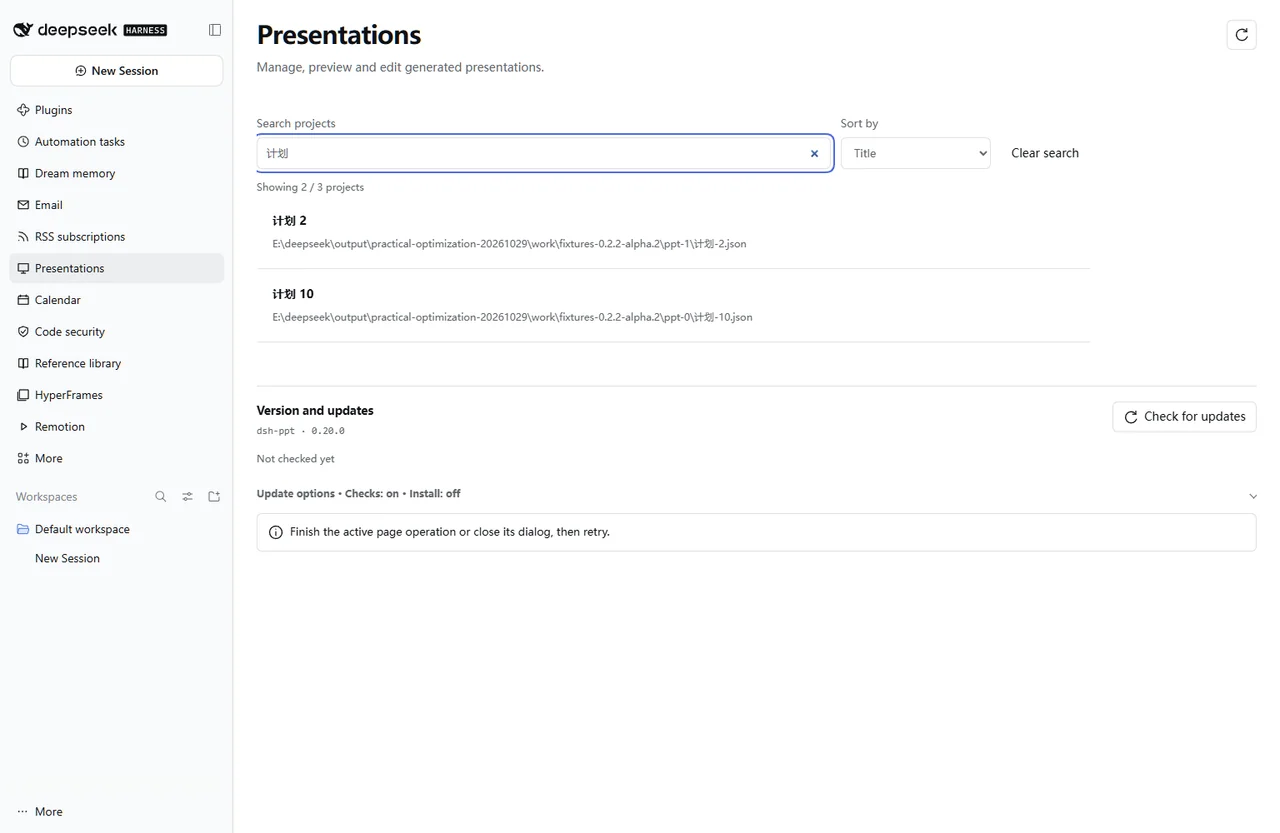
|
|
47
48
|
|
|
@@ -61,19 +62,19 @@ For the web profile, replace `desktop` with `web`. Restart that DSH profile afte
|
|
|
61
62
|
|
|
62
63
|
## Start using it
|
|
63
64
|
|
|
64
|
-
1. Provide material, purpose, audience
|
|
65
|
+
1. Provide material, purpose, audience, or a reference `.pptx` in the target workspace — no manual design tuning needed; Scenario Auto-Director selects a tailored daylight/dark theme and varied slide layouts automatically.
|
|
65
66
|
2. Open Presentations in the sidebar and search for or select the generated project.
|
|
66
|
-
3.
|
|
67
|
-
4. Explicitly start optional AI review, rehearsal or visual repair when needed; direct download does not require them.
|
|
67
|
+
3. Switch 24 slide archetypes, edit Gantt timelines, Harvey matrices, structured cards/tables/images in **Edit content**, or restyle the whole deck across 18 themes & 6 master skeletons and absorb a corporate `.pptx` in **Style Studio**; render the current PPTX for side-by-side HTML ↔ PPTX comparison when needed.
|
|
68
|
+
4. Explicitly start optional AI storyline review, defense rehearsal, or 24-slide visual repair when needed; direct download does not require them.
|
|
68
69
|
5. Deliver the share bundle or retain editability with the project bundle; check the result in the target browser or Office application.
|
|
69
70
|
|
|
70
|
-
Example request
|
|
71
|
+
Example request:
|
|
71
72
|
|
|
72
|
-
> Create
|
|
73
|
+
> Create an executive strategy deck from this material with HTML, editable PPTX and a project bundle — automatically match a clean daylight theme and varied KPI/card/chart layouts.
|
|
73
74
|
|
|
74
75
|
## Before you start
|
|
75
76
|
|
|
76
|
-
Download the finished deck directly; AI review and
|
|
77
|
+
Download the finished deck directly; AI review, rehearsal and visual repair are optional. Office edits do not sync back into the project.
|
|
77
78
|
|
|
78
79
|
Configuration, detailed tools and troubleshooting: [full reference](https://github.com/STARDUSTLC666/dsh-ppt/blob/master/docs/REFERENCE.en.md).
|
|
79
80
|
|
package/README.md
CHANGED
|
@@ -2,7 +2,7 @@
|
|
|
2
2
|
|
|
3
3
|
# PPT
|
|
4
4
|
|
|
5
|
-
|
|
5
|
+
**在 DeepSeek Harness 中将材料整理为有审美品味、可直接交付的演示文稿,导出离线 HTML、可编辑 PPTX 与工程包,内置可切换五套明亮风格的工作台界面。**
|
|
6
6
|
|
|
7
7
|
[](https://www.npmjs.com/package/dsh-ppt) [](https://www.npmjs.com/package/dsh-ppt) [](https://www.npmjs.com/package/dsh-ppt)
|
|
8
8
|
|
|
@@ -17,9 +17,10 @@
|
|
|
17
17
|
|
|
18
18
|
## 功能
|
|
19
19
|
|
|
20
|
-
-
|
|
21
|
-
-
|
|
22
|
-
-
|
|
20
|
+
- **零品味负担自动导演**:无需懂排版配色,一句话或文档自动匹配 **18 套大师主题**(12 套明亮投影友好 + 6 套沉浸深色)与 **6 套差异化母版骨架**(麦肯锡直角 / Apple 空间留白 / 杂志社论书脊 / 黑曜石 Bento / 学术 Beamer 通栏页眉 / 东方政务双线),覆盖 **16 套行业场景蓝图** 与 **24 种原生可编辑版式与专业图示**(Bento 网格、KPI 大数字、2×2 矩阵、痛点对比、飞轮/漏斗流程、甘特图路线图、分层系统架构、哈维球竞品矩阵、TAM/SAM/SOM 同心圆、组织/团队图谱、学术三线表、13 种出版级图表与矢量瀑布桥)。
|
|
21
|
+
- **深度吸收外部 `.pptx`**:既内建麦肯锡 / 经济学人 / 现代政务 / 清澄学术 / Apple / 金融时报规范,也支持通过 `ppt_absorb`、`referencePptx`(`cloneStructure: true`)或工作台拖拽外部 `.pptx` 解析 OOXML 修饰色板、字体、Logo、母版骨架几何(`extractedSkeleton` / `recommendedChrome`)与逐页版式序列(`slideSkeleton`),自带 WCAG 对比度净化与刺眼红底降级。
|
|
22
|
+
- **工作台轻量精修**:适配 DeepSeek Harness `>=0.2.2-rc.3`,工作台与弹窗支持「原生清透 / 米白纸感 / Claude 暖书卷 / 8-Bit 像素 / 晴空薄荷」五套明亮主题切换;在「风格与母版」一键切换 18 套演示主题、6 套母版骨架或拖拽吸收 `.pptx`,在「内容编辑」一键切换 24 种版式、编辑甘特图/哈维球/卡片/三线表与单页骨架,支持 HTML ↔ PPTX 并排对比与撤销。
|
|
23
|
+
- **可选高阶能力**:数字溯源与现场推演(支持卡片/甘特图/TAM/哈维球/架构绑定)、24 页双层 AI 视觉审查(含 12 种无损排版修复与全宽前后对比)、高管叙事预审与模拟答辩。
|
|
23
24
|
|
|
24
25
|
## 风格预览
|
|
25
26
|
|
|
@@ -27,14 +28,14 @@
|
|
|
27
28
|
|
|
28
29
|
<table>
|
|
29
30
|
<tr>
|
|
30
|
-
<th
|
|
31
|
-
<th
|
|
32
|
-
<th
|
|
31
|
+
<th>森系社论封面</th>
|
|
32
|
+
<th>暖调精装图文页</th>
|
|
33
|
+
<th>焦点高亮数据页</th>
|
|
33
34
|
</tr>
|
|
34
35
|
<tr>
|
|
35
|
-
<td width="33%"><a href="https://raw.githubusercontent.com/STARDUSTLC666/dsh-ppt/master/assets/gallery/editorial-zh.webp"><img src="https://raw.githubusercontent.com/STARDUSTLC666/dsh-ppt/master/assets/gallery/editorial-zh.webp" alt="
|
|
36
|
-
<td width="33%"><a href="https://raw.githubusercontent.com/STARDUSTLC666/dsh-ppt/master/assets/gallery/reading-corner-zh.webp"><img src="https://raw.githubusercontent.com/STARDUSTLC666/dsh-ppt/master/assets/gallery/reading-corner-zh.webp" alt="
|
|
37
|
-
<td width="33%"><a href="https://raw.githubusercontent.com/STARDUSTLC666/dsh-ppt/master/assets/gallery/visits-chart-zh.webp"><img src="https://raw.githubusercontent.com/STARDUSTLC666/dsh-ppt/master/assets/gallery/visits-chart-zh.webp" alt="
|
|
36
|
+
<td width="33%"><a href="https://raw.githubusercontent.com/STARDUSTLC666/dsh-ppt/master/assets/gallery/editorial-zh.webp"><img src="https://raw.githubusercontent.com/STARDUSTLC666/dsh-ppt/master/assets/gallery/editorial-zh.webp" alt="森系社论暖白封面,墨绿竖线衬托标题:把街角图书馆变成邻里推门即入的周末精神客厅" width="100%"></a></td>
|
|
37
|
+
<td width="33%"><a href="https://raw.githubusercontent.com/STARDUSTLC666/dsh-ppt/master/assets/gallery/reading-corner-zh.webp"><img src="https://raw.githubusercontent.com/STARDUSTLC666/dsh-ppt/master/assets/gallery/reading-corner-zh.webp" alt="暖调精装左文右图页,结构化要点配阳光木桌阅读实景与底栏核心结论" width="100%"></a></td>
|
|
38
|
+
<td width="33%"><a href="https://raw.githubusercontent.com/STARDUSTLC666/dsh-ppt/master/assets/gallery/visits-chart-zh.webp"><img src="https://raw.githubusercontent.com/STARDUSTLC666/dsh-ppt/master/assets/gallery/visits-chart-zh.webp" alt="经济学人风格柱状图数据页,灰阶对照柱衬托第四周墨绿高亮峰值 780 人次与底栏洞察" width="100%"></a></td>
|
|
38
39
|
</tr>
|
|
39
40
|
</table>
|
|
40
41
|
|
|
@@ -61,19 +62,19 @@ dsh plugin --profile desktop add dsh-ppt
|
|
|
61
62
|
|
|
62
63
|
## 开始使用
|
|
63
64
|
|
|
64
|
-
1.
|
|
65
|
+
1. 在目标工作区直接提供材料、用途或外部参考 `.pptx`(无需手调设计参数,自动导演会按汇报、答辩、路演或政务场景匹配明亮高质感风格与多版式节奏)。
|
|
65
66
|
2. 从左侧栏打开“演示文稿”,在工程库搜索或选择生成的项目。
|
|
66
|
-
3.
|
|
67
|
-
4. 按需要主动开启 AI
|
|
67
|
+
3. 在「内容编辑」一键切换 24 种版式、编辑甘特图/哈维球/卡片/表格/图片或新增页面;在「风格与母版」一键切换 18 套主题、6 套母版骨架或拖拽 `.pptx` 吸收配色、骨架与 Logo;需要时渲染当前 PPTX 并排对比画面。
|
|
68
|
+
4. 按需要主动开启 AI 叙事预审、模拟答辩或看图修复(最多 24 页);直接下载成品不要求这些步骤。
|
|
68
69
|
5. 下载“分享成品包”交付,或下载“完整工程包”保留编辑能力;在目标播放器或 Office 中再核对一次。
|
|
69
70
|
|
|
70
71
|
可以这样说:
|
|
71
72
|
|
|
72
|
-
>
|
|
73
|
+
> 根据这些材料制作季度汇报演示文稿,自动匹配商务明亮风格与多版式卡片/图表,生成 HTML、可编辑 PPTX 和工程包。
|
|
73
74
|
|
|
74
75
|
## 开始前要知道
|
|
75
76
|
|
|
76
|
-
可直接下载成品;AI
|
|
77
|
+
可直接下载成品;AI 预审、模拟答辩与看图修复均按需开启。Office 中的手工修改不会自动同步回 JSON 工程。
|
|
77
78
|
|
|
78
79
|
配置、完整工具与排错见[详细使用说明](https://github.com/STARDUSTLC666/dsh-ppt/blob/master/docs/REFERENCE.zh.md)。
|
|
79
80
|
|
package/docs/COACHING.md
CHANGED
|
@@ -2,25 +2,26 @@
|
|
|
2
2
|
|
|
3
3
|
常规流程仍是「提供材料 → 生成 HTML、可编辑 PPTX 和工程 → 预览与下载」。演练不是交付前置条件,也不会自动启动。
|
|
4
4
|
|
|
5
|
-
|
|
5
|
+
在演示文稿工作台切换至「演练(Rehearsal)」分栏(或在「设置 → 演示文稿」成品下载区下方),提供两个按需入口:
|
|
6
6
|
|
|
7
7
|
| 入口 | 适合做什么 | 调用上限 |
|
|
8
8
|
| --- | --- | --- |
|
|
9
|
-
| AI 预审 |
|
|
10
|
-
| 模拟答辩 | AI
|
|
9
|
+
| AI 预审 | 按金字塔原理、SCQA 叙事与动作结论句标准模拟受众审阅,整理最多 **8 条**高价值改进项(表达、叙事主线、逻辑、证据缺口) | 选择 1–3 轮,最多 3 次插件调用 |
|
|
10
|
+
| 模拟答辩 | AI 一次提一个针对性问题,用户作答后给出点评与追问/下一题 | 选择 1–5 题,首次出题加每题反馈,最多 6 次插件调用 |
|
|
11
11
|
|
|
12
|
-
先选择 DSH
|
|
12
|
+
先选择 DSH 已配置的文字模型、**7 类目标听众角色**(通用听众 `general`、高管决策层 `executive`、投资人 `investor`、业务管理层 `management`、学术答辩评委 `academic`、技术评审委员会 `technical`、客户采购方 `client`)、温和 / 普通 / 严格的提问强度,以及整个工程或当前页。需要时可粘贴补充材料,或导入 TXT / Markdown(最多 20,000 字符,文件最多 100 KB)。开始按钮会明确说明发送范围与最多调用次数;点击后才发起生成。可用时优先选中生成工程时的模型;旧工程需自行核对模型。
|
|
13
13
|
|
|
14
14
|
刷新目录或切换预审 / 答辩时会保留仍然可用的已选模型。原提供方或模型下线后,必须重新选择才能开始,不会自动换用目录中的其他模型。
|
|
15
15
|
|
|
16
|
-
|
|
16
|
+
只发送所选页面的文字、结构化卡片、表格 / 图表数据、结论栏(`takeaway`)、备注及主动提供的补充材料,不发送图片文件、密钥或工作区其他文件。模型调用不附带文件、终端等工具。请在开始前检查输入是否适合交给所选模型服务。供应商自身的重试和计费规则仍然适用,次数上限指插件主动发起的调用。
|
|
17
17
|
|
|
18
18
|
## 如何使用结果
|
|
19
19
|
|
|
20
|
-
-
|
|
21
|
-
-
|
|
22
|
-
-
|
|
23
|
-
-
|
|
20
|
+
- **表达与结论句润色(`expression`)**:覆盖标题(如将话题式标题改写为结论先行标题)、正文、要点、底部结论栏(`takeaway`)与备注;查看对应页、材料原文和修改前后对比后自行勾选采纳。程序严格核对原文引用,并阻止缺少真实数字来源的表达改稿;这不证明内容真实,也不能保证 AI 保留了全部细微含义。
|
|
21
|
+
- **叙事主线诊断(`storyline`)**:检查开场背景-冲突-核心答案(SCQA)、章节递进、论据与标题支撑关系以及前后页节奏失衡,作为结构调整参考或可选精炼改稿建议。
|
|
22
|
+
- **逻辑问题与证据缺口(`logic` / `evidence`)**:作为准备清单整理,绝不会由 AI 自动填入杜撰的实验、数据或引用。请补充真实材料后重跑。
|
|
23
|
+
- **模拟答辩**:输入你的回答再提交下一步。难度与听众角色只影响提问视角,不能预测真实评委、投资人或客户现场会如何提问。
|
|
24
|
+
- **备用问答页**:自行选中需要的问答,追加到新副本末尾。页面及备注标明来自演练、需要人工核对;不会默默扩充原稿。
|
|
24
25
|
- **下载问答与材料清单**:输出 Markdown,包含问题、回答、建议、来源、缺口及模型和调用次数,不导出全部补充材料。
|
|
25
26
|
|
|
26
27
|
采纳总是另存新副本,原 HTML / PPTX / JSON 的字节保持原样。在副本点击「撤销上次修改」,可一次撤回本次采纳和新增备用页。副本从工程 JSON 生成,不包含 Office 中的手动编辑。
|
|
@@ -37,12 +38,12 @@
|
|
|
37
38
|
|
|
38
39
|
Finished files remain the primary output. AI review and rehearsal are optional and never start automatically.
|
|
39
40
|
|
|
40
|
-
Choose a configured DSH text model, audience, difficulty, scope and optional supporting material. Click Start to send selected slide text, table/chart data, notes and the supplied material; image files are excluded. No file or shell tools are offered to the model. No additional account is needed beyond the chosen DSH provider.
|
|
41
|
+
Choose a configured DSH text model, one of **7 audience personas** (`general`, `executive`, `investor`, `management`, `academic`, `technical`, `client`), difficulty (`gentle`, `standard`, `strict`), scope, and optional supporting material. Click Start to send selected slide text, structured card items, table/chart data, `takeaway` callouts, notes, and the supplied material; image files are excluded. No file or shell tools are offered to the model. No additional account is needed beyond the chosen DSH provider.
|
|
41
42
|
|
|
42
43
|
Catalog refresh and mode changes preserve an available selection by provider and model ID. If the selected route disappears, choose again before starting; another model is never substituted automatically.
|
|
43
44
|
|
|
44
|
-
Review makes up to three plugin calls. Practice asks one question at a time and accepts human answers: one initial question plus feedback for up to five questions, at most six plugin calls. Provider retries and billing rules still apply. You can stop a call or finish early; stopping may still incur a charge, and failed attempts use the current budget. There is no automatic retry.
|
|
45
|
+
Review makes up to three plugin calls and consolidates up to **8 prioritized findings** across four categories: `expression` (action-title & wording polish across titles, bullets, `takeaway`, and notes), `storyline` (SCQA / Pyramid Principle narrative flow & slide-to-slide rhythm), `logic` (reasoning gaps), and `evidence` (missing proof). Practice asks one question at a time and accepts human answers: one initial question plus feedback for up to five questions, at most six plugin calls. Provider retries and billing rules still apply. You can stop a call or finish early; stopping may still incur a charge, and failed attempts use the current budget. There is no automatic retry.
|
|
45
46
|
|
|
46
|
-
Compare source quotes and proposed edits before adopting them. Only
|
|
47
|
+
Compare source quotes and proposed edits before adopting them. Only verified wording suggestions (with exact quote matching and numeric guardrails) can directly patch slide fields; storyline restructures, logic issues, and evidence gaps remain explicit preparation tasks without fabricated facts or numbers. Save selected edits and Q&A backup slides to a new copy; the original artifacts remain intact and Undo restores the copy to its pre-adoption content. Copies are generated from JSON and do not import Office edits.
|
|
47
48
|
|
|
48
|
-
Export Q&A, feedback and the evidence checklist as Markdown. Local reports are bound to the source revision. Changed presentations require a new rehearsal; old reports remain readable and exportable after reopening the current project. Keep up to 20 reports per project and 200 total, then delete old reports explicitly. Deleting a report keeps the presentation files.
|
|
49
|
+
Export Q&A, feedback, and the evidence checklist as Markdown. Local reports are bound to the source revision. Changed presentations require a new rehearsal; old reports remain readable and exportable after reopening the current project. Keep up to 20 reports per project and 200 total, then delete old reports explicitly. Deleting a report keeps the presentation files.
|
package/docs/DATA.md
CHANGED
|
@@ -4,10 +4,10 @@
|
|
|
4
4
|
|
|
5
5
|
## 怎么用
|
|
6
6
|
|
|
7
|
-
可以对 DSH
|
|
7
|
+
可以对 DSH 说:“用这份经营数据做汇报,给数字关联出处,并把增长率设为可调整的假设。”助手使用真实材料建立 `{{metricId}}` 绑定后,打开演示文稿工作台的「数据与推演(Data and what-if)」分栏(或「设置 → 演示文稿」):
|
|
8
8
|
|
|
9
9
|
1. 点击预览中带点状下划线的数字,查看材料行、CSV 单元格或计算公式。公式中的输入可继续点开。灰色下划线表示没有关联来源,不会因数值相同自动认定来源相同。
|
|
10
|
-
2.
|
|
10
|
+
2. 调整「现场推演参数」中的滑杆或数值,实时预览标题、正文、要点、结构化卡片与专业图示(KPI / 多栏卡片 / 甘特图 `gantt` / 市场空间 `tam` / 系统架构 `architecture` / 组织图谱 `org` 的 `value`、`delta`、`text` 与 `bullets`)、底部结论栏(`takeaway`)、来源角注(`source`)、表格与哈维球矩阵(`rows`)以及全部 **13 类原生图表**(含瀑布图 `waterfall`、双轴组合图 `combo`、堆叠图等)的联动变化。只有明确声明的假设可调,原始事实保持只读。
|
|
11
11
|
3. 点击「预览差异」,核对指标、受影响页面及字段的之前 / 之后。默认「保存为新副本」保留原稿,确认后才更新三件套,副本也可撤销。
|
|
12
12
|
4. 来源有更新时,在「更新来源材料」选择已有来源,导入或粘贴新材料,再走同样的预览和确认流程。不会监视文件,也不会回写源文件。
|
|
13
13
|
|
|
@@ -33,11 +33,11 @@ PPTX 保留确认后的静态数值及原生可编辑图表。每页的演讲备
|
|
|
33
33
|
|
|
34
34
|
Both features are optional. Ordinary finished-deck delivery does not require a data model or rehearsal.
|
|
35
35
|
|
|
36
|
-
- Supply actual material and ask DSH to link its numbers and expose selected assumptions. In
|
|
37
|
-
- Adjust declared assumptions; text, tables and charts
|
|
38
|
-
- Replace an existing source by importing or pasting UTF-8 CSV, TSV, TXT or Markdown. Excel tables can be exported as CSV. Nothing watches or writes the original source file; XLSX parsing and automatic online research are not included.
|
|
39
|
-
- Offline HTML retains controls and lineage (D opens the panel). Export scenario parameters, import them into the same DSH project, preview and confirm to create a matching static PPTX. Foreign or stale packets are rejected. Downloads of older PPTX/JSON files are blocked while the HTML has unsaved values.
|
|
40
|
-
- PPTX contains confirmed static values and native editable charts, with formulas, assumptions, source excerpts/locators and checksums in speaker notes. Download the Markdown lineage report separately. It does not execute HTML controls inside PowerPoint.
|
|
36
|
+
- Supply actual material and ask DSH to link its numbers (`{{metricId}}`) and expose selected assumptions. In the Presentations workbench (**Data and what-if** tab), click a linked number to inspect its source row, CSV cell, or formula. Follow formula inputs to their origins. Unlinked numbers are labelled explicitly.
|
|
37
|
+
- Adjust declared assumptions; titles, bullets, structured `items` across KPI/cards/`gantt`/`tam`/`architecture`/`org` (`value`, `delta`, `text`, `bullets`), `takeaway` callouts, `source` footnotes, tables & Harvey matrices (`rows`), and all **13 native chart kinds** (including `waterfall`, `combo`, and stacked charts) recalculate together. Source facts remain read-only in what-if mode. Preview metric and slide differences before confirming. The default is an undoable new copy, preserving the original.
|
|
38
|
+
- Replace an existing source by importing or pasting UTF-8 CSV, TSV, TXT, or Markdown. Excel tables can be exported as CSV. Nothing watches or writes the original source file; XLSX parsing and automatic online research are not included.
|
|
39
|
+
- Offline HTML retains controls and lineage (`D` opens the panel). Export scenario parameters, import them into the same DSH project, preview, and confirm to create a matching static PPTX. Foreign or stale packets are rejected. Downloads of older PPTX/JSON files are blocked while the HTML has unsaved values.
|
|
40
|
+
- PPTX contains confirmed static values and native editable charts, with formulas, assumptions, source excerpts/locators, and checksums in speaker notes. Download the Markdown lineage report separately. It does not execute HTML controls inside PowerPoint.
|
|
41
41
|
- A source link is not factual verification. JSON retains full imported material; HTML/PPTX include metric-referenced row excerpts, which may contain other fields from that row. Review before sharing.
|
|
42
42
|
|
|
43
|
-
See the [model reference](../skills/dsh-ppt/references/data.md) for schema, limits and tool examples.
|
|
43
|
+
See the [model reference](../skills/dsh-ppt/references/data.md) for schema, limits, and tool examples.
|
package/docs/REFERENCE.en.md
CHANGED
|
@@ -6,7 +6,7 @@
|
|
|
6
6
|
|
|
7
7
|

|
|
8
8
|
|
|
9
|
-
Turn source material into a
|
|
9
|
+
Turn source material into a publication-grade HTML slideshow, 100% native editable PPTX and reusable project bundle. Scenario Auto-Director automatically pairs your content with curated daylight/dark themes and varied slide archetypes — or use DSH's Style Studio to switch themes in one click, absorb a corporate `.pptx` template, edit structured cards and academic 3-line tables, trace numeric lineage, and run live what-if scenarios. AI review, rehearsal and visual repair remain optional so you can download finished files directly.
|
|
10
10
|
|
|
11
11
|
[](https://www.npmjs.com/package/dsh-ppt) [](https://www.npmjs.com/package/dsh-ppt) [](https://www.npmjs.com/package/dsh-ppt)
|
|
12
12
|
|
|
@@ -18,18 +18,14 @@ Open the workbench from the native DSH sidebar. See the [workbench guide](WORKBE
|
|
|
18
18
|
|
|
19
19
|
## What it does
|
|
20
20
|
|
|
21
|
-
-
|
|
22
|
-
|
|
23
|
-
|
|
24
|
-
|
|
25
|
-
|
|
26
|
-
-
|
|
27
|
-
-
|
|
28
|
-
-
|
|
29
|
-
- Check quality and optionally render the final PPTX as images or PDF.
|
|
30
|
-
- Download Markdown speaker notes with each slide's current title and notes.
|
|
31
|
-
- Choose a share bundle (PPTX, offline HTML and current speaker notes) or a project bundle (including the editable JSON). Share bundles retain bound source excerpts and authored content. See [download details](WORKBENCH.md#下载与分享--download-and-share).
|
|
32
|
-
- Keyboard support: Ctrl/⌘+S save, Esc cancel or go back, Alt+←/→ switch slides; leaving with unsaved edits prompts first.
|
|
21
|
+
- **Zero-taste-burden Auto-Director, 18 Master Themes & 6 Chrome Skeletons**: Ships 12 projector-safe daylight themes (`consulting`, `cobalt-cream`, `exec-jilan`, `exec-palace`, `academic`, `editorial-forest`, `cartesian`, `course-sage`, `soft`, `keynote-light`, `financial-ft`, `medical-clean`) and 6 stage dark themes (`linear-dark`, `swiss`, `velvet`, `data`, `bold`, `luxury-noir`), paired with **6 Master Chrome Skeletons** (`consulting-classic`, `keynote-spatial`, `editorial-folio`, `saas-bento`, `academic-minimal`, `gov-ceremonial`) and **16 industry scenario blueprints**. When `theme` is omitted in `ppt_create`, `auto` routes content to the best-fit persona theme and chrome.
|
|
22
|
+
- **Deep Reference `.pptx` Skeleton Absorption**: Inspect or adopt external corporate `.pptx` templates via `ppt_absorb`, `referencePptx` (including `cloneStructure: true`), or drag-and-drop in **Style Studio** — resolving OOXML color modifiers, CJK/Latin fonts, master logos, skeleton geometry (`extractedSkeleton`, `recommendedChrome`), and slide-by-slide layout sequences (`slideSkeleton[]`) through `sanitizeAbsorbedTheme()` (enforcing WCAG ≥4.5:1 contrast).
|
|
23
|
+
- **24 Native Editable Layouts/Diagrams & 13 Pro Chart Kinds**: Build Bento/pillar `cards`, hero `kpi` grids, `comparison`, `matrix` (2×2), `process` (steps / timeline / layers / funnel / flywheel), `callout`, `gantt` roadmaps, `architecture` layered diagrams, `harvey`-ball competitor matrices, `tam` concentric circles, `org`/team charts, `table` (`consulting | booktabs | minimal | banded | harvey`), `chart-split`, and 13 Economist/FT chart variants (including native vector `waterfall` bridges, `doughnut`, `combo`, direct value labels, and focal `highlight` bars).
|
|
24
|
+
- **Rich Workbench & Style Studio**: Search and filter projects with theme/page metadata; switch slide archetypes and per-slide chrome skeletons in one click, edit Gantt timelines, Harvey matrices, structured `items`, and tables, add/duplicate/reorder slides, compare HTML ↔ rendered PPTX side-by-side, jump directly from quality findings to slides, and undo up to 20 revisions.
|
|
25
|
+
- **Traceable Data & What-If Scenarios**: Bind `{{metricId}}` across titles, bullets, `items` (including `gantt`, `tam`, `architecture`, `org`), `harvey`/table `rows`, `takeaway`, `source`, and charts; adjust declared assumptions live in HTML and save confirmed snapshots to PPTX. See [the data guide](DATA.md#english).
|
|
26
|
+
- **Optional 24-Slide Two-Tier Vision QA**: Inspect rendered PPTX images for both layout bugs and aesthetic hierarchy, apply 12 lossless formatting actions on a copy, and compare full-width before/after renders on the canvas. See [visual review](VISUAL.md#english).
|
|
27
|
+
- **Optional Executive Storyline Review & Rehearsal**: Critique Action Titles, SCQA narrative flow, and missing evidence (up to 8 findings across 7 audience personas) or practice live Q&A. See [the rehearsal guide](COACHING.md#english).
|
|
28
|
+
- **Share & Project Bundles**: Export a share ZIP (PPTX, offline HTML, Markdown speaker notes) or full project ZIP (including editable JSON), plus keyboard shortcuts (`Ctrl/⌘+S`, `Esc`, `Alt+←/→`). See [download details](WORKBENCH.md#下载与分享--download-and-share).
|
|
33
29
|
|
|
34
30
|
## Install
|
|
35
31
|
|
|
@@ -43,23 +39,25 @@ For the web version, replace `desktop` with `web`. Restart DSH after installatio
|
|
|
43
39
|
|
|
44
40
|
## Start using it
|
|
45
41
|
|
|
46
|
-
1. Provide material, purpose, audience
|
|
42
|
+
1. Provide material, purpose, audience, or a reference `.pptx` in the target workspace; request HTML, PPTX and project files.
|
|
47
43
|
2. Open Presentations in the sidebar and search for or select the generated project.
|
|
48
|
-
3. Edit slide
|
|
49
|
-
4. Explicitly start optional AI review, rehearsal or visual repair when needed; direct download does not require them.
|
|
44
|
+
3. Edit 24 slide archetypes, per-slide chrome skeletons, Gantt timelines, Harvey matrices, structured cards/tables, images or order in **Edit content**, or switch across 18 themes & 6 master skeletons and absorb a `.pptx` in **Style Studio**; render the current PPTX for side-by-side inspection when needed.
|
|
45
|
+
4. Explicitly start optional AI storyline review, rehearsal or 24-slide visual repair when needed; direct download does not require them.
|
|
50
46
|
5. Deliver the share bundle or retain editability with the project bundle; check the result in the target browser or Office application.
|
|
51
47
|
|
|
52
48
|
Office changes do not sync back to JSON. Externally changed outputs and legacy projects without integrity records cannot be overwritten. Use **Save a copy** or `ppt_edit(saveAs:true)` to rebuild a new trio from JSON while preserving the originals. The copy does not import Office edits.
|
|
53
49
|
|
|
54
50
|
## Requirements and configuration
|
|
55
51
|
|
|
56
|
-
Normal generation
|
|
57
|
-
|
|
58
|
-
Detailed configuration, tool arguments and troubleshooting are in the [usage guide](USAGE.en.md). For standalone development, follow the Node requirement in [package.json](../package.json).
|
|
52
|
+
Normal generation and `.pptx` style extraction do not require Office or LibreOffice. Final PPTX page PNG/PDF rendering uses the optional official LibreOffice Kit; see the [usage guide](USAGE.en.md) for dependencies, cross-platform CJK/Latin font safety, and installation. For standalone development, follow the Node requirement in [package.json](../package.json).
|
|
59
53
|
|
|
60
54
|
## Documentation
|
|
61
55
|
|
|
62
56
|
- [Usage and troubleshooting](USAGE.en.md)
|
|
57
|
+
- [Workbench & Style Studio](WORKBENCH.md)
|
|
58
|
+
- [Visual review and repair](VISUAL.md#english)
|
|
59
|
+
- [AI storyline review & rehearsal](COACHING.md#english)
|
|
60
|
+
- [Data lineage & what-if](DATA.md#english)
|
|
63
61
|
- [Changelog](../CHANGELOG.md)
|
|
64
62
|
- [Validation scope and history](VALIDATION.md)
|
|
65
63
|
- [Report a problem or suggest a feature](https://github.com/STARDUSTLC666/dsh-ppt/issues)
|
package/docs/REFERENCE.zh.md
CHANGED
|
@@ -6,7 +6,7 @@
|
|
|
6
6
|
|
|
7
7
|

|
|
8
8
|
|
|
9
|
-
|
|
9
|
+
把材料制作成高审美品味、可直接交付的 HTML 放映、100% 原生可编辑 PPTX 与工程包。无需懂设计参数,自动导演会匹配合适的明暗主题与丰富版式;也可在 DSH 工作台一键换肤、吸收外部 `.pptx` 风格、编辑卡片/三线表、核对数字来源和现场推演。AI 预审、模拟答辩与看图修复均按需选择,也可直接下载成品。
|
|
10
10
|
|
|
11
11
|
[](https://www.npmjs.com/package/dsh-ppt) [](https://www.npmjs.com/package/dsh-ppt) [](https://www.npmjs.com/package/dsh-ppt)
|
|
12
12
|
|
|
@@ -18,16 +18,14 @@
|
|
|
18
18
|
|
|
19
19
|
## 功能
|
|
20
20
|
|
|
21
|
-
-
|
|
22
|
-
-
|
|
23
|
-
-
|
|
24
|
-
-
|
|
25
|
-
-
|
|
26
|
-
-
|
|
27
|
-
-
|
|
28
|
-
-
|
|
29
|
-
- 可选 AI 预审与模拟答辩:复用 DSH 已配置模型,按需提问、比较改稿、另存可撤销副本,并导出问答与待补充材料清单。默认关闭,直接下载成品无需预审。
|
|
30
|
-
- 键盘操作:Ctrl/⌘+S 保存、Esc 取消或返回、Alt+←/→ 切换页面;有未保存修改时离开会提示。
|
|
21
|
+
- **零品味负担自动导演、18 套大师主题与 6 套母版骨架**:内建 12 套明亮投影友好主题(咨询蔚蓝 `consulting`、钴蓝简报 `cobalt-cream`、霁蓝政务 `exec-jilan`、故宫丹宸 `exec-palace`、清澄学术 `academic`、森系社论 `editorial-forest`、暖石极简 `cartesian`、知行讲义 `course-sage`、柔和信号 `soft`、库比蒂诺留白 `keynote-light`、金融时报 `financial-ft`、仁心临床 `medical-clean`)与 6 套深色舞台主题(黑曜石路演 `linear-dark`、`swiss`、`velvet`、`data`、`bold`、黑金策展 `luxury-noir`),匹配 **6 套差异化母版骨架**(`consulting-classic` / `keynote-spatial` / `editorial-folio` / `saas-bento` / `academic-minimal` / `gov-ceremonial`)与 **16 套行业场景蓝图**。未指定主题时 `ppt_create` 默认启用 `auto` 场景导演。
|
|
22
|
+
- **深度吸收外部 `.pptx` 骨架与配色**:支持 `ppt_absorb` 工具、`referencePptx`(含 `cloneStructure: true` 结构复刻)或工作台「风格与母版」面板直接上传参考 `.pptx`,自动解析 OOXML 修饰色板、中英文字体、母版 Logo、骨架几何(`extractedSkeleton` / `recommendedChrome`)与逐页版式序列(`slideSkeleton[]`),并经 `sanitizeAbsorbedTheme()` 执行 WCAG ≥4.5:1 对比度钳制与高饱和红/蓝底封面降级。
|
|
23
|
+
- **24 种原生可编辑版式/专业图示与 13 种出版级图表**:覆盖 Bento/支柱卡片(`cards`)、大数字指标(`kpi`)、双栏/痛点举措对比(`comparison`)、四象限矩阵(`matrix`)、流程/里程碑轴/漏斗/飞轮(`process`)、定理/行动清单(`callout`)、甘特图路线图(`gantt`)、分层系统架构(`architecture`)、哈维球竞品矩阵(`harvey`)、TAM/SAM/SOM 同心圆(`tam`)、组织架构/团队图谱(`org`)、咨询表与学术三线表(`table` `booktabs` `harvey`)、图表+洞察分栏(`chart-split`)及矢量瀑布桥(`waterfall`)、环形图、组合图、焦点高亮柱等。
|
|
24
|
+
- **工程库与增强工作台**:按关键词/主题搜索排序,展示主题与页数标签;支持单页版式与单页母版骨架一键无损切换、结构化卡片/甘特图时间轴/哈维球与表格编辑、新增页面、HTML ↔ PPTX 并排分屏对比、点击质量提醒直接跳页,以及最多 20 步撤销。
|
|
25
|
+
- **可选数字溯源与现场推演**:点击数字追到原始材料、CSV 单元格或公式(全面支持 `items`、甘特图、`tam`、架构、哈维球矩阵、`takeaway`、`source` 与图表绑定);调整假设、预览影响并确认保存。见[数据说明](DATA.md)。
|
|
26
|
+
- **可选双层 AI 视觉检查(最多 24 页)**:看实际 PPTX 渲染图,兼顾排版溢出检测与审美层级把关,支持 12 种零文本篡改排版动作、全宽画布前后对比、停止与撤销。见[看图修复](VISUAL.md)。
|
|
27
|
+
- **可选高管叙事预审与模拟答辩**:把关结论先行 Action Title、SCQA 金字塔叙事与论据缺口(单轮最多 8 条建议,支持高管/投资人/学术评委/技术评审等 7 类听众画像),导出问答与待补充材料清单。见[演练说明](COACHING.md)。
|
|
28
|
+
- **分享成品包与工程包下载**:可选「分享成品包」(PPTX、离线 HTML、逐页 Markdown 讲稿)或「完整工程包」(含 JSON 工程),见[下载说明](WORKBENCH.md#下载与分享--download-and-share)。
|
|
31
29
|
|
|
32
30
|
## 安装
|
|
33
31
|
|
|
@@ -41,25 +39,25 @@ dsh plugin --profile desktop add dsh-ppt
|
|
|
41
39
|
|
|
42
40
|
## 开始使用
|
|
43
41
|
|
|
44
|
-
1.
|
|
42
|
+
1. 在目标工作区提供材料、用途、听众或参考 `.pptx`,例如“做成可交付的季度汇报演示文稿,生成 HTML、PPTX 和工程文件”。
|
|
45
43
|
2. 从左侧栏打开“演示文稿”,在工程库搜索或选择生成的项目。
|
|
46
|
-
3.
|
|
44
|
+
3. 在「内容编辑」切换 24 种单页版式与单页母版骨架、编辑文字/甘特图/哈维球/卡片/表格/图片或新增页面;在「风格与母版」一键切换 18 套主题、6 套母版骨架或拖拽 `.pptx` 吸收企业风格与骨架;需要时渲染当前 PPTX 并开启并排对比。
|
|
47
45
|
4. 按需要主动开启 AI 预审、模拟答辩或看图修复;直接下载成品不要求这些步骤。
|
|
48
46
|
5. 下载“分享成品包”交付,或下载“完整工程包”保留编辑能力;在目标播放器或 Office 中再核对一次。
|
|
49
47
|
|
|
50
48
|
Office 中的修改不会同步回 JSON。插件检测到成品在外部修改,或旧工程没有校验记录时,会拒绝直接覆盖;可用面板「另存副本」或 `ppt_edit(saveAs:true)` 从 JSON 生成新文件,保留原成品。副本不包含 Office 手工修改。
|
|
51
49
|
|
|
52
|
-
成品页下方可主动开启「AI 预审」或「模拟答辩」。前者根据材料模拟质疑与回答,后者由 AI 一次问一题、你来回答。可以先选模型、听众、强度和范围,再决定是否发送。具体流程与调用上限见[演练说明](COACHING.md)。AI 建议不等于事实核验;普通成品生成、编辑和下载仍不要求配置模型。
|
|
53
|
-
|
|
54
50
|
## 依赖与配置
|
|
55
51
|
|
|
56
|
-
|
|
57
|
-
|
|
58
|
-
详细配置、工具参数与排错见[使用说明](USAGE.md)。从源码独立开发时,Node 要求以 [package.json](../package.json) 为准。
|
|
52
|
+
普通生成与 `.pptx` 风格吸收均不需要安装 Office 或 LibreOffice。最终 PPTX 逐页 PNG / PDF 渲染使用可选的官方 LibreOffice Kit;依赖版本、跨平台零缺字字体环境和安装方法见[使用说明](USAGE.md)。从源码独立开发时,Node 要求以 [package.json](../package.json) 为准。
|
|
59
53
|
|
|
60
54
|
## 文档
|
|
61
55
|
|
|
62
56
|
- [使用与排错](USAGE.md)
|
|
57
|
+
- [工作台与风格工作室](WORKBENCH.md)
|
|
58
|
+
- [AI 看图修复](VISUAL.md)
|
|
59
|
+
- [AI 叙事预审与答辩演练](COACHING.md)
|
|
60
|
+
- [数字溯源与现场推演](DATA.md)
|
|
63
61
|
- [更新记录](../CHANGELOG.md)
|
|
64
62
|
- [验证范围与历史记录](VALIDATION.md)
|
|
65
63
|
- [问题反馈与功能建议](https://github.com/STARDUSTLC666/dsh-ppt/issues)
|