dsh-ppt-canvas 0.0.0-stage → 1.1.0
This diff represents the content of publicly available package versions that have been released to one of the supported registries. The information contained in this diff is provided for informational purposes only and reflects changes between package versions as they appear in their respective public registries.
- package/CHANGELOG.md +16 -0
- package/LICENSE +21 -0
- package/README.en.md +119 -0
- package/README.md +116 -2
- package/assets/annotation-review.png +0 -0
- package/assets/icon.svg +12 -0
- package/assets/workbench-compact.png +0 -0
- package/assets/workbench-dark.png +0 -0
- package/assets/workbench-light.png +0 -0
- package/cordis.patch.yml +5 -0
- package/package.json +69 -4
- package/plugin/annotation-conflicts.js +172 -0
- package/plugin/annotations-context.js +106 -0
- package/plugin/annotations-patch.js +53 -0
- package/plugin/api.js +577 -0
- package/plugin/assets/demo.pptx +0 -0
- package/plugin/client.js +6068 -0
- package/plugin/deck-store.js +864 -0
- package/plugin/demo.js +72 -0
- package/plugin/history.js +236 -0
- package/plugin/host.js +154 -0
- package/plugin/import-copy.js +182 -0
- package/plugin/platform-paths.js +20 -0
- package/plugin/pptx-read.js +1265 -0
- package/plugin/pptx-write.js +1172 -0
- package/plugin/region-context.js +83 -0
- package/plugin/render.js +327 -0
- package/plugin/selftest.js +107 -0
- package/plugin/standalone-server.js +75 -0
- package/plugin/temp-sweep.js +78 -0
- package/plugin/tools.js +299 -0
- package/plugin/xml.js +320 -0
- package/plugin/zip.js +391 -0
- package/screenshots.json +6 -0
package/CHANGELOG.md
ADDED
|
@@ -0,0 +1,16 @@
|
|
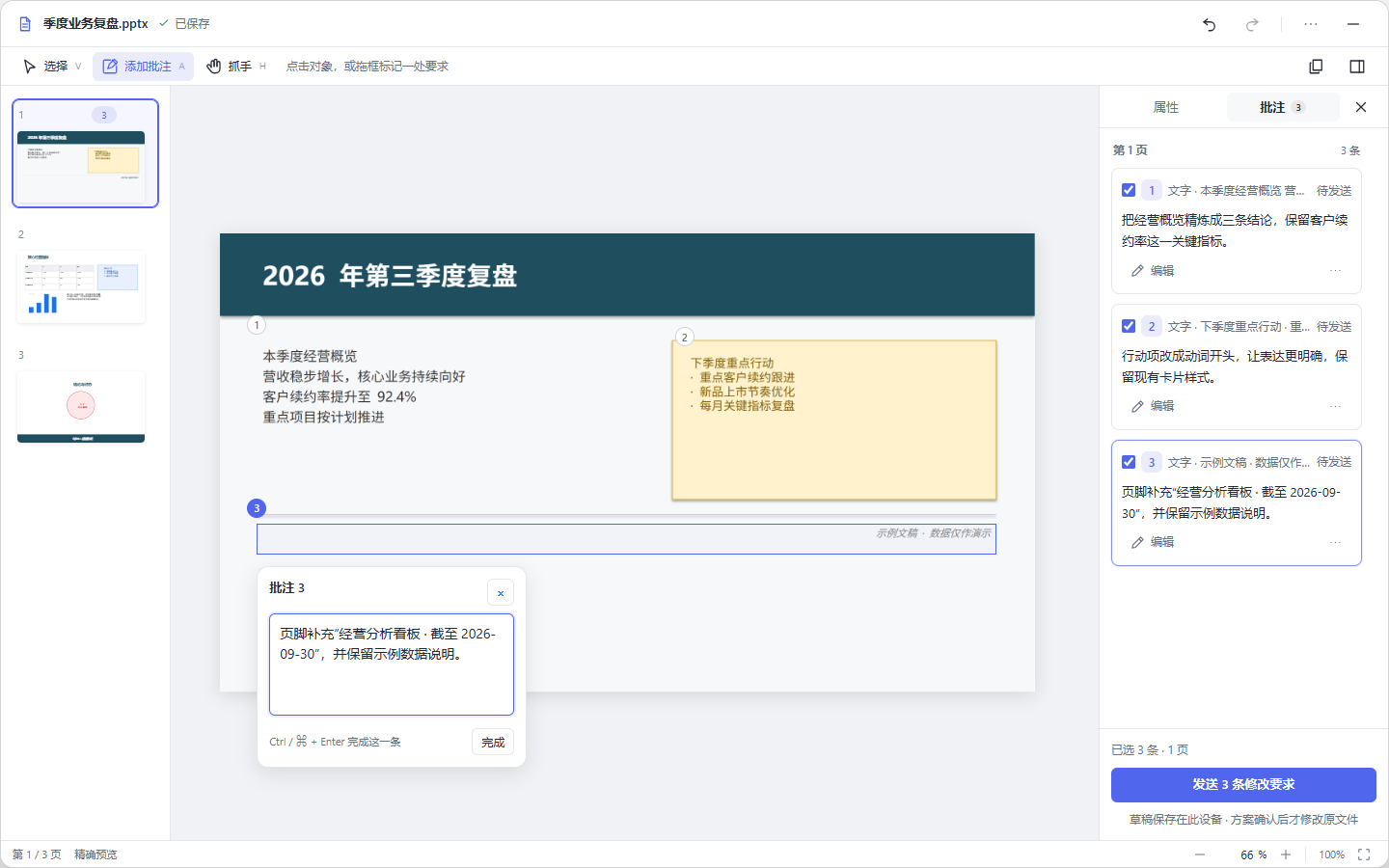
|
1
|
+
# 更新记录
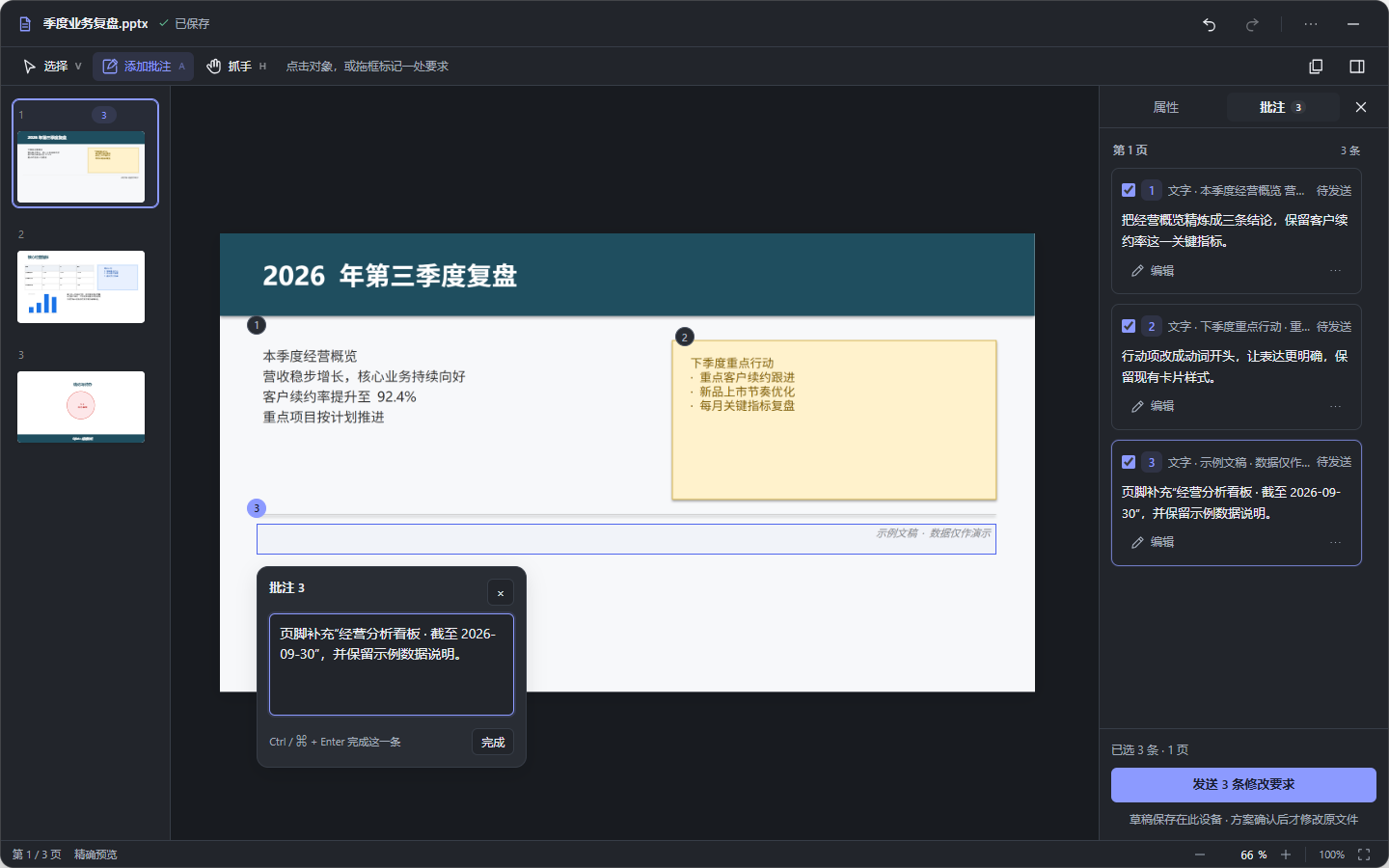
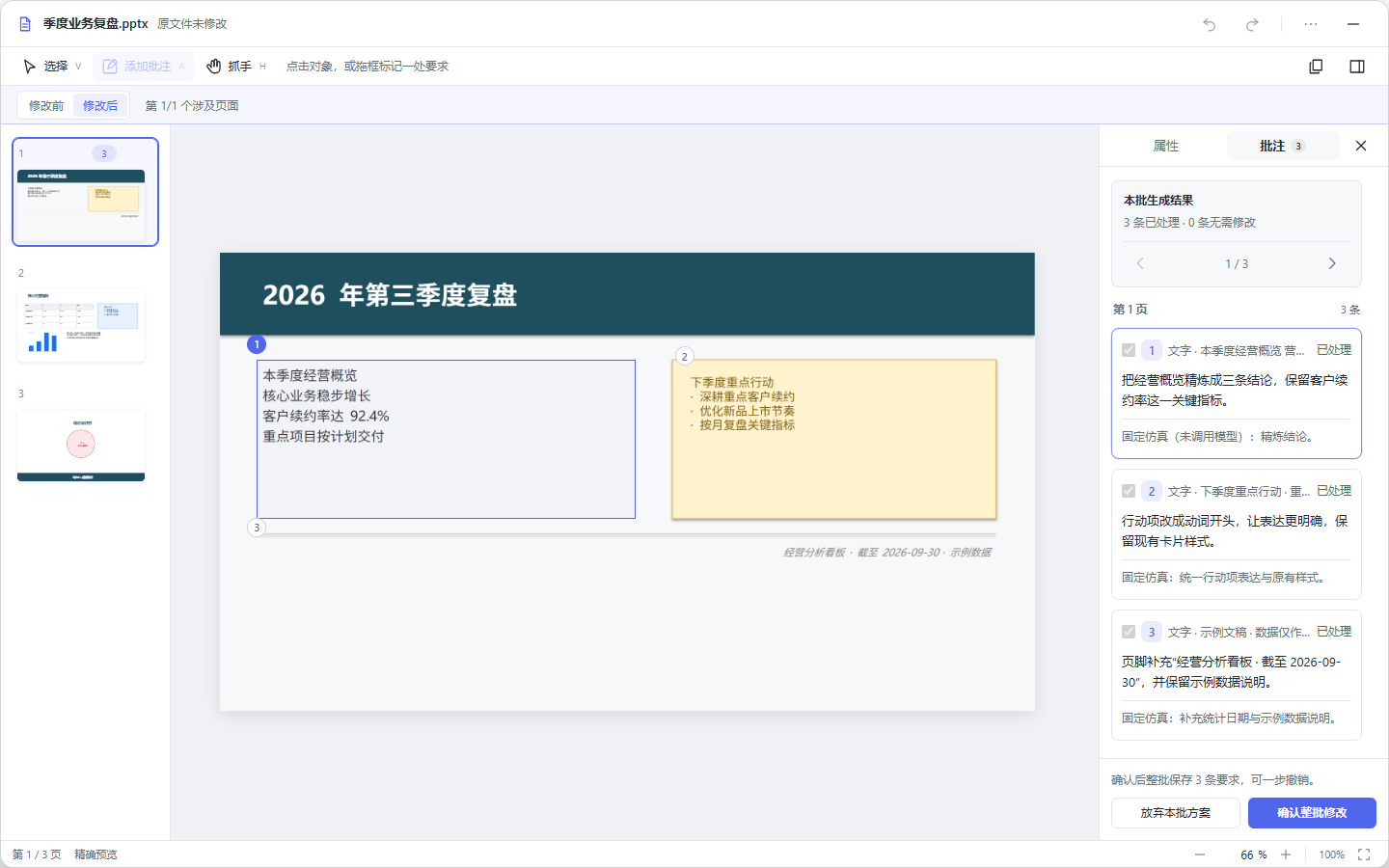
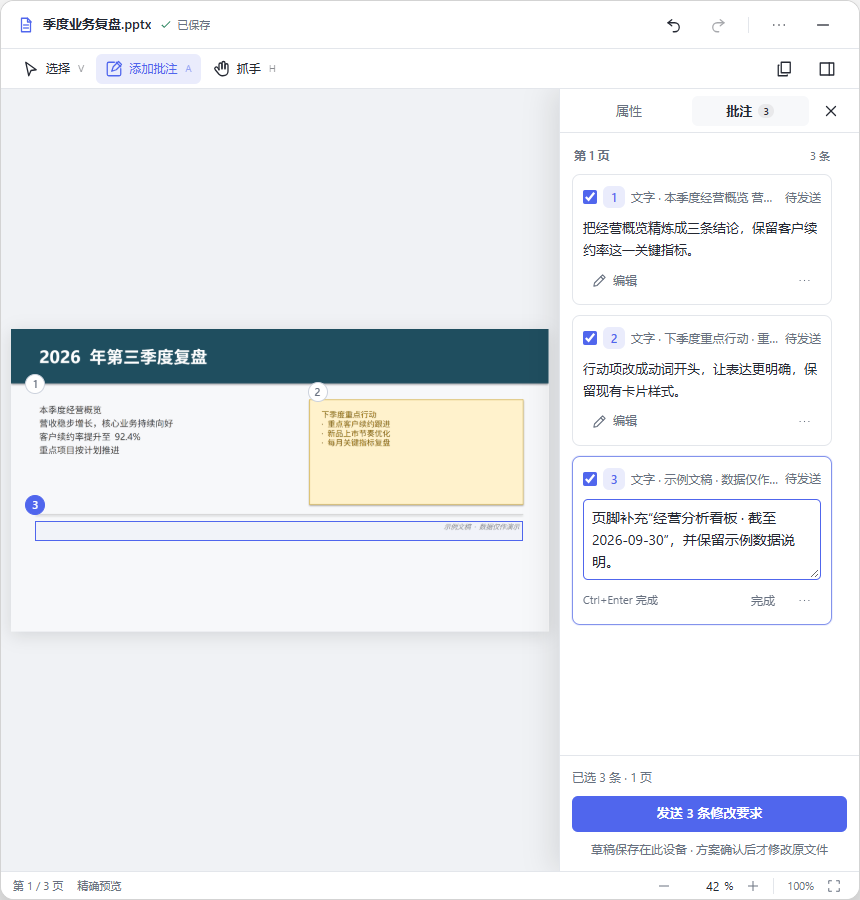
|
|
2
|
+
|
|
3
|
+
## 1.1.0 · 2026-11-14
|
|
4
|
+
|
|
5
|
+
- 新增多点批注工作流:跨页点击对象或框选区域,逐处填写要求,一次发送带编号截图、坐标和目标信息。
|
|
6
|
+
- AI 方案在原画布检查,支持修改前后切换、逐处查看结果、整批确认保存与一步撤销。
|
|
7
|
+
- 新增持久导入副本;拖入 `.pptx` 即可打开,兼容有路径与无路径的文件来源,失败保留当前编辑与草稿。
|
|
8
|
+
- 更新浅深主题工作台、目标旁批注卡、摘要侧栏、键盘焦点、触控板连续缩放和逐页视角恢复。
|
|
9
|
+
- 修复异步保存抢焦点、数值预览竞态、文字描边挤压、透明渐变变色和显式无线条重现等问题。
|
|
10
|
+
- 更新中英文 README、界面截图与市场截图索引,继续保持零额外运行时依赖。
|
|
11
|
+
|
|
12
|
+
验证:382 项最终通过,Mac、DSH/AI 按约定仿真;Windows 使用本机 Chromium、真实 Host 与 LibreOffice。主题阴影、复杂图表与混合排版在轻量操控预览中仍可能有差异,精确图加载后展示原稿效果。完整记录见 [界面精修验收](docs/UI-POLISH-ACCEPTANCE.md)。
|
|
13
|
+
|
|
14
|
+
## 1.0.0
|
|
15
|
+
|
|
16
|
+
初始公开版本:PPT 元素选择、就地编辑、AI 协作及字节级撤销/重做。
|
package/LICENSE
ADDED
|
@@ -0,0 +1,21 @@
|
|
|
1
|
+
MIT License
|
|
2
|
+
|
|
3
|
+
Copyright (c) 2026 dsh-ppt-canvas contributors
|
|
4
|
+
|
|
5
|
+
Permission is hereby granted, free of charge, to any person obtaining a copy
|
|
6
|
+
of this software and associated documentation files (the "Software"), to deal
|
|
7
|
+
in the Software without restriction, including without limitation the rights
|
|
8
|
+
to use, copy, modify, merge, publish, distribute, sublicense, and/or sell
|
|
9
|
+
copies of the Software, and to permit persons to whom the Software is
|
|
10
|
+
furnished to do so, subject to the following conditions:
|
|
11
|
+
|
|
12
|
+
The above copyright notice and this permission notice shall be included in all
|
|
13
|
+
copies or substantial portions of the Software.
|
|
14
|
+
|
|
15
|
+
THE SOFTWARE IS PROVIDED "AS IS", WITHOUT WARRANTY OF ANY KIND, EXPRESS OR
|
|
16
|
+
IMPLIED, INCLUDING BUT NOT LIMITED TO THE WARRANTIES OF MERCHANTABILITY,
|
|
17
|
+
FITNESS FOR A PARTICULAR PURPOSE AND NONINFRINGEMENT. IN NO EVENT SHALL THE
|
|
18
|
+
AUTHORS OR COPYRIGHT HOLDERS BE LIABLE FOR ANY CLAIM, DAMAGES OR OTHER
|
|
19
|
+
LIABILITY, WHETHER IN AN ACTION OF CONTRACT, TORT OR OTHERWISE, ARISING FROM,
|
|
20
|
+
OUT OF OR IN CONNECTION WITH THE SOFTWARE OR THE USE OR OTHER DEALINGS IN THE
|
|
21
|
+
SOFTWARE.
|
package/README.en.md
ADDED
|
@@ -0,0 +1,119 @@
|
|
|
1
|
+
<p align="center">
|
|
2
|
+
<img src="https://raw.githubusercontent.com/hg1048596-pixel/dsh-ppt-canvas/main/assets/icon.svg" alt="dsh-ppt-canvas" width="112" height="112">
|
|
3
|
+
</p>
|
|
4
|
+
<h1 align="center">dsh-ppt-canvas</h1>
|
|
5
|
+
|
|
6
|
+
<p align="center">
|
|
7
|
+
<a href="https://github.com/hg1048596-pixel/dsh-ppt-canvas/blob/main/README.md">简体中文</a> · <strong>English</strong>
|
|
8
|
+
</p>
|
|
9
|
+
|
|
10
|
+
<p align="center">
|
|
11
|
+
<a href="https://github.com/hg1048596-pixel/dsh-ppt-canvas/blob/main/package.json"><img src="https://img.shields.io/badge/version-1.1.0-2563eb?style=flat-square" alt="Version 1.1.0"></a>
|
|
12
|
+
<a href="https://github.com/hg1048596-pixel/dsh-ppt-canvas/blob/main/docs/SIMULATION-ACCEPTANCE.md"><img src="https://img.shields.io/badge/DSH-Desktop%2FWeb%20simulation-0f766e?style=flat-square" alt="DSH Desktop / Web: simulated validation"></a>
|
|
13
|
+
<a href="https://github.com/hg1048596-pixel/dsh-ppt-canvas/blob/main/package.json"><img src="https://img.shields.io/badge/Node-22%2B-337a48?style=flat-square&logo=nodedotjs&logoColor=white" alt="Node 22+"></a>
|
|
14
|
+
<a href="https://github.com/hg1048596-pixel/dsh-ppt-canvas/blob/main/LICENSE"><img src="https://img.shields.io/badge/license-MIT-64748b?style=flat-square" alt="MIT license"></a>
|
|
15
|
+
</p>
|
|
16
|
+
|
|
17
|
+
<p align="center">
|
|
18
|
+
<strong>Mark what needs changing. Review the AI proposal. Save the batch.</strong><br>
|
|
19
|
+
A PowerPoint editing workbench for DeepSeek Harness.
|
|
20
|
+
</p>
|
|
21
|
+
|
|
22
|
+
<p align="center">
|
|
23
|
+
<a href="#quick-start"><img src="https://img.shields.io/badge/Quick_Start-2563eb?style=for-the-badge" alt="Quick start"></a>
|
|
24
|
+
<a href="#how-it-works"><img src="https://img.shields.io/badge/How_It_Works-0f766e?style=for-the-badge" alt="How it works"></a>
|
|
25
|
+
<a href="#documentation"><img src="https://img.shields.io/badge/Documentation-334155?style=for-the-badge" alt="Documentation"></a>
|
|
26
|
+
<a href="https://github.com/hg1048596-pixel/dsh-ppt-canvas/issues"><img src="https://img.shields.io/badge/Issues-334155?style=for-the-badge" alt="Report an issue"></a>
|
|
27
|
+
</p>
|
|
28
|
+
|
|
29
|
+
---
|
|
30
|
+
|
|
31
|
+
**v1.1.0**, for DSH desktop/web profiles. Windows validation uses local Chromium, the real document engine and LibreOffice. Mac input/paths and DSH/AI sessions use simulation; native Mac and live DSH platform compatibility remain unverified.
|
|
32
|
+
|
|
33
|
+
- **Direct editing**: select, move, resize and rotate objects; edit text, align selections and undo with byte snapshots.
|
|
34
|
+
- **Annotations across pages**: mark objects or regions and send separate instructions with real page images, numbers and coordinates.
|
|
35
|
+
- **Review before saving**: compare before/after on the original canvas, inspect each result and confirm one batch with one-step undo.
|
|
36
|
+
- **Continuous navigation**: zoom around the pointer, pan with a trackpad, retain page views and local drafts, and follow light/dark themes.
|
|
37
|
+
|
|
38
|
+
<a id="how-it-works"></a>
|
|
39
|
+
|
|
40
|
+
## How it works
|
|
41
|
+
|
|
42
|
+
Open a `.pptx` → edit directly or annotate changes → send to a DSH session → inspect the proposal → confirm and save.
|
|
43
|
+
|
|
44
|
+
|
|
45
|
+
|
|
46
|
+
<details>
|
|
47
|
+
<summary>Dark theme, proposal review and compact view</summary>
|
|
48
|
+
|
|
49
|
+
|
|
50
|
+
|
|
51
|
+
|
|
52
|
+
|
|
53
|
+
|
|
54
|
+
|
|
55
|
+
</details>
|
|
56
|
+
|
|
57
|
+
Screenshots use the same components and real document engine in a local preview. The review image uses fixed AI simulation, not a live model. Gestures use a lightweight preview; an exact image replaces it when ready. Assess complex theme shadows, charts and mixed text layout in the exact preview.
|
|
58
|
+
|
|
59
|
+
<a id="quick-start"></a>
|
|
60
|
+
|
|
61
|
+
## Installation
|
|
62
|
+
|
|
63
|
+
Search the plugin market for the npm package **`dsh-ppt-canvas`**, or install/update through the official CLI:
|
|
64
|
+
|
|
65
|
+
```powershell
|
|
66
|
+
dsh plugin --profile desktop add dsh-ppt-canvas@1.1.0
|
|
67
|
+
```
|
|
68
|
+
|
|
69
|
+
Use `web` instead of `desktop` for DSH Web, then restart that DSH profile. Prepare **Node.js 22+** and **LibreOffice**. Exact previews and images sent to AI require LibreOffice; the selected model must accept image input. The plugin has no additional npm runtime dependencies.
|
|
70
|
+
|
|
71
|
+
See the [development guide][development] for source installation and diagnostics.
|
|
72
|
+
|
|
73
|
+
## Use from DSH
|
|
74
|
+
|
|
75
|
+
1. Click **PPT Canvas** in the sidebar footer, or drop one `.pptx` on its entry, minimized launcher or workbench. Alternatively, choose **More → Open local presentation**.
|
|
76
|
+
2. Click to select; double-click, Enter or F2 to edit text. Drag handles to resize, or use properties to adjust position and style. Manual edits save directly.
|
|
77
|
+
3. Press **A** to mark an object or region and enter its instructions. Continue on other pages. Enter adds a line; Ctrl/⌘ + Enter finishes the note **without sending it**. One editor moves into the sidebar when the viewport is narrow or space is insufficient, preserving text selection.
|
|
78
|
+
4. Select notes in the sidebar and send the batch. Check **Before/After** and **Previous/Next change**, then confirm the batch. Generating or discarding a proposal does not write the deck.
|
|
79
|
+
|
|
80
|
+
| Action | Shortcut |
|
|
81
|
+
| --- | --- |
|
|
82
|
+
| Select / annotate / hand | V / A / H |
|
|
83
|
+
| Add to selection | Shift or Ctrl/⌘ + click |
|
|
84
|
+
| Finish editing / cancel | Ctrl/⌘ + Enter / Esc |
|
|
85
|
+
| Undo / redo | Ctrl/⌘ + Z / Ctrl/⌘ + Shift + Z |
|
|
86
|
+
| Zoom / pan | Ctrl/⌘ + wheel; two-finger scroll, Space + drag or middle button |
|
|
87
|
+
|
|
88
|
+
**Files and limits:** `.pptx` only, **80 MiB** per file, one open deck. A real local path opens the original file for editing. When the browser provides only file contents, a persistent **imported copy** is opened and labeled in the title bar. Copies default to `~/.dsh/ppt-canvas/imports/`; `DSH_PPT_DATA_ROOT` overrides the data root.
|
|
89
|
+
|
|
90
|
+
Batches normally allow **4 pages**, subject to lower host image limits. Limits, unsupported changes, conflicts and invalid anchors are reported without deleting drafts. Drafts and the latest 30 batch records stay in this device's localStorage, not cloud sync or native PPT comments. Undo retains up to 50 steps. This edits existing decks; it does not provide full-deck generation from themes/outlines, new pages or local image insertion. See the [protocol and capability limits][contract].
|
|
91
|
+
|
|
92
|
+
<a id="documentation"></a>
|
|
93
|
+
|
|
94
|
+
## Documentation
|
|
95
|
+
|
|
96
|
+
- [Development guide][development]: layout, build, diagnostics and isolated tests.
|
|
97
|
+
- [Protocol and capabilities][contract]: Deck, patches, annotation scope, confirmation and storage.
|
|
98
|
+
- [UI acceptance][polish] · [Import acceptance][import] · [Mac and DSH simulation scope][simulation].
|
|
99
|
+
|
|
100
|
+
Detailed technical documentation is currently in Chinese.
|
|
101
|
+
|
|
102
|
+
## Development
|
|
103
|
+
|
|
104
|
+
```powershell
|
|
105
|
+
npm ci
|
|
106
|
+
npm run build
|
|
107
|
+
npm test
|
|
108
|
+
npm run preview
|
|
109
|
+
```
|
|
110
|
+
|
|
111
|
+
Requires local Chromium and LibreOffice. The preview edits a disposable deck with fixed AI simulation; the plugin uses DSH sessions. Final coverage: **382/382 passing, zero skips**. An outdated Mac zoom expectation failed the first full run and passed a corrected rerun. See the [acceptance record][polish] for the separate results and performance limits.
|
|
112
|
+
|
|
113
|
+
[Report an issue](https://github.com/hg1048596-pixel/dsh-ppt-canvas/issues) · [MIT License](https://github.com/hg1048596-pixel/dsh-ppt-canvas/blob/main/LICENSE)
|
|
114
|
+
|
|
115
|
+
[development]: https://github.com/hg1048596-pixel/dsh-ppt-canvas/blob/main/docs/DEVELOPMENT.md
|
|
116
|
+
[contract]: https://github.com/hg1048596-pixel/dsh-ppt-canvas/blob/main/docs/CONTRACT.md
|
|
117
|
+
[polish]: https://github.com/hg1048596-pixel/dsh-ppt-canvas/blob/main/docs/UI-POLISH-ACCEPTANCE.md
|
|
118
|
+
[import]: https://github.com/hg1048596-pixel/dsh-ppt-canvas/blob/main/docs/IMPORT-ACCEPTANCE.md
|
|
119
|
+
[simulation]: https://github.com/hg1048596-pixel/dsh-ppt-canvas/blob/main/docs/SIMULATION-ACCEPTANCE.md
|
package/README.md
CHANGED
|
@@ -1,3 +1,117 @@
|
|
|
1
|
-
|
|
1
|
+
<p align="center">
|
|
2
|
+
<img src="https://raw.githubusercontent.com/hg1048596-pixel/dsh-ppt-canvas/main/assets/icon.svg" alt="dsh-ppt-canvas" width="112" height="112">
|
|
3
|
+
</p>
|
|
4
|
+
<h1 align="center">dsh-ppt-canvas</h1>
|
|
2
5
|
|
|
3
|
-
|
|
6
|
+
<p align="center">
|
|
7
|
+
<strong>简体中文</strong> · <a href="https://github.com/hg1048596-pixel/dsh-ppt-canvas/blob/main/README.en.md">English</a>
|
|
8
|
+
</p>
|
|
9
|
+
|
|
10
|
+
<p align="center">
|
|
11
|
+
<a href="https://github.com/hg1048596-pixel/dsh-ppt-canvas/blob/main/package.json"><img src="https://img.shields.io/badge/version-1.1.0-2563eb?style=flat-square" alt="Version 1.1.0"></a>
|
|
12
|
+
<a href="https://github.com/hg1048596-pixel/dsh-ppt-canvas/blob/main/docs/SIMULATION-ACCEPTANCE.md"><img src="https://img.shields.io/badge/DSH-Desktop%2FWeb%20simulation-0f766e?style=flat-square" alt="DSH Desktop / Web:仿真验收"></a>
|
|
13
|
+
<a href="https://github.com/hg1048596-pixel/dsh-ppt-canvas/blob/main/package.json"><img src="https://img.shields.io/badge/Node-22%2B-337a48?style=flat-square&logo=nodedotjs&logoColor=white" alt="Node 22+"></a>
|
|
14
|
+
<a href="https://github.com/hg1048596-pixel/dsh-ppt-canvas/blob/main/LICENSE"><img src="https://img.shields.io/badge/license-MIT-64748b?style=flat-square" alt="MIT license"></a>
|
|
15
|
+
</p>
|
|
16
|
+
|
|
17
|
+
<p align="center">
|
|
18
|
+
<strong>在原画布标出要改的地方,检查 AI 方案,再整批保存。</strong><br>
|
|
19
|
+
DeepSeek Harness 的 PPT 编辑工作台。
|
|
20
|
+
</p>
|
|
21
|
+
|
|
22
|
+
<p align="center">
|
|
23
|
+
<a href="#quick-start"><img src="https://img.shields.io/badge/Quick_Start-2563eb?style=for-the-badge" alt="快速开始"></a>
|
|
24
|
+
<a href="#how-it-works"><img src="https://img.shields.io/badge/How_It_Works-0f766e?style=for-the-badge" alt="工作方式"></a>
|
|
25
|
+
<a href="#documentation"><img src="https://img.shields.io/badge/Documentation-334155?style=for-the-badge" alt="文档"></a>
|
|
26
|
+
<a href="https://github.com/hg1048596-pixel/dsh-ppt-canvas/issues"><img src="https://img.shields.io/badge/Issues-334155?style=for-the-badge" alt="问题反馈"></a>
|
|
27
|
+
</p>
|
|
28
|
+
|
|
29
|
+
---
|
|
30
|
+
|
|
31
|
+
当前版本 **v1.1.0**,面向 DSH desktop/web profile。Windows 使用本机 Chromium、真实文档引擎与 LibreOffice 验证;Mac 交互、路径及 DSH/AI 会话链路按仿真验收,尚未据此声明 Mac 实机或真实 DSH 全平台验证。
|
|
32
|
+
|
|
33
|
+
- **直接编辑**:选择、移动、缩放和旋转对象,双击修改文字,支持多选、对齐及字节级撤销。
|
|
34
|
+
- **跨页批注**:点选对象或拖出区域,每处单独填写要求;整批发送真实页面截图、编号与坐标。
|
|
35
|
+
- **先检查后保存**:在原画布比较修改前后,逐条检查结果,确认后整批写盘,一步撤销。
|
|
36
|
+
- **连续操控**:指针中心缩放、触控板平移、逐页视角记忆,深浅主题与本机批注草稿。
|
|
37
|
+
|
|
38
|
+
<a id="how-it-works"></a>
|
|
39
|
+
|
|
40
|
+
## 工作方式
|
|
41
|
+
|
|
42
|
+
打开 `.pptx` → 直接调整或标注多处要求 → 发送给 DSH 会话 → 检查候选 → 确认保存。
|
|
43
|
+
|
|
44
|
+

|
|
45
|
+
|
|
46
|
+
<details>
|
|
47
|
+
<summary>深色主题、方案检查与窄窗口</summary>
|
|
48
|
+
|
|
49
|
+

|
|
50
|
+
|
|
51
|
+

|
|
52
|
+
|
|
53
|
+

|
|
54
|
+
|
|
55
|
+
</details>
|
|
56
|
+
|
|
57
|
+
截图来自相同组件与真实文档引擎的本机样板;方案检查图使用固定 AI 仿真候选,不代表真实模型效果。操控期间使用轻量预览,精确图就绪后接管;复杂主题阴影、图表与混合排版以精确预览为准。
|
|
58
|
+
|
|
59
|
+
<a id="quick-start"></a>
|
|
60
|
+
|
|
61
|
+
## 安装
|
|
62
|
+
|
|
63
|
+
在插件市场搜索 npm 包名 **`dsh-ppt-canvas`**,安装到实际使用的 profile;也可用官方 CLI 安装或升级:
|
|
64
|
+
|
|
65
|
+
```powershell
|
|
66
|
+
dsh plugin --profile desktop add dsh-ppt-canvas@1.1.0
|
|
67
|
+
```
|
|
68
|
+
|
|
69
|
+
使用网页版时将 `desktop` 换成 `web`,完成后重启对应 DSH。准备 **Node.js 22+** 与 **LibreOffice**;精确页面预览和发给 AI 的截图需要 LibreOffice,AI 会话需选用支持图片输入的模型。插件运行时不额外安装 npm 依赖。
|
|
70
|
+
|
|
71
|
+
源码联调、安装自检及本地 helper 见[开发指南][development]。
|
|
72
|
+
|
|
73
|
+
## 在 DSH 中使用
|
|
74
|
+
|
|
75
|
+
1. 点击侧边栏底部 **PPT 画布**,或将一个 `.pptx` 拖到入口/最小化按钮/工作台。也可在“更多操作 → 打开本地演示文稿”选择文件。
|
|
76
|
+
2. 单击选择对象,双击、Enter 或 F2 编辑文字;拖动把手调整大小,属性栏可修改位置和样式。手动编辑直接保存。
|
|
77
|
+
3. 按 **A** 添加批注:点击对象或拖出区域,在目标旁填写要求;可跨页继续添加。Enter 换行,Ctrl/⌘ + Enter 完成当前条,**不会发送 AI**。窄窗口或空间不足时,唯一编辑框移入右栏并保留光标选区。
|
|
78
|
+
4. 在右栏勾选本批要求,点击“发送 N 条修改要求”;用“修改前/修改后”和“上一处/下一处”检查方案,最后确认整批保存。生成或放弃候选不会写入文稿。
|
|
79
|
+
|
|
80
|
+
| 操作 | 快捷键 |
|
|
81
|
+
| --- | --- |
|
|
82
|
+
| 选择/批注/抓手 | V/A/H |
|
|
83
|
+
| 多选 | Shift、Ctrl/⌘ + 点击 |
|
|
84
|
+
| 完成编辑/取消 | Ctrl/⌘ + Enter/Esc |
|
|
85
|
+
| 撤销/重做 | Ctrl/⌘ + Z/Ctrl/⌘ + Shift + Z |
|
|
86
|
+
| 缩放/平移 | Ctrl/⌘ + 滚轮;触控板双指滚动、空格 + 拖动或中键 |
|
|
87
|
+
|
|
88
|
+
**文件与能力边界:**仅支持 `.pptx`,单文件最多 **80 MiB**,同时打开一份文稿。能取得真实本地路径时直接编辑原件;浏览器只提供文件内容时,打开持久保存的**导入副本**,标题栏明确标记。副本默认在 `~/.dsh/ppt-canvas/imports/`,可用 `DSH_PPT_DATA_ROOT` 指定数据根目录。
|
|
89
|
+
|
|
90
|
+
批注通常每批最多 **4 页**,宿主图片额度更低时跟随其限制;超额、不支持、冲突或失效定位会提示,草稿保留。草稿与最近 30 轮批次记录保存在当前设备的 localStorage,不是云同步或 PPT 原生评论;撤销最多 50 步。当前用于编辑已有文稿,不提供从主题/大纲生成整稿、新建页面或插入本地图片等完整制作功能。详见[协议与能力边界][contract]。
|
|
91
|
+
|
|
92
|
+
<a id="documentation"></a>
|
|
93
|
+
|
|
94
|
+
## 文档
|
|
95
|
+
|
|
96
|
+
- [开发指南][development]:目录、构建、自检、排障与测试隔离。
|
|
97
|
+
- [协议与能力][contract]:Deck、补丁、批注授权、确认写盘及存储边界。
|
|
98
|
+
- [界面精修验收][polish] · [导入验收][import] · [Mac 与 DSH 仿真范围][simulation]。
|
|
99
|
+
|
|
100
|
+
## 开发
|
|
101
|
+
|
|
102
|
+
```powershell
|
|
103
|
+
npm ci
|
|
104
|
+
npm run build
|
|
105
|
+
npm test
|
|
106
|
+
npm run preview
|
|
107
|
+
```
|
|
108
|
+
|
|
109
|
+
需要本机 Chromium 和 LibreOffice。样板编辑临时演示文稿,AI 使用固定仿真响应;正常插件连接 DSH 会话。最终覆盖 **382/382 项通过、0 跳过**;首次全量中的旧 Mac 缩放期望修正后专项复验通过,完整过程与性能边界见[验收记录][polish],不将复验表述为首次全绿。
|
|
110
|
+
|
|
111
|
+
[问题反馈](https://github.com/hg1048596-pixel/dsh-ppt-canvas/issues) · [MIT License](https://github.com/hg1048596-pixel/dsh-ppt-canvas/blob/main/LICENSE)
|
|
112
|
+
|
|
113
|
+
[development]: https://github.com/hg1048596-pixel/dsh-ppt-canvas/blob/main/docs/DEVELOPMENT.md
|
|
114
|
+
[contract]: https://github.com/hg1048596-pixel/dsh-ppt-canvas/blob/main/docs/CONTRACT.md
|
|
115
|
+
[polish]: https://github.com/hg1048596-pixel/dsh-ppt-canvas/blob/main/docs/UI-POLISH-ACCEPTANCE.md
|
|
116
|
+
[import]: https://github.com/hg1048596-pixel/dsh-ppt-canvas/blob/main/docs/IMPORT-ACCEPTANCE.md
|
|
117
|
+
[simulation]: https://github.com/hg1048596-pixel/dsh-ppt-canvas/blob/main/docs/SIMULATION-ACCEPTANCE.md
|
|
Binary file
|
package/assets/icon.svg
ADDED
|
@@ -0,0 +1,12 @@
|
|
|
1
|
+
<svg xmlns="http://www.w3.org/2000/svg" width="112" height="112" viewBox="0 0 112 112" fill="none">
|
|
2
|
+
<title>dsh-ppt-canvas</title>
|
|
3
|
+
<desc>A presentation canvas with an annotation marker.</desc>
|
|
4
|
+
<rect x="4" y="4" width="104" height="104" rx="24" fill="#F8FAFF" stroke="#DCE5F5" stroke-width="2"/>
|
|
5
|
+
<g stroke="#2563EB" stroke-width="3.5" stroke-linecap="round" stroke-linejoin="round">
|
|
6
|
+
<rect x="25" y="27" width="62" height="43" rx="6" fill="white"/>
|
|
7
|
+
<path d="M56 71V82M43 88L56 81L69 88"/>
|
|
8
|
+
<path d="M37 41H63M37 50H74M37 59H54"/>
|
|
9
|
+
</g>
|
|
10
|
+
<circle cx="83" cy="29" r="11" fill="#2563EB" stroke="#F8FAFF" stroke-width="3"/>
|
|
11
|
+
<path d="M80 26L83 24V34M80 34H86" stroke="white" stroke-width="2.2" stroke-linecap="round" stroke-linejoin="round"/>
|
|
12
|
+
</svg>
|
|
Binary file
|
|
Binary file
|
|
Binary file
|
package/cordis.patch.yml
ADDED
package/package.json
CHANGED
|
@@ -1,6 +1,71 @@
|
|
|
1
1
|
{
|
|
2
2
|
"name": "dsh-ppt-canvas",
|
|
3
|
-
"version": "
|
|
4
|
-
"
|
|
5
|
-
"
|
|
6
|
-
|
|
3
|
+
"version": "1.1.0",
|
|
4
|
+
"description": "PowerPoint workbench for DeepSeek Harness: drag in a PPTX, annotate objects or regions across slides, review AI changes on the canvas, and confirm one batch with undo and redo.",
|
|
5
|
+
"type": "module",
|
|
6
|
+
"scripts": {
|
|
7
|
+
"preview": "node tools/preview-workbench.mjs",
|
|
8
|
+
"screenshots": "node tools/capture-release-screenshots.mjs",
|
|
9
|
+
"build": "node tools/sync-plugin.mjs",
|
|
10
|
+
"check:sync": "node tools/sync-plugin.mjs --check",
|
|
11
|
+
"test": "node tools/test-all.mjs",
|
|
12
|
+
"test:browser": "node tools/test-all.mjs --browser",
|
|
13
|
+
"test:simulation": "node tools/test-all.mjs --simulation",
|
|
14
|
+
"prepack": "node tools/sync-plugin.mjs --check"
|
|
15
|
+
},
|
|
16
|
+
"main": "./plugin/host.js",
|
|
17
|
+
"repository": {
|
|
18
|
+
"type": "git",
|
|
19
|
+
"url": "git+https://github.com/hg1048596-pixel/dsh-ppt-canvas.git"
|
|
20
|
+
},
|
|
21
|
+
"homepage": "https://github.com/hg1048596-pixel/dsh-ppt-canvas#readme",
|
|
22
|
+
"bugs": {
|
|
23
|
+
"url": "https://github.com/hg1048596-pixel/dsh-ppt-canvas/issues"
|
|
24
|
+
},
|
|
25
|
+
"exports": {
|
|
26
|
+
".": "./plugin/host.js",
|
|
27
|
+
"./client": "./plugin/client.js",
|
|
28
|
+
"./package.json": "./package.json"
|
|
29
|
+
},
|
|
30
|
+
"files": [
|
|
31
|
+
"plugin/",
|
|
32
|
+
"assets/workbench-light.png",
|
|
33
|
+
"assets/workbench-dark.png",
|
|
34
|
+
"assets/annotation-review.png",
|
|
35
|
+
"assets/workbench-compact.png",
|
|
36
|
+
"assets/icon.svg",
|
|
37
|
+
"screenshots.json",
|
|
38
|
+
"cordis.patch.yml",
|
|
39
|
+
"README.md",
|
|
40
|
+
"README.en.md",
|
|
41
|
+
"CHANGELOG.md",
|
|
42
|
+
"LICENSE"
|
|
43
|
+
],
|
|
44
|
+
"license": "MIT",
|
|
45
|
+
"keywords": [
|
|
46
|
+
"dsh-plugin",
|
|
47
|
+
"deepseek-harness",
|
|
48
|
+
"dsh",
|
|
49
|
+
"plugin",
|
|
50
|
+
"cordis",
|
|
51
|
+
"pptx",
|
|
52
|
+
"powerpoint",
|
|
53
|
+
"ooxml",
|
|
54
|
+
"canvas",
|
|
55
|
+
"ai-editing"
|
|
56
|
+
],
|
|
57
|
+
"dsh": {
|
|
58
|
+
"bundle": {
|
|
59
|
+
"patch": "./cordis.patch.yml"
|
|
60
|
+
},
|
|
61
|
+
"client": {
|
|
62
|
+
"platform": "web"
|
|
63
|
+
}
|
|
64
|
+
},
|
|
65
|
+
"devDependencies": {
|
|
66
|
+
"jsdom": "26.1.0",
|
|
67
|
+
"playwright-core": "1.65.0",
|
|
68
|
+
"react": "18.3.1",
|
|
69
|
+
"react-dom": "18.3.1"
|
|
70
|
+
}
|
|
71
|
+
}
|
|
@@ -0,0 +1,172 @@
|
|
|
1
|
+
// Cross-annotation conflicts only. Operations within one annotation retain writer order.
|
|
2
|
+
// This is not a patch validator: malformed/unknown operations are left to the writer.
|
|
3
|
+
const HEX_COLOR = /^#[0-9a-f]{6}$/i
|
|
4
|
+
const TEXT_ALIGN = new Set(['left', 'center', 'right', 'justify'])
|
|
5
|
+
const ALIGN_MODES = new Set(['left', 'hcenter', 'right', 'top', 'vcenter', 'bottom', 'distributeH', 'distributeV'])
|
|
6
|
+
const LAYER_OPS = new Set(['setZ', 'bringToFront', 'sendToBack'])
|
|
7
|
+
const STRUCTURE_OPS = new Set(['remove', 'duplicate'])
|
|
8
|
+
// A rejected batch does not need a quadratic-size error payload to remain safely blocked.
|
|
9
|
+
const MAX_REPORTED_CONFLICTS = 64
|
|
10
|
+
|
|
11
|
+
const isRecord = value => value !== null && typeof value === 'object' && !Array.isArray(value)
|
|
12
|
+
const isId = value => typeof value === 'string' && value.indexOf(':') > 0
|
|
13
|
+
const finite = value => typeof value === 'number' && Number.isFinite(value)
|
|
14
|
+
const color = value => value === null || (typeof value === 'string' && HEX_COLOR.test(value))
|
|
15
|
+
const equal = (one, two) => Array.isArray(one) && Array.isArray(two)
|
|
16
|
+
? one.length === two.length && one.every((value, index) => value === two[index])
|
|
17
|
+
: one === two
|
|
18
|
+
|
|
19
|
+
function textContent(paragraphs) {
|
|
20
|
+
if (!Array.isArray(paragraphs) || paragraphs.length === 0) return null
|
|
21
|
+
const result = []
|
|
22
|
+
for (const paragraph of paragraphs) {
|
|
23
|
+
if (!isRecord(paragraph) || (paragraph.runs !== undefined && !Array.isArray(paragraph.runs))) return null
|
|
24
|
+
const runs = paragraph.runs ?? []
|
|
25
|
+
if (runs.some(run => !isRecord(run) || typeof run.text !== 'string')) return null
|
|
26
|
+
result.push(runs.map(run => run.text).join(''))
|
|
27
|
+
}
|
|
28
|
+
return result
|
|
29
|
+
}
|
|
30
|
+
|
|
31
|
+
/**
|
|
32
|
+
* @param {object[]} ops Authorized writer operations carrying annotationId.
|
|
33
|
+
* @returns {{annotationIds:string[],code:string,message:string}[]}
|
|
34
|
+
*/
|
|
35
|
+
export function detectAnnotationConflicts(ops) {
|
|
36
|
+
if (!Array.isArray(ops)) return []
|
|
37
|
+
const owners = new Map()
|
|
38
|
+
const targets = new Map()
|
|
39
|
+
const slides = new Map()
|
|
40
|
+
for (const op of ops) {
|
|
41
|
+
if (!isRecord(op) || typeof op.annotationId !== 'string' || op.annotationId === '' || typeof op.op !== 'string') continue
|
|
42
|
+
const supported = ['setText', 'setTextStyle', 'setFill', 'setLine', 'setGeometry', 'move', 'resize', 'align']
|
|
43
|
+
.includes(op.op) || LAYER_OPS.has(op.op) || STRUCTURE_OPS.has(op.op)
|
|
44
|
+
if (!supported) continue
|
|
45
|
+
const ids = op.op === 'align' ? (Array.isArray(op.ids) ? op.ids.filter(isId) : []) : (isId(op.id) ? [op.id] : [])
|
|
46
|
+
if (ids.length === 0) continue
|
|
47
|
+
if (op.op === 'align' && (!ALIGN_MODES.has(op.mode) || ids.length < 2)) continue
|
|
48
|
+
if (op.op === 'move' && !finite(op.dx) && !finite(op.dy)) continue
|
|
49
|
+
if (op.op === 'resize' && !finite(op.dw) && !finite(op.dh)) continue
|
|
50
|
+
if (op.op === 'setZ' && (!finite(op.z) || op.z < 0)) continue
|
|
51
|
+
if (!owners.has(op.annotationId)) owners.set(op.annotationId, owners.size)
|
|
52
|
+
for (const id of new Set(ids)) {
|
|
53
|
+
let byOwner = targets.get(id)
|
|
54
|
+
if (!byOwner) { byOwner = new Map(); targets.set(id, byOwner) }
|
|
55
|
+
let target = byOwner.get(op.annotationId)
|
|
56
|
+
if (!target) {
|
|
57
|
+
target = { annotationId: op.annotationId, writes: new Map(), geometry: false, relative: false, structure: false }
|
|
58
|
+
byOwner.set(op.annotationId, target)
|
|
59
|
+
}
|
|
60
|
+
const slideId = id.slice(0, id.indexOf(':'))
|
|
61
|
+
let slideOwners = slides.get(slideId)
|
|
62
|
+
if (!slideOwners) { slideOwners = new Map(); slides.set(slideId, slideOwners) }
|
|
63
|
+
let slide = slideOwners.get(op.annotationId)
|
|
64
|
+
if (!slide) { slide = { annotationId: op.annotationId, layer: false, structure: false }; slideOwners.set(op.annotationId, slide) }
|
|
65
|
+
const write = (field, value) => target.writes.set(field, typeof value === 'string' && HEX_COLOR.test(value) ? value.toUpperCase() : value)
|
|
66
|
+
switch (op.op) {
|
|
67
|
+
case 'setText': {
|
|
68
|
+
const content = textContent(op.paragraphs)
|
|
69
|
+
if (content === null) break
|
|
70
|
+
write('text.content', content)
|
|
71
|
+
op.paragraphs.forEach((paragraph, index) => {
|
|
72
|
+
if (TEXT_ALIGN.has(paragraph.align)) write(`text.align.${index}`, paragraph.align)
|
|
73
|
+
})
|
|
74
|
+
break
|
|
75
|
+
}
|
|
76
|
+
case 'setTextStyle':
|
|
77
|
+
for (const field of ['color', 'fontSize', 'fontFamily', 'bold', 'italic', 'underline']) {
|
|
78
|
+
const value = op[field]
|
|
79
|
+
const valid = field === 'color' ? color(value)
|
|
80
|
+
: field === 'fontSize' ? finite(value) && value >= 1
|
|
81
|
+
: field === 'fontFamily' ? typeof value === 'string' : typeof value === 'boolean'
|
|
82
|
+
if (valid) write(`text.${field}`, value)
|
|
83
|
+
}
|
|
84
|
+
if (TEXT_ALIGN.has(op.align)) {
|
|
85
|
+
for (const field of target.writes.keys()) if (field.startsWith('text.align.')) target.writes.delete(field)
|
|
86
|
+
write('text.align.*', op.align)
|
|
87
|
+
}
|
|
88
|
+
break
|
|
89
|
+
case 'setFill':
|
|
90
|
+
if (color(op.color)) write('fill.color', op.color)
|
|
91
|
+
break
|
|
92
|
+
case 'setLine':
|
|
93
|
+
if (color(op.color)) write('line.color', op.color)
|
|
94
|
+
if (finite(op.width) && op.width >= 0) write('line.width', op.width)
|
|
95
|
+
if (['solid', 'dash', 'dot', 'lgDash', 'sysDash', 'sysDot'].includes(op.dash)) write('line.dash', op.dash)
|
|
96
|
+
break
|
|
97
|
+
case 'setGeometry':
|
|
98
|
+
for (const field of ['x', 'y', 'w', 'h', 'rotation']) {
|
|
99
|
+
if (finite(op[field]) && (!['w', 'h'].includes(field) || op[field] >= 1)) {
|
|
100
|
+
write(`geometry.${field}`, op[field])
|
|
101
|
+
target.geometry = true
|
|
102
|
+
}
|
|
103
|
+
}
|
|
104
|
+
break
|
|
105
|
+
case 'move':
|
|
106
|
+
case 'resize':
|
|
107
|
+
case 'align':
|
|
108
|
+
target.relative = target.geometry = true
|
|
109
|
+
break
|
|
110
|
+
case 'remove':
|
|
111
|
+
case 'duplicate':
|
|
112
|
+
target.structure = slide.structure = true
|
|
113
|
+
break
|
|
114
|
+
default:
|
|
115
|
+
if (LAYER_OPS.has(op.op)) slide.layer = true
|
|
116
|
+
}
|
|
117
|
+
}
|
|
118
|
+
}
|
|
119
|
+
|
|
120
|
+
const issues = []
|
|
121
|
+
const seen = new Set()
|
|
122
|
+
const add = (one, two, category, target, field, message) => {
|
|
123
|
+
if (issues.length >= MAX_REPORTED_CONFLICTS) return
|
|
124
|
+
const annotationIds = [one.annotationId, two.annotationId].sort((a, b) => owners.get(a) - owners.get(b))
|
|
125
|
+
const key = JSON.stringify([annotationIds, category, target, field])
|
|
126
|
+
if (seen.has(key)) return
|
|
127
|
+
seen.add(key)
|
|
128
|
+
issues.push({ annotationIds, code: 'annotationConflict', message })
|
|
129
|
+
}
|
|
130
|
+
for (const [id, byOwner] of targets) {
|
|
131
|
+
const entries = [...byOwner.values()]
|
|
132
|
+
for (let i = 0; i < entries.length; i++) for (let j = i + 1; j < entries.length; j++) {
|
|
133
|
+
const one = entries[i]
|
|
134
|
+
const two = entries[j]
|
|
135
|
+
if (one.structure || two.structure) {
|
|
136
|
+
add(one, two, 'structure', id, '', `对象 ${id} 的删除或复制与另一条批注的修改互相影响,请合并或调整相关要求。`)
|
|
137
|
+
continue
|
|
138
|
+
}
|
|
139
|
+
if ((one.relative && two.geometry) || (two.relative && one.geometry)) {
|
|
140
|
+
add(one, two, 'geometry', id, '', `对象 ${id} 的移动、缩放或对齐与另一条批注的几何修改存在执行依赖,请合并相关要求。`)
|
|
141
|
+
}
|
|
142
|
+
for (const [field, value] of one.writes) {
|
|
143
|
+
if (two.writes.has(field) && !equal(value, two.writes.get(field))) {
|
|
144
|
+
add(one, two, 'value', id, field, `对象 ${id} 的 ${field} 在多条批注中被设置为不同值,请明确统一要求。`)
|
|
145
|
+
}
|
|
146
|
+
if (field.startsWith('text.align.') && field !== 'text.align.*'
|
|
147
|
+
&& !two.writes.has(field) && two.writes.has('text.align.*') && !equal(value, two.writes.get('text.align.*'))) {
|
|
148
|
+
add(one, two, 'value', id, field, `对象 ${id} 的段落对齐与另一条批注的整体对齐要求不一致。`)
|
|
149
|
+
}
|
|
150
|
+
}
|
|
151
|
+
if (one.writes.has('text.align.*')) {
|
|
152
|
+
for (const [field, value] of two.writes) {
|
|
153
|
+
if (field.startsWith('text.align.') && field !== 'text.align.*'
|
|
154
|
+
&& !one.writes.has(field) && !equal(one.writes.get('text.align.*'), value)) {
|
|
155
|
+
add(one, two, 'value', id, field, `对象 ${id} 的段落对齐与另一条批注的整体对齐要求不一致。`)
|
|
156
|
+
}
|
|
157
|
+
}
|
|
158
|
+
}
|
|
159
|
+
}
|
|
160
|
+
}
|
|
161
|
+
for (const [slideId, byOwner] of slides) {
|
|
162
|
+
const entries = [...byOwner.values()]
|
|
163
|
+
for (let i = 0; i < entries.length; i++) for (let j = i + 1; j < entries.length; j++) {
|
|
164
|
+
const one = entries[i]
|
|
165
|
+
const two = entries[j]
|
|
166
|
+
if ((one.layer && (two.layer || two.structure)) || (two.layer && one.structure)) {
|
|
167
|
+
add(one, two, 'layer', slideId, '', `页面 ${slideId} 的层级调整与另一条批注的层级、删除或复制操作互相影响,请合并相关要求。`)
|
|
168
|
+
}
|
|
169
|
+
}
|
|
170
|
+
}
|
|
171
|
+
return issues
|
|
172
|
+
}
|