dsh-plugin-maoxuan-pet 0.2.2 → 0.3.0
This diff represents the content of publicly available package versions that have been released to one of the supported registries. The information contained in this diff is provided for informational purposes only and reflects changes between package versions as they appear in their respective public registries.
- package/CHANGELOG.md +29 -0
- package/README.en.md +22 -2
- package/README.md +16 -3
- package/cordis.patch.yml +2 -1
- package/desktop/Info.plist +20 -0
- package/desktop/README.md +74 -0
- package/desktop/build.sh +17 -0
- package/desktop/maoxuan-pet.swift +418 -0
- package/desktop/pet.html +415 -0
- package/docs/RELEASE.md +4 -4
- package/index.js +159 -4
- package/package.json +9 -2
package/CHANGELOG.md
CHANGED
|
@@ -1,5 +1,34 @@
|
|
|
1
1
|
# CHANGELOG
|
|
2
2
|
|
|
3
|
+
## 0.3.0 — 2026-11-01
|
|
4
|
+
|
|
5
|
+
新能力:独立 macOS 桌宠壳——小毛从 DSH 界面里走出来,站到真正的桌面上;DSH 最小化甚至关掉界面,她都站在原地。
|
|
6
|
+
|
|
7
|
+
### 桌宠壳(`desktop/`)
|
|
8
|
+
- **为什么需要它**:Web 宠物是 `position:fixed` 的 DOM,永远画不出浏览器视口之外——DSH 最小化她就没。DSH 自带宠物能「跑出去」,是因为壳层进程建了第二个原生窗口(透明、置顶、跨所有 Space)。本壳用纯 Swift + 系统 WebKit(单文件约 450 行、零第三方依赖)给小毛配了同款独立窗口,进程独立于 DSH。
|
|
9
|
+
- **窗口参数对照**(从 DSH Tauri 壳层二进制核实的参数 → 本壳实现):`transparent`/`alwaysOnTop`/`visibleOnAllWorkspaces`/`skipTaskbar` → 透明无边框 `NSWindow` + `.floating` + `canJoinAllSpaces` + accessory 策略(不占 Dock、不进 Cmd-Tab);`set_pet_input_region`/`set_pet_ignore_cursor_events` → 容器 `hitTest` 白名单矩形,矩形外鼠标事件全部穿透回桌面。
|
|
10
|
+
- **数据通道**:`URLSession`(ephemeral)原生轮询既有同源路由——state 平时 20s、生成中 3s、离线 8s;`再督促`/`收起` POST 同源接口;宿主 `index.js` 零改动,Web 宠物照常并存。
|
|
11
|
+
- **素材也走原生层**:WebKit 的 ATS 不认 loopback 豁免,`file://` 页面直挂 `http://127.0.0.1` 的图会被拦(只剩占位鲸),所以精灵图由 URLSession 拉取后转 data URL 注入(`window.__petSprites`);WebKit 零网络请求,壳零磁盘写入(`nonPersistent` 数据存储 + ephemeral 会话)。
|
|
12
|
+
- **交互语义与 Web 宠物一致**:红皮书卡片、新气泡自动弹出、打开 600ms 后标已读、翻书中状态、倒计时标签、`‹ ›` 回翻、Esc 收起;右键小毛 = 复位位置 / 退出;拖小毛或卡片标题栏 = 整窗移动(`screenX/screenY` 差值,无反馈回环),位置存 `UserDefaults`(suite `dsh-maoxuan-pet.window`)跨启动记忆。
|
|
13
|
+
- **构建与运行**:`npm run pet:build`(swiftc 约几秒,模块缓存收进项目内)/ `npm run pet`;参数 `--origin=` / `--port=` / `--reset` / `--verbose`;详见 `desktop/README.md`。
|
|
14
|
+
|
|
15
|
+
### 打包
|
|
16
|
+
- `package.json` `files` 收录 `desktop/` 五个源码文件(Info.plist/README/build.sh/maoxuan-pet.swift/pet.html),源码随 npm 包分发;`desktop/build/` 构建产物(二进制 + Swift 模块缓存,约 70MB)不进包体——`.gitignore` 只拦 git 不拦 `npm pack`,files 白名单目录内的产物必须逐文件点名(0.3.0 发布前实测修正)。
|
|
17
|
+
|
|
18
|
+
## 0.2.3 — 2026-11-01
|
|
19
|
+
|
|
20
|
+
首次安装修复:模型配置自动从宿主 profile 桥接进 headless 子进程,新装机基本零配置。
|
|
21
|
+
|
|
22
|
+
### 修复
|
|
23
|
+
- **新装机必踩的 `MISSING_CREDENTIAL`**:插件每小时调用 `dsh --profile headless` 生成气泡,而随包 `headless` profile 是一个没有任何模型配置的空壳——官方 DeepSeek、中转线路的用户第一次安装都会生成失败,只能看到「离线摘录 + 报错」。
|
|
24
|
+
- 现在**每次生成前自动把宿主 profile patch 里的 llm 条目**(`agent-default-model`、`dsh-llm-pi-ai`、`dsh-llm-deepseek-api-key`)**原样搬到** `$DSH_HOME/storages/dsh-maoxuan-pet.headless-overlay.yml`,并以 `dsh --profile headless --patch <overlay>` 启动子进程:宿主 GUI 能用什么模型(官方 / wocheng 之类任意中转),气泡子进程就能用什么,官方与中转线路零配置可用。
|
|
25
|
+
- 待机行为:宿主 patch 没有 llm 条目(如机器确实没配过模型)时不写 overlay,`MISSING_CREDENTIAL` 报错会转成一句可操作的中文指引(保留原始错误摘要)写入 `state.lastError`;`dsh` 找不到(ENOENT)同样给出指引,其他报错原样透传。
|
|
26
|
+
- overlay 内容变化才落盘(tmp + rename 原子写);文件可随时手动删除,插件每次生成都会重写。子进程 llm 桥接失败不影响正常降级。
|
|
27
|
+
|
|
28
|
+
### 升级行为
|
|
29
|
+
- `profile` 配置默认仍是 `headless`。显式改 `profile` / `dshBin` 的老配置完全不受影响(此时不做桥接桥外干扰,`--patch` 只在 overlay 存在时追加)。
|
|
30
|
+
- 新增并导出纯函数 `headlessOverlayPath` / `hostPatchPath` / `extractLlmPatchEntries` / `syncHeadlessOverlay` / `friendlyHeadlessError`;`verify/contract.mjs` 增加 llm 抽取与友好报错用例(40 断言全绿)。
|
|
31
|
+
|
|
3
32
|
## 0.2.2 — 2026-11-01
|
|
4
33
|
|
|
5
34
|
展示层维护版:README 从技术说明改成安装页,npm 页面的介绍随之更新。
|
package/README.en.md
CHANGED
|
@@ -14,6 +14,22 @@ dsh plugin --profile web add dsh-plugin-maoxuan-pet
|
|
|
14
14
|
Requirements: DSH `>=0.2.1-rc.2 <0.3.0`, Node `^22.19.0 || >=24.0.0`. Web shell only.
|
|
15
15
|
Source install / uninstall / troubleshooting: [docs/INSTALL.md](docs/INSTALL.md).
|
|
16
16
|
|
|
17
|
+
## Stand on the real desktop (macOS, optional)
|
|
18
|
+
|
|
19
|
+
The web pet lives inside the DSH window and disappears when it is minimized — a hard browser
|
|
20
|
+
sandbox boundary. `desktop/` ships a **standalone-process pet shell** (pure Swift + system
|
|
21
|
+
WebKit, ~450 lines, zero dependencies): transparent, always-on-top, visible on all Spaces.
|
|
22
|
+
Minimize DSH or close the window entirely — she stays. The plugin still owns the brain (the
|
|
23
|
+
hourly essay reading); the shell only relocates the display.
|
|
24
|
+
|
|
25
|
+
```bash
|
|
26
|
+
npm run pet:build # swiftc build, a few seconds
|
|
27
|
+
npm run pet # she stands at the bottom-right of your screen
|
|
28
|
+
```
|
|
29
|
+
|
|
30
|
+
Click to open the red-book card, drag to move (position is remembered), right-click for
|
|
31
|
+
reset/quit. See [desktop/README.md](desktop/README.md) for details.
|
|
32
|
+
|
|
17
33
|
## Screenshot
|
|
18
34
|
|
|
19
35
|
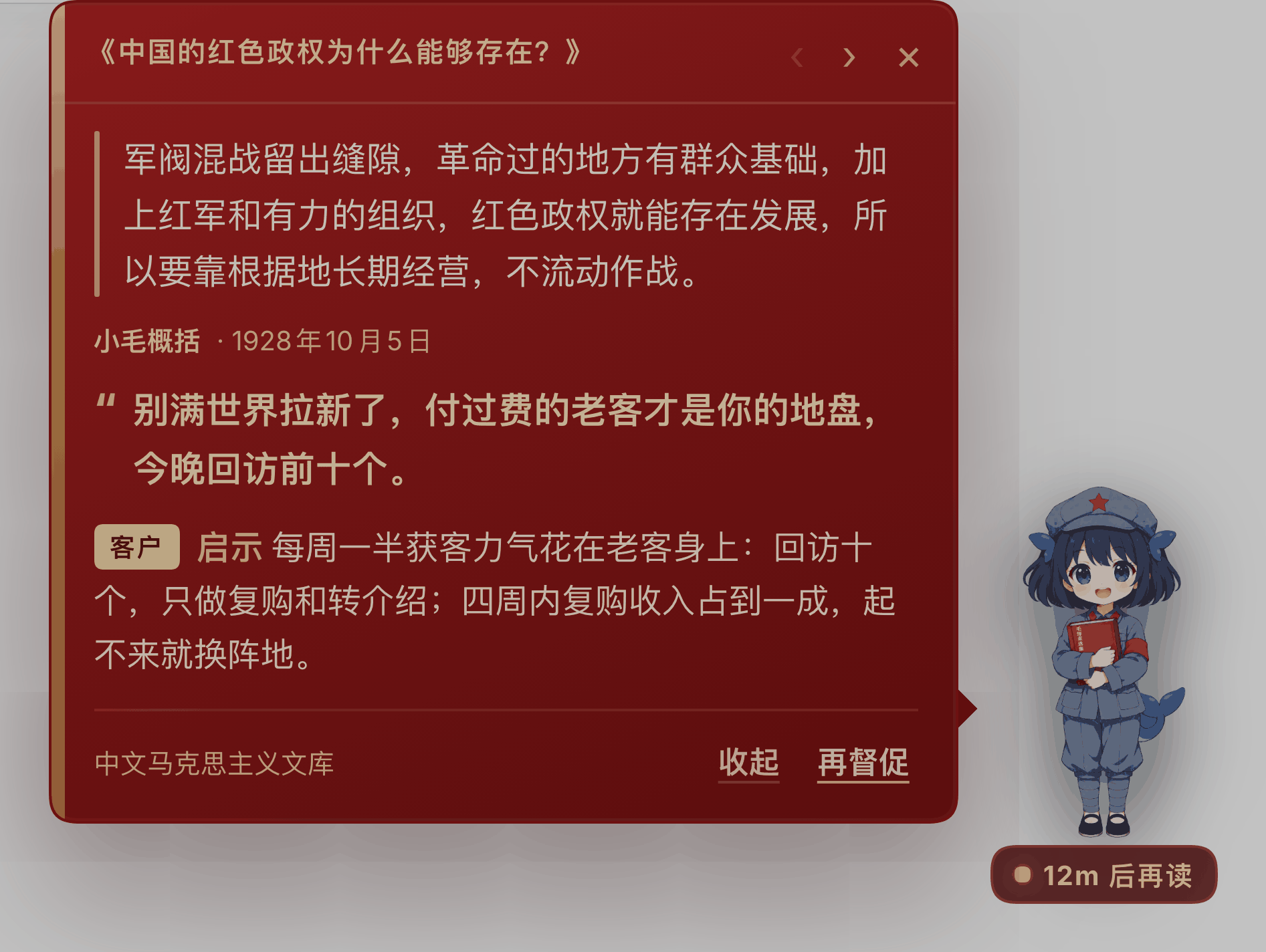
|
|
@@ -55,7 +71,8 @@ fan-made character; not affiliated with DeepSeek.
|
|
|
55
71
|
maxBubbles: 40
|
|
56
72
|
headless: true # false = only local excerpts, zero model calls
|
|
57
73
|
dshBin: dsh
|
|
58
|
-
profile: headless
|
|
74
|
+
profile: headless # since v0.2.3 the host GUI's model config is
|
|
75
|
+
# bridged in automatically (official/relay, no setup)
|
|
59
76
|
timeoutMs: 180000
|
|
60
77
|
businessContext: "40, indie developer, small-tool SaaS"
|
|
61
78
|
```
|
|
@@ -69,7 +86,10 @@ fan-made character; not affiliated with DeepSeek.
|
|
|
69
86
|
|
|
70
87
|
## Known limitations
|
|
71
88
|
|
|
72
|
-
- web
|
|
89
|
+
- web pet only (`dsh.client.platform: web`) — no pet in the terminal / TUI; on macOS use the
|
|
90
|
+
desktop shell above to leave the window;
|
|
91
|
+
- the desktop shell is macOS-only (system WebKit); Windows / Linux need a Tauri 2 / Electron
|
|
92
|
+
shell — `pet.html` can be reused as-is;
|
|
73
93
|
- the timer only runs while this `dsh web` process is alive; a stopped process does not catch up,
|
|
74
94
|
and on restart `nextRunAt` decides whether to run once more;
|
|
75
95
|
- each headless generation is a fresh session (no shared context): stable, but she "doesn't
|
package/README.md
CHANGED
|
@@ -1,4 +1,4 @@
|
|
|
1
|
-
# 鲸鱼娘 · 小毛 ——
|
|
1
|
+
# 鲸鱼娘 · 小毛 —— 每小时陪你读一篇毛选的桌宠,macOS 上还能站上真正的桌面
|
|
2
2
|
|
|
3
3
|
红皮书气泡 + 四帧立绘;每条内容 = 原文引文(带来源日期)+ 一句说给你听的督促 + 一条能当天验证的启示,整条 ≤ 200 字。
|
|
4
4
|
|
|
@@ -13,6 +13,17 @@ dsh plugin --profile web add dsh-plugin-maoxuan-pet
|
|
|
13
13
|
- 要求:DSH `>=0.2.1-rc.2 <0.3.0`、Node `^22.19.0 || >=24.0.0`,仅 Web 界面;
|
|
14
14
|
- 从源码安装、卸载、排错:[docs/INSTALL.md](docs/INSTALL.md)。
|
|
15
15
|
|
|
16
|
+
## 让她站上真正的桌面(macOS,可选)
|
|
17
|
+
|
|
18
|
+
Web 宠物住在 DSH 界面里,界面最小化她就跟着没了——这是浏览器沙箱的硬边界。`desktop/` 目录自带一个**独立进程的桌宠壳**(纯 Swift + 系统 WebKit,约 450 行、零依赖):透明、置顶、跨所有桌面空间,DSH 最小化甚至关掉界面她都站着;毛选的灵魂(每小时读一篇)仍由插件负责,壳只把「显示器」搬了出来。
|
|
19
|
+
|
|
20
|
+
```bash
|
|
21
|
+
npm run pet:build # swiftc 编译,几秒
|
|
22
|
+
npm run pet # 她就站在屏幕右下角了
|
|
23
|
+
```
|
|
24
|
+
|
|
25
|
+
点她开合红皮书卡片、拖她换位置(下次还在那儿)、右键她 = 复位位置 / 退出。详见 [desktop/README.md](desktop/README.md)。
|
|
26
|
+
|
|
16
27
|
## 界面
|
|
17
28
|
|
|
18
29
|

|
|
@@ -51,7 +62,8 @@ dsh plugin --profile web add dsh-plugin-maoxuan-pet
|
|
|
51
62
|
maxBubbles: 40
|
|
52
63
|
headless: true # false = 只用本地摘录,不花模型调用
|
|
53
64
|
dshBin: dsh
|
|
54
|
-
profile: headless
|
|
65
|
+
profile: headless # v0.2.3 起会自动把宿主 GUI 的模型配置桥接进来
|
|
66
|
+
# (官方/中转线路通用,无需手动配置)
|
|
55
67
|
timeoutMs: 180000
|
|
56
68
|
businessContext: |-
|
|
57
69
|
用户是一位正在创业的独立开发者……
|
|
@@ -66,7 +78,8 @@ dsh plugin --profile web add dsh-plugin-maoxuan-pet
|
|
|
66
78
|
|
|
67
79
|
## 已知限制
|
|
68
80
|
|
|
69
|
-
-
|
|
81
|
+
- Web 宠物只支持 Web 界面(`dsh.client.platform: web`),终端 / TUI 里没有宠物;macOS 想让她离开界面,用上面的桌宠壳;
|
|
82
|
+
- 桌宠壳仅 macOS(系统 WebKit);Windows / Linux 需要 Tauri 2 / Electron 起同款壳,`pet.html` 可直接复用;
|
|
70
83
|
- 定时器只在这个 `dsh web` 进程活着时走;进程停了不会补跑,重启后按 `nextRunAt` 决定是否补一次;
|
|
71
84
|
- headless 生成每次是独立会话(不复用上下文):稳定,但「不记得昨天说过什么」——所以 prompt 里带最近 6 条督促来避免重复。
|
|
72
85
|
|
package/cordis.patch.yml
CHANGED
|
@@ -16,7 +16,8 @@
|
|
|
16
16
|
quietHours: [2, 8]
|
|
17
17
|
maxBubbles: 40
|
|
18
18
|
headless: true
|
|
19
|
-
profile
|
|
19
|
+
# 不写死 profile:插件默认跟随宿主的 DSH_PROFILE(宿主能用什么模型,
|
|
20
|
+
# 子进程就能用什么模型)。想强制某个 profile 再显式写 profile: xxx。
|
|
20
21
|
timeoutMs: 180000
|
|
21
22
|
businessContext: |-
|
|
22
23
|
用户是一位正在创业的独立开发者/小团队创始人,关心客户获取、现金流、
|
|
@@ -0,0 +1,20 @@
|
|
|
1
|
+
<?xml version="1.0" encoding="UTF-8"?>
|
|
2
|
+
<!DOCTYPE plist PUBLIC "-//Apple//DTD PLIST 1.0//EN" "http://www.apple.com/DTDs/PropertyList-1.0.dtd">
|
|
3
|
+
<plist version="1.0">
|
|
4
|
+
<dict>
|
|
5
|
+
<key>CFBundleIdentifier</key>
|
|
6
|
+
<string>dev.yuna.dsh-maoxuan-pet.shell</string>
|
|
7
|
+
<key>CFBundleName</key>
|
|
8
|
+
<string>maoxuan-pet</string>
|
|
9
|
+
<key>CFBundlePackageType</key>
|
|
10
|
+
<string>APPL</string>
|
|
11
|
+
<!-- 透明窗要画的宿主数据走 http://127.0.0.1,必须放开 ATS -->
|
|
12
|
+
<key>NSAppTransportSecurity</key>
|
|
13
|
+
<dict>
|
|
14
|
+
<key>NSAllowsArbitraryLoads</key>
|
|
15
|
+
<true/>
|
|
16
|
+
</dict>
|
|
17
|
+
<key>NSHighResolutionCapable</key>
|
|
18
|
+
<true/>
|
|
19
|
+
</dict>
|
|
20
|
+
</plist>
|
|
@@ -0,0 +1,74 @@
|
|
|
1
|
+
# 桌面壳:让小毛跑出 DSH 窗口(macOS)
|
|
2
|
+
|
|
3
|
+
DSH 自带宠物之所以能「跑出去」,是因为它**根本不在网页里**——壳层 Rust 进程建了第二个
|
|
4
|
+
原生窗口(透明、置顶、跨所有 Space)。网页(无论浏览器还是 iframe)永远画不出视口之外,
|
|
5
|
+
这是浏览器沙箱的硬边界。
|
|
6
|
+
|
|
7
|
+
本目录给「鲸鱼娘·小毛」配了一个**独立的原生壳**:进程独立于 DSH,DSH 主窗口最小化、
|
|
8
|
+
甚至 Web 界面整个关掉,她都站在桌面上。毛选的灵魂(每小时一篇的 headless 生成)
|
|
9
|
+
仍由 `index.js` 宿主插件负责,壳只是把「显示器」搬了出来。
|
|
10
|
+
|
|
11
|
+
## 架构
|
|
12
|
+
|
|
13
|
+
```
|
|
14
|
+
┌─ DSH 宿主(照旧,什么都不用改) ─────────────┐
|
|
15
|
+
│ index.js 插件:每小时 headless 读毛选 → │
|
|
16
|
+
│ GET /api/dsh-maoxuan-pet.state │
|
|
17
|
+
│ POST /api/dsh-maoxuan-pet.generate|dismiss │
|
|
18
|
+
│ GET /api/dsh-maoxuan-pet.asset?name=… │
|
|
19
|
+
└──────────────┬──────────────────────────────┘
|
|
20
|
+
│ URLSession 原生轮询(绕开 WKWebView 跨域)
|
|
21
|
+
┌──────────────┴──────────────────────────────┐
|
|
22
|
+
│ maoxuan-pet(独立 Swift 进程) │
|
|
23
|
+
│ · 透明无边框 NSWindow,.floating 置顶, │
|
|
24
|
+
│ canJoinAllSpaces(所有桌面/全屏旁可见) │
|
|
25
|
+
│ · WKWebView 渲染 pet.html(宠物+红皮书卡片) │
|
|
26
|
+
│ · hitTest 白名单矩形 = 点击穿透 │
|
|
27
|
+
│ (等价 dsh-tauri 的 set_pet_input_region) │
|
|
28
|
+
│ · 拖拽/位置持久化/右键菜单/退出 │
|
|
29
|
+
└─────────────────────────────────────────────┘
|
|
30
|
+
```
|
|
31
|
+
|
|
32
|
+
对照 DSH 自带宠物窗口(从壳层二进制里核实到的参数):
|
|
33
|
+
`transparent` / `alwaysOnTop` / `visibleOnAllWorkspaces` / `skipTaskbar` /
|
|
34
|
+
`set_pet_input_region` / `set_pet_ignore_cursor_events` / 位置持久化到 store——
|
|
35
|
+
本壳一一对应,只是把宿主从 Tauri 换成了一个几十 KB 的独立进程。
|
|
36
|
+
|
|
37
|
+
## 构建与运行
|
|
38
|
+
|
|
39
|
+
```sh
|
|
40
|
+
npm run pet:build # swiftc 编译(约几秒,产物 desktop/build/maoxuan-pet)
|
|
41
|
+
npm run pet # 编译并前台运行(Ctrl-C 或右键小毛→退出)
|
|
42
|
+
```
|
|
43
|
+
|
|
44
|
+
参数:
|
|
45
|
+
|
|
46
|
+
| 参数 | 说明 |
|
|
47
|
+
| --- | --- |
|
|
48
|
+
| `--origin=URL` | 宿主地址,默认 `http://127.0.0.1:3081` |
|
|
49
|
+
| `--port=N` | 等价 `--origin=http://127.0.0.1:N` |
|
|
50
|
+
| `--reset` | 忽略保存的位置,回到屏幕右下 |
|
|
51
|
+
| `--verbose` | 向 stderr 打轮询/POST/输入区日志 |
|
|
52
|
+
|
|
53
|
+
无 Dock 图标、不进 Cmd-Tab(`NSActivationPolicy.accessory`)。窗口位置存在
|
|
54
|
+
`UserDefaults`(suite `dsh-maoxuan-pet.window`),拖到哪儿下次就在哪儿。
|
|
55
|
+
|
|
56
|
+
## 交互
|
|
57
|
+
|
|
58
|
+
- **点小毛**:开合红皮书卡片;新气泡照样自动弹出、600ms 后自动标记已读——与 web 版同语义。
|
|
59
|
+
- **拖小毛或卡片标题栏**:整窗移动;原地松手才算点击(>4px 判定为拖拽)。
|
|
60
|
+
- **右键小毛**:复位位置 / 退出小毛。
|
|
61
|
+
- **Esc**:收起卡片。
|
|
62
|
+
- 宿主不在时:圆点变红、卡片内提示「连接中断,重试中…」,人继续站着。
|
|
63
|
+
|
|
64
|
+
## 已知边界
|
|
65
|
+
|
|
66
|
+
- 仅 macOS(用系统 WebKit,零第三方依赖)。Windows/Linux 想要同款,
|
|
67
|
+
照 `docs/` 里 dsh-tauri 的窗口参数用 Tauri 2 或 Electron 起一个同样的壳即可,
|
|
68
|
+
页面(pet.html)不用改——它只依赖 `__petState/__petSprites/__petOffline/__petActionDone`
|
|
69
|
+
几个注入点和 `webkit.messageHandlers.pet` 一个消息通道。
|
|
70
|
+
- **精灵图走原生层转 data URL**:WebKit 的 ATS 不认 loopback 豁免,
|
|
71
|
+
`file://` 页面直挂 `http://127.0.0.1` 的图会被拦(表现为只剩占位鲸),
|
|
72
|
+
所以素材由 URLSession 拉取后 base64 注入,WebKit 全程零网络请求。
|
|
73
|
+
- 宿主关掉后她只是「待机」并不会死——离线轮询 8s 一次,开销可忽略。
|
|
74
|
+
- 本壳不上传任何东西;全部数据都来自本机 harness 端口。
|
package/desktop/build.sh
ADDED
|
@@ -0,0 +1,17 @@
|
|
|
1
|
+
#!/usr/bin/env bash
|
|
2
|
+
# 构建独立桌宠壳:纯 Swift + 系统 WebKit,无第三方依赖。
|
|
3
|
+
# 产物:desktop/build/maoxuan-pet(单文件可执行,pet.html 同目录随行)。
|
|
4
|
+
set -euo pipefail
|
|
5
|
+
cd "$(dirname "$0")/.."
|
|
6
|
+
|
|
7
|
+
mkdir -p desktop/build
|
|
8
|
+
# 模块缓存放进项目内:系统默认缓存目录(/var/folders/.../C/clang)可能不可写
|
|
9
|
+
swiftc -O \
|
|
10
|
+
-module-cache-path desktop/build/.module-cache \
|
|
11
|
+
-o desktop/build/maoxuan-pet \
|
|
12
|
+
desktop/maoxuan-pet.swift \
|
|
13
|
+
-Xlinker -sectcreate -Xlinker __TEXT -Xlinker __info_plist -Xlinker desktop/Info.plist
|
|
14
|
+
cp desktop/pet.html desktop/build/pet.html
|
|
15
|
+
|
|
16
|
+
echo "built: desktop/build/maoxuan-pet"
|
|
17
|
+
echo "run: ./desktop/build/maoxuan-pet [--origin=http://127.0.0.1:3081] [--reset] [--verbose]"
|
|
@@ -0,0 +1,418 @@
|
|
|
1
|
+
// desktop/maoxuan-pet.swift — 「鲸鱼娘·小毛」独立桌宠壳(macOS)
|
|
2
|
+
//
|
|
3
|
+
// 学 dsh-tauri-pet 的原生窗口思路,但**进程独立于 DSH**:
|
|
4
|
+
// - 透明、无边框、置顶、跨所有 Space 的 NSWindow + WKWebView
|
|
5
|
+
// (对应 Tauri 的 transparent / alwaysOnTop / visibleOnAllWorkspaces / skipTaskbar);
|
|
6
|
+
// - 点击穿透用 hitTest 白名单矩形实现(等价 dsh-tauri 的 set_pet_input_region);
|
|
7
|
+
// - 宿主数据由本进程 URLSession 轮询(等价宠物窗口的 session stream),
|
|
8
|
+
// 绕开 WKWebView 的跨域限制,页面只管渲染;
|
|
9
|
+
// - DSH 主窗口最小化甚至退出都不影响她站着——她是自己的进程。
|
|
10
|
+
//
|
|
11
|
+
// 用法:maoxuan-pet [--origin=http://127.0.0.1:3081 | --port=3081] [--reset] [--verbose]
|
|
12
|
+
// 退出:右键小毛 → 退出小毛。
|
|
13
|
+
|
|
14
|
+
import AppKit
|
|
15
|
+
import WebKit
|
|
16
|
+
|
|
17
|
+
// MARK: - 配置
|
|
18
|
+
|
|
19
|
+
enum Shell {
|
|
20
|
+
static var origin = "http://127.0.0.1:3081"
|
|
21
|
+
static var verbose = false
|
|
22
|
+
static let statePath = "/api/dsh-maoxuan-pet.state"
|
|
23
|
+
static let generatePath = "/api/dsh-maoxuan-pet.generate"
|
|
24
|
+
static let dismissPath = "/api/dsh-maoxuan-pet.dismiss"
|
|
25
|
+
static let windowWidth: CGFloat = 640
|
|
26
|
+
static let windowHeight: CGFloat = 720
|
|
27
|
+
static let defaults = UserDefaults(suiteName: "dsh-maoxuan-pet.window")!
|
|
28
|
+
|
|
29
|
+
static func log(_ message: String) {
|
|
30
|
+
guard verbose else { return }
|
|
31
|
+
FileHandle.standardError.write(Data("[maoxuan-pet] \(message)\n".utf8))
|
|
32
|
+
}
|
|
33
|
+
|
|
34
|
+
static func jsonString(_ value: Any) -> String {
|
|
35
|
+
guard JSONSerialization.isValidJSONObject([value]),
|
|
36
|
+
let data = try? JSONSerialization.data(withJSONObject: [value]),
|
|
37
|
+
let array = String(data: data, encoding: .utf8),
|
|
38
|
+
array.count > 1 else { return "{}" }
|
|
39
|
+
return String(array.dropFirst().dropLast())
|
|
40
|
+
}
|
|
41
|
+
}
|
|
42
|
+
|
|
43
|
+
// MARK: - 无边框窗口要显式声明可成为 key(Escape 关卡片需要键盘事件)
|
|
44
|
+
|
|
45
|
+
final class PetWindow: NSWindow {
|
|
46
|
+
override var canBecomeKey: Bool { true }
|
|
47
|
+
override var canBecomeMain: Bool { true }
|
|
48
|
+
}
|
|
49
|
+
|
|
50
|
+
// MARK: - 点击穿透容器:白名单矩形之外,鼠标事件全部放行给桌面
|
|
51
|
+
|
|
52
|
+
final class ClickThroughView: NSView {
|
|
53
|
+
weak var webView: WKWebView?
|
|
54
|
+
/// 容器本地坐标(左下原点);矩形之外 hitTest 返回 nil → 点击落到下层窗口。
|
|
55
|
+
var passRects: [CGRect] = []
|
|
56
|
+
|
|
57
|
+
override func hitTest(_ aPoint: NSPoint) -> NSView? {
|
|
58
|
+
let local: NSPoint
|
|
59
|
+
if let superview {
|
|
60
|
+
local = convert(aPoint, from: superview)
|
|
61
|
+
} else {
|
|
62
|
+
local = aPoint
|
|
63
|
+
}
|
|
64
|
+
for rect in passRects where rect.contains(local) {
|
|
65
|
+
return webView
|
|
66
|
+
}
|
|
67
|
+
return nil
|
|
68
|
+
}
|
|
69
|
+
}
|
|
70
|
+
|
|
71
|
+
// MARK: - 主控制器
|
|
72
|
+
|
|
73
|
+
final class ShellController: NSObject, NSApplicationDelegate, WKNavigationDelegate, WKScriptMessageHandler {
|
|
74
|
+
private var window: PetWindow!
|
|
75
|
+
private var webView: WKWebView!
|
|
76
|
+
private var clickView: ClickThroughView!
|
|
77
|
+
private var pollItem: DispatchWorkItem?
|
|
78
|
+
/// ephemeral:无磁盘缓存/cookie,壳不写任何本地数据(也躲开 ~/Library/Caches 权限噪音)
|
|
79
|
+
private lazy var http: URLSession = URLSession(configuration: .ephemeral)
|
|
80
|
+
private var dragBaseOrigin: NSPoint?
|
|
81
|
+
private var pageReady = false
|
|
82
|
+
private var lastInterval: TimeInterval = 20
|
|
83
|
+
/// 精灵图 name → data URL:WebKit 的 ATS 会拦 file:// 页面直挂的 http 图,
|
|
84
|
+
/// 所以素材也由原生层拉取后转 base64 注入,WebKit 全程零网络请求。
|
|
85
|
+
private var spriteDataURLs: [String: String] = [:]
|
|
86
|
+
private var spritePending = Set<String>()
|
|
87
|
+
|
|
88
|
+
// MARK 生命周期
|
|
89
|
+
|
|
90
|
+
func applicationDidFinishLaunching(_ notification: Notification) {
|
|
91
|
+
let content = NSRect(x: 0, y: 0, width: Shell.windowWidth, height: Shell.windowHeight)
|
|
92
|
+
let window = PetWindow(
|
|
93
|
+
contentRect: restoredFrame() ?? defaultFrame(),
|
|
94
|
+
styleMask: [.borderless],
|
|
95
|
+
backing: .buffered,
|
|
96
|
+
defer: false
|
|
97
|
+
)
|
|
98
|
+
window.isOpaque = false
|
|
99
|
+
window.backgroundColor = .clear
|
|
100
|
+
window.hasShadow = false
|
|
101
|
+
window.level = .floating
|
|
102
|
+
window.collectionBehavior = [.canJoinAllSpaces, .fullScreenAuxiliary, .ignoresCycle]
|
|
103
|
+
window.isMovableByWindowBackground = false
|
|
104
|
+
window.acceptsMouseMovedEvents = true
|
|
105
|
+
window.isReleasedWhenClosed = false
|
|
106
|
+
window.ignoresMouseEvents = false
|
|
107
|
+
|
|
108
|
+
let container = ClickThroughView(frame: content)
|
|
109
|
+
container.wantsLayer = true
|
|
110
|
+
|
|
111
|
+
let configuration = WKWebViewConfiguration()
|
|
112
|
+
// 壳不需要任何网站数据(位置持久化走原生 UserDefaults),用一次性存储免得碰 ~/Library/WebKit
|
|
113
|
+
configuration.websiteDataStore = .nonPersistent()
|
|
114
|
+
configuration.userContentController.add(self, name: "pet")
|
|
115
|
+
// __petEnv 必须在页面脚本运行前就位(didFinish 时内联脚本早已执行完)
|
|
116
|
+
let envScript = WKUserScript(
|
|
117
|
+
source: "window.__petEnv = \(Shell.jsonString(["origin": Shell.origin]));",
|
|
118
|
+
injectionTime: .atDocumentStart,
|
|
119
|
+
forMainFrameOnly: true
|
|
120
|
+
)
|
|
121
|
+
configuration.userContentController.addUserScript(envScript)
|
|
122
|
+
|
|
123
|
+
let webView = WKWebView(frame: container.bounds, configuration: configuration)
|
|
124
|
+
webView.autoresizingMask = [.width, .height]
|
|
125
|
+
webView.navigationDelegate = self
|
|
126
|
+
// WKWebView 画透明底的两件套
|
|
127
|
+
webView.setValue(false, forKey: "drawsBackground")
|
|
128
|
+
webView.underPageBackgroundColor = .clear
|
|
129
|
+
|
|
130
|
+
container.webView = webView
|
|
131
|
+
container.addSubview(webView)
|
|
132
|
+
window.contentView = container
|
|
133
|
+
|
|
134
|
+
self.window = window
|
|
135
|
+
self.webView = webView
|
|
136
|
+
self.clickView = container
|
|
137
|
+
|
|
138
|
+
if let html = locateHTML() {
|
|
139
|
+
webView.loadFileURL(html, allowingReadAccessTo: html.deletingLastPathComponent())
|
|
140
|
+
} else {
|
|
141
|
+
FileHandle.standardError.write(Data("[maoxuan-pet] 找不到 pet.html(应与可执行文件同目录)\n".utf8))
|
|
142
|
+
NSApp.terminate(nil)
|
|
143
|
+
return
|
|
144
|
+
}
|
|
145
|
+
|
|
146
|
+
window.orderFrontRegardless()
|
|
147
|
+
FileHandle.standardError.write(Data("[maoxuan-pet] 小毛已站上桌面 — \(Shell.origin)(独立进程,DSH 最小化不影响她)\n".utf8))
|
|
148
|
+
}
|
|
149
|
+
|
|
150
|
+
func applicationWillTerminate(_ notification: Notification) {
|
|
151
|
+
persistFrame()
|
|
152
|
+
}
|
|
153
|
+
|
|
154
|
+
/// pet.html 与可执行文件同目录(build.sh 负责拷贝)。
|
|
155
|
+
private func locateHTML() -> URL? {
|
|
156
|
+
let argv0 = CommandLine.arguments.first ?? "maoxuan-pet"
|
|
157
|
+
let executable = URL(fileURLWithPath: argv0).resolvingSymlinksInPath()
|
|
158
|
+
let candidate = executable.deletingLastPathComponent().appendingPathComponent("pet.html")
|
|
159
|
+
return FileManager.default.fileExists(atPath: candidate.path) ? candidate : nil
|
|
160
|
+
}
|
|
161
|
+
|
|
162
|
+
// MARK 窗口位置
|
|
163
|
+
|
|
164
|
+
private func defaultFrame() -> NSRect {
|
|
165
|
+
let visible = NSScreen.main?.visibleFrame
|
|
166
|
+
?? NSRect(x: 0, y: 0, width: 1440, height: 900)
|
|
167
|
+
let origin = NSPoint(
|
|
168
|
+
x: visible.maxX - Shell.windowWidth - 28,
|
|
169
|
+
y: visible.minY + 96
|
|
170
|
+
)
|
|
171
|
+
return NSRect(origin: origin, size: NSSize(width: Shell.windowWidth, height: Shell.windowHeight))
|
|
172
|
+
}
|
|
173
|
+
|
|
174
|
+
private func restoredFrame() -> NSRect? {
|
|
175
|
+
guard ProcessInfo.processInfo.arguments.contains("--reset") == false,
|
|
176
|
+
let raw = Shell.defaults.string(forKey: "frame") else { return nil }
|
|
177
|
+
let frame = NSRectFromString(raw)
|
|
178
|
+
let onScreen = NSScreen.screens.contains { $0.visibleFrame.intersects(frame) }
|
|
179
|
+
guard onScreen, frame.width > 100, frame.height > 100 else { return nil }
|
|
180
|
+
return frame
|
|
181
|
+
}
|
|
182
|
+
|
|
183
|
+
private func persistFrame() {
|
|
184
|
+
guard let window else { return }
|
|
185
|
+
Shell.defaults.set(NSStringFromRect(window.frame), forKey: "frame")
|
|
186
|
+
Shell.log("frame saved: \(NSStringFromRect(window.frame))")
|
|
187
|
+
}
|
|
188
|
+
|
|
189
|
+
private func resetFrame() {
|
|
190
|
+
Shell.defaults.removeObject(forKey: "frame")
|
|
191
|
+
let frame = defaultFrame()
|
|
192
|
+
window.setFrame(frame, display: true)
|
|
193
|
+
persistFrame()
|
|
194
|
+
}
|
|
195
|
+
|
|
196
|
+
/// 拖拽落点收敛:至少留 140pt 在可见区域内,防止拖丢。
|
|
197
|
+
private func clampedOrigin(_ origin: NSPoint) -> NSPoint {
|
|
198
|
+
let size = window.frame.size
|
|
199
|
+
let center = NSPoint(x: origin.x + size.width / 2, y: origin.y + size.height / 2)
|
|
200
|
+
let screen = NSScreen.screens.first { $0.frame.contains(center) } ?? NSScreen.main
|
|
201
|
+
let visible = screen?.visibleFrame ?? NSRect(x: 0, y: 0, width: 1440, height: 900)
|
|
202
|
+
let clampedX = min(max(origin.x, visible.minX - size.width + 140), visible.maxX - 140)
|
|
203
|
+
let clampedY = min(max(origin.y, visible.minY - size.height + 140), visible.maxY - 40)
|
|
204
|
+
return NSPoint(x: clampedX, y: clampedY)
|
|
205
|
+
}
|
|
206
|
+
|
|
207
|
+
// MARK 轮询(原生层负责全部 HTTP,页面不跨域)
|
|
208
|
+
|
|
209
|
+
private func schedulePoll(after interval: TimeInterval) {
|
|
210
|
+
pollItem?.cancel()
|
|
211
|
+
let item = DispatchWorkItem { [weak self] in self?.pollNow() }
|
|
212
|
+
pollItem = item
|
|
213
|
+
DispatchQueue.main.asyncAfter(deadline: .now() + interval, execute: item)
|
|
214
|
+
}
|
|
215
|
+
|
|
216
|
+
private func pollNow() {
|
|
217
|
+
guard let url = URL(string: Shell.origin + Shell.statePath) else { return }
|
|
218
|
+
var request = URLRequest(url: url, cachePolicy: .reloadIgnoringLocalCacheData, timeoutInterval: 8)
|
|
219
|
+
request.httpMethod = "GET"
|
|
220
|
+
http.dataTask(with: request) { [weak self] data, response, error in
|
|
221
|
+
DispatchQueue.main.async {
|
|
222
|
+
guard let self else { return }
|
|
223
|
+
if let error {
|
|
224
|
+
Shell.log("state failed: \(error.localizedDescription)")
|
|
225
|
+
self.evaluate("window.__petOffline && window.__petOffline();")
|
|
226
|
+
self.schedulePoll(after: 8)
|
|
227
|
+
return
|
|
228
|
+
}
|
|
229
|
+
if let http = response as? HTTPURLResponse, http.statusCode != 200 {
|
|
230
|
+
Shell.log("state HTTP \(http.statusCode)")
|
|
231
|
+
self.evaluate("window.__petOffline && window.__petOffline();")
|
|
232
|
+
self.schedulePoll(after: 8)
|
|
233
|
+
return
|
|
234
|
+
}
|
|
235
|
+
guard let data, let text = String(data: data, encoding: .utf8) else {
|
|
236
|
+
self.evaluate("window.__petOffline && window.__petOffline();")
|
|
237
|
+
self.schedulePoll(after: 8)
|
|
238
|
+
return
|
|
239
|
+
}
|
|
240
|
+
// 生成中的话 3s 后紧跟下一条,让气泡尽快落地
|
|
241
|
+
let running = (text.contains("\"running\":true") || text.contains("\"running\" : true"))
|
|
242
|
+
self.lastInterval = running ? 3 : 20
|
|
243
|
+
self.ensureSprites(from: data)
|
|
244
|
+
self.evaluate("window.__petState && window.__petState(\(self.sanitized(text)));")
|
|
245
|
+
self.schedulePoll(after: self.lastInterval)
|
|
246
|
+
}
|
|
247
|
+
}.resume()
|
|
248
|
+
}
|
|
249
|
+
|
|
250
|
+
/// 从 state 里拿 pet.sprites,逐张原生拉取并转 data URL 注入页面(一次性,之后命中缓存)。
|
|
251
|
+
private func ensureSprites(from stateData: Data) {
|
|
252
|
+
guard let obj = try? JSONSerialization.jsonObject(with: stateData),
|
|
253
|
+
let dict = obj as? [String: Any],
|
|
254
|
+
let pet = dict["pet"] as? [String: Any],
|
|
255
|
+
let sprites = pet["sprites"] as? [String: String] else { return }
|
|
256
|
+
var newlyNeeded: [(name: String, path: String)] = []
|
|
257
|
+
for (name, path) in sprites {
|
|
258
|
+
guard spriteDataURLs[name] == nil, !spritePending.contains(name) else { continue }
|
|
259
|
+
spritePending.insert(name)
|
|
260
|
+
newlyNeeded.append((name, path))
|
|
261
|
+
}
|
|
262
|
+
guard !newlyNeeded.isEmpty else { return }
|
|
263
|
+
for entry in newlyNeeded {
|
|
264
|
+
guard let url = URL(string: Shell.origin + entry.path) else {
|
|
265
|
+
spritePending.remove(entry.name)
|
|
266
|
+
continue
|
|
267
|
+
}
|
|
268
|
+
http.dataTask(with: URLRequest(url: url, timeoutInterval: 8)) { [weak self] data, response, error in
|
|
269
|
+
DispatchQueue.main.async {
|
|
270
|
+
guard let self else { return }
|
|
271
|
+
self.spritePending.remove(entry.name)
|
|
272
|
+
if let error {
|
|
273
|
+
Shell.log("sprite \(entry.name) failed: \(error.localizedDescription)")
|
|
274
|
+
} else if let http = response as? HTTPURLResponse, http.statusCode == 200, let data {
|
|
275
|
+
let mime = http.mimeType ?? "image/png"
|
|
276
|
+
self.spriteDataURLs[entry.name] = "data:\(mime);base64,\(data.base64EncodedString())"
|
|
277
|
+
Shell.log("sprite \(entry.name) ready (\(data.count) bytes)")
|
|
278
|
+
}
|
|
279
|
+
self.evaluate("window.__petSprites && window.__petSprites(\(Shell.jsonString(self.spriteDataURLs)));")
|
|
280
|
+
}
|
|
281
|
+
}.resume()
|
|
282
|
+
}
|
|
283
|
+
}
|
|
284
|
+
|
|
285
|
+
/// JSON 文本直接内联为 JS 字面量;U+2028/2029 在旧解析器里会断行,换义掉。
|
|
286
|
+
private func sanitized(_ text: String) -> String {
|
|
287
|
+
text
|
|
288
|
+
.replacingOccurrences(of: "\u{2028}", with: "\\u2028")
|
|
289
|
+
.replacingOccurrences(of: "\u{2029}", with: "\\u2029")
|
|
290
|
+
}
|
|
291
|
+
|
|
292
|
+
private func evaluate(_ source: String) {
|
|
293
|
+
guard pageReady else { return }
|
|
294
|
+
webView.evaluateJavaScript(source, completionHandler: { result, error in
|
|
295
|
+
if let error { Shell.log("evaluate failed: \(error.localizedDescription)") }
|
|
296
|
+
})
|
|
297
|
+
}
|
|
298
|
+
|
|
299
|
+
// MARK POST 动作(再督促 / 收起)
|
|
300
|
+
|
|
301
|
+
private func postAction(path: String, body: String) {
|
|
302
|
+
guard let url = URL(string: Shell.origin + path) else { return }
|
|
303
|
+
var request = URLRequest(url: url, cachePolicy: .reloadIgnoringLocalCacheData, timeoutInterval: 200)
|
|
304
|
+
request.httpMethod = "POST"
|
|
305
|
+
request.setValue("application/json", forHTTPHeaderField: "content-type")
|
|
306
|
+
request.httpBody = body.data(using: .utf8)
|
|
307
|
+
Shell.log("POST \(path) \(body)")
|
|
308
|
+
http.dataTask(with: request) { [weak self] data, response, error in
|
|
309
|
+
DispatchQueue.main.async {
|
|
310
|
+
guard let self else { return }
|
|
311
|
+
if let error {
|
|
312
|
+
Shell.log("POST failed: \(error.localizedDescription)")
|
|
313
|
+
} else if let http = (response as? HTTPURLResponse) {
|
|
314
|
+
let bodyText = data.flatMap { String(data: $0, encoding: .utf8) } ?? ""
|
|
315
|
+
Shell.log("POST \(path) → \(http.statusCode) \(String(bodyText.prefix(160)))")
|
|
316
|
+
}
|
|
317
|
+
self.evaluate("window.__petActionDone && window.__petActionDone();")
|
|
318
|
+
self.pollNow()
|
|
319
|
+
}
|
|
320
|
+
}.resume()
|
|
321
|
+
}
|
|
322
|
+
|
|
323
|
+
// MARK WKNavigationDelegate
|
|
324
|
+
|
|
325
|
+
func webView(_ webView: WKWebView, didFinish navigation: WKNavigation!) {
|
|
326
|
+
pageReady = true
|
|
327
|
+
pollNow()
|
|
328
|
+
}
|
|
329
|
+
|
|
330
|
+
func webView(_ webView: WKWebView, didFail navigation: WKNavigation!, withError error: Error) {
|
|
331
|
+
Shell.log("page load failed: \(error.localizedDescription)")
|
|
332
|
+
}
|
|
333
|
+
|
|
334
|
+
// MARK WKScriptMessageHandler(页面 → 原生)
|
|
335
|
+
|
|
336
|
+
func userContentController(_ userContentController: WKUserContentController, didReceive message: WKScriptMessage) {
|
|
337
|
+
guard message.name == "pet",
|
|
338
|
+
let body = message.body as? [String: Any],
|
|
339
|
+
let type = body["type"] as? String else { return }
|
|
340
|
+
switch type {
|
|
341
|
+
case "input":
|
|
342
|
+
// 页面上报的可交互矩形(CSS px,左上原点)→ 容器本地坐标(左下原点)
|
|
343
|
+
guard let rects = body["rects"] as? [[String: Any]] else { return }
|
|
344
|
+
let contentHeight = webView.bounds.height
|
|
345
|
+
let converted: [CGRect] = rects.compactMap { dict in
|
|
346
|
+
guard let x = (dict["x"] as? NSNumber)?.doubleValue,
|
|
347
|
+
let y = (dict["y"] as? NSNumber)?.doubleValue,
|
|
348
|
+
let w = (dict["w"] as? NSNumber)?.doubleValue,
|
|
349
|
+
let h = (dict["h"] as? NSNumber)?.doubleValue,
|
|
350
|
+
w > 0, h > 0 else { return nil }
|
|
351
|
+
return CGRect(x: x, y: contentHeight - (y + h), width: w, height: h)
|
|
352
|
+
}
|
|
353
|
+
clickView.passRects = converted
|
|
354
|
+
Shell.log("input rects: \(converted.count)")
|
|
355
|
+
|
|
356
|
+
case "dragstart":
|
|
357
|
+
dragBaseOrigin = window.frame.origin
|
|
358
|
+
|
|
359
|
+
case "dragto":
|
|
360
|
+
guard let base = dragBaseOrigin else { return }
|
|
361
|
+
let dx = (body["dx"] as? NSNumber)?.doubleValue ?? 0
|
|
362
|
+
let dy = (body["dy"] as? NSNumber)?.doubleValue ?? 0
|
|
363
|
+
let target = clampedOrigin(NSPoint(x: base.x + dx, y: base.y - dy))
|
|
364
|
+
window.setFrameOrigin(target)
|
|
365
|
+
|
|
366
|
+
case "dragend":
|
|
367
|
+
dragBaseOrigin = nil
|
|
368
|
+
persistFrame()
|
|
369
|
+
|
|
370
|
+
case "action":
|
|
371
|
+
let action = body["action"] as? String
|
|
372
|
+
if action == "generate" {
|
|
373
|
+
postAction(path: Shell.generatePath, body: "{}")
|
|
374
|
+
} else if action == "dismiss" {
|
|
375
|
+
let raw = body["id"] as? String ?? ""
|
|
376
|
+
let id = String(raw.filter { $0.isLetter || $0.isNumber || $0 == "-" || $0 == "_" })
|
|
377
|
+
let payload = id.isEmpty ? "{}" : "{\"id\":\"\(id)\"}"
|
|
378
|
+
postAction(path: Shell.dismissPath, body: payload)
|
|
379
|
+
}
|
|
380
|
+
|
|
381
|
+
case "config":
|
|
382
|
+
let action = body["action"] as? String
|
|
383
|
+
if action == "quit" {
|
|
384
|
+
NSApp.terminate(nil)
|
|
385
|
+
} else if action == "reset" {
|
|
386
|
+
resetFrame()
|
|
387
|
+
}
|
|
388
|
+
|
|
389
|
+
default:
|
|
390
|
+
break
|
|
391
|
+
}
|
|
392
|
+
}
|
|
393
|
+
}
|
|
394
|
+
|
|
395
|
+
// MARK: - 入口
|
|
396
|
+
|
|
397
|
+
let arguments = ProcessInfo.processInfo.arguments
|
|
398
|
+
var index = 1
|
|
399
|
+
while index < arguments.count {
|
|
400
|
+
let argument = arguments[index]
|
|
401
|
+
if argument.hasPrefix("--origin=") {
|
|
402
|
+
var value = String(argument.dropFirst("--origin=".count))
|
|
403
|
+
while value.hasSuffix("/") { value.removeLast() }
|
|
404
|
+
Shell.origin = value
|
|
405
|
+
} else if argument.hasPrefix("--port=") {
|
|
406
|
+
let value = String(argument.dropFirst("--port=".count))
|
|
407
|
+
Shell.origin = "http://127.0.0.1:\(value)"
|
|
408
|
+
} else if argument == "--verbose" {
|
|
409
|
+
Shell.verbose = true
|
|
410
|
+
}
|
|
411
|
+
index += 1
|
|
412
|
+
}
|
|
413
|
+
|
|
414
|
+
let app = NSApplication.shared
|
|
415
|
+
app.setActivationPolicy(.accessory) // 不占 Dock、不进 Cmd-Tab
|
|
416
|
+
let controller = ShellController()
|
|
417
|
+
app.delegate = controller
|
|
418
|
+
app.run()
|