dsh-obsidian-notes 0.6.0 → 0.6.2
This diff represents the content of publicly available package versions that have been released to one of the supported registries. The information contained in this diff is provided for informational purposes only and reflects changes between package versions as they appear in their respective public registries.
- package/README.md +49 -55
- package/README.zh.md +21 -33
- package/lib/client.js +211 -78
- package/package.json +1 -1
- package/src/client.js +155 -75
- package/src/graph.js +52 -1
- package/src/markdown.js +4 -2
package/README.md
CHANGED
|
@@ -14,32 +14,33 @@ English | [中文](https://github.com/revive123456/dsh-obsidian-notes/blob/main/
|
|
|
14
14
|
|
|
15
15
|
---
|
|
16
16
|
|
|
17
|
-
##
|
|
18
|
-
|
|
19
|
-
|
|
20
|
-
|
|
21
|
-
|
|
22
|
-
|
|
23
|
-
|
|
24
|
-
|
|
25
|
-
|
|
26
|
-
|
|
27
|
-
|
|
28
|
-
|
|
29
|
-
|
|
30
|
-
|
|
31
|
-
|
|
32
|
-
|
|
33
|
-
|
|
34
|
-
|
|
35
|
-
|
|
36
|
-
|
|
37
|
-
|
|
38
|
-
|
|
17
|
+
## What it does
|
|
18
|
+
|
|
19
|
+
A local-first Markdown notes panel that sits in the DSH sidebar and hands notes
|
|
20
|
+
to the chat without copy-paste:
|
|
21
|
+
|
|
22
|
+
1. **Your notes stay beside the conversation.** Point it at a folder of Markdown
|
|
23
|
+
files and you get the vault tree, an Obsidian-flavoured preview, edit/save,
|
|
24
|
+
and search across titles and bodies — no import, no sync, no cloud.
|
|
25
|
+
2. **The handoff is the feature.** Cite a whole note as an `@path` mention, or
|
|
26
|
+
select a passage and press **Ask** — the prompt in the composer carries the
|
|
27
|
+
absolute path, the line range and the quoted text, so the model can refer to
|
|
28
|
+
exactly what you read.
|
|
29
|
+
3. **Screenshots become part of the vault.** Paste an image while editing and it
|
|
30
|
+
is saved into the attachment folder as an Obsidian-native
|
|
31
|
+
`![[Pasted image …]]` embed; moving that folder later rewrites the embeds.
|
|
32
|
+
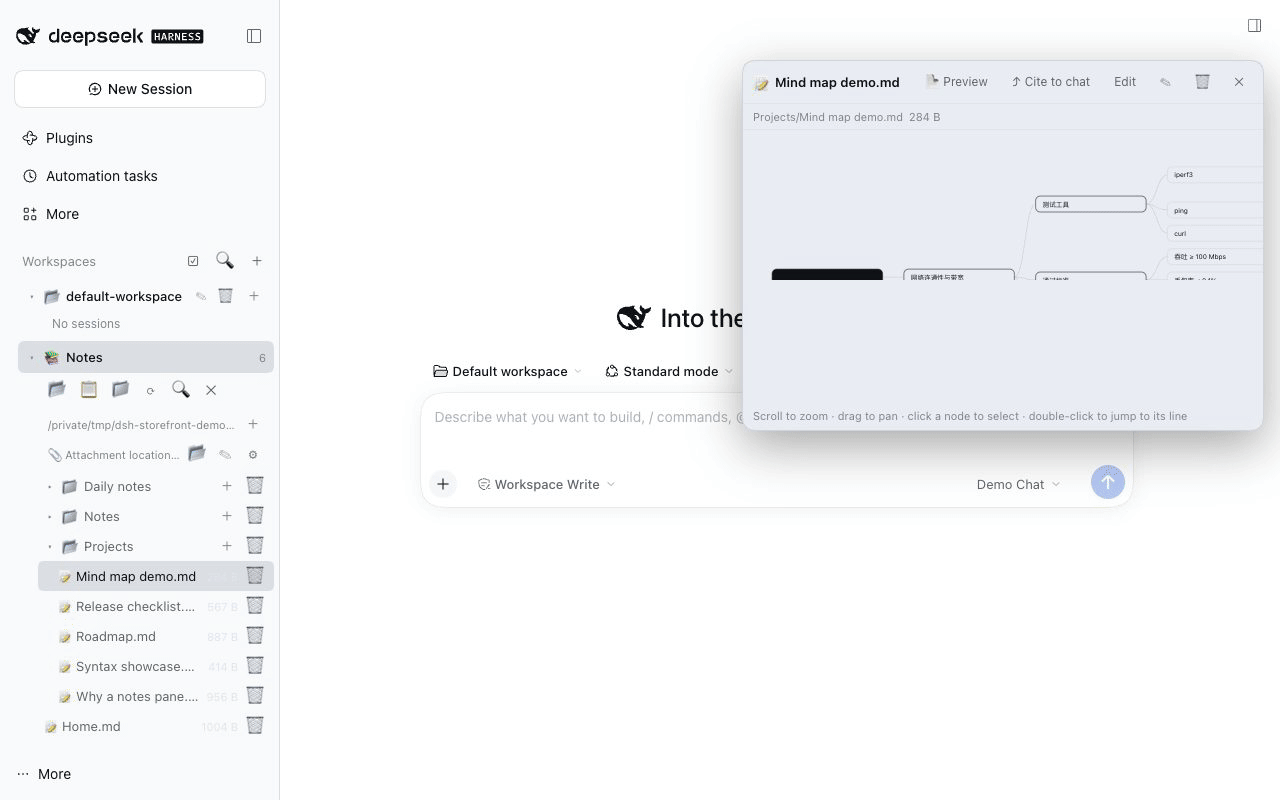
4. **Two ways to see the shape of a vault.** Turn a note into a **mind map**
|
|
33
|
+
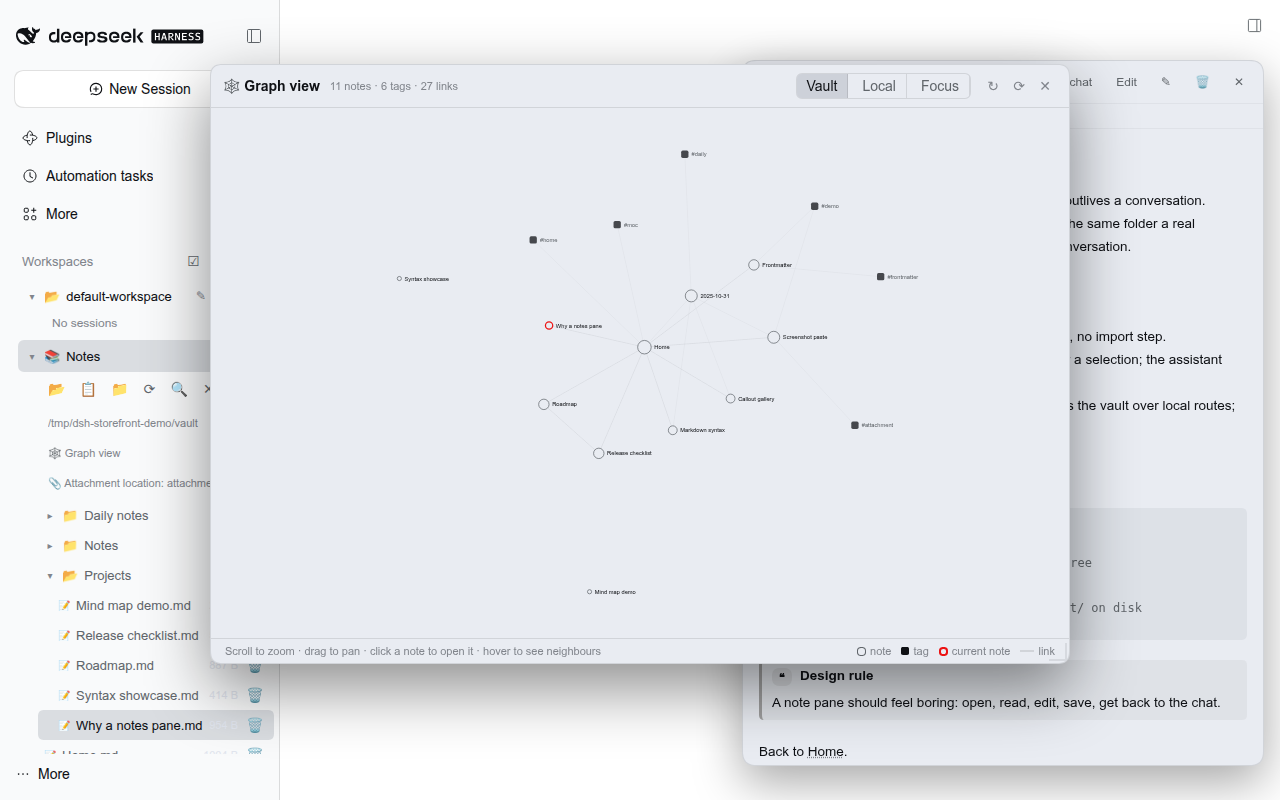
built from its headings and list items, or open the **relation graph**
|
|
34
|
+
computed from `[[links]]` and `#tags` — vault-wide, locally around the open
|
|
35
|
+
note with 1–5 hops, or focused: the whole graph with the camera framed on the
|
|
36
|
+
open note and its neighbours.
|
|
37
|
+
|
|
38
|
+
Everything runs on your machine: the plugin reads and writes only the folder you
|
|
39
|
+
choose, and the client talks to the host over its own loopback routes.
|
|
39
40
|
|
|
40
41
|
## Screenshots
|
|
41
42
|
|
|
42
|
-
| Notes tree + docked preview | Callouts,
|
|
43
|
+
| Notes tree + docked preview | Callouts, task lists, badges |
|
|
43
44
|
| --- | --- |
|
|
44
45
|
| 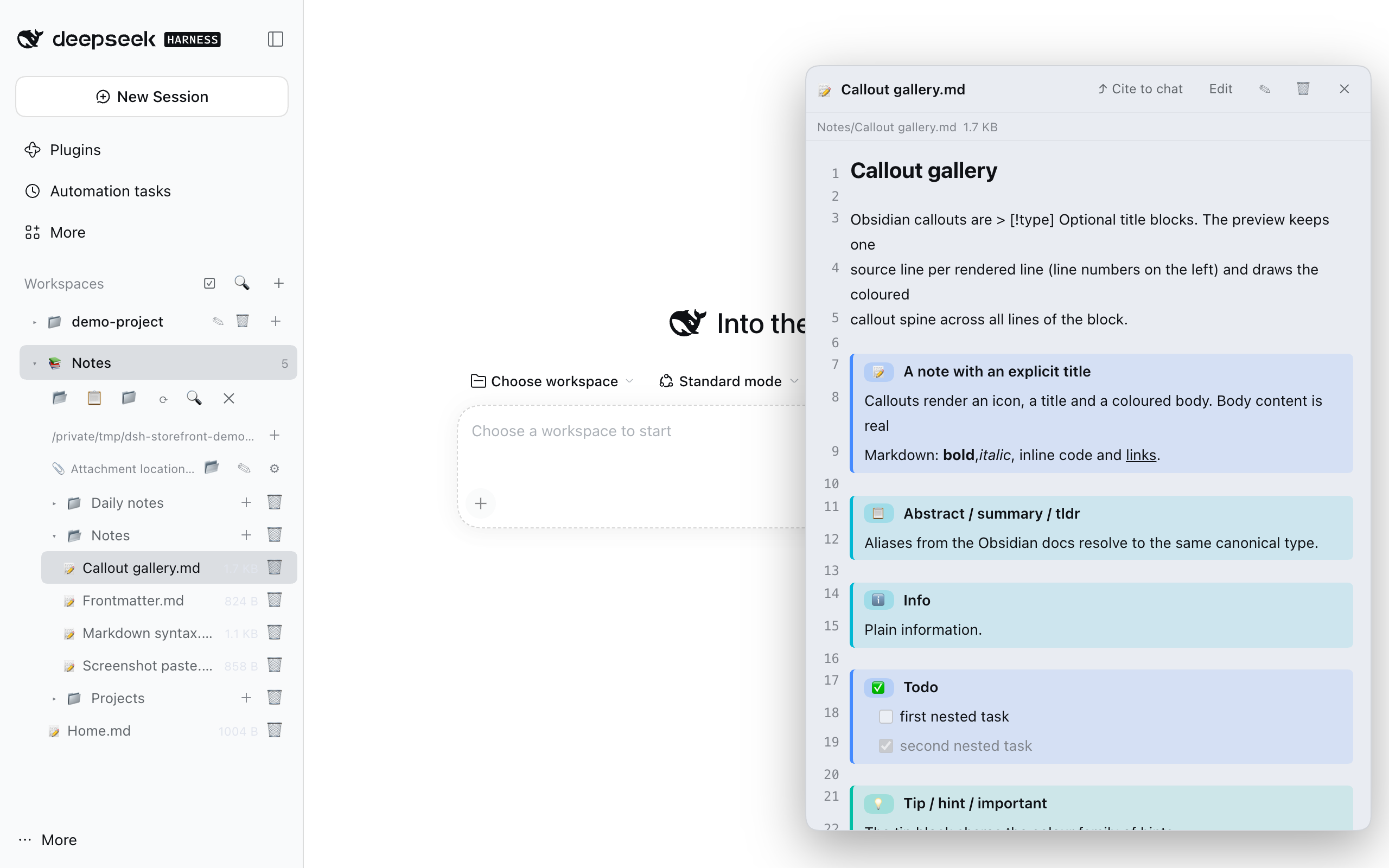 | 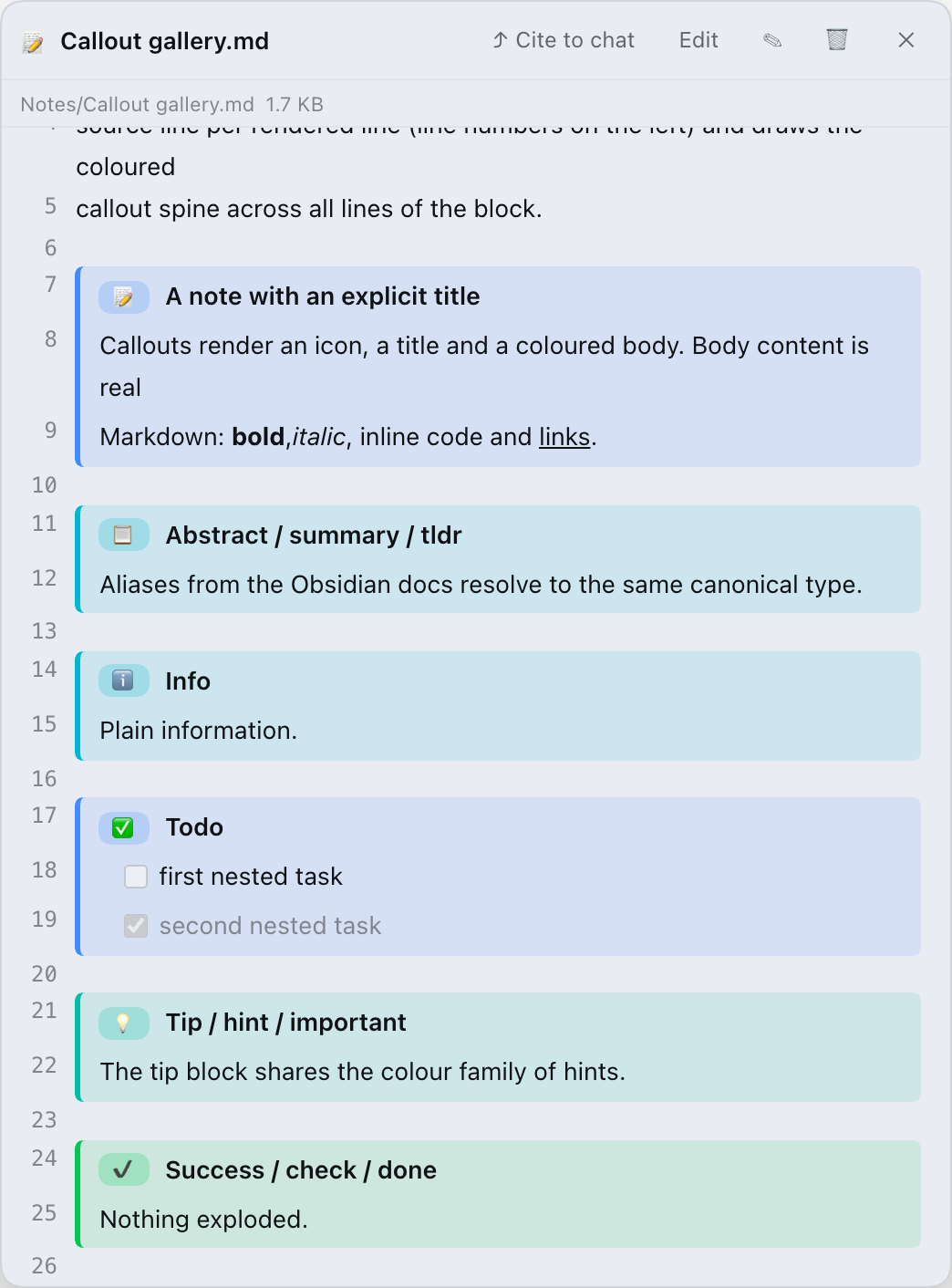 |
|
|
45
46
|
|
|
@@ -47,7 +48,7 @@ different set of things — the three that matter if you write next to a chat:
|
|
|
47
48
|
| --- | --- |
|
|
48
49
|
| 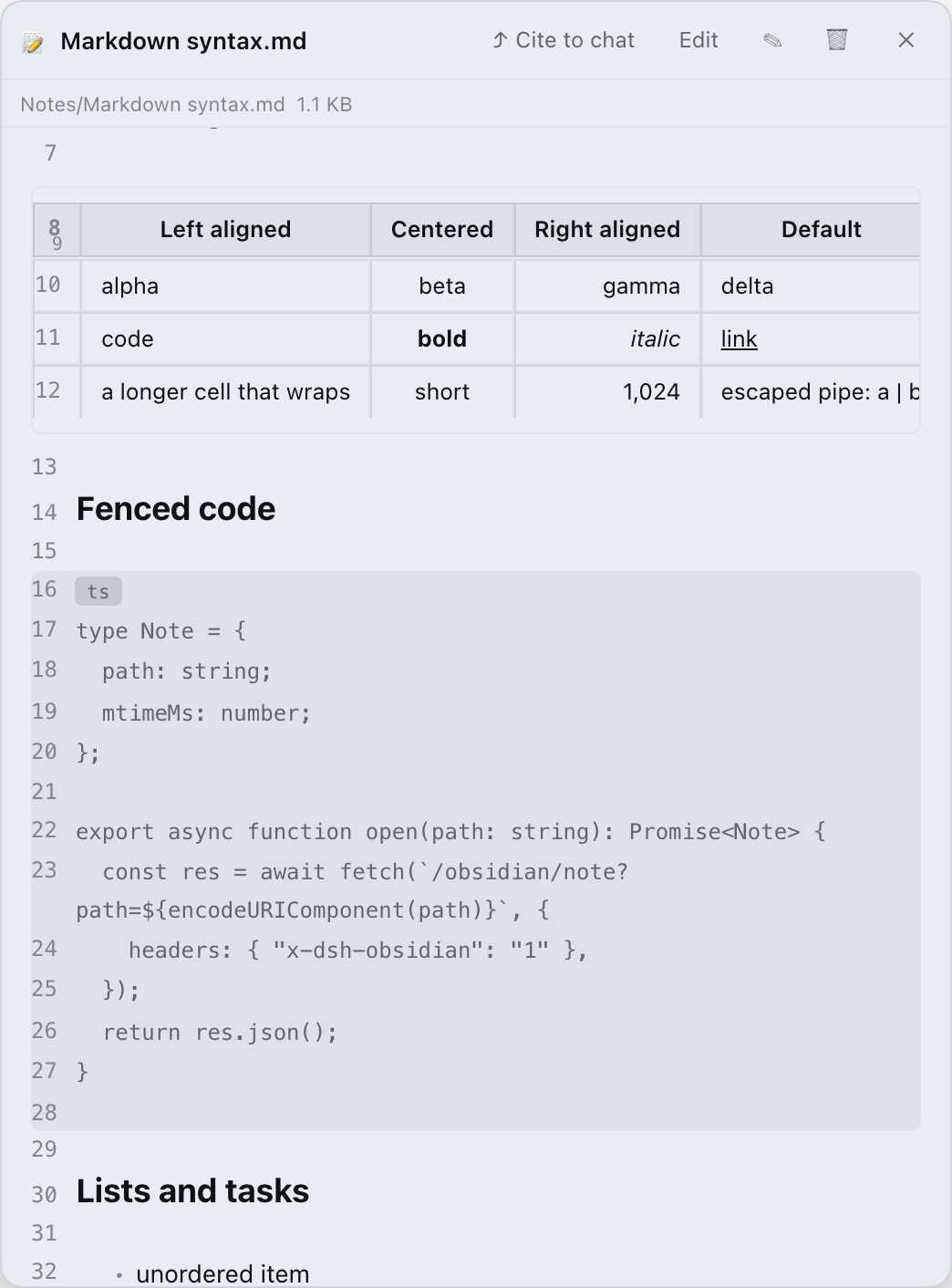 | 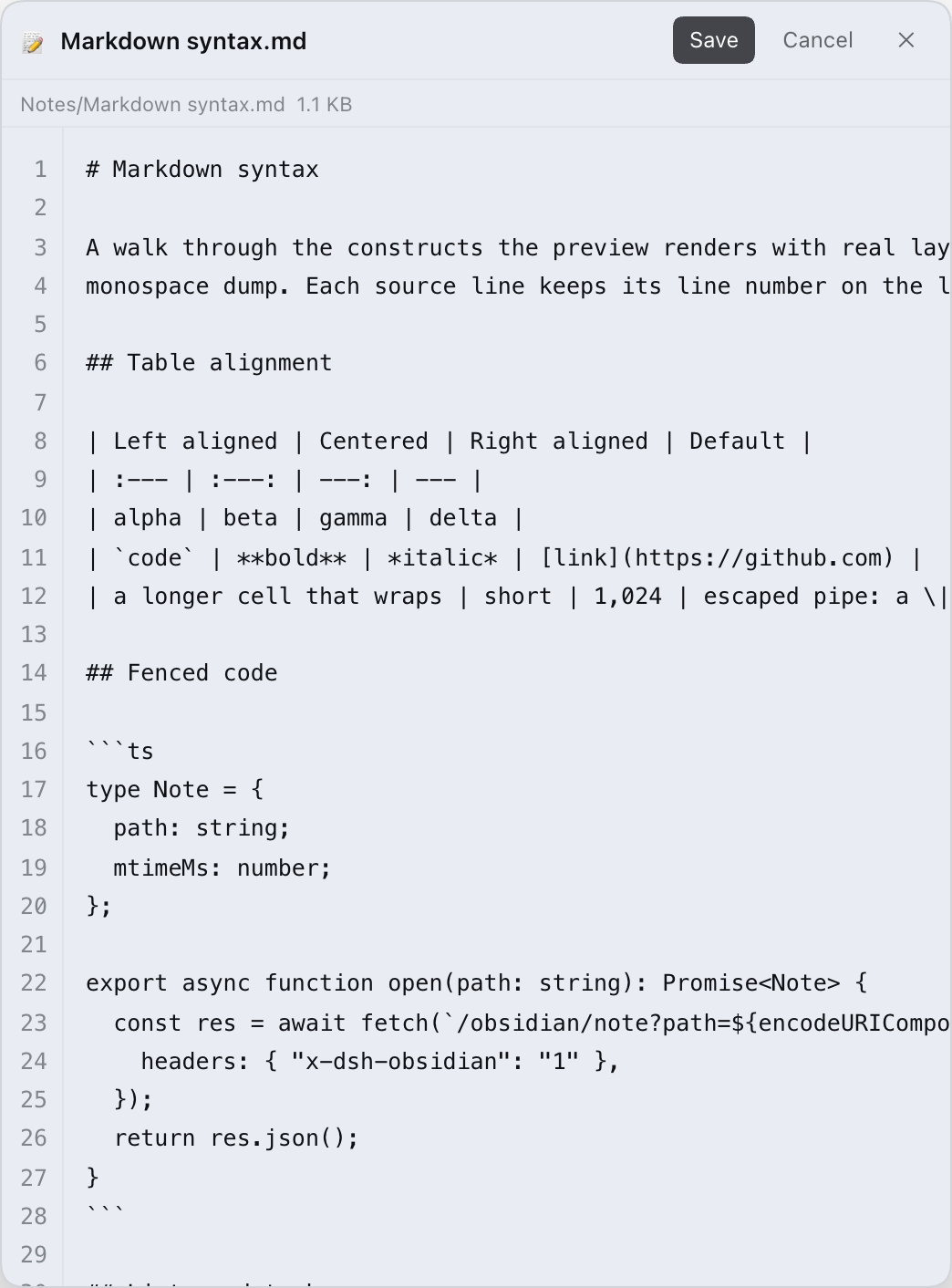 |
|
|
49
50
|
|
|
50
|
-
| Mind map from headings + lists | Vault-wide graph
|
|
51
|
+
| Mind map from headings + lists | Vault-wide graph — Vault / Local / Focus |
|
|
51
52
|
| --- | --- |
|
|
52
53
|
|  |  |
|
|
53
54
|
|
|
@@ -79,7 +80,7 @@ host-side route.
|
|
|
79
80
|
2. Search for **`dsh-obsidian-notes`** and install it.
|
|
80
81
|
3. Restart DeepSeek Harness.
|
|
81
82
|
|
|
82
|
-
> This path requires the package to be published on npm
|
|
83
|
+
> This path requires the package to be published on npm.
|
|
83
84
|
> If search shows nothing, use one of the two paths below.
|
|
84
85
|
|
|
85
86
|
### 2. CLI (after the npm release)
|
|
@@ -125,17 +126,31 @@ configured, choose one:
|
|
|
125
126
|
The default vault is `$DSH_WORKSPACE/obsidian_vault`, falling back to
|
|
126
127
|
`./obsidian_vault` under the directory you started `dsh web` from.
|
|
127
128
|
|
|
129
|
+
### Typical workflow
|
|
130
|
+
|
|
131
|
+
1. Open **📚 Notes** and pick a vault (above).
|
|
132
|
+
2. Click a note to read the preview; **Edit** to change it, then **Save** or
|
|
133
|
+
<kbd>Ctrl/Cmd+S</kbd>.
|
|
134
|
+
3. To bring a note into the chat, press **⤴ Cite to chat** for the whole note, or
|
|
135
|
+
select text and press **Ask** to attach a question to that passage.
|
|
136
|
+
4. Paste a screenshot while editing to store it in the vault.
|
|
137
|
+
5. Switch the dock to **🧠 Mind map** to explore the note's structure, or open
|
|
138
|
+
**🕸 Graph view** above the tree to see the vault as a graph (**Local** = around
|
|
139
|
+
the open note, **Depth 1–5**; **Focus** = whole graph, camera on the open note).
|
|
140
|
+
|
|
128
141
|
## Features
|
|
129
142
|
|
|
130
143
|
- **Vault sidebar** — lazy directory tree; open a note with one click, create,
|
|
131
144
|
rename or delete notes and folders, and search titles **and** file contents.
|
|
132
145
|
Shows a live note count.
|
|
133
|
-
- **
|
|
134
|
-
|
|
135
|
-
|
|
136
|
-
|
|
137
|
-
|
|
138
|
-
|
|
146
|
+
- **Obsidian-style preview** — every source line renders as its own row, so
|
|
147
|
+
tables, fenced code, nested lists and callouts line up the way they do in
|
|
148
|
+
Obsidian. Line numbers stay out of the reading view and show only while you
|
|
149
|
+
edit. Real tables with alignment, fenced code with language labels, nested
|
|
150
|
+
lists and task lists, all heading levels, setext headings, horizontal rules,
|
|
151
|
+
and clickable `[[wikilinks]]` (aliases and `#sections` included). Inline
|
|
152
|
+
Obsidian styles render too: `==highlight==`, `~~strikethrough~~`, backslash
|
|
153
|
+
escapes, hidden `%%comments%%`, and `<https://…>` / bare URLs as links.
|
|
139
154
|
- **Graph view** — a vault-wide relation graph built from every note's `[[links]]`
|
|
140
155
|
and `#tags` (no graph file, no export step: it is computed from your Markdown on
|
|
141
156
|
the fly, like Obsidian's own graph). A vault-level entry above the note tree
|
|
@@ -143,7 +158,8 @@ The default vault is `$DSH_WORKSPACE/obsidian_vault`, falling back to
|
|
|
143
158
|
neighbours, click a note to open it in the dock. **Local** shows the
|
|
144
159
|
neighbourhood of the note that is currently open; the depth is adjustable
|
|
145
160
|
from 1 to 5 hops (same range as Obsidian's local graph depth slider, default
|
|
146
|
-
1)
|
|
161
|
+
1). **Focus** keeps the whole graph but frames the open note and its
|
|
162
|
+
neighbours — click it again to re-centre.
|
|
147
163
|
- **Mind map view** — toggle the preview into a horizontal mind map built from the
|
|
148
164
|
note's headings and list items. Scroll to zoom, drag to pan; select a node to
|
|
149
165
|
jump to its source line, or insert that whole branch (node + descendants) into
|
|
@@ -182,28 +198,6 @@ The default vault is `$DSH_WORKSPACE/obsidian_vault`, falling back to
|
|
|
182
198
|
The UI is bilingual (English / Chinese) and uses DSH theme tokens, so it follows
|
|
183
199
|
the app's light and dark themes.
|
|
184
200
|
|
|
185
|
-
## Comparison
|
|
186
|
-
|
|
187
|
-
| | This plugin | [DedsecLemon/dsh-obsidian](https://github.com/DedsecLemon/dsh-obsidian) |
|
|
188
|
-
| --- | --- | --- |
|
|
189
|
-
| Vault tree, search | ✅ tree, title + body search | ✅ tree, whole-vault matching-line search |
|
|
190
|
-
| Obsidian callouts | ✅ 13 types + 15 aliases, line-numbered spine | ✅ rendered, fold state kept |
|
|
191
|
-
| Tables, fenced code, setext headings | ✅ | ✅ |
|
|
192
|
-
| Frontmatter | ✅ preserved on save | ✅ shown as properties |
|
|
193
|
-
| Paste screenshots + attachment folder moves | ✅ | — |
|
|
194
|
-
| Cite a note / ask about a selection | ✅ | — |
|
|
195
|
-
| Session & workspace housekeeping | ✅ | — |
|
|
196
|
-
| Backlinks | ❌ | ✅ |
|
|
197
|
-
| Outline pane | ❌ | ✅ |
|
|
198
|
-
| Mind map view (headings + lists) | ✅ | — |
|
|
199
|
-
| Graph view (vault-wide links + tags) | ✅ | — |
|
|
200
|
-
| `==highlight==` | ✅ | ✅ |
|
|
201
|
-
|
|
202
|
-
The point is not "more features" — it is a different trade-off. If you need
|
|
203
|
-
outline and backlinks, use the other plugin (or Obsidian itself); if you want a
|
|
204
|
-
faithful Obsidian reading/editing experience with a clean hand-off into the chat,
|
|
205
|
-
this one is built for that.
|
|
206
|
-
|
|
207
201
|
## Configuration
|
|
208
202
|
|
|
209
203
|
Everything lives inside the notes pane; there is no YAML to edit.
|
|
@@ -297,7 +291,7 @@ Repository layout:
|
|
|
297
291
|
| --- | --- |
|
|
298
292
|
| `src/index.js` | Host half: `/obsidian/*` routes, path containment, attachment migration |
|
|
299
293
|
| `src/client.js` | Browser half: sidebar, notes tree, preview dock, session/workspace UI |
|
|
300
|
-
| `src/markdown.js` | Zero-dependency
|
|
294
|
+
| `src/markdown.js` | Zero-dependency Markdown renderer (one row per source line) |
|
|
301
295
|
| `src/vault-store.js` | Vault + attachment settings persistence |
|
|
302
296
|
| `src/session-store.js` | Session log discovery and deletion |
|
|
303
297
|
| `lib/client.js` | Build artifact (gitignored; produced by `npm run build`) |
|
package/README.zh.md
CHANGED
|
@@ -14,21 +14,20 @@
|
|
|
14
14
|
|
|
15
15
|
---
|
|
16
16
|
|
|
17
|
-
##
|
|
17
|
+
## 它能做什么
|
|
18
18
|
|
|
19
|
-
|
|
20
|
-
([DedsecLemon/dsh-obsidian](https://github.com/DedsecLemon/dsh-obsidian)),
|
|
21
|
-
它适合需要大纲和反链的人。本插件押的是另外三件事 —— 如果你习惯「一边写笔记、一边和模型讨论」,这三件更重要:
|
|
19
|
+
一个本地优先的 Markdown 笔记面板:在 DSH 侧边栏里读笔记,并把笔记顺手递进对话,不用复制粘贴。
|
|
22
20
|
|
|
23
|
-
1.
|
|
24
|
-
2.
|
|
25
|
-
3.
|
|
21
|
+
1. **笔记就在对话旁边。** 指向一个 Markdown 文件夹,就有目录树、Obsidian 风格预览、编辑保存,以及标题和正文搜索——不导入、不同步、不上云。
|
|
22
|
+
2. **「递进对话」本身就是功能。** 整篇引用为 `@绝对路径`;选中一段点 **Ask**,输入框里的 prompt 带着绝对路径、行号区间和原文,模型能准确引用你正在看的这一段。
|
|
23
|
+
3. **截图直接进笔记库。** 编辑时粘贴图片会存进附件目录,并写成 Obsidian 原生的 `![[Pasted image …]]`;以后迁移附件目录,全库引用会一起改写。
|
|
24
|
+
4. **两种看结构的方式。** 把笔记切换成由标题和列表生成的**思维导图**;或打开由 `[[双链]]` 和 `#标签` 现算的**关系图谱**——全库视角、当前笔记周围 1–5 跳的局部视角,或保留全库、只把镜头对准当前笔记的聚焦视角。
|
|
26
25
|
|
|
27
|
-
|
|
26
|
+
全部在本机运行:插件只读写你选择的文件夹,客户端只走宿主自己的 loopback 路由。
|
|
28
27
|
|
|
29
28
|
## 截图
|
|
30
29
|
|
|
31
|
-
| 侧边栏笔记树 + 右侧预览 | Callout
|
|
30
|
+
| 侧边栏笔记树 + 右侧预览 | Callout、任务列表、类型徽标 |
|
|
32
31
|
| --- | --- |
|
|
33
32
|
|  |  |
|
|
34
33
|
|
|
@@ -36,7 +35,7 @@ DSH 生态里已经有一个 Obsidian 方向的插件
|
|
|
36
35
|
| --- | --- |
|
|
37
36
|
|  |  |
|
|
38
37
|
|
|
39
|
-
| 由标题 + 列表生成的思维导图 |
|
|
38
|
+
| 由标题 + 列表生成的思维导图 | 全库关系图谱——全库 / 局部 / 聚焦 |
|
|
40
39
|
| --- | --- |
|
|
41
40
|
|  |  |
|
|
42
41
|
|
|
@@ -58,7 +57,7 @@ DSH 生态里已经有一个 Obsidian 方向的插件
|
|
|
58
57
|
2. 搜索 **`dsh-obsidian-notes`** 并安装;
|
|
59
58
|
3. 重启 DeepSeek Harness。
|
|
60
59
|
|
|
61
|
-
> 这条路径要求 npm
|
|
60
|
+
> 这条路径要求 npm 上已有该包。搜不到时用下面两种方式。
|
|
62
61
|
|
|
63
62
|
### 2. CLI(npm 发布后)
|
|
64
63
|
|
|
@@ -99,11 +98,19 @@ dsh plugin --profile web add "$(pwd)" # PowerShell 用 "$PWD"
|
|
|
99
98
|
默认 Vault 为 `$DSH_WORKSPACE/obsidian_vault`,缺省回落到启动 `dsh web` 目录下的
|
|
100
99
|
`./obsidian_vault`。
|
|
101
100
|
|
|
101
|
+
### 典型用法
|
|
102
|
+
|
|
103
|
+
1. 打开 **📚 笔记**,先选一个 Vault(见上)。
|
|
104
|
+
2. 点击笔记读预览;点 **编辑** 修改,再点 **保存** 或 <kbd>Ctrl/Cmd+S</kbd>。
|
|
105
|
+
3. 把笔记带进对话:整篇点 **⤴ 引用到对话**;选中一段点 **Ask**,把问题附着在那段文字上。
|
|
106
|
+
4. 编辑时粘贴截图,会存进 Vault 的附件目录。
|
|
107
|
+
5. 把 Dock 切成 **🧠 思维导图** 看笔记结构;或点笔记树上方的 **🕸 关系图谱** 看全库图(**局部** = 当前笔记周围,**跳数 1–5**)。
|
|
108
|
+
|
|
102
109
|
## 功能
|
|
103
110
|
|
|
104
111
|
- **Vault 侧边栏**:按需加载的目录树;单击打开笔记,新建 / 重命名 / 删除笔记与文件夹,按标题**和正文**搜索,显示笔记数徽标。
|
|
105
|
-
-
|
|
106
|
-
- **关系图谱**:全库关系图,节点/连线直接由每篇笔记的 `[[双链]]` 与 `#标签` 现算(没有额外图谱文件,也不导出——和 Obsidian 自己的图谱一样从 Markdown 推导)。入口在笔记树上方的 vault 级「🕸 关系图谱」行,点击后在独立视图里显示;滚轮缩放、拖动平移、悬停高亮邻居、点笔记节点在 Dock 里打开。切到「局部」可看当前打开笔记的邻居,跳数可在 1–5 之间调(与 Obsidian 局部图谱的 depth 范围一致,默认 1
|
|
112
|
+
- **Obsidian 风格预览**:一行源码对应一行渲染,表格、围栏代码、嵌套列表和 callout 都按 Obsidian 的排版排好;只读预览不显示行号,行号只在编辑时出现。真表格(支持 `:---` / `:---:` / `---:` 对齐)、带语言标签的围栏代码、嵌套列表与任务列表、`#`~`######` 标题、setext 标题、分隔线、可点击的 `[[双链]]`(含别名与 `#章节`);行内也支持 `==高亮==`、`~~删除线~~`、反斜杠转义、隐藏的 `%%注释%%`,以及 `<https://…>` / 裸 URL 自动成链。
|
|
113
|
+
- **关系图谱**:全库关系图,节点/连线直接由每篇笔记的 `[[双链]]` 与 `#标签` 现算(没有额外图谱文件,也不导出——和 Obsidian 自己的图谱一样从 Markdown 推导)。入口在笔记树上方的 vault 级「🕸 关系图谱」行,点击后在独立视图里显示;滚轮缩放、拖动平移、悬停高亮邻居、点笔记节点在 Dock 里打开。切到「局部」可看当前打开笔记的邻居,跳数可在 1–5 之间调(与 Obsidian 局部图谱的 depth 范围一致,默认 1);「聚焦」保留全库,只把镜头对准当前笔记、把笔记和邻居框进画面,再点一次重新居中。
|
|
107
114
|
- **思维导图视图**:把预览切换成由标题 + 列表生成的横向思维导图。滚轮缩放、拖动平移;选中节点可跳到对应源码行,或把「该分支(节点 + 全部后代)」作为上下文插入对话。纯渲染,不改动 Markdown 文件。
|
|
108
115
|
- **Callout**:`> [!type] 标题` 按类型渲染颜色、图标与徽标。13 种规范类型(`note`、`abstract`、`info`、`todo`、`tip`、`success`、`question`、`warning`、`failure`、`danger`、`bug`、`example`、`quote`)+ 15 个 Obsidian 别名(`summary`、`tldr`、`hint`、`important`、`check`、`done`、`help`、`faq`、`caution`、`attention`、`fail`、`missing`、`error`、`cite`、`none`)。
|
|
109
116
|
- **编辑与保存**:带行号的源码编辑器,点 `保存` 或按 <kbd>Ctrl/Cmd+S</kbd>。YAML frontmatter 不进编辑器,保存时原样拼回;外部对 YAML 的改动不会被覆盖。
|
|
@@ -115,25 +122,6 @@ dsh plugin --profile web add "$(pwd)" # PowerShell 用 "$PWD"
|
|
|
115
122
|
|
|
116
123
|
界面中英双语,使用 DSH 主题变量,跟随应用的浅色 / 深色主题。
|
|
117
124
|
|
|
118
|
-
## 对比
|
|
119
|
-
|
|
120
|
-
| | 本插件 | [DedsecLemon/dsh-obsidian](https://github.com/DedsecLemon/dsh-obsidian) |
|
|
121
|
-
| --- | --- | --- |
|
|
122
|
-
| Vault 目录树、搜索 | ✅ 目录树 + 标题/正文搜索 | ✅ 目录树 + 全库命中行搜索 |
|
|
123
|
-
| Obsidian callout | ✅ 13 种类型 + 15 别名,逐行渲染 | ✅ 渲染,保留折叠状态 |
|
|
124
|
-
| 表格、围栏代码、setext 标题 | ✅ | ✅ |
|
|
125
|
-
| frontmatter | ✅ 保存时原样拼回 | ✅ 以属性区展示 |
|
|
126
|
-
| 粘贴截图 + 附件目录迁移 | ✅ | — |
|
|
127
|
-
| 整篇引用 / 选中片段提问 | ✅ | — |
|
|
128
|
-
| 会话与工作区整理 | ✅ | — |
|
|
129
|
-
| 反链 | ❌ | ✅ |
|
|
130
|
-
| 大纲面板 | ❌ | ✅ |
|
|
131
|
-
| 思维导图视图(标题 + 列表) | ✅ | — |
|
|
132
|
-
| 关系图谱(全库双链 + 标签) | ✅ | — |
|
|
133
|
-
| `==高亮==` | ✅ | ✅ |
|
|
134
|
-
|
|
135
|
-
比的不是「功能多少」,而是取舍:需要大纲和反链,用另一个插件(或真 Obsidian);想要忠实的 Obsidian 阅读/编辑体验、并顺手把笔记递进对话,这个插件就是为此写的。
|
|
136
|
-
|
|
137
125
|
## 配置
|
|
138
126
|
|
|
139
127
|
所有配置都在笔记面板里完成,不用手改 YAML。
|
|
@@ -196,7 +184,7 @@ npm run check:bundle # bundle 清单一致性(patch 文件、module id、fil
|
|
|
196
184
|
| --- | --- |
|
|
197
185
|
| `src/index.js` | host 半边:`/obsidian/*` 路由、路径包含性、附件迁移 |
|
|
198
186
|
| `src/client.js` | 浏览器半边:侧边栏、笔记树、预览 Dock、会话/工作区 UI |
|
|
199
|
-
| `src/markdown.js` |
|
|
187
|
+
| `src/markdown.js` | 零依赖、逐行渲染的 Markdown 渲染器 |
|
|
200
188
|
| `src/vault-store.js` | Vault 与附件设置的持久化 |
|
|
201
189
|
| `src/session-store.js` | 会话日志发现与删除 |
|
|
202
190
|
| `lib/client.js` | 构建产物(gitignore;由 `npm run build` 生成) |
|
package/lib/client.js
CHANGED
|
@@ -9,7 +9,8 @@ window.__ModuleLoader__.load({
|
|
|
9
9
|
* 轻量 Markdown 渲染器(无第三方依赖,纯 React.createElement),两个出口、
|
|
10
10
|
* 两套块级能力,共同复用行内解析 renderInline(粗斜体/行内代码/链接/图片/双链):
|
|
11
11
|
*
|
|
12
|
-
* 1) renderNumbered —— 笔记面板预览**实际使用**的渲染器(一行源码 = 一行 +
|
|
12
|
+
* 1) renderNumbered —— 笔记面板预览**实际使用**的渲染器(一行源码 = 一行 + 行号节点;
|
|
13
|
+
* 面板只读态的 CSS 把这批行号收起来,编辑态的行号走 client 里的 editor gutter)。
|
|
13
14
|
* 块级支持:引用(逐行、嵌套,不再吞行)、callout(类型/别名/标题,正文里的
|
|
14
15
|
* 列表与标题)、代码围栏(```/~~~、info string、未闭合到文末,行号保留)、
|
|
15
16
|
* 列表(无序/有序/嵌套,按实际缩进,tab=4)、任务列表(只读复选框)、
|
|
@@ -846,7 +847,8 @@ window.__ModuleLoader__.load({
|
|
|
846
847
|
}
|
|
847
848
|
|
|
848
849
|
/**
|
|
849
|
-
*
|
|
850
|
+
* 行号预览模式(每个源码行一个行号节点;面板只读态用 CSS 隐藏行号,节点本身
|
|
851
|
+
* 还要撑住空行行高、承载 data-line 供思维导图跳行):
|
|
850
852
|
* 每个源码行渲染为一行 <div class="dsh-obs-md-row">,左侧行号 .dsh-obs-md-ln、
|
|
851
853
|
* 内容 .dsh-obs-md-lc(行内 markdown 保留,且允许自然折行)。行号与源码行一一对应,
|
|
852
854
|
* 不依赖固定宽度/不折行,长行折行也不影响后续行号对齐。选中映射(.dsh-obs-src 偏移)
|
|
@@ -1595,6 +1597,57 @@ window.__ModuleLoader__.load({
|
|
|
1595
1597
|
}
|
|
1596
1598
|
|
|
1597
1599
|
|
|
1600
|
+
/**
|
|
1601
|
+
* 「聚焦」模式的镜头:全库不裁剪,只把视口对准某篇笔记和它的一跳邻居。
|
|
1602
|
+
*
|
|
1603
|
+
* 和 localSubgraph 的分工:局部是「只留这块节点」,聚焦是「节点都在,镜头对准这块」。
|
|
1604
|
+
* 输入是 layoutGraph 的布局坐标与画布像素尺寸,输出直接可用的 SVG 平移/缩放。
|
|
1605
|
+
*
|
|
1606
|
+
* @param plan - `layoutGraph()` 的返回值(nodes 带 x/y)。
|
|
1607
|
+
* @param edges - 与 `plan.nodes` 对应的连线(`[{ source, target }]`)。
|
|
1608
|
+
* @param focusId - 焦点节点 id(笔记节点是 `note:<rel>`)。
|
|
1609
|
+
* @param viewport - `{ width, height }` 画布像素尺寸。
|
|
1610
|
+
* @param options - `{ padding, maxScale }`:padding 为布局坐标里的留白(默认 80),
|
|
1611
|
+
* maxScale 限制推近倍数(默认 1.6,邻居很少时不至于糊脸)。
|
|
1612
|
+
* @returns `{ x, y, s }`;焦点不在布局里时返回 null(调用方退回整图适配)。
|
|
1613
|
+
*/
|
|
1614
|
+
function focusViewport(plan, edges, focusId, viewport, options = {}) {
|
|
1615
|
+
const nodes = plan && Array.isArray(plan.nodes) ? plan.nodes : [];
|
|
1616
|
+
const center = nodes.find((node) => node.id === focusId);
|
|
1617
|
+
if (center === undefined) return null;
|
|
1618
|
+
const near = new Set([focusId]);
|
|
1619
|
+
for (const edge of edges ?? []) {
|
|
1620
|
+
if (edge.source === focusId) near.add(edge.target);
|
|
1621
|
+
else if (edge.target === focusId) near.add(edge.source);
|
|
1622
|
+
}
|
|
1623
|
+
let minX = center.x;
|
|
1624
|
+
let maxX = center.x;
|
|
1625
|
+
let minY = center.y;
|
|
1626
|
+
let maxY = center.y;
|
|
1627
|
+
for (const node of nodes) {
|
|
1628
|
+
if (!near.has(node.id)) continue;
|
|
1629
|
+
if (node.x < minX) minX = node.x;
|
|
1630
|
+
if (node.x > maxX) maxX = node.x;
|
|
1631
|
+
if (node.y < minY) minY = node.y;
|
|
1632
|
+
if (node.y > maxY) maxY = node.y;
|
|
1633
|
+
}
|
|
1634
|
+
const padding = options.padding ?? 80;
|
|
1635
|
+
const maxScale = options.maxScale ?? 1.6;
|
|
1636
|
+
const width = viewport && Number.isFinite(viewport.width) ? viewport.width : 900;
|
|
1637
|
+
const height = viewport && Number.isFinite(viewport.height) ? viewport.height : 560;
|
|
1638
|
+
// 单点邻居(焦点没有连线)时包围盒是 0×0,+padding 后仍可算;max(1) 只为除零兜底
|
|
1639
|
+
const boxW = Math.max(1, maxX - minX + padding * 2);
|
|
1640
|
+
const boxH = Math.max(1, maxY - minY + padding * 2);
|
|
1641
|
+
const raw = Math.min((width - 30) / boxW, (height - 30) / boxH, maxScale);
|
|
1642
|
+
const scale = Math.max(0.18, raw);
|
|
1643
|
+
return {
|
|
1644
|
+
x: width / 2 - ((minX + maxX) / 2) * scale,
|
|
1645
|
+
y: height / 2 - ((minY + maxY) / 2) * scale,
|
|
1646
|
+
s: scale,
|
|
1647
|
+
};
|
|
1648
|
+
}
|
|
1649
|
+
|
|
1650
|
+
|
|
1598
1651
|
/** POSIX 风格拼接 + 折叠 `.`/`..`(客户端兜底构建时与 host 同一套链接解析)。 */
|
|
1599
1652
|
function joinPosix(dir, rel) {
|
|
1600
1653
|
const parts = dir === "" ? [] : dir.split("/");
|
|
@@ -1737,7 +1790,7 @@ window.__ModuleLoader__.load({
|
|
|
1737
1790
|
return [...tags];
|
|
1738
1791
|
}
|
|
1739
1792
|
|
|
1740
|
-
return { layoutGraph, localSubgraph, adjacency, rng, resolveGraphLink, buildGraphFromNotes, extractTags };
|
|
1793
|
+
return { layoutGraph, localSubgraph, focusViewport, adjacency, rng, resolveGraphLink, buildGraphFromNotes, extractTags };
|
|
1741
1794
|
})();
|
|
1742
1795
|
|
|
1743
1796
|
/**
|
|
@@ -1865,7 +1918,7 @@ window.__ModuleLoader__.load({
|
|
|
1865
1918
|
graphHint: "滚轮缩放 · 拖动平移 · 点击笔记打开 · 悬停看邻居",
|
|
1866
1919
|
graphGlobal: "全库",
|
|
1867
1920
|
graphLocal: "局部",
|
|
1868
|
-
graphLocalHint: "
|
|
1921
|
+
graphLocalHint: "以当前打开的笔记为中心显示邻居(跳数可调)",
|
|
1869
1922
|
graphRefresh: "重新读取 vault",
|
|
1870
1923
|
graphRerun: "重新布局",
|
|
1871
1924
|
graphClose: "关闭图谱",
|
|
@@ -1882,7 +1935,7 @@ window.__ModuleLoader__.load({
|
|
|
1882
1935
|
graphErrorTitle: "关系图谱加载失败",
|
|
1883
1936
|
graphBuilding: "正在从笔记构建图谱({done}/{total})…",
|
|
1884
1937
|
graphFocus: "聚焦",
|
|
1885
|
-
graphFocusHint: "
|
|
1938
|
+
graphFocusHint: "把镜头对准当前打开笔记:保留全库,把笔记和它的一跳邻居框进画面(再点 = 重新居中)",
|
|
1886
1939
|
graphLegendNote: "笔记",
|
|
1887
1940
|
graphLegendTag: "标签",
|
|
1888
1941
|
graphLegendFocus: "当前笔记",
|
|
@@ -1920,11 +1973,10 @@ window.__ModuleLoader__.load({
|
|
|
1920
1973
|
wikilinkNotFound: "未找到笔记",
|
|
1921
1974
|
error: "出错了",
|
|
1922
1975
|
imageInserted: "已插入图片",
|
|
1923
|
-
attachDir: "
|
|
1976
|
+
attachDir: "附件文件夹",
|
|
1924
1977
|
attachDirPick: "选择附件目录(Vault 内)",
|
|
1925
|
-
|
|
1926
|
-
|
|
1927
|
-
attachDirPlaceholder: "Vault 相对路径,如 docs/images",
|
|
1978
|
+
attachDirPlaceholder: "Vault 相对路径,如 attachments",
|
|
1979
|
+
attachDirHint: "留空 = Vault 根目录,回车保存",
|
|
1928
1980
|
imageRemoved: "已同步删除未引用的图片",
|
|
1929
1981
|
attachDirConfirm: "更改截图落盘目录:{from} → {to}。会**自动把原目录下的截图移动到新目录**、删除原目录(若空),并同步更新笔记里的引用路径。确认更改?",
|
|
1930
1982
|
attachSettings: "附件设置(位置 / 显示 / 清理)",
|
|
@@ -1933,7 +1985,9 @@ window.__ModuleLoader__.load({
|
|
|
1933
1985
|
attachMode_fixed: "固定目录",
|
|
1934
1986
|
attachMode_note: "与笔记同目录",
|
|
1935
1987
|
attachMode_sub: "笔记目录下子目录",
|
|
1936
|
-
attachSubfolder: "
|
|
1988
|
+
attachSubfolder: "子目录名称",
|
|
1989
|
+
attachSubfolderPlaceholder: "如 attachments",
|
|
1990
|
+
attachSubHint: "回车保存",
|
|
1937
1991
|
attachHideDir: "隐藏图片目录(只含图片、没有笔记的目录)",
|
|
1938
1992
|
attachDeleteOrphans: "保存笔记时自动删除无用附件(默认关)",
|
|
1939
1993
|
migrated: "迁移 {n} 张截图,更新 {m} 篇笔记",
|
|
@@ -2040,7 +2094,7 @@ window.__ModuleLoader__.load({
|
|
|
2040
2094
|
graphHint: "Scroll to zoom · drag to pan · click a note to open it · hover to see neighbours",
|
|
2041
2095
|
graphGlobal: "Vault",
|
|
2042
2096
|
graphLocal: "Local",
|
|
2043
|
-
graphLocalHint: "Show the
|
|
2097
|
+
graphLocalHint: "Show the open note's neighbourhood (depth adjustable)",
|
|
2044
2098
|
graphRefresh: "Re-read the vault",
|
|
2045
2099
|
graphRerun: "Re-run the layout",
|
|
2046
2100
|
graphClose: "Close the graph",
|
|
@@ -2057,7 +2111,7 @@ window.__ModuleLoader__.load({
|
|
|
2057
2111
|
graphErrorTitle: "The graph view failed to load",
|
|
2058
2112
|
graphBuilding: "Building the graph from notes ({done}/{total})…",
|
|
2059
2113
|
graphFocus: "Focus",
|
|
2060
|
-
graphFocusHint: "
|
|
2114
|
+
graphFocusHint: "Aim the camera at the open note: keep the whole graph, frame the note and its neighbours (click again to re-centre)",
|
|
2061
2115
|
graphLegendNote: "note",
|
|
2062
2116
|
graphLegendTag: "tag",
|
|
2063
2117
|
graphLegendFocus: "current note",
|
|
@@ -2095,11 +2149,10 @@ window.__ModuleLoader__.load({
|
|
|
2095
2149
|
wikilinkNotFound: "Note not found",
|
|
2096
2150
|
error: "Error",
|
|
2097
2151
|
imageInserted: "Image inserted",
|
|
2098
|
-
attachDir: "Attachment
|
|
2152
|
+
attachDir: "Attachment folder",
|
|
2099
2153
|
attachDirPick: "Choose attachment dir (inside vault)",
|
|
2100
|
-
|
|
2101
|
-
|
|
2102
|
-
attachDirPlaceholder: "Vault-relative path, e.g. docs/images",
|
|
2154
|
+
attachDirPlaceholder: "Vault-relative path, e.g. attachments",
|
|
2155
|
+
attachDirHint: "Empty = vault root; press Enter to save",
|
|
2103
2156
|
imageRemoved: "Deleted unreferenced image(s)",
|
|
2104
2157
|
attachDirConfirm: "Change screenshot dir: {from} → {to}. This will automatically move existing screenshots to the new dir, remove the old dir (if empty), and update note references. Continue?",
|
|
2105
2158
|
attachSettings: "Attachment settings (location / visibility / cleanup)",
|
|
@@ -2108,7 +2161,9 @@ window.__ModuleLoader__.load({
|
|
|
2108
2161
|
attachMode_fixed: "Fixed folder",
|
|
2109
2162
|
attachMode_note: "Same folder as note",
|
|
2110
2163
|
attachMode_sub: "Subfolder under note",
|
|
2111
|
-
attachSubfolder: "Subfolder name
|
|
2164
|
+
attachSubfolder: "Subfolder name",
|
|
2165
|
+
attachSubfolderPlaceholder: "e.g. attachments",
|
|
2166
|
+
attachSubHint: "Press Enter to save",
|
|
2112
2167
|
attachHideDir: "Hide image folders (folders without any notes)",
|
|
2113
2168
|
attachDeleteOrphans: "Auto-delete orphaned attachments on save (off by default)",
|
|
2114
2169
|
migrated: "moved {n} image(s), updated {m} note(s)",
|
|
@@ -2484,6 +2539,7 @@ window.__ModuleLoader__.load({
|
|
|
2484
2539
|
`.dsh-obs-ws-title{flex:1;min-width:0;overflow:hidden;text-overflow:ellipsis;font-weight:500}`,
|
|
2485
2540
|
`.dsh-obs-mini{display:inline-flex;align-items:center;justify-content:center;width:24px;height:24px;border:0;border-radius:6px;background:transparent;color:var(--dsw-alias-label-tertiary);cursor:pointer;font-size:14px;line-height:1;flex:none}`,
|
|
2486
2541
|
`.dsh-obs-mini:hover{background:var(--dsw-alias-interactive-bg-hover);color:var(--dsw-alias-label-primary)}`,
|
|
2542
|
+
`.dsh-obs-mini.dsh-obs-on{background:var(--dsw-alias-interactive-bg-hover-accent);color:var(--dsw-alias-brand-primary)}`,
|
|
2487
2543
|
// 行尾管理动作(工作区/会话 的 重命名 / 删除,常显)
|
|
2488
2544
|
`.dsh-obs-actions{display:flex;align-items:center;gap:2px;flex:none}`,
|
|
2489
2545
|
`.dsh-obs-actions button{display:inline-flex;align-items:center;justify-content:center;width:22px;height:22px;border:0;border-radius:6px;background:transparent;color:var(--dsw-alias-label-tertiary);cursor:pointer;font-size:12px;line-height:1}`,
|
|
@@ -2532,9 +2588,21 @@ window.__ModuleLoader__.load({
|
|
|
2532
2588
|
`.dsh-obs-tree-head button{display:inline-flex;align-items:center;justify-content:center;min-width:26px;height:26px;padding:0 6px;border:0;border-radius:7px;background:transparent;color:var(--dsw-alias-label-secondary);cursor:pointer;font-size:14px;line-height:1}`,
|
|
2533
2589
|
`.dsh-obs-tree-head button:hover{background:var(--dsw-alias-interactive-bg-hover)}`,
|
|
2534
2590
|
`.dsh-obs-tree-head button.dsh-obs-on{background:var(--dsw-alias-interactive-bg-hover-accent);color:var(--dsw-alias-brand-primary)}`,
|
|
2535
|
-
|
|
2536
|
-
|
|
2537
|
-
`.dsh-obs-
|
|
2591
|
+
// 附件设置面板:窄侧边栏里的表单卡片。位置模式用下拉框,四个中文标签都能整行放下;
|
|
2592
|
+
// 旧版把四个标签塞进 24×24 的图标按钮,汉字被挤成一列,盖住下面的输入框和开关。
|
|
2593
|
+
`.dsh-obs-attachcfg{display:flex;flex-direction:column;gap:8px;margin:2px 4px 8px;padding:8px 8px 10px;border:1px solid var(--dsw-alias-border-l1);border-radius:9px;background:var(--dsw-alias-interactive-bg-hover)}`,
|
|
2594
|
+
`.dsh-obs-field{display:flex;flex-direction:column;gap:4px;min-width:0}`,
|
|
2595
|
+
`.dsh-obs-field-label{font-size:11px;line-height:15px;color:var(--dsw-alias-label-tertiary)}`,
|
|
2596
|
+
`.dsh-obs-select{width:100%;height:28px;padding:0 28px 0 8px;border:1px solid var(--dsw-alias-border-l2);border-radius:7px;background-color:transparent;background-image:url("data:image/svg+xml,%3Csvg xmlns='http://www.w3.org/2000/svg' width='12' height='12' viewBox='0 0 12 12' fill='none'%3E%3Cpath d='M3 4.5L6 7.5L9 4.5' stroke='%2381858C' stroke-width='1.5' stroke-linecap='round' stroke-linejoin='round'/%3E%3C/svg%3E");background-repeat:no-repeat;background-position:right 8px center;background-size:12px 12px;color:var(--dsw-alias-label-primary);font-size:12px;line-height:26px;appearance:none;outline:none;cursor:pointer}`,
|
|
2597
|
+
`.dsh-obs-select:focus{border-color:var(--dsw-alias-brand-primary)}`,
|
|
2598
|
+
`.dsh-obs-inputrow{display:flex;align-items:center;gap:4px;min-width:0}`,
|
|
2599
|
+
`.dsh-obs-inputrow input{flex:1;min-width:0;height:28px;padding:0 8px;border:1px solid var(--dsw-alias-border-l2);border-radius:7px;background:transparent;color:var(--dsw-alias-label-primary);font-size:12px;outline:none}`,
|
|
2600
|
+
`.dsh-obs-inputrow input:focus{border-color:var(--dsw-alias-brand-primary)}`,
|
|
2601
|
+
`.dsh-obs-inputrow .dsh-obs-mini{width:26px;height:26px;border:1px solid var(--dsw-alias-border-l2)}`,
|
|
2602
|
+
`.dsh-obs-hint{font-size:11px;line-height:15px;color:var(--dsw-alias-label-tertiary)}`,
|
|
2603
|
+
`.dsh-obs-checks{display:flex;flex-direction:column;gap:6px;padding-top:2px}`,
|
|
2604
|
+
`.dsh-obs-cfgline{display:flex;align-items:flex-start;gap:6px;font-size:12px;line-height:1.5;color:var(--dsw-alias-label-secondary);cursor:pointer;user-select:none}`,
|
|
2605
|
+
`.dsh-obs-cfgline input[type=checkbox]{flex:none;margin:2px 0 0;cursor:pointer}`,
|
|
2538
2606
|
`.dsh-obs-root-row{display:flex;align-items:center;gap:6px;padding:4px 10px;font-size:11px;color:var(--dsw-alias-label-tertiary)}`,
|
|
2539
2607
|
`.dsh-obs-root-row .dsh-obs-root-path{flex:1;min-width:0;overflow:hidden;text-overflow:ellipsis;white-space:nowrap}`,
|
|
2540
2608
|
`.dsh-obs-root-row .dsh-obs-mini,.dsh-obs-row .dsh-obs-mini{flex:none;width:22px;height:22px}`,
|
|
@@ -2568,6 +2636,13 @@ window.__ModuleLoader__.load({
|
|
|
2568
2636
|
`.dsh-obs-md-row{display:flex;align-items:flex-start;gap:10px}`,
|
|
2569
2637
|
`.dsh-obs-md-ln{flex:none;min-width:2ch;text-align:right;color:var(--dsw-alias-label-tertiary);font-family:ui-monospace,SFMono-Regular,Menlo,Consolas,monospace;font-size:12px;line-height:1.7;user-select:none;-webkit-user-select:none}`,
|
|
2570
2638
|
`.dsh-obs-md-lc{flex:1;min-width:0}`,
|
|
2639
|
+
// 只读预览不显示行号。行号节点留在 DOM 里但收成零宽、visibility:hidden:
|
|
2640
|
+
// 一是空源码行还要靠它的行高撑住段落间距;二是 data-line 仍供思维导图跳行,
|
|
2641
|
+
// 选区反查脚本行号走的是 .dsh-obs-src 偏移,和行号节点无关。
|
|
2642
|
+
// 编辑态的行号走 .dsh-obs-editor-gutter,不受这三条影响。
|
|
2643
|
+
`.dsh-obs-dock-body .dsh-obs-md .dsh-obs-md-row{gap:0}`,
|
|
2644
|
+
`.dsh-obs-dock-body .dsh-obs-md .dsh-obs-md-ln{width:0;min-width:0;overflow:hidden;visibility:hidden}`,
|
|
2645
|
+
`.dsh-obs-dock-body .dsh-obs-md .dsh-obs-md-tln{display:none}`,
|
|
2571
2646
|
`.dsh-obs-dock-body .dsh-obs-md-row .dsh-obs-md-lc p,.dsh-obs-dock-body .dsh-obs-md-row .dsh-obs-md-lc h1,.dsh-obs-dock-body .dsh-obs-md-row .dsh-obs-md-lc h2,.dsh-obs-dock-body .dsh-obs-md-row .dsh-obs-md-lc h3,.dsh-obs-dock-body .dsh-obs-md-row .dsh-obs-md-lc h4,.dsh-obs-dock-body .dsh-obs-md-row .dsh-obs-md-lc h5,.dsh-obs-dock-body .dsh-obs-md-row .dsh-obs-md-lc h6,.dsh-obs-dock-body .dsh-obs-md-row .dsh-obs-md-lc blockquote{margin:0;padding:0}`,
|
|
2572
2647
|
`.dsh-obs-md-row.dsh-obs-md-heading .dsh-obs-md-lc{font-weight:600}`,
|
|
2573
2648
|
// 行内 Obsidian 语法:==高亮== / ~~删除线~~ / 裸链接与自动链接
|
|
@@ -2798,7 +2873,14 @@ window.__ModuleLoader__.load({
|
|
|
2798
2873
|
|
|
2799
2874
|
function injectCss() {
|
|
2800
2875
|
if (typeof document === "undefined") return;
|
|
2801
|
-
|
|
2876
|
+
// 已注入过就只更新内容:插件被 HMR 重新装载时 apply() 会再跑一遍,旧实现直接
|
|
2877
|
+
// return,页面会继续用上一次的 CSS —— 新加的类名没有样式,界面半新半旧,只能
|
|
2878
|
+
// 整页刷新才正常。
|
|
2879
|
+
const existing = document.querySelector('style[data-plugin-css="dsh-obsidian-vault/core.css"]');
|
|
2880
|
+
if (existing !== null) {
|
|
2881
|
+
if (existing.textContent !== CSS) existing.textContent = CSS;
|
|
2882
|
+
return;
|
|
2883
|
+
}
|
|
2802
2884
|
const tag = document.createElement("style");
|
|
2803
2885
|
tag.dataset.plugin = "dsh-obsidian-vault";
|
|
2804
2886
|
tag.dataset.pluginCss = "dsh-obsidian-vault/core.css";
|
|
@@ -3052,6 +3134,7 @@ window.__ModuleLoader__.load({
|
|
|
3052
3134
|
const [attachDir, setAttachDirState] = useState(null);
|
|
3053
3135
|
const [attachOpen, setAttachOpen] = useState(false);
|
|
3054
3136
|
const [attachInput, setAttachInput] = useState("");
|
|
3137
|
+
const [attachSubInput, setAttachSubInput] = useState("");
|
|
3055
3138
|
// 附件位置模式 / 子目录 / 两个开关(对齐 Obsidian 的附件位置设置)
|
|
3056
3139
|
const [attachCfg, setAttachCfg] = useState(null);
|
|
3057
3140
|
|
|
@@ -3101,6 +3184,14 @@ window.__ModuleLoader__.load({
|
|
|
3101
3184
|
void loadRoot();
|
|
3102
3185
|
}, [loadRoot, vaultRev]);
|
|
3103
3186
|
|
|
3187
|
+
// 面板每次打开都把输入框填成当前设置:旧版只有铅笔按钮会带值,点齿轮打开时
|
|
3188
|
+
// 输入框是空的,看起来像「设置丢了」。
|
|
3189
|
+
useEffect(() => {
|
|
3190
|
+
if (!attachOpen) return;
|
|
3191
|
+
setAttachInput(typeof attachDir === "string" ? attachDir : "");
|
|
3192
|
+
setAttachSubInput(attachCfg !== null ? attachCfg.subfolder : "attachments");
|
|
3193
|
+
}, [attachOpen]);
|
|
3194
|
+
|
|
3104
3195
|
const toggleDir = useCallback(async (rel) => {
|
|
3105
3196
|
const willOpen = !expanded.has(rel);
|
|
3106
3197
|
setExpanded((prev) => {
|
|
@@ -3402,63 +3493,85 @@ window.__ModuleLoader__.load({
|
|
|
3402
3493
|
onClick: (e) => { e.stopPropagation(); patchShared({ graphOpen: true }); },
|
|
3403
3494
|
}, "↗"),
|
|
3404
3495
|
),
|
|
3405
|
-
rootInfo && rootInfo.exists && attachDir !== null && createElement("div", {
|
|
3496
|
+
rootInfo && rootInfo.exists && attachDir !== null && createElement("div", {
|
|
3497
|
+
className: "dsh-obs-root-row",
|
|
3498
|
+
title: `${t("attachLocation")}: ${attachLocationLabel(attachCfg, attachDir, t)}`,
|
|
3499
|
+
},
|
|
3406
3500
|
createElement("span", { className: "dsh-obs-root-path" },
|
|
3407
3501
|
`📎 ${t("attachLocation")}: ${attachLocationLabel(attachCfg, attachDir, t)}`),
|
|
3408
|
-
attachCfg !== null && attachCfg.mode === "fixed" && createElement("button", {
|
|
3409
|
-
className: "dsh-obs-mini",
|
|
3410
|
-
title: t("attachDirPick"),
|
|
3411
|
-
onClick: (e) => { e.stopPropagation(); void pickAttachDir(); },
|
|
3412
|
-
}, "📂"),
|
|
3413
|
-
attachCfg !== null && attachCfg.mode === "fixed" && createElement("button", {
|
|
3414
|
-
className: "dsh-obs-mini",
|
|
3415
|
-
title: t("attachDirEdit"),
|
|
3416
|
-
onClick: (e) => { e.stopPropagation(); setAttachInput(attachDir); setAttachOpen((v) => !v); },
|
|
3417
|
-
}, "✎"),
|
|
3418
3502
|
createElement("button", {
|
|
3419
|
-
className:
|
|
3503
|
+
className: `dsh-obs-mini${attachOpen ? " dsh-obs-on" : ""}`,
|
|
3420
3504
|
title: t("attachSettings"),
|
|
3505
|
+
"aria-expanded": attachOpen === true,
|
|
3421
3506
|
onClick: (e) => { e.stopPropagation(); setAttachOpen((v) => !v); },
|
|
3422
3507
|
}, "⚙"),
|
|
3423
3508
|
),
|
|
3424
|
-
//
|
|
3509
|
+
// 附件设置面板:窄侧边栏里当表单排(下拉框 + 输入行 + 开关),长标签整行放得下
|
|
3425
3510
|
attachOpen && rootInfo && rootInfo.exists && attachCfg !== null && createElement("div", { className: "dsh-obs-attachcfg" },
|
|
3426
|
-
|
|
3427
|
-
|
|
3428
|
-
|
|
3429
|
-
|
|
3430
|
-
|
|
3431
|
-
|
|
3432
|
-
attachCfg.mode === "fixed" && createElement("input", {
|
|
3433
|
-
autoFocus: true,
|
|
3434
|
-
placeholder: t("attachDirPlaceholder"),
|
|
3435
|
-
value: attachInput,
|
|
3436
|
-
onChange: (e) => setAttachInput(e.target.value),
|
|
3437
|
-
onKeyDown: (e) => {
|
|
3438
|
-
if (e.key === "Enter") void applyAttachDir(attachInput);
|
|
3439
|
-
if (e.key === "Escape") setAttachOpen(false);
|
|
3511
|
+
createElement("label", { className: "dsh-obs-field" },
|
|
3512
|
+
createElement("span", { className: "dsh-obs-field-label" }, t("attachLocation")),
|
|
3513
|
+
createElement("select", {
|
|
3514
|
+
className: "dsh-obs-select",
|
|
3515
|
+
value: attachCfg.mode,
|
|
3516
|
+
onChange: (e) => { void applyAttachSettings({ mode: e.target.value }); },
|
|
3440
3517
|
},
|
|
3441
|
-
|
|
3442
|
-
|
|
3443
|
-
placeholder: t("attachSubfolder"),
|
|
3444
|
-
defaultValue: attachCfg.subfolder,
|
|
3445
|
-
onKeyDown: (e) => { if (e.key === "Enter") void applyAttachSettings({ subfolder: e.target.value }); },
|
|
3446
|
-
}),
|
|
3447
|
-
createElement("label", { className: "dsh-obs-cfgline" },
|
|
3448
|
-
createElement("input", {
|
|
3449
|
-
type: "checkbox",
|
|
3450
|
-
checked: attachCfg.hideDir,
|
|
3451
|
-
onChange: (e) => { e.stopPropagation(); void applyAttachSettings({ hideAttachmentDir: e.target.checked === true }); },
|
|
3452
|
-
}),
|
|
3453
|
-
t("attachHideDir"),
|
|
3518
|
+
["root", "fixed", "note", "sub"].map((m) => createElement("option", { key: m, value: m }, t(`attachMode_${m}`))),
|
|
3519
|
+
),
|
|
3454
3520
|
),
|
|
3455
|
-
createElement("
|
|
3456
|
-
createElement("
|
|
3457
|
-
|
|
3458
|
-
|
|
3459
|
-
|
|
3460
|
-
|
|
3461
|
-
|
|
3521
|
+
attachCfg.mode === "fixed" && createElement("div", { className: "dsh-obs-field" },
|
|
3522
|
+
createElement("span", { className: "dsh-obs-field-label" }, t("attachDir")),
|
|
3523
|
+
createElement("div", { className: "dsh-obs-inputrow" },
|
|
3524
|
+
createElement("input", {
|
|
3525
|
+
"aria-label": t("attachDir"),
|
|
3526
|
+
placeholder: t("attachDirPlaceholder"),
|
|
3527
|
+
value: attachInput,
|
|
3528
|
+
onChange: (e) => setAttachInput(e.target.value),
|
|
3529
|
+
onKeyDown: (e) => {
|
|
3530
|
+
if (e.key === "Enter") void applyAttachDir(attachInput);
|
|
3531
|
+
if (e.key === "Escape") setAttachOpen(false);
|
|
3532
|
+
},
|
|
3533
|
+
}),
|
|
3534
|
+
createElement("button", {
|
|
3535
|
+
className: "dsh-obs-mini",
|
|
3536
|
+
title: t("attachDirPick"),
|
|
3537
|
+
onClick: (e) => { e.stopPropagation(); void pickAttachDir(); },
|
|
3538
|
+
}, "📂"),
|
|
3539
|
+
),
|
|
3540
|
+
createElement("span", { className: "dsh-obs-hint" }, t("attachDirHint")),
|
|
3541
|
+
),
|
|
3542
|
+
attachCfg.mode === "sub" && createElement("div", { className: "dsh-obs-field" },
|
|
3543
|
+
createElement("span", { className: "dsh-obs-field-label" }, t("attachSubfolder")),
|
|
3544
|
+
createElement("div", { className: "dsh-obs-inputrow" },
|
|
3545
|
+
createElement("input", {
|
|
3546
|
+
"aria-label": t("attachSubfolder"),
|
|
3547
|
+
placeholder: t("attachSubfolderPlaceholder"),
|
|
3548
|
+
value: attachSubInput,
|
|
3549
|
+
onChange: (e) => setAttachSubInput(e.target.value),
|
|
3550
|
+
onKeyDown: (e) => {
|
|
3551
|
+
if (e.key === "Enter") void applyAttachSettings({ subfolder: attachSubInput });
|
|
3552
|
+
if (e.key === "Escape") setAttachOpen(false);
|
|
3553
|
+
},
|
|
3554
|
+
}),
|
|
3555
|
+
),
|
|
3556
|
+
createElement("span", { className: "dsh-obs-hint" }, t("attachSubHint")),
|
|
3557
|
+
),
|
|
3558
|
+
createElement("div", { className: "dsh-obs-checks" },
|
|
3559
|
+
createElement("label", { className: "dsh-obs-cfgline" },
|
|
3560
|
+
createElement("input", {
|
|
3561
|
+
type: "checkbox",
|
|
3562
|
+
checked: attachCfg.hideDir,
|
|
3563
|
+
onChange: (e) => { e.stopPropagation(); void applyAttachSettings({ hideAttachmentDir: e.target.checked === true }); },
|
|
3564
|
+
}),
|
|
3565
|
+
createElement("span", null, t("attachHideDir")),
|
|
3566
|
+
),
|
|
3567
|
+
createElement("label", { className: "dsh-obs-cfgline" },
|
|
3568
|
+
createElement("input", {
|
|
3569
|
+
type: "checkbox",
|
|
3570
|
+
checked: attachCfg.deleteOrphans,
|
|
3571
|
+
onChange: (e) => { e.stopPropagation(); void applyAttachSettings({ deleteOrphanAttachments: e.target.checked === true }); },
|
|
3572
|
+
}),
|
|
3573
|
+
createElement("span", null, t("attachDeleteOrphans")),
|
|
3574
|
+
),
|
|
3462
3575
|
),
|
|
3463
3576
|
),
|
|
3464
3577
|
body,
|
|
@@ -4476,7 +4589,8 @@ window.__ModuleLoader__.load({
|
|
|
4476
4589
|
|
|
4477
4590
|
/**
|
|
4478
4591
|
* 关系图谱视图:全库 .md + [[双链]] + 标签(host `/obsidian/graph` 计算,
|
|
4479
|
-
* 力导向布局在 src/graph.js
|
|
4592
|
+
* 力导向布局在 src/graph.js)。「局部」= 当前打开笔记周围 1–5 跳邻居;
|
|
4593
|
+
* 「聚焦」保留全库,只把镜头对准当前笔记。
|
|
4480
4594
|
*/
|
|
4481
4595
|
function GraphView({ t, currentNote, onOpenNote, onClose }) {
|
|
4482
4596
|
const [data, setData] = useState(null);
|
|
@@ -4648,28 +4762,46 @@ window.__ModuleLoader__.load({
|
|
|
4648
4762
|
const currentRel = currentNote && currentNote.rel ? currentNote.rel : null;
|
|
4649
4763
|
const focusId = currentRel !== null ? `note:${currentRel}` : null;
|
|
4650
4764
|
const localAvailable = data !== null && focusId !== null && data.nodes.some((node) => node.id === focusId);
|
|
4765
|
+
// 全库数据只包一次:全库 ↔ 聚焦之间切换不重跑力导向布局(同一 seed 结果一样,重跑一遍纯属浪费)
|
|
4766
|
+
const fullGraph = useMemo(
|
|
4767
|
+
() => (data === null ? { nodes: [], edges: [] } : { nodes: data.nodes, edges: data.edges }),
|
|
4768
|
+
[data],
|
|
4769
|
+
);
|
|
4651
4770
|
const shown = useMemo(() => {
|
|
4652
|
-
if (
|
|
4653
|
-
if (mode === "local" && localAvailable) {
|
|
4771
|
+
if (mode === "local" && localAvailable && data !== null) {
|
|
4654
4772
|
const sub = graphModule.localSubgraph(data, focusId, localDepth);
|
|
4655
4773
|
return { nodes: sub.nodes, edges: sub.edges };
|
|
4656
4774
|
}
|
|
4657
|
-
return
|
|
4658
|
-
}, [data, mode, localAvailable, focusId, localDepth]);
|
|
4775
|
+
return fullGraph;
|
|
4776
|
+
}, [fullGraph, data, mode, localAvailable, focusId, localDepth]);
|
|
4659
4777
|
const plan = useMemo(
|
|
4660
4778
|
() => graphModule.layoutGraph(shown.nodes, shown.edges, { seed, maxNodes: 420 }),
|
|
4661
4779
|
[shown, seed],
|
|
4662
4780
|
);
|
|
4663
4781
|
|
|
4664
|
-
// 打开 / 切换范围 /
|
|
4782
|
+
// 打开 / 切换范围 / 重新布局后摆好镜头:全库与局部把整张图适配进画布;
|
|
4783
|
+
// 聚焦模式保留全库,但把镜头对准当前笔记:笔记和它的一跳邻居框进画面(不裁节点)。
|
|
4665
4784
|
useEffect(() => {
|
|
4666
4785
|
const el = wrapRef.current;
|
|
4667
4786
|
if (!el || plan.nodes.length === 0) return;
|
|
4668
4787
|
const w = el.clientWidth || 900;
|
|
4669
4788
|
const h = el.clientHeight || 560;
|
|
4789
|
+
if (mode === "focus") {
|
|
4790
|
+
const framed = graphModule.focusViewport(plan, shown.edges, focusId, { width: w, height: h });
|
|
4791
|
+
if (framed !== null) {
|
|
4792
|
+
setTransform(framed);
|
|
4793
|
+
return;
|
|
4794
|
+
}
|
|
4795
|
+
}
|
|
4670
4796
|
const fit = Math.min((w - 30) / plan.width, (h - 30) / plan.height, 1);
|
|
4671
4797
|
setTransform({ x: (w - plan.width * fit) / 2, y: (h - plan.height * fit) / 2, s: fit });
|
|
4672
|
-
}, [plan, fitKey]);
|
|
4798
|
+
}, [plan, fitKey, mode, focusId, shown.edges]);
|
|
4799
|
+
|
|
4800
|
+
// 当前笔记被关掉 / 从图里消失后,局部与聚焦都没有中心:退回全库,
|
|
4801
|
+
// 否则会留下一个「按不动却亮着」的分段按钮。
|
|
4802
|
+
useEffect(() => {
|
|
4803
|
+
if (!localAvailable && (mode === "local" || mode === "focus")) setMode("global");
|
|
4804
|
+
}, [localAvailable, mode]);
|
|
4673
4805
|
|
|
4674
4806
|
const onWheel = useCallback((e) => {
|
|
4675
4807
|
if (plan.nodes.length === 0) return;
|
|
@@ -4791,10 +4923,11 @@ window.__ModuleLoader__.load({
|
|
|
4791
4923
|
disabled: !localAvailable,
|
|
4792
4924
|
title: localAvailable ? t("graphLocalHint") : t("graphNoNote"),
|
|
4793
4925
|
}),
|
|
4794
|
-
modeButton(t("graphFocus"),
|
|
4926
|
+
modeButton(t("graphFocus"), mode === "focus", () => {
|
|
4795
4927
|
if (!localAvailable) return;
|
|
4796
|
-
|
|
4797
|
-
setFitKey((v) => v + 1);
|
|
4928
|
+
// 聚焦是独立模式(全库图 + 镜头对准当前笔记):再点一次 = 重新居中
|
|
4929
|
+
if (mode === "focus") setFitKey((v) => v + 1);
|
|
4930
|
+
else setMode("focus");
|
|
4798
4931
|
}, {
|
|
4799
4932
|
disabled: !localAvailable,
|
|
4800
4933
|
title: localAvailable ? t("graphFocusHint") : t("graphNoNote"),
|
package/package.json
CHANGED
|
@@ -1,6 +1,6 @@
|
|
|
1
1
|
{
|
|
2
2
|
"name": "dsh-obsidian-notes",
|
|
3
|
-
"version": "0.6.
|
|
3
|
+
"version": "0.6.2",
|
|
4
4
|
"description": "Obsidian-style notes panel for DeepSeek Harness Web: vault directory tree, Markdown preview/edit/save, cite-to-chat, batch archive/delete of sessions and workspaces. DSH 内嵌 Obsidian 风格笔记面板:目录树 + Markdown 预览/编辑/保存 + 引用到对话 + 会话/工作区批量操作。",
|
|
5
5
|
"engines": {
|
|
6
6
|
"node": "^22.19 || >=24"
|
package/src/client.js
CHANGED
|
@@ -123,7 +123,7 @@
|
|
|
123
123
|
graphHint: "滚轮缩放 · 拖动平移 · 点击笔记打开 · 悬停看邻居",
|
|
124
124
|
graphGlobal: "全库",
|
|
125
125
|
graphLocal: "局部",
|
|
126
|
-
graphLocalHint: "
|
|
126
|
+
graphLocalHint: "以当前打开的笔记为中心显示邻居(跳数可调)",
|
|
127
127
|
graphRefresh: "重新读取 vault",
|
|
128
128
|
graphRerun: "重新布局",
|
|
129
129
|
graphClose: "关闭图谱",
|
|
@@ -140,7 +140,7 @@
|
|
|
140
140
|
graphErrorTitle: "关系图谱加载失败",
|
|
141
141
|
graphBuilding: "正在从笔记构建图谱({done}/{total})…",
|
|
142
142
|
graphFocus: "聚焦",
|
|
143
|
-
graphFocusHint: "
|
|
143
|
+
graphFocusHint: "把镜头对准当前打开笔记:保留全库,把笔记和它的一跳邻居框进画面(再点 = 重新居中)",
|
|
144
144
|
graphLegendNote: "笔记",
|
|
145
145
|
graphLegendTag: "标签",
|
|
146
146
|
graphLegendFocus: "当前笔记",
|
|
@@ -178,11 +178,10 @@
|
|
|
178
178
|
wikilinkNotFound: "未找到笔记",
|
|
179
179
|
error: "出错了",
|
|
180
180
|
imageInserted: "已插入图片",
|
|
181
|
-
attachDir: "
|
|
181
|
+
attachDir: "附件文件夹",
|
|
182
182
|
attachDirPick: "选择附件目录(Vault 内)",
|
|
183
|
-
|
|
184
|
-
|
|
185
|
-
attachDirPlaceholder: "Vault 相对路径,如 docs/images",
|
|
183
|
+
attachDirPlaceholder: "Vault 相对路径,如 attachments",
|
|
184
|
+
attachDirHint: "留空 = Vault 根目录,回车保存",
|
|
186
185
|
imageRemoved: "已同步删除未引用的图片",
|
|
187
186
|
attachDirConfirm: "更改截图落盘目录:{from} → {to}。会**自动把原目录下的截图移动到新目录**、删除原目录(若空),并同步更新笔记里的引用路径。确认更改?",
|
|
188
187
|
attachSettings: "附件设置(位置 / 显示 / 清理)",
|
|
@@ -191,7 +190,9 @@
|
|
|
191
190
|
attachMode_fixed: "固定目录",
|
|
192
191
|
attachMode_note: "与笔记同目录",
|
|
193
192
|
attachMode_sub: "笔记目录下子目录",
|
|
194
|
-
attachSubfolder: "
|
|
193
|
+
attachSubfolder: "子目录名称",
|
|
194
|
+
attachSubfolderPlaceholder: "如 attachments",
|
|
195
|
+
attachSubHint: "回车保存",
|
|
195
196
|
attachHideDir: "隐藏图片目录(只含图片、没有笔记的目录)",
|
|
196
197
|
attachDeleteOrphans: "保存笔记时自动删除无用附件(默认关)",
|
|
197
198
|
migrated: "迁移 {n} 张截图,更新 {m} 篇笔记",
|
|
@@ -298,7 +299,7 @@
|
|
|
298
299
|
graphHint: "Scroll to zoom · drag to pan · click a note to open it · hover to see neighbours",
|
|
299
300
|
graphGlobal: "Vault",
|
|
300
301
|
graphLocal: "Local",
|
|
301
|
-
graphLocalHint: "Show the
|
|
302
|
+
graphLocalHint: "Show the open note's neighbourhood (depth adjustable)",
|
|
302
303
|
graphRefresh: "Re-read the vault",
|
|
303
304
|
graphRerun: "Re-run the layout",
|
|
304
305
|
graphClose: "Close the graph",
|
|
@@ -315,7 +316,7 @@
|
|
|
315
316
|
graphErrorTitle: "The graph view failed to load",
|
|
316
317
|
graphBuilding: "Building the graph from notes ({done}/{total})…",
|
|
317
318
|
graphFocus: "Focus",
|
|
318
|
-
graphFocusHint: "
|
|
319
|
+
graphFocusHint: "Aim the camera at the open note: keep the whole graph, frame the note and its neighbours (click again to re-centre)",
|
|
319
320
|
graphLegendNote: "note",
|
|
320
321
|
graphLegendTag: "tag",
|
|
321
322
|
graphLegendFocus: "current note",
|
|
@@ -353,11 +354,10 @@
|
|
|
353
354
|
wikilinkNotFound: "Note not found",
|
|
354
355
|
error: "Error",
|
|
355
356
|
imageInserted: "Image inserted",
|
|
356
|
-
attachDir: "Attachment
|
|
357
|
+
attachDir: "Attachment folder",
|
|
357
358
|
attachDirPick: "Choose attachment dir (inside vault)",
|
|
358
|
-
|
|
359
|
-
|
|
360
|
-
attachDirPlaceholder: "Vault-relative path, e.g. docs/images",
|
|
359
|
+
attachDirPlaceholder: "Vault-relative path, e.g. attachments",
|
|
360
|
+
attachDirHint: "Empty = vault root; press Enter to save",
|
|
361
361
|
imageRemoved: "Deleted unreferenced image(s)",
|
|
362
362
|
attachDirConfirm: "Change screenshot dir: {from} → {to}. This will automatically move existing screenshots to the new dir, remove the old dir (if empty), and update note references. Continue?",
|
|
363
363
|
attachSettings: "Attachment settings (location / visibility / cleanup)",
|
|
@@ -366,7 +366,9 @@
|
|
|
366
366
|
attachMode_fixed: "Fixed folder",
|
|
367
367
|
attachMode_note: "Same folder as note",
|
|
368
368
|
attachMode_sub: "Subfolder under note",
|
|
369
|
-
attachSubfolder: "Subfolder name
|
|
369
|
+
attachSubfolder: "Subfolder name",
|
|
370
|
+
attachSubfolderPlaceholder: "e.g. attachments",
|
|
371
|
+
attachSubHint: "Press Enter to save",
|
|
370
372
|
attachHideDir: "Hide image folders (folders without any notes)",
|
|
371
373
|
attachDeleteOrphans: "Auto-delete orphaned attachments on save (off by default)",
|
|
372
374
|
migrated: "moved {n} image(s), updated {m} note(s)",
|
|
@@ -742,6 +744,7 @@
|
|
|
742
744
|
`.dsh-obs-ws-title{flex:1;min-width:0;overflow:hidden;text-overflow:ellipsis;font-weight:500}`,
|
|
743
745
|
`.dsh-obs-mini{display:inline-flex;align-items:center;justify-content:center;width:24px;height:24px;border:0;border-radius:6px;background:transparent;color:var(--dsw-alias-label-tertiary);cursor:pointer;font-size:14px;line-height:1;flex:none}`,
|
|
744
746
|
`.dsh-obs-mini:hover{background:var(--dsw-alias-interactive-bg-hover);color:var(--dsw-alias-label-primary)}`,
|
|
747
|
+
`.dsh-obs-mini.dsh-obs-on{background:var(--dsw-alias-interactive-bg-hover-accent);color:var(--dsw-alias-brand-primary)}`,
|
|
745
748
|
// 行尾管理动作(工作区/会话 的 重命名 / 删除,常显)
|
|
746
749
|
`.dsh-obs-actions{display:flex;align-items:center;gap:2px;flex:none}`,
|
|
747
750
|
`.dsh-obs-actions button{display:inline-flex;align-items:center;justify-content:center;width:22px;height:22px;border:0;border-radius:6px;background:transparent;color:var(--dsw-alias-label-tertiary);cursor:pointer;font-size:12px;line-height:1}`,
|
|
@@ -790,9 +793,21 @@
|
|
|
790
793
|
`.dsh-obs-tree-head button{display:inline-flex;align-items:center;justify-content:center;min-width:26px;height:26px;padding:0 6px;border:0;border-radius:7px;background:transparent;color:var(--dsw-alias-label-secondary);cursor:pointer;font-size:14px;line-height:1}`,
|
|
791
794
|
`.dsh-obs-tree-head button:hover{background:var(--dsw-alias-interactive-bg-hover)}`,
|
|
792
795
|
`.dsh-obs-tree-head button.dsh-obs-on{background:var(--dsw-alias-interactive-bg-hover-accent);color:var(--dsw-alias-brand-primary)}`,
|
|
793
|
-
|
|
794
|
-
|
|
795
|
-
`.dsh-obs-
|
|
796
|
+
// 附件设置面板:窄侧边栏里的表单卡片。位置模式用下拉框,四个中文标签都能整行放下;
|
|
797
|
+
// 旧版把四个标签塞进 24×24 的图标按钮,汉字被挤成一列,盖住下面的输入框和开关。
|
|
798
|
+
`.dsh-obs-attachcfg{display:flex;flex-direction:column;gap:8px;margin:2px 4px 8px;padding:8px 8px 10px;border:1px solid var(--dsw-alias-border-l1);border-radius:9px;background:var(--dsw-alias-interactive-bg-hover)}`,
|
|
799
|
+
`.dsh-obs-field{display:flex;flex-direction:column;gap:4px;min-width:0}`,
|
|
800
|
+
`.dsh-obs-field-label{font-size:11px;line-height:15px;color:var(--dsw-alias-label-tertiary)}`,
|
|
801
|
+
`.dsh-obs-select{width:100%;height:28px;padding:0 28px 0 8px;border:1px solid var(--dsw-alias-border-l2);border-radius:7px;background-color:transparent;background-image:url("data:image/svg+xml,%3Csvg xmlns='http://www.w3.org/2000/svg' width='12' height='12' viewBox='0 0 12 12' fill='none'%3E%3Cpath d='M3 4.5L6 7.5L9 4.5' stroke='%2381858C' stroke-width='1.5' stroke-linecap='round' stroke-linejoin='round'/%3E%3C/svg%3E");background-repeat:no-repeat;background-position:right 8px center;background-size:12px 12px;color:var(--dsw-alias-label-primary);font-size:12px;line-height:26px;appearance:none;outline:none;cursor:pointer}`,
|
|
802
|
+
`.dsh-obs-select:focus{border-color:var(--dsw-alias-brand-primary)}`,
|
|
803
|
+
`.dsh-obs-inputrow{display:flex;align-items:center;gap:4px;min-width:0}`,
|
|
804
|
+
`.dsh-obs-inputrow input{flex:1;min-width:0;height:28px;padding:0 8px;border:1px solid var(--dsw-alias-border-l2);border-radius:7px;background:transparent;color:var(--dsw-alias-label-primary);font-size:12px;outline:none}`,
|
|
805
|
+
`.dsh-obs-inputrow input:focus{border-color:var(--dsw-alias-brand-primary)}`,
|
|
806
|
+
`.dsh-obs-inputrow .dsh-obs-mini{width:26px;height:26px;border:1px solid var(--dsw-alias-border-l2)}`,
|
|
807
|
+
`.dsh-obs-hint{font-size:11px;line-height:15px;color:var(--dsw-alias-label-tertiary)}`,
|
|
808
|
+
`.dsh-obs-checks{display:flex;flex-direction:column;gap:6px;padding-top:2px}`,
|
|
809
|
+
`.dsh-obs-cfgline{display:flex;align-items:flex-start;gap:6px;font-size:12px;line-height:1.5;color:var(--dsw-alias-label-secondary);cursor:pointer;user-select:none}`,
|
|
810
|
+
`.dsh-obs-cfgline input[type=checkbox]{flex:none;margin:2px 0 0;cursor:pointer}`,
|
|
796
811
|
`.dsh-obs-root-row{display:flex;align-items:center;gap:6px;padding:4px 10px;font-size:11px;color:var(--dsw-alias-label-tertiary)}`,
|
|
797
812
|
`.dsh-obs-root-row .dsh-obs-root-path{flex:1;min-width:0;overflow:hidden;text-overflow:ellipsis;white-space:nowrap}`,
|
|
798
813
|
`.dsh-obs-root-row .dsh-obs-mini,.dsh-obs-row .dsh-obs-mini{flex:none;width:22px;height:22px}`,
|
|
@@ -826,6 +841,13 @@
|
|
|
826
841
|
`.dsh-obs-md-row{display:flex;align-items:flex-start;gap:10px}`,
|
|
827
842
|
`.dsh-obs-md-ln{flex:none;min-width:2ch;text-align:right;color:var(--dsw-alias-label-tertiary);font-family:ui-monospace,SFMono-Regular,Menlo,Consolas,monospace;font-size:12px;line-height:1.7;user-select:none;-webkit-user-select:none}`,
|
|
828
843
|
`.dsh-obs-md-lc{flex:1;min-width:0}`,
|
|
844
|
+
// 只读预览不显示行号。行号节点留在 DOM 里但收成零宽、visibility:hidden:
|
|
845
|
+
// 一是空源码行还要靠它的行高撑住段落间距;二是 data-line 仍供思维导图跳行,
|
|
846
|
+
// 选区反查脚本行号走的是 .dsh-obs-src 偏移,和行号节点无关。
|
|
847
|
+
// 编辑态的行号走 .dsh-obs-editor-gutter,不受这三条影响。
|
|
848
|
+
`.dsh-obs-dock-body .dsh-obs-md .dsh-obs-md-row{gap:0}`,
|
|
849
|
+
`.dsh-obs-dock-body .dsh-obs-md .dsh-obs-md-ln{width:0;min-width:0;overflow:hidden;visibility:hidden}`,
|
|
850
|
+
`.dsh-obs-dock-body .dsh-obs-md .dsh-obs-md-tln{display:none}`,
|
|
829
851
|
`.dsh-obs-dock-body .dsh-obs-md-row .dsh-obs-md-lc p,.dsh-obs-dock-body .dsh-obs-md-row .dsh-obs-md-lc h1,.dsh-obs-dock-body .dsh-obs-md-row .dsh-obs-md-lc h2,.dsh-obs-dock-body .dsh-obs-md-row .dsh-obs-md-lc h3,.dsh-obs-dock-body .dsh-obs-md-row .dsh-obs-md-lc h4,.dsh-obs-dock-body .dsh-obs-md-row .dsh-obs-md-lc h5,.dsh-obs-dock-body .dsh-obs-md-row .dsh-obs-md-lc h6,.dsh-obs-dock-body .dsh-obs-md-row .dsh-obs-md-lc blockquote{margin:0;padding:0}`,
|
|
830
852
|
`.dsh-obs-md-row.dsh-obs-md-heading .dsh-obs-md-lc{font-weight:600}`,
|
|
831
853
|
// 行内 Obsidian 语法:==高亮== / ~~删除线~~ / 裸链接与自动链接
|
|
@@ -1056,7 +1078,14 @@
|
|
|
1056
1078
|
|
|
1057
1079
|
function injectCss() {
|
|
1058
1080
|
if (typeof document === "undefined") return;
|
|
1059
|
-
|
|
1081
|
+
// 已注入过就只更新内容:插件被 HMR 重新装载时 apply() 会再跑一遍,旧实现直接
|
|
1082
|
+
// return,页面会继续用上一次的 CSS —— 新加的类名没有样式,界面半新半旧,只能
|
|
1083
|
+
// 整页刷新才正常。
|
|
1084
|
+
const existing = document.querySelector('style[data-plugin-css="dsh-obsidian-vault/core.css"]');
|
|
1085
|
+
if (existing !== null) {
|
|
1086
|
+
if (existing.textContent !== CSS) existing.textContent = CSS;
|
|
1087
|
+
return;
|
|
1088
|
+
}
|
|
1060
1089
|
const tag = document.createElement("style");
|
|
1061
1090
|
tag.dataset.plugin = "dsh-obsidian-vault";
|
|
1062
1091
|
tag.dataset.pluginCss = "dsh-obsidian-vault/core.css";
|
|
@@ -1310,6 +1339,7 @@
|
|
|
1310
1339
|
const [attachDir, setAttachDirState] = useState(null);
|
|
1311
1340
|
const [attachOpen, setAttachOpen] = useState(false);
|
|
1312
1341
|
const [attachInput, setAttachInput] = useState("");
|
|
1342
|
+
const [attachSubInput, setAttachSubInput] = useState("");
|
|
1313
1343
|
// 附件位置模式 / 子目录 / 两个开关(对齐 Obsidian 的附件位置设置)
|
|
1314
1344
|
const [attachCfg, setAttachCfg] = useState(null);
|
|
1315
1345
|
|
|
@@ -1359,6 +1389,14 @@
|
|
|
1359
1389
|
void loadRoot();
|
|
1360
1390
|
}, [loadRoot, vaultRev]);
|
|
1361
1391
|
|
|
1392
|
+
// 面板每次打开都把输入框填成当前设置:旧版只有铅笔按钮会带值,点齿轮打开时
|
|
1393
|
+
// 输入框是空的,看起来像「设置丢了」。
|
|
1394
|
+
useEffect(() => {
|
|
1395
|
+
if (!attachOpen) return;
|
|
1396
|
+
setAttachInput(typeof attachDir === "string" ? attachDir : "");
|
|
1397
|
+
setAttachSubInput(attachCfg !== null ? attachCfg.subfolder : "attachments");
|
|
1398
|
+
}, [attachOpen]);
|
|
1399
|
+
|
|
1362
1400
|
const toggleDir = useCallback(async (rel) => {
|
|
1363
1401
|
const willOpen = !expanded.has(rel);
|
|
1364
1402
|
setExpanded((prev) => {
|
|
@@ -1660,63 +1698,85 @@
|
|
|
1660
1698
|
onClick: (e) => { e.stopPropagation(); patchShared({ graphOpen: true }); },
|
|
1661
1699
|
}, "↗"),
|
|
1662
1700
|
),
|
|
1663
|
-
rootInfo && rootInfo.exists && attachDir !== null && createElement("div", {
|
|
1701
|
+
rootInfo && rootInfo.exists && attachDir !== null && createElement("div", {
|
|
1702
|
+
className: "dsh-obs-root-row",
|
|
1703
|
+
title: `${t("attachLocation")}: ${attachLocationLabel(attachCfg, attachDir, t)}`,
|
|
1704
|
+
},
|
|
1664
1705
|
createElement("span", { className: "dsh-obs-root-path" },
|
|
1665
1706
|
`📎 ${t("attachLocation")}: ${attachLocationLabel(attachCfg, attachDir, t)}`),
|
|
1666
|
-
attachCfg !== null && attachCfg.mode === "fixed" && createElement("button", {
|
|
1667
|
-
className: "dsh-obs-mini",
|
|
1668
|
-
title: t("attachDirPick"),
|
|
1669
|
-
onClick: (e) => { e.stopPropagation(); void pickAttachDir(); },
|
|
1670
|
-
}, "📂"),
|
|
1671
|
-
attachCfg !== null && attachCfg.mode === "fixed" && createElement("button", {
|
|
1672
|
-
className: "dsh-obs-mini",
|
|
1673
|
-
title: t("attachDirEdit"),
|
|
1674
|
-
onClick: (e) => { e.stopPropagation(); setAttachInput(attachDir); setAttachOpen((v) => !v); },
|
|
1675
|
-
}, "✎"),
|
|
1676
1707
|
createElement("button", {
|
|
1677
|
-
className:
|
|
1708
|
+
className: `dsh-obs-mini${attachOpen ? " dsh-obs-on" : ""}`,
|
|
1678
1709
|
title: t("attachSettings"),
|
|
1710
|
+
"aria-expanded": attachOpen === true,
|
|
1679
1711
|
onClick: (e) => { e.stopPropagation(); setAttachOpen((v) => !v); },
|
|
1680
1712
|
}, "⚙"),
|
|
1681
1713
|
),
|
|
1682
|
-
//
|
|
1714
|
+
// 附件设置面板:窄侧边栏里当表单排(下拉框 + 输入行 + 开关),长标签整行放得下
|
|
1683
1715
|
attachOpen && rootInfo && rootInfo.exists && attachCfg !== null && createElement("div", { className: "dsh-obs-attachcfg" },
|
|
1684
|
-
|
|
1685
|
-
|
|
1686
|
-
|
|
1687
|
-
|
|
1688
|
-
|
|
1689
|
-
|
|
1690
|
-
attachCfg.mode === "fixed" && createElement("input", {
|
|
1691
|
-
autoFocus: true,
|
|
1692
|
-
placeholder: t("attachDirPlaceholder"),
|
|
1693
|
-
value: attachInput,
|
|
1694
|
-
onChange: (e) => setAttachInput(e.target.value),
|
|
1695
|
-
onKeyDown: (e) => {
|
|
1696
|
-
if (e.key === "Enter") void applyAttachDir(attachInput);
|
|
1697
|
-
if (e.key === "Escape") setAttachOpen(false);
|
|
1716
|
+
createElement("label", { className: "dsh-obs-field" },
|
|
1717
|
+
createElement("span", { className: "dsh-obs-field-label" }, t("attachLocation")),
|
|
1718
|
+
createElement("select", {
|
|
1719
|
+
className: "dsh-obs-select",
|
|
1720
|
+
value: attachCfg.mode,
|
|
1721
|
+
onChange: (e) => { void applyAttachSettings({ mode: e.target.value }); },
|
|
1698
1722
|
},
|
|
1699
|
-
|
|
1700
|
-
|
|
1701
|
-
placeholder: t("attachSubfolder"),
|
|
1702
|
-
defaultValue: attachCfg.subfolder,
|
|
1703
|
-
onKeyDown: (e) => { if (e.key === "Enter") void applyAttachSettings({ subfolder: e.target.value }); },
|
|
1704
|
-
}),
|
|
1705
|
-
createElement("label", { className: "dsh-obs-cfgline" },
|
|
1706
|
-
createElement("input", {
|
|
1707
|
-
type: "checkbox",
|
|
1708
|
-
checked: attachCfg.hideDir,
|
|
1709
|
-
onChange: (e) => { e.stopPropagation(); void applyAttachSettings({ hideAttachmentDir: e.target.checked === true }); },
|
|
1710
|
-
}),
|
|
1711
|
-
t("attachHideDir"),
|
|
1723
|
+
["root", "fixed", "note", "sub"].map((m) => createElement("option", { key: m, value: m }, t(`attachMode_${m}`))),
|
|
1724
|
+
),
|
|
1712
1725
|
),
|
|
1713
|
-
createElement("
|
|
1714
|
-
createElement("
|
|
1715
|
-
|
|
1716
|
-
|
|
1717
|
-
|
|
1718
|
-
|
|
1719
|
-
|
|
1726
|
+
attachCfg.mode === "fixed" && createElement("div", { className: "dsh-obs-field" },
|
|
1727
|
+
createElement("span", { className: "dsh-obs-field-label" }, t("attachDir")),
|
|
1728
|
+
createElement("div", { className: "dsh-obs-inputrow" },
|
|
1729
|
+
createElement("input", {
|
|
1730
|
+
"aria-label": t("attachDir"),
|
|
1731
|
+
placeholder: t("attachDirPlaceholder"),
|
|
1732
|
+
value: attachInput,
|
|
1733
|
+
onChange: (e) => setAttachInput(e.target.value),
|
|
1734
|
+
onKeyDown: (e) => {
|
|
1735
|
+
if (e.key === "Enter") void applyAttachDir(attachInput);
|
|
1736
|
+
if (e.key === "Escape") setAttachOpen(false);
|
|
1737
|
+
},
|
|
1738
|
+
}),
|
|
1739
|
+
createElement("button", {
|
|
1740
|
+
className: "dsh-obs-mini",
|
|
1741
|
+
title: t("attachDirPick"),
|
|
1742
|
+
onClick: (e) => { e.stopPropagation(); void pickAttachDir(); },
|
|
1743
|
+
}, "📂"),
|
|
1744
|
+
),
|
|
1745
|
+
createElement("span", { className: "dsh-obs-hint" }, t("attachDirHint")),
|
|
1746
|
+
),
|
|
1747
|
+
attachCfg.mode === "sub" && createElement("div", { className: "dsh-obs-field" },
|
|
1748
|
+
createElement("span", { className: "dsh-obs-field-label" }, t("attachSubfolder")),
|
|
1749
|
+
createElement("div", { className: "dsh-obs-inputrow" },
|
|
1750
|
+
createElement("input", {
|
|
1751
|
+
"aria-label": t("attachSubfolder"),
|
|
1752
|
+
placeholder: t("attachSubfolderPlaceholder"),
|
|
1753
|
+
value: attachSubInput,
|
|
1754
|
+
onChange: (e) => setAttachSubInput(e.target.value),
|
|
1755
|
+
onKeyDown: (e) => {
|
|
1756
|
+
if (e.key === "Enter") void applyAttachSettings({ subfolder: attachSubInput });
|
|
1757
|
+
if (e.key === "Escape") setAttachOpen(false);
|
|
1758
|
+
},
|
|
1759
|
+
}),
|
|
1760
|
+
),
|
|
1761
|
+
createElement("span", { className: "dsh-obs-hint" }, t("attachSubHint")),
|
|
1762
|
+
),
|
|
1763
|
+
createElement("div", { className: "dsh-obs-checks" },
|
|
1764
|
+
createElement("label", { className: "dsh-obs-cfgline" },
|
|
1765
|
+
createElement("input", {
|
|
1766
|
+
type: "checkbox",
|
|
1767
|
+
checked: attachCfg.hideDir,
|
|
1768
|
+
onChange: (e) => { e.stopPropagation(); void applyAttachSettings({ hideAttachmentDir: e.target.checked === true }); },
|
|
1769
|
+
}),
|
|
1770
|
+
createElement("span", null, t("attachHideDir")),
|
|
1771
|
+
),
|
|
1772
|
+
createElement("label", { className: "dsh-obs-cfgline" },
|
|
1773
|
+
createElement("input", {
|
|
1774
|
+
type: "checkbox",
|
|
1775
|
+
checked: attachCfg.deleteOrphans,
|
|
1776
|
+
onChange: (e) => { e.stopPropagation(); void applyAttachSettings({ deleteOrphanAttachments: e.target.checked === true }); },
|
|
1777
|
+
}),
|
|
1778
|
+
createElement("span", null, t("attachDeleteOrphans")),
|
|
1779
|
+
),
|
|
1720
1780
|
),
|
|
1721
1781
|
),
|
|
1722
1782
|
body,
|
|
@@ -2734,7 +2794,8 @@
|
|
|
2734
2794
|
|
|
2735
2795
|
/**
|
|
2736
2796
|
* 关系图谱视图:全库 .md + [[双链]] + 标签(host `/obsidian/graph` 计算,
|
|
2737
|
-
* 力导向布局在 src/graph.js
|
|
2797
|
+
* 力导向布局在 src/graph.js)。「局部」= 当前打开笔记周围 1–5 跳邻居;
|
|
2798
|
+
* 「聚焦」保留全库,只把镜头对准当前笔记。
|
|
2738
2799
|
*/
|
|
2739
2800
|
function GraphView({ t, currentNote, onOpenNote, onClose }) {
|
|
2740
2801
|
const [data, setData] = useState(null);
|
|
@@ -2906,28 +2967,46 @@
|
|
|
2906
2967
|
const currentRel = currentNote && currentNote.rel ? currentNote.rel : null;
|
|
2907
2968
|
const focusId = currentRel !== null ? `note:${currentRel}` : null;
|
|
2908
2969
|
const localAvailable = data !== null && focusId !== null && data.nodes.some((node) => node.id === focusId);
|
|
2970
|
+
// 全库数据只包一次:全库 ↔ 聚焦之间切换不重跑力导向布局(同一 seed 结果一样,重跑一遍纯属浪费)
|
|
2971
|
+
const fullGraph = useMemo(
|
|
2972
|
+
() => (data === null ? { nodes: [], edges: [] } : { nodes: data.nodes, edges: data.edges }),
|
|
2973
|
+
[data],
|
|
2974
|
+
);
|
|
2909
2975
|
const shown = useMemo(() => {
|
|
2910
|
-
if (
|
|
2911
|
-
if (mode === "local" && localAvailable) {
|
|
2976
|
+
if (mode === "local" && localAvailable && data !== null) {
|
|
2912
2977
|
const sub = graphModule.localSubgraph(data, focusId, localDepth);
|
|
2913
2978
|
return { nodes: sub.nodes, edges: sub.edges };
|
|
2914
2979
|
}
|
|
2915
|
-
return
|
|
2916
|
-
}, [data, mode, localAvailable, focusId, localDepth]);
|
|
2980
|
+
return fullGraph;
|
|
2981
|
+
}, [fullGraph, data, mode, localAvailable, focusId, localDepth]);
|
|
2917
2982
|
const plan = useMemo(
|
|
2918
2983
|
() => graphModule.layoutGraph(shown.nodes, shown.edges, { seed, maxNodes: 420 }),
|
|
2919
2984
|
[shown, seed],
|
|
2920
2985
|
);
|
|
2921
2986
|
|
|
2922
|
-
// 打开 / 切换范围 /
|
|
2987
|
+
// 打开 / 切换范围 / 重新布局后摆好镜头:全库与局部把整张图适配进画布;
|
|
2988
|
+
// 聚焦模式保留全库,但把镜头对准当前笔记:笔记和它的一跳邻居框进画面(不裁节点)。
|
|
2923
2989
|
useEffect(() => {
|
|
2924
2990
|
const el = wrapRef.current;
|
|
2925
2991
|
if (!el || plan.nodes.length === 0) return;
|
|
2926
2992
|
const w = el.clientWidth || 900;
|
|
2927
2993
|
const h = el.clientHeight || 560;
|
|
2994
|
+
if (mode === "focus") {
|
|
2995
|
+
const framed = graphModule.focusViewport(plan, shown.edges, focusId, { width: w, height: h });
|
|
2996
|
+
if (framed !== null) {
|
|
2997
|
+
setTransform(framed);
|
|
2998
|
+
return;
|
|
2999
|
+
}
|
|
3000
|
+
}
|
|
2928
3001
|
const fit = Math.min((w - 30) / plan.width, (h - 30) / plan.height, 1);
|
|
2929
3002
|
setTransform({ x: (w - plan.width * fit) / 2, y: (h - plan.height * fit) / 2, s: fit });
|
|
2930
|
-
}, [plan, fitKey]);
|
|
3003
|
+
}, [plan, fitKey, mode, focusId, shown.edges]);
|
|
3004
|
+
|
|
3005
|
+
// 当前笔记被关掉 / 从图里消失后,局部与聚焦都没有中心:退回全库,
|
|
3006
|
+
// 否则会留下一个「按不动却亮着」的分段按钮。
|
|
3007
|
+
useEffect(() => {
|
|
3008
|
+
if (!localAvailable && (mode === "local" || mode === "focus")) setMode("global");
|
|
3009
|
+
}, [localAvailable, mode]);
|
|
2931
3010
|
|
|
2932
3011
|
const onWheel = useCallback((e) => {
|
|
2933
3012
|
if (plan.nodes.length === 0) return;
|
|
@@ -3049,10 +3128,11 @@
|
|
|
3049
3128
|
disabled: !localAvailable,
|
|
3050
3129
|
title: localAvailable ? t("graphLocalHint") : t("graphNoNote"),
|
|
3051
3130
|
}),
|
|
3052
|
-
modeButton(t("graphFocus"),
|
|
3131
|
+
modeButton(t("graphFocus"), mode === "focus", () => {
|
|
3053
3132
|
if (!localAvailable) return;
|
|
3054
|
-
|
|
3055
|
-
setFitKey((v) => v + 1);
|
|
3133
|
+
// 聚焦是独立模式(全库图 + 镜头对准当前笔记):再点一次 = 重新居中
|
|
3134
|
+
if (mode === "focus") setFitKey((v) => v + 1);
|
|
3135
|
+
else setMode("focus");
|
|
3056
3136
|
}, {
|
|
3057
3137
|
disabled: !localAvailable,
|
|
3058
3138
|
title: localAvailable ? t("graphFocusHint") : t("graphNoNote"),
|
package/src/graph.js
CHANGED
|
@@ -202,6 +202,57 @@ const graphModule = (() => {
|
|
|
202
202
|
}
|
|
203
203
|
|
|
204
204
|
|
|
205
|
+
/**
|
|
206
|
+
* 「聚焦」模式的镜头:全库不裁剪,只把视口对准某篇笔记和它的一跳邻居。
|
|
207
|
+
*
|
|
208
|
+
* 和 localSubgraph 的分工:局部是「只留这块节点」,聚焦是「节点都在,镜头对准这块」。
|
|
209
|
+
* 输入是 layoutGraph 的布局坐标与画布像素尺寸,输出直接可用的 SVG 平移/缩放。
|
|
210
|
+
*
|
|
211
|
+
* @param plan - `layoutGraph()` 的返回值(nodes 带 x/y)。
|
|
212
|
+
* @param edges - 与 `plan.nodes` 对应的连线(`[{ source, target }]`)。
|
|
213
|
+
* @param focusId - 焦点节点 id(笔记节点是 `note:<rel>`)。
|
|
214
|
+
* @param viewport - `{ width, height }` 画布像素尺寸。
|
|
215
|
+
* @param options - `{ padding, maxScale }`:padding 为布局坐标里的留白(默认 80),
|
|
216
|
+
* maxScale 限制推近倍数(默认 1.6,邻居很少时不至于糊脸)。
|
|
217
|
+
* @returns `{ x, y, s }`;焦点不在布局里时返回 null(调用方退回整图适配)。
|
|
218
|
+
*/
|
|
219
|
+
function focusViewport(plan, edges, focusId, viewport, options = {}) {
|
|
220
|
+
const nodes = plan && Array.isArray(plan.nodes) ? plan.nodes : [];
|
|
221
|
+
const center = nodes.find((node) => node.id === focusId);
|
|
222
|
+
if (center === undefined) return null;
|
|
223
|
+
const near = new Set([focusId]);
|
|
224
|
+
for (const edge of edges ?? []) {
|
|
225
|
+
if (edge.source === focusId) near.add(edge.target);
|
|
226
|
+
else if (edge.target === focusId) near.add(edge.source);
|
|
227
|
+
}
|
|
228
|
+
let minX = center.x;
|
|
229
|
+
let maxX = center.x;
|
|
230
|
+
let minY = center.y;
|
|
231
|
+
let maxY = center.y;
|
|
232
|
+
for (const node of nodes) {
|
|
233
|
+
if (!near.has(node.id)) continue;
|
|
234
|
+
if (node.x < minX) minX = node.x;
|
|
235
|
+
if (node.x > maxX) maxX = node.x;
|
|
236
|
+
if (node.y < minY) minY = node.y;
|
|
237
|
+
if (node.y > maxY) maxY = node.y;
|
|
238
|
+
}
|
|
239
|
+
const padding = options.padding ?? 80;
|
|
240
|
+
const maxScale = options.maxScale ?? 1.6;
|
|
241
|
+
const width = viewport && Number.isFinite(viewport.width) ? viewport.width : 900;
|
|
242
|
+
const height = viewport && Number.isFinite(viewport.height) ? viewport.height : 560;
|
|
243
|
+
// 单点邻居(焦点没有连线)时包围盒是 0×0,+padding 后仍可算;max(1) 只为除零兜底
|
|
244
|
+
const boxW = Math.max(1, maxX - minX + padding * 2);
|
|
245
|
+
const boxH = Math.max(1, maxY - minY + padding * 2);
|
|
246
|
+
const raw = Math.min((width - 30) / boxW, (height - 30) / boxH, maxScale);
|
|
247
|
+
const scale = Math.max(0.18, raw);
|
|
248
|
+
return {
|
|
249
|
+
x: width / 2 - ((minX + maxX) / 2) * scale,
|
|
250
|
+
y: height / 2 - ((minY + maxY) / 2) * scale,
|
|
251
|
+
s: scale,
|
|
252
|
+
};
|
|
253
|
+
}
|
|
254
|
+
|
|
255
|
+
|
|
205
256
|
/** POSIX 风格拼接 + 折叠 `.`/`..`(客户端兜底构建时与 host 同一套链接解析)。 */
|
|
206
257
|
function joinPosix(dir, rel) {
|
|
207
258
|
const parts = dir === "" ? [] : dir.split("/");
|
|
@@ -344,5 +395,5 @@ const graphModule = (() => {
|
|
|
344
395
|
return [...tags];
|
|
345
396
|
}
|
|
346
397
|
|
|
347
|
-
return { layoutGraph, localSubgraph, adjacency, rng, resolveGraphLink, buildGraphFromNotes, extractTags };
|
|
398
|
+
return { layoutGraph, localSubgraph, focusViewport, adjacency, rng, resolveGraphLink, buildGraphFromNotes, extractTags };
|
|
348
399
|
})();
|
package/src/markdown.js
CHANGED
|
@@ -2,7 +2,8 @@
|
|
|
2
2
|
* 轻量 Markdown 渲染器(无第三方依赖,纯 React.createElement),两个出口、
|
|
3
3
|
* 两套块级能力,共同复用行内解析 renderInline(粗斜体/行内代码/链接/图片/双链):
|
|
4
4
|
*
|
|
5
|
-
* 1) renderNumbered —— 笔记面板预览**实际使用**的渲染器(一行源码 = 一行 +
|
|
5
|
+
* 1) renderNumbered —— 笔记面板预览**实际使用**的渲染器(一行源码 = 一行 + 行号节点;
|
|
6
|
+
* 面板只读态的 CSS 把这批行号收起来,编辑态的行号走 client 里的 editor gutter)。
|
|
6
7
|
* 块级支持:引用(逐行、嵌套,不再吞行)、callout(类型/别名/标题,正文里的
|
|
7
8
|
* 列表与标题)、代码围栏(```/~~~、info string、未闭合到文末,行号保留)、
|
|
8
9
|
* 列表(无序/有序/嵌套,按实际缩进,tab=4)、任务列表(只读复选框)、
|
|
@@ -839,7 +840,8 @@ const renderMarkdownModule = (() => {
|
|
|
839
840
|
}
|
|
840
841
|
|
|
841
842
|
/**
|
|
842
|
-
*
|
|
843
|
+
* 行号预览模式(每个源码行一个行号节点;面板只读态用 CSS 隐藏行号,节点本身
|
|
844
|
+
* 还要撑住空行行高、承载 data-line 供思维导图跳行):
|
|
843
845
|
* 每个源码行渲染为一行 <div class="dsh-obs-md-row">,左侧行号 .dsh-obs-md-ln、
|
|
844
846
|
* 内容 .dsh-obs-md-lc(行内 markdown 保留,且允许自然折行)。行号与源码行一一对应,
|
|
845
847
|
* 不依赖固定宽度/不折行,长行折行也不影响后续行号对齐。选中映射(.dsh-obs-src 偏移)
|