dsh-obsidian-notes 0.5.1 → 0.6.0
This diff represents the content of publicly available package versions that have been released to one of the supported registries. The information contained in this diff is provided for informational purposes only and reflects changes between package versions as they appear in their respective public registries.
- package/README.md +41 -10
- package/README.zh.md +19 -5
- package/lib/client.js +1582 -31
- package/package.json +1 -1
- package/src/client.js +923 -17
- package/src/graph.js +348 -0
- package/src/index.js +234 -2
- package/src/markdown.js +102 -14
- package/src/mindmap.js +207 -0
package/README.md
CHANGED
|
@@ -7,6 +7,8 @@
|
|
|
7
7
|
[](https://github.com/revive123456/dsh-obsidian-notes/actions/workflows/ci.yml)
|
|
8
8
|
[](https://github.com/revive123456/dsh-obsidian-notes/blob/main/LICENSE)
|
|
9
9
|

|
|
10
|
+
[](https://dshbase.com/zh/plugins/dsh-obsidian-notes/)
|
|
11
|
+
[](https://github.com/revive123456/dsh-obsidian-notes/stargazers)
|
|
10
12
|
|
|
11
13
|
English | [中文](https://github.com/revive123456/dsh-obsidian-notes/blob/main/README.zh.md)
|
|
12
14
|
|
|
@@ -16,9 +18,8 @@ English | [中文](https://github.com/revive123456/dsh-obsidian-notes/blob/main/
|
|
|
16
18
|
|
|
17
19
|
There is already an Obsidian-ish plugin in the DSH ecosystem
|
|
18
20
|
([DedsecLemon/dsh-obsidian](https://github.com/DedsecLemon/dsh-obsidian)), and it
|
|
19
|
-
is a good fit if you want an outline pane
|
|
20
|
-
|
|
21
|
-
to a chat:
|
|
21
|
+
is a good fit if you want an outline pane and backlinks. This plugin bet on a
|
|
22
|
+
different set of things — the three that matter if you write next to a chat:
|
|
22
23
|
|
|
23
24
|
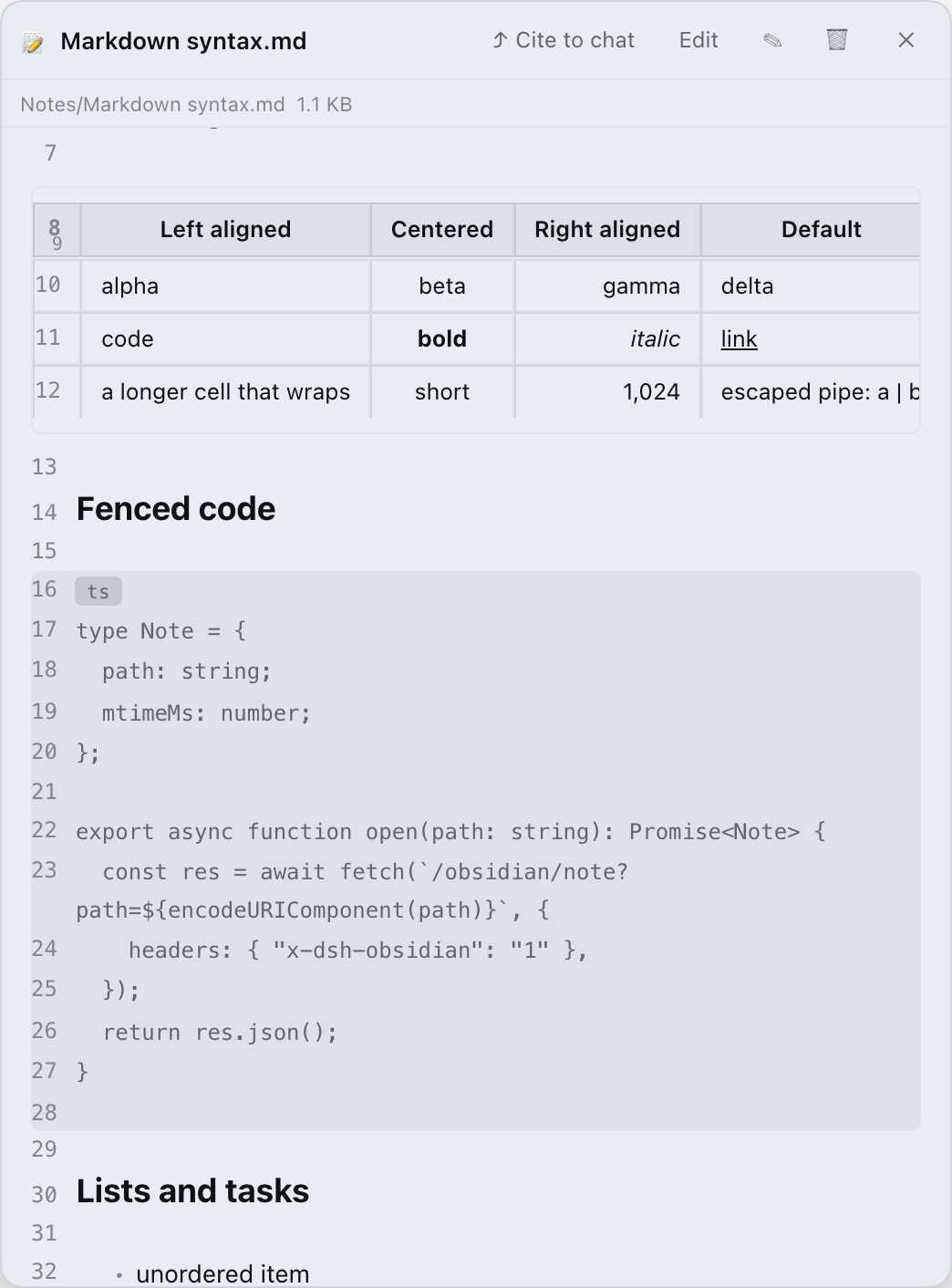
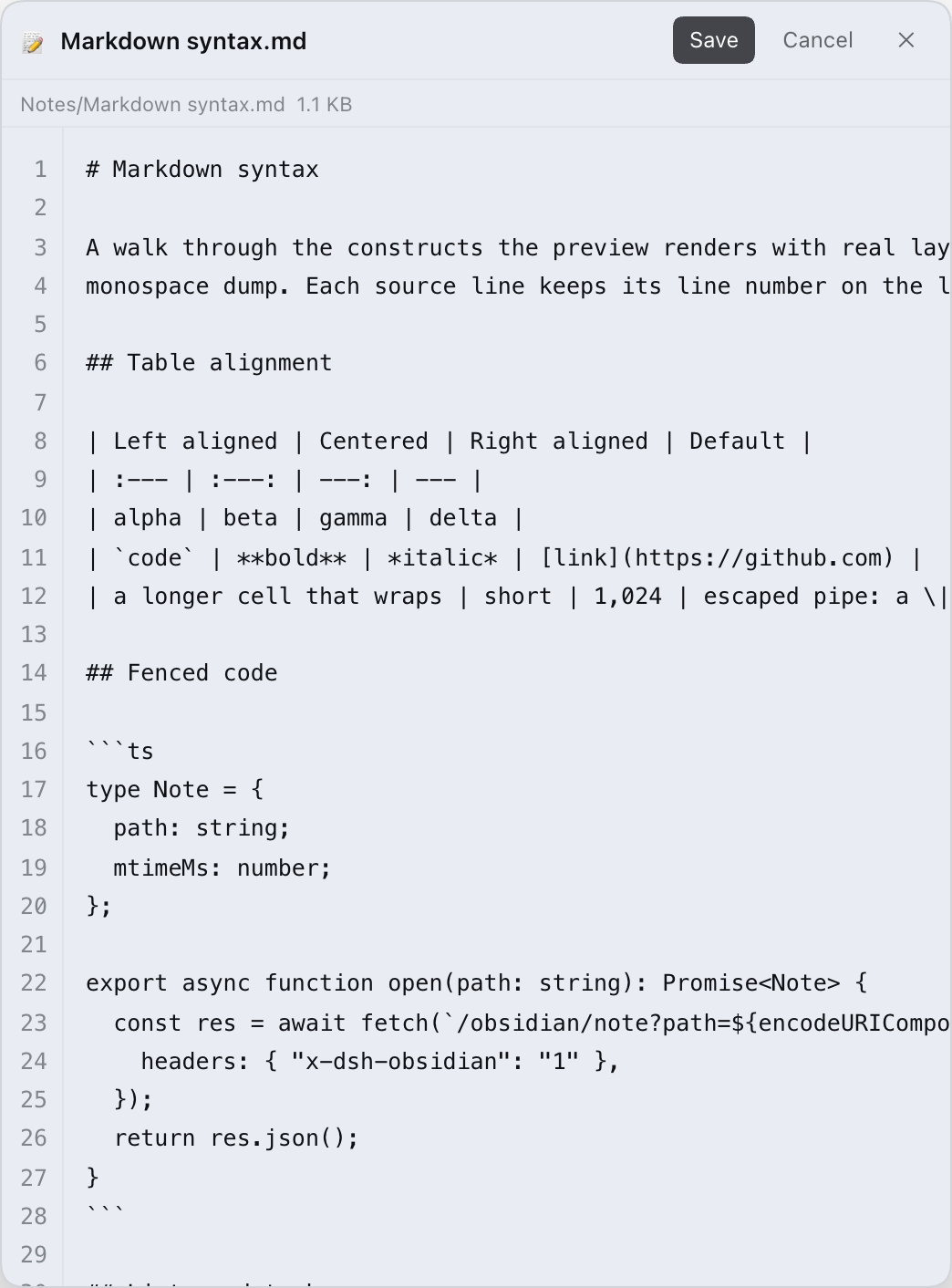
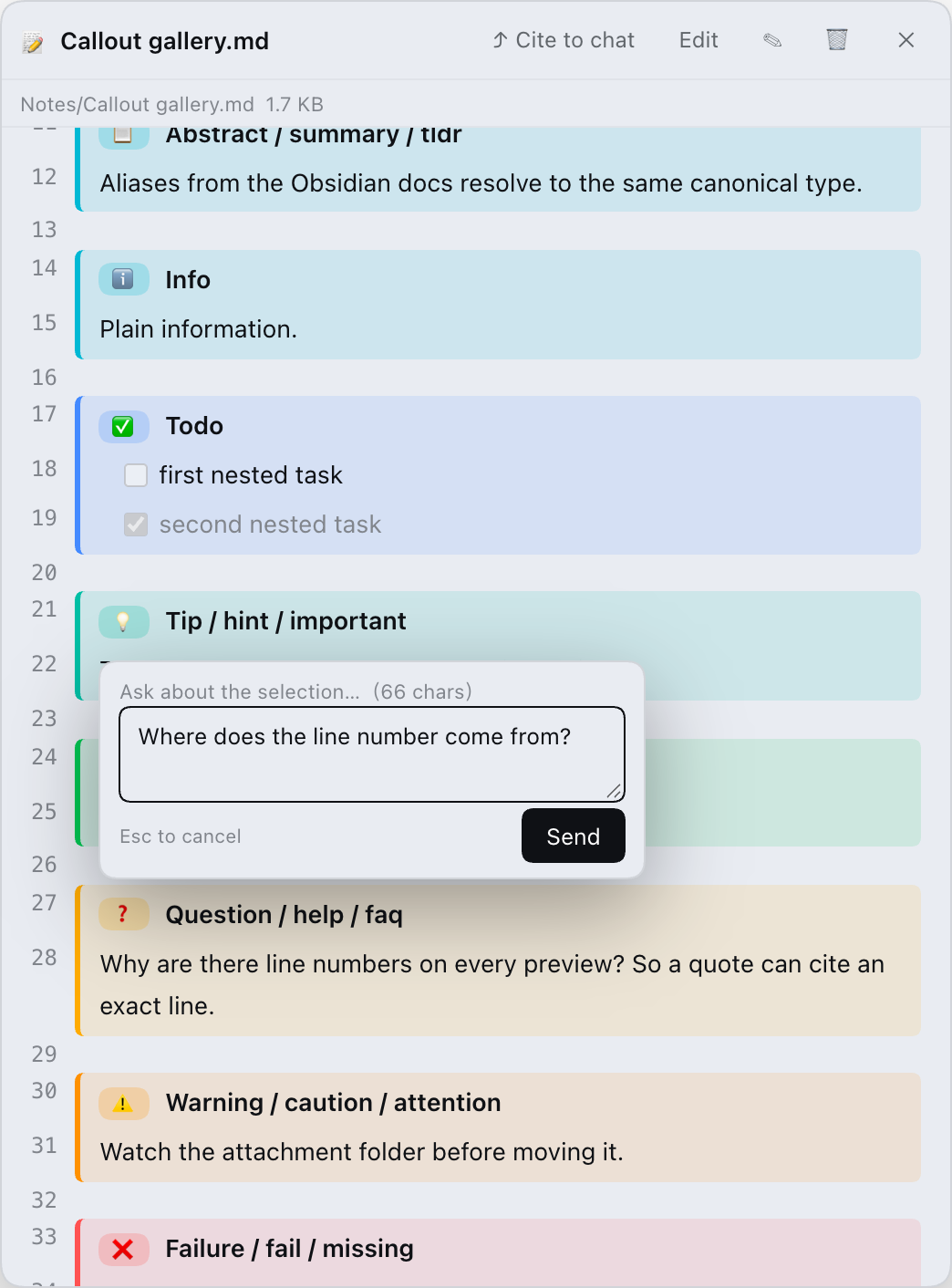
1. **Rendering fidelity is the feature.** The preview is line-numbered and keeps
|
|
24
25
|
the Obsidian details other viewers flatten: all 13 callout types plus 15
|
|
@@ -46,6 +47,10 @@ to a chat:
|
|
|
46
47
|
| --- | --- |
|
|
47
48
|
|  |  |
|
|
48
49
|
|
|
50
|
+
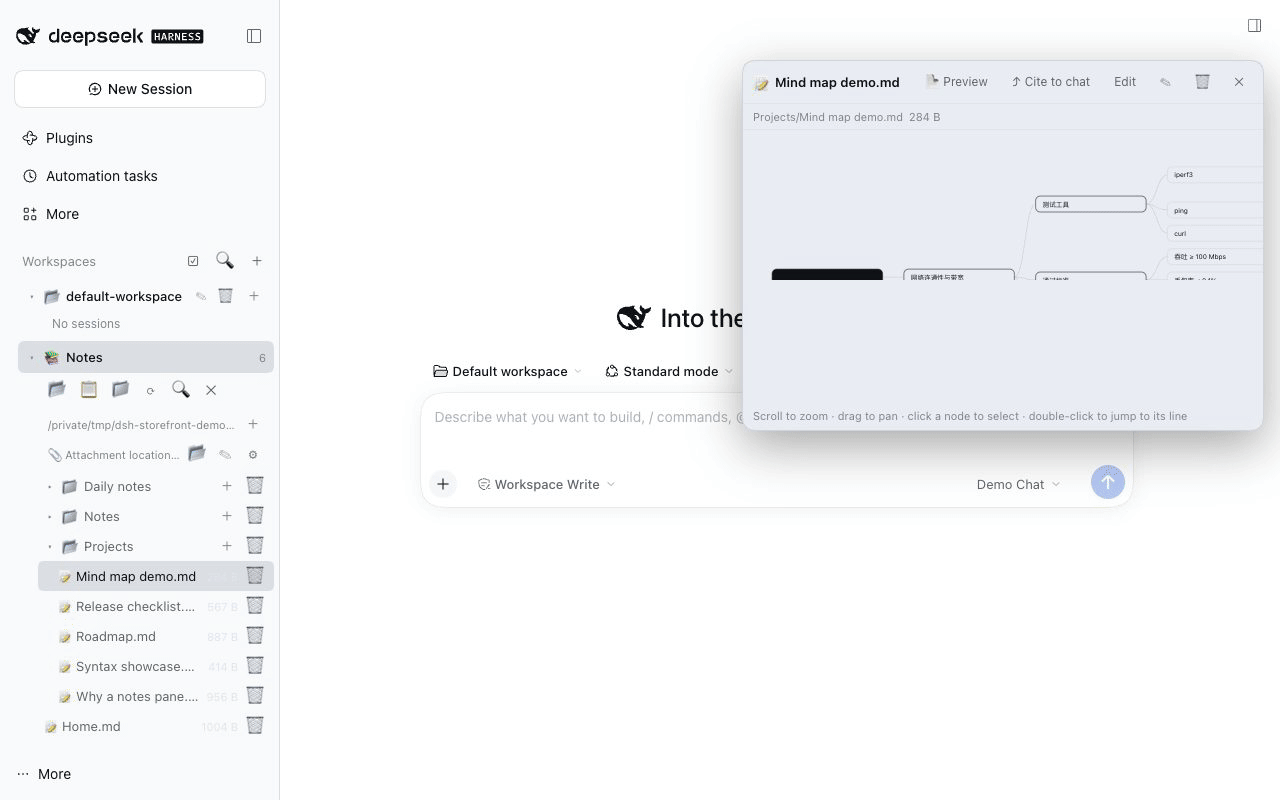
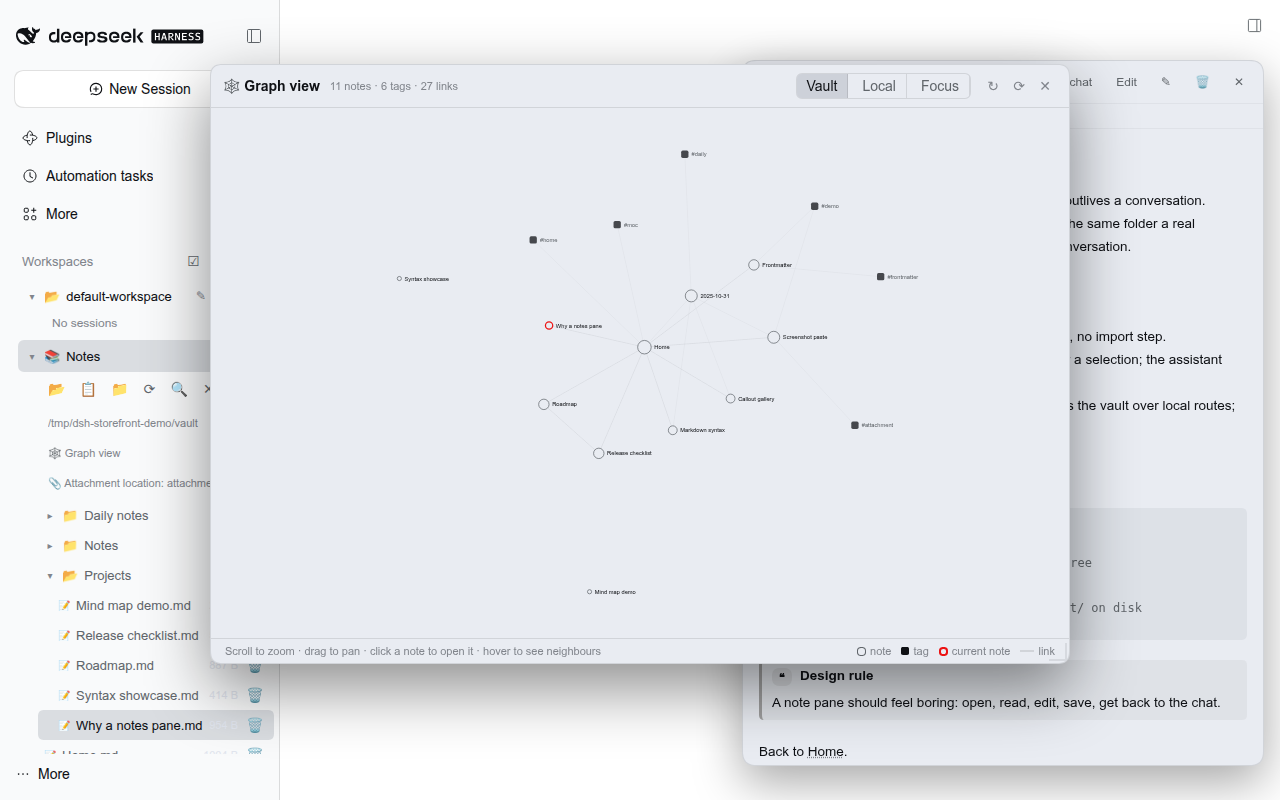
| Mind map from headings + lists | Vault-wide graph view (notes, links, tags) |
|
|
51
|
+
| --- | --- |
|
|
52
|
+
|  |  |
|
|
53
|
+
|
|
49
54
|
|
|
50
55
|
|
|
51
56
|
## Install
|
|
@@ -58,13 +63,23 @@ A plugin that ships a bundle layer is only composed at startup, so **restart the
|
|
|
58
63
|
DSH host after installing** (desktop: quit and reopen). Refreshing the page is
|
|
59
64
|
not enough.
|
|
60
65
|
|
|
66
|
+
### Already installed? Upgrading
|
|
67
|
+
|
|
68
|
+
Replacing the package and refreshing the page is enough for new UI features: the
|
|
69
|
+
client asks the host which capabilities it has (`/obsidian/root` → `features`)
|
|
70
|
+
and, when the running host is still the previous version, builds data it needs
|
|
71
|
+
from the existing routes instead of erroring. The relation graph, for example,
|
|
72
|
+
falls back to walking the vault with the old tree/note endpoints — no restart
|
|
73
|
+
and no "version mismatch" dialog. Restart the host when you want the faster
|
|
74
|
+
host-side route.
|
|
75
|
+
|
|
61
76
|
### 1. Desktop app (after the npm release)
|
|
62
77
|
|
|
63
78
|
1. Open **Settings → Plugins**.
|
|
64
79
|
2. Search for **`dsh-obsidian-notes`** and install it.
|
|
65
80
|
3. Restart DeepSeek Harness.
|
|
66
81
|
|
|
67
|
-
> This path requires the package to be published on npm (
|
|
82
|
+
> This path requires the package to be published on npm (current release **0.6.0**).
|
|
68
83
|
> If search shows nothing, use one of the two paths below.
|
|
69
84
|
|
|
70
85
|
### 2. CLI (after the npm release)
|
|
@@ -118,7 +133,21 @@ The default vault is `$DSH_WORKSPACE/obsidian_vault`, falling back to
|
|
|
118
133
|
- **Line-numbered Obsidian preview** — every source line keeps its line number.
|
|
119
134
|
Real tables with alignment, fenced code with language labels, nested lists and
|
|
120
135
|
task lists, all heading levels, setext headings, horizontal rules, and
|
|
121
|
-
clickable `[[wikilinks]]` (aliases and `#sections` included).
|
|
136
|
+
clickable `[[wikilinks]]` (aliases and `#sections` included). Inline Obsidian
|
|
137
|
+
styles render too: `==highlight==`, `~~strikethrough~~`, backslash escapes,
|
|
138
|
+
hidden `%%comments%%`, and `<https://…>` / bare URLs as links.
|
|
139
|
+
- **Graph view** — a vault-wide relation graph built from every note's `[[links]]`
|
|
140
|
+
and `#tags` (no graph file, no export step: it is computed from your Markdown on
|
|
141
|
+
the fly, like Obsidian's own graph). A vault-level entry above the note tree
|
|
142
|
+
opens it as its own view; scroll to zoom, drag to pan, hover to highlight
|
|
143
|
+
neighbours, click a note to open it in the dock. **Local** shows the
|
|
144
|
+
neighbourhood of the note that is currently open; the depth is adjustable
|
|
145
|
+
from 1 to 5 hops (same range as Obsidian's local graph depth slider, default
|
|
146
|
+
1), and **Focus current note** jumps from the vault view straight to it.
|
|
147
|
+
- **Mind map view** — toggle the preview into a horizontal mind map built from the
|
|
148
|
+
note's headings and list items. Scroll to zoom, drag to pan; select a node to
|
|
149
|
+
jump to its source line, or insert that whole branch (node + descendants) into
|
|
150
|
+
the chat as context. Rendering only — the Markdown file is untouched.
|
|
122
151
|
- **Callouts** — `> [!type] title` blocks render with type colours, icons and
|
|
123
152
|
badges. 13 canonical types (`note`, `abstract`, `info`, `todo`, `tip`,
|
|
124
153
|
`success`, `question`, `warning`, `failure`, `danger`, `bug`, `example`,
|
|
@@ -166,7 +195,9 @@ the app's light and dark themes.
|
|
|
166
195
|
| Session & workspace housekeeping | ✅ | — |
|
|
167
196
|
| Backlinks | ❌ | ✅ |
|
|
168
197
|
| Outline pane | ❌ | ✅ |
|
|
169
|
-
|
|
|
198
|
+
| Mind map view (headings + lists) | ✅ | — |
|
|
199
|
+
| Graph view (vault-wide links + tags) | ✅ | — |
|
|
200
|
+
| `==highlight==` | ✅ | ✅ |
|
|
170
201
|
|
|
171
202
|
The point is not "more features" — it is a different trade-off. If you need
|
|
172
203
|
outline and backlinks, use the other plugin (or Obsidian itself); if you want a
|
|
@@ -246,10 +277,10 @@ Settings are persisted in `$DSH_HOME/dsh-obsidian-vault.json`
|
|
|
246
277
|
- **Node.js:** `^22.19 || >=24` (needed only when running the host from source).
|
|
247
278
|
- **OS:** paths are handled with the platform separator; session paths use
|
|
248
279
|
`$DSH_HOME`. The screenshots above were captured on macOS.
|
|
249
|
-
- **Not rendered** (kept as source text): math, mermaid, footnotes,
|
|
250
|
-
|
|
251
|
-
|
|
252
|
-
|
|
280
|
+
- **Not rendered** (kept as source text): math, mermaid, footnotes, tags, raw
|
|
281
|
+
HTML, note transclusion, audio/PDF embeds, block refs (`^id`), callout
|
|
282
|
+
folding/unknown types/nested callouts, and some inline emphasis edge cases
|
|
283
|
+
(`***bold italic***`, nested emphasis, `_` next to text).
|
|
253
284
|
|
|
254
285
|
## Development
|
|
255
286
|
|
package/README.zh.md
CHANGED
|
@@ -7,6 +7,8 @@
|
|
|
7
7
|
[](https://github.com/revive123456/dsh-obsidian-notes/actions/workflows/ci.yml)
|
|
8
8
|
[](https://github.com/revive123456/dsh-obsidian-notes/blob/main/LICENSE)
|
|
9
9
|

|
|
10
|
+
[](https://dshbase.com/zh/plugins/dsh-obsidian-notes/)
|
|
11
|
+
[](https://github.com/revive123456/dsh-obsidian-notes/stargazers)
|
|
10
12
|
|
|
11
13
|
[English](https://github.com/revive123456/dsh-obsidian-notes/blob/main/README.md) | 中文
|
|
12
14
|
|
|
@@ -16,7 +18,7 @@
|
|
|
16
18
|
|
|
17
19
|
DSH 生态里已经有一个 Obsidian 方向的插件
|
|
18
20
|
([DedsecLemon/dsh-obsidian](https://github.com/DedsecLemon/dsh-obsidian)),
|
|
19
|
-
|
|
21
|
+
它适合需要大纲和反链的人。本插件押的是另外三件事 —— 如果你习惯「一边写笔记、一边和模型讨论」,这三件更重要:
|
|
20
22
|
|
|
21
23
|
1. **渲染细节本身就是功能。** 预览带行号,并保留 Obsidian 的渲染细节:13 种 callout 类型 + 15 个别名、表格对齐、带语言标签的围栏代码、任务列表、setext 标题;frontmatter 不进编辑器,保存时按原文拼回。
|
|
22
24
|
2. **粘贴的截图不会丢。** 编辑时粘贴图片,host 落盘为 Obsidian 原生引用 `![[Pasted image …]]`;以后迁移附件目录,全库笔记里的引用会一并改写。
|
|
@@ -34,6 +36,10 @@ DSH 生态里已经有一个 Obsidian 方向的插件
|
|
|
34
36
|
| --- | --- |
|
|
35
37
|
|  |  |
|
|
36
38
|
|
|
39
|
+
| 由标题 + 列表生成的思维导图 | 全库关系图谱(笔记、双链、标签) |
|
|
40
|
+
| --- | --- |
|
|
41
|
+
|  |  |
|
|
42
|
+
|
|
37
43
|

|
|
38
44
|
|
|
39
45
|
## 安装
|
|
@@ -42,13 +48,17 @@ DSH 生态里已经有一个 Obsidian 方向的插件
|
|
|
42
48
|
|
|
43
49
|
带 bundle 的插件只在启动时装配,所以**安装后必须重启 DSH host**(桌面版:退出再打开)。只刷新页面不够。
|
|
44
50
|
|
|
51
|
+
### 已经装过?升级说明
|
|
52
|
+
|
|
53
|
+
换掉包、刷新页面就能用上新界面能力:客户端会先问 host 支持哪些能力(`/obsidian/root` → `features`),如果运行中的 host 还是旧版,就用**已有接口在浏览器里自建**需要的数据,而不是弹「版本不匹配」错误。比如关系图谱在旧 host 上会回退成用旧的 tree/note 接口遍历 vault 构建——不用重启、也不会看到报错。想要更快的 host 侧路径时再重启一次即可。
|
|
54
|
+
|
|
45
55
|
### 1. 桌面版(npm 发布后)
|
|
46
56
|
|
|
47
57
|
1. 打开 **Settings → Plugins**;
|
|
48
58
|
2. 搜索 **`dsh-obsidian-notes`** 并安装;
|
|
49
59
|
3. 重启 DeepSeek Harness。
|
|
50
60
|
|
|
51
|
-
> 这条路径要求 npm
|
|
61
|
+
> 这条路径要求 npm 上已有该包(当前版本 **0.6.0**)。搜不到时用下面两种方式。
|
|
52
62
|
|
|
53
63
|
### 2. CLI(npm 发布后)
|
|
54
64
|
|
|
@@ -92,7 +102,9 @@ dsh plugin --profile web add "$(pwd)" # PowerShell 用 "$PWD"
|
|
|
92
102
|
## 功能
|
|
93
103
|
|
|
94
104
|
- **Vault 侧边栏**:按需加载的目录树;单击打开笔记,新建 / 重命名 / 删除笔记与文件夹,按标题**和正文**搜索,显示笔记数徽标。
|
|
95
|
-
- **带行号的 Obsidian 预览**:一行源码对应一行渲染并带行号。真表格(支持 `:---` / `:---:` / `---:` 对齐)、带语言标签的围栏代码、嵌套列表与任务列表、`#`~`######` 标题、setext 标题、分隔线、可点击的 `[[双链]]`(含别名与
|
|
105
|
+
- **带行号的 Obsidian 预览**:一行源码对应一行渲染并带行号。真表格(支持 `:---` / `:---:` / `---:` 对齐)、带语言标签的围栏代码、嵌套列表与任务列表、`#`~`######` 标题、setext 标题、分隔线、可点击的 `[[双链]]`(含别名与 `#章节`);行内也支持 `==高亮==`、`~~删除线~~`、反斜杠转义、隐藏的 `%%注释%%`,以及 `<https://…>` / 裸 URL 自动成链。
|
|
106
|
+
- **关系图谱**:全库关系图,节点/连线直接由每篇笔记的 `[[双链]]` 与 `#标签` 现算(没有额外图谱文件,也不导出——和 Obsidian 自己的图谱一样从 Markdown 推导)。入口在笔记树上方的 vault 级「🕸 关系图谱」行,点击后在独立视图里显示;滚轮缩放、拖动平移、悬停高亮邻居、点笔记节点在 Dock 里打开。切到「局部」可看当前打开笔记的邻居,跳数可在 1–5 之间调(与 Obsidian 局部图谱的 depth 范围一致,默认 1);「聚焦当前笔记」可从全库一键切到该视角。
|
|
107
|
+
- **思维导图视图**:把预览切换成由标题 + 列表生成的横向思维导图。滚轮缩放、拖动平移;选中节点可跳到对应源码行,或把「该分支(节点 + 全部后代)」作为上下文插入对话。纯渲染,不改动 Markdown 文件。
|
|
96
108
|
- **Callout**:`> [!type] 标题` 按类型渲染颜色、图标与徽标。13 种规范类型(`note`、`abstract`、`info`、`todo`、`tip`、`success`、`question`、`warning`、`failure`、`danger`、`bug`、`example`、`quote`)+ 15 个 Obsidian 别名(`summary`、`tldr`、`hint`、`important`、`check`、`done`、`help`、`faq`、`caution`、`attention`、`fail`、`missing`、`error`、`cite`、`none`)。
|
|
97
109
|
- **编辑与保存**:带行号的源码编辑器,点 `保存` 或按 <kbd>Ctrl/Cmd+S</kbd>。YAML frontmatter 不进编辑器,保存时原样拼回;外部对 YAML 的改动不会被覆盖。
|
|
98
110
|
- **粘贴截图**:编辑时 <kbd>Ctrl/Cmd+V</kbd> 把剪贴板图片写入附件目录,并在光标处插入 Obsidian 原生写法 `![[Pasted image <时间戳>.png]]`(单张上限 20 MB),写进 `.md` 的内容可被真实 Obsidian 识别。
|
|
@@ -116,7 +128,9 @@ dsh plugin --profile web add "$(pwd)" # PowerShell 用 "$PWD"
|
|
|
116
128
|
| 会话与工作区整理 | ✅ | — |
|
|
117
129
|
| 反链 | ❌ | ✅ |
|
|
118
130
|
| 大纲面板 | ❌ | ✅ |
|
|
119
|
-
|
|
|
131
|
+
| 思维导图视图(标题 + 列表) | ✅ | — |
|
|
132
|
+
| 关系图谱(全库双链 + 标签) | ✅ | — |
|
|
133
|
+
| `==高亮==` | ✅ | ✅ |
|
|
120
134
|
|
|
121
135
|
比的不是「功能多少」,而是取舍:需要大纲和反链,用另一个插件(或真 Obsidian);想要忠实的 Obsidian 阅读/编辑体验、并顺手把笔记递进对话,这个插件就是为此写的。
|
|
122
136
|
|
|
@@ -165,7 +179,7 @@ dsh plugin --profile web add "$(pwd)" # PowerShell 用 "$PWD"
|
|
|
165
179
|
- **DSH:** 已对照 **0.2.1-rc.5** 验证(Web UI、桌面版外壳)。composer 集成面向 DSH 0.2 的 Lexical 输入框,并保留 0.1.x textarea 的降级路径。
|
|
166
180
|
- **Node.js:** `^22.19 || >=24`(仅从源码运行 host 时需要)。
|
|
167
181
|
- **系统:** 路径按平台分隔符处理,会话路径基于 `$DSH_HOME`。上面的截图在 macOS 上录制。
|
|
168
|
-
- **不渲染(保持原文显示)**:数学公式、mermaid
|
|
182
|
+
- **不渲染(保持原文显示)**:数学公式、mermaid、脚注、标签、裸 HTML、笔记 transclusion、音频/PDF 嵌入、块引用 `^id`、callout 折叠/未知类型/嵌套,以及部分行内强调边界(`***粗斜体***`、嵌套强调、`_` 相邻文本)。
|
|
169
183
|
|
|
170
184
|
## 开发
|
|
171
185
|
|