dsh-obsidian-notes 0.0.0-stage → 0.5.1
This diff represents the content of publicly available package versions that have been released to one of the supported registries. The information contained in this diff is provided for informational purposes only and reflects changes between package versions as they appear in their respective public registries.
- package/LICENSE +21 -0
- package/README.md +285 -2
- package/README.zh.md +201 -0
- package/cordis.patch.yml +11 -0
- package/lib/client.js +4330 -0
- package/lib/types/index.d.ts +3 -0
- package/package.json +70 -4
- package/src/client.js +3229 -0
- package/src/index.js +1293 -0
- package/src/markdown.js +1089 -0
- package/src/session-store.js +146 -0
- package/src/vault-store.js +141 -0
package/LICENSE
ADDED
|
@@ -0,0 +1,21 @@
|
|
|
1
|
+
MIT License
|
|
2
|
+
|
|
3
|
+
Copyright (c) 2026 revive123456
|
|
4
|
+
|
|
5
|
+
Permission is hereby granted, free of charge, to any person obtaining a copy
|
|
6
|
+
of this software and associated documentation files (the "Software"), to deal
|
|
7
|
+
in the Software without restriction, including without limitation the rights
|
|
8
|
+
to use, copy, modify, merge, publish, distribute, sublicense, and/or sell
|
|
9
|
+
copies of the Software, and to permit persons to whom the Software is
|
|
10
|
+
furnished to do so, subject to the following conditions:
|
|
11
|
+
|
|
12
|
+
The above copyright notice and this permission notice shall be included in all
|
|
13
|
+
copies or substantial portions of the Software.
|
|
14
|
+
|
|
15
|
+
THE SOFTWARE IS PROVIDED "AS IS", WITHOUT WARRANTY OF ANY KIND, EXPRESS OR
|
|
16
|
+
IMPLIED, INCLUDING BUT NOT LIMITED TO THE WARRANTIES OF MERCHANTABILITY,
|
|
17
|
+
FITNESS FOR A PARTICULAR PURPOSE AND NONINFRINGEMENT. IN NO EVENT SHALL THE
|
|
18
|
+
AUTHORS OR COPYRIGHT HOLDERS BE LIABLE FOR ANY CLAIM, DAMAGES OR OTHER
|
|
19
|
+
LIABILITY, WHETHER IN AN ACTION OF CONTRACT, TORT OR OTHERWISE, ARISING FROM,
|
|
20
|
+
OUT OF OR IN CONNECTION WITH THE SOFTWARE OR THE USE OR OTHER DEALINGS IN THE
|
|
21
|
+
SOFTWARE.
|
package/README.md
CHANGED
|
@@ -1,3 +1,286 @@
|
|
|
1
|
-
#
|
|
1
|
+
# Obsidian Notes for DeepSeek Harness
|
|
2
2
|
|
|
3
|
-
|
|
3
|
+
**A local Obsidian-style notes pane for the [DeepSeek Harness](https://github.com/deepseek-ai/deepseek-harness) web UI.** Point it at a folder of Markdown files, then read, edit, search and cite them next to the conversation — without opening Obsidian, without importing anything, and without your notes leaving the machine.
|
|
4
|
+
|
|
5
|
+
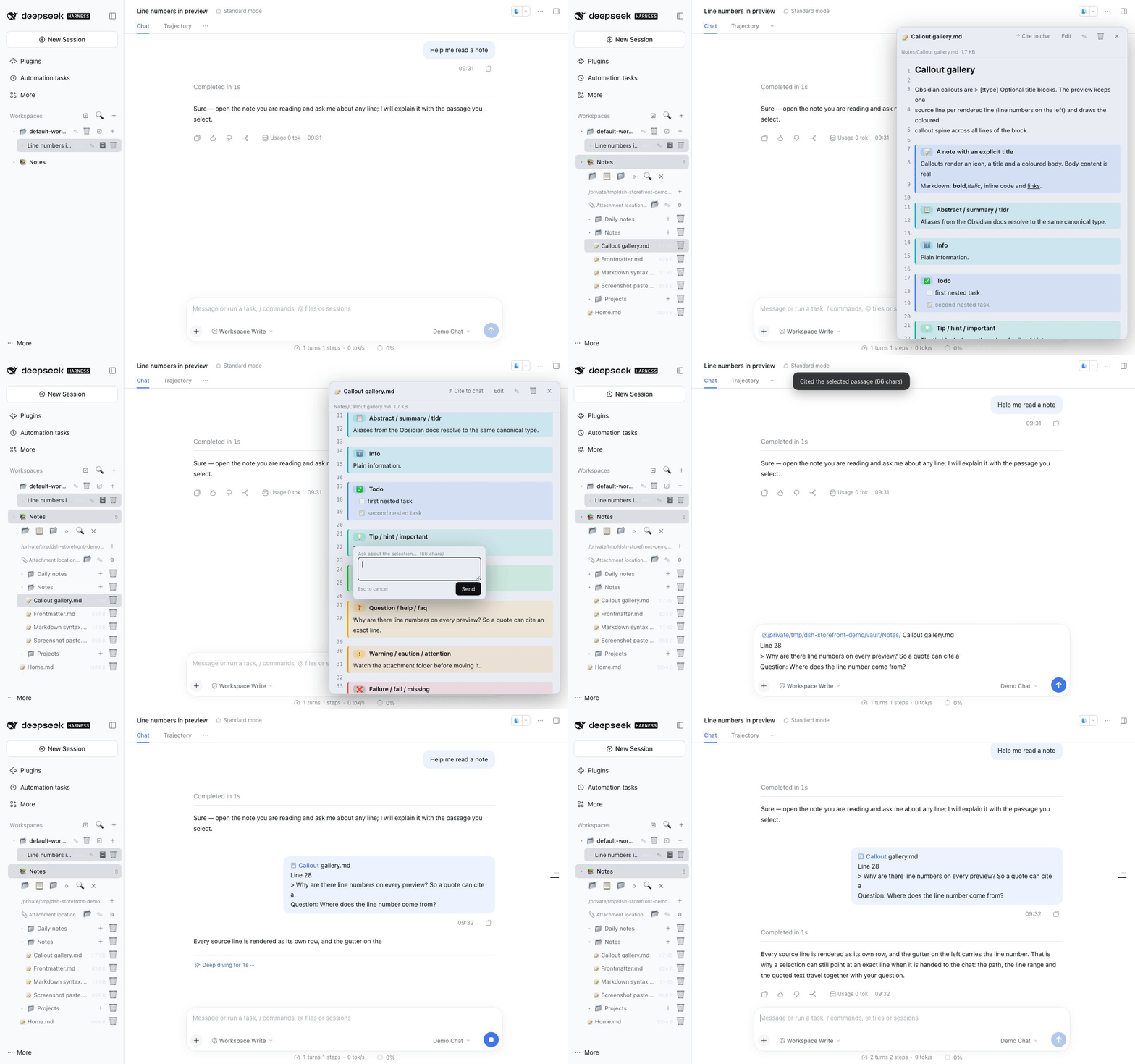
|
|
6
|
+
|
|
7
|
+
[](https://github.com/revive123456/dsh-obsidian-notes/actions/workflows/ci.yml)
|
|
8
|
+
[](https://github.com/revive123456/dsh-obsidian-notes/blob/main/LICENSE)
|
|
9
|
+

|
|
10
|
+
|
|
11
|
+
English | [中文](https://github.com/revive123456/dsh-obsidian-notes/blob/main/README.zh.md)
|
|
12
|
+
|
|
13
|
+
---
|
|
14
|
+
|
|
15
|
+
## Why this one
|
|
16
|
+
|
|
17
|
+
There is already an Obsidian-ish plugin in the DSH ecosystem
|
|
18
|
+
([DedsecLemon/dsh-obsidian](https://github.com/DedsecLemon/dsh-obsidian)), and it
|
|
19
|
+
is a good fit if you want an outline pane, backlinks and `==highlight==`. This
|
|
20
|
+
plugin bet on a different set of things — the three that matter if you write next
|
|
21
|
+
to a chat:
|
|
22
|
+
|
|
23
|
+
1. **Rendering fidelity is the feature.** The preview is line-numbered and keeps
|
|
24
|
+
the Obsidian details other viewers flatten: all 13 callout types plus 15
|
|
25
|
+
aliases, table alignment, fenced code with info strings, task lists, setext
|
|
26
|
+
headings, and frontmatter that round-trips byte-for-byte on save.
|
|
27
|
+
2. **Pasted screenshots stay attached.** Paste an image while editing and the
|
|
28
|
+
host writes an Obsidian-native `![[Pasted image …]]` embed. Move the
|
|
29
|
+
attachment folder later and every embed in the vault is rewritten to match.
|
|
30
|
+
3. **The note can talk to the chat.** Cite a whole note as an `@path` mention, or
|
|
31
|
+
select a passage and ask about it — the prompt carries the absolute path, the
|
|
32
|
+
line range and the quoted text.
|
|
33
|
+
|
|
34
|
+
> **What it does not do:** no backlinks, no outline pane, no graph view, and no
|
|
35
|
+
> math/mermaid/transclusion rendering. If those are your priority, use a real
|
|
36
|
+
> Obsidian vault (or the plugin above) instead. The [comparison](#comparison) is
|
|
37
|
+
> spelled out below.
|
|
38
|
+
|
|
39
|
+
## Screenshots
|
|
40
|
+
|
|
41
|
+
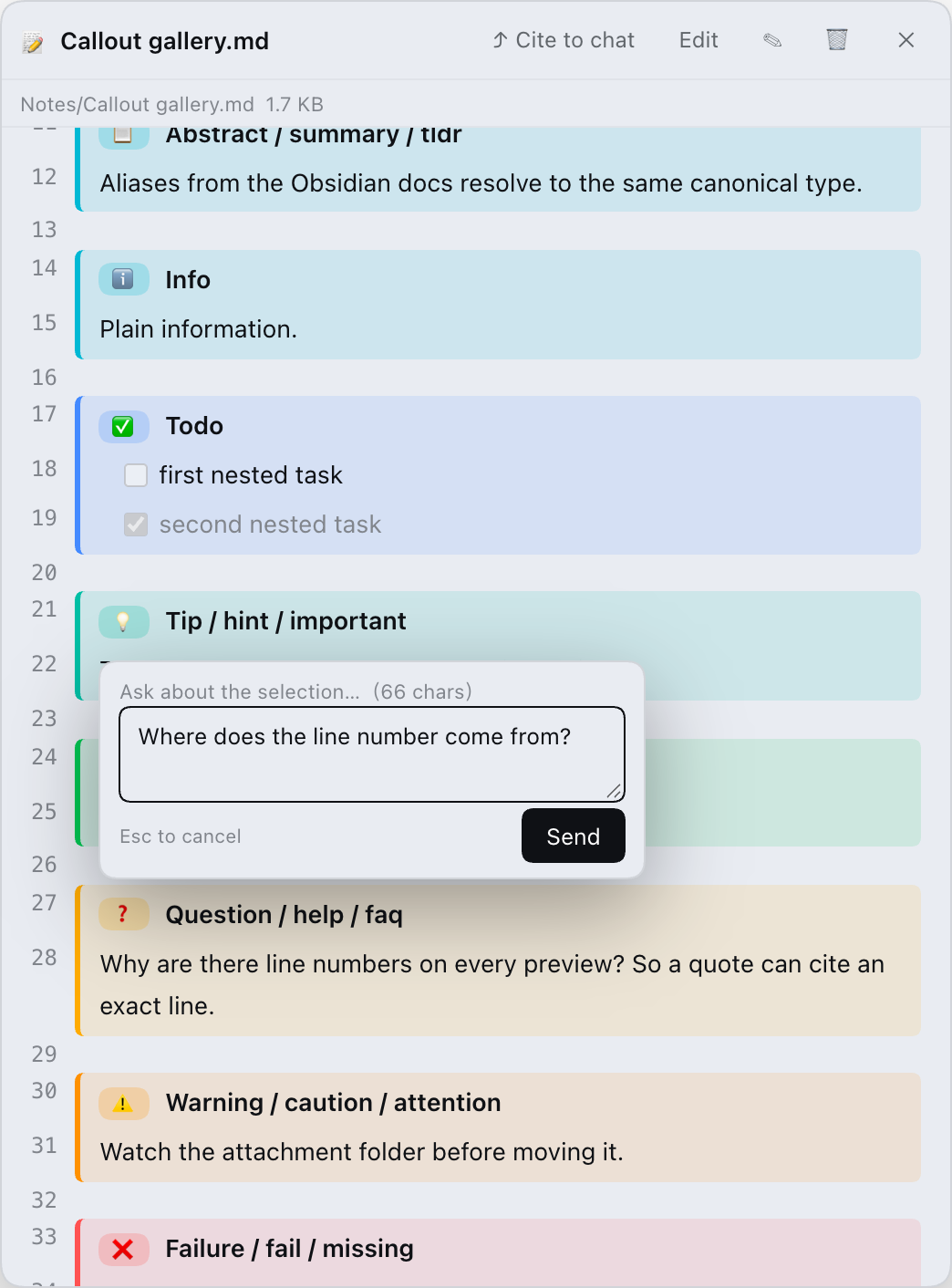
| Notes tree + docked preview | Callouts, line numbers, badges |
|
|
42
|
+
| --- | --- |
|
|
43
|
+
| 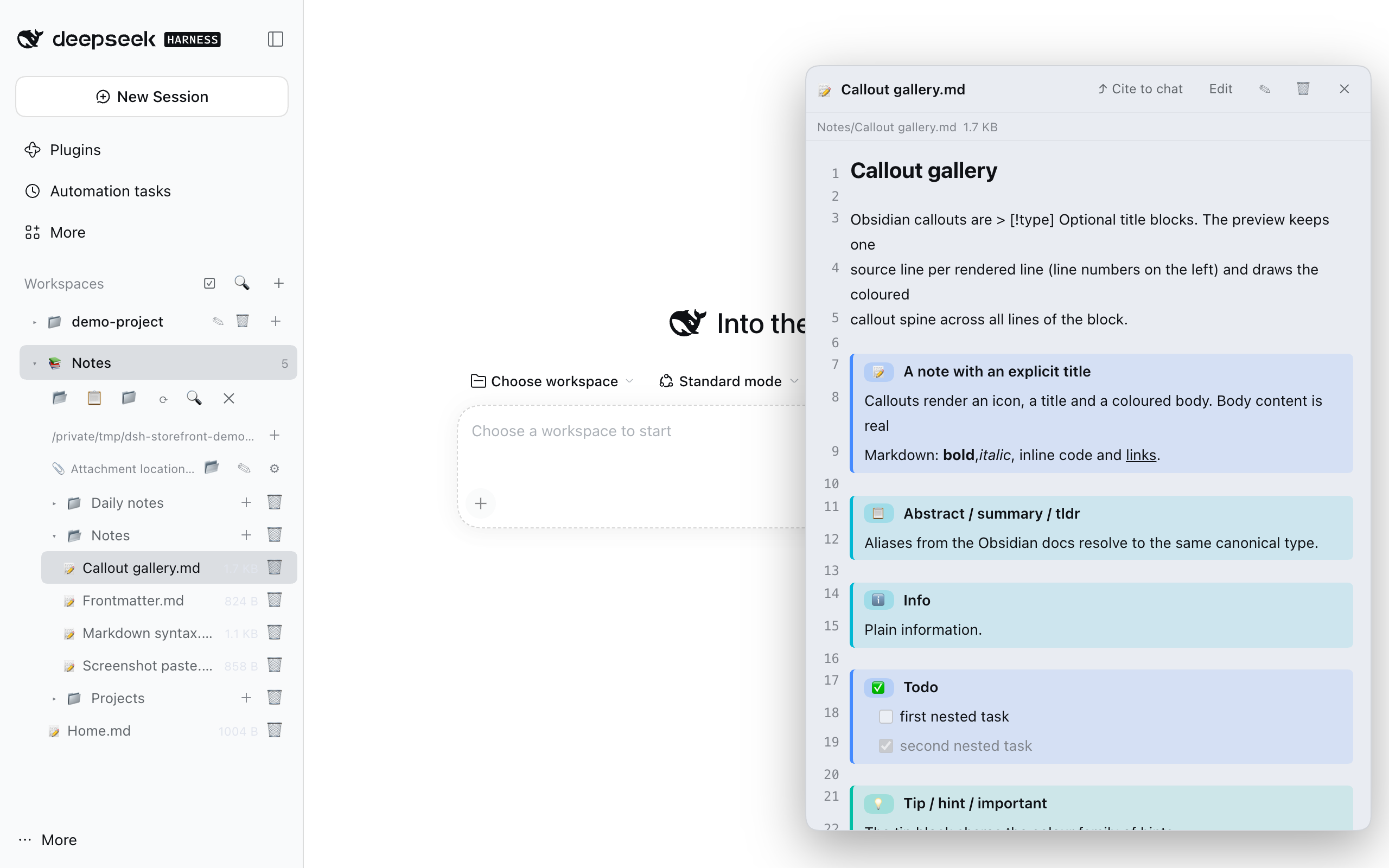 | 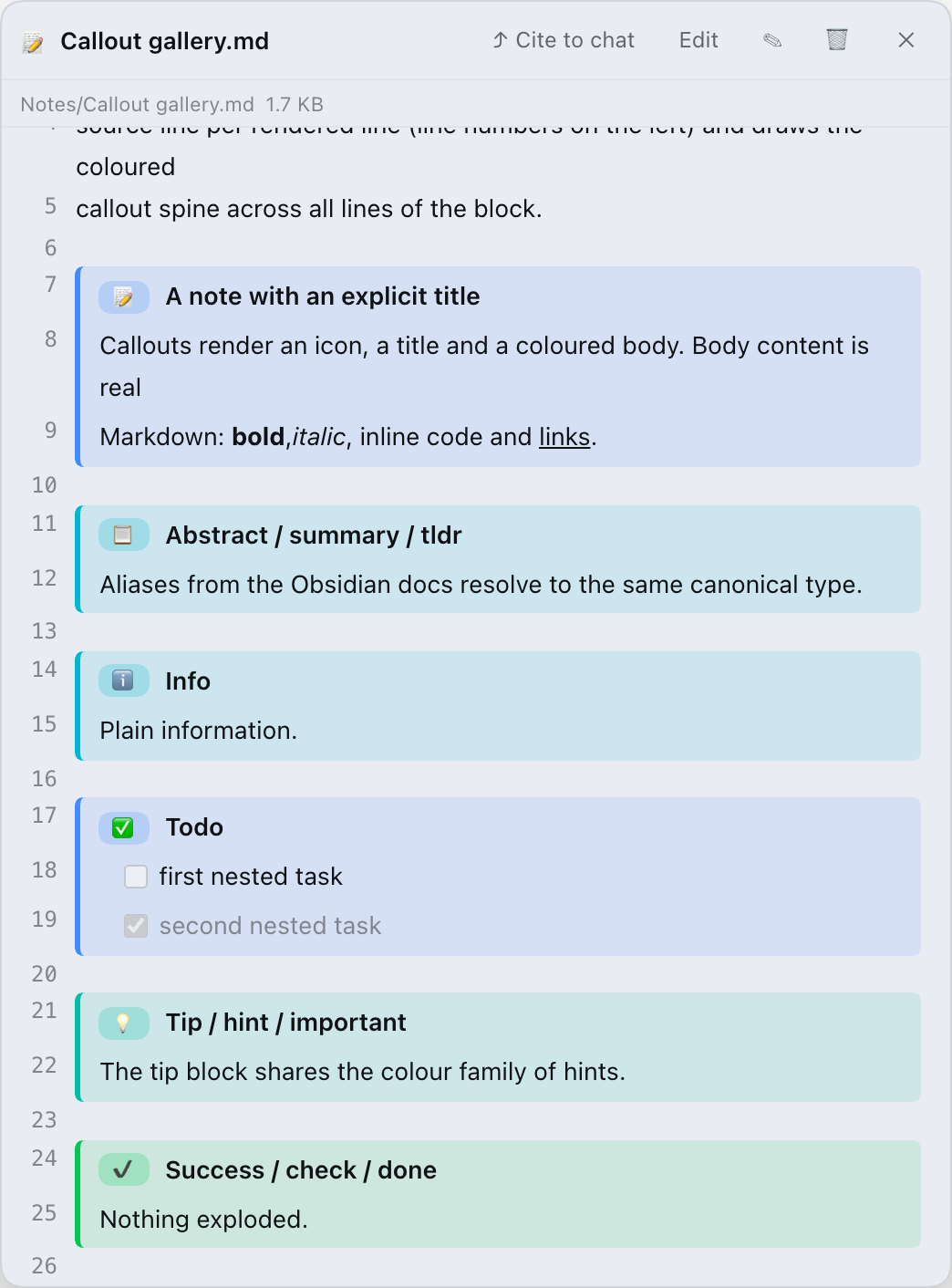 |
|
|
44
|
+
|
|
45
|
+
| Real tables and fenced code | Edit with a line-numbered source view |
|
|
46
|
+
| --- | --- |
|
|
47
|
+
| 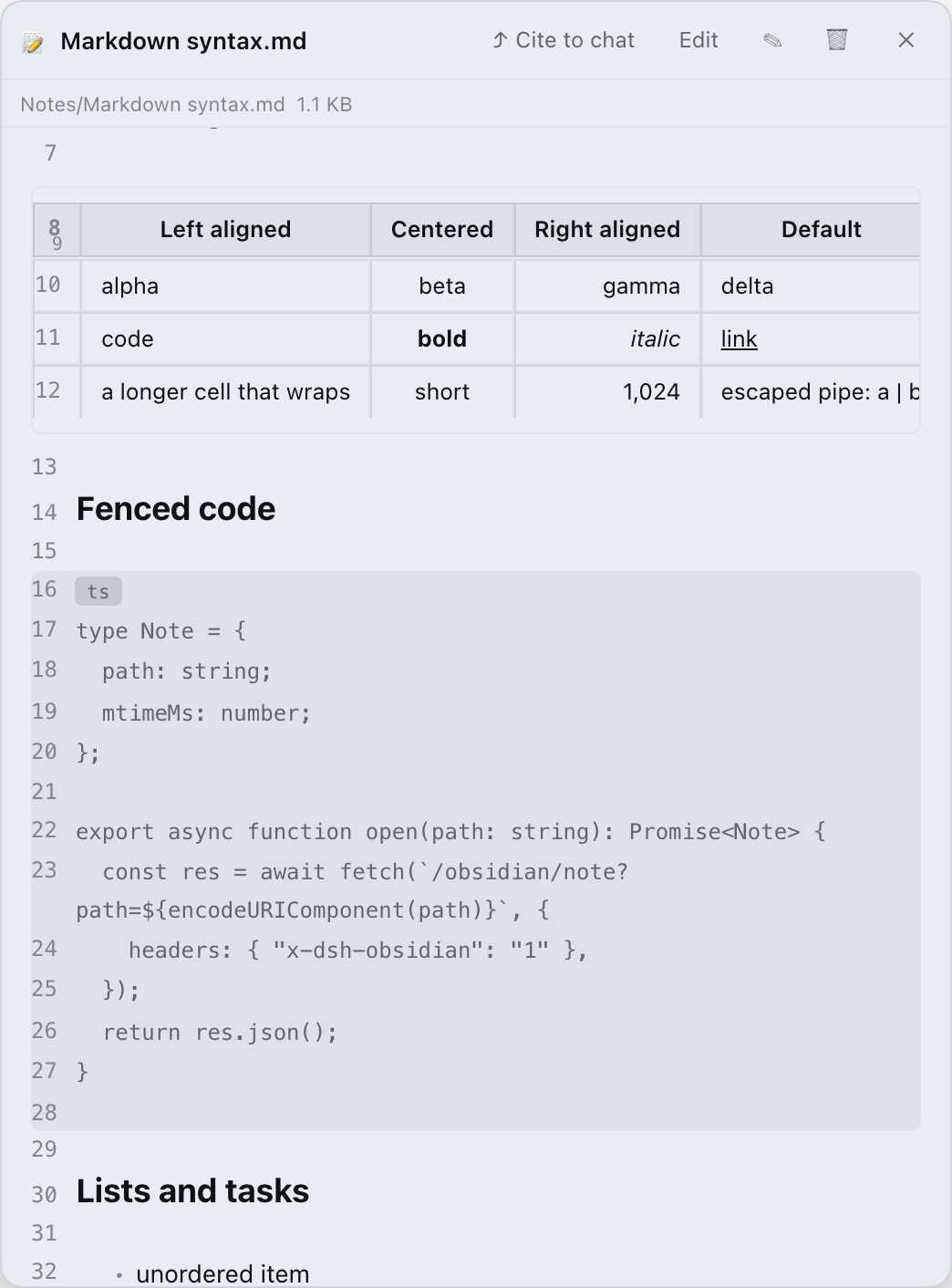 | 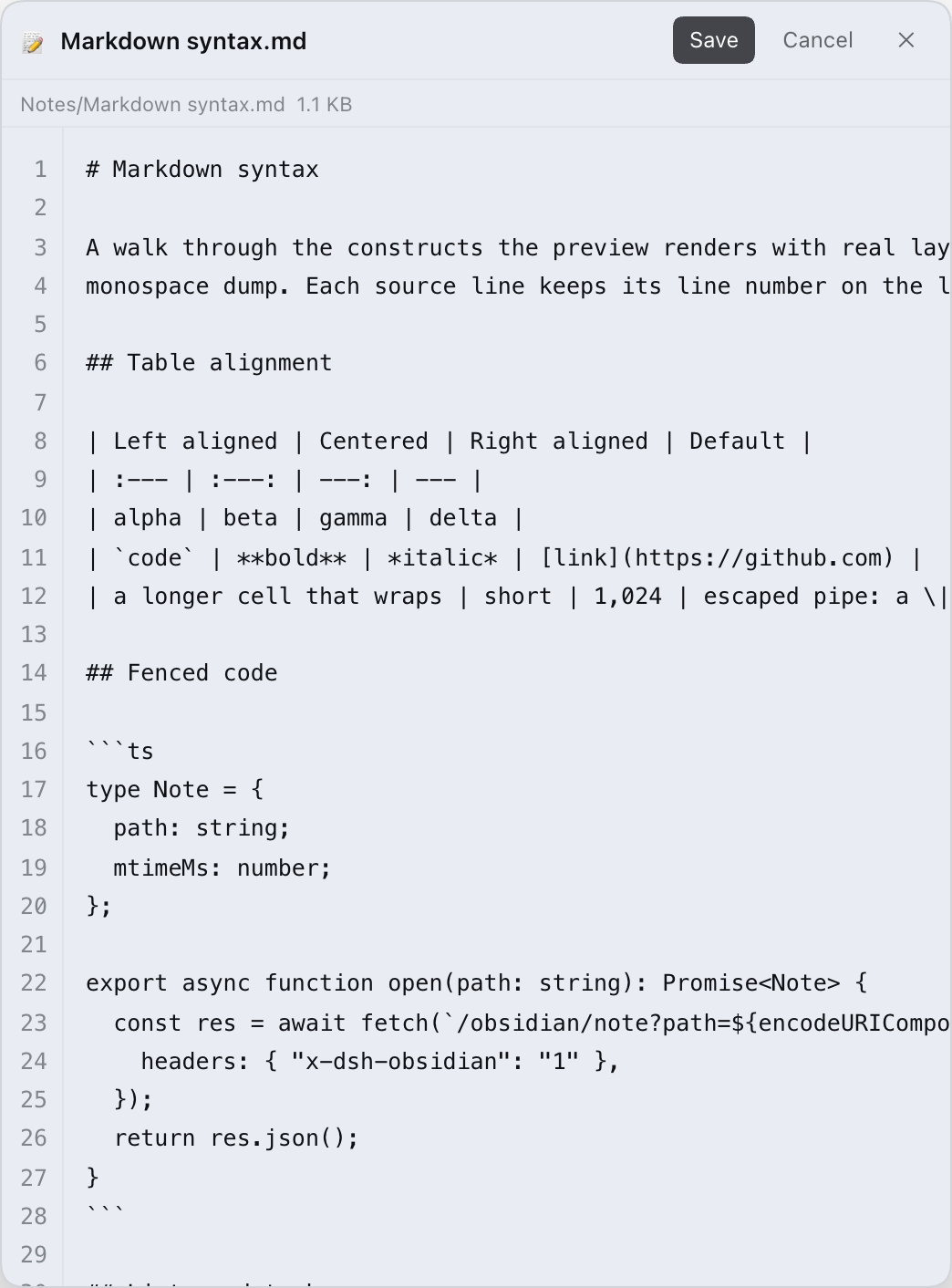 |
|
|
48
|
+
|
|
49
|
+
|
|
50
|
+
|
|
51
|
+
## Install
|
|
52
|
+
|
|
53
|
+
**Requirements:** DeepSeek Harness **0.2.1 or newer** (web UI or desktop app).
|
|
54
|
+
The CLI install also needs **pnpm** (`npm i -g pnpm`, or `corepack enable`) and a
|
|
55
|
+
Node.js **`^22.19 || >=24`** runtime for DSH.
|
|
56
|
+
|
|
57
|
+
A plugin that ships a bundle layer is only composed at startup, so **restart the
|
|
58
|
+
DSH host after installing** (desktop: quit and reopen). Refreshing the page is
|
|
59
|
+
not enough.
|
|
60
|
+
|
|
61
|
+
### 1. Desktop app (after the npm release)
|
|
62
|
+
|
|
63
|
+
1. Open **Settings → Plugins**.
|
|
64
|
+
2. Search for **`dsh-obsidian-notes`** and install it.
|
|
65
|
+
3. Restart DeepSeek Harness.
|
|
66
|
+
|
|
67
|
+
> This path requires the package to be published on npm (target release 0.5.0).
|
|
68
|
+
> If search shows nothing, use one of the two paths below.
|
|
69
|
+
|
|
70
|
+
### 2. CLI (after the npm release)
|
|
71
|
+
|
|
72
|
+
```bash
|
|
73
|
+
npm i -g pnpm # `dsh plugin` forwards to pnpm
|
|
74
|
+
dsh plugin --profile web add dsh-obsidian-notes
|
|
75
|
+
# restart the host, then start it again
|
|
76
|
+
dsh web
|
|
77
|
+
```
|
|
78
|
+
|
|
79
|
+
### 3. From source (works before the npm release)
|
|
80
|
+
|
|
81
|
+
```bash
|
|
82
|
+
git clone https://github.com/revive123456/dsh-obsidian-notes.git
|
|
83
|
+
cd dsh-obsidian-notes
|
|
84
|
+
npm i # runs build.mjs via prepare → lib/client.js
|
|
85
|
+
dsh plugin --profile web add "$(pwd)" # PowerShell: "$PWD"
|
|
86
|
+
# restart `dsh web`
|
|
87
|
+
```
|
|
88
|
+
|
|
89
|
+
`dsh plugin add` records the package as a bundle in
|
|
90
|
+
`$DSH_HOME/profiles/web/package.json`; the profile patch is applied on the next
|
|
91
|
+
boot.
|
|
92
|
+
|
|
93
|
+
> Avoid installing this repository with a bare `github:` spec: pnpm ≥ 10 blocks
|
|
94
|
+
> lifecycle (`prepare`) scripts by default, so the build step that produces
|
|
95
|
+
> `lib/client.js` would be skipped. Clone + `npm i` + install the local path
|
|
96
|
+
> instead.
|
|
97
|
+
|
|
98
|
+
**Uninstall:** `dsh plugin --profile web remove dsh-obsidian-notes`, then restart.
|
|
99
|
+
If you installed it the old way (manual `cordis.patch.yml` row), see
|
|
100
|
+
[docs/legacy-install.md](https://github.com/revive123456/dsh-obsidian-notes/blob/main/docs/legacy-install.md).
|
|
101
|
+
|
|
102
|
+
### First run
|
|
103
|
+
|
|
104
|
+
Open the **📚 Notes** row at the bottom of the sidebar. If no vault is
|
|
105
|
+
configured, choose one:
|
|
106
|
+
|
|
107
|
+
- **📂** opens a directory picker;
|
|
108
|
+
- **📋** accepts a pasted absolute path.
|
|
109
|
+
|
|
110
|
+
The default vault is `$DSH_WORKSPACE/obsidian_vault`, falling back to
|
|
111
|
+
`./obsidian_vault` under the directory you started `dsh web` from.
|
|
112
|
+
|
|
113
|
+
## Features
|
|
114
|
+
|
|
115
|
+
- **Vault sidebar** — lazy directory tree; open a note with one click, create,
|
|
116
|
+
rename or delete notes and folders, and search titles **and** file contents.
|
|
117
|
+
Shows a live note count.
|
|
118
|
+
- **Line-numbered Obsidian preview** — every source line keeps its line number.
|
|
119
|
+
Real tables with alignment, fenced code with language labels, nested lists and
|
|
120
|
+
task lists, all heading levels, setext headings, horizontal rules, and
|
|
121
|
+
clickable `[[wikilinks]]` (aliases and `#sections` included).
|
|
122
|
+
- **Callouts** — `> [!type] title` blocks render with type colours, icons and
|
|
123
|
+
badges. 13 canonical types (`note`, `abstract`, `info`, `todo`, `tip`,
|
|
124
|
+
`success`, `question`, `warning`, `failure`, `danger`, `bug`, `example`,
|
|
125
|
+
`quote`) plus 15 Obsidian aliases (`summary`, `tldr`, `hint`, `important`,
|
|
126
|
+
`check`, `done`, `help`, `faq`, `caution`, `attention`, `fail`, `missing`,
|
|
127
|
+
`error`, `cite`, `none`).
|
|
128
|
+
- **Edit and save** — line-numbered source editor, save with the button or
|
|
129
|
+
<kbd>Ctrl/Cmd+S</kbd>. The YAML frontmatter is never shown in the editor and is
|
|
130
|
+
stitched back untouched on save; external edits to the YAML are preserved.
|
|
131
|
+
- **Screenshot paste** — <kbd>Ctrl/Cmd+V</kbd> in the editor uploads the image to
|
|
132
|
+
the configured attachment folder and inserts the Obsidian-native
|
|
133
|
+
`![[Pasted image <timestamp>.png]]` embed (20 MB per image). Files written this
|
|
134
|
+
way keep working in real Obsidian.
|
|
135
|
+
- **Attachment folder management** — four location modes (Vault root, fixed
|
|
136
|
+
folder, same folder as the note, subfolder under the note), image-only folders
|
|
137
|
+
hidden from the tree, and optional orphan cleanup. Changing the folder moves
|
|
138
|
+
existing screenshots and rewrites the embeds in every note.
|
|
139
|
+
- **Cite and ask** — `⤴ Cite to chat` inserts `@/abs/path/to/note.md` into the
|
|
140
|
+
composer (falling back to the clipboard if the composer cannot be reached).
|
|
141
|
+
Select text in the preview or editor to get the **💬 Ask / ⚡ Explain** bar: the
|
|
142
|
+
prompt contains the absolute path, the line range, the quoted passage (up to
|
|
143
|
+
1500 characters) and your question.
|
|
144
|
+
- **Session and workspace housekeeping** — rename, archive or permanently delete
|
|
145
|
+
sessions from the sidebar; batch-select sessions (archive/delete) or
|
|
146
|
+
workspaces (delete registration and their session logs); rows whose logs are
|
|
147
|
+
already gone are hidden instead of resurrected. Running sessions are refused,
|
|
148
|
+
and deleting a workspace never touches its directory or files.
|
|
149
|
+
- **Docked panel** — the preview panel can be dragged around and resized; the
|
|
150
|
+
width you pick is remembered. The preview polls the file's mtime and refreshes
|
|
151
|
+
when the file changes on disk.
|
|
152
|
+
|
|
153
|
+
The UI is bilingual (English / Chinese) and uses DSH theme tokens, so it follows
|
|
154
|
+
the app's light and dark themes.
|
|
155
|
+
|
|
156
|
+
## Comparison
|
|
157
|
+
|
|
158
|
+
| | This plugin | [DedsecLemon/dsh-obsidian](https://github.com/DedsecLemon/dsh-obsidian) |
|
|
159
|
+
| --- | --- | --- |
|
|
160
|
+
| Vault tree, search | ✅ tree, title + body search | ✅ tree, whole-vault matching-line search |
|
|
161
|
+
| Obsidian callouts | ✅ 13 types + 15 aliases, line-numbered spine | ✅ rendered, fold state kept |
|
|
162
|
+
| Tables, fenced code, setext headings | ✅ | ✅ |
|
|
163
|
+
| Frontmatter | ✅ preserved on save | ✅ shown as properties |
|
|
164
|
+
| Paste screenshots + attachment folder moves | ✅ | — |
|
|
165
|
+
| Cite a note / ask about a selection | ✅ | — |
|
|
166
|
+
| Session & workspace housekeeping | ✅ | — |
|
|
167
|
+
| Backlinks | ❌ | ✅ |
|
|
168
|
+
| Outline pane | ❌ | ✅ |
|
|
169
|
+
| `==highlight==` | ❌ | ✅ |
|
|
170
|
+
|
|
171
|
+
The point is not "more features" — it is a different trade-off. If you need
|
|
172
|
+
outline and backlinks, use the other plugin (or Obsidian itself); if you want a
|
|
173
|
+
faithful Obsidian reading/editing experience with a clean hand-off into the chat,
|
|
174
|
+
this one is built for that.
|
|
175
|
+
|
|
176
|
+
## Configuration
|
|
177
|
+
|
|
178
|
+
Everything lives inside the notes pane; there is no YAML to edit.
|
|
179
|
+
|
|
180
|
+
### Vault root
|
|
181
|
+
|
|
182
|
+
`📂` (pick a directory) or `📋` (paste an absolute path) in the notes toolbar.
|
|
183
|
+
The picker and the pasted path are validated: the vault must exist and be a
|
|
184
|
+
directory. Switching the vault clears the currently open note.
|
|
185
|
+
|
|
186
|
+
### Attachments
|
|
187
|
+
|
|
188
|
+
The `📎 Attachment location` row in the tree controls where pasted images go:
|
|
189
|
+
|
|
190
|
+
| Mode | Behaviour |
|
|
191
|
+
| --- | --- |
|
|
192
|
+
| Vault root | The image lands in the vault root. |
|
|
193
|
+
| Fixed folder | The image lands in the configured folder (default `attachments`). |
|
|
194
|
+
| Same folder as note | The image lands next to the note it was pasted into. |
|
|
195
|
+
| Subfolder under note | The image lands in `<note dir>/<subfolder>`. |
|
|
196
|
+
|
|
197
|
+
Defaults: fixed folder `attachments`, image-only folders hidden from the tree,
|
|
198
|
+
automatic orphan deletion **off** (files are never deleted implicitly). When
|
|
199
|
+
automatic cleanup is enabled, saving a note deletes an attachment only if the
|
|
200
|
+
embed was removed **and** no other note references the file.
|
|
201
|
+
|
|
202
|
+
Settings are persisted in `$DSH_HOME/dsh-obsidian-vault.json`
|
|
203
|
+
(`$DSH_HOME` defaults to `~/.dsh`).
|
|
204
|
+
|
|
205
|
+
### Keyboard
|
|
206
|
+
|
|
207
|
+
- <kbd>Ctrl/Cmd+S</kbd> — save the note being edited.
|
|
208
|
+
- <kbd>Esc</kbd> — close the search box or the ask popup.
|
|
209
|
+
|
|
210
|
+
## Security and privacy
|
|
211
|
+
|
|
212
|
+
- **Local only, no telemetry.** The plugin serves everything from the DSH host's
|
|
213
|
+
own `/obsidian/*` routes. It makes no outbound network requests and contains
|
|
214
|
+
no analytics. (Links you click in a note are ordinary links; the plugin does
|
|
215
|
+
not fetch them.)
|
|
216
|
+
- **Behind the DSH auth fence.** The routes are mounted on the DSH web server, so
|
|
217
|
+
they require the same authenticated session/token as the app. On top of that,
|
|
218
|
+
every non-image request must carry the plugin's `x-dsh-obsidian: 1` header;
|
|
219
|
+
image requests are exempt only because `<img>` tags cannot set headers (they
|
|
220
|
+
are still behind the app's auth).
|
|
221
|
+
- **Vault containment.** Every path that crosses the route boundary is
|
|
222
|
+
normalized first (absolute paths, `..`, backslashes and drive letters are
|
|
223
|
+
rejected) and then re-checked with `realpath` against the resolved vault root,
|
|
224
|
+
so symlinks cannot escape either. Setting the attachment folder outside the
|
|
225
|
+
vault is rejected with `403`.
|
|
226
|
+
- **Explicit limits.** A single note is capped at 1 MB, a pasted image at
|
|
227
|
+
20 MB, and a search at 4000 scanned files / 100 results.
|
|
228
|
+
- **Destructive actions are scoped.**
|
|
229
|
+
- Deleting a note or folder requires confirmation and deletes only the vault
|
|
230
|
+
entry (folders recursively).
|
|
231
|
+
- Deleting sessions removes only that session's log directory under
|
|
232
|
+
`$DSH_HOME/sessions` and its projection cache under `$DSH_HOME/storages`;
|
|
233
|
+
running sessions (including running subagents) are refused, and symlinked
|
|
234
|
+
directories are skipped. Archiving is one-way: the log stays on disk.
|
|
235
|
+
- Deleting a workspace removes its registration and its session logs — the
|
|
236
|
+
directory and files are kept.
|
|
237
|
+
- **No hidden writes.** The only write paths are: a note save, the attachment
|
|
238
|
+
upload, attachment folder migration, orphan cleanup (opt-in), and session-log
|
|
239
|
+
deletion you initiated.
|
|
240
|
+
|
|
241
|
+
## Compatibility
|
|
242
|
+
|
|
243
|
+
- **DSH:** verified against **0.2.1-rc.5** (web UI, desktop app shell). The
|
|
244
|
+
composer integration targets DSH 0.2's Lexical input and falls back to the
|
|
245
|
+
0.1.x textarea path where possible.
|
|
246
|
+
- **Node.js:** `^22.19 || >=24` (needed only when running the host from source).
|
|
247
|
+
- **OS:** paths are handled with the platform separator; session paths use
|
|
248
|
+
`$DSH_HOME`. The screenshots above were captured on macOS.
|
|
249
|
+
- **Not rendered** (kept as source text): math, mermaid, footnotes, strikethrough
|
|
250
|
+
and highlight, tags, raw HTML, note transclusion, audio/PDF embeds, block refs
|
|
251
|
+
(`^id`), callout folding/unknown types/nested callouts, and some inline
|
|
252
|
+
emphasis edge cases (`***bold italic***`, nested emphasis, `_` next to text).
|
|
253
|
+
|
|
254
|
+
## Development
|
|
255
|
+
|
|
256
|
+
```bash
|
|
257
|
+
npm i # installs dev deps and builds lib/client.js via prepare
|
|
258
|
+
npm test # node --test test/*.mjs — offline, no network, no API keys
|
|
259
|
+
npm run build # rebuild lib/client.js from src/
|
|
260
|
+
npm run check:bundle # bundle manifest consistency (patch file, module id, files)
|
|
261
|
+
```
|
|
262
|
+
|
|
263
|
+
Repository layout:
|
|
264
|
+
|
|
265
|
+
| Path | Purpose |
|
|
266
|
+
| --- | --- |
|
|
267
|
+
| `src/index.js` | Host half: `/obsidian/*` routes, path containment, attachment migration |
|
|
268
|
+
| `src/client.js` | Browser half: sidebar, notes tree, preview dock, session/workspace UI |
|
|
269
|
+
| `src/markdown.js` | Zero-dependency line-numbered Markdown renderer |
|
|
270
|
+
| `src/vault-store.js` | Vault + attachment settings persistence |
|
|
271
|
+
| `src/session-store.js` | Session log discovery and deletion |
|
|
272
|
+
| `lib/client.js` | Build artifact (gitignored; produced by `npm run build`) |
|
|
273
|
+
| `cordis.patch.yml` | The bundle layer inserted by `dsh plugin add` |
|
|
274
|
+
| `tools/demo/` | Isolated demo environment + headless-Chrome asset pipeline (see [tools/demo/README.md](https://github.com/revive123456/dsh-obsidian-notes/blob/main/tools/demo/README.md)) |
|
|
275
|
+
| `docs/assets/` | The screenshots and GIF used above |
|
|
276
|
+
|
|
277
|
+
The plugin never modifies the DSH installation: it only contributes a bundle
|
|
278
|
+
layer plus host/client plugin modules.
|
|
279
|
+
|
|
280
|
+
Contributions are welcome through pull requests — `main` is protected and only
|
|
281
|
+
the maintainer can push to it. See [CONTRIBUTING.md](CONTRIBUTING.md).
|
|
282
|
+
|
|
283
|
+
## License
|
|
284
|
+
|
|
285
|
+
[MIT](https://github.com/revive123456/dsh-obsidian-notes/blob/main/LICENSE). See [README.zh.md](https://github.com/revive123456/dsh-obsidian-notes/blob/main/README.zh.md) for the Chinese version and
|
|
286
|
+
[docs/troubleshooting.md](https://github.com/revive123456/dsh-obsidian-notes/blob/main/docs/troubleshooting.md) for troubleshooting.
|
package/README.zh.md
ADDED
|
@@ -0,0 +1,201 @@
|
|
|
1
|
+
# Obsidian Notes for DeepSeek Harness
|
|
2
|
+
|
|
3
|
+
**DeepSeek Harness Web 的本地 Obsidian 风格笔记面板。** 指向一个 Markdown 文件夹,就能在对话旁边浏览、编辑、搜索、引用笔记 —— 不用装 Obsidian、不用导入,笔记也不会离开这台机器。
|
|
4
|
+
|
|
5
|
+

|
|
6
|
+
|
|
7
|
+
[](https://github.com/revive123456/dsh-obsidian-notes/actions/workflows/ci.yml)
|
|
8
|
+
[](https://github.com/revive123456/dsh-obsidian-notes/blob/main/LICENSE)
|
|
9
|
+

|
|
10
|
+
|
|
11
|
+
[English](https://github.com/revive123456/dsh-obsidian-notes/blob/main/README.md) | 中文
|
|
12
|
+
|
|
13
|
+
---
|
|
14
|
+
|
|
15
|
+
## 为什么是这一个
|
|
16
|
+
|
|
17
|
+
DSH 生态里已经有一个 Obsidian 方向的插件
|
|
18
|
+
([DedsecLemon/dsh-obsidian](https://github.com/DedsecLemon/dsh-obsidian)),
|
|
19
|
+
它适合需要大纲、反链和高亮的人。本插件押的是另外三件事 —— 如果你习惯「一边写笔记、一边和模型讨论」,这三件更重要:
|
|
20
|
+
|
|
21
|
+
1. **渲染细节本身就是功能。** 预览带行号,并保留 Obsidian 的渲染细节:13 种 callout 类型 + 15 个别名、表格对齐、带语言标签的围栏代码、任务列表、setext 标题;frontmatter 不进编辑器,保存时按原文拼回。
|
|
22
|
+
2. **粘贴的截图不会丢。** 编辑时粘贴图片,host 落盘为 Obsidian 原生引用 `![[Pasted image …]]`;以后迁移附件目录,全库笔记里的引用会一并改写。
|
|
23
|
+
3. **笔记能接进对话。** 整篇引用为 `@绝对路径`;选中一段再提问,注入的内容带文件路径、行号区间和原文。
|
|
24
|
+
|
|
25
|
+
> **它不做什么:** 没有反链、没有大纲面板、没有关系图,也不渲染数学公式 / mermaid / transclusion。这些是你的刚需就用真 Obsidian(或上面那个插件)。对比在[下方](#对比)写清楚。
|
|
26
|
+
|
|
27
|
+
## 截图
|
|
28
|
+
|
|
29
|
+
| 侧边栏笔记树 + 右侧预览 | Callout、行号、类型徽标 |
|
|
30
|
+
| --- | --- |
|
|
31
|
+
|  |  |
|
|
32
|
+
|
|
33
|
+
| 真表格与围栏代码 | 带行号的源码编辑视图 |
|
|
34
|
+
| --- | --- |
|
|
35
|
+
|  |  |
|
|
36
|
+
|
|
37
|
+

|
|
38
|
+
|
|
39
|
+
## 安装
|
|
40
|
+
|
|
41
|
+
**前置要求:** DeepSeek Harness **0.2.1 或更新**(Web UI / 桌面版)。CLI 安装还需要 **pnpm**(`npm i -g pnpm` 或 `corepack enable`);从源码跑需要 Node.js **`^22.19 || >=24`**。
|
|
42
|
+
|
|
43
|
+
带 bundle 的插件只在启动时装配,所以**安装后必须重启 DSH host**(桌面版:退出再打开)。只刷新页面不够。
|
|
44
|
+
|
|
45
|
+
### 1. 桌面版(npm 发布后)
|
|
46
|
+
|
|
47
|
+
1. 打开 **Settings → Plugins**;
|
|
48
|
+
2. 搜索 **`dsh-obsidian-notes`** 并安装;
|
|
49
|
+
3. 重启 DeepSeek Harness。
|
|
50
|
+
|
|
51
|
+
> 这条路径要求 npm 上已有该包(目标版本 0.5.0)。搜不到时用下面两种方式。
|
|
52
|
+
|
|
53
|
+
### 2. CLI(npm 发布后)
|
|
54
|
+
|
|
55
|
+
```bash
|
|
56
|
+
npm i -g pnpm # `dsh plugin` 会转发给 pnpm
|
|
57
|
+
dsh plugin --profile web add dsh-obsidian-notes
|
|
58
|
+
# 重启 host 后再启动
|
|
59
|
+
dsh web
|
|
60
|
+
```
|
|
61
|
+
|
|
62
|
+
### 3. 从源码安装(npm 发布前也能用)
|
|
63
|
+
|
|
64
|
+
```bash
|
|
65
|
+
git clone https://github.com/revive123456/dsh-obsidian-notes.git
|
|
66
|
+
cd dsh-obsidian-notes
|
|
67
|
+
npm i # 通过 prepare 跑 build.mjs → 生成 lib/client.js
|
|
68
|
+
dsh plugin --profile web add "$(pwd)" # PowerShell 用 "$PWD"
|
|
69
|
+
# 重启 `dsh web`
|
|
70
|
+
```
|
|
71
|
+
|
|
72
|
+
`dsh plugin add` 会把这个包记为 profile 的 bundle,写进
|
|
73
|
+
`$DSH_HOME/profiles/web/package.json`,下次启动时生效。
|
|
74
|
+
|
|
75
|
+
> 不建议直接用 `github:` 形式安装本仓库:pnpm ≥ 10 默认拦截生命周期
|
|
76
|
+
> (`prepare`) 脚本,生成 `lib/client.js` 的构建步骤会被跳过。请用
|
|
77
|
+
> clone + `npm i` + 安装本地路径。
|
|
78
|
+
|
|
79
|
+
**卸载:** `dsh plugin --profile web remove dsh-obsidian-notes`,然后重启。若当年是手工改
|
|
80
|
+
`cordis.patch.yml` 装的,见 [docs/legacy-install.md](https://github.com/revive123456/dsh-obsidian-notes/blob/main/docs/legacy-install.md)。
|
|
81
|
+
|
|
82
|
+
### 首次使用
|
|
83
|
+
|
|
84
|
+
点侧边栏底部的 **📚 笔记**。没有配置 Vault 时先选目录:
|
|
85
|
+
|
|
86
|
+
- **📂** 打开目录选择器;
|
|
87
|
+
- **📋** 接受一个粘贴的绝对路径。
|
|
88
|
+
|
|
89
|
+
默认 Vault 为 `$DSH_WORKSPACE/obsidian_vault`,缺省回落到启动 `dsh web` 目录下的
|
|
90
|
+
`./obsidian_vault`。
|
|
91
|
+
|
|
92
|
+
## 功能
|
|
93
|
+
|
|
94
|
+
- **Vault 侧边栏**:按需加载的目录树;单击打开笔记,新建 / 重命名 / 删除笔记与文件夹,按标题**和正文**搜索,显示笔记数徽标。
|
|
95
|
+
- **带行号的 Obsidian 预览**:一行源码对应一行渲染并带行号。真表格(支持 `:---` / `:---:` / `---:` 对齐)、带语言标签的围栏代码、嵌套列表与任务列表、`#`~`######` 标题、setext 标题、分隔线、可点击的 `[[双链]]`(含别名与 `#章节`)。
|
|
96
|
+
- **Callout**:`> [!type] 标题` 按类型渲染颜色、图标与徽标。13 种规范类型(`note`、`abstract`、`info`、`todo`、`tip`、`success`、`question`、`warning`、`failure`、`danger`、`bug`、`example`、`quote`)+ 15 个 Obsidian 别名(`summary`、`tldr`、`hint`、`important`、`check`、`done`、`help`、`faq`、`caution`、`attention`、`fail`、`missing`、`error`、`cite`、`none`)。
|
|
97
|
+
- **编辑与保存**:带行号的源码编辑器,点 `保存` 或按 <kbd>Ctrl/Cmd+S</kbd>。YAML frontmatter 不进编辑器,保存时原样拼回;外部对 YAML 的改动不会被覆盖。
|
|
98
|
+
- **粘贴截图**:编辑时 <kbd>Ctrl/Cmd+V</kbd> 把剪贴板图片写入附件目录,并在光标处插入 Obsidian 原生写法 `![[Pasted image <时间戳>.png]]`(单张上限 20 MB),写进 `.md` 的内容可被真实 Obsidian 识别。
|
|
99
|
+
- **附件目录管理**:四种位置模式(Vault 根 / 固定目录 / 与笔记同目录 / 笔记目录下子目录)、目录树隐藏纯图片目录、可选孤儿附件清理。修改目录会移动已有截图并改写全库笔记引用。
|
|
100
|
+
- **引用与提问**:`⤴ 引用到对话` 把 `@绝对路径` 注入输入框(注入不了时复制到剪贴板);在预览或编辑器中选中文字会出现 **💬 提问 / ⚡ 解释** 浮动条,注入内容包含绝对路径、行号区间、原文(≤1500 字符)和你的问题。
|
|
101
|
+
- **会话与工作区整理**:重命名 / 归档 / 彻底删除会话;批量勾选会话(归档、彻底删除)或工作区(删除注册项及其会话日志);日志已不存在的行会被隐藏而不是复活。运行中的会话拒绝删除;删除工作区不碰目录和文件。
|
|
102
|
+
- **可停靠面板**:预览面板可拖动、可调宽,宽度会被记住;预览每 3 秒探测文件 mtime,磁盘上的改动会自动刷新。
|
|
103
|
+
|
|
104
|
+
界面中英双语,使用 DSH 主题变量,跟随应用的浅色 / 深色主题。
|
|
105
|
+
|
|
106
|
+
## 对比
|
|
107
|
+
|
|
108
|
+
| | 本插件 | [DedsecLemon/dsh-obsidian](https://github.com/DedsecLemon/dsh-obsidian) |
|
|
109
|
+
| --- | --- | --- |
|
|
110
|
+
| Vault 目录树、搜索 | ✅ 目录树 + 标题/正文搜索 | ✅ 目录树 + 全库命中行搜索 |
|
|
111
|
+
| Obsidian callout | ✅ 13 种类型 + 15 别名,逐行渲染 | ✅ 渲染,保留折叠状态 |
|
|
112
|
+
| 表格、围栏代码、setext 标题 | ✅ | ✅ |
|
|
113
|
+
| frontmatter | ✅ 保存时原样拼回 | ✅ 以属性区展示 |
|
|
114
|
+
| 粘贴截图 + 附件目录迁移 | ✅ | — |
|
|
115
|
+
| 整篇引用 / 选中片段提问 | ✅ | — |
|
|
116
|
+
| 会话与工作区整理 | ✅ | — |
|
|
117
|
+
| 反链 | ❌ | ✅ |
|
|
118
|
+
| 大纲面板 | ❌ | ✅ |
|
|
119
|
+
| `==高亮==` | ❌ | ✅ |
|
|
120
|
+
|
|
121
|
+
比的不是「功能多少」,而是取舍:需要大纲和反链,用另一个插件(或真 Obsidian);想要忠实的 Obsidian 阅读/编辑体验、并顺手把笔记递进对话,这个插件就是为此写的。
|
|
122
|
+
|
|
123
|
+
## 配置
|
|
124
|
+
|
|
125
|
+
所有配置都在笔记面板里完成,不用手改 YAML。
|
|
126
|
+
|
|
127
|
+
### Vault 根目录
|
|
128
|
+
|
|
129
|
+
笔记工具栏的 `📂`(选目录)或 `📋`(粘贴绝对路径)。目录必须存在且是目录;切换 Vault 会清空当前打开的笔记。
|
|
130
|
+
|
|
131
|
+
### 附件
|
|
132
|
+
|
|
133
|
+
目录树里的 `📎 Attachment location` 行控制粘贴图片的落盘位置:
|
|
134
|
+
|
|
135
|
+
| 模式 | 行为 |
|
|
136
|
+
| --- | --- |
|
|
137
|
+
| Vault 根 | 图片落在 Vault 根目录。 |
|
|
138
|
+
| 固定目录 | 图片落在配置的目录(默认 `attachments`)。 |
|
|
139
|
+
| 与笔记同目录 | 图片落在被粘贴笔记所在目录。 |
|
|
140
|
+
| 笔记目录下子目录 | 图片落在 `<笔记目录>/<子目录>`。 |
|
|
141
|
+
|
|
142
|
+
默认值:固定目录 `attachments`、目录树隐藏纯图片目录、自动清理孤儿附件**关闭**(不会隐式删文件)。打开自动清理后,只有「这次保存移除了引用」且「没有其它笔记引用」的附件才会被删。
|
|
143
|
+
|
|
144
|
+
设置持久化在 `$DSH_HOME/dsh-obsidian-vault.json`(`$DSH_HOME` 缺省 `~/.dsh`)。
|
|
145
|
+
|
|
146
|
+
### 快捷键
|
|
147
|
+
|
|
148
|
+
- <kbd>Ctrl/Cmd+S</kbd>:保存正在编辑的笔记。
|
|
149
|
+
- <kbd>Esc</kbd>:关闭搜索框或提问浮层。
|
|
150
|
+
|
|
151
|
+
## 安全与隐私
|
|
152
|
+
|
|
153
|
+
- **纯本地、无遥测。** 所有能力都由 DSH host 自己的 `/obsidian/*` 路由提供;插件不发起任何外网请求,也不含统计埋点。(笔记里点链接是普通链接;插件不会去抓取。)
|
|
154
|
+
- **在 DSH 鉴权之后。** 路由挂在 DSH web server 上,需要和应用相同的已认证会话/token。除此之外,所有非图片请求还必须带插件自己的 `x-dsh-obsidian: 1` 头;图片请求豁免只因为 `<img>` 无法带自定义头(它同样在应用鉴权之后)。
|
|
155
|
+
- **Vault 包含性校验。** 跨越路由边界的每个路径先做词法规范化(绝对路径、`..`、反斜杠、盘符一律拒绝),再用 `realpath` 对真实 Vault 根做一次包含性校验,符号链接也逃不出去。把附件目录设到 Vault 之外会被 `403` 拒绝。
|
|
156
|
+
- **明确的限额。** 单篇笔记上限 1 MB,粘贴图片上限 20 MB,搜索最多扫描 4000 个文件、返回 100 条。
|
|
157
|
+
- **破坏性操作有边界。**
|
|
158
|
+
- 删除笔记/文件夹需确认,且只删 Vault 内的条目(文件夹递归)。
|
|
159
|
+
- 删除会话只删该会话在 `$DSH_HOME/sessions` 下的日志目录与 `$DSH_HOME/storages` 下的投影缓存;运行中的会话(含运行中子代理)拒绝删除,符号链接目录一律跳过。归档是单向的:日志保留在磁盘。
|
|
160
|
+
- 删除工作区 = 删注册项 + 该工作区的会话日志,目录和文件保留。
|
|
161
|
+
- **没有隐式写入。** 唯一的写路径是:保存笔记、上传附件、附件目录迁移、孤儿清理(需显式开启)、以及你主动发起的会话日志删除。
|
|
162
|
+
|
|
163
|
+
## 兼容性
|
|
164
|
+
|
|
165
|
+
- **DSH:** 已对照 **0.2.1-rc.5** 验证(Web UI、桌面版外壳)。composer 集成面向 DSH 0.2 的 Lexical 输入框,并保留 0.1.x textarea 的降级路径。
|
|
166
|
+
- **Node.js:** `^22.19 || >=24`(仅从源码运行 host 时需要)。
|
|
167
|
+
- **系统:** 路径按平台分隔符处理,会话路径基于 `$DSH_HOME`。上面的截图在 macOS 上录制。
|
|
168
|
+
- **不渲染(保持原文显示)**:数学公式、mermaid、脚注、删除线/高亮、标签、裸 HTML、笔记 transclusion、音频/PDF 嵌入、块引用 `^id`、callout 折叠/未知类型/嵌套,以及部分行内强调边界(`***粗斜体***`、嵌套强调、`_` 相邻文本)。
|
|
169
|
+
|
|
170
|
+
## 开发
|
|
171
|
+
|
|
172
|
+
```bash
|
|
173
|
+
npm i # 安装 dev 依赖,并通过 prepare 构建 lib/client.js
|
|
174
|
+
npm test # node --test test/*.mjs —— 离线、不联网、不需要 API Key
|
|
175
|
+
npm run build # 从 src/ 重新构建 lib/client.js
|
|
176
|
+
npm run check:bundle # bundle 清单一致性(patch 文件、module id、files)
|
|
177
|
+
```
|
|
178
|
+
|
|
179
|
+
仓库结构:
|
|
180
|
+
|
|
181
|
+
| 路径 | 作用 |
|
|
182
|
+
| --- | --- |
|
|
183
|
+
| `src/index.js` | host 半边:`/obsidian/*` 路由、路径包含性、附件迁移 |
|
|
184
|
+
| `src/client.js` | 浏览器半边:侧边栏、笔记树、预览 Dock、会话/工作区 UI |
|
|
185
|
+
| `src/markdown.js` | 零依赖、带行号的 Markdown 渲染器 |
|
|
186
|
+
| `src/vault-store.js` | Vault 与附件设置的持久化 |
|
|
187
|
+
| `src/session-store.js` | 会话日志发现与删除 |
|
|
188
|
+
| `lib/client.js` | 构建产物(gitignore;由 `npm run build` 生成) |
|
|
189
|
+
| `cordis.patch.yml` | `dsh plugin add` 安装后生效的 bundle 层 |
|
|
190
|
+
| `tools/demo/` | 隔离 demo 环境 + 无头 Chrome 资产生成流程(见 [tools/demo/README.md](https://github.com/revive123456/dsh-obsidian-notes/blob/main/tools/demo/README.md)) |
|
|
191
|
+
| `docs/assets/` | 上面用到的截图与 GIF |
|
|
192
|
+
|
|
193
|
+
插件不修改 DSH 安装本身:只贡献一个 bundle 层和 host/client 插件模块。
|
|
194
|
+
|
|
195
|
+
欢迎通过 PR 贡献 —— `main` 已开启分支保护,只有维护者能直接 push。见
|
|
196
|
+
[CONTRIBUTING.md](CONTRIBUTING.md)。
|
|
197
|
+
|
|
198
|
+
## 许可
|
|
199
|
+
|
|
200
|
+
[MIT](https://github.com/revive123456/dsh-obsidian-notes/blob/main/LICENSE)。英文版见 [README.md](https://github.com/revive123456/dsh-obsidian-notes/blob/main/README.md),排障见
|
|
201
|
+
[docs/troubleshooting.zh.md](https://github.com/revive123456/dsh-obsidian-notes/blob/main/docs/troubleshooting.zh.md)。
|
package/cordis.patch.yml
ADDED
|
@@ -0,0 +1,11 @@
|
|
|
1
|
+
# dsh-obsidian-notes 的组合层(bundle layer)。
|
|
2
|
+
#
|
|
3
|
+
# profile 的 package.json 在 dsh.profile.bundles 里列出本包名后,启动器按顺序
|
|
4
|
+
# 叠加各 bundle 的 patch 文件;本文件把插件行插入组合树。行字段含义:
|
|
5
|
+
# - id:组合内唯一的行 id,profile/用户的 patch 层用它覆盖本行;
|
|
6
|
+
# - name:Node 模块标识符,即 npm 包名,启动器据此解析到本包的 host 入口。
|
|
7
|
+
# id 与 name 都写包名:一旦 npm 包名迁移,这里和 build.mjs 的 client module id
|
|
8
|
+
# 必须一起改(test/bundle-manifest.mjs 会离线断言三者一致)。
|
|
9
|
+
- insert:
|
|
10
|
+
- id: dsh-obsidian-notes
|
|
11
|
+
name: dsh-obsidian-notes
|