dsh-notify-me 1.9.5 → 1.10.0
This diff represents the content of publicly available package versions that have been released to one of the supported registries. The information contained in this diff is provided for informational purposes only and reflects changes between package versions as they appear in their respective public registries.
- package/CHANGELOG.md +18 -0
- package/README.en.md +12 -11
- package/README.md +15 -12
- package/lib/client.js +89 -37
- package/package.json +1 -1
package/CHANGELOG.md
CHANGED
|
@@ -2,6 +2,24 @@
|
|
|
2
2
|
|
|
3
3
|
All notable changes to **dsh-notify-me** are documented here.
|
|
4
4
|
|
|
5
|
+
## [1.10.0] — 2026-10-21
|
|
6
|
+
|
|
7
|
+
### 新增
|
|
8
|
+
|
|
9
|
+
- **提醒方式改成二选一**:「系统通知」和「页面浮层」从两个独立开关变成一组单选。两个都开时同一条提醒会弹两遍、浮层还会被系统横幅压住,现在选一个另一个自动关掉。老配置里开着浮层的,升级后自动落到浮层(`readConfig` 迁移,`overlay`/`toast` 两个旧字段继续作为镜像同步,控制台 `setConfig({ overlay: true })` 照旧生效)。
|
|
10
|
+
- 设置页里这两个选项改成行首带单选的列表,读起来是一组互斥选项,而不是两个可以同时开的开关。
|
|
11
|
+
|
|
12
|
+
### 变更
|
|
13
|
+
|
|
14
|
+
- **停留时间收紧**:普通系统通知 10 秒自动收(带按钮的 20 秒),原来统一 15 秒;浮层卡片「需要你」12 秒、「回复完成」6 秒、带按钮的审批卡片 18 秒——原来带按钮的卡永不自动消失,留着占屏。
|
|
15
|
+
- 说明文案同步:系统通知那行直说「桌面端这类通知没有按钮」,浮层那行直说「与上面二选一」;`bridgeOffDesktop` 改成指路——桌面端要按钮就切到浮层,并点明宿主缺 `allowServiceWorkers`。
|
|
16
|
+
- `api.debug()` 新增 `channel` 字段。
|
|
17
|
+
|
|
18
|
+
### 测试
|
|
19
|
+
|
|
20
|
+
- 冒烟:两个单选互斥的持久化、老配置迁移、切频道时图层清理、两种渠道各自只发一条、带按钮卡片 18 秒自收(用可控 `setTimeout` 捕获定时器)。
|
|
21
|
+
- `npm test` 两套件(`smoke-test.cjs` / `cordis-host-test.mjs`)全过。
|
|
22
|
+
|
|
5
23
|
## [1.9.5] — 2026-10-20
|
|
6
24
|
|
|
7
25
|
### 说明
|
package/README.en.md
CHANGED
|
@@ -13,7 +13,7 @@
|
|
|
13
13
|
[](https://www.npmjs.com/package/dsh-notify-me)
|
|
14
14
|
[](LICENSE)
|
|
15
15
|
[](#installation)
|
|
16
|
-
[](lib/client.js)
|
|
17
17
|
[](#compatibility)
|
|
18
18
|
[](https://awesome-dsh-plugin.com)
|
|
19
19
|
|
|
@@ -26,7 +26,7 @@ A notification plugin for DSH Web / Desktop, so you can keep full access off wit
|
|
|
26
26
|
- **When input is needed:** approval, plan review, and questions trigger notifications, sound, and a title marker.
|
|
27
27
|
- **When a background reply finishes:** return to the result; click the notification to open its conversation.
|
|
28
28
|
- **When you leave your computer:** optionally forward alerts to Discord, Bark, Gotify, or your own webhook.
|
|
29
|
-
- **When you do not watch the primary display:**
|
|
29
|
+
- **When you do not watch the primary display:** switch the alert channel to the in-page overlay — it follows the DSH window onto whichever screen you are looking at (system notifications only ever appear on the primary display).
|
|
30
30
|
|
|
31
31
|
> Keep the page or desktop app running; backgrounding / minimizing is fine. System notifications require permission. Approval buttons need a Service Worker capable Web environment (such as `http://127.0.0.1` or `https`); Desktop notifications have no buttons — turn on the in-page overlay to decide from there instead (see [Secondary displays and the overlay](#secondary-displays-and-the-overlay)).
|
|
32
32
|
|
|
@@ -47,7 +47,7 @@ A notification plugin for DSH Web / Desktop, so you can keep full access off wit
|
|
|
47
47
|
|
|
48
48
|
|
|
49
49
|
|
|
50
|
-
The real settings component (v1.
|
|
50
|
+
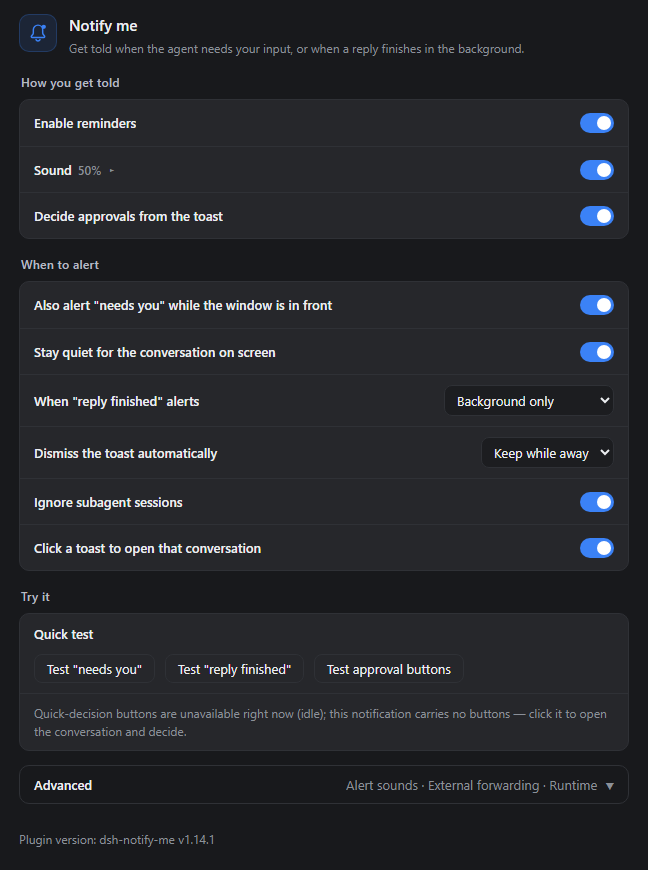
The real settings component (v1.10.0 defaults) rendered in a standalone demo shell. The alert channel is a single choice, and row explanations live in a hover tooltip that appears when the pointer rests on a title, which is why only the titles show here.
|
|
51
51
|
</details>
|
|
52
52
|
|
|
53
53
|
## Installation
|
|
@@ -121,10 +121,11 @@ Open **Settings → Notify me**. The page runs as how you get told, when to aler
|
|
|
121
121
|
### How you get told
|
|
122
122
|
|
|
123
123
|
- **Enable reminders**: master switch — off means no toasts, no sounds, and the tab title is left alone;
|
|
124
|
-
- **
|
|
125
|
-
- **
|
|
124
|
+
- **How you get told (pick one)**: system notifications or the in-page overlay — a single choice, so turning one on turns the other off;
|
|
125
|
+
- **System notifications** (default): native toasts landing in the Windows / macOS notification center; needs notification permission;
|
|
126
|
+
- **In-page overlay**: cards drawn in the page corner, on whichever display the window sits on — system notifications only land on the primary display. No permission needed, and the Desktop shell can Approve / Reject right on the card. Pick one of four corners when it is the chosen channel. See [Secondary displays and the overlay](#secondary-displays-and-the-overlay);
|
|
126
127
|
- **Sound / Volume**: master cue switch and a volume slider; what it plays comes from Advanced → Alert sound;
|
|
127
|
-
- **Decide approvals from the toast** (on by default): approval toasts carry Approve / Reject that settle the request in place. **Desktop notifications have no buttons** (`dsh-app://` cannot register a Service Worker) —
|
|
128
|
+
- **Decide approvals from the toast** (on by default): approval toasts carry Approve / Reject that settle the request in place. **Desktop notifications have no buttons** (`dsh-app://` cannot register a Service Worker) — pick the in-page overlay as the channel instead; the page states plainly which channel can carry buttons right now.
|
|
128
129
|
|
|
129
130
|
### Secondary displays and the overlay
|
|
130
131
|
|
|
@@ -135,8 +136,8 @@ The **in-page overlay** skips the notification center and draws the card inside
|
|
|
135
136
|
- **Position** — top right / bottom right / top left / bottom left, default bottom right; changes apply immediately;
|
|
136
137
|
- **No notification permission needed** — it works when permission was never granted, and on the Desktop shell where buttonless toasts are all the OS channel can do;
|
|
137
138
|
- **Approval cards carry Approve / Reject** — the same decision as Allow once / Reject on the approval card, and they work on the Desktop too (no Service Worker involved). Clicking the card body opens its conversation;
|
|
138
|
-
- **Lifetime** — "needs you" cards retire after
|
|
139
|
-
- **Relation to system notifications** —
|
|
139
|
+
- **Lifetime** — "needs you" cards retire after 12s, "reply finished" after 6s, and an approval card with buttons after 18s; a card or its close button retires one earlier. At most 4 cards stack at once;
|
|
140
|
+
- **Relation to system notifications** — it is one or the other. Both used to be switchable at once, which meant every alert arrived twice and the pair covered each other; 1.10.0 makes it a single choice, and an old config with the overlay on migrates to it.
|
|
140
141
|
|
|
141
142
|
The overlay only knows which screen the window is on, not which screen you are looking at. If the window stays on the primary display while you watch another one, it stays invisible — same as a toast.
|
|
142
143
|
|
|
@@ -200,7 +201,7 @@ The last block inside Advanced. The page protocol is detected automatically to t
|
|
|
200
201
|
## How it alerts
|
|
201
202
|
|
|
202
203
|
- **System notification** — a toast through the browser into the Windows action center / macOS Notification Center (clicking it opens the conversation it came from; supported Web environments offer approval buttons, Desktop does not)
|
|
203
|
-
- **In-page overlay**
|
|
204
|
+
- **In-page overlay** — an alert card drawn in the corner of the DSH page, on whatever display the window is on, optionally with Approve / Reject buttons; see [Secondary displays and the overlay](#secondary-displays-and-the-overlay)
|
|
204
205
|
- **Sound** — WebAudio beeps by default (distinct patterns for "needs you" vs "done"); each kind can instead play a picked audio file, or hand the sound over to the operating system's own notification sound
|
|
205
206
|
- **Tab title marker** — while something is waiting on you, the tab title is prefixed with `🔔 Action needed · …` / `🔔 需要你 · …`; while a background session is **finished but unread**, with `✅ Reply finished · …` / `✅ 回复完成 · …`, gone once you open that session (or it starts running again). Both kinds can be up together, "needs you" first; a host title change is rebased under the markers
|
|
206
207
|
- **External notifications** (optional, default off) — the same alert is also forwarded to the push targets you configure: Discord Webhook / Bark / Gotify / custom webhook — so the push channel on your phone picks it up while you step away from the machine
|
|
@@ -250,14 +251,14 @@ window.__dshNotifyMe.setConfig({
|
|
|
250
251
|
currentHiddenOnly: true, // true = waits in the conversation on screen keep only the tab marker (replayed once backgrounded)
|
|
251
252
|
doneHiddenOnly: true, // false = also alert "reply finished" while visible
|
|
252
253
|
ignoreSubagent: true, // true = never alert for background subagent sessions (the open one is exempt)
|
|
253
|
-
|
|
254
|
+
channel: "toast", // alert channel: 'toast' system notification | 'overlay' in-page card, pick one
|
|
254
255
|
sound: true, // cue toggle (also governs the "system notification sound" mode)
|
|
255
256
|
soundDone: "synth", // "reply finished" cue source: 'synth' built-in | 'custom' picked file | 'system' OS sound
|
|
256
257
|
soundAttention: "synth", // "needs you" cue source, same values
|
|
257
258
|
volume: 0.5, // 0..1
|
|
258
259
|
autoFocus: true, // clicking a toast opens the conversation it came from
|
|
259
260
|
quickActions: true, // Approve / Reject buttons on approval toasts
|
|
260
|
-
overlay: false, //
|
|
261
|
+
overlay: false, // legacy mirror kept in sync with channel (old configs migrate through it)
|
|
261
262
|
overlayCorner: "bottom-right", // overlay anchor: 'top-right' | 'bottom-right' | 'top-left' | 'bottom-left'
|
|
262
263
|
externalEnabled: false, // external-notification forwarding master switch (default off: no endpoint, nothing is sent)
|
|
263
264
|
externalAttention: true, // forward "needs you" (exactly the same trigger rules as local alerts)
|
package/README.md
CHANGED
|
@@ -13,7 +13,7 @@
|
|
|
13
13
|
[](https://www.npmjs.com/package/dsh-notify-me)
|
|
14
14
|
[](LICENSE)
|
|
15
15
|
[](#安装)
|
|
16
|
-
[](lib/client.js)
|
|
17
17
|
[](#兼容性)
|
|
18
18
|
[](https://awesome-dsh-plugin.com)
|
|
19
19
|
|
|
@@ -26,9 +26,9 @@ DSH Web / Desktop 的通知插件,让你敢不开完整访问,也不必一
|
|
|
26
26
|
- **需要你操作时**:审批、方案确认、提问,用通知、提示音和标题标记提醒。
|
|
27
27
|
- **后台回复完成时**:及时回来查看结果,点击通知可回到对应对话。
|
|
28
28
|
- **离开电脑时**:可选转发到 Discord、Bark、Gotify 或自己的 Webhook。
|
|
29
|
-
-
|
|
29
|
+
- **不看主屏时**:提醒方式可以切成页面内浮层,跟着 DSH 窗口出现在你正看着的那块屏(系统通知只会出现在主屏)。
|
|
30
30
|
|
|
31
|
-
> 页面或桌面应用需保持运行,后台 / 最小化可以。系统通知需要通知权限;审批按钮在支持 Service Worker 的 Web 环境(如 `http://127.0.0.1` 或 `https
|
|
31
|
+
> 页面或桌面应用需保持运行,后台 / 最小化可以。系统通知需要通知权限;审批按钮在支持 Service Worker 的 Web 环境(如 `http://127.0.0.1` 或 `https`)由通知提供,桌面端的通知没有按钮——把「提醒方式」切到页面浮层「页面浮层提醒」后可在浮层上直接裁决(见[副屏与浮层提醒](#副屏与浮层提醒))。
|
|
32
32
|
|
|
33
33
|
> 🔎 想找这个插件?可以搜:`dsh-notify-me`、**消息提醒**、**可操作提醒**、**桌面通知**、**需要你操作**、**回复完成提醒**、**后台完成提醒**、**外部通知**、**Discord / Bark / Gotify 推送**(npm 关键词已含以上中英文词)。
|
|
34
34
|
|
|
@@ -47,7 +47,7 @@ DSH Web / Desktop 的通知插件,让你敢不开完整访问,也不必一
|
|
|
47
47
|
|
|
48
48
|
|
|
49
49
|
|
|
50
|
-
真实插件设置组件(v1.
|
|
50
|
+
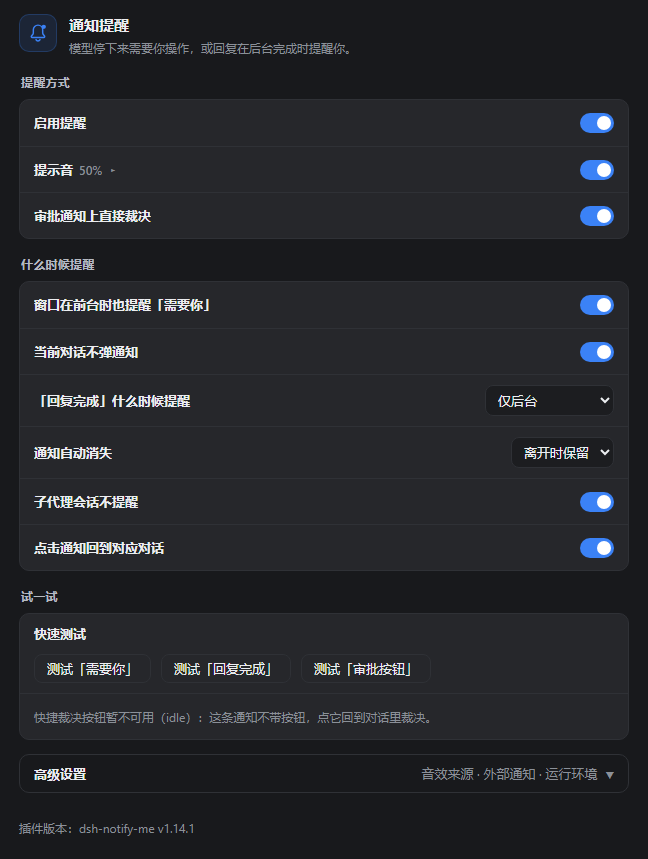
真实插件设置组件(v1.10.0 默认配置)在独立演示环境里渲染;提醒方式是一组单选,每行的说明在鼠标停在标题文字上时才出现,所以这里只看到标题。
|
|
51
51
|
</details>
|
|
52
52
|
|
|
53
53
|
## 安装
|
|
@@ -74,7 +74,7 @@ dsh plugin --profile web add dsh-notify-me
|
|
|
74
74
|
## 首次验证
|
|
75
75
|
|
|
76
76
|
1. 在 DSH 页面上点击一次,按提示允许通知;若此前拒绝过,在浏览器站点设置中允许通知。操作系统也需要允许对应浏览器 / DSH Desktop 显示通知。
|
|
77
|
-
2. 打开 **设置 →
|
|
77
|
+
2. 打开 **设置 → 通知提醒**,确认出现该分区及底部插件版本号,保持「启用提醒」「提示音」开启,提醒方式先留「系统通知」。
|
|
78
78
|
3. 点击设置页的「测试『回复完成』」按钮:应出现一条测试通知,并按当前音效设置播放声音。这个本地测试不会转发到外部通知端点,也不受「页面打开时也提醒」开关限制。
|
|
79
79
|
|
|
80
80
|
Web 用户可再测试审批按钮;桌面端该测试只发普通通知,**没有「同意 / 拒绝」按钮属于预期行为**。
|
|
@@ -117,8 +117,9 @@ dsh-notify-me 把「监督」和「守在屏幕前」解耦:只在真的出现
|
|
|
117
117
|
### 提醒方式
|
|
118
118
|
|
|
119
119
|
- **启用提醒** 总开关:关闭后不弹通知、不响提示音,也不改标签页标题;
|
|
120
|
-
-
|
|
121
|
-
-
|
|
120
|
+
- **提醒方式(二选一)**:系统通知 / 页面浮层,单选,开了这个就不再弹那个;
|
|
121
|
+
- **系统通知**(默认):进 Windows / macOS 通知中心,需要通知权限;
|
|
122
|
+
- **页面浮层**:在 DSH 页面角落画提醒卡片,窗口在哪块屏它就在哪块屏——系统通知只会画在主屏,主屏不看时用它;不需要通知权限,桌面端也能在卡片上直接「同意 / 拒绝」。选中后可选四个角落的位置,见[副屏与浮层提醒](#副屏与浮层提醒);
|
|
122
123
|
- **提示音 / 音量**:提示音开关与音量滑块;具体播什么由「高级设置 → 音效来源」决定;
|
|
123
124
|
- **审批通知上直接裁决**(默认开):审批通知带「同意 / 拒绝」,点一下即完成裁决,不用切回页面。**桌面端的通知没有按钮**(`dsh-app://` 页面无法注册 Service Worker),需要按钮就打开「页面浮层提醒」,改在浮层上裁决;设置页会如实说明当前哪种渠道能给按钮。
|
|
124
125
|
|
|
@@ -131,8 +132,8 @@ Windows 的系统通知横幅固定画在主屏上,系统没有设置项、浏
|
|
|
131
132
|
- **位置**:设置里选右上 / 右下 / 左上 / 左下,默认右下;改完立刻生效;
|
|
132
133
|
- **不需要通知权限**:通知权限没给、或桌面端弹不出带按钮的通知时,浮层照常工作;
|
|
133
134
|
- **审批卡片带「同意 / 拒绝」**:与审批卡片的「允许一次 / 拒绝」等价,桌面端也能用(不依赖 Service Worker);点卡片正文则切回对应对话;
|
|
134
|
-
- **停留时间**:「需要你」
|
|
135
|
-
-
|
|
135
|
+
- **停留时间**:「需要你」12 秒,「回复完成」6 秒,带按钮的审批卡片 18 秒,都会自动收起;也可以点卡片或右上角叉提前关掉。最多同时叠 4 张;
|
|
136
|
+
- **与系统通知的关系**:二选一。以前两个开关可以同开,结果同一条提醒弹两遍、还互相挡住,1.10.0 起改成单选。老配置里开着浮层的,升级后自动落到浮层。
|
|
136
137
|
|
|
137
138
|
浮层只知道窗口在哪块屏,不知道你人在看哪块屏。窗口留在主屏、人却盯着副屏时,它同样看不见。
|
|
138
139
|
|
|
@@ -196,7 +197,9 @@ Windows 的系统通知横幅固定画在主屏上,系统没有设置项、浏
|
|
|
196
197
|
## 五种提醒渠道
|
|
197
198
|
|
|
198
199
|
- **系统通知**:经浏览器弹出的系统通知,进 Windows 通知中心或 macOS 通知中心(点击回到提醒所属的对话;支持快捷裁决的 Web 环境可点审批按钮直接裁决,桌面端无按钮)
|
|
199
|
-
-
|
|
200
|
+
- **页面浮层**:画在 DSH 页面角落的提醒卡片,落在窗口所在的那块屏,可带「同意 / 拒绝」按钮;见[副屏与浮层提醒](#副屏与浮层提醒)
|
|
201
|
+
|
|
202
|
+
两种渠道在设置里二选一,不会同时出现。
|
|
200
203
|
- **提示音**:默认是 WebAudio 合成音(「需要你」与「完成」使用不同音型);可在设置里为两类提醒分别换成自定义音频文件,或改成让操作系统播放它自己的通知音
|
|
201
204
|
- **标签页标题标记**:有待处理事项时,标题前出现 `🔔 需要你 · …` / `🔔 Action needed · …`;后台会话**完成但还没看**时出现 `✅ 回复完成 · …` / `✅ Reply finished · …`,打开对应会话(或它再次开跑)即消失。两种标记可同时出现,「需要你」在前;宿主改写标题后标记基于新标题重建
|
|
202
205
|
- **外部通知**(可选,默认关):按设置里配的推送目标,把同一条提醒转发到 Discord Webhook / Bark / Gotify / 自定义 Webhook——临时离开电脑时,手机上的推送渠道照样收到
|
|
@@ -246,14 +249,14 @@ window.__dshNotifyMe.setConfig({
|
|
|
246
249
|
currentHiddenOnly: true, // true = 当前对话的等待只留标题标记(转后台补发)
|
|
247
250
|
doneHiddenOnly: true, // false = 页面可见时「完成」也提醒
|
|
248
251
|
ignoreSubagent: true, // true = 后台子代理(subagent)会话不提醒(当前打开的照常)
|
|
249
|
-
|
|
252
|
+
channel: "toast", // 提醒方式:'toast' 系统通知 | 'overlay' 页面浮层,二选一
|
|
250
253
|
sound: true, // 提示音开关(含「系统通知音」模式)
|
|
251
254
|
soundDone: "synth", // 「完成」音效来源:'synth' 内置 | 'custom' 自定义文件 | 'system' 系统通知音
|
|
252
255
|
soundAttention: "synth", // 「需要你」音效来源,取值同上
|
|
253
256
|
volume: 0.5, // 音量 0~1
|
|
254
257
|
autoFocus: true, // 点通知回到提醒所属的对话
|
|
255
258
|
quickActions: true, // 审批通知上的「同意 / 拒绝」按钮
|
|
256
|
-
overlay: false, //
|
|
259
|
+
overlay: false, // 兼容字段,跟随 channel 同步(老配置靠它迁移)
|
|
257
260
|
overlayCorner: "bottom-right", // 浮层位置:'top-right' | 'bottom-right' | 'top-left' | 'bottom-left'
|
|
258
261
|
externalEnabled: false, // 外部通知转发主开关(默认关:不填端点就什么都不发)
|
|
259
262
|
externalAttention: true, // 转发「需要你」(触发规则跟本地提醒完全一致)
|
package/lib/client.js
CHANGED
|
@@ -256,15 +256,19 @@
|
|
|
256
256
|
// through the Service Worker half of this same file; where that cannot
|
|
257
257
|
// run, the toast simply falls back to its plain form.
|
|
258
258
|
quickActions: true,
|
|
259
|
-
//
|
|
260
|
-
//
|
|
261
|
-
//
|
|
262
|
-
//
|
|
263
|
-
//
|
|
264
|
-
//
|
|
265
|
-
//
|
|
266
|
-
//
|
|
267
|
-
// the
|
|
259
|
+
// The alert channel: exactly one of them, never both.
|
|
260
|
+
// 'toast' — the OS notification center. Always drawn on the primary
|
|
261
|
+
// display (Windows offers no setting and Chromium no API to
|
|
262
|
+
// aim a banner at another monitor), needs notification
|
|
263
|
+
// permission, and cannot carry action buttons on the desktop
|
|
264
|
+
// shell.
|
|
265
|
+
// 'overlay' — a card inside the page, so it follows the DSH window to
|
|
266
|
+
// whatever display it sits on, needs no permission, and can
|
|
267
|
+
// carry the approval buttons even on the desktop shell.
|
|
268
|
+
channel: "toast",
|
|
269
|
+
// Legacy mirrors of `channel`, kept in sync on every read/write so that a
|
|
270
|
+
// config written by an older build, or a console poke at one of them,
|
|
271
|
+
// still means what it used to.
|
|
268
272
|
overlay: false,
|
|
269
273
|
// Which corner of this window the overlay cards stack in. The screen
|
|
270
274
|
// follows the window — the page cannot aim it anywhere else either.
|
|
@@ -285,12 +289,31 @@
|
|
|
285
289
|
var raw = localStorage.getItem(LS_CONFIG);
|
|
286
290
|
if (raw) cfg = JSON.parse(raw);
|
|
287
291
|
} catch (e) { /* corrupt storage -> defaults */ }
|
|
292
|
+
// Older builds stored two independent switches; the channel is now a
|
|
293
|
+
// single choice, and a config that had the overlay on keeps using it.
|
|
294
|
+
// Checked before the defaults fill in `channel`, or the fresh default
|
|
295
|
+
// would shadow the legacy keys.
|
|
296
|
+
if (typeof cfg.channel !== "string") {
|
|
297
|
+
cfg.channel = cfg.overlay === true ? "overlay" : "toast";
|
|
298
|
+
}
|
|
288
299
|
for (var k in DEFAULTS) if (!(k in cfg)) cfg[k] = DEFAULTS[k];
|
|
300
|
+
|
|
301
|
+
cfg.toast = cfg.channel === "toast";
|
|
302
|
+
cfg.overlay = cfg.channel === "overlay";
|
|
289
303
|
return cfg;
|
|
290
304
|
}
|
|
291
305
|
function writeConfig(patch) {
|
|
292
306
|
var cfg = readConfig();
|
|
293
307
|
for (var k in patch) cfg[k] = patch[k];
|
|
308
|
+
if (!("channel" in patch)) {
|
|
309
|
+
if (patch.overlay === true) cfg.channel = "overlay";
|
|
310
|
+
else if (patch.overlay === false && cfg.channel === "overlay") cfg.channel = "toast";
|
|
311
|
+
if (patch.toast === true) cfg.channel = "toast";
|
|
312
|
+
else if (patch.toast === false && cfg.channel === "toast") cfg.channel = "overlay";
|
|
313
|
+
}
|
|
314
|
+
cfg.channel = cfg.channel === "overlay" ? "overlay" : "toast";
|
|
315
|
+
cfg.toast = cfg.channel === "toast";
|
|
316
|
+
cfg.overlay = cfg.channel === "overlay";
|
|
294
317
|
try { localStorage.setItem(LS_CONFIG, JSON.stringify(cfg)); } catch (e) {}
|
|
295
318
|
return cfg;
|
|
296
319
|
}
|
|
@@ -303,7 +326,7 @@
|
|
|
303
326
|
// Overlay re-apply: switching it off takes the cards down at once and a
|
|
304
327
|
// new corner moves the layer without waiting for the next alert.
|
|
305
328
|
try {
|
|
306
|
-
if (
|
|
329
|
+
if (config.channel !== "overlay") clearOverlays();
|
|
307
330
|
else if (overlayLayer) overlayLayer.className = "dnm-ov-layer dnm-ov-" + overlayCorner();
|
|
308
331
|
} catch (e) {}
|
|
309
332
|
return config;
|
|
@@ -436,7 +459,7 @@
|
|
|
436
459
|
} catch (e) {}
|
|
437
460
|
}
|
|
438
461
|
function canToast() {
|
|
439
|
-
if (
|
|
462
|
+
if (config.channel !== "toast") return false;
|
|
440
463
|
try {
|
|
441
464
|
return "Notification" in window && Notification.permission === "granted";
|
|
442
465
|
} catch (e) { return false; } // a policy-disabled Notification must not break delivery
|
|
@@ -682,10 +705,11 @@
|
|
|
682
705
|
// they are the only kind whose decision is a plain binary, and the only one
|
|
683
706
|
// whose object answers answer('allowed-once' | 'rejected').
|
|
684
707
|
function quickFor(key, it, sessionId) {
|
|
685
|
-
// The
|
|
686
|
-
//
|
|
687
|
-
//
|
|
688
|
-
|
|
708
|
+
// The buttons themselves are a rendering concern: the overlay always
|
|
709
|
+
// draws them, and a toast needs a live worker bridge for OS actions. The
|
|
710
|
+
// pending record is kept either way, so a click still settles the same
|
|
711
|
+
// decision (and debug().actionKeys stays honest about what is waiting).
|
|
712
|
+
if (!config.quickActions) return null;
|
|
689
713
|
if (!it || it.kind !== "approval" || typeof it.answer !== "function") return null;
|
|
690
714
|
var q = {
|
|
691
715
|
key: key,
|
|
@@ -756,7 +780,9 @@
|
|
|
756
780
|
n.close();
|
|
757
781
|
};
|
|
758
782
|
}
|
|
759
|
-
|
|
783
|
+
// Longer for an actionable toast so there is time to click it, shorter
|
|
784
|
+
// for a plain one: a notification that just sits there is noise.
|
|
785
|
+
setTimeout(function () { n.close(); }, quick ? 20000 : 10000);
|
|
760
786
|
} catch (e) {}
|
|
761
787
|
}
|
|
762
788
|
|
|
@@ -772,9 +798,10 @@
|
|
|
772
798
|
var OVERLAY_STYLE_ID = "dsh-notify-me/overlay";
|
|
773
799
|
var OVERLAY_ID = "dsh-notify-me-overlay";
|
|
774
800
|
var OVERLAY_MAX_CARDS = 4;
|
|
775
|
-
//
|
|
776
|
-
//
|
|
777
|
-
|
|
801
|
+
// How long a card stays. "needs you" deserves a longer look than a finished
|
|
802
|
+
// reply; actionable cards get the longest window but still fade, because a
|
|
803
|
+
// card that never leaves is just clutter once the user has moved on.
|
|
804
|
+
var OVERLAY_TTL = { attention: 12000, done: 6000, action: 18000 };
|
|
778
805
|
var OVERLAY_CORNERS = ["bottom-right", "bottom-left", "top-right", "top-left"];
|
|
779
806
|
var OVERLAY_CSS = "" +
|
|
780
807
|
".dnm-ov-layer{position:fixed;z-index:2147483000;display:flex;flex-direction:column;gap:10px;pointer-events:none;max-width:calc(100vw - 24px)}" +
|
|
@@ -871,7 +898,7 @@
|
|
|
871
898
|
// Same inputs as showToast: `quick` is the approval record built by
|
|
872
899
|
// quickFor(), and it is what lets an overlay settle the request in place.
|
|
873
900
|
function showOverlay(kind, title, body, sessionId, quick) {
|
|
874
|
-
if (
|
|
901
|
+
if (config.channel !== "overlay") return false;
|
|
875
902
|
var layer = ensureOverlayLayer();
|
|
876
903
|
if (!layer) return false;
|
|
877
904
|
var d = texts();
|
|
@@ -937,10 +964,10 @@
|
|
|
937
964
|
overlayCards[id] = rec;
|
|
938
965
|
var ids = Object.keys(overlayCards);
|
|
939
966
|
for (var i = 0; i < ids.length - OVERLAY_MAX_CARDS; i++) dismissOverlay(ids[i]);
|
|
940
|
-
|
|
941
|
-
|
|
942
|
-
|
|
943
|
-
}
|
|
967
|
+
var ttl = (quick && typeof quick.key === "string")
|
|
968
|
+
? OVERLAY_TTL.action
|
|
969
|
+
: OVERLAY_TTL[kind === "attention" ? "attention" : "done"];
|
|
970
|
+
if (ttl) rec.timer = setTimeout(function () { dismissOverlay(id); }, ttl);
|
|
944
971
|
return true;
|
|
945
972
|
} catch (e) { return false; }
|
|
946
973
|
}
|
|
@@ -1937,7 +1964,7 @@
|
|
|
1937
1964
|
});
|
|
1938
1965
|
} catch (e) {}
|
|
1939
1966
|
// keep in sync with package.json "version" on every release
|
|
1940
|
-
api.version = "1.
|
|
1967
|
+
api.version = "1.10.0";
|
|
1941
1968
|
api.setConfig = function (patch) { return setConfigLocal(patch); };
|
|
1942
1969
|
api.resetConfig = function () {
|
|
1943
1970
|
try {
|
|
@@ -1998,6 +2025,7 @@
|
|
|
1998
2025
|
currentHiddenOnly: config.currentHiddenOnly,
|
|
1999
2026
|
doneHiddenOnly: config.doneHiddenOnly,
|
|
2000
2027
|
ignoreSubagent: config.ignoreSubagent,
|
|
2028
|
+
channel: config.channel,
|
|
2001
2029
|
toast: config.toast,
|
|
2002
2030
|
sound: config.sound,
|
|
2003
2031
|
soundDone: soundMode("done"),
|
|
@@ -2073,7 +2101,7 @@
|
|
|
2073
2101
|
enable: "启用提醒",
|
|
2074
2102
|
enableHint: "关闭后不弹通知、不响提示音,也不改标签页标题。",
|
|
2075
2103
|
hostEnv: "运行环境",
|
|
2076
|
-
hostEnvHint: "默认自动识别:页面协议是 dsh-app:// 即桌面端(DSH Desktop),其余为 Web 端。识别不准时手动指定:桌面端走 dsh://
|
|
2104
|
+
hostEnvHint: "默认自动识别:页面协议是 dsh-app:// 即桌面端(DSH Desktop),其余为 Web 端。识别不准时手动指定:桌面端走 dsh:// 深链调窗(效果不稳定),系统通知不带按钮、浮层才带;Web 端走 window.focus() 与 Service Worker 桥。",
|
|
2077
2105
|
hostEnvAuto: "自动识别(推荐)",
|
|
2078
2106
|
hostEnvDesktop: "桌面端(DSH Desktop)",
|
|
2079
2107
|
hostEnvWeb: "Web 端(浏览器)",
|
|
@@ -2081,7 +2109,7 @@
|
|
|
2081
2109
|
hostEnvMismatchTail: "」,手动选择会覆盖它)",
|
|
2082
2110
|
hostEnvDesktopForcedNote: "(当前页面不是 dsh-app://:点通知会尝试唤起 dsh:// 协议,浏览器可能弹「打开应用」确认框)",
|
|
2083
2111
|
toast: "系统通知",
|
|
2084
|
-
toastHint: "
|
|
2112
|
+
toastHint: "走系统通知中心,需要通知权限;桌面端这类通知没有「同意 / 拒绝」按钮。",
|
|
2085
2113
|
sound: "提示音",
|
|
2086
2114
|
soundHint: "提示音总开关;播什么由「高级设置 → 音效来源」决定。",
|
|
2087
2115
|
soundSource: "音效来源",
|
|
@@ -2153,9 +2181,9 @@
|
|
|
2153
2181
|
quickApprovalNote: "「同意」等价于审批卡片上的「允许一次」,只放行这一次。",
|
|
2154
2182
|
bridgeOff: "快捷裁决按钮暂不可用(",
|
|
2155
2183
|
bridgeOffTail: "):审批通知会退回不带按钮的普通样式。",
|
|
2156
|
-
bridgeOffDesktop: "
|
|
2184
|
+
bridgeOffDesktop: "系统通知没有「同意 / 拒绝」按钮:桌面端页面(dsh-app://)注册不了 Service Worker(宿主少给 allowServiceWorkers 特权),按钮发不出来。想一键裁决就把「提醒方式」切到「页面浮层」。",
|
|
2157
2185
|
overlay: "页面浮层提醒",
|
|
2158
|
-
overlayHint: "
|
|
2186
|
+
overlayHint: "在窗口角落画提醒卡片:窗口在哪块屏,它就在哪块屏;系统通知只会出现在主屏,主屏不看时用它。不需要通知权限,卡片上能直接「同意 / 拒绝」。与上面二选一,选它就不再弹系统通知。",
|
|
2159
2187
|
overlayCorner: "浮层位置",
|
|
2160
2188
|
overlayCornerHint: "贴在 DSH 窗口的哪个角;窗口在哪块屏,浮层就出现在哪块屏。",
|
|
2161
2189
|
overlayPosTR: "右上",
|
|
@@ -2200,7 +2228,7 @@
|
|
|
2200
2228
|
enable: "Enable reminders",
|
|
2201
2229
|
enableHint: "When off: no toasts, no sounds, and the tab title is left alone.",
|
|
2202
2230
|
hostEnv: "Environment",
|
|
2203
|
-
hostEnvHint: "Auto-detect by default: a dsh-app:// page is the Desktop (DSH Desktop) shell, anything else is the Web. Override it if detection comes out wrong: on the Desktop a toast click fires the dsh:// deep link (the effect is unreliable) and
|
|
2231
|
+
hostEnvHint: "Auto-detect by default: a dsh-app:// page is the Desktop (DSH Desktop) shell, anything else is the Web. Override it if detection comes out wrong: on the Desktop a toast click fires the dsh:// deep link (the effect is unreliable) and system notifications carry no buttons (the overlay does); on the Web it is window.focus() plus the Service Worker bridge.",
|
|
2204
2232
|
hostEnvAuto: "Auto-detect (recommended)",
|
|
2205
2233
|
hostEnvDesktop: "Desktop (DSH Desktop)",
|
|
2206
2234
|
hostEnvWeb: "Web (browser)",
|
|
@@ -2208,7 +2236,7 @@
|
|
|
2208
2236
|
hostEnvMismatchTail: "\"; the manual choice overrides it)",
|
|
2209
2237
|
hostEnvDesktopForcedNote: " (this page is not dsh-app://: a toast click will try to launch the dsh:// protocol and the browser may show an \"open app?\" prompt)",
|
|
2210
2238
|
toast: "System notifications",
|
|
2211
|
-
toastHint: "
|
|
2239
|
+
toastHint: "Through the system notification center; needs notification permission, and on the Desktop these carry no Approve / Reject buttons.",
|
|
2212
2240
|
sound: "Sound",
|
|
2213
2241
|
soundHint: "Master cue switch; what it plays comes from Advanced → Alert sound.",
|
|
2214
2242
|
soundSource: "Alert sound",
|
|
@@ -2280,9 +2308,9 @@
|
|
|
2280
2308
|
quickApprovalNote: "\"Approve\" equals \"Allow once\" on the approval card — it allows that one call only.",
|
|
2281
2309
|
bridgeOff: "Quick-decision buttons are unavailable right now (",
|
|
2282
2310
|
bridgeOffTail: "); approval toasts fall back to their plain form.",
|
|
2283
|
-
bridgeOffDesktop: "
|
|
2311
|
+
bridgeOffDesktop: "System notifications carry no Approve / Reject buttons: dsh-app:// pages cannot register a Service Worker (the shell does not grant the allowServiceWorkers privilege), so the buttons cannot be attached. Switch the alert channel to the in-page overlay to settle approvals in one click.",
|
|
2284
2312
|
overlay: "In-page overlay",
|
|
2285
|
-
overlayHint: "Draw a card in the
|
|
2313
|
+
overlayHint: "Draw a card in the window corner, on whatever display the window sits on. System notifications only land on the primary display. No permission needed, and the card carries Approve / Reject directly. Pick this or the system notification above: choosing it stops system notifications.",
|
|
2286
2314
|
overlayCorner: "Overlay position",
|
|
2287
2315
|
overlayCornerHint: "Which corner of the DSH window the cards stack in; they follow the window to whatever display it is on.",
|
|
2288
2316
|
overlayPosTR: "Top right",
|
|
@@ -2419,6 +2447,9 @@
|
|
|
2419
2447
|
".dnm-switch.on{background:var(--dsw-alias-state-business-primary,#3b82f6);border-color:transparent}" +
|
|
2420
2448
|
".dnm-knob{position:absolute;top:2px;left:2px;width:14px;height:14px;border-radius:50%;background:#fff;transition:left .15s ease}" +
|
|
2421
2449
|
".dnm-switch.on .dnm-knob{left:16px}" +
|
|
2450
|
+
".dnm-radio{flex:none;width:16px;height:16px;margin:0;accent-color:var(--dsw-alias-state-business-primary,#3b82f6);cursor:pointer}" +
|
|
2451
|
+
".dnm-rowRadio{justify-content:flex-start;gap:10px}" +
|
|
2452
|
+
".dnm-rowRadio .dnm-rowText{flex:1}" +
|
|
2422
2453
|
".dnm-range{width:150px;accent-color:var(--dsw-alias-state-business-primary,#3b82f6)}" +
|
|
2423
2454
|
".dnm-select{border:1px solid var(--dsw-alias-border-l2,rgba(128,128,128,.4));background:var(--dsw-alias-bg-layer-1,rgba(255,255,255,.03));color:var(--dsw-alias-label-primary,rgba(20,20,20,.9));border-radius:8px;padding:5px 8px;font-size:13px;font-family:inherit}" +
|
|
2424
2455
|
".dnm-btn{border:1px solid var(--dsw-alias-border-l2,rgba(128,128,128,.4));background:transparent;color:var(--dsw-alias-label-primary,rgba(20,20,20,.9));border-radius:8px;padding:5px 12px;font-size:13px;cursor:pointer;font-family:inherit}" +
|
|
@@ -2876,6 +2907,27 @@
|
|
|
2876
2907
|
function secTitle(labelText) {
|
|
2877
2908
|
return h("div", { className: "dnm-secTitle" }, labelText);
|
|
2878
2909
|
}
|
|
2910
|
+
// One channel at a time, so the pair renders as radios, not switches. The
|
|
2911
|
+
// radio sits ahead of the label: two rows sharing one choice read as a
|
|
2912
|
+
// list of options, which a lone dot on the far right does not.
|
|
2913
|
+
function rowRadio(labelText, hintText, checked, onChange) {
|
|
2914
|
+
var pick = function () { if (!checked) onChange(); };
|
|
2915
|
+
return tipRow("dnm-row dnm-rowRadio", hintText, [
|
|
2916
|
+
h("input", {
|
|
2917
|
+
type: "radio",
|
|
2918
|
+
className: "dnm-radio",
|
|
2919
|
+
name: "dnm-alert-channel",
|
|
2920
|
+
checked: !!checked,
|
|
2921
|
+
"aria-label": labelText,
|
|
2922
|
+
onChange: pick,
|
|
2923
|
+
onClick: pick
|
|
2924
|
+
}),
|
|
2925
|
+
h("div", { className: "dnm-rowText" }, [
|
|
2926
|
+
h("div", { className: "dnm-rowLabel" }, labelText),
|
|
2927
|
+
srOnly(hintText)
|
|
2928
|
+
])
|
|
2929
|
+
]);
|
|
2930
|
+
}
|
|
2879
2931
|
// The permission state belongs on the System-notifications row it affects
|
|
2880
2932
|
// rather than in a footer note the user has to connect to it.
|
|
2881
2933
|
function toastHintText() {
|
|
@@ -2911,9 +2963,9 @@
|
|
|
2911
2963
|
patch({ enabled: v });
|
|
2912
2964
|
if (!v && attentionActive > 0) { attentionActive = 0; applyTitle(); }
|
|
2913
2965
|
}),
|
|
2914
|
-
|
|
2915
|
-
|
|
2916
|
-
cfg.overlay ? tipRow("dnm-row dnm-rowSub", t("overlayCornerHint"), [
|
|
2966
|
+
rowRadio(t("toast"), toastHintText(), cfg.channel !== "overlay", function () { patch({ channel: "toast" }); }),
|
|
2967
|
+
rowRadio(t("overlay"), t("overlayHint"), cfg.channel === "overlay", function () { patch({ channel: "overlay" }); }),
|
|
2968
|
+
cfg.channel === "overlay" ? tipRow("dnm-row dnm-rowSub", t("overlayCornerHint"), [
|
|
2917
2969
|
h("div", { className: "dnm-rowText" }, [
|
|
2918
2970
|
h("div", { className: "dnm-rowLabel" }, t("overlayCorner")),
|
|
2919
2971
|
srOnly(t("overlayCornerHint"))
|
|
@@ -2966,7 +3018,7 @@
|
|
|
2966
3018
|
!cfg.quickActions ? h("div", { className: "dnm-row" }, [
|
|
2967
3019
|
h("div", { className: "dnm-rowText" }, [h("div", { className: "dnm-rowHint" }, t("testNeedsQuick"))])
|
|
2968
3020
|
]) : h("div", { className: "dnm-row" }, [
|
|
2969
|
-
h("div", { className: "dnm-rowText" }, [h("div", { className: "dnm-rowHint" }, cfg.overlay ? t("overlayQuickNote") : (
|
|
3021
|
+
h("div", { className: "dnm-rowText" }, [h("div", { className: "dnm-rowHint" }, cfg.channel === "overlay" ? t("overlayQuickNote") : (!bridgeActive() ? (isDesktopShell() ? t("bridgeOffDesktop") : t("bridgeOff") + swState + t("bridgeOffTail")) : t("quickApprovalNote")))])
|
|
2970
3022
|
]),
|
|
2971
3023
|
feedback ? h("div", { className: "dnm-row" }, [
|
|
2972
3024
|
h("div", { className: "dnm-rowText" }, [h("div", { className: "dnm-feedback" }, feedback)])
|
package/package.json
CHANGED