dsh-notify-me 1.9.2 → 1.9.4
This diff represents the content of publicly available package versions that have been released to one of the supported registries. The information contained in this diff is provided for informational purposes only and reflects changes between package versions as they appear in their respective public registries.
- package/CHANGELOG.md +26 -0
- package/README.en.md +8 -5
- package/README.md +8 -5
- package/lib/client.js +43 -13
- package/package.json +1 -1
package/CHANGELOG.md
CHANGED
|
@@ -2,6 +2,32 @@
|
|
|
2
2
|
|
|
3
3
|
All notable changes to **dsh-notify-me** are documented here.
|
|
4
4
|
|
|
5
|
+
## [1.9.4] — 2026-10-20
|
|
6
|
+
|
|
7
|
+
### 说明
|
|
8
|
+
|
|
9
|
+
- **改口径:桌面端「点通知抬窗」不再当成必然**。DSH Desktop 0.2.1-rc.2(Windows)实测这条链路失效——通知点击回调照常执行(`navigator.userActivation.isActive === true`),但窗口不上前台;带 `dsh://open` 参数的第二实例 133 ms 后以退出码 1 结束,不带参数则 258 ms 退出码 0;用 `WM_SYSCOMMAND` 真实最小化后发深链,`IsIconic` 仍为 `true`,`focusPrimaryWindow()` 的 `restore()` 没生效;壳的 preload 也没有 focus/raise 类 IPC。复现与代码位置已提交 [deepseek-harness discussions #10446](https://github.com/deepseek-ai/deepseek-harness/discussions/10446)。
|
|
10
|
+
- README(中英):设置清单、「运行环境」说明、「桌面端怎么抬窗的」、已知限制四处按实测结果改写——插件照发深链,原生窗口能否上前台由壳决定;0.2.0-rc.2 上验证通过的结论与「深链必须在用户手势里发」的口径保留。
|
|
11
|
+
|
|
12
|
+
### 变更
|
|
13
|
+
|
|
14
|
+
- `lib/client.js`:`hostEnvHint` 中英两版去掉「把窗口带到前台」的确定性表述。
|
|
15
|
+
|
|
16
|
+
### 测试
|
|
17
|
+
|
|
18
|
+
- `npm test` 两套件通过(`ALL SMOKE TESTS PASSED ✔` / `cordis-host-test passed`)。
|
|
19
|
+
|
|
20
|
+
## [1.9.3] — 2026-10-20
|
|
21
|
+
|
|
22
|
+
### 变更
|
|
23
|
+
|
|
24
|
+
- **悬浮提示只在行标题上触发**:之前整行(右侧开关、滑块、下拉都算)都是触发区,鼠标扫过控件也会弹方框;现在指针停在标题文字上才出现,开关和滑块保持干净。
|
|
25
|
+
- 渐显 320 ms、跟随指针、靠边翻转、滚动收起这些行为不变;读屏隐藏副本不受影响。
|
|
26
|
+
|
|
27
|
+
### 测试
|
|
28
|
+
|
|
29
|
+
- 冒烟测试新增四条结构断言:带说明的行必须把提示挂在 `.dnm-rowLabel` 上,该节点持有 `data-dnm-tip` 与三个 hover 处理函数,任何整行节点都不再是提示目标。`npm test` 两套件通过。
|
|
30
|
+
|
|
5
31
|
## [1.9.2] — 2026-10-20
|
|
6
32
|
|
|
7
33
|
### 变更
|
package/README.en.md
CHANGED
|
@@ -13,7 +13,7 @@
|
|
|
13
13
|
[](https://www.npmjs.com/package/dsh-notify-me)
|
|
14
14
|
[](LICENSE)
|
|
15
15
|
[](#installation)
|
|
16
|
-
[](lib/client.js)
|
|
17
17
|
[](#compatibility)
|
|
18
18
|
[](https://awesome-dsh-plugin.com)
|
|
19
19
|
|
|
@@ -47,7 +47,7 @@ A notification plugin for DSH Web / Desktop, so you can keep full access off wit
|
|
|
47
47
|
|
|
48
48
|
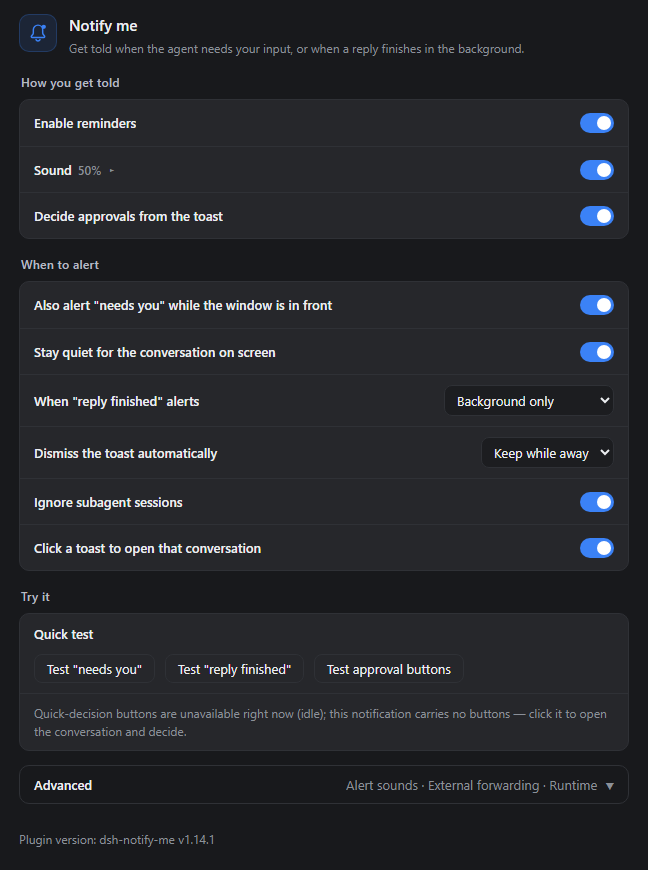
|
|
49
49
|
|
|
50
|
-
The real settings component (v1.9.2 defaults) rendered as the content column in a standalone demo shell. Row explanations now live in a hover tooltip, which is why only the titles show here.
|
|
50
|
+
The real settings component (v1.9.2 defaults) rendered as the content column in a standalone demo shell. Row explanations now live in a hover tooltip that appears when the pointer rests on a title, which is why only the titles show here.
|
|
51
51
|
</details>
|
|
52
52
|
|
|
53
53
|
## Installation
|
|
@@ -116,7 +116,7 @@ dsh-notify-me decouples **supervision** from **sitting in front of the screen**:
|
|
|
116
116
|
|
|
117
117
|
## Configure it from DSH Settings
|
|
118
118
|
|
|
119
|
-
Open **Settings → Notify me**. The page runs as how you get told, when to alert, and a try-it block; the knobs you rarely touch fold into **Advanced** at the bottom. Rows show titles only — the explanation pops up next to the pointer on
|
|
119
|
+
Open **Settings → Notify me**. The page runs as how you get told, when to alert, and a try-it block; the knobs you rarely touch fold into **Advanced** at the bottom. Rows show titles only — the explanation pops up next to the pointer once it rests on the title text (hovering a switch does nothing), with a hidden copy kept for screen readers.
|
|
120
120
|
|
|
121
121
|
### How you get told
|
|
122
122
|
|
|
@@ -146,7 +146,7 @@ The overlay only knows which screen the window is on, not which screen you are l
|
|
|
146
146
|
- **Stay quiet for the conversation on screen** (on): a wait belonging to the conversation you are looking at keeps only the tab marker so the approval card stays readable; backgrounding restores alerts;
|
|
147
147
|
- **Also alert "reply finished" while the page is open** (off): by default only background finishes alert;
|
|
148
148
|
- **Ignore subagent sessions** (on): skip background sessions spawned by a subagent — the parent conversation covers them; the one you have open still alerts;
|
|
149
|
-
- **Click a toast to open that conversation** (on): the click brings
|
|
149
|
+
- **Click a toast to open that conversation** (on): the click switches to the conversation that raised it; in a browser it also brings the window forward, while on the Desktop shell whether the native window comes forward depends on the shell version (see [How the Desktop window gets raised](#how-the-desktop-window-gets-raised)); with several tabs open only one is raised, and off means a click does nothing.
|
|
150
150
|
|
|
151
151
|
### Try it
|
|
152
152
|
|
|
@@ -182,7 +182,7 @@ Off by default. Supports Discord Webhook / Bark / Gotify / custom webhooks. Aler
|
|
|
182
182
|
|
|
183
183
|
### Runtime & diagnostics
|
|
184
184
|
|
|
185
|
-
The last block inside Advanced. The page protocol is detected automatically to tell Web from Desktop (`dsh-app://`); override it by hand if detection is wrong — Desktop clicks
|
|
185
|
+
The last block inside Advanced. The page protocol is detected automatically to tell Web from Desktop (`dsh-app://`); override it by hand if detection is wrong — Desktop clicks fire the `dsh://` deep link (whether that actually raises the window depends on the shell version — see [How the Desktop window gets raised](#how-the-desktop-window-gets-raised)) and carry no quick-decision buttons, while Web uses `window.focus()` plus the Service Worker bridge. When the override disagrees with detection the page says so.
|
|
186
186
|
|
|
187
187
|
<details>
|
|
188
188
|
<summary>Alert language, Desktop window raising, reset</summary>
|
|
@@ -305,6 +305,8 @@ DSH Desktop is a thin Electron shell and its page lives under `dsh-app://app`: D
|
|
|
305
305
|
|
|
306
306
|
Verified on the real shell (DSH Desktop 0.2.0-rc.2, three rounds of retesting in issue #9): a toast click raises the window and switches the conversation in one step, stable across sessions and with the window in the background. Timing of the fire is what makes the chain work: the deep link must be launched from a **user-gesture handler** — the notification's `onclick` carries one, which is why the product path works — while gesture-less scripted injection (an iframe appended from a CDP evaluate, say) is silently dropped by Chromium and the external protocol never launches, which looks exactly like the channel being blocked.
|
|
307
307
|
|
|
308
|
+
**Regression on 0.2.1-rc.2 / Windows** (measured 2026-10-20): the toast click handler still runs (`navigator.userActivation.isActive === true`, `visibilityState` is `hidden`), but the window no longer comes forward. Shell-side evidence: launching a second instance with the `dsh://open` argument exits with code 1 after 133 ms, while launching it without arguments exits with code 0 after 258 ms (the normal single-instance yield), so the URL branch is what breaks. Minimizing the window for real via `WM_SYSCOMMAND` and then firing the deep link — or relaunching with no arguments — leaves `IsIconic` at `true`, so `focusPrimaryWindow()`'s `restore()` never takes effect. There is no page-side fallback either: the shell preload only exposes `dshDesktop`, the directory picker and locale, and `DESKTOP_IPC` has no focus/raise channel. The repro and code locations are filed upstream in [deepseek-harness discussions #10446](https://github.com/deepseek-ai/deepseek-harness/discussions/10446). The plugin's part ends there: it still fires the deep link; raising the native window is the shell's call.
|
|
309
|
+
|
|
308
310
|
</details>
|
|
309
311
|
|
|
310
312
|
## Known limitations
|
|
@@ -313,6 +315,7 @@ Verified on the real shell (DSH Desktop 0.2.0-rc.2, three rounds of retesting in
|
|
|
313
315
|
- Notifications appear through the browser, so the browser needs "show notifications" permission in the OS notification settings, and notification-center "Do Not Disturb" must not suppress them.
|
|
314
316
|
- The first sound/toast of each page load needs one user click on the page first (browser autoplay + permission policy).
|
|
315
317
|
- Toasts are only produced once the notification permission is granted; declining means sound + title marker only.
|
|
318
|
+
- On the Desktop shell (DSH Desktop 0.2.1-rc.2 / Windows) a toast click no longer brings the window forward by itself: the plugin fires the `dsh://open` deep link, but the shell does not raise the window ([discussions #10446](https://github.com/deepseek-ai/deepseek-harness/discussions/10446)). Switching to the conversation still works.
|
|
316
319
|
- System notification banners are drawn on the primary display only: Windows has no setting and Chromium no API to aim one at another monitor, so on a multi-monitor setup the second screen never receives them. Use the in-page overlay for that — it follows the DSH window to its display.
|
|
317
320
|
- Quick-decision buttons need a Service Worker: they work on `http://127.0.0.1` and `https`, not on plain `http://192.168.x.x`-style LAN addresses, and some browsers or desktop hosts never render notification buttons. **The Desktop (`dsh-app://`) is tested and cannot register a Service Worker**, so buttons never render there and approval toasts fall back to their buttonless form. The `bridge` field of `window.__dshNotifyMe.debug()` says why; everything else keeps working.
|
|
318
321
|
- macOS: in the browser, alerts, sounds, the title marker and toast-click navigation carry no OS assumptions and work as on Windows. Two caveats: DSH Desktop (Electron) notifications require the app to be code-signed — unsigned builds simply emit no notification — and whether the official macOS build satisfies that is untested; and notification buttons on the macOS desktop host are likewise untested (the Windows desktop host is tested and renders none, see the line above), falling back to the buttonless form above.
|
package/README.md
CHANGED
|
@@ -13,7 +13,7 @@
|
|
|
13
13
|
[](https://www.npmjs.com/package/dsh-notify-me)
|
|
14
14
|
[](LICENSE)
|
|
15
15
|
[](#安装)
|
|
16
|
-
[](lib/client.js)
|
|
17
17
|
[](#兼容性)
|
|
18
18
|
[](https://awesome-dsh-plugin.com)
|
|
19
19
|
|
|
@@ -47,7 +47,7 @@ DSH Web / Desktop 的通知插件,让你敢不开完整访问,也不必一
|
|
|
47
47
|
|
|
48
48
|
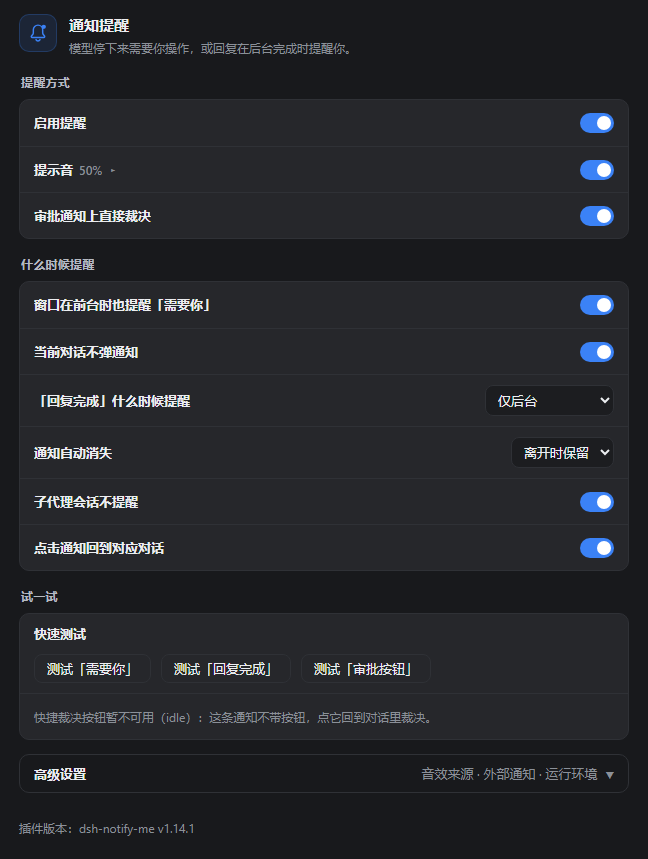
|
|
49
49
|
|
|
50
|
-
真实插件设置组件(v1.9.2
|
|
50
|
+
真实插件设置组件(v1.9.2 默认配置)在独立演示环境里按内容列整页渲染;每行的说明改成鼠标停在标题文字上才出现的小方框,所以这里只看到标题。
|
|
51
51
|
</details>
|
|
52
52
|
|
|
53
53
|
## 安装
|
|
@@ -142,7 +142,7 @@ Windows 的系统通知横幅固定画在主屏上,系统没有设置项、浏
|
|
|
142
142
|
- **当前对话不弹通知**(默认开):等待就发生在你正看着的对话里时只留标签页标记,免得挡住审批卡片;切到后台后照常提醒,若你已处理掉就作废;
|
|
143
143
|
- **页面打开时也提醒「回复完成」**(默认关):默认只在切到后台时提醒,避免打扰;
|
|
144
144
|
- **子代理会话不提醒**(默认开):跳过后台子代理(subagent)会话——它们是主对话那一轮的步骤,完成由主对话自己的提醒覆盖;你当前打开的那个子代理会话照常提醒;
|
|
145
|
-
-
|
|
145
|
+
- **点击通知回到对应对话**(默认开):点通知切到提醒所属的对话;浏览器里同时把窗口带到前台,桌面端能不能上前台看壳的版本(见[桌面端怎么抬窗的](#桌面端怎么抬窗的));多个标签页同时开着时只调起一个(优先当前可见的那个);关掉后点通知不做任何事。
|
|
146
146
|
|
|
147
147
|
### 试一试
|
|
148
148
|
|
|
@@ -178,13 +178,13 @@ Windows 的系统通知横幅固定画在主屏上,系统没有设置项、浏
|
|
|
178
178
|
|
|
179
179
|
### 运行环境与诊断
|
|
180
180
|
|
|
181
|
-
在「高级设置」最后一块。默认自动识别当前是 Web 端还是桌面端(DSH Desktop,`dsh-app://`);识别不准时可手动指定——桌面端点通知走 `dsh://`
|
|
181
|
+
在「高级设置」最后一块。默认自动识别当前是 Web 端还是桌面端(DSH Desktop,`dsh-app://`);识别不准时可手动指定——桌面端点通知走 `dsh://` 深链调窗(能否真的上前台看壳的版本,见[桌面端怎么抬窗的](#桌面端怎么抬窗的))、通知上不带快捷裁决按钮;Web 端走 `window.focus()` 与 Service Worker 桥。手动覆盖与自动识别不一致时,设置页会明示检测结果。
|
|
182
182
|
|
|
183
183
|
<details>
|
|
184
184
|
<summary>通知语言、桌面端抬窗与恢复默认</summary>
|
|
185
185
|
|
|
186
186
|
- **通知语言**:跟随界面 / 简体中文 / English——决定通知文字与 `🔔 …` 标题标记使用的语言;
|
|
187
|
-
- **桌面端怎么抬窗**:页面侧的 `window.focus()` 在 Electron 里抬不动原生窗口,1.5.2 起改走应用自己的 `dsh://open`
|
|
187
|
+
- **桌面端怎么抬窗**:页面侧的 `window.focus()` 在 Electron 里抬不动原生窗口,1.5.2 起改走应用自己的 `dsh://open` 深链调窗——在 DSH Desktop 0.2.0-rc.2 上实测有效,0.2.1-rc.2 在 Windows 上失效(详见下一节);
|
|
188
188
|
- **恢复默认设置**:把所有开关与音效设置还原成出厂值(不动外部推送目标和已选的自定义音频文件)。
|
|
189
189
|
|
|
190
190
|
</details>
|
|
@@ -301,12 +301,15 @@ DSH Desktop 是一层 Electron 壳,页面跑在 `dsh-app://app` 下:DOM 的
|
|
|
301
301
|
|
|
302
302
|
真实壳已实测(DSH Desktop 0.2.0-rc.2,issue #9 三轮复测):点通知 = 抬窗 + 切会话一步到位,跨会话、窗口在后台时同样稳定。触发时机是这条链路的关键:深链必须在**带用户手势的处理器**里发——通知的 `onclick` 自带手势,所以产品路径通;而无手势的脚本化注入(如 CDP evaluate 手工塞 iframe)会被 Chromium 静默丢弃、外部协议根本不回流,复现时看起来就像「通道被拦死」。
|
|
303
303
|
|
|
304
|
+
**0.2.1-rc.2 在 Windows 上失效**(2026-10-20 实测):点通知的回调照常执行(`navigator.userActivation.isActive === true`、`visibilityState` 为 `hidden`),但窗口不再上前台。壳侧可复现的证据:带 `dsh://open` 参数启动第二实例,133 ms 后以退出码 1 结束;不带参数时 258 ms 退出码 0(正常的单实例让位),说明问题出在 URL 参数那条分支。把窗口用 `WM_SYSCOMMAND` 真实最小化后,无论发深链还是无参重启,`IsIconic` 都保持 `true`,`focusPrimaryWindow()` 的 `restore()` 没有实际生效。页面侧也没有替代通道:壳的 preload 只暴露 `dshDesktop`、目录选择、本地化这些,`DESKTOP_IPC` 里没有 focus/raise 类通道。已把复现步骤与代码位置提交到 [deepseek-harness discussions #10446](https://github.com/deepseek-ai/deepseek-harness/discussions/10446)。插件侧能做的到此为止:深链照发,原生窗口抬不抬由壳决定。
|
|
305
|
+
|
|
304
306
|
</details>
|
|
305
307
|
|
|
306
308
|
## 已知限制
|
|
307
309
|
|
|
308
310
|
- 页面必须开着才会提醒(后台标签/最小化可以;关标签页即失效——浏览器层方案固有限制)。
|
|
309
311
|
- 通知经由浏览器弹出,需允许浏览器通知权限,且勿扰模式不能屏蔽它。
|
|
312
|
+
- 桌面端(DSH Desktop 0.2.1-rc.2 / Windows)点通知不再自动把窗口带到前台:插件能发 `dsh://open` 深链,壳侧却没把窗口抬起来([discussions #10446](https://github.com/deepseek-ai/deepseek-harness/discussions/10446));切到对应对话不受影响。
|
|
310
313
|
- 系统通知横幅只画在主屏:Windows 没有设置项、Chromium 没有 API 能把它指到别的显示器(多屏时副屏收不到系统通知)。要用副屏提醒,开「页面浮层提醒」,它会跟着 DSH 窗口走。
|
|
311
314
|
- 每次页面加载后第一次出声/弹通知前,需在页面上点击过一次(浏览器自动播放与权限策略)。
|
|
312
315
|
- 未授权通知权限时只有提示音与标题标记。
|
package/lib/client.js
CHANGED
|
@@ -1937,7 +1937,7 @@
|
|
|
1937
1937
|
});
|
|
1938
1938
|
} catch (e) {}
|
|
1939
1939
|
// keep in sync with package.json "version" on every release
|
|
1940
|
-
api.version = "1.9.
|
|
1940
|
+
api.version = "1.9.4";
|
|
1941
1941
|
api.setConfig = function (patch) { return setConfigLocal(patch); };
|
|
1942
1942
|
api.resetConfig = function () {
|
|
1943
1943
|
try {
|
|
@@ -2073,7 +2073,7 @@
|
|
|
2073
2073
|
enable: "启用提醒",
|
|
2074
2074
|
enableHint: "关闭后不弹通知、不响提示音,也不改标签页标题。",
|
|
2075
2075
|
hostEnv: "运行环境",
|
|
2076
|
-
hostEnvHint: "默认自动识别:页面协议是 dsh-app:// 即桌面端(DSH Desktop),其余为 Web
|
|
2076
|
+
hostEnvHint: "默认自动识别:页面协议是 dsh-app:// 即桌面端(DSH Desktop),其余为 Web 端。识别不准时手动指定:桌面端走 dsh:// 深链调窗(能否真的上前台看壳的版本)、快捷裁决按钮不可用;Web 端走 window.focus() 与 Service Worker 桥。",
|
|
2077
2077
|
hostEnvAuto: "自动识别(推荐)",
|
|
2078
2078
|
hostEnvDesktop: "桌面端(DSH Desktop)",
|
|
2079
2079
|
hostEnvWeb: "Web 端(浏览器)",
|
|
@@ -2200,7 +2200,7 @@
|
|
|
2200
2200
|
enable: "Enable reminders",
|
|
2201
2201
|
enableHint: "When off: no toasts, no sounds, and the tab title is left alone.",
|
|
2202
2202
|
hostEnv: "Environment",
|
|
2203
|
-
hostEnvHint: "Auto-detect by default: a dsh-app:// page is the Desktop (DSH Desktop) shell, anything else is the Web. Override it if detection comes out wrong: on the Desktop a toast click
|
|
2203
|
+
hostEnvHint: "Auto-detect by default: a dsh-app:// page is the Desktop (DSH Desktop) shell, anything else is the Web. Override it if detection comes out wrong: on the Desktop a toast click fires the dsh:// deep link (whether the window actually comes forward depends on the shell version) and quick-decision buttons are unavailable; on the Web it is window.focus() plus the Service Worker bridge.",
|
|
2204
2204
|
hostEnvAuto: "Auto-detect (recommended)",
|
|
2205
2205
|
hostEnvDesktop: "Desktop (DSH Desktop)",
|
|
2206
2206
|
hostEnvWeb: "Web (browser)",
|
|
@@ -2450,7 +2450,7 @@
|
|
|
2450
2450
|
".dnm-advToggle:focus-visible{outline:2px solid var(--dsw-alias-state-business-primary,#3b82f6);outline-offset:2px}" +
|
|
2451
2451
|
".dnm-advRight{display:flex;align-items:center;gap:8px;flex:none;font-weight:400;color:var(--dsw-alias-label-tertiary,rgba(120,120,120,.9))}" +
|
|
2452
2452
|
".dnm-advChev{font-size:10px;translate:0 1px;transition:transform .15s ease}" +
|
|
2453
|
-
".dnm-rowTip{cursor:help}" +
|
|
2453
|
+
".dnm-rowLabel.dnm-rowTip{cursor:help}" +
|
|
2454
2454
|
".dnm-rowValue{font-size:12px;line-height:18px;color:var(--dsw-alias-label-tertiary,rgba(120,120,120,.9))}" +
|
|
2455
2455
|
// The long explanation lives in a tooltip next to the pointer, so a
|
|
2456
2456
|
// row is one line tall. Screen readers still get the text.
|
|
@@ -2541,17 +2541,47 @@
|
|
|
2541
2541
|
onMouseLeave: hideTip
|
|
2542
2542
|
};
|
|
2543
2543
|
}
|
|
2544
|
-
//
|
|
2545
|
-
|
|
2546
|
-
|
|
2547
|
-
if (
|
|
2548
|
-
|
|
2544
|
+
// Attach the tooltip to the label text only. Hovering the switch or the
|
|
2545
|
+
// slider on the right of a row should not pop an explanation.
|
|
2546
|
+
function tipTarget(node, hintText) {
|
|
2547
|
+
if (!node || typeof node !== "object") return node;
|
|
2548
|
+
var props = node.props || {};
|
|
2549
|
+
var className = String(props.className || "");
|
|
2550
|
+
// React keeps children in props.children; the smoke harness keeps them on
|
|
2551
|
+
// the node itself, so look in both places.
|
|
2552
|
+
var kids = props.children;
|
|
2553
|
+
if (kids === undefined && node.children) kids = node.children.length === 1 ? node.children[0] : node.children;
|
|
2554
|
+
if (className.indexOf("dnm-rowLabel") >= 0) {
|
|
2549
2555
|
var handlers = tipHandlers(hintText);
|
|
2550
|
-
|
|
2551
|
-
props
|
|
2552
|
-
|
|
2556
|
+
var merged = {};
|
|
2557
|
+
for (var k in props) merged[k] = props[k];
|
|
2558
|
+
merged.className = className + " dnm-rowTip";
|
|
2559
|
+
merged["data-dnm-tip"] = hintText;
|
|
2560
|
+
merged.onMouseEnter = handlers.onMouseEnter;
|
|
2561
|
+
merged.onMouseMove = handlers.onMouseMove;
|
|
2562
|
+
merged.onMouseLeave = handlers.onMouseLeave;
|
|
2563
|
+
return h(node.type, merged, kids);
|
|
2564
|
+
}
|
|
2565
|
+
if (Array.isArray(kids)) {
|
|
2566
|
+
var changed = false;
|
|
2567
|
+
var next = [];
|
|
2568
|
+
for (var i = 0; i < kids.length; i++) {
|
|
2569
|
+
var mapped = tipTarget(kids[i], hintText);
|
|
2570
|
+
if (mapped !== kids[i]) changed = true;
|
|
2571
|
+
next.push(mapped);
|
|
2572
|
+
}
|
|
2573
|
+
return changed ? h(node.type, props, next) : node;
|
|
2553
2574
|
}
|
|
2554
|
-
|
|
2575
|
+
var single = tipTarget(kids, hintText);
|
|
2576
|
+
return single === kids ? node : h(node.type, props, single);
|
|
2577
|
+
}
|
|
2578
|
+
// A row that has an explanation: single-line label, text in the tooltip.
|
|
2579
|
+
function tipRow(className, hintText, children) {
|
|
2580
|
+
if (!hintText) return h("div", { className: className }, children);
|
|
2581
|
+
var kids = Array.isArray(children)
|
|
2582
|
+
? children.map(function (child) { return tipTarget(child, hintText); })
|
|
2583
|
+
: tipTarget(children, hintText);
|
|
2584
|
+
return h("div", { className: className }, kids);
|
|
2555
2585
|
}
|
|
2556
2586
|
// Read-screen-only copy of the tooltip text.
|
|
2557
2587
|
function srOnly(text) {
|
package/package.json
CHANGED