dsh-notify-me 1.8.0 → 1.9.1
This diff represents the content of publicly available package versions that have been released to one of the supported registries. The information contained in this diff is provided for informational purposes only and reflects changes between package versions as they appear in their respective public registries.
- package/CHANGELOG.md +35 -0
- package/README.en.md +49 -27
- package/README.md +50 -28
- package/lib/client.js +354 -174
- package/package.json +2 -2
package/CHANGELOG.md
CHANGED
|
@@ -2,6 +2,20 @@
|
|
|
2
2
|
|
|
3
3
|
All notable changes to **dsh-notify-me** are documented here.
|
|
4
4
|
|
|
5
|
+
## [1.9.1] — 2026-10-20
|
|
6
|
+
|
|
7
|
+
### 新增
|
|
8
|
+
|
|
9
|
+
- **设置左侧导航行换成品牌铃铛**:DSH 的设置外壳按分区 id 硬编码导航图标,`settings.section` 没有图标字段,所以插件改为面板渲染后打补丁——按本地化标签找到自己那一行的导航按钮,把宿主生成的 `<svg>` 换成品牌线稿(形状与 `docs/brand/icon-outline.svg` 一致),沿用宿主给的 icon class,并用 MutationObserver 跟随面板重渲染与重开。
|
|
10
|
+
- 宿主改结构时补丁静默放弃,显示回默认齿轮,其他功能不受影响。
|
|
11
|
+
|
|
12
|
+
### 变更
|
|
13
|
+
|
|
14
|
+
- README(中英)与 `docs/brand/README.md` 的旧口径「导航行图标换不了」改成实际做法与失效条件;`screenshots.json` 补上 1.8.0 / 1.9.0 的截图并修正已删除的 `.jpg` 路径;徽章 bundle 尺寸更新为 ~161 KiB。
|
|
15
|
+
|
|
16
|
+
### 测试
|
|
17
|
+
|
|
18
|
+
- `npm test` 两套件通过;另用真 bundle + 合成宿主面板(`data-shortcut-modal="settings"`、`button.navCell > svg + span.navLabel`)在无头 Chromium 里验证:三行导航里只有「通知提醒」变成铃铛(`data-dnm-nav="1"`、三条 shape),另外两行保持齿轮,图标 class 未丢。
|
|
5
19
|
## [Unreleased]
|
|
6
20
|
|
|
7
21
|
### 兼容性
|
|
@@ -12,6 +26,27 @@ All notable changes to **dsh-notify-me** are documented here.
|
|
|
12
26
|
### 测试
|
|
13
27
|
- `npm test` 两套件在 0.2.1-rc.2 的 cordis 4.0.5 上通过(`smoke/smoke-test.cjs` 与真 cordis 腿 `smoke/cordis-host-test.mjs`)。
|
|
14
28
|
|
|
29
|
+
## [1.9.0] — 2026-10-20
|
|
30
|
+
|
|
31
|
+
### 新增
|
|
32
|
+
|
|
33
|
+
- **品牌标志**:`docs/brand/` 收录 24px 线稿、512→32px 应用图标、favicon 与总览图。母题是「铃铛 + 未读圆点」,设置页页眉直接用线稿版内联渲染(不依赖静态资源)。
|
|
34
|
+
|
|
35
|
+
### 变更
|
|
36
|
+
|
|
37
|
+
- **设置页重新排版**:页眉(标志 + 一句话说明)之后按「提醒方式 → 什么时候提醒 → 试一试」三段排开,音效来源、外部推送、运行环境与诊断收进折叠的「高级设置」,高级设置右侧列出内含项。原来六张卡片平铺、每行 hint 三四行的样子不再有。
|
|
38
|
+
- 每一行的说明压到一到两行,只讲一件事;「音量」作为「提示音」的附属行缩进显示,「位置」作为「页面浮层提醒」的附属行缩进显示。
|
|
39
|
+
- README 中英双语同步重排,设置章节与截图换成 1.9.0 的实拍整页图(`docs/screenshots/settings-zh.png` / `settings-en.png`)。
|
|
40
|
+
|
|
41
|
+
### 说明
|
|
42
|
+
|
|
43
|
+
- 插件对 DSH 侧仍然只用 `__ModuleLoader__.load`、`settings.section`、`locale` 三个既有面,1.9.0 没有引入任何新的宿主 API:**0.1.1-rc.2 → 0.2.1-rc.2 的插件条目照旧兼容**,退回旧宿主不需要改配置。
|
|
44
|
+
- 设置左侧导航行的图标由宿主按分区 id 硬编码(只认 account / models / agent-presets / plugins / archived-sessions),`settings.section` 没有图标字段,插件换不了,已在「已知限制」写明。
|
|
45
|
+
|
|
46
|
+
### 测试
|
|
47
|
+
|
|
48
|
+
- smoke 增补:重排后的控件仍能按 `aria-label` 定位;「高级设置」折叠态默认收起、`settingsBoot({ advanced: true })` 展开后能继续走到音效与外部推送;浮层位置下拉仍在默认可见区。
|
|
49
|
+
|
|
15
50
|
## [1.8.0] — 2026-10-20
|
|
16
51
|
|
|
17
52
|
### 新增
|
package/README.en.md
CHANGED
|
@@ -1,5 +1,7 @@
|
|
|
1
1
|
<div align="center">
|
|
2
2
|
|
|
3
|
+
<img src="https://raw.githubusercontent.com/chromoany/dsh-notify-me/main/docs/brand/icon-app-128.png" width="76" height="76" alt="dsh-notify-me">
|
|
4
|
+
|
|
3
5
|
# dsh-notify-me
|
|
4
6
|
|
|
5
7
|
**Step away from DSH and know when to come back.**
|
|
@@ -11,7 +13,7 @@
|
|
|
11
13
|
[](https://www.npmjs.com/package/dsh-notify-me)
|
|
12
14
|
[](LICENSE)
|
|
13
15
|
[](#installation)
|
|
14
|
-
[](lib/client.js)
|
|
15
17
|
[](#compatibility)
|
|
16
18
|
[](https://awesome-dsh-plugin.com)
|
|
17
19
|
|
|
@@ -43,10 +45,9 @@ A notification plugin for DSH Web / Desktop, so you can keep full access off wit
|
|
|
43
45
|
<details>
|
|
44
46
|
<summary>See the settings interface</summary>
|
|
45
47
|
|
|
46
|
-
|
|
49
49
|
|
|
50
|
+
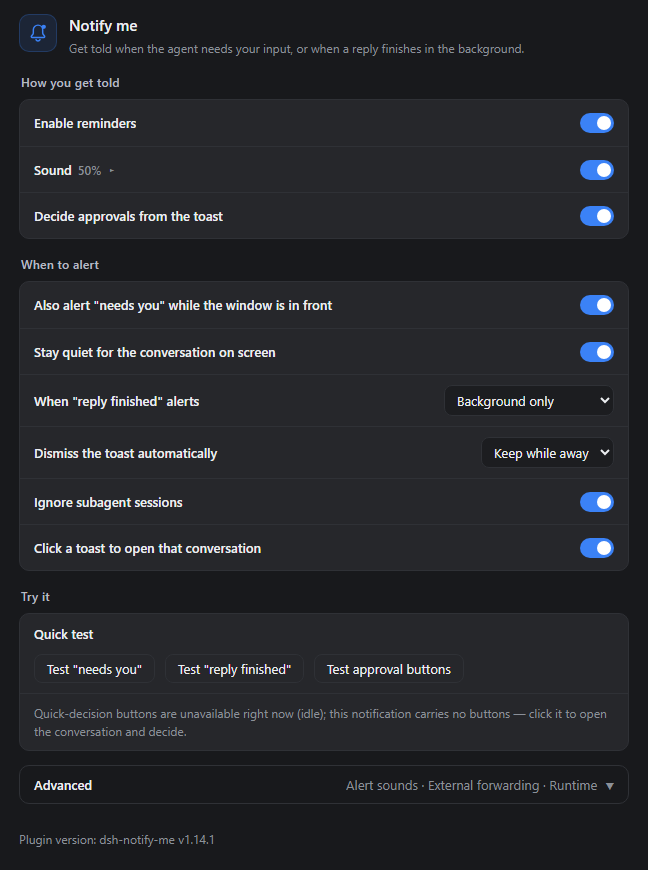
The real settings component (v1.9.0 defaults) rendered full-page in a standalone demo shell; the sidebar is kept for context, it is not the DSH shell.
|
|
50
51
|
</details>
|
|
51
52
|
|
|
52
53
|
## Installation
|
|
@@ -115,31 +116,15 @@ dsh-notify-me decouples **supervision** from **sitting in front of the screen**:
|
|
|
115
116
|
|
|
116
117
|
## Configure it from DSH Settings
|
|
117
118
|
|
|
118
|
-
Open **Settings → Notify me**.
|
|
119
|
-
|
|
120
|
-
### Basics
|
|
121
|
-
|
|
122
|
-
- **Enable reminders** — master switch; when off, no toasts, no sounds and the tab title is never touched;
|
|
123
|
-
- **System notifications / Sound / Volume** — toast toggle, cue toggle and a volume slider;
|
|
124
|
-
- **In-page overlay** (default off; independent of "System notifications", both can be on) — draws the alert card inside the DSH page, positioned with the window; see [Secondary displays and the overlay](#secondary-displays-and-the-overlay);
|
|
125
|
-
- **Notification language** — follow the interface / 简体中文 / English: controls the language of the alert text and the `🔔 …` title marker;
|
|
126
|
-
- **Test buttons** — send one "needs you", "reply finished" or "approval buttons" test alert with the current settings (**not** limited by the "while the page is open" toggles; the "needs you" test's title marker clears itself after ~6s);
|
|
127
|
-
- **Version info** — the settings page always shows the installed plugin version at its foot (`dsh-notify-me v…`); quote that line in bug reports or to check which build you are on.
|
|
119
|
+
Open **Settings → Notify me**. The page runs as how you get told, when to alert, and a try-it block; the knobs you rarely touch fold into **Advanced** at the bottom.
|
|
128
120
|
|
|
129
|
-
###
|
|
130
|
-
|
|
131
|
-
- **"Needs you" alerts while the page is open** (default on) and **"Reply finished" alerts while the page is open** (default off);
|
|
132
|
-
- **Stay quiet for the conversation on screen** (default on): a wait inside the conversation you are looking at keeps only the tab marker — no toast or sound landing on the approval card. Backgrounding the page puts that alert back at once, unless you already handled it. Waits in other background sessions are unaffected;
|
|
133
|
-
- **Ignore subagent sessions** (default on): background subagent child sessions raise neither "needs you" nor "reply finished" — those are steps of the parent conversation's turn, and the parent's own alert already covers them. The subagent session you have open alerts as usual. Turn it off to alert for every session;
|
|
134
|
-
- **Decide approvals from the toast** (default on): approval notifications carry Approve / Reject buttons, and one click settles the request exactly like the Allow once / Reject buttons on the approval card. Clicking the toast body still takes you back to the conversation. **Desktop toasts have no buttons** (`dsh-app://` pages cannot register a Service Worker); turn on the in-page overlay to decide from the overlay instead, and the settings page states which channel can offer buttons;
|
|
135
|
-
|
|
136
|
-
<details>
|
|
137
|
-
<summary>Environment, conversation navigation, and multiple windows</summary>
|
|
121
|
+
### How you get told
|
|
138
122
|
|
|
139
|
-
- **
|
|
140
|
-
- **
|
|
141
|
-
|
|
142
|
-
|
|
123
|
+
- **Enable reminders**: master switch — off means no toasts, no sounds, and the tab title is left alone;
|
|
124
|
+
- **System notifications** (on by default): native toasts through the browser, landing in the Windows / macOS notification center;
|
|
125
|
+
- **In-page overlay** (off by default): cards drawn in the page corner, on whichever display the window sits on — system notifications only land on the primary display. No permission needed, and the Desktop shell can Approve / Reject right on the card. Runs alongside toasts; pick one of four corners when expanded. See [Secondary displays and the overlay](#secondary-displays-and-the-overlay);
|
|
126
|
+
- **Sound / Volume**: master cue switch and a volume slider; what it plays comes from Advanced → Alert sound;
|
|
127
|
+
- **Decide approvals from the toast** (on by default): approval toasts carry Approve / Reject that settle the request in place. **Desktop notifications have no buttons** (`dsh-app://` cannot register a Service Worker) — leave the overlay on instead; the page states plainly which channel can carry buttons right now.
|
|
143
128
|
|
|
144
129
|
### Secondary displays and the overlay
|
|
145
130
|
|
|
@@ -155,6 +140,24 @@ The **in-page overlay** skips the notification center and draws the card inside
|
|
|
155
140
|
|
|
156
141
|
The overlay only knows which screen the window is on, not which screen you are looking at. If the window stays on the primary display while you watch another one, it stays invisible — same as a toast.
|
|
157
142
|
|
|
143
|
+
### When to alert
|
|
144
|
+
|
|
145
|
+
- **Also alert "needs you" while the page is open** (on): turn it off to hear only from the background;
|
|
146
|
+
- **Stay quiet for the conversation on screen** (on): a wait belonging to the conversation you are looking at keeps only the tab marker so the approval card stays readable; backgrounding restores alerts;
|
|
147
|
+
- **Also alert "reply finished" while the page is open** (off): by default only background finishes alert;
|
|
148
|
+
- **Ignore subagent sessions** (on): skip background sessions spawned by a subagent — the parent conversation covers them; the one you have open still alerts;
|
|
149
|
+
- **Click a toast to open that conversation** (on): the click brings DSH forward and switches conversation; with several tabs open only one is raised, and off means a click does nothing. Desktop window-raising details live in [Runtime & diagnostics](#runtime--diagnostics).
|
|
150
|
+
|
|
151
|
+
### Try it
|
|
152
|
+
|
|
153
|
+
Three buttons send one "needs you", one "reply finished" and one "approval buttons" test alert with the current settings — deliberately not limited by the switches above. A line underneath states which channel can carry approval buttons right now.
|
|
154
|
+
|
|
155
|
+
The plugin version sits at the bottom of the page (`dsh-notify-me v…`) — copy that line when reporting a bug or checking whether an update landed.
|
|
156
|
+
|
|
157
|
+
### Advanced
|
|
158
|
+
|
|
159
|
+
Collapsed by default. It holds the three things you rarely touch: alert sounds, external forwarding, and runtime & diagnostics — each documented below.
|
|
160
|
+
|
|
158
161
|
### Sound
|
|
159
162
|
|
|
160
163
|
Choose a built-in cue, custom audio file, or system notification sound independently for each alert kind.
|
|
@@ -177,6 +180,21 @@ Off by default. Supports Discord Webhook / Bark / Gotify / custom webhooks. Aler
|
|
|
177
180
|
|
|
178
181
|
</details>
|
|
179
182
|
|
|
183
|
+
### Runtime & diagnostics
|
|
184
|
+
|
|
185
|
+
The last block inside Advanced. The page protocol is detected automatically to tell Web from Desktop (`dsh-app://`); override it by hand if detection is wrong — Desktop clicks raise the window through the `dsh://` deep link and carry no quick-decision buttons, while Web uses `window.focus()` plus the Service Worker bridge. When the override disagrees with detection the page says so.
|
|
186
|
+
|
|
187
|
+
<details>
|
|
188
|
+
<summary>Alert language, Desktop window raising, reset</summary>
|
|
189
|
+
|
|
190
|
+
- **Alert language**: follow the UI / Simplified Chinese / English — governs alert copy and the `🔔 …` title marker;
|
|
191
|
+
- **How the Desktop window is raised**: `window.focus()` cannot lift a native Electron window, so since 1.5.2 the page drives the app's own `dsh://open` deep link — it works even when the window is parked in the tray;
|
|
192
|
+
- **Reset settings**: restores every switch and cue setting to the factory defaults (webhook targets and chosen audio files are kept).
|
|
193
|
+
|
|
194
|
+
</details>
|
|
195
|
+
|
|
196
|
+
> The settings sidebar icon is rendered by the DSH settings shell: it hard-codes icons per section id (account / models / agent-presets / plugins / archived-sessions) and `settings.section` has no icon field. The plugin therefore patches that row after the panel renders: it finds its own entry by the localised label text, swaps the host `<svg>` for the brand bell (keeping the host icon class), and follows re-renders with a MutationObserver; if the host changes its markup the patch quietly gives up and the default gear stays.
|
|
197
|
+
|
|
180
198
|
> Notification permission is required: click once on the page → **Allow** (or address-bar lock → Site settings → Notifications → Allow → reload). On macOS, also allow the browser under System Settings → Notifications.
|
|
181
199
|
|
|
182
200
|
## How it alerts
|
|
@@ -214,6 +232,8 @@ Two traps are worth remembering: a package listed in `dsh.client.inject` that a
|
|
|
214
232
|
|
|
215
233
|
</details>
|
|
216
234
|
|
|
235
|
+
`1.9.0` neither widens nor narrows that range: the settings page is plain React rendering over the existing CSS variables (every colour carries a fallback) and adds no host API. The overlay, title markers and window raising still go through the 1.7 / 1.8 paths, so **plugin entries stay compatible from 0.1.1-rc.2 through 0.2.1-rc.2**, and stepping back to an older host needs no config change. The only new surface is visual: the bell in the page header is the plugin's own SVG (`docs/brand/`).
|
|
236
|
+
|
|
217
237
|
## Advanced: console configuration
|
|
218
238
|
|
|
219
239
|
The Settings page is the primary entry; preferences live in `localStorage` (key `dshNotifyMe.config`) and can be scripted from the console:
|
|
@@ -302,6 +322,8 @@ Verified on the real shell (DSH Desktop 0.2.0-rc.2, three rounds of retesting in
|
|
|
302
322
|
- "Stay quiet for the conversation on screen" is judged by `document.hidden`: a window fully covered by other apps still counts as visible, so waits in the current conversation stay quiet there too.
|
|
303
323
|
- External notification forwarding is subject to browser CORS rules: an endpoint that does not allow cross-origin requests falls back to a "sent but unverifiable" delivery (no-cors) and is reported honestly as such; Discord webhooks do allow cross-origin, so delivery to them is confirmed. HTTP errors are recorded as failures and never blindly retried. Forwarding runs only after the local alert has decided to fire, so anything the rules silence is never sent out.
|
|
304
324
|
|
|
325
|
+
- **The settings sidebar glyph relies on a DOM patch**: the shell hard-codes icons per section id and `settings.section` exposes no icon field, so the plugin can only swap the `<svg>` in its own row after the panel renders. It depends on the current panel structure (`data-shortcut-modal="settings"` plus a label `<span>` inside each nav button); if DSH changes that markup the patch silently stops working and the default gear shows instead — nothing else is affected.
|
|
326
|
+
|
|
305
327
|
## Development
|
|
306
328
|
|
|
307
329
|
```powershell
|
package/README.md
CHANGED
|
@@ -1,5 +1,7 @@
|
|
|
1
1
|
<div align="center">
|
|
2
2
|
|
|
3
|
+
<img src="https://raw.githubusercontent.com/chromoany/dsh-notify-me/main/docs/brand/icon-app-128.png" width="76" height="76" alt="dsh-notify-me">
|
|
4
|
+
|
|
3
5
|
# dsh-notify-me
|
|
4
6
|
|
|
5
7
|
**离开 DSH 页面,也能及时知道何时需要回来。**
|
|
@@ -11,7 +13,7 @@
|
|
|
11
13
|
[](https://www.npmjs.com/package/dsh-notify-me)
|
|
12
14
|
[](LICENSE)
|
|
13
15
|
[](#安装)
|
|
14
|
-
[](lib/client.js)
|
|
15
17
|
[](#兼容性)
|
|
16
18
|
[](https://awesome-dsh-plugin.com)
|
|
17
19
|
|
|
@@ -43,10 +45,9 @@ DSH Web / Desktop 的通知插件,让你敢不开完整访问,也不必一
|
|
|
43
45
|
<details>
|
|
44
46
|
<summary>展开设置界面预览</summary>
|
|
45
47
|
|
|
46
|
-
|
|
49
49
|
|
|
50
|
+
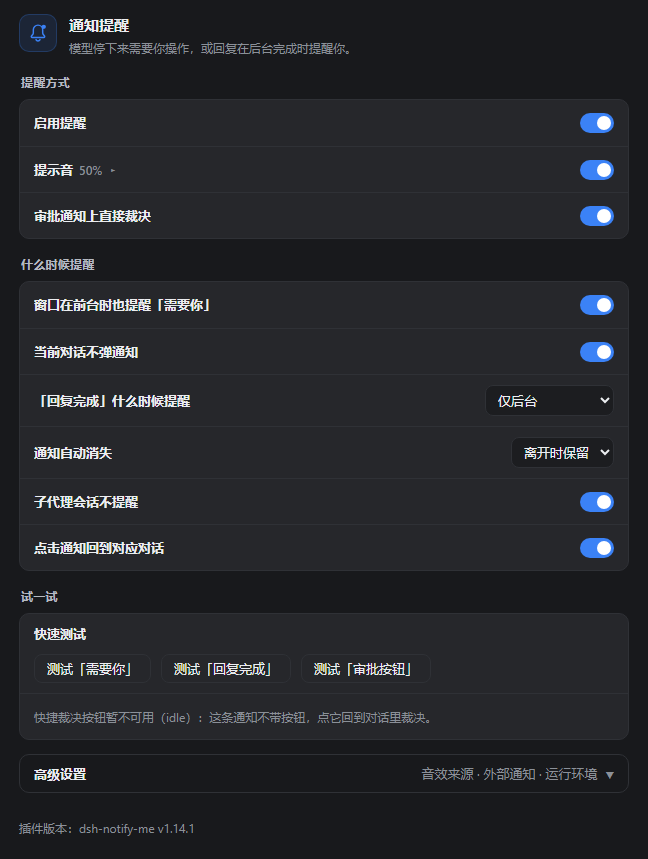
真实插件设置组件(v1.9.0 默认配置)在独立演示环境里整页渲染;只保留左侧导航作参照,不是 DSH 宿主外壳。
|
|
50
51
|
</details>
|
|
51
52
|
|
|
52
53
|
## 安装
|
|
@@ -111,31 +112,15 @@ dsh-notify-me 把「监督」和「守在屏幕前」解耦:只在真的出现
|
|
|
111
112
|
|
|
112
113
|
## 在 DSH 设置里改配置
|
|
113
114
|
|
|
114
|
-
打开 **设置 →
|
|
115
|
-
|
|
116
|
-
### 基础设置
|
|
117
|
-
|
|
118
|
-
- **启用提醒** 主开关:关闭后不再弹系统通知、不播放提示音、也不改标签页标题;
|
|
119
|
-
- **系统通知 / 提示音 / 音量**:Toast、提示音开关与音量滑块;
|
|
120
|
-
- **页面浮层提醒**(默认关,与「系统通知」互不替代,可同时开):在 DSH 页面里画提醒卡片,位置跟窗口走,见[副屏与浮层提醒](#副屏与浮层提醒);
|
|
121
|
-
- **通知语言**:跟随界面 / 简体中文 / English——决定通知文字与 `🔔 …` 标题标记使用的语言;
|
|
122
|
-
- **测试按钮**:用当前设置立即发一条「需要你」「回复完成」或「审批按钮」测试提醒(**不受**上面「页面打开时也提醒」开关限制;「需要你」测试的标题标记约 6 秒后自动消失);
|
|
123
|
-
- **版本信息**:设置页底部常显当前插件版本号(`dsh-notify-me v…`)——报障、核对是否装上新版本时直接照抄这一行。
|
|
124
|
-
|
|
125
|
-
### 提醒与点击行为
|
|
126
|
-
|
|
127
|
-
- **页面打开时也提醒「需要你」**(默认开)与 **页面打开时也提醒「回复完成」**(默认关);
|
|
128
|
-
- **当前对话不弹通知**(默认开):等待就发生在你正看着的对话里时只留标题标记,不弹通知也不响音(免得盖住审批卡片);页面切到后台立刻补发,若你已经处理掉就作废。其它后台会话不受影响;
|
|
129
|
-
- **子代理会话不提醒**(默认开):后台子代理(subagent)子会话的「需要你」与「回复完成」都不提醒——它们是主对话那一轮的步骤,完成由主对话自己的提醒覆盖;你当前打开的那个子代理会话照常提醒;关掉后恢复逐会话提醒;
|
|
130
|
-
- **审批通知上直接裁决**(默认开):权限审批的通知上带「同意 / 拒绝」按钮,点一下就按审批卡片的「允许一次 / 拒绝」直接裁决,不用切回页面;点通知正文仍是原来的「切回对应对话」。**桌面端的通知没有按钮**(`dsh-app://` 页面无法注册 Service Worker),需要按钮时打开「页面浮层提醒」,改在浮层上裁决;设置页会如实说明当前哪种渠道能给按钮;
|
|
115
|
+
打开 **设置 → 通知提醒**。页面按「提醒方式 → 什么时候提醒 → 试一试」三段排开,不常改的收进底部「高级设置」,点一下展开。
|
|
131
116
|
|
|
132
|
-
|
|
133
|
-
<summary>运行环境、点击回到对话与多窗口细节</summary>
|
|
134
|
-
|
|
135
|
-
- **运行环境**(默认自动识别):按页面协议识别 Web 端 / 桌面端(DSH Desktop,`dsh-app://`),识别不准时可手动指定——桌面端点通知走 `dsh://` 深链抬窗、快捷裁决按钮不可用;Web 端走 `window.focus()` 与 Service Worker 桥。手动覆盖与自动识别不一致时,设置页会明示检测结果;
|
|
136
|
-
- **点击通知回到对应对话**(默认开):点通知把 DSH 带到前台并切到提醒所属的对话;多个 DSH 标签页同时开着时,一次点击只调起一个窗口(优先当前可见的那个)并只切它的对话,其余标签页不动;关掉后点通知不做任何事。桌面端(DSH Desktop)同样会把窗口带到前台并切对话:页面侧的 `window.focus()` 在 Electron 里抬不动原生窗口,1.5.2 起改走应用自己的 `dsh://open` 深链调窗(窗口隐藏在托盘里也能被抬回来);
|
|
117
|
+
### 提醒方式
|
|
137
118
|
|
|
138
|
-
|
|
119
|
+
- **启用提醒** 总开关:关闭后不弹通知、不响提示音,也不改标签页标题;
|
|
120
|
+
- **系统通知**(默认开):经浏览器弹系统通知,进 Windows / macOS 通知中心;
|
|
121
|
+
- **页面浮层提醒**(默认关):在 DSH 页面角落画提醒卡片,窗口在哪块屏它就在哪块屏——系统通知只会画在主屏,主屏不看时用它;不需要通知权限,桌面端也能在卡片上直接「同意 / 拒绝」,可与系统通知同开。展开后可选四个角落的位置,见[副屏与浮层提醒](#副屏与浮层提醒);
|
|
122
|
+
- **提示音 / 音量**:提示音开关与音量滑块;具体播什么由「高级设置 → 音效来源」决定;
|
|
123
|
+
- **审批通知上直接裁决**(默认开):审批通知带「同意 / 拒绝」,点一下即完成裁决,不用切回页面。**桌面端的通知没有按钮**(`dsh-app://` 页面无法注册 Service Worker),需要按钮就打开「页面浮层提醒」,改在浮层上裁决;设置页会如实说明当前哪种渠道能给按钮。
|
|
139
124
|
|
|
140
125
|
### 副屏与浮层提醒
|
|
141
126
|
|
|
@@ -151,6 +136,24 @@ Windows 的系统通知横幅固定画在主屏上,系统没有设置项、浏
|
|
|
151
136
|
|
|
152
137
|
浮层只知道窗口在哪块屏,不知道你人在看哪块屏。窗口留在主屏、人却盯着副屏时,它同样看不见。
|
|
153
138
|
|
|
139
|
+
### 什么时候提醒
|
|
140
|
+
|
|
141
|
+
- **页面打开时也提醒「需要你」**(默认开):页面在最前也提醒;关掉后只有切到后台才提醒;
|
|
142
|
+
- **当前对话不弹通知**(默认开):等待就发生在你正看着的对话里时只留标签页标记,免得挡住审批卡片;切到后台后照常提醒,若你已处理掉就作废;
|
|
143
|
+
- **页面打开时也提醒「回复完成」**(默认关):默认只在切到后台时提醒,避免打扰;
|
|
144
|
+
- **子代理会话不提醒**(默认开):跳过后台子代理(subagent)会话——它们是主对话那一轮的步骤,完成由主对话自己的提醒覆盖;你当前打开的那个子代理会话照常提醒;
|
|
145
|
+
- **点击通知回到对应对话**(默认开):点通知把 DSH 带到前台并切到提醒所属的对话;多个标签页同时开着时只调起一个(优先当前可见的那个);关掉后点通知不做任何事。桌面端的抬窗细节见[运行环境与诊断](#运行环境与诊断)。
|
|
146
|
+
|
|
147
|
+
### 试一试
|
|
148
|
+
|
|
149
|
+
三个按钮分别发一条「需要你」「回复完成」「审批按钮」测试提醒,用当前设置立即发,**不受**「什么时候提醒」里的开关限制;下方一行如实说明当前哪种渠道能给审批按钮。
|
|
150
|
+
|
|
151
|
+
设置页底部常显插件版本号(`dsh-notify-me v…`)——报障、核对是否装上新版本时直接照抄这一行。
|
|
152
|
+
|
|
153
|
+
### 高级设置
|
|
154
|
+
|
|
155
|
+
默认收起,点一下展开。里面收着三块不常改的东西:音效来源、外部推送、运行环境与诊断——分别见下面三节。
|
|
156
|
+
|
|
154
157
|
### 音效
|
|
155
158
|
|
|
156
159
|
「需要你」与「回复完成」可独立选择内置合成音、自定义音频或系统通知音。
|
|
@@ -173,9 +176,24 @@ Windows 的系统通知横幅固定画在主屏上,系统没有设置项、浏
|
|
|
173
176
|
|
|
174
177
|
</details>
|
|
175
178
|
|
|
179
|
+
### 运行环境与诊断
|
|
180
|
+
|
|
181
|
+
在「高级设置」最后一块。默认自动识别当前是 Web 端还是桌面端(DSH Desktop,`dsh-app://`);识别不准时可手动指定——桌面端点通知走 `dsh://` 深链抬窗、通知上不带快捷裁决按钮;Web 端走 `window.focus()` 与 Service Worker 桥。手动覆盖与自动识别不一致时,设置页会明示检测结果。
|
|
182
|
+
|
|
183
|
+
<details>
|
|
184
|
+
<summary>通知语言、桌面端抬窗与恢复默认</summary>
|
|
185
|
+
|
|
186
|
+
- **通知语言**:跟随界面 / 简体中文 / English——决定通知文字与 `🔔 …` 标题标记使用的语言;
|
|
187
|
+
- **桌面端怎么抬窗**:页面侧的 `window.focus()` 在 Electron 里抬不动原生窗口,1.5.2 起改走应用自己的 `dsh://open` 深链调窗(窗口隐藏在托盘里也能被抬回来);
|
|
188
|
+
- **恢复默认设置**:把所有开关与音效设置还原成出厂值(不动外部推送目标和已选的自定义音频文件)。
|
|
189
|
+
|
|
190
|
+
</details>
|
|
191
|
+
|
|
192
|
+
> 左侧导航行的图标由 DSH 设置外壳统一渲染:外壳按分区 id 硬编码(只认 account / models / agent-presets / plugins / archived-sessions),其他分区一律给默认齿轮,`settings.section` 也没有图标字段。插件的做法是在设置面板渲染后替换那一行:按本地化标签文本找到自己的入口,把宿主的 `<svg>` 换成品牌铃铛(保留宿主给的 icon class),并用 MutationObserver 跟随重渲染;宿主改结构时会自动放弃、回落到齿轮。
|
|
193
|
+
|
|
176
194
|
> 需要浏览器通知权限:页面上点一下 → 允许;或地址栏锁 → 站点设置 → 通知 → 允许 → 刷新。macOS 还要在 系统设置 → 通知 里允许该浏览器。
|
|
177
195
|
|
|
178
|
-
##
|
|
196
|
+
## 五种提醒渠道
|
|
179
197
|
|
|
180
198
|
- **系统通知**:经浏览器弹出的系统通知,进 Windows 通知中心或 macOS 通知中心(点击回到提醒所属的对话;支持快捷裁决的 Web 环境可点审批按钮直接裁决,桌面端无按钮)
|
|
181
199
|
- **页面浮层**(可选,默认关):画在 DSH 页面角落的提醒卡片,落在窗口所在的那块屏,可带「同意 / 拒绝」按钮;见[副屏与浮层提醒](#副屏与浮层提醒)
|
|
@@ -210,6 +228,8 @@ Windows 的系统通知横幅固定画在主屏上,系统没有设置项、浏
|
|
|
210
228
|
|
|
211
229
|
</details>
|
|
212
230
|
|
|
231
|
+
`1.9.0` 的界面重排没有放宽也没有收紧这个范围:设置页是纯 React 渲染 + 既有 CSS 变量(每个色值都带 fallback),没有引入任何新的宿主 API;浮层、标题标记、抬窗仍走 1.7 / 1.8 那几条路径。**0.1.1-rc.2 到 0.2.1-rc.2 的插件条目照旧兼容**,换回旧宿主也不需要改配置。新增的只有界面元素——设置页页眉的铃铛是插件自己画的 SVG(`docs/brand/`),与宿主无关。
|
|
232
|
+
|
|
213
233
|
## 控制台高级配置
|
|
214
234
|
|
|
215
235
|
设置页是第一入口;想脚本化/批量改或恢复默认时,偏好存 `localStorage`(`dshNotifyMe.config`),可用控制台实时调整:
|
|
@@ -298,6 +318,8 @@ DSH Desktop 是一层 Electron 壳,页面跑在 `dsh-app://app` 下:DOM 的
|
|
|
298
318
|
- 「当前对话不弹通知」按 `document.hidden` 判定:窗口被别的应用完全盖住时仍算「页面可见」,此时当前对话的等待照样静默。
|
|
299
319
|
- 外部通知转发受浏览器跨域(CORS)限制:端点不放行时自动降级为「送出但不可确认」(no-cors),如实标为「已送出不可确认」;Discord Webhook 官方放行跨域,可直接确认送达。HTTP 错误如实记失败、不重试。转发在本地提醒决定要发之后才触发,所以被「当前对话不弹通知」等规则静音的提醒也不会外发。
|
|
300
320
|
|
|
321
|
+
- **设置左侧导航行图标靠 DOM 补丁**:外壳按分区 id 硬编码图标且 `settings.section` 没有图标字段,插件只能在面板渲染后把那一行的 `<svg>` 换成铃铛。命中依赖宿主当前的面板结构(`data-shortcut-modal="settings"` + 导航按钮里的标签 `<span>`);如果 DSH 改了这套结构,补丁会静默失效、显示回默认齿轮,其他功能不受影响。
|
|
322
|
+
|
|
301
323
|
## 开发自检
|
|
302
324
|
|
|
303
325
|
```powershell
|
package/lib/client.js
CHANGED
|
@@ -1937,7 +1937,7 @@
|
|
|
1937
1937
|
});
|
|
1938
1938
|
} catch (e) {}
|
|
1939
1939
|
// keep in sync with package.json "version" on every release
|
|
1940
|
-
api.version = "1.
|
|
1940
|
+
api.version = "1.9.1";
|
|
1941
1941
|
api.setConfig = function (patch) { return setConfigLocal(patch); };
|
|
1942
1942
|
api.resetConfig = function () {
|
|
1943
1943
|
try {
|
|
@@ -2059,9 +2059,19 @@
|
|
|
2059
2059
|
var NS = "dsh-notify-me";
|
|
2060
2060
|
var UI_zh = {
|
|
2061
2061
|
nav: "通知提醒",
|
|
2062
|
-
blurb: "
|
|
2062
|
+
blurb: "模型停下来需要你操作,或回复在后台完成时提醒你。",
|
|
2063
|
+
secWays: "提醒方式",
|
|
2064
|
+
secWhen: "什么时候提醒",
|
|
2065
|
+
secTest: "试一试",
|
|
2066
|
+
advanced: "高级设置",
|
|
2067
|
+
advancedHint: "音效来源 · 外部通知 · 运行环境",
|
|
2068
|
+
secDiag: "运行环境与诊断",
|
|
2069
|
+
expand: "展开",
|
|
2070
|
+
collapse: "收起",
|
|
2071
|
+
permHintInline: "尚未授权,允许一次即可。",
|
|
2072
|
+
resetHint: "把上面所有选项还原成默认值(含已选的自定义音效)。",
|
|
2063
2073
|
enable: "启用提醒",
|
|
2064
|
-
enableHint: "
|
|
2074
|
+
enableHint: "关闭后不弹通知、不响提示音,也不改标签页标题。",
|
|
2065
2075
|
hostEnv: "运行环境",
|
|
2066
2076
|
hostEnvHint: "默认自动识别:页面协议是 dsh-app:// 即桌面端(DSH Desktop),其余为 Web 端。识别不准时手动指定:桌面端点通知借 dsh:// 深链把窗口带到前台、快捷裁决按钮不可用;Web 端走 window.focus() 与 Service Worker 桥。",
|
|
2067
2077
|
hostEnvAuto: "自动识别(推荐)",
|
|
@@ -2071,11 +2081,11 @@
|
|
|
2071
2081
|
hostEnvMismatchTail: "」,手动选择会覆盖它)",
|
|
2072
2082
|
hostEnvDesktopForcedNote: "(当前页面不是 dsh-app://:点通知会尝试唤起 dsh:// 协议,浏览器可能弹「打开应用」确认框)",
|
|
2073
2083
|
toast: "系统通知",
|
|
2074
|
-
toastHint: "
|
|
2084
|
+
toastHint: "经浏览器弹系统通知(Windows 通知中心),需要通知权限。",
|
|
2075
2085
|
sound: "提示音",
|
|
2076
|
-
soundHint: "
|
|
2086
|
+
soundHint: "提示音总开关;播什么由「高级设置 → 音效来源」决定。",
|
|
2077
2087
|
soundSource: "音效来源",
|
|
2078
|
-
soundSourceHint: "
|
|
2088
|
+
soundSourceHint: "两类提醒各自选声音来源,互不影响;默认是插件内置合成音。",
|
|
2079
2089
|
soundDoneLabel: "「回复完成」的声音",
|
|
2080
2090
|
soundAttentionLabel: "「需要你」的声音",
|
|
2081
2091
|
soundSynth: "内置合成音(默认)",
|
|
@@ -2098,7 +2108,7 @@
|
|
|
2098
2108
|
soundOffHint: "「提示音」开关是关的:先打开它才能试听(关掉时提醒本身也确实不出声)。",
|
|
2099
2109
|
soundPreviewSystem: "「系统通知音」是随通知由系统播放的,插件这边没有可播的音;已发一条测试提醒,声音就是它。",
|
|
2100
2110
|
external: "外部通知",
|
|
2101
|
-
externalHint: "
|
|
2111
|
+
externalHint: "把提醒同时推到 Discord / Bark / Gotify / 自定义 Webhook,人不在电脑前也能收到。与本地提醒同一套触发规则。",
|
|
2102
2112
|
externalEnable: "转发外部通知",
|
|
2103
2113
|
externalEnableHint: "总开关:关闭后不向任何外部端点发送。",
|
|
2104
2114
|
externalAttentionLabel: "转发「需要你」",
|
|
@@ -2129,23 +2139,23 @@
|
|
|
2129
2139
|
externalNoTargets: "先添加至少一个推送目标。",
|
|
2130
2140
|
externalOffHint: "先打开「转发外部通知」。",
|
|
2131
2141
|
attentionVisible: "页面打开时也提醒「需要你」",
|
|
2132
|
-
attentionVisibleHint: "
|
|
2142
|
+
attentionVisibleHint: "页面在最前也提醒。关掉后只有切到后台才提醒。",
|
|
2133
2143
|
currentQuiet: "当前对话不弹通知",
|
|
2134
|
-
currentQuietHint: "
|
|
2144
|
+
currentQuietHint: "等待就发生在你正看着的对话里时只留标签页标记,免得挡住审批卡片;切到后台后照常提醒。",
|
|
2135
2145
|
doneVisible: "页面打开时也提醒「回复完成」",
|
|
2136
|
-
doneVisibleHint: "
|
|
2146
|
+
doneVisibleHint: "页面在最前也提醒。默认只在切到后台时提醒,避免打扰。",
|
|
2137
2147
|
subagentQuiet: "子代理会话不提醒",
|
|
2138
|
-
subagentQuietHint: "
|
|
2148
|
+
subagentQuietHint: "跳过后台子代理会话(结果由所属主对话的提醒覆盖);你正打开的那个照常提醒。",
|
|
2139
2149
|
autoFocus: "点击通知回到对应对话",
|
|
2140
|
-
autoFocusHint: "
|
|
2150
|
+
autoFocusHint: "点通知会切到这条提醒所属的对话;关掉后点击不做任何事。",
|
|
2141
2151
|
quickActions: "审批通知上直接裁决",
|
|
2142
|
-
quickActionsHint: "
|
|
2152
|
+
quickActionsHint: "审批通知上带「同意 / 拒绝」,点一下即完成裁决,不用切回页面。需要 Service Worker(http://127.0.0.1 或 https),用不了时退回普通通知。",
|
|
2143
2153
|
quickApprovalNote: "「同意」等价于审批卡片上的「允许一次」,只放行这一次。",
|
|
2144
2154
|
bridgeOff: "快捷裁决按钮暂不可用(",
|
|
2145
2155
|
bridgeOffTail: "):审批通知会退回不带按钮的普通样式。",
|
|
2146
2156
|
bridgeOffDesktop: "桌面端暂不支持快捷裁决按钮:dsh-app:// 页面无法注册 Service Worker,审批通知只能是不带按钮的普通样式,测试按钮同样只发普通通知。这是宿主限制,不是设置坏了。",
|
|
2147
2157
|
overlay: "页面浮层提醒",
|
|
2148
|
-
overlayHint: "
|
|
2158
|
+
overlayHint: "在页面角落画提醒卡片:窗口在哪块屏,它就在哪块屏。系统通知只会出现在主屏,主屏不看时用它。不需要通知权限,桌面端也能直接「同意 / 拒绝」,可与系统通知同开。",
|
|
2149
2159
|
overlayCorner: "浮层位置",
|
|
2150
2160
|
overlayCornerHint: "贴在 DSH 窗口的哪个角;窗口在哪块屏,浮层就出现在哪块屏。",
|
|
2151
2161
|
overlayPosTR: "右上",
|
|
@@ -2163,7 +2173,7 @@
|
|
|
2163
2173
|
langAutoNote: "(跟随界面)",
|
|
2164
2174
|
current: "界面当前语言",
|
|
2165
2175
|
testTitle: "快速测试",
|
|
2166
|
-
testHint: "
|
|
2176
|
+
testHint: "用当前设置各发一条,不受「什么时候提醒」里的开关限制。",
|
|
2167
2177
|
testAttention: "测试「需要你」",
|
|
2168
2178
|
testDone: "测试「回复完成」",
|
|
2169
2179
|
testApprovalBtn: "测试「审批按钮」",
|
|
@@ -2176,9 +2186,19 @@
|
|
|
2176
2186
|
};
|
|
2177
2187
|
var UI_en = {
|
|
2178
2188
|
nav: "Notify me",
|
|
2179
|
-
blurb: "
|
|
2189
|
+
blurb: "Get told when the agent needs your input, or when a reply finishes in the background.",
|
|
2190
|
+
secWays: "How you get told",
|
|
2191
|
+
secWhen: "When to alert",
|
|
2192
|
+
secTest: "Try it",
|
|
2193
|
+
advanced: "Advanced",
|
|
2194
|
+
advancedHint: "Alert sounds · External forwarding · Runtime",
|
|
2195
|
+
secDiag: "Runtime & diagnostics",
|
|
2196
|
+
expand: "Show",
|
|
2197
|
+
collapse: "Hide",
|
|
2198
|
+
permHintInline: "Not granted yet — allow it once from the page.",
|
|
2199
|
+
resetHint: "Put every option above back to its default (picked sound files included).",
|
|
2180
2200
|
enable: "Enable reminders",
|
|
2181
|
-
enableHint: "
|
|
2201
|
+
enableHint: "When off: no toasts, no sounds, and the tab title is left alone.",
|
|
2182
2202
|
hostEnv: "Environment",
|
|
2183
2203
|
hostEnvHint: "Auto-detect by default: a dsh-app:// page is the Desktop (DSH Desktop) shell, anything else is the Web. Override it if detection comes out wrong: on the Desktop a toast click raises the window through the dsh:// deep link and quick-decision buttons are unavailable; on the Web it is window.focus() plus the Service Worker bridge.",
|
|
2184
2204
|
hostEnvAuto: "Auto-detect (recommended)",
|
|
@@ -2188,11 +2208,11 @@
|
|
|
2188
2208
|
hostEnvMismatchTail: "\"; the manual choice overrides it)",
|
|
2189
2209
|
hostEnvDesktopForcedNote: " (this page is not dsh-app://: a toast click will try to launch the dsh:// protocol and the browser may show an \"open app?\" prompt)",
|
|
2190
2210
|
toast: "System notifications",
|
|
2191
|
-
toastHint: "Native toasts
|
|
2211
|
+
toastHint: "Native toasts through the browser (Windows notification center); needs notification permission.",
|
|
2192
2212
|
sound: "Sound",
|
|
2193
|
-
soundHint: "Master cue switch; what it
|
|
2213
|
+
soundHint: "Master cue switch; what it plays comes from Advanced → Alert sound.",
|
|
2194
2214
|
soundSource: "Alert sound",
|
|
2195
|
-
soundSourceHint: "Each alert kind picks its own
|
|
2215
|
+
soundSourceHint: "Each alert kind picks its own source; the two never affect each other. Default is the built-in cue.",
|
|
2196
2216
|
soundDoneLabel: "\"Reply finished\" sound",
|
|
2197
2217
|
soundAttentionLabel: "\"Needs you\" sound",
|
|
2198
2218
|
soundSynth: "Built-in cue (default)",
|
|
@@ -2215,7 +2235,7 @@
|
|
|
2215
2235
|
soundOffHint: "The Sound switch is off: turn it on to preview (with it off the alerts themselves stay silent too).",
|
|
2216
2236
|
soundPreviewSystem: "The system sound plays with a toast, not from the plugin — a test alert was sent instead; that sound is it.",
|
|
2217
2237
|
external: "External notifications",
|
|
2218
|
-
externalHint: "
|
|
2238
|
+
externalHint: "Also push alerts to Discord / Bark / Gotify / custom webhooks, so you hear about it away from the machine. Same trigger rules as local alerts.",
|
|
2219
2239
|
externalEnable: "Forward to external targets",
|
|
2220
2240
|
externalEnableHint: "Master switch: when off, nothing is sent to any external endpoint.",
|
|
2221
2241
|
externalAttentionLabel: "Forward \"needs you\"",
|
|
@@ -2246,23 +2266,23 @@
|
|
|
2246
2266
|
externalNoTargets: "Add at least one push target first.",
|
|
2247
2267
|
externalOffHint: "Turn on \"Forward to external targets\" first.",
|
|
2248
2268
|
attentionVisible: "Also alert \"needs you\" while the page is open",
|
|
2249
|
-
attentionVisibleHint: "
|
|
2269
|
+
attentionVisibleHint: "Alert even while the page is in front. Turn off to hear only from the background.",
|
|
2250
2270
|
currentQuiet: "Stay quiet for the conversation on screen",
|
|
2251
|
-
currentQuietHint: "
|
|
2271
|
+
currentQuietHint: "A wait belonging to the conversation on screen keeps only the tab marker, so the approval card stays readable; backgrounding restores alerts.",
|
|
2252
2272
|
doneVisible: "Also alert \"reply finished\" while the page is open",
|
|
2253
|
-
doneVisibleHint: "
|
|
2273
|
+
doneVisibleHint: "Alert even while the page is in front. By default only background finishes alert.",
|
|
2254
2274
|
subagentQuiet: "Ignore subagent sessions",
|
|
2255
|
-
subagentQuietHint: "
|
|
2275
|
+
subagentQuietHint: "Skip sessions spawned by a subagent (the parent conversation covers them); the one you have open still alerts.",
|
|
2256
2276
|
autoFocus: "Click a toast to open that conversation",
|
|
2257
|
-
autoFocusHint: "
|
|
2277
|
+
autoFocusHint: "A click switches to the conversation the alert came from; off means a click does nothing.",
|
|
2258
2278
|
quickActions: "Decide approvals from the toast",
|
|
2259
|
-
quickActionsHint: "
|
|
2279
|
+
quickActionsHint: "Approval notifications carry Approve / Reject; one click settles the request without switching back. Needs a Service Worker browser (http://127.0.0.1 or https), else plain toasts.",
|
|
2260
2280
|
quickApprovalNote: "\"Approve\" equals \"Allow once\" on the approval card — it allows that one call only.",
|
|
2261
2281
|
bridgeOff: "Quick-decision buttons are unavailable right now (",
|
|
2262
2282
|
bridgeOffTail: "); approval toasts fall back to their plain form.",
|
|
2263
2283
|
bridgeOffDesktop: "Quick-decision buttons are unavailable on Desktop: dsh-app:// pages cannot register a Service Worker, so approval toasts fall back to their plain, button-less form and the test button only sends a plain notification. This is a host limitation, not a broken setting.",
|
|
2264
2284
|
overlay: "In-page overlay",
|
|
2265
|
-
overlayHint: "Draw
|
|
2285
|
+
overlayHint: "Draw a card in the page corner, on whatever display the window sits on. System notifications only land on the primary display. No permission needed, and the Desktop shell can Approve / Reject right on the card. Can run with toasts on.",
|
|
2266
2286
|
overlayCorner: "Overlay position",
|
|
2267
2287
|
overlayCornerHint: "Which corner of the DSH window the cards stack in; they follow the window to whatever display it is on.",
|
|
2268
2288
|
overlayPosTR: "Top right",
|
|
@@ -2280,7 +2300,7 @@
|
|
|
2280
2300
|
langAutoNote: " (follows the interface)",
|
|
2281
2301
|
current: "Current interface language",
|
|
2282
2302
|
testTitle: "Quick test",
|
|
2283
|
-
testHint: "Send one
|
|
2303
|
+
testHint: "Send one of each with the current settings; the \"When to alert\" switches are bypassed.",
|
|
2284
2304
|
testAttention: "Test \"needs you\"",
|
|
2285
2305
|
testDone: "Test \"reply finished\"",
|
|
2286
2306
|
testApprovalBtn: "Test approval buttons",
|
|
@@ -2291,6 +2311,94 @@
|
|
|
2291
2311
|
offHint: "Reminders are off: enable them first, then test.",
|
|
2292
2312
|
versionLine: "Plugin version: dsh-notify-me v"
|
|
2293
2313
|
};
|
|
2314
|
+
// ─────────────────── sidebar row glyph ───────────────────────────
|
|
2315
|
+
// The settings shell picks the nav glyph from a table keyed by section id
|
|
2316
|
+
// (account / models / agent-presets / plugins / archived-sessions) and hands
|
|
2317
|
+
// every other section the settings gear; settings.section carries no icon
|
|
2318
|
+
// field, so there is no supported way to give our row the bell. Patch the
|
|
2319
|
+
// rendered cell instead: find the nav button whose label is ours and swap
|
|
2320
|
+
// its <svg> for the brand bell. The panel is portaled fresh on every open,
|
|
2321
|
+
// so this re-applies itself; if a host updates its markup the label lookup
|
|
2322
|
+
// simply finds nothing and the gear stays.
|
|
2323
|
+
function bellNavSvg() {
|
|
2324
|
+
var NS = "http://www.w3.org/2000/svg";
|
|
2325
|
+
var svg = document.createElementNS(NS, "svg");
|
|
2326
|
+
var attrs = {
|
|
2327
|
+
viewBox: "0 0 24 24", width: "16", height: "16", fill: "none",
|
|
2328
|
+
stroke: "currentColor", "stroke-width": "1.6", "stroke-linecap": "round",
|
|
2329
|
+
"stroke-linejoin": "round", "aria-hidden": "true", "data-dnm-nav": "1"
|
|
2330
|
+
};
|
|
2331
|
+
for (var k in attrs) if (Object.prototype.hasOwnProperty.call(attrs, k)) svg.setAttribute(k, attrs[k]);
|
|
2332
|
+
var shapes = [
|
|
2333
|
+
["path", { d: "M12 3.4a5.1 5.1 0 0 0-5.1 5.1v3.1c0 .9-.3 1.7-.9 2.4l-1.1 1.3c-.5.6-.1 1.5.7 1.5h12.8c.8 0 1.2-.9.7-1.5l-1.1-1.3a3.8 3.8 0 0 1-.9-2.4V8.5A5.1 5.1 0 0 0 12 3.4Z" }],
|
|
2334
|
+
["path", { d: "M9.8 19.2a2.4 2.4 0 0 0 4.4 0" }],
|
|
2335
|
+
["circle", { cx: "18.3", cy: "5.3", r: "2.35", fill: "currentColor", stroke: "none" }]
|
|
2336
|
+
];
|
|
2337
|
+
for (var i = 0; i < shapes.length; i++) {
|
|
2338
|
+
var el = document.createElementNS(NS, shapes[i][0]);
|
|
2339
|
+
for (var a in shapes[i][1]) if (Object.prototype.hasOwnProperty.call(shapes[i][1], a)) el.setAttribute(a, shapes[i][1][a]);
|
|
2340
|
+
svg.appendChild(el);
|
|
2341
|
+
}
|
|
2342
|
+
return svg;
|
|
2343
|
+
}
|
|
2344
|
+
|
|
2345
|
+
function installNavBell(labelOf) {
|
|
2346
|
+
if (typeof document === "undefined" || !document.body || typeof MutationObserver !== "function") {
|
|
2347
|
+
return function () {};
|
|
2348
|
+
}
|
|
2349
|
+
var PANEL = '[data-shortcut-modal="settings"]';
|
|
2350
|
+
var observed = null;
|
|
2351
|
+
var watching = null;
|
|
2352
|
+
|
|
2353
|
+
function patchPanel(panel) {
|
|
2354
|
+
try {
|
|
2355
|
+
var label = String(labelOf() || "").trim();
|
|
2356
|
+
if (!label || !panel) return;
|
|
2357
|
+
var cells = panel.querySelectorAll("button");
|
|
2358
|
+
for (var i = 0; i < cells.length; i++) {
|
|
2359
|
+
var cell = cells[i];
|
|
2360
|
+
var spans = cell.querySelectorAll("span");
|
|
2361
|
+
var hit = false;
|
|
2362
|
+
for (var s = 0; s < spans.length; s++) {
|
|
2363
|
+
if (String(spans[s].textContent || "").trim() === label) { hit = true; break; }
|
|
2364
|
+
}
|
|
2365
|
+
if (!hit) continue;
|
|
2366
|
+
var svg = cell.querySelector("svg");
|
|
2367
|
+
if (!svg || svg.getAttribute("data-dnm-nav") === "1") continue;
|
|
2368
|
+
var bell = bellNavSvg();
|
|
2369
|
+
// Keep the shell's own icon class so the box size and color match.
|
|
2370
|
+
var cls = svg.getAttribute("class");
|
|
2371
|
+
if (cls) bell.setAttribute("class", cls);
|
|
2372
|
+
if (svg.parentNode) svg.parentNode.replaceChild(bell, svg);
|
|
2373
|
+
}
|
|
2374
|
+
} catch (e) {}
|
|
2375
|
+
}
|
|
2376
|
+
|
|
2377
|
+
function watchPanel(panel) {
|
|
2378
|
+
if (!panel || panel === observed) return;
|
|
2379
|
+
observed = panel;
|
|
2380
|
+
patchPanel(panel);
|
|
2381
|
+
if (watching) { try { watching.disconnect(); } catch (e) {} }
|
|
2382
|
+
watching = new MutationObserver(function () { patchPanel(observed); });
|
|
2383
|
+
watching.observe(panel, { childList: true, subtree: true });
|
|
2384
|
+
}
|
|
2385
|
+
|
|
2386
|
+
// The panel is portaled onto <body>, so a body-level childList observer is
|
|
2387
|
+
// enough to notice it opening without watching the whole page.
|
|
2388
|
+
var opener = new MutationObserver(function () {
|
|
2389
|
+
var panel = document.querySelector(PANEL);
|
|
2390
|
+
if (panel) watchPanel(panel);
|
|
2391
|
+
else if (watching) { try { watching.disconnect(); } catch (e) {} watching = null; observed = null; }
|
|
2392
|
+
});
|
|
2393
|
+
opener.observe(document.body, { childList: true });
|
|
2394
|
+
var existing = document.querySelector(PANEL);
|
|
2395
|
+
if (existing) watchPanel(existing);
|
|
2396
|
+
return function () {
|
|
2397
|
+
try { opener.disconnect(); } catch (e) {}
|
|
2398
|
+
if (watching) { try { watching.disconnect(); } catch (e) {} }
|
|
2399
|
+
};
|
|
2400
|
+
}
|
|
2401
|
+
|
|
2294
2402
|
// Small element helper to keep the hand-written page readable.
|
|
2295
2403
|
function h(tag, props) {
|
|
2296
2404
|
var args = [tag, props || null];
|
|
@@ -2322,7 +2430,27 @@
|
|
|
2322
2430
|
".dnm-targetRow+.dnm-targetRow{border-top:1px solid var(--dsw-alias-border-l2,rgba(128,128,128,.35))}" +
|
|
2323
2431
|
".dnm-input{flex:1;min-width:180px;border:1px solid var(--dsw-alias-border-l2,rgba(128,128,128,.4));background:var(--dsw-alias-bg-layer-1,rgba(255,255,255,.03));color:var(--dsw-alias-label-primary,rgba(20,20,20,.9));border-radius:8px;padding:5px 8px;font-size:12px;font-family:inherit}" +
|
|
2324
2432
|
".dnm-hint{font-size:12px;line-height:18px;color:var(--dsw-alias-label-tertiary,rgba(120,120,120,.9))}" +
|
|
2325
|
-
".dnm-feedback{font-size:12px;line-height:18px;color:var(--dsw-alias-label-tertiary,rgba(120,120,120,.9));min-height:18px}"
|
|
2433
|
+
".dnm-feedback{font-size:12px;line-height:18px;color:var(--dsw-alias-label-tertiary,rgba(120,120,120,.9));min-height:18px}" +
|
|
2434
|
+
// Page header: mark + title + one-line purpose. The section titles below
|
|
2435
|
+
// carry the grouping, so the header stays small.
|
|
2436
|
+
".dnm-head{display:flex;align-items:flex-start;gap:12px}" +
|
|
2437
|
+
".dnm-headIcon{flex:none;width:36px;height:36px;border-radius:10px;display:grid;place-items:center;color:var(--dsw-alias-state-business-primary,#3b82f6);background:rgba(59,130,246,.12);border:1px solid rgba(59,130,246,.24)}" +
|
|
2438
|
+
".dnm-headText{min-width:0;display:flex;flex-direction:column;gap:3px;padding-top:1px}" +
|
|
2439
|
+
".dnm-headTitle{font-size:15px;font-weight:600;line-height:21px;color:var(--dsw-alias-label-primary,rgba(20,20,20,.9))}" +
|
|
2440
|
+
".dnm-headSub{margin:0;font-size:12px;line-height:18px;color:var(--dsw-alias-label-tertiary,rgba(120,120,120,.9))}" +
|
|
2441
|
+
".dnm-secTitle{margin:2px 0 -6px;padding:0 2px;font-size:12px;font-weight:600;line-height:18px;color:var(--dsw-alias-label-secondary,rgba(90,90,90,.9));letter-spacing:.02em}" +
|
|
2442
|
+
// Sub-rows hang under the row they belong to (corner of the overlay,
|
|
2443
|
+
// volume under Sound) instead of reading as siblings.
|
|
2444
|
+
".dnm-rowSub{padding-left:26px;background:var(--dsw-alias-bg-layer-2,rgba(128,128,128,.04))}" +
|
|
2445
|
+
".dnm-rowSub .dnm-rowLabel{font-weight:500}" +
|
|
2446
|
+
".dnm-rowStack{flex-direction:column;align-items:stretch;gap:10px}" +
|
|
2447
|
+
".dnm-rowStack .dnm-btnRow{justify-content:flex-start;flex-wrap:wrap}" +
|
|
2448
|
+
".dnm-advToggle{width:100%;box-sizing:border-box;display:flex;align-items:center;justify-content:space-between;gap:10px;border:1px solid var(--dsw-alias-border-l2,rgba(128,128,128,.35));background:transparent;color:var(--dsw-alias-label-primary,rgba(20,20,20,.9));border-radius:10px;padding:10px 14px;font-family:inherit;font-size:13px;font-weight:600;cursor:pointer;text-align:left}" +
|
|
2449
|
+
".dnm-advToggle:hover{background:var(--dsw-alias-bg-layer-1,rgba(128,128,128,.08))}" +
|
|
2450
|
+
".dnm-advToggle:focus-visible{outline:2px solid var(--dsw-alias-state-business-primary,#3b82f6);outline-offset:2px}" +
|
|
2451
|
+
".dnm-advRight{display:flex;align-items:center;gap:8px;flex:none;font-weight:400;color:var(--dsw-alias-label-tertiary,rgba(120,120,120,.9))}" +
|
|
2452
|
+
".dnm-advChev{font-size:10px;translate:0 1px;transition:transform .15s ease}" +
|
|
2453
|
+
".dnm-advChev.open{transform:rotate(180deg)}";
|
|
2326
2454
|
(function injectStyle() {
|
|
2327
2455
|
try {
|
|
2328
2456
|
if (typeof document === "undefined" || typeof document.createElement !== "function") return;
|
|
@@ -2606,34 +2734,57 @@
|
|
|
2606
2734
|
else if (cfg.hostEnv !== "auto" && isDesktopShell() !== detectedDesktop()) {
|
|
2607
2735
|
envHint += t("hostEnvMismatch") + (detectedDesktop() ? t("hostEnvDesktop") : t("hostEnvWeb")) + t("hostEnvMismatchTail");
|
|
2608
2736
|
}
|
|
2737
|
+
// Page header: the plugin's own mark instead of the host's generic
|
|
2738
|
+
// settings gear, so the page is recognisable at a glance while the
|
|
2739
|
+
// Settings nav row itself stays host-controlled.
|
|
2740
|
+
function headIcon() {
|
|
2741
|
+
return h("svg", { viewBox: "0 0 24 24", width: 22, height: 22, fill: "none", stroke: "currentColor", "stroke-width": 1.6, "stroke-linecap": "round", "stroke-linejoin": "round", "aria-hidden": "true" }, [
|
|
2742
|
+
h("path", { d: "M12 3.4a5.1 5.1 0 0 0-5.1 5.1v3.1c0 .9-.3 1.7-.9 2.4l-1.1 1.3c-.5.6-.1 1.5.7 1.5h12.8c.8 0 1.2-.9.7-1.5l-1.1-1.3a3.8 3.8 0 0 1-.9-2.4V8.5A5.1 5.1 0 0 0 12 3.4Z" }),
|
|
2743
|
+
h("path", { d: "M9.8 19.2a2.4 2.4 0 0 0 4.4 0" }),
|
|
2744
|
+
h("circle", { cx: 18.3, cy: 5.3, r: 2.35, fill: "currentColor", stroke: "none" })
|
|
2745
|
+
]);
|
|
2746
|
+
}
|
|
2747
|
+
function secTitle(labelText) {
|
|
2748
|
+
return h("div", { className: "dnm-secTitle" }, labelText);
|
|
2749
|
+
}
|
|
2750
|
+
// The permission state belongs on the System-notifications row it affects
|
|
2751
|
+
// rather than in a footer note the user has to connect to it.
|
|
2752
|
+
function toastHintText() {
|
|
2753
|
+
return t("toastHint") + (permOK ? "" : " " + t("permHintInline"));
|
|
2754
|
+
}
|
|
2755
|
+
var advState = React.useState(false);
|
|
2756
|
+
var advancedOpen = advState[0];
|
|
2757
|
+
var setAdvancedOpen = advState[1];
|
|
2758
|
+
var testRow = h("div", { className: "dnm-row dnm-rowStack" }, [
|
|
2759
|
+
h("div", { className: "dnm-rowText" }, [
|
|
2760
|
+
h("div", { className: "dnm-rowLabel" }, t("testTitle")),
|
|
2761
|
+
h("div", { className: "dnm-rowHint" }, t("testHint"))
|
|
2762
|
+
]),
|
|
2763
|
+
h("div", { className: "dnm-btnRow" }, [
|
|
2764
|
+
h("button", { type: "button", className: "dnm-btn", disabled: !cfg.enabled, onClick: function () { runTest("attention"); } }, t("testAttention")),
|
|
2765
|
+
h("button", { type: "button", className: "dnm-btn", disabled: !cfg.enabled, onClick: function () { runTest("done"); } }, t("testDone")),
|
|
2766
|
+
h("button", { type: "button", className: "dnm-btn", disabled: !cfg.enabled || !cfg.quickActions, onClick: function () { runTest("approval"); } }, t("testApprovalBtn"))
|
|
2767
|
+
])
|
|
2768
|
+
]);
|
|
2609
2769
|
return h("div", { className: "dnm-wrap" }, [
|
|
2610
|
-
h("
|
|
2770
|
+
h("div", { className: "dnm-head" }, [
|
|
2771
|
+
h("span", { className: "dnm-headIcon" }, headIcon()),
|
|
2772
|
+
h("div", { className: "dnm-headText" }, [
|
|
2773
|
+
h("div", { className: "dnm-headTitle" }, t("nav")),
|
|
2774
|
+
h("p", { className: "dnm-headSub" }, t("blurb"))
|
|
2775
|
+
])
|
|
2776
|
+
]),
|
|
2777
|
+
// 1) How the alert reaches you. Each channel owns its own row, and the
|
|
2778
|
+
// row's dependent control (overlay corner, volume) hangs beneath it.
|
|
2779
|
+
secTitle(t("secWays")),
|
|
2611
2780
|
card([
|
|
2612
2781
|
rowSwitch("enabled", t("enable"), t("enableHint"), cfg.enabled, function (v) {
|
|
2613
2782
|
patch({ enabled: v });
|
|
2614
2783
|
if (!v && attentionActive > 0) { attentionActive = 0; applyTitle(); }
|
|
2615
2784
|
}),
|
|
2616
|
-
|
|
2617
|
-
h("div", { className: "dnm-rowText" }, [
|
|
2618
|
-
h("div", { className: "dnm-rowLabel" }, t("hostEnv")),
|
|
2619
|
-
h("div", { className: "dnm-rowHint" }, envHint)
|
|
2620
|
-
]),
|
|
2621
|
-
h("select", {
|
|
2622
|
-
className: "dnm-select",
|
|
2623
|
-
value: cfg.hostEnv,
|
|
2624
|
-
"aria-label": t("hostEnv"),
|
|
2625
|
-
onChange: function (e) { patch({ hostEnv: e.currentTarget.value }); }
|
|
2626
|
-
}, [
|
|
2627
|
-
h("option", { value: "auto" }, t("hostEnvAuto")),
|
|
2628
|
-
h("option", { value: "desktop" }, t("hostEnvDesktop")),
|
|
2629
|
-
h("option", { value: "web" }, t("hostEnvWeb"))
|
|
2630
|
-
])
|
|
2631
|
-
])
|
|
2632
|
-
]),
|
|
2633
|
-
card([
|
|
2634
|
-
rowSwitch("toast", t("toast"), t("toastHint"), cfg.toast, function (v) { patch({ toast: v }); }),
|
|
2785
|
+
rowSwitch("toast", t("toast"), toastHintText(), cfg.toast, function (v) { patch({ toast: v }); }),
|
|
2635
2786
|
rowSwitch("overlay", t("overlay"), t("overlayHint"), cfg.overlay, function (v) { patch({ overlay: v }); }),
|
|
2636
|
-
cfg.overlay ? h("div", { className: "dnm-row" }, [
|
|
2787
|
+
cfg.overlay ? h("div", { className: "dnm-row dnm-rowSub" }, [
|
|
2637
2788
|
h("div", { className: "dnm-rowText" }, [
|
|
2638
2789
|
h("div", { className: "dnm-rowLabel" }, t("overlayCorner")),
|
|
2639
2790
|
h("div", { className: "dnm-rowHint" }, t("overlayCornerHint"))
|
|
@@ -2651,16 +2802,7 @@
|
|
|
2651
2802
|
])
|
|
2652
2803
|
]) : null,
|
|
2653
2804
|
rowSwitch("sound", t("sound"), t("soundHint"), cfg.sound, function (v) { patch({ sound: v }); }),
|
|
2654
|
-
|
|
2655
|
-
rowSwitch("currentQuiet", t("currentQuiet"), t("currentQuietHint"), cfg.currentHiddenOnly, function (v) { patch({ currentHiddenOnly: v }); }),
|
|
2656
|
-
rowSwitch("doneVisible", t("doneVisible"), t("doneVisibleHint"), !cfg.doneHiddenOnly, function (v) { patch({ doneHiddenOnly: !v }); }),
|
|
2657
|
-
rowSwitch("subagentQuiet", t("subagentQuiet"), t("subagentQuietHint"), cfg.ignoreSubagent, function (v) { patch({ ignoreSubagent: v }); }),
|
|
2658
|
-
rowSwitch("autoFocus", t("autoFocus"), t("autoFocusHint"), cfg.autoFocus, function (v) { patch({ autoFocus: v }); }),
|
|
2659
|
-
rowSwitch("quickActions", t("quickActions"), t("quickActionsHint"), cfg.quickActions, function (v) {
|
|
2660
|
-
patch({ quickActions: v });
|
|
2661
|
-
if (v) ensureActionBridge();
|
|
2662
|
-
}),
|
|
2663
|
-
h("div", { className: "dnm-row" }, [
|
|
2805
|
+
cfg.sound ? h("div", { className: "dnm-row dnm-rowSub" }, [
|
|
2664
2806
|
h("div", { className: "dnm-rowText" }, [
|
|
2665
2807
|
h("div", { className: "dnm-rowLabel" }, t("volume")),
|
|
2666
2808
|
h("div", { className: "dnm-rowHint" }, String(Math.round(cfg.volume * 100)) + "%")
|
|
@@ -2673,126 +2815,159 @@
|
|
|
2673
2815
|
"aria-label": t("volume"),
|
|
2674
2816
|
onChange: function (e) { patch({ volume: Number(e.currentTarget.value) / 100 }); }
|
|
2675
2817
|
})
|
|
2676
|
-
])
|
|
2818
|
+
]) : null,
|
|
2819
|
+
rowSwitch("quickActions", t("quickActions"), t("quickActionsHint"), cfg.quickActions, function (v) {
|
|
2820
|
+
patch({ quickActions: v });
|
|
2821
|
+
if (v) ensureActionBridge();
|
|
2822
|
+
})
|
|
2677
2823
|
]),
|
|
2678
|
-
//
|
|
2679
|
-
|
|
2680
|
-
// sound-related knobs read together, and re-read through soundBump
|
|
2681
|
-
// because picked files live outside the config object.
|
|
2682
|
-
card([].concat(
|
|
2683
|
-
[h("div", { className: "dnm-row" }, [
|
|
2684
|
-
h("div", { className: "dnm-rowText" }, [
|
|
2685
|
-
h("div", { className: "dnm-rowLabel" }, t("soundSource")),
|
|
2686
|
-
h("div", { className: "dnm-rowHint" }, t("soundSourceHint"))
|
|
2687
|
-
])
|
|
2688
|
-
])],
|
|
2689
|
-
soundRows("done", t("soundDoneLabel")),
|
|
2690
|
-
soundRows("attention", t("soundAttentionLabel"))
|
|
2691
|
-
)),
|
|
2692
|
-
// External forwarding: the same alerts, mirrored to the user's own
|
|
2693
|
-
// webhook endpoints so "come back" reaches them away from the machine.
|
|
2694
|
-
card([].concat(
|
|
2695
|
-
[h("div", { className: "dnm-row" }, [
|
|
2696
|
-
h("div", { className: "dnm-rowText" }, [
|
|
2697
|
-
h("div", { className: "dnm-rowLabel" }, t("external")),
|
|
2698
|
-
h("div", { className: "dnm-rowHint" }, t("externalHint"))
|
|
2699
|
-
])
|
|
2700
|
-
]),
|
|
2701
|
-
rowSwitch("externalEnabled", t("externalEnable"), t("externalEnableHint"), cfg.externalEnabled, function (v) { patch({ externalEnabled: v }); }),
|
|
2702
|
-
rowSwitch("externalAttention", t("externalAttentionLabel"), t("externalAttentionHint"), cfg.externalAttention, function (v) { patch({ externalAttention: v }); }),
|
|
2703
|
-
rowSwitch("externalDone", t("externalDoneLabel"), t("externalDoneHint"), cfg.externalDone, function (v) { patch({ externalDone: v }); }),
|
|
2704
|
-
h("div", { className: "dnm-row" }, [
|
|
2705
|
-
h("div", { className: "dnm-rowText" }, [
|
|
2706
|
-
h("div", { className: "dnm-rowLabel" }, t("externalTargetsLabel")),
|
|
2707
|
-
h("div", { className: "dnm-rowHint" }, t("externalTargetsHint"))
|
|
2708
|
-
])
|
|
2709
|
-
])],
|
|
2710
|
-
externalRows(),
|
|
2711
|
-
[(Array.isArray(cfg.externalTargets) && cfg.externalTargets.length) ? h("div", { className: "dnm-row" }, [
|
|
2712
|
-
h("div", { className: "dnm-rowText" }, [h("div", { className: "dnm-hint" }, t("externalPrivacy"))])
|
|
2713
|
-
]) : h("div", { className: "dnm-row" }, [
|
|
2714
|
-
h("div", { className: "dnm-rowText" }, [h("div", { className: "dnm-hint" }, t("externalEmpty"))])
|
|
2715
|
-
]),
|
|
2716
|
-
h("div", { className: "dnm-row" }, [
|
|
2717
|
-
h("div", { className: "dnm-btnRow" }, [
|
|
2718
|
-
h("button", {
|
|
2719
|
-
type: "button",
|
|
2720
|
-
className: "dnm-btn",
|
|
2721
|
-
"aria-label": t("externalAdd"),
|
|
2722
|
-
onClick: addTarget
|
|
2723
|
-
}, t("externalAdd"))
|
|
2724
|
-
])
|
|
2725
|
-
]),
|
|
2726
|
-
h("div", { className: "dnm-row" }, [
|
|
2727
|
-
h("div", { className: "dnm-rowText" }, [
|
|
2728
|
-
h("div", { className: "dnm-rowLabel" }, t("externalTestLabel")),
|
|
2729
|
-
h("div", { className: "dnm-rowHint" }, t("externalTestHint"))
|
|
2730
|
-
]),
|
|
2731
|
-
h("div", { className: "dnm-btnRow" }, [
|
|
2732
|
-
h("button", {
|
|
2733
|
-
type: "button",
|
|
2734
|
-
className: "dnm-btn",
|
|
2735
|
-
"aria-label": t("externalTestLabel"),
|
|
2736
|
-
disabled: !cfg.enabled,
|
|
2737
|
-
onClick: runExternalTest
|
|
2738
|
-
}, t("externalTestBtn"))
|
|
2739
|
-
])
|
|
2740
|
-
])
|
|
2741
|
-
])),
|
|
2824
|
+
// 2) Which events are worth interrupting for.
|
|
2825
|
+
secTitle(t("secWhen")),
|
|
2742
2826
|
card([
|
|
2743
|
-
|
|
2744
|
-
|
|
2745
|
-
|
|
2746
|
-
|
|
2747
|
-
|
|
2748
|
-
|
|
2749
|
-
|
|
2750
|
-
|
|
2751
|
-
|
|
2752
|
-
|
|
2753
|
-
|
|
2754
|
-
|
|
2755
|
-
h("option", { value: "zh" }, t("langZh")),
|
|
2756
|
-
h("option", { value: "en" }, t("langEn"))
|
|
2757
|
-
])
|
|
2758
|
-
]),
|
|
2759
|
-
h("div", { className: "dnm-row" }, [
|
|
2760
|
-
h("div", { className: "dnm-rowText" }, [
|
|
2761
|
-
h("div", { className: "dnm-rowLabel" }, t("testTitle")),
|
|
2762
|
-
h("div", { className: "dnm-rowHint" }, t("testHint"))
|
|
2763
|
-
]),
|
|
2764
|
-
h("div", { className: "dnm-btnRow" }, [
|
|
2765
|
-
h("button", { type: "button", className: "dnm-btn", disabled: !cfg.enabled, onClick: function () { runTest("attention"); } }, t("testAttention")),
|
|
2766
|
-
h("button", { type: "button", className: "dnm-btn", disabled: !cfg.enabled, onClick: function () { runTest("done"); } }, t("testDone")),
|
|
2767
|
-
h("button", { type: "button", className: "dnm-btn", disabled: !cfg.enabled || !cfg.quickActions, onClick: function () { runTest("approval"); } }, t("testApprovalBtn"))
|
|
2768
|
-
])
|
|
2769
|
-
]),
|
|
2770
|
-
cfg.quickActions && cfg.toast && !bridgeActive() && !cfg.overlay ? h("div", { className: "dnm-row" }, [
|
|
2771
|
-
h("div", { className: "dnm-rowText" }, [h("div", { className: "dnm-rowHint" }, isDesktopShell() ? t("bridgeOffDesktop") : t("bridgeOff") + swState + t("bridgeOffTail"))])
|
|
2827
|
+
rowSwitch("attentionVisible", t("attentionVisible"), t("attentionVisibleHint"), !cfg.attentionHiddenOnly, function (v) { patch({ attentionHiddenOnly: !v }); }),
|
|
2828
|
+
rowSwitch("currentQuiet", t("currentQuiet"), t("currentQuietHint"), cfg.currentHiddenOnly, function (v) { patch({ currentHiddenOnly: v }); }),
|
|
2829
|
+
rowSwitch("doneVisible", t("doneVisible"), t("doneVisibleHint"), !cfg.doneHiddenOnly, function (v) { patch({ doneHiddenOnly: !v }); }),
|
|
2830
|
+
rowSwitch("subagentQuiet", t("subagentQuiet"), t("subagentQuietHint"), cfg.ignoreSubagent, function (v) { patch({ ignoreSubagent: v }); }),
|
|
2831
|
+
rowSwitch("autoFocus", t("autoFocus"), t("autoFocusHint"), cfg.autoFocus, function (v) { patch({ autoFocus: v }); })
|
|
2832
|
+
]),
|
|
2833
|
+
// 3) Prove the setup works without leaving the page.
|
|
2834
|
+
secTitle(t("secTest")),
|
|
2835
|
+
card([
|
|
2836
|
+
testRow,
|
|
2837
|
+
!cfg.quickActions ? h("div", { className: "dnm-row" }, [
|
|
2838
|
+
h("div", { className: "dnm-rowText" }, [h("div", { className: "dnm-rowHint" }, t("testNeedsQuick"))])
|
|
2772
2839
|
]) : h("div", { className: "dnm-row" }, [
|
|
2773
|
-
h("div", { className: "dnm-rowText" }, [h("div", { className: "dnm-rowHint" },
|
|
2840
|
+
h("div", { className: "dnm-rowText" }, [h("div", { className: "dnm-rowHint" }, cfg.overlay ? t("overlayQuickNote") : (cfg.toast && !bridgeActive() ? (isDesktopShell() ? t("bridgeOffDesktop") : t("bridgeOff") + swState + t("bridgeOffTail")) : t("quickApprovalNote")))])
|
|
2774
2841
|
]),
|
|
2775
|
-
h("div", { className: "dnm-row" }, [
|
|
2842
|
+
feedback ? h("div", { className: "dnm-row" }, [
|
|
2776
2843
|
h("div", { className: "dnm-rowText" }, [h("div", { className: "dnm-feedback" }, feedback)])
|
|
2777
|
-
]),
|
|
2778
|
-
h("div", { className: "dnm-row" }, [
|
|
2779
|
-
h("div", { className: "dnm-rowText" }, [
|
|
2780
|
-
h("div", { className: "dnm-rowLabel" }, t("reset")),
|
|
2781
|
-
h("div", { className: "dnm-rowHint" }, " ")
|
|
2782
|
-
]),
|
|
2783
|
-
h("button", { type: "button", className: "dnm-btn", onClick: function () {
|
|
2784
|
-
// api.resetConfig() also drops the picked cue files, which are
|
|
2785
|
-
// stored outside the config.
|
|
2786
|
-
setCfg(api.resetConfig());
|
|
2787
|
-
applyTitle();
|
|
2788
|
-
setSoundBump(soundBump + 1);
|
|
2789
|
-
setFeedback(t("resetDone"));
|
|
2790
|
-
} }, t("reset"))
|
|
2791
|
-
]),
|
|
2792
|
-
!permOK ? h("div", { className: "dnm-row" }, [
|
|
2793
|
-
h("div", { className: "dnm-rowText" }, [h("div", { className: "dnm-rowHint" }, t("permHint"))])
|
|
2794
2844
|
]) : null
|
|
2795
2845
|
]),
|
|
2846
|
+
// 4) Everything most users never touch, collapsed by default. It all
|
|
2847
|
+
// stays mounted-on-demand (no hidden DOM work while closed).
|
|
2848
|
+
h("button", {
|
|
2849
|
+
type: "button",
|
|
2850
|
+
className: "dnm-advToggle",
|
|
2851
|
+
"aria-expanded": advancedOpen ? "true" : "false",
|
|
2852
|
+
"aria-label": t("advanced"),
|
|
2853
|
+
onClick: function () { setAdvancedOpen(!advancedOpen); }
|
|
2854
|
+
}, [
|
|
2855
|
+
h("span", null, t("advanced")),
|
|
2856
|
+
h("span", { className: "dnm-advRight" }, [
|
|
2857
|
+
h("span", null, advancedOpen ? t("collapse") : t("advancedHint")),
|
|
2858
|
+
h("span", { className: "dnm-advChev" + (advancedOpen ? " open" : "") }, "▼")
|
|
2859
|
+
])
|
|
2860
|
+
]),
|
|
2861
|
+
advancedOpen ? [
|
|
2862
|
+
secTitle(t("soundSource")),
|
|
2863
|
+
// Alert sound source: built-in cue, a picked file, or the platform's
|
|
2864
|
+
// own sound. Re-read through soundBump because picked files live
|
|
2865
|
+
// outside the config object.
|
|
2866
|
+
card([].concat(
|
|
2867
|
+
[h("div", { className: "dnm-row" }, [
|
|
2868
|
+
h("div", { className: "dnm-rowText" }, [h("div", { className: "dnm-hint" }, t("soundSourceHint"))])
|
|
2869
|
+
])],
|
|
2870
|
+
soundRows("done", t("soundDoneLabel")),
|
|
2871
|
+
soundRows("attention", t("soundAttentionLabel"))
|
|
2872
|
+
)),
|
|
2873
|
+
secTitle(t("external")),
|
|
2874
|
+
// External forwarding: the same alerts mirrored to the user's own
|
|
2875
|
+
// webhook endpoints so "come back" reaches them away from the machine.
|
|
2876
|
+
card([].concat(
|
|
2877
|
+
[h("div", { className: "dnm-row" }, [
|
|
2878
|
+
h("div", { className: "dnm-rowText" }, [h("div", { className: "dnm-hint" }, t("externalHint"))])
|
|
2879
|
+
])],
|
|
2880
|
+
[rowSwitch("externalEnabled", t("externalEnable"), t("externalEnableHint"), cfg.externalEnabled, function (v) { patch({ externalEnabled: v }); })],
|
|
2881
|
+
[rowSwitch("externalAttention", t("externalAttentionLabel"), t("externalAttentionHint"), cfg.externalAttention, function (v) { patch({ externalAttention: v }); })],
|
|
2882
|
+
[rowSwitch("externalDone", t("externalDoneLabel"), t("externalDoneHint"), cfg.externalDone, function (v) { patch({ externalDone: v }); })],
|
|
2883
|
+
[h("div", { className: "dnm-row" }, [
|
|
2884
|
+
h("div", { className: "dnm-rowText" }, [
|
|
2885
|
+
h("div", { className: "dnm-rowLabel" }, t("externalTargetsLabel")),
|
|
2886
|
+
h("div", { className: "dnm-rowHint" }, t("externalTargetsHint"))
|
|
2887
|
+
])
|
|
2888
|
+
])],
|
|
2889
|
+
externalRows(),
|
|
2890
|
+
[(Array.isArray(cfg.externalTargets) && cfg.externalTargets.length) ? h("div", { className: "dnm-row" }, [
|
|
2891
|
+
h("div", { className: "dnm-rowText" }, [h("div", { className: "dnm-hint" }, t("externalPrivacy"))])
|
|
2892
|
+
]) : h("div", { className: "dnm-row" }, [
|
|
2893
|
+
h("div", { className: "dnm-rowText" }, [h("div", { className: "dnm-hint" }, t("externalEmpty"))])
|
|
2894
|
+
])],
|
|
2895
|
+
[h("div", { className: "dnm-row" }, [
|
|
2896
|
+
h("div", { className: "dnm-btnRow" }, [
|
|
2897
|
+
h("button", {
|
|
2898
|
+
type: "button",
|
|
2899
|
+
className: "dnm-btn",
|
|
2900
|
+
"aria-label": t("externalAdd"),
|
|
2901
|
+
onClick: addTarget
|
|
2902
|
+
}, t("externalAdd"))
|
|
2903
|
+
])
|
|
2904
|
+
])],
|
|
2905
|
+
[h("div", { className: "dnm-row" }, [
|
|
2906
|
+
h("div", { className: "dnm-rowText" }, [
|
|
2907
|
+
h("div", { className: "dnm-rowLabel" }, t("externalTestLabel")),
|
|
2908
|
+
h("div", { className: "dnm-rowHint" }, t("externalTestHint"))
|
|
2909
|
+
]),
|
|
2910
|
+
h("div", { className: "dnm-btnRow" }, [
|
|
2911
|
+
h("button", {
|
|
2912
|
+
type: "button",
|
|
2913
|
+
className: "dnm-btn",
|
|
2914
|
+
"aria-label": t("externalTestLabel"),
|
|
2915
|
+
disabled: !cfg.enabled,
|
|
2916
|
+
onClick: runExternalTest
|
|
2917
|
+
}, t("externalTestBtn"))
|
|
2918
|
+
])
|
|
2919
|
+
])]
|
|
2920
|
+
)),
|
|
2921
|
+
secTitle(t("secDiag")),
|
|
2922
|
+
card([
|
|
2923
|
+
h("div", { className: "dnm-row" }, [
|
|
2924
|
+
h("div", { className: "dnm-rowText" }, [
|
|
2925
|
+
h("div", { className: "dnm-rowLabel" }, t("hostEnv")),
|
|
2926
|
+
h("div", { className: "dnm-rowHint" }, envHint)
|
|
2927
|
+
]),
|
|
2928
|
+
h("select", {
|
|
2929
|
+
className: "dnm-select",
|
|
2930
|
+
value: cfg.hostEnv,
|
|
2931
|
+
"aria-label": t("hostEnv"),
|
|
2932
|
+
onChange: function (e) { patch({ hostEnv: e.currentTarget.value }); }
|
|
2933
|
+
}, [
|
|
2934
|
+
h("option", { value: "auto" }, t("hostEnvAuto")),
|
|
2935
|
+
h("option", { value: "desktop" }, t("hostEnvDesktop")),
|
|
2936
|
+
h("option", { value: "web" }, t("hostEnvWeb"))
|
|
2937
|
+
])
|
|
2938
|
+
]),
|
|
2939
|
+
h("div", { className: "dnm-row" }, [
|
|
2940
|
+
h("div", { className: "dnm-rowText" }, [
|
|
2941
|
+
h("div", { className: "dnm-rowLabel" }, t("language")),
|
|
2942
|
+
h("div", { className: "dnm-rowHint" }, resolvedLangName + (cfg.language === "auto" ? t("langAutoNote") : ""))
|
|
2943
|
+
]),
|
|
2944
|
+
h("select", {
|
|
2945
|
+
className: "dnm-select",
|
|
2946
|
+
value: cfg.language,
|
|
2947
|
+
"aria-label": t("language"),
|
|
2948
|
+
onChange: function (e) { patch({ language: e.currentTarget.value }); }
|
|
2949
|
+
}, [
|
|
2950
|
+
h("option", { value: "auto" }, t("langAuto")),
|
|
2951
|
+
h("option", { value: "zh" }, t("langZh")),
|
|
2952
|
+
h("option", { value: "en" }, t("langEn"))
|
|
2953
|
+
])
|
|
2954
|
+
]),
|
|
2955
|
+
h("div", { className: "dnm-row" }, [
|
|
2956
|
+
h("div", { className: "dnm-rowText" }, [
|
|
2957
|
+
h("div", { className: "dnm-rowLabel" }, t("reset")),
|
|
2958
|
+
h("div", { className: "dnm-rowHint" }, t("resetHint"))
|
|
2959
|
+
]),
|
|
2960
|
+
h("button", { type: "button", className: "dnm-btn", onClick: function () {
|
|
2961
|
+
// api.resetConfig() also drops the picked cue files, which are
|
|
2962
|
+
// stored outside the config.
|
|
2963
|
+
setCfg(api.resetConfig());
|
|
2964
|
+
applyTitle();
|
|
2965
|
+
setSoundBump(soundBump + 1);
|
|
2966
|
+
setFeedback(t("resetDone"));
|
|
2967
|
+
} }, t("reset"))
|
|
2968
|
+
])
|
|
2969
|
+
])
|
|
2970
|
+
] : null,
|
|
2796
2971
|
// Always-visible version line at the page foot: bug reports need it,
|
|
2797
2972
|
// and "which build am I on" should not require the console.
|
|
2798
2973
|
h("p", { className: "dnm-hint" }, t("versionLine") + api.version)
|
|
@@ -2845,6 +3020,11 @@
|
|
|
2845
3020
|
return React.createElement(NotifySettingsView, { ctx: ctx, t: t });
|
|
2846
3021
|
});
|
|
2847
3022
|
});
|
|
3023
|
+
// Same page, different layer: give the sidebar row the bell instead of
|
|
3024
|
+
// the gear the shell falls back to for unknown section ids.
|
|
3025
|
+
ctx.effect(function () {
|
|
3026
|
+
return installNavBell(function () { return t("nav"); });
|
|
3027
|
+
}, "dsh-notify-me: sidebar glyph");
|
|
2848
3028
|
}
|
|
2849
3029
|
} catch (e) {
|
|
2850
3030
|
try { console.error("[dsh-notify-me] settings page unavailable", e); } catch (e2) {}
|
package/package.json
CHANGED
|
@@ -1,7 +1,7 @@
|
|
|
1
1
|
{
|
|
2
2
|
"name": "dsh-notify-me",
|
|
3
|
-
"version": "1.
|
|
4
|
-
"description": "DSH
|
|
3
|
+
"version": "1.9.1",
|
|
4
|
+
"description": "离开 DSH 页面也能收到提醒:需要你操作 / 后台回复完成时发系统通知、标题标记与可选页面浮层(副屏也能看见),支持审批快捷裁决与外部推送。Brand icon and a reworked settings page in 1.9.0.",
|
|
5
5
|
"license": "MIT",
|
|
6
6
|
"type": "module",
|
|
7
7
|
"main": "lib/index.js",
|