dsh-notify-me 1.7.0 → 1.8.0
This diff represents the content of publicly available package versions that have been released to one of the supported registries. The information contained in this diff is provided for informational purposes only and reflects changes between package versions as they appear in their respective public registries.
- package/CHANGELOG.md +32 -0
- package/README.en.md +179 -60
- package/README.md +176 -57
- package/lib/client.js +266 -7
- package/package.json +9 -4
package/CHANGELOG.md
CHANGED
|
@@ -2,6 +2,38 @@
|
|
|
2
2
|
|
|
3
3
|
All notable changes to **dsh-notify-me** are documented here.
|
|
4
4
|
|
|
5
|
+
## [Unreleased]
|
|
6
|
+
|
|
7
|
+
### 兼容性
|
|
8
|
+
- 适配 `0.2.1-rc.2`(当前 npm latest):隔离 `DSH_HOME` 起 `dsh web`,启动页 70 个条目里插件排第 59、`application` 批,三个注入目标都在它前面且解析正常;`/plugins/??dsh-notify-me/client.js&rev=…` 返回 1.7.0 构建(140,153 B);无头 Chromium 载入页面后 `apply` 执行,`window.__dshNotifyMe.debug()` 报 `uiSession: bound`、来源 `sessionStatus`。宿主侧公共 store 与 `0.2.0-rc.2` 同形(`sessionStatus`、`retainedBy.mainView`、`uiWorkspace.openSession()`),**不需要改代码**。
|
|
9
|
+
- `package.json` 的 `dsh.compatibility.dshReleases` 补 `0.2.1-rc.2`。`0.2.1-rc.2` 的宿主已不再读取该字段(安装门控只看 `peerDependencies` 与 `engines`),它现在只是给人看的记录。
|
|
10
|
+
- README(中英)同步:徽章、实测版本句、代际表、两坑段落与已知限制都补上 `0.2.1-rc.2`。
|
|
11
|
+
|
|
12
|
+
### 测试
|
|
13
|
+
- `npm test` 两套件在 0.2.1-rc.2 的 cordis 4.0.5 上通过(`smoke/smoke-test.cjs` 与真 cordis 腿 `smoke/cordis-host-test.mjs`)。
|
|
14
|
+
|
|
15
|
+
## [1.8.0] — 2026-10-20
|
|
16
|
+
|
|
17
|
+
### 新增
|
|
18
|
+
- **页面浮层提醒**(用户建议:分屏时系统通知只出现在主屏,而主屏基本不看):Windows 的横幅固定画在主屏,系统没有设置项、Chromium 也没有 API 能把它指到别的显示器,所以新增一条不经过通知中心的通道。配置项 `overlay`(默认关):在 DSH 页面角落直接画提醒卡片,窗口在哪块屏就出现在哪块屏。
|
|
19
|
+
- 位置 `overlayCorner`:`top-right` / `bottom-right` / `top-left` / `bottom-left`,默认右下,改完立即生效;
|
|
20
|
+
- 不需要通知权限,也不依赖 Service Worker;
|
|
21
|
+
- 审批卡片带「同意 / 拒绝」,走审批卡片自己的 `answer('allowed-once' | 'rejected')`——桌面端(`dsh-app://`,注册不了 Service Worker)因此也能裁决,这是系统通知给不了的;
|
|
22
|
+
- 停留时间:「需要你」20 秒、「回复完成」8 秒,带按钮的审批卡片不自动收;最多叠 4 张;点正文切回对应对话,右上角 × 关闭;
|
|
23
|
+
- 与「系统通知」互不替代,可同时开(主屏 toast + 副屏浮层),也可以只留浮层。
|
|
24
|
+
- 设置页「系统通知」下方新增「页面浮层提醒」开关与「浮层位置」下拉(开关打开时才出现位置选项)。
|
|
25
|
+
- `window.__dshNotifyMe.debug()` 新增 `overlay` 块(`enabled` / `corner` / `cards`)。
|
|
26
|
+
|
|
27
|
+
### 变更
|
|
28
|
+
- `quickFor()` 的门控从「`quickActions` 且 `toast`」放宽为「`quickActions` 且(`toast` 或 `overlay`)」:浮层是独立的按钮通道,关掉系统通知后仍可裁决。
|
|
29
|
+
- 设置页底部按钮提示按渠道如实分流:浮层开着时不再报「快捷裁决按钮暂不可用」,改为「浮层上的「同意」同样等价于「允许一次」」。
|
|
30
|
+
- 浮层的清理:HMR 重新注册时先撤掉上一份图层;关掉开关立即撤下所有卡片;审批在别处被裁决(页面审批卡片、通知按钮、会话切换)时对应浮层随之消失,不留可点的陈旧卡片。
|
|
31
|
+
- 版本号 1.7.0 → 1.8.0;`window.__dshNotifyMe.version` 与 `package.json` 同步;README 中英同步(简介、基础设置、新增「副屏与浮层提醒」一节、提醒方式、控制台配置块、已知限制),client 体积徽章 137 → 152 KiB。
|
|
32
|
+
|
|
33
|
+
### 测试
|
|
34
|
+
- `smoke/smoke-test.cjs` 新增两段。① 浮层通道:默认不动 DOM、固定图层挂在 `<body>` 下、卡片类名/角色/文案、位置切换与非法值回落、4 张上限、点卡片与 × 撤下、关开关撤层、没有 `Notification` 的环境里审批按钮走完 `decidePending()` 并给出「已模拟同意」反馈、`debug().overlay` 上报。② 设置页浮层两行:开关与位置下拉的出现与持久化、文案、按钮提示分流。
|
|
35
|
+
- `npm test` 两套件通过。
|
|
36
|
+
|
|
5
37
|
## [1.7.0] — 2026-10-16
|
|
6
38
|
|
|
7
39
|
### 新增
|
package/README.en.md
CHANGED
|
@@ -1,121 +1,226 @@
|
|
|
1
|
+
<div align="center">
|
|
2
|
+
|
|
1
3
|
# dsh-notify-me
|
|
2
4
|
|
|
5
|
+
**Step away from DSH and know when to come back.**
|
|
6
|
+
|
|
3
7
|
[简体中文](README.md) | English
|
|
4
8
|
|
|
5
9
|
[](https://www.npmjs.com/package/dsh-notify-me)
|
|
6
|
-
[](https://www.npmjs.com/package/dsh-notify-me)
|
|
7
|
-
](https://www.npmjs.com/package/dsh-notify-me)
|
|
11
|
+
[](https://www.npmjs.com/package/dsh-notify-me)
|
|
12
|
+
[](LICENSE)
|
|
13
|
+
[](#installation)
|
|
14
|
+
[](lib/client.js)
|
|
15
|
+
[](#compatibility)
|
|
10
16
|
[](https://awesome-dsh-plugin.com)
|
|
11
17
|
|
|
12
|
-
|
|
18
|
+
</div>
|
|
13
19
|
|
|
14
|
-
|
|
20
|
+
[Install](#installation) · [Preview](#ui-preview) · [Settings](#configure-it-from-dsh-settings) · [Compatibility](#compatibility) · [Changelog](CHANGELOG.md)
|
|
15
21
|
|
|
16
|
-
|
|
22
|
+
A notification plugin for DSH Web / Desktop, so you can keep full access off without watching the page all day.
|
|
17
23
|
|
|
18
|
-
|
|
24
|
+
- **When input is needed:** approval, plan review, and questions trigger notifications, sound, and a title marker.
|
|
25
|
+
- **When a background reply finishes:** return to the result; click the notification to open its conversation.
|
|
26
|
+
- **When you leave your computer:** optionally forward alerts to Discord, Bark, Gotify, or your own webhook.
|
|
27
|
+
- **When you do not watch the primary display:** an optional in-page overlay follows the DSH window onto whichever screen you are looking at (system notifications only ever appear on the primary display).
|
|
19
28
|
|
|
20
|
-
|
|
29
|
+
> Keep the page or desktop app running; backgrounding / minimizing is fine. System notifications require permission. Approval buttons need a Service Worker capable Web environment (such as `http://127.0.0.1` or `https`); Desktop notifications have no buttons — turn on the in-page overlay to decide from there instead (see [Secondary displays and the overlay](#secondary-displays-and-the-overlay)).
|
|
21
30
|
|
|
22
|
-
|
|
23
|
-
| --- | --- | --- |
|
|
24
|
-
| No full access (`workspace-write` + ask) | **Waiting** — the agent stops on an approval; if you aren't watching the page, you're just burning wall-clock time | Time, growing with the number of sessions |
|
|
25
|
-
| Full access | **Irreversible risk** — you give up the ability to intercept before anything happens | Risk, independent of whether you watch |
|
|
31
|
+
> 🔎 Looking for it? Search `dsh-notify-me`, **message alerts**, **notification**, **desktop notification**, **reminder**, **approval alert**, **external notifications**, **Discord / Bark / Gotify push** or **可操作提醒 / 消息提醒 / 桌面通知 / 需要你操作** (npm keywords include both English and Chinese terms).
|
|
26
32
|
|
|
27
|
-
|
|
33
|
+
## UI Preview
|
|
28
34
|
|
|
29
|
-
|
|
35
|
+
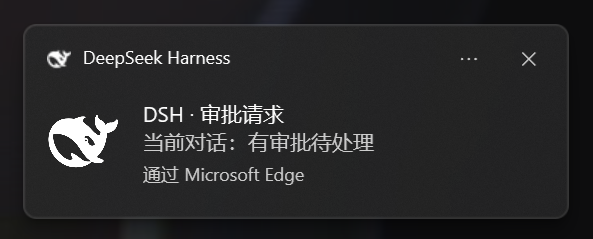
|
|
30
36
|
|
|
31
|
-
|
|
37
|
+
*Plain notification example · Windows / Edge · no approval buttons.* [View full size](https://raw.githubusercontent.com/chromoany/dsh-notify-me/main/docs/screenshots/notify-toast.png)
|
|
32
38
|
|
|
33
|
-
|
|
39
|
+

|
|
40
|
+
|
|
41
|
+
*In-page overlay (1.8.0) · the real plugin rendered on a demo page · for when system notifications cannot reach the secondary display; cards appear on whichever display the DSH window is on.* [View full size](https://raw.githubusercontent.com/chromoany/dsh-notify-me/main/docs/screenshots/overlay-en.png)
|
|
42
|
+
|
|
43
|
+
<details>
|
|
44
|
+
<summary>See the settings interface</summary>
|
|
45
|
+
|
|
46
|
+

|
|
47
|
+
|
|
48
|
+
The real plugin settings component rendered with v1.7.0 defaults in an isolated demo environment. Shows the basic settings area, without the DSH host shell (the two overlay rows added in 1.8.0 are not in this shot).
|
|
49
|
+
|
|
50
|
+
</details>
|
|
51
|
+
|
|
52
|
+
## Installation
|
|
53
|
+
|
|
54
|
+
### DSH Web
|
|
55
|
+
|
|
56
|
+
With the DSH CLI already installed, run in a terminal:
|
|
57
|
+
|
|
58
|
+
```powershell
|
|
59
|
+
# Install and auto-mount into the web profile
|
|
60
|
+
dsh plugin --profile web add dsh-notify-me
|
|
61
|
+
```
|
|
62
|
+
|
|
63
|
+
Restart `dsh web`, then hard-refresh the page (Ctrl+Shift+R). If you use another Web profile, replace `web` with its actual name.
|
|
64
|
+
|
|
65
|
+
### DSH Desktop
|
|
66
|
+
|
|
67
|
+
1. Open **Plugins → Add plugin** in the desktop application.
|
|
68
|
+
2. Enter the npm package name `dsh-notify-me`, follow the installation prompts, and confirm that the plugin is enabled.
|
|
69
|
+
3. Quit DSH Desktop completely and relaunch it so the plugin loads.
|
|
70
|
+
|
|
71
|
+
The Electron application manages the `desktop` profile. Do not change the Web command above to `--profile desktop`: the CLI rejects that operation. Installing into the Web profile does not automatically install the plugin into Desktop.
|
|
72
|
+
|
|
73
|
+
## First-use check
|
|
34
74
|
|
|
35
|
-
|
|
36
|
-
|
|
37
|
-
|
|
75
|
+
1. Click once in the DSH page and allow notifications when prompted. If you previously declined, allow them in the browser's site settings. The operating system must also allow notifications from the browser / DSH Desktop.
|
|
76
|
+
2. Open **Settings → Notify me**. Confirm that the section and plugin version at its foot appear, and leave the master switch, system notifications, and sound enabled.
|
|
77
|
+
3. Click **Test "reply finished"** on the settings page. A test notification should appear and sound according to your cue settings. This local test does not forward to external endpoints and ignores the "while the page is open" toggle.
|
|
38
78
|
|
|
39
|
-
|
|
79
|
+
Web users can also test approval buttons. On Desktop that test sends a plain notification: **no Approve / Reject buttons is the expected result**.
|
|
80
|
+
|
|
81
|
+
**Optional console check** — in environments with DevTools, you can also run:
|
|
82
|
+
|
|
83
|
+
```js
|
|
84
|
+
window.__dshNotifyMe.test("done") // "reply finished" sample
|
|
85
|
+
window.__dshNotifyMe.test("attention") // "needs your input" sample
|
|
86
|
+
window.__dshNotifyMe.test("approval") // Approve / Reject with an active Web bridge; buttonless on Desktop
|
|
87
|
+
window.__dshNotifyMe.debug() // the bridge field reports the button channel: "active" = buttons work
|
|
88
|
+
```
|
|
89
|
+
|
|
90
|
+
If no test notification appears, first check:
|
|
91
|
+
|
|
92
|
+
- the notification permission was declined — click anywhere on the page and choose **Allow** (address-bar lock → Site settings → Notifications → Allow → reload);
|
|
93
|
+
- the DSH process wasn't restarted after install;
|
|
94
|
+
- your OS/browser notification settings block the browser's toasts.
|
|
95
|
+
|
|
96
|
+
## Why you need it
|
|
97
|
+
|
|
98
|
+
- **Without full access (`workspace-write` + ask):** keep approval before actions, but a missed request leaves the agent waiting.
|
|
99
|
+
- **With full access:** fewer approval interruptions, at the cost of interception before actions.
|
|
100
|
+
|
|
101
|
+
dsh-notify-me decouples **supervision** from **sitting in front of the screen**: it pulls you back with a system notification only when a decision is genuinely needed (approval / plan review / question) or a reply finishes — **so you can afford to keep full access off** instead of trading away interception for speed. It does not lower the risk of full access itself (it is not a sandbox); it reduces the time spent waiting on missed approvals in ask-mode.
|
|
40
102
|
|
|
41
103
|
## What it alerts about
|
|
42
104
|
|
|
43
|
-
|
|
|
44
|
-
| --- | --- |
|
|
45
|
-
| 🔔
|
|
46
|
-
| ✅
|
|
105
|
+
| Event | Default behavior |
|
|
106
|
+
| --- | --- |
|
|
107
|
+
| 🔔 Input needed | Alerts even in the foreground; the conversation on screen keeps only a title marker |
|
|
108
|
+
| ✅ Reply finished | Alerts while the page is hidden / backgrounded |
|
|
109
|
+
|
|
110
|
+
**Input needed** covers approval requests, plan review, and questions (`ask_user_question`). Supported Web environments show Approve / Reject buttons; Desktop does not.
|
|
111
|
+
|
|
112
|
+
**Reply finished** also covers background sessions. A finished but unread session keeps the `✅ Reply finished ·` title marker until opened. Title markers are independent of the "while the page is open" toggles.
|
|
47
113
|
|
|
48
114
|
> **Background** subagent child sessions are **not** alerted about by default: DSH lists each of them as its own session, but they are steps inside the parent conversation's turn, so an alert for them is only noise. The subagent session you have open is not part of this and alerts as usual. Settings → "Ignore subagent sessions" turns the mute off.
|
|
49
115
|
|
|
50
116
|
## Configure it from DSH Settings
|
|
51
117
|
|
|
52
|
-
Open **Settings → Notify me
|
|
118
|
+
Open **Settings → Notify me**. Common options are grouped below.
|
|
119
|
+
|
|
120
|
+
### Basics
|
|
53
121
|
|
|
54
122
|
- **Enable reminders** — master switch; when off, no toasts, no sounds and the tab title is never touched;
|
|
55
|
-
- **Environment** (auto-detect by default) — identifies Web vs Desktop (DSH Desktop, `dsh-app://`) from the page protocol, with a manual override for hosts where detection comes out wrong: on the Desktop a toast click rides the `dsh://` deep link to raise the window and quick-decision buttons are unavailable; on the Web it is `window.focus()` plus the Service Worker bridge. Whenever the override disagrees with detection, the settings page says what detection saw;
|
|
56
123
|
- **System notifications / Sound / Volume** — toast toggle, cue toggle and a volume slider;
|
|
57
|
-
- **
|
|
58
|
-
- **
|
|
124
|
+
- **In-page overlay** (default off; independent of "System notifications", both can be on) — draws the alert card inside the DSH page, positioned with the window; see [Secondary displays and the overlay](#secondary-displays-and-the-overlay);
|
|
125
|
+
- **Notification language** — follow the interface / 简体中文 / English: controls the language of the alert text and the `🔔 …` title marker;
|
|
126
|
+
- **Test buttons** — send one "needs you", "reply finished" or "approval buttons" test alert with the current settings (**not** limited by the "while the page is open" toggles; the "needs you" test's title marker clears itself after ~6s);
|
|
127
|
+
- **Version info** — the settings page always shows the installed plugin version at its foot (`dsh-notify-me v…`); quote that line in bug reports or to check which build you are on.
|
|
128
|
+
|
|
129
|
+
### Timing and click behavior
|
|
130
|
+
|
|
59
131
|
- **"Needs you" alerts while the page is open** (default on) and **"Reply finished" alerts while the page is open** (default off);
|
|
60
132
|
- **Stay quiet for the conversation on screen** (default on): a wait inside the conversation you are looking at keeps only the tab marker — no toast or sound landing on the approval card. Backgrounding the page puts that alert back at once, unless you already handled it. Waits in other background sessions are unaffected;
|
|
61
133
|
- **Ignore subagent sessions** (default on): background subagent child sessions raise neither "needs you" nor "reply finished" — those are steps of the parent conversation's turn, and the parent's own alert already covers them. The subagent session you have open alerts as usual. Turn it off to alert for every session;
|
|
134
|
+
- **Decide approvals from the toast** (default on): approval notifications carry Approve / Reject buttons, and one click settles the request exactly like the Allow once / Reject buttons on the approval card. Clicking the toast body still takes you back to the conversation. **Desktop toasts have no buttons** (`dsh-app://` pages cannot register a Service Worker); turn on the in-page overlay to decide from the overlay instead, and the settings page states which channel can offer buttons;
|
|
135
|
+
|
|
136
|
+
<details>
|
|
137
|
+
<summary>Environment, conversation navigation, and multiple windows</summary>
|
|
138
|
+
|
|
139
|
+
- **Environment** (auto-detect by default) — identifies Web vs Desktop (DSH Desktop, `dsh-app://`) from the page protocol, with a manual override for hosts where detection comes out wrong: on the Desktop a toast click rides the `dsh://` deep link to raise the window and quick-decision buttons are unavailable; on the Web it is `window.focus()` plus the Service Worker bridge. Whenever the override disagrees with detection, the settings page says what detection saw;
|
|
62
140
|
- **Click a toast to open that conversation** (default on): clicking brings DSH to the front and switches to the conversation the alert came from. With several DSH tabs open, one click raises exactly one window (a visible one first) and switches only that one — the others stay put; when off, clicking a toast does nothing. On the Desktop (DSH Desktop) the click likewise raises the window and switches conversations: page-side `window.focus()` cannot raise a native Electron window, so since 1.5.2 the plugin rides the app's own `dsh://open` deep link instead (a window hidden to the tray comes back too);
|
|
63
|
-
|
|
64
|
-
|
|
65
|
-
|
|
66
|
-
|
|
141
|
+
|
|
142
|
+
</details>
|
|
143
|
+
|
|
144
|
+
### Secondary displays and the overlay
|
|
145
|
+
|
|
146
|
+
Windows draws system notification banners on the primary display only. There is no setting in Windows and no API in the browser to aim one at another monitor, so with DSH parked on a second screen and the primary display unwatched, a toast is as good as not sent.
|
|
147
|
+
|
|
148
|
+
The **in-page overlay** skips the notification center and draws the card inside the DSH page instead: wherever the window is, the card is there too.
|
|
149
|
+
|
|
150
|
+
- **Position** — top right / bottom right / top left / bottom left, default bottom right; changes apply immediately;
|
|
151
|
+
- **No notification permission needed** — it works when permission was never granted, and on the Desktop shell where buttonless toasts are all the OS channel can do;
|
|
152
|
+
- **Approval cards carry Approve / Reject** — the same decision as Allow once / Reject on the approval card, and they work on the Desktop too (no Service Worker involved). Clicking the card body opens its conversation;
|
|
153
|
+
- **Lifetime** — "needs you" cards retire after 20s, "reply finished" after 8s; an approval card with buttons stays until it is decided or closed. At most 4 cards stack at once;
|
|
154
|
+
- **Relation to system notifications** — the two switches are independent. With both on, the primary display gets toasts and the second screen gets the overlay; the overlay alone is also a valid setup.
|
|
155
|
+
|
|
156
|
+
The overlay only knows which screen the window is on, not which screen you are looking at. If the window stays on the primary display while you watch another one, it stays invisible — same as a toast.
|
|
157
|
+
|
|
158
|
+
### Sound
|
|
159
|
+
|
|
160
|
+
Choose a built-in cue, custom audio file, or system notification sound independently for each alert kind.
|
|
161
|
+
|
|
162
|
+
<details>
|
|
163
|
+
<summary>Custom audio, previews, and fallback behavior</summary>
|
|
164
|
+
|
|
165
|
+
- **Alert sound** (picked separately for "needs you" and "reply finished") — built-in cue (default) / custom audio file / system notification sound. "Custom audio file" takes one local audio file in the settings page (1 MiB limit, stored in the browser, with preview and remove); "system notification sound" plays no plugin cue at all — the toast still appears and the operating system supplies the sound, so its timbre follows your system notification settings; in that mode "Preview" sends a test alert instead, because the sound only exists as part of a toast and that is the sound you hear. Any source that has no file, cannot be read, or does not fit falls back to the built-in cue, so an alert never goes silent;
|
|
166
|
+
|
|
167
|
+
</details>
|
|
168
|
+
|
|
169
|
+
### External push
|
|
170
|
+
|
|
171
|
+
Off by default. Supports Discord Webhook / Bark / Gotify / custom webhooks. Alert text is sent to the addresses you enter; use trusted endpoints.
|
|
172
|
+
|
|
173
|
+
<details>
|
|
174
|
+
<summary>Target URLs, forwarding switches, and test messages</summary>
|
|
175
|
+
|
|
176
|
+
- **External notifications** (default off) — forward each alert to your own push endpoints as well, so it reaches you away from the machine: **Discord Webhook** / **Bark** / **Gotify** / **custom webhook**, any number of targets, each with a type and URL (Discord takes the webhook URL; Bark `https://api.day.app/<device key>`; Gotify `https://<server>/message?token=<app token>`; a custom endpoint receives one POST of JSON: `{source, event, title, body, sessionId, time}`). "Forward 'needs you'" and "Forward 'reply finished'" switch independently; **Send test notification** sends one test message to every target (not limited by those two switches, and never pretending to be a real alert). Forwarding follows exactly the same trigger rules as local alerts ("stay quiet for the conversation on screen" and friends apply to it too); the alert text is sent as-is to the addresses you fill in, so **only use endpoints you trust**;
|
|
177
|
+
|
|
178
|
+
</details>
|
|
67
179
|
|
|
68
180
|
> Notification permission is required: click once on the page → **Allow** (or address-bar lock → Site settings → Notifications → Allow → reload). On macOS, also allow the browser under System Settings → Notifications.
|
|
69
181
|
|
|
70
182
|
## How it alerts
|
|
71
183
|
|
|
72
|
-
- **System notification** — a toast through the browser into the Windows action center / macOS Notification Center (clicking it opens the conversation it came from;
|
|
184
|
+
- **System notification** — a toast through the browser into the Windows action center / macOS Notification Center (clicking it opens the conversation it came from; supported Web environments offer approval buttons, Desktop does not)
|
|
185
|
+
- **In-page overlay** (optional, default off) — an alert card drawn in the corner of the DSH page, on whatever display the window is on, optionally with Approve / Reject buttons; see [Secondary displays and the overlay](#secondary-displays-and-the-overlay)
|
|
73
186
|
- **Sound** — WebAudio beeps by default (distinct patterns for "needs you" vs "done"); each kind can instead play a picked audio file, or hand the sound over to the operating system's own notification sound
|
|
74
187
|
- **Tab title marker** — while something is waiting on you, the tab title is prefixed with `🔔 Action needed · …` / `🔔 需要你 · …`; while a background session is **finished but unread**, with `✅ Reply finished · …` / `✅ 回复完成 · …`, gone once you open that session (or it starts running again). Both kinds can be up together, "needs you" first; a host title change is rebased under the markers
|
|
75
188
|
- **External notifications** (optional, default off) — the same alert is also forwarded to the push targets you configure: Discord Webhook / Bark / Gotify / custom webhook — so the push channel on your phone picks it up while you step away from the machine
|
|
76
189
|
|
|
77
190
|
This is a **browser-layer** plugin: the DSH page must stay open (minimized or backgrounded is fine — that's exactly the "away" state it watches for).
|
|
78
191
|
|
|
79
|
-
##
|
|
192
|
+
## Compatibility
|
|
80
193
|
|
|
81
|
-
|
|
82
|
-
|
|
83
|
-
|
|
84
|
-
```
|
|
194
|
+
Per-release adaptation records live in [package.json](package.json), under `dsh.compatibility.dshReleases`. The current host (`0.2.1-rc.2`) no longer reads that field — installation gates only on `peerDependencies` and `engines` — so it is a human-readable record, not a gate.
|
|
195
|
+
|
|
196
|
+
Verified to actually activate on `0.1.2-rc.1`, `0.1.5-rc.1`, `0.1.5-rc.2` and `0.2.0-rc.2` (each booted in its own profile: the plugin entry lands in the boot page's `__DSH_BOOT__` with its inject dependencies resolved, `/plugins/??dsh-notify-me/client.js&rev=…` serves a build containing the new code, and the Settings → Notifications section registers, i.e. the plugin's `apply` really runs), and previously on `0.1.1-rc.2`.
|
|
85
197
|
|
|
86
|
-
|
|
198
|
+
`0.2.1-rc.2` (current latest) got its own isolated run: an isolated `DSH_HOME` booting `dsh web` (70 boot entries) placed the plugin entry 59th, in the `application` batch, with all three inject targets present and ordered before it; `/plugins/??dsh-notify-me/client.js&rev=…` served the 1.7.0 source build (140,153 B); loaded in a headless Chromium page, `apply` ran — `window.__dshNotifyMe.debug()` reported `uiSession: bound`, `uiSessionSource: sessionStatus`, `bridge: active`. Host-side shapes match `0.2.0-rc.2`; no plugin code change was needed.
|
|
87
199
|
|
|
88
|
-
|
|
200
|
+
<details>
|
|
201
|
+
<summary>Host generations and adaptation diagnostics</summary>
|
|
202
|
+
|
|
203
|
+
The plugin picks its interaction source per host generation; the table below marks where each shape appeared — it is not a gate (the current host does not read `dshReleases`):
|
|
89
204
|
|
|
90
205
|
| Host generation | "Needs you" interaction source | Current session | Toast-click navigation |
|
|
91
206
|
| --- | --- | --- | --- |
|
|
92
207
|
| `<= 0.1.2-alpha.1` | controller snapshot `pending[]` | snapshot `current` | `sessions.open()` |
|
|
93
208
|
| `0.1.2-alpha.2 .. 0.1.6-alpha.1` | `uiSession.pendingInteractions` | snapshot `current` | `sessions.open()` |
|
|
94
|
-
| `>= 0.1.6-alpha.2` (incl. `0.2.0-rc.2`) | `uiSession.sessionStatus` | `retainedBy.mainView` | `uiWorkspace.openSession()` |
|
|
95
|
-
|
|
96
|
-
The ranges are illustrative: the plugin picks its source by store shape (whenever `sessionStatus` exists it takes the new path); the version numbers only mark where each shape appeared. The `peerDependencies` range in `package.json` likewise only shapes npm's install warning — compatibility is declared per release in `dshReleases` after real testing, and untested new versions fall back to shape-driven behaviour.
|
|
97
|
-
|
|
98
|
-
Verified to actually activate on `0.1.2-rc.1`, `0.1.5-rc.2` and `0.2.0-rc.2` (each booted in its own profile: the Settings → Notifications section registers, i.e. the plugin's `apply` really runs), and previously on `0.1.1-rc.2`. Two traps are worth remembering: a package listed in `dsh.client.inject` that a newer runtime no longer ships parks the client entry at `pending (waiting for services: …)` forever — which is what broke 1.1.3 on `0.1.2-rc.1` and later; and when the host renames a store or a field nothing throws, alerts just go **silent** — `0.2.0-rc.2` moved `pendingInteractions`→`sessionStatus`, `list.current`→`retainedBy.mainView` and `sessions.open()`→`uiWorkspace.openSession()`. So every adaptation must confirm `window.__dshNotifyMe.debug()` reports `bound` and which source answered.
|
|
209
|
+
| `>= 0.1.6-alpha.2` (incl. `0.2.0-rc.2`, `0.2.1-rc.2`) | `uiSession.sessionStatus` | `retainedBy.mainView` | `uiWorkspace.openSession()` |
|
|
99
210
|
|
|
100
|
-
|
|
101
|
-
|
|
102
|
-
```js
|
|
103
|
-
window.__dshNotifyMe.test("done") // "reply finished" sample
|
|
104
|
-
window.__dshNotifyMe.test("attention") // "needs your input" sample
|
|
105
|
-
window.__dshNotifyMe.test("approval") // "approval buttons" sample: try the Approve / Reject buttons on the toast
|
|
106
|
-
window.__dshNotifyMe.debug() // the bridge field reports the button channel: "active" = buttons work
|
|
107
|
-
```
|
|
211
|
+
The ranges are illustrative: the plugin picks its source by store shape (whenever `sessionStatus` exists it takes the new path); the version numbers only mark where each shape appeared. The `peerDependencies` range in `package.json` shapes npm's peer warning — `0.2.1-rc.2` already falls inside `>=0.2.0-rc.1 <0.3.0-0`, so no exemption is needed; `dshReleases` is just an archive, real compatibility is per-release testing, and untested new versions fall back to shape-driven behaviour.
|
|
108
212
|
|
|
109
|
-
|
|
213
|
+
Two traps are worth remembering: a package listed in `dsh.client.inject` that a newer runtime no longer ships parks the client entry at `pending (waiting for services: …)` forever — which is what broke 1.1.3 on `0.1.2-rc.1` and later; and when the host renames a store or a field nothing throws, alerts just go **silent** — `0.2.0-rc.2` moved `pendingInteractions`→`sessionStatus`, `list.current`→`retainedBy.mainView` and `sessions.open()`→`uiWorkspace.openSession()`. So every adaptation must confirm `window.__dshNotifyMe.debug()` reports `bound` and which source answered. `0.2.1-rc.2` changed neither: `sessionStatus` is still a Map of `{running, pendingInteraction, completionUnread}`, `uiWorkspace.openSession(id)` is unchanged, and the session list still has no `current`.
|
|
110
214
|
|
|
111
|
-
|
|
112
|
-
- the DSH process wasn't restarted after install;
|
|
113
|
-
- your OS/browser notification settings block the browser's toasts.
|
|
215
|
+
</details>
|
|
114
216
|
|
|
115
217
|
## Advanced: console configuration
|
|
116
218
|
|
|
117
219
|
The Settings page is the primary entry; preferences live in `localStorage` (key `dshNotifyMe.config`) and can be scripted from the console:
|
|
118
220
|
|
|
221
|
+
<details>
|
|
222
|
+
<summary>Console API and storage reference</summary>
|
|
223
|
+
|
|
119
224
|
```js
|
|
120
225
|
window.__dshNotifyMe.config // view current config
|
|
121
226
|
window.__dshNotifyMe.setConfig({
|
|
@@ -132,6 +237,8 @@ window.__dshNotifyMe.setConfig({
|
|
|
132
237
|
volume: 0.5, // 0..1
|
|
133
238
|
autoFocus: true, // clicking a toast opens the conversation it came from
|
|
134
239
|
quickActions: true, // Approve / Reject buttons on approval toasts
|
|
240
|
+
overlay: false, // in-page overlay alert (follows the DSH window to its display; no notification permission needed)
|
|
241
|
+
overlayCorner: "bottom-right", // overlay anchor: 'top-right' | 'bottom-right' | 'top-left' | 'bottom-left'
|
|
135
242
|
externalEnabled: false, // external-notification forwarding master switch (default off: no endpoint, nothing is sent)
|
|
136
243
|
externalAttention: true, // forward "needs you" (exactly the same trigger rules as local alerts)
|
|
137
244
|
externalDone: true, // forward "reply finished"
|
|
@@ -139,15 +246,24 @@ window.__dshNotifyMe.setConfig({
|
|
|
139
246
|
})
|
|
140
247
|
window.__dshNotifyMe.resetConfig() // restore defaults (also drops any picked audio files)
|
|
141
248
|
window.__dshNotifyMe.decide("approval:3", "allowed-once") // programmatic decision: "allowed-once" | "rejected"
|
|
142
|
-
window.__dshNotifyMe.testExternal() //
|
|
249
|
+
window.__dshNotifyMe.testExternal() // explicit outbound test to valid targets; resolves {sent, unverified, failed, statuses}
|
|
143
250
|
```
|
|
144
251
|
|
|
252
|
+
> **External-test switch behavior:** the settings page's "Send test notification" button requires both the plugin and external-forwarding master switches to be on, but ignores the two per-kind forwarding switches. The console `testExternal()` call is an explicit test: with valid configured targets, it sends to them even when those master switches are off; with no valid targets it sends nothing. Ordinary `test("done")` / `test("attention")` / `test("approval")` calls only test local alerts and never forward externally.
|
|
253
|
+
|
|
145
254
|
> Picked audio files do not live in `dshNotifyMe.config`: each kind gets its own key (`dshNotifyMe.sound.done` / `dshNotifyMe.sound.attention`, holding `{name, size, data}` with a data URL), because a file inflates by ~1.37x once base64-encoded and would slow down every config read. `resetConfig()` clears both keys along with the config.
|
|
146
255
|
>
|
|
147
256
|
> To see which source is live, check `soundDone` / `soundAttention` and `customSoundDone` / `customSoundAttention` in `window.__dshNotifyMe.debug()`.
|
|
148
257
|
|
|
258
|
+
</details>
|
|
259
|
+
|
|
149
260
|
## How it works
|
|
150
261
|
|
|
262
|
+
The reminder core watches session state and pending interactions. The page handles approval decisions; Desktop window activation uses the app deep link.
|
|
263
|
+
|
|
264
|
+
<details>
|
|
265
|
+
<summary>Event sources, approval bridge, and Desktop window activation</summary>
|
|
266
|
+
|
|
151
267
|
The reminder core picks its interaction source per host generation (see the table above); the current session always comes from the client `sessions` service:
|
|
152
268
|
|
|
153
269
|
- the **selected session's** `SessionSnapshot`: a `running: true → false` edge means a reply finished;
|
|
@@ -169,16 +285,19 @@ DSH Desktop is a thin Electron shell and its page lives under `dsh-app://app`: D
|
|
|
169
285
|
|
|
170
286
|
Verified on the real shell (DSH Desktop 0.2.0-rc.2, three rounds of retesting in issue #9): a toast click raises the window and switches the conversation in one step, stable across sessions and with the window in the background. Timing of the fire is what makes the chain work: the deep link must be launched from a **user-gesture handler** — the notification's `onclick` carries one, which is why the product path works — while gesture-less scripted injection (an iframe appended from a CDP evaluate, say) is silently dropped by Chromium and the external protocol never launches, which looks exactly like the channel being blocked.
|
|
171
287
|
|
|
288
|
+
</details>
|
|
289
|
+
|
|
172
290
|
## Known limitations
|
|
173
291
|
|
|
174
292
|
- The page must be open for alerts to fire (background tab / minimized is fine; closing the tab stops it — that's inherent to a browser-layer plugin).
|
|
175
293
|
- Notifications appear through the browser, so the browser needs "show notifications" permission in the OS notification settings, and notification-center "Do Not Disturb" must not suppress them.
|
|
176
294
|
- The first sound/toast of each page load needs one user click on the page first (browser autoplay + permission policy).
|
|
177
295
|
- Toasts are only produced once the notification permission is granted; declining means sound + title marker only.
|
|
296
|
+
- System notification banners are drawn on the primary display only: Windows has no setting and Chromium no API to aim one at another monitor, so on a multi-monitor setup the second screen never receives them. Use the in-page overlay for that — it follows the DSH window to its display.
|
|
178
297
|
- Quick-decision buttons need a Service Worker: they work on `http://127.0.0.1` and `https`, not on plain `http://192.168.x.x`-style LAN addresses, and some browsers or desktop hosts never render notification buttons. **The Desktop (`dsh-app://`) is tested and cannot register a Service Worker**, so buttons never render there and approval toasts fall back to their buttonless form. The `bridge` field of `window.__dshNotifyMe.debug()` says why; everything else keeps working.
|
|
179
298
|
- macOS: in the browser, alerts, sounds, the title marker and toast-click navigation carry no OS assumptions and work as on Windows. Two caveats: DSH Desktop (Electron) notifications require the app to be code-signed — unsigned builds simply emit no notification — and whether the official macOS build satisfies that is untested; and notification buttons on the macOS desktop host are likewise untested (the Windows desktop host is tested and renders none, see the line above), falling back to the buttonless form above.
|
|
180
299
|
- Config lives in browser `localStorage`: switching browsers/devices or clearing site data returns to defaults (one-click restore in the Settings page).
|
|
181
|
-
- On `>= 0.1.6` (including `0.2.0-rc.2`) the "reply finished" toast body carries only the session label, no assistant snippet: host snapshots no longer expose `nodes`. The alert itself still fires.
|
|
300
|
+
- On `>= 0.1.6` (including `0.2.0-rc.2`, `0.2.1-rc.2`) the "reply finished" toast body carries only the session label, no assistant snippet: host snapshots no longer expose `nodes`. The alert itself still fires.
|
|
182
301
|
- The title marker is written into `document.title` alongside the host: when the host recomputes the title it can overwrite the marker until the next alert event rewrites it.
|
|
183
302
|
- "Stay quiet for the conversation on screen" is judged by `document.hidden`: a window fully covered by other apps still counts as visible, so waits in the current conversation stay quiet there too.
|
|
184
303
|
- External notification forwarding is subject to browser CORS rules: an endpoint that does not allow cross-origin requests falls back to a "sent but unverifiable" delivery (no-cors) and is reported honestly as such; Discord webhooks do allow cross-origin, so delivery to them is confirmed. HTTP errors are recorded as failures and never blindly retried. Forwarding runs only after the local alert has decided to fire, so anything the rules silence is never sent out.
|
package/README.md
CHANGED
|
@@ -1,117 +1,222 @@
|
|
|
1
|
+
<div align="center">
|
|
2
|
+
|
|
1
3
|
# dsh-notify-me
|
|
2
4
|
|
|
5
|
+
**离开 DSH 页面,也能及时知道何时需要回来。**
|
|
6
|
+
|
|
3
7
|
简体中文 | [English](README.en.md)
|
|
4
8
|
|
|
5
9
|
[](https://www.npmjs.com/package/dsh-notify-me)
|
|
6
|
-
[](https://www.npmjs.com/package/dsh-notify-me)
|
|
7
|
-
](https://www.npmjs.com/package/dsh-notify-me)
|
|
11
|
+
[](https://www.npmjs.com/package/dsh-notify-me)
|
|
12
|
+
[](LICENSE)
|
|
13
|
+
[](#安装)
|
|
14
|
+
[](lib/client.js)
|
|
15
|
+
[](#兼容性)
|
|
10
16
|
[](https://awesome-dsh-plugin.com)
|
|
11
17
|
|
|
12
|
-
|
|
18
|
+
</div>
|
|
13
19
|
|
|
14
|
-
|
|
20
|
+
[安装](#安装) · [效果预览](#效果预览) · [配置](#在-dsh-设置里改配置) · [兼容性](#兼容性) · [更新日志](CHANGELOG.md)
|
|
15
21
|
|
|
16
|
-
|
|
22
|
+
DSH Web / Desktop 的通知插件,让你敢不开完整访问,也不必一直守着页面。
|
|
17
23
|
|
|
18
|
-
|
|
24
|
+
- **需要你操作时**:审批、方案确认、提问,用通知、提示音和标题标记提醒。
|
|
25
|
+
- **后台回复完成时**:及时回来查看结果,点击通知可回到对应对话。
|
|
26
|
+
- **离开电脑时**:可选转发到 Discord、Bark、Gotify 或自己的 Webhook。
|
|
27
|
+
- **不看主屏时**:可选页面内浮层提醒,跟着 DSH 窗口出现在你正看着的那块屏(系统通知只会出现在主屏)。
|
|
19
28
|
|
|
20
|
-
|
|
29
|
+
> 页面或桌面应用需保持运行,后台 / 最小化可以。系统通知需要通知权限;审批按钮在支持 Service Worker 的 Web 环境(如 `http://127.0.0.1` 或 `https`)由通知提供,桌面端的通知没有按钮——打开「页面浮层提醒」后可在浮层上直接裁决(见[副屏与浮层提醒](#副屏与浮层提醒))。
|
|
21
30
|
|
|
22
|
-
|
|
23
|
-
| --- | --- | --- |
|
|
24
|
-
| 不开完整访问(`workspace-write` + ask) | **等待**——agent 卡在审批上,不盯着页面就是干等 | 时间成本,随会话数增长 |
|
|
25
|
-
| 开完整访问(full access) | **不可逆风险**——放弃的是事前拦截能力 | 风险成本,与你盯不盯无关 |
|
|
31
|
+
> 🔎 想找这个插件?可以搜:`dsh-notify-me`、**消息提醒**、**可操作提醒**、**桌面通知**、**需要你操作**、**回复完成提醒**、**后台完成提醒**、**外部通知**、**Discord / Bark / Gotify 推送**(npm 关键词已含以上中英文词)。
|
|
26
32
|
|
|
27
|
-
|
|
33
|
+
## 效果预览
|
|
28
34
|
|
|
29
|
-
|
|
35
|
+

|
|
30
36
|
|
|
31
|
-
|
|
37
|
+
*普通通知示例 · Windows / Edge · 不含审批按钮。* [查看原图](https://raw.githubusercontent.com/chromoany/dsh-notify-me/main/docs/screenshots/notify-toast.png)
|
|
32
38
|
|
|
33
|
-
|
|
39
|
+

|
|
40
|
+
|
|
41
|
+
*页面浮层提醒(1.8.0)· 真实插件在独立演示页里渲染 · 系统通知画不到副屏时用它,卡片落在 DSH 窗口所在的那块屏。* [查看原图](https://raw.githubusercontent.com/chromoany/dsh-notify-me/main/docs/screenshots/overlay-zh.png)
|
|
42
|
+
|
|
43
|
+
<details>
|
|
44
|
+
<summary>展开设置界面预览</summary>
|
|
45
|
+
|
|
46
|
+

|
|
47
|
+
|
|
48
|
+
真实插件设置组件,使用 v1.7.0 默认配置在独立演示环境中渲染;展示基础设置区域,不包含 DSH 宿主外壳(1.8.0 新增的「页面浮层提醒」两行不在这张图里)。
|
|
49
|
+
|
|
50
|
+
</details>
|
|
51
|
+
|
|
52
|
+
## 安装
|
|
53
|
+
|
|
54
|
+
### DSH Web
|
|
55
|
+
|
|
56
|
+
已安装 DSH CLI 的用户,在终端执行:
|
|
57
|
+
|
|
58
|
+
```powershell
|
|
59
|
+
# 安装并自动挂载进 web profile
|
|
60
|
+
dsh plugin --profile web add dsh-notify-me
|
|
61
|
+
```
|
|
62
|
+
|
|
63
|
+
重启 `dsh web`,然后硬刷新页面(Ctrl+Shift+R)。如果你使用其他 Web profile,请把命令中的 `web` 换成实际名称。
|
|
64
|
+
|
|
65
|
+
### DSH Desktop
|
|
66
|
+
|
|
67
|
+
1. 在桌面应用打开 **插件 → 添加插件**。
|
|
68
|
+
2. 输入 npm 包名 `dsh-notify-me`,按应用提示完成安装,并确认插件已启用。
|
|
69
|
+
3. 完全退出并重新启动 DSH Desktop,使插件加载。
|
|
34
70
|
|
|
35
|
-
|
|
36
|
-
| --- |
|
|
37
|
-
|  |
|
|
71
|
+
桌面端的 `desktop` profile 由 Electron 应用管理;不要把上面的 Web 命令改成 `--profile desktop`,CLI 会拒绝此操作。安装到 Web profile 也不会自动安装到桌面端。
|
|
38
72
|
|
|
39
|
-
|
|
73
|
+
## 首次验证
|
|
74
|
+
|
|
75
|
+
1. 在 DSH 页面上点击一次,按提示允许通知;若此前拒绝过,在浏览器站点设置中允许通知。操作系统也需要允许对应浏览器 / DSH Desktop 显示通知。
|
|
76
|
+
2. 打开 **设置 → 通知提醒**,确认出现该分区及底部插件版本号,保持「启用提醒」「系统通知」「提示音」开启。
|
|
77
|
+
3. 点击设置页的「测试『回复完成』」按钮:应出现一条测试通知,并按当前音效设置播放声音。这个本地测试不会转发到外部通知端点,也不受「页面打开时也提醒」开关限制。
|
|
78
|
+
|
|
79
|
+
Web 用户可再测试审批按钮;桌面端该测试只发普通通知,**没有「同意 / 拒绝」按钮属于预期行为**。
|
|
80
|
+
|
|
81
|
+
**控制台验证(可选)** — 支持 DevTools 的环境也可执行:
|
|
82
|
+
|
|
83
|
+
```js
|
|
84
|
+
window.__dshNotifyMe.test("done") // 「完成」示例
|
|
85
|
+
window.__dshNotifyMe.test("attention") // 「需要你」示例
|
|
86
|
+
window.__dshNotifyMe.test("approval") // Web 桥可用时带「同意 / 拒绝」按钮;桌面端为无按钮通知
|
|
87
|
+
window.__dshNotifyMe.debug() // 桥接状态看 bridge 字段,active = 按钮可用
|
|
88
|
+
```
|
|
89
|
+
|
|
90
|
+
没有测试通知时,先检查:通知权限是否被拒绝(在页面上点一下 → 选「允许」;或地址栏锁 → 站点设置 → 通知 → 允许 → 刷新)、装完没重启 DSH、系统设置里浏览器通知被关。
|
|
91
|
+
|
|
92
|
+
## 为什么需要它
|
|
93
|
+
|
|
94
|
+
- **不开完整访问(`workspace-write` + ask)**:保留事前审批,但错过请求会让 agent 等待。
|
|
95
|
+
- **开完整访问(full access)**:减少审批打断,同时放弃事前拦截能力。
|
|
96
|
+
|
|
97
|
+
dsh-notify-me 把「监督」和「守在屏幕前」解耦:只在真的出现决策点(审批 / 方案确认 / 提问)或回复跑完时,才用系统通知把你叫回来——**让你敢不开完整访问**,不必靠放弃拦截能力来换效率。它不降低 full access 本身的权限风险(它不是沙箱),只是减少 ask 模式下因错过审批而产生的等待。
|
|
40
98
|
|
|
41
99
|
## 提醒时机
|
|
42
100
|
|
|
43
|
-
|
|
|
44
|
-
| --- | --- |
|
|
45
|
-
| 🔔
|
|
46
|
-
| ✅
|
|
101
|
+
| 事件 | 默认行为 |
|
|
102
|
+
| --- | --- |
|
|
103
|
+
| 🔔 需要你操作 | 页面可见也提醒;当前对话只留标题标记 |
|
|
104
|
+
| ✅ 回复完成 | 页面隐藏 / 后台时提醒 |
|
|
105
|
+
|
|
106
|
+
**需要你操作**包括审批请求、方案待确认(plan review)和提问(`ask_user_question`)。支持快捷裁决的 Web 环境会显示「同意 / 拒绝」按钮,桌面端无按钮。
|
|
107
|
+
|
|
108
|
+
**回复完成**也覆盖后台会话;完成但还没看时,标题带 `✅ 回复完成 ·` 标记,打开对应会话即撤。标题标记不受「页面打开时也提醒」开关限制。
|
|
47
109
|
|
|
48
110
|
> **后台**子代理(subagent)子会话的等待与完成默认**不提醒**:DSH 把每个子代理子会话列成独立会话,但它们是所属主对话那一轮里的步骤,提醒只会是噪音。你当前打开的那个子代理会话不算在内,照常提醒。设置页「子代理会话不提醒」可关掉这个静音。
|
|
49
111
|
|
|
50
112
|
## 在 DSH 设置里改配置
|
|
51
113
|
|
|
52
|
-
打开 **设置 →
|
|
114
|
+
打开 **设置 → 通知提醒**,常用项分为以下几组。
|
|
115
|
+
|
|
116
|
+
### 基础设置
|
|
53
117
|
|
|
54
118
|
- **启用提醒** 主开关:关闭后不再弹系统通知、不播放提示音、也不改标签页标题;
|
|
55
|
-
- **运行环境**(默认自动识别):按页面协议识别 Web 端 / 桌面端(DSH Desktop,`dsh-app://`),识别不准时可手动指定——桌面端点通知走 `dsh://` 深链抬窗、快捷裁决按钮不可用;Web 端走 `window.focus()` 与 Service Worker 桥。手动覆盖与自动识别不一致时,设置页会明示检测结果;
|
|
56
119
|
- **系统通知 / 提示音 / 音量**:Toast、提示音开关与音量滑块;
|
|
57
|
-
-
|
|
58
|
-
-
|
|
120
|
+
- **页面浮层提醒**(默认关,与「系统通知」互不替代,可同时开):在 DSH 页面里画提醒卡片,位置跟窗口走,见[副屏与浮层提醒](#副屏与浮层提醒);
|
|
121
|
+
- **通知语言**:跟随界面 / 简体中文 / English——决定通知文字与 `🔔 …` 标题标记使用的语言;
|
|
122
|
+
- **测试按钮**:用当前设置立即发一条「需要你」「回复完成」或「审批按钮」测试提醒(**不受**上面「页面打开时也提醒」开关限制;「需要你」测试的标题标记约 6 秒后自动消失);
|
|
123
|
+
- **版本信息**:设置页底部常显当前插件版本号(`dsh-notify-me v…`)——报障、核对是否装上新版本时直接照抄这一行。
|
|
124
|
+
|
|
125
|
+
### 提醒与点击行为
|
|
126
|
+
|
|
59
127
|
- **页面打开时也提醒「需要你」**(默认开)与 **页面打开时也提醒「回复完成」**(默认关);
|
|
60
128
|
- **当前对话不弹通知**(默认开):等待就发生在你正看着的对话里时只留标题标记,不弹通知也不响音(免得盖住审批卡片);页面切到后台立刻补发,若你已经处理掉就作废。其它后台会话不受影响;
|
|
61
129
|
- **子代理会话不提醒**(默认开):后台子代理(subagent)子会话的「需要你」与「回复完成」都不提醒——它们是主对话那一轮的步骤,完成由主对话自己的提醒覆盖;你当前打开的那个子代理会话照常提醒;关掉后恢复逐会话提醒;
|
|
130
|
+
- **审批通知上直接裁决**(默认开):权限审批的通知上带「同意 / 拒绝」按钮,点一下就按审批卡片的「允许一次 / 拒绝」直接裁决,不用切回页面;点通知正文仍是原来的「切回对应对话」。**桌面端的通知没有按钮**(`dsh-app://` 页面无法注册 Service Worker),需要按钮时打开「页面浮层提醒」,改在浮层上裁决;设置页会如实说明当前哪种渠道能给按钮;
|
|
131
|
+
|
|
132
|
+
<details>
|
|
133
|
+
<summary>运行环境、点击回到对话与多窗口细节</summary>
|
|
134
|
+
|
|
135
|
+
- **运行环境**(默认自动识别):按页面协议识别 Web 端 / 桌面端(DSH Desktop,`dsh-app://`),识别不准时可手动指定——桌面端点通知走 `dsh://` 深链抬窗、快捷裁决按钮不可用;Web 端走 `window.focus()` 与 Service Worker 桥。手动覆盖与自动识别不一致时,设置页会明示检测结果;
|
|
62
136
|
- **点击通知回到对应对话**(默认开):点通知把 DSH 带到前台并切到提醒所属的对话;多个 DSH 标签页同时开着时,一次点击只调起一个窗口(优先当前可见的那个)并只切它的对话,其余标签页不动;关掉后点通知不做任何事。桌面端(DSH Desktop)同样会把窗口带到前台并切对话:页面侧的 `window.focus()` 在 Electron 里抬不动原生窗口,1.5.2 起改走应用自己的 `dsh://open` 深链调窗(窗口隐藏在托盘里也能被抬回来);
|
|
63
|
-
|
|
64
|
-
|
|
65
|
-
|
|
66
|
-
|
|
137
|
+
|
|
138
|
+
</details>
|
|
139
|
+
|
|
140
|
+
### 副屏与浮层提醒
|
|
141
|
+
|
|
142
|
+
Windows 的系统通知横幅固定画在主屏上,系统没有设置项、浏览器也没有 API 能把它挪到别的显示器。主屏不看、DSH 停在副屏时,通知就等于没发。
|
|
143
|
+
|
|
144
|
+
「页面浮层提醒」绕开系统通知中心,直接在 DSH 页面里画一张卡片:窗口在哪块屏,卡片就出现在哪块屏。
|
|
145
|
+
|
|
146
|
+
- **位置**:设置里选右上 / 右下 / 左上 / 左下,默认右下;改完立刻生效;
|
|
147
|
+
- **不需要通知权限**:通知权限没给、或桌面端弹不出带按钮的通知时,浮层照常工作;
|
|
148
|
+
- **审批卡片带「同意 / 拒绝」**:与审批卡片的「允许一次 / 拒绝」等价,桌面端也能用(不依赖 Service Worker);点卡片正文则切回对应对话;
|
|
149
|
+
- **停留时间**:「需要你」20 秒后自动收起,「回复完成」8 秒;带按钮的审批卡片不自动收,直到裁决或手动关掉。最多同时叠 4 张;
|
|
150
|
+
- **与系统通知的关系**:两个开关互不替代。都开着时主屏看系统通知、副屏看浮层,也可以只留浮层。
|
|
151
|
+
|
|
152
|
+
浮层只知道窗口在哪块屏,不知道你人在看哪块屏。窗口留在主屏、人却盯着副屏时,它同样看不见。
|
|
153
|
+
|
|
154
|
+
### 音效
|
|
155
|
+
|
|
156
|
+
「需要你」与「回复完成」可独立选择内置合成音、自定义音频或系统通知音。
|
|
157
|
+
|
|
158
|
+
<details>
|
|
159
|
+
<summary>自定义音频、试听与回落规则</summary>
|
|
160
|
+
|
|
161
|
+
- **音效来源**(「需要你」与「回复完成」各自独立选):内置合成音(默认)/ 自定义音频文件 / 系统通知音。选「自定义音频文件」可在设置页挑一个本地音频(上限 1 MiB,存在浏览器本地,可试听与移除);选「系统通知音」则完全不播插件音效,通知照发,声音交给操作系统(音色跟着系统通知设置走),此时「试听」会改发一条测试通知——该模式没有插件可播的音,你听到的就是它。任一来源缺文件、读不出来或存不下时自动回落到内置合成音,提醒不会因此变成哑的;
|
|
162
|
+
|
|
163
|
+
</details>
|
|
164
|
+
|
|
165
|
+
### 外部推送
|
|
166
|
+
|
|
167
|
+
默认关闭。支持 Discord Webhook / Bark / Gotify / 自定义 Webhook;提醒正文会发往你填写的地址,只使用可信端点。
|
|
168
|
+
|
|
169
|
+
<details>
|
|
170
|
+
<summary>目标地址、转发开关与发送测试</summary>
|
|
171
|
+
|
|
172
|
+
- **外部通知**(默认关):把提醒同时转发到你自己的推送端点,人不在电脑前也能收到——支持 **Discord Webhook** / **Bark** / **Gotify** / **自定义 Webhook**,可加多个目标,每个选类型填地址(Discord 填 Webhook 地址;Bark 填 `https://api.day.app/<设备密钥>`;Gotify 填 `https://<服务器>/message?token=<应用令牌>`;自定义端点收一条 POST JSON:`{source, event, title, body, sessionId, time}`);「转发「需要你」」「转发「回复完成」」各自独立开关;**发送测试通知**往所有目标发一条测试消息(不受这两类开关限制,也不会冒充真提醒)。转发跟本地提醒走同一套触发规则(「当前对话不弹通知」等开关同样管它);提醒正文会原样发往你填的地址,**只填你自己信任的端点**;
|
|
173
|
+
|
|
174
|
+
</details>
|
|
67
175
|
|
|
68
176
|
> 需要浏览器通知权限:页面上点一下 → 允许;或地址栏锁 → 站点设置 → 通知 → 允许 → 刷新。macOS 还要在 系统设置 → 通知 里允许该浏览器。
|
|
69
177
|
|
|
70
178
|
## 提醒方式
|
|
71
179
|
|
|
72
|
-
- **系统通知**:经浏览器弹出的系统通知,进 Windows 通知中心或 macOS
|
|
180
|
+
- **系统通知**:经浏览器弹出的系统通知,进 Windows 通知中心或 macOS 通知中心(点击回到提醒所属的对话;支持快捷裁决的 Web 环境可点审批按钮直接裁决,桌面端无按钮)
|
|
181
|
+
- **页面浮层**(可选,默认关):画在 DSH 页面角落的提醒卡片,落在窗口所在的那块屏,可带「同意 / 拒绝」按钮;见[副屏与浮层提醒](#副屏与浮层提醒)
|
|
73
182
|
- **提示音**:默认是 WebAudio 合成音(「需要你」与「完成」使用不同音型);可在设置里为两类提醒分别换成自定义音频文件,或改成让操作系统播放它自己的通知音
|
|
74
183
|
- **标签页标题标记**:有待处理事项时,标题前出现 `🔔 需要你 · …` / `🔔 Action needed · …`;后台会话**完成但还没看**时出现 `✅ 回复完成 · …` / `✅ Reply finished · …`,打开对应会话(或它再次开跑)即消失。两种标记可同时出现,「需要你」在前;宿主改写标题后标记基于新标题重建
|
|
75
184
|
- **外部通知**(可选,默认关):按设置里配的推送目标,把同一条提醒转发到 Discord Webhook / Bark / Gotify / 自定义 Webhook——临时离开电脑时,手机上的推送渠道照样收到
|
|
76
185
|
|
|
77
186
|
本插件是**浏览器层**实现:DSH 页面需保持打开(最小化/后台即可——那正是它监听的「离开」状态)。
|
|
78
187
|
|
|
79
|
-
##
|
|
188
|
+
## 兼容性
|
|
80
189
|
|
|
81
|
-
|
|
82
|
-
|
|
83
|
-
|
|
84
|
-
|
|
190
|
+
逐版本适配记录见 [package.json](package.json) 的 `dsh.compatibility.dshReleases`。当前宿主(`0.2.1-rc.2`)的安装门控只读 `peerDependencies` 与 `engines`,**不再读取这个字段**,所以它现在只是一份给人看的记录,不构成门禁。
|
|
191
|
+
|
|
192
|
+
实测**真正激活**(各自独立 profile 启动:插件条目进启动页 `__DSH_BOOT__` 且注入依赖解析通过、`/plugins/??dsh-notify-me/client.js&rev=…` 返回含新代码的构建,设置里出现「通知提醒」分区,即插件的 `apply` 确实执行)于 `0.1.2-rc.1`、`0.1.5-rc.1`、`0.1.5-rc.2` 与 `0.2.0-rc.2`;更早的 `0.1.1-rc.2` 亦验证过。
|
|
193
|
+
|
|
194
|
+
`0.2.1-rc.2`(当前 latest)另跑了一轮隔离验证:隔离 `DSH_HOME` 起 `dsh web`(70 个启动条目),插件条目排在第 59、`application` 批,三个注入目标都在且都排在它前面;`/plugins/??dsh-notify-me/client.js&rev=…` 返回 1.7.0 源码构建(140,153 B);无头 Chromium 载入页面后 `apply` 正常执行,`window.__dshNotifyMe.debug()` 报 `uiSession: bound`、`uiSessionSource: sessionStatus`、`bridge: active`。宿主侧的形状与 `0.2.0-rc.2` 一致,没有需要改代码的地方。
|
|
85
195
|
|
|
86
|
-
|
|
196
|
+
<details>
|
|
197
|
+
<summary>宿主代际与适配排查细节</summary>
|
|
87
198
|
|
|
88
|
-
|
|
199
|
+
插件按宿主代际自动选源;下表是各形状的边界,不是门禁:
|
|
89
200
|
|
|
90
201
|
| 宿主代际 | 「需要你」交互来源 | 判断当前会话 | 点通知切会话 |
|
|
91
202
|
| --- | --- | --- | --- |
|
|
92
203
|
| `≤ 0.1.2-alpha.1` | 控制器快照的 `pending[]` | 快照 `current` | `sessions.open()` |
|
|
93
204
|
| `0.1.2-alpha.2 .. 0.1.6-alpha.1` | `uiSession.pendingInteractions` | 快照 `current` | `sessions.open()` |
|
|
94
|
-
| `≥ 0.1.6-alpha.2`(含 `0.2.0-rc.2`) | `uiSession.sessionStatus` | `retainedBy.mainView` | `uiWorkspace.openSession()` |
|
|
95
|
-
|
|
96
|
-
区间仅作示意:插件按 store 形状自动选源(`sessionStatus` 存在即走新路),版本号只是各形状的出现边界。`package.json` 的 `peerDependencies` 范围同理只影响 npm install 的提示文案——兼容与否以 `dshReleases` 的逐版实测声明为准,未实测的新版本由形状驱动兜底。
|
|
97
|
-
|
|
98
|
-
实测**真正激活**(各自独立 profile 启动:设置里出现「通知提醒」分区,即插件的 `apply` 确实执行)于 `0.1.2-rc.1`、`0.1.5-rc.2` 与 `0.2.0-rc.2`;更早的 `0.1.1-rc.2` 亦验证过。两个坑值得记住:一是 `dsh.client.inject` 里列了新版运行时已不再提供的包,客户端条目会停在 `pending (waiting for services: …)` 而永不执行——1.1.3 在 `0.1.2-rc.1` 及以后正是这样失效的;二是宿主换存储/字段名时**不会报错**,提醒只会静默失效——`0.2.0-rc.2` 上 `pendingInteractions`→`sessionStatus`、`list.current`→`retainedBy.mainView`、`sessions.open()`→`uiWorkspace.openSession()` 都是这一类,所以每次适配都要用 `window.__dshNotifyMe.debug()` 确认真的是 `bound`、以及用的是哪个来源。
|
|
205
|
+
| `≥ 0.1.6-alpha.2`(含 `0.2.0-rc.2`、`0.2.1-rc.2`) | `uiSession.sessionStatus` | `retainedBy.mainView` | `uiWorkspace.openSession()` |
|
|
99
206
|
|
|
100
|
-
|
|
207
|
+
区间仅作示意:插件按 store 形状自动选源(`sessionStatus` 存在即走新路),版本号只是各形状的出现边界。`package.json` 的 `peerDependencies` 范围决定 npm 的 peer 提示——`0.2.1-rc.2` 已落在 `>=0.2.0-rc.1 <0.3.0-0` 里,不需要豁免;`dshReleases` 只是存档,真实兼容性以逐版实测为准,未实测的新版本由形状驱动兜底。
|
|
101
208
|
|
|
102
|
-
|
|
103
|
-
window.__dshNotifyMe.test("done") // 「完成」示例
|
|
104
|
-
window.__dshNotifyMe.test("attention") // 「需要你」示例
|
|
105
|
-
window.__dshNotifyMe.test("approval") // 「审批按钮」示例:通知上有「同意 / 拒绝」,点着试试
|
|
106
|
-
window.__dshNotifyMe.debug() // 桥接状态看 bridge 字段,active = 按钮可用
|
|
107
|
-
```
|
|
209
|
+
两个坑值得记住:一是 `dsh.client.inject` 里列了新版运行时已不再提供的包,客户端条目会停在 `pending (waiting for services: …)` 而永不执行——1.1.3 在 `0.1.2-rc.1` 及以后正是这样失效的;二是宿主换存储/字段名时**不会报错**,提醒只会静默失效——`0.2.0-rc.2` 上 `pendingInteractions`→`sessionStatus`、`list.current`→`retainedBy.mainView`、`sessions.open()`→`uiWorkspace.openSession()` 都是这一类,所以每次适配都要用 `window.__dshNotifyMe.debug()` 确认真的是 `bound`、以及用的是哪个来源。`0.2.1-rc.2` 这两处都没有再变:`sessionStatus` 仍是 `{running, pendingInteraction, completionUnread}` 的 Map,`uiWorkspace.openSession(id)` 照旧,会话列表里仍然没有 `current`。
|
|
108
210
|
|
|
109
|
-
|
|
211
|
+
</details>
|
|
110
212
|
|
|
111
213
|
## 控制台高级配置
|
|
112
214
|
|
|
113
215
|
设置页是第一入口;想脚本化/批量改或恢复默认时,偏好存 `localStorage`(`dshNotifyMe.config`),可用控制台实时调整:
|
|
114
216
|
|
|
217
|
+
<details>
|
|
218
|
+
<summary>展开控制台 API 与存储说明</summary>
|
|
219
|
+
|
|
115
220
|
```js
|
|
116
221
|
window.__dshNotifyMe.config // 查看
|
|
117
222
|
window.__dshNotifyMe.setConfig({
|
|
@@ -128,6 +233,8 @@ window.__dshNotifyMe.setConfig({
|
|
|
128
233
|
volume: 0.5, // 音量 0~1
|
|
129
234
|
autoFocus: true, // 点通知回到提醒所属的对话
|
|
130
235
|
quickActions: true, // 审批通知上的「同意 / 拒绝」按钮
|
|
236
|
+
overlay: false, // 页面浮层提醒(跟着 DSH 窗口落在哪块屏;不需要通知权限)
|
|
237
|
+
overlayCorner: "bottom-right", // 浮层位置:'top-right' | 'bottom-right' | 'top-left' | 'bottom-left'
|
|
131
238
|
externalEnabled: false, // 外部通知转发主开关(默认关:不填端点就什么都不发)
|
|
132
239
|
externalAttention: true, // 转发「需要你」(触发规则跟本地提醒完全一致)
|
|
133
240
|
externalDone: true, // 转发「回复完成」
|
|
@@ -135,15 +242,24 @@ window.__dshNotifyMe.setConfig({
|
|
|
135
242
|
})
|
|
136
243
|
window.__dshNotifyMe.resetConfig() // 恢复默认(同时清掉已选的自定义音效文件)
|
|
137
244
|
window.__dshNotifyMe.decide("approval:3", "allowed-once") // 程序化裁决:"allowed-once" | "rejected"
|
|
138
|
-
window.__dshNotifyMe.testExternal() //
|
|
245
|
+
window.__dshNotifyMe.testExternal() // 显式外发测试:向有效目标发送,返回 {sent, unverified, failed, statuses}
|
|
139
246
|
```
|
|
140
247
|
|
|
248
|
+
> **外部通知测试的开关边界**:设置页「发送测试通知」要求「启用提醒」与「外部通知」主开关开启,但忽略两类提醒的转发开关。控制台 `testExternal()` 是显式测试调用:只要配置了有效目标,即使上述主开关关闭,也会向这些目标发送测试消息;没有有效目标则不发送。普通的 `test("done")` / `test("attention")` / `test("approval")` 只测试本地提醒,不外发。
|
|
249
|
+
|
|
141
250
|
> 自定义音效文件不在 `dshNotifyMe.config` 里,而是按类别各存一个键(`dshNotifyMe.sound.done` / `dshNotifyMe.sound.attention`,内容是 `{name, size, data}` 的 data URL)——一个文件转成 data URL 会膨胀约 1.37 倍,塞进配置会拖慢每次读取。`resetConfig()` 会连这两个键一起清掉。
|
|
142
251
|
>
|
|
143
252
|
> 想确认当前生效的来源,看 `window.__dshNotifyMe.debug()` 的 `soundDone` / `soundAttention` 与 `customSoundDone` / `customSoundAttention`。
|
|
144
253
|
|
|
254
|
+
</details>
|
|
255
|
+
|
|
145
256
|
## 工作原理
|
|
146
257
|
|
|
258
|
+
提醒核心监听会话状态与待处理交互;审批裁决由页面侧完成,桌面抬窗使用应用深链。
|
|
259
|
+
|
|
260
|
+
<details>
|
|
261
|
+
<summary>展开事件来源、审批桥接与桌面抬窗实现</summary>
|
|
262
|
+
|
|
147
263
|
提醒核心按宿主代际取源(见上表),当前会话一律来自客户端 `sessions` 服务:
|
|
148
264
|
|
|
149
265
|
- **当前会话** `SessionSnapshot`:`running` true→false = 回复完成;
|
|
@@ -165,16 +281,19 @@ DSH Desktop 是一层 Electron 壳,页面跑在 `dsh-app://app` 下:DOM 的
|
|
|
165
281
|
|
|
166
282
|
真实壳已实测(DSH Desktop 0.2.0-rc.2,issue #9 三轮复测):点通知 = 抬窗 + 切会话一步到位,跨会话、窗口在后台时同样稳定。触发时机是这条链路的关键:深链必须在**带用户手势的处理器**里发——通知的 `onclick` 自带手势,所以产品路径通;而无手势的脚本化注入(如 CDP evaluate 手工塞 iframe)会被 Chromium 静默丢弃、外部协议根本不回流,复现时看起来就像「通道被拦死」。
|
|
167
283
|
|
|
284
|
+
</details>
|
|
285
|
+
|
|
168
286
|
## 已知限制
|
|
169
287
|
|
|
170
288
|
- 页面必须开着才会提醒(后台标签/最小化可以;关标签页即失效——浏览器层方案固有限制)。
|
|
171
289
|
- 通知经由浏览器弹出,需允许浏览器通知权限,且勿扰模式不能屏蔽它。
|
|
290
|
+
- 系统通知横幅只画在主屏:Windows 没有设置项、Chromium 没有 API 能把它指到别的显示器(多屏时副屏收不到系统通知)。要用副屏提醒,开「页面浮层提醒」,它会跟着 DSH 窗口走。
|
|
172
291
|
- 每次页面加载后第一次出声/弹通知前,需在页面上点击过一次(浏览器自动播放与权限策略)。
|
|
173
292
|
- 未授权通知权限时只有提示音与标题标记。
|
|
174
293
|
- 快捷裁决按钮要 Service Worker:`http://127.0.0.1`、`https` 可用,`http://192.168.x.x` 这类局域网地址不行;**桌面端(`dsh-app://`)已实测无法注册 Service Worker**,按钮渲染不了,审批通知退回无按钮样式。浏览器或桌面宿主不渲染通知按钮时,`window.__dshNotifyMe.debug()` 的 `bridge` 字段会说明原因,其余功能不受影响。
|
|
175
294
|
- macOS:浏览器里提醒、提示音、标题标记、点通知跳转都没有平台假设,照常工作;但 DSH Desktop(Electron)的系统通知要求应用已签名,未签名的通知直接发不出去,官方 macOS 版是否满足这一前提未实测;审批按钮在 macOS 桌面宿主上的渲染同样未实测(Windows 桌面端已实测不渲染,见上条),不渲染时自动退回无按钮通知。
|
|
176
295
|
- 配置存在浏览器 `localStorage`:换浏览器/设备或清除站点数据后会回到默认值(设置页可一键恢复默认)。
|
|
177
|
-
- `≥ 0.1.6`(含 `0.2.0-rc.2`)的「回复完成」提醒正文只有会话名,不再附带回复摘要——宿主快照已不再提供 `nodes`;提醒本身照常触发。
|
|
296
|
+
- `≥ 0.1.6`(含 `0.2.0-rc.2`、`0.2.1-rc.2`)的「回复完成」提醒正文只有会话名,不再附带回复摘要——宿主快照已不再提供 `nodes`;提醒本身照常触发。
|
|
178
297
|
- 标题标记由宿主与插件共同写 `document.title`:宿主重算标题时标记可能被覆盖,直到下一次提醒事件重新写成。
|
|
179
298
|
- 「当前对话不弹通知」按 `document.hidden` 判定:窗口被别的应用完全盖住时仍算「页面可见」,此时当前对话的等待照样静默。
|
|
180
299
|
- 外部通知转发受浏览器跨域(CORS)限制:端点不放行时自动降级为「送出但不可确认」(no-cors),如实标为「已送出不可确认」;Discord Webhook 官方放行跨域,可直接确认送达。HTTP 错误如实记失败、不重试。转发在本地提醒决定要发之后才触发,所以被「当前对话不弹通知」等规则静音的提醒也不会外发。
|
|
@@ -184,7 +303,7 @@ DSH Desktop 是一层 Electron 壳,页面跑在 `dsh-app://app` 下:DOM 的
|
|
|
184
303
|
```powershell
|
|
185
304
|
node --check lib\client.js
|
|
186
305
|
node --check lib\index.js
|
|
187
|
-
node smoke\smoke-test.cjs # 离线状态机冒烟测试:三代宿主 + 主开关 + 中英语言用例 + 快捷裁决桥(Service Worker
|
|
306
|
+
node smoke\smoke-test.cjs # 离线状态机冒烟测试:三代宿主 + 主开关 + 中英语言用例 + 快捷裁决桥(Service Worker 半侧一并跑)+ 页面浮层
|
|
188
307
|
node smoke\cordis-host-test.mjs # 真 cordis 端到端(找不到本机 DSH 时自动跳过)
|
|
189
308
|
npm pack --dry-run # 预览发布包
|
|
190
309
|
```
|
package/lib/client.js
CHANGED
|
@@ -256,6 +256,19 @@
|
|
|
256
256
|
// through the Service Worker half of this same file; where that cannot
|
|
257
257
|
// run, the toast simply falls back to its plain form.
|
|
258
258
|
quickActions: true,
|
|
259
|
+
// Where the alert is drawn. The OS toast always lands on the primary
|
|
260
|
+
// display — Windows offers no setting (and Chromium no API) to aim a
|
|
261
|
+
// banner at another monitor — so a user whose DSH window lives on a
|
|
262
|
+
// second screen never sees one. This option draws the same alert inside
|
|
263
|
+
// the page instead: it appears on whatever screen the window is on, needs
|
|
264
|
+
// no notification permission, and can carry the approval buttons even on
|
|
265
|
+
// the desktop shell (whose dsh-app:// page cannot run the Service Worker
|
|
266
|
+
// that OS action buttons need). Independent of `toast`; neither replaces
|
|
267
|
+
// the other, so "both" is a valid setup.
|
|
268
|
+
overlay: false,
|
|
269
|
+
// Which corner of this window the overlay cards stack in. The screen
|
|
270
|
+
// follows the window — the page cannot aim it anywhere else either.
|
|
271
|
+
overlayCorner: "bottom-right", // bottom-right | bottom-left | top-right | top-left
|
|
259
272
|
// External forwarding: mirror every alert the plugin actually delivers to
|
|
260
273
|
// webhook endpoints (Discord / Bark / Gotify / custom), so a phone or
|
|
261
274
|
// another box can tell the user to come back. Off by default — nothing
|
|
@@ -287,6 +300,12 @@
|
|
|
287
300
|
function setConfigLocal(patch) {
|
|
288
301
|
config = writeConfig(patch);
|
|
289
302
|
applyTitle();
|
|
303
|
+
// Overlay re-apply: switching it off takes the cards down at once and a
|
|
304
|
+
// new corner moves the layer without waiting for the next alert.
|
|
305
|
+
try {
|
|
306
|
+
if (!config.overlay) clearOverlays();
|
|
307
|
+
else if (overlayLayer) overlayLayer.className = "dnm-ov-layer dnm-ov-" + overlayCorner();
|
|
308
|
+
} catch (e) {}
|
|
290
309
|
return config;
|
|
291
310
|
}
|
|
292
311
|
|
|
@@ -341,9 +360,10 @@
|
|
|
341
360
|
sep: ":",
|
|
342
361
|
approve: "同意",
|
|
343
362
|
reject: "拒绝",
|
|
363
|
+
dismiss: "关闭这条提醒",
|
|
344
364
|
testAttention: "这是一条测试提醒:DSH 需要你的操作",
|
|
345
365
|
testDone: "测试提醒 · 回复完成示例",
|
|
346
|
-
testApproval: "
|
|
366
|
+
testApproval: "这是一条测试审批:点「同意 / 拒绝」试试快捷裁决",
|
|
347
367
|
testApproved: "测试提醒 · 已模拟「同意」(仅测试,未改动任何会话)",
|
|
348
368
|
testRejected: "测试提醒 · 已模拟「拒绝」(仅测试,未改动任何会话)",
|
|
349
369
|
testExternalTitle: "外部通知测试",
|
|
@@ -367,9 +387,10 @@
|
|
|
367
387
|
sep: ": ",
|
|
368
388
|
approve: "Approve",
|
|
369
389
|
reject: "Reject",
|
|
390
|
+
dismiss: "Dismiss this alert",
|
|
370
391
|
testAttention: "This is a test alert: DSH is waiting for your input",
|
|
371
392
|
testDone: "Test alert · reply-finished sample",
|
|
372
|
-
testApproval: "This is a test approval: try
|
|
393
|
+
testApproval: "This is a test approval: try the Approve / Reject buttons to settle it",
|
|
373
394
|
testApproved: "Test alert · simulated \"Approve\" (test only, nothing changed)",
|
|
374
395
|
testRejected: "Test alert · simulated \"Reject\" (test only, nothing changed)",
|
|
375
396
|
testExternalTitle: "External notification test",
|
|
@@ -639,6 +660,7 @@
|
|
|
639
660
|
if (!rec) return false; // already answered elsewhere, or a stale toast
|
|
640
661
|
delete pendingActions[key];
|
|
641
662
|
if (!rec.test) closeNotificationTag(rec.tag);
|
|
663
|
+
closeOverlayForKey(key);
|
|
642
664
|
if (rec.test) {
|
|
643
665
|
// Test toasts settle nothing real; the feedback toast IS the proof that
|
|
644
666
|
// the button clicked all the way through the worker bridge.
|
|
@@ -660,7 +682,10 @@
|
|
|
660
682
|
// they are the only kind whose decision is a plain binary, and the only one
|
|
661
683
|
// whose object answers answer('allowed-once' | 'rejected').
|
|
662
684
|
function quickFor(key, it, sessionId) {
|
|
663
|
-
|
|
685
|
+
// The overlay can settle approvals without a worker, so it counts as a
|
|
686
|
+
// button channel on its own — the desktop shell, where OS action buttons
|
|
687
|
+
// cannot render, gets them this way.
|
|
688
|
+
if (!config.quickActions || !(config.toast || config.overlay)) return null;
|
|
664
689
|
if (!it || it.kind !== "approval" || typeof it.answer !== "function") return null;
|
|
665
690
|
var q = {
|
|
666
691
|
key: key,
|
|
@@ -734,6 +759,191 @@
|
|
|
734
759
|
setTimeout(function () { n.close(); }, 15000);
|
|
735
760
|
} catch (e) {}
|
|
736
761
|
}
|
|
762
|
+
|
|
763
|
+
// ─────────────────── page overlay reminders ──────────────────────
|
|
764
|
+
// Windows draws notification banners on the primary display and exposes no
|
|
765
|
+
// way to aim them at another monitor; a user who keeps DSH on a second
|
|
766
|
+
// screen therefore never sees a toast. This overlay draws the same alert
|
|
767
|
+
// inside the page instead, so it lands on whatever screen the DSH window
|
|
768
|
+
// occupies. It also needs no notification permission, and — unlike OS
|
|
769
|
+
// action buttons, which require the Service Worker the desktop shell cannot
|
|
770
|
+
// run — it can carry the 同意/拒绝 buttons everywhere. Off by default;
|
|
771
|
+
// independent of the toast switch.
|
|
772
|
+
var OVERLAY_STYLE_ID = "dsh-notify-me/overlay";
|
|
773
|
+
var OVERLAY_ID = "dsh-notify-me-overlay";
|
|
774
|
+
var OVERLAY_MAX_CARDS = 4;
|
|
775
|
+
// An approval card is actionable and stays until it is answered or closed;
|
|
776
|
+
// the other kinds fade on the toast's own schedule (a toast closes at 15s).
|
|
777
|
+
var OVERLAY_TTL = { attention: 20000, done: 8000 };
|
|
778
|
+
var OVERLAY_CORNERS = ["bottom-right", "bottom-left", "top-right", "top-left"];
|
|
779
|
+
var OVERLAY_CSS = "" +
|
|
780
|
+
".dnm-ov-layer{position:fixed;z-index:2147483000;display:flex;flex-direction:column;gap:10px;pointer-events:none;max-width:calc(100vw - 24px)}" +
|
|
781
|
+
".dnm-ov-bottom-right{right:16px;bottom:16px;align-items:flex-end}" +
|
|
782
|
+
".dnm-ov-bottom-left{left:16px;bottom:16px;align-items:flex-start}" +
|
|
783
|
+
".dnm-ov-top-right{right:16px;top:16px;align-items:flex-end}" +
|
|
784
|
+
".dnm-ov-top-left{left:16px;top:16px;align-items:flex-start}" +
|
|
785
|
+
".dnm-ov{pointer-events:auto;width:320px;max-width:calc(100vw - 32px);box-sizing:border-box;border-radius:12px;padding:10px 12px 11px;display:flex;flex-direction:column;gap:7px;font-size:13px;line-height:19px;color:var(--dsw-alias-label-primary,#f3f4f6);background:var(--dsw-alias-bg-layer-3,rgba(30,32,36,.97));border:1px solid var(--dsw-alias-border-l2,rgba(128,128,128,.35));border-left-width:3px;box-shadow:0 12px 32px rgba(0,0,0,.32);cursor:pointer;animation:dnmOvIn .16s ease-out}" +
|
|
786
|
+
".dnm-ov-attention{border-left-color:var(--dsw-alias-state-warning-primary,#f59e0b)}" +
|
|
787
|
+
".dnm-ov-done{border-left-color:var(--dsw-alias-state-success-primary,#22c55e)}" +
|
|
788
|
+
".dnm-ov-head{display:flex;align-items:center;gap:7px}" +
|
|
789
|
+
".dnm-ov-dot{flex:none;width:7px;height:7px;border-radius:50%;background:currentColor;opacity:.55}" +
|
|
790
|
+
".dnm-ov-attention .dnm-ov-dot{color:var(--dsw-alias-state-warning-primary,#f59e0b);opacity:1}" +
|
|
791
|
+
".dnm-ov-done .dnm-ov-dot{color:var(--dsw-alias-state-success-primary,#22c55e);opacity:1}" +
|
|
792
|
+
".dnm-ov-title{flex:1;min-width:0;font-weight:600;font-size:13px;overflow:hidden;text-overflow:ellipsis;white-space:nowrap}" +
|
|
793
|
+
".dnm-ov-x{flex:none;border:0;background:transparent;color:inherit;opacity:.6;font-size:15px;line-height:15px;padding:0 2px;cursor:pointer;font-family:inherit}" +
|
|
794
|
+
".dnm-ov-x:hover{opacity:1}" +
|
|
795
|
+
".dnm-ov-body{color:var(--dsw-alias-label-secondary,rgba(220,222,226,.86));font-size:12px;line-height:18px;display:-webkit-box;-webkit-line-clamp:3;-webkit-box-orient:vertical;overflow:hidden;word-break:break-word}" +
|
|
796
|
+
".dnm-ov-actions{display:flex;gap:8px;margin-top:2px}" +
|
|
797
|
+
".dnm-ov-btn{flex:1;border:1px solid var(--dsw-alias-border-l2,rgba(128,128,128,.4));background:var(--dsw-alias-bg-layer-1,rgba(255,255,255,.06));color:inherit;border-radius:8px;padding:5px 10px;font-size:12px;font-family:inherit;cursor:pointer}" +
|
|
798
|
+
".dnm-ov-btn:hover{background:var(--dsw-alias-bg-layer-2,rgba(255,255,255,.12))}" +
|
|
799
|
+
".dnm-ov-approve{border-color:transparent;background:var(--dsw-alias-state-business-primary,#3b82f6);color:#fff}" +
|
|
800
|
+
".dnm-ov-approve:hover{background:var(--dsw-alias-state-business-primary,#3b82f6);filter:brightness(1.06)}" +
|
|
801
|
+
".dnm-ov-reject{color:inherit}" +
|
|
802
|
+
"@keyframes dnmOvIn{from{opacity:0;transform:translateY(6px)}to{opacity:1;transform:none}}";
|
|
803
|
+
var overlayLayer = null;
|
|
804
|
+
var overlayCards = Object.create(null); // id -> { card, key, kind, timer }
|
|
805
|
+
var overlaySeq = 0;
|
|
806
|
+
function overlayCorner() {
|
|
807
|
+
return OVERLAY_CORNERS.indexOf(config.overlayCorner) === -1 ? "bottom-right" : config.overlayCorner;
|
|
808
|
+
}
|
|
809
|
+
function injectOverlayStyle() {
|
|
810
|
+
try {
|
|
811
|
+
if (typeof document === "undefined" || typeof document.createElement !== "function") return;
|
|
812
|
+
if (!document.head && !document.documentElement) return;
|
|
813
|
+
var sel = "style[data-plugin-css=" + JSON.stringify(OVERLAY_STYLE_ID) + "]";
|
|
814
|
+
var seen = false;
|
|
815
|
+
try { seen = !!(document.querySelector && document.querySelector(sel)); } catch (e) {}
|
|
816
|
+
if (seen) return;
|
|
817
|
+
var s = document.createElement("style");
|
|
818
|
+
s.dataset.plugin = "dsh-notify-me";
|
|
819
|
+
s.dataset.pluginCss = OVERLAY_STYLE_ID;
|
|
820
|
+
s.textContent = OVERLAY_CSS;
|
|
821
|
+
(document.head || document.documentElement).appendChild(s);
|
|
822
|
+
} catch (e) {}
|
|
823
|
+
}
|
|
824
|
+
// The fixed layer lives directly under <body> so no ancestor transform or
|
|
825
|
+
// stacking context in the host app can drag the cards away from the corner.
|
|
826
|
+
function ensureOverlayLayer() {
|
|
827
|
+
try {
|
|
828
|
+
if (typeof document === "undefined" || typeof document.createElement !== "function" || !document.body) return null;
|
|
829
|
+
injectOverlayStyle();
|
|
830
|
+
if (!overlayLayer || !overlayLayer.parentNode) {
|
|
831
|
+
// A reload of this bundle can leave a previous layer behind; the id is
|
|
832
|
+
// the only handle an HMR-free page gives us.
|
|
833
|
+
var old = null;
|
|
834
|
+
try { old = document.getElementById && document.getElementById(OVERLAY_ID); } catch (e) {}
|
|
835
|
+
if (old && old.parentNode) old.parentNode.removeChild(old);
|
|
836
|
+
overlayLayer = document.createElement("div");
|
|
837
|
+
overlayLayer.id = OVERLAY_ID;
|
|
838
|
+
overlayLayer.setAttribute("role", "status");
|
|
839
|
+
overlayLayer.setAttribute("aria-live", "polite");
|
|
840
|
+
document.body.appendChild(overlayLayer);
|
|
841
|
+
}
|
|
842
|
+
overlayLayer.className = "dnm-ov-layer dnm-ov-" + overlayCorner();
|
|
843
|
+
return overlayLayer;
|
|
844
|
+
} catch (e) { return null; }
|
|
845
|
+
}
|
|
846
|
+
function dismissOverlay(id) {
|
|
847
|
+
var rec = overlayCards[id];
|
|
848
|
+
if (!rec) return;
|
|
849
|
+
delete overlayCards[id];
|
|
850
|
+
if (rec.timer) { try { clearTimeout(rec.timer); } catch (e) {} }
|
|
851
|
+
try { if (rec.card && rec.card.parentNode) rec.card.parentNode.removeChild(rec.card); } catch (e) {}
|
|
852
|
+
}
|
|
853
|
+
// An approval that gets answered elsewhere (the in-page card, another
|
|
854
|
+
// toast, a session switch) must not leave a stale overlay behind.
|
|
855
|
+
function closeOverlayForKey(key) {
|
|
856
|
+
if (!key) return;
|
|
857
|
+
var ids = Object.keys(overlayCards);
|
|
858
|
+
for (var i = 0; i < ids.length; i++) {
|
|
859
|
+
if (overlayCards[ids[i]].key === key) dismissOverlay(ids[i]);
|
|
860
|
+
}
|
|
861
|
+
}
|
|
862
|
+
function clearOverlays() {
|
|
863
|
+
var ids = Object.keys(overlayCards);
|
|
864
|
+
for (var i = 0; i < ids.length; i++) dismissOverlay(ids[i]);
|
|
865
|
+
if (overlayLayer) {
|
|
866
|
+
try { if (overlayLayer.parentNode) overlayLayer.parentNode.removeChild(overlayLayer); } catch (e) {}
|
|
867
|
+
overlayLayer = null;
|
|
868
|
+
}
|
|
869
|
+
}
|
|
870
|
+
function overlayCount() { return Object.keys(overlayCards).length; }
|
|
871
|
+
// Same inputs as showToast: `quick` is the approval record built by
|
|
872
|
+
// quickFor(), and it is what lets an overlay settle the request in place.
|
|
873
|
+
function showOverlay(kind, title, body, sessionId, quick) {
|
|
874
|
+
if (!config.overlay) return false;
|
|
875
|
+
var layer = ensureOverlayLayer();
|
|
876
|
+
if (!layer) return false;
|
|
877
|
+
var d = texts();
|
|
878
|
+
try {
|
|
879
|
+
var id = "ov" + (++overlaySeq);
|
|
880
|
+
var card = document.createElement("div");
|
|
881
|
+
card.className = "dnm-ov dnm-ov-" + (kind === "attention" ? "attention" : "done");
|
|
882
|
+
card.setAttribute("role", kind === "attention" ? "alert" : "status");
|
|
883
|
+
var head = document.createElement("div");
|
|
884
|
+
head.className = "dnm-ov-head";
|
|
885
|
+
var dot = document.createElement("span");
|
|
886
|
+
dot.className = "dnm-ov-dot";
|
|
887
|
+
var label = document.createElement("span");
|
|
888
|
+
label.className = "dnm-ov-title";
|
|
889
|
+
label.textContent = String(title == null ? "" : title);
|
|
890
|
+
var close = document.createElement("button");
|
|
891
|
+
close.type = "button";
|
|
892
|
+
close.className = "dnm-ov-x";
|
|
893
|
+
close.setAttribute("aria-label", d.dismiss);
|
|
894
|
+
close.textContent = "×";
|
|
895
|
+
close.onclick = function (ev) {
|
|
896
|
+
if (ev && ev.stopPropagation) ev.stopPropagation();
|
|
897
|
+
dismissOverlay(id);
|
|
898
|
+
};
|
|
899
|
+
head.appendChild(dot);
|
|
900
|
+
head.appendChild(label);
|
|
901
|
+
head.appendChild(close);
|
|
902
|
+
card.appendChild(head);
|
|
903
|
+
if (body) {
|
|
904
|
+
var bodyEl = document.createElement("div");
|
|
905
|
+
bodyEl.className = "dnm-ov-body";
|
|
906
|
+
bodyEl.textContent = String(body);
|
|
907
|
+
card.appendChild(bodyEl);
|
|
908
|
+
}
|
|
909
|
+
if (quick && typeof quick.key === "string") {
|
|
910
|
+
var actions = document.createElement("div");
|
|
911
|
+
actions.className = "dnm-ov-actions";
|
|
912
|
+
var actionBtn = function (cls, text, outcome) {
|
|
913
|
+
var b = document.createElement("button");
|
|
914
|
+
b.type = "button";
|
|
915
|
+
b.className = "dnm-ov-btn " + cls;
|
|
916
|
+
b.textContent = text;
|
|
917
|
+
b.onclick = function (ev) {
|
|
918
|
+
if (ev && ev.stopPropagation) ev.stopPropagation();
|
|
919
|
+
try { decidePending(quick.key, outcome); } catch (e) {}
|
|
920
|
+
dismissOverlay(id);
|
|
921
|
+
};
|
|
922
|
+
return b;
|
|
923
|
+
};
|
|
924
|
+
actions.appendChild(actionBtn("dnm-ov-approve", d.approve, "allowed-once"));
|
|
925
|
+
actions.appendChild(actionBtn("dnm-ov-reject", d.reject, "rejected"));
|
|
926
|
+
card.appendChild(actions);
|
|
927
|
+
}
|
|
928
|
+
// A click on the card body opens the conversation, exactly like a toast
|
|
929
|
+
// body click — and here it is an ordinary page gesture, so it reaches the
|
|
930
|
+
// desktop's dsh:// raise path even though a worker click would not.
|
|
931
|
+
card.onclick = function () {
|
|
932
|
+
if (config.autoFocus) focusSession(sessionId || null);
|
|
933
|
+
dismissOverlay(id);
|
|
934
|
+
};
|
|
935
|
+
layer.appendChild(card);
|
|
936
|
+
var rec = { card: card, key: (quick && quick.key) ? quick.key : null, kind: kind, timer: null };
|
|
937
|
+
overlayCards[id] = rec;
|
|
938
|
+
var ids = Object.keys(overlayCards);
|
|
939
|
+
for (var i = 0; i < ids.length - OVERLAY_MAX_CARDS; i++) dismissOverlay(ids[i]);
|
|
940
|
+
if (!(quick && typeof quick.key === "string")) {
|
|
941
|
+
var ttl = OVERLAY_TTL[kind === "attention" ? "attention" : "done"];
|
|
942
|
+
if (ttl) rec.timer = setTimeout(function () { dismissOverlay(id); }, ttl);
|
|
943
|
+
}
|
|
944
|
+
return true;
|
|
945
|
+
} catch (e) { return false; }
|
|
946
|
+
}
|
|
737
947
|
// Sound: WebAudio beeps (no asset needed). The context only runs after a
|
|
738
948
|
// user gesture; we unlock it on the first pointer/key event.
|
|
739
949
|
var audioCtx = null;
|
|
@@ -1044,7 +1254,10 @@
|
|
|
1044
1254
|
var rec = pendingActions[key];
|
|
1045
1255
|
if (rec) {
|
|
1046
1256
|
delete pendingActions[key];
|
|
1047
|
-
if (!rec.test)
|
|
1257
|
+
if (!rec.test) {
|
|
1258
|
+
closeNotificationTag(rec.tag);
|
|
1259
|
+
closeOverlayForKey(key);
|
|
1260
|
+
}
|
|
1048
1261
|
}
|
|
1049
1262
|
if (!attentionKeysMarked[key]) return;
|
|
1050
1263
|
delete attentionKeysMarked[key];
|
|
@@ -1084,6 +1297,7 @@
|
|
|
1084
1297
|
function deliver(kind, title, body, sessionId, quick) {
|
|
1085
1298
|
if (!config.enabled) return;
|
|
1086
1299
|
showToast(kind, title, body, sessionId, quick);
|
|
1300
|
+
showOverlay(kind, title, body, sessionId, quick);
|
|
1087
1301
|
if (kind === "attention") {
|
|
1088
1302
|
playAttentionSound();
|
|
1089
1303
|
} else {
|
|
@@ -1723,7 +1937,7 @@
|
|
|
1723
1937
|
});
|
|
1724
1938
|
} catch (e) {}
|
|
1725
1939
|
// keep in sync with package.json "version" on every release
|
|
1726
|
-
api.version = "1.
|
|
1940
|
+
api.version = "1.8.0";
|
|
1727
1941
|
api.setConfig = function (patch) { return setConfigLocal(patch); };
|
|
1728
1942
|
api.resetConfig = function () {
|
|
1729
1943
|
try {
|
|
@@ -1791,6 +2005,14 @@
|
|
|
1791
2005
|
customSoundDone: !!readSound("done"),
|
|
1792
2006
|
customSoundAttention: !!readSound("attention"),
|
|
1793
2007
|
quickActions: config.quickActions,
|
|
2008
|
+
// in-page overlay: the alert channel that follows the DSH window to
|
|
2009
|
+
// whatever display it sits on, instead of the OS toast's fixed primary
|
|
2010
|
+
// display. cards is the live stack, corner the configured anchor.
|
|
2011
|
+
overlay: {
|
|
2012
|
+
enabled: !!config.overlay,
|
|
2013
|
+
corner: overlayCorner(),
|
|
2014
|
+
cards: overlayCount()
|
|
2015
|
+
},
|
|
1794
2016
|
// external webhook forwarding: counts come from externalStat (tallied
|
|
1795
2017
|
// on every send), targets is the raw vs validated count.
|
|
1796
2018
|
external: {
|
|
@@ -1922,6 +2144,15 @@
|
|
|
1922
2144
|
bridgeOff: "快捷裁决按钮暂不可用(",
|
|
1923
2145
|
bridgeOffTail: "):审批通知会退回不带按钮的普通样式。",
|
|
1924
2146
|
bridgeOffDesktop: "桌面端暂不支持快捷裁决按钮:dsh-app:// 页面无法注册 Service Worker,审批通知只能是不带按钮的普通样式,测试按钮同样只发普通通知。这是宿主限制,不是设置坏了。",
|
|
2147
|
+
overlay: "页面浮层提醒",
|
|
2148
|
+
overlayHint: "在 DSH 页面里直接画一条提醒卡片,出现在窗口所在的那块屏幕上——系统通知只会出现在主屏,主屏不看时用它。浮层不要通知权限,桌面端也能在浮层上直接「同意 / 拒绝」。可与上面的「系统通知」同时开启。",
|
|
2149
|
+
overlayCorner: "浮层位置",
|
|
2150
|
+
overlayCornerHint: "贴在 DSH 窗口的哪个角;窗口在哪块屏,浮层就出现在哪块屏。",
|
|
2151
|
+
overlayPosTR: "右上",
|
|
2152
|
+
overlayPosBR: "右下",
|
|
2153
|
+
overlayPosTL: "左上",
|
|
2154
|
+
overlayPosBL: "左下",
|
|
2155
|
+
overlayQuickNote: "浮层上的「同意」同样等价于审批卡片上的「允许一次」,与通知按钮一致。",
|
|
1925
2156
|
testApprovalNoBridge: "已发普通测试通知(快捷裁决按钮需要 Service Worker,当前环境没有,按钮渲染不了)。",
|
|
1926
2157
|
testNeedsQuick: "先打开上面的「审批通知上直接裁决」才能测按钮。",
|
|
1927
2158
|
volume: "音量",
|
|
@@ -2030,6 +2261,15 @@
|
|
|
2030
2261
|
bridgeOff: "Quick-decision buttons are unavailable right now (",
|
|
2031
2262
|
bridgeOffTail: "); approval toasts fall back to their plain form.",
|
|
2032
2263
|
bridgeOffDesktop: "Quick-decision buttons are unavailable on Desktop: dsh-app:// pages cannot register a Service Worker, so approval toasts fall back to their plain, button-less form and the test button only sends a plain notification. This is a host limitation, not a broken setting.",
|
|
2264
|
+
overlay: "In-page overlay",
|
|
2265
|
+
overlayHint: "Draw the alert inside the DSH page instead of an OS toast, so it appears on the screen the window is on. System notifications are always drawn on the primary display, which is the one you may not be watching. The overlay needs no notification permission, and on the Desktop shell its Approve / Reject buttons work too. Can be enabled together with \"System notifications\" above.",
|
|
2266
|
+
overlayCorner: "Overlay position",
|
|
2267
|
+
overlayCornerHint: "Which corner of the DSH window the cards stack in; they follow the window to whatever display it is on.",
|
|
2268
|
+
overlayPosTR: "Top right",
|
|
2269
|
+
overlayPosBR: "Bottom right",
|
|
2270
|
+
overlayPosTL: "Top left",
|
|
2271
|
+
overlayPosBL: "Bottom left",
|
|
2272
|
+
overlayQuickNote: "\"Approve\" here equals \"Allow once\" on the approval card — the same decision the toast buttons send.",
|
|
2033
2273
|
testApprovalNoBridge: "Plain test notification sent (quick-decision buttons need a Service Worker, which this environment lacks, so they cannot render).",
|
|
2034
2274
|
testNeedsQuick: "Turn on \"Decide approvals from the toast\" above to test the buttons.",
|
|
2035
2275
|
volume: "Volume",
|
|
@@ -2392,6 +2632,24 @@
|
|
|
2392
2632
|
]),
|
|
2393
2633
|
card([
|
|
2394
2634
|
rowSwitch("toast", t("toast"), t("toastHint"), cfg.toast, function (v) { patch({ toast: v }); }),
|
|
2635
|
+
rowSwitch("overlay", t("overlay"), t("overlayHint"), cfg.overlay, function (v) { patch({ overlay: v }); }),
|
|
2636
|
+
cfg.overlay ? h("div", { className: "dnm-row" }, [
|
|
2637
|
+
h("div", { className: "dnm-rowText" }, [
|
|
2638
|
+
h("div", { className: "dnm-rowLabel" }, t("overlayCorner")),
|
|
2639
|
+
h("div", { className: "dnm-rowHint" }, t("overlayCornerHint"))
|
|
2640
|
+
]),
|
|
2641
|
+
h("select", {
|
|
2642
|
+
className: "dnm-select",
|
|
2643
|
+
value: overlayCorner(),
|
|
2644
|
+
"aria-label": t("overlayCorner"),
|
|
2645
|
+
onChange: function (e) { patch({ overlayCorner: e.currentTarget.value }); }
|
|
2646
|
+
}, [
|
|
2647
|
+
h("option", { value: "top-right" }, t("overlayPosTR")),
|
|
2648
|
+
h("option", { value: "bottom-right" }, t("overlayPosBR")),
|
|
2649
|
+
h("option", { value: "top-left" }, t("overlayPosTL")),
|
|
2650
|
+
h("option", { value: "bottom-left" }, t("overlayPosBL"))
|
|
2651
|
+
])
|
|
2652
|
+
]) : null,
|
|
2395
2653
|
rowSwitch("sound", t("sound"), t("soundHint"), cfg.sound, function (v) { patch({ sound: v }); }),
|
|
2396
2654
|
rowSwitch("attentionVisible", t("attentionVisible"), t("attentionVisibleHint"), !cfg.attentionHiddenOnly, function (v) { patch({ attentionHiddenOnly: !v }); }),
|
|
2397
2655
|
rowSwitch("currentQuiet", t("currentQuiet"), t("currentQuietHint"), cfg.currentHiddenOnly, function (v) { patch({ currentHiddenOnly: v }); }),
|
|
@@ -2509,10 +2767,10 @@
|
|
|
2509
2767
|
h("button", { type: "button", className: "dnm-btn", disabled: !cfg.enabled || !cfg.quickActions, onClick: function () { runTest("approval"); } }, t("testApprovalBtn"))
|
|
2510
2768
|
])
|
|
2511
2769
|
]),
|
|
2512
|
-
cfg.quickActions && cfg.toast && !bridgeActive() ? h("div", { className: "dnm-row" }, [
|
|
2770
|
+
cfg.quickActions && cfg.toast && !bridgeActive() && !cfg.overlay ? h("div", { className: "dnm-row" }, [
|
|
2513
2771
|
h("div", { className: "dnm-rowText" }, [h("div", { className: "dnm-rowHint" }, isDesktopShell() ? t("bridgeOffDesktop") : t("bridgeOff") + swState + t("bridgeOffTail"))])
|
|
2514
2772
|
]) : h("div", { className: "dnm-row" }, [
|
|
2515
|
-
h("div", { className: "dnm-rowText" }, [h("div", { className: "dnm-rowHint" }, cfg.quickActions ? t("
|
|
2773
|
+
h("div", { className: "dnm-rowText" }, [h("div", { className: "dnm-rowHint" }, !cfg.quickActions ? t("testNeedsQuick") : (cfg.overlay ? t("overlayQuickNote") : t("quickApprovalNote")))])
|
|
2516
2774
|
]),
|
|
2517
2775
|
h("div", { className: "dnm-row" }, [
|
|
2518
2776
|
h("div", { className: "dnm-rowText" }, [h("div", { className: "dnm-feedback" }, feedback)])
|
|
@@ -2633,6 +2891,7 @@
|
|
|
2633
2891
|
for (var i = 0; i < unsubs.length; i++) { try { unsubs[i](); } catch (e) {} }
|
|
2634
2892
|
detachFace();
|
|
2635
2893
|
detachUiSession();
|
|
2894
|
+
clearOverlays();
|
|
2636
2895
|
};
|
|
2637
2896
|
}, "dsh-notify-me: watchers");
|
|
2638
2897
|
}
|
package/package.json
CHANGED
|
@@ -1,7 +1,7 @@
|
|
|
1
1
|
{
|
|
2
2
|
"name": "dsh-notify-me",
|
|
3
|
-
"version": "1.
|
|
4
|
-
"description": "DSH 桌面消息提醒插件:模型需要你操作(审批/方案确认/提问的可操作提醒)或回复在后台完成时,系统通知+提示音+标签页标题提醒你;权限审批的通知上可直接点「同意/拒绝」完成裁决;可把提醒转发到 Discord Webhook / Bark / Gotify / 自定义 Webhook
|
|
3
|
+
"version": "1.8.0",
|
|
4
|
+
"description": "DSH 桌面消息提醒插件:模型需要你操作(审批/方案确认/提问的可操作提醒)或回复在后台完成时,系统通知+提示音+标签页标题提醒你;权限审批的通知上可直接点「同意/拒绝」完成裁决;可把提醒转发到 Discord Webhook / Bark / Gotify / 自定义 Webhook 等外部通知;可选页面内浮层提醒(跟着 DSH 窗口落在你正在看的那块屏,桌面端也能在浮层上直接裁决),可在设置页开关并切换通知语言。Desktop notification & message alerts for DeepSeek Harness web — toasts, sounds and a tab-title marker when the agent needs your input (approval / plan review / question) or a reply finishes in the background, Approve/Reject buttons on approval toasts to decide right from the notification, forwarding to external webhooks (Discord / Bark / Gotify / custom); an optional in-page overlay alert that follows the window to its display (and carries working Approve/Reject buttons on Desktop); toggleable from Settings with zh/en notification language.",
|
|
5
5
|
"license": "MIT",
|
|
6
6
|
"type": "module",
|
|
7
7
|
"main": "lib/index.js",
|
|
@@ -35,6 +35,8 @@
|
|
|
35
35
|
"needs-your-input",
|
|
36
36
|
"approval-alert",
|
|
37
37
|
"approval-actions",
|
|
38
|
+
"multi-monitor",
|
|
39
|
+
"in-page-overlay",
|
|
38
40
|
"background-alert",
|
|
39
41
|
"external-notification",
|
|
40
42
|
"webhook",
|
|
@@ -52,7 +54,9 @@
|
|
|
52
54
|
"后台完成提醒",
|
|
53
55
|
"外部通知",
|
|
54
56
|
"推送提醒",
|
|
55
|
-
"提醒"
|
|
57
|
+
"提醒",
|
|
58
|
+
"副屏提醒",
|
|
59
|
+
"浮层提醒"
|
|
56
60
|
],
|
|
57
61
|
"engines": {
|
|
58
62
|
"node": ">=18"
|
|
@@ -91,7 +95,8 @@
|
|
|
91
95
|
"0.1.2-rc.1": "compatible",
|
|
92
96
|
"0.1.5-rc.1": "compatible",
|
|
93
97
|
"0.1.5-rc.2": "compatible",
|
|
94
|
-
"0.2.0-rc.2": "compatible"
|
|
98
|
+
"0.2.0-rc.2": "compatible",
|
|
99
|
+
"0.2.1-rc.2": "compatible"
|
|
95
100
|
}
|
|
96
101
|
}
|
|
97
102
|
},
|