dsh-notify-me 1.6.1 → 1.8.0
This diff represents the content of publicly available package versions that have been released to one of the supported registries. The information contained in this diff is provided for informational purposes only and reflects changes between package versions as they appear in their respective public registries.
- package/CHANGELOG.md +51 -0
- package/README.en.md +187 -59
- package/README.md +184 -56
- package/lib/client.js +650 -10
- package/package.json +17 -4
package/CHANGELOG.md
CHANGED
|
@@ -2,6 +2,57 @@
|
|
|
2
2
|
|
|
3
3
|
All notable changes to **dsh-notify-me** are documented here.
|
|
4
4
|
|
|
5
|
+
## [Unreleased]
|
|
6
|
+
|
|
7
|
+
### 兼容性
|
|
8
|
+
- 适配 `0.2.1-rc.2`(当前 npm latest):隔离 `DSH_HOME` 起 `dsh web`,启动页 70 个条目里插件排第 59、`application` 批,三个注入目标都在它前面且解析正常;`/plugins/??dsh-notify-me/client.js&rev=…` 返回 1.7.0 构建(140,153 B);无头 Chromium 载入页面后 `apply` 执行,`window.__dshNotifyMe.debug()` 报 `uiSession: bound`、来源 `sessionStatus`。宿主侧公共 store 与 `0.2.0-rc.2` 同形(`sessionStatus`、`retainedBy.mainView`、`uiWorkspace.openSession()`),**不需要改代码**。
|
|
9
|
+
- `package.json` 的 `dsh.compatibility.dshReleases` 补 `0.2.1-rc.2`。`0.2.1-rc.2` 的宿主已不再读取该字段(安装门控只看 `peerDependencies` 与 `engines`),它现在只是给人看的记录。
|
|
10
|
+
- README(中英)同步:徽章、实测版本句、代际表、两坑段落与已知限制都补上 `0.2.1-rc.2`。
|
|
11
|
+
|
|
12
|
+
### 测试
|
|
13
|
+
- `npm test` 两套件在 0.2.1-rc.2 的 cordis 4.0.5 上通过(`smoke/smoke-test.cjs` 与真 cordis 腿 `smoke/cordis-host-test.mjs`)。
|
|
14
|
+
|
|
15
|
+
## [1.8.0] — 2026-10-20
|
|
16
|
+
|
|
17
|
+
### 新增
|
|
18
|
+
- **页面浮层提醒**(用户建议:分屏时系统通知只出现在主屏,而主屏基本不看):Windows 的横幅固定画在主屏,系统没有设置项、Chromium 也没有 API 能把它指到别的显示器,所以新增一条不经过通知中心的通道。配置项 `overlay`(默认关):在 DSH 页面角落直接画提醒卡片,窗口在哪块屏就出现在哪块屏。
|
|
19
|
+
- 位置 `overlayCorner`:`top-right` / `bottom-right` / `top-left` / `bottom-left`,默认右下,改完立即生效;
|
|
20
|
+
- 不需要通知权限,也不依赖 Service Worker;
|
|
21
|
+
- 审批卡片带「同意 / 拒绝」,走审批卡片自己的 `answer('allowed-once' | 'rejected')`——桌面端(`dsh-app://`,注册不了 Service Worker)因此也能裁决,这是系统通知给不了的;
|
|
22
|
+
- 停留时间:「需要你」20 秒、「回复完成」8 秒,带按钮的审批卡片不自动收;最多叠 4 张;点正文切回对应对话,右上角 × 关闭;
|
|
23
|
+
- 与「系统通知」互不替代,可同时开(主屏 toast + 副屏浮层),也可以只留浮层。
|
|
24
|
+
- 设置页「系统通知」下方新增「页面浮层提醒」开关与「浮层位置」下拉(开关打开时才出现位置选项)。
|
|
25
|
+
- `window.__dshNotifyMe.debug()` 新增 `overlay` 块(`enabled` / `corner` / `cards`)。
|
|
26
|
+
|
|
27
|
+
### 变更
|
|
28
|
+
- `quickFor()` 的门控从「`quickActions` 且 `toast`」放宽为「`quickActions` 且(`toast` 或 `overlay`)」:浮层是独立的按钮通道,关掉系统通知后仍可裁决。
|
|
29
|
+
- 设置页底部按钮提示按渠道如实分流:浮层开着时不再报「快捷裁决按钮暂不可用」,改为「浮层上的「同意」同样等价于「允许一次」」。
|
|
30
|
+
- 浮层的清理:HMR 重新注册时先撤掉上一份图层;关掉开关立即撤下所有卡片;审批在别处被裁决(页面审批卡片、通知按钮、会话切换)时对应浮层随之消失,不留可点的陈旧卡片。
|
|
31
|
+
- 版本号 1.7.0 → 1.8.0;`window.__dshNotifyMe.version` 与 `package.json` 同步;README 中英同步(简介、基础设置、新增「副屏与浮层提醒」一节、提醒方式、控制台配置块、已知限制),client 体积徽章 137 → 152 KiB。
|
|
32
|
+
|
|
33
|
+
### 测试
|
|
34
|
+
- `smoke/smoke-test.cjs` 新增两段。① 浮层通道:默认不动 DOM、固定图层挂在 `<body>` 下、卡片类名/角色/文案、位置切换与非法值回落、4 张上限、点卡片与 × 撤下、关开关撤层、没有 `Notification` 的环境里审批按钮走完 `decidePending()` 并给出「已模拟同意」反馈、`debug().overlay` 上报。② 设置页浮层两行:开关与位置下拉的出现与持久化、文案、按钮提示分流。
|
|
35
|
+
- `npm test` 两套件通过。
|
|
36
|
+
|
|
37
|
+
## [1.7.0] — 2026-10-16
|
|
38
|
+
|
|
39
|
+
### 新增
|
|
40
|
+
- **外部通知转发**(issue #12):把「需要你」「回复完成」提醒同时转发到你自己的推送端点,临时离开电脑时手机上的推送渠道照样收到。支持 **Discord Webhook** / **Bark** / **Gotify** / **自定义 Webhook** 四类目标,可配多个、各选类型填地址;负载形状:Discord 走 `{"username":"DSH","content":…}`(正文超长截 1900 字符),Bark 走 `{title, body, group}`,Gotify 走 `{title, message, priority}`(「需要你」priority 8、「回复完成」5),自定义端点收一条 POST JSON `{source, event, title, body, sessionId, time}`。
|
|
41
|
+
- 新配置项(默认保守,不填端点就什么都不发):`externalEnabled`(转发主开关,默认 `false`)、`externalAttention` / `externalDone`(两类提醒各自可关,默认开)、`externalTargets`(推送目标列表)。
|
|
42
|
+
- 设置页新增「外部通知」卡片:主开关、「转发「需要你」」「转发「回复完成」」、目标列表(类型下拉 + 地址 + 删除)、添加目标、隐私提示(提醒正文会原样外发,只填自己信任的端点)、「发送测试通知」。
|
|
43
|
+
- `window.__dshNotifyMe.testExternal()`:向所有目标发一条测试消息(不受两类提醒开关限制,也不会冒充真提醒),返回 `{sent, unverified, failed, statuses}`;`window.__dshNotifyMe.debug()` 新增 `external` 块(开关状态、目标数/有效目标数、成功/不可确认/失败计数与最后状态)。
|
|
44
|
+
|
|
45
|
+
### 变更
|
|
46
|
+
- 转发挂在 `fire()` 里、本地提醒决定要发之后触发:**跟本地提醒完全同一套触发规则**(「当前对话不弹通知」「页面打开时也提醒」等开关同样管它);设置页的「测试提醒」按钮与快捷裁决反馈走 `deliver()`,不会误发 webhook。
|
|
47
|
+
- 跨域(CORS)口径:先走能读回响应的 CORS POST JSON;被拒(CORS/网络错误)时降级 no-cors + `text/plain` 送出,如实标为「已送出不可确认」(响应对页面不可见是浏览器规则,读不回就没法确认);Bark 另有经典 GET(`<地址>/<标题>/<正文>`)兜底;HTTP 错误如实记失败、不盲重试。
|
|
48
|
+
- 版本号 1.6.1 → 1.7.0;`window.__dshNotifyMe.version` 与 `package.json` 同步;npm 关键词新增 external-notification / webhook / discord / bark / gotify / push-notification / 外部通知 / 推送提醒。
|
|
49
|
+
- README(中英)同步:搜索词、设置清单、提醒方式、控制台配置块(四个新键 + `testExternal()`)、已知限制的 CORS 说明;致谢名单新增 [@RiZhiZhaoYi](https://github.com/RiZhiZhaoYi)(issue #12 的功能建议)。
|
|
50
|
+
|
|
51
|
+
### 测试
|
|
52
|
+
- `smoke/smoke-test.cjs` 新增两段:① 转发链路(默认零外发、toast 测试不触发转发、四类负载形状、真实提醒镜像与两类开关、主开关、no-cors 降级、HTTP 500 单次不重试、Bark GET 兜底、非法 URL 剔除与未知类型归为 custom);② 设置页「外部通知」卡片(渲染与空状态、目标增删改落配置、测试按钮反馈文案、两种静默原因的提示语)。
|
|
53
|
+
- 修掉测试脚手架一处坑:假 React 里 onChange 事件之间不重渲染的话,下一个处理器闭包里的 `cfg` 还是旧的、会把前一次编辑悄悄覆盖(真 React 每个事件之间都会重渲染,产品代码不受影响)。为此把 `settingsBoot` 提升到模块级并补 `renderNow()` / `find` / `findAll` / `configNow()`;`rowSwitch` 开关按钮补 `aria-label`——可及性修正,同时让测试能按名按到。
|
|
54
|
+
- `npm test` 两套件均通过(含 `smoke/cordis-host-test.mjs` 真 cordis 腿)。
|
|
55
|
+
|
|
5
56
|
## [1.6.1] — 2026-10-16
|
|
6
57
|
|
|
7
58
|
### 修复
|
package/README.en.md
CHANGED
|
@@ -1,119 +1,226 @@
|
|
|
1
|
+
<div align="center">
|
|
2
|
+
|
|
1
3
|
# dsh-notify-me
|
|
2
4
|
|
|
5
|
+
**Step away from DSH and know when to come back.**
|
|
6
|
+
|
|
3
7
|
[简体中文](README.md) | English
|
|
4
8
|
|
|
5
9
|
[](https://www.npmjs.com/package/dsh-notify-me)
|
|
6
|
-
[](https://www.npmjs.com/package/dsh-notify-me)
|
|
7
|
-
](https://www.npmjs.com/package/dsh-notify-me)
|
|
11
|
+
[](https://www.npmjs.com/package/dsh-notify-me)
|
|
12
|
+
[](LICENSE)
|
|
13
|
+
[](#installation)
|
|
14
|
+
[](lib/client.js)
|
|
15
|
+
[](#compatibility)
|
|
10
16
|
[](https://awesome-dsh-plugin.com)
|
|
11
17
|
|
|
12
|
-
|
|
18
|
+
</div>
|
|
13
19
|
|
|
14
|
-
|
|
20
|
+
[Install](#installation) · [Preview](#ui-preview) · [Settings](#configure-it-from-dsh-settings) · [Compatibility](#compatibility) · [Changelog](CHANGELOG.md)
|
|
15
21
|
|
|
16
|
-
|
|
22
|
+
A notification plugin for DSH Web / Desktop, so you can keep full access off without watching the page all day.
|
|
17
23
|
|
|
18
|
-
|
|
24
|
+
- **When input is needed:** approval, plan review, and questions trigger notifications, sound, and a title marker.
|
|
25
|
+
- **When a background reply finishes:** return to the result; click the notification to open its conversation.
|
|
26
|
+
- **When you leave your computer:** optionally forward alerts to Discord, Bark, Gotify, or your own webhook.
|
|
27
|
+
- **When you do not watch the primary display:** an optional in-page overlay follows the DSH window onto whichever screen you are looking at (system notifications only ever appear on the primary display).
|
|
19
28
|
|
|
20
|
-
|
|
29
|
+
> Keep the page or desktop app running; backgrounding / minimizing is fine. System notifications require permission. Approval buttons need a Service Worker capable Web environment (such as `http://127.0.0.1` or `https`); Desktop notifications have no buttons — turn on the in-page overlay to decide from there instead (see [Secondary displays and the overlay](#secondary-displays-and-the-overlay)).
|
|
21
30
|
|
|
22
|
-
|
|
23
|
-
| --- | --- | --- |
|
|
24
|
-
| No full access (`workspace-write` + ask) | **Waiting** — the agent stops on an approval; if you aren't watching the page, you're just burning wall-clock time | Time, growing with the number of sessions |
|
|
25
|
-
| Full access | **Irreversible risk** — you give up the ability to intercept before anything happens | Risk, independent of whether you watch |
|
|
31
|
+
> 🔎 Looking for it? Search `dsh-notify-me`, **message alerts**, **notification**, **desktop notification**, **reminder**, **approval alert**, **external notifications**, **Discord / Bark / Gotify push** or **可操作提醒 / 消息提醒 / 桌面通知 / 需要你操作** (npm keywords include both English and Chinese terms).
|
|
26
32
|
|
|
27
|
-
|
|
33
|
+
## UI Preview
|
|
28
34
|
|
|
29
|
-
|
|
35
|
+
|
|
30
36
|
|
|
31
|
-
|
|
37
|
+
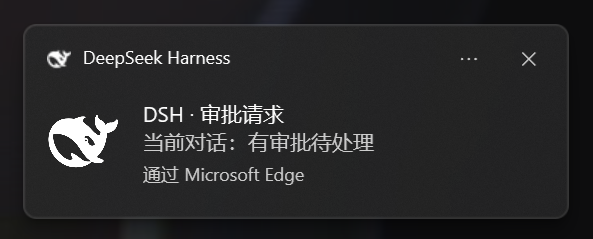
*Plain notification example · Windows / Edge · no approval buttons.* [View full size](https://raw.githubusercontent.com/chromoany/dsh-notify-me/main/docs/screenshots/notify-toast.png)
|
|
32
38
|
|
|
33
|
-
|
|
39
|
+

|
|
40
|
+
|
|
41
|
+
*In-page overlay (1.8.0) · the real plugin rendered on a demo page · for when system notifications cannot reach the secondary display; cards appear on whichever display the DSH window is on.* [View full size](https://raw.githubusercontent.com/chromoany/dsh-notify-me/main/docs/screenshots/overlay-en.png)
|
|
42
|
+
|
|
43
|
+
<details>
|
|
44
|
+
<summary>See the settings interface</summary>
|
|
45
|
+
|
|
46
|
+

|
|
47
|
+
|
|
48
|
+
The real plugin settings component rendered with v1.7.0 defaults in an isolated demo environment. Shows the basic settings area, without the DSH host shell (the two overlay rows added in 1.8.0 are not in this shot).
|
|
49
|
+
|
|
50
|
+
</details>
|
|
51
|
+
|
|
52
|
+
## Installation
|
|
53
|
+
|
|
54
|
+
### DSH Web
|
|
55
|
+
|
|
56
|
+
With the DSH CLI already installed, run in a terminal:
|
|
57
|
+
|
|
58
|
+
```powershell
|
|
59
|
+
# Install and auto-mount into the web profile
|
|
60
|
+
dsh plugin --profile web add dsh-notify-me
|
|
61
|
+
```
|
|
62
|
+
|
|
63
|
+
Restart `dsh web`, then hard-refresh the page (Ctrl+Shift+R). If you use another Web profile, replace `web` with its actual name.
|
|
64
|
+
|
|
65
|
+
### DSH Desktop
|
|
66
|
+
|
|
67
|
+
1. Open **Plugins → Add plugin** in the desktop application.
|
|
68
|
+
2. Enter the npm package name `dsh-notify-me`, follow the installation prompts, and confirm that the plugin is enabled.
|
|
69
|
+
3. Quit DSH Desktop completely and relaunch it so the plugin loads.
|
|
70
|
+
|
|
71
|
+
The Electron application manages the `desktop` profile. Do not change the Web command above to `--profile desktop`: the CLI rejects that operation. Installing into the Web profile does not automatically install the plugin into Desktop.
|
|
72
|
+
|
|
73
|
+
## First-use check
|
|
74
|
+
|
|
75
|
+
1. Click once in the DSH page and allow notifications when prompted. If you previously declined, allow them in the browser's site settings. The operating system must also allow notifications from the browser / DSH Desktop.
|
|
76
|
+
2. Open **Settings → Notify me**. Confirm that the section and plugin version at its foot appear, and leave the master switch, system notifications, and sound enabled.
|
|
77
|
+
3. Click **Test "reply finished"** on the settings page. A test notification should appear and sound according to your cue settings. This local test does not forward to external endpoints and ignores the "while the page is open" toggle.
|
|
34
78
|
|
|
35
|
-
|
|
36
|
-
| --- |
|
|
37
|
-
|  |
|
|
79
|
+
Web users can also test approval buttons. On Desktop that test sends a plain notification: **no Approve / Reject buttons is the expected result**.
|
|
38
80
|
|
|
39
|
-
|
|
81
|
+
**Optional console check** — in environments with DevTools, you can also run:
|
|
82
|
+
|
|
83
|
+
```js
|
|
84
|
+
window.__dshNotifyMe.test("done") // "reply finished" sample
|
|
85
|
+
window.__dshNotifyMe.test("attention") // "needs your input" sample
|
|
86
|
+
window.__dshNotifyMe.test("approval") // Approve / Reject with an active Web bridge; buttonless on Desktop
|
|
87
|
+
window.__dshNotifyMe.debug() // the bridge field reports the button channel: "active" = buttons work
|
|
88
|
+
```
|
|
89
|
+
|
|
90
|
+
If no test notification appears, first check:
|
|
91
|
+
|
|
92
|
+
- the notification permission was declined — click anywhere on the page and choose **Allow** (address-bar lock → Site settings → Notifications → Allow → reload);
|
|
93
|
+
- the DSH process wasn't restarted after install;
|
|
94
|
+
- your OS/browser notification settings block the browser's toasts.
|
|
95
|
+
|
|
96
|
+
## Why you need it
|
|
97
|
+
|
|
98
|
+
- **Without full access (`workspace-write` + ask):** keep approval before actions, but a missed request leaves the agent waiting.
|
|
99
|
+
- **With full access:** fewer approval interruptions, at the cost of interception before actions.
|
|
100
|
+
|
|
101
|
+
dsh-notify-me decouples **supervision** from **sitting in front of the screen**: it pulls you back with a system notification only when a decision is genuinely needed (approval / plan review / question) or a reply finishes — **so you can afford to keep full access off** instead of trading away interception for speed. It does not lower the risk of full access itself (it is not a sandbox); it reduces the time spent waiting on missed approvals in ask-mode.
|
|
40
102
|
|
|
41
103
|
## What it alerts about
|
|
42
104
|
|
|
43
|
-
|
|
|
44
|
-
| --- | --- |
|
|
45
|
-
| 🔔
|
|
46
|
-
| ✅
|
|
105
|
+
| Event | Default behavior |
|
|
106
|
+
| --- | --- |
|
|
107
|
+
| 🔔 Input needed | Alerts even in the foreground; the conversation on screen keeps only a title marker |
|
|
108
|
+
| ✅ Reply finished | Alerts while the page is hidden / backgrounded |
|
|
109
|
+
|
|
110
|
+
**Input needed** covers approval requests, plan review, and questions (`ask_user_question`). Supported Web environments show Approve / Reject buttons; Desktop does not.
|
|
111
|
+
|
|
112
|
+
**Reply finished** also covers background sessions. A finished but unread session keeps the `✅ Reply finished ·` title marker until opened. Title markers are independent of the "while the page is open" toggles.
|
|
47
113
|
|
|
48
114
|
> **Background** subagent child sessions are **not** alerted about by default: DSH lists each of them as its own session, but they are steps inside the parent conversation's turn, so an alert for them is only noise. The subagent session you have open is not part of this and alerts as usual. Settings → "Ignore subagent sessions" turns the mute off.
|
|
49
115
|
|
|
50
116
|
## Configure it from DSH Settings
|
|
51
117
|
|
|
52
|
-
Open **Settings → Notify me
|
|
118
|
+
Open **Settings → Notify me**. Common options are grouped below.
|
|
119
|
+
|
|
120
|
+
### Basics
|
|
53
121
|
|
|
54
122
|
- **Enable reminders** — master switch; when off, no toasts, no sounds and the tab title is never touched;
|
|
55
|
-
- **Environment** (auto-detect by default) — identifies Web vs Desktop (DSH Desktop, `dsh-app://`) from the page protocol, with a manual override for hosts where detection comes out wrong: on the Desktop a toast click rides the `dsh://` deep link to raise the window and quick-decision buttons are unavailable; on the Web it is `window.focus()` plus the Service Worker bridge. Whenever the override disagrees with detection, the settings page says what detection saw;
|
|
56
123
|
- **System notifications / Sound / Volume** — toast toggle, cue toggle and a volume slider;
|
|
57
|
-
- **
|
|
124
|
+
- **In-page overlay** (default off; independent of "System notifications", both can be on) — draws the alert card inside the DSH page, positioned with the window; see [Secondary displays and the overlay](#secondary-displays-and-the-overlay);
|
|
125
|
+
- **Notification language** — follow the interface / 简体中文 / English: controls the language of the alert text and the `🔔 …` title marker;
|
|
126
|
+
- **Test buttons** — send one "needs you", "reply finished" or "approval buttons" test alert with the current settings (**not** limited by the "while the page is open" toggles; the "needs you" test's title marker clears itself after ~6s);
|
|
127
|
+
- **Version info** — the settings page always shows the installed plugin version at its foot (`dsh-notify-me v…`); quote that line in bug reports or to check which build you are on.
|
|
128
|
+
|
|
129
|
+
### Timing and click behavior
|
|
130
|
+
|
|
58
131
|
- **"Needs you" alerts while the page is open** (default on) and **"Reply finished" alerts while the page is open** (default off);
|
|
59
132
|
- **Stay quiet for the conversation on screen** (default on): a wait inside the conversation you are looking at keeps only the tab marker — no toast or sound landing on the approval card. Backgrounding the page puts that alert back at once, unless you already handled it. Waits in other background sessions are unaffected;
|
|
60
133
|
- **Ignore subagent sessions** (default on): background subagent child sessions raise neither "needs you" nor "reply finished" — those are steps of the parent conversation's turn, and the parent's own alert already covers them. The subagent session you have open alerts as usual. Turn it off to alert for every session;
|
|
134
|
+
- **Decide approvals from the toast** (default on): approval notifications carry Approve / Reject buttons, and one click settles the request exactly like the Allow once / Reject buttons on the approval card. Clicking the toast body still takes you back to the conversation. **Desktop toasts have no buttons** (`dsh-app://` pages cannot register a Service Worker); turn on the in-page overlay to decide from the overlay instead, and the settings page states which channel can offer buttons;
|
|
135
|
+
|
|
136
|
+
<details>
|
|
137
|
+
<summary>Environment, conversation navigation, and multiple windows</summary>
|
|
138
|
+
|
|
139
|
+
- **Environment** (auto-detect by default) — identifies Web vs Desktop (DSH Desktop, `dsh-app://`) from the page protocol, with a manual override for hosts where detection comes out wrong: on the Desktop a toast click rides the `dsh://` deep link to raise the window and quick-decision buttons are unavailable; on the Web it is `window.focus()` plus the Service Worker bridge. Whenever the override disagrees with detection, the settings page says what detection saw;
|
|
61
140
|
- **Click a toast to open that conversation** (default on): clicking brings DSH to the front and switches to the conversation the alert came from. With several DSH tabs open, one click raises exactly one window (a visible one first) and switches only that one — the others stay put; when off, clicking a toast does nothing. On the Desktop (DSH Desktop) the click likewise raises the window and switches conversations: page-side `window.focus()` cannot raise a native Electron window, so since 1.5.2 the plugin rides the app's own `dsh://open` deep link instead (a window hidden to the tray comes back too);
|
|
62
|
-
|
|
63
|
-
|
|
64
|
-
|
|
65
|
-
|
|
141
|
+
|
|
142
|
+
</details>
|
|
143
|
+
|
|
144
|
+
### Secondary displays and the overlay
|
|
145
|
+
|
|
146
|
+
Windows draws system notification banners on the primary display only. There is no setting in Windows and no API in the browser to aim one at another monitor, so with DSH parked on a second screen and the primary display unwatched, a toast is as good as not sent.
|
|
147
|
+
|
|
148
|
+
The **in-page overlay** skips the notification center and draws the card inside the DSH page instead: wherever the window is, the card is there too.
|
|
149
|
+
|
|
150
|
+
- **Position** — top right / bottom right / top left / bottom left, default bottom right; changes apply immediately;
|
|
151
|
+
- **No notification permission needed** — it works when permission was never granted, and on the Desktop shell where buttonless toasts are all the OS channel can do;
|
|
152
|
+
- **Approval cards carry Approve / Reject** — the same decision as Allow once / Reject on the approval card, and they work on the Desktop too (no Service Worker involved). Clicking the card body opens its conversation;
|
|
153
|
+
- **Lifetime** — "needs you" cards retire after 20s, "reply finished" after 8s; an approval card with buttons stays until it is decided or closed. At most 4 cards stack at once;
|
|
154
|
+
- **Relation to system notifications** — the two switches are independent. With both on, the primary display gets toasts and the second screen gets the overlay; the overlay alone is also a valid setup.
|
|
155
|
+
|
|
156
|
+
The overlay only knows which screen the window is on, not which screen you are looking at. If the window stays on the primary display while you watch another one, it stays invisible — same as a toast.
|
|
157
|
+
|
|
158
|
+
### Sound
|
|
159
|
+
|
|
160
|
+
Choose a built-in cue, custom audio file, or system notification sound independently for each alert kind.
|
|
161
|
+
|
|
162
|
+
<details>
|
|
163
|
+
<summary>Custom audio, previews, and fallback behavior</summary>
|
|
164
|
+
|
|
165
|
+
- **Alert sound** (picked separately for "needs you" and "reply finished") — built-in cue (default) / custom audio file / system notification sound. "Custom audio file" takes one local audio file in the settings page (1 MiB limit, stored in the browser, with preview and remove); "system notification sound" plays no plugin cue at all — the toast still appears and the operating system supplies the sound, so its timbre follows your system notification settings; in that mode "Preview" sends a test alert instead, because the sound only exists as part of a toast and that is the sound you hear. Any source that has no file, cannot be read, or does not fit falls back to the built-in cue, so an alert never goes silent;
|
|
166
|
+
|
|
167
|
+
</details>
|
|
168
|
+
|
|
169
|
+
### External push
|
|
170
|
+
|
|
171
|
+
Off by default. Supports Discord Webhook / Bark / Gotify / custom webhooks. Alert text is sent to the addresses you enter; use trusted endpoints.
|
|
172
|
+
|
|
173
|
+
<details>
|
|
174
|
+
<summary>Target URLs, forwarding switches, and test messages</summary>
|
|
175
|
+
|
|
176
|
+
- **External notifications** (default off) — forward each alert to your own push endpoints as well, so it reaches you away from the machine: **Discord Webhook** / **Bark** / **Gotify** / **custom webhook**, any number of targets, each with a type and URL (Discord takes the webhook URL; Bark `https://api.day.app/<device key>`; Gotify `https://<server>/message?token=<app token>`; a custom endpoint receives one POST of JSON: `{source, event, title, body, sessionId, time}`). "Forward 'needs you'" and "Forward 'reply finished'" switch independently; **Send test notification** sends one test message to every target (not limited by those two switches, and never pretending to be a real alert). Forwarding follows exactly the same trigger rules as local alerts ("stay quiet for the conversation on screen" and friends apply to it too); the alert text is sent as-is to the addresses you fill in, so **only use endpoints you trust**;
|
|
177
|
+
|
|
178
|
+
</details>
|
|
66
179
|
|
|
67
180
|
> Notification permission is required: click once on the page → **Allow** (or address-bar lock → Site settings → Notifications → Allow → reload). On macOS, also allow the browser under System Settings → Notifications.
|
|
68
181
|
|
|
69
182
|
## How it alerts
|
|
70
183
|
|
|
71
|
-
- **System notification** — a toast through the browser into the Windows action center / macOS Notification Center (clicking it opens the conversation it came from;
|
|
184
|
+
- **System notification** — a toast through the browser into the Windows action center / macOS Notification Center (clicking it opens the conversation it came from; supported Web environments offer approval buttons, Desktop does not)
|
|
185
|
+
- **In-page overlay** (optional, default off) — an alert card drawn in the corner of the DSH page, on whatever display the window is on, optionally with Approve / Reject buttons; see [Secondary displays and the overlay](#secondary-displays-and-the-overlay)
|
|
72
186
|
- **Sound** — WebAudio beeps by default (distinct patterns for "needs you" vs "done"); each kind can instead play a picked audio file, or hand the sound over to the operating system's own notification sound
|
|
73
187
|
- **Tab title marker** — while something is waiting on you, the tab title is prefixed with `🔔 Action needed · …` / `🔔 需要你 · …`; while a background session is **finished but unread**, with `✅ Reply finished · …` / `✅ 回复完成 · …`, gone once you open that session (or it starts running again). Both kinds can be up together, "needs you" first; a host title change is rebased under the markers
|
|
188
|
+
- **External notifications** (optional, default off) — the same alert is also forwarded to the push targets you configure: Discord Webhook / Bark / Gotify / custom webhook — so the push channel on your phone picks it up while you step away from the machine
|
|
74
189
|
|
|
75
190
|
This is a **browser-layer** plugin: the DSH page must stay open (minimized or backgrounded is fine — that's exactly the "away" state it watches for).
|
|
76
191
|
|
|
77
|
-
##
|
|
192
|
+
## Compatibility
|
|
78
193
|
|
|
79
|
-
|
|
80
|
-
|
|
81
|
-
|
|
82
|
-
|
|
194
|
+
Per-release adaptation records live in [package.json](package.json), under `dsh.compatibility.dshReleases`. The current host (`0.2.1-rc.2`) no longer reads that field — installation gates only on `peerDependencies` and `engines` — so it is a human-readable record, not a gate.
|
|
195
|
+
|
|
196
|
+
Verified to actually activate on `0.1.2-rc.1`, `0.1.5-rc.1`, `0.1.5-rc.2` and `0.2.0-rc.2` (each booted in its own profile: the plugin entry lands in the boot page's `__DSH_BOOT__` with its inject dependencies resolved, `/plugins/??dsh-notify-me/client.js&rev=…` serves a build containing the new code, and the Settings → Notifications section registers, i.e. the plugin's `apply` really runs), and previously on `0.1.1-rc.2`.
|
|
197
|
+
|
|
198
|
+
`0.2.1-rc.2` (current latest) got its own isolated run: an isolated `DSH_HOME` booting `dsh web` (70 boot entries) placed the plugin entry 59th, in the `application` batch, with all three inject targets present and ordered before it; `/plugins/??dsh-notify-me/client.js&rev=…` served the 1.7.0 source build (140,153 B); loaded in a headless Chromium page, `apply` ran — `window.__dshNotifyMe.debug()` reported `uiSession: bound`, `uiSessionSource: sessionStatus`, `bridge: active`. Host-side shapes match `0.2.0-rc.2`; no plugin code change was needed.
|
|
83
199
|
|
|
84
|
-
|
|
200
|
+
<details>
|
|
201
|
+
<summary>Host generations and adaptation diagnostics</summary>
|
|
85
202
|
|
|
86
|
-
|
|
203
|
+
The plugin picks its interaction source per host generation; the table below marks where each shape appeared — it is not a gate (the current host does not read `dshReleases`):
|
|
87
204
|
|
|
88
205
|
| Host generation | "Needs you" interaction source | Current session | Toast-click navigation |
|
|
89
206
|
| --- | --- | --- | --- |
|
|
90
207
|
| `<= 0.1.2-alpha.1` | controller snapshot `pending[]` | snapshot `current` | `sessions.open()` |
|
|
91
208
|
| `0.1.2-alpha.2 .. 0.1.6-alpha.1` | `uiSession.pendingInteractions` | snapshot `current` | `sessions.open()` |
|
|
92
|
-
| `>= 0.1.6-alpha.2` (incl. `0.2.0-rc.2`) | `uiSession.sessionStatus` | `retainedBy.mainView` | `uiWorkspace.openSession()` |
|
|
209
|
+
| `>= 0.1.6-alpha.2` (incl. `0.2.0-rc.2`, `0.2.1-rc.2`) | `uiSession.sessionStatus` | `retainedBy.mainView` | `uiWorkspace.openSession()` |
|
|
93
210
|
|
|
94
|
-
The ranges are illustrative: the plugin picks its source by store shape (whenever `sessionStatus` exists it takes the new path); the version numbers only mark where each shape appeared. The `peerDependencies` range in `package.json`
|
|
211
|
+
The ranges are illustrative: the plugin picks its source by store shape (whenever `sessionStatus` exists it takes the new path); the version numbers only mark where each shape appeared. The `peerDependencies` range in `package.json` shapes npm's peer warning — `0.2.1-rc.2` already falls inside `>=0.2.0-rc.1 <0.3.0-0`, so no exemption is needed; `dshReleases` is just an archive, real compatibility is per-release testing, and untested new versions fall back to shape-driven behaviour.
|
|
95
212
|
|
|
96
|
-
|
|
213
|
+
Two traps are worth remembering: a package listed in `dsh.client.inject` that a newer runtime no longer ships parks the client entry at `pending (waiting for services: …)` forever — which is what broke 1.1.3 on `0.1.2-rc.1` and later; and when the host renames a store or a field nothing throws, alerts just go **silent** — `0.2.0-rc.2` moved `pendingInteractions`→`sessionStatus`, `list.current`→`retainedBy.mainView` and `sessions.open()`→`uiWorkspace.openSession()`. So every adaptation must confirm `window.__dshNotifyMe.debug()` reports `bound` and which source answered. `0.2.1-rc.2` changed neither: `sessionStatus` is still a Map of `{running, pendingInteraction, completionUnread}`, `uiWorkspace.openSession(id)` is unchanged, and the session list still has no `current`.
|
|
97
214
|
|
|
98
|
-
|
|
99
|
-
|
|
100
|
-
```js
|
|
101
|
-
window.__dshNotifyMe.test("done") // "reply finished" sample
|
|
102
|
-
window.__dshNotifyMe.test("attention") // "needs your input" sample
|
|
103
|
-
window.__dshNotifyMe.test("approval") // "approval buttons" sample: try the Approve / Reject buttons on the toast
|
|
104
|
-
window.__dshNotifyMe.debug() // the bridge field reports the button channel: "active" = buttons work
|
|
105
|
-
```
|
|
106
|
-
|
|
107
|
-
Nothing happened? 90% of the time it's one of:
|
|
108
|
-
|
|
109
|
-
- the notification permission was declined — click anywhere on the page and choose **Allow** (address-bar lock → Site settings → Notifications → Allow → reload);
|
|
110
|
-
- the DSH process wasn't restarted after install;
|
|
111
|
-
- your OS/browser notification settings block the browser's toasts.
|
|
215
|
+
</details>
|
|
112
216
|
|
|
113
217
|
## Advanced: console configuration
|
|
114
218
|
|
|
115
219
|
The Settings page is the primary entry; preferences live in `localStorage` (key `dshNotifyMe.config`) and can be scripted from the console:
|
|
116
220
|
|
|
221
|
+
<details>
|
|
222
|
+
<summary>Console API and storage reference</summary>
|
|
223
|
+
|
|
117
224
|
```js
|
|
118
225
|
window.__dshNotifyMe.config // view current config
|
|
119
226
|
window.__dshNotifyMe.setConfig({
|
|
@@ -129,18 +236,34 @@ window.__dshNotifyMe.setConfig({
|
|
|
129
236
|
soundAttention: "synth", // "needs you" cue source, same values
|
|
130
237
|
volume: 0.5, // 0..1
|
|
131
238
|
autoFocus: true, // clicking a toast opens the conversation it came from
|
|
132
|
-
quickActions: true
|
|
239
|
+
quickActions: true, // Approve / Reject buttons on approval toasts
|
|
240
|
+
overlay: false, // in-page overlay alert (follows the DSH window to its display; no notification permission needed)
|
|
241
|
+
overlayCorner: "bottom-right", // overlay anchor: 'top-right' | 'bottom-right' | 'top-left' | 'bottom-left'
|
|
242
|
+
externalEnabled: false, // external-notification forwarding master switch (default off: no endpoint, nothing is sent)
|
|
243
|
+
externalAttention: true, // forward "needs you" (exactly the same trigger rules as local alerts)
|
|
244
|
+
externalDone: true, // forward "reply finished"
|
|
245
|
+
externalTargets: [] // push targets: [{id, type:'discord'|'bark'|'gotify'|'custom', url}]
|
|
133
246
|
})
|
|
134
247
|
window.__dshNotifyMe.resetConfig() // restore defaults (also drops any picked audio files)
|
|
135
248
|
window.__dshNotifyMe.decide("approval:3", "allowed-once") // programmatic decision: "allowed-once" | "rejected"
|
|
249
|
+
window.__dshNotifyMe.testExternal() // explicit outbound test to valid targets; resolves {sent, unverified, failed, statuses}
|
|
136
250
|
```
|
|
137
251
|
|
|
252
|
+
> **External-test switch behavior:** the settings page's "Send test notification" button requires both the plugin and external-forwarding master switches to be on, but ignores the two per-kind forwarding switches. The console `testExternal()` call is an explicit test: with valid configured targets, it sends to them even when those master switches are off; with no valid targets it sends nothing. Ordinary `test("done")` / `test("attention")` / `test("approval")` calls only test local alerts and never forward externally.
|
|
253
|
+
|
|
138
254
|
> Picked audio files do not live in `dshNotifyMe.config`: each kind gets its own key (`dshNotifyMe.sound.done` / `dshNotifyMe.sound.attention`, holding `{name, size, data}` with a data URL), because a file inflates by ~1.37x once base64-encoded and would slow down every config read. `resetConfig()` clears both keys along with the config.
|
|
139
255
|
>
|
|
140
256
|
> To see which source is live, check `soundDone` / `soundAttention` and `customSoundDone` / `customSoundAttention` in `window.__dshNotifyMe.debug()`.
|
|
141
257
|
|
|
258
|
+
</details>
|
|
259
|
+
|
|
142
260
|
## How it works
|
|
143
261
|
|
|
262
|
+
The reminder core watches session state and pending interactions. The page handles approval decisions; Desktop window activation uses the app deep link.
|
|
263
|
+
|
|
264
|
+
<details>
|
|
265
|
+
<summary>Event sources, approval bridge, and Desktop window activation</summary>
|
|
266
|
+
|
|
144
267
|
The reminder core picks its interaction source per host generation (see the table above); the current session always comes from the client `sessions` service:
|
|
145
268
|
|
|
146
269
|
- the **selected session's** `SessionSnapshot`: a `running: true → false` edge means a reply finished;
|
|
@@ -162,18 +285,22 @@ DSH Desktop is a thin Electron shell and its page lives under `dsh-app://app`: D
|
|
|
162
285
|
|
|
163
286
|
Verified on the real shell (DSH Desktop 0.2.0-rc.2, three rounds of retesting in issue #9): a toast click raises the window and switches the conversation in one step, stable across sessions and with the window in the background. Timing of the fire is what makes the chain work: the deep link must be launched from a **user-gesture handler** — the notification's `onclick` carries one, which is why the product path works — while gesture-less scripted injection (an iframe appended from a CDP evaluate, say) is silently dropped by Chromium and the external protocol never launches, which looks exactly like the channel being blocked.
|
|
164
287
|
|
|
288
|
+
</details>
|
|
289
|
+
|
|
165
290
|
## Known limitations
|
|
166
291
|
|
|
167
292
|
- The page must be open for alerts to fire (background tab / minimized is fine; closing the tab stops it — that's inherent to a browser-layer plugin).
|
|
168
293
|
- Notifications appear through the browser, so the browser needs "show notifications" permission in the OS notification settings, and notification-center "Do Not Disturb" must not suppress them.
|
|
169
294
|
- The first sound/toast of each page load needs one user click on the page first (browser autoplay + permission policy).
|
|
170
295
|
- Toasts are only produced once the notification permission is granted; declining means sound + title marker only.
|
|
296
|
+
- System notification banners are drawn on the primary display only: Windows has no setting and Chromium no API to aim one at another monitor, so on a multi-monitor setup the second screen never receives them. Use the in-page overlay for that — it follows the DSH window to its display.
|
|
171
297
|
- Quick-decision buttons need a Service Worker: they work on `http://127.0.0.1` and `https`, not on plain `http://192.168.x.x`-style LAN addresses, and some browsers or desktop hosts never render notification buttons. **The Desktop (`dsh-app://`) is tested and cannot register a Service Worker**, so buttons never render there and approval toasts fall back to their buttonless form. The `bridge` field of `window.__dshNotifyMe.debug()` says why; everything else keeps working.
|
|
172
298
|
- macOS: in the browser, alerts, sounds, the title marker and toast-click navigation carry no OS assumptions and work as on Windows. Two caveats: DSH Desktop (Electron) notifications require the app to be code-signed — unsigned builds simply emit no notification — and whether the official macOS build satisfies that is untested; and notification buttons on the macOS desktop host are likewise untested (the Windows desktop host is tested and renders none, see the line above), falling back to the buttonless form above.
|
|
173
299
|
- Config lives in browser `localStorage`: switching browsers/devices or clearing site data returns to defaults (one-click restore in the Settings page).
|
|
174
|
-
- On `>= 0.1.6` (including `0.2.0-rc.2`) the "reply finished" toast body carries only the session label, no assistant snippet: host snapshots no longer expose `nodes`. The alert itself still fires.
|
|
300
|
+
- On `>= 0.1.6` (including `0.2.0-rc.2`, `0.2.1-rc.2`) the "reply finished" toast body carries only the session label, no assistant snippet: host snapshots no longer expose `nodes`. The alert itself still fires.
|
|
175
301
|
- The title marker is written into `document.title` alongside the host: when the host recomputes the title it can overwrite the marker until the next alert event rewrites it.
|
|
176
302
|
- "Stay quiet for the conversation on screen" is judged by `document.hidden`: a window fully covered by other apps still counts as visible, so waits in the current conversation stay quiet there too.
|
|
303
|
+
- External notification forwarding is subject to browser CORS rules: an endpoint that does not allow cross-origin requests falls back to a "sent but unverifiable" delivery (no-cors) and is reported honestly as such; Discord webhooks do allow cross-origin, so delivery to them is confirmed. HTTP errors are recorded as failures and never blindly retried. Forwarding runs only after the local alert has decided to fire, so anything the rules silence is never sent out.
|
|
177
304
|
|
|
178
305
|
## Development
|
|
179
306
|
|
|
@@ -196,6 +323,7 @@ Contributors (by handle; the link points at the PR / issue they worked on):
|
|
|
196
323
|
- [@EliteOtaku](https://github.com/EliteOtaku) — [#9](https://github.com/chromoany/dsh-notify-me/issues/9): the layer-by-layer investigation and three rounds of real-shell retesting of the desktop raise path (1.5.2) — confirming that a toast click raises the window and switches conversations reliably, and pinning down the reproduction difference ("gesture-less scripted injection is silently dropped by Chromium"), which corrected the initial "the sandbox blocks it" reading;
|
|
197
324
|
- [@Wh1stle05](https://github.com/Wh1stle05) — [#10](https://github.com/chromoany/dsh-notify-me/pull/10): the per-kind alert sound source (built-in synth / picked audio file / system notification sound, chosen independently for "needs you" and "reply done"), with its settings UI, fallback chain, tests and docs; the two refinements — a "system" preview sending a real test notification instead of doing nothing, and the fake React holding hook state by index across renders — come from the same PR.
|
|
198
325
|
- [@yanzhaohui1999](https://github.com/yanzhaohui1999) — [#13](https://github.com/chromoany/dsh-notify-me/issues/13) / [#14](https://github.com/chromoany/dsh-notify-me/pull/14): the 482-session idle-page CPU report (pinning `currentSessionId()` rescanning the whole table per row, 5.9%~6.5% of CPU) and the fix (derive the on-screen session once per list change), with a red-then-green regression assertion — a 4-row and a 40-row list change must cost the same (upstream reported 7 vs 43, 5 vs 5 after).
|
|
326
|
+
- [@RiZhiZhaoYi](https://github.com/RiZhiZhaoYi) — [#12](https://github.com/chromoany/dsh-notify-me/issues/12): the external-notification forwarding suggestion (Discord Webhook / Bark / Gotify / custom webhook) and its use case (1.7.0).
|
|
199
327
|
|
|
200
328
|
Attribution policy: external PRs are landed as maintainer commits — the original commit is not reused and no Co-authored-by trailer is added, so GitHub's contributors graph lists the maintainer only and contributors are credited above.
|
|
201
329
|
|