dsh-notify-me 1.3.0 → 1.3.1
This diff represents the content of publicly available package versions that have been released to one of the supported registries. The information contained in this diff is provided for informational purposes only and reflects changes between package versions as they appear in their respective public registries.
- package/CHANGELOG.md +10 -0
- package/README.en.md +13 -8
- package/README.md +11 -6
- package/lib/client.js +1 -1
- package/package.json +1 -1
package/CHANGELOG.md
CHANGED
|
@@ -2,6 +2,16 @@
|
|
|
2
2
|
|
|
3
3
|
All notable changes to **dsh-notify-me** are documented here.
|
|
4
4
|
|
|
5
|
+
## [1.3.1] — 2026-10-03
|
|
6
|
+
|
|
7
|
+
### 文档
|
|
8
|
+
- README 中英补齐 1.1.7 / 1.1.8 起就有、但一直没写进文档的两个设置项:「当前对话不弹通知」(`currentHiddenOnly`)与「点击通知回到对应对话」(`autoFocus`),控制台配置示例同步补 `currentHiddenOnly`;「提醒时机」表的默认口径改为「页面可见也提醒(当前对话除外:默认只留标题标记)」——原表述把当前对话的静默规则漏掉了。
|
|
9
|
+
- 措辞去掉 Windows 专属口径:系统通知按「经浏览器弹出,进 Windows 通知中心或 macOS 通知中心」描述,权限提示补 macOS 的 系统设置 → 通知;已知限制新增 macOS 一条——浏览器路径无平台假设,但 DSH Desktop(Electron)的系统通知要求应用已签名(官方 macOS 版是否满足未实测),审批按钮在 macOS 与桌面宿主上的渲染同样未实测,不渲染时自动退回无按钮通知。
|
|
10
|
+
- 已知限制补「当前对话不弹通知」按 `document.hidden` 判定的边界(窗口被别的应用完全盖住仍算可见);开发自检一节补 `cordis-host-test.mjs` 的 cordis 探测路径(含 `~/.dsh/profiles/node_modules` 平铺回退目录)。
|
|
11
|
+
|
|
12
|
+
### 变更
|
|
13
|
+
- 版本号 1.3.0 → 1.3.1;`window.__dshNotifyMe.version` 同步。功能零改动。
|
|
14
|
+
|
|
5
15
|
## [1.3.0] — 2026-10-03
|
|
6
16
|
|
|
7
17
|
### 新增
|
package/README.en.md
CHANGED
|
@@ -11,7 +11,7 @@
|
|
|
11
11
|
|
|
12
12
|
---
|
|
13
13
|
|
|
14
|
-
**Step away from the DeepSeek Harness web UI — and still know what's going on.** When the agent stops and needs your input, or when a reply finishes in the background while you're in another app, dsh-notify-me alerts you with a
|
|
14
|
+
**Step away from the DeepSeek Harness web UI — and still know what's going on.** When the agent stops and needs your input, or when a reply finishes in the background while you're in another app, dsh-notify-me alerts you with a desktop notification, a sound, and a tab-title marker. Approval notifications even carry Approve / Reject buttons, so you can settle the request without switching back. Toggle it and pick the notification language right from **Settings → Notify me**.
|
|
15
15
|
|
|
16
16
|
---
|
|
17
17
|
|
|
@@ -32,7 +32,7 @@ dsh-notify-me decouples **supervision** from **sitting in front of the screen**:
|
|
|
32
32
|
|
|
33
33
|
## UI Preview
|
|
34
34
|
|
|
35
|
-
|
|
|
35
|
+
| System notification (screenshot from Windows) |
|
|
36
36
|
| --- |
|
|
37
37
|
| 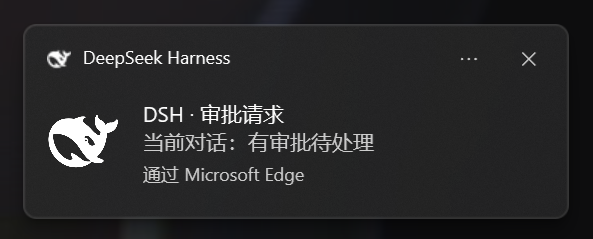 |
|
|
38
38
|
|
|
@@ -42,7 +42,7 @@ dsh-notify-me decouples **supervision** from **sitting in front of the screen**:
|
|
|
42
42
|
|
|
43
43
|
| When | What you get | Default |
|
|
44
44
|
| --- | --- | --- |
|
|
45
|
-
| 🔔 **The agent needs your input** — sandbox approval / plan review / a question (`ask_user_question`) | Toast + sound + `🔔 Action needed ·` title marker; approval toasts also carry Approve / Reject buttons | Alerts even while the page is visible |
|
|
45
|
+
| 🔔 **The agent needs your input** — sandbox approval / plan review / a question (`ask_user_question`) | Toast + sound + `🔔 Action needed ·` title marker; approval toasts also carry Approve / Reject buttons | Alerts even while the page is visible (the conversation on screen is the exception: tab marker only by default) |
|
|
46
46
|
| ✅ **A reply finishes** — a turn completes; background sessions finishing are also reported | Toast + sound | Alerts only while the page is hidden / backgrounded |
|
|
47
47
|
|
|
48
48
|
## Configure it from DSH Settings
|
|
@@ -52,15 +52,17 @@ Open **Settings → Notify me** (refresh the page once after installing):
|
|
|
52
52
|
- **Enable reminders** — master switch; when off, no toasts, no sounds and the tab title is never touched;
|
|
53
53
|
- **System notifications / Sound / Volume** — toast toggle, WebAudio beep toggle and a volume slider;
|
|
54
54
|
- **"Needs you" alerts while the page is open** (default on) and **"Reply finished" alerts while the page is open** (default off);
|
|
55
|
+
- **Stay quiet for the conversation on screen** (default on): a wait inside the conversation you are looking at keeps only the tab marker — no toast or sound landing on the approval card. Backgrounding the page puts that alert back at once, unless you already handled it. Waits in other background sessions are unaffected;
|
|
56
|
+
- **Click a toast to open that conversation** (default on): clicking brings DSH to the front and switches to the conversation the alert came from; when off, clicking a toast does nothing;
|
|
55
57
|
- **Decide approvals from the toast** (default on): approval notifications carry Approve / Reject buttons, and one click settles the request exactly like the Allow once / Reject buttons on the approval card. Clicking the toast body still takes you back to the conversation;
|
|
56
58
|
- **Notification language** — follow the interface / 简体中文 / English: controls the language of the alert text and the `🔔 …` title marker;
|
|
57
59
|
- **Test buttons** — send one "needs you", "reply finished" or "approval buttons" test alert with the current settings (**not** limited by the "while the page is open" toggles; the "needs you" test's title marker clears itself after ~6s).
|
|
58
60
|
|
|
59
|
-
> Notification permission is required: click once on the page → **Allow** (or address-bar lock → Site settings → Notifications → Allow → reload).
|
|
61
|
+
> Notification permission is required: click once on the page → **Allow** (or address-bar lock → Site settings → Notifications → Allow → reload). On macOS, also allow the browser under System Settings → Notifications.
|
|
60
62
|
|
|
61
63
|
## How it alerts
|
|
62
64
|
|
|
63
|
-
- **System notification** —
|
|
65
|
+
- **System notification** — a toast through the browser into the Windows action center / macOS Notification Center (clicking it opens the conversation it came from; approval toasts can be decided straight from the buttons)
|
|
64
66
|
- **Sound** — WebAudio beeps (distinct patterns for "needs you" vs "done")
|
|
65
67
|
- **Tab title marker** — while something is waiting on you, the tab title is prefixed with `🔔 Action needed · …` / `🔔 需要你 · …`
|
|
66
68
|
|
|
@@ -112,11 +114,12 @@ window.__dshNotifyMe.setConfig({
|
|
|
112
114
|
enabled: true, // false = disable all reminders (master switch)
|
|
113
115
|
language: "auto", // 'auto' follow the UI | 'zh' | 'en'
|
|
114
116
|
attentionHiddenOnly: false, // true = don't alert "needs you" while the page is visible
|
|
117
|
+
currentHiddenOnly: true, // true = waits in the conversation on screen keep only the tab marker (replayed once backgrounded)
|
|
115
118
|
doneHiddenOnly: true, // false = also alert "reply finished" while visible
|
|
116
119
|
toast: true, // system-notification toggle
|
|
117
120
|
sound: true, // sound toggle
|
|
118
121
|
volume: 0.5, // 0..1
|
|
119
|
-
autoFocus: true, // clicking
|
|
122
|
+
autoFocus: true, // clicking a toast opens the conversation it came from
|
|
120
123
|
quickActions: true // Approve / Reject buttons on approval toasts
|
|
121
124
|
})
|
|
122
125
|
window.__dshNotifyMe.resetConfig() // restore defaults
|
|
@@ -142,13 +145,15 @@ Every button toast is booked against its interaction key, so it can only decide
|
|
|
142
145
|
## Known limitations
|
|
143
146
|
|
|
144
147
|
- The page must be open for alerts to fire (background tab / minimized is fine; closing the tab stops it — that's inherent to a browser-layer plugin).
|
|
145
|
-
- Notifications appear through the browser, so the browser needs "show notifications" permission in
|
|
148
|
+
- Notifications appear through the browser, so the browser needs "show notifications" permission in the OS notification settings, and notification-center "Do Not Disturb" must not suppress them.
|
|
146
149
|
- The first sound/toast of each page load needs one user click on the page first (browser autoplay + permission policy).
|
|
147
150
|
- Toasts are only produced once the notification permission is granted; declining means sound + title marker only.
|
|
148
151
|
- Quick-decision buttons need a Service Worker: they work on `http://127.0.0.1` and `https`, not on plain `http://192.168.x.x`-style LAN addresses, and some browsers or desktop hosts never render notification buttons. The `bridge` field of `window.__dshNotifyMe.debug()` says why; toasts then fall back to their buttonless form and everything else keeps working.
|
|
152
|
+
- macOS: in the browser, alerts, sounds, the title marker and toast-click navigation carry no OS assumptions and work as on Windows. Two caveats: DSH Desktop (Electron) notifications require the app to be code-signed — unsigned builds simply emit no notification — and whether the official macOS build satisfies that is untested; and notification buttons on macOS / desktop hosts are likewise unrendered in some cases, falling back to the buttonless form above.
|
|
149
153
|
- Config lives in browser `localStorage`: switching browsers/devices or clearing site data returns to defaults (one-click restore in the Settings page).
|
|
150
154
|
- On `>= 0.1.6` (including `0.2.0-rc.2`) the "reply finished" toast body carries only the session label, no assistant snippet: host snapshots no longer expose `nodes`. The alert itself still fires.
|
|
151
155
|
- The title marker is written into `document.title` alongside the host: when the host recomputes the title it can overwrite the marker until the next alert event rewrites it.
|
|
156
|
+
- "Stay quiet for the conversation on screen" is judged by `document.hidden`: a window fully covered by other apps still counts as visible, so waits in the current conversation stay quiet there too.
|
|
152
157
|
|
|
153
158
|
## Development
|
|
154
159
|
|
|
@@ -160,7 +165,7 @@ node smoke\cordis-host-test.mjs # real-cordis end-to-end (skips when no local D
|
|
|
160
165
|
npm pack --dry-run # preview the published tarball
|
|
161
166
|
```
|
|
162
167
|
|
|
163
|
-
`cordis-host-test.mjs` borrows `@deepseek-ai/cordis` from a local DSH installation; in a source checkout with no profile dependencies, point it there with `DSH_CORDIS_PATH=<checkout>/vendor/cordis/lib/index.js`.
|
|
168
|
+
`cordis-host-test.mjs` borrows `@deepseek-ai/cordis` from a local DSH installation (it probes the global npm directory, `~/.dsh/profiles/web/node_modules` and the flat fallback `~/.dsh/profiles/node_modules` in turn); in a source checkout with no profile dependencies, point it there with `DSH_CORDIS_PATH=<checkout>/vendor/cordis/lib/index.js`.
|
|
164
169
|
|
|
165
170
|
## License
|
|
166
171
|
|
package/README.md
CHANGED
|
@@ -32,7 +32,7 @@ dsh-notify-me 把「监督」和「守在屏幕前」解耦:只在真的出现
|
|
|
32
32
|
|
|
33
33
|
## 效果预览
|
|
34
34
|
|
|
35
|
-
| Windows
|
|
35
|
+
| 系统通知效果(截图来自 Windows) |
|
|
36
36
|
| --- |
|
|
37
37
|
|  |
|
|
38
38
|
|
|
@@ -42,7 +42,7 @@ dsh-notify-me 把「监督」和「守在屏幕前」解耦:只在真的出现
|
|
|
42
42
|
|
|
43
43
|
| 时机 | 提醒内容 | 默认 |
|
|
44
44
|
| --- | --- | --- |
|
|
45
|
-
| 🔔 **模型需要你操作** — 审批请求 / 方案待确认(plan review)/ 提问(`ask_user_question`) | 通知 + 提示音 + `🔔 需要你 ·` 标题标记;审批的通知上直接带「同意 / 拒绝」按钮 |
|
|
45
|
+
| 🔔 **模型需要你操作** — 审批请求 / 方案待确认(plan review)/ 提问(`ask_user_question`) | 通知 + 提示音 + `🔔 需要你 ·` 标题标记;审批的通知上直接带「同意 / 拒绝」按钮 | 页面可见也提醒(当前对话除外:默认只留标题标记) |
|
|
46
46
|
| ✅ **回复完成** — 一轮回复跑完;后台会话完成也会报 | 通知 + 提示音 | 仅页面隐藏/后台时提醒 |
|
|
47
47
|
|
|
48
48
|
## 在 DSH 设置里改配置
|
|
@@ -52,15 +52,17 @@ dsh-notify-me 把「监督」和「守在屏幕前」解耦:只在真的出现
|
|
|
52
52
|
- **启用提醒** 主开关:关闭后不再弹系统通知、不播放提示音、也不改标签页标题;
|
|
53
53
|
- **系统通知 / 提示音 / 音量**:Toast、WebAudio 提示音与音量滑块;
|
|
54
54
|
- **页面打开时也提醒「需要你」**(默认开)与 **页面打开时也提醒「回复完成」**(默认关);
|
|
55
|
+
- **当前对话不弹通知**(默认开):等待就发生在你正看着的对话里时只留标题标记,不弹通知也不响音(免得盖住审批卡片);页面切到后台立刻补发,若你已经处理掉就作废。其它后台会话不受影响;
|
|
56
|
+
- **点击通知回到对应对话**(默认开):点通知把 DSH 带到前台并切到提醒所属的对话;关掉后点通知不做任何事;
|
|
55
57
|
- **审批通知上直接裁决**(默认开):权限审批的通知上带「同意 / 拒绝」按钮,点一下就按审批卡片的「允许一次 / 拒绝」直接裁决,不用切回页面;点通知正文仍是原来的「切回对应对话」;
|
|
56
58
|
- **通知语言**:跟随界面 / 简体中文 / English——决定通知文字与 `🔔 …` 标题标记使用的语言;
|
|
57
59
|
- **测试按钮**:用当前设置立即发一条「需要你」「回复完成」或「审批按钮」测试提醒(**不受**上面「页面打开时也提醒」开关限制;「需要你」测试的标题标记约 6 秒后自动消失)。
|
|
58
60
|
|
|
59
|
-
> 需要浏览器通知权限:页面上点一下 → 允许;或地址栏锁 → 站点设置 → 通知 → 允许 → 刷新。
|
|
61
|
+
> 需要浏览器通知权限:页面上点一下 → 允许;或地址栏锁 → 站点设置 → 通知 → 允许 → 刷新。macOS 还要在 系统设置 → 通知 里允许该浏览器。
|
|
60
62
|
|
|
61
63
|
## 提醒方式
|
|
62
64
|
|
|
63
|
-
-
|
|
65
|
+
- **系统通知**:经浏览器弹出的系统通知,进 Windows 通知中心或 macOS 通知中心(点击回到提醒所属的对话;审批的通知点按钮直接裁决)
|
|
64
66
|
- **提示音**:WebAudio 合成音(「需要你」与「完成」使用不同音型)
|
|
65
67
|
- **标签页标题标记**:有待处理事项时,标题前出现 `🔔 需要你 · …` / `🔔 Action needed · …`
|
|
66
68
|
|
|
@@ -108,11 +110,12 @@ window.__dshNotifyMe.setConfig({
|
|
|
108
110
|
enabled: true, // false = 关闭所有提醒(主开关)
|
|
109
111
|
language: "auto", // 'auto' 跟随界面 | 'zh' 简体中文 | 'en' English
|
|
110
112
|
attentionHiddenOnly: false, // true = 页面可见时「需要你」不提醒
|
|
113
|
+
currentHiddenOnly: true, // true = 当前对话的等待只留标题标记(转后台补发)
|
|
111
114
|
doneHiddenOnly: true, // false = 页面可见时「完成」也提醒
|
|
112
115
|
toast: true, // 系统通知开关
|
|
113
116
|
sound: true, // 提示音开关
|
|
114
117
|
volume: 0.5, // 音量 0~1
|
|
115
|
-
autoFocus: true, //
|
|
118
|
+
autoFocus: true, // 点通知回到提醒所属的对话
|
|
116
119
|
quickActions: true // 审批通知上的「同意 / 拒绝」按钮
|
|
117
120
|
})
|
|
118
121
|
window.__dshNotifyMe.resetConfig() // 恢复默认
|
|
@@ -142,9 +145,11 @@ window.__dshNotifyMe.decide("approval:3", "allowed-once") // 程序化裁决:
|
|
|
142
145
|
- 每次页面加载后第一次出声/弹通知前,需在页面上点击过一次(浏览器自动播放与权限策略)。
|
|
143
146
|
- 未授权通知权限时只有提示音与标题标记。
|
|
144
147
|
- 快捷裁决按钮要 Service Worker:`http://127.0.0.1`、`https` 可用,`http://192.168.x.x` 这类局域网地址不行;浏览器或桌面宿主不渲染通知按钮时,`window.__dshNotifyMe.debug()` 的 `bridge` 字段会说明原因,通知自动退回无按钮样式,其余功能不受影响。
|
|
148
|
+
- macOS:浏览器里提醒、提示音、标题标记、点通知跳转都没有平台假设,照常工作;但 DSH Desktop(Electron)的系统通知要求应用已签名,未签名的通知直接发不出去,官方 macOS 版是否满足这一前提未实测;审批按钮在 macOS 与桌面宿主上的渲染同样未实测,不渲染时自动退回无按钮通知。
|
|
145
149
|
- 配置存在浏览器 `localStorage`:换浏览器/设备或清除站点数据后会回到默认值(设置页可一键恢复默认)。
|
|
146
150
|
- `≥ 0.1.6`(含 `0.2.0-rc.2`)的「回复完成」提醒正文只有会话名,不再附带回复摘要——宿主快照已不再提供 `nodes`;提醒本身照常触发。
|
|
147
151
|
- 标题标记由宿主与插件共同写 `document.title`:宿主重算标题时标记可能被覆盖,直到下一次提醒事件重新写成。
|
|
152
|
+
- 「当前对话不弹通知」按 `document.hidden` 判定:窗口被别的应用完全盖住时仍算「页面可见」,此时当前对话的等待照样静默。
|
|
148
153
|
|
|
149
154
|
## 开发自检
|
|
150
155
|
|
|
@@ -156,7 +161,7 @@ node smoke\cordis-host-test.mjs # 真 cordis 端到端(找不到本机 DSH
|
|
|
156
161
|
npm pack --dry-run # 预览发布包
|
|
157
162
|
```
|
|
158
163
|
|
|
159
|
-
`cordis-host-test.mjs` 会从本机 DSH 安装借 `@deepseek-ai/cordis
|
|
164
|
+
`cordis-host-test.mjs` 会从本机 DSH 安装借 `@deepseek-ai/cordis`(依次探测 npm 全局目录、`~/.dsh/profiles/web/node_modules` 与 `~/.dsh/profiles/node_modules` 平铺回退目录);源码 checkout 里没有 profile 依赖时,用 `DSH_CORDIS_PATH=<checkout>/vendor/cordis/lib/index.js` 指定即可。
|
|
160
165
|
|
|
161
166
|
## License
|
|
162
167
|
|
package/lib/client.js
CHANGED
|
@@ -1179,7 +1179,7 @@
|
|
|
1179
1179
|
});
|
|
1180
1180
|
} catch (e) {}
|
|
1181
1181
|
// keep in sync with package.json "version" on every release
|
|
1182
|
-
api.version = "1.3.
|
|
1182
|
+
api.version = "1.3.1";
|
|
1183
1183
|
api.setConfig = function (patch) { return setConfigLocal(patch); };
|
|
1184
1184
|
api.resetConfig = function () {
|
|
1185
1185
|
try { localStorage.removeItem(LS_CONFIG); } catch (e) {}
|
package/package.json
CHANGED
|
@@ -1,6 +1,6 @@
|
|
|
1
1
|
{
|
|
2
2
|
"name": "dsh-notify-me",
|
|
3
|
-
"version": "1.3.
|
|
3
|
+
"version": "1.3.1",
|
|
4
4
|
"description": "DSH 桌面消息提醒插件:模型需要你操作(审批/方案确认/提问的可操作提醒)或回复在后台完成时,系统通知+提示音+标签页标题提醒你;权限审批的通知上可直接点「同意/拒绝」完成裁决;可在设置页开关并切换通知语言。Desktop notification & message alerts for DeepSeek Harness web — toasts, sounds and a tab-title marker when the agent needs your input (approval / plan review / question) or a reply finishes in the background, Approve/Reject buttons on approval toasts to decide right from the notification; toggleable from Settings with zh/en notification language.",
|
|
5
5
|
"license": "MIT",
|
|
6
6
|
"type": "module",
|