dsh-notify-me 1.14.0 → 1.14.2
This diff represents the content of publicly available package versions that have been released to one of the supported registries. The information contained in this diff is provided for informational purposes only and reflects changes between package versions as they appear in their respective public registries.
- package/CHANGELOG.md +36 -4
- package/README.en.md +158 -136
- package/README.md +97 -71
- package/lib/client.js +102 -13
- package/lib/index.js +83 -7
- package/package.json +1 -1
package/README.en.md
CHANGED
|
@@ -19,18 +19,16 @@
|
|
|
19
19
|
|
|
20
20
|
</div>
|
|
21
21
|
|
|
22
|
-
[Install](#installation) · [Preview](#ui-preview) · [Settings](#configure-it-from-dsh-settings) · [Compatibility](#compatibility) · [Changelog](CHANGELOG.md)
|
|
22
|
+
[Install](#installation) · [Preview](#ui-preview) · [Settings](#configure-it-from-dsh-settings) · [Compatibility](#compatibility) · [Known limitations](#known-limitations) · [Changelog](CHANGELOG.md)
|
|
23
23
|
|
|
24
|
-
A notification plugin for DSH Web / Desktop, so you can keep full access off without watching the page all day.
|
|
24
|
+
A notification plugin for DSH Web / Desktop, so you can afford to keep full access off without watching the page all day.
|
|
25
25
|
|
|
26
|
-
- **When input is needed:** approval, plan review, and questions
|
|
27
|
-
- **When a background reply finishes:**
|
|
28
|
-
- **When you walk off but the window stays in front:** over 3 minutes without input counts as away, and the alert still fires;
|
|
26
|
+
- **When input is needed:** approval, plan review, and questions get a notification, a sound, and a title marker.
|
|
27
|
+
- **When a background reply finishes:** come back for the result; clicking the notification returns to that conversation. Pick "background only", "quiet for the open one", or "always".
|
|
28
|
+
- **When you walk off but the window stays in front:** over 3 minutes without input counts as away, and the alert still fires as usual; the toast that arrived does not clear itself before you come back.
|
|
29
29
|
- **When you leave your computer:** optionally forward alerts to Discord, Bark, Gotify, Feishu group bots, ServerChan, WxPusher, or your own webhook.
|
|
30
30
|
|
|
31
|
-
>
|
|
32
|
-
|
|
33
|
-
> 🔎 Looking for it? Search `dsh-notify-me`, **message alerts**, **notification**, **desktop notification**, **reminder**, **approval alert**, **external notifications**, **Android push**, **Discord / Bark / Gotify / Feishu / ServerChan / WxPusher push** or **可操作提醒 / 消息提醒 / 桌面通知 / 需要你操作** (npm keywords include both English and Chinese terms).
|
|
31
|
+
> The page or desktop app has to stay running (background / minimized is fine); system notifications need notification permission. Approval buttons rely on a Service Worker, so only Web has them — Desktop notifications carry no buttons, and clicking one takes you back to the conversation to decide.
|
|
34
32
|
|
|
35
33
|
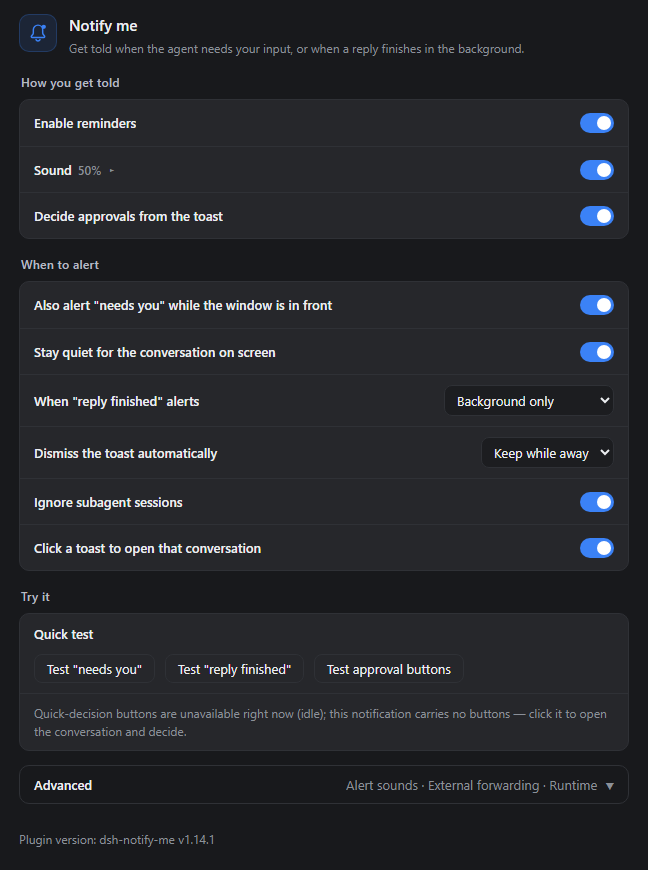
## UI Preview
|
|
36
34
|
|
|
@@ -43,7 +41,8 @@ A notification plugin for DSH Web / Desktop, so you can keep full access off wit
|
|
|
43
41
|
|
|
44
42
|
|
|
45
43
|
|
|
46
|
-
Just the plugin panel (the real component, on the same dark theme as the host) without the DSH navigation sidebar
|
|
44
|
+
Just the plugin's own panel (the real component, on the same dark theme as the host), without the DSH navigation sidebar; row explanations only appear once the pointer rests on the title text, which is why only the titles show here.
|
|
45
|
+
|
|
47
46
|
</details>
|
|
48
47
|
|
|
49
48
|
## Installation
|
|
@@ -69,31 +68,27 @@ The Electron application manages the `desktop` profile. Do not change the Web co
|
|
|
69
68
|
|
|
70
69
|
## First-use check
|
|
71
70
|
|
|
72
|
-
1. Click once in the DSH page and allow notifications when prompted. If you
|
|
73
|
-
2. Open **Settings → Notify me**. Confirm that the section and plugin version at its foot appear, and leave
|
|
74
|
-
3. Click **Test "reply finished"** on the settings page. A test notification should appear and sound according to your
|
|
71
|
+
1. Click once in the DSH page and allow notifications when prompted. If you declined before, allow them in the browser's site settings. The operating system also has to allow notifications from the browser / DSH Desktop.
|
|
72
|
+
2. Open **Settings → Notify me**. Confirm that the section and the plugin version at its foot appear, and leave "Enable reminders" and "Sound" on.
|
|
73
|
+
3. Click **Test "reply finished"** on the settings page. A test notification should appear and play a sound according to your current sound settings. This local test is not forwarded to any external endpoint, and the "also alert while the window is in front" switch does not apply to it.
|
|
75
74
|
|
|
76
|
-
Web users can also test approval buttons
|
|
75
|
+
Web users can also test the approval buttons, which then appear on the notification. Desktop cannot get a Service Worker, so this test sends a plain notification; real approval alerts work the same way — the toast fires, and clicking it takes you back to the conversation to decide.
|
|
77
76
|
|
|
78
77
|
**Optional console check** — in environments with DevTools, you can also run:
|
|
79
78
|
|
|
80
79
|
```js
|
|
81
80
|
window.__dshNotifyMe.test("done") // "reply finished" sample
|
|
82
|
-
window.__dshNotifyMe.test("attention") // "needs
|
|
83
|
-
window.__dshNotifyMe.test("approval") // Approve / Reject
|
|
84
|
-
window.__dshNotifyMe.debug() // the bridge field reports the
|
|
81
|
+
window.__dshNotifyMe.test("attention") // "needs you" sample
|
|
82
|
+
window.__dshNotifyMe.test("approval") // Approve / Reject when the bridge is available; a plain notification otherwise (which is what Desktop gets)
|
|
83
|
+
window.__dshNotifyMe.debug() // the bridge field reports the state: "active" = buttons work
|
|
85
84
|
```
|
|
86
85
|
|
|
87
|
-
If no test notification appears,
|
|
88
|
-
|
|
89
|
-
- the notification permission was declined — click anywhere on the page and choose **Allow** (address-bar lock → Site settings → Notifications → Allow → reload);
|
|
90
|
-
- the DSH process wasn't restarted after install;
|
|
91
|
-
- your OS/browser notification settings block the browser's toasts.
|
|
86
|
+
If no test notification appears, check in this order: whether the notification permission was declined (click once on the page and choose **Allow**; or address-bar lock → Site settings → Notifications → Allow → reload), whether DSH was restarted after installing, and whether the browser's notifications are switched off in the OS settings.
|
|
92
87
|
|
|
93
88
|
## Why you need it
|
|
94
89
|
|
|
95
90
|
- **Without full access (`workspace-write` + ask):** keep approval before actions, but a missed request leaves the agent waiting.
|
|
96
|
-
- **With full access:** fewer approval interruptions, at the cost of
|
|
91
|
+
- **With full access:** fewer approval interruptions, at the cost of losing the ability to intercept beforehand.
|
|
97
92
|
|
|
98
93
|
dsh-notify-me decouples **supervision** from **sitting in front of the screen**: it pulls you back with a system notification only when a decision is genuinely needed (approval / plan review / question) or a reply finishes — **so you can afford to keep full access off** instead of trading away interception for speed. It does not lower the risk of full access itself (it is not a sandbox); it reduces the time spent waiting on missed approvals in ask-mode.
|
|
99
94
|
|
|
@@ -104,7 +99,7 @@ dsh-notify-me decouples **supervision** from **sitting in front of the screen**:
|
|
|
104
99
|
| 🔔 Input needed | Alerts even in the foreground; the conversation on screen keeps only a title marker |
|
|
105
100
|
| ✅ Reply finished | Alerts while the page is hidden / backgrounded (or "quiet for the open one" / "always") |
|
|
106
101
|
|
|
107
|
-
**Input needed** covers approval requests, plan review, and questions (`ask_user_question`). The
|
|
102
|
+
**Input needed** covers approval requests, plan review, and questions (`ask_user_question`). The approve / reject quick decision only works on Web, where the toast carries the buttons; on Desktop, click the notification to decide in the conversation (see [Known limitations](#known-limitations)).
|
|
108
103
|
|
|
109
104
|
**Reply finished** also covers background sessions. A finished but unread session keeps the `✅ Reply finished ·` title marker until opened. Title markers are independent of the alert policy.
|
|
110
105
|
|
|
@@ -112,98 +107,99 @@ dsh-notify-me decouples **supervision** from **sitting in front of the screen**:
|
|
|
112
107
|
|
|
113
108
|
## Configure it from DSH Settings
|
|
114
109
|
|
|
115
|
-
Open **Settings → Notify me**. The page
|
|
110
|
+
Open **Settings → Notify me**. The page lays out three blocks — how you get told, when to alert, and try it — and the knobs you rarely change fold into **Advanced** at the bottom, one click to open. Rows show only a title; the explanation pops up in a small box when the pointer rests on the title text (only the title itself triggers it, not the empty rest of the row; for touch or keyboard a hidden copy is kept for screen readers). Rows marked with ▸ open a sub-item on click.
|
|
116
111
|
|
|
117
112
|
### How you get told
|
|
118
113
|
|
|
119
|
-
- **Enable reminders
|
|
120
|
-
- **Sound / Volume
|
|
121
|
-
- **Decide approvals from the toast** (on by default)
|
|
114
|
+
- **Enable reminders** — master switch: off means no toasts, no sound, and the tab title is left alone;
|
|
115
|
+
- **Sound / Volume** — the switch toggles directly; the volume slider is folded into that row and revealed by clicking the title (▸ becomes ▾). What it actually plays is decided by Advanced → Alert sound source;
|
|
116
|
+
- **Decide approvals from the toast** (on by default) — approvals carry Approve / Reject, one click settles the request without switching back. Web gets a system notification with buttons; Desktop `dsh-app://` cannot register a Service Worker, so the notification has no buttons and you click it to decide in the conversation. The line under "Try it" states truthfully whether the current environment can provide buttons.
|
|
122
117
|
|
|
123
118
|
### When to alert
|
|
124
119
|
|
|
125
|
-
- **Also alert "needs you" while the window is in front** (on):
|
|
126
|
-
- **Stay quiet for the conversation on screen** (on): a wait
|
|
127
|
-
- **When "reply finished" alerts** (default "background only"):
|
|
128
|
-
- **Dismiss the toast automatically** (default "keep while away"):
|
|
129
|
-
- **Ignore subagent sessions** (on):
|
|
130
|
-
- **Click a toast to open that conversation** (on):
|
|
120
|
+
- **Also alert "needs you" while the window is in front** (on by default): off means you only hear it once the window goes to the background;
|
|
121
|
+
- **Stay quiet for the conversation on screen** (on by default): a wait in the conversation you are looking at keeps only the tab marker, and is delivered once you leave;
|
|
122
|
+
- **When "reply finished" alerts** (default "background only"): background only / quiet for the open one / always — pick one;
|
|
123
|
+
- **Dismiss the toast automatically** (default "keep while away"): keep while away / always close / never close — pick one;
|
|
124
|
+
- **Ignore subagent sessions** (on by default): skips background subagent sessions, while the one you have open still alerts;
|
|
125
|
+
- **Click a toast to open that conversation** (on by default): switches to that conversation and brings the window forward — on Desktop through native raising — and with several tabs only one is raised.
|
|
131
126
|
|
|
132
|
-
|
|
127
|
+
<details>
|
|
128
|
+
<summary>Edge cases behind the switches</summary>
|
|
133
129
|
|
|
134
|
-
|
|
130
|
+
- **What counts as background**: switching to another app, being covered by another window, or minimizing all count; a window left in front with 3 minutes of no keyboard or mouse input counts too, and `idleMinutes: 0` falls back to looking only at the window.
|
|
131
|
+
- **When "stay quiet for the conversation on screen" is replayed**: as usual once the window goes to the background or the idle timer fires; if you already handled it, it is dropped.
|
|
132
|
+
- **The three "reply finished" choices**: "background only" = alert when you are not watching the page; "quiet for the open one" = the one on screen stays silent while other conversations still alert, useful with several open; "always" = never suppress. An old profile's "also alert 'reply finished' while in front" switch migrates to this setting automatically.
|
|
133
|
+
- **"Keep while away"**: a toast only closes a few seconds later while you are actually at the page; one that arrived while you were away stays in the notification centre until you come back. Approval toasts with Approve / Reject still follow their 12 s rule and are likewise not withdrawn while you are away.
|
|
134
|
+
- **Fallback for a toast click**: on Desktop a window that will not raise leaves only the conversation switch, with the reason in `debug().raiseLast`; turn this switch off and a click does nothing.
|
|
135
135
|
|
|
136
|
-
|
|
136
|
+
</details>
|
|
137
137
|
|
|
138
|
-
###
|
|
138
|
+
### Try it
|
|
139
139
|
|
|
140
|
-
|
|
140
|
+
Three buttons send one "needs you", one "reply finished" and one "approval buttons" test alert with the current settings, right away, and deliberately **not** limited by the switches under "when to alert"; the line underneath states which channel can carry approval buttons right now.
|
|
141
141
|
|
|
142
|
-
|
|
142
|
+
The plugin version is always shown at the bottom of the settings page (`dsh-notify-me v…`) — copy that line when reporting a bug or checking whether an update landed.
|
|
143
143
|
|
|
144
|
-
|
|
144
|
+
### Advanced
|
|
145
145
|
|
|
146
|
-
|
|
147
|
-
<summary>Custom audio, previews, and fallback behavior</summary>
|
|
146
|
+
Collapsed by default, one click to open. It holds the three things you rarely touch — alert sound sources, external push, and runtime & diagnostics — covered in the three subsections below.
|
|
148
147
|
|
|
149
|
-
|
|
148
|
+
#### Alert sound
|
|
150
149
|
|
|
151
|
-
|
|
150
|
+
For each alert kind — "needs you" and "reply finished" — you can pick a built-in cue (the default), a custom audio file, or the system notification sound, independently. A custom file is capped at 1 MiB, lives in the browser, and can be previewed and removed; the system notification sound plays no plugin cue at all — the toast still fires and the sound is handed to the operating system, so its timbre follows your system notification settings, and in that mode Preview sends a test alert instead. Any source that has no file, cannot be read, or does not fit falls back to the built-in cue, so an alert never goes silent.
|
|
152
151
|
|
|
153
|
-
|
|
152
|
+
#### External push
|
|
154
153
|
|
|
155
|
-
Off by default. Supports Discord Webhook / Bark / Gotify / Feishu group bots / ServerChan (Turbo and ServerChan³) / WxPusher / custom webhooks. Alert text is sent to the addresses you enter; use trusted endpoints.
|
|
154
|
+
Off by default. Supports Discord Webhook / Bark / Gotify / Feishu group bots / ServerChan (Turbo and ServerChan³) / WxPusher / custom webhooks. Alert text is sent to the addresses you enter; use trusted endpoints only.
|
|
156
155
|
|
|
157
156
|
<details>
|
|
158
157
|
<summary>Target URLs, forwarding switches, test messages, and the failure log</summary>
|
|
159
158
|
|
|
160
|
-
- **External notifications** (default off)
|
|
161
|
-
- **
|
|
162
|
-
- **
|
|
163
|
-
- **
|
|
164
|
-
- **
|
|
165
|
-
- **
|
|
159
|
+
- **External notifications** (default off): forward each alert to your own push endpoints as well, so it reaches you away from the machine; any number of targets, each of which can be enabled or disabled on its own. "Forward 'needs you'" and "Forward 'reply finished'" switch independently; **Send test notification** sends one test message to every target (not limited by those two switches, and never pretending to be a real alert). Forwarding follows exactly the same trigger rules as local alerts ("stay quiet for the conversation on screen" and friends apply to it too); the alert text is sent as-is to the addresses you fill in, so **only use endpoints you trust**;
|
|
160
|
+
- **What each target takes**: Discord — the webhook URL; Bark — `https://api.day.app/<device key>`; Gotify — `https://<server>/message?token=<app token>`; Feishu — the group-bot webhook plus an optional verification secret; ServerChan — the full `…/send/<SendKey>.send` URL; WxPusher — the appToken and the receiver UID; a custom endpoint receives one POST of JSON: `{source, event, title, body, text, sessionId, time}`;
|
|
161
|
+
- **Reliable delivery**: failures that look transient (network error, 5xx, 429) are retried after 2 s and 6 s; anything else stops at once. A delivery that still fails is recorded in the failure log (10 entries at most — title and body snippet plus host only, never the full endpoint), which the settings page shows and can clear;
|
|
162
|
+
- **Per-target state**: the right end of each target row shows how its last delivery went (last delivery ok / sent-unverified / failed with the reason) next to a switch of its own, so an endpoint that is temporarily down can be turned off alone instead of muting a whole alert kind;
|
|
163
|
+
- **Signing**: a custom target with a secret sends `X-DSH-Notify-Signature` (HMAC-SHA256 over the body, `sha256=<hex>`); a Feishu target with a secret carries `timestamp` / `sign` in the body per Feishu's own algorithm;
|
|
164
|
+
- **Message template** (optional): Feishu / ServerChan / WxPusher / custom targets accept a template with `{{title}}` `{{body}}` `{{event}}` `{{time}}` `{{session}}`; empty means "title, newline, body";
|
|
165
|
+
- **DingTalk is not supported**: its robot endpoint answers no CORS header at all and only accepts `application/json`, so a page can neither read the reply nor send a conforming request (under no-cors the content type is restricted to the safelisted ones). To reach DingTalk, relay it through a machine you control and point a custom webhook at that.
|
|
166
166
|
|
|
167
167
|
</details>
|
|
168
168
|
|
|
169
|
-
|
|
169
|
+
#### Runtime & diagnostics
|
|
170
170
|
|
|
171
|
-
The last block inside Advanced. The page protocol is detected automatically to tell Web from Desktop (`dsh-app://`); override it by hand if detection is wrong — Desktop
|
|
171
|
+
The last block inside Advanced. The page protocol is detected automatically to tell Web from Desktop (DSH Desktop, `dsh-app://`); override it by hand if detection is wrong — on Desktop a toast click goes through the host route for native raising (see [How the Desktop window gets raised](#how-the-desktop-window-gets-raised)) and carries no quick-decision buttons, while Web uses `window.focus()` plus the Service Worker bridge. When the manual override disagrees with detection the page says so.
|
|
172
172
|
|
|
173
173
|
<details>
|
|
174
|
-
<summary>Alert language, Desktop window raising, reset</summary>
|
|
174
|
+
<summary>Alert language, Desktop window raising, and reset</summary>
|
|
175
175
|
|
|
176
|
-
- **Alert language**: follow the UI / Simplified Chinese / English — governs alert copy and the `🔔 …` title marker;
|
|
177
|
-
- **
|
|
178
|
-
- **Reset settings**: restores every switch and
|
|
176
|
+
- **Alert language**: follow the UI / Simplified Chinese / English — governs the alert copy and the `🔔 …` title marker;
|
|
177
|
+
- **Desktop window raising**: since 1.14.0 the host route does the native activation, and raising back a minimized or covered window is measured to work (see [How the Desktop window gets raised](#how-the-desktop-window-gets-raised));
|
|
178
|
+
- **Reset settings**: restores every switch and sound setting to the factory defaults (external push targets and chosen custom audio files are kept).
|
|
179
179
|
|
|
180
180
|
</details>
|
|
181
181
|
|
|
182
|
-
|
|
183
|
-
|
|
184
|
-
> Notification permission is required: click once on the page → **Allow** (or address-bar lock → Site settings → Notifications → Allow → reload). On macOS, also allow the browser under System Settings → Notifications.
|
|
185
|
-
|
|
186
|
-
## How it alerts
|
|
182
|
+
## Alert channels
|
|
187
183
|
|
|
188
|
-
|
|
189
|
-
|
|
190
|
-
|
|
191
|
-
|
|
184
|
+
| Channel | What it does |
|
|
185
|
+
| --- | --- |
|
|
186
|
+
| System notification | Through the browser into the Windows action center / macOS Notification Center; clicking it returns to the conversation it came from. Web can carry Approve / Reject |
|
|
187
|
+
| Sound | WebAudio cue by default, with different patterns for "needs you" and "done"; swap in a custom audio file, or hand the sound over to the system notification sound |
|
|
188
|
+
| Tab title | `🔔 Action needed · …` / `✅ Reply finished · …`, following the alert language; gone once you open that session, and both markers can be up at the same time |
|
|
189
|
+
| External push (optional, default off) | Forwards the same alert to Discord / Bark / Gotify / Feishu / ServerChan / WxPusher / a custom webhook |
|
|
192
190
|
|
|
193
|
-
This is a **browser-layer** plugin: the DSH page
|
|
191
|
+
This is a **browser-layer** plugin: the DSH page has to stay open (minimized or backgrounded is fine — that is exactly the "away" state it watches for).
|
|
194
192
|
|
|
195
193
|
## Compatibility
|
|
196
194
|
|
|
197
|
-
Per-release adaptation records live in [package.json](package.json)
|
|
198
|
-
|
|
199
|
-
Verified to actually activate on `0.1.2-rc.1`, `0.1.5-rc.1`, `0.1.5-rc.2` and `0.2.0-rc.2` (each booted in its own profile: the plugin entry lands in the boot page's `__DSH_BOOT__` with its inject dependencies resolved, `/plugins/??dsh-notify-me/client.js&rev=…` serves a build containing the new code, and the Settings → Notifications section registers, i.e. the plugin's `apply` really runs), and previously on `0.1.1-rc.2`.
|
|
195
|
+
Per-release adaptation records live in [package.json](package.json) under `dsh.compatibility.dshReleases`; the current host (`0.2.1-rc.2`) gates installation on `peerDependencies` and `engines` only and no longer reads that field, so it is a human-readable record, not a gate.
|
|
200
196
|
|
|
201
|
-
`0.
|
|
197
|
+
Every release was tested to **actually activate**: `0.1.1-rc.2`, `0.1.2-rc.1`, `0.1.5-rc.1`, `0.1.5-rc.2`, `0.2.0-rc.2` and `0.2.1-rc.2` (the criteria: the plugin entry lands in the boot page's `__DSH_BOOT__`, its inject dependencies resolve, `/plugins/??dsh-notify-me/client.js&rev=…` serves a build containing the new code, and the "Notify me" section appears in Settings). Plugin entries stay compatible from `0.1.1-rc.2` through `0.2.1-rc.2`, and stepping back to an older host needs no config change; the `1.9.0` settings redesign added no new host API, and the bell in the settings page header is the plugin's own SVG (`docs/brand/`).
|
|
202
198
|
|
|
203
199
|
<details>
|
|
204
|
-
<summary>Host
|
|
200
|
+
<summary>Host-generation shape differences and two known traps</summary>
|
|
205
201
|
|
|
206
|
-
The plugin picks its interaction source per host generation; the table below marks
|
|
202
|
+
The plugin picks its interaction source per host generation; the table below marks the boundaries of each shape, not a gate:
|
|
207
203
|
|
|
208
204
|
| Host generation | "Needs you" interaction source | Current session | Toast-click navigation |
|
|
209
205
|
| --- | --- | --- | --- |
|
|
@@ -211,17 +207,17 @@ The plugin picks its interaction source per host generation; the table below mar
|
|
|
211
207
|
| `0.1.2-alpha.2 .. 0.1.6-alpha.1` | `uiSession.pendingInteractions` | snapshot `current` | `sessions.open()` |
|
|
212
208
|
| `>= 0.1.6-alpha.2` (incl. `0.2.0-rc.2`, `0.2.1-rc.2`) | `uiSession.sessionStatus` | `retainedBy.mainView` | `uiWorkspace.openSession()` |
|
|
213
209
|
|
|
214
|
-
The ranges are illustrative: the plugin picks its source by store shape (whenever `sessionStatus` exists it takes the new path)
|
|
210
|
+
The ranges are illustrative: the plugin picks its source by store shape (whenever `sessionStatus` exists it takes the new path), and the version numbers only mark where each shape appeared. The `peerDependencies` range shapes npm's peer warning — `0.2.1-rc.2` already falls inside `>=0.2.0-rc.1 <0.3.0-0`, so no exemption is needed.
|
|
215
211
|
|
|
216
|
-
|
|
212
|
+
`0.2.1-rc.2` got a separate isolated run: an isolated `DSH_HOME` booting `dsh web` (70 boot entries) placed the plugin entry 59th, in the `application` batch, with all three inject targets present and ordered before it; `client.js` served the then-installed 1.7.0 source build (140,153 B); loaded in a headless Chromium page, `apply` ran normally and `debug()` reported `uiSession: bound`, `uiSessionSource: sessionStatus`, `bridge: active`. Host-side shapes match `0.2.0-rc.2`; no code change was needed.
|
|
217
213
|
|
|
218
|
-
|
|
214
|
+
Two traps are worth remembering: a package listed in `dsh.client.inject` that a newer runtime no longer ships parks the client entry at `pending (waiting for services: …)` forever — which is exactly how 1.1.3 broke on `0.1.2-rc.1` and later; and when the host swaps a store or a field name nothing throws, alerts just go **silent** — `pendingInteractions`→`sessionStatus`, `list.current`→`retainedBy.mainView` and `sessions.open()`→`uiWorkspace.openSession()` were all this kind. So every adaptation has to confirm with `window.__dshNotifyMe.debug()` that it really reports `bound`.
|
|
219
215
|
|
|
220
|
-
|
|
216
|
+
</details>
|
|
221
217
|
|
|
222
|
-
## Advanced
|
|
218
|
+
## Advanced console configuration
|
|
223
219
|
|
|
224
|
-
The Settings page is the
|
|
220
|
+
The Settings page is the first entry point; to script or bulk-edit preferences, or to reset them, the config lives in `localStorage` (`dshNotifyMe.config`) and can be adjusted live from the console:
|
|
225
221
|
|
|
226
222
|
<details>
|
|
227
223
|
<summary>Console API and storage reference</summary>
|
|
@@ -230,24 +226,24 @@ The Settings page is the primary entry; preferences live in `localStorage` (key
|
|
|
230
226
|
window.__dshNotifyMe.config // view current config
|
|
231
227
|
window.__dshNotifyMe.setConfig({
|
|
232
228
|
enabled: true, // false = disable all reminders (master switch)
|
|
233
|
-
language: "auto", // 'auto' follow the UI | 'zh' | 'en'
|
|
229
|
+
language: "auto", // 'auto' follow the UI | 'zh' Simplified Chinese | 'en' English
|
|
234
230
|
attentionHiddenOnly: false, // true = don't alert "needs you" while the page is visible
|
|
235
|
-
currentHiddenOnly: true, // true = waits in the conversation on screen keep only the
|
|
231
|
+
currentHiddenOnly: true, // true = waits in the conversation on screen keep only the title marker (replayed once away)
|
|
236
232
|
donePolicy: "background", // "reply finished" policy: 'background' only when away | 'smart' quiet only for the open one | 'always' always alert
|
|
237
|
-
idleMinutes: 3, // minutes without
|
|
238
|
-
autoDismiss: "present", // toast
|
|
239
|
-
ignoreSubagent: true, // true =
|
|
233
|
+
idleMinutes: 3, // minutes without keyboard/mouse input before "away" counts (0 = turn the idle rule off)
|
|
234
|
+
autoDismiss: "present", // toast auto-dismiss: 'present' keep while away | 'always' always close | 'never' never close
|
|
235
|
+
ignoreSubagent: true, // true = no alerts for background subagent sessions (the open one still alerts)
|
|
236
|
+
sound: true, // sound switch (also governs the "system notification sound" mode)
|
|
237
|
+
soundDone: "synth", // "reply finished" sound source: 'synth' built-in | 'custom' picked file | 'system' OS notification sound
|
|
238
|
+
soundAttention: "synth", // "needs you" sound source, same values
|
|
239
|
+
volume: 0.5, // volume 0..1
|
|
240
|
+
autoFocus: true, // a toast click returns to the conversation that raised it
|
|
240
241
|
quickActions: true, // Approve / Reject buttons on approval toasts
|
|
241
|
-
|
|
242
|
-
soundDone: "synth", // "reply finished" cue source: 'synth' built-in | 'custom' picked file | 'system' OS sound
|
|
243
|
-
soundAttention: "synth", // "needs you" cue source, same values
|
|
244
|
-
volume: 0.5, // 0..1
|
|
245
|
-
autoFocus: true, // clicking a toast opens the conversation it came from
|
|
246
|
-
externalEnabled: false, // external-notification forwarding master switch (default off: no endpoint, nothing is sent)
|
|
242
|
+
externalEnabled: false, // external forwarding master switch (default off: no endpoint, nothing is sent)
|
|
247
243
|
externalAttention: true, // forward "needs you" (exactly the same trigger rules as local alerts)
|
|
248
244
|
externalDone: true, // forward "reply finished"
|
|
249
245
|
externalRetryDelays: [2000, 6000], // backoff for retryable failures (ms, with jitter; [] = send once)
|
|
250
|
-
externalTargets: [] // push targets, see the
|
|
246
|
+
externalTargets: [] // push targets, see the field notes below
|
|
251
247
|
})
|
|
252
248
|
// Target shape: {id, type, url, secret?, token?, uid?, template?, enabled?}
|
|
253
249
|
// type: 'discord' | 'bark' | 'gotify' | 'feishu' | 'serverchan' | 'wxpusher' | 'custom'
|
|
@@ -259,67 +255,94 @@ window.__dshNotifyMe.decide("approval:3", "allowed-once") // programmatic decis
|
|
|
259
255
|
window.__dshNotifyMe.testExternal() // explicit outbound test to valid targets; resolves {sent, unverified, failed, statuses}
|
|
260
256
|
```
|
|
261
257
|
|
|
262
|
-
> **External-test switch
|
|
258
|
+
> **External-test switch boundary:** the settings page's "Send test notification" needs the "Enable reminders" and "External notifications" master switches on, but ignores the two per-kind forwarding switches. The console `testExternal()` call is an explicit test: with valid configured targets it sends to them even when those master switches are off; with no valid targets it sends nothing. Ordinary `test("done")` / `test("attention")` / `test("approval")` calls only test local alerts and never forward externally.
|
|
263
259
|
|
|
264
|
-
> Picked audio files do not live in `dshNotifyMe.config`: each kind gets its own key (`dshNotifyMe.sound.done` / `dshNotifyMe.sound.attention`, holding `{name, size, data}`
|
|
260
|
+
> Picked audio files do not live in `dshNotifyMe.config`: each kind gets its own key (`dshNotifyMe.sound.done` / `dshNotifyMe.sound.attention`, holding a `{name, size, data}` data URL), because one file inflates by ~1.37× once turned into a data URL and would slow down every config read. `resetConfig()` clears both keys along with the config.
|
|
265
261
|
>
|
|
266
|
-
> To
|
|
262
|
+
> To confirm which source is actually in effect, check `soundDone` / `soundAttention` and `customSoundDone` / `customSoundAttention` in `window.__dshNotifyMe.debug()`.
|
|
267
263
|
|
|
268
264
|
</details>
|
|
269
265
|
|
|
270
266
|
## How it works
|
|
271
267
|
|
|
272
|
-
The reminder core watches session state and pending interactions
|
|
268
|
+
The reminder core watches session state and pending interactions; approval decisions happen in the page, and Desktop window raising goes through a host route plus native Win32 activation.
|
|
273
269
|
|
|
274
270
|
<details>
|
|
275
|
-
<summary>Event sources
|
|
271
|
+
<summary>Event sources and graceful degradation</summary>
|
|
276
272
|
|
|
277
273
|
The reminder core picks its interaction source per host generation (see the table above); the current session always comes from the client `sessions` service:
|
|
278
274
|
|
|
279
|
-
-
|
|
280
|
-
- **pending interactions**: a new key in `uiSession
|
|
281
|
-
- **
|
|
282
|
-
- **
|
|
275
|
+
- **The current session's** `SessionSnapshot`: a `running: true → false` edge means a reply finished;
|
|
276
|
+
- **pending interactions**: a new key in `uiSession`'s `sessionStatus` (`>= 0.1.6`, per-session `pendingInteraction`) or in `pendingInteractions` (`0.1.2 .. 0.1.5`) means the agent is waiting on you — the container carries the approval tool name / reason or the question text; older hosts fall back to the controller snapshot's `pending[]`;
|
|
277
|
+
- **Every other listed session's** summary: a `running: true → false` edge (or the legacy `completed` edge) alerts you about background work. The host's completion-unread level flag covers gaps and owns the title marker: `completionUnread` on `sessionStatus` rows on `>= 0.1.6` (lit when a background session finishes, cleared when it is opened / starts running again / disappears), the list row's `completed` reminder bit on older hosts (cleared on select). It re-reports a completion edge the page never saw (a plugin hot reload mid-turn, a snapshot merge that jumps) exactly once, and when the edge and the level flag arrive together a short window collapses them into a single alert;
|
|
278
|
+
- **Subagent sessions**: **background** rows carrying `origin: 'subagent'` (and a `parentId`) are muted by default; the subagent session you have open is not muted — its alerts follow the normal current-conversation rules (tab marker only while the page is visible by default, delivered once backgrounded), outstanding waits are caught up when you switch in, and it goes back to muted when you switch away. A fork has a `parentId` but no `origin`, is your own conversation, and keeps alerting as usual.
|
|
283
279
|
|
|
284
|
-
The reminder core
|
|
280
|
+
The reminder core still has zero third-party runtime dependencies and is fully self-contained: notification copy resolves at alert time from the chosen language (follow the interface / Simplified Chinese / English). The Settings page is an **optional** React surface — it only registers into Settings → Notify me when the DSH web profile provides `slots` / `locale` / `react`; missing any of them, the plugin degrades gracefully to alerts-only (no Settings page), with no functional loss.
|
|
281
|
+
|
|
282
|
+
</details>
|
|
285
283
|
|
|
286
284
|
### Quick decisions, and how they reach the agent
|
|
287
285
|
|
|
288
|
-
|
|
286
|
+
Notifications with Approve / Reject buttons can only be raised by a Service Worker (passing `actions` to `new Notification()` throws a `TypeError` outright), so the same bundle file is registered a second time as a worker whose only job is relaying which button was clicked back to the page. **The decision still happens in the page**, through the same `PendingApproval.answer('allowed-once' | 'rejected')` the approval panel uses for Allow once / Reject — so "Approve" is exactly "Allow once" and releases nothing extra.
|
|
289
287
|
|
|
290
|
-
|
|
288
|
+
<details>
|
|
289
|
+
<summary>Button-toast bookkeeping and window raising</summary>
|
|
290
|
+
|
|
291
|
+
Each button toast is booked against its interaction key, and one toast claims only one wait; once the request has been answered in the page, or replaced by a newer request, clicking the leftover buttons decides nothing and just closes it quietly. Button toasts stay 12 s (plain ones 5 s) and are withdrawn on their own; if you miss the click, the approval in the conversation is still waiting for you.
|
|
292
|
+
|
|
293
|
+
The "raise a window and switch its conversation" part of a body click is scheduled on the worker half as well: `client.focus()` raises exactly one window (a visible one first) and routes the conversation switch to that window alone, so several DSH tabs never fight over focus or all switch at once.
|
|
294
|
+
|
|
295
|
+
</details>
|
|
291
296
|
|
|
292
297
|
### How the Desktop window gets raised
|
|
293
298
|
|
|
294
|
-
DSH Desktop is a thin Electron shell and its page lives under `dsh-app://app`: DOM `window.focus()` only
|
|
299
|
+
DSH Desktop is a thin Electron shell and its page lives under `dsh-app://app`: DOM `window.focus()` only moves the browsing-context window and never touches the native one, and the shell's `will-navigate` closes the usual page-side exit of firing a `dsh:` URL. The route now is the plugin's own host route — the page POSTs `/__dsh-notify-me/focus-window`, the host spawns `powershell.exe` to run `lib/focus-window.ps1`, which enumerates native windows and activates one adaptively (the `dsh://open` deep link used from 1.5.2 through 1.13.0 retested 3/3 ineffective on `0.2.1-rc.2`, and 1.14.0 deletes it entirely).
|
|
300
|
+
|
|
301
|
+
<details>
|
|
302
|
+
<summary>The route, the raise order, the measurements, and the security gate</summary>
|
|
303
|
+
|
|
304
|
+
The shell forwards every path under `dsh-app://app` other than static assets straight to the host HTTP server (with an origin check and the host cookie injected), so that POST is a same-origin request with no CORS involved; the host half (`lib/index.js`) already runs as a child of the Electron main process, so `process.ppid` is the browser process that owns the main window. On a toast click: the page POSTs → the host spawns one `powershell.exe` running `lib/focus-window.ps1 -ProcessId <ppid>` → the script enumerates that pid's visible, owner-less, non-toolwindow top-level windows (preferring class `Chrome_WidgetWin_1`, then the largest area from `GetWindowRect`) → activates adaptively → compares `GetForegroundWindow()` and prints `FOCUSED=1|0` → the host answers `200` / `202`.
|
|
295
305
|
|
|
296
|
-
|
|
306
|
+
The raise order is adaptive: already in front means do nothing (the common case, zero flicker); minimized means `SW_RESTORE` first; then a synthetic Alt tap (`keybd_event` down/up) grants the calling thread foreground permission before `SetForegroundWindow`; only if all of that fails does it fall back to `SW_MINIMIZE` + `SW_RESTORE`. `SetForegroundWindow` on its own gets refused by the foreground lock — per call, unrelated to `ForegroundLockTimeout`. That also re-reads why the 1.5.2 deep-link approach was "sometimes it works": the times the window did come forward were most likely the OS activating the app on the click itself.
|
|
297
307
|
|
|
298
|
-
|
|
308
|
+
Measured with `powershell.exe` 5.1 in one round: window in front ×3, minimized with Notepad in front ×3, visible but covered ×3 — all `FOCUSED=1` with the foreground comparison matching and every `IsIconic` flipped back from `true` to `false`; Notepad maximized covering it completely, minimized plus fully covered, and `-ProcessId 0` auto-detection all succeeded too. Script-internal time peaked at 434 ms, process start to exit at 782 ms, well inside the 8 s cap; `pwsh` 7.6 behaved the same in a control round, only ~100 ms slower compiling the `Add-Type` helpers (the script deliberately avoids PowerShell 7 syntax). A pid that does not exist and a pid with no visible window both settle on `FOCUSED=0` with `exit 0`.
|
|
299
309
|
|
|
300
|
-
|
|
310
|
+
Security-wise the plugin opens exactly one exact route. Requests outside the vocabulary are refused: anything other than GET / HEAD / POST answers `405` (including a preflight `OPTIONS`, and it never returns a CORS header), a non-Desktop host (Web, macOS / Linux, plain Node) `501`, and a missing `x-dsh-notify-me-focus: focus` header `403`.
|
|
301
311
|
|
|
302
|
-
|
|
312
|
+
That header is only a "this came from the page" marker, not the defence — a DNS-rebinding page is same-origin with the address it resolved, so it can send any custom header and triggers no preflight. The real gate is three checks: the peer address must be loopback; `Host` must be a loopback name (`127.0.0.1` / `localhost` / `[::1]`, port optional), because the shell deletes `host` when forwarding and fetch refills it from the loopback URL, while a rebound page still has the attacker's domain in `Host`; and an `Origin`, when present, must be same-origin with that `Host`. Any failure answers `403`, with `reason` set to `bad-remote` / `bad-host` / `cross-origin`. A `GET` returns only `{ok, route, enabled, desktop, platform}`, so after installing you can open it in a browser to confirm the route is there. Calls within 400 ms coalesce into one, and a script that has not answered after 8 s is killed and counted as a failure.
|
|
303
313
|
|
|
304
|
-
|
|
314
|
+
The cases where it will not raise are the same ones listed under [Known limitations](#known-limitations) (elevated window, another virtual desktop, a foreground repeatedly stolen, a window hidden to the tray with `SW_HIDE`); they all answer `202` truthfully and the conversation switch still happens.
|
|
315
|
+
|
|
316
|
+
</details>
|
|
305
317
|
|
|
306
318
|
## Known limitations
|
|
307
319
|
|
|
308
|
-
|
|
309
|
-
|
|
310
|
-
- The
|
|
311
|
-
-
|
|
312
|
-
-
|
|
313
|
-
-
|
|
314
|
-
|
|
315
|
-
|
|
316
|
-
|
|
317
|
-
-
|
|
318
|
-
-
|
|
319
|
-
-
|
|
320
|
-
|
|
321
|
-
|
|
322
|
-
|
|
320
|
+
**Runtime prerequisites**
|
|
321
|
+
|
|
322
|
+
- The page must be open for alerts to fire (background tab / minimized is fine; closing the tab stops it — inherent to a browser-layer plugin).
|
|
323
|
+
- Notifications come through the browser, so notification permission must be granted; the first sound / toast after each page load needs one click on the page first; without permission only the sound and the title marker are left.
|
|
324
|
+
- System notification banners are drawn on the primary display only: Windows has no setting and Chromium no API to aim one at another monitor (on a multi-monitor setup the second screen never gets them). The only way across screens is external push to your phone (since 1.12.0 the page no longer draws an approval card).
|
|
325
|
+
- Config lives in browser `localStorage`: switching browsers / devices or clearing site data returns to the defaults (the Settings page restores them in one click).
|
|
326
|
+
|
|
327
|
+
**Platform differences**
|
|
328
|
+
|
|
329
|
+
- Quick-decision buttons need a Service Worker: `http://127.0.0.1` and `https` work, `http://192.168.x.x`-style LAN addresses do not; **the Desktop (`dsh-app://`) is tested and cannot register a Service Worker** (the host does not grant the `allowServiceWorkers` privilege), so approval toasts fall back to their buttonless form. When the host renders no notification buttons, the `bridge` field of `debug()` explains why, and nothing else is affected.
|
|
330
|
+
- On Desktop (Windows) a toast click can still fail to raise the window: when the target window is owned by a higher integrity level (elevated / UAC), sits on another virtual desktop, has its foreground repeatedly stolen by another process, or is hidden to the tray with `SW_HIDE`, the host script answers `FOCUSED=0` and the route answers `202`, with the conversation switch intact (see [How the Desktop window gets raised](#how-the-desktop-window-gets-raised)).
|
|
331
|
+
- macOS: alerts, sound, the title marker and toast-click navigation carry no platform assumptions and work as usual; but DSH Desktop (Electron) system notifications require the app to be signed — an unsigned build simply emits no notification — and whether the official macOS build meets that precondition is untested; notification button rendering on the macOS desktop host is likewise untested (the Windows desktop host is tested and renders none).
|
|
332
|
+
|
|
333
|
+
**Alert content and timing**
|
|
334
|
+
|
|
335
|
+
- On `>= 0.1.6` (including `0.2.0-rc.2`, `0.2.1-rc.2`) the "reply finished" alert body carries only the session name and no reply snippet any more — host snapshots no longer provide `nodes`; the alert itself still fires as usual.
|
|
336
|
+
- The title marker is written into `document.title` alongside the host: when the host recomputes the title the marker can be overwritten until the next alert event writes it again.
|
|
337
|
+
- "Stay quiet for the conversation on screen" is judged by whether the window is in front: covered by another app, switched to another app, or minimized all count as background; back in front or with fresh keyboard / mouse input it goes quiet again.
|
|
338
|
+
|
|
339
|
+
**External push**
|
|
340
|
+
|
|
341
|
+
- Bounded by browser CORS: an endpoint that does not allow cross-origin degrades to "sent but unverifiable" (no-cors) and is labelled as such; Discord, Feishu, ServerChan and WxPusher do allow cross-origin, so delivery to them is confirmed. DingTalk allows no CORS header at all and only accepts `application/json`, so a page cannot send to it — hence no DingTalk target type (relay it through your own box and use a custom target). A transient failure (network error, 5xx, 429) is retried on the backoff, and a delivery that still fails lands in the failure log; anything else stops at once, no retry. Forwarding is triggered only after the local alert has decided to fire, so an alert muted by the rules is never sent out either.
|
|
342
|
+
|
|
343
|
+
**Settings icon patch**
|
|
344
|
+
|
|
345
|
+
- The sidebar row icon relies on a DOM patch: the shell hard-codes an icon per section id and `settings.section` has no icon field, so the plugin can only swap that row's `<svg>` for a bell after the panel renders. It hinges on the host's current panel structure (`data-shortcut-modal="settings"` plus a label `<span>` inside the nav button); if DSH changes that structure it silently falls back to the default gear and nothing else is affected. The logo and naming decisions are in [docs/brand/README.md](docs/brand/README.md).
|
|
323
346
|
|
|
324
347
|
## Development
|
|
325
348
|
|
|
@@ -336,18 +359,17 @@ npm pack --dry-run # preview the published tarball
|
|
|
336
359
|
|
|
337
360
|
## Credits & how contributions land
|
|
338
361
|
|
|
339
|
-
|
|
340
|
-
|
|
341
|
-
|
|
342
|
-
|
|
343
|
-
|
|
344
|
-
|
|
345
|
-
|
|
346
|
-
|
|
347
|
-
|
|
348
|
-
|
|
362
|
+
| Contributor | Contribution |
|
|
363
|
+
|:---:|:---|
|
|
364
|
+
| <a href="https://github.com/AgMahone"><img src="https://raw.githubusercontent.com/chromoany/dsh-notify-me/main/docs/contributors/AgMahone.png" width="40" height="40" alt="@AgMahone"></a> | [#7](https://github.com/chromoany/dsh-notify-me/pull/7): the 0.1.6+ / 0.2.0 host-generation compatibility reports and retesting |
|
|
365
|
+
| <a href="https://github.com/d0ublecl1ck"><img src="https://raw.githubusercontent.com/chromoany/dsh-notify-me/main/docs/contributors/d0ublecl1ck.png" width="40" height="40" alt="@d0ublecl1ck"></a> | [#8](https://github.com/chromoany/dsh-notify-me/pull/8): muting subagent sessions (`ignoreSubagent`), with tests and docs |
|
|
366
|
+
| <a href="https://github.com/EliteOtaku"><img src="https://raw.githubusercontent.com/chromoany/dsh-notify-me/main/docs/contributors/EliteOtaku.png" width="40" height="40" alt="@EliteOtaku"></a> | [#9](https://github.com/chromoany/dsh-notify-me/issues/9): the layer-by-layer investigation of the desktop raise path, retested in a real shell |
|
|
367
|
+
| <a href="https://github.com/Wh1stle05"><img src="https://raw.githubusercontent.com/chromoany/dsh-notify-me/main/docs/contributors/Wh1stle05.png" width="40" height="40" alt="@Wh1stle05"></a> | [#10](https://github.com/chromoany/dsh-notify-me/pull/10): per-kind sound sources (built-in cue / custom audio file / system notification sound) |
|
|
368
|
+
| <a href="https://github.com/yanzhaohui1999"><img src="https://raw.githubusercontent.com/chromoany/dsh-notify-me/main/docs/contributors/yanzhaohui1999.png" width="40" height="40" alt="@yanzhaohui1999"></a> | [#13](https://github.com/chromoany/dsh-notify-me/issues/13) / [#14](https://github.com/chromoany/dsh-notify-me/pull/14): the idle-page CPU report and fix for busy session lists |
|
|
369
|
+
| <a href="https://github.com/RiZhiZhaoYi"><img src="https://raw.githubusercontent.com/chromoany/dsh-notify-me/main/docs/contributors/RiZhiZhaoYi.png" width="40" height="40" alt="@RiZhiZhaoYi"></a> | [#12](https://github.com/chromoany/dsh-notify-me/issues/12): external notification forwarding (Discord / Bark / Gotify / custom webhook) |
|
|
370
|
+
| <a href="https://github.com/yuexian7"><img src="https://raw.githubusercontent.com/chromoany/dsh-notify-me/main/docs/contributors/yuexian7.png" width="40" height="40" alt="@yuexian7"></a> | [#17](https://github.com/chromoany/dsh-notify-me/issues/17): the ask for Android delivery, which led to the Feishu / ServerChan / WxPusher targets |
|
|
371
|
+
| <a href="https://github.com/shrekcg"><img src="https://raw.githubusercontent.com/chromoany/dsh-notify-me/main/docs/contributors/shrekcg.png" width="40" height="40" alt="@shrekcg"></a> | [#16](https://github.com/chromoany/dsh-notify-me/pull/16): away detection (`idleMinutes`), reply-done routing (`donePolicy`), auto-dismiss (`autoDismiss`) |
|
|
349
372
|
|
|
350
|
-
- [@xinming-chenniang](https://github.com/xinming-chenniang) — [deepseek-harness discussions #10446](https://github.com/deepseek-ai/deepseek-harness/discussions/10446#discussioncomment-19143913): the five-method Win32 raise comparison (`SetForegroundWindow` alone refused by the foreground lock, accepted after a synthetic Alt tap, minimize→restore working in both scenarios), plus a working proof of the "host-registered same-origin route + PowerShell fallback chain" detour; the direct basis for 1.14.0's host route and `lib/focus-window.ps1`.
|
|
351
373
|
Attribution policy: external PRs are landed as maintainer commits — the original commit is not reused and no Co-authored-by trailer is added, so GitHub's contributors graph lists the maintainer only and contributors are credited above.
|
|
352
374
|
|
|
353
375
|
## License
|