dsh-notify-me 1.10.2 → 1.10.3
This diff represents the content of publicly available package versions that have been released to one of the supported registries. The information contained in this diff is provided for informational purposes only and reflects changes between package versions as they appear in their respective public registries.
- package/CHANGELOG.md +10 -0
- package/README.en.md +12 -11
- package/README.md +15 -16
- package/lib/client.js +17 -1
- package/package.json +1 -1
package/CHANGELOG.md
CHANGED
|
@@ -2,6 +2,16 @@
|
|
|
2
2
|
|
|
3
3
|
All notable changes to **dsh-notify-me** are documented here.
|
|
4
4
|
|
|
5
|
+
## [1.10.3] — 2026-10-21
|
|
6
|
+
|
|
7
|
+
### 修复
|
|
8
|
+
|
|
9
|
+
- **桌面端同类系统通知只弹第一条**(#15):普通通知的 `tag` 原本按类别固定(`dsh-notify-me-<kind>`),靠 `renotify: true` 让同 tag 的新通知替换并重新提示;Electron 不认这个标志,同 tag 的第二条被静默替换,横幅不再出现。现改为每条普通通知独立 tag(`dsh-notify-me-<kind>-<seq>-<ts>`,计数器防同毫秒碰撞)。审批通知的 tag 保持稳定,`closeNotificationTag()` 撤回逻辑不变。
|
|
10
|
+
|
|
11
|
+
### 测试
|
|
12
|
+
|
|
13
|
+
- 冒烟新增 `uniqueToastTags()` 回归用例:连发三次「回复完成」断言三条 tag 互不相同、审批 tag 前缀不变;`npm test` 两套件通过。
|
|
14
|
+
|
|
5
15
|
## [1.10.2] — 2026-10-21
|
|
6
16
|
|
|
7
17
|
### 变更
|
package/README.en.md
CHANGED
|
@@ -13,7 +13,7 @@
|
|
|
13
13
|
[](https://www.npmjs.com/package/dsh-notify-me)
|
|
14
14
|
[](LICENSE)
|
|
15
15
|
[](#installation)
|
|
16
|
-
[](https://www.npmjs.com/package/dsh-notify-me)
|
|
17
17
|
[](#compatibility)
|
|
18
18
|
[](https://awesome-dsh-plugin.com)
|
|
19
19
|
|
|
@@ -47,7 +47,7 @@ A notification plugin for DSH Web / Desktop, so you can keep full access off wit
|
|
|
47
47
|
|
|
48
48
|
|
|
49
49
|
|
|
50
|
-
|
|
50
|
+
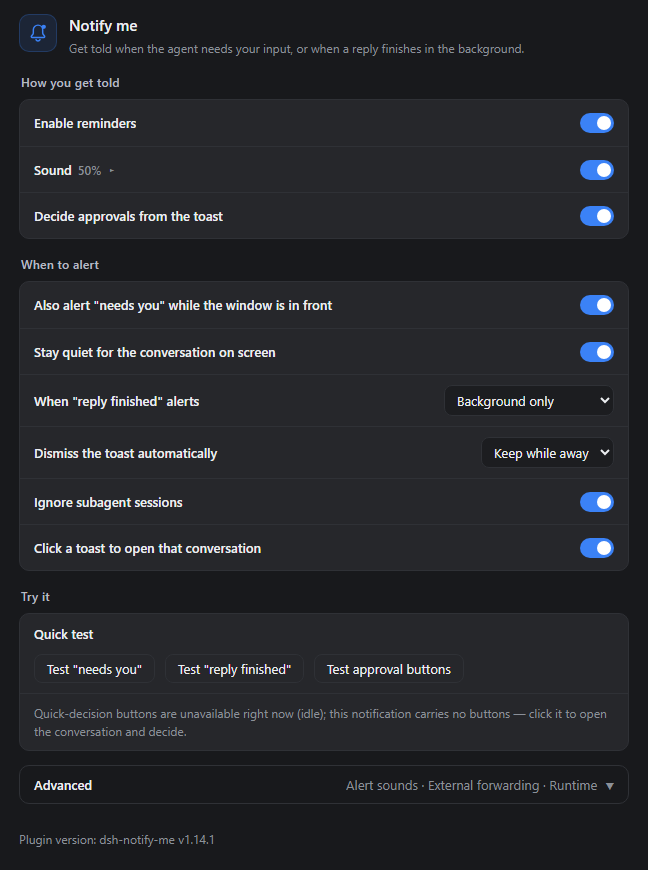
Just the plugin panel (the real component, v1.10.2 defaults) without the DSH navigation sidebar. Alert type is a segmented control, and row explanations live in a hover tooltip that appears when the pointer rests on a title, which is why only the titles show here.
|
|
51
51
|
</details>
|
|
52
52
|
|
|
53
53
|
## Installation
|
|
@@ -74,7 +74,7 @@ The Electron application manages the `desktop` profile. Do not change the Web co
|
|
|
74
74
|
## First-use check
|
|
75
75
|
|
|
76
76
|
1. Click once in the DSH page and allow notifications when prompted. If you previously declined, allow them in the browser's site settings. The operating system must also allow notifications from the browser / DSH Desktop.
|
|
77
|
-
2. Open **Settings → Notify me**. Confirm that the section and plugin version at its foot appear, and leave the master switch, system notifications, and sound enabled.
|
|
77
|
+
2. Open **Settings → Notify me**. Confirm that the section and plugin version at its foot appear, and leave the master switch, the alert type on system notifications, and sound enabled.
|
|
78
78
|
3. Click **Test "reply finished"** on the settings page. A test notification should appear and sound according to your cue settings. This local test does not forward to external endpoints and ignores the "while the page is open" toggle.
|
|
79
79
|
|
|
80
80
|
Web users can also test approval buttons. On Desktop that test sends a plain notification: **no Approve / Reject buttons is the expected result**.
|
|
@@ -123,7 +123,7 @@ Open **Settings → Notify me**. The page runs as how you get told, when to aler
|
|
|
123
123
|
- **Enable reminders**: master switch — off means no toasts, no sounds, and the tab title is left alone;
|
|
124
124
|
- **Alert type (pick one)**: one segmented control — system notifications on the left, in-page overlay on the right; whichever you pick is the only channel used;
|
|
125
125
|
- **System notifications** (default): native toasts landing in the Windows / macOS notification center; needs notification permission;
|
|
126
|
-
- **In-page overlay**: cards drawn in the page corner, on whichever display the window sits on — system notifications only land on the primary display. No permission needed, and the Desktop shell can Approve / Reject right on the card.
|
|
126
|
+
- **In-page overlay**: cards drawn in the page corner, on whichever display the window sits on — system notifications only land on the primary display. No permission needed, and the Desktop shell can Approve / Reject right on the card. With the overlay chosen, a Corner row appears; open it to pick one of four positions. See [Secondary displays and the overlay](#secondary-displays-and-the-overlay);
|
|
127
127
|
- **Sound / Volume**: the switch is direct; the slider folds into that row — click the title (▸ turns into ▾) to reveal it. What it plays comes from Advanced → Alert sound;
|
|
128
128
|
- **Decide approvals from the toast** (on by default): approval toasts carry Approve / Reject that settle the request in place. **Desktop notifications have no buttons** (`dsh-app://` cannot register a Service Worker) — pick the in-page overlay as the channel instead; the page states plainly which channel can carry buttons right now.
|
|
129
129
|
|
|
@@ -133,10 +133,10 @@ Windows draws system notification banners on the primary display only. There is
|
|
|
133
133
|
|
|
134
134
|
The **in-page overlay** skips the notification center and draws the card inside the DSH page instead: wherever the window is, the card is there too.
|
|
135
135
|
|
|
136
|
-
- **Position** —
|
|
136
|
+
- **Position** — with the in-page overlay chosen, a Corner row appears showing the current value (bottom right by default); click it open (▸ turns into ▾), then pick top right / bottom right / top left / bottom left. Changes apply immediately;
|
|
137
137
|
- **No notification permission needed** — it works when permission was never granted, and on the Desktop shell where buttonless toasts are all the OS channel can do;
|
|
138
138
|
- **Approval cards carry Approve / Reject** — the same decision as Allow once / Reject on the approval card, and they work on the Desktop too (no Service Worker involved). Clicking the card body opens its conversation;
|
|
139
|
-
- **Lifetime** — "needs you"
|
|
139
|
+
- **Lifetime** — "needs you" and "reply finished" cards retire after 5s each, an approval card with buttons after 12s (system toasts use the same two numbers); a card or its close button retires one earlier. At most 4 cards stack at once;
|
|
140
140
|
- **Relation to system notifications** — it is one or the other. Both used to be switchable at once, which meant every alert arrived twice and the pair covered each other; 1.10.0 made it a single choice, and 1.10.2 turns that into one segmented row. An old config with the overlay on migrates to it.
|
|
141
141
|
|
|
142
142
|
The overlay only knows which screen the window is on, not which screen you are looking at. If the window stays on the primary display while you watch another one, it stays invisible — same as a toast.
|
|
@@ -189,7 +189,7 @@ The last block inside Advanced. The page protocol is detected automatically to t
|
|
|
189
189
|
<summary>Alert language, Desktop window raising, reset</summary>
|
|
190
190
|
|
|
191
191
|
- **Alert language**: follow the UI / Simplified Chinese / English — governs alert copy and the `🔔 …` title marker;
|
|
192
|
-
- **How the Desktop window is raised**: `window.focus()` cannot lift a native Electron window, so since 1.5.2 the page drives the app's own `dsh://open` deep link —
|
|
192
|
+
- **How the Desktop window is raised**: `window.focus()` cannot lift a native Electron window, so since 1.5.2 the page drives the app's own `dsh://open` deep link — measured working on DSH Desktop 0.2.0-rc.2, flaky on 0.2.1-rc.2 / Windows (see the next section);
|
|
193
193
|
- **Reset settings**: restores every switch and cue setting to the factory defaults (webhook targets and chosen audio files are kept).
|
|
194
194
|
|
|
195
195
|
</details>
|
|
@@ -200,8 +200,9 @@ The last block inside Advanced. The page protocol is detected automatically to t
|
|
|
200
200
|
|
|
201
201
|
## How it alerts
|
|
202
202
|
|
|
203
|
-
- **
|
|
204
|
-
- **
|
|
203
|
+
- **Alert channel (pick one — the two never run together)**:
|
|
204
|
+
- **System notification** — a toast through the browser into the Windows action center / macOS Notification Center (clicking it opens the conversation it came from; supported Web environments offer approval buttons, Desktop does not)
|
|
205
|
+
- **In-page overlay** — an alert card drawn in the corner of the DSH page, on whatever display the window is on, optionally with Approve / Reject buttons; see [Secondary displays and the overlay](#secondary-displays-and-the-overlay)
|
|
205
206
|
- **Sound** — WebAudio beeps by default (distinct patterns for "needs you" vs "done"); each kind can instead play a picked audio file, or hand the sound over to the operating system's own notification sound
|
|
206
207
|
- **Tab title marker** — while something is waiting on you, the tab title is prefixed with `🔔 Action needed · …` / `🔔 需要你 · …`; while a background session is **finished but unread**, with `✅ Reply finished · …` / `✅ 回复完成 · …`, gone once you open that session (or it starts running again). Both kinds can be up together, "needs you" first; a host title change is rebased under the markers
|
|
207
208
|
- **External notifications** (optional, default off) — the same alert is also forwarded to the push targets you configure: Discord Webhook / Bark / Gotify / custom webhook — so the push channel on your phone picks it up while you step away from the machine
|
|
@@ -214,7 +215,7 @@ Per-release adaptation records live in [package.json](package.json), under `dsh.
|
|
|
214
215
|
|
|
215
216
|
Verified to actually activate on `0.1.2-rc.1`, `0.1.5-rc.1`, `0.1.5-rc.2` and `0.2.0-rc.2` (each booted in its own profile: the plugin entry lands in the boot page's `__DSH_BOOT__` with its inject dependencies resolved, `/plugins/??dsh-notify-me/client.js&rev=…` serves a build containing the new code, and the Settings → Notifications section registers, i.e. the plugin's `apply` really runs), and previously on `0.1.1-rc.2`.
|
|
216
217
|
|
|
217
|
-
`0.2.1-rc.2` (current latest) got its own isolated run: an isolated `DSH_HOME` booting `dsh web` (70 boot entries) placed the plugin entry 59th, in the `application` batch, with all three inject targets present and ordered before it; `/plugins/??dsh-notify-me/client.js&rev=…` served the 1.7.0 source build (140,153 B); loaded in a headless Chromium page, `apply` ran — `window.__dshNotifyMe.debug()` reported `uiSession: bound`, `uiSessionSource: sessionStatus`, `bridge: active`. Host-side shapes match `0.2.0-rc.2`; no plugin code change was needed.
|
|
218
|
+
`0.2.1-rc.2` (current latest) got its own isolated run: an isolated `DSH_HOME` booting `dsh web` (70 boot entries) placed the plugin entry 59th, in the `application` batch, with all three inject targets present and ordered before it; `/plugins/??dsh-notify-me/client.js&rev=…` served the then-installed 1.7.0 source build (140,153 B); loaded in a headless Chromium page, `apply` ran — `window.__dshNotifyMe.debug()` reported `uiSession: bound`, `uiSessionSource: sessionStatus`, `bridge: active`. Host-side shapes match `0.2.0-rc.2`; no plugin code change was needed.
|
|
218
219
|
|
|
219
220
|
<details>
|
|
220
221
|
<summary>Host generations and adaptation diagnostics</summary>
|
|
@@ -298,7 +299,7 @@ The reminder core stays dependency-free and self-contained: notification copy re
|
|
|
298
299
|
|
|
299
300
|
Action buttons (`actions`) belong to persistent notifications shown through `ServiceWorkerRegistration.showNotification()`; passing `actions` to the `new Notification()` constructor throws a `TypeError`. That is a browser rule no plugin can route around, so the bundle holds two jobs in the same bytes: the page half registers the reminder factory as it always did, and the very same file is registered as a Service Worker whose only task is relaying which button was clicked back to the page. The decision itself happens in the page, through the same `PendingApproval.answer('allowed-once' | 'rejected')` the approval card uses — which is why "Approve" is exactly "Allow once" and nothing broader. The "raise a window and switch its conversation" part of a body click is scheduled on the worker half too: `client.focus()` raises exactly one window (a visible one first) and routes the conversation switch to that window alone, so several open DSH tabs never fight over focus or all switch at once.
|
|
300
301
|
|
|
301
|
-
Every button toast is booked against its interaction key, so it can only decide the request it was raised for. Once the page answers that request or a newer one replaces it, clicking the leftover buttons decides nothing and just closes the notification. Button toasts
|
|
302
|
+
Every button toast is booked against its interaction key, so it can only decide the request it was raised for. Once the page answers that request or a newer one replaces it, clicking the leftover buttons decides nothing and just closes the notification. Button toasts stay 12s (plain ones 5s) and retire on their own, so an approval left undecided there still waits for you in the page.
|
|
302
303
|
|
|
303
304
|
### How the Desktop window gets raised
|
|
304
305
|
|
package/README.md
CHANGED
|
@@ -13,7 +13,7 @@
|
|
|
13
13
|
[](https://www.npmjs.com/package/dsh-notify-me)
|
|
14
14
|
[](LICENSE)
|
|
15
15
|
[](#安装)
|
|
16
|
-
[](https://www.npmjs.com/package/dsh-notify-me)
|
|
17
17
|
[](#兼容性)
|
|
18
18
|
[](https://awesome-dsh-plugin.com)
|
|
19
19
|
|
|
@@ -26,9 +26,9 @@ DSH Web / Desktop 的通知插件,让你敢不开完整访问,也不必一
|
|
|
26
26
|
- **需要你操作时**:审批、方案确认、提问,用通知、提示音和标题标记提醒。
|
|
27
27
|
- **后台回复完成时**:及时回来查看结果,点击通知可回到对应对话。
|
|
28
28
|
- **离开电脑时**:可选转发到 Discord、Bark、Gotify 或自己的 Webhook。
|
|
29
|
-
-
|
|
29
|
+
- **不看主屏时**:把「通知类型」切成「浮层提醒」,卡片就跟着 DSH 窗口出现在你正看着的那块屏(系统通知只会出现在主屏)。
|
|
30
30
|
|
|
31
|
-
> 页面或桌面应用需保持运行,后台 / 最小化可以。系统通知需要通知权限;审批按钮在支持 Service Worker 的 Web 环境(如 `http://127.0.0.1` 或 `https
|
|
31
|
+
> 页面或桌面应用需保持运行,后台 / 最小化可以。系统通知需要通知权限;审批按钮在支持 Service Worker 的 Web 环境(如 `http://127.0.0.1` 或 `https`)由通知提供,桌面端的通知没有按钮——把「通知类型」选成「浮层提醒」后可在浮层上直接裁决(见[副屏与浮层提醒](#副屏与浮层提醒))。
|
|
32
32
|
|
|
33
33
|
> 🔎 想找这个插件?可以搜:`dsh-notify-me`、**消息提醒**、**可操作提醒**、**桌面通知**、**需要你操作**、**回复完成提醒**、**后台完成提醒**、**外部通知**、**Discord / Bark / Gotify 推送**(npm 关键词已含以上中英文词)。
|
|
34
34
|
|
|
@@ -47,7 +47,7 @@ DSH Web / Desktop 的通知插件,让你敢不开完整访问,也不必一
|
|
|
47
47
|
|
|
48
48
|
|
|
49
49
|
|
|
50
|
-
|
|
50
|
+
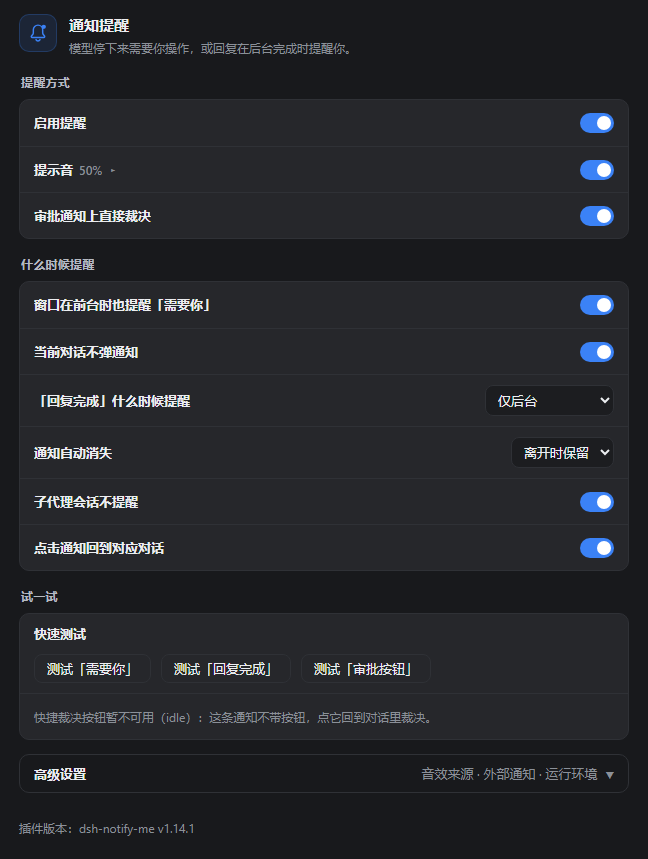
只截插件自己的面板(真实组件、v1.10.2 默认配置),不带 DSH 左侧导航栏;「通知类型」是分段选择器,每行说明在鼠标停在标题文字上时才出现,所以这里只看到标题。
|
|
51
51
|
</details>
|
|
52
52
|
|
|
53
53
|
## 安装
|
|
@@ -74,7 +74,7 @@ dsh plugin --profile web add dsh-notify-me
|
|
|
74
74
|
## 首次验证
|
|
75
75
|
|
|
76
76
|
1. 在 DSH 页面上点击一次,按提示允许通知;若此前拒绝过,在浏览器站点设置中允许通知。操作系统也需要允许对应浏览器 / DSH Desktop 显示通知。
|
|
77
|
-
2. 打开 **设置 →
|
|
77
|
+
2. 打开 **设置 → 通知提醒**,确认出现该分区及底部插件版本号,保持「启用提醒」「提示音」开启,通知类型先留「系统通知」。
|
|
78
78
|
3. 点击设置页的「测试『回复完成』」按钮:应出现一条测试通知,并按当前音效设置播放声音。这个本地测试不会转发到外部通知端点,也不受「页面打开时也提醒」开关限制。
|
|
79
79
|
|
|
80
80
|
Web 用户可再测试审批按钮;桌面端该测试只发普通通知,**没有「同意 / 拒绝」按钮属于预期行为**。
|
|
@@ -119,7 +119,7 @@ dsh-notify-me 把「监督」和「守在屏幕前」解耦:只在真的出现
|
|
|
119
119
|
- **启用提醒** 总开关:关闭后不弹通知、不响提示音,也不改标签页标题;
|
|
120
120
|
- **通知类型(二选一)**:一行分段选择器,左边「系统通知」、右边「浮层提醒」,点哪个就只走哪个;
|
|
121
121
|
- **系统通知**(默认):进 Windows / macOS 通知中心,需要通知权限;
|
|
122
|
-
- **页面浮层**:在 DSH 页面角落画提醒卡片,窗口在哪块屏它就在哪块屏——系统通知只会画在主屏,主屏不看时用它;不需要通知权限,桌面端也能在卡片上直接「同意 /
|
|
122
|
+
- **页面浮层**:在 DSH 页面角落画提醒卡片,窗口在哪块屏它就在哪块屏——系统通知只会画在主屏,主屏不看时用它;不需要通知权限,桌面端也能在卡片上直接「同意 / 拒绝」。选中后卡片里会多出「浮层位置」子行,点开可选四个角落,见[副屏与浮层提醒](#副屏与浮层提醒);
|
|
123
123
|
- **提示音 / 音量**:开关直接切;音量滑块收在该行里,点一下标题(▸ 变成 ▾)展开。具体播什么由「高级设置 → 音效来源」决定;
|
|
124
124
|
- **审批通知上直接裁决**(默认开):审批通知带「同意 / 拒绝」,点一下即完成裁决,不用切回页面。**桌面端的通知没有按钮**(`dsh-app://` 页面无法注册 Service Worker),需要按钮就打开「页面浮层提醒」,改在浮层上裁决;设置页会如实说明当前哪种渠道能给按钮。
|
|
125
125
|
|
|
@@ -129,10 +129,10 @@ Windows 的系统通知横幅固定画在主屏上,系统没有设置项、浏
|
|
|
129
129
|
|
|
130
130
|
「页面浮层提醒」绕开系统通知中心,直接在 DSH 页面里画一张卡片:窗口在哪块屏,卡片就出现在哪块屏。
|
|
131
131
|
|
|
132
|
-
-
|
|
132
|
+
- **位置**:选中「浮层提醒」后,「浮层位置」子行出现,行上直接显示当前值(默认右下);点它(▸ 变 ▾)再选右上 / 右下 / 左上 / 左下,改完立刻生效;
|
|
133
133
|
- **不需要通知权限**:通知权限没给、或桌面端弹不出带按钮的通知时,浮层照常工作;
|
|
134
134
|
- **审批卡片带「同意 / 拒绝」**:与审批卡片的「允许一次 / 拒绝」等价,桌面端也能用(不依赖 Service Worker);点卡片正文则切回对应对话;
|
|
135
|
-
- **停留时间**:普通提醒 5 秒自动收起,带「同意 / 拒绝」的审批卡片 12
|
|
135
|
+
- **停留时间**:普通提醒 5 秒自动收起,带「同意 / 拒绝」的审批卡片 12 秒(系统通知用同一套数字);也可以点卡片或右上角叉提前关掉。最多同时叠 4 张;
|
|
136
136
|
- **与系统通知的关系**:二选一。以前两个开关可以同开,结果同一条提醒弹两遍、还互相挡住;1.10.0 起改成单选,1.10.2 起做成一行分段选择器。老配置里开着浮层的,升级后自动落到浮层。
|
|
137
137
|
|
|
138
138
|
浮层只知道窗口在哪块屏,不知道你人在看哪块屏。窗口留在主屏、人却盯着副屏时,它同样看不见。
|
|
@@ -194,12 +194,11 @@ Windows 的系统通知横幅固定画在主屏上,系统没有设置项、浏
|
|
|
194
194
|
|
|
195
195
|
> 需要浏览器通知权限:页面上点一下 → 允许;或地址栏锁 → 站点设置 → 通知 → 允许 → 刷新。macOS 还要在 系统设置 → 通知 里允许该浏览器。
|
|
196
196
|
|
|
197
|
-
##
|
|
197
|
+
## 提醒渠道
|
|
198
198
|
|
|
199
|
-
-
|
|
200
|
-
-
|
|
201
|
-
|
|
202
|
-
两种渠道在设置里二选一,不会同时出现。
|
|
199
|
+
- **提醒渠道(二选一,不同时出现)**:
|
|
200
|
+
- **系统通知**:经浏览器弹出的系统通知,进 Windows 通知中心或 macOS 通知中心(点击回到提醒所属的对话;支持快捷裁决的 Web 环境可点审批按钮直接裁决,桌面端无按钮)
|
|
201
|
+
- **页面浮层**:画在 DSH 页面角落的提醒卡片,落在窗口所在的那块屏,可带「同意 / 拒绝」按钮;见[副屏与浮层提醒](#副屏与浮层提醒)
|
|
203
202
|
- **提示音**:默认是 WebAudio 合成音(「需要你」与「完成」使用不同音型);可在设置里为两类提醒分别换成自定义音频文件,或改成让操作系统播放它自己的通知音
|
|
204
203
|
- **标签页标题标记**:有待处理事项时,标题前出现 `🔔 需要你 · …` / `🔔 Action needed · …`;后台会话**完成但还没看**时出现 `✅ 回复完成 · …` / `✅ Reply finished · …`,打开对应会话(或它再次开跑)即消失。两种标记可同时出现,「需要你」在前;宿主改写标题后标记基于新标题重建
|
|
205
204
|
- **外部通知**(可选,默认关):按设置里配的推送目标,把同一条提醒转发到 Discord Webhook / Bark / Gotify / 自定义 Webhook——临时离开电脑时,手机上的推送渠道照样收到
|
|
@@ -212,7 +211,7 @@ Windows 的系统通知横幅固定画在主屏上,系统没有设置项、浏
|
|
|
212
211
|
|
|
213
212
|
实测**真正激活**(各自独立 profile 启动:插件条目进启动页 `__DSH_BOOT__` 且注入依赖解析通过、`/plugins/??dsh-notify-me/client.js&rev=…` 返回含新代码的构建,设置里出现「通知提醒」分区,即插件的 `apply` 确实执行)于 `0.1.2-rc.1`、`0.1.5-rc.1`、`0.1.5-rc.2` 与 `0.2.0-rc.2`;更早的 `0.1.1-rc.2` 亦验证过。
|
|
214
213
|
|
|
215
|
-
`0.2.1-rc.2`(当前 latest)另跑了一轮隔离验证:隔离 `DSH_HOME` 起 `dsh web`(70 个启动条目),插件条目排在第 59、`application` 批,三个注入目标都在且都排在它前面;`/plugins/??dsh-notify-me/client.js&rev=…`
|
|
214
|
+
`0.2.1-rc.2`(当前 latest)另跑了一轮隔离验证:隔离 `DSH_HOME` 起 `dsh web`(70 个启动条目),插件条目排在第 59、`application` 批,三个注入目标都在且都排在它前面;`/plugins/??dsh-notify-me/client.js&rev=…` 返回当时装的 1.7.0 源码构建(140,153 B);无头 Chromium 载入页面后 `apply` 正常执行,`window.__dshNotifyMe.debug()` 报 `uiSession: bound`、`uiSessionSource: sessionStatus`、`bridge: active`。宿主侧的形状与 `0.2.0-rc.2` 一致,没有需要改代码的地方。
|
|
216
215
|
|
|
217
216
|
<details>
|
|
218
217
|
<summary>宿主代际与适配排查细节</summary>
|
|
@@ -249,7 +248,7 @@ window.__dshNotifyMe.setConfig({
|
|
|
249
248
|
currentHiddenOnly: true, // true = 当前对话的等待只留标题标记(转后台补发)
|
|
250
249
|
doneHiddenOnly: true, // false = 页面可见时「完成」也提醒
|
|
251
250
|
ignoreSubagent: true, // true = 后台子代理(subagent)会话不提醒(当前打开的照常)
|
|
252
|
-
channel: "toast", //
|
|
251
|
+
channel: "toast", // 通知类型:'toast' 系统通知 | 'overlay' 页面浮层,二选一
|
|
253
252
|
sound: true, // 提示音开关(含「系统通知音」模式)
|
|
254
253
|
soundDone: "synth", // 「完成」音效来源:'synth' 内置 | 'custom' 自定义文件 | 'system' 系统通知音
|
|
255
254
|
soundAttention: "synth", // 「需要你」音效来源,取值同上
|
|
@@ -296,7 +295,7 @@ window.__dshNotifyMe.testExternal() // 显式外发测试:向有
|
|
|
296
295
|
|
|
297
296
|
通知按钮(`actions`)只属于 Service Worker 弹的持久通知,往 `new Notification()` 里传 `actions` 会直接抛 `TypeError`——这是绕不开的浏览器限制。所以 bundle 一份文件干两件事:页面里照常注册提醒工厂,同一份字节再注册成一个只干转信的 Service Worker,把「点了哪个按钮」(同意 / 拒绝 / 点正文)带回页面。真正的裁决发生在页面里,调的是审批卡片自己用的 `PendingApproval.answer('allowed-once' | 'rejected')`,所以「同意」就是「允许一次」,不多放行任何东西。点正文的「调窗口 + 切对话」同样归 worker 这半侧调度:它用 `client.focus()` 只调起一个窗口(优先当前可见的),并只让那个窗口切对话——多个 DSH 标签页不会互相抢焦点或一起乱切。
|
|
298
297
|
|
|
299
|
-
每条按钮通知按交互 key
|
|
298
|
+
每条按钮通知按交互 key 记账,一次只认领一条等待;请求被页面里答掉、或被新请求顶替之后,残留通知上的按钮再点也不会误裁,只是安静地关掉。带按钮的通知停留 12 秒(普通通知 5 秒),到点自动撤;没来得及点就回页面里裁决,卡片一直等着你。
|
|
300
299
|
|
|
301
300
|
### 桌面端怎么抬窗的
|
|
302
301
|
|
package/lib/client.js
CHANGED
|
@@ -733,10 +733,26 @@
|
|
|
733
733
|
return q;
|
|
734
734
|
}
|
|
735
735
|
|
|
736
|
+
// A plain toast needs a tag unique to that one notification. It used to be
|
|
737
|
+
// "dsh-notify-me-" + kind, which leans on renotify:true to replace the
|
|
738
|
+
// previous banner of the same kind; Electron ignores that flag, so the
|
|
739
|
+
// second toast of a kind silently overwrote the first and never re-alerted
|
|
740
|
+
// (issue #15). A unique tag makes every toast a fresh alert everywhere,
|
|
741
|
+
// while renotify stays meaningful on the web. Date.now() alone collides
|
|
742
|
+
// when two alerts land in the same millisecond, hence the counter; the
|
|
743
|
+
// >>> 0 wrap keeps it from ever going negative. Approval toasts keep their
|
|
744
|
+
// stable "dsh-notify-me-attention-<key>" tag: closeNotificationTag() looks
|
|
745
|
+
// them up by it when the request is settled.
|
|
746
|
+
var toastSeq = 0;
|
|
747
|
+
function uniqueToastTag(kind) {
|
|
748
|
+
toastSeq = (toastSeq + 1) >>> 0;
|
|
749
|
+
return "dsh-notify-me-" + kind + "-" + toastSeq + "-" + Date.now();
|
|
750
|
+
}
|
|
751
|
+
|
|
736
752
|
function showToast(kind, title, body, sessionId, quick) {
|
|
737
753
|
if (!canToast()) return;
|
|
738
754
|
try {
|
|
739
|
-
var tag = quick ? quick.tag :
|
|
755
|
+
var tag = quick ? quick.tag : uniqueToastTag(kind);
|
|
740
756
|
if (quick && bridgeActive()) {
|
|
741
757
|
var d = texts();
|
|
742
758
|
try {
|
package/package.json
CHANGED