dsh-notify-me 1.10.1 → 1.10.2
This diff represents the content of publicly available package versions that have been released to one of the supported registries. The information contained in this diff is provided for informational purposes only and reflects changes between package versions as they appear in their respective public registries.
- package/CHANGELOG.md +11 -0
- package/README.en.md +4 -4
- package/README.md +4 -4
- package/lib/client.js +40 -38
- package/package.json +1 -1
package/CHANGELOG.md
CHANGED
|
@@ -2,6 +2,17 @@
|
|
|
2
2
|
|
|
3
3
|
All notable changes to **dsh-notify-me** are documented here.
|
|
4
4
|
|
|
5
|
+
## [1.10.2] — 2026-10-21
|
|
6
|
+
|
|
7
|
+
### 变更
|
|
8
|
+
|
|
9
|
+
- 设置页「提醒方式」重做成一行分段选择器:左边「系统通知」、右边「浮层提醒」,选中的那半填色。原来的两个单选圆点会出现「一个在左一个在右、像在打勾」的错位感,也读不出互斥关系。
|
|
10
|
+
- 「浮层位置」只在选了浮层提醒时出现,作为可点开的子项(默认显示当前值,点标题展开);「音量」同样改为可点开。
|
|
11
|
+
- 设置行说明的悬浮提示改为只在标题文字上触发(之前的触发区是整行,空白处划过也会弹)。
|
|
12
|
+
|
|
13
|
+
### 测试
|
|
14
|
+
|
|
15
|
+
- 冒烟测试改断言「两个 role=radio 的分段按钮、选中半区带 on」;`npm test` 两套件通过。
|
|
5
16
|
## [1.10.1] — 2026-10-21
|
|
6
17
|
|
|
7
18
|
### 变更
|
package/README.en.md
CHANGED
|
@@ -13,7 +13,7 @@
|
|
|
13
13
|
[](https://www.npmjs.com/package/dsh-notify-me)
|
|
14
14
|
[](LICENSE)
|
|
15
15
|
[](#installation)
|
|
16
|
-
[](lib/client.js)
|
|
17
17
|
[](#compatibility)
|
|
18
18
|
[](https://awesome-dsh-plugin.com)
|
|
19
19
|
|
|
@@ -47,7 +47,7 @@ A notification plugin for DSH Web / Desktop, so you can keep full access off wit
|
|
|
47
47
|
|
|
48
48
|
|
|
49
49
|
|
|
50
|
-
The real settings component (v1.10.
|
|
50
|
+
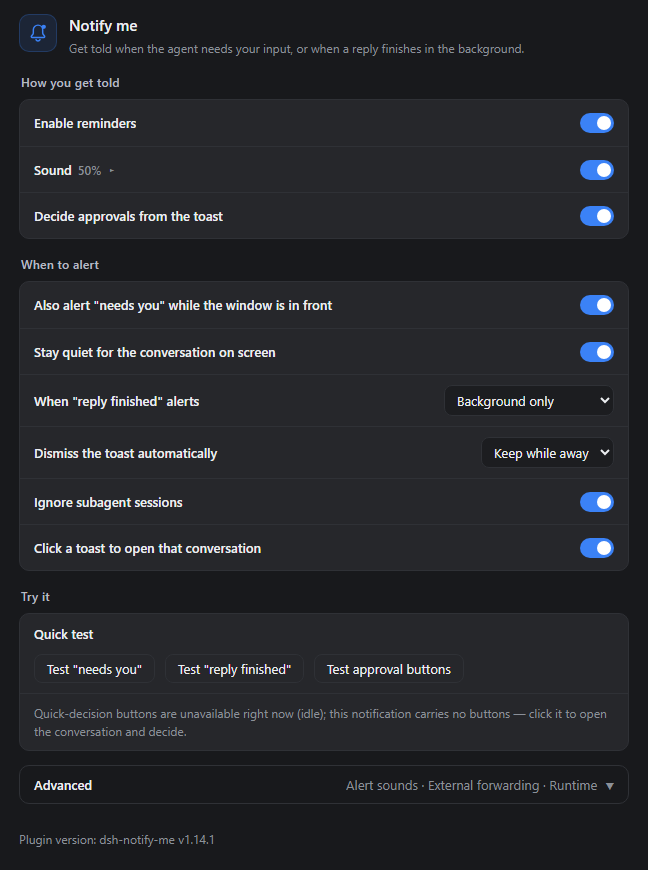
The real settings component (v1.10.2 defaults) rendered in a standalone demo shell. Alert type is a segmented control, and row explanations live in a hover tooltip that appears when the pointer rests on a title, which is why only the titles show here.
|
|
51
51
|
</details>
|
|
52
52
|
|
|
53
53
|
## Installation
|
|
@@ -121,7 +121,7 @@ Open **Settings → Notify me**. The page runs as how you get told, when to aler
|
|
|
121
121
|
### How you get told
|
|
122
122
|
|
|
123
123
|
- **Enable reminders**: master switch — off means no toasts, no sounds, and the tab title is left alone;
|
|
124
|
-
- **
|
|
124
|
+
- **Alert type (pick one)**: one segmented control — system notifications on the left, in-page overlay on the right; whichever you pick is the only channel used;
|
|
125
125
|
- **System notifications** (default): native toasts landing in the Windows / macOS notification center; needs notification permission;
|
|
126
126
|
- **In-page overlay**: cards drawn in the page corner, on whichever display the window sits on — system notifications only land on the primary display. No permission needed, and the Desktop shell can Approve / Reject right on the card. Click the row open to pick one of four corners when it is the chosen channel. See [Secondary displays and the overlay](#secondary-displays-and-the-overlay);
|
|
127
127
|
- **Sound / Volume**: the switch is direct; the slider folds into that row — click the title (▸ turns into ▾) to reveal it. What it plays comes from Advanced → Alert sound;
|
|
@@ -137,7 +137,7 @@ The **in-page overlay** skips the notification center and draws the card inside
|
|
|
137
137
|
- **No notification permission needed** — it works when permission was never granted, and on the Desktop shell where buttonless toasts are all the OS channel can do;
|
|
138
138
|
- **Approval cards carry Approve / Reject** — the same decision as Allow once / Reject on the approval card, and they work on the Desktop too (no Service Worker involved). Clicking the card body opens its conversation;
|
|
139
139
|
- **Lifetime** — "needs you" cards retire after 12s, "reply finished" after 6s, and an approval card with buttons after 18s; a card or its close button retires one earlier. At most 4 cards stack at once;
|
|
140
|
-
- **Relation to system notifications** — it is one or the other. Both used to be switchable at once, which meant every alert arrived twice and the pair covered each other; 1.10.0
|
|
140
|
+
- **Relation to system notifications** — it is one or the other. Both used to be switchable at once, which meant every alert arrived twice and the pair covered each other; 1.10.0 made it a single choice, and 1.10.2 turns that into one segmented row. An old config with the overlay on migrates to it.
|
|
141
141
|
|
|
142
142
|
The overlay only knows which screen the window is on, not which screen you are looking at. If the window stays on the primary display while you watch another one, it stays invisible — same as a toast.
|
|
143
143
|
|
package/README.md
CHANGED
|
@@ -13,7 +13,7 @@
|
|
|
13
13
|
[](https://www.npmjs.com/package/dsh-notify-me)
|
|
14
14
|
[](LICENSE)
|
|
15
15
|
[](#安装)
|
|
16
|
-
[](lib/client.js)
|
|
17
17
|
[](#兼容性)
|
|
18
18
|
[](https://awesome-dsh-plugin.com)
|
|
19
19
|
|
|
@@ -47,7 +47,7 @@ DSH Web / Desktop 的通知插件,让你敢不开完整访问,也不必一
|
|
|
47
47
|
|
|
48
48
|
|
|
49
49
|
|
|
50
|
-
真实插件设置组件(v1.10.
|
|
50
|
+
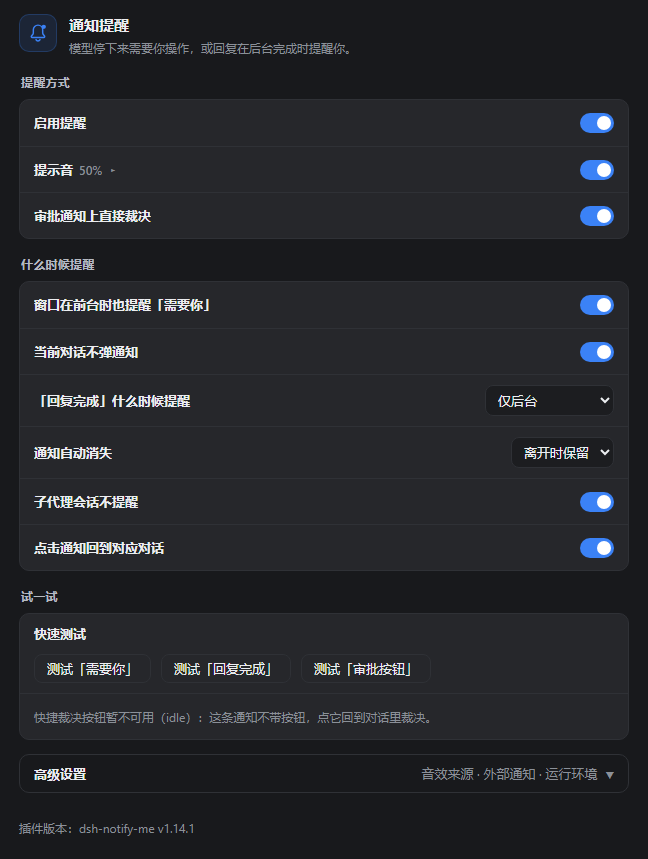
真实插件设置组件(v1.10.2 默认配置)在独立演示环境里渲染;「通知类型」是分段选择器,每行的说明在鼠标停在标题文字上时才出现,所以这里只看到标题。
|
|
51
51
|
</details>
|
|
52
52
|
|
|
53
53
|
## 安装
|
|
@@ -117,7 +117,7 @@ dsh-notify-me 把「监督」和「守在屏幕前」解耦:只在真的出现
|
|
|
117
117
|
### 提醒方式
|
|
118
118
|
|
|
119
119
|
- **启用提醒** 总开关:关闭后不弹通知、不响提示音,也不改标签页标题;
|
|
120
|
-
-
|
|
120
|
+
- **通知类型(二选一)**:一行分段选择器,左边「系统通知」、右边「浮层提醒」,点哪个就只走哪个;
|
|
121
121
|
- **系统通知**(默认):进 Windows / macOS 通知中心,需要通知权限;
|
|
122
122
|
- **页面浮层**:在 DSH 页面角落画提醒卡片,窗口在哪块屏它就在哪块屏——系统通知只会画在主屏,主屏不看时用它;不需要通知权限,桌面端也能在卡片上直接「同意 / 拒绝」。选中后可在该行点开选四个角落的位置,见[副屏与浮层提醒](#副屏与浮层提醒);
|
|
123
123
|
- **提示音 / 音量**:开关直接切;音量滑块收在该行里,点一下标题(▸ 变成 ▾)展开。具体播什么由「高级设置 → 音效来源」决定;
|
|
@@ -133,7 +133,7 @@ Windows 的系统通知横幅固定画在主屏上,系统没有设置项、浏
|
|
|
133
133
|
- **不需要通知权限**:通知权限没给、或桌面端弹不出带按钮的通知时,浮层照常工作;
|
|
134
134
|
- **审批卡片带「同意 / 拒绝」**:与审批卡片的「允许一次 / 拒绝」等价,桌面端也能用(不依赖 Service Worker);点卡片正文则切回对应对话;
|
|
135
135
|
- **停留时间**:普通提醒 5 秒自动收起,带「同意 / 拒绝」的审批卡片 12 秒,系统通知同档(普通 5 秒、带按钮 12 秒);也可以点卡片或右上角叉提前关掉。最多同时叠 4 张;
|
|
136
|
-
-
|
|
136
|
+
- **与系统通知的关系**:二选一。以前两个开关可以同开,结果同一条提醒弹两遍、还互相挡住;1.10.0 起改成单选,1.10.2 起做成一行分段选择器。老配置里开着浮层的,升级后自动落到浮层。
|
|
137
137
|
|
|
138
138
|
浮层只知道窗口在哪块屏,不知道你人在看哪块屏。窗口留在主屏、人却盯着副屏时,它同样看不见。
|
|
139
139
|
|
package/lib/client.js
CHANGED
|
@@ -1964,7 +1964,7 @@
|
|
|
1964
1964
|
});
|
|
1965
1965
|
} catch (e) {}
|
|
1966
1966
|
// keep in sync with package.json "version" on every release
|
|
1967
|
-
api.version = "1.10.
|
|
1967
|
+
api.version = "1.10.2";
|
|
1968
1968
|
api.setConfig = function (patch) { return setConfigLocal(patch); };
|
|
1969
1969
|
api.resetConfig = function () {
|
|
1970
1970
|
try {
|
|
@@ -2183,7 +2183,10 @@
|
|
|
2183
2183
|
bridgeOffTail: "):审批通知会退回不带按钮的普通样式。",
|
|
2184
2184
|
bridgeOffDesktop: "系统通知没有「同意 / 拒绝」按钮:桌面端页面(dsh-app://)注册不了 Service Worker(宿主少给 allowServiceWorkers 特权),按钮发不出来。想一键裁决就把「提醒方式」切到「页面浮层」。",
|
|
2185
2185
|
overlay: "页面浮层提醒",
|
|
2186
|
-
overlayHint: "在窗口角落画提醒卡片:窗口在哪块屏,它就在哪块屏;系统通知只会出现在主屏,主屏不看时用它。不需要通知权限,卡片上能直接「同意 /
|
|
2186
|
+
overlayHint: "在窗口角落画提醒卡片:窗口在哪块屏,它就在哪块屏;系统通知只会出现在主屏,主屏不看时用它。不需要通知权限,卡片上能直接「同意 / 拒绝」。与系统通知二选一。",
|
|
2187
|
+
channelLabel: "通知类型",
|
|
2188
|
+
overlaySeg: "浮层提醒",
|
|
2189
|
+
channelHint: "系统通知只会出现在主屏,进通知中心要权限,桌面端也没有「同意 / 拒绝」按钮;页面浮层画在 DSH 窗口所在的那块屏,不需要权限,卡片上能直接裁决。两个只能选一个。",
|
|
2187
2190
|
overlayCorner: "浮层位置",
|
|
2188
2191
|
overlayCornerHint: "贴在 DSH 窗口的哪个角;窗口在哪块屏,浮层就出现在哪块屏。",
|
|
2189
2192
|
overlayPosTR: "右上",
|
|
@@ -2310,7 +2313,10 @@
|
|
|
2310
2313
|
bridgeOffTail: "); approval toasts fall back to their plain form.",
|
|
2311
2314
|
bridgeOffDesktop: "System notifications carry no Approve / Reject buttons: dsh-app:// pages cannot register a Service Worker (the shell does not grant the allowServiceWorkers privilege), so the buttons cannot be attached. Switch the alert channel to the in-page overlay to settle approvals in one click.",
|
|
2312
2315
|
overlay: "In-page overlay",
|
|
2313
|
-
overlayHint: "Draw a card in the window corner, on whatever display the window sits on. System notifications only
|
|
2316
|
+
overlayHint: "Draw a card in the window corner, on whatever display the window sits on. System notifications only ever show on the primary display. No permission needed, and the card carries Approve / Reject directly. It replaces system notifications rather than adding to them.",
|
|
2317
|
+
channelLabel: "Alert type",
|
|
2318
|
+
overlaySeg: "Overlay",
|
|
2319
|
+
channelHint: "System notifications land in the Windows notification center: permission needed, primary display only, and no Approve / Reject buttons on the Desktop shell. The in-page overlay draws on whichever display the DSH window sits on, needs no permission, and lets the Desktop shell decide right on the card. Pick one.",
|
|
2314
2320
|
overlayCorner: "Overlay position",
|
|
2315
2321
|
overlayCornerHint: "Which corner of the DSH window the cards stack in; they follow the window to whatever display it is on.",
|
|
2316
2322
|
overlayPosTR: "Top right",
|
|
@@ -2448,8 +2454,11 @@
|
|
|
2448
2454
|
".dnm-knob{position:absolute;top:2px;left:2px;width:14px;height:14px;border-radius:50%;background:#fff;transition:left .15s ease}" +
|
|
2449
2455
|
".dnm-switch.on .dnm-knob{left:16px}" +
|
|
2450
2456
|
".dnm-radio{flex:none;width:16px;height:16px;margin:0;accent-color:var(--dsw-alias-state-business-primary,#3b82f6);cursor:pointer}" +
|
|
2451
|
-
".dnm-
|
|
2452
|
-
".dnm-
|
|
2457
|
+
".dnm-seg{display:inline-flex;flex:none;border:1px solid var(--dsw-alias-border-l2,rgba(128,128,128,.35));border-radius:8px;overflow:hidden}" +
|
|
2458
|
+
".dnm-segBtn{height:28px;padding:0 12px;border:0;background:transparent;color:var(--dsw-alias-label-secondary,rgba(90,90,90,.95));font:inherit;font-size:12px;line-height:28px;cursor:pointer;white-space:nowrap}" +
|
|
2459
|
+
".dnm-segBtn+.dnm-segBtn{border-left:1px solid var(--dsw-alias-border-l2,rgba(128,128,128,.35))}" +
|
|
2460
|
+
".dnm-segBtn:hover{color:var(--dsw-alias-label-primary,rgba(20,20,20,.9))}" +
|
|
2461
|
+
".dnm-segBtn.on{background:var(--dsw-alias-state-business-primary,#3b82f6);color:#fff}" +
|
|
2453
2462
|
".dnm-range{width:150px;accent-color:var(--dsw-alias-state-business-primary,#3b82f6)}" +
|
|
2454
2463
|
".dnm-select{border:1px solid var(--dsw-alias-border-l2,rgba(128,128,128,.4));background:var(--dsw-alias-bg-layer-1,rgba(255,255,255,.03));color:var(--dsw-alias-label-primary,rgba(20,20,20,.9));border-radius:8px;padding:5px 8px;font-size:13px;font-family:inherit}" +
|
|
2455
2464
|
".dnm-btn{border:1px solid var(--dsw-alias-border-l2,rgba(128,128,128,.4));background:transparent;color:var(--dsw-alias-label-primary,rgba(20,20,20,.9));border-radius:8px;padding:5px 12px;font-size:13px;cursor:pointer;font-family:inherit}" +
|
|
@@ -2912,24 +2921,27 @@
|
|
|
2912
2921
|
function secTitle(labelText) {
|
|
2913
2922
|
return h("div", { className: "dnm-secTitle" }, labelText);
|
|
2914
2923
|
}
|
|
2915
|
-
// One channel at a time
|
|
2916
|
-
//
|
|
2917
|
-
|
|
2918
|
-
|
|
2919
|
-
|
|
2920
|
-
|
|
2921
|
-
|
|
2922
|
-
|
|
2923
|
-
|
|
2924
|
-
|
|
2925
|
-
|
|
2926
|
-
|
|
2927
|
-
|
|
2928
|
-
|
|
2929
|
-
}),
|
|
2924
|
+
// One channel at a time. A pair of radios read as two unrelated dots, so
|
|
2925
|
+
// the choice is a segmented control: the filled half is the active option.
|
|
2926
|
+
function segButton(labelText, checked, onPick) {
|
|
2927
|
+
return h("button", {
|
|
2928
|
+
type: "button",
|
|
2929
|
+
role: "radio",
|
|
2930
|
+
"aria-checked": checked ? "true" : "false",
|
|
2931
|
+
"aria-label": labelText,
|
|
2932
|
+
className: "dnm-segBtn" + (checked ? " on" : ""),
|
|
2933
|
+
onClick: function () { if (!checked) onPick(); }
|
|
2934
|
+
}, labelText);
|
|
2935
|
+
}
|
|
2936
|
+
function rowChannel(labelText, hintText, current, onPick) {
|
|
2937
|
+
return tipRow("dnm-row", hintText, [
|
|
2930
2938
|
h("div", { className: "dnm-rowText" }, [
|
|
2931
2939
|
h("div", { className: "dnm-rowLabel" }, labelText),
|
|
2932
2940
|
srOnly(hintText)
|
|
2941
|
+
]),
|
|
2942
|
+
h("div", { className: "dnm-seg", role: "radiogroup", "aria-label": labelText }, [
|
|
2943
|
+
segButton(t("toast"), current !== "overlay", function () { onPick("toast"); }),
|
|
2944
|
+
segButton(t("overlaySeg"), current === "overlay", function () { onPick("overlay"); })
|
|
2933
2945
|
])
|
|
2934
2946
|
]);
|
|
2935
2947
|
}
|
|
@@ -2971,10 +2983,9 @@
|
|
|
2971
2983
|
opts.valueText ? h("span", { className: "dnm-rowValue" }, opts.valueText) : null,
|
|
2972
2984
|
h("span", { className: "dnm-chev" }, open ? "▾" : "▸")
|
|
2973
2985
|
]);
|
|
2974
|
-
var
|
|
2975
|
-
|
|
2976
|
-
|
|
2977
|
-
]);
|
|
2986
|
+
var kids = [h("div", { className: "dnm-rowText" }, [label, srOnly(opts.hintText)])];
|
|
2987
|
+
if (opts.control) kids.push(opts.control);
|
|
2988
|
+
var row = tipRow(opts.rowClass || "dnm-row", opts.hintText, kids);
|
|
2978
2989
|
return open ? [row, opts.sub] : [row];
|
|
2979
2990
|
}
|
|
2980
2991
|
var testRow = tipRow("dnm-row dnm-rowStack", t("testHint"), [
|
|
@@ -3004,22 +3015,13 @@
|
|
|
3004
3015
|
patch({ enabled: v });
|
|
3005
3016
|
if (!v && attentionActive > 0) { attentionActive = 0; applyTitle(); }
|
|
3006
3017
|
}),
|
|
3007
|
-
|
|
3018
|
+
rowChannel(t("channelLabel"), t("channelHint"), cfg.channel, function (next) { patch({ channel: next }); }),
|
|
3008
3019
|
cfg.channel === "overlay" ? discloseRow({
|
|
3009
3020
|
key: "overlayCorner",
|
|
3010
|
-
rowClass: "dnm-row dnm-
|
|
3011
|
-
labelText: t("
|
|
3012
|
-
hintText: t("
|
|
3021
|
+
rowClass: "dnm-row dnm-rowSub",
|
|
3022
|
+
labelText: t("overlayCorner"),
|
|
3023
|
+
hintText: t("overlayCornerHint"),
|
|
3013
3024
|
valueText: t("overlayPos" + ({ "top-right": "TR", "bottom-right": "BR", "top-left": "TL", "bottom-left": "BL" })[overlayCorner()] || "BR"),
|
|
3014
|
-
control: h("input", {
|
|
3015
|
-
type: "radio",
|
|
3016
|
-
className: "dnm-radio",
|
|
3017
|
-
name: "dnm-alert-channel",
|
|
3018
|
-
checked: true,
|
|
3019
|
-
"aria-label": t("overlay") + " " + t("overlayCorner"),
|
|
3020
|
-
onChange: function () {},
|
|
3021
|
-
onClick: function () {}
|
|
3022
|
-
}),
|
|
3023
3025
|
sub: tipRow("dnm-row dnm-rowSub", t("overlayCornerHint"), [
|
|
3024
3026
|
h("div", { className: "dnm-rowText" }, [
|
|
3025
3027
|
h("div", { className: "dnm-rowLabel" }, t("overlayCorner")),
|
|
@@ -3037,7 +3039,7 @@
|
|
|
3037
3039
|
h("option", { value: "bottom-left" }, t("overlayPosBL"))
|
|
3038
3040
|
])
|
|
3039
3041
|
])
|
|
3040
|
-
}) :
|
|
3042
|
+
}) : null,
|
|
3041
3043
|
cfg.sound ? discloseRow({
|
|
3042
3044
|
key: "volume",
|
|
3043
3045
|
labelText: t("sound"),
|
package/package.json
CHANGED