dsh-mnemon 0.5.2 → 0.5.3
This diff represents the content of publicly available package versions that have been released to one of the supported registries. The information contained in this diff is provided for informational purposes only and reflects changes between package versions as they appear in their respective public registries.
- package/README.md +63 -183
- package/README.zh-CN.md +66 -186
- package/SECURITY.md +6 -6
- package/lib/client.js +1578 -1273
- package/lib/extension-sdk.js +1 -9
- package/lib/index.js +399 -290
- package/lib/strategy-configuration-B_DsZRQG.js +90 -0
- package/lib/types/src/client/locales.d.ts +976 -900
- package/lib/types/src/host/config-values.d.ts +6 -6
- package/lib/types/src/host/config.d.ts +2 -4
- package/lib/types/src/host/protocol.d.ts +10 -1
- package/lib/types/src/sdk/strategy-configuration.d.ts +5 -0
- package/package.json +19 -18
- package/lib/storage-lock-Bqrhkyag.js +0 -20
package/README.zh-CN.md
CHANGED
|
@@ -1,240 +1,120 @@
|
|
|
1
1
|
<h1 align="center">dsh-mnemon</h1>
|
|
2
2
|
|
|
3
|
-
<p align="center"><a href="
|
|
3
|
+
<p align="center"><a href="https://github.com/omdsh-dev/dsh-mnemon/blob/8466e3560a3b9de4e9f4b7302cbf005c84e8e69f/README.md">English</a> · <strong>简体中文</strong></p>
|
|
4
4
|
|
|
5
5
|
<p align="center">
|
|
6
|
-
<a href="https://www.npmjs.com/package/dsh-mnemon"><img alt="npm
|
|
7
|
-
<a href="https://www.npmjs.com/package/dsh-mnemon"><img alt="npm
|
|
8
|
-
<a href="https://github.com/omdsh-dev/dsh-mnemon/releases/latest"><img alt="GitHub
|
|
9
|
-
<a href="https://github.com/omdsh-dev/dsh-mnemon
|
|
10
|
-
<a href="
|
|
6
|
+
<a href="https://www.npmjs.com/package/dsh-mnemon"><img alt="npm 版本" src="https://img.shields.io/npm/v/dsh-mnemon?label=npm" /></a>
|
|
7
|
+
<a href="https://www.npmjs.com/package/dsh-mnemon"><img alt="npm 累计下载量" src="https://img.shields.io/npm/dt/dsh-mnemon?label=%E7%B4%AF%E8%AE%A1%E4%B8%8B%E8%BD%BD" /></a>
|
|
8
|
+
<a href="https://github.com/omdsh-dev/dsh-mnemon/releases/latest"><img alt="GitHub 发布版本" src="https://img.shields.io/github/v/release/omdsh-dev/dsh-mnemon" /></a>
|
|
9
|
+
<a href="https://github.com/omdsh-dev/dsh-mnemon"><img alt="GitHub 收藏数" src="https://img.shields.io/github/stars/omdsh-dev/dsh-mnemon?label=stars" /></a>
|
|
10
|
+
<a href="https://github.com/omdsh-dev/dsh-mnemon/blob/8466e3560a3b9de4e9f4b7302cbf005c84e8e69f/LICENSE"><img alt="MIT 许可证" src="https://img.shields.io/badge/License-MIT-yellow.svg" /></a>
|
|
11
11
|
<a href="https://dshfind.com/zh/plugins/omdsh-dev/dsh-mnemon?ref=badge"><img alt="dshfind" src="https://dshfind.com/api/badge/omdsh-dev/dsh-mnemon?lang=zh" /></a>
|
|
12
12
|
<a href="https://dshfind.com/zh/plugins/omdsh-dev/dsh-mnemon?ref=badge"><img alt="dshfind 下载量" src="https://dshfind.com/api/badge/omdsh-dev/dsh-mnemon?metric=downloads&lang=zh" /></a>
|
|
13
13
|
</p>
|
|
14
14
|
|
|
15
|
-
<p align="center"><strong>DeepSeek Harness
|
|
16
|
-
<p align="center"
|
|
15
|
+
<p align="center"><strong>DeepSeek Harness 的可组合记忆系统。</strong></p>
|
|
16
|
+
<p align="center">默认三层记忆 · 来源与策略可组合 · 每回合一个上下文视图</p>
|
|
17
17
|
|
|
18
18
|
<p align="center">
|
|
19
|
-
<a href="https://github.com/omdsh-dev/dsh-mnemon/blob/
|
|
20
|
-
<img src="https://raw.githubusercontent.com/omdsh-dev/dsh-mnemon/
|
|
19
|
+
<a href="https://github.com/omdsh-dev/dsh-mnemon/blob/e1b58f917289325ee430106385da2d4ff2c67153/docs/assets/showcase/demo.mp4">
|
|
20
|
+
<img src="https://raw.githubusercontent.com/omdsh-dev/dsh-mnemon/e1b58f917289325ee430106385da2d4ff2c67153/docs/assets/showcase/zh-CN/runtime.png" alt="真实 DSH 侧栏中的合成运行时记忆" width="1180" />
|
|
21
21
|
</a>
|
|
22
22
|
</p>
|
|
23
23
|
|
|
24
24
|
<p align="center">
|
|
25
|
-
<a href="
|
|
26
|
-
<a href="
|
|
27
|
-
<a href="
|
|
28
|
-
<a href="https://github.com/omdsh-dev/dsh-mnemon/blob/
|
|
25
|
+
<a href="https://github.com/omdsh-dev/dsh-mnemon/blob/8466e3560a3b9de4e9f4b7302cbf005c84e8e69f/docs/zh-CN/guides/getting-started.md"><strong>快速开始</strong></a> ·
|
|
26
|
+
<a href="https://github.com/omdsh-dev/dsh-mnemon/blob/e1b58f917289325ee430106385da2d4ff2c67153/docs/assets/showcase/demo.mp4">观看演示(英文界面)</a> ·
|
|
27
|
+
<a href="https://github.com/omdsh-dev/dsh-mnemon/blob/8466e3560a3b9de4e9f4b7302cbf005c84e8e69f/docs/zh-CN/development/extensions.md">制作插件</a> ·
|
|
28
|
+
<a href="https://github.com/omdsh-dev/dsh-mnemon/blob/8466e3560a3b9de4e9f4b7302cbf005c84e8e69f/docs/zh-CN/README.md">文档中心</a>
|
|
29
29
|
</p>
|
|
30
30
|
|
|
31
|
-
|
|
31
|
+
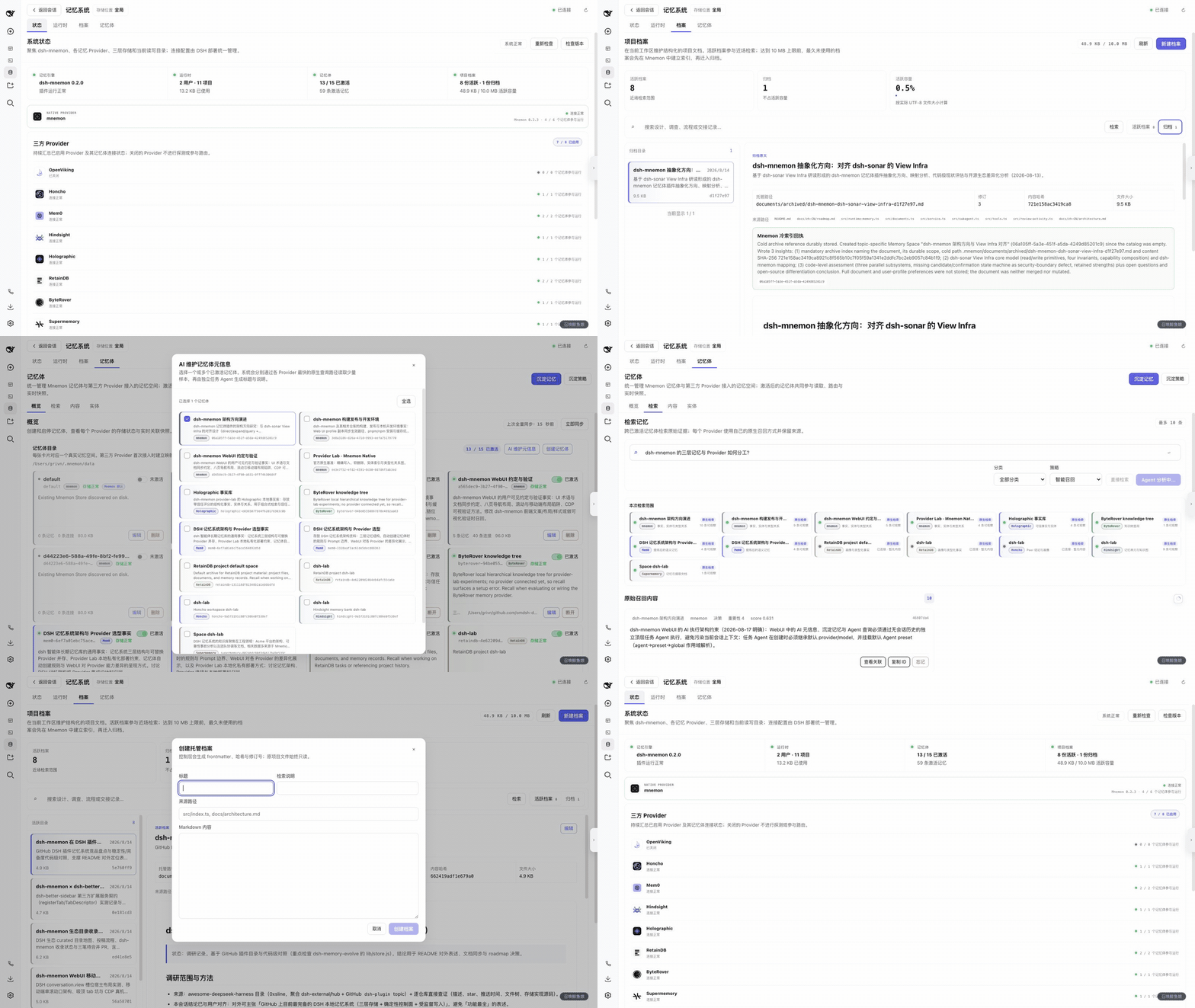
运行时上下文、可检索档案和长期证据,使用同一个熟悉的侧栏(Sidebar)。默认安装包(Starter)安装经过验证的插件组合;贡献者可以独立替换或扩展其中的部分。
|
|
32
32
|
|
|
33
|
-
|
|
33
|
+
## 三层记忆,三种用途
|
|
34
34
|
|
|
35
|
-
|
|
36
|
-
|
|
37
|
-
**v0.5 版本线引入 View-based Memory,以及独立发布的 Source/Strategy/Provider 插件。** 文档化的扩展导出构成 v0.5 支持表面,内部路径与 Host RPC 仍是私有实现。默认用户配置与使用流程保持兼容。相对 v0.4,普通界面只在“设置 → 记忆系统”增加三个默认关闭的增强开关,不增加 View 页或插件管理入口。参阅 [v0.5.0 架构范围](./docs/zh-CN/releases/v0.5.0.md)。
|
|
38
|
-
|
|
39
|
-
v0.5.0 保留 v0.4 的 Sidebar 行为:默认使用 Sidebar,可选 `displayMode: builtin` 将同一组 Source 页面放入所属会话。旧 `buildin` 可识别并自动保存为 `builtin`,不改变记忆数据;折叠图标与侧栏相邻控件对齐,settings store 与 ZIP 修复也继续保留。详见[稳定版说明](./docs/zh-CN/releases/v0.5.0.md)与[入口位置及范围映射](./docs/zh-CN/configuration.md#入口位置displaymode-与-tabenabled)。
|
|
40
|
-
|
|
41
|
-
v0.5.1 修复正式 Desktop 嵌套 Sidebar 下设置不可写,以及 Idle Review 竞态导致下一轮对话出现 `already pinned` 错误的问题。详见 [v0.5.1 补丁说明](./docs/zh-CN/releases/v0.5.1.md)。
|
|
42
|
-
|
|
43
|
-
v0.5.2 让既有 `mnemon` profile Entry 成为完整 Starter 的原子总开关,使保留的停用状态不再让 v0.5 Source 与 Strategy Entry 等待 `mnemonMemory`;同时完成独立包版本与选择性发布的一次性迁移。详见 [v0.5.2 补丁说明](./docs/zh-CN/releases/v0.5.2.md)。
|
|
44
|
-
|
|
45
|
-
已验证的 DSH 基线仍是 0.1.2-rc.1,同时保留 Node 20 公开入口兼容与上一条 0.1.1-rc.2 版本线的回归证据。
|
|
46
|
-
|
|
47
|
-
## 30 秒理解能力边界
|
|
48
|
-
|
|
49
|
-
| 层级 | 适合保存 | 如何进入 Agent 上下文 | 由谁管理 |
|
|
50
|
-
|---|---|---|---|
|
|
51
|
-
| **运行时** | 偏好、协作规则、项目约定、环境事实 | `USER.md` / `MEMORY.md` 每轮紧凑投影 | Runtime Source |
|
|
52
|
-
| **档案** | 设计、调查、流程、复盘、交接材料 | 先检索,再按需阅读全文 | Documents Source |
|
|
53
|
-
| **记忆体** | 跨会话事实、决策、实体与关系 | 从已激活记忆体召回有界证据 | Memory Spaces Source + 所选 Provider |
|
|
54
|
-
|
|
55
|
-
三层不是同一内容的副本。简单判断规则是:**每轮都需要的放运行时,需要完整阅读的放档案,需要跨任务按需召回的放记忆体。**当前指令、仓库文件与实时工具结果始终高于历史记忆。
|
|
56
|
-
|
|
57
|
-
## 点击之后,谁在工作
|
|
58
|
-
|
|
59
|
-
| 用户操作 | 实际执行方式 | 数据影响 |
|
|
35
|
+
| 记忆 | 适合保存 | 如何进入 Agent 上下文 |
|
|
60
36
|
|---|---|---|
|
|
61
|
-
|
|
|
62
|
-
|
|
|
63
|
-
|
|
|
64
|
-
| **智能选择** | 硬规则先筛选,只有真实歧义才交给任务 Agent | 保存路由回执 |
|
|
65
|
-
| **AI 维护元信息** | 每个选中记忆体各自启动异步任务,并使用最快采样路径 | 只更新本地标题与说明 |
|
|
66
|
-
| **归档档案** | 任务 Agent 先建立可检索冷引用,Host 验证后移动原文 | 受监督迁移 |
|
|
67
|
-
| **本回合记忆** | 展开本轮召回、写入和档案检索;点击条目精确跳转 | 只读 |
|
|
68
|
-
|
|
69
|
-
只有明确写出“任务 Agent”的行才会消耗独立模型上下文;**检索**和**本回合记忆**都是确定性的 Host 读取。
|
|
37
|
+
| **运行时** | 偏好、协作约定、下一轮就需要的事实 | 紧凑的 USER / MEMORY 投影 |
|
|
38
|
+
| **档案** | 设计、调查、流程和交接材料 | 先检索,再阅读相关叙事 |
|
|
39
|
+
| **记忆体** | 长期事实、决策、实体与关系 | 从已启用后端按需召回证据 |
|
|
70
40
|
|
|
71
|
-
|
|
41
|
+
Sidebar、对话工具与 Headless 使用同一套数据。全局、工作区与自定义范围明确可选。直接检索不创建 Mnemon 任务 Agent;Agent 查询、语义写入和整理可能使用已配置的模型。[流程与调用开销](https://github.com/omdsh-dev/dsh-mnemon/blob/8466e3560a3b9de4e9f4b7302cbf005c84e8e69f/docs/zh-CN/reference/workflows.md)。
|
|
72
42
|
|
|
73
|
-
|
|
43
|
+
## 从默认组合开始
|
|
74
44
|
|
|
75
|
-
|
|
76
|
-
|
|
77
|
-
| Provider | 形态 | 适合场景 |
|
|
78
|
-
|---|---|---|
|
|
79
|
-
| **[Mnemon](https://github.com/mnemon-dev/mnemon)** | 官方原生,本地 CLI + SQLite | 精确写入、实体、类型关系、本地优先共享 |
|
|
80
|
-
| **[OpenViking](https://github.com/volcengine/OpenViking)** | HTTP + `viking://` | 资源树与异步提炼 |
|
|
81
|
-
| **[Honcho](https://github.com/plastic-labs/honcho)** | HTTP workspace / peers | 团队与 Agent peer conclusions |
|
|
82
|
-
| **[Mem0](https://github.com/mem0ai/mem0)** | Platform 或自托管 HTTP | 已有用户 / Agent 记忆 |
|
|
83
|
-
| **[Hindsight](https://github.com/vectorize-io/hindsight)** | HTTP memory bank | bank、实体与 Provider 原生图谱 |
|
|
84
|
-
| **[Holographic](https://github.com/NousResearch/hermes-agent/tree/main/plugins/memory/holographic)** | 本地结构化事实文件 | 可审计事实、信任评分、本地实体 |
|
|
85
|
-
| **[RetainDB](https://github.com/RetainDB/RetainDB)** | HTTP project / user | 项目与用户双作用域画像 |
|
|
86
|
-
| **[ByteRover](https://github.com/campfirein/byterover-cli)** | 本地 `brv` CLI | 代码知识树与 curate 流程 |
|
|
87
|
-
| **[Supermemory](https://github.com/supermemoryai/supermemory)** | HTTP container | 文档摄取与容器级共享 |
|
|
88
|
-
|
|
89
|
-
Provider 能力差异会如实展示:引擎没有图谱边、删除语义或可枚举内容时,dsh-mnemon 不会伪造。**设置页管理可复用的 Provider 服务;记忆体页管理具体实例、激活、作用域与元信息。**三方 Provider 默认关闭。
|
|
90
|
-
|
|
91
|
-
完整差异见 [Provider 能力与部署矩阵](./docs/zh-CN/memory-providers.md)。
|
|
92
|
-
|
|
93
|
-
## 真实 WebUI 演示
|
|
94
|
-
|
|
95
|
-
下面约 55 秒的素材来自真实的 1600×900 DSH WebUI:在完整上下滑动、页面切换、Provider 卡片、弹窗、按钮状态变化和 Agent 答案上都保留了更清晰的停留,并包含一次真正完成的只读 Agent 查询。可能改变数据的确认按钮都没有提交。
|
|
96
|
-
|
|
97
|
-
|
|
98
|
-
|
|
99
|
-
[观看 1600×900 MP4](https://github.com/omdsh-dev/dsh-mnemon/blob/e6ca446e45bdd17991f3c7c98560456de465282b/docs/assets/media/dsh-mnemon-memory-system-demo.mp4) · [按页面查看交互指南](./docs/zh-CN/ui-guide.md)
|
|
100
|
-
|
|
101
|
-
## 5 分钟开始使用
|
|
102
|
-
|
|
103
|
-
### 1. 安装 Mnemon Native
|
|
104
|
-
|
|
105
|
-
Mnemon 是默认引擎,也是最简单的本地优先起点:
|
|
45
|
+
先准备兼容的 DSH 宿主(Host)。**Mnemon Native 还需要单独安装 `mnemon` CLI**;npm 默认安装包不包含这个二进制,也不会安装三方后端服务。参见[各平台安装步骤](https://github.com/omdsh-dev/dsh-mnemon/blob/8466e3560a3b9de4e9f4b7302cbf005c84e8e69f/docs/zh-CN/guides/getting-started.md)和[已验证的兼容基线](https://github.com/omdsh-dev/dsh-mnemon/blob/8466e3560a3b9de4e9f4b7302cbf005c84e8e69f/docs/zh-CN/reference/compatibility.md)。
|
|
106
46
|
|
|
107
47
|
```sh
|
|
108
|
-
# macOS
|
|
109
|
-
brew install --cask mnemon-dev/tap/mnemon
|
|
110
|
-
|
|
111
|
-
# macOS / Linux,也可以通过 Go 安装
|
|
112
|
-
go install github.com/mnemon-dev/mnemon@latest
|
|
113
|
-
|
|
114
48
|
mnemon --version
|
|
49
|
+
dsh plugin --profile web add dsh-mnemon
|
|
50
|
+
dsh web
|
|
115
51
|
```
|
|
116
52
|
|
|
117
|
-
|
|
118
|
-
|
|
119
|
-
### 2. 安装 DSH 与插件
|
|
120
|
-
|
|
121
|
-
Registry 安装以稳定的 DSH 0.1.2-rc.1 验证;其完整 profile 需要 Node.js `^22.19.0 || >=24.0.0`。dsh-mnemon 包本身仍为较旧且兼容的 DSH Host 保留 Node.js 20 公开入口兼容。下面显式指定已发布版本以保证可复现安装;维护者可按需运行 [alpha 源码兼容流程](./docs/zh-CN/development.md#手动-dsh-012-alpha5-源码兼容)。
|
|
122
|
-
|
|
123
|
-
```sh
|
|
124
|
-
npm install -g @deepseek-ai/dsh@0.1.2-rc.1
|
|
125
|
-
dsh --version
|
|
126
|
-
```
|
|
127
|
-
|
|
128
|
-
```sh
|
|
129
|
-
dsh plugin --profile web add dsh-mnemon@0.5.2
|
|
130
|
-
dsh --profile web
|
|
131
|
-
```
|
|
132
|
-
|
|
133
|
-
将 Web profile 发布到云端域名时,稳定版 DSH 0.1.2-rc.1 需要 HTTPS 反向代理或访问网关、显式可信 authority,以及 Host 启动时输出的一次性启动 URL。请按[云端 WebUI 操作步骤](./docs/zh-CN/operations.md#cloud-hosted-webui)配置,不要把回环服务直接暴露到公网。
|
|
134
|
-
|
|
135
|
-
DSH 各 profile 的插件清单彼此独立。一次性 Headless 任务需要单独安装:
|
|
136
|
-
|
|
137
|
-
```sh
|
|
138
|
-
dsh plugin --profile headless add dsh-mnemon
|
|
139
|
-
dsh --profile headless "回答前先检查持久化的项目上下文。"
|
|
140
|
-
```
|
|
141
|
-
|
|
142
|
-
本地开发检出使用绝对路径:
|
|
53
|
+
Headless 使用同一个包:`dsh plugin --profile headless add dsh-mnemon`。
|
|
143
54
|
|
|
144
|
-
|
|
145
|
-
dsh plugin --profile web add "link:/absolute/path/to/dsh-mnemon"
|
|
146
|
-
dsh plugin --profile headless add "link:/absolute/path/to/dsh-mnemon"
|
|
147
|
-
```
|
|
55
|
+
打开**记忆系统 → 状态**,然后添加一条运行时记忆。创建档案前先选择 DSH 工作区,全局存储也需要工作区身份。需要长期沉淀时,人工选择 Provider 并创建记忆体。默认以 Sidebar 展示,可选 Builtin 使用同一组页面。
|
|
148
56
|
|
|
149
|
-
|
|
57
|
+
从 v0.4 升级保留熟悉的配置、数据与工作流。三个可选增强仅在**设置 → 记忆系统**中透出,不增加 View 页或通用记忆插件管理器。[升级清单](https://github.com/omdsh-dev/dsh-mnemon/blob/8466e3560a3b9de4e9f4b7302cbf005c84e8e69f/docs/zh-CN/reference/compatibility.md)。
|
|
150
58
|
|
|
151
|
-
|
|
152
|
-
2. 打开**记忆体 → 概览 → 创建记忆体**,人工选择一个已启用 Provider;
|
|
153
|
-
3. 通过**沉淀记忆**提交一条稳定、未来仍有用的候选;
|
|
154
|
-
4. 在**检索**先执行直接检索,再对同一个问题执行**Agent 查询**;
|
|
155
|
-
5. 回到对话,展开**本回合记忆**并点击一个具体工具条目。
|
|
59
|
+
## Source + Strategy → View
|
|
156
60
|
|
|
157
|
-
|
|
61
|
+
[](https://github.com/omdsh-dev/dsh-mnemon/blob/8466e3560a3b9de4e9f4b7302cbf005c84e8e69f/docs/zh-CN/development/architecture.md)
|
|
158
62
|
|
|
159
|
-
|
|
63
|
+
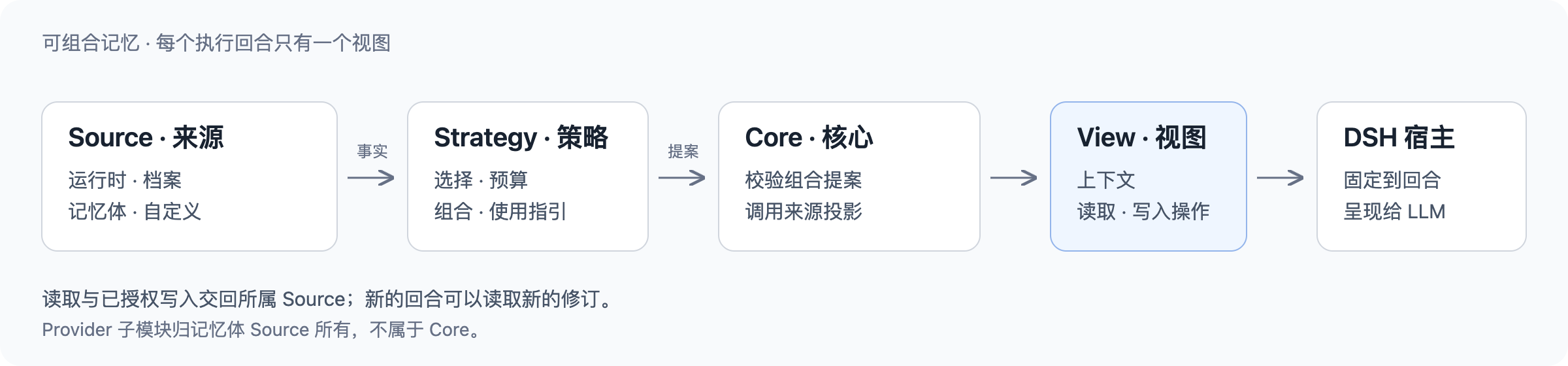
- **Source(记忆来源)** 拥有记忆、投影、读写操作,以及可选的 DSH 页面。
|
|
64
|
+
- **Strategy(组合策略)** 决定可用 Source 如何参与:选择范围、常驻内容、检索与使用指引。纯组合不写入记忆。
|
|
65
|
+
- **Core(核心)** 校验提案,调用 Source 生成有界投影,编译为不可变 **View(上下文视图)**;**DSH Host** 将它固定到执行回合,并控制工具访问。
|
|
160
66
|
|
|
161
|
-
|
|
67
|
+
View 不仅包含上下文,也包含 LLM 接下来可以使用的限定范围读取路由与写入操作。它不是另一种数据库,也不是前端页面。记忆体(Memory Spaces)自行管理后端(Provider)子 Fiber;Core 只提供小型的 `ctx.mnemonMemory` 贡献服务。
|
|
162
68
|
|
|
163
|
-
|
|
164
|
-
|---|---|
|
|
165
|
-
| [](https://github.com/omdsh-dev/dsh-mnemon/blob/e6ca446e45bdd17991f3c7c98560456de465282b/docs/assets/screenshots/remember-dialog.png) | [](https://github.com/omdsh-dev/dsh-mnemon/blob/e6ca446e45bdd17991f3c7c98560456de465282b/docs/assets/screenshots/recall-agent-answer.png) |
|
|
69
|
+
默认插件和外部仓库使用同一套公开契约。Source 作者保留数据与后端选择,Strategy 作者复用这些能力、回合生命周期、预算与测试夹具。[完整架构与时序图](https://github.com/omdsh-dev/dsh-mnemon/blob/8466e3560a3b9de4e9f4b7302cbf005c84e8e69f/docs/zh-CN/development/architecture.md)。
|
|
166
70
|
|
|
167
|
-
|
|
71
|
+
## 官方插件
|
|
168
72
|
|
|
169
|
-
|
|
73
|
+
Starter 随附 **3 个 Source、1 个默认 Strategy、3 个可选策略贡献、9 个 Provider**。各包独立版本、独立发布;Starter 固定经过测试的精确组合。
|
|
170
74
|
|
|
171
|
-
|
|
|
172
|
-
|
|
173
|
-
| [
|
|
174
|
-
|
|
175
|
-
|
|
75
|
+
| 包 | 职责 | 默认状态 |
|
|
76
|
+
|---|---|---|
|
|
77
|
+
| [dsh-mnemon-source-runtime](https://github.com/omdsh-dev/dsh-mnemon/blob/8466e3560a3b9de4e9f4b7302cbf005c84e8e69f/plugins/dsh-mnemon-source-runtime/README.md) | USER / MEMORY、修订与本地热记忆 | 启用 |
|
|
78
|
+
| [dsh-mnemon-source-documents](https://github.com/omdsh-dev/dsh-mnemon/blob/8466e3560a3b9de4e9f4b7302cbf005c84e8e69f/plugins/dsh-mnemon-source-documents/README.md) | Markdown、搜索、修订与归档 | 启用 |
|
|
79
|
+
| [dsh-mnemon-source-memory-spaces](https://github.com/omdsh-dev/dsh-mnemon/blob/8466e3560a3b9de4e9f4b7302cbf005c84e8e69f/plugins/dsh-mnemon-source-memory-spaces/README.md) | 长期证据及 Source 自有 Provider 子模块 | 启用 |
|
|
80
|
+
| [dsh-mnemon-strategy-default-three-tier](https://github.com/omdsh-dev/dsh-mnemon/blob/8466e3560a3b9de4e9f4b7302cbf005c84e8e69f/plugins/dsh-mnemon-strategy-default-three-tier/README.md) | 默认三层 View 与回合检索策略 | 选中 |
|
|
81
|
+
| [dsh-mnemon-strategy-auto-capture](https://github.com/omdsh-dev/dsh-mnemon/blob/8466e3560a3b9de4e9f4b7302cbf005c84e8e69f/plugins/dsh-mnemon-strategy-auto-capture/README.md) | 当前回合中主动记录有用事实的指引 | 关闭 |
|
|
82
|
+
| [dsh-mnemon-strategy-light-context](https://github.com/omdsh-dev/dsh-mnemon/blob/8466e3560a3b9de4e9f4b7302cbf005c84e8e69f/plugins/dsh-mnemon-strategy-light-context/README.md) | 所有选中 Source 共享的常驻投影上限 | 关闭 |
|
|
83
|
+
| [dsh-mnemon-strategy-scoped](https://github.com/omdsh-dev/dsh-mnemon/blob/8466e3560a3b9de4e9f4b7302cbf005c84e8e69f/plugins/dsh-mnemon-strategy-scoped/README.md) | 有序选择 Source,并限定可写子集 | 关闭 |
|
|
176
84
|
|
|
177
|
-
|
|
85
|
+
三个增强使用默认 Strategy 的不同槽,可以共存,最终仍输出一个 View。主动记录是指引,不是自主记录器;投影上限不是 token 计费或增量注入;范围组合不创建存储。
|
|
178
86
|
|
|
179
|
-
|
|
180
|
-
|---|---|
|
|
181
|
-
| `global` | 使用 `~/.mnemon`,适合多个工作区和本机 Agent 共享控制面 |
|
|
182
|
-
| `workspace` | 使用 `<workspace>/.mnemon`;支持工作区跟随的本地 Provider 会随有效工作区切换 |
|
|
183
|
-
| `custom` | 显式路径的全局语义,适合团队约定或隔离环境 |
|
|
87
|
+
Memory Spaces 可使用以下 Provider 插件:
|
|
184
88
|
|
|
185
|
-
|
|
89
|
+
[Mnemon Native](https://github.com/omdsh-dev/dsh-mnemon/blob/8466e3560a3b9de4e9f4b7302cbf005c84e8e69f/plugins/dsh-mnemon-provider-mnemon-native/README.md) · [OpenViking](https://github.com/omdsh-dev/dsh-mnemon/blob/8466e3560a3b9de4e9f4b7302cbf005c84e8e69f/plugins/dsh-mnemon-provider-openviking/README.md) · [Honcho](https://github.com/omdsh-dev/dsh-mnemon/blob/8466e3560a3b9de4e9f4b7302cbf005c84e8e69f/plugins/dsh-mnemon-provider-honcho/README.md) · [Mem0](https://github.com/omdsh-dev/dsh-mnemon/blob/8466e3560a3b9de4e9f4b7302cbf005c84e8e69f/plugins/dsh-mnemon-provider-mem0/README.md) · [Hindsight](https://github.com/omdsh-dev/dsh-mnemon/blob/8466e3560a3b9de4e9f4b7302cbf005c84e8e69f/plugins/dsh-mnemon-provider-hindsight/README.md) · [Holographic](https://github.com/omdsh-dev/dsh-mnemon/blob/8466e3560a3b9de4e9f4b7302cbf005c84e8e69f/plugins/dsh-mnemon-provider-holographic/README.md) · [RetainDB](https://github.com/omdsh-dev/dsh-mnemon/blob/8466e3560a3b9de4e9f4b7302cbf005c84e8e69f/plugins/dsh-mnemon-provider-retaindb/README.md) · [ByteRover](https://github.com/omdsh-dev/dsh-mnemon/blob/8466e3560a3b9de4e9f4b7302cbf005c84e8e69f/plugins/dsh-mnemon-provider-byterover/README.md) · [Supermemory](https://github.com/omdsh-dev/dsh-mnemon/blob/8466e3560a3b9de4e9f4b7302cbf005c84e8e69f/plugins/dsh-mnemon-provider-supermemory/README.md)。
|
|
186
90
|
|
|
187
|
-
|
|
91
|
+
Native 是默认后端,三方服务需要显式配置和启用。图谱、删除、精确写入与枚举能力保留各后端的真实差异。[Provider 能力与部署](https://github.com/omdsh-dev/dsh-mnemon/blob/8466e3560a3b9de4e9f4b7302cbf005c84e8e69f/docs/zh-CN/guides/memory-providers.md)。
|
|
188
92
|
|
|
189
|
-
##
|
|
93
|
+
## 制作自己的组合
|
|
190
94
|
|
|
191
|
-
|
|
192
|
-
|---|---|
|
|
193
|
-
| **Sidebar WebUI** | 状态、运行时、档案、记忆体、Provider 服务、可视化与确认入口 |
|
|
194
|
-
| **对话内 UI** | 本回合记忆、存入记忆、精确跳转对应页面 |
|
|
195
|
-
| **Headless** | 没有 WebUI,但保留运行时注入、档案检索、记忆体工具、工作区路由与受监督写入 |
|
|
196
|
-
| **命令** | `/mnemon status`、`recall`、`related`、`remember`、`forget` |
|
|
95
|
+
通过 `dsh-mnemon/extension-sdk` 定义 Source 或 Strategy,并注册到所属 Cordis Fiber。可叠加贡献使用目标 Strategy 的 SDK;Memory Spaces 驱动使用 `dsh-mnemon-source-memory-spaces/provider-sdk`。
|
|
197
96
|
|
|
198
|
-
|
|
97
|
+
个人仓库拥有自己的包清单、公开依赖、实现、测试与构建。DSH Profile/Loader 负责安装和挂载;Mnemon 不扫描任意已安装插件。安装代码、激活贡献、选择完整 Strategy,是不同的决定。
|
|
199
98
|
|
|
200
|
-
-
|
|
201
|
-
- Provider 凭据以 mode `0600` 保存在 `<storageRoot>/state/memory-providers.json`,不会返回浏览器、智能选择 Agent 或 Mnemon Pack。
|
|
202
|
-
- Host 调用使用参数数组并禁用 shell,同时约束输出、超时、取消、schema、路径、锁与 revision。
|
|
203
|
-
- 关闭 Provider 只清理本地目录元数据,不删除远程数据;重连时从 Provider 重建,无法映射的字段才使用本地默认值。
|
|
204
|
-
- 切换范围不会自动迁移、合并或删除旧根目录。
|
|
205
|
-
- 当前没有确定性 secret scanner;任何层级都不应保存 key、token、私钥或原始敏感日志。
|
|
206
|
-
- 卸载插件不会删除本地或远程记忆数据。
|
|
99
|
+
从[插件开发指南](https://github.com/omdsh-dev/dsh-mnemon/blob/8466e3560a3b9de4e9f4b7302cbf005c84e8e69f/docs/zh-CN/development/extensions.md)和[外部消费者示例](https://github.com/omdsh-dev/dsh-mnemon/tree/8466e3560a3b9de4e9f4b7302cbf005c84e8e69f/scripts/fixtures/plugin-consumer)开始,验证独立包、双实例、卸载、限定读取与授权写入。Git 或 Notion 集成可以做成新的 Source;这不代表现有所有 DSH 记忆插件都已无缝支持。
|
|
207
100
|
|
|
208
|
-
|
|
101
|
+
欢迎维护独立插件仓库。向本仓库贡献时遵循[贡献规范](https://github.com/omdsh-dev/dsh-mnemon/blob/8466e3560a3b9de4e9f4b7302cbf005c84e8e69f/CONTRIBUTING.zh-CN.md),新能力与 Provider 请先通过 Issue 讨论。
|
|
209
102
|
|
|
210
|
-
##
|
|
103
|
+
## 数据与信任边界
|
|
211
104
|
|
|
212
|
-
|
|
213
|
-
|
|
214
|
-
|
|
215
|
-
|
|
216
|
-
| 跟随所有可见点击与 Agent 行为 | [Sidebar 与对话交互指南](./docs/zh-CN/ui-guide.md) |
|
|
217
|
-
| 比较或部署九种 Provider | [长期记忆 Provider](./docs/zh-CN/memory-providers.md) |
|
|
218
|
-
| 理解分层与生命周期 | [存储模型](./docs/zh-CN/storage-model.md) · [工作流](./docs/zh-CN/workflows.md) |
|
|
219
|
-
| 配置范围、路由与模型 | [配置参考](./docs/zh-CN/configuration.md) |
|
|
220
|
-
| 备份、更新或排障 | [运维指南](./docs/zh-CN/operations.md) |
|
|
221
|
-
| 接入工具、命令或 RPC | [接口参考](./docs/zh-CN/interfaces.md) |
|
|
222
|
-
| 开发 Source、Strategy 或 Memory Spaces Provider 插件 | [扩展开发指南](./docs/zh-CN/extensions.md) |
|
|
223
|
-
| 查看稳定版升级 | [v0.5.2 发布说明](./docs/zh-CN/releases/v0.5.2.md) |
|
|
105
|
+
- Runtime 与 Documents 保存在本地,Native 默认本地;外部 Provider 使用各自配置的服务与范围。
|
|
106
|
+
- 停用参与不擦除记忆,切换存储范围不迁移数据。停用 Provider 可能清理本地目录元信息,但不删除远端数据。
|
|
107
|
+
- 已保存的 Provider 凭据留在 Host,不进入 Mnemon Pack;Pack 仍包含私有记忆,需要妥善保护。
|
|
108
|
+
- Source 与 Strategy 是受信任的同进程 JavaScript,**不是沙箱代码**。历史记忆不能覆盖当前指令,模型生成的插件不会自动安装。
|
|
224
109
|
|
|
225
|
-
|
|
110
|
+
[备份与恢复](https://github.com/omdsh-dev/dsh-mnemon/blob/8466e3560a3b9de4e9f4b7302cbf005c84e8e69f/docs/zh-CN/guides/operations.md) · [安全策略](https://github.com/omdsh-dev/dsh-mnemon/blob/8466e3560a3b9de4e9f4b7302cbf005c84e8e69f/SECURITY.md) · [发布历史](https://github.com/omdsh-dev/dsh-mnemon/blob/8466e3560a3b9de4e9f4b7302cbf005c84e8e69f/docs/zh-CN/releases/README.md) · [路线图](https://github.com/omdsh-dev/dsh-mnemon/blob/8466e3560a3b9de4e9f4b7302cbf005c84e8e69f/docs/zh-CN/roadmap.md)
|
|
226
111
|
|
|
227
|
-
##
|
|
112
|
+
## 开发与验证
|
|
228
113
|
|
|
229
114
|
```sh
|
|
230
|
-
pnpm install
|
|
231
|
-
pnpm
|
|
115
|
+
pnpm install --frozen-lockfile
|
|
116
|
+
pnpm verify
|
|
117
|
+
pnpm verify:plugins
|
|
232
118
|
```
|
|
233
119
|
|
|
234
|
-
`
|
|
235
|
-
|
|
236
|
-
提交 Issue 或 Pull Request 前请阅读[贡献规范](./CONTRIBUTING.zh-CN.md)([English](./CONTRIBUTING.md))并使用双语仓库模板;缺少必填信息的报告和 PR 描述会被双语自动化规则拒绝。
|
|
237
|
-
|
|
238
|
-
## 许可证
|
|
239
|
-
|
|
240
|
-
MIT。安全问题请通过 [SECURITY.md](./SECURITY.md) 私下报告,不要公开提交 issue。
|
|
120
|
+
使用 Node.js `^22.19.0 || >=24.0.0` 与 pnpm 10.13.1。各包可以独立验证;WebUI 素材来自临时数据和真实 DSH Host。机制测试不等于 LLM 准确度或真实云 Provider 一致性验证。[开发指南](https://github.com/omdsh-dev/dsh-mnemon/blob/8466e3560a3b9de4e9f4b7302cbf005c84e8e69f/docs/zh-CN/development/README.md) · [素材来源](https://github.com/omdsh-dev/dsh-mnemon/blob/8466e3560a3b9de4e9f4b7302cbf005c84e8e69f/docs/assets/showcase/README.md)。
|
package/SECURITY.md
CHANGED
|
@@ -6,10 +6,10 @@
|
|
|
6
6
|
|
|
7
7
|
| Version | Supported |
|
|
8
8
|
|---|---|
|
|
9
|
-
|
|
|
10
|
-
|
|
|
9
|
+
| Latest stable `dsh-mnemon` Starter and its pinned official plugins | Security fixes |
|
|
10
|
+
| Older releases | Upgrade to the latest stable Starter |
|
|
11
11
|
|
|
12
|
-
Only the latest
|
|
12
|
+
Only the latest stable release receives security fixes. Official Source, Strategy and Provider packages in this repository are in scope even when published independently; report both the Starter version and the affected package version. The Starter pins a tested combination. See the verified Host and runtime baselines in [Compatibility](./docs/en/reference/compatibility.md).
|
|
13
13
|
|
|
14
14
|
## Reporting a vulnerability
|
|
15
15
|
|
|
@@ -63,10 +63,10 @@ Out of scope:
|
|
|
63
63
|
|
|
64
64
|
| 版本 | 支持 |
|
|
65
65
|
|---|---|
|
|
66
|
-
|
|
|
67
|
-
|
|
|
66
|
+
| 最新稳定版 `dsh-mnemon` Starter 及其固定的官方插件组合 | 提供安全修复 |
|
|
67
|
+
| 较旧版本 | 升级到最新稳定版 Starter |
|
|
68
68
|
|
|
69
|
-
|
|
69
|
+
仅最新稳定版本获得安全修复。本仓库的官方 Source、Strategy 和 Provider 包即使独立发布,也属于报告范围;请同时提供 Starter 与受影响包的版本。Starter 固定经过验证的组合,已验证的宿主和运行环境见[兼容性说明](./docs/zh-CN/reference/compatibility.md)。
|
|
70
70
|
|
|
71
71
|
### 报告漏洞
|
|
72
72
|
|