dsh-miloco-bridge 0.1.0 → 0.1.2
This diff represents the content of publicly available package versions that have been released to one of the supported registries. The information contained in this diff is provided for informational purposes only and reflects changes between package versions as they appear in their respective public registries.
- package/README.md +18 -10
- package/cordis.patch.yml +80 -5
- package/{doc → docs}/ARCHITECTURE.md +13 -6
- package/{doc → docs}/INSTALL.md +25 -11
- package/{doc → docs}/SKILL-REWRITES.md +3 -3
- package/{doc → docs}/TOOLS.md +13 -10
- package/{doc → docs}/VERIFICATION.md +22 -6
- package/docs/images/agent-presets.png +0 -0
- package/docs/images/miloco-settings.png +0 -0
- package/lib/client.js +693 -119
- package/lib/deploy.js +236 -38
- package/lib/github-release.js +162 -0
- package/lib/index.js +11 -1
- package/lib/settings-api.js +170 -1
- package/lib/tools.js +365 -40
- package/package.json +2 -2
- package/skills/miloco-create-task/SKILL.md +63 -14
- package/skills/miloco-devices/SKILL.md +3 -2
- package/doc/images/agent-presets.png +0 -0
- package/doc/images/miloco-settings.png +0 -0
package/README.md
CHANGED
|
@@ -13,13 +13,13 @@
|
|
|
13
13
|
|
|
14
14
|
| Agent 预设 | Miloco 配置页 |
|
|
15
15
|
|---|---|
|
|
16
|
-
|  | 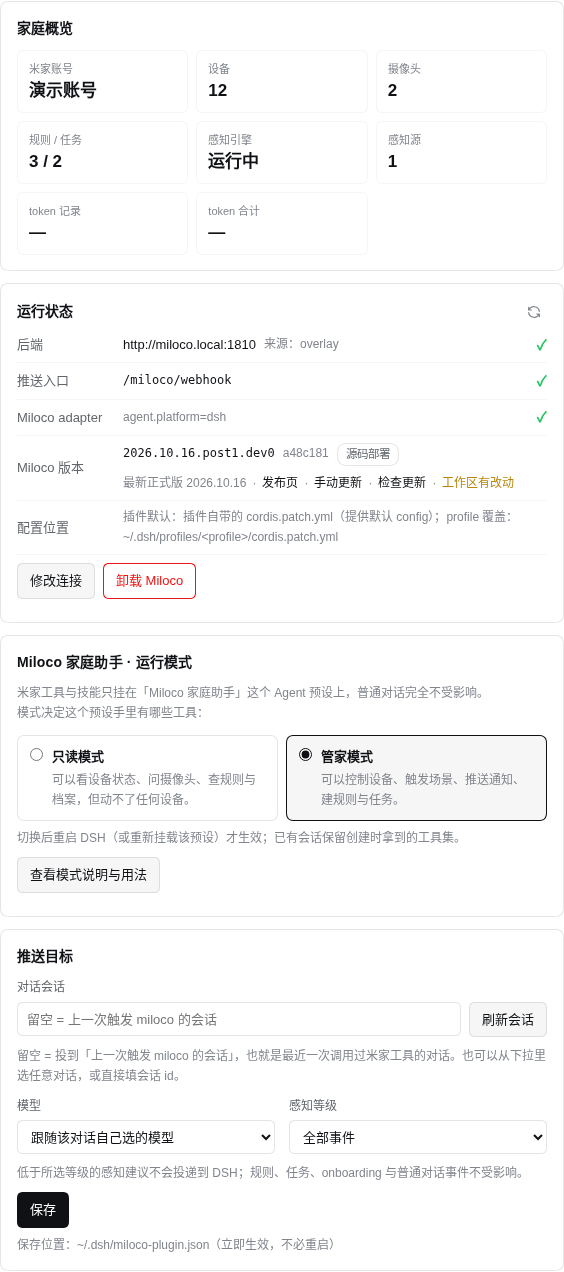 |
|
|
17
17
|
|
|
18
18
|
> 截图使用演示数据;真实账号、内网地址与 token 用量已脱敏。
|
|
19
19
|
|
|
20
20
|
## 它解决什么问题
|
|
21
21
|
|
|
22
|
-
- **Agent 隔离**:
|
|
22
|
+
- **Agent 隔离**:56 个 Miloco 工具和 18 个 Skill 只挂在专用预设「Miloco 家庭助手」上。
|
|
23
23
|
普通对话看不到 `miloco_*` 工具,也不会被注入 Miloco 技能。
|
|
24
24
|
- **完整能力**:设备、场景、感知、规则、任务、身份、宠物、家庭档案、通知、token 用量。
|
|
25
25
|
- **推送闭环**:Miloco 的感知事件、规则触发、任务到期可以主动推送到 DSH 会话。
|
|
@@ -36,11 +36,19 @@
|
|
|
36
36
|
dsh plugin --profile web add dsh-miloco-bridge
|
|
37
37
|
```
|
|
38
38
|
|
|
39
|
+
> npm 新包可能处于审核期;若上述命令暂时 404,请使用下面的源码安装。
|
|
40
|
+
|
|
41
|
+
### 源码安装(npm 审核期 / 未发布时)
|
|
42
|
+
|
|
43
|
+
```bash
|
|
44
|
+
dsh plugin --profile web add github:exa160/dsh-miloco-bridge
|
|
45
|
+
```
|
|
46
|
+
|
|
39
47
|
### 从 bundle / 本地安装
|
|
40
48
|
|
|
41
49
|
```bash
|
|
42
50
|
# 发布包
|
|
43
|
-
dsh plugin --profile web add file:dist/dsh-miloco-bridge-0.1.
|
|
51
|
+
dsh plugin --profile web add file:dist/dsh-miloco-bridge-0.1.2.tgz
|
|
44
52
|
|
|
45
53
|
# 本地开发(link)
|
|
46
54
|
./install.sh --profile web
|
|
@@ -49,7 +57,7 @@ dsh plugin --profile web add file:dist/dsh-miloco-bridge-0.1.0.tgz
|
|
|
49
57
|
### Miloco 侧 adapter
|
|
50
58
|
|
|
51
59
|
如果已安装 Miloco,`install.sh` 会自动安装 adapter、写入连接与推送令牌。
|
|
52
|
-
手动步骤、systemd、升级与卸载见 [
|
|
60
|
+
手动步骤、systemd、升级与卸载见 [docs/INSTALL.md](docs/INSTALL.md)。
|
|
53
61
|
|
|
54
62
|
安装后重启 DSH:
|
|
55
63
|
|
|
@@ -84,17 +92,17 @@ systemctl --user restart dsh-web.service
|
|
|
84
92
|
|
|
85
93
|
| 文档 | 内容 |
|
|
86
94
|
|---|---|
|
|
87
|
-
| [
|
|
88
|
-
| [
|
|
89
|
-
| [
|
|
90
|
-
| [
|
|
91
|
-
| [
|
|
95
|
+
| [docs/INSTALL.md](docs/INSTALL.md) | 安装、连接、adapter、systemd、升级/卸载、排错 |
|
|
96
|
+
| [docs/VERIFICATION.md](docs/VERIFICATION.md) | 离线测试、真实 DSH/Miloco 验证、推送与过滤验证 |
|
|
97
|
+
| [docs/ARCHITECTURE.md](docs/ARCHITECTURE.md) | 双半架构、路由、配置层、状态文件、推送协议 |
|
|
98
|
+
| [docs/SKILL-REWRITES.md](docs/SKILL-REWRITES.md) | 为什么重写 18 个 Skill、改了什么、合规边界 |
|
|
99
|
+
| [docs/TOOLS.md](docs/TOOLS.md) | 56 个工具的参数与语义 |
|
|
92
100
|
| [SECURITY.md](SECURITY.md) | 安全边界与漏洞报告 |
|
|
93
101
|
|
|
94
102
|
## 开发
|
|
95
103
|
|
|
96
104
|
```bash
|
|
97
|
-
npm test #
|
|
105
|
+
npm test # 76 项测试
|
|
98
106
|
npm run selftest # 离线自检
|
|
99
107
|
npm run verify:readonly # 真实 Miloco 只读接口
|
|
100
108
|
npm run pack:bundle # 生成 dist/*.tgz
|
package/cordis.patch.yml
CHANGED
|
@@ -53,10 +53,22 @@
|
|
|
53
53
|
minLevel: "all"
|
|
54
54
|
deploy:
|
|
55
55
|
repo: "https://github.com/XiaoMi/xiaomi-miloco"
|
|
56
|
+
# 一键部署下载官方 release install.sh,不再 clone 源码。
|
|
56
57
|
# 留空 = $DSH_HOME/plugin-data/dsh-miloco-bridge/xiaomi-miloco
|
|
57
|
-
#
|
|
58
|
+
# (release 部署不创建该目录;仅保留给旧源码部署/卸载清理)
|
|
58
59
|
sourceDir: ""
|
|
59
|
-
|
|
60
|
+
# --skip-openclaw 阻止上游安装 OpenClaw 插件;--agent-platform=openclaw
|
|
61
|
+
# 只用于通过上游非交互式平台检测,实际由 DSH adapter 接管。
|
|
62
|
+
installArgs: ["--skip-openclaw", "--agent-platform=openclaw", "--lang=zh"]
|
|
63
|
+
# 直连 GitHub 失败时按顺序尝试这些镜像(直接拼接原 URL)。
|
|
64
|
+
githubMirrors:
|
|
65
|
+
- "https://gh-proxy.com/"
|
|
66
|
+
- "https://gh-proxy.org/"
|
|
67
|
+
# release 包默认从第一个镜像下载;留空 = 自动拼接 releases/download。
|
|
68
|
+
downloadSite: ""
|
|
69
|
+
# 额外的 uv 索引,不覆盖用户默认索引;PyPI 带 upload-time 元数据,
|
|
70
|
+
# 部分国内镜像缺少该元数据会触发安装器 exclude-newer 解析失败。
|
|
71
|
+
uvIndex: "https://pypi.org/simple"
|
|
60
72
|
# 设置页里不展示任何「DSH 默认模型」配置项。模型下拉只有
|
|
61
73
|
# 「跟随该对话」+ 实际模型;不选模型就完全不动会话的模型选择。
|
|
62
74
|
# ------------------------------------------------------------------
|
|
@@ -68,9 +80,7 @@
|
|
|
68
80
|
id: miloco
|
|
69
81
|
name: Miloco 家庭助手
|
|
70
82
|
description: >-
|
|
71
|
-
|
|
72
|
-
米家工具与技能只在这个预设里;新建会话时选择它。
|
|
73
|
-
模式说明与使用示例见「设置 → 插件 → Miloco」。
|
|
83
|
+
家里的全屋智能管家:米家工具与技能隔离在这个预设中,能看设备、问摄像头、查档案与用量。
|
|
74
84
|
order: 30
|
|
75
85
|
plugins:
|
|
76
86
|
- id: dsh-miloco-bridge-tools
|
|
@@ -85,3 +95,68 @@
|
|
|
85
95
|
overlayFile: ""
|
|
86
96
|
stateFile: ""
|
|
87
97
|
cwd: ""
|
|
98
|
+
# 保留标准 DSH Agent 的工具面;子插件只在 miloco 预设内生效。
|
|
99
|
+
- id: tool-bash
|
|
100
|
+
name: '@deepseek-ai/dsh-tool-bash'
|
|
101
|
+
disabled: !!js process.platform === 'win32'
|
|
102
|
+
- id: tool-pwsh
|
|
103
|
+
name: '@deepseek-ai/dsh-tool-pwsh'
|
|
104
|
+
disabled: !!js process.platform !== 'win32'
|
|
105
|
+
- id: tool-fs
|
|
106
|
+
name: '@deepseek-ai/dsh-tool-fs'
|
|
107
|
+
- id: tool-fs-search
|
|
108
|
+
name: '@deepseek-ai/dsh-tool-fs-search'
|
|
109
|
+
config:
|
|
110
|
+
sampleOverCapGlobResults: false
|
|
111
|
+
- id: tool-jobs
|
|
112
|
+
name: '@deepseek-ai/dsh-tool-jobs'
|
|
113
|
+
- id: tool-schedule
|
|
114
|
+
name: '@deepseek-ai/dsh-tool-schedule'
|
|
115
|
+
- id: skill-filesystem
|
|
116
|
+
name: '@deepseek-ai/dsh-skill-filesystem'
|
|
117
|
+
- id: tool-skill
|
|
118
|
+
name: '@deepseek-ai/dsh-tool-skill'
|
|
119
|
+
- id: command-goal
|
|
120
|
+
name: '@deepseek-ai/dsh-command-goal'
|
|
121
|
+
- id: tool-goal
|
|
122
|
+
name: '@deepseek-ai/dsh-tool-goal'
|
|
123
|
+
- id: tool-ask-user
|
|
124
|
+
name: '@deepseek-ai/dsh-tool-ask-user'
|
|
125
|
+
- id: tool-todo
|
|
126
|
+
name: '@deepseek-ai/dsh-tool-todo'
|
|
127
|
+
config:
|
|
128
|
+
allowParallelInProgress: true
|
|
129
|
+
- id: tool-web
|
|
130
|
+
name: '@deepseek-ai/dsh-tool-web'
|
|
131
|
+
config:
|
|
132
|
+
fetch: true
|
|
133
|
+
searchTimeoutMs: 60000
|
|
134
|
+
- id: present
|
|
135
|
+
name: '@deepseek-ai/dsh-tool-present'
|
|
136
|
+
- id: delegation
|
|
137
|
+
name: cordis:group
|
|
138
|
+
group: true
|
|
139
|
+
isolate:
|
|
140
|
+
workflowEngine: true
|
|
141
|
+
config:
|
|
142
|
+
- id: tool-subagent-control
|
|
143
|
+
name: '@deepseek-ai/dsh-tool-subagent-control'
|
|
144
|
+
- id: tool-subagent-list-agents
|
|
145
|
+
name: '@deepseek-ai/dsh-tool-subagent-control/list-agents'
|
|
146
|
+
- id: tool-subagent
|
|
147
|
+
name: '@deepseek-ai/dsh-tool-subagent'
|
|
148
|
+
config:
|
|
149
|
+
provider: spawn
|
|
150
|
+
toolName: subagent
|
|
151
|
+
modelSelectionSettings: true
|
|
152
|
+
- id: tool-subagent-fork
|
|
153
|
+
name: '@deepseek-ai/dsh-tool-subagent'
|
|
154
|
+
config:
|
|
155
|
+
provider: fork
|
|
156
|
+
toolName: subagent_fork
|
|
157
|
+
- id: workflow-ptc
|
|
158
|
+
name: '@deepseek-ai/dsh-workflow-ptc'
|
|
159
|
+
config:
|
|
160
|
+
provider: spawn
|
|
161
|
+
- id: tool-workflow
|
|
162
|
+
name: '@deepseek-ai/dsh-tool-workflow'
|
|
@@ -14,7 +14,7 @@ DSH Host
|
|
|
14
14
|
│ └─ 浏览器设置页
|
|
15
15
|
└── preset「miloco」
|
|
16
16
|
└── dsh-miloco-bridge/tools
|
|
17
|
-
├─ 30 只读 +
|
|
17
|
+
├─ 30 只读 + 26 写 + dsh_deliver_message
|
|
18
18
|
└─ 18 Skill
|
|
19
19
|
```
|
|
20
20
|
|
|
@@ -31,12 +31,12 @@ DSH Host
|
|
|
31
31
|
lib/
|
|
32
32
|
├── index.js 全局半边:webhook + 设置 API 的装配
|
|
33
33
|
├── tools-entry.js 预设半边:工具/技能/投递工具的装配
|
|
34
|
-
├── tools.js
|
|
34
|
+
├── tools.js 56 个原生工具定义
|
|
35
35
|
├── skills.js SKILL.md 读取与 ctx.skills.register
|
|
36
36
|
├── miloco-client.js Miloco HTTP 客户端(连接优先级、envelope 解包)
|
|
37
37
|
├── push.js 入站推送:鉴权、目标解析、会话恢复、等待 turn
|
|
38
38
|
├── settings-api.js 设置 API 路由
|
|
39
|
-
├── deploy.js 一键部署(启动已有 /
|
|
39
|
+
├── deploy.js 一键部署(启动已有 / 下载 release 安装器 / 写 adapter)
|
|
40
40
|
├── uninstall.js 卸载 Miloco(停服务 / 移除 adapter / 可选删数据或源码)
|
|
41
41
|
├── perception.js 感知事件优先级解析与阈值过滤
|
|
42
42
|
├── client.js 浏览器设置页(无构建步骤)
|
|
@@ -194,13 +194,20 @@ push.perception.minLevel = all | low | medium | high
|
|
|
194
194
|
|
|
195
195
|
1. 健康检查 `127.0.0.1:1810`;
|
|
196
196
|
2. 已装 Miloco → `miloco-cli service start`;
|
|
197
|
-
3. 未装 →
|
|
198
|
-
4.
|
|
197
|
+
3. 未装 → 下载官方 release `install.sh`(直连失败时走 GitHub 镜像);
|
|
198
|
+
4. 以 headless agent 模式运行 `install.sh --agent-prepare` + `--agent-finish`
|
|
199
|
+
(`--skip-openclaw --agent-platform=openclaw --lang=zh`);
|
|
199
200
|
5. 启动服务并等待健康;
|
|
200
201
|
6. 安装 adapter,写令牌;
|
|
201
202
|
7. 写 overlay 的连接与推送令牌。
|
|
202
203
|
|
|
203
|
-
所有子进程用 `spawn(command, args)`,不做 shell
|
|
204
|
+
所有子进程用 `spawn(command, args)`,不做 shell 字符串拼接。
|
|
205
|
+
`--agent-platform=openclaw` 只用于通过上游平台的非交互检测,
|
|
206
|
+
`--skip-openclaw` 保证不安装 OpenClaw 插件,实际由 DSH adapter 接管。
|
|
207
|
+
|
|
208
|
+
镜像模式的一键升级复用同一 release 安装器:下载 → `--agent-prepare` →
|
|
209
|
+
`--agent-finish` → 启动服务 → 写 adapter/webhook。升级状态与日志独立于部署,
|
|
210
|
+
日志在 `$MILOCO_HOME/log/dsh-miloco-upgrade.log`;命令参数和子进程输出都会脱敏。
|
|
204
211
|
|
|
205
212
|
## 9. 安全边界
|
|
206
213
|
|
package/{doc → docs}/INSTALL.md
RENAMED
|
@@ -26,18 +26,21 @@ cd /path/to/dsh-miloco-bridge
|
|
|
26
26
|
dsh plugin --profile web add "link:/path/to/dsh-miloco-bridge"
|
|
27
27
|
```
|
|
28
28
|
|
|
29
|
+
npm 新包可能处于审核期;若 `dsh plugin add dsh-miloco-bridge` 暂时 404,
|
|
30
|
+
可改用 `dsh plugin --profile web add github:exa160/dsh-miloco-bridge`。
|
|
31
|
+
|
|
29
32
|
### 1.2 打包后安装(发布)
|
|
30
33
|
|
|
31
34
|
```bash
|
|
32
35
|
npm run pack:bundle
|
|
33
|
-
# dist/dsh-miloco-bridge-0.1.
|
|
34
|
-
dsh plugin --profile web add "file:/path/to/dist/dsh-miloco-bridge-0.1.
|
|
36
|
+
# dist/dsh-miloco-bridge-0.1.2.tgz
|
|
37
|
+
dsh plugin --profile web add "file:/path/to/dist/dsh-miloco-bridge-0.1.2.tgz"
|
|
35
38
|
```
|
|
36
39
|
|
|
37
40
|
或:
|
|
38
41
|
|
|
39
42
|
```bash
|
|
40
|
-
./install.sh --profile web --bundle dist/dsh-miloco-bridge-0.1.
|
|
43
|
+
./install.sh --profile web --bundle dist/dsh-miloco-bridge-0.1.2.tgz
|
|
41
44
|
```
|
|
42
45
|
|
|
43
46
|
### 1.3 手动配置
|
|
@@ -91,16 +94,17 @@ install.sh
|
|
|
91
94
|
3. 点「一键部署 Miloco」;
|
|
92
95
|
4. 面板会实时显示部署日志。流程:
|
|
93
96
|
- 若检测到已安装的 `miloco-cli` 与 `$MILOCO_HOME/config.json`,先尝试 `service start`;
|
|
94
|
-
-
|
|
95
|
-
|
|
96
|
-
|
|
97
|
+
- 否则下载官方 release `install.sh`(GitHub 直连失败时走 `gh-proxy.com` / `gh-proxy.org`);
|
|
98
|
+
- 以 headless agent 模式运行 `install.sh --agent-prepare --skip-openclaw --agent-platform=openclaw --lang=zh`
|
|
99
|
+
和 `install.sh --agent-finish ...`(`openclaw` 只用于通过上游平台检测,不会安装 OpenClaw 插件);
|
|
100
|
+
- 安装器使用 `UV_CACHE_DIR=$MILOCO_HOME/.uv-cache`、额外 `UV_INDEX`(默认 PyPI)
|
|
101
|
+
和镜像下载 release 包(`MILOCO_DOWNLOAD_URL`,默认第一个 GitHub 镜像);
|
|
97
102
|
- 启动后端并等待 `127.0.0.1:1810` 健康;
|
|
98
103
|
- 安装本插件的 adapter,生成/复用推送令牌,写入 overlay。
|
|
99
104
|
5. 部署完成后按面板提示绑定米家账号、开启摄像头感知。
|
|
100
105
|
|
|
101
|
-
>
|
|
102
|
-
>
|
|
103
|
-
> 或其它 DSH 进程用户不可写的路径;部署前会显式检查并给出中文错误。
|
|
106
|
+
> **MILOCO_HOME 必须可写**:默认 `~/.miloco`,部署前会显式检查并给出中文错误。
|
|
107
|
+
> release 部署不再创建源码目录;`deploy.sourceDir` 仅用于旧源码部署或卸载清理。
|
|
104
108
|
|
|
105
109
|
> 一键部署会运行上游安装器,可能安装 Python 依赖并占用较多磁盘。
|
|
106
110
|
> 请先确认你接受 Xiaomi Miloco 的许可证与资源开销。
|
|
@@ -197,7 +201,7 @@ overlay 示例:
|
|
|
197
201
|
| 模式 | 工具 |
|
|
198
202
|
|---|---|
|
|
199
203
|
| `readonly` | 30 个只读工具 + 18 技能 |
|
|
200
|
-
| `full` | 30 只读 +
|
|
204
|
+
| `full` | 30 只读 + 26 写 + `dsh_deliver_message` + 18 技能 |
|
|
201
205
|
|
|
202
206
|
模式写在状态文件里,**插件激活时读取**:
|
|
203
207
|
|
|
@@ -269,10 +273,20 @@ systemctl --user restart dsh-web.service
|
|
|
269
273
|
|
|
270
274
|
```bash
|
|
271
275
|
npm run pack:bundle
|
|
272
|
-
dsh plugin --profile web add "file:dist/dsh-miloco-bridge-0.1.
|
|
276
|
+
dsh plugin --profile web add "file:dist/dsh-miloco-bridge-0.1.2.tgz"
|
|
273
277
|
systemctl --user restart dsh-web.service
|
|
274
278
|
```
|
|
275
279
|
|
|
280
|
+
### 8.3 Miloco 版本更新
|
|
281
|
+
|
|
282
|
+
「运行状态 → 检查更新」按顺序检查:Miloco 后端 → 直连 GitHub → GitHub 镜像。
|
|
283
|
+
|
|
284
|
+
- 后端能访问 GitHub:走 Miloco 原有一键升级;
|
|
285
|
+
- 后端不可达但镜像可用:由插件下载 release 安装器并执行 headless 升级
|
|
286
|
+
(`--agent-prepare` + `--agent-finish`,继续使用 `MILOCO_HOME` 和镜像下载);
|
|
287
|
+
- 源码/dev 部署不提供一键升级;
|
|
288
|
+
- 升级过程写入 `$MILOCO_HOME/log/dsh-miloco-upgrade.log`。
|
|
289
|
+
|
|
276
290
|
卸载插件:
|
|
277
291
|
|
|
278
292
|
```bash
|
|
@@ -124,7 +124,7 @@ Xiaomi Miloco 的许可证对复制、修改、分发有明确限制。为了能
|
|
|
124
124
|
| `miloco-devices` | 设备查询/控制/场景 | `miloco_device_*`、`miloco_scene_*` |
|
|
125
125
|
| `miloco-perception` | 摄像头问答与事件回顾 | `miloco_perceive`、`miloco_perception_logs` |
|
|
126
126
|
| `miloco-perception-digest` | 感知日志摘要 | `miloco_perception_logs`、`miloco_event_list` |
|
|
127
|
-
| `miloco-create-task` | 规则/定时/统计/生命周期 | `miloco_rule_create`、`miloco_cron_create`、`miloco_task_create` |
|
|
127
|
+
| `miloco-create-task` | 规则/定时/统计/生命周期 | `miloco_rule_create`、`miloco_cron_create`、`miloco_task_create`、`miloco_task_record_init` |
|
|
128
128
|
| `miloco-terminate-task` | 终止并清理任务 | `miloco_task_delete` |
|
|
129
129
|
| `miloco-notify` | 主动通知与文案 | `miloco_notify_push`、`dsh_deliver_message` |
|
|
130
130
|
| `miloco-home-profile` | 档案查询与维护 | `miloco_home_profile*` |
|
|
@@ -153,7 +153,7 @@ Xiaomi Miloco 的许可证对复制、修改、分发有明确限制。为了能
|
|
|
153
153
|
5. 家庭档案渲染接口返回 `{markdown: "..."}`,不是 `{rendered: "..."}`。
|
|
154
154
|
|
|
155
155
|
这些坑在上游 Skill 中有的没有写、有的写成了旧接口;本仓库的 Skill 按真实接口行为编写,
|
|
156
|
-
并在 `
|
|
156
|
+
并在 `docs/TOOLS.md` 中保留说明。
|
|
157
157
|
|
|
158
158
|
---
|
|
159
159
|
|
|
@@ -162,7 +162,7 @@ Xiaomi Miloco 的许可证对复制、修改、分发有明确限制。为了能
|
|
|
162
162
|
1. 起一个**默认预设**的新会话,发一句普通问题;
|
|
163
163
|
2. 会话请求头里应有 **0 个** `miloco_*` 工具;
|
|
164
164
|
3. 起一个 **Miloco 家庭助手** 预设的新会话;
|
|
165
|
-
4. 只读模式应有 **30 个** `miloco_*` 工具;管家模式应有 **
|
|
165
|
+
4. 只读模式应有 **30 个** `miloco_*` 工具;管家模式应有 **56 个**(30 读 + 26 写 + `dsh_deliver_message`)。
|
|
166
166
|
|
|
167
167
|
如果普通会话出现 `miloco_*`,说明 preset 作用域没生效,检查 `cordis.patch.yml` 中
|
|
168
168
|
`preset-miloco` 的 `plugins` 是否指向 `dsh-miloco-bridge/tools`。
|
package/{doc → docs}/TOOLS.md
RENAMED
|
@@ -3,7 +3,7 @@
|
|
|
3
3
|
所有米家工具返回 JSON 字符串。工具只在「Miloco 家庭助手」预设的会话中可见。
|
|
4
4
|
|
|
5
5
|
- 只读模式:30 个只读工具
|
|
6
|
-
- 管家模式:30 只读 +
|
|
6
|
+
- 管家模式:30 只读 + 26 写
|
|
7
7
|
- 另有 `dsh_deliver_message`(DSH 侧投递,不碰设备)
|
|
8
8
|
|
|
9
9
|
## 只读工具(30)
|
|
@@ -12,7 +12,7 @@
|
|
|
12
12
|
|---|---|---|---|
|
|
13
13
|
| `miloco_status` | — | `/api/admin/status` + `/api/perception/engine/status` | 运行状态、账号、引擎、数据库 |
|
|
14
14
|
| `miloco_capabilities` | — | — | 当前模式与已注册工具 |
|
|
15
|
-
| `miloco_device_list` | `room
|
|
15
|
+
| `miloco_device_list` | `room?`, `name?`, `online_only?`, `limit?`, `offset?`, `include?[]` | `/api/miot/device_list` | 默认 `did/name/online/room_name/model/home_id`,默认最多 500 台;`include` 可取 `icon/local_ip/home_name/order_time/lan_online/sub_devices` |
|
|
16
16
|
| `miloco_device_spec` | `did` | `/api/miot/devices/{did}/spec` | SPEC:iid、access、枚举、范围 |
|
|
17
17
|
| `miloco_device_status` | `did`, `iid?` | `/api/miot/devices/{did}/status` | 当前属性值 |
|
|
18
18
|
| `miloco_device_history` | — | `/api/miot/device_history` | 最近访问的 iid |
|
|
@@ -41,21 +41,24 @@
|
|
|
41
41
|
| `miloco_push_target` | — | overlay | 当前推送目标与感知等级 |
|
|
42
42
|
| `miloco_push_models` | — | DSH 模型目录 | 可选模型清单 |
|
|
43
43
|
|
|
44
|
-
## 写工具(
|
|
44
|
+
## 写工具(26,仅管家模式)
|
|
45
45
|
|
|
46
46
|
| 工具 | 参数 | 说明 |
|
|
47
47
|
|---|---|---|
|
|
48
48
|
| `miloco_device_control` | `did`, `type?`, `iid?`, `value?`, `properties?[]`, `params?[]` | `set_property`(默认)/ `set_properties` / `call_action` |
|
|
49
49
|
| `miloco_scene_trigger` | `scene_id` | 触发手动场景 |
|
|
50
50
|
| `miloco_notify_push` | `notify` | 米家 App 通知 |
|
|
51
|
-
| `miloco_rule_create` | `
|
|
52
|
-
| `
|
|
51
|
+
| `miloco_rule_create` | `name`, `task_id`, `condition`, `mode?`, `direction?`, `actions?[]`, `action_descriptions?[]`, `on_enter_*?`, `on_exit_*?` | 创建结构化规则;不再接收自然语言 `content` |
|
|
52
|
+
| `miloco_rule_delete` | `rule_id` | 删除规则 |
|
|
53
|
+
| `miloco_task_create` | `task_id`, `description`, `lifecycle?`, `expires_at?` | 创建任务占位行;`task_id` 只能用小写字母/数字/下划线 |
|
|
54
|
+
| `miloco_task_record_init` | `task_id`, `kind`, `content?` | 初始化累计记录:`progress` / `duration` / `event` |
|
|
53
55
|
| `miloco_task_delete` | `task_id`, `reason` | 删除任务(`completed` / `expired` / `abandoned`) |
|
|
54
|
-
| `miloco_cron_create` | `kind`, `message`, `name?`, `cron_expr?`, `at_iso?`, `every_ms?`, `tz?`, `task_id?` |
|
|
56
|
+
| `miloco_cron_create` | `kind`, `message`, `name?`, `cron_expr?`, `at_iso?`, `every_ms?`, `tz?`, `task_id?` | 注册定时计划;`every_ms` 最小 60000 |
|
|
57
|
+
| `miloco_cron_delete` | `cron_id` | 删除定时计划 |
|
|
55
58
|
| `miloco_scope_set` | `items[]{did, in_use}` | 修改感知摄像头 |
|
|
56
|
-
| `miloco_home_profile_write` | `ops[]` | 写正式档案;`from=<candidate_id>` 消费候选 |
|
|
57
|
-
| `miloco_home_profile_candidate_write` | `ops[]` |
|
|
58
|
-
| `miloco_home_profile_commit` | — |
|
|
59
|
+
| `miloco_home_profile_write` | `ops[]`, `user_edit?` | 写正式档案;`from=<candidate_id>` 消费候选 |
|
|
60
|
+
| `miloco_home_profile_candidate_write` | `ops[]` | 写候选档案;每个 op 必须带 `date` |
|
|
61
|
+
| `miloco_home_profile_commit` | — | 清理/归档/渲染(无请求体) |
|
|
59
62
|
| `miloco_home_profile_reassign` | `mappings[]` | 主体归并/名称归一 |
|
|
60
63
|
| `miloco_person_create` | `name`, `role?` | 新增成员花名册 |
|
|
61
64
|
| `miloco_person_update` | `person_id`, `name?`, `role?` | 修改成员 |
|
|
@@ -64,7 +67,7 @@
|
|
|
64
67
|
| `miloco_pet_update` | `pet_id`, `name?`, `species?` | 修改宠物 |
|
|
65
68
|
| `miloco_pet_delete` | `pet_id` | 删除宠物 |
|
|
66
69
|
| `miloco_pet_observe` | `files[]`, `grounding?` | 观察宠物外观(不落库) |
|
|
67
|
-
| `miloco_pet_reference_crops` | `pet_id`, `files[]` |
|
|
70
|
+
| `miloco_pet_reference_crops` | `pet_id`, `files[]`, `mode?` | 落库参照图;multipart 字段为 `crops` |
|
|
68
71
|
| `miloco_register_preview` | `media_b64?`, `media_b64_list?`, `media_kind?`, `cluster_id?`, `member_id?`, `topk?` | 身份样本预览 |
|
|
69
72
|
| `miloco_register_commit` | `register_session_id_pending`, `indices?`, `member_name?`, `member_role?` | 身份样本落库 |
|
|
70
73
|
| `miloco_push_target_set` | `sessionId?`, `provider?`, `model?`, `reasoningEffort?`, `perceptionLevel?` | 修改推送目标与感知等级 |
|
|
@@ -22,7 +22,7 @@ python3 -m py_compile adapter/dsh_adapter.py
|
|
|
22
22
|
覆盖:
|
|
23
23
|
|
|
24
24
|
- 连接/overlay/state 的路径与权限(`0600`);
|
|
25
|
-
- 只读 30 工具、管家
|
|
25
|
+
- 只读 30 工具、管家 56 工具;
|
|
26
26
|
- 推送目标:上次会话 / 显式会话 / 派生会话 / 模型留空不调 `selectModel`;
|
|
27
27
|
- 感知过滤:结构化 urgency、文本“事件优先级”、批量取最高、ignore、阈值比较;
|
|
28
28
|
- webhook:无令牌 503、错令牌 401、正确令牌通过、幂等、turn 等待;
|
|
@@ -144,6 +144,21 @@ node tools/verify-readonly.mjs
|
|
|
144
144
|
真实环境结果(2026-10-28):24/24 接口通过;账号已绑定、感知引擎运行中。
|
|
145
145
|
账号昵称、设备数量与 token 用量属于家庭隐私,已脱敏,不在仓库中列出。
|
|
146
146
|
|
|
147
|
+
### 3.1 写接口契约审计
|
|
148
|
+
|
|
149
|
+
从运行中的 Miloco 读取 `/openapi.json`,用 stub client 执行全部 56 个工具
|
|
150
|
+
(其中 52 个会发 HTTP 请求),逐项比对 method / path / query / body 与 OpenAPI
|
|
151
|
+
schema(required、additionalProperties、enum)。所有 HTTP 工具的路径与方法都存在;本轮修复了:
|
|
152
|
+
|
|
153
|
+
- `POST /api/tasks` 的 v2 契约(`task_id` + `description`,不再接受 `kind/content/name`)
|
|
154
|
+
- 新增 `POST /api/tasks/{id}/record` 的 `miloco_task_record_init`
|
|
155
|
+
- `POST /api/rules` 改为结构化 `condition/actions`
|
|
156
|
+
- 设备列表的 `room` 改为本地过滤(后端没有该查询参数)
|
|
157
|
+
- `candidates:write` 强制 `date`,`commit` 去掉多余请求体
|
|
158
|
+
- 宠物参照图 multipart 字段改为 `crops`
|
|
159
|
+
|
|
160
|
+
对应的离线契约测试见 `test/tools-contract.test.js`。真实写操作仍未在家庭设备上执行。
|
|
161
|
+
|
|
147
162
|
---
|
|
148
163
|
|
|
149
164
|
## 4. 推送闭环验证
|
|
@@ -192,7 +207,7 @@ dsh-miloco-bridge: push delivery failed ... # 仅在失败时
|
|
|
192
207
|
2. 查看该会话的请求头/工具列表:不应出现任何 `miloco_*`;
|
|
193
208
|
3. 新建一个 **Miloco 家庭助手** 会话:
|
|
194
209
|
- 只读模式:30 个 `miloco_*`;
|
|
195
|
-
- 管家模式:
|
|
210
|
+
- 管家模式:56 个 `miloco_*` + `dsh_deliver_message`。
|
|
196
211
|
|
|
197
212
|
如果标准会话出现 `miloco_*`,检查 `preset-miloco` 是否被正确装载。
|
|
198
213
|
|
|
@@ -205,17 +220,17 @@ dsh-miloco-bridge: push delivery failed ... # 仅在失败时
|
|
|
205
220
|
|
|
206
221
|
```bash
|
|
207
222
|
npm run pack:bundle
|
|
208
|
-
tar -tzf dist/dsh-miloco-bridge-0.1.
|
|
223
|
+
tar -tzf dist/dsh-miloco-bridge-0.1.2.tgz | head -30
|
|
209
224
|
```
|
|
210
225
|
|
|
211
226
|
预期包含:`package/lib/*`、`package/skills/*/SKILL.md`、`package/adapter/dsh_adapter.py`、
|
|
212
|
-
`package/cordis.patch.yml`、`package/
|
|
227
|
+
`package/cordis.patch.yml`、`package/docs/*`,且**不含** `test/`、`node_modules/`、真实 token。
|
|
213
228
|
|
|
214
229
|
安装:
|
|
215
230
|
|
|
216
231
|
```bash
|
|
217
232
|
DSH_HOME=/tmp/dsh-miloco-bundle-verify \
|
|
218
|
-
dsh plugin --profile web add "file:$PWD/dist/dsh-miloco-bridge-0.1.
|
|
233
|
+
dsh plugin --profile web add "file:$PWD/dist/dsh-miloco-bridge-0.1.2.tgz"
|
|
219
234
|
```
|
|
220
235
|
|
|
221
236
|
---
|
|
@@ -226,4 +241,5 @@ DSH_HOME=/tmp/dsh-miloco-bundle-verify \
|
|
|
226
241
|
推送 turn 的等待/回复逻辑由离线测试覆盖。
|
|
227
242
|
- 一键部署会运行上游安装器,耗时取决于网络与 Python 依赖;本次未在干净机器上从零跑完整安装。
|
|
228
243
|
- 写操作(控制设备、建任务)没有在真实家庭上执行,避免产生物理副作用;
|
|
229
|
-
|
|
244
|
+
写工具的请求体/查询参数已按 OpenAPI 做契约测试(`test/tools-contract.test.js`),
|
|
245
|
+
但真实写入链路仍需在用户确认后用测试任务验证。
|
|
Binary file
|
|
Binary file
|