dsh-mcp-tools 1.0.0 → 1.0.1
This diff represents the content of publicly available package versions that have been released to one of the supported registries. The information contained in this diff is provided for informational purposes only and reflects changes between package versions as they appear in their respective public registries.
- package/README.en.md +19 -13
- package/README.md +18 -12
- package/package.json +3 -3
package/README.en.md
CHANGED
|
@@ -6,12 +6,15 @@
|
|
|
6
6
|
[](https://www.npmjs.com/package/dsh-mcp-tools)
|
|
7
7
|
[](LICENSE)
|
|
8
8
|
[](https://nodejs.org)
|
|
9
|
+
[](https://github.com/hxlog/dsh-mcp-tools)
|
|
10
|
+
|
|
11
|
+
[GitHub repository](https://github.com/hxlog/dsh-mcp-tools) · [npm](https://www.npmjs.com/package/dsh-mcp-tools) · [Issues](https://github.com/hxlog/dsh-mcp-tools/issues)
|
|
9
12
|
|
|
10
13
|
English | [简体中文](README.md)
|
|
11
14
|
|
|
12
|
-
Manage your MCP servers and toggle MCP tools on demand, inside
|
|
15
|
+
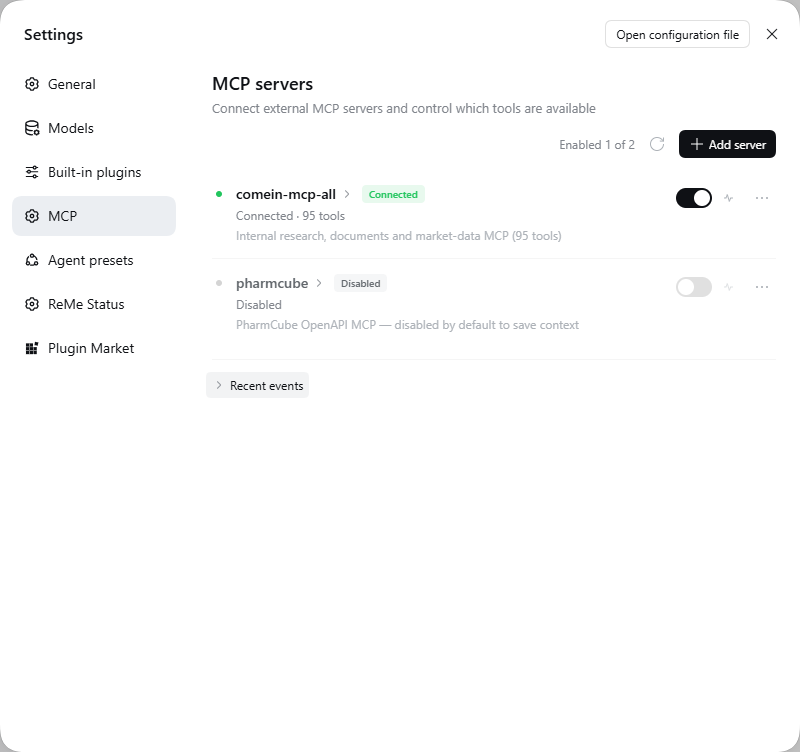
Manage your MCP servers and toggle MCP tools on demand, inside DeepSeek Harness (Web GUI or Desktop). Disabled tools **never reach the model**: no context cost, no accidental calls.
|
|
13
16
|
|
|
14
|
-

|
|
17
|
+
|
|
15
18
|
|
|
16
19
|
---
|
|
17
20
|
|
|
@@ -41,21 +44,21 @@ dsh-mcp-tools moves all of that into **Settings → MCP**:
|
|
|
41
44
|
|
|
42
45
|
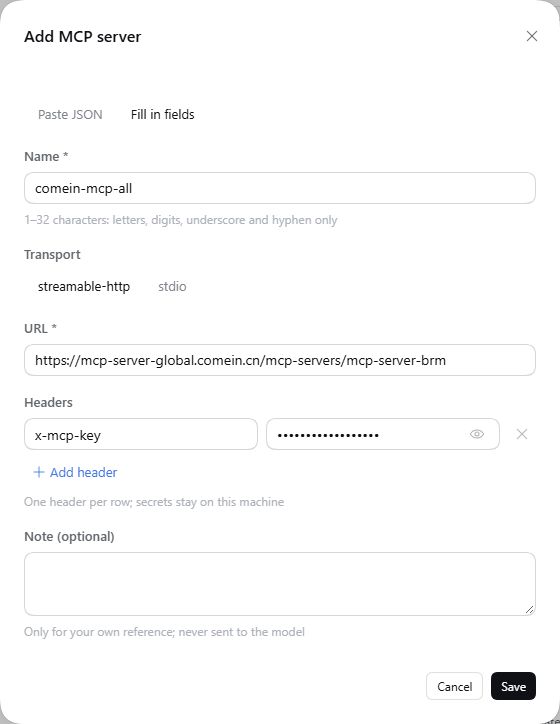
Header rows are key/value pairs, not a JSON textarea. A new server starts with an `x-mcp-key` row: paste the secret into the value column and save.
|
|
43
46
|
|
|
44
|
-

|
|
47
|
+
|
|
45
48
|
|
|
46
49
|
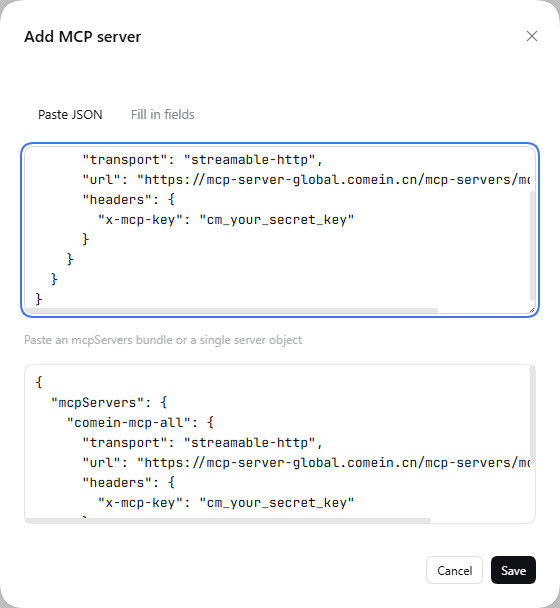
Values are masked by default and can be revealed per row. Duplicate header names are rejected inline. Prefer JSON? Switch to **Paste JSON** — it syncs name, URL, transport and headers back into the form.
|
|
47
50
|
|
|
48
|
-

|
|
51
|
+
|
|
49
52
|
|
|
50
53
|
### Real per-tool control
|
|
51
54
|
|
|
52
55
|
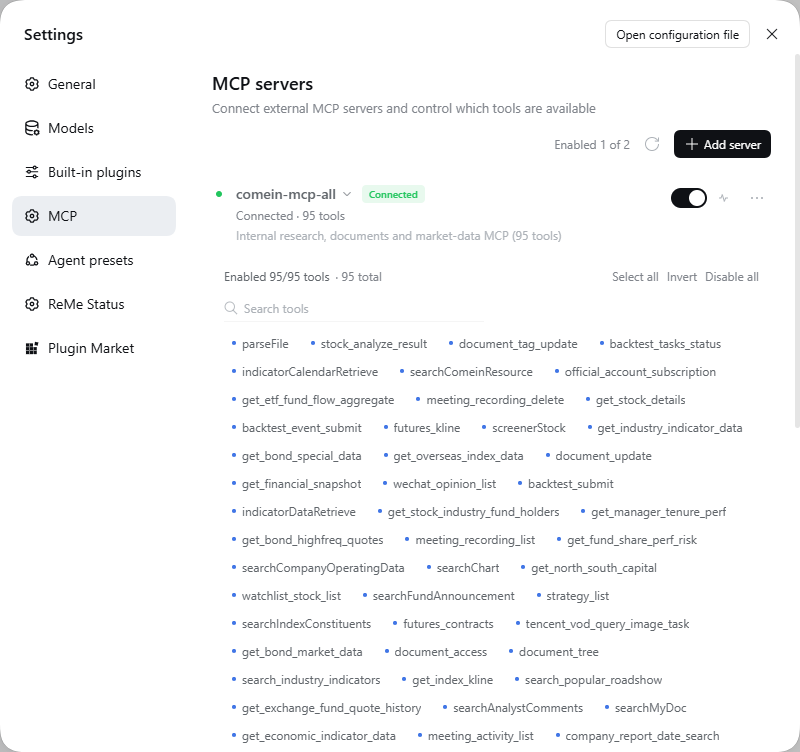
Every tool is a chip. Click to disable; the tool disappears from the model's tool list immediately (it is not registered at all). Search, select all, invert, disable all.
|
|
53
56
|
|
|
54
|
-

|
|
57
|
+
|
|
55
58
|
|
|
56
59
|
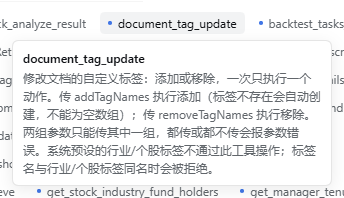
Hover a chip for its full description, even while the server is disabled.
|
|
57
60
|
|
|
58
|
-

|
|
61
|
+
|
|
59
62
|
|
|
60
63
|
### Connectivity test and event log
|
|
61
64
|
|
|
@@ -67,19 +70,21 @@ Same design tokens (`--dsw-*`), same flat rows, same 32px inputs as DSH itself.
|
|
|
67
70
|
|
|
68
71
|
See it in dark mode:
|
|
69
72
|
|
|
70
|
-

|
|
73
|
+

|
|
71
74
|
|
|
72
|
-

|
|
75
|
+

|
|
73
76
|
|
|
74
77
|
---
|
|
75
78
|
|
|
76
79
|
## Install
|
|
77
80
|
|
|
78
|
-
Requires **DeepSeek Harness 0.2.x**
|
|
81
|
+
Requires **DeepSeek Harness 0.2.x** (Web GUI `dsh web` or DSH Desktop) and **Node.js ≥ 22.13**. Published on npm as [dsh-mcp-tools](https://www.npmjs.com/package/dsh-mcp-tools) `1.0.1`.
|
|
82
|
+
|
|
83
|
+
> ⚠️ This is a **DeepSeek Harness plugin**, not a plain npm library. `npm i dsh-mcp-tools` only downloads the package; it still has to be installed into a DSH profile as described below.
|
|
79
84
|
|
|
80
85
|
### From the Plugins page (recommended)
|
|
81
86
|
|
|
82
|
-
1. Open
|
|
87
|
+
1. Open DSH Web (or DSH Desktop) → **Plugins** in the sidebar (Desktop: **Settings → Plugins**).
|
|
83
88
|
2. Choose **Install**, enter `dsh-mcp-tools`, and confirm.
|
|
84
89
|
3. Enable the new bundle, then refresh the page once.
|
|
85
90
|
4. Open **Settings → MCP**.
|
|
@@ -87,12 +92,13 @@ Requires **DeepSeek Harness 0.2.x** with the Web GUI (`dsh web`) and **Node.js
|
|
|
87
92
|
### From the CLI
|
|
88
93
|
|
|
89
94
|
```bash
|
|
90
|
-
dsh plugin --profile web add dsh-mcp-tools
|
|
95
|
+
dsh plugin --profile web add dsh-mcp-tools # Web
|
|
96
|
+
dsh plugin --profile desktop add dsh-mcp-tools # Desktop
|
|
91
97
|
```
|
|
92
98
|
|
|
93
|
-
|
|
99
|
+
The command installs from npm and records the bundle in that profile's `dsh.profile.bundles`. If the Plugins page does not show it, enable the bundle once; if the section still does not appear, restart `dsh web`.
|
|
94
100
|
|
|
95
|
-
> Upgrading the package requires a restart of `dsh web` to load the new host module generation.
|
|
101
|
+
> Upgrading the package requires a restart of `dsh web` (or reopening DSH Desktop) to load the new host module generation.
|
|
96
102
|
|
|
97
103
|
---
|
|
98
104
|
|
package/README.md
CHANGED
|
@@ -6,12 +6,15 @@
|
|
|
6
6
|
[](https://www.npmjs.com/package/dsh-mcp-tools)
|
|
7
7
|
[](LICENSE)
|
|
8
8
|
[](https://nodejs.org)
|
|
9
|
+
[](https://github.com/hxlog/dsh-mcp-tools)
|
|
10
|
+
|
|
11
|
+
[GitHub 仓库](https://github.com/hxlog/dsh-mcp-tools) · [npm](https://www.npmjs.com/package/dsh-mcp-tools) · [问题反馈](https://github.com/hxlog/dsh-mcp-tools/issues)
|
|
9
12
|
|
|
10
13
|
[English](README.en.md) | 简体中文
|
|
11
14
|
|
|
12
15
|
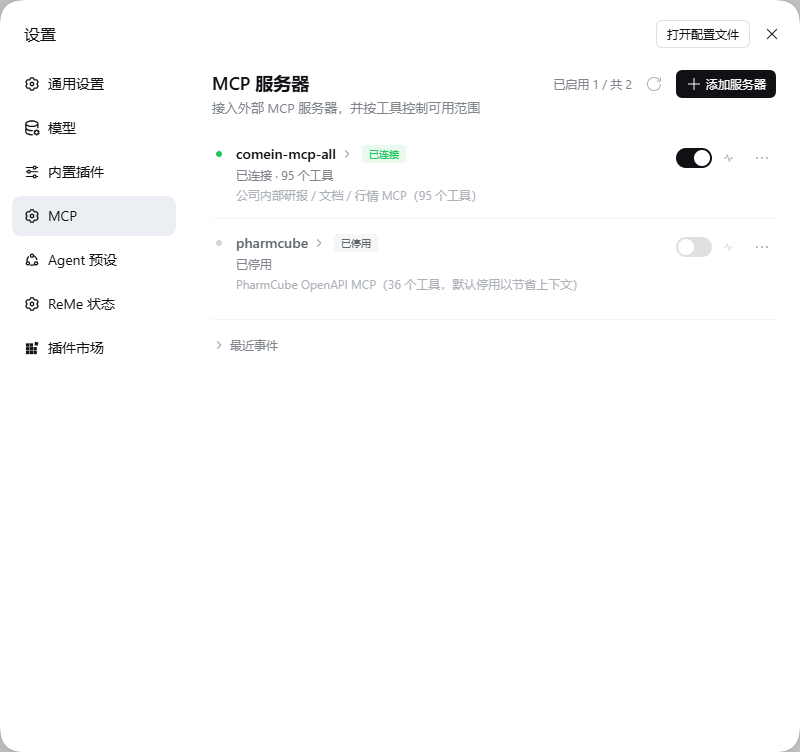
管理用户的 MCP Server,按需开关 MCP Tools。被停用的工具**不会注册进模型**,既不占上下文,也无法被误调用。
|
|
13
16
|
|
|
14
|
-

|
|
17
|
+
|
|
15
18
|
|
|
16
19
|
---
|
|
17
20
|
|
|
@@ -41,21 +44,21 @@ dsh-mcp-tools 把这些搬进了 **设置 → MCP**:
|
|
|
41
44
|
|
|
42
45
|
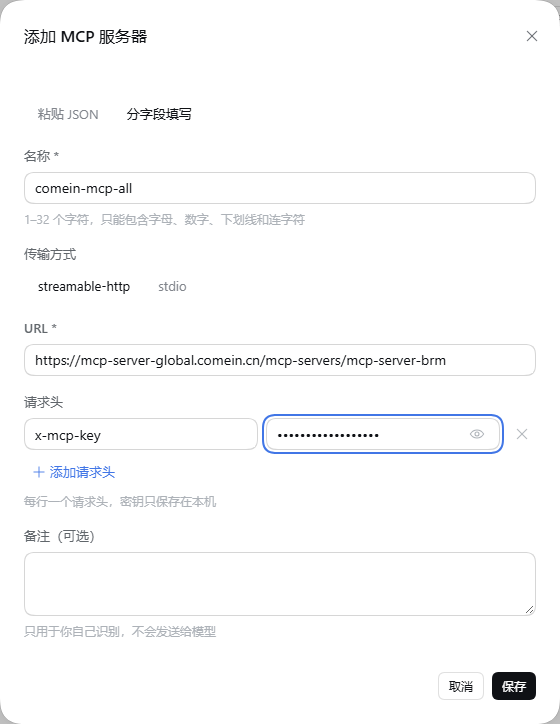
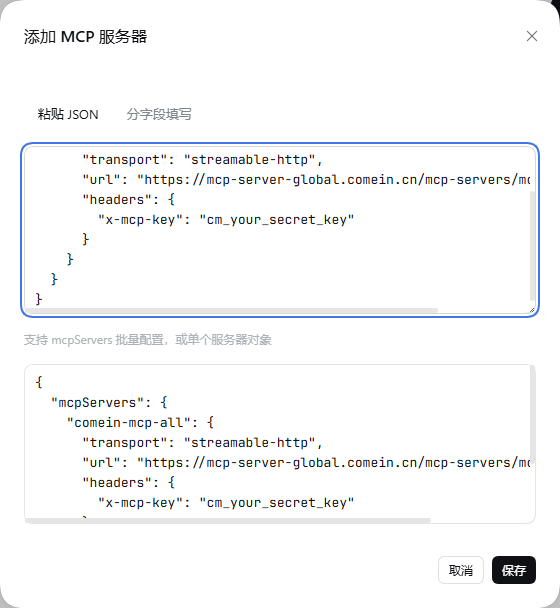
请求头是键值对行,而不是 JSON 文本框。新服务器默认带一行 `x-mcp-key`,把密钥粘进「值」即可保存。
|
|
43
46
|
|
|
44
|
-

|
|
47
|
+
|
|
45
48
|
|
|
46
49
|
值默认掩码显示,可逐行切换显示;名称重复会就地报错。也可以切到「粘贴 JSON」——解析后会把名称、URL、传输方式和请求头同步回表单。
|
|
47
50
|
|
|
48
|
-

|
|
51
|
+
|
|
49
52
|
|
|
50
53
|
### 真正的逐工具控制
|
|
51
54
|
|
|
52
55
|
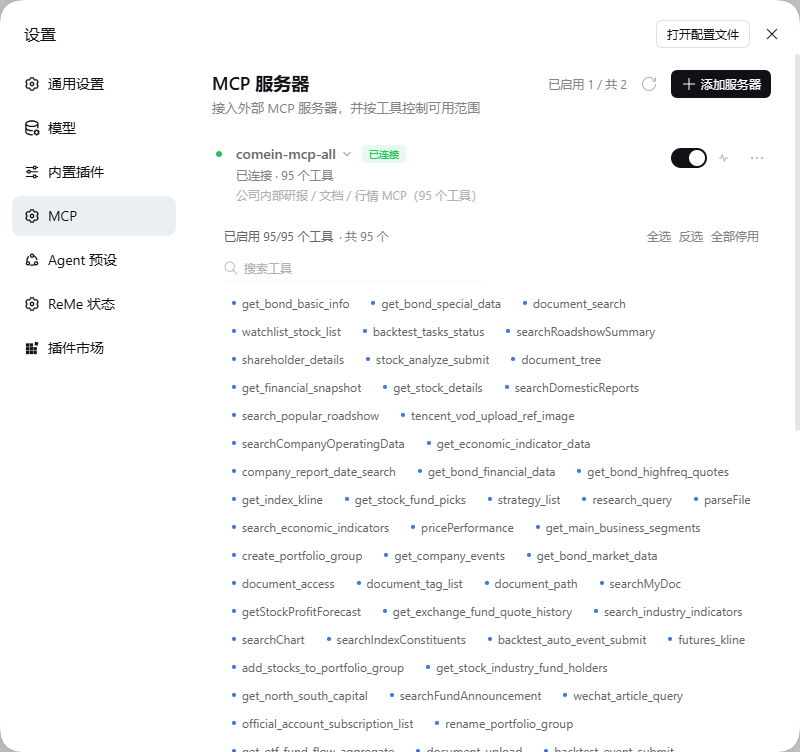
每个工具是一个 chip。点击即停用,工具会立刻从模型工具列表中消失(不是注册了再报错)。支持搜索、全选、反选、全部停用。
|
|
53
56
|
|
|
54
|
-

|
|
57
|
+
|
|
55
58
|
|
|
56
59
|
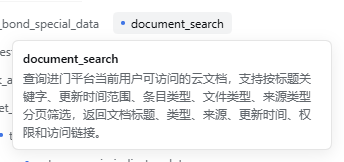
悬停 chip 可查看完整描述,服务器停用时也能看。
|
|
57
60
|
|
|
58
|
-

|
|
61
|
+
|
|
59
62
|
|
|
60
63
|
### 连通性测试与事件日志
|
|
61
64
|
|
|
@@ -67,21 +70,23 @@ dsh-mcp-tools 把这些搬进了 **设置 → MCP**:
|
|
|
67
70
|
|
|
68
71
|
深色模式:
|
|
69
72
|
|
|
70
|
-

|
|
73
|
+

|
|
71
74
|
|
|
72
75
|
停用部分工具:
|
|
73
76
|
|
|
74
|
-

|
|
77
|
+

|
|
75
78
|
|
|
76
79
|
---
|
|
77
80
|
|
|
78
81
|
## 安装
|
|
79
82
|
|
|
80
|
-
需要 **DeepSeek Harness 0.2.x**(Web GUI
|
|
83
|
+
需要 **DeepSeek Harness 0.2.x**(Web GUI `dsh web` 或 DSH Desktop)与 **Node.js ≥ 22.13**。包已发布到 npm:[dsh-mcp-tools](https://www.npmjs.com/package/dsh-mcp-tools) `1.0.1`。
|
|
84
|
+
|
|
85
|
+
> ⚠️ 这是一个 **DeepSeek Harness 插件**,不是普通 npm 依赖库。`npm i dsh-mcp-tools` 只会下载包,运行时仍要通过下面的方式装进 DSH profile。
|
|
81
86
|
|
|
82
87
|
### 通过插件页安装(推荐)
|
|
83
88
|
|
|
84
|
-
1. 打开 DSH Web
|
|
89
|
+
1. 打开 DSH Web(或 DSH Desktop)→ 侧边栏 **插件**(Desktop 在 **设置 → 插件**)。
|
|
85
90
|
2. 点击安装,填入 `dsh-mcp-tools`,确认。
|
|
86
91
|
3. 启用新 bundle,然后刷新一次页面。
|
|
87
92
|
4. 打开 **设置 → MCP**。
|
|
@@ -89,12 +94,13 @@ dsh-mcp-tools 把这些搬进了 **设置 → MCP**:
|
|
|
89
94
|
### 通过命令行安装
|
|
90
95
|
|
|
91
96
|
```bash
|
|
92
|
-
dsh plugin --profile web add dsh-mcp-tools
|
|
97
|
+
dsh plugin --profile web add dsh-mcp-tools # Web
|
|
98
|
+
dsh plugin --profile desktop add dsh-mcp-tools # Desktop
|
|
93
99
|
```
|
|
94
100
|
|
|
95
|
-
|
|
101
|
+
命令会从 npm 安装并写入该 profile 的 `dsh.profile.bundles`。若插件页未出现,启用一次该 bundle;分区仍未出现就重启 `dsh web`。
|
|
96
102
|
|
|
97
|
-
> 升级包版本后需要重启 `dsh web
|
|
103
|
+
> 升级包版本后需要重启 `dsh web` / 重开 DSH Desktop,才会加载新的 host 模块。
|
|
98
104
|
|
|
99
105
|
---
|
|
100
106
|
|
package/package.json
CHANGED
|
@@ -1,8 +1,8 @@
|
|
|
1
1
|
{
|
|
2
2
|
"name": "dsh-mcp-tools",
|
|
3
|
-
"version": "1.0.
|
|
3
|
+
"version": "1.0.1",
|
|
4
4
|
"type": "module",
|
|
5
|
-
"description": "Manage your MCP servers and toggle MCP tools on demand
|
|
5
|
+
"description": "Manage your MCP servers and toggle MCP tools on demand inside DeepSeek Harness settings",
|
|
6
6
|
"icon": "icon.svg",
|
|
7
7
|
"main": "./lib/index.js",
|
|
8
8
|
"exports": {
|
|
@@ -51,7 +51,7 @@
|
|
|
51
51
|
},
|
|
52
52
|
"license": "MIT",
|
|
53
53
|
"author": "Xingyu Liu <xingyuliu@outlook.sg>",
|
|
54
|
-
"homepage": "https://github.com/hxlog/dsh-mcp-tools
|
|
54
|
+
"homepage": "https://github.com/hxlog/dsh-mcp-tools",
|
|
55
55
|
"repository": {
|
|
56
56
|
"type": "git",
|
|
57
57
|
"url": "git+https://github.com/hxlog/dsh-mcp-tools.git"
|