dsh-mcp-tools 0.0.0-stage → 1.0.1
This diff represents the content of publicly available package versions that have been released to one of the supported registries. The information contained in this diff is provided for informational purposes only and reflects changes between package versions as they appear in their respective public registries.
- package/LICENSE +21 -0
- package/README.en.md +187 -0
- package/README.md +188 -2
- package/client/client.js +3099 -0
- package/cordis.patch.yml +6 -0
- package/docs/screenshots/en/mcp-add-server.png +0 -0
- package/docs/screenshots/en/mcp-dark.png +0 -0
- package/docs/screenshots/en/mcp-json-import.png +0 -0
- package/docs/screenshots/en/mcp-overview.png +0 -0
- package/docs/screenshots/en/mcp-tool-toggles.png +0 -0
- package/docs/screenshots/en/mcp-tools.png +0 -0
- package/docs/screenshots/en/mcp-tooltip.png +0 -0
- package/docs/screenshots/zh/mcp-add-server.png +0 -0
- package/docs/screenshots/zh/mcp-connectivity.png +0 -0
- package/docs/screenshots/zh/mcp-dark.png +0 -0
- package/docs/screenshots/zh/mcp-json-import.png +0 -0
- package/docs/screenshots/zh/mcp-overview.png +0 -0
- package/docs/screenshots/zh/mcp-tool-toggles.png +0 -0
- package/docs/screenshots/zh/mcp-tools.png +0 -0
- package/docs/screenshots/zh/mcp-tooltip.png +0 -0
- package/icon.svg +13 -0
- package/lib/index.js +37 -0
- package/lib/manager.js +738 -0
- package/lib/profile-modules.js +98 -0
- package/lib/routes.js +131 -0
- package/lib/store.js +277 -0
- package/lib/toolname.js +25 -0
- package/locale/en.json +6 -0
- package/locale/zh.json +6 -0
- package/package.json +74 -4
- package/scripts/selftest.mjs +117 -0
- package/scripts/smoke.mjs +79 -0
package/LICENSE
ADDED
|
@@ -0,0 +1,21 @@
|
|
|
1
|
+
MIT License
|
|
2
|
+
|
|
3
|
+
Copyright (c) 2026 dsh-mcp-workbench contributors
|
|
4
|
+
|
|
5
|
+
Permission is hereby granted, free of charge, to any person obtaining a copy
|
|
6
|
+
of this software and associated documentation files (the "Software"), to deal
|
|
7
|
+
in the Software without restriction, including without limitation the rights
|
|
8
|
+
to use, copy, modify, merge, publish, distribute, sublicense, and/or sell
|
|
9
|
+
copies of the Software, and to permit persons to whom the Software is
|
|
10
|
+
furnished to do so, subject to the following conditions:
|
|
11
|
+
|
|
12
|
+
The above copyright notice and this permission notice shall be included in all
|
|
13
|
+
copies or substantial portions of the Software.
|
|
14
|
+
|
|
15
|
+
THE SOFTWARE IS PROVIDED "AS IS", WITHOUT WARRANTY OF ANY KIND, EXPRESS OR
|
|
16
|
+
IMPLIED, INCLUDING BUT NOT LIMITED TO THE WARRANTIES OF MERCHANTABILITY,
|
|
17
|
+
FITNESS FOR A PARTICULAR PURPOSE AND NONINFRINGEMENT. IN NO EVENT SHALL THE
|
|
18
|
+
AUTHORS OR COPYRIGHT HOLDERS BE LIABLE FOR ANY CLAIM, DAMAGES OR OTHER
|
|
19
|
+
LIABILITY, WHETHER IN AN ACTION OF CONTRACT, TORT OR OTHERWISE, ARISING FROM,
|
|
20
|
+
OUT OF OR IN CONNECTION WITH THE SOFTWARE OR THE USE OR OTHER DEALINGS IN THE
|
|
21
|
+
SOFTWARE.
|
package/README.en.md
ADDED
|
@@ -0,0 +1,187 @@
|
|
|
1
|
+
# dsh-mcp-tools
|
|
2
|
+
|
|
3
|
+
**The most minimal, elegant MCP tool manager for DeepSeek Harness.**
|
|
4
|
+
|
|
5
|
+
[](https://www.npmjs.com/package/dsh-mcp-tools)
|
|
6
|
+
[](https://www.npmjs.com/package/dsh-mcp-tools)
|
|
7
|
+
[](LICENSE)
|
|
8
|
+
[](https://nodejs.org)
|
|
9
|
+
[](https://github.com/hxlog/dsh-mcp-tools)
|
|
10
|
+
|
|
11
|
+
[GitHub repository](https://github.com/hxlog/dsh-mcp-tools) · [npm](https://www.npmjs.com/package/dsh-mcp-tools) · [Issues](https://github.com/hxlog/dsh-mcp-tools/issues)
|
|
12
|
+
|
|
13
|
+
English | [简体中文](README.md)
|
|
14
|
+
|
|
15
|
+
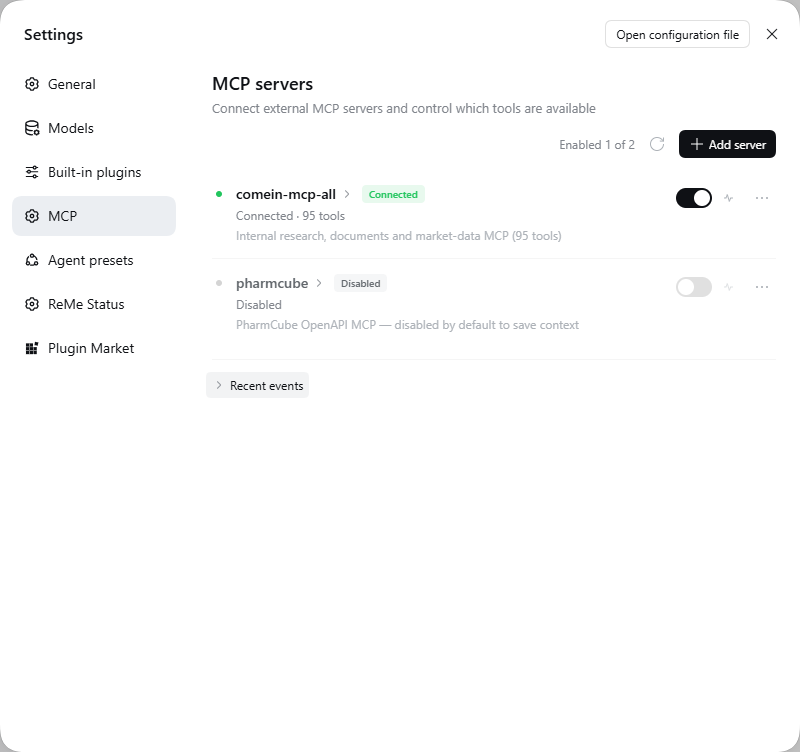
Manage your MCP servers and toggle MCP tools on demand, inside DeepSeek Harness (Web GUI or Desktop). Disabled tools **never reach the model**: no context cost, no accidental calls.
|
|
16
|
+
|
|
17
|
+
|
|
18
|
+
|
|
19
|
+
---
|
|
20
|
+
|
|
21
|
+
## Why this exists
|
|
22
|
+
|
|
23
|
+
MCP servers are great until a single "all-in-one" server drops 95 tools into every request. DSH's native configuration is a YAML/JSON file: editing it means restarting or recomposing the profile, and there is no way to say *"keep this server, but give the model only 12 of its tools."*
|
|
24
|
+
|
|
25
|
+
dsh-mcp-tools moves all of that into **Settings → MCP**:
|
|
26
|
+
|
|
27
|
+
- add, edit, disable and delete servers without touching config files;
|
|
28
|
+
- paste secrets as Postman-style key/value headers (headers stay on your machine);
|
|
29
|
+
- verify connectivity and see the tool count before enabling anything;
|
|
30
|
+
- toggle tools per server, with search, select-all, invert and disable-all.
|
|
31
|
+
|
|
32
|
+
---
|
|
33
|
+
|
|
34
|
+
## Features
|
|
35
|
+
|
|
36
|
+
### Server management
|
|
37
|
+
|
|
38
|
+
- **Two transports**: `streamable-http` (URL + headers) and `stdio` (command, args, env, cwd).
|
|
39
|
+
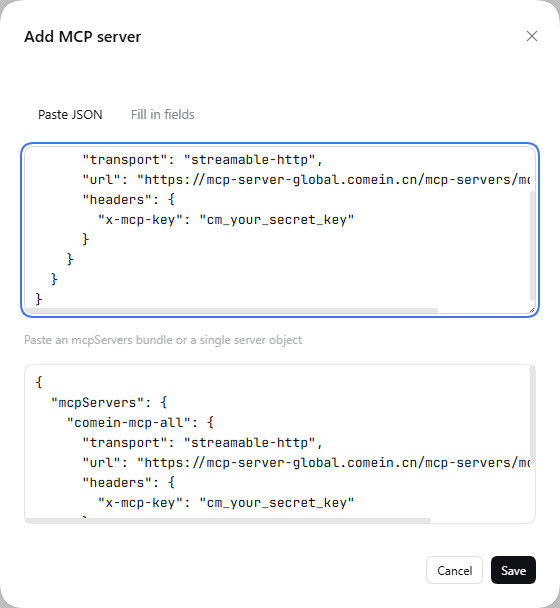
- **Two ways to add**: fill in fields, or paste an `{"mcpServers": { ... }}` block — the same shape DSH and Claude Desktop use — to import several servers at once.
|
|
40
|
+
- **Server switch**: turning a server off disconnects it and unregisters all of its tools. Nothing is deleted.
|
|
41
|
+
- **Copy config**: one click copies that server back out as an `mcpServers` snippet.
|
|
42
|
+
|
|
43
|
+
### Secrets, the Postman way
|
|
44
|
+
|
|
45
|
+
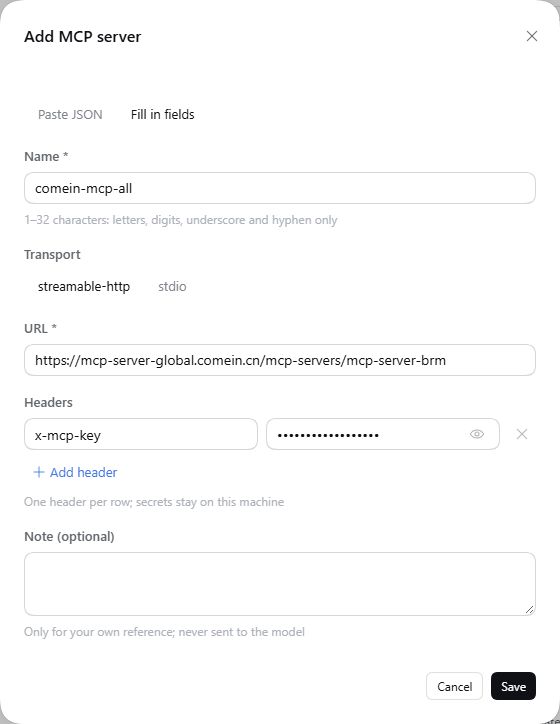
Header rows are key/value pairs, not a JSON textarea. A new server starts with an `x-mcp-key` row: paste the secret into the value column and save.
|
|
46
|
+
|
|
47
|
+
|
|
48
|
+
|
|
49
|
+
Values are masked by default and can be revealed per row. Duplicate header names are rejected inline. Prefer JSON? Switch to **Paste JSON** — it syncs name, URL, transport and headers back into the form.
|
|
50
|
+
|
|
51
|
+
|
|
52
|
+
|
|
53
|
+
### Real per-tool control
|
|
54
|
+
|
|
55
|
+
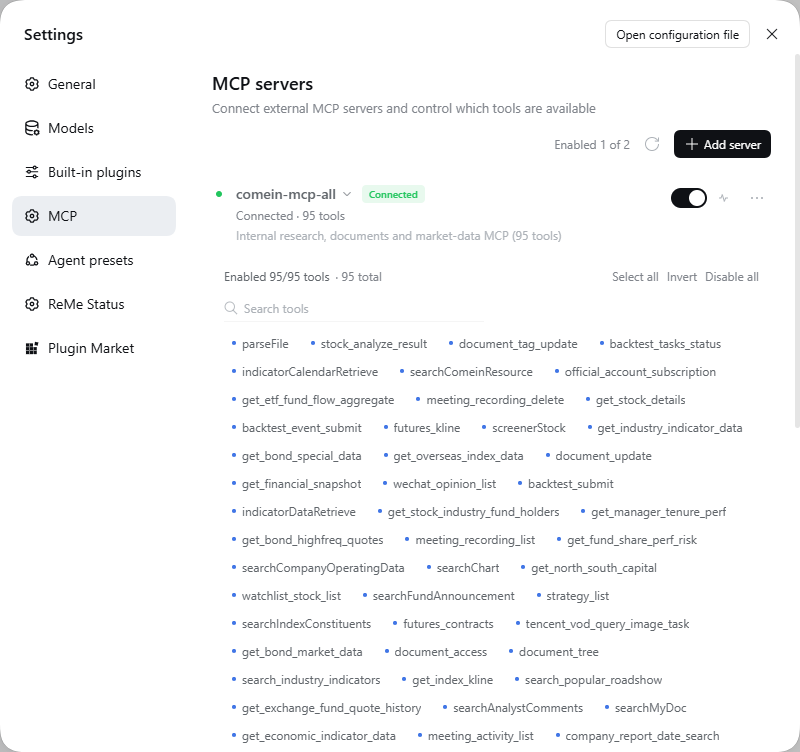
Every tool is a chip. Click to disable; the tool disappears from the model's tool list immediately (it is not registered at all). Search, select all, invert, disable all.
|
|
56
|
+
|
|
57
|
+
|
|
58
|
+
|
|
59
|
+
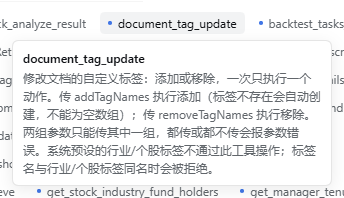
Hover a chip for its full description, even while the server is disabled.
|
|
60
|
+
|
|
61
|
+
|
|
62
|
+
|
|
63
|
+
### Connectivity test and event log
|
|
64
|
+
|
|
65
|
+
The test button opens a throwaway connection: `initialize` → `tools/list` → close. It reports latency, protocol version and tool count, and never mutates the running server. A compact event log records connects, reloads, tests and failures.
|
|
66
|
+
|
|
67
|
+
### Native fit
|
|
68
|
+
|
|
69
|
+
Same design tokens (`--dsw-*`), same flat rows, same 32px inputs as DSH itself. Light and dark, Chinese and English, keyboard focus rings included. No build step: the client bundle is a classic script that only requires `react` and the official UI primitives.
|
|
70
|
+
|
|
71
|
+
See it in dark mode:
|
|
72
|
+
|
|
73
|
+

|
|
74
|
+
|
|
75
|
+

|
|
76
|
+
|
|
77
|
+
---
|
|
78
|
+
|
|
79
|
+
## Install
|
|
80
|
+
|
|
81
|
+
Requires **DeepSeek Harness 0.2.x** (Web GUI `dsh web` or DSH Desktop) and **Node.js ≥ 22.13**. Published on npm as [dsh-mcp-tools](https://www.npmjs.com/package/dsh-mcp-tools) `1.0.1`.
|
|
82
|
+
|
|
83
|
+
> ⚠️ This is a **DeepSeek Harness plugin**, not a plain npm library. `npm i dsh-mcp-tools` only downloads the package; it still has to be installed into a DSH profile as described below.
|
|
84
|
+
|
|
85
|
+
### From the Plugins page (recommended)
|
|
86
|
+
|
|
87
|
+
1. Open DSH Web (or DSH Desktop) → **Plugins** in the sidebar (Desktop: **Settings → Plugins**).
|
|
88
|
+
2. Choose **Install**, enter `dsh-mcp-tools`, and confirm.
|
|
89
|
+
3. Enable the new bundle, then refresh the page once.
|
|
90
|
+
4. Open **Settings → MCP**.
|
|
91
|
+
|
|
92
|
+
### From the CLI
|
|
93
|
+
|
|
94
|
+
```bash
|
|
95
|
+
dsh plugin --profile web add dsh-mcp-tools # Web
|
|
96
|
+
dsh plugin --profile desktop add dsh-mcp-tools # Desktop
|
|
97
|
+
```
|
|
98
|
+
|
|
99
|
+
The command installs from npm and records the bundle in that profile's `dsh.profile.bundles`. If the Plugins page does not show it, enable the bundle once; if the section still does not appear, restart `dsh web`.
|
|
100
|
+
|
|
101
|
+
> Upgrading the package requires a restart of `dsh web` (or reopening DSH Desktop) to load the new host module generation.
|
|
102
|
+
|
|
103
|
+
---
|
|
104
|
+
|
|
105
|
+
## Quick start
|
|
106
|
+
|
|
107
|
+
1. **Settings → MCP → Add server.**
|
|
108
|
+
2. For a remote server: paste its URL, then put the key in the header row (`x-mcp-key` by default).
|
|
109
|
+
3. Hit **Test connection** — you should see something like `Connected · 95 tools · 478 ms`.
|
|
110
|
+
4. Save. Enable the server if it is not on yet.
|
|
111
|
+
5. In a session, ask the model to use a tool. DSH registers each one as `mcp__<server>__<tool>`.
|
|
112
|
+
|
|
113
|
+
To trim context, open the server's tools and disable what you do not need. Fewer enabled tools means a smaller tool schema in every request.
|
|
114
|
+
|
|
115
|
+
---
|
|
116
|
+
|
|
117
|
+
## How it works
|
|
118
|
+
|
|
119
|
+
```
|
|
120
|
+
DeepSeek Harness Web (dsh web)
|
|
121
|
+
├── Host plugin (lib/) ← cordis bundle patch, native MCP client
|
|
122
|
+
│ ├── manager.js connections, tool registry, enable/disable
|
|
123
|
+
│ ├── store.js ~/.dsh/dsh-mcp-tools/state.json (atomic, watched)
|
|
124
|
+
│ └── routes.js /mcp-tools/api/*
|
|
125
|
+
└── Client bundle (client/client.js)
|
|
126
|
+
└── Settings section "MCP" (id: mcp, order: 18) — classic script, no build
|
|
127
|
+
```
|
|
128
|
+
|
|
129
|
+
- The host plugin wraps DSH's native MCP client, so tools appear in sessions exactly like hand-configured ones (`mcp__server__tool`).
|
|
130
|
+
- Enablement is enforced at **registration** time, not on call: a disabled tool is absent from the model's tool list.
|
|
131
|
+
- State lives in `~/.dsh/dsh-mcp-tools/state.json`, written atomically. External edits are picked up and applied live.
|
|
132
|
+
|
|
133
|
+
REST surface (used by the panel, also scriptable): `GET /mcp-tools/api/state`, `POST /servers/{test,save,delete,toggle,refresh}`, `POST /tools/{toggle,bulk}`, `POST /import`, `POST /reload`, `GET /logs`. See [docs/API.md](docs/API.md).
|
|
134
|
+
|
|
135
|
+
---
|
|
136
|
+
|
|
137
|
+
## Security notes
|
|
138
|
+
|
|
139
|
+
- Server headers are stored **in plaintext** in the local state file. The file is yours, on your machine — do not commit it or sync it to a public location.
|
|
140
|
+
- Use a dedicated, least-privilege key per MCP server.
|
|
141
|
+
- The plugin makes no network calls except to the MCP servers you configure. No telemetry.
|
|
142
|
+
- Deleting a server removes its tools from every future request.
|
|
143
|
+
|
|
144
|
+
---
|
|
145
|
+
|
|
146
|
+
## Development
|
|
147
|
+
|
|
148
|
+
```bash
|
|
149
|
+
git clone https://github.com/hxlog/dsh-mcp-tools.git
|
|
150
|
+
cd dsh-mcp-tools
|
|
151
|
+
node --check client/client.js
|
|
152
|
+
npm run selftest
|
|
153
|
+
```
|
|
154
|
+
|
|
155
|
+
For live development, link the checkout into your profile instead of installing a copy (Windows example):
|
|
156
|
+
|
|
157
|
+
```bat
|
|
158
|
+
rmdir "C:\Users\<you>\.dsh\profiles\web\node_modules\dsh-mcp-tools"
|
|
159
|
+
mklink /J "C:\Users\<you>\.dsh\profiles\web\node_modules\dsh-mcp-tools" "D:\path\to\dsh-mcp-tools"
|
|
160
|
+
```
|
|
161
|
+
|
|
162
|
+
- **Client changes**: refresh the page. The bundle is served from disk, no build involved.
|
|
163
|
+
- **Host changes**: touch the profile's `cordis.patch.yml` (e.g. append a comment) to trigger HMR recomposition; the log line `MCP manager started` confirms it.
|
|
164
|
+
|
|
165
|
+
The panel is written as a single classic script because DSH's Web loader evaluates client bundles as classic scripts. Only `react` and `@deepseek-ai/dsh-client-ui-primitives` may be required.
|
|
166
|
+
|
|
167
|
+
---
|
|
168
|
+
|
|
169
|
+
## FAQ
|
|
170
|
+
|
|
171
|
+
**The MCP section is missing.** The bundle is probably not enabled. Check Plugins → the bundle, refresh, and restart `dsh web` if needed.
|
|
172
|
+
|
|
173
|
+
**Tools do not show up in a session.** Make sure the server is enabled and the individual tool chips are on. Disabled tools are never registered.
|
|
174
|
+
|
|
175
|
+
**Test connection fails.** Verify the URL, that the server speaks `streamable-http` (not plain SSE), and that the header name matches what the server expects. Network/proxy issues surface here too.
|
|
176
|
+
|
|
177
|
+
**Where is the state?** `~/.dsh/dsh-mcp-tools/state.json`. Deleting it resets everything to empty; the plugin recreates it on next launch.
|
|
178
|
+
|
|
179
|
+
---
|
|
180
|
+
|
|
181
|
+
## License
|
|
182
|
+
|
|
183
|
+
[MIT](LICENSE)
|
|
184
|
+
|
|
185
|
+
---
|
|
186
|
+
|
|
187
|
+
[](https://github.com/deepseek-ai/deepseek-harness)
|
package/README.md
CHANGED
|
@@ -1,3 +1,189 @@
|
|
|
1
|
-
#
|
|
1
|
+
# dsh-mcp-tools
|
|
2
2
|
|
|
3
|
-
|
|
3
|
+
**DeepSeek Harness 最简洁、优雅的MCP工具管理器。**
|
|
4
|
+
|
|
5
|
+
[](https://www.npmjs.com/package/dsh-mcp-tools)
|
|
6
|
+
[](https://www.npmjs.com/package/dsh-mcp-tools)
|
|
7
|
+
[](LICENSE)
|
|
8
|
+
[](https://nodejs.org)
|
|
9
|
+
[](https://github.com/hxlog/dsh-mcp-tools)
|
|
10
|
+
|
|
11
|
+
[GitHub 仓库](https://github.com/hxlog/dsh-mcp-tools) · [npm](https://www.npmjs.com/package/dsh-mcp-tools) · [问题反馈](https://github.com/hxlog/dsh-mcp-tools/issues)
|
|
12
|
+
|
|
13
|
+
[English](README.en.md) | 简体中文
|
|
14
|
+
|
|
15
|
+
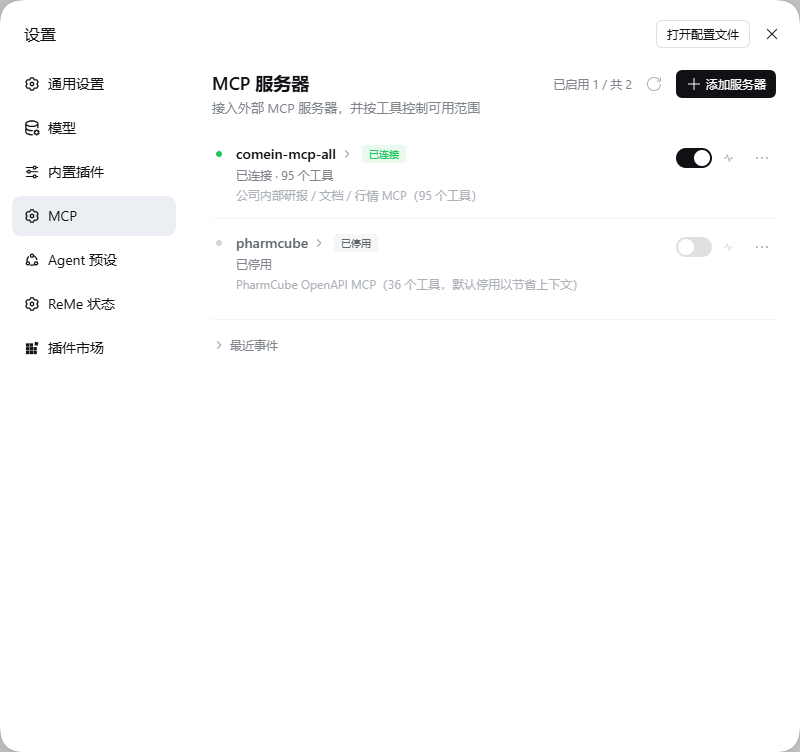
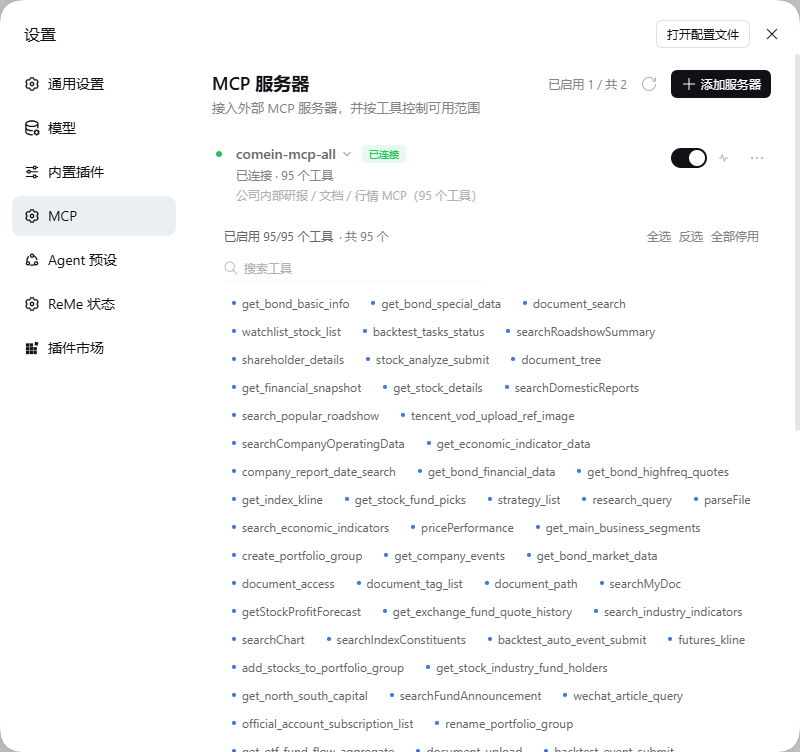
管理用户的 MCP Server,按需开关 MCP Tools。被停用的工具**不会注册进模型**,既不占上下文,也无法被误调用。
|
|
16
|
+
|
|
17
|
+
|
|
18
|
+
|
|
19
|
+
---
|
|
20
|
+
|
|
21
|
+
## 为什么做这个
|
|
22
|
+
|
|
23
|
+
MCP 很好用,直到某个「全家桶」服务器把 95 个工具塞进每一次请求。DSH 原生配置是 YAML/JSON 文件:改一次要重组 profile 甚至重启,而且没法表达「保留这个服务器,但只给模型 12 个工具」。
|
|
24
|
+
|
|
25
|
+
dsh-mcp-tools 把这些搬进了 **设置 → MCP**:
|
|
26
|
+
|
|
27
|
+
- 增删改停服务器,不碰配置文件;
|
|
28
|
+
- 请求头按 Postman 的方式一行一个键值对,密钥只留在本机;
|
|
29
|
+
- 启用前先验证连通性和工具数量;
|
|
30
|
+
- 按服务器逐工具开关,支持搜索、全选、反选、全部停用。
|
|
31
|
+
|
|
32
|
+
---
|
|
33
|
+
|
|
34
|
+
## 功能
|
|
35
|
+
|
|
36
|
+
### 服务器管理
|
|
37
|
+
|
|
38
|
+
- **两种传输**:`streamable-http`(URL + 请求头)与 `stdio`(命令、参数、环境变量、工作目录)。
|
|
39
|
+
- **两种录入**:分字段填写,或直接粘贴 `{"mcpServers": { ... }}`(与 DSH 原生配置同格式),一次导入多个服务器。
|
|
40
|
+
- **服务器开关**:关闭即断开连接并注销该服务器全部工具,不会删除配置。
|
|
41
|
+
- **复制配置**:一键复制该服务器的 `mcpServers` 片段。
|
|
42
|
+
|
|
43
|
+
### 像 Postman 一样填密钥
|
|
44
|
+
|
|
45
|
+
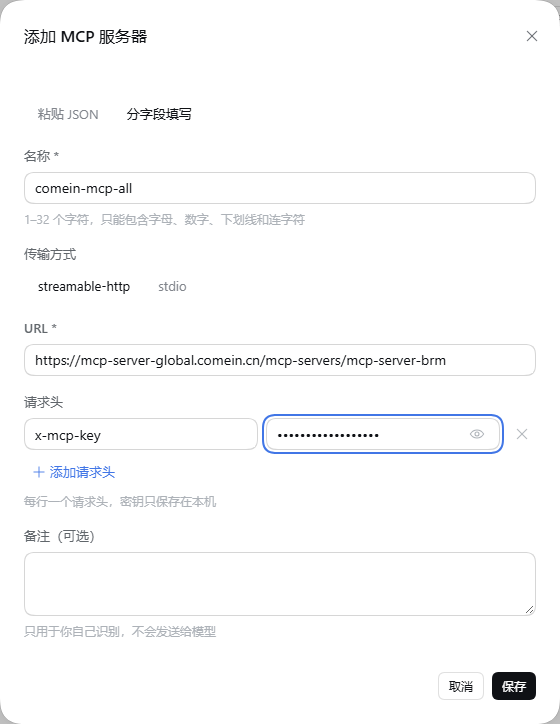
请求头是键值对行,而不是 JSON 文本框。新服务器默认带一行 `x-mcp-key`,把密钥粘进「值」即可保存。
|
|
46
|
+
|
|
47
|
+
|
|
48
|
+
|
|
49
|
+
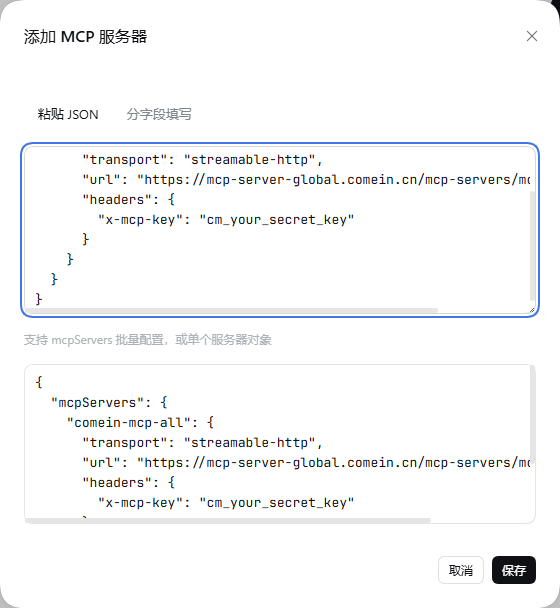
值默认掩码显示,可逐行切换显示;名称重复会就地报错。也可以切到「粘贴 JSON」——解析后会把名称、URL、传输方式和请求头同步回表单。
|
|
50
|
+
|
|
51
|
+
|
|
52
|
+
|
|
53
|
+
### 真正的逐工具控制
|
|
54
|
+
|
|
55
|
+
每个工具是一个 chip。点击即停用,工具会立刻从模型工具列表中消失(不是注册了再报错)。支持搜索、全选、反选、全部停用。
|
|
56
|
+
|
|
57
|
+
|
|
58
|
+
|
|
59
|
+
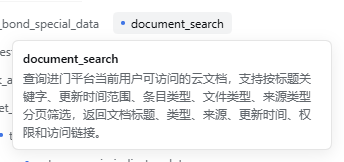
悬停 chip 可查看完整描述,服务器停用时也能看。
|
|
60
|
+
|
|
61
|
+
|
|
62
|
+
|
|
63
|
+
### 连通性测试与事件日志
|
|
64
|
+
|
|
65
|
+
测试按钮会临时建连:`initialize` → `tools/list` → 关闭,回报耗时、协议版本与工具数量,不改动正在运行的服务器。下方「最近事件」记录连接、重载、测试与失败。
|
|
66
|
+
|
|
67
|
+
### 与 DSH 原生一致
|
|
68
|
+
|
|
69
|
+
沿用 `--dsw-*` 设计 token、平铺行、32px 输入框,深浅色与中英文自适应,键盘焦点环完整。客户端没有构建步骤:它是 classic script,只依赖 `react` 与官方 UI primitives。
|
|
70
|
+
|
|
71
|
+
深色模式:
|
|
72
|
+
|
|
73
|
+

|
|
74
|
+
|
|
75
|
+
停用部分工具:
|
|
76
|
+
|
|
77
|
+

|
|
78
|
+
|
|
79
|
+
---
|
|
80
|
+
|
|
81
|
+
## 安装
|
|
82
|
+
|
|
83
|
+
需要 **DeepSeek Harness 0.2.x**(Web GUI `dsh web` 或 DSH Desktop)与 **Node.js ≥ 22.13**。包已发布到 npm:[dsh-mcp-tools](https://www.npmjs.com/package/dsh-mcp-tools) `1.0.1`。
|
|
84
|
+
|
|
85
|
+
> ⚠️ 这是一个 **DeepSeek Harness 插件**,不是普通 npm 依赖库。`npm i dsh-mcp-tools` 只会下载包,运行时仍要通过下面的方式装进 DSH profile。
|
|
86
|
+
|
|
87
|
+
### 通过插件页安装(推荐)
|
|
88
|
+
|
|
89
|
+
1. 打开 DSH Web(或 DSH Desktop)→ 侧边栏 **插件**(Desktop 在 **设置 → 插件**)。
|
|
90
|
+
2. 点击安装,填入 `dsh-mcp-tools`,确认。
|
|
91
|
+
3. 启用新 bundle,然后刷新一次页面。
|
|
92
|
+
4. 打开 **设置 → MCP**。
|
|
93
|
+
|
|
94
|
+
### 通过命令行安装
|
|
95
|
+
|
|
96
|
+
```bash
|
|
97
|
+
dsh plugin --profile web add dsh-mcp-tools # Web
|
|
98
|
+
dsh plugin --profile desktop add dsh-mcp-tools # Desktop
|
|
99
|
+
```
|
|
100
|
+
|
|
101
|
+
命令会从 npm 安装并写入该 profile 的 `dsh.profile.bundles`。若插件页未出现,启用一次该 bundle;分区仍未出现就重启 `dsh web`。
|
|
102
|
+
|
|
103
|
+
> 升级包版本后需要重启 `dsh web` / 重开 DSH Desktop,才会加载新的 host 模块。
|
|
104
|
+
|
|
105
|
+
---
|
|
106
|
+
|
|
107
|
+
## 快速开始
|
|
108
|
+
|
|
109
|
+
1. **设置 → MCP → 添加服务器**。
|
|
110
|
+
2. 远程服务器:填 URL,把密钥粘贴进请求头行(默认 `x-mcp-key`)。
|
|
111
|
+
3. 点 **测试连接**,应看到类似 `已连接 · 95 个工具 · 478 ms`。
|
|
112
|
+
4. 保存,并打开服务器开关。
|
|
113
|
+
5. 在会话中直接让模型调用工具。DSH 会把它注册为 `mcp__<服务器>__<工具>`。
|
|
114
|
+
|
|
115
|
+
想省上下文,就展开工具列表,把用不到的停用。启用的工具越少,每次请求里的工具 schema 越小。
|
|
116
|
+
|
|
117
|
+
---
|
|
118
|
+
|
|
119
|
+
## 工作原理
|
|
120
|
+
|
|
121
|
+
```
|
|
122
|
+
DeepSeek Harness Web (dsh web)
|
|
123
|
+
├── Host 插件(lib/) ← cordis bundle patch,复用原生 MCP 客户端
|
|
124
|
+
│ ├── manager.js 连接、工具注册、启停
|
|
125
|
+
│ ├── store.js ~/.dsh/dsh-mcp-tools/state.json(原子写、监听外部修改)
|
|
126
|
+
│ └── routes.js /mcp-tools/api/*
|
|
127
|
+
└── 客户端 bundle(client/client.js)
|
|
128
|
+
└── 设置分区「MCP」(id: mcp,order: 18)—— classic script,无需构建
|
|
129
|
+
```
|
|
130
|
+
|
|
131
|
+
- Host 插件包装 DSH 原生 MCP 客户端,工具与会话的接入方式与手写配置完全一致(`mcp__服务器__工具`)。
|
|
132
|
+
- 启停生效于**注册时**而非调用时:停用的工具根本不出现在模型工具列表里。
|
|
133
|
+
- 状态在 `~/.dsh/dsh-mcp-tools/state.json`,原子写入;外部修改会被监听并热应用。
|
|
134
|
+
|
|
135
|
+
REST 接口(面板在用,也可脚本调用):`GET /mcp-tools/api/state`、`POST /servers/{test,save,delete,toggle,refresh}`、`POST /tools/{toggle,bulk}`、`POST /import`、`POST /reload`、`GET /logs`。详见 [docs/API.md](docs/API.md)。
|
|
136
|
+
|
|
137
|
+
---
|
|
138
|
+
|
|
139
|
+
## 安全说明
|
|
140
|
+
|
|
141
|
+
- 服务器请求头以**明文**保存在本地状态文件里。文件只在本机,请不要提交到仓库或同步到公开位置。
|
|
142
|
+
- 给每个 MCP 服务器使用独立、最小权限的密钥。
|
|
143
|
+
- 插件除你配置的 MCP 服务器外不发起任何网络请求,没有遥测。
|
|
144
|
+
- 删除服务器后,它的工具会从后续所有请求中移除。
|
|
145
|
+
|
|
146
|
+
---
|
|
147
|
+
|
|
148
|
+
## 开发
|
|
149
|
+
|
|
150
|
+
```bash
|
|
151
|
+
git clone https://github.com/hxlog/dsh-mcp-tools.git
|
|
152
|
+
cd dsh-mcp-tools
|
|
153
|
+
node --check client/client.js
|
|
154
|
+
npm run selftest
|
|
155
|
+
```
|
|
156
|
+
|
|
157
|
+
调试时把源码目录链接进 profile,而不是安装副本(Windows 示例):
|
|
158
|
+
|
|
159
|
+
```bat
|
|
160
|
+
rmdir "C:\Users\<你>\.dsh\profiles\web\node_modules\dsh-mcp-tools"
|
|
161
|
+
mklink /J "C:\Users\<你>\.dsh\profiles\web\node_modules\dsh-mcp-tools" "D:\path\to\dsh-mcp-tools"
|
|
162
|
+
```
|
|
163
|
+
|
|
164
|
+
- **客户端改动**:刷新页面。bundle 直接从磁盘提供,无构建。
|
|
165
|
+
- **Host 改动**:修改一次 profile 的 `cordis.patch.yml`(例如追加一行注释)触发 HMR 重组;日志出现 `MCP 管理器已启动` 即生效。
|
|
166
|
+
|
|
167
|
+
面板是单个 classic script,因为 DSH Web loader 以 classic script 方式执行客户端 bundle。只能 require `react` 与 `@deepseek-ai/dsh-client-ui-primitives`。
|
|
168
|
+
|
|
169
|
+
---
|
|
170
|
+
|
|
171
|
+
## 常见问题
|
|
172
|
+
|
|
173
|
+
**设置里没有 MCP 分区。** 多半是 bundle 未启用:去插件页确认并刷新页面,必要时重启 `dsh web`。
|
|
174
|
+
|
|
175
|
+
**会话里看不到工具。** 确认服务器开关已打开、对应工具 chip 也是启用状态;停用的工具不会被注册。
|
|
176
|
+
|
|
177
|
+
**测试连接失败。** 检查 URL、服务器是否使用 `streamable-http`(而非普通 SSE)、请求头名称是否与服务端要求一致;网络/代理问题也会在这里暴露。
|
|
178
|
+
|
|
179
|
+
**状态文件在哪?** `~/.dsh/dsh-mcp-tools/state.json`。删除即重置为空,下次启动会自动重建。
|
|
180
|
+
|
|
181
|
+
---
|
|
182
|
+
|
|
183
|
+
## License
|
|
184
|
+
|
|
185
|
+
[MIT](LICENSE)
|
|
186
|
+
|
|
187
|
+
---
|
|
188
|
+
|
|
189
|
+
[](https://github.com/deepseek-ai/deepseek-harness)
|