dsh-mcp-connector 0.2.79 → 0.2.81
This diff represents the content of publicly available package versions that have been released to one of the supported registries. The information contained in this diff is provided for informational purposes only and reflects changes between package versions as they appear in their respective public registries.
- package/CHANGELOG.md +17 -0
- package/README.en.md +10 -4
- package/README.md +10 -4
- package/docs/tutorials/ONE-SUCCESS-CASE.md +51 -0
- package/docs/tutorials/README.md +2 -0
- package/docs/tutorials/SHARING-KIT.md +43 -0
- package/package.json +5 -6
package/CHANGELOG.md
CHANGED
|
@@ -2,6 +2,23 @@
|
|
|
2
2
|
|
|
3
3
|
本项目遵循 [Keep a Changelog](https://keepachangelog.com/zh-CN/1.1.0/);首个公开版本从 `0.1.0` 开始。
|
|
4
4
|
|
|
5
|
+
## [0.2.81] - 2026-10-25
|
|
6
|
+
|
|
7
|
+
### Documentation
|
|
8
|
+
|
|
9
|
+
- 明确默认 Desktop/Web 安装 profile 与各自重启方式,移除未经验证的“30 秒”安装承诺。
|
|
10
|
+
- 修正中英文 README 的截图版本说明,区分历史 Mock 演示与真实业务验收。
|
|
11
|
+
- 新增企业简介首次只读调用教程和社区分享素材包,提供复现步骤、文章提纲、素材来源及脱敏反馈模板。
|
|
12
|
+
- 新增教程随 npm 包分发,并纳入首次使用文档、打包白名单和本地链接校验。本版本不修改运行时功能,不新增遥测或真实业务调用。
|
|
13
|
+
|
|
14
|
+
## [0.2.80] - 2026-10-25
|
|
15
|
+
|
|
16
|
+
### Fixed
|
|
17
|
+
|
|
18
|
+
- #181:将 Zod 从宿主 peer 改为插件直接依赖(^4.1.8),全新 generation 安装无需借用宿主 asar 或手工创建共享 profiles/node_modules。保留 React 和 @deepseek-ai/* 宿主 peer,不放宽宿主隔离校验。
|
|
19
|
+
- 增加 Windows/Linux 全新打包安装门禁:禁用 peer 自动安装,无共享依赖目录,对照 0.2.79 缺失依赖并验证新包提升到 live 后 Zod 的真实路径与实际消费者导入。
|
|
20
|
+
- 该门禁是隔离安装测试,不等于 Windows Desktop 插件管理器 UI 实机验收;#178 仍待原报告者 Windows 性能复测。
|
|
21
|
+
|
|
5
22
|
## [0.2.79] - 2026-10-24
|
|
6
23
|
|
|
7
24
|
### Fixed
|
package/README.en.md
CHANGED
|
@@ -30,7 +30,9 @@ Tool browsing does not execute target tools. Parameter summaries may omit comple
|
|
|
30
30
|
[](https://github.com/duhu2000/dsh-mcp-connector-registry/blob/main/catalog-stats.json)
|
|
31
31
|
[](https://github.com/duhu2000/dsh-mcp-connector-registry/blob/main/catalog-stats.json)
|
|
32
32
|
|
|
33
|
-
##
|
|
33
|
+
## Get started
|
|
34
|
+
|
|
35
|
+
Search for **`dsh-mcp-connector`** in your plugin marketplace, or run the command below. Default Desktop and Web installations both use the `web` profile; custom deployments should use the profile actually loaded by their host.
|
|
34
36
|
|
|
35
37
|
```bash
|
|
36
38
|
dsh plugin --profile web add dsh-mcp-connector
|
|
@@ -38,6 +40,10 @@ dsh plugin --profile web add dsh-mcp-connector
|
|
|
38
40
|
|
|
39
41
|
Fully restart DeepSeek Harness Desktop or `dsh web` after installation or upgrade, then open **MCP Connector** in the primary sidebar, or open it directly from **Settings → Plugins → Plugin Configuration → MCP Connector**.
|
|
40
42
|
|
|
43
|
+
For Desktop, fully quit and relaunch the application. For Web, stop the existing `dsh web` process and start it again; refreshing the browser does not reload backend plugins.
|
|
44
|
+
|
|
45
|
+
**Complete one task first:** [look up one company's profile](docs/tutorials/ONE-SUCCESS-CASE.md) (Chinese), checking authorization, tool source, and the actual result. For an independent review, use the [community sharing kit](docs/tutorials/SHARING-KIT.md) (Chinese): demo assets, an article outline, and a redacted evidence template.
|
|
46
|
+
|
|
41
47
|
For a first successful use, confirm the connection and scope in Installed, find the expected tool and source in Tools, then complete one provider-permitted read-only call through the normal DSH Host approval flow. Cached visibility alone does not prove that a service is currently callable.
|
|
42
48
|
|
|
43
49
|
First-success guide (Chinese): [install → connect → find a tool → make the first read-only call](docs/tutorials/README.md). Task details: [three acceptance-ready scenarios](docs/tutorials/FIRST-SUCCESS-SCENARIOS.md) · [migrate `mcpServers` JSON](docs/tutorials/JSON-MIGRATION.md) · [diagnose OAuth](docs/tutorials/OAUTH-DIAGNOSTICS.md) · [find and recover tools](docs/tutorials/TOOL-SEARCH-RECOVERY.md) · [trusted status copy](docs/tutorials/TRUSTED-STATUS-COPY.md).
|
|
@@ -85,7 +91,7 @@ If the plugin helps you connect an MCP server faster, consider [starring the rep
|
|
|
85
91
|
- Explicit, non-destructive migration from the two earlier Qichacha OAuth plugins, plus active-plugin conflict detection that blocks duplicate server management and credential overwrites.
|
|
86
92
|
|
|
87
93
|
<!-- catalog-stats:start -->
|
|
88
|
-
As of 2026-10-
|
|
94
|
+
As of 2026-10-24, the public Registry publishes 112 connector descriptors. After merging and deduplicating them with the 4 bundled Qichacha cards, the Marketplace exposes 116 cards across 9 business categories. Recommendations remain limited to the four Qichacha cards, PKULaw, and Wind, for 6 featured cards in total. The Registry evolves independently; the badge shown after a client refresh and the live badges above are the authoritative current counts.
|
|
89
95
|
<!-- catalog-stats:end -->
|
|
90
96
|
|
|
91
97
|
## Interface and demo
|
|
@@ -100,7 +106,7 @@ As of 2026-10-17, the public Registry publishes 110 connector descriptors. After
|
|
|
100
106
|
| Connection diagnostics and last-success cache | |
|
|
101
107
|
| 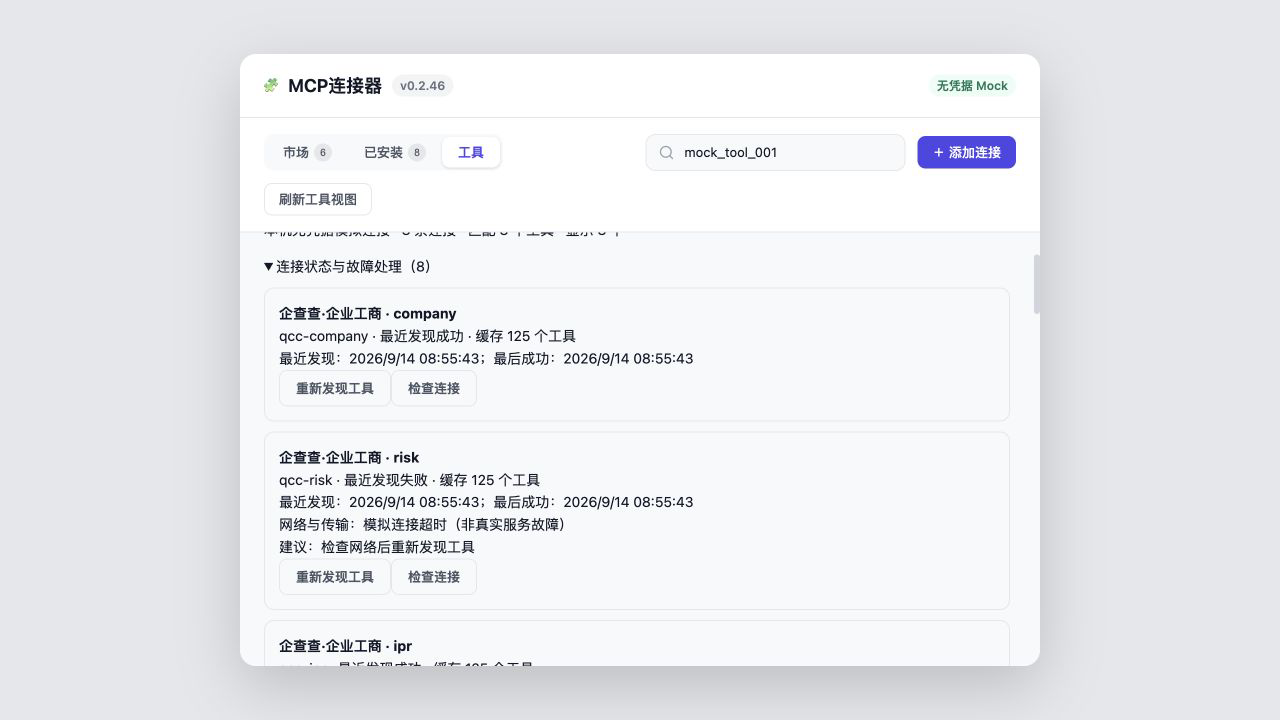 | |
|
|
102
108
|
|
|
103
|
-
Assets `01
|
|
109
|
+
Assets `01`, `02`, `04`, and `07` are `v0.2.73` demos captured on 2026-10-16; `03` retains a historical `v0.2.37` snapshot; `05`, `06`, and the 43-second GIF retain `v0.2.46` demos. All are credential-free Mock UI harness assets, not evidence of real business acceptance on the current version. They contain no credentials, local paths, or query results. See [`docs/screenshots/README.md`](docs/screenshots/README.md) for provenance.
|
|
104
110
|
|
|
105
111
|
## Installation
|
|
106
112
|
|
|
@@ -225,7 +231,7 @@ npm run dev:ui
|
|
|
225
231
|
|
|
226
232
|
Every Registry merge regenerates `catalog-stats.json`; an hourly workflow in this repository synchronizes the Chinese and English product copy plus a local stats snapshot. The static npm README updates with package releases, while the live badges above read the Registry directly and therefore stay current without another npm release.
|
|
227
233
|
|
|
228
|
-
The current public version is [`dsh-mcp-connector@0.2.
|
|
234
|
+
The current public version is [`dsh-mcp-connector@0.2.81`](https://www.npmjs.com/package/dsh-mcp-connector), with [GitHub Release v0.2.81](https://github.com/duhu2000/dsh-mcp-connector/releases/tag/v0.2.81).
|
|
229
235
|
|
|
230
236
|
See [CHANGELOG.md](CHANGELOG.md) for version history and [docs/DESKTOP-E2E.md](docs/DESKTOP-E2E.md) for the Desktop release checklist.
|
|
231
237
|
|
package/README.md
CHANGED
|
@@ -30,7 +30,9 @@ OAuth 是否可用取决于服务商的客户端注册、账号权限与授权
|
|
|
30
30
|
[](https://github.com/duhu2000/dsh-mcp-connector-registry/blob/main/catalog-stats.json)
|
|
31
31
|
[](https://github.com/duhu2000/dsh-mcp-connector-registry/blob/main/catalog-stats.json)
|
|
32
32
|
|
|
33
|
-
##
|
|
33
|
+
## 开始使用
|
|
34
|
+
|
|
35
|
+
在插件市场搜索完整包名 **`dsh-mcp-connector`**,或在本机终端运行下方命令。当前默认 Desktop 和 Web 都使用 `web` profile;自定义部署请以宿主实际加载的 profile 为准。
|
|
34
36
|
|
|
35
37
|
```bash
|
|
36
38
|
dsh plugin --profile web add dsh-mcp-connector
|
|
@@ -38,6 +40,10 @@ dsh plugin --profile web add dsh-mcp-connector
|
|
|
38
40
|
|
|
39
41
|
安装或升级后完全重启 DeepSeek Harness Desktop 或 `dsh web`,然后打开左侧「MCP连接器」;也可从“设置 → 插件 → 插件配置 → MCP连接器”直接打开。
|
|
40
42
|
|
|
43
|
+
Desktop 需要完全退出并重新启动应用;Web 需要停止原 `dsh web` 进程再启动,只刷新网页不会重新加载后端插件。
|
|
44
|
+
|
|
45
|
+
**先完成一件事:**[查询一家企业的简介](docs/tutorials/ONE-SUCCESS-CASE.md),按步骤核对授权、工具来源和真实返回。想写体验文章?使用[社区分享素材包](docs/tutorials/SHARING-KIT.md),包含演示素材、文章提纲和脱敏记录模板。
|
|
46
|
+
|
|
41
47
|
首次使用建议依次确认:连接已保存且范围正确 → “工具”页能找到预期工具与来源 → 在正常 DSH 会话中通过 Host 审批链完成一次服务商许可的只读调用。缓存可见不等于当前服务可调用。
|
|
42
48
|
|
|
43
49
|
[首次成功入口:安装 → 连接 → 找到工具 → 首次只读调用](docs/tutorials/README.md)。按任务深入:[三个可验收场景包](docs/tutorials/FIRST-SUCCESS-SCENARIOS.md) · [迁移现有 `mcpServers` JSON](docs/tutorials/JSON-MIGRATION.md) · [OAuth 授权诊断](docs/tutorials/OAUTH-DIAGNOSTICS.md) · [跨连接找工具与恢复](docs/tutorials/TOOL-SEARCH-RECOVERY.md) · [可信状态文案](docs/tutorials/TRUSTED-STATUS-COPY.md)。
|
|
@@ -87,7 +93,7 @@ dsh plugin --profile web add dsh-mcp-connector
|
|
|
87
93
|
- 对话工具:`mcp_connector_catalog`、`connect`、`configure`、`import_json`、`export_config`、`snapshot`、`install_from_url`、`status`、`scope`、`health_check`、`policy`、`set_enabled`、`session_tools`、`disconnect`、`refresh_catalog`、`publish`、`tools_list`、`tool_search`、`tool_detail`。搜索/详情只做渐进式能力发现,不执行目标 MCP 工具。
|
|
88
94
|
|
|
89
95
|
<!-- catalog-stats:start -->
|
|
90
|
-
截至 2026-10-
|
|
96
|
+
截至 2026-10-24,公共 Registry 已发布 112 条连接器描述;与随包的 4 张企查查卡片合并去重后,市场页可浏览 116 张卡片,覆盖企业数据、金融投资、法律合规、开发工具、办公协作、调研分析、设计创意、效率工具、其他 9 类。推荐位严格保留 4 张企查查卡片、北大法宝和 Wind,共 6 张;其他连接器按业务分类展示。Registry 可独立持续更新,实际数量以客户端刷新后的市场页签徽标和上方实时统计徽标为准。
|
|
91
97
|
<!-- catalog-stats:end -->
|
|
92
98
|
|
|
93
99
|
## 界面与演示
|
|
@@ -102,7 +108,7 @@ dsh plugin --profile web add dsh-mcp-connector
|
|
|
102
108
|
| 连接诊断与最后成功缓存 | |
|
|
103
109
|
|  | |
|
|
104
110
|
|
|
105
|
-
`01
|
|
111
|
+
`01`、`02`、`04`、`07` 为 2026-10-16 的 `v0.2.73` 演示;`03` 保留 `v0.2.37` 历史快照;`05`、`06` 与 43 秒 GIF 保留 `v0.2.46` 演示。全部来自无凭据 Mock UI harness,不是当前版本的真实业务验收证据,不包含凭据、本机路径或查询结果。详见 [`docs/screenshots/README.md`](docs/screenshots/README.md)。
|
|
106
112
|
|
|
107
113
|
## 安装
|
|
108
114
|
|
|
@@ -220,7 +226,7 @@ npm run dev:ui
|
|
|
220
226
|
|
|
221
227
|
公共 Registry 每次合并后会生成 `catalog-stats.json`;本仓库的定时工作流每小时同步中英文介绍和统计快照。npm 页面中的静态正文随版本发布更新,上方动态统计徽标则直接读取 Registry,可在不发布新 npm 版本时保持实时数量一致。
|
|
222
228
|
|
|
223
|
-
当前公开版本为 [`dsh-mcp-connector@0.2.
|
|
229
|
+
当前公开版本为 [`dsh-mcp-connector@0.2.81`](https://www.npmjs.com/package/dsh-mcp-connector),对应 [GitHub Release v0.2.81](https://github.com/duhu2000/dsh-mcp-connector/releases/tag/v0.2.81)。
|
|
224
230
|
|
|
225
231
|
版本能力与变更记录见 [CHANGELOG.md](CHANGELOG.md)。
|
|
226
232
|
Desktop 发版回归见 [docs/DESKTOP-E2E.md](docs/DESKTOP-E2E.md)。
|
|
@@ -0,0 +1,51 @@
|
|
|
1
|
+
# 首次成功案例:查询一家企业的简介
|
|
2
|
+
|
|
3
|
+
目标:在正常 DSH 会话中完成一次有来源、可核对的只读调用。插件支持通用 MCP 服务;这里用企查查作为具体示例,不要求每位用户都使用该服务。
|
|
4
|
+
|
|
5
|
+
## 准备与连接
|
|
6
|
+
|
|
7
|
+
1. 按[安装入口](README.md)安装并重启对应宿主,记录页面显示的插件版本。
|
|
8
|
+
2. 在市场找到“企查查·企业工商”,连接到你希望使用的项目范围,按页面完成服务商授权。
|
|
9
|
+
3. 确认账号具备企业简介接口权限与额度。插件开源不等于服务商数据免费,费用和可用范围以服务商账号为准。
|
|
10
|
+
4. 在“工具”页定位 `qcc-company` 的 `get_company_profile`,查看当前参数和来源。没有该工具时先检查授权及工具发现状态,不要凭名称猜测或改用其他工具。
|
|
11
|
+
|
|
12
|
+
已授权账号可以复用有效授权;是否出现授权页面不能单独证明账号或权限正确。缓存中的工具列表也不证明当前能调用。
|
|
13
|
+
|
|
14
|
+
## 可复制的任务
|
|
15
|
+
|
|
16
|
+
在正常 DSH 会话中发送以下内容,通过 Host 的工具权限与审批链执行:
|
|
17
|
+
|
|
18
|
+
> 使用 qcc-company 的 get_company_profile,只查询“企查查科技股份有限公司”的企业简介(searchKey 为完整企业名称)。仅调用一次;不要查询联系人、司法、财务或其他主体,不要写入任何数据。成功后列出实际返回的企业名称、简介摘要、数据来源和调用时间;缺失字段标为未返回。失败则报告错误,不自动扩大查询或连续重试。
|
|
19
|
+
|
|
20
|
+
## 怎样判定完成
|
|
21
|
+
|
|
22
|
+
| 检查层级 | 通过条件 |
|
|
23
|
+
|---|---|
|
|
24
|
+
| 连接 | 正确范围内存在连接,授权状态可用 |
|
|
25
|
+
| 工具 | 发现预期工具,来源和参数可核对 |
|
|
26
|
+
| 业务 | 本次调用成功,返回企业名称与目标一致;有真实来源与时间 |
|
|
27
|
+
|
|
28
|
+
只有第三层通过才记为本次首次成功。授权失败看[OAuth 诊断](OAUTH-DIAGNOSTICS.md);工具缺失看[查找与恢复](TOOL-SEARCH-RECOVERY.md);额度或业务权限不足应按服务商提示处理。
|
|
29
|
+
|
|
30
|
+
## 已有证据与复验边界
|
|
31
|
+
|
|
32
|
+
2026-10-16 10:23:07(Asia/Shanghai)已有内部记录:使用已有 `qcc-company` 连接调用 `get_company_profile`,参数为上述企业完整名称,返回企业名称一致。此处只摘录验收结论,不公开原始业务数据或凭据。
|
|
33
|
+
|
|
34
|
+
该历史记录只证明当时已有连接的一次只读调用成功,**不证明首次 OAuth、全新安装、JSON 迁移或当前版本全流程已经验收**。本文是复现步骤,本次文档更新没有新增真实调用。
|
|
35
|
+
|
|
36
|
+
## 自愿分享你的结果
|
|
37
|
+
|
|
38
|
+
复制下面模板,删除不希望公开的内容;不需要上传完整日志或查询结果:
|
|
39
|
+
|
|
40
|
+
```text
|
|
41
|
+
日期与时区:
|
|
42
|
+
DSH / 插件版本:
|
|
43
|
+
宿主:Desktop / Web(自定义 profile 请注明)
|
|
44
|
+
任务:一次企业简介只读查询
|
|
45
|
+
安装 / 授权 / 工具发现 / 业务调用:分别填写成功、失败或未测试
|
|
46
|
+
耗时:实测填写,未计时则留空
|
|
47
|
+
实际解决的问题:
|
|
48
|
+
遇到的限制或错误码(脱敏):
|
|
49
|
+
```
|
|
50
|
+
|
|
51
|
+
请勿分享 Token、API Key、授权回调 URL、账号标识、本机路径或未经许可的业务数据。写文章可参考[社区分享素材包](SHARING-KIT.md)。
|
package/docs/tutorials/README.md
CHANGED
|
@@ -1,5 +1,7 @@
|
|
|
1
1
|
# 从安装到首次成功调用
|
|
2
2
|
|
|
3
|
+
从一个具体任务开始:[查询一家企业的简介](ONE-SUCCESS-CASE.md)。完成后可用[社区分享素材包](SHARING-KIT.md)记录真实体验与限制。
|
|
4
|
+
|
|
3
5
|
这是一条统一的最短路径。它把已有教程串成“安装 → 连接 → 找到工具 → 首次只读调用”,不替代各服务商文档。首次调用只选你已获准使用、费用与权限边界明确的只读任务;截图、GIF、连接成功或工具缓存都不等于真实业务调用通过。
|
|
4
6
|
|
|
5
7
|
需要可直接执行的验收任务时,选择[企业信息只读查询、本地智能文档解析、授权办公文档或日程查询](FIRST-SUCCESS-SCENARIOS.md)中的一个场景;记录状态时使用[可信状态文案规范](TRUSTED-STATUS-COPY.md),缺少账号、组织、费用或调用证据就明确写“未知/待验收”。
|
|
@@ -0,0 +1,43 @@
|
|
|
1
|
+
# 社区分享素材包
|
|
2
|
+
|
|
3
|
+
帮助使用者写出可复现、有个人判断的体验分享。无需统一口径、无需好评,也不要求 Star 或转发才能使用。此文档不代表已公开发帖。
|
|
4
|
+
|
|
5
|
+
## 先选择你真正完成的任务
|
|
6
|
+
|
|
7
|
+
- [一次企业简介只读查询](ONE-SUCCESS-CASE.md):包含历史证据边界和复验模板。
|
|
8
|
+
- [迁移已有 mcpServers 配置](JSON-MIGRATION.md):只展示脱敏模板,不分享真实配置。
|
|
9
|
+
- [跨连接查找工具与恢复](TOOL-SEARCH-RECOVERY.md):区分缓存、工具发现与业务调用。
|
|
10
|
+
|
|
11
|
+
没有完成的流程请标为未测试。优先分享“遇到什么问题、怎样解决、还有什么限制”,不要把目录数量写成全部服务都实测可用。
|
|
12
|
+
|
|
13
|
+
## 可引用的简短介绍
|
|
14
|
+
|
|
15
|
+
> dsh-mcp-connector 是 DeepSeek Harness 的开源 MCP 接入与管理插件。通过连接器目录或已有配置接入 MCP Server,管理授权、跨连接查找工具并排查连接问题。由企查查/QCC 团队维护,支持通用 MCP 服务;具体数据权限、额度与费用由各服务商决定。
|
|
16
|
+
|
|
17
|
+
安装命令、Desktop/Web 重启说明见[统一入口](README.md)。项目地址:[GitHub](https://github.com/duhu2000/dsh-mcp-connector),安装包:[npm](https://www.npmjs.com/package/dsh-mcp-connector)。
|
|
18
|
+
|
|
19
|
+
## 图片与视频素材
|
|
20
|
+
|
|
21
|
+
使用[截图目录及来源说明](../screenshots/README.md),不要重制或抹掉 Mock 标记。`01`、`02`、`04`、`07` 为 `v0.2.73`,`03` 为 `v0.2.37`,`05`、`06` 与 GIF 为 `v0.2.46`;它们用于解释界面,不是最新版本的真实调用截图。
|
|
22
|
+
|
|
23
|
+
可用图注:“MCP连接器界面演示,Mock 数据;素材版本见来源说明,实际界面以安装版本为准。”
|
|
24
|
+
|
|
25
|
+
仓库代码遵循 [MIT 许可证](../../LICENSE);第三方商标、图标及数据的权利不因仓库开源而转让。文章应链接来源,真实账号截图需脱敏并确认数据可公开。
|
|
26
|
+
|
|
27
|
+
## 文章提纲与标题方向
|
|
28
|
+
|
|
29
|
+
可选标题:“我如何在 DSH 中找到并调用一个 MCP 工具”;只有实测后才使用“成功”“节省了多久”等结论。
|
|
30
|
+
|
|
31
|
+
1. 原先卡在哪里:配置分散、找不到工具或连接失败。
|
|
32
|
+
2. 你的环境与步骤:版本、宿主、安装、授权、选定任务。
|
|
33
|
+
3. 你的证据:实际调用结果摘要、来源、时间;不要只截图“已连接”。
|
|
34
|
+
4. 你的判断:有效之处、失败之处、费用与权限门槛。
|
|
35
|
+
5. 给读者一个下一步:安装入口与同一任务的复现链接。
|
|
36
|
+
|
|
37
|
+
如受邀测试、获得试用额度或与项目有关系,应主动说明;欢迎独立评价,不要求正面结论。不要宣传保证排名第一、所有服务免费、一键免权限或未经测量的效率提升。
|
|
38
|
+
|
|
39
|
+
## 分享后怎样改进
|
|
40
|
+
|
|
41
|
+
自愿提交脱敏案例或问题到 [Issues](https://github.com/duhu2000/dsh-mcp-connector/issues)。希望参与开发可看[贡献指南](../../CONTRIBUTING.md)。Star 表达认可,Fork 用于实际修改与贡献,都不是使用条件。
|
|
42
|
+
|
|
43
|
+
首轮邀请 5–10 位自愿体验者,手工记录安装、授权、工具发现、首次调用各阶段的成功/失败/未测试、实际耗时和阻塞原因。未计时不补估值,不新增遥测;样本仅用于改进体验,不外推整体转化率。npm 下载量也不等于独立用户或成功调用人数。
|
package/package.json
CHANGED
|
@@ -1,6 +1,6 @@
|
|
|
1
1
|
{
|
|
2
2
|
"name": "dsh-mcp-connector",
|
|
3
|
-
"version": "0.2.
|
|
3
|
+
"version": "0.2.81",
|
|
4
4
|
"description": "DeepSeek Harness MCP Connector: connect servers, search tools across active connections, and troubleshoot discovery. Includes a continuously updated catalog; supports OAuth 2.0 PKCE, API keys, Streamable HTTP/stdio, and mcpServers JSON import.",
|
|
5
5
|
"type": "module",
|
|
6
6
|
"main": "lib/index.js",
|
|
@@ -149,19 +149,18 @@
|
|
|
149
149
|
"@deepseek-ai/schemastery": "^3.18.1",
|
|
150
150
|
"@deepseek-ai/cordis": "^4.0.1",
|
|
151
151
|
"react": "^18.2.0",
|
|
152
|
-
"react-dom": "^18.2.0"
|
|
153
|
-
"zod": ">=4.1.8 <5"
|
|
152
|
+
"react-dom": "^18.2.0"
|
|
154
153
|
},
|
|
155
154
|
"dependencies": {
|
|
156
155
|
"cross-spawn": "^7.0.6",
|
|
157
|
-
"undici": "^6.29.0"
|
|
156
|
+
"undici": "^6.29.0",
|
|
157
|
+
"zod": "^4.1.8"
|
|
158
158
|
},
|
|
159
159
|
"devDependencies": {
|
|
160
160
|
"@deepseek-ai/cordis": "^4.0.1",
|
|
161
161
|
"@deepseek-ai/dsh-storage": "^0.1.0-rc.7",
|
|
162
162
|
"@deepseek-ai/dsh-storage-domain": "^0.1.0-rc.7",
|
|
163
|
-
"@deepseek-ai/schemastery": "^3.18.1"
|
|
164
|
-
"zod": "^4.4.0"
|
|
163
|
+
"@deepseek-ai/schemastery": "^3.18.1"
|
|
165
164
|
},
|
|
166
165
|
"engines": {
|
|
167
166
|
"node": ">=20"
|