dsh-mcp-connector 0.2.58 → 0.2.59
This diff represents the content of publicly available package versions that have been released to one of the supported registries. The information contained in this diff is provided for informational purposes only and reflects changes between package versions as they appear in their respective public registries.
- package/CHANGELOG.md +12 -0
- package/README.en.md +3 -2
- package/README.md +3 -2
- package/docs/USER-GUIDE.md +2 -0
- package/docs/tutorials/JSON-MIGRATION.md +3 -1
- package/docs/tutorials/OAUTH-DIAGNOSTICS.md +2 -0
- package/docs/tutorials/README.md +51 -0
- package/docs/tutorials/TOOL-SEARCH-RECOVERY.md +2 -0
- package/package.json +4 -3
package/CHANGELOG.md
CHANGED
|
@@ -4,6 +4,18 @@
|
|
|
4
4
|
|
|
5
5
|
## [Unreleased]
|
|
6
6
|
|
|
7
|
+
## [0.2.59] - 2026-09-25
|
|
8
|
+
|
|
9
|
+
### Fixed
|
|
10
|
+
|
|
11
|
+
- 恢复市场中文描述中的连续“连接管理”短语,并增加核心检索文案门禁,修复真实 Market 查询无法命中该短语的回归。
|
|
12
|
+
|
|
13
|
+
### Documentation
|
|
14
|
+
|
|
15
|
+
- 新增统一首次成功路径,串联安装、连接、工具发现和 Host 审批下的首次只读调用。
|
|
16
|
+
- 明确 DSH Desktop 与 `dsh web` 默认均使用本机 `web` profile;仅重启当前使用的 Host,避免安装位置与重启对象产生歧义。
|
|
17
|
+
- 补充安全 Prompt 模板、权限/费用/副作用边界,以及 7/14 天无遥测复盘口径;没有证据时保持“无数据”,不从下载量推算转化率。
|
|
18
|
+
|
|
7
19
|
## [0.2.58] - 2026-09-22
|
|
8
20
|
|
|
9
21
|
### Documentation
|
package/README.en.md
CHANGED
|
@@ -40,7 +40,7 @@ Fully restart DeepSeek Harness Desktop or `dsh web` after installation or upgrad
|
|
|
40
40
|
|
|
41
41
|
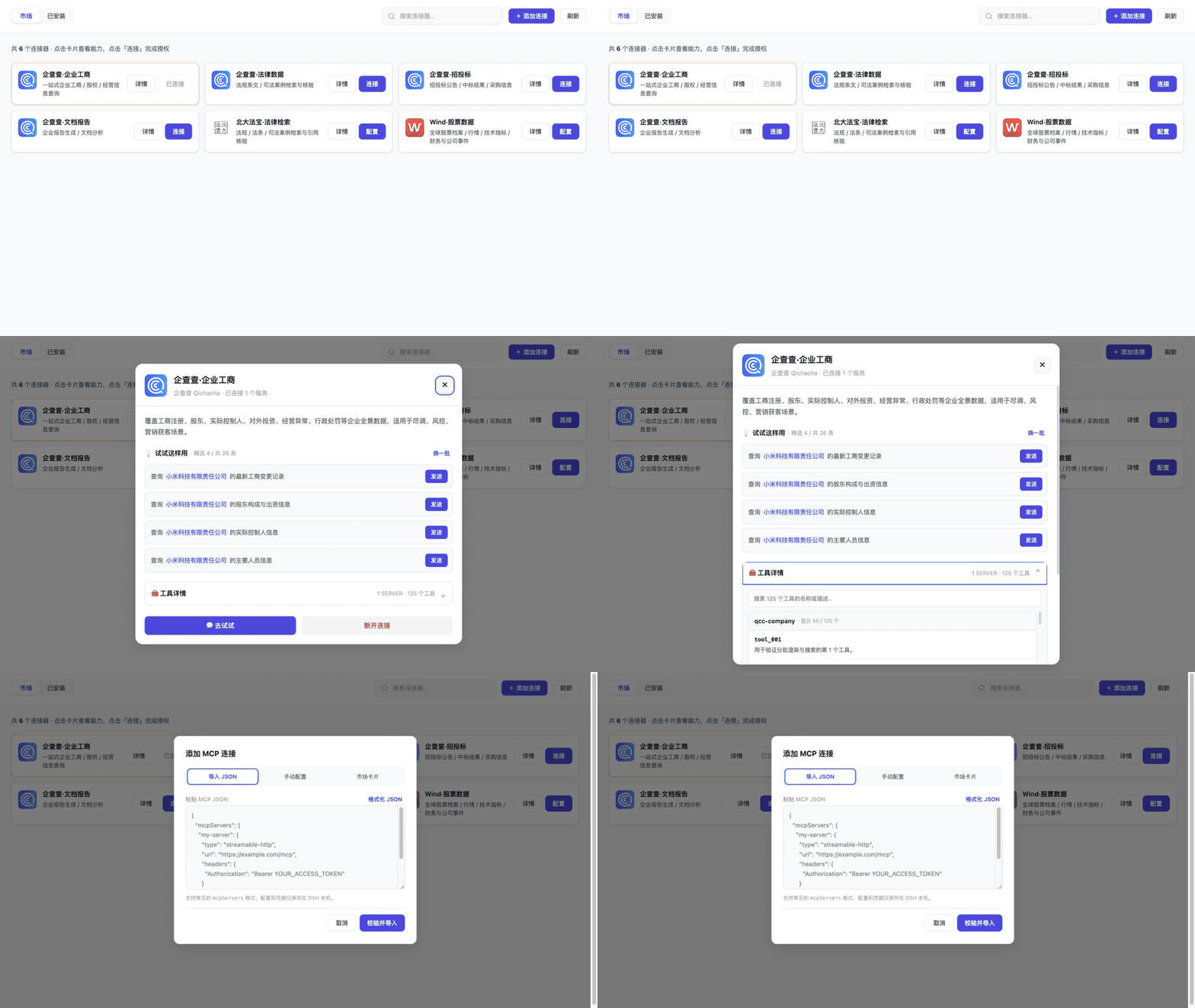
For a first successful use, confirm the connection and scope in Installed, find the expected tool and source in Tools, then complete one provider-permitted read-only call through the normal DSH Host approval flow. Cached visibility alone does not prove that a service is currently callable.
|
|
42
42
|
|
|
43
|
-
|
|
43
|
+
First-success guide (Chinese): [install → connect → find a tool → make the first read-only call](docs/tutorials/README.md). Task details: [migrate `mcpServers` JSON](docs/tutorials/JSON-MIGRATION.md) · [diagnose OAuth](docs/tutorials/OAUTH-DIAGNOSTICS.md) · [find and recover tools](docs/tutorials/TOOL-SEARCH-RECOVERY.md).
|
|
44
44
|
|
|
45
45
|
|
|
46
46
|
|
|
@@ -131,6 +131,7 @@ The detailed [Chinese user guide](docs/USER-GUIDE.md) covers category browsing,
|
|
|
131
131
|
## Guides and ecosystem
|
|
132
132
|
|
|
133
133
|
- [User guide: installation, authorization, diagnostics, compatibility, and troubleshooting](docs/USER-GUIDE.md)
|
|
134
|
+
- [First-success guide: install, connect, find a tool, and make a read-only call (Chinese)](docs/tutorials/README.md)
|
|
134
135
|
- [Task guides: JSON migration, OAuth diagnostics, and cross-connection tool recovery](docs/USER-GUIDE.md#按任务开始)
|
|
135
136
|
- [Connection scopes: project/global inheritance, copy, move, and rollback](docs/CONNECTION-SCOPES.md)
|
|
136
137
|
- [Connection, Server, and Tool governance](docs/TOOL-GOVERNANCE.md)
|
|
@@ -197,7 +198,7 @@ npm run dev:ui
|
|
|
197
198
|
|
|
198
199
|
Every Registry merge regenerates `catalog-stats.json`; an hourly workflow in this repository synchronizes the Chinese and English product copy plus a local stats snapshot. The static npm README updates with package releases, while the live badges above read the Registry directly and therefore stay current without another npm release.
|
|
199
200
|
|
|
200
|
-
The current public version is [`dsh-mcp-connector@0.2.
|
|
201
|
+
The current public version is [`dsh-mcp-connector@0.2.59`](https://www.npmjs.com/package/dsh-mcp-connector), with [GitHub Release v0.2.59](https://github.com/duhu2000/dsh-mcp-connector/releases/tag/v0.2.59).
|
|
201
202
|
|
|
202
203
|
See [CHANGELOG.md](CHANGELOG.md) for version history and [docs/DESKTOP-E2E.md](docs/DESKTOP-E2E.md) for the Desktop release checklist.
|
|
203
204
|
|
package/README.md
CHANGED
|
@@ -40,7 +40,7 @@ dsh plugin --profile web add dsh-mcp-connector
|
|
|
40
40
|
|
|
41
41
|
首次使用建议依次确认:连接已保存且范围正确 → “工具”页能找到预期工具与来源 → 在正常 DSH 会话中通过 Host 审批链完成一次服务商许可的只读调用。缓存可见不等于当前服务可调用。
|
|
42
42
|
|
|
43
|
-
|
|
43
|
+
[首次成功入口:安装 → 连接 → 找到工具 → 首次只读调用](docs/tutorials/README.md)。按任务深入:[迁移现有 `mcpServers` JSON](docs/tutorials/JSON-MIGRATION.md) · [OAuth 授权诊断](docs/tutorials/OAUTH-DIAGNOSTICS.md) · [跨连接找工具与恢复](docs/tutorials/TOOL-SEARCH-RECOVERY.md)。
|
|
44
44
|
|
|
45
45
|

|
|
46
46
|
|
|
@@ -132,6 +132,7 @@ bash <(curl -fsSL https://raw.githubusercontent.com/duhu2000/dsh-mcp-connector/m
|
|
|
132
132
|
## 中文教程与生态入口
|
|
133
133
|
|
|
134
134
|
- [用户手册:安装、授权、诊断、兼容性与故障排查](docs/USER-GUIDE.md)
|
|
135
|
+
- [首次成功入口:安装、连接、找工具和首次只读调用](docs/tutorials/README.md)
|
|
135
136
|
- [任务教程:JSON 迁移、OAuth 诊断、跨连接找工具与恢复](docs/USER-GUIDE.md#按任务开始)
|
|
136
137
|
- [配置备份:脱敏导出、快照与恢复边界](docs/CONFIG-BACKUP.md)
|
|
137
138
|
- [连接作用域:project/global 继承、复制、移动与回滚](docs/CONNECTION-SCOPES.md)
|
|
@@ -192,7 +193,7 @@ npm run dev:ui
|
|
|
192
193
|
|
|
193
194
|
公共 Registry 每次合并后会生成 `catalog-stats.json`;本仓库的定时工作流每小时同步中英文介绍和统计快照。npm 页面中的静态正文随版本发布更新,上方动态统计徽标则直接读取 Registry,可在不发布新 npm 版本时保持实时数量一致。
|
|
194
195
|
|
|
195
|
-
当前公开版本为 [`dsh-mcp-connector@0.2.
|
|
196
|
+
当前公开版本为 [`dsh-mcp-connector@0.2.59`](https://www.npmjs.com/package/dsh-mcp-connector),对应 [GitHub Release v0.2.59](https://github.com/duhu2000/dsh-mcp-connector/releases/tag/v0.2.59)。
|
|
196
197
|
|
|
197
198
|
版本能力与变更记录见 [CHANGELOG.md](CHANGELOG.md)。
|
|
198
199
|
Desktop 发版回归见 [docs/DESKTOP-E2E.md](docs/DESKTOP-E2E.md)。
|
package/docs/USER-GUIDE.md
CHANGED
|
@@ -4,6 +4,8 @@
|
|
|
4
4
|
|
|
5
5
|
## 按任务开始
|
|
6
6
|
|
|
7
|
+
第一次使用请从[统一首次成功入口](tutorials/README.md)开始:安装并重启正确 profile,只选一种连接方式,确认工具来源,再回到正常 DSH 会话完成服务商许可的首次只读调用。
|
|
8
|
+
|
|
7
9
|
- 已有其他客户端配置:从[迁移 `mcpServers` JSON](tutorials/JSON-MIGRATION.md)开始,逐项验证配置保存、工具发现/注册和只读调用。
|
|
8
10
|
- OAuth 卡在注册、授权或刷新:看[OAuth 连接诊断](tutorials/OAUTH-DIAGNOSTICS.md),先按阶段与稳定代码排查,不反复提交未获授权的账号。
|
|
9
11
|
- 已连接多个服务却找不到工具:看[跨连接找工具与发现失败恢复](tutorials/TOOL-SEARCH-RECOVERY.md)。缓存可查不等于当前可调用。
|
|
@@ -1,10 +1,12 @@
|
|
|
1
1
|
# 把已有 `mcpServers` JSON 迁移到 MCP连接器
|
|
2
2
|
|
|
3
|
+
返回[首次成功统一入口](README.md)。
|
|
4
|
+
|
|
3
5
|
适用场景:你已经有其他客户端的 `mcpServers` 配置,希望在 DeepSeek Harness 中统一管理,而不是逐个重新录入。本文只演示受信任的 HTTP/stdio MCP Server;不会把普通 API 或 CLI 自动变成 MCP Server。
|
|
4
6
|
|
|
5
7
|
## 迁移前:先确认什么
|
|
6
8
|
|
|
7
|
-
1.
|
|
9
|
+
1. 按统一入口安装 `dsh-mcp-connector`:默认布局下 DSH Desktop 与 `dsh web` 都从本机 `web` profile 加载插件。安装后只需重启正在使用的宿主;自定义 profile 布局以宿主配置为准。
|
|
8
10
|
2. 核对原配置的每个 Server:远端 URL 是否为 MCP Streamable HTTP 端点;本地 `command`、`args` 和运行时是否可信且可在 **DSH 所在机器** 启动。
|
|
9
11
|
3. 对每个连接决定“当前项目”或“所有项目(全局)”。全局仅指当前 DSH profile,并非跨 profile 共享。
|
|
10
12
|
4. 在本机保存原配置的安全备份。不要把含 Token、API Key、Cookie 或本机路径的原文发到 Issue、聊天或公开仓库。
|
|
@@ -0,0 +1,51 @@
|
|
|
1
|
+
# 从安装到首次成功调用
|
|
2
|
+
|
|
3
|
+
这是一条统一的最短路径。它把已有教程串成“安装 → 连接 → 找到工具 → 首次只读调用”,不替代各服务商文档。首次调用只选你已获准使用、费用与权限边界明确的只读任务;截图、GIF、连接成功或工具缓存都不等于真实业务调用通过。
|
|
4
|
+
|
|
5
|
+
## 1. 安装并重启正确的 profile
|
|
6
|
+
|
|
7
|
+
当前默认安装布局中,DSH Desktop 和 `dsh web` 都从本机 `web` profile 加载插件,因此两种宿主都使用同一条安装命令;不要因为使用 Desktop 就把命令改成 `--profile desktop`。
|
|
8
|
+
|
|
9
|
+
```bash
|
|
10
|
+
dsh plugin --profile web add dsh-mcp-connector
|
|
11
|
+
```
|
|
12
|
+
|
|
13
|
+
安装或升级后,只重启你正在使用的宿主:DSH Desktop 需完全退出应用后重新打开;`dsh web` 需停止原进程后重新启动。打开左侧“🧩 MCP连接器”;若侧边栏入口已隐藏,从“设置 → 插件 → 插件配置 → MCP连接器”点击“打开 MCP连接器”。自定义过 profile 布局的部署应以其宿主配置为准。
|
|
14
|
+
|
|
15
|
+
## 2. 只选一条连接路径
|
|
16
|
+
|
|
17
|
+
- 已有其他客户端配置:按[迁移 `mcpServers` JSON](JSON-MIGRATION.md)导入,并在提交前确认当前项目或全局范围。
|
|
18
|
+
- 使用市场中的 OAuth / API Key 连接器:按服务商要求授权或在本机录入凭据;卡住时转到[OAuth 连接诊断](OAUTH-DIAGNOSTICS.md)。OAuth 能否使用取决于服务商客户端注册政策、账号权限和授权范围。
|
|
19
|
+
- 自建 HTTP / stdio Server:按[用户手册的自定义连接说明](../USER-GUIDE.md#6-添加自定义连接)填写可信端点或本机命令。普通 REST API 或 CLI 不能因此自动变成 MCP Server。
|
|
20
|
+
|
|
21
|
+
连接后先在“已安装”确认名称、项目/全局范围和启停状态。这里只证明配置已保存,不证明工具已经注册或服务当前可调用。
|
|
22
|
+
|
|
23
|
+
## 3. 找到要调用的工具
|
|
24
|
+
|
|
25
|
+
在当前 Workspace 打开“工具”,搜索预期工具,核对连接、Server、工具来源和参数。若结果为空、陈旧或最近发现失败,按[跨连接找工具与恢复](TOOL-SEARCH-RECOVERY.md)处理。
|
|
26
|
+
|
|
27
|
+
工具页只展示当前范围内已启用连接的安全缓存,不执行目标工具。继续之前,确认预期工具已被发现;必要时核对 DSH Host 中的 `mcp__<serverName>__*` 注册状态。
|
|
28
|
+
|
|
29
|
+
## 4. 在正常 DSH 会话完成首次只读调用
|
|
30
|
+
|
|
31
|
+
插件页面没有绕过审批的“试运行”按钮。回到正常 DSH 会话,替换尖括号后发送:
|
|
32
|
+
|
|
33
|
+
```text
|
|
34
|
+
请仅使用 MCP 工具 mcp__<serverName>__<toolName> 完成“<一个服务商允许的只读任务>”。
|
|
35
|
+
调用前请列出工具来源、将发送的关键参数,以及是否可能产生费用或副作用。
|
|
36
|
+
如果需要写入、付费、发布、删除,或超出当前账户权限,请停止并先请求我确认。
|
|
37
|
+
```
|
|
38
|
+
|
|
39
|
+
实际工具执行及权限/审批由 DSH Host 管理。服务商可能另有账号资格、配额和费用;不要为首次验收使用真实敏感数据,或选择写入、删除、发布等有副作用的操作。
|
|
40
|
+
|
|
41
|
+
## 5. 记录三个独立结果
|
|
42
|
+
|
|
43
|
+
| 层次 | 通过条件 |
|
|
44
|
+
|---|---|
|
|
45
|
+
| 配置 | “已安装”中存在目标连接,范围和启停状态正确 |
|
|
46
|
+
| 发现/注册 | “工具”中出现预期工具和来源;必要时确认 Host 注册状态 |
|
|
47
|
+
| 调用 | 正常会话经 Host 审批链完成服务商许可的只读调用,并得到可辨认结果 |
|
|
48
|
+
|
|
49
|
+
只有第三项通过,才能把这个具体场景记为“首次成功调用”。若第三项没有条件验证,请明确写“无数据/待验收”,不要从下载量、页面浏览、连接成功或演示素材推算。
|
|
50
|
+
|
|
51
|
+
如果这条路径确实帮你完成首次调用,欢迎克制地 [Star 项目](https://github.com/duhu2000/dsh-mcp-connector/stargazers)、[提交新连接器](https://github.com/duhu2000/dsh-mcp-connector-registry/blob/main/docs/ONBOARDING.md)或[参与贡献](../../CONTRIBUTING.md)。
|
package/package.json
CHANGED
|
@@ -1,6 +1,6 @@
|
|
|
1
1
|
{
|
|
2
2
|
"name": "dsh-mcp-connector",
|
|
3
|
-
"version": "0.2.
|
|
3
|
+
"version": "0.2.59",
|
|
4
4
|
"description": "DeepSeek Harness MCP Connector: connect servers, search tools across active connections, and troubleshoot discovery. Includes a continuously updated catalog; supports OAuth 2.0 PKCE, API keys, Streamable HTTP/stdio, and mcpServers JSON import.",
|
|
5
5
|
"type": "module",
|
|
6
6
|
"main": "lib/index.js",
|
|
@@ -45,7 +45,7 @@
|
|
|
45
45
|
],
|
|
46
46
|
"scripts": {
|
|
47
47
|
"test": "node --test",
|
|
48
|
-
"lint": "node --check lib/discovery-policy.js && node --check lib/index.js && node --check lib/web.js && node --check lib/client.js && node --check lib/settings.js && node --check lib/version-status.js && node --check lib/schema.js && node --check lib/catalog.js && node --check lib/prompts.js && node --check lib/probe.js && node --check lib/diagnostics.js && node --check lib/connection-backup.js && node --check lib/connection-editor.js && node --check lib/connection-scopes.js && node --check lib/governance.js && node --check lib/tool-catalog-cache.js && node --check lib/status-events.js && node --check lib/mcp-validation.js && node --check lib/mcp-http.js && node --check lib/migration.js && node --check lib/stores.js && node --check lib/grant-journal.js && node --check lib/oauth.js && node --check lib/grant-lifecycle.js && node --check lib/callback-server.js && node --check lib/mcp-provision.js && node --check lib/cli-providers.js && node --check lib/util.js && node --check lib/constants.js && node --check lib/tools.js && node --check lib/connectors/oauth-connector.js && node --check lib/connectors/manual-connector.js && node --check lib/connectors/json-connector.js && node --check scripts/probe-connector.mjs && node --check scripts/cli-bridge.mjs && node --check scripts/build-registry.mjs && node --check scripts/ui-harness.mjs && node --check scripts/check-market-registration.mjs && node --check scripts/check-distribution-sync.mjs && node --check scripts/check-readme-version.mjs && node --check scripts/check-marketing-metadata.mjs && node --check scripts/check-storefront-screenshots.mjs && node --check scripts/sync-registry-stats.mjs && node --check scripts/verify-pack.mjs",
|
|
48
|
+
"lint": "node --check lib/discovery-policy.js && node --check lib/index.js && node --check lib/web.js && node --check lib/client.js && node --check lib/settings.js && node --check lib/version-status.js && node --check lib/schema.js && node --check lib/catalog.js && node --check lib/prompts.js && node --check lib/probe.js && node --check lib/diagnostics.js && node --check lib/connection-backup.js && node --check lib/connection-editor.js && node --check lib/connection-scopes.js && node --check lib/governance.js && node --check lib/tool-catalog-cache.js && node --check lib/status-events.js && node --check lib/mcp-validation.js && node --check lib/mcp-http.js && node --check lib/migration.js && node --check lib/stores.js && node --check lib/grant-journal.js && node --check lib/oauth.js && node --check lib/grant-lifecycle.js && node --check lib/callback-server.js && node --check lib/mcp-provision.js && node --check lib/cli-providers.js && node --check lib/util.js && node --check lib/constants.js && node --check lib/tools.js && node --check lib/connectors/oauth-connector.js && node --check lib/connectors/manual-connector.js && node --check lib/connectors/json-connector.js && node --check scripts/probe-connector.mjs && node --check scripts/cli-bridge.mjs && node --check scripts/build-registry.mjs && node --check scripts/ui-harness.mjs && node --check scripts/check-market-registration.mjs && node --check scripts/check-distribution-sync.mjs && node --check scripts/check-readme-version.mjs && node --check scripts/check-first-use-docs.mjs && node --check scripts/check-marketing-metadata.mjs && node --check scripts/check-storefront-screenshots.mjs && node --check scripts/sync-registry-stats.mjs && node --check scripts/verify-pack.mjs",
|
|
49
49
|
"registry:build": "node scripts/build-registry.mjs",
|
|
50
50
|
"registry:validate": "node scripts/probe-connector.mjs catalog/catalog.json --validate-only",
|
|
51
51
|
"dev:ui": "node scripts/ui-harness.mjs",
|
|
@@ -53,13 +53,14 @@
|
|
|
53
53
|
"distribution:check:live": "node scripts/check-distribution-sync.mjs --strict-sync",
|
|
54
54
|
"registry:stats:sync": "node scripts/sync-registry-stats.mjs",
|
|
55
55
|
"docs:check": "node scripts/check-readme-version.mjs",
|
|
56
|
+
"docs:first-use:check": "node scripts/check-first-use-docs.mjs",
|
|
56
57
|
"marketing:check": "node scripts/check-marketing-metadata.mjs",
|
|
57
58
|
"marketing:check:github": "node scripts/check-marketing-metadata.mjs --live-github",
|
|
58
59
|
"marketing:check:npm": "node scripts/check-marketing-metadata.mjs --live-npm",
|
|
59
60
|
"marketing:check:live": "node scripts/check-marketing-metadata.mjs --live",
|
|
60
61
|
"storefront:check": "node scripts/check-storefront-screenshots.mjs",
|
|
61
62
|
"verify-pack": "node scripts/verify-pack.mjs",
|
|
62
|
-
"check": "npm run lint && npm run docs:check && npm run marketing:check && npm run storefront:check && npm test && npm run verify-pack",
|
|
63
|
+
"check": "npm run lint && npm run docs:check && npm run docs:first-use:check && npm run marketing:check && npm run storefront:check && npm test && npm run verify-pack",
|
|
63
64
|
"prepublishOnly": "npm run check"
|
|
64
65
|
},
|
|
65
66
|
"keywords": [
|