dsh-mcp-connector 0.2.57 → 0.2.59
This diff represents the content of publicly available package versions that have been released to one of the supported registries. The information contained in this diff is provided for informational purposes only and reflects changes between package versions as they appear in their respective public registries.
- package/CHANGELOG.md +20 -0
- package/README.en.md +10 -2
- package/README.md +10 -2
- package/docs/USER-GUIDE.md +10 -0
- package/docs/tutorials/JSON-MIGRATION.md +57 -0
- package/docs/tutorials/OAUTH-DIAGNOSTICS.md +38 -0
- package/docs/tutorials/README.md +51 -0
- package/docs/tutorials/TOOL-SEARCH-RECOVERY.md +34 -0
- package/package.json +5 -3
package/CHANGELOG.md
CHANGED
|
@@ -4,6 +4,26 @@
|
|
|
4
4
|
|
|
5
5
|
## [Unreleased]
|
|
6
6
|
|
|
7
|
+
## [0.2.59] - 2026-09-25
|
|
8
|
+
|
|
9
|
+
### Fixed
|
|
10
|
+
|
|
11
|
+
- 恢复市场中文描述中的连续“连接管理”短语,并增加核心检索文案门禁,修复真实 Market 查询无法命中该短语的回归。
|
|
12
|
+
|
|
13
|
+
### Documentation
|
|
14
|
+
|
|
15
|
+
- 新增统一首次成功路径,串联安装、连接、工具发现和 Host 审批下的首次只读调用。
|
|
16
|
+
- 明确 DSH Desktop 与 `dsh web` 默认均使用本机 `web` profile;仅重启当前使用的 Host,避免安装位置与重启对象产生歧义。
|
|
17
|
+
- 补充安全 Prompt 模板、权限/费用/副作用边界,以及 7/14 天无遥测复盘口径;没有证据时保持“无数据”,不从下载量推算转化率。
|
|
18
|
+
|
|
19
|
+
## [0.2.58] - 2026-09-22
|
|
20
|
+
|
|
21
|
+
### Documentation
|
|
22
|
+
|
|
23
|
+
- 优化中英文首屏及外部目录介绍,明确 MCP 管理面板、授权配置和服务商权限边界。
|
|
24
|
+
- 新增 JSON 迁移、OAuth 诊断和工具搜索恢复三篇任务教程,并验证教程随 npm 包发布。
|
|
25
|
+
- 更新外部市场分发核验记录,区分上架、元数据同步、安装和真实调用验收。
|
|
26
|
+
|
|
7
27
|
## [0.2.57] - 2026-09-22
|
|
8
28
|
|
|
9
29
|
### Fixed
|
package/README.en.md
CHANGED
|
@@ -1,9 +1,11 @@
|
|
|
1
1
|
# Connect, Find, and Troubleshoot MCP Servers in DeepSeek Harness
|
|
2
2
|
|
|
3
|
-
>
|
|
3
|
+
> MCP Connector for DeepSeek Harness: one panel to connect MCP servers, manage authorization, search tools across connections, and troubleshoot failures; browse 100+ connectors in a continuously updated catalog.
|
|
4
4
|
|
|
5
5
|
Connect MCP servers from a continuously updated catalog. Search tools across enabled connections in the current scope, inspect readable parameters, source metadata, and the last successful cache time, then check a connection or rediscover its tools when discovery fails. Supports OAuth 2.0 PKCE, API keys, Streamable HTTP/stdio, and `mcpServers` JSON import.
|
|
6
6
|
|
|
7
|
+
OAuth availability depends on each provider's client-registration policy and account permissions. Verify a saved connection, discovered/registered tools, and a successful business call as separate outcomes.
|
|
8
|
+
|
|
7
9
|
> Here, “skill extension” means extending an agent through MCP tools and prompts; this package does not present itself as a standalone DSH Skill.
|
|
8
10
|
|
|
9
11
|
[简体中文](README.md)
|
|
@@ -36,6 +38,10 @@ dsh plugin --profile web add dsh-mcp-connector
|
|
|
36
38
|
|
|
37
39
|
Fully restart DeepSeek Harness Desktop or `dsh web` after installation or upgrade, then open **MCP Connector** in the primary sidebar, or open it directly from **Settings → Plugins → Plugin Configuration → MCP Connector**.
|
|
38
40
|
|
|
41
|
+
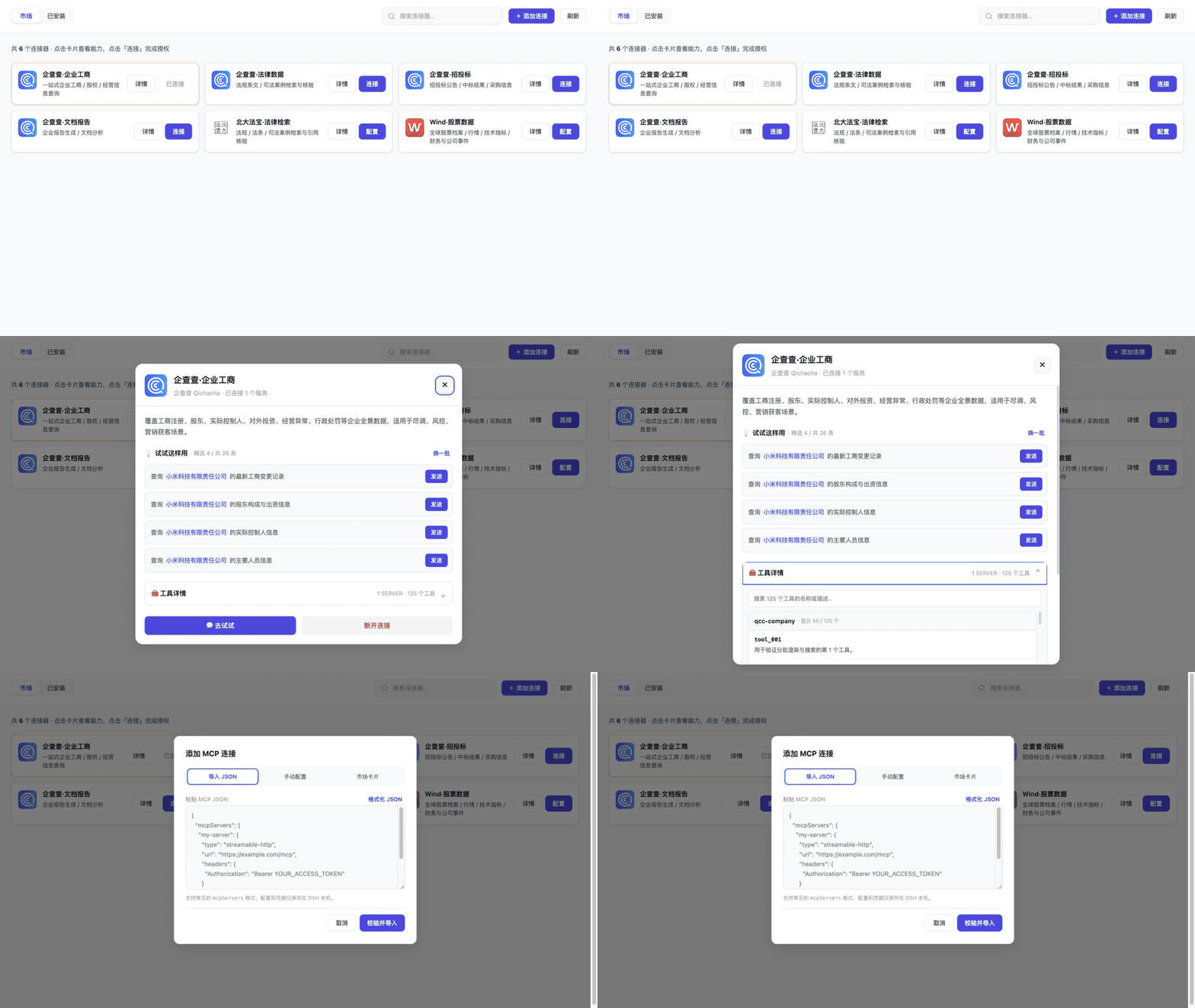
For a first successful use, confirm the connection and scope in Installed, find the expected tool and source in Tools, then complete one provider-permitted read-only call through the normal DSH Host approval flow. Cached visibility alone does not prove that a service is currently callable.
|
|
42
|
+
|
|
43
|
+
First-success guide (Chinese): [install → connect → find a tool → make the first read-only call](docs/tutorials/README.md). Task details: [migrate `mcpServers` JSON](docs/tutorials/JSON-MIGRATION.md) · [diagnose OAuth](docs/tutorials/OAUTH-DIAGNOSTICS.md) · [find and recover tools](docs/tutorials/TOOL-SEARCH-RECOVERY.md).
|
|
44
|
+
|
|
39
45
|
|
|
40
46
|
|
|
41
47
|
If the plugin helps you connect an MCP server faster, consider [starring the repository](https://github.com/duhu2000/dsh-mcp-connector/stargazers), [submitting a connector](https://github.com/duhu2000/dsh-mcp-connector-registry/blob/main/docs/ONBOARDING.md), or [contributing a fix](CONTRIBUTING.md).
|
|
@@ -125,6 +131,8 @@ The detailed [Chinese user guide](docs/USER-GUIDE.md) covers category browsing,
|
|
|
125
131
|
## Guides and ecosystem
|
|
126
132
|
|
|
127
133
|
- [User guide: installation, authorization, diagnostics, compatibility, and troubleshooting](docs/USER-GUIDE.md)
|
|
134
|
+
- [First-success guide: install, connect, find a tool, and make a read-only call (Chinese)](docs/tutorials/README.md)
|
|
135
|
+
- [Task guides: JSON migration, OAuth diagnostics, and cross-connection tool recovery](docs/USER-GUIDE.md#按任务开始)
|
|
128
136
|
- [Connection scopes: project/global inheritance, copy, move, and rollback](docs/CONNECTION-SCOPES.md)
|
|
129
137
|
- [Connection, Server, and Tool governance](docs/TOOL-GOVERNANCE.md)
|
|
130
138
|
- [Tool trial: official API evidence and safety design](docs/TOOL-TRIAL-DESIGN.md)
|
|
@@ -190,7 +198,7 @@ npm run dev:ui
|
|
|
190
198
|
|
|
191
199
|
Every Registry merge regenerates `catalog-stats.json`; an hourly workflow in this repository synchronizes the Chinese and English product copy plus a local stats snapshot. The static npm README updates with package releases, while the live badges above read the Registry directly and therefore stay current without another npm release.
|
|
192
200
|
|
|
193
|
-
The current public version is [`dsh-mcp-connector@0.2.
|
|
201
|
+
The current public version is [`dsh-mcp-connector@0.2.59`](https://www.npmjs.com/package/dsh-mcp-connector), with [GitHub Release v0.2.59](https://github.com/duhu2000/dsh-mcp-connector/releases/tag/v0.2.59).
|
|
194
202
|
|
|
195
203
|
See [CHANGELOG.md](CHANGELOG.md) for version history and [docs/DESKTOP-E2E.md](docs/DESKTOP-E2E.md) for the Desktop release checklist.
|
|
196
204
|
|
package/README.md
CHANGED
|
@@ -1,9 +1,11 @@
|
|
|
1
1
|
# MCP连接器:在 DeepSeek Harness 接入、查找和排障 MCP Server
|
|
2
2
|
|
|
3
|
-
> DeepSeek Harness
|
|
3
|
+
> DeepSeek Harness 的 MCP 接入与管理面板:超百个 MCP连接器,一个入口完成 MCP Server 授权配置、跨连接工具搜索与连接排障。
|
|
4
4
|
|
|
5
5
|
从持续更新的连接器目录接入 MCP Server;跨当前范围内已启用连接查找工具,查看易读参数、来源和最后成功缓存时间,并在发现异常时检查连接或重新发现工具。支持 OAuth 2.0 PKCE、API Key、Streamable HTTP/stdio 与 `mcpServers` JSON 导入。
|
|
6
6
|
|
|
7
|
+
OAuth 是否可用取决于服务商的客户端注册、账号权限与授权政策;连接已保存、工具已发现和业务调用成功应分别验证。
|
|
8
|
+
|
|
7
9
|
> 注:“技能扩展”指通过 MCP 工具和 Prompt 扩展智能体能力,本包不会伪装成独立 DSH Skill。
|
|
8
10
|
|
|
9
11
|
[English](README.en.md)
|
|
@@ -36,6 +38,10 @@ dsh plugin --profile web add dsh-mcp-connector
|
|
|
36
38
|
|
|
37
39
|
安装或升级后完全重启 DeepSeek Harness Desktop 或 `dsh web`,然后打开左侧「🧩 MCP连接器」;也可从“设置 → 插件 → 插件配置 → MCP连接器”直接打开。
|
|
38
40
|
|
|
41
|
+
首次使用建议依次确认:连接已保存且范围正确 → “工具”页能找到预期工具与来源 → 在正常 DSH 会话中通过 Host 审批链完成一次服务商许可的只读调用。缓存可见不等于当前服务可调用。
|
|
42
|
+
|
|
43
|
+
[首次成功入口:安装 → 连接 → 找到工具 → 首次只读调用](docs/tutorials/README.md)。按任务深入:[迁移现有 `mcpServers` JSON](docs/tutorials/JSON-MIGRATION.md) · [OAuth 授权诊断](docs/tutorials/OAUTH-DIAGNOSTICS.md) · [跨连接找工具与恢复](docs/tutorials/TOOL-SEARCH-RECOVERY.md)。
|
|
44
|
+
|
|
39
45
|

|
|
40
46
|
|
|
41
47
|
如果它帮你更快地接入 MCP Server,欢迎 [GitHub 点个 Star](https://github.com/duhu2000/dsh-mcp-connector/stargazers)、[提交新的连接器](https://github.com/duhu2000/dsh-mcp-connector-registry/blob/main/docs/ONBOARDING.md)或[参与贡献](CONTRIBUTING.md)。
|
|
@@ -126,6 +132,8 @@ bash <(curl -fsSL https://raw.githubusercontent.com/duhu2000/dsh-mcp-connector/m
|
|
|
126
132
|
## 中文教程与生态入口
|
|
127
133
|
|
|
128
134
|
- [用户手册:安装、授权、诊断、兼容性与故障排查](docs/USER-GUIDE.md)
|
|
135
|
+
- [首次成功入口:安装、连接、找工具和首次只读调用](docs/tutorials/README.md)
|
|
136
|
+
- [任务教程:JSON 迁移、OAuth 诊断、跨连接找工具与恢复](docs/USER-GUIDE.md#按任务开始)
|
|
129
137
|
- [配置备份:脱敏导出、快照与恢复边界](docs/CONFIG-BACKUP.md)
|
|
130
138
|
- [连接作用域:project/global 继承、复制、移动与回滚](docs/CONNECTION-SCOPES.md)
|
|
131
139
|
- [连接、Server 与 Tool 治理](docs/TOOL-GOVERNANCE.md)
|
|
@@ -185,7 +193,7 @@ npm run dev:ui
|
|
|
185
193
|
|
|
186
194
|
公共 Registry 每次合并后会生成 `catalog-stats.json`;本仓库的定时工作流每小时同步中英文介绍和统计快照。npm 页面中的静态正文随版本发布更新,上方动态统计徽标则直接读取 Registry,可在不发布新 npm 版本时保持实时数量一致。
|
|
187
195
|
|
|
188
|
-
当前公开版本为 [`dsh-mcp-connector@0.2.
|
|
196
|
+
当前公开版本为 [`dsh-mcp-connector@0.2.59`](https://www.npmjs.com/package/dsh-mcp-connector),对应 [GitHub Release v0.2.59](https://github.com/duhu2000/dsh-mcp-connector/releases/tag/v0.2.59)。
|
|
189
197
|
|
|
190
198
|
版本能力与变更记录见 [CHANGELOG.md](CHANGELOG.md)。
|
|
191
199
|
Desktop 发版回归见 [docs/DESKTOP-E2E.md](docs/DESKTOP-E2E.md)。
|
package/docs/USER-GUIDE.md
CHANGED
|
@@ -2,6 +2,16 @@
|
|
|
2
2
|
|
|
3
3
|
本手册面向安装和使用 `dsh-mcp-connector` 的 DeepSeek Harness(DSH)用户。服务商或 MCP 原作者如需提交市场卡片,请改看独立 Registry 的[第三方连接器上架指南](https://github.com/duhu2000/dsh-mcp-connector-registry/blob/main/docs/ONBOARDING.md)。
|
|
4
4
|
|
|
5
|
+
## 按任务开始
|
|
6
|
+
|
|
7
|
+
第一次使用请从[统一首次成功入口](tutorials/README.md)开始:安装并重启正确 profile,只选一种连接方式,确认工具来源,再回到正常 DSH 会话完成服务商许可的首次只读调用。
|
|
8
|
+
|
|
9
|
+
- 已有其他客户端配置:从[迁移 `mcpServers` JSON](tutorials/JSON-MIGRATION.md)开始,逐项验证配置保存、工具发现/注册和只读调用。
|
|
10
|
+
- OAuth 卡在注册、授权或刷新:看[OAuth 连接诊断](tutorials/OAUTH-DIAGNOSTICS.md),先按阶段与稳定代码排查,不反复提交未获授权的账号。
|
|
11
|
+
- 已连接多个服务却找不到工具:看[跨连接找工具与发现失败恢复](tutorials/TOOL-SEARCH-RECOVERY.md)。缓存可查不等于当前可调用。
|
|
12
|
+
|
|
13
|
+
这三篇是操作教程,不代表对所有服务商完成了真实业务调用验收;正式调用仍受服务商权限、费用与 DSH Host 审批约束。
|
|
14
|
+
|
|
5
15
|
## 1. 安装、升级与重启
|
|
6
16
|
|
|
7
17
|
要求:DSH Desktop 或 `web` profile,Node.js 20 或更高版本。
|
|
@@ -0,0 +1,57 @@
|
|
|
1
|
+
# 把已有 `mcpServers` JSON 迁移到 MCP连接器
|
|
2
|
+
|
|
3
|
+
返回[首次成功统一入口](README.md)。
|
|
4
|
+
|
|
5
|
+
适用场景:你已经有其他客户端的 `mcpServers` 配置,希望在 DeepSeek Harness 中统一管理,而不是逐个重新录入。本文只演示受信任的 HTTP/stdio MCP Server;不会把普通 API 或 CLI 自动变成 MCP Server。
|
|
6
|
+
|
|
7
|
+
## 迁移前:先确认什么
|
|
8
|
+
|
|
9
|
+
1. 按统一入口安装 `dsh-mcp-connector`:默认布局下 DSH Desktop 与 `dsh web` 都从本机 `web` profile 加载插件。安装后只需重启正在使用的宿主;自定义 profile 布局以宿主配置为准。
|
|
10
|
+
2. 核对原配置的每个 Server:远端 URL 是否为 MCP Streamable HTTP 端点;本地 `command`、`args` 和运行时是否可信且可在 **DSH 所在机器** 启动。
|
|
11
|
+
3. 对每个连接决定“当前项目”或“所有项目(全局)”。全局仅指当前 DSH profile,并非跨 profile 共享。
|
|
12
|
+
4. 在本机保存原配置的安全备份。不要把含 Token、API Key、Cookie 或本机路径的原文发到 Issue、聊天或公开仓库。
|
|
13
|
+
|
|
14
|
+
## 导入一个最小示例
|
|
15
|
+
|
|
16
|
+
打开左侧“🧩 MCP连接器”(或“设置 → 插件 → 插件配置 → MCP连接器 → 打开 MCP连接器”),点击“+ 添加连接 → 导入 JSON”,在本机粘贴:
|
|
17
|
+
|
|
18
|
+
```json
|
|
19
|
+
{
|
|
20
|
+
"mcpServers": {
|
|
21
|
+
"example-http": {
|
|
22
|
+
"type": "streamable-http",
|
|
23
|
+
"url": "https://example.com/mcp",
|
|
24
|
+
"headers": { "Authorization": "Bearer REPLACE_LOCALLY" }
|
|
25
|
+
},
|
|
26
|
+
"example-local": {
|
|
27
|
+
"type": "stdio",
|
|
28
|
+
"command": "node",
|
|
29
|
+
"args": ["/replace/with/trusted/server.js"],
|
|
30
|
+
"env": { "EXAMPLE_MODE": "readonly" }
|
|
31
|
+
}
|
|
32
|
+
}
|
|
33
|
+
}
|
|
34
|
+
```
|
|
35
|
+
|
|
36
|
+
以上地址、路径和凭据都是占位示例,不能直接连接。请在本机替换为服务商文档给出的值;如没有可信的本地服务,可删除 `example-local`。历史 `sse` 会被归一为 Streamable HTTP,不代表任何旧 SSE 地址都兼容。外部 URL 默认应使用 HTTPS;对私有 IP 明文 HTTP 的显式风险确认及限制见[用户手册](../USER-GUIDE.md#61-导入-mcpservers-json)。
|
|
37
|
+
|
|
38
|
+
提交前确认目标范围,提交后在“已安装”查看连接。导入和启动失败时先看诊断;不要仅凭“列表里出现配置”判断可用。自定义 HTTP 会在保存前校验 MCP `initialize`;stdio 会等待 Host 首次初始化和工具同步。
|
|
39
|
+
|
|
40
|
+
## 首次成功使用的三个验收点
|
|
41
|
+
|
|
42
|
+
| 验收点 | 在哪里看 | 通过条件 |
|
|
43
|
+
|---|---|---|
|
|
44
|
+
| 配置已保存 | “已安装”页 | 目标连接存在,名称与项目/全局范围正确 |
|
|
45
|
+
| 工具已发现并注册 | “工具”页与 DSH Host | 当前范围内出现预期工具和来源;必要时检查 `mcp__<serverName>__*` 注册状态 |
|
|
46
|
+
| 业务调用成功 | 正常 DSH 会话 | 经 Host 的权限/审批链调用一个服务商允许的只读工具,并得到可辨认结果 |
|
|
47
|
+
|
|
48
|
+
前两项不能替代第三项;工具缓存可查也不证明服务此刻能调用。涉及付费、写入、删除等操作时,不要用它们做首次验收。
|
|
49
|
+
|
|
50
|
+
## 迁移后的维护与回退
|
|
51
|
+
|
|
52
|
+
- 在“已安装 → 编辑配置”可修改**自定义或 JSON 导入**连接的标准化单连接 JSON,并保存重连。这里不会恢复原 JSON 的排版/注释,也不能改 connection key 或 `serverName`。敏感值以 `<KEEP_EXISTING>` 表示本机保留,不要把真实值复制到聊天。
|
|
53
|
+
- “配置备份”可导出脱敏 JSON,迁移到另一设备前需在目标设备重填占位符;OAuth Grant 不能携带,须从市场重新授权。
|
|
54
|
+
- 当前 profile 的本机快照可预览和恢复连接变更,但可能含凭据,不能作为可公开分享的备份;服务端已撤销的 OAuth Grant 不能靠快照恢复。
|
|
55
|
+
- 如果原客户端仍在管理同一 `serverName`,先确认是否会双重连接或工具名冲突,再决定停用旧配置。不要在确认新路径通过第三个验收点之前删除原配置。
|
|
56
|
+
|
|
57
|
+
更多细节见[用户手册:JSON 导入](../USER-GUIDE.md#61-导入-mcpservers-json)、[配置备份与恢复](../CONFIG-BACKUP.md)和[连接作用域](../CONNECTION-SCOPES.md)。
|
|
@@ -0,0 +1,38 @@
|
|
|
1
|
+
# OAuth 连接没有成功时,先定位哪一层失败
|
|
2
|
+
|
|
3
|
+
返回[首次成功统一入口](README.md)。
|
|
4
|
+
|
|
5
|
+
适用场景:市场卡片要求 OAuth 2.0 PKCE,但按钮显示“自动重试中”“需重新授权”或连接异常。OAuth 接入能力依赖服务商公开元数据、客户端注册、账号权限与网络条件;插件支持 OAuth 流程,不等于每个市场连接器都已对任意账号开放。
|
|
6
|
+
|
|
7
|
+
## 先看状态,而不是反复点击授权
|
|
8
|
+
|
|
9
|
+
1. 在“市场”或“已安装”找到对应连接,记录服务商名称、插件版本和按钮状态,不记录 Token/授权码。
|
|
10
|
+
2. 展开详情中的诊断,记录 `stage`、稳定 `code`、`checkedAt` 与建议动作。`状态未知` 只表示缺少当前进程的观察证据,既不是成功也不是失败。
|
|
11
|
+
3. 若为“自动重试中”,先检查网络与服务商状态,等待有界退避;临时刷新失败不必立刻重新授权。
|
|
12
|
+
4. 若明确为“需重新授权”,再从卡片发起新授权。不要向未获授权的企业账号反复尝试登录,也不要把真实凭据交给第三方排障者。
|
|
13
|
+
|
|
14
|
+
## 按失败阶段处理
|
|
15
|
+
|
|
16
|
+
| 观察到的阶段或代码 | 首先核对 | 不应推断 |
|
|
17
|
+
|---|---|---|
|
|
18
|
+
| OAuth 元数据/动态客户端注册;HTTP 403 | 服务商是否允许公开注册、是否需要预登记客户端或企业资格 | 浏览器没弹出就认定插件损坏;重复点击可绕过服务商政策 |
|
|
19
|
+
| `auth` / `refresh` | 账号权限、授权范围、Grant 是否失效、服务商撤销状态 | 所有 refresh 错误都意味着永久失效 |
|
|
20
|
+
| `dns` / `tls` / `timeout` / `http` | DNS、代理、证书、VPN/专线、白名单、服务端状态 | 授权已成功就说明 MCP 端点也可用 |
|
|
21
|
+
| `protocol` | URL 是否为兼容的 MCP Streamable HTTP 端点 | 普通网页登录地址或 REST API 地址可直接替代 MCP URL |
|
|
22
|
+
| `host-tools-pending` / `host-status-unavailable` | DSH Host 是否完成工具注册、版本是否能观测状态 | “已保存”就等于工具可调用 |
|
|
23
|
+
|
|
24
|
+
只有页面明确显示“客户端注册被拒绝、尚未进入浏览器授权”时,才将问题定位到服务商注册政策;这不是用户 OAuth 登录失败。服务商可能要求登记客户端,不能靠重复尝试用户登录绕过。
|
|
25
|
+
|
|
26
|
+
## 验证恢复,而不是只看授权回调
|
|
27
|
+
|
|
28
|
+
1. 完成浏览器授权后回到 DSH,检查连接诊断与最近观察时间。多 Server 卡片如有一个异常,整体可能显示“部分异常”。
|
|
29
|
+
2. 在当前工作区打开“工具”,确认对应连接/服务的工具被发现;若未选择 Workspace,只会显示全局连接。最后成功缓存可帮助定位,但不代表当前可调用。
|
|
30
|
+
3. 在正常 DSH 会话里,以服务商许可的**只读**任务验证一次正式调用。工具执行、权限和审批由 DSH Host 管理;页面里的“检查连接/重新发现工具”不会执行目标工具。
|
|
31
|
+
|
|
32
|
+
授权成功、工具注册成功和业务调用成功是三个不同结果。只有全部完成,才可说“首次使用通过”。不要用含真实业务数据、付费或有副作用的调用做公开演示。
|
|
33
|
+
|
|
34
|
+
## 安全反馈模板
|
|
35
|
+
|
|
36
|
+
在 [GitHub Issue](https://github.com/duhu2000/dsh-mcp-connector/issues) 提供:DSH 版本、插件版本、连接器名称、操作系统、脱敏的阶段/code、时间、复现步骤,以及“浏览器是否进入授权”“工具是否注册”“只读调用是否成功”三个独立结论。不要上传 Token、API Key、Cookie、授权码、完整 Header、用户信息或本机路径。
|
|
37
|
+
|
|
38
|
+
完整状态语义见[用户手册:连接诊断](../USER-GUIDE.md#74-如何理解连接诊断)。
|
|
@@ -0,0 +1,51 @@
|
|
|
1
|
+
# 从安装到首次成功调用
|
|
2
|
+
|
|
3
|
+
这是一条统一的最短路径。它把已有教程串成“安装 → 连接 → 找到工具 → 首次只读调用”,不替代各服务商文档。首次调用只选你已获准使用、费用与权限边界明确的只读任务;截图、GIF、连接成功或工具缓存都不等于真实业务调用通过。
|
|
4
|
+
|
|
5
|
+
## 1. 安装并重启正确的 profile
|
|
6
|
+
|
|
7
|
+
当前默认安装布局中,DSH Desktop 和 `dsh web` 都从本机 `web` profile 加载插件,因此两种宿主都使用同一条安装命令;不要因为使用 Desktop 就把命令改成 `--profile desktop`。
|
|
8
|
+
|
|
9
|
+
```bash
|
|
10
|
+
dsh plugin --profile web add dsh-mcp-connector
|
|
11
|
+
```
|
|
12
|
+
|
|
13
|
+
安装或升级后,只重启你正在使用的宿主:DSH Desktop 需完全退出应用后重新打开;`dsh web` 需停止原进程后重新启动。打开左侧“🧩 MCP连接器”;若侧边栏入口已隐藏,从“设置 → 插件 → 插件配置 → MCP连接器”点击“打开 MCP连接器”。自定义过 profile 布局的部署应以其宿主配置为准。
|
|
14
|
+
|
|
15
|
+
## 2. 只选一条连接路径
|
|
16
|
+
|
|
17
|
+
- 已有其他客户端配置:按[迁移 `mcpServers` JSON](JSON-MIGRATION.md)导入,并在提交前确认当前项目或全局范围。
|
|
18
|
+
- 使用市场中的 OAuth / API Key 连接器:按服务商要求授权或在本机录入凭据;卡住时转到[OAuth 连接诊断](OAUTH-DIAGNOSTICS.md)。OAuth 能否使用取决于服务商客户端注册政策、账号权限和授权范围。
|
|
19
|
+
- 自建 HTTP / stdio Server:按[用户手册的自定义连接说明](../USER-GUIDE.md#6-添加自定义连接)填写可信端点或本机命令。普通 REST API 或 CLI 不能因此自动变成 MCP Server。
|
|
20
|
+
|
|
21
|
+
连接后先在“已安装”确认名称、项目/全局范围和启停状态。这里只证明配置已保存,不证明工具已经注册或服务当前可调用。
|
|
22
|
+
|
|
23
|
+
## 3. 找到要调用的工具
|
|
24
|
+
|
|
25
|
+
在当前 Workspace 打开“工具”,搜索预期工具,核对连接、Server、工具来源和参数。若结果为空、陈旧或最近发现失败,按[跨连接找工具与恢复](TOOL-SEARCH-RECOVERY.md)处理。
|
|
26
|
+
|
|
27
|
+
工具页只展示当前范围内已启用连接的安全缓存,不执行目标工具。继续之前,确认预期工具已被发现;必要时核对 DSH Host 中的 `mcp__<serverName>__*` 注册状态。
|
|
28
|
+
|
|
29
|
+
## 4. 在正常 DSH 会话完成首次只读调用
|
|
30
|
+
|
|
31
|
+
插件页面没有绕过审批的“试运行”按钮。回到正常 DSH 会话,替换尖括号后发送:
|
|
32
|
+
|
|
33
|
+
```text
|
|
34
|
+
请仅使用 MCP 工具 mcp__<serverName>__<toolName> 完成“<一个服务商允许的只读任务>”。
|
|
35
|
+
调用前请列出工具来源、将发送的关键参数,以及是否可能产生费用或副作用。
|
|
36
|
+
如果需要写入、付费、发布、删除,或超出当前账户权限,请停止并先请求我确认。
|
|
37
|
+
```
|
|
38
|
+
|
|
39
|
+
实际工具执行及权限/审批由 DSH Host 管理。服务商可能另有账号资格、配额和费用;不要为首次验收使用真实敏感数据,或选择写入、删除、发布等有副作用的操作。
|
|
40
|
+
|
|
41
|
+
## 5. 记录三个独立结果
|
|
42
|
+
|
|
43
|
+
| 层次 | 通过条件 |
|
|
44
|
+
|---|---|
|
|
45
|
+
| 配置 | “已安装”中存在目标连接,范围和启停状态正确 |
|
|
46
|
+
| 发现/注册 | “工具”中出现预期工具和来源;必要时确认 Host 注册状态 |
|
|
47
|
+
| 调用 | 正常会话经 Host 审批链完成服务商许可的只读调用,并得到可辨认结果 |
|
|
48
|
+
|
|
49
|
+
只有第三项通过,才能把这个具体场景记为“首次成功调用”。若第三项没有条件验证,请明确写“无数据/待验收”,不要从下载量、页面浏览、连接成功或演示素材推算。
|
|
50
|
+
|
|
51
|
+
如果这条路径确实帮你完成首次调用,欢迎克制地 [Star 项目](https://github.com/duhu2000/dsh-mcp-connector/stargazers)、[提交新连接器](https://github.com/duhu2000/dsh-mcp-connector-registry/blob/main/docs/ONBOARDING.md)或[参与贡献](../../CONTRIBUTING.md)。
|
|
@@ -0,0 +1,34 @@
|
|
|
1
|
+
# 跨连接找工具,并在发现失败后恢复
|
|
2
|
+
|
|
3
|
+
返回[首次成功统一入口](README.md)。
|
|
4
|
+
|
|
5
|
+
适用场景:你已连接多个 MCP Server,想按任务找工具、看参数;或某条连接的最近发现失败,但仍需要判断工具曾经有哪些。本文不演示执行真实业务工具。
|
|
6
|
+
|
|
7
|
+
## 先定位正确的工具
|
|
8
|
+
|
|
9
|
+
1. 在 DSH 选中目标 Workspace,再打开“🧩 MCP连接器 → 工具”。未选 Workspace 时仅能看到全局连接;项目连接不会越界显示。
|
|
10
|
+
2. 输入工具名或描述中的关键词。精确工具名优先;同名结果仍需核对连接、服务和来源。
|
|
11
|
+
3. 使用“连接”“服务”“发现状态”筛选。若结果为空,先清除筛选,再确认连接已启用、范围正确且至少成功发现过一次。
|
|
12
|
+
4. 点击“参数详情”:先看类型、必填、枚举和可展开的嵌套摘要;复杂规则可打开“原始 Schema(安全缓存)”。它仍经过安全裁剪和容量限制,不是服务端完整原文。
|
|
13
|
+
|
|
14
|
+
工具页搜索的是**当前范围内已启用连接的最后成功安全缓存**,不是整个市场中未安装连接器的工具。搜索/筛选不请求目标服务,也不执行目标工具。
|
|
15
|
+
|
|
16
|
+
## 最近发现失败时怎么做
|
|
17
|
+
|
|
18
|
+
1. 看结果上的连接器/连接/服务来源、最近发现状态和“最后成功缓存时间”。超过 24 小时的缓存会标记陈旧;缓存能看不代表服务当前可调用。
|
|
19
|
+
2. 展开“连接状态与故障处理”,先阅读失败阶段、稳定 code 和建议。`状态未知` 不等于连接成功。
|
|
20
|
+
3. 根据建议使用“检查连接”或“重新发现工具”。前者检查单连接健康;后者重新获取该连接的工具元数据,二者都不是目标工具试运行,也不保证自动修复。
|
|
21
|
+
4. 若遇 429/限流,等待显示的重试时间,不要连续点击。工具页手动动作不能绕过有效限流;鉴权失败需更新凭据或重新授权。
|
|
22
|
+
5. 修复后再次观察发现状态与时间;最后再通过正常 DSH 会话调用一个获准的只读工具,确认真实业务路径。
|
|
23
|
+
|
|
24
|
+
后台发现最多并行处理两条连接。健康连接是**五分钟后到期**,不是精确每五分钟或永久实时轮询;普通失败指数退避,鉴权失败暂停自动重试。页面状态通知不等于持续健康探针。
|
|
25
|
+
|
|
26
|
+
## 可复核的首次成功标准
|
|
27
|
+
|
|
28
|
+
| 层次 | 你应看到什么 |
|
|
29
|
+
|---|---|
|
|
30
|
+
| 连接 | “已安装”中对应连接存在,范围与启停状态正确 |
|
|
31
|
+
| 发现/注册 | 工具页出现预期工具、来源和最近成功时间;必要时核对 Host 工具注册 |
|
|
32
|
+
| 调用 | 正常会话中通过 Host 审批链完成一个服务商许可的只读调用并得到预期结果 |
|
|
33
|
+
|
|
34
|
+
不要用缓存搜索结果代替调用验收,也不要在公开反馈中粘贴真实参数、结果或凭据。进一步诊断见[用户手册:工具工作台](../USER-GUIDE.md#51-工具工作台统一查找工具)。
|
package/package.json
CHANGED
|
@@ -1,6 +1,6 @@
|
|
|
1
1
|
{
|
|
2
2
|
"name": "dsh-mcp-connector",
|
|
3
|
-
"version": "0.2.
|
|
3
|
+
"version": "0.2.59",
|
|
4
4
|
"description": "DeepSeek Harness MCP Connector: connect servers, search tools across active connections, and troubleshoot discovery. Includes a continuously updated catalog; supports OAuth 2.0 PKCE, API keys, Streamable HTTP/stdio, and mcpServers JSON import.",
|
|
5
5
|
"type": "module",
|
|
6
6
|
"main": "lib/index.js",
|
|
@@ -28,6 +28,7 @@
|
|
|
28
28
|
"docs/STDIO-SUPPORT.md",
|
|
29
29
|
"docs/CLI-PROVIDERS.md",
|
|
30
30
|
"docs/USER-GUIDE.md",
|
|
31
|
+
"docs/tutorials",
|
|
31
32
|
"docs/screenshots",
|
|
32
33
|
"cordis.patch.yml",
|
|
33
34
|
"README.md",
|
|
@@ -44,7 +45,7 @@
|
|
|
44
45
|
],
|
|
45
46
|
"scripts": {
|
|
46
47
|
"test": "node --test",
|
|
47
|
-
"lint": "node --check lib/discovery-policy.js && node --check lib/index.js && node --check lib/web.js && node --check lib/client.js && node --check lib/settings.js && node --check lib/version-status.js && node --check lib/schema.js && node --check lib/catalog.js && node --check lib/prompts.js && node --check lib/probe.js && node --check lib/diagnostics.js && node --check lib/connection-backup.js && node --check lib/connection-editor.js && node --check lib/connection-scopes.js && node --check lib/governance.js && node --check lib/tool-catalog-cache.js && node --check lib/status-events.js && node --check lib/mcp-validation.js && node --check lib/mcp-http.js && node --check lib/migration.js && node --check lib/stores.js && node --check lib/grant-journal.js && node --check lib/oauth.js && node --check lib/grant-lifecycle.js && node --check lib/callback-server.js && node --check lib/mcp-provision.js && node --check lib/cli-providers.js && node --check lib/util.js && node --check lib/constants.js && node --check lib/tools.js && node --check lib/connectors/oauth-connector.js && node --check lib/connectors/manual-connector.js && node --check lib/connectors/json-connector.js && node --check scripts/probe-connector.mjs && node --check scripts/cli-bridge.mjs && node --check scripts/build-registry.mjs && node --check scripts/ui-harness.mjs && node --check scripts/check-market-registration.mjs && node --check scripts/check-distribution-sync.mjs && node --check scripts/check-readme-version.mjs && node --check scripts/check-marketing-metadata.mjs && node --check scripts/check-storefront-screenshots.mjs && node --check scripts/sync-registry-stats.mjs && node --check scripts/verify-pack.mjs",
|
|
48
|
+
"lint": "node --check lib/discovery-policy.js && node --check lib/index.js && node --check lib/web.js && node --check lib/client.js && node --check lib/settings.js && node --check lib/version-status.js && node --check lib/schema.js && node --check lib/catalog.js && node --check lib/prompts.js && node --check lib/probe.js && node --check lib/diagnostics.js && node --check lib/connection-backup.js && node --check lib/connection-editor.js && node --check lib/connection-scopes.js && node --check lib/governance.js && node --check lib/tool-catalog-cache.js && node --check lib/status-events.js && node --check lib/mcp-validation.js && node --check lib/mcp-http.js && node --check lib/migration.js && node --check lib/stores.js && node --check lib/grant-journal.js && node --check lib/oauth.js && node --check lib/grant-lifecycle.js && node --check lib/callback-server.js && node --check lib/mcp-provision.js && node --check lib/cli-providers.js && node --check lib/util.js && node --check lib/constants.js && node --check lib/tools.js && node --check lib/connectors/oauth-connector.js && node --check lib/connectors/manual-connector.js && node --check lib/connectors/json-connector.js && node --check scripts/probe-connector.mjs && node --check scripts/cli-bridge.mjs && node --check scripts/build-registry.mjs && node --check scripts/ui-harness.mjs && node --check scripts/check-market-registration.mjs && node --check scripts/check-distribution-sync.mjs && node --check scripts/check-readme-version.mjs && node --check scripts/check-first-use-docs.mjs && node --check scripts/check-marketing-metadata.mjs && node --check scripts/check-storefront-screenshots.mjs && node --check scripts/sync-registry-stats.mjs && node --check scripts/verify-pack.mjs",
|
|
48
49
|
"registry:build": "node scripts/build-registry.mjs",
|
|
49
50
|
"registry:validate": "node scripts/probe-connector.mjs catalog/catalog.json --validate-only",
|
|
50
51
|
"dev:ui": "node scripts/ui-harness.mjs",
|
|
@@ -52,13 +53,14 @@
|
|
|
52
53
|
"distribution:check:live": "node scripts/check-distribution-sync.mjs --strict-sync",
|
|
53
54
|
"registry:stats:sync": "node scripts/sync-registry-stats.mjs",
|
|
54
55
|
"docs:check": "node scripts/check-readme-version.mjs",
|
|
56
|
+
"docs:first-use:check": "node scripts/check-first-use-docs.mjs",
|
|
55
57
|
"marketing:check": "node scripts/check-marketing-metadata.mjs",
|
|
56
58
|
"marketing:check:github": "node scripts/check-marketing-metadata.mjs --live-github",
|
|
57
59
|
"marketing:check:npm": "node scripts/check-marketing-metadata.mjs --live-npm",
|
|
58
60
|
"marketing:check:live": "node scripts/check-marketing-metadata.mjs --live",
|
|
59
61
|
"storefront:check": "node scripts/check-storefront-screenshots.mjs",
|
|
60
62
|
"verify-pack": "node scripts/verify-pack.mjs",
|
|
61
|
-
"check": "npm run lint && npm run docs:check && npm run marketing:check && npm run storefront:check && npm test && npm run verify-pack",
|
|
63
|
+
"check": "npm run lint && npm run docs:check && npm run docs:first-use:check && npm run marketing:check && npm run storefront:check && npm test && npm run verify-pack",
|
|
62
64
|
"prepublishOnly": "npm run check"
|
|
63
65
|
},
|
|
64
66
|
"keywords": [
|