dsh-mcp-connector 0.2.45 → 0.2.47
This diff represents the content of publicly available package versions that have been released to one of the supported registries. The information contained in this diff is provided for informational purposes only and reflects changes between package versions as they appear in their respective public registries.
- package/CHANGELOG.md +31 -1
- package/README.en.md +26 -20
- package/README.md +26 -20
- package/docs/USER-GUIDE.md +28 -0
- package/docs/screenshots/05-unified-tool-search.png +0 -0
- package/docs/screenshots/06-tool-parameters.png +0 -0
- package/docs/screenshots/07-connection-diagnostics.png +0 -0
- package/docs/screenshots/README.md +23 -30
- package/docs/screenshots/assets.json +33 -4
- package/package.json +2 -2
- package/screenshots.json +4 -1
package/CHANGELOG.md
CHANGED
|
@@ -4,6 +4,31 @@
|
|
|
4
4
|
|
|
5
5
|
## [Unreleased]
|
|
6
6
|
|
|
7
|
+
## [0.2.47] - 2026-09-14
|
|
8
|
+
|
|
9
|
+
### Changed
|
|
10
|
+
|
|
11
|
+
- 新增三张当前工具工作台宣传截图,覆盖统一工具搜索、参数详情与连接诊断;更新 Storefront 清单、来源版本与完整性哈希。
|
|
12
|
+
- 将演示 GIF 更新为 43 秒六场景流程,并在中英文 README 中补齐当前能力截图。
|
|
13
|
+
- 更新宣传总账、媒体发布登记和外部分发状态;记录 `dshmarket@1.46.1` 的五组搜索复验结果及 D+7/D+14 复盘日期。
|
|
14
|
+
|
|
15
|
+
### Verification
|
|
16
|
+
|
|
17
|
+
- 250 项自动测试通过;7 张 Storefront 截图及 43 秒演示通过哈希、尺寸、采集约束和无凭据检查;75 个发布文件通过白名单与敏感信息扫描。
|
|
18
|
+
- npm/GitHub 营销元数据线上检查通过;外部目录非收敛项继续由 Issue #69 跟踪。
|
|
19
|
+
|
|
20
|
+
## [0.2.46] - 2026-09-13
|
|
21
|
+
|
|
22
|
+
### Changed
|
|
23
|
+
|
|
24
|
+
- 重写中英文 README 首屏,围绕接入 MCP Server、跨连接工具查找和连接排障统一产品表达,并用可核验的能力表替换竞品比较文案。
|
|
25
|
+
- 扩充统一工具工作台用户指南,补齐来源定位、参数阅读、发现/缓存语义、连接检查与逐连接重新发现流程。
|
|
26
|
+
- 同步 npm、GitHub About、README 与外部目录的双语描述,新增 npm 250 字符商店描述上限及用户结果关键词自动校验。
|
|
27
|
+
|
|
28
|
+
### Verification
|
|
29
|
+
|
|
30
|
+
- 248 项自动测试通过;4 张现有 storefront 截图通过完整性和无凭据检查;72 个发布文件通过白名单与敏感信息扫描。
|
|
31
|
+
|
|
7
32
|
## [0.2.45] - 2026-09-12
|
|
8
33
|
|
|
9
34
|
### Added
|
|
@@ -692,7 +717,12 @@
|
|
|
692
717
|
- 外部 URL 与导入 Header 执行安全校验。
|
|
693
718
|
- iframe 消息校验同源和消息来源。
|
|
694
719
|
|
|
695
|
-
[Unreleased]: https://github.com/duhu2000/dsh-mcp-connector/compare/v0.2.
|
|
720
|
+
[Unreleased]: https://github.com/duhu2000/dsh-mcp-connector/compare/v0.2.47...HEAD
|
|
721
|
+
[0.2.47]: https://github.com/duhu2000/dsh-mcp-connector/compare/v0.2.46...v0.2.47
|
|
722
|
+
[0.2.46]: https://github.com/duhu2000/dsh-mcp-connector/compare/v0.2.45...v0.2.46
|
|
723
|
+
[0.2.45]: https://github.com/duhu2000/dsh-mcp-connector/compare/v0.2.44...v0.2.45
|
|
724
|
+
[0.2.44]: https://github.com/duhu2000/dsh-mcp-connector/compare/v0.2.43...v0.2.44
|
|
725
|
+
[0.2.43]: https://github.com/duhu2000/dsh-mcp-connector/compare/v0.2.42...v0.2.43
|
|
696
726
|
[0.2.42]: https://github.com/duhu2000/dsh-mcp-connector/compare/v0.2.41...v0.2.42
|
|
697
727
|
[0.2.41]: https://github.com/duhu2000/dsh-mcp-connector/compare/v0.2.40...v0.2.41
|
|
698
728
|
[0.2.40]: https://github.com/duhu2000/dsh-mcp-connector/compare/v0.2.39...v0.2.40
|
package/README.en.md
CHANGED
|
@@ -1,8 +1,8 @@
|
|
|
1
|
-
#
|
|
1
|
+
# Connect, Find, and Troubleshoot MCP Servers in DeepSeek Harness
|
|
2
2
|
|
|
3
|
-
>
|
|
3
|
+
> 100+ MCP connectors for DeepSeek Harness, one place to connect MCP servers, search tools across connections, and troubleshoot connections.
|
|
4
4
|
|
|
5
|
-
|
|
5
|
+
Connect MCP servers from a continuously updated catalog. Search tools across enabled connections in the current scope, inspect readable parameters, source metadata, and the last successful cache time, then check a connection or rediscover its tools when discovery fails. Supports OAuth 2.0 PKCE, API keys, Streamable HTTP/stdio, and `mcpServers` JSON import.
|
|
6
6
|
|
|
7
7
|
> Here, “skill extension” means extending an agent through MCP tools and prompts; this package does not present itself as a standalone DSH Skill.
|
|
8
8
|
|
|
@@ -10,9 +10,11 @@ Manage MCP connections from different providers in one place inside DeepSeek Har
|
|
|
10
10
|
|
|
11
11
|
### Tool discovery and troubleshooting
|
|
12
12
|
|
|
13
|
-
|
|
13
|
+
Search cached tools across enabled connections visible to the current workspace in the Tools tab. Filter by connection, service and latest discovery status, then open parameter details for types, required fields and nested structures. Without a selected workspace, only global connections appear.
|
|
14
14
|
|
|
15
|
-
Expand connection diagnostics to check
|
|
15
|
+
Results identify their source and last successful cache time. A cached tool is not a guarantee that the service is currently callable. Expand connection diagnostics to check the connection or rediscover tools. Healthy discovery becomes due after five minutes; while the page remains connected, background scheduling checks due tasks. Failures back off, and authentication failures pause automatic retries.
|
|
16
|
+
|
|
17
|
+
Tool browsing does not execute target tools. Parameter summaries may omit complex rules; the original-schema view contains the sanitized, size-limited cached schema, not an untouched server response. See the [Chinese tool-workspace guide](docs/USER-GUIDE.md#51-工具工作台统一查找工具).
|
|
16
18
|
|
|
17
19
|
[Chinese user guide](docs/USER-GUIDE.md) · [Connector onboarding](https://github.com/duhu2000/dsh-mcp-connector-registry/blob/main/docs/ONBOARDING.md) · [First contribution](docs/FIRST-CONTRIBUTION.md) · [Contributing](CONTRIBUTING.md) · [Issues](https://github.com/duhu2000/dsh-mcp-connector/issues)
|
|
18
20
|
|
|
@@ -34,23 +36,22 @@ dsh plugin --profile web add dsh-mcp-connector
|
|
|
34
36
|
|
|
35
37
|
Fully restart DeepSeek Harness Desktop or `dsh web` after installation or upgrade, then open **MCP Connector** in the primary sidebar, or open it directly from **Settings → Plugins → Plugin Configuration → MCP Connector**.
|
|
36
38
|
|
|
37
|
-
|
|
38
40
|
|
|
39
41
|
If the plugin helps you connect an MCP server faster, consider [starring the repository](https://github.com/duhu2000/dsh-mcp-connector/stargazers), [submitting a connector](https://github.com/duhu2000/dsh-mcp-connector-registry/blob/main/docs/ONBOARDING.md), or [contributing a fix](CONTRIBUTING.md).
|
|
40
42
|
|
|
41
|
-
##
|
|
43
|
+
## What MCP Connector provides
|
|
42
44
|
|
|
43
|
-
| Capability |
|
|
44
|
-
|
|
45
|
-
|
|
|
46
|
-
|
|
|
47
|
-
|
|
|
48
|
-
|
|
|
49
|
-
|
|
|
50
|
-
|
|
|
51
|
-
|
|
|
52
|
-
|
|
|
53
|
-
| Plugin version discovery and safe updates | Usually not included | ✅ |
|
|
45
|
+
| Capability | What it gives you |
|
|
46
|
+
|---|---|
|
|
47
|
+
| Continuously updated catalog | Browse featured connectors and nine business categories; refresh after a Registry update to fetch new cards |
|
|
48
|
+
| Multiple connection paths | Connect with OAuth 2.0 PKCE, API keys, Streamable HTTP/stdio, or `mcpServers` JSON |
|
|
49
|
+
| Cross-connection tool search | Search the last-success cache of enabled connections in the current scope, then filter by connection, service, or state |
|
|
50
|
+
| Readable parameters and sources | Inspect types, required fields, enums, nested summaries, sources, cache time, and a sanitized schema |
|
|
51
|
+
| Connection troubleshooting | Use observed stages and stable error codes to check a connection or rediscover tools while retaining an available last-success cache |
|
|
52
|
+
| Scope and governance | Manage project/global visibility plus Connection, Server, and Tool rules |
|
|
53
|
+
| Safer lifecycle management | Keep credentials local, refresh grants, export redacted backups, restore snapshots, and preserve the previous connection on failure |
|
|
54
|
+
| Plugin updates | Detect newer versions and, when the host exposes a compatible Update Provider, show progress, failures, and rollback results |
|
|
54
55
|
|
|
55
56
|
## Features
|
|
56
57
|
|
|
@@ -86,8 +87,12 @@ As of 2026-09-11, the public Registry publishes 106 connector descriptors. After
|
|
|
86
87
|
|  |  |
|
|
87
88
|
| Tool discovery, descriptions, and scrolling | JSON import |
|
|
88
89
|
|  | 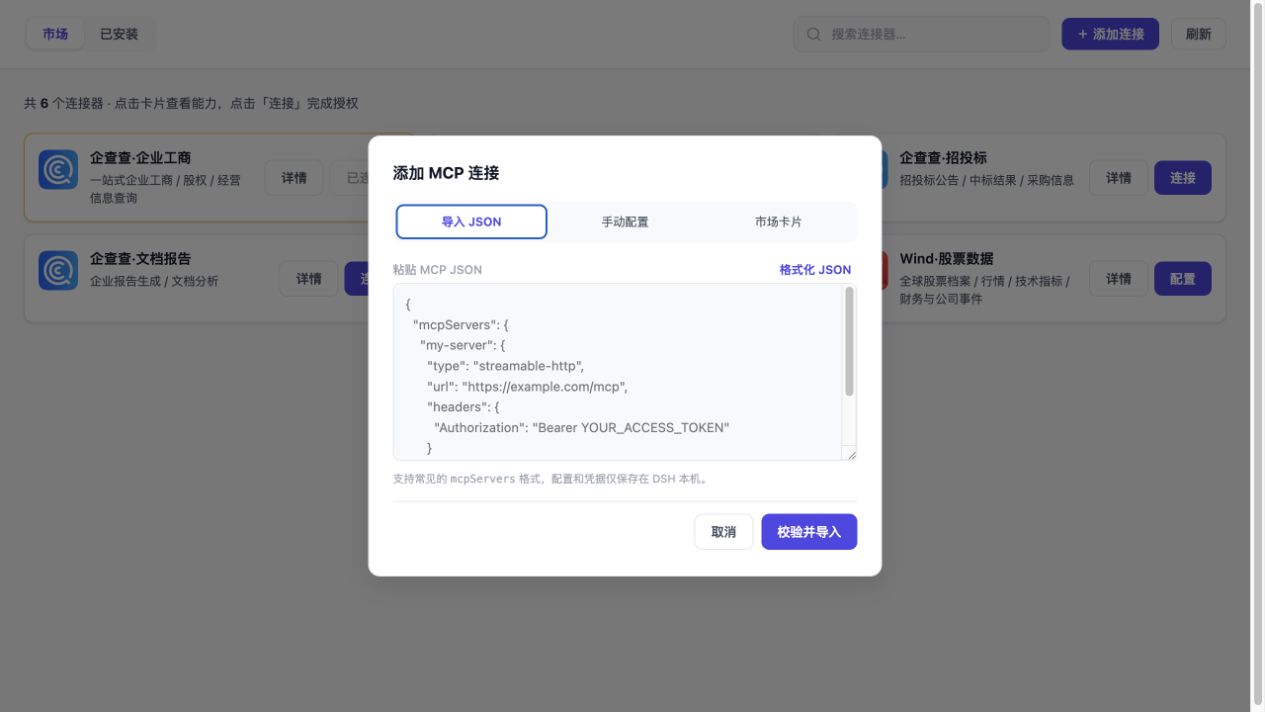 |
|
|
90
|
+
| Unified tool search and sources | Parameter details and safe schema |
|
|
91
|
+
| 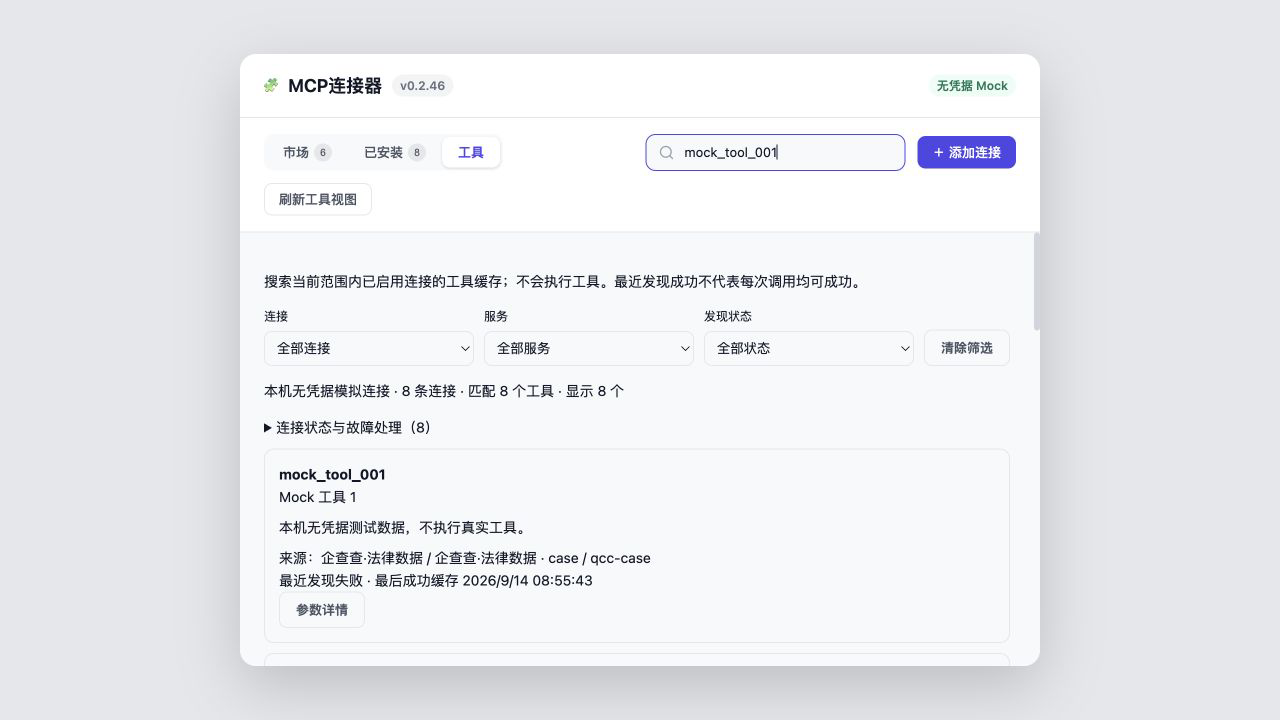 | 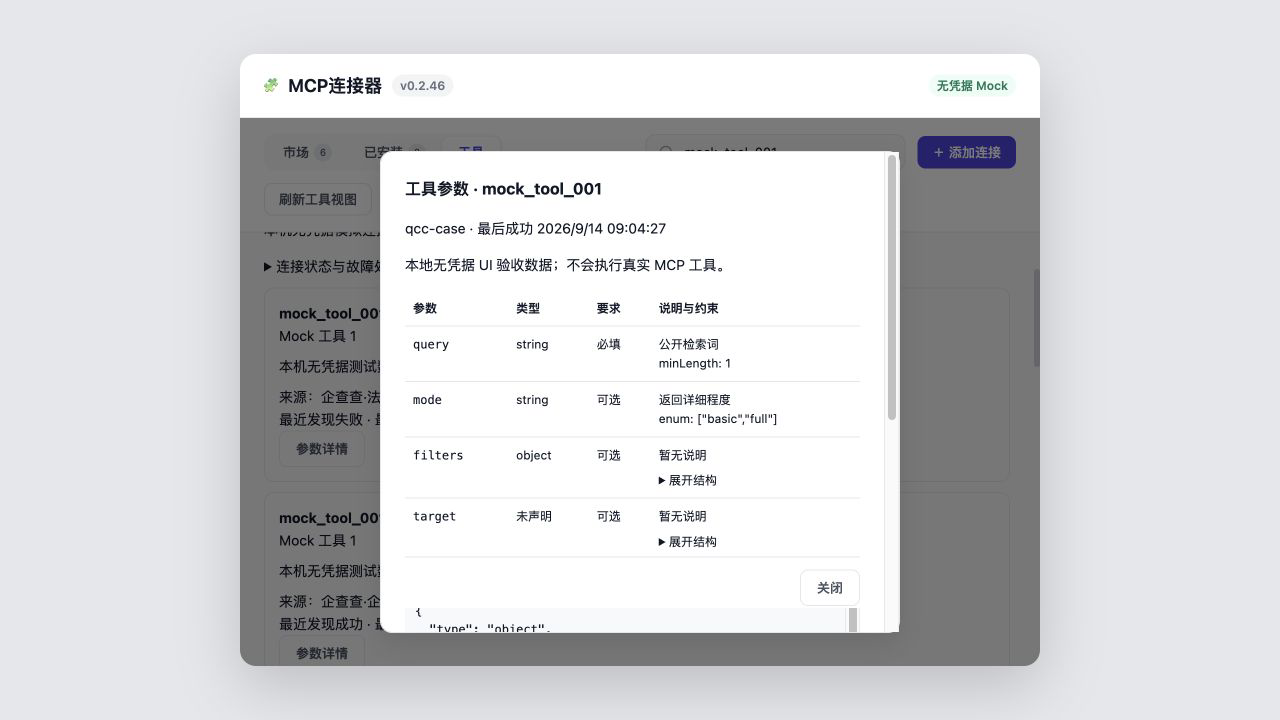 |
|
|
92
|
+
| Connection diagnostics and last-success cache | |
|
|
93
|
+
| 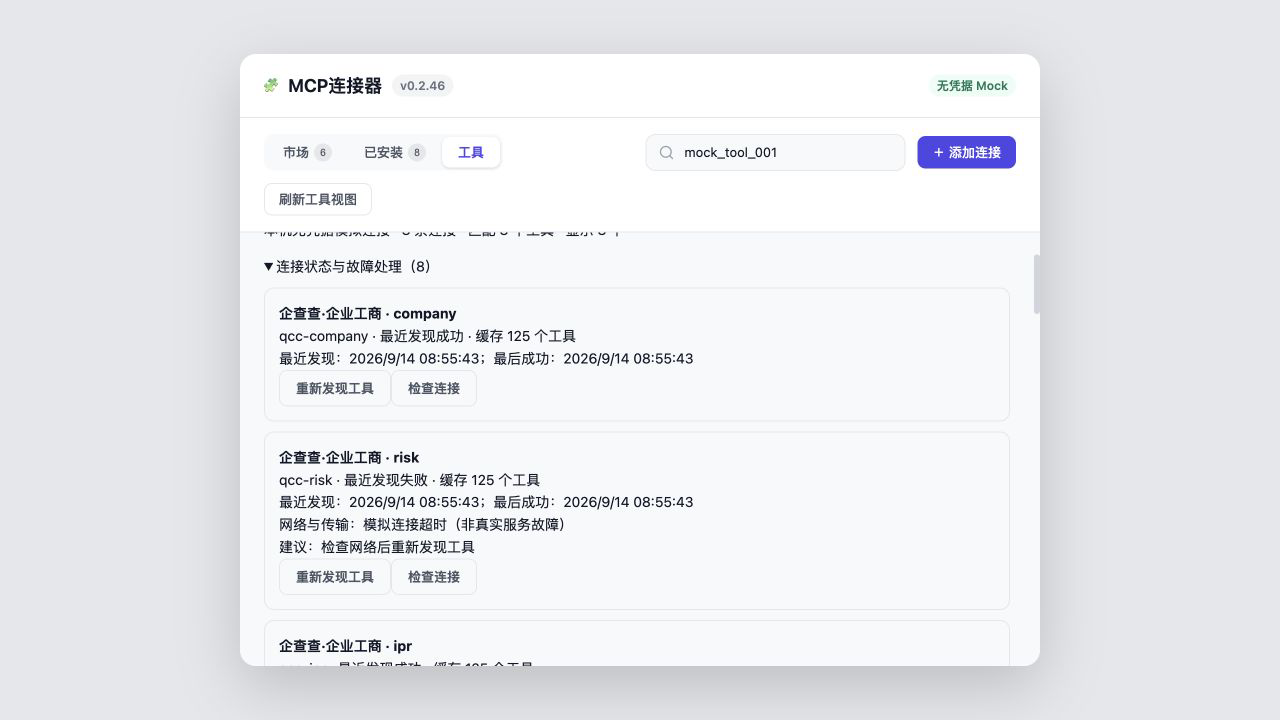 | |
|
|
89
94
|
|
|
90
|
-
|
|
95
|
+
Assets `01`–`04` preserve the historical `v0.2.37` marketplace snapshot. Assets `05`–`07` and the 43-second walkthrough come from the current `v0.2.46` credential-free UI harness. The harness mirrors the real 800px product panel, producing two cards per desktop row. It shows only public marketplace metadata, example prompts, and explicitly marked mock tool descriptions—never credentials, local paths, or query results. See [`docs/screenshots/README.md`](docs/screenshots/README.md) for provenance.
|
|
91
96
|
|
|
92
97
|
## Installation
|
|
93
98
|
|
|
@@ -111,6 +116,7 @@ Run the same command again to upgrade. Fully quit and restart DeepSeek Harness D
|
|
|
111
116
|
2. Choose a connector, confirm **Current project** or **All projects (global)**, and complete authorization or configuration.
|
|
112
117
|
3. Open its details to inspect tools or send an example prompt to a new conversation draft.
|
|
113
118
|
4. Use Installed or the conversation tools to enable, disable, inspect, or disconnect a connection.
|
|
119
|
+
5. After connecting, open **Tools** to search by tool name or description and filter by connection or service. Provider authorization, fees, and actual execution remain under the provider and DSH Host.
|
|
114
120
|
|
|
115
121
|
Connected tools are exposed to the model with the `mcp__<serverName>__*` prefix.
|
|
116
122
|
|
|
@@ -184,7 +190,7 @@ npm run dev:ui
|
|
|
184
190
|
|
|
185
191
|
Every Registry merge regenerates `catalog-stats.json`; an hourly workflow in this repository synchronizes the Chinese and English product copy plus a local stats snapshot. The static npm README updates with package releases, while the live badges above read the Registry directly and therefore stay current without another npm release.
|
|
186
192
|
|
|
187
|
-
The current public version is [`dsh-mcp-connector@0.2.
|
|
193
|
+
The current public version is [`dsh-mcp-connector@0.2.47`](https://www.npmjs.com/package/dsh-mcp-connector), with [GitHub Release v0.2.47](https://github.com/duhu2000/dsh-mcp-connector/releases/tag/v0.2.47).
|
|
188
194
|
|
|
189
195
|
See [CHANGELOG.md](CHANGELOG.md) for version history and [docs/DESKTOP-E2E.md](docs/DESKTOP-E2E.md) for the Desktop release checklist.
|
|
190
196
|
|
package/README.md
CHANGED
|
@@ -1,8 +1,8 @@
|
|
|
1
|
-
# MCP
|
|
1
|
+
# MCP连接器:在 DeepSeek Harness 接入、查找和排障 MCP Server
|
|
2
2
|
|
|
3
|
-
> DeepSeek Harness
|
|
3
|
+
> DeepSeek Harness 的超百个 MCP连接器,一个入口完成 MCP Server 接入、跨连接工具查找与连接排障。
|
|
4
4
|
|
|
5
|
-
|
|
5
|
+
从持续更新的连接器目录接入 MCP Server;跨当前范围内已启用连接查找工具,查看易读参数、来源和最后成功缓存时间,并在发现异常时检查连接或重新发现工具。支持 OAuth 2.0 PKCE、API Key、Streamable HTTP/stdio 与 `mcpServers` JSON 导入。
|
|
6
6
|
|
|
7
7
|
> 注:“技能扩展”指通过 MCP 工具和 Prompt 扩展智能体能力,本包不会伪装成独立 DSH Skill。
|
|
8
8
|
|
|
@@ -10,9 +10,11 @@
|
|
|
10
10
|
|
|
11
11
|
### 工具查找与故障处理
|
|
12
12
|
|
|
13
|
-
|
|
13
|
+
在“工具”页统一查找当前工作区可见、已启用连接的工具。输入工具名或描述,再按连接、服务和最近发现状态筛选;点击“参数详情”查看类型、必填项与嵌套结构。未选择工作区时,仅展示全局连接。
|
|
14
14
|
|
|
15
|
-
|
|
15
|
+
结果标注来源和最后成功缓存时间。发现失败时仍可查看已有缓存,但不代表服务当前可调用。展开“连接状态与故障处理”,按建议使用“检查连接”或“重新发现工具”。健康连接五分钟后到期,页面保持连接时后台检查到期任务;失败时退避,鉴权失败暂停自动重试。
|
|
16
|
+
|
|
17
|
+
详见[工具工作台教程](docs/USER-GUIDE.md#51-工具工作台统一查找工具)。工具页用于发现与诊断,不执行目标工具;参数摘要与原始安全缓存均有裁剪边界。
|
|
16
18
|
|
|
17
19
|
[用户手册](docs/USER-GUIDE.md) · [第三方连接器上架指南](https://github.com/duhu2000/dsh-mcp-connector-registry/blob/main/docs/ONBOARDING.md) · [首次贡献](docs/FIRST-CONTRIBUTION.md) · [参与贡献](CONTRIBUTING.md) · [问题反馈](https://github.com/duhu2000/dsh-mcp-connector/issues)
|
|
18
20
|
|
|
@@ -34,23 +36,22 @@ dsh plugin --profile web add dsh-mcp-connector
|
|
|
34
36
|
|
|
35
37
|
安装或升级后完全重启 DeepSeek Harness Desktop 或 `dsh web`,然后打开左侧「🧩 MCP连接器」;也可从“设置 → 插件 → 插件配置 → MCP连接器”直接打开。
|
|
36
38
|
|
|
37
|
-

|
|
38
40
|
|
|
39
41
|
如果它帮你更快地接入 MCP Server,欢迎 [GitHub 点个 Star](https://github.com/duhu2000/dsh-mcp-connector/stargazers)、[提交新的连接器](https://github.com/duhu2000/dsh-mcp-connector-registry/blob/main/docs/ONBOARDING.md)或[参与贡献](CONTRIBUTING.md)。
|
|
40
42
|
|
|
41
|
-
##
|
|
43
|
+
## MCP连接器能做什么
|
|
42
44
|
|
|
43
|
-
| 能力 |
|
|
44
|
-
|
|
45
|
-
|
|
|
46
|
-
|
|
|
47
|
-
|
|
|
48
|
-
|
|
|
49
|
-
|
|
|
50
|
-
|
|
|
51
|
-
|
|
|
52
|
-
|
|
|
53
|
-
| 插件版本检测与安全更新 | 通常无 | ✅ |
|
|
45
|
+
| 能力 | 用户得到什么 |
|
|
46
|
+
|---|---|
|
|
47
|
+
| 持续更新的连接器目录 | 浏览精选与 9 类业务连接器;Registry 更新后刷新即可获取新卡片 |
|
|
48
|
+
| 多种接入方式 | 使用 OAuth 2.0 PKCE、API Key、Streamable HTTP/stdio 或 `mcpServers` JSON 接入 |
|
|
49
|
+
| 跨连接工具查找 | 在当前范围内已启用连接的最后成功缓存中按名称或描述搜索,并按连接、服务和状态筛选 |
|
|
50
|
+
| 易读参数与来源 | 查看类型、必填、枚举、嵌套摘要、来源、缓存时间及安全裁剪后的 Schema |
|
|
51
|
+
| 连接排障 | 根据明确的阶段和错误码检查连接或重新发现工具,同时保留可用的最后成功缓存 |
|
|
52
|
+
| 作用域与治理 | 管理 project/global 可见范围以及 Connection、Server、Tool 三层规则 |
|
|
53
|
+
| 安全生命周期 | 支持凭据本机存储、授权刷新、脱敏备份、快照回滚及失败时保留原连接 |
|
|
54
|
+
| 插件更新 | 检测新版本,并在宿主提供兼容 Update Provider 时显示进度、失败原因和回滚结果 |
|
|
54
55
|
|
|
55
56
|
## 功能
|
|
56
57
|
|
|
@@ -87,8 +88,12 @@ dsh plugin --profile web add dsh-mcp-connector
|
|
|
87
88
|
|  |  |
|
|
88
89
|
| 工具发现、描述与独立滚动 | JSON 导入 |
|
|
89
90
|
|  |  |
|
|
91
|
+
| 统一工具搜索与来源 | 参数详情与安全 Schema |
|
|
92
|
+
|  |  |
|
|
93
|
+
| 连接诊断与最后成功缓存 | |
|
|
94
|
+
|  | |
|
|
90
95
|
|
|
91
|
-
|
|
96
|
+
`01`–`04` 保留 `v0.2.37` 的历史市场快照,`05`–`07` 与 43 秒演示来自 `v0.2.46` 当前无凭据 UI harness。桌面端一行 2 张卡片;只展示公开市场元数据、示例 Prompt 和明确标识的 Mock 工具说明,不包含凭据、本机路径或查询结果。详见 [`docs/screenshots/README.md`](docs/screenshots/README.md)。
|
|
92
97
|
|
|
93
98
|
## 安装
|
|
94
99
|
|
|
@@ -112,6 +117,7 @@ bash <(curl -fsSL https://raw.githubusercontent.com/duhu2000/dsh-mcp-connector/m
|
|
|
112
117
|
2. 在市场中选择连接器,确认“当前项目”或“所有项目(全局)”,再完成授权或配置。
|
|
113
118
|
3. 打开卡片详情,可点击示例 Prompt 的发送按钮,在当前工作区创建/复用空白会话并写入草稿。
|
|
114
119
|
4. 在“已安装”或对话工具中查看、停用、恢复或断开连接。
|
|
120
|
+
5. 连接后打开“工具”页,按工具名或描述查找能力,使用连接/服务筛选定位来源;授权、费用及正式调用仍由相应服务与 DSH Host 管理。
|
|
115
121
|
|
|
116
122
|
连接成功后,工具按 `mcp__<serverName>__*` 前缀提供给模型。
|
|
117
123
|
|
|
@@ -179,7 +185,7 @@ npm run dev:ui
|
|
|
179
185
|
|
|
180
186
|
公共 Registry 每次合并后会生成 `catalog-stats.json`;本仓库的定时工作流每小时同步中英文介绍和统计快照。npm 页面中的静态正文随版本发布更新,上方动态统计徽标则直接读取 Registry,可在不发布新 npm 版本时保持实时数量一致。
|
|
181
187
|
|
|
182
|
-
当前公开版本为 [`dsh-mcp-connector@0.2.
|
|
188
|
+
当前公开版本为 [`dsh-mcp-connector@0.2.47`](https://www.npmjs.com/package/dsh-mcp-connector),对应 [GitHub Release v0.2.47](https://github.com/duhu2000/dsh-mcp-connector/releases/tag/v0.2.47)。
|
|
183
189
|
|
|
184
190
|
版本能力与变更记录见 [CHANGELOG.md](CHANGELOG.md)。
|
|
185
191
|
Desktop 发版回归见 [docs/DESKTOP-E2E.md](docs/DESKTOP-E2E.md)。
|
package/docs/USER-GUIDE.md
CHANGED
|
@@ -106,6 +106,34 @@ OAuth 一键连接要求服务商支持标准 OAuth 2.1/PKCE 和公开元数据
|
|
|
106
106
|
|
|
107
107
|
对话中可用 `mcp_connector_tool_search` 按名称、标题或描述搜索缓存,再用 `mcp_connector_tool_detail` 精确读取某个工具的参数 schema。两者只用于发现,不代理或执行 MCP 调用。
|
|
108
108
|
|
|
109
|
+
### 5.1 工具工作台:统一查找工具
|
|
110
|
+
|
|
111
|
+
1. 先连接所需 MCP 服务,打开顶部“工具”页;工具发现会在后台进行,无需先打开每个连接的详情。
|
|
112
|
+
2. 输入工具名或描述中的关键词。精确工具名优先;同名工具仍可能来自不同连接,请核对来源。
|
|
113
|
+
3. 使用“连接”“服务”“发现状态”筛选缩小范围,点击“清除筛选”恢复。结果按页展示。
|
|
114
|
+
4. 工具页搜索的是已启用且当前范围可见连接的成功缓存,不是市场中所有未安装连接器的工具。未选择 Workspace 时仅显示全局连接。
|
|
115
|
+
5. 没有结果时先清除筛选,并确认连接已启用、范围正确且至少成功发现过一次;首次发现可能仍在等待。
|
|
116
|
+
|
|
117
|
+
### 5.2 查看参数与来源
|
|
118
|
+
|
|
119
|
+
每条结果展示连接器、连接、服务、最近发现状态和最后成功缓存时间。点击“参数详情”查看类型、必填、说明、枚举和嵌套结构。
|
|
120
|
+
|
|
121
|
+
复杂引用、组合规则或过大结构会提示摘要限制;可展开“原始 Schema(安全缓存)”继续查看。这里的原始 Schema 仍是安全裁剪后的缓存,不含被移除的默认值或示例,也不保证保留超限字段。此页不执行工具。
|
|
122
|
+
|
|
123
|
+
### 5.3 发现状态和最后成功缓存
|
|
124
|
+
|
|
125
|
+
“尚未发现”表示还没有当前发现状态;“Host 状态未知”表示宿主状态无法确认;“最近发现成功/失败”仅代表最近一次发现,不保证随后调用的结果。
|
|
126
|
+
|
|
127
|
+
失败时已有的最后成功工具缓存仍可查看;超过 24 小时会提示陈旧。没有成功记录则无法提供缓存,成功空列表也不代表故障。连接改配、停用或断开可能使原结果不再可见。
|
|
128
|
+
|
|
129
|
+
### 5.4 检查连接与重新发现
|
|
130
|
+
|
|
131
|
+
展开“连接状态与故障处理”,先阅读阶段与建议。“检查连接”执行该连接的健康检查;“重新发现工具”重新获取该连接的工具元数据。两者不是目标工具试运行,也不保证自动修复。
|
|
132
|
+
|
|
133
|
+
同连接进行中的操作会合并,频繁操作有冷却;工具页操作不能绕过有效限流等待。鉴权失败请到“已安装”页更新凭据或重新授权。
|
|
134
|
+
|
|
135
|
+
健康后台发现五分钟后到期;页面保持 SSE 连接时按调度检查到期项,普通故障指数退避,限流结合 `Retry-After` 等待,鉴权失败暂停自动重试。不要把“刷新工具视图”误认为强制访问所有服务,它只刷新缓存视图。
|
|
136
|
+
|
|
109
137
|
## 6. 添加自定义连接
|
|
110
138
|
|
|
111
139
|
点击“+ 添加连接”后有三种方式。
|
|
Binary file
|
|
Binary file
|
|
Binary file
|
|
@@ -1,35 +1,28 @@
|
|
|
1
1
|
# UI 素材说明
|
|
2
2
|
|
|
3
|
-
|
|
4
|
-
|
|
5
|
-
|
|
6
|
-
|
|
7
|
-
|
|
8
|
-
|
|
9
|
-
|
|
10
|
-
|
|
11
|
-
|
|
12
|
-
|
|
13
|
-
|
|
14
|
-
仓库根目录的 [`screenshots.json`](../../screenshots.json) 按市场总览、连接器详情、工具发现、
|
|
15
|
-
JSON 导入的顺序声明这 4 张图片,供 awesome-dsh-plugin 和 DSH Market 的 App Store 风格详情页
|
|
16
|
-
直接采集。根清单保持外部消费者兼容的路径数组;[`assets.json`](assets.json) 记录
|
|
17
|
-
1280×720 视口、800px 产品面板、2 列、无凭据状态,以及每张截图和 `demo.gif` 的
|
|
18
|
-
SHA-256、尺寸与 GIF 时长。
|
|
19
|
-
`npm run storefront:check` 会校验路径、顺序、格式、文件存在性、哈希、尺寸和采集约束;
|
|
20
|
-
`npm run check` 已包含该门禁。
|
|
3
|
+
本目录保存 `dsh-mcp-connector` 的公开界面截图。所有素材均来自无凭据 UI harness:外层浏览器视口为 1280×720,harness 复刻 `lib/client.js` 中定义的 800px 产品面板,因此桌面端稳定为一行 2 张卡片。画面只展示公开目录元数据、示例 Prompt 和明确标识为 Mock 的工具数据,不包含 OAuth Token、API Key、本机路径、用户会话或查询结果。
|
|
4
|
+
|
|
5
|
+
素材分为两组,避免把历史截图误写成当前版本:
|
|
6
|
+
|
|
7
|
+
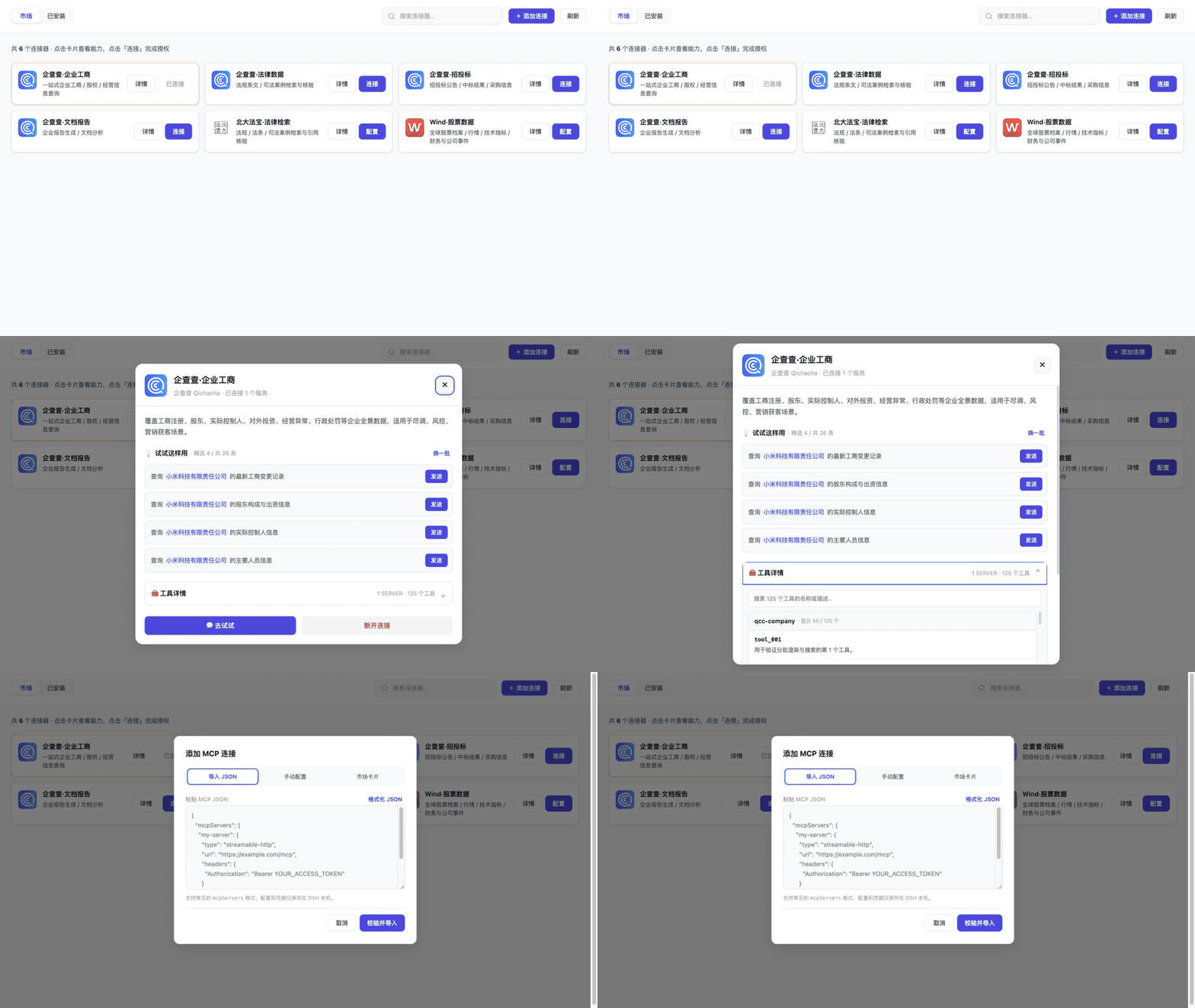
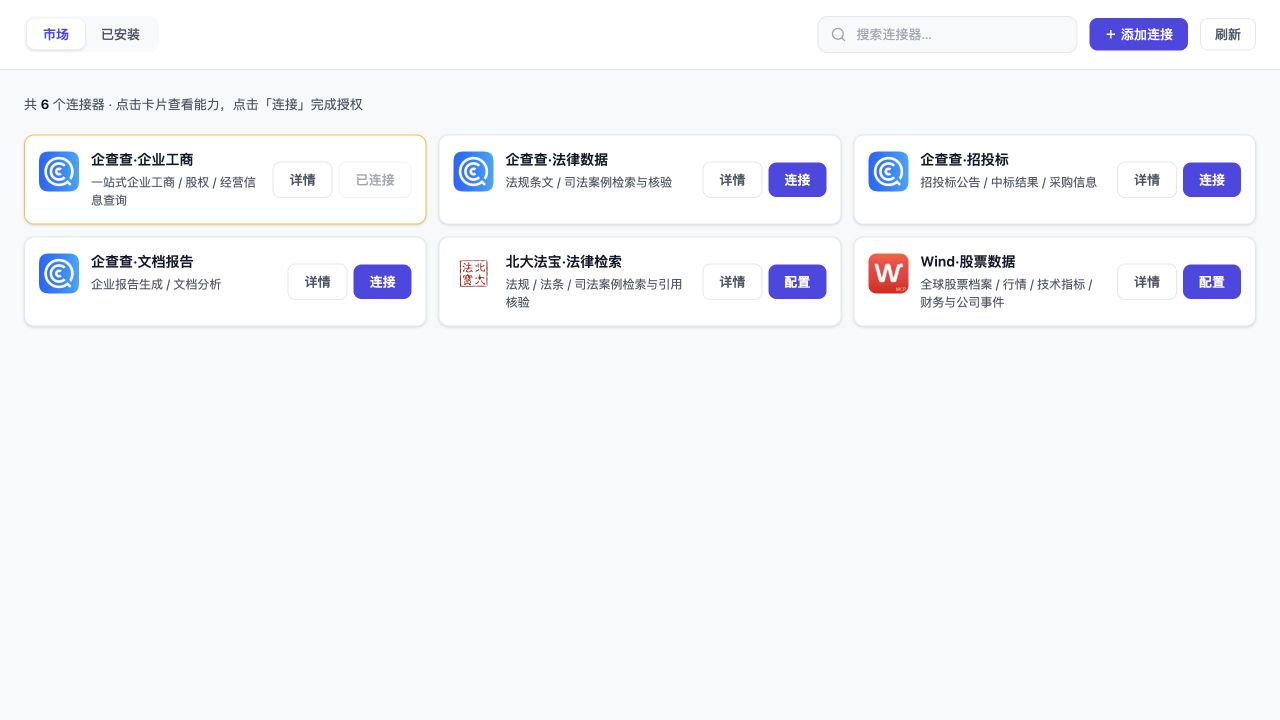
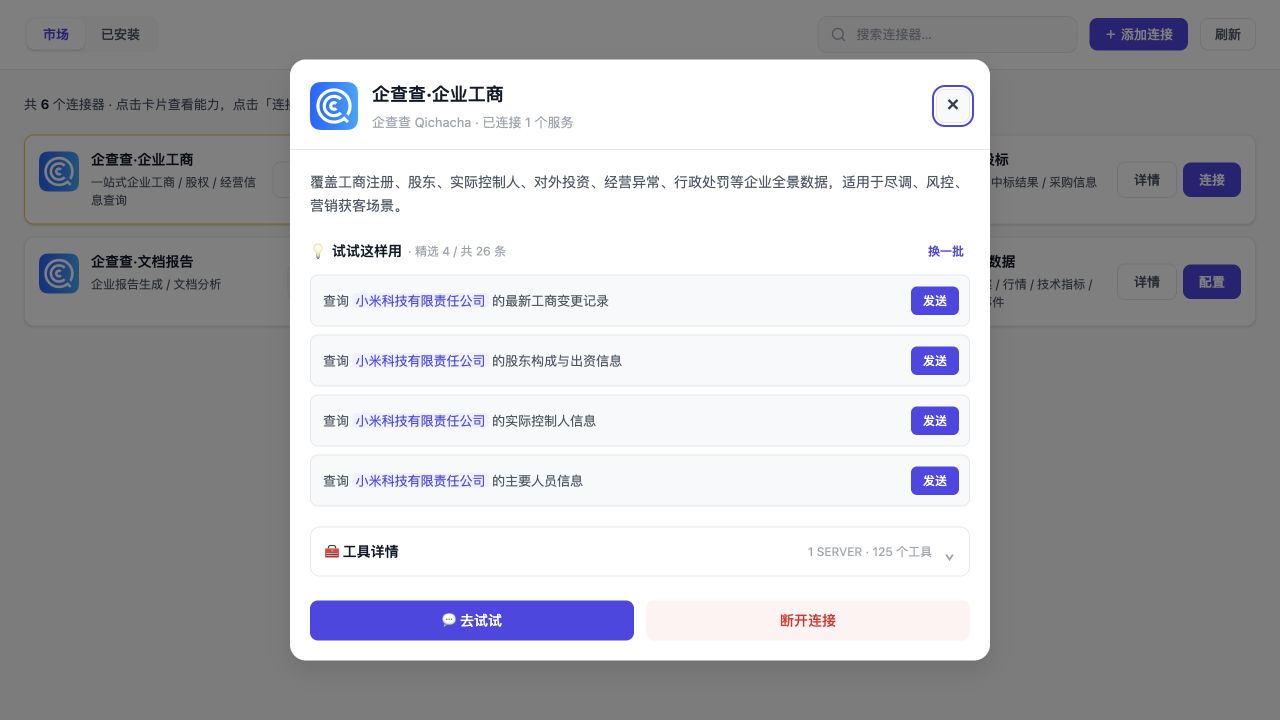
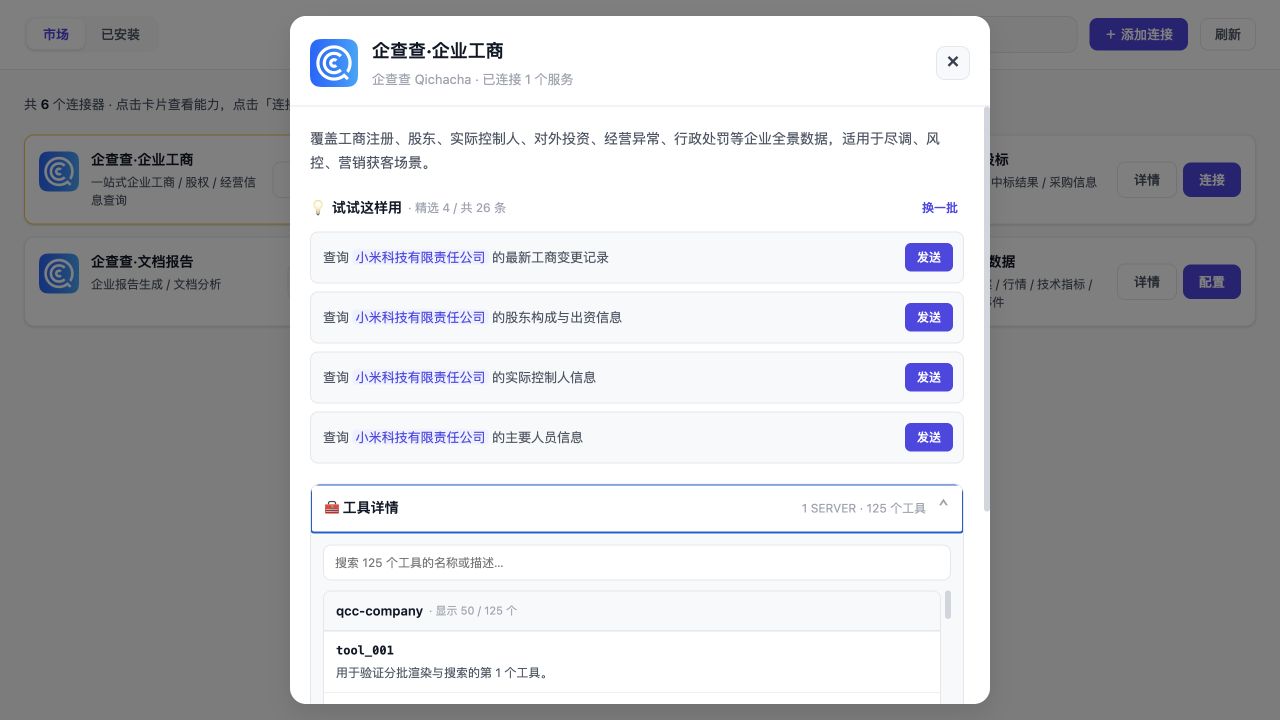
- `01`–`04` 是 2026-09-06 从 `v0.2.37` 采集的历史市场、详情、发现和导入快照;当时公开 Registry 为 105 条,与 4 张随包唯一卡片去重后显示 109 张。
|
|
8
|
+
- `05`–`07` 和 `../demo.gif` 是 2026-09-14 从 `v0.2.46` 当前 UI harness 采集的工具工作台、参数和诊断素材。harness 中的目录数量、连接数量和工具数量属于测试夹具,不代表生产市场统计。
|
|
9
|
+
|
|
10
|
+
旧素材曾直接以 1280px 打开内部 iframe,绕过真实产品的 800px 宿主面板,因此触发 `auto-fill/minmax(300px)` 的 3 列布局;这是采集 harness/视口过期,不是产品 CSS 漂移。当前全部登记素材都从浏览器中的真实页面状态直接截取,没有后期重排卡片或修改连接状态。
|
|
11
|
+
|
|
12
|
+
仓库根目录的 [`screenshots.json`](../../screenshots.json) 按市场总览、连接器详情、工具发现、JSON 导入、统一工具搜索、参数详情和连接诊断的顺序声明 7 张图片,供 awesome-dsh-plugin 和 DSH Market 的 App Store 风格详情页采集。根清单保持外部消费者兼容的路径数组;[`assets.json`](assets.json) 记录采集版本、视口、产品面板、无凭据状态,以及每张截图和 `demo.gif` 的 SHA-256、尺寸与 GIF 时长。
|
|
21
13
|
|
|
22
14
|
| 文件 | 展示内容 |
|
|
23
15
|
|---|---|
|
|
24
|
-
| `01-market-overview.jpg` | 109 张合并市场卡片、桌面两列、推荐章节、9
|
|
25
|
-
| `02-connector-detail.jpg` |
|
|
26
|
-
| `03-tool-discovery.jpg` | Context7 无凭据 Mock 健康状态、Mock 工具数量/描述、搜索和独立滚动区 |
|
|
27
|
-
| `04-json-import.jpg` | Streamable HTTP / stdio JSON 导入与本机凭据提示 |
|
|
28
|
-
|
|
29
|
-
|
|
30
|
-
|
|
31
|
-
|
|
32
|
-
|
|
33
|
-
|
|
34
|
-
|
|
35
|
-
|
|
16
|
+
| `01-market-overview.jpg` | `v0.2.37` 历史市场快照:109 张合并市场卡片、桌面两列、推荐章节、9 分类和固定分类栏 |
|
|
17
|
+
| `02-connector-detail.jpg` | `v0.2.37` 智能文档解析详情:一次 OAuth 授权同时连接远程 URL 解析与本地 `qcc-document-mcp` 文件解析 |
|
|
18
|
+
| `03-tool-discovery.jpg` | `v0.2.37` Context7 无凭据 Mock 健康状态、Mock 工具数量/描述、搜索和独立滚动区 |
|
|
19
|
+
| `04-json-import.jpg` | `v0.2.37` Streamable HTTP / stdio JSON 导入与本机凭据提示 |
|
|
20
|
+
| `05-unified-tool-search.png` | `v0.2.46` 统一工具搜索:跨连接结果、来源、发现失败和最后成功缓存 |
|
|
21
|
+
| `06-tool-parameters.png` | `v0.2.46` 参数详情:必填、类型、枚举、嵌套结构和原始安全 Schema |
|
|
22
|
+
| `07-connection-diagnostics.png` | `v0.2.46` 连接诊断:成功缓存、可控失败原因、建议、“检查连接”和“重新发现工具” |
|
|
23
|
+
|
|
24
|
+
`../demo.gif` 由 6 个真实浏览器状态顺序编码:市场、连接器详情、工具详情、统一搜索、参数 Schema、连接诊断。时长 43 秒,分辨率 960×540;编码只做等比例缩放和 GIF 调色,不改变布局或状态。
|
|
25
|
+
|
|
26
|
+
`npm run storefront:check` 校验路径、顺序、格式、文件存在性、哈希、尺寸和采集约束;`npm run check` 已包含该门禁。更新 UI 后继续使用 1280×720 浏览器视口、800px 产品面板和无凭据初始状态采集,并检查桌面两列、企查查卡片不出现“需重新授权”,且画面不包含凭据、本机路径、真实会话、查询结果或其他不应公开的内容。
|
|
27
|
+
|
|
28
|
+
截图顶部“无凭据 Mock”标识和工具名中的 `mock_` 前缀用于明确区分验收数据与真实授权。真实用户的已安装数量、授权状态和服务健康度会因本机环境而不同。
|
|
@@ -1,14 +1,17 @@
|
|
|
1
1
|
{
|
|
2
2
|
"schemaVersion": 1,
|
|
3
3
|
"capture": {
|
|
4
|
-
"capturedOn": "2026-09-
|
|
4
|
+
"capturedOn": "2026-09-14",
|
|
5
|
+
"sourceVersion": "0.2.46",
|
|
5
6
|
"browserViewport": {
|
|
6
7
|
"width": 1280,
|
|
7
8
|
"height": 720
|
|
8
9
|
},
|
|
9
10
|
"productPanelWidth": 800,
|
|
10
11
|
"desktopCardColumns": 2,
|
|
11
|
-
"state": "credential-free-mock"
|
|
12
|
+
"state": "credential-free-mock",
|
|
13
|
+
"preservedLegacyScreenshots": 4,
|
|
14
|
+
"notes": "01-04 preserve the 2026-09-06 v0.2.37 storefront snapshot; 05-07 and demo.gif were captured from the current v0.2.46 UI harness on 2026-09-14."
|
|
12
15
|
},
|
|
13
16
|
"screenshots": [
|
|
14
17
|
{
|
|
@@ -34,13 +37,39 @@
|
|
|
34
37
|
"sha256": "de0a87cc7f247fad40ac37188f5a1d026f4087571e98d64595e80f8bcd9410be",
|
|
35
38
|
"width": 1280,
|
|
36
39
|
"height": 720
|
|
40
|
+
},
|
|
41
|
+
{
|
|
42
|
+
"path": "docs/screenshots/05-unified-tool-search.png",
|
|
43
|
+
"sha256": "a75119afeccdb666e1496917ab1cac50e368882412fe5ce16cfdb268c2a6595b",
|
|
44
|
+
"width": 1280,
|
|
45
|
+
"height": 720,
|
|
46
|
+
"capturedOn": "2026-09-14",
|
|
47
|
+
"sourceVersion": "0.2.46"
|
|
48
|
+
},
|
|
49
|
+
{
|
|
50
|
+
"path": "docs/screenshots/06-tool-parameters.png",
|
|
51
|
+
"sha256": "199a960e6c07c84ff2e3b99acf64536b6875f2ebf08b5a86a1df971cc120da70",
|
|
52
|
+
"width": 1280,
|
|
53
|
+
"height": 720,
|
|
54
|
+
"capturedOn": "2026-09-14",
|
|
55
|
+
"sourceVersion": "0.2.46"
|
|
56
|
+
},
|
|
57
|
+
{
|
|
58
|
+
"path": "docs/screenshots/07-connection-diagnostics.png",
|
|
59
|
+
"sha256": "5ca0e53cf560c68a06239c29651f9d9e49ee184c43d43432ccdc4139299e811b",
|
|
60
|
+
"width": 1280,
|
|
61
|
+
"height": 720,
|
|
62
|
+
"capturedOn": "2026-09-14",
|
|
63
|
+
"sourceVersion": "0.2.46"
|
|
37
64
|
}
|
|
38
65
|
],
|
|
39
66
|
"demo": {
|
|
40
67
|
"path": "docs/demo.gif",
|
|
41
|
-
"sha256": "
|
|
68
|
+
"sha256": "69250ef0d6730d2c708c1fea6a3c8041d495008a40f53a02a894238601f165ec",
|
|
42
69
|
"width": 960,
|
|
43
70
|
"height": 540,
|
|
44
|
-
"durationSeconds":
|
|
71
|
+
"durationSeconds": 43,
|
|
72
|
+
"capturedOn": "2026-09-14",
|
|
73
|
+
"sourceVersion": "0.2.46"
|
|
45
74
|
}
|
|
46
75
|
}
|
package/package.json
CHANGED
|
@@ -1,7 +1,7 @@
|
|
|
1
1
|
{
|
|
2
2
|
"name": "dsh-mcp-connector",
|
|
3
|
-
"version": "0.2.
|
|
4
|
-
"description": "DeepSeek Harness MCP Connector
|
|
3
|
+
"version": "0.2.47",
|
|
4
|
+
"description": "DeepSeek Harness MCP Connector: connect servers, search tools across active connections, and troubleshoot discovery. Includes a continuously updated catalog; supports OAuth 2.0 PKCE, API keys, Streamable HTTP/stdio, and mcpServers JSON import.",
|
|
5
5
|
"type": "module",
|
|
6
6
|
"main": "lib/index.js",
|
|
7
7
|
"exports": {
|
package/screenshots.json
CHANGED
|
@@ -2,5 +2,8 @@
|
|
|
2
2
|
"docs/screenshots/01-market-overview.jpg",
|
|
3
3
|
"docs/screenshots/02-connector-detail.jpg",
|
|
4
4
|
"docs/screenshots/03-tool-discovery.jpg",
|
|
5
|
-
"docs/screenshots/04-json-import.jpg"
|
|
5
|
+
"docs/screenshots/04-json-import.jpg",
|
|
6
|
+
"docs/screenshots/05-unified-tool-search.png",
|
|
7
|
+
"docs/screenshots/06-tool-parameters.png",
|
|
8
|
+
"docs/screenshots/07-connection-diagnostics.png"
|
|
6
9
|
]
|