dsh-mcp-connector 0.2.36 → 0.2.38
This diff represents the content of publicly available package versions that have been released to one of the supported registries. The information contained in this diff is provided for informational purposes only and reflects changes between package versions as they appear in their respective public registries.
- package/CHANGELOG.md +34 -1
- package/README.en.md +7 -3
- package/README.md +7 -3
- package/catalog/catalog.json +9 -19
- package/cordis.patch.yml +1 -0
- package/docs/STDIO-SUPPORT.md +2 -2
- package/docs/USER-GUIDE.md +9 -4
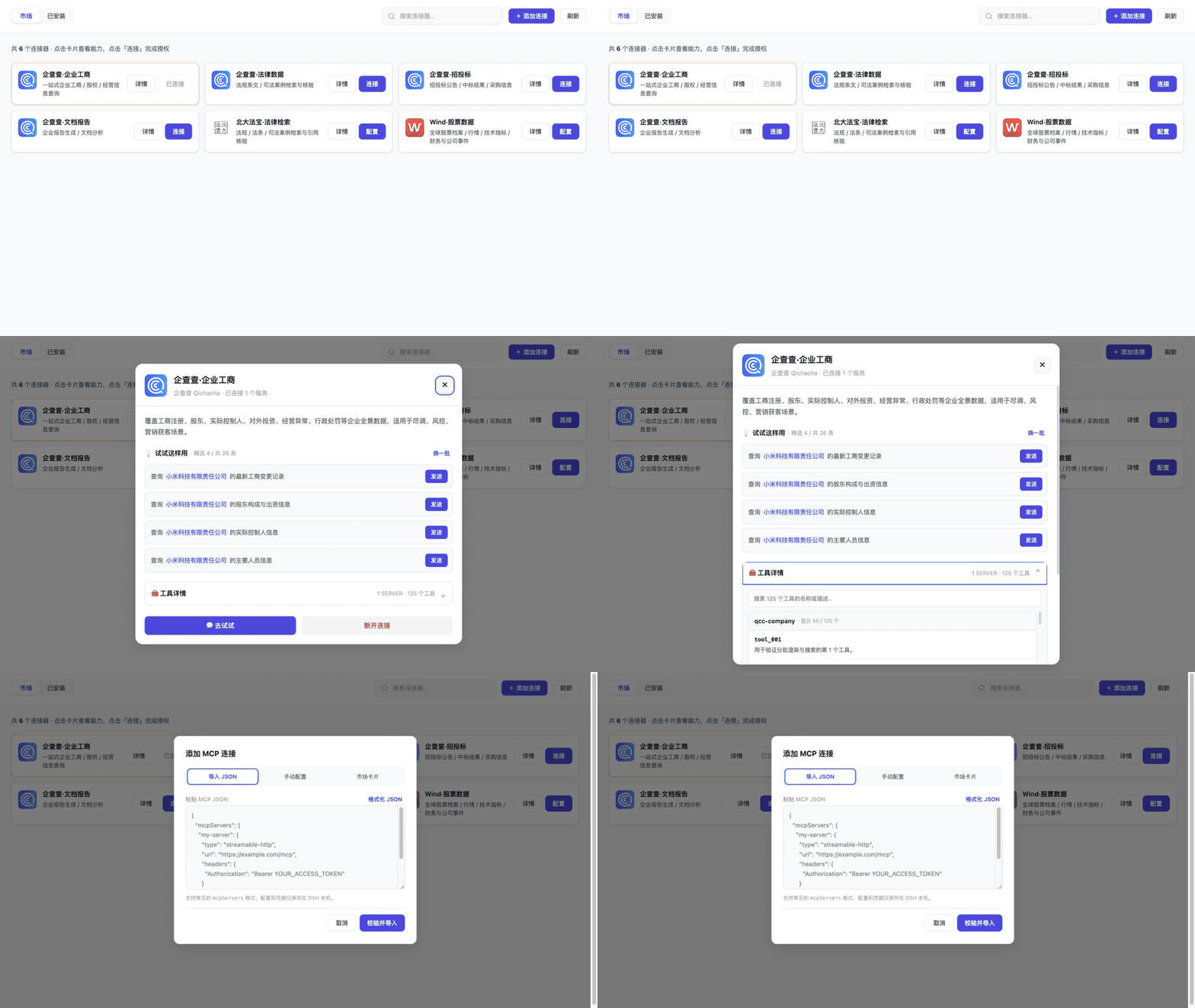
- package/docs/screenshots/01-market-overview.jpg +0 -0
- package/docs/screenshots/02-connector-detail.jpg +0 -0
- package/docs/screenshots/03-tool-discovery.jpg +0 -0
- package/docs/screenshots/04-json-import.jpg +0 -0
- package/docs/screenshots/README.md +4 -4
- package/docs/screenshots/assets.json +6 -6
- package/lib/catalog.js +28 -1
- package/lib/client.js +410 -10
- package/lib/connectors/oauth-connector.js +5 -5
- package/lib/index.js +15 -3
- package/lib/mcp-provision.js +6 -1
- package/lib/schema.js +7 -1
- package/lib/settings.js +24 -0
- package/package.json +2 -2
- package/registry/schema/connector.schema.json +2 -0
- package/ui/index.html +17 -3
package/CHANGELOG.md
CHANGED
|
@@ -4,6 +4,37 @@
|
|
|
4
4
|
|
|
5
5
|
## [Unreleased]
|
|
6
6
|
|
|
7
|
+
## [0.2.38] - 2026-09-08
|
|
8
|
+
|
|
9
|
+
### Added
|
|
10
|
+
|
|
11
|
+
- 在 `设置 → 插件 → 插件配置` 新增“MCP连接器”卡片,可按当前 DSH profile 显示或隐藏侧边栏入口。
|
|
12
|
+
- 设置卡片新增“打开 MCP连接器”快捷动作;入口隐藏后仍可随时打开、连接和管理 MCP Server,关闭弹框后返回原操作位置。
|
|
13
|
+
|
|
14
|
+
### Changed
|
|
15
|
+
|
|
16
|
+
- 侧边栏可见性保存后即时生效;仅隐藏入口,不影响插件、连接、工具、后台刷新或对话内调用。
|
|
17
|
+
- Settings Host 与客户端服务均采用可选注入;旧版 DSH 或服务暂不可用时安全回退为显示侧边栏,避免升级后失去入口。
|
|
18
|
+
|
|
19
|
+
### Verification
|
|
20
|
+
|
|
21
|
+
- 205 项自动测试、lint、版本/营销元数据/商店截图门禁和 npm 发布包白名单/敏感内容扫描全部通过;新增覆盖 Host 设置注册、客户端持久化、快捷打开、隐藏态零挂载、键盘焦点恢复和兼容回退。
|
|
22
|
+
|
|
23
|
+
## [0.2.37] - 2026-09-06
|
|
24
|
+
|
|
25
|
+
### Changed
|
|
26
|
+
|
|
27
|
+
- “企查查·智能文档解析”改为 OAuth 2.0 PKCE 一键授权,一次授权同时启用远程在线 URL 与本地文件解析两个 Server;无需再手工复制 API Key。
|
|
28
|
+
- 更新产品截图和演示 GIF,同步当前 109 张市场卡片、智能文档解析名称及 OAuth 双入口说明。
|
|
29
|
+
|
|
30
|
+
### Security
|
|
31
|
+
|
|
32
|
+
- 新增受限制的 OAuth-to-stdio 运行时注入:目录必须将 `oauthResource` 精确绑定到同连接器的 HTTPS MCP resource,Access Token 只注入子进程声明的 `oauthTokenEnv`,不写入连接记录、市场输出或日志。
|
|
33
|
+
|
|
34
|
+
### Fixed
|
|
35
|
+
|
|
36
|
+
- 从旧版 API Key 单入口升级时显示“升级一键授权”;只有 OAuth 与远程/本地两个 Server 全部启动成功后才原子替换旧连接,失败时保留旧配置。
|
|
37
|
+
|
|
7
38
|
## [0.2.36] - 2026-09-06
|
|
8
39
|
|
|
9
40
|
### Changed
|
|
@@ -565,7 +596,9 @@
|
|
|
565
596
|
- 外部 URL 与导入 Header 执行安全校验。
|
|
566
597
|
- iframe 消息校验同源和消息来源。
|
|
567
598
|
|
|
568
|
-
[Unreleased]: https://github.com/duhu2000/dsh-mcp-connector/compare/v0.2.
|
|
599
|
+
[Unreleased]: https://github.com/duhu2000/dsh-mcp-connector/compare/v0.2.38...HEAD
|
|
600
|
+
[0.2.38]: https://github.com/duhu2000/dsh-mcp-connector/compare/v0.2.37...v0.2.38
|
|
601
|
+
[0.2.37]: https://github.com/duhu2000/dsh-mcp-connector/compare/v0.2.36...v0.2.37
|
|
569
602
|
[0.2.36]: https://github.com/duhu2000/dsh-mcp-connector/compare/v0.2.35...v0.2.36
|
|
570
603
|
[0.2.35]: https://github.com/duhu2000/dsh-mcp-connector/compare/v0.2.34...v0.2.35
|
|
571
604
|
[0.2.34]: https://github.com/duhu2000/dsh-mcp-connector/compare/v0.2.33...v0.2.34
|
package/README.en.md
CHANGED
|
@@ -26,7 +26,7 @@ Manage MCP connections from different providers in one place inside DeepSeek Har
|
|
|
26
26
|
dsh plugin --profile web add dsh-mcp-connector
|
|
27
27
|
```
|
|
28
28
|
|
|
29
|
-
Fully restart DeepSeek Harness Desktop or `dsh web` after installation or upgrade, then open **MCP Connector** in the primary sidebar
|
|
29
|
+
Fully restart DeepSeek Harness Desktop or `dsh web` after installation or upgrade, then open **MCP Connector** in the primary sidebar, or open it directly from **Settings → Plugins → Plugin Configuration → MCP Connector**.
|
|
30
30
|
|
|
31
31
|
|
|
32
32
|
|
|
@@ -49,6 +49,7 @@ If the plugin helps you connect an MCP server faster, consider [starring the rep
|
|
|
49
49
|
## Features
|
|
50
50
|
|
|
51
51
|
- A primary sidebar entry below New Conversation and above workspaces/conversations, with a public footer-slot fallback for incompatible DSH DOM versions.
|
|
52
|
+
- A profile-wide sidebar visibility preference; even when the shortcut is hidden, the existing connector dialog remains available from **Settings → Plugins → Plugin Configuration → MCP Connector**.
|
|
52
53
|
- Searchable Marketplace and Installed views; the default Marketplace groups cards into Featured plus nine business-category sections, previews four cards per section, keeps the category bar visible while scrolling, and shows every card when a single category is selected.
|
|
53
54
|
- OAuth 2.0 Authorization Code with PKCE, including DCR public clients and `client_secret_post` / `client_secret_basic`; API key/Bearer/unauthenticated HTTP configuration, stdio local-process configuration, and `mcpServers` JSON import.
|
|
54
55
|
- Installation from a credential-free connector descriptor URL.
|
|
@@ -97,7 +98,7 @@ Run the same command again to upgrade. Fully quit and restart DeepSeek Harness D
|
|
|
97
98
|
|
|
98
99
|
## Usage
|
|
99
100
|
|
|
100
|
-
1. Select **MCP Connector** in the primary sidebar
|
|
101
|
+
1. Select **MCP Connector** in the primary sidebar, or choose **Open MCP Connector** from **Settings → Plugins → Plugin Configuration → MCP Connector**.
|
|
101
102
|
2. Choose a connector, confirm **Current project** or **All projects (global)**, and complete authorization or configuration.
|
|
102
103
|
3. Open its details to inspect tools or send an example prompt to a new conversation draft.
|
|
103
104
|
4. Use Installed or the conversation tools to enable, disable, inspect, or disconnect a connection.
|
|
@@ -139,10 +140,13 @@ The default bundle configuration is in `cordis.patch.yml`:
|
|
|
139
140
|
entryPrefix: mcp
|
|
140
141
|
refreshSkewMs: 300000
|
|
141
142
|
openBrowser: true
|
|
143
|
+
showSidebarEntry: true
|
|
142
144
|
```
|
|
143
145
|
|
|
144
146
|
Set `catalogUrl` to an empty string for an explicitly offline/private setup. A custom non-default URL is used as-is and does not fall back to the public registry.
|
|
145
147
|
|
|
148
|
+
`showSidebarEntry` defaults to `true`. Users can override it from the DSH plugin configuration page; turning it off hides only the shortcut and does not disable the connector, connected MCP servers, or tools.
|
|
149
|
+
|
|
146
150
|
## Compatibility and responsibility boundary
|
|
147
151
|
|
|
148
152
|
| Area | Current boundary |
|
|
@@ -171,7 +175,7 @@ npm run dev:ui
|
|
|
171
175
|
|
|
172
176
|
Every Registry merge regenerates `catalog-stats.json`; an hourly workflow in this repository synchronizes the Chinese and English product copy plus a local stats snapshot. The static npm README updates with package releases, while the live badges above read the Registry directly and therefore stay current without another npm release.
|
|
173
177
|
|
|
174
|
-
The current public version is [`dsh-mcp-connector@0.2.
|
|
178
|
+
The current public version is [`dsh-mcp-connector@0.2.38`](https://www.npmjs.com/package/dsh-mcp-connector), with [GitHub Release v0.2.38](https://github.com/duhu2000/dsh-mcp-connector/releases/tag/v0.2.38).
|
|
175
179
|
|
|
176
180
|
See [CHANGELOG.md](CHANGELOG.md) for version history and [docs/DESKTOP-E2E.md](docs/DESKTOP-E2E.md) for the Desktop release checklist.
|
|
177
181
|
|
package/README.md
CHANGED
|
@@ -26,7 +26,7 @@
|
|
|
26
26
|
dsh plugin --profile web add dsh-mcp-connector
|
|
27
27
|
```
|
|
28
28
|
|
|
29
|
-
安装或升级后完全重启 DeepSeek Harness Desktop 或 `dsh web`,然后打开左侧「🧩 MCP
|
|
29
|
+
安装或升级后完全重启 DeepSeek Harness Desktop 或 `dsh web`,然后打开左侧「🧩 MCP连接器」;也可从“设置 → 插件 → 插件配置 → MCP连接器”直接打开。
|
|
30
30
|
|
|
31
31
|

|
|
32
32
|
|
|
@@ -49,6 +49,7 @@ dsh plugin --profile web add dsh-mcp-connector
|
|
|
49
49
|
## 功能
|
|
50
50
|
|
|
51
51
|
- 左侧主导航入口:目标位置为“新会话”下方、“工作区/会话列表”上方;若 DSH DOM 结构不兼容,自动回退到底部公开插槽。
|
|
52
|
+
- 侧边栏入口可按当前 profile 隐藏;隐藏后仍可从“设置 → 插件 → 插件配置 → MCP连接器”临时打开现有连接器弹框,用完即关。
|
|
52
53
|
- 图形化市场:默认“全部”按推荐与 9 类业务分类分章节展示,每章先展示 4 张并可展开;分类栏固定可见,单分类页展示全部卡片。
|
|
53
54
|
- 图形化添加:手动 HTTP/stdio、`mcpServers` JSON、连接器描述 URL 三种入口,失败时保留表单并给出修复建议。
|
|
54
55
|
- 连接器详情:精选 Prompt 优先展示,点击可带入 DSH 新会话;工具按 Server 分组,支持描述、搜索和独立滚动。
|
|
@@ -99,7 +100,7 @@ bash <(curl -fsSL https://raw.githubusercontent.com/duhu2000/dsh-mcp-connector/m
|
|
|
99
100
|
|
|
100
101
|
## 使用
|
|
101
102
|
|
|
102
|
-
1. 点击左侧“🧩 MCP连接器”。
|
|
103
|
+
1. 点击左侧“🧩 MCP连接器”,或从“设置 → 插件 → 插件配置 → MCP连接器”点击“打开 MCP连接器”。
|
|
103
104
|
2. 在市场中选择连接器,确认“当前项目”或“所有项目(全局)”,再完成授权或配置。
|
|
104
105
|
3. 打开卡片详情,可点击示例 Prompt 的发送按钮,在当前工作区创建/复用空白会话并写入草稿。
|
|
105
106
|
4. 在“已安装”或对话工具中查看、停用、恢复或断开连接。
|
|
@@ -135,10 +136,13 @@ Bundle 默认配置位于 `cordis.patch.yml`:
|
|
|
135
136
|
entryPrefix: mcp
|
|
136
137
|
refreshSkewMs: 300000
|
|
137
138
|
openBrowser: true
|
|
139
|
+
showSidebarEntry: true
|
|
138
140
|
```
|
|
139
141
|
|
|
140
142
|
`catalogUrl` 默认通过 jsDelivr CDN 读取公共 [dsh-mcp-connector-registry](https://github.com/duhu2000/dsh-mcp-connector-registry),支持 ETag/TTL 缓存;主源失败时自动尝试 GitHub raw 备用源,再回退到上次缓存或随包内置目录。jsDelivr 的分支 URL 可能存在缓存延迟,因此 Registry 合并后的新卡片不保证秒级出现。需要离线/私有模式时可将 `catalogUrl` 显式设为空字符串;显式配置其他目录 URL 时不会自动切换到公共备用源。
|
|
141
143
|
|
|
144
|
+
`showSidebarEntry` 默认为 `true`。用户可在 DSH 插件配置页覆盖该值;关闭后只隐藏侧边栏快捷入口,不停用连接器、已连接 MCP Server 或工具。
|
|
145
|
+
|
|
142
146
|
## 兼容性与责任边界
|
|
143
147
|
|
|
144
148
|
| 项目 | 当前边界 |
|
|
@@ -167,7 +171,7 @@ npm run dev:ui
|
|
|
167
171
|
|
|
168
172
|
公共 Registry 每次合并后会生成 `catalog-stats.json`;本仓库的定时工作流每小时同步中英文介绍和统计快照。npm 页面中的静态正文随版本发布更新,上方动态统计徽标则直接读取 Registry,可在不发布新 npm 版本时保持实时数量一致。
|
|
169
173
|
|
|
170
|
-
当前公开版本为 [`dsh-mcp-connector@0.2.
|
|
174
|
+
当前公开版本为 [`dsh-mcp-connector@0.2.38`](https://www.npmjs.com/package/dsh-mcp-connector),对应 [GitHub Release v0.2.38](https://github.com/duhu2000/dsh-mcp-connector/releases/tag/v0.2.38)。
|
|
171
175
|
|
|
172
176
|
版本能力与变更记录见 [CHANGELOG.md](CHANGELOG.md)。
|
|
173
177
|
Desktop 发版回归见 [docs/DESKTOP-E2E.md](docs/DESKTOP-E2E.md)。
|
package/catalog/catalog.json
CHANGED
|
@@ -136,29 +136,18 @@
|
|
|
136
136
|
"icon": "/mcp-connector/ui/assets/qcc-logo.svg",
|
|
137
137
|
"category": "效率工具",
|
|
138
138
|
"summary": "本机文件 / 在线链接 · OCR 与结构化解析",
|
|
139
|
-
"description": "
|
|
139
|
+
"description": "一次 OAuth 授权同时连接远程与本地 Agent:远程入口解析公网 PDF/图片 URL,本地入口读取对话中上传、粘贴或指定路径的本机文件,自动上传并输出 Markdown 与结构化内容。本地入口需 Node.js 20+。",
|
|
140
140
|
"tags": ["智能文档解析", "OCR", "本机文件", "在线文档", "PDF", "图片", "Markdown"],
|
|
141
141
|
"published": true,
|
|
142
142
|
"featured": true,
|
|
143
143
|
"homepage": "https://agent.qcc.com/doc",
|
|
144
144
|
"auth": {
|
|
145
|
-
"mode": "
|
|
146
|
-
"
|
|
147
|
-
"
|
|
148
|
-
"
|
|
149
|
-
"
|
|
150
|
-
"
|
|
151
|
-
"credentialFields": [
|
|
152
|
-
{
|
|
153
|
-
"key": "authorization",
|
|
154
|
-
"label": "Authorization",
|
|
155
|
-
"placeholder": "Bearer YOUR_API_KEY",
|
|
156
|
-
"description": "格式为 Bearer + 空格 + 智能文档解析 API Key;OAuth 登录令牌不能用于本地文件上传。凭据仅保存在 DSH 本机。",
|
|
157
|
-
"helpLabel": "前往企查查智能文档解析获取 API Key",
|
|
158
|
-
"required": true,
|
|
159
|
-
"secret": true
|
|
160
|
-
}
|
|
161
|
-
]
|
|
145
|
+
"mode": "oauth2-pkce",
|
|
146
|
+
"issuer": "https://agent.qcc.com",
|
|
147
|
+
"scope": "mcp:tools",
|
|
148
|
+
"clientName": "DeepSeek Harness - MCP 连接器",
|
|
149
|
+
"tokenEndpointAuthMethod": "none",
|
|
150
|
+
"grantSharing": "issuer"
|
|
162
151
|
},
|
|
163
152
|
"servers": [
|
|
164
153
|
{ "serverKey": "document", "url": "https://agent.qcc.com/mcp/document/stream", "serverName": "qcc-document", "transport": "streamable-http", "headers": {} },
|
|
@@ -168,7 +157,8 @@
|
|
|
168
157
|
"transport": "stdio",
|
|
169
158
|
"command": "npx",
|
|
170
159
|
"args": ["-y", "qcc-document-mcp"],
|
|
171
|
-
"
|
|
160
|
+
"oauthResource": "https://agent.qcc.com/mcp/document/stream",
|
|
161
|
+
"oauthTokenEnv": "QCC_DOCUMENT_AUTHORIZATION"
|
|
172
162
|
}
|
|
173
163
|
],
|
|
174
164
|
"prompts": [
|
package/cordis.patch.yml
CHANGED
package/docs/STDIO-SUPPORT.md
CHANGED
|
@@ -152,7 +152,7 @@ const Config = z.union([
|
|
|
152
152
|
|
|
153
153
|
- stdio 是本地进程,密钥最终仍通过环境变量传递(如 `GITHUB_TOKEN`、`OPENAI_API_KEY`)。
|
|
154
154
|
- 无凭据的 stdio 连接器使用 `auth.mode: "none"`;需要用户输入的卡片使用 `bearer` 或 `api-key`,并在 `auth.credentialFields` 声明一个或多个输入字段。
|
|
155
|
-
- `servers[].credentialBindings` 只保存“环境变量名 → 凭据字段 key
|
|
155
|
+
- `servers[].credentialBindings` 只保存“环境变量名 → 凭据字段 key”的映射;OAuth stdio 只能用 `oauthResource` 引用同连接器的 HTTP resource,并通过 `oauthTokenEnv` 声明运行时 Token 环境变量。`servers[].env` 只能包含非敏感默认值。
|
|
156
156
|
- 用户输入存入本机 `ConnectionRecord.env` 并透传给 `dsh-mcp-client`,不回写目录,也不出现在 catalog/status/log 输出。
|
|
157
157
|
- Registry 探针只校验声明与命令形状,绝不执行本地 stdio 命令。
|
|
158
158
|
|
|
@@ -614,7 +614,7 @@ cwd: { type: 'string', description: 'transport=stdio 时的工作目录,默认
|
|
|
614
614
|
| stdio `command` 可执行任意本地命令 | command 来自(a)维护者审核的 catalog,或(b)用户主动 configure,风险可控;DSH 运行时沙箱机制兜底 |
|
|
615
615
|
| `env` 里的密钥泄露到日志 | dsh-mcp-client 的 `buildChildEnv` 已用 `scrubbedParentEnv()` 清理敏感父环境变量;我们持久化 env 到 storage domain 与现有 headers 鉴权一致,无新增泄露面 |
|
|
616
616
|
| `cwd` 空字符串导致 spawn 异常 | provisioning 层显式 `record.cwd \|\| process.cwd()` |
|
|
617
|
-
| 目录夹带密钥 | `auditRawDescriptor` 拒绝真实凭据字段,`auditDescriptor` 拒绝 `env` 中的 token/secret/API Key/password
|
|
617
|
+
| 目录夹带密钥 | `auditRawDescriptor` 拒绝真实凭据字段,`auditDescriptor` 拒绝 `env` 中的 token/secret/API Key/password 类变量;手工凭据只允许 `credentialBindings` 引用已声明字段,OAuth Token 只允许按同连接器 `oauthResource` 在运行时注入 `oauthTokenEnv` |
|
|
618
618
|
| 凭据映射错误或未使用 | Schema 与目录审计检查字段 key、env 名、重复映射、未知引用及未被任何 HTTP/stdio Server 使用的必填字段 |
|
|
619
619
|
|
|
620
620
|
---
|
package/docs/USER-GUIDE.md
CHANGED
|
@@ -34,7 +34,12 @@ dsh web
|
|
|
34
34
|
|
|
35
35
|
## 2. 打开 MCP连接器
|
|
36
36
|
|
|
37
|
-
|
|
37
|
+
重启后,可以用以下任一方式打开:
|
|
38
|
+
|
|
39
|
+
- 在 DSH 左侧主导航点击“🧩 MCP连接器”。入口通常位于“新会话”下方、工作区/会话列表上方;如果当前 DSH 版本没有对应的公开插槽,入口会回退到左侧底部。
|
|
40
|
+
- 打开“设置 → 插件 → 插件配置 → MCP连接器”,展开卡片并点击“打开 MCP连接器”。该按钮直接复用同一个连接器弹框,不要求侧边栏入口可见;关闭弹框后仍回到设置页。
|
|
41
|
+
|
|
42
|
+
如需腾出侧边栏空间,可在同一配置卡片关闭“在侧边栏显示 MCP连接器”。该偏好作用于当前 DSH profile,并在重启后保留;它只隐藏快捷入口,不停用插件、已连接 MCP Server 或工具。隐藏后可以随时从该配置卡片直接打开连接器,或重新开启入口。旧版 DSH 没有 Settings 能力时,插件保持入口可见,不会因设置功能进入 Safe Mode。
|
|
38
43
|
|
|
39
44
|
页面顶部提供:
|
|
40
45
|
|
|
@@ -75,14 +80,14 @@ Bearer/API Key 连接器会先执行 MCP `initialize` 验证。所有 Server 通
|
|
|
75
80
|
|
|
76
81
|
stdio 市场卡片也可能显示一个或多个凭据字段,例如 API Token、区域或租户标识。卡片目录只声明字段名称及其环境变量映射;提交后,真实值仅保存到 DSH 本机连接记录,并由插件注入该 stdio 进程的 `env`。市场、状态页和日志不会返回这些值。插件会等待 Host 完成首次 MCP 初始化与工具同步后再保存连接;失败或超时不会增加已安装数量,卡片也不会提前显示“已连接”。
|
|
77
82
|
|
|
78
|
-
|
|
83
|
+
“企查查·智能文档解析”会通过一次 OAuth 一键授权配置两个互不冲突的入口:
|
|
79
84
|
|
|
80
85
|
- `qcc-document`:远程 Agent,解析公网可访问的在线文档或图片 URL。
|
|
81
86
|
- `qcc-document-mcp`:本地 Agent,通过 `npx -y qcc-document-mcp` 读取对话中上传、粘贴或指定路径的本机文件,自动上传并提交解析;要求 Node.js 20+。
|
|
82
87
|
|
|
83
|
-
|
|
88
|
+
点击“连接”后只需完成一次企查查 OAuth 授权,插件会同时注册上述两个 Server。OAuth Access Token 仅在运行时注入本地子进程的 `QCC_DOCUMENT_AUTHORIZATION`,不会写入市场目录、连接记录、页面状态或日志;Token 刷新后本地 Agent 会自动更新。从旧版手工 API Key 配置升级时,点击“升级一键授权”,只有在新授权与两个 Server 都启动成功后才会原子替换旧连接;失败会保留原配置。
|
|
84
89
|
|
|
85
|
-
|
|
90
|
+
旧版本只配置过远程入口时,卡片会显示“升级一键授权”,不会把单入口误报为完整连接。完成 OAuth 后,插件先验证两个 Server,再原子保存;任一入口失败都不会留下半套配置。
|
|
86
91
|
|
|
87
92
|
OAuth 一键连接要求服务商支持标准 OAuth 2.1/PKCE 和公开元数据发现。动态客户端注册既支持无需客户端密钥的 `none`,也支持服务商签发密钥的 `client_secret_post` 与 `client_secret_basic`。客户端密钥仅与 OAuth Grant 一同保存在 DSH 本机,用于换取、刷新和撤销 Token;插件不会要求用户把 OAuth Token 或客户端密钥复制到聊天中。如服务商在动态客户端注册阶段返回 HTTP 403,页面会明确提示“客户端注册被拒绝、尚未进入浏览器授权”;这通常需要服务商审核或登记客户端,重试用户授权无法绕过。
|
|
88
93
|
|
|
Binary file
|
|
Binary file
|
|
Binary file
|
|
Binary file
|
|
@@ -1,9 +1,9 @@
|
|
|
1
1
|
# UI 素材说明
|
|
2
2
|
|
|
3
|
-
本目录用于保存 `dsh-mcp-connector` 的公开界面截图。素材于 2026-
|
|
3
|
+
本目录用于保存 `dsh-mcp-connector` 的公开界面截图。素材于 2026-09-06 从 `v0.2.37` 源码的
|
|
4
4
|
无凭据 UI harness 采集:外层浏览器视口为 1280×720,harness 复刻产品宿主在
|
|
5
5
|
`lib/client.js` 中定义的 800px 市场面板,因此桌面端稳定为一行 2 张卡片。公开 Registry
|
|
6
|
-
快照含
|
|
6
|
+
快照含 105 条描述,与 4 张随包唯一卡片合并后市场显示 109 张。画面只展示公开市场元数据、
|
|
7
7
|
示例 Prompt 和明确标识为 Mock 的工具数据,不包含 OAuth Token、API Key、本机路径、
|
|
8
8
|
用户会话或查询结果。
|
|
9
9
|
|
|
@@ -21,8 +21,8 @@ SHA-256、尺寸与 GIF 时长。
|
|
|
21
21
|
|
|
22
22
|
| 文件 | 展示内容 |
|
|
23
23
|
|---|---|
|
|
24
|
-
| `01-market-overview.jpg` |
|
|
25
|
-
| `02-connector-detail.jpg` |
|
|
24
|
+
| `01-market-overview.jpg` | 109 张合并市场卡片、桌面两列、推荐章节、9 分类和固定分类栏;展示“企查查·智能文档解析”新名称与未配置状态 |
|
|
25
|
+
| `02-connector-detail.jpg` | 智能文档解析一次 OAuth 授权同时连接 2 个 Server:远程 Agent 解析在线 URL,本地 Agent 通过 `npx -y qcc-document-mcp` 解析本机文件 |
|
|
26
26
|
| `03-tool-discovery.jpg` | Context7 无凭据 Mock 健康状态、Mock 工具数量/描述、搜索和独立滚动区 |
|
|
27
27
|
| `04-json-import.jpg` | Streamable HTTP / stdio JSON 导入与本机凭据提示 |
|
|
28
28
|
|
|
@@ -1,7 +1,7 @@
|
|
|
1
1
|
{
|
|
2
2
|
"schemaVersion": 1,
|
|
3
3
|
"capture": {
|
|
4
|
-
"capturedOn": "2026-
|
|
4
|
+
"capturedOn": "2026-09-06",
|
|
5
5
|
"browserViewport": {
|
|
6
6
|
"width": 1280,
|
|
7
7
|
"height": 720
|
|
@@ -13,32 +13,32 @@
|
|
|
13
13
|
"screenshots": [
|
|
14
14
|
{
|
|
15
15
|
"path": "docs/screenshots/01-market-overview.jpg",
|
|
16
|
-
"sha256": "
|
|
16
|
+
"sha256": "9c9bc1c6f9e5b247c71ce283b86895b9e971f6283dc6eabaa9dbb1c42ae408c3",
|
|
17
17
|
"width": 1280,
|
|
18
18
|
"height": 720
|
|
19
19
|
},
|
|
20
20
|
{
|
|
21
21
|
"path": "docs/screenshots/02-connector-detail.jpg",
|
|
22
|
-
"sha256": "
|
|
22
|
+
"sha256": "dbb7a1493378c30e743dd77c8a35c1779f443a2f8b720871de1efc61ee54eb27",
|
|
23
23
|
"width": 1280,
|
|
24
24
|
"height": 720
|
|
25
25
|
},
|
|
26
26
|
{
|
|
27
27
|
"path": "docs/screenshots/03-tool-discovery.jpg",
|
|
28
|
-
"sha256": "
|
|
28
|
+
"sha256": "5eeb896db75a5f141a8463f128f7733ffe89af6a447cecb2d1b19f8287a3e1ec",
|
|
29
29
|
"width": 1280,
|
|
30
30
|
"height": 720
|
|
31
31
|
},
|
|
32
32
|
{
|
|
33
33
|
"path": "docs/screenshots/04-json-import.jpg",
|
|
34
|
-
"sha256": "
|
|
34
|
+
"sha256": "de0a87cc7f247fad40ac37188f5a1d026f4087571e98d64595e80f8bcd9410be",
|
|
35
35
|
"width": 1280,
|
|
36
36
|
"height": 720
|
|
37
37
|
}
|
|
38
38
|
],
|
|
39
39
|
"demo": {
|
|
40
40
|
"path": "docs/demo.gif",
|
|
41
|
-
"sha256": "
|
|
41
|
+
"sha256": "c9a84ce9c164c1b9f846f8b5a65afd8dd5c49741c9dfc530f1ad766e47b3d2b6",
|
|
42
42
|
"width": 960,
|
|
43
43
|
"height": 540,
|
|
44
44
|
"durationSeconds": 16
|
package/lib/catalog.js
CHANGED
|
@@ -43,6 +43,11 @@ export function loadBundledCatalog() {
|
|
|
43
43
|
|
|
44
44
|
/** 安全审计:目录禁止携带密钥、URL 协议白名单、header 名白名单。 */
|
|
45
45
|
export function auditDescriptor(descriptor) {
|
|
46
|
+
const oauthHttpResources = new Set(
|
|
47
|
+
descriptor.servers
|
|
48
|
+
.filter((server) => server.transport === 'streamable-http')
|
|
49
|
+
.map((server) => server.url),
|
|
50
|
+
);
|
|
46
51
|
const credentialFields = descriptor.auth.credentialFields ?? [];
|
|
47
52
|
const credentialKeys = new Set();
|
|
48
53
|
for (const field of credentialFields) {
|
|
@@ -59,7 +64,26 @@ export function auditDescriptor(descriptor) {
|
|
|
59
64
|
}
|
|
60
65
|
const bindings = server.credentialBindings ?? {};
|
|
61
66
|
if (descriptor.auth.mode === 'oauth2-pkce') {
|
|
62
|
-
|
|
67
|
+
if (Object.keys(bindings).length > 0) {
|
|
68
|
+
throw new Error(`connector "${descriptor.id}" 的 OAuth stdio server 不能同时声明 credentialBindings`);
|
|
69
|
+
}
|
|
70
|
+
if (!server.oauthResource || !server.oauthTokenEnv) {
|
|
71
|
+
throw new Error(`connector "${descriptor.id}" 的 OAuth stdio server 必须声明 oauthResource 和 oauthTokenEnv`);
|
|
72
|
+
}
|
|
73
|
+
assertSafeUrl(server.oauthResource);
|
|
74
|
+
if (!oauthHttpResources.has(server.oauthResource)) {
|
|
75
|
+
throw new Error(`connector "${descriptor.id}" 的 OAuth stdio oauthResource 必须引用同一连接器的 HTTP resource`);
|
|
76
|
+
}
|
|
77
|
+
if (!/^[A-Za-z_][A-Za-z0-9_]*$/.test(server.oauthTokenEnv)) {
|
|
78
|
+
throw new Error(`connector "${descriptor.id}" oauthTokenEnv 环境变量名非法: ${server.oauthTokenEnv}`);
|
|
79
|
+
}
|
|
80
|
+
if (Object.hasOwn(server.env ?? {}, server.oauthTokenEnv)) {
|
|
81
|
+
throw new Error(`connector "${descriptor.id}" oauthTokenEnv 与 servers[].env 重复声明: ${server.oauthTokenEnv}`);
|
|
82
|
+
}
|
|
83
|
+
continue;
|
|
84
|
+
}
|
|
85
|
+
if (server.oauthResource || server.oauthTokenEnv) {
|
|
86
|
+
throw new Error(`connector "${descriptor.id}" 只有 OAuth stdio server 可声明 oauthResource/oauthTokenEnv`);
|
|
63
87
|
}
|
|
64
88
|
if (descriptor.auth.mode === 'none' && Object.keys(bindings).length > 0) {
|
|
65
89
|
throw new Error(`connector "${descriptor.id}" 的 stdio credentialBindings 需要 bearer/api-key 凭据定义`);
|
|
@@ -89,6 +113,9 @@ export function auditDescriptor(descriptor) {
|
|
|
89
113
|
}
|
|
90
114
|
}
|
|
91
115
|
}
|
|
116
|
+
if (descriptor.auth.mode === 'oauth2-pkce' && oauthHttpResources.size === 0) {
|
|
117
|
+
throw new Error(`connector "${descriptor.id}" 的 OAuth 授权至少需要一个 HTTP resource`);
|
|
118
|
+
}
|
|
92
119
|
if (['bearer', 'api-key'].includes(descriptor.auth.mode)) {
|
|
93
120
|
const httpServers = descriptor.servers.filter((server) => server.transport === 'streamable-http');
|
|
94
121
|
if (httpServers.length > 0 && credentialFields[0]) referencedCredentials.add(credentialFields[0].key);
|
package/lib/client.js
CHANGED
|
@@ -23,6 +23,8 @@ window.__ModuleLoader__.load({
|
|
|
23
23
|
const VERSION_CHECK_RETRY_MS = 5 * 60 * 1e3;
|
|
24
24
|
const NPM_PACKAGE_URL = "https://www.npmjs.com/package/dsh-mcp-connector";
|
|
25
25
|
const PLUGIN_PACKAGE_NAME = "dsh-mcp-connector";
|
|
26
|
+
const CONNECTOR_SETTINGS_NAMESPACE = "mcp-connector";
|
|
27
|
+
const SHOW_SIDEBAR_ENTRY_FIELD = "showSidebarEntry";
|
|
26
28
|
const UPDATE_PROVIDER_OPERATION_POLL_MS = 1e3;
|
|
27
29
|
const UPDATE_PROVIDER_ADAPTERS = Object.freeze([
|
|
28
30
|
createHttpUpdateProviderAdapter({
|
|
@@ -110,6 +112,9 @@ window.__ModuleLoader__.load({
|
|
|
110
112
|
.mcpConnectorTopEntry[data-wide="false"] .mcpConnectorLauncher {
|
|
111
113
|
margin: 0 0 8px;
|
|
112
114
|
}
|
|
115
|
+
`;
|
|
116
|
+
const OVERLAY_STYLE_ID = "dsh-mcp-connector-overlay";
|
|
117
|
+
const overlayCss = `
|
|
113
118
|
|
|
114
119
|
.mcpConnectorMarketPanel { background: #ffffff; color: #111827; }
|
|
115
120
|
.mcpConnectorMarketHeader { border-color: #e5e7eb; }
|
|
@@ -218,19 +223,189 @@ window.__ModuleLoader__.load({
|
|
|
218
223
|
.mcpConnectorMarketClose:hover,
|
|
219
224
|
.mcpConnectorMarketClose:focus-visible { background: #30343d !important; color: #ffffff; }
|
|
220
225
|
}
|
|
226
|
+
`;
|
|
227
|
+
const SETTINGS_STYLE_ID = "dsh-mcp-connector-settings";
|
|
228
|
+
const settingsCss = `
|
|
229
|
+
.mcpConnectorSettingsCard {
|
|
230
|
+
border: 1px solid var(--dsw-alias-border-l2, rgba(127, 127, 127, 0.28));
|
|
231
|
+
background: var(--dsw-alias-bg-layer-3, transparent);
|
|
232
|
+
border-radius: 12px;
|
|
233
|
+
list-style: none;
|
|
234
|
+
}
|
|
235
|
+
.mcpConnectorSettingsCard[data-open="true"] {
|
|
236
|
+
background: var(--dsw-alias-bg-layer-2, rgba(127, 127, 127, 0.06));
|
|
237
|
+
border-color: var(--dsw-alias-label-dimmed, rgba(127, 127, 127, 0.5));
|
|
238
|
+
}
|
|
239
|
+
.mcpConnectorSettingsHeader {
|
|
240
|
+
appearance: none;
|
|
241
|
+
display: flex;
|
|
242
|
+
align-items: center;
|
|
243
|
+
gap: 12px;
|
|
244
|
+
width: 100%;
|
|
245
|
+
padding: 14px 16px;
|
|
246
|
+
border: 0;
|
|
247
|
+
border-radius: 12px;
|
|
248
|
+
color: inherit;
|
|
249
|
+
background: transparent;
|
|
250
|
+
font: inherit;
|
|
251
|
+
text-align: left;
|
|
252
|
+
cursor: pointer;
|
|
253
|
+
}
|
|
254
|
+
.mcpConnectorSettingsHeader:focus-visible,
|
|
255
|
+
.mcpConnectorSettingsButton:focus-visible,
|
|
256
|
+
.mcpConnectorSettingsSwitch:focus-visible {
|
|
257
|
+
outline: 2px solid var(--dsw-alias-brand-primary, currentColor);
|
|
258
|
+
outline-offset: 2px;
|
|
259
|
+
}
|
|
260
|
+
.mcpConnectorSettingsHeadText {
|
|
261
|
+
display: flex;
|
|
262
|
+
flex: 1;
|
|
263
|
+
flex-direction: column;
|
|
264
|
+
gap: 4px;
|
|
265
|
+
min-width: 0;
|
|
266
|
+
}
|
|
267
|
+
.mcpConnectorSettingsName {
|
|
268
|
+
color: var(--dsw-alias-label-primary, inherit);
|
|
269
|
+
font-size: 15px;
|
|
270
|
+
font-weight: 600;
|
|
271
|
+
line-height: 1.4;
|
|
272
|
+
}
|
|
273
|
+
.mcpConnectorSettingsDescription,
|
|
274
|
+
.mcpConnectorSettingsHint,
|
|
275
|
+
.mcpConnectorSettingsState {
|
|
276
|
+
color: var(--dsw-alias-label-tertiary, rgba(127, 127, 127, 0.9));
|
|
277
|
+
font-size: 13px;
|
|
278
|
+
line-height: 1.5;
|
|
279
|
+
}
|
|
280
|
+
.mcpConnectorSettingsChevron {
|
|
281
|
+
flex: none;
|
|
282
|
+
color: var(--dsw-alias-label-tertiary, currentColor);
|
|
283
|
+
font-size: 16px;
|
|
284
|
+
transition: transform 0.16s;
|
|
285
|
+
}
|
|
286
|
+
.mcpConnectorSettingsCard[data-open="true"] .mcpConnectorSettingsChevron {
|
|
287
|
+
transform: rotate(180deg);
|
|
288
|
+
}
|
|
289
|
+
.mcpConnectorSettingsBody {
|
|
290
|
+
margin: 0 16px;
|
|
291
|
+
padding: 14px 0 10px;
|
|
292
|
+
border-top: 1px solid var(--dsw-alias-border-l2, rgba(127, 127, 127, 0.28));
|
|
293
|
+
}
|
|
294
|
+
.mcpConnectorSettingsRow {
|
|
295
|
+
display: grid;
|
|
296
|
+
grid-template-columns: minmax(0, 1fr) auto;
|
|
297
|
+
align-items: center;
|
|
298
|
+
gap: 18px;
|
|
299
|
+
}
|
|
300
|
+
.mcpConnectorSettingsLabel {
|
|
301
|
+
display: block;
|
|
302
|
+
color: var(--dsw-alias-label-primary, inherit);
|
|
303
|
+
font-size: 14px;
|
|
304
|
+
font-weight: 600;
|
|
305
|
+
}
|
|
306
|
+
.mcpConnectorSettingsHint {
|
|
307
|
+
display: block;
|
|
308
|
+
margin-top: 5px;
|
|
309
|
+
}
|
|
310
|
+
.mcpConnectorSettingsSwitch {
|
|
311
|
+
position: relative;
|
|
312
|
+
appearance: none;
|
|
313
|
+
width: 42px;
|
|
314
|
+
height: 24px;
|
|
315
|
+
margin: 0;
|
|
316
|
+
border: 0;
|
|
317
|
+
border-radius: 999px;
|
|
318
|
+
background: var(--dsw-alias-fill-secondary, rgba(127, 127, 127, 0.35));
|
|
319
|
+
cursor: pointer;
|
|
320
|
+
transition: background 0.16s;
|
|
321
|
+
}
|
|
322
|
+
.mcpConnectorSettingsSwitch::after {
|
|
323
|
+
position: absolute;
|
|
324
|
+
top: 3px;
|
|
325
|
+
left: 3px;
|
|
326
|
+
width: 18px;
|
|
327
|
+
height: 18px;
|
|
328
|
+
border-radius: 50%;
|
|
329
|
+
background: #ffffff;
|
|
330
|
+
box-shadow: 0 1px 3px rgba(0, 0, 0, 0.28);
|
|
331
|
+
content: "";
|
|
332
|
+
transition: transform 0.16s;
|
|
333
|
+
}
|
|
334
|
+
.mcpConnectorSettingsSwitch:checked {
|
|
335
|
+
background: var(--dsw-alias-state-success, #16a34a);
|
|
336
|
+
}
|
|
337
|
+
.mcpConnectorSettingsSwitch:checked::after {
|
|
338
|
+
transform: translateX(18px);
|
|
339
|
+
}
|
|
340
|
+
.mcpConnectorSettingsSwitch:disabled {
|
|
341
|
+
cursor: default;
|
|
342
|
+
opacity: 0.55;
|
|
343
|
+
}
|
|
344
|
+
.mcpConnectorSettingsFooter {
|
|
345
|
+
display: flex;
|
|
346
|
+
align-items: center;
|
|
347
|
+
flex-wrap: wrap;
|
|
348
|
+
gap: 8px;
|
|
349
|
+
margin-top: 14px;
|
|
350
|
+
padding-top: 12px;
|
|
351
|
+
border-top: 1px solid var(--dsw-alias-border-l2, rgba(127, 127, 127, 0.28));
|
|
352
|
+
}
|
|
353
|
+
.mcpConnectorSettingsState {
|
|
354
|
+
flex: 1 1 210px;
|
|
355
|
+
margin: 0;
|
|
356
|
+
}
|
|
357
|
+
.mcpConnectorSettingsState[data-tone="error"] {
|
|
358
|
+
color: var(--dsw-alias-label-error, #b91c1c);
|
|
359
|
+
}
|
|
360
|
+
.mcpConnectorSettingsButton {
|
|
361
|
+
appearance: none;
|
|
362
|
+
padding: 6px 12px;
|
|
363
|
+
border: 1px solid var(--dsw-alias-border-l2, rgba(127, 127, 127, 0.28));
|
|
364
|
+
border-radius: 8px;
|
|
365
|
+
color: var(--dsw-alias-label-secondary, inherit);
|
|
366
|
+
background: transparent;
|
|
367
|
+
font: inherit;
|
|
368
|
+
font-size: 13px;
|
|
369
|
+
cursor: pointer;
|
|
370
|
+
}
|
|
371
|
+
.mcpConnectorSettingsButton[data-primary="true"] {
|
|
372
|
+
border-color: transparent;
|
|
373
|
+
color: var(--dsw-alias-bg-layer-3, #ffffff);
|
|
374
|
+
background: var(--dsw-alias-label-primary, #111827);
|
|
375
|
+
}
|
|
376
|
+
.mcpConnectorSettingsButton:disabled {
|
|
377
|
+
cursor: default;
|
|
378
|
+
opacity: 0.45;
|
|
379
|
+
}
|
|
380
|
+
@media (max-width: 520px) {
|
|
381
|
+
.mcpConnectorSettingsRow { grid-template-columns: 1fr; }
|
|
382
|
+
.mcpConnectorSettingsFooter .mcpConnectorSettingsButton { flex: 1 1 140px; }
|
|
383
|
+
}
|
|
221
384
|
`;
|
|
222
385
|
const SIDEBAR_WORKSPACES_SELECTOR = '[data-slot="sidebar.workspaces"]';
|
|
223
386
|
const TOP_MOUNT_SELECTOR = '[data-mcp-connector-top-mount="true"]';
|
|
224
387
|
|
|
225
|
-
function
|
|
226
|
-
if (document.querySelector(`style[data-plugin="${
|
|
388
|
+
function installStyles(id, css) {
|
|
389
|
+
if (document.querySelector(`style[data-plugin="${id}"]`) !== null) return () => {};
|
|
227
390
|
const style = document.createElement("style");
|
|
228
|
-
style.dataset.plugin =
|
|
229
|
-
style.textContent =
|
|
391
|
+
style.dataset.plugin = id;
|
|
392
|
+
style.textContent = css;
|
|
230
393
|
document.head.append(style);
|
|
231
394
|
return () => { style.remove(); };
|
|
232
395
|
}
|
|
233
396
|
|
|
397
|
+
function installSidebarStyles() {
|
|
398
|
+
return installStyles(SIDEBAR_STYLE_ID, sidebarCss);
|
|
399
|
+
}
|
|
400
|
+
|
|
401
|
+
function installOverlayStyles() {
|
|
402
|
+
return installStyles(OVERLAY_STYLE_ID, overlayCss);
|
|
403
|
+
}
|
|
404
|
+
|
|
405
|
+
function installSettingsStyles() {
|
|
406
|
+
return installStyles(SETTINGS_STYLE_ID, settingsCss);
|
|
407
|
+
}
|
|
408
|
+
|
|
234
409
|
/**
|
|
235
410
|
* DSH rc.7 没有公开的「新会话与工作区之间」插槽。插件仍注册在公开的
|
|
236
411
|
* footer list slot 中保证生命周期与降级可用,再把实际按钮 Portal 到
|
|
@@ -548,17 +723,24 @@ window.__ModuleLoader__.load({
|
|
|
548
723
|
* 包名或客户端模块到达顺序让整个 Desktop 进入 Safe Mode。
|
|
549
724
|
*/
|
|
550
725
|
function createMarketViewStore() {
|
|
726
|
+
let sidebarVisible = true;
|
|
727
|
+
const liveActions = new Set();
|
|
551
728
|
const spec = {
|
|
552
|
-
init: () => ({ open: false, detailOpen: false }),
|
|
729
|
+
init: () => ({ open: false, detailOpen: false, sidebarVisible }),
|
|
553
730
|
actions: {
|
|
554
731
|
open: (draft) => { draft.open = true; },
|
|
555
732
|
close: (draft) => { draft.open = false; draft.detailOpen = false; },
|
|
556
733
|
detailOpened: (draft) => { draft.detailOpen = true; },
|
|
557
|
-
detailClosed: (draft) => { draft.detailOpen = false; }
|
|
734
|
+
detailClosed: (draft) => { draft.detailOpen = false; },
|
|
735
|
+
setSidebarVisible: (draft, visible) => { draft.sidebarVisible = visible !== false; }
|
|
558
736
|
}
|
|
559
737
|
};
|
|
560
738
|
return {
|
|
561
739
|
spec,
|
|
740
|
+
syncSidebarVisible(visible) {
|
|
741
|
+
sidebarVisible = visible !== false;
|
|
742
|
+
for (const actions of liveActions) actions.setSidebarVisible(sidebarVisible);
|
|
743
|
+
},
|
|
562
744
|
create() {
|
|
563
745
|
let state = spec.init();
|
|
564
746
|
const listeners = new Set();
|
|
@@ -571,6 +753,7 @@ window.__ModuleLoader__.load({
|
|
|
571
753
|
for (const listener of listeners) listener();
|
|
572
754
|
};
|
|
573
755
|
}
|
|
756
|
+
liveActions.add(actions);
|
|
574
757
|
return {
|
|
575
758
|
actions,
|
|
576
759
|
getSnapshot: () => state,
|
|
@@ -578,12 +761,216 @@ window.__ModuleLoader__.load({
|
|
|
578
761
|
listeners.add(listener);
|
|
579
762
|
return () => { listeners.delete(listener); };
|
|
580
763
|
},
|
|
581
|
-
clearPersisted() {
|
|
764
|
+
clearPersisted() {
|
|
765
|
+
liveActions.delete(actions);
|
|
766
|
+
listeners.clear();
|
|
767
|
+
}
|
|
582
768
|
};
|
|
583
769
|
}
|
|
584
770
|
};
|
|
585
771
|
}
|
|
586
772
|
|
|
773
|
+
function resolveSidebarVisible(snapshot) {
|
|
774
|
+
return snapshot?.status === "ready"
|
|
775
|
+
? snapshot.value?.[SHOW_SIDEBAR_ENTRY_FIELD] !== false
|
|
776
|
+
: true;
|
|
777
|
+
}
|
|
778
|
+
|
|
779
|
+
function connectorSettingsCopy() {
|
|
780
|
+
const language = document.documentElement?.lang || window.navigator?.language || "zh";
|
|
781
|
+
if (String(language).toLowerCase().startsWith("en")) {
|
|
782
|
+
return {
|
|
783
|
+
title: "MCP Connector",
|
|
784
|
+
description: "Control how the MCP Connector is opened.",
|
|
785
|
+
show: "Show MCP Connector in the sidebar",
|
|
786
|
+
hint: "Turning this off only hides the shortcut. Connected MCP servers and tools remain available.",
|
|
787
|
+
visible: "The sidebar shortcut is visible.",
|
|
788
|
+
hidden: "The shortcut is hidden. You can still open MCP Connector here.",
|
|
789
|
+
readOnly: "This settings page is read-only.",
|
|
790
|
+
saving: "Saving…",
|
|
791
|
+
failed: "The setting was not saved. Please try again.",
|
|
792
|
+
reset: "Reset",
|
|
793
|
+
open: "Open MCP Connector",
|
|
794
|
+
expand: "Expand MCP Connector settings",
|
|
795
|
+
collapse: "Collapse MCP Connector settings"
|
|
796
|
+
};
|
|
797
|
+
}
|
|
798
|
+
return {
|
|
799
|
+
title: "MCP连接器",
|
|
800
|
+
description: "控制侧边栏入口和快捷打开方式。",
|
|
801
|
+
show: "在侧边栏显示 MCP连接器",
|
|
802
|
+
hint: "关闭后只隐藏入口,不影响已连接的 MCP Server 和工具。",
|
|
803
|
+
visible: "侧边栏入口当前显示。",
|
|
804
|
+
hidden: "入口已隐藏,仍可从这里打开 MCP连接器。",
|
|
805
|
+
readOnly: "当前设置页只读。",
|
|
806
|
+
saving: "正在保存…",
|
|
807
|
+
failed: "设置未保存,请重试。",
|
|
808
|
+
reset: "恢复默认",
|
|
809
|
+
open: "打开 MCP连接器",
|
|
810
|
+
expand: "展开 MCP连接器设置",
|
|
811
|
+
collapse: "收起 MCP连接器设置"
|
|
812
|
+
};
|
|
813
|
+
}
|
|
814
|
+
|
|
815
|
+
function ConnectorSettingsCard(props) {
|
|
816
|
+
const { settingsScope, actions } = props;
|
|
817
|
+
const copy = connectorSettingsCopy();
|
|
818
|
+
const snapshot = (0, react.useSyncExternalStore)(
|
|
819
|
+
(listener) => settingsScope.subscribe(listener),
|
|
820
|
+
() => settingsScope.getSnapshot()
|
|
821
|
+
);
|
|
822
|
+
const [open, setOpen] = (0, react.useState)(false);
|
|
823
|
+
const [saving, setSaving] = (0, react.useState)(false);
|
|
824
|
+
const [failed, setFailed] = (0, react.useState)(false);
|
|
825
|
+
if (snapshot.status !== "ready") return null;
|
|
826
|
+
const visible = resolveSidebarVisible(snapshot);
|
|
827
|
+
const writable = snapshot.writable === true;
|
|
828
|
+
const overridden = snapshot.user !== null
|
|
829
|
+
&& typeof snapshot.user === "object"
|
|
830
|
+
&& Object.prototype.hasOwnProperty.call(snapshot.user, SHOW_SIDEBAR_ENTRY_FIELD);
|
|
831
|
+
|
|
832
|
+
const save = async (next) => {
|
|
833
|
+
setSaving(true);
|
|
834
|
+
setFailed(false);
|
|
835
|
+
try {
|
|
836
|
+
await settingsScope.set(SHOW_SIDEBAR_ENTRY_FIELD, next);
|
|
837
|
+
const confirmed = settingsScope.getSnapshot();
|
|
838
|
+
setFailed(confirmed.status !== "ready" || resolveSidebarVisible(confirmed) !== next);
|
|
839
|
+
} catch (error) {
|
|
840
|
+
console.error("[mcp-connector] sidebar setting update failed:", error);
|
|
841
|
+
setFailed(true);
|
|
842
|
+
} finally {
|
|
843
|
+
setSaving(false);
|
|
844
|
+
}
|
|
845
|
+
};
|
|
846
|
+
|
|
847
|
+
const reset = async () => {
|
|
848
|
+
setSaving(true);
|
|
849
|
+
setFailed(false);
|
|
850
|
+
try {
|
|
851
|
+
await settingsScope.unset(SHOW_SIDEBAR_ENTRY_FIELD);
|
|
852
|
+
const confirmed = settingsScope.getSnapshot();
|
|
853
|
+
const stillOverridden = confirmed.user !== null
|
|
854
|
+
&& typeof confirmed.user === "object"
|
|
855
|
+
&& Object.prototype.hasOwnProperty.call(confirmed.user, SHOW_SIDEBAR_ENTRY_FIELD);
|
|
856
|
+
setFailed(confirmed.status !== "ready" || stillOverridden);
|
|
857
|
+
} catch (error) {
|
|
858
|
+
console.error("[mcp-connector] sidebar setting reset failed:", error);
|
|
859
|
+
setFailed(true);
|
|
860
|
+
} finally {
|
|
861
|
+
setSaving(false);
|
|
862
|
+
}
|
|
863
|
+
};
|
|
864
|
+
|
|
865
|
+
return /* @__PURE__ */ (0, react_jsx_runtime.jsxs)("li", {
|
|
866
|
+
className: "mcpConnectorSettingsCard",
|
|
867
|
+
"data-open": open,
|
|
868
|
+
children: [
|
|
869
|
+
/* @__PURE__ */ (0, react_jsx_runtime.jsxs)("button", {
|
|
870
|
+
type: "button",
|
|
871
|
+
className: "mcpConnectorSettingsHeader",
|
|
872
|
+
"aria-expanded": open,
|
|
873
|
+
"aria-label": open ? copy.collapse : copy.expand,
|
|
874
|
+
onClick: () => { setOpen(!open); },
|
|
875
|
+
children: [
|
|
876
|
+
/* @__PURE__ */ (0, react_jsx_runtime.jsxs)("span", {
|
|
877
|
+
className: "mcpConnectorSettingsHeadText",
|
|
878
|
+
children: [
|
|
879
|
+
/* @__PURE__ */ (0, react_jsx_runtime.jsx)("span", { className: "mcpConnectorSettingsName", children: copy.title }),
|
|
880
|
+
/* @__PURE__ */ (0, react_jsx_runtime.jsx)("span", { className: "mcpConnectorSettingsDescription", children: copy.description })
|
|
881
|
+
]
|
|
882
|
+
}),
|
|
883
|
+
/* @__PURE__ */ (0, react_jsx_runtime.jsx)("span", { className: "mcpConnectorSettingsChevron", "aria-hidden": true, children: "⌄" })
|
|
884
|
+
]
|
|
885
|
+
}),
|
|
886
|
+
open ? /* @__PURE__ */ (0, react_jsx_runtime.jsxs)("div", {
|
|
887
|
+
className: "mcpConnectorSettingsBody",
|
|
888
|
+
children: [
|
|
889
|
+
/* @__PURE__ */ (0, react_jsx_runtime.jsxs)("div", {
|
|
890
|
+
className: "mcpConnectorSettingsRow",
|
|
891
|
+
children: [
|
|
892
|
+
/* @__PURE__ */ (0, react_jsx_runtime.jsxs)("label", {
|
|
893
|
+
htmlFor: "mcp-connector-show-sidebar-entry",
|
|
894
|
+
children: [
|
|
895
|
+
/* @__PURE__ */ (0, react_jsx_runtime.jsx)("span", { className: "mcpConnectorSettingsLabel", children: copy.show }),
|
|
896
|
+
/* @__PURE__ */ (0, react_jsx_runtime.jsx)("span", { className: "mcpConnectorSettingsHint", children: copy.hint })
|
|
897
|
+
]
|
|
898
|
+
}),
|
|
899
|
+
/* @__PURE__ */ (0, react_jsx_runtime.jsx)("input", {
|
|
900
|
+
id: "mcp-connector-show-sidebar-entry",
|
|
901
|
+
className: "mcpConnectorSettingsSwitch",
|
|
902
|
+
type: "checkbox",
|
|
903
|
+
role: "switch",
|
|
904
|
+
"aria-checked": visible,
|
|
905
|
+
checked: visible,
|
|
906
|
+
disabled: !writable || saving,
|
|
907
|
+
onChange: (event) => { void save(event.target.checked); }
|
|
908
|
+
})
|
|
909
|
+
]
|
|
910
|
+
}),
|
|
911
|
+
/* @__PURE__ */ (0, react_jsx_runtime.jsxs)("div", {
|
|
912
|
+
className: "mcpConnectorSettingsFooter",
|
|
913
|
+
children: [
|
|
914
|
+
/* @__PURE__ */ (0, react_jsx_runtime.jsx)("p", {
|
|
915
|
+
className: "mcpConnectorSettingsState",
|
|
916
|
+
"data-tone": failed ? "error" : "normal",
|
|
917
|
+
role: failed ? "alert" : "status",
|
|
918
|
+
children: failed ? copy.failed : saving ? copy.saving : !writable ? copy.readOnly : visible ? copy.visible : copy.hidden
|
|
919
|
+
}),
|
|
920
|
+
/* @__PURE__ */ (0, react_jsx_runtime.jsx)("button", {
|
|
921
|
+
type: "button",
|
|
922
|
+
className: "mcpConnectorSettingsButton",
|
|
923
|
+
disabled: !writable || saving || !overridden,
|
|
924
|
+
onClick: () => { void reset(); },
|
|
925
|
+
children: copy.reset
|
|
926
|
+
}),
|
|
927
|
+
/* @__PURE__ */ (0, react_jsx_runtime.jsx)("button", {
|
|
928
|
+
type: "button",
|
|
929
|
+
className: "mcpConnectorSettingsButton",
|
|
930
|
+
"data-primary": true,
|
|
931
|
+
"aria-haspopup": "dialog",
|
|
932
|
+
onClick: () => { actions.open(); },
|
|
933
|
+
children: copy.open
|
|
934
|
+
})
|
|
935
|
+
]
|
|
936
|
+
})
|
|
937
|
+
]
|
|
938
|
+
}) : null
|
|
939
|
+
]
|
|
940
|
+
});
|
|
941
|
+
}
|
|
942
|
+
|
|
943
|
+
function installClientSettings(ctx, marketView) {
|
|
944
|
+
if (typeof ctx.inject !== "function") return;
|
|
945
|
+
ctx.inject(["settingsScope"], (settingsCtx) => {
|
|
946
|
+
const settingsScope = settingsCtx.settingsScope.bind({
|
|
947
|
+
namespace: CONNECTOR_SETTINGS_NAMESPACE,
|
|
948
|
+
decode(value) {
|
|
949
|
+
if (typeof value !== "object" || value === null || Array.isArray(value)) return void 0;
|
|
950
|
+
return typeof value[SHOW_SIDEBAR_ENTRY_FIELD] === "boolean"
|
|
951
|
+
? { [SHOW_SIDEBAR_ENTRY_FIELD]: value[SHOW_SIDEBAR_ENTRY_FIELD] }
|
|
952
|
+
: void 0;
|
|
953
|
+
}
|
|
954
|
+
});
|
|
955
|
+
settingsCtx.effect(() => {
|
|
956
|
+
const sync = () => { marketView.syncSidebarVisible(resolveSidebarVisible(settingsScope.getSnapshot())); };
|
|
957
|
+
sync();
|
|
958
|
+
const unsubscribe = settingsScope.subscribe(sync);
|
|
959
|
+
return () => {
|
|
960
|
+
unsubscribe();
|
|
961
|
+
marketView.syncSidebarVisible(true);
|
|
962
|
+
};
|
|
963
|
+
}, "mcp-connector: sidebar visibility setting");
|
|
964
|
+
settingsCtx.effect(() => installSettingsStyles(), "mcp-connector: settings styles");
|
|
965
|
+
settingsCtx.slots.inject("settings.plugin.item", () => settingsCtx.slots.register({
|
|
966
|
+
name: "settings.plugin.item",
|
|
967
|
+
key: CONNECTOR_SETTINGS_NAMESPACE,
|
|
968
|
+
store: marketView,
|
|
969
|
+
inject: () => ({ settingsScope })
|
|
970
|
+
}, ConnectorSettingsCard));
|
|
971
|
+
});
|
|
972
|
+
}
|
|
973
|
+
|
|
587
974
|
/**
|
|
588
975
|
* 用 DSH 自身的工作区/会话/输入机把示例 Prompt 带入新会话。
|
|
589
976
|
* connectWorkspace 与 DSH 的「新会话」按钮同源:优先复用当前工作区的
|
|
@@ -815,10 +1202,14 @@ window.__ModuleLoader__.load({
|
|
|
815
1202
|
}, [open, updateOperation?.operationId, updateProviderSelection?.provider?.id, expectedUpdateVersion]);
|
|
816
1203
|
(0, react.useEffect)(() => {
|
|
817
1204
|
if (!open) return void 0;
|
|
1205
|
+
const opener = document.activeElement;
|
|
818
1206
|
closeRef.current?.focus?.();
|
|
819
1207
|
const onKeyDown = (event) => { if (event.key === "Escape") actions.close(); };
|
|
820
1208
|
window.addEventListener("keydown", onKeyDown);
|
|
821
|
-
return () => {
|
|
1209
|
+
return () => {
|
|
1210
|
+
window.removeEventListener("keydown", onKeyDown);
|
|
1211
|
+
if (opener?.isConnected !== false) opener?.focus?.();
|
|
1212
|
+
};
|
|
822
1213
|
}, [open, actions]);
|
|
823
1214
|
if (!open) return null;
|
|
824
1215
|
const updateRunning = updateStarting || updateOperation !== null && ["queued", "running"].includes(updateOperation.state);
|
|
@@ -1188,8 +1579,14 @@ window.__ModuleLoader__.load({
|
|
|
1188
1579
|
function SidebarEntry(props) {
|
|
1189
1580
|
const { wide, useStore, actions } = props;
|
|
1190
1581
|
const open = useStore((state) => state.open);
|
|
1582
|
+
const visible = useStore((state) => state.sidebarVisible !== false);
|
|
1191
1583
|
const [topMount, setTopMount] = (0, react.useState)(null);
|
|
1192
1584
|
(0, react.useEffect)(() => {
|
|
1585
|
+
if (!visible) {
|
|
1586
|
+
setTopMount(null);
|
|
1587
|
+
return void 0;
|
|
1588
|
+
}
|
|
1589
|
+
const removeStyles = installSidebarStyles();
|
|
1193
1590
|
let disposed = false;
|
|
1194
1591
|
const ownedMounts = new Set();
|
|
1195
1592
|
const syncMount = () => {
|
|
@@ -1208,8 +1605,10 @@ window.__ModuleLoader__.load({
|
|
|
1208
1605
|
disposed = true;
|
|
1209
1606
|
observer?.disconnect();
|
|
1210
1607
|
for (const mount of ownedMounts) mount.remove();
|
|
1608
|
+
removeStyles();
|
|
1211
1609
|
};
|
|
1212
|
-
}, []);
|
|
1610
|
+
}, [visible]);
|
|
1611
|
+
if (!visible) return null;
|
|
1213
1612
|
const launcher = /* @__PURE__ */ (0, react_jsx_runtime.jsx)("button", {
|
|
1214
1613
|
type: "button",
|
|
1215
1614
|
className: "mcpConnectorLauncher",
|
|
@@ -1232,7 +1631,8 @@ window.__ModuleLoader__.load({
|
|
|
1232
1631
|
console.log('[mcp-connector] client apply() called');
|
|
1233
1632
|
try {
|
|
1234
1633
|
const marketView = createMarketViewStore();
|
|
1235
|
-
ctx.effect(() =>
|
|
1634
|
+
ctx.effect(() => installOverlayStyles(), "mcp-connector: overlay styles");
|
|
1635
|
+
installClientSettings(ctx, marketView);
|
|
1236
1636
|
|
|
1237
1637
|
// 弹框:注册到 shell.overlay(类似社区插件市场)
|
|
1238
1638
|
ctx.slots.inject("shell.overlay", () => {
|
|
@@ -88,8 +88,8 @@ export function describeOAuthAuthorizationError(error) {
|
|
|
88
88
|
* @param {AbortSignal} [args.signal]
|
|
89
89
|
*/
|
|
90
90
|
export async function oauthAuthorize({ connector, config, logger, signal }) {
|
|
91
|
-
const entryServer = connector.servers
|
|
92
|
-
if (!entryServer) throw stagedError('resource-discovery', `connector "${connector.id}" has no
|
|
91
|
+
const entryServer = connector.servers.find((server) => server.url);
|
|
92
|
+
if (!entryServer) throw stagedError('resource-discovery', `connector "${connector.id}" has no HTTP OAuth resource`);
|
|
93
93
|
|
|
94
94
|
const protectedResource = await atOAuthStage(
|
|
95
95
|
'resource-discovery',
|
|
@@ -166,16 +166,16 @@ export async function oauthAuthorize({ connector, config, logger, signal }) {
|
|
|
166
166
|
let grantedResources;
|
|
167
167
|
if (grantedUrls) {
|
|
168
168
|
const granted = new Set(grantedUrls);
|
|
169
|
-
const grantedServers = connector.servers.filter((s) => granted.has(s.url));
|
|
169
|
+
const grantedServers = connector.servers.filter((s) => granted.has(s.oauthResource ?? s.url));
|
|
170
170
|
grantedKeys = grantedServers.map((s) => s.serverKey);
|
|
171
|
-
grantedResources = grantedServers.map((s) => s.url);
|
|
171
|
+
grantedResources = [...new Set(grantedServers.map((s) => s.oauthResource ?? s.url).filter(Boolean))];
|
|
172
172
|
if (grantedKeys.length === 0) {
|
|
173
173
|
grantedKeys = [entryServer.serverKey];
|
|
174
174
|
grantedResources = [entryServer.url];
|
|
175
175
|
}
|
|
176
176
|
} else {
|
|
177
177
|
grantedKeys = connector.servers.map((s) => s.serverKey);
|
|
178
|
-
grantedResources = connector.servers.map((s) => s.url);
|
|
178
|
+
grantedResources = [...new Set(connector.servers.map((s) => s.oauthResource ?? s.url).filter(Boolean))];
|
|
179
179
|
}
|
|
180
180
|
|
|
181
181
|
return {
|
package/lib/index.js
CHANGED
|
@@ -62,6 +62,7 @@ import {
|
|
|
62
62
|
scopeLabel,
|
|
63
63
|
scopeTargets,
|
|
64
64
|
} from './connection-scopes.js';
|
|
65
|
+
import { installConnectorSettings } from './settings.js';
|
|
65
66
|
|
|
66
67
|
export const name = 'mcp-connector';
|
|
67
68
|
|
|
@@ -105,9 +106,12 @@ export const Config = z.object({
|
|
|
105
106
|
openBrowser: z.boolean().default(true),
|
|
106
107
|
/** 授权账号标识(预留多账号) */
|
|
107
108
|
account: z.string().default(DEFAULT_ACCOUNT),
|
|
109
|
+
/** 是否在 DSH 主侧边栏显示 MCP连接器快捷入口 */
|
|
110
|
+
showSidebarEntry: z.boolean().default(true),
|
|
108
111
|
});
|
|
109
112
|
|
|
110
113
|
export async function apply(ctx, config) {
|
|
114
|
+
installConnectorSettings(ctx, config);
|
|
111
115
|
const logger = ctx.logger('mcp-connector');
|
|
112
116
|
const versionStatusService = createVersionStatusService({
|
|
113
117
|
timeoutMs: config.requestTimeoutMs,
|
|
@@ -1051,7 +1055,7 @@ export async function apply(ctx, config) {
|
|
|
1051
1055
|
|
|
1052
1056
|
function oauthResourceOrigins(connector) {
|
|
1053
1057
|
return [...new Set((connector.servers ?? []).map((server) => {
|
|
1054
|
-
try { return new URL(server.url).origin; } catch { return ''; }
|
|
1058
|
+
try { return new URL(server.oauthResource ?? server.url).origin; } catch { return ''; }
|
|
1055
1059
|
}).filter(Boolean))].sort();
|
|
1056
1060
|
}
|
|
1057
1061
|
|
|
@@ -1084,6 +1088,7 @@ export async function apply(ctx, config) {
|
|
|
1084
1088
|
const servers = [];
|
|
1085
1089
|
for (const candidate of sharingConnectors) {
|
|
1086
1090
|
for (const server of candidate.servers) {
|
|
1091
|
+
if (!server.url) continue;
|
|
1087
1092
|
if (seen.has(server.url)) continue;
|
|
1088
1093
|
seen.add(server.url);
|
|
1089
1094
|
servers.push({ ...server, serverKey: `${candidate.id}:${server.serverKey}` });
|
|
@@ -1097,7 +1102,7 @@ export async function apply(ctx, config) {
|
|
|
1097
1102
|
const now = Date.now();
|
|
1098
1103
|
const records = [];
|
|
1099
1104
|
for (const connector of connectors) {
|
|
1100
|
-
for (const server of connector.servers.filter((candidate) => granted.has(candidate.url))) {
|
|
1105
|
+
for (const server of connector.servers.filter((candidate) => granted.has(candidate.oauthResource ?? candidate.url))) {
|
|
1101
1106
|
records.push({
|
|
1102
1107
|
key: `${connector.id}-${server.serverKey}`,
|
|
1103
1108
|
connectorId: connector.id,
|
|
@@ -1106,6 +1111,11 @@ export async function apply(ctx, config) {
|
|
|
1106
1111
|
serverKey: server.serverKey,
|
|
1107
1112
|
transport: server.transport,
|
|
1108
1113
|
url: server.url,
|
|
1114
|
+
command: server.command,
|
|
1115
|
+
args: server.args,
|
|
1116
|
+
env: server.env,
|
|
1117
|
+
oauthTokenEnv: server.oauthTokenEnv,
|
|
1118
|
+
cwd: server.cwd,
|
|
1109
1119
|
serverName: server.serverName,
|
|
1110
1120
|
headers: server.headers,
|
|
1111
1121
|
auth: { mode: 'oauth', grantKey },
|
|
@@ -1146,7 +1156,7 @@ export async function apply(ctx, config) {
|
|
|
1146
1156
|
continue;
|
|
1147
1157
|
}
|
|
1148
1158
|
}
|
|
1149
|
-
if (connector.servers.some((server) => entry.grant.authorizedResources.includes(server.url))) {
|
|
1159
|
+
if (connector.servers.some((server) => entry.grant.authorizedResources.includes(server.oauthResource ?? server.url))) {
|
|
1150
1160
|
return { grantKey, entry };
|
|
1151
1161
|
}
|
|
1152
1162
|
}
|
|
@@ -1757,6 +1767,8 @@ export async function apply(ctx, config) {
|
|
|
1757
1767
|
command: s.command,
|
|
1758
1768
|
args: s.args,
|
|
1759
1769
|
credentialBindings: s.credentialBindings,
|
|
1770
|
+
oauthResource: s.oauthResource,
|
|
1771
|
+
oauthTokenEnv: s.oauthTokenEnv,
|
|
1760
1772
|
transport: s.transport,
|
|
1761
1773
|
serverName: s.serverName,
|
|
1762
1774
|
})),
|
package/lib/mcp-provision.js
CHANGED
|
@@ -26,12 +26,17 @@ export function authHeaders(record, grants) {
|
|
|
26
26
|
|
|
27
27
|
export function buildEntryConfig(record, grants, { failOnStartupError = false } = {}) {
|
|
28
28
|
if (record.transport === 'stdio') {
|
|
29
|
+
const env = { ...(record.env ?? {}) };
|
|
30
|
+
if (record.auth?.mode === 'oauth' && record.oauthTokenEnv) {
|
|
31
|
+
const grant = record.auth.grantKey ? grants.get(record.auth.grantKey) : null;
|
|
32
|
+
if (grant?.accessToken) env[record.oauthTokenEnv] = `Bearer ${grant.accessToken}`;
|
|
33
|
+
}
|
|
29
34
|
return {
|
|
30
35
|
transport: 'stdio',
|
|
31
36
|
serverName: record.serverName,
|
|
32
37
|
command: record.command,
|
|
33
38
|
args: record.args ?? [],
|
|
34
|
-
env
|
|
39
|
+
env,
|
|
35
40
|
cwd: record.cwd || process.cwd(),
|
|
36
41
|
failOnStartupError,
|
|
37
42
|
};
|
package/lib/schema.js
CHANGED
|
@@ -13,6 +13,8 @@ export const serverRefSchema = z.object({
|
|
|
13
13
|
args: z.array(z.string()).optional(),
|
|
14
14
|
env: z.record(z.string()).optional(),
|
|
15
15
|
credentialBindings: z.record(z.string()).optional(),
|
|
16
|
+
oauthResource: z.string().min(1).optional(),
|
|
17
|
+
oauthTokenEnv: z.string().min(1).optional(),
|
|
16
18
|
cwd: z.string().optional(),
|
|
17
19
|
serverName: z.string().min(1),
|
|
18
20
|
transport: z.enum(['streamable-http', 'sse', 'stdio']).optional(),
|
|
@@ -110,6 +112,7 @@ export const connectionRecordSchema = z.object({
|
|
|
110
112
|
command: z.string().min(1).optional(),
|
|
111
113
|
args: z.array(z.string()).optional(),
|
|
112
114
|
env: z.record(z.string()).optional(),
|
|
115
|
+
oauthTokenEnv: z.string().min(1).optional(),
|
|
113
116
|
cwd: z.string().optional(),
|
|
114
117
|
serverName: z.string().min(1),
|
|
115
118
|
headers: z.record(z.string()).optional(),
|
|
@@ -238,6 +241,8 @@ export function normalizeConnectorDescriptor(raw) {
|
|
|
238
241
|
args: transport === 'stdio' ? (s.args ?? []) : undefined,
|
|
239
242
|
env: transport === 'stdio' ? (s.env ?? {}) : undefined,
|
|
240
243
|
credentialBindings: transport === 'stdio' ? (s.credentialBindings ?? {}) : undefined,
|
|
244
|
+
oauthResource: transport === 'stdio' ? s.oauthResource : undefined,
|
|
245
|
+
oauthTokenEnv: transport === 'stdio' ? s.oauthTokenEnv : undefined,
|
|
241
246
|
cwd: transport === 'stdio' ? (s.cwd ?? '') : undefined,
|
|
242
247
|
serverName: s.serverName,
|
|
243
248
|
transport,
|
|
@@ -334,8 +339,9 @@ export function normalizeConnectionRecord(raw) {
|
|
|
334
339
|
command: transport === 'stdio' ? data.command : undefined,
|
|
335
340
|
args: transport === 'stdio' ? (data.args ?? []) : undefined,
|
|
336
341
|
env: transport === 'stdio' ? (data.env ?? {}) : undefined,
|
|
342
|
+
oauthTokenEnv: transport === 'stdio' && data.auth?.mode === 'oauth' ? data.oauthTokenEnv : undefined,
|
|
337
343
|
cwd: transport === 'stdio' ? (data.cwd ?? '') : undefined,
|
|
338
344
|
headers: transport === 'streamable-http' ? (data.headers ?? {}) : {},
|
|
339
|
-
auth: transport === 'stdio' ? undefined : data.auth,
|
|
345
|
+
auth: transport === 'stdio' && data.auth?.mode !== 'oauth' ? undefined : data.auth,
|
|
340
346
|
};
|
|
341
347
|
}
|
package/lib/settings.js
ADDED
|
@@ -0,0 +1,24 @@
|
|
|
1
|
+
import z from '@deepseek-ai/schemastery';
|
|
2
|
+
|
|
3
|
+
export const CONNECTOR_SETTINGS_NAMESPACE = 'mcp-connector';
|
|
4
|
+
export const SHOW_SIDEBAR_ENTRY_FIELD = 'showSidebarEntry';
|
|
5
|
+
|
|
6
|
+
export const ConnectorSettings = z.object({
|
|
7
|
+
[SHOW_SIDEBAR_ENTRY_FIELD]: z.boolean().default(true),
|
|
8
|
+
});
|
|
9
|
+
|
|
10
|
+
/**
|
|
11
|
+
* Register the connector's user-facing settings only while a Settings provider
|
|
12
|
+
* is present. The provider owns persistence; older DSH hosts keep the composed
|
|
13
|
+
* config and continue loading the connector normally.
|
|
14
|
+
*/
|
|
15
|
+
export function installConnectorSettings(ctx, config = {}) {
|
|
16
|
+
if (typeof ctx.inject !== 'function') return;
|
|
17
|
+
ctx.inject(['settings'], (settingsCtx) => {
|
|
18
|
+
settingsCtx.settings.register(CONNECTOR_SETTINGS_NAMESPACE, ConnectorSettings, {
|
|
19
|
+
base: {
|
|
20
|
+
[SHOW_SIDEBAR_ENTRY_FIELD]: config[SHOW_SIDEBAR_ENTRY_FIELD] !== false,
|
|
21
|
+
},
|
|
22
|
+
});
|
|
23
|
+
});
|
|
24
|
+
}
|
package/package.json
CHANGED
|
@@ -1,6 +1,6 @@
|
|
|
1
1
|
{
|
|
2
2
|
"name": "dsh-mcp-connector",
|
|
3
|
-
"version": "0.2.
|
|
3
|
+
"version": "0.2.38",
|
|
4
4
|
"description": "DeepSeek Harness MCP Connector and MCP Server marketplace with over one hundred MCP connectors, continuously updated. Discover, authorize, and manage connections in one place; supports OAuth 2.0 PKCE, API keys, stdio/HTTP, mcpServers JSON import, and tool and prompt discovery. Maintained by Qichacha/QCC.",
|
|
5
5
|
"type": "module",
|
|
6
6
|
"main": "lib/index.js",
|
|
@@ -41,7 +41,7 @@
|
|
|
41
41
|
],
|
|
42
42
|
"scripts": {
|
|
43
43
|
"test": "node --test",
|
|
44
|
-
"lint": "node --check lib/index.js && node --check lib/web.js && node --check lib/client.js && node --check lib/version-status.js && node --check lib/schema.js && node --check lib/catalog.js && node --check lib/prompts.js && node --check lib/probe.js && node --check lib/diagnostics.js && node --check lib/connection-backup.js && node --check lib/connection-scopes.js && node --check lib/governance.js && node --check lib/mcp-validation.js && node --check lib/mcp-http.js && node --check lib/migration.js && node --check lib/stores.js && node --check lib/grant-journal.js && node --check lib/oauth.js && node --check lib/grant-lifecycle.js && node --check lib/callback-server.js && node --check lib/mcp-provision.js && node --check lib/util.js && node --check lib/constants.js && node --check lib/tools.js && node --check lib/connectors/oauth-connector.js && node --check lib/connectors/manual-connector.js && node --check lib/connectors/json-connector.js && node --check scripts/probe-connector.mjs && node --check scripts/build-registry.mjs && node --check scripts/ui-harness.mjs && node --check scripts/check-market-registration.mjs && node --check scripts/check-readme-version.mjs && node --check scripts/check-marketing-metadata.mjs && node --check scripts/check-storefront-screenshots.mjs && node --check scripts/sync-registry-stats.mjs && node --check scripts/verify-pack.mjs",
|
|
44
|
+
"lint": "node --check lib/index.js && node --check lib/web.js && node --check lib/client.js && node --check lib/settings.js && node --check lib/version-status.js && node --check lib/schema.js && node --check lib/catalog.js && node --check lib/prompts.js && node --check lib/probe.js && node --check lib/diagnostics.js && node --check lib/connection-backup.js && node --check lib/connection-scopes.js && node --check lib/governance.js && node --check lib/mcp-validation.js && node --check lib/mcp-http.js && node --check lib/migration.js && node --check lib/stores.js && node --check lib/grant-journal.js && node --check lib/oauth.js && node --check lib/grant-lifecycle.js && node --check lib/callback-server.js && node --check lib/mcp-provision.js && node --check lib/util.js && node --check lib/constants.js && node --check lib/tools.js && node --check lib/connectors/oauth-connector.js && node --check lib/connectors/manual-connector.js && node --check lib/connectors/json-connector.js && node --check scripts/probe-connector.mjs && node --check scripts/build-registry.mjs && node --check scripts/ui-harness.mjs && node --check scripts/check-market-registration.mjs && node --check scripts/check-readme-version.mjs && node --check scripts/check-marketing-metadata.mjs && node --check scripts/check-storefront-screenshots.mjs && node --check scripts/sync-registry-stats.mjs && node --check scripts/verify-pack.mjs",
|
|
45
45
|
"registry:build": "node scripts/build-registry.mjs",
|
|
46
46
|
"registry:validate": "node scripts/probe-connector.mjs catalog/catalog.json --validate-only",
|
|
47
47
|
"dev:ui": "node scripts/ui-harness.mjs",
|
|
@@ -57,6 +57,8 @@
|
|
|
57
57
|
"args": { "type": "array", "items": { "type": "string" } },
|
|
58
58
|
"env": { "type": "object", "additionalProperties": { "type": "string" } },
|
|
59
59
|
"credentialBindings": { "type": "object", "additionalProperties": { "type": "string" } },
|
|
60
|
+
"oauthResource": { "type": "string", "minLength": 1 },
|
|
61
|
+
"oauthTokenEnv": { "type": "string", "minLength": 1, "pattern": "^[A-Za-z_][A-Za-z0-9_]*$" },
|
|
60
62
|
"cwd": { "type": "string" },
|
|
61
63
|
"serverName": { "type": "string", "minLength": 1 },
|
|
62
64
|
"transport": { "enum": ["streamable-http", "stdio"] },
|
package/ui/index.html
CHANGED
|
@@ -521,7 +521,7 @@
|
|
|
521
521
|
reauthorize: '需重新授权', recovering: '自动重试中', connectionError: '连接异常', partialError: '部分异常', disabled: '已停用',
|
|
522
522
|
send: '发送', fillSend: '填写并发送', connectToUse: '连接后使用', try: '💬 去试试',
|
|
523
523
|
connectTry: '🔗 连接后试用', configureConnect: '🔑 录入凭据并连接',
|
|
524
|
-
reconfigureCredential: '🔑 重新配置凭据', completeSetup: '补充本地解析', loading: '加载中…',
|
|
524
|
+
reconfigureCredential: '🔑 重新配置凭据', completeSetup: '补充本地解析', upgradeOauth: '升级一键授权', loading: '加载中…',
|
|
525
525
|
};
|
|
526
526
|
const t = (key) => LABELS[key] || key;
|
|
527
527
|
const MCP_JSON_EXAMPLE = JSON.stringify({
|
|
@@ -1064,6 +1064,9 @@
|
|
|
1064
1064
|
if (incomplete && ['bearer', 'api-key'].includes(d.authMode)) {
|
|
1065
1065
|
return `<button class="btn ghost" type="button" onclick="event.stopPropagation();window.__mcp.showDetail('${id}')">${t('details')}</button><button class="btn status-warning" type="button" onclick="event.stopPropagation();window.__mcp.openConfig('${id}')">${t('completeSetup')}</button>`;
|
|
1066
1066
|
}
|
|
1067
|
+
if (incomplete && d.authMode === 'oauth2-pkce') {
|
|
1068
|
+
return `<button class="btn ghost" type="button" onclick="event.stopPropagation();window.__mcp.showDetail('${id}')">${t('details')}</button><button class="btn status-warning" type="button" onclick="event.stopPropagation();window.__mcp.connect('${id}')">${t('upgradeOauth')}</button>`;
|
|
1069
|
+
}
|
|
1067
1070
|
if (configured) {
|
|
1068
1071
|
if (state === 'healthy') return `<button class="btn ghost" type="button" onclick="event.stopPropagation();window.__mcp.showDetail('${id}')">${t('details')}</button><button class="btn ghost" disabled>${t('connected')}</button>`;
|
|
1069
1072
|
if (state === 'unknown') return `<button class="btn ghost" type="button" onclick="event.stopPropagation();window.__mcp.showDetail('${id}')">${t('details')}</button><button class="btn ghost" type="button" onclick="event.stopPropagation();window.__mcp.showDetail('${id}')">${t('unknown')}</button>`;
|
|
@@ -1630,7 +1633,7 @@
|
|
|
1630
1633
|
$('#detail-disconnect-btn').style.display = d.connected?.length > 0 ? 'block' : 'none';
|
|
1631
1634
|
const needsCredential = ['bearer', 'api-key'].includes(d.authMode);
|
|
1632
1635
|
$('#detail-try-btn').textContent = detailNeedsReconfigure
|
|
1633
|
-
? detailFailureState === 'incomplete' ? t('completeSetup') : d.authMode === 'oauth2-pkce' && detailFailureState === 'reauth' ? '🔐 重新授权' : needsCredential && detailFailureState === 'reauth' ? t('reconfigureCredential') : '🔄 重新检查'
|
|
1636
|
+
? detailFailureState === 'incomplete' ? (d.authMode === 'oauth2-pkce' ? t('upgradeOauth') : t('completeSetup')) : d.authMode === 'oauth2-pkce' && detailFailureState === 'reauth' ? '🔐 重新授权' : needsCredential && detailFailureState === 'reauth' ? t('reconfigureCredential') : '🔄 重新检查'
|
|
1634
1637
|
: d.connected?.length > 0 ? t('try') : needsCredential ? t('configureConnect') : t('connectTry');
|
|
1635
1638
|
if (!d.connected?.length && !d.toolsSnapshot?.length) {
|
|
1636
1639
|
$('#tools-summary').textContent = '连接后查看工具';
|
|
@@ -1677,7 +1680,7 @@
|
|
|
1677
1680
|
? `待补充 ${d.missingServers?.length || 1} 个服务`
|
|
1678
1681
|
: `${detailFailureState === 'degraded' ? '部分服务可用' : '已连接'} ${d.connected?.length || 0} 个服务`;
|
|
1679
1682
|
$('#detail-vendor').textContent = d.vendor ? `${d.vendor} · ${connectedLabel}` : connectedLabel;
|
|
1680
|
-
$('#detail-try-btn').textContent = incomplete ? t('completeSetup') : t('try');
|
|
1683
|
+
$('#detail-try-btn').textContent = incomplete ? (d.authMode === 'oauth2-pkce' ? t('upgradeOauth') : t('completeSetup')) : t('try');
|
|
1681
1684
|
renderPromptPage();
|
|
1682
1685
|
detailToolServers = toolsResult.detail?.servers || [];
|
|
1683
1686
|
updateToolsSummary();
|
|
@@ -1773,6 +1776,17 @@
|
|
|
1773
1776
|
openAddConnection('manual', detailConnector);
|
|
1774
1777
|
return;
|
|
1775
1778
|
}
|
|
1779
|
+
if (detailFailureState === 'incomplete' && detailConnector?.authMode === 'oauth2-pkce') {
|
|
1780
|
+
const id = detailConnector.id;
|
|
1781
|
+
const r = await call('connect', { connectorId: id }, { timeoutMs: 310_000 });
|
|
1782
|
+
showToast(r.message, r.ok);
|
|
1783
|
+
if (r.ok) {
|
|
1784
|
+
markCommunityCtaEligible();
|
|
1785
|
+
await call('healthCheck', { connectorId: id });
|
|
1786
|
+
await refreshConnectionUi(id);
|
|
1787
|
+
}
|
|
1788
|
+
return;
|
|
1789
|
+
}
|
|
1776
1790
|
if (detailFailureState === 'reauth' && detailConnector?.authMode === 'oauth2-pkce') {
|
|
1777
1791
|
const id = detailConnector.id;
|
|
1778
1792
|
const r = await call('connect', { connectorId: id }, { timeoutMs: 310_000 });
|