dsh-mcp-connector 0.2.16 → 0.2.18
This diff represents the content of publicly available package versions that have been released to one of the supported registries. The information contained in this diff is provided for informational purposes only and reflects changes between package versions as they appear in their respective public registries.
- package/CHANGELOG.md +27 -1
- package/README.en.md +13 -8
- package/README.md +14 -8
- package/docs/MARKET-REGISTRATION.md +35 -2
- package/docs/STDIO-SUPPORT.md +10 -8
- package/docs/USER-GUIDE.md +172 -0
- package/lib/catalog.js +43 -3
- package/lib/connectors/oauth-connector.js +11 -0
- package/lib/index.js +66 -6
- package/lib/oauth.js +85 -12
- package/lib/schema.js +44 -2
- package/lib/tools.js +7 -1
- package/package.json +2 -1
- package/registry/catalog.json +24 -2
- package/registry/connectors/stdio-credential.sample.json +50 -0
- package/registry/schema/connector.schema.json +21 -2
- package/ui/index.html +25 -4
package/CHANGELOG.md
CHANGED
|
@@ -4,6 +4,25 @@
|
|
|
4
4
|
|
|
5
5
|
## [Unreleased]
|
|
6
6
|
|
|
7
|
+
## [0.2.18] - 2026-08-24
|
|
8
|
+
|
|
9
|
+
### Added
|
|
10
|
+
|
|
11
|
+
- 市场 stdio 连接器支持声明多个凭据输入字段,并将用户在本机填写的值安全绑定到指定环境变量;目录仍禁止携带真实凭据,Registry 探针仍不执行本地命令。
|
|
12
|
+
- OAuth 动态客户端注册支持 `client_secret_post` 与 `client_secret_basic`,客户端密钥随本机 Grant 用于授权码交换、刷新和撤销。
|
|
13
|
+
|
|
14
|
+
### Security
|
|
15
|
+
|
|
16
|
+
- stdio 凭据值不进入 catalog/status/log;字段映射会校验环境变量名、未知引用、重复声明和未使用的必填字段。
|
|
17
|
+
- OAuth DCR 客户端密钥不进入公开输出,并支持服务端提供的到期时间检查。
|
|
18
|
+
|
|
19
|
+
## [0.2.17] - 2026-08-24
|
|
20
|
+
|
|
21
|
+
### Documentation
|
|
22
|
+
|
|
23
|
+
- 新增面向下载用户的完整使用手册,覆盖安装/升级与重启、市场分类、鉴权状态、自定义 HTTP/stdio、JSON 导入、连接管理、安全边界和常见故障。
|
|
24
|
+
- 使用当前 14 张市场卡片与 6 张推荐位的实机界面重采 4 张公开截图,并重建 16 秒演示 GIF;同步链接 Registry 的第三方连接器上架指南。
|
|
25
|
+
|
|
7
26
|
## [0.2.16] - 2026-08-24
|
|
8
27
|
|
|
9
28
|
### Changed
|
|
@@ -296,7 +315,14 @@
|
|
|
296
315
|
- 外部 URL 与导入 Header 执行安全校验。
|
|
297
316
|
- iframe 消息校验同源和消息来源。
|
|
298
317
|
|
|
299
|
-
[Unreleased]: https://github.com/duhu2000/dsh-mcp-connector/compare/v0.2.
|
|
318
|
+
[Unreleased]: https://github.com/duhu2000/dsh-mcp-connector/compare/v0.2.18...HEAD
|
|
319
|
+
[0.2.18]: https://github.com/duhu2000/dsh-mcp-connector/compare/v0.2.17...v0.2.18
|
|
320
|
+
[0.2.17]: https://github.com/duhu2000/dsh-mcp-connector/compare/v0.2.16...v0.2.17
|
|
321
|
+
[0.2.16]: https://github.com/duhu2000/dsh-mcp-connector/compare/v0.2.15...v0.2.16
|
|
322
|
+
[0.2.15]: https://github.com/duhu2000/dsh-mcp-connector/compare/v0.2.14...v0.2.15
|
|
323
|
+
[0.2.14]: https://github.com/duhu2000/dsh-mcp-connector/compare/v0.2.13...v0.2.14
|
|
324
|
+
[0.2.13]: https://github.com/duhu2000/dsh-mcp-connector/compare/v0.2.12...v0.2.13
|
|
325
|
+
[0.2.12]: https://github.com/duhu2000/dsh-mcp-connector/compare/v0.2.11...v0.2.12
|
|
300
326
|
[0.2.11]: https://github.com/duhu2000/dsh-mcp-connector/compare/v0.2.10...v0.2.11
|
|
301
327
|
[0.2.10]: https://github.com/duhu2000/dsh-mcp-connector/compare/v0.2.9...v0.2.10
|
|
302
328
|
[0.2.9]: https://github.com/duhu2000/dsh-mcp-connector/compare/v0.2.8...v0.2.9
|
package/README.en.md
CHANGED
|
@@ -8,6 +8,8 @@ Browse and install MCP connectors from different providers in DeepSeek Harness D
|
|
|
8
8
|
|
|
9
9
|
[简体中文](README.md)
|
|
10
10
|
|
|
11
|
+
[Chinese user guide](docs/USER-GUIDE.md) · [Connector onboarding](https://github.com/duhu2000/dsh-mcp-connector-registry/blob/main/docs/ONBOARDING.md) · [Issues](https://github.com/duhu2000/dsh-mcp-connector/issues)
|
|
12
|
+
|
|
11
13
|
[](https://github.com/duhu2000/dsh-mcp-connector/actions/workflows/ci.yml)
|
|
12
14
|
[](https://www.npmjs.com/package/dsh-mcp-connector)
|
|
13
15
|
[](LICENSE)
|
|
@@ -16,12 +18,12 @@ Browse and install MCP connectors from different providers in DeepSeek Harness D
|
|
|
16
18
|
|
|
17
19
|
- A primary sidebar entry below New Conversation and above workspaces/conversations, with a public footer-slot fallback for incompatible DSH DOM versions.
|
|
18
20
|
- Searchable Marketplace and Installed views; the default Marketplace groups cards into Featured plus nine business-category sections, previews four cards per section, keeps the category bar visible while scrolling, and shows every card when a single category is selected.
|
|
19
|
-
- OAuth 2.0 Authorization Code with PKCE, API key/Bearer/unauthenticated HTTP configuration, stdio local-process configuration, and `mcpServers` JSON import.
|
|
21
|
+
- OAuth 2.0 Authorization Code with PKCE, including DCR public clients and `client_secret_post` / `client_secret_basic`; API key/Bearer/unauthenticated HTTP configuration, stdio local-process configuration, and `mcpServers` JSON import.
|
|
20
22
|
- Installation from a credential-free connector descriptor URL.
|
|
21
|
-
- Credential and MCP initialize validation before API-key connectors are saved as installed.
|
|
23
|
+
- Credential and MCP initialize validation before HTTP API-key connectors are saved as installed, plus declarative multi-field credential-to-env bindings for marketplace stdio connectors.
|
|
22
24
|
- Dynamic tool discovery grouped by MCP server, including descriptions, search, batched rendering, and an independent scroll region.
|
|
23
25
|
- Curated prompt templates that can open a DSH conversation and prefill its draft; missing variables are requested before the prompt is sent.
|
|
24
|
-
- Persistent connection lifecycle management: restore on restart, enable/disable, disconnect, refresh OAuth tokens, and revoke authorization.
|
|
26
|
+
- Persistent connection lifecycle management: restore on restart, enable/disable, disconnect, refresh OAuth tokens, and revoke authorization. DCR client secrets are kept with the local grant only.
|
|
25
27
|
- Built-in, remote, and local catalogs with `published` and `featured` controls.
|
|
26
28
|
- A standalone remote Registry, allowing new marketplace cards to appear after refresh without publishing a new npm version.
|
|
27
29
|
- Explicit, non-destructive migration of authorization from the two earlier Qichacha OAuth plugins.
|
|
@@ -30,7 +32,7 @@ The first four bundled cards are Qichacha connectors, followed by PKULaw and Win
|
|
|
30
32
|
|
|
31
33
|
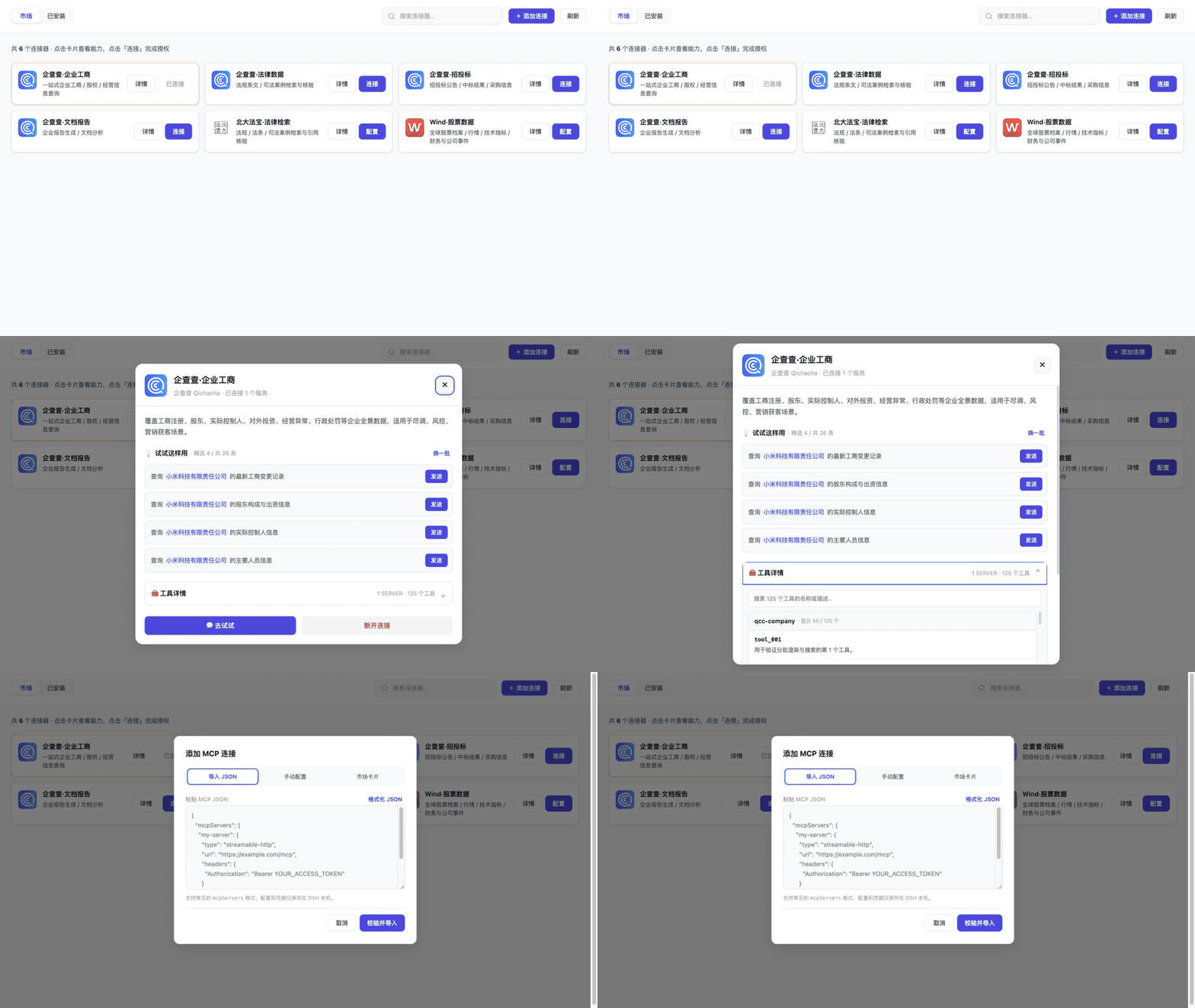
## Interface and demo
|
|
32
34
|
|
|
33
|
-
|
|
34
36
|
|
|
35
37
|
| Marketplace overview | Connector details and curated prompts |
|
|
36
38
|
|---|---|
|
|
@@ -38,7 +40,7 @@ The first four bundled cards are Qichacha connectors, followed by PKULaw and Win
|
|
|
38
40
|
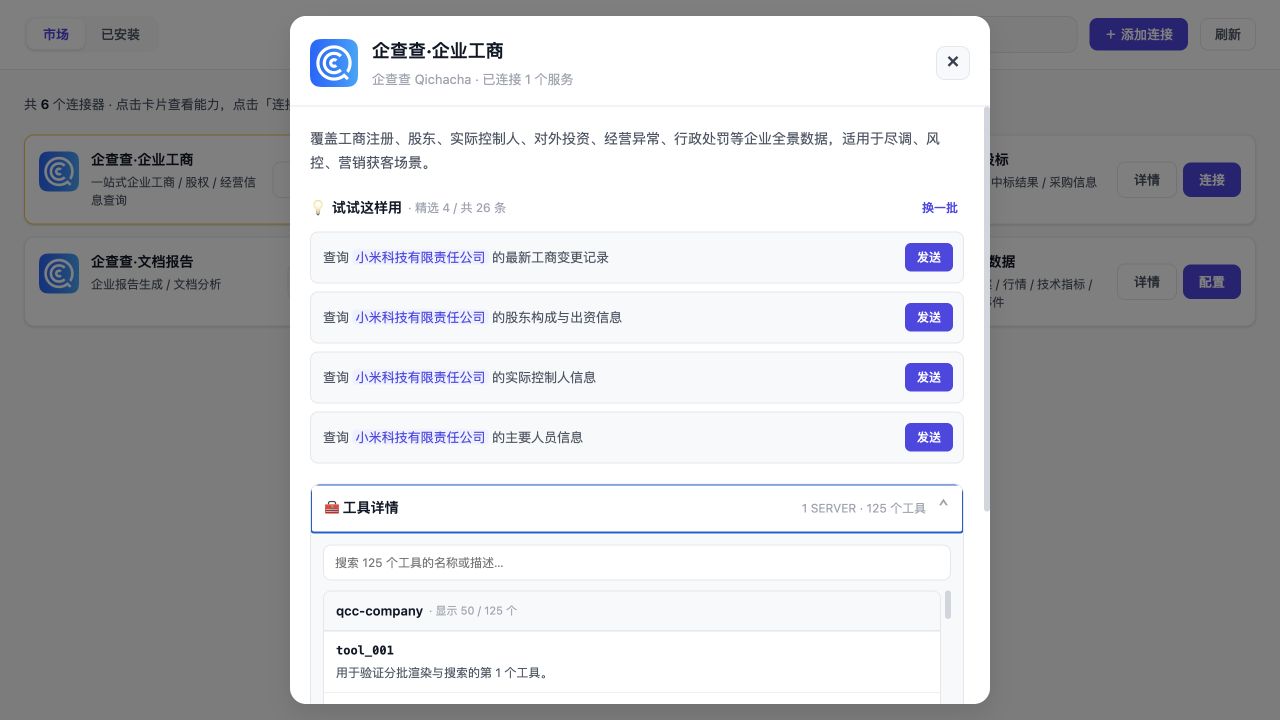
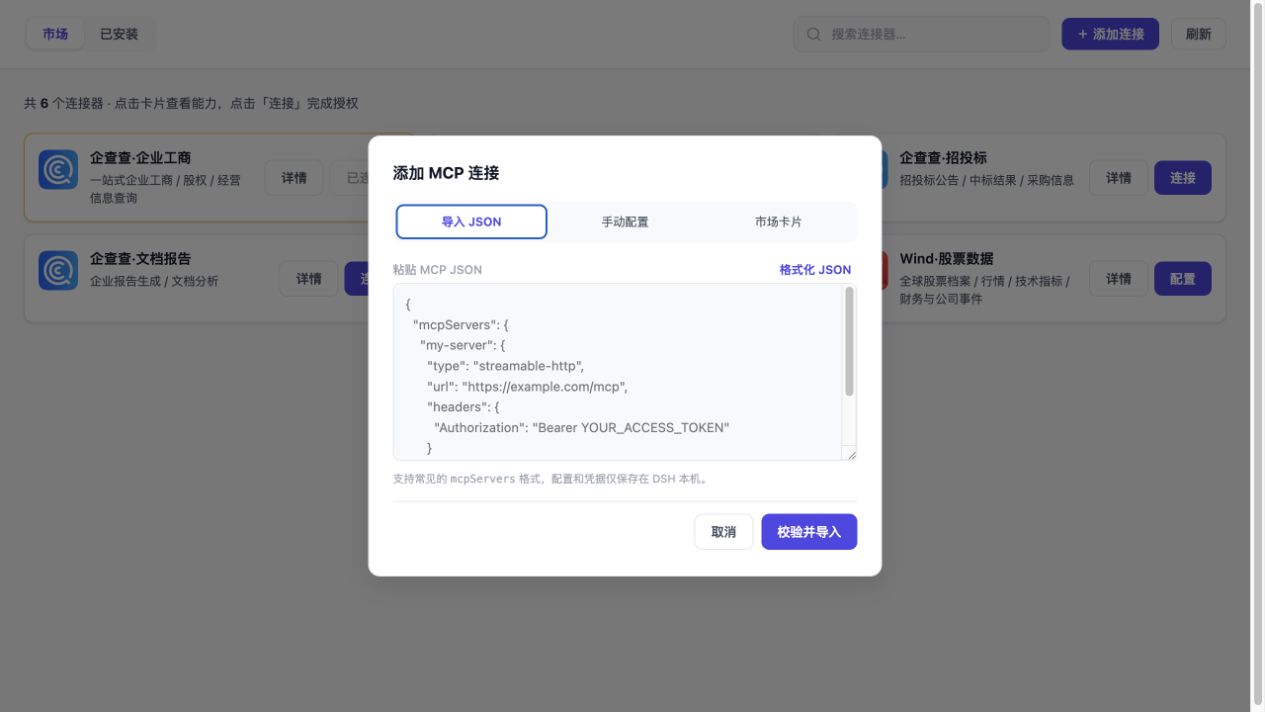
| Tool discovery, descriptions, and scrolling | JSON import |
|
|
39
41
|
|  |  |
|
|
40
42
|
|
|
41
|
-
The assets are captured from
|
|
43
|
+
The assets are captured from a local DSH `web` acceptance environment and show only public marketplace metadata, example prompts, and tool descriptions. They contain no credentials, local paths, or query results. See [`docs/screenshots/README.md`](docs/screenshots/README.md) for provenance.
|
|
42
44
|
|
|
43
45
|
## Installation
|
|
44
46
|
|
|
@@ -54,7 +56,7 @@ Or use the installer:
|
|
|
54
56
|
bash <(curl -fsSL https://raw.githubusercontent.com/duhu2000/dsh-mcp-connector/main/install.sh)
|
|
55
57
|
```
|
|
56
58
|
|
|
57
|
-
Fully quit and restart DeepSeek Harness Desktop after installation or upgrade.
|
|
59
|
+
Run the same command again to upgrade. Fully quit and restart DeepSeek Harness Desktop after installation or upgrade. For `dsh web`, stop the original process before starting it again; `EADDRINUSE 127.0.0.1:3080` means another instance is already listening.
|
|
58
60
|
|
|
59
61
|
## Usage
|
|
60
62
|
|
|
@@ -65,6 +67,8 @@ Fully quit and restart DeepSeek Harness Desktop after installation or upgrade.
|
|
|
65
67
|
|
|
66
68
|
Connected tools are exposed to the model with the `mcp__<serverName>__*` prefix.
|
|
67
69
|
|
|
70
|
+
The detailed [Chinese user guide](docs/USER-GUIDE.md) covers category browsing, the four authentication modes, HTTP/stdio configuration, JSON import, connection management, and troubleshooting.
|
|
71
|
+
|
|
68
72
|
## Connector catalog
|
|
69
73
|
|
|
70
74
|
The package contains a bundled fallback catalog. By default, it refreshes from the public [dsh-mcp-connector-registry](https://github.com/duhu2000/dsh-mcp-connector-registry); cached or bundled data remains available if the remote registry cannot be reached.
|
|
@@ -101,7 +105,7 @@ npm run dev:ui
|
|
|
101
105
|
|
|
102
106
|
`npm run check` performs syntax checks, automated tests, and an npm package allowlist/sensitive-content audit. `npm run market:check` tracks the external DSH marketplace PR and live directory. Tags matching `v*` trigger GitHub Actions; the tag must match `package.json`. npm releases use Trusted Publishing through GitHub OIDC and do not require a long-lived `NPM_TOKEN`.
|
|
103
107
|
|
|
104
|
-
The current public version is [`dsh-mcp-connector@0.2.
|
|
108
|
+
The current public version is [`dsh-mcp-connector@0.2.18`](https://www.npmjs.com/package/dsh-mcp-connector), with [GitHub Release v0.2.18](https://github.com/duhu2000/dsh-mcp-connector/releases/tag/v0.2.18).
|
|
105
109
|
|
|
106
110
|
See [CHANGELOG.md](CHANGELOG.md) for version history and [docs/DESKTOP-E2E.md](docs/DESKTOP-E2E.md) for the Desktop release checklist.
|
|
107
111
|
|
|
@@ -112,7 +116,8 @@ See [CHANGELOG.md](CHANGELOG.md) for version history and [docs/DESKTOP-E2E.md](d
|
|
|
112
116
|
- External URLs must use HTTPS; HTTP is allowed only for loopback development.
|
|
113
117
|
- Remote descriptors and catalogs are limited to 2 MiB, Web API requests to 1 MiB, and imported JSON is scanned for credential fields before normalization.
|
|
114
118
|
- Streamable HTTP and stdio are supported end to end. Legacy `sse` entries are normalized to Streamable HTTP. The connector passes stdio `command/args/env/cwd` to `@deepseek-ai/dsh-mcp-client` instead of reimplementing process transport.
|
|
115
|
-
- stdio starts a local process. Import or connect only trusted commands and packages
|
|
119
|
+
- stdio starts a local process. Import or connect only trusted commands and packages. Catalog descriptors may declare `credentialFields` and `credentialBindings`, but may never contain actual token/secret values; user input is injected only into the local Host process environment.
|
|
120
|
+
- OAuth DCR client secrets share the same local-only boundary as access and refresh tokens and are omitted from catalog/status responses and logs.
|
|
116
121
|
- The primary sidebar placement uses the stable DSH `data-slot` marker and falls back to the footer if that marker is removed.
|
|
117
122
|
|
|
118
123
|
## License
|
package/README.md
CHANGED
|
@@ -8,6 +8,8 @@
|
|
|
8
8
|
|
|
9
9
|
[English](README.en.md)
|
|
10
10
|
|
|
11
|
+
[用户手册](docs/USER-GUIDE.md) · [第三方连接器上架指南](https://github.com/duhu2000/dsh-mcp-connector-registry/blob/main/docs/ONBOARDING.md) · [问题反馈](https://github.com/duhu2000/dsh-mcp-connector/issues)
|
|
12
|
+
|
|
11
13
|
[](https://github.com/duhu2000/dsh-mcp-connector/actions/workflows/ci.yml)
|
|
12
14
|
[](https://www.npmjs.com/package/dsh-mcp-connector)
|
|
13
15
|
[](LICENSE)
|
|
@@ -19,9 +21,9 @@
|
|
|
19
21
|
- 图形化添加:手动 HTTP/stdio、`mcpServers` JSON、连接器描述 URL 三种入口,失败时保留表单并给出修复建议。
|
|
20
22
|
- 连接器详情:精选 Prompt 优先展示,点击可带入 DSH 新会话;工具按 Server 分组,支持描述、搜索和独立滚动。
|
|
21
23
|
- Prompt 模板:使用 `{{company}}` 等变量,发送前填写真实查询主体。
|
|
22
|
-
- 三种接入:OAuth 2.0 PKCE、自定义 HTTP/stdio、导入 `mcpServers` JSON;也支持从连接器描述 URL 安装。
|
|
23
|
-
- 市场 Bearer/API Key 连接器先执行 MCP initialize 连通性与凭据校验,全部 Server
|
|
24
|
-
- 生命周期管理:连接持久化、重启恢复、启停、断开、OAuth
|
|
24
|
+
- 三种接入:OAuth 2.0 PKCE、自定义 HTTP/stdio、导入 `mcpServers` JSON;也支持从连接器描述 URL 安装。OAuth 动态注册兼容公共客户端以及 `client_secret_post` / `client_secret_basic` 机密客户端。
|
|
25
|
+
- 市场 Bearer/API Key 连接器先执行 MCP initialize 连通性与凭据校验,全部 HTTP Server 通过后才持久化凭据并进入“已安装”;stdio 卡片可声明多个本机凭据字段及其环境变量映射。
|
|
26
|
+
- 生命周期管理:连接持久化、重启恢复、启停、断开、OAuth 刷新与撤销;DCR 返回的客户端密钥与 Token 一同只保存在本机。
|
|
25
27
|
- 目录运营:内置目录、远程 registry、本地覆盖,支持 `published` 上下架与 `featured` 精选。
|
|
26
28
|
- 独立远程 Registry:新市场卡片合并后客户端刷新即可见,无需重新发布 npm;远程不可用时自动回退内置目录。
|
|
27
29
|
- Registry 工具链:Schema/唯一性/密钥审计、MCP/OAuth 无凭据探针、每周健康巡检。
|
|
@@ -32,7 +34,7 @@
|
|
|
32
34
|
|
|
33
35
|
## 界面与演示
|
|
34
36
|
|
|
35
|
-

|
|
36
38
|
|
|
37
39
|
| 市场总览 | 连接器详情与精选 Prompt |
|
|
38
40
|
|---|---|
|
|
@@ -40,7 +42,7 @@
|
|
|
40
42
|
| 工具发现、描述与独立滚动 | JSON 导入 |
|
|
41
43
|
|  |  |
|
|
42
44
|
|
|
43
|
-
|
|
45
|
+
素材从本机 DSH `web` 验收环境采集,只展示公开市场元数据、示例 Prompt 和工具说明,不包含凭据、本机路径或查询结果。详见 [`docs/screenshots/README.md`](docs/screenshots/README.md)。
|
|
44
46
|
|
|
45
47
|
## 安装
|
|
46
48
|
|
|
@@ -56,7 +58,7 @@ dsh plugin --profile web add dsh-mcp-connector
|
|
|
56
58
|
bash <(curl -fsSL https://raw.githubusercontent.com/duhu2000/dsh-mcp-connector/main/install.sh)
|
|
57
59
|
```
|
|
58
60
|
|
|
59
|
-
|
|
61
|
+
重复执行安装命令即可升级。安装或升级后需完全退出并重启 DeepSeek Harness Desktop;使用 `dsh web` 时需先停止原进程再启动,`EADDRINUSE 127.0.0.1:3080` 表示已有实例正在运行。
|
|
60
62
|
|
|
61
63
|
## 使用
|
|
62
64
|
|
|
@@ -67,6 +69,8 @@ bash <(curl -fsSL https://raw.githubusercontent.com/duhu2000/dsh-mcp-connector/m
|
|
|
67
69
|
|
|
68
70
|
连接成功后,工具按 `mcp__<serverName>__*` 前缀提供给模型。
|
|
69
71
|
|
|
72
|
+
分类浏览、四种鉴权状态、自定义 HTTP/stdio、JSON 导入、连接管理与故障排查见完整的[用户手册](docs/USER-GUIDE.md)。
|
|
73
|
+
|
|
70
74
|
## 配置
|
|
71
75
|
|
|
72
76
|
Bundle 默认配置位于 `cordis.patch.yml`:
|
|
@@ -96,12 +100,13 @@ npm run dev:ui
|
|
|
96
100
|
|
|
97
101
|
`check` 执行语法检查、自动测试和 npm 发布包白名单校验;`market:check` 检查外部 DSH 市场 PR 与线上目录;`dev:ui` 启动不含真实凭据的本地 mock 市场。CI 使用 `--legacy-peer-deps` 安装显式测试依赖,DSH 运行期 peer 仍由 Host 提供。`v*` Tag 会触发 GitHub Actions;Tag 必须与 `package.json` 版本一致。Release 通过 npm Trusted Publishing (GitHub OIDC) 发布,不依赖长期 `NPM_TOKEN`。
|
|
98
102
|
|
|
99
|
-
当前公开版本为 [`dsh-mcp-connector@0.2.
|
|
103
|
+
当前公开版本为 [`dsh-mcp-connector@0.2.18`](https://www.npmjs.com/package/dsh-mcp-connector),对应 [GitHub Release v0.2.18](https://github.com/duhu2000/dsh-mcp-connector/releases/tag/v0.2.18)。
|
|
100
104
|
|
|
101
105
|
版本能力与变更记录见 [CHANGELOG.md](CHANGELOG.md)。
|
|
102
106
|
Desktop 发版回归见 [docs/DESKTOP-E2E.md](docs/DESKTOP-E2E.md)。
|
|
103
107
|
市场卡片、公共 registry 与 OAuth 一键授权要求见 [docs/MARKET-REGISTRATION.md](docs/MARKET-REGISTRATION.md)。
|
|
104
108
|
stdio 传输的架构、透传边界与安全约束见 [docs/STDIO-SUPPORT.md](docs/STDIO-SUPPORT.md)。
|
|
109
|
+
第三方服务商提交市场卡片请阅读 Registry 的[第三方连接器上架指南](https://github.com/duhu2000/dsh-mcp-connector-registry/blob/main/docs/ONBOARDING.md),无需修改插件代码或等待插件重新发布 npm。
|
|
105
110
|
|
|
106
111
|
## 安全与限制
|
|
107
112
|
|
|
@@ -110,7 +115,8 @@ stdio 传输的架构、透传边界与安全约束见 [docs/STDIO-SUPPORT.md](d
|
|
|
110
115
|
- 外部 URL 仅允许 HTTPS,HTTP 仅允许回环地址;导入配置会校验 URL 与 Header。
|
|
111
116
|
- 远程目录/描述响应限制 2 MiB,Web API 请求限制 1 MiB;原始 JSON 在归一化前扫描凭据字段。
|
|
112
117
|
- 完整覆盖 Streamable HTTP 与 stdio;旧 `sse` 配置在导入/恢复时归一为 Streamable HTTP。stdio 的 `command/args/env/cwd` 原样交给 `@deepseek-ai/dsh-mcp-client`,插件本身不重复实现进程传输。
|
|
113
|
-
- stdio
|
|
118
|
+
- stdio 会启动本机进程:仅导入或连接可信命令/软件包。市场目录只能用 `credentialFields` + `credentialBindings` 声明输入与 env 映射,不得携带真实 token/secret;用户填写值只写入本机连接记录并交给 Host。
|
|
119
|
+
- OAuth DCR 的 `client_secret` 与 Access/Refresh Token 采用相同的本机存储边界,不会进入市场 API、状态输出或日志。
|
|
114
120
|
- 顶部入口通过 DSH 稳定 `data-slot` 定位并使用 React Portal;DSH 若移除该标记,入口会回退到底部,不影响连接器功能。
|
|
115
121
|
- 旧授权迁移必须显式确认,只复制不删除;确认新连接可用后再手动停用旧插件。
|
|
116
122
|
|
|
@@ -16,7 +16,7 @@
|
|
|
16
16
|
3. 在插件中选择「添加连接 → 市场卡片」,粘贴 URL。
|
|
17
17
|
4. Schema/密钥审计通过后,卡片会持久化到本机市场。
|
|
18
18
|
|
|
19
|
-
Bearer/API Key 型连接器可在卡片上点「配置」,一次填写凭据后批量连接该卡片的所有 Server。
|
|
19
|
+
Bearer/API Key 型连接器可在卡片上点「配置」,一次填写凭据后批量连接该卡片的所有 Server。stdio 卡片可通过 `auth.credentialFields` 声明多个输入,并用 `servers[].credentialBindings` 映射到本地进程环境变量;描述文件仍不得包含真实值。
|
|
20
20
|
|
|
21
21
|
## 3. 提交公共市场
|
|
22
22
|
|
|
@@ -47,8 +47,11 @@ Bearer/API Key 型连接器可在卡片上点「配置」,一次填写凭据
|
|
|
47
47
|
- Authorization Server Metadata(RFC 8414);
|
|
48
48
|
- `authorization_endpoint`、`token_endpoint`、`registration_endpoint`;`revocation_endpoint` 建议提供,但按标准属于可选能力;
|
|
49
49
|
- Dynamic Client Registration,且支持 loopback callback URI;
|
|
50
|
+
- DCR 的 `token_endpoint_auth_method` 可为 `none`、`client_secret_post` 或 `client_secret_basic`;后两者的注册响应必须返回 `client_secret`;
|
|
50
51
|
- Refresh Token;如提供撤销端点,插件会在断开/清理授权时撤销 Refresh Token,否则只删除 DSH 本机授权记录。
|
|
51
52
|
|
|
53
|
+
DCR 返回的 `client_secret` 由插件与 Access/Refresh Token 一同保存在 DSH 本机 Grant 中,只用于 Token 交换、刷新和撤销,不会出现在目录、状态输出或日志。描述文件只填写服务端支持的 `tokenEndpointAuthMethod`,不得预置客户端密钥。
|
|
54
|
+
|
|
52
55
|
插件优先读取 RFC 8414 Authorization Server Metadata;若动态注册或撤销端点缺失,会再读取 OIDC Discovery 并仅补齐缺失字段。OAuth 元数据中的授权、Token 等标准端点始终优先。
|
|
53
56
|
|
|
54
57
|
符合上述条件的最小描述:
|
|
@@ -59,7 +62,7 @@ Bearer/API Key 型连接器可在卡片上点「配置」,一次填写凭据
|
|
|
59
62
|
"id": "vendor-legal",
|
|
60
63
|
"name": "厂商·法律数据",
|
|
61
64
|
"vendor": "厂商名称",
|
|
62
|
-
"category": "
|
|
65
|
+
"category": "法律合规",
|
|
63
66
|
"summary": "法规与案例检索",
|
|
64
67
|
"published": true,
|
|
65
68
|
"auth": {
|
|
@@ -80,6 +83,36 @@ Bearer/API Key 型连接器可在卡片上点「配置」,一次填写凭据
|
|
|
80
83
|
}
|
|
81
84
|
```
|
|
82
85
|
|
|
86
|
+
### 5.1 需要本机环境变量的 stdio 卡片
|
|
87
|
+
|
|
88
|
+
目录只声明字段和映射,示例见 `registry/connectors/stdio-credential.sample.json`:
|
|
89
|
+
|
|
90
|
+
```json
|
|
91
|
+
{
|
|
92
|
+
"auth": {
|
|
93
|
+
"mode": "api-key",
|
|
94
|
+
"credentialFields": [
|
|
95
|
+
{ "key": "apiToken", "label": "API Token", "required": true, "secret": true },
|
|
96
|
+
{ "key": "region", "label": "区域", "required": true, "secret": false }
|
|
97
|
+
]
|
|
98
|
+
},
|
|
99
|
+
"servers": [{
|
|
100
|
+
"serverKey": "main",
|
|
101
|
+
"serverName": "vendor-local-service",
|
|
102
|
+
"transport": "stdio",
|
|
103
|
+
"command": "npx",
|
|
104
|
+
"args": ["-y", "@vendor/example-mcp-server"],
|
|
105
|
+
"env": { "LOG_LEVEL": "info" },
|
|
106
|
+
"credentialBindings": {
|
|
107
|
+
"VENDOR_API_TOKEN": "apiToken",
|
|
108
|
+
"VENDOR_REGION": "region"
|
|
109
|
+
}
|
|
110
|
+
}]
|
|
111
|
+
}
|
|
112
|
+
```
|
|
113
|
+
|
|
114
|
+
`credentialBindings` 的 key 必须是合法环境变量名,value 必须引用已声明的字段。不要在 `env`、`credentialFields` 或其他目录字段中填写 Token、Secret、API Key、密码或 Cookie。
|
|
115
|
+
|
|
83
116
|
## 6. 北大法宝当前适配结论
|
|
84
117
|
|
|
85
118
|
北大法宝当前公开文档的主路径是在控制台生成 Access Token,然后通过 `Authorization: Bearer ...` 访问多个 MCP Server。因此:
|
package/docs/STDIO-SUPPORT.md
CHANGED
|
@@ -146,12 +146,13 @@ const Config = z.union([
|
|
|
146
146
|
|
|
147
147
|
采用「宽松 schema + normalize 阶段显式校验」风格(与现有代码注释「宽松校验、显式报错」一致)。
|
|
148
148
|
|
|
149
|
-
### 决策 3:stdio
|
|
149
|
+
### 决策 3:stdio 凭据使用声明式字段绑定,真实值仅在本机注入 `env`
|
|
150
150
|
|
|
151
|
-
- stdio
|
|
152
|
-
-
|
|
153
|
-
-
|
|
154
|
-
-
|
|
151
|
+
- stdio 是本地进程,密钥最终仍通过环境变量传递(如 `GITHUB_TOKEN`、`OPENAI_API_KEY`)。
|
|
152
|
+
- 无凭据的 stdio 连接器使用 `auth.mode: "none"`;需要用户输入的卡片使用 `bearer` 或 `api-key`,并在 `auth.credentialFields` 声明一个或多个输入字段。
|
|
153
|
+
- `servers[].credentialBindings` 只保存“环境变量名 → 凭据字段 key”的映射;`servers[].env` 只能包含非敏感默认值。
|
|
154
|
+
- 用户输入存入本机 `ConnectionRecord.env` 并透传给 `dsh-mcp-client`,不回写目录,也不出现在 catalog/status/log 输出。
|
|
155
|
+
- Registry 探针只校验声明与命令形状,绝不执行本地 stdio 命令。
|
|
155
156
|
|
|
156
157
|
### 决策 4:mcp-provision 按 transport 分支透传
|
|
157
158
|
|
|
@@ -611,9 +612,8 @@ cwd: { type: 'string', description: 'transport=stdio 时的工作目录,默认
|
|
|
611
612
|
| stdio `command` 可执行任意本地命令 | command 来自(a)维护者审核的 catalog,或(b)用户主动 configure,风险可控;DSH 运行时沙箱机制兜底 |
|
|
612
613
|
| `env` 里的密钥泄露到日志 | dsh-mcp-client 的 `buildChildEnv` 已用 `scrubbedParentEnv()` 清理敏感父环境变量;我们持久化 env 到 storage domain 与现有 headers 鉴权一致,无新增泄露面 |
|
|
613
614
|
| `cwd` 空字符串导致 spawn 异常 | provisioning 层显式 `record.cwd \|\| process.cwd()` |
|
|
614
|
-
| 目录夹带密钥 |
|
|
615
|
-
|
|
616
|
-
> ⚠️ **需补充**:`catalog.js` 的 `auditDescriptor` / `auditRawDescriptor` 目前审计 `servers[].headers` 的密钥类字段,需确认 `servers[].env` 也被审计(避免目录里 stdio 的 env 夹带 token)。
|
|
615
|
+
| 目录夹带密钥 | `auditRawDescriptor` 拒绝真实凭据字段,`auditDescriptor` 拒绝 `env` 中的 token/secret/API Key/password 类变量;只允许 `credentialBindings` 引用已声明字段 |
|
|
616
|
+
| 凭据映射错误或未使用 | Schema 与目录审计检查字段 key、env 名、重复映射、未知引用及未被任何 HTTP/stdio Server 使用的必填字段 |
|
|
617
617
|
|
|
618
618
|
---
|
|
619
619
|
|
|
@@ -649,6 +649,8 @@ cwd: { type: 'string', description: 'transport=stdio 时的工作目录,默认
|
|
|
649
649
|
- `npm run check`(lint + test + verify-pack)全绿
|
|
650
650
|
4. **安全**:
|
|
651
651
|
- 目录里 stdio 连接器的 `env` 含 token/secret 字段时被 `auditRawDescriptor` 拦截
|
|
652
|
+
- 多字段 `credentialFields` / `credentialBindings` 通过校验,未知引用与缺失必填值被拒绝
|
|
653
|
+
- 真实值只进入本机连接记录与 Host env,catalog/status/log 均不返回
|
|
652
654
|
|
|
653
655
|
---
|
|
654
656
|
|
|
@@ -0,0 +1,172 @@
|
|
|
1
|
+
# MCP连接器用户手册
|
|
2
|
+
|
|
3
|
+
本手册面向安装和使用 `dsh-mcp-connector` 的 DeepSeek Harness(DSH)用户。服务商或 MCP 原作者如需提交市场卡片,请改看独立 Registry 的[第三方连接器上架指南](https://github.com/duhu2000/dsh-mcp-connector-registry/blob/main/docs/ONBOARDING.md)。
|
|
4
|
+
|
|
5
|
+
## 1. 安装、升级与重启
|
|
6
|
+
|
|
7
|
+
要求:DSH Desktop 或 `web` profile,Node.js 20 或更高版本。
|
|
8
|
+
|
|
9
|
+
```bash
|
|
10
|
+
dsh plugin --profile web add dsh-mcp-connector
|
|
11
|
+
```
|
|
12
|
+
|
|
13
|
+
也可以运行一键安装脚本:
|
|
14
|
+
|
|
15
|
+
```bash
|
|
16
|
+
bash <(curl -fsSL https://raw.githubusercontent.com/duhu2000/dsh-mcp-connector/main/install.sh)
|
|
17
|
+
```
|
|
18
|
+
|
|
19
|
+
重复执行同一安装命令即可升级。安装或升级后必须让 DSH **完全退出并重新启动**,仅刷新浏览器页面不足以替换已经加载的插件代码。
|
|
20
|
+
|
|
21
|
+
- DSH Desktop:退出应用后重新打开。
|
|
22
|
+
- `dsh web`:停止原进程,再运行 `dsh web`。
|
|
23
|
+
- 浏览器访问:默认打开 `http://127.0.0.1:3080`。
|
|
24
|
+
|
|
25
|
+
如果重新运行 `dsh web` 出现 `EADDRINUSE 127.0.0.1:3080`,说明已有 DSH 进程正在监听 3080 端口,并不表示插件安装失败。可以直接打开现有页面;若确实要重启,先在原终端停止进程,或用下面的只读命令确认监听者,再正常结束对应 PID:
|
|
26
|
+
|
|
27
|
+
```bash
|
|
28
|
+
lsof -nP -iTCP:3080 -sTCP:LISTEN
|
|
29
|
+
kill <PID>
|
|
30
|
+
dsh web
|
|
31
|
+
```
|
|
32
|
+
|
|
33
|
+
不要同时启动两个 `dsh web` 实例。
|
|
34
|
+
|
|
35
|
+
## 2. 打开 MCP连接器
|
|
36
|
+
|
|
37
|
+
重启后,在 DSH 左侧主导航点击“🧩 MCP连接器”。入口通常位于“新会话”下方、工作区/会话列表上方;如果当前 DSH 版本没有对应的公开插槽,入口会回退到左侧底部。
|
|
38
|
+
|
|
39
|
+
页面顶部提供:
|
|
40
|
+
|
|
41
|
+
- **市场**:浏览内置目录与远程 Registry 合并后的公开连接器,页签徽标显示当前卡片数。
|
|
42
|
+
- **已安装**:查看已经保存到本机的连接,页签徽标显示连接数。
|
|
43
|
+
- **搜索**:按名称、服务商、简介和标签查找。
|
|
44
|
+
- **添加连接**:导入 JSON、手动配置 HTTP/stdio,或从市场描述 URL 安装。
|
|
45
|
+
- **刷新**:重新拉取目录,并更新连接健康状态。
|
|
46
|
+
|
|
47
|
+
## 3. 浏览市场与分类
|
|
48
|
+
|
|
49
|
+
默认选择“全部”,页面按以下顺序分章节展示:推荐、企业数据、金融投资、法律合规、开发工具、办公协作、调研分析、设计创意、效率工具、其他。
|
|
50
|
+
|
|
51
|
+
- 推荐位固定为 6 张精选卡片;其他卡片仍会出现在各自业务分类中。
|
|
52
|
+
- 每个章节先展示最多 4 张卡片;数量更多时可点击“查看全部”,再点击“收起”。
|
|
53
|
+
- 点击某个分类标签后,只展示该分类的全部卡片。
|
|
54
|
+
- 分类栏固定在页面 Header 内,滚动卡片时不会遮挡内容;切换到“已安装”后自动隐藏。
|
|
55
|
+
- 远程目录不可用时,插件会继续使用上次缓存或随包内置目录,不影响已有连接。
|
|
56
|
+
|
|
57
|
+
## 4. 连接市场卡片
|
|
58
|
+
|
|
59
|
+
卡片右侧按钮会根据鉴权方式和当前状态变化:
|
|
60
|
+
|
|
61
|
+
| 按钮/状态 | 含义 | 操作 |
|
|
62
|
+
|---|---|---|
|
|
63
|
+
| `连接` | OAuth 或免密连接器尚未连接 | 点击后按页面提示完成授权或连通性检查 |
|
|
64
|
+
| `配置` | 需要 Bearer Token 或 API Key | 录入服务商签发的凭据并验证 |
|
|
65
|
+
| `需重新授权` | OAuth 授权过期、被撤销或不可用 | 点击后重新完成 OAuth 授权 |
|
|
66
|
+
| `已配置` | 本机已有配置,尚未完成本轮健康确认 | 点击“刷新”或进入详情检查 |
|
|
67
|
+
| `已连接` | 最近一次健康检查通过 | 可直接在会话中使用对应 MCP 工具 |
|
|
68
|
+
| `部分异常` / `连接异常` | 一个或多个 Server 未通过检查 | 打开详情查看提示,核对网络、权限和服务状态 |
|
|
69
|
+
|
|
70
|
+
Bearer/API Key 连接器会先执行 MCP `initialize` 验证。所有 Server 通过后,凭据才会保存并出现在“已安装”中;验证失败不会写入新凭据。
|
|
71
|
+
|
|
72
|
+
stdio 市场卡片也可能显示一个或多个凭据字段,例如 API Token、区域或租户标识。卡片目录只声明字段名称及其环境变量映射;提交后,真实值仅保存到 DSH 本机连接记录,并由插件注入该 stdio 进程的 `env`。市场、状态页和日志不会返回这些值。stdio 由 Host 托管,配置成功表示命令已注册;最终工具可用性仍以本机进程启动结果为准。
|
|
73
|
+
|
|
74
|
+
OAuth 一键连接要求服务商支持标准 OAuth 2.1/PKCE 和公开元数据发现。动态客户端注册既支持无需客户端密钥的 `none`,也支持服务商签发密钥的 `client_secret_post` 与 `client_secret_basic`。客户端密钥仅与 OAuth Grant 一同保存在 DSH 本机,用于换取、刷新和撤销 Token;插件不会要求用户把 OAuth Token 或客户端密钥复制到聊天中。
|
|
75
|
+
|
|
76
|
+
## 5. 查看详情、Prompt 与工具
|
|
77
|
+
|
|
78
|
+
点击卡片或“详情”可打开连接器详情:
|
|
79
|
+
|
|
80
|
+
1. 阅读服务说明、鉴权方式、数据范围与可能产生的费用或副作用。
|
|
81
|
+
2. 在“试试这样用”中选择示例 Prompt;带变量的模板会先要求补齐查询主体等信息。
|
|
82
|
+
3. 展开“工具详情”查看 Server 数量、工具名称与描述,并可搜索工具。
|
|
83
|
+
4. 点击“去试试”或 Prompt 的发送按钮,在当前工作区创建或复用空白会话并写入草稿。
|
|
84
|
+
|
|
85
|
+
连接成功后,工具按 `mcp__<serverName>__*` 前缀提供给模型。工具清单来自服务端,实际数量会随服务商权限和版本变化。
|
|
86
|
+
|
|
87
|
+
## 6. 添加自定义连接
|
|
88
|
+
|
|
89
|
+
点击“+ 添加连接”后有三种方式。
|
|
90
|
+
|
|
91
|
+
### 6.1 导入 `mcpServers` JSON
|
|
92
|
+
|
|
93
|
+
支持 Streamable HTTP、历史 `sse` 配置和 stdio。历史 `sse` 会自动归一为 Streamable HTTP。
|
|
94
|
+
|
|
95
|
+
```json
|
|
96
|
+
{
|
|
97
|
+
"mcpServers": {
|
|
98
|
+
"my-http-server": {
|
|
99
|
+
"type": "streamable-http",
|
|
100
|
+
"url": "https://example.com/mcp",
|
|
101
|
+
"headers": {
|
|
102
|
+
"Authorization": "Bearer YOUR_ACCESS_TOKEN"
|
|
103
|
+
}
|
|
104
|
+
},
|
|
105
|
+
"my-local-server": {
|
|
106
|
+
"type": "stdio",
|
|
107
|
+
"command": "npx",
|
|
108
|
+
"args": ["-y", "@vendor/example-mcp-server"],
|
|
109
|
+
"env": {
|
|
110
|
+
"EXAMPLE_MODE": "readonly"
|
|
111
|
+
}
|
|
112
|
+
}
|
|
113
|
+
}
|
|
114
|
+
}
|
|
115
|
+
```
|
|
116
|
+
|
|
117
|
+
导入前请把示例占位符替换为自己的值。凭据只应在本机导入,不要把含真实 Token、API Key、密码或 Cookie 的 JSON 提交到 Git、Issue 或聊天。
|
|
118
|
+
|
|
119
|
+
### 6.2 手动配置
|
|
120
|
+
|
|
121
|
+
- **HTTP**:填写名称、HTTPS MCP URL、可选 Header 和传输方式。
|
|
122
|
+
- **stdio**:填写本机命令、参数、环境变量和可选工作目录。
|
|
123
|
+
|
|
124
|
+
stdio 进程由 `@deepseek-ai/dsh-mcp-client` 管理,插件只透传 `command`、`args`、`env`、`cwd`。stdio 会以当前用户权限启动本机进程,只运行你信任的软件包和命令。
|
|
125
|
+
|
|
126
|
+
### 6.3 市场卡片 URL
|
|
127
|
+
|
|
128
|
+
填写一个公开的 HTTPS Connector Descriptor URL。描述文件只能携带公开元数据,不应包含任何凭据;安装后仍由用户在本机完成 OAuth 或录入 Key。
|
|
129
|
+
|
|
130
|
+
## 7. 管理已安装连接
|
|
131
|
+
|
|
132
|
+
在“已安装”中可以:
|
|
133
|
+
|
|
134
|
+
- 查看连接状态和 Server 数量;
|
|
135
|
+
- 启用或停用连接;
|
|
136
|
+
- 重新授权 OAuth,或重新录入 Token/API Key;
|
|
137
|
+
- 执行健康检查;
|
|
138
|
+
- 断开连接并删除该连接的本机配置。
|
|
139
|
+
|
|
140
|
+
OAuth 断开时,插件会尽力调用服务商的撤销端点;无撤销端点时仍会删除 DSH 本机授权记录。连接状态发生变化后,可点击“刷新”重新检查。
|
|
141
|
+
|
|
142
|
+
## 8. 安全边界
|
|
143
|
+
|
|
144
|
+
- 凭据仅保存在 DSH storage domain,不进入市场目录、Git 仓库或对话历史。
|
|
145
|
+
- stdio 目录只能声明凭据字段与 env 映射,不能给出真实值;Registry 探针不会执行目录中的本地命令。
|
|
146
|
+
- OAuth 动态注册返回的 `client_secret` 不出现在目录、连接状态或日志中;断开连接时与 Refresh Token 一起尽力撤销并删除本机记录。
|
|
147
|
+
- 外部 HTTP 地址必须使用 HTTPS;仅本机回环开发地址允许 HTTP。
|
|
148
|
+
- Registry 健康探针不持有用户凭据,也绝不会执行目录里的 stdio 命令。
|
|
149
|
+
- 连接器能看到的数据和能执行的操作取决于你授予的账户权限;优先使用最小权限 Token/API Key。
|
|
150
|
+
- 生成、付费、写入、发布、删除、停止任务等有副作用的工具,应在执行前再次确认参数和影响。
|
|
151
|
+
|
|
152
|
+
## 9. 常见问题
|
|
153
|
+
|
|
154
|
+
### 安装后没有入口,或界面仍是旧版
|
|
155
|
+
|
|
156
|
+
确认安装目标是 `web` profile,然后完全退出并重启 DSH。浏览器强制刷新只能刷新静态页面,不能替换仍在运行的旧插件进程。
|
|
157
|
+
|
|
158
|
+
### 市场里没有最新卡片
|
|
159
|
+
|
|
160
|
+
点击“刷新”。如果远程 Registry 暂时不可用,页面会继续显示缓存或内置目录;稍后恢复网络再刷新即可。
|
|
161
|
+
|
|
162
|
+
### Token/API Key 一直验证失败
|
|
163
|
+
|
|
164
|
+
核对凭据是否过期、是否具备目标 MCP Server 权限、Header 类型是否正确,以及服务商是否要求单独开通或付费。失败的候选凭据不会覆盖本机原有可用配置。
|
|
165
|
+
|
|
166
|
+
### stdio 启动失败
|
|
167
|
+
|
|
168
|
+
先在终端确认命令本身可执行、软件包可信、Node/运行时版本满足要求,并检查 `cwd` 和环境变量。不要把本机凭据写入公开 Registry descriptor。
|
|
169
|
+
|
|
170
|
+
### 如何反馈问题
|
|
171
|
+
|
|
172
|
+
提交 [GitHub Issue](https://github.com/duhu2000/dsh-mcp-connector/issues) 时,请提供 DSH 版本、插件版本、连接器名称、复现步骤和已脱敏的错误信息。不要附带 Token、API Key、Cookie、授权码或包含真实凭据的配置文件。
|
package/lib/catalog.js
CHANGED
|
@@ -16,6 +16,11 @@ export function auditRawDescriptor(raw, path = 'connector') {
|
|
|
16
16
|
if (!raw || typeof raw !== 'object') return raw;
|
|
17
17
|
for (const [key, value] of Object.entries(raw)) {
|
|
18
18
|
const fieldPath = `${path}.${key}`;
|
|
19
|
+
// credentialBindings 的 key 是待注入的环境变量名,value 只能是凭据字段引用;
|
|
20
|
+
// 真实值会在本机表单提交后写入 ConnectionRecord,不允许出现在目录中。
|
|
21
|
+
if (key === 'credentialBindings') continue;
|
|
22
|
+
// credentialFields[].secret 只是“以密码框显示”的布尔声明,不是密钥值。
|
|
23
|
+
if (key === 'secret' && typeof value === 'boolean' && /\.auth\.credentialFields\.\d+\.secret$/.test(fieldPath)) continue;
|
|
19
24
|
if (SECRET_KEY_RE.test(key) && value !== undefined && value !== null && String(value).trim() !== '') {
|
|
20
25
|
throw new Error(`${fieldPath} 禁止携带凭证或密钥`);
|
|
21
26
|
}
|
|
@@ -38,16 +43,42 @@ export function loadBundledCatalog() {
|
|
|
38
43
|
|
|
39
44
|
/** 安全审计:目录禁止携带密钥、URL 协议白名单、header 名白名单。 */
|
|
40
45
|
export function auditDescriptor(descriptor) {
|
|
46
|
+
const credentialFields = descriptor.auth.credentialFields ?? [];
|
|
47
|
+
const credentialKeys = new Set();
|
|
48
|
+
for (const field of credentialFields) {
|
|
49
|
+
if (credentialKeys.has(field.key)) throw new Error(`connector "${descriptor.id}" auth.credentialFields key 重复: ${field.key}`);
|
|
50
|
+
credentialKeys.add(field.key);
|
|
51
|
+
}
|
|
52
|
+
const referencedCredentials = new Set();
|
|
41
53
|
for (const server of descriptor.servers) {
|
|
42
54
|
if (server.transport === 'stdio') {
|
|
43
|
-
if (descriptor.auth.mode !== 'none') {
|
|
44
|
-
throw new Error(`connector "${descriptor.id}" 的 stdio server 只能使用 auth.mode=none;凭据应由用户本机 env 配置`);
|
|
45
|
-
}
|
|
46
55
|
for (const name of Object.keys(server.env ?? {})) {
|
|
47
56
|
if (SECRET_ENV_RE.test(name)) {
|
|
48
57
|
throw new Error(`connector "${descriptor.id}" servers[].env 禁止携带密钥类变量: ${name}`);
|
|
49
58
|
}
|
|
50
59
|
}
|
|
60
|
+
const bindings = server.credentialBindings ?? {};
|
|
61
|
+
if (descriptor.auth.mode === 'oauth2-pkce') {
|
|
62
|
+
throw new Error(`connector "${descriptor.id}" 的 stdio server 不支持 auth.mode=oauth2-pkce`);
|
|
63
|
+
}
|
|
64
|
+
if (descriptor.auth.mode === 'none' && Object.keys(bindings).length > 0) {
|
|
65
|
+
throw new Error(`connector "${descriptor.id}" 的 stdio credentialBindings 需要 bearer/api-key 凭据定义`);
|
|
66
|
+
}
|
|
67
|
+
if (['bearer', 'api-key'].includes(descriptor.auth.mode) && Object.keys(bindings).length === 0) {
|
|
68
|
+
throw new Error(`connector "${descriptor.id}" 的凭据型 stdio server 必须声明 credentialBindings`);
|
|
69
|
+
}
|
|
70
|
+
for (const [envName, credentialKey] of Object.entries(bindings)) {
|
|
71
|
+
if (!/^[A-Za-z_][A-Za-z0-9_]*$/.test(envName)) {
|
|
72
|
+
throw new Error(`connector "${descriptor.id}" credentialBindings 环境变量名非法: ${envName}`);
|
|
73
|
+
}
|
|
74
|
+
if (Object.hasOwn(server.env ?? {}, envName)) {
|
|
75
|
+
throw new Error(`connector "${descriptor.id}" credentialBindings 与 servers[].env 重复声明: ${envName}`);
|
|
76
|
+
}
|
|
77
|
+
if (!credentialKeys.has(credentialKey)) {
|
|
78
|
+
throw new Error(`connector "${descriptor.id}" credentialBindings 引用了未知凭据字段: ${credentialKey}`);
|
|
79
|
+
}
|
|
80
|
+
referencedCredentials.add(credentialKey);
|
|
81
|
+
}
|
|
51
82
|
continue;
|
|
52
83
|
}
|
|
53
84
|
assertSafeUrl(server.url);
|
|
@@ -58,6 +89,15 @@ export function auditDescriptor(descriptor) {
|
|
|
58
89
|
}
|
|
59
90
|
}
|
|
60
91
|
}
|
|
92
|
+
if (['bearer', 'api-key'].includes(descriptor.auth.mode)) {
|
|
93
|
+
const httpServers = descriptor.servers.filter((server) => server.transport === 'streamable-http');
|
|
94
|
+
if (httpServers.length > 0 && credentialFields[0]) referencedCredentials.add(credentialFields[0].key);
|
|
95
|
+
for (const field of credentialFields) {
|
|
96
|
+
if (field.required && !referencedCredentials.has(field.key)) {
|
|
97
|
+
throw new Error(`connector "${descriptor.id}" 必填凭据字段未被 HTTP 或 stdio 使用: ${field.key}`);
|
|
98
|
+
}
|
|
99
|
+
}
|
|
100
|
+
}
|
|
61
101
|
return descriptor;
|
|
62
102
|
}
|
|
63
103
|
|
|
@@ -31,11 +31,17 @@ export async function oauthAuthorize({ connector, config, logger, signal }) {
|
|
|
31
31
|
if (!issuer) throw new Error(`connector "${connector.id}" missing issuer`);
|
|
32
32
|
|
|
33
33
|
const metadata = await discoverServerMetadata(issuer, config.requestTimeoutMs);
|
|
34
|
+
const requestedAuthMethod = connector.auth.tokenEndpointAuthMethod ?? 'none';
|
|
35
|
+
if (metadata.tokenEndpointAuthMethodsSupported.length > 0
|
|
36
|
+
&& !metadata.tokenEndpointAuthMethodsSupported.includes(requestedAuthMethod)) {
|
|
37
|
+
throw new Error(`OAuth 服务不支持 token_endpoint_auth_method=${requestedAuthMethod}`);
|
|
38
|
+
}
|
|
34
39
|
const callback = await startCallbackServer({ path: '/callback', timeoutMs: config.callbackTimeoutMs, signal });
|
|
35
40
|
const registration = await registerClient(metadata.registrationEndpoint, {
|
|
36
41
|
clientName: connector.auth.clientName,
|
|
37
42
|
redirectUris: [callback.url],
|
|
38
43
|
scope: connector.auth.scope,
|
|
44
|
+
tokenEndpointAuthMethod: requestedAuthMethod,
|
|
39
45
|
timeoutMs: config.requestTimeoutMs,
|
|
40
46
|
});
|
|
41
47
|
|
|
@@ -61,6 +67,8 @@ export async function oauthAuthorize({ connector, config, logger, signal }) {
|
|
|
61
67
|
|
|
62
68
|
const token = await exchangeCode(metadata.tokenEndpoint, {
|
|
63
69
|
clientId: registration.clientId,
|
|
70
|
+
clientSecret: registration.clientSecret,
|
|
71
|
+
tokenEndpointAuthMethod: registration.tokenEndpointAuthMethod,
|
|
64
72
|
code,
|
|
65
73
|
redirectUri: callback.url,
|
|
66
74
|
codeVerifier: verifier,
|
|
@@ -83,6 +91,9 @@ export async function oauthAuthorize({ connector, config, logger, signal }) {
|
|
|
83
91
|
return {
|
|
84
92
|
issuer,
|
|
85
93
|
clientId: registration.clientId,
|
|
94
|
+
clientSecret: registration.clientSecret,
|
|
95
|
+
clientSecretExpiresAt: registration.clientSecretExpiresAt,
|
|
96
|
+
tokenEndpointAuthMethod: registration.tokenEndpointAuthMethod,
|
|
86
97
|
clientName: connector.auth.clientName,
|
|
87
98
|
scope: connector.auth.scope,
|
|
88
99
|
token,
|
package/lib/index.js
CHANGED
|
@@ -147,11 +147,17 @@ export async function apply(ctx, config) {
|
|
|
147
147
|
async function refreshGrant(grantKey) {
|
|
148
148
|
const entry = state.grants.get(grantKey);
|
|
149
149
|
if (!entry || !entry.grant.refreshToken) throw new Error('no refresh token available');
|
|
150
|
+
if (entry.grant.clientSecret && entry.grant.clientSecretExpiresAt > 0
|
|
151
|
+
&& entry.grant.clientSecretExpiresAt * 1000 <= Date.now()) {
|
|
152
|
+
throw new Error('OAuth dynamic client secret expired');
|
|
153
|
+
}
|
|
150
154
|
if (entry.refreshPromise) return entry.refreshPromise;
|
|
151
155
|
entry.refreshPromise = (async () => {
|
|
152
156
|
const metadata = await discoverServerMetadata(entry.grant.issuer, config.requestTimeoutMs);
|
|
153
157
|
const token = await refreshAccessToken(metadata.tokenEndpoint, {
|
|
154
158
|
clientId: entry.grant.clientId,
|
|
159
|
+
clientSecret: entry.grant.clientSecret,
|
|
160
|
+
tokenEndpointAuthMethod: entry.grant.tokenEndpointAuthMethod ?? 'none',
|
|
155
161
|
refreshToken: entry.grant.refreshToken,
|
|
156
162
|
resource: entry.grant.authorizedResources[0],
|
|
157
163
|
scope: entry.grant.scope,
|
|
@@ -204,6 +210,8 @@ export async function apply(ctx, config) {
|
|
|
204
210
|
if (metadata.revocationEndpoint) {
|
|
205
211
|
await revokeRefreshToken(metadata.revocationEndpoint, {
|
|
206
212
|
clientId: entry.grant.clientId,
|
|
213
|
+
clientSecret: entry.grant.clientSecret,
|
|
214
|
+
tokenEndpointAuthMethod: entry.grant.tokenEndpointAuthMethod ?? 'none',
|
|
207
215
|
refreshToken: entry.grant.refreshToken,
|
|
208
216
|
timeoutMs: config.requestTimeoutMs,
|
|
209
217
|
});
|
|
@@ -247,7 +255,9 @@ export async function apply(ctx, config) {
|
|
|
247
255
|
const grantKey = record.auth.grantKey;
|
|
248
256
|
const entry = grantKey ? state.grants.get(grantKey) : null;
|
|
249
257
|
if (!entry) return { ok: false, kind: 'auth', serverKey: record.serverKey, serverName: record.serverName, message: 'OAuth 授权缺失,请重新授权' };
|
|
250
|
-
|
|
258
|
+
const clientSecretExpired = entry.grant.clientSecret && entry.grant.clientSecretExpiresAt > 0
|
|
259
|
+
&& entry.grant.clientSecretExpiresAt * 1000 <= Date.now();
|
|
260
|
+
if (entry.needsReauth || clientSecretExpired || entry.grant.accessTokenExpiresAt <= Date.now()) {
|
|
251
261
|
return { ok: false, kind: 'auth', serverKey: record.serverKey, serverName: record.serverName, message: 'OAuth 授权已过期或刷新失败,请重新授权' };
|
|
252
262
|
}
|
|
253
263
|
return null;
|
|
@@ -302,6 +312,35 @@ export async function apply(ctx, config) {
|
|
|
302
312
|
return summary;
|
|
303
313
|
}
|
|
304
314
|
|
|
315
|
+
function resolveCredentialValues(connector, params = {}) {
|
|
316
|
+
const raw = params.credentialValues && typeof params.credentialValues === 'object' && !Array.isArray(params.credentialValues)
|
|
317
|
+
? params.credentialValues
|
|
318
|
+
: {};
|
|
319
|
+
const values = {};
|
|
320
|
+
const fields = connector.auth.credentialFields ?? [];
|
|
321
|
+
for (const [index, field] of fields.entries()) {
|
|
322
|
+
let value = raw[field.key];
|
|
323
|
+
// 兼容旧调用方:单一/首个凭据仍可通过 bearerToken 或 apiKeyValue 传入。
|
|
324
|
+
if ((value === undefined || value === '') && (field.key === 'credential' || index === 0)) {
|
|
325
|
+
value = connector.auth.mode === 'bearer' ? params.bearerToken : params.apiKeyValue;
|
|
326
|
+
}
|
|
327
|
+
if (field.required && (value === undefined || String(value).trim() === '')) {
|
|
328
|
+
throw new Error(`${field.label} 必填`);
|
|
329
|
+
}
|
|
330
|
+
if (value !== undefined && String(value) !== '') values[field.key] = String(value);
|
|
331
|
+
}
|
|
332
|
+
return values;
|
|
333
|
+
}
|
|
334
|
+
|
|
335
|
+
function bindStdioCredentials(server, credentialValues) {
|
|
336
|
+
const env = { ...(server.env ?? {}) };
|
|
337
|
+
for (const [envName, credentialKey] of Object.entries(server.credentialBindings ?? {})) {
|
|
338
|
+
const value = credentialValues[credentialKey];
|
|
339
|
+
if (value !== undefined && value !== '') env[envName] = value;
|
|
340
|
+
}
|
|
341
|
+
return env;
|
|
342
|
+
}
|
|
343
|
+
|
|
305
344
|
/* ───────────────────────── api 门面 ───────────────────────── */
|
|
306
345
|
|
|
307
346
|
const api = {
|
|
@@ -326,6 +365,7 @@ export async function apply(ctx, config) {
|
|
|
326
365
|
credentialPlaceholder: d.auth.credentialPlaceholder,
|
|
327
366
|
credentialDescription: d.auth.credentialDescription,
|
|
328
367
|
credentialHelpLabel: d.auth.credentialHelpLabel,
|
|
368
|
+
credentialFields: d.auth.credentialFields ?? [],
|
|
329
369
|
prompts: d.prompts ?? [],
|
|
330
370
|
probeStatus: d.probeStatus,
|
|
331
371
|
probeCheckedAt: d.probeCheckedAt,
|
|
@@ -340,6 +380,9 @@ export async function apply(ctx, config) {
|
|
|
340
380
|
servers: (d.servers ?? []).map((s) => ({
|
|
341
381
|
serverKey: s.serverKey,
|
|
342
382
|
url: s.url,
|
|
383
|
+
command: s.command,
|
|
384
|
+
args: s.args,
|
|
385
|
+
credentialBindings: s.credentialBindings,
|
|
343
386
|
transport: s.transport,
|
|
344
387
|
serverName: s.serverName,
|
|
345
388
|
})),
|
|
@@ -373,6 +416,9 @@ export async function apply(ctx, config) {
|
|
|
373
416
|
key: grantKey,
|
|
374
417
|
issuer: authz.issuer,
|
|
375
418
|
clientId: authz.clientId,
|
|
419
|
+
clientSecret: authz.clientSecret,
|
|
420
|
+
clientSecretExpiresAt: authz.clientSecretExpiresAt,
|
|
421
|
+
tokenEndpointAuthMethod: authz.tokenEndpointAuthMethod ?? 'none',
|
|
376
422
|
clientName: authz.clientName,
|
|
377
423
|
scope: authz.scope,
|
|
378
424
|
account: config.account,
|
|
@@ -466,8 +512,14 @@ export async function apply(ctx, config) {
|
|
|
466
512
|
ok: false,
|
|
467
513
|
message:
|
|
468
514
|
`连接器 "${connector.name}" 需要凭据(${connector.auth.mode}),目录不含密钥。` +
|
|
469
|
-
|
|
470
|
-
detail: {
|
|
515
|
+
'请用 mcp_connector_configure 在本机填写目录声明的凭据字段。',
|
|
516
|
+
detail: {
|
|
517
|
+
transport: connector.servers[0].transport,
|
|
518
|
+
url: connector.servers[0].url,
|
|
519
|
+
command: connector.servers[0].command,
|
|
520
|
+
serverName: connector.servers[0].serverName,
|
|
521
|
+
credentialFields: connector.auth.credentialFields ?? [],
|
|
522
|
+
},
|
|
471
523
|
};
|
|
472
524
|
},
|
|
473
525
|
|
|
@@ -481,17 +533,23 @@ export async function apply(ctx, config) {
|
|
|
481
533
|
throw new Error(`连接器 "${connector.name}" 不是 Bearer/API Key 凭据型`);
|
|
482
534
|
}
|
|
483
535
|
const records = [];
|
|
536
|
+
const credentialValues = resolveCredentialValues(connector, params);
|
|
537
|
+
const primaryCredential = credentialValues[connector.auth.credentialFields?.[0]?.key ?? 'credential'];
|
|
484
538
|
for (const server of connector.servers) {
|
|
485
539
|
const record = buildManualRecord({
|
|
486
540
|
name: connector.servers.length > 1 ? `${connector.name}·${server.serverKey}` : connector.name,
|
|
487
541
|
url: server.url,
|
|
488
542
|
serverName: server.serverName,
|
|
489
543
|
transport: server.transport,
|
|
544
|
+
command: server.command,
|
|
545
|
+
args: server.args,
|
|
546
|
+
envJson: server.transport === 'stdio' ? bindStdioCredentials(server, credentialValues) : undefined,
|
|
547
|
+
cwd: server.cwd,
|
|
490
548
|
headersJson: server.headers,
|
|
491
|
-
authMode: connector.auth.mode,
|
|
492
|
-
bearerToken: params.bearerToken,
|
|
549
|
+
authMode: server.transport === 'stdio' ? 'none' : connector.auth.mode,
|
|
550
|
+
bearerToken: params.bearerToken ?? primaryCredential,
|
|
493
551
|
apiKeyHeader: params.apiKeyHeader || connector.auth.apiKeyHeader,
|
|
494
|
-
apiKeyValue: params.apiKeyValue,
|
|
552
|
+
apiKeyValue: params.apiKeyValue ?? primaryCredential,
|
|
495
553
|
});
|
|
496
554
|
record.key = `${connector.id}-${server.serverKey}`;
|
|
497
555
|
record.connectorId = connector.id;
|
|
@@ -727,6 +785,8 @@ export async function apply(ctx, config) {
|
|
|
727
785
|
if (metadata.revocationEndpoint) {
|
|
728
786
|
await revokeRefreshToken(metadata.revocationEndpoint, {
|
|
729
787
|
clientId: g.grant.clientId,
|
|
788
|
+
clientSecret: g.grant.clientSecret,
|
|
789
|
+
tokenEndpointAuthMethod: g.grant.tokenEndpointAuthMethod ?? 'none',
|
|
730
790
|
refreshToken: g.grant.refreshToken,
|
|
731
791
|
timeoutMs: config.requestTimeoutMs,
|
|
732
792
|
});
|
package/lib/oauth.js
CHANGED
|
@@ -184,7 +184,13 @@ export async function discoverServerMetadata(issuer, timeoutMs) {
|
|
|
184
184
|
|
|
185
185
|
/* ─────────────────────────── 阶段三:动态注册客户端 ─────────────────────────── */
|
|
186
186
|
|
|
187
|
-
export async function registerClient(registrationEndpoint, {
|
|
187
|
+
export async function registerClient(registrationEndpoint, {
|
|
188
|
+
clientName,
|
|
189
|
+
redirectUris,
|
|
190
|
+
scope = DEFAULT_SCOPE,
|
|
191
|
+
tokenEndpointAuthMethod = 'none',
|
|
192
|
+
timeoutMs,
|
|
193
|
+
}) {
|
|
188
194
|
if (!Array.isArray(redirectUris) || redirectUris.length === 0) {
|
|
189
195
|
throw new OAuthError('invalid_client_metadata', 'redirect_uris is required');
|
|
190
196
|
}
|
|
@@ -198,7 +204,7 @@ export async function registerClient(registrationEndpoint, { clientName, redirec
|
|
|
198
204
|
redirect_uris: redirectUris,
|
|
199
205
|
grant_types: ['authorization_code', 'refresh_token'],
|
|
200
206
|
response_types: ['code'],
|
|
201
|
-
token_endpoint_auth_method:
|
|
207
|
+
token_endpoint_auth_method: tokenEndpointAuthMethod,
|
|
202
208
|
scope,
|
|
203
209
|
}),
|
|
204
210
|
},
|
|
@@ -207,7 +213,25 @@ export async function registerClient(registrationEndpoint, { clientName, redirec
|
|
|
207
213
|
if (typeof body.client_id !== 'string' || body.client_id.length === 0) {
|
|
208
214
|
throw new OAuthError('invalid_client_metadata', 'registration response missing client_id');
|
|
209
215
|
}
|
|
210
|
-
|
|
216
|
+
const resolvedAuthMethod = body.token_endpoint_auth_method ?? tokenEndpointAuthMethod;
|
|
217
|
+
if (!['none', 'client_secret_post', 'client_secret_basic'].includes(resolvedAuthMethod)) {
|
|
218
|
+
throw new OAuthError('invalid_client_metadata', `unsupported token_endpoint_auth_method: ${resolvedAuthMethod}`);
|
|
219
|
+
}
|
|
220
|
+
const clientSecret = typeof body.client_secret === 'string' && body.client_secret.length > 0
|
|
221
|
+
? body.client_secret
|
|
222
|
+
: undefined;
|
|
223
|
+
if (resolvedAuthMethod !== 'none' && !clientSecret) {
|
|
224
|
+
throw new OAuthError('invalid_client_metadata', `registration response missing client_secret for ${resolvedAuthMethod}`);
|
|
225
|
+
}
|
|
226
|
+
const expiresAt = Number(body.client_secret_expires_at);
|
|
227
|
+
return {
|
|
228
|
+
clientId: body.client_id,
|
|
229
|
+
clientSecret,
|
|
230
|
+
clientSecretExpiresAt: Number.isFinite(expiresAt) ? expiresAt : undefined,
|
|
231
|
+
tokenEndpointAuthMethod: resolvedAuthMethod,
|
|
232
|
+
clientIdIssuedAt: body.client_id_issued_at,
|
|
233
|
+
clientName: body.client_name,
|
|
234
|
+
};
|
|
211
235
|
}
|
|
212
236
|
|
|
213
237
|
/* ─────────────────────────── PKCE ─────────────────────────── */
|
|
@@ -250,10 +274,43 @@ export function buildAuthorizeUrl(metadata, { clientId, redirectUri, state, chal
|
|
|
250
274
|
|
|
251
275
|
/* ─────────────────────────── 阶段五:换 token / 刷新 / 撤销 ─────────────────────────── */
|
|
252
276
|
|
|
253
|
-
|
|
277
|
+
function formComponent(value) {
|
|
278
|
+
return new URLSearchParams({ value: String(value) }).toString().slice('value='.length);
|
|
279
|
+
}
|
|
280
|
+
|
|
281
|
+
function clientAuthentication({ clientId, clientSecret, tokenEndpointAuthMethod = 'none' }) {
|
|
282
|
+
if (!clientId) throw new OAuthError('invalid_client', 'client_id is required');
|
|
283
|
+
if (tokenEndpointAuthMethod === 'none') {
|
|
284
|
+
return { params: { client_id: clientId }, headers: {} };
|
|
285
|
+
}
|
|
286
|
+
if (!clientSecret) {
|
|
287
|
+
throw new OAuthError('invalid_client', `client_secret is required for ${tokenEndpointAuthMethod}`);
|
|
288
|
+
}
|
|
289
|
+
if (tokenEndpointAuthMethod === 'client_secret_post') {
|
|
290
|
+
return { params: { client_id: clientId, client_secret: clientSecret }, headers: {} };
|
|
291
|
+
}
|
|
292
|
+
if (tokenEndpointAuthMethod === 'client_secret_basic') {
|
|
293
|
+
const encoded = Buffer.from(`${formComponent(clientId)}:${formComponent(clientSecret)}`).toString('base64');
|
|
294
|
+
return { params: {}, headers: { Authorization: `Basic ${encoded}` } };
|
|
295
|
+
}
|
|
296
|
+
throw new OAuthError('invalid_client', `unsupported token endpoint auth method: ${tokenEndpointAuthMethod}`);
|
|
297
|
+
}
|
|
298
|
+
|
|
299
|
+
export async function exchangeCode(tokenEndpoint, {
|
|
300
|
+
clientId,
|
|
301
|
+
clientSecret,
|
|
302
|
+
tokenEndpointAuthMethod = 'none',
|
|
303
|
+
code,
|
|
304
|
+
redirectUri,
|
|
305
|
+
codeVerifier,
|
|
306
|
+
resource,
|
|
307
|
+
scope,
|
|
308
|
+
timeoutMs,
|
|
309
|
+
}) {
|
|
310
|
+
const clientAuth = clientAuthentication({ clientId, clientSecret, tokenEndpointAuthMethod });
|
|
254
311
|
const params = {
|
|
255
312
|
grant_type: 'authorization_code',
|
|
256
|
-
|
|
313
|
+
...clientAuth.params,
|
|
257
314
|
code,
|
|
258
315
|
redirect_uri: redirectUri,
|
|
259
316
|
code_verifier: codeVerifier,
|
|
@@ -262,37 +319,53 @@ export async function exchangeCode(tokenEndpoint, { clientId, code, redirectUri,
|
|
|
262
319
|
if (scope) params.scope = scope;
|
|
263
320
|
const body = await fetchJson(
|
|
264
321
|
tokenEndpoint,
|
|
265
|
-
{ method: 'POST', headers: { 'Content-Type': 'application/x-www-form-urlencoded' }, body: formEncode(params) },
|
|
322
|
+
{ method: 'POST', headers: { 'Content-Type': 'application/x-www-form-urlencoded', ...clientAuth.headers }, body: formEncode(params) },
|
|
266
323
|
timeoutMs,
|
|
267
324
|
);
|
|
268
325
|
return parseTokenResponse(body, scope);
|
|
269
326
|
}
|
|
270
327
|
|
|
271
|
-
export async function refreshAccessToken(tokenEndpoint, {
|
|
328
|
+
export async function refreshAccessToken(tokenEndpoint, {
|
|
329
|
+
clientId,
|
|
330
|
+
clientSecret,
|
|
331
|
+
tokenEndpointAuthMethod = 'none',
|
|
332
|
+
refreshToken,
|
|
333
|
+
resource,
|
|
334
|
+
scope,
|
|
335
|
+
timeoutMs,
|
|
336
|
+
}) {
|
|
337
|
+
const clientAuth = clientAuthentication({ clientId, clientSecret, tokenEndpointAuthMethod });
|
|
272
338
|
const params = {
|
|
273
339
|
grant_type: 'refresh_token',
|
|
274
|
-
|
|
340
|
+
...clientAuth.params,
|
|
275
341
|
refresh_token: refreshToken,
|
|
276
342
|
};
|
|
277
343
|
if (resource) params.resource = resource;
|
|
278
344
|
if (scope) params.scope = scope;
|
|
279
345
|
const body = await fetchJson(
|
|
280
346
|
tokenEndpoint,
|
|
281
|
-
{ method: 'POST', headers: { 'Content-Type': 'application/x-www-form-urlencoded' }, body: formEncode(params) },
|
|
347
|
+
{ method: 'POST', headers: { 'Content-Type': 'application/x-www-form-urlencoded', ...clientAuth.headers }, body: formEncode(params) },
|
|
282
348
|
timeoutMs,
|
|
283
349
|
);
|
|
284
350
|
return parseTokenResponse(body, scope);
|
|
285
351
|
}
|
|
286
352
|
|
|
287
|
-
export async function revokeRefreshToken(revocationEndpoint, {
|
|
353
|
+
export async function revokeRefreshToken(revocationEndpoint, {
|
|
354
|
+
clientId,
|
|
355
|
+
clientSecret,
|
|
356
|
+
tokenEndpointAuthMethod = 'none',
|
|
357
|
+
refreshToken,
|
|
358
|
+
timeoutMs,
|
|
359
|
+
}) {
|
|
360
|
+
const clientAuth = clientAuthentication({ clientId, clientSecret, tokenEndpointAuthMethod });
|
|
288
361
|
assertSafeUrl(revocationEndpoint);
|
|
289
362
|
const controller = new AbortController();
|
|
290
363
|
const timer = setTimeout(() => controller.abort(new Error('timeout')), timeoutMs ?? DEFAULT_REQUEST_TIMEOUT_MS);
|
|
291
364
|
try {
|
|
292
365
|
const response = await fetch(revocationEndpoint, {
|
|
293
366
|
method: 'POST',
|
|
294
|
-
headers: { 'Content-Type': 'application/x-www-form-urlencoded' },
|
|
295
|
-
body: formEncode({
|
|
367
|
+
headers: { 'Content-Type': 'application/x-www-form-urlencoded', ...clientAuth.headers },
|
|
368
|
+
body: formEncode({ ...clientAuth.params, token: refreshToken, token_type_hint: 'refresh_token' }),
|
|
296
369
|
signal: controller.signal,
|
|
297
370
|
});
|
|
298
371
|
if (response.ok) return true;
|
package/lib/schema.js
CHANGED
|
@@ -11,12 +11,24 @@ export const serverRefSchema = z.object({
|
|
|
11
11
|
command: z.string().min(1).optional(),
|
|
12
12
|
args: z.array(z.string()).optional(),
|
|
13
13
|
env: z.record(z.string()).optional(),
|
|
14
|
+
credentialBindings: z.record(z.string()).optional(),
|
|
14
15
|
cwd: z.string().optional(),
|
|
15
16
|
serverName: z.string().min(1),
|
|
16
17
|
transport: z.enum(['streamable-http', 'sse', 'stdio']).optional(),
|
|
17
18
|
headers: z.record(z.string()).optional(),
|
|
18
19
|
});
|
|
19
20
|
|
|
21
|
+
/** 市场凭据输入定义;只描述表单,绝不包含真实值。 */
|
|
22
|
+
export const credentialFieldSchema = z.object({
|
|
23
|
+
key: z.string().regex(/^[A-Za-z][A-Za-z0-9_-]*$/, '仅允许字母开头及字母/数字/_/-'),
|
|
24
|
+
label: z.string().min(1),
|
|
25
|
+
placeholder: z.string().optional(),
|
|
26
|
+
description: z.string().optional(),
|
|
27
|
+
helpLabel: z.string().optional(),
|
|
28
|
+
required: z.boolean().optional(),
|
|
29
|
+
secret: z.boolean().optional(),
|
|
30
|
+
});
|
|
31
|
+
|
|
20
32
|
/** Prompt 模板变量;目录只描述表单,不保存用户输入。 */
|
|
21
33
|
export const promptVariableSchema = z.object({
|
|
22
34
|
name: z.string().regex(/^[A-Za-z][A-Za-z0-9_-]*$/, '仅允许字母开头及字母/数字/_/-'),
|
|
@@ -71,13 +83,14 @@ export const connectorDescriptorSchema = z.object({
|
|
|
71
83
|
issuer: z.string().optional(),
|
|
72
84
|
scope: z.string().optional(),
|
|
73
85
|
clientName: z.string().optional(),
|
|
74
|
-
tokenEndpointAuthMethod: z.
|
|
86
|
+
tokenEndpointAuthMethod: z.enum(['none', 'client_secret_post', 'client_secret_basic']).optional(),
|
|
75
87
|
apiKeyHeader: z.string().optional(),
|
|
76
88
|
grantSharing: z.string().optional(),
|
|
77
89
|
credentialName: z.string().optional(),
|
|
78
90
|
credentialPlaceholder: z.string().optional(),
|
|
79
91
|
credentialDescription: z.string().optional(),
|
|
80
92
|
credentialHelpLabel: z.string().optional(),
|
|
93
|
+
credentialFields: z.array(credentialFieldSchema).optional(),
|
|
81
94
|
})
|
|
82
95
|
.optional(),
|
|
83
96
|
servers: z.array(serverRefSchema).min(1),
|
|
@@ -118,6 +131,9 @@ export const grantRecordSchema = z.object({
|
|
|
118
131
|
key: z.string().min(1),
|
|
119
132
|
issuer: z.string().min(1),
|
|
120
133
|
clientId: z.string().min(1),
|
|
134
|
+
clientSecret: z.string().optional(),
|
|
135
|
+
clientSecretExpiresAt: z.number().optional(),
|
|
136
|
+
tokenEndpointAuthMethod: z.enum(['none', 'client_secret_post', 'client_secret_basic']).optional(),
|
|
121
137
|
clientName: z.string().optional(),
|
|
122
138
|
scope: z.string(),
|
|
123
139
|
account: z.string(),
|
|
@@ -160,12 +176,37 @@ export function normalizeConnectorDescriptor(raw) {
|
|
|
160
176
|
command: transport === 'stdio' ? s.command : undefined,
|
|
161
177
|
args: transport === 'stdio' ? (s.args ?? []) : undefined,
|
|
162
178
|
env: transport === 'stdio' ? (s.env ?? {}) : undefined,
|
|
179
|
+
credentialBindings: transport === 'stdio' ? (s.credentialBindings ?? {}) : undefined,
|
|
163
180
|
cwd: transport === 'stdio' ? (s.cwd ?? '') : undefined,
|
|
164
181
|
serverName: s.serverName,
|
|
165
182
|
transport,
|
|
166
183
|
headers: transport === 'streamable-http' ? (s.headers ?? {}) : {},
|
|
167
184
|
};
|
|
168
185
|
});
|
|
186
|
+
const authMode = c.auth?.mode ?? 'none';
|
|
187
|
+
const fallbackCredentialLabel = c.auth?.credentialName
|
|
188
|
+
|| (authMode === 'bearer' ? 'Bearer Token' : authMode === 'api-key' ? 'API Key' : '凭据');
|
|
189
|
+
const credentialFields = c.auth?.credentialFields?.length
|
|
190
|
+
? c.auth.credentialFields.map((field) => ({
|
|
191
|
+
key: field.key,
|
|
192
|
+
label: field.label,
|
|
193
|
+
placeholder: field.placeholder ?? '',
|
|
194
|
+
description: field.description ?? '',
|
|
195
|
+
helpLabel: field.helpLabel ?? '',
|
|
196
|
+
required: field.required !== false,
|
|
197
|
+
secret: field.secret !== false,
|
|
198
|
+
}))
|
|
199
|
+
: ['bearer', 'api-key'].includes(authMode)
|
|
200
|
+
? [{
|
|
201
|
+
key: 'credential',
|
|
202
|
+
label: fallbackCredentialLabel,
|
|
203
|
+
placeholder: c.auth?.credentialPlaceholder ?? '',
|
|
204
|
+
description: c.auth?.credentialDescription ?? '',
|
|
205
|
+
helpLabel: c.auth?.credentialHelpLabel ?? '',
|
|
206
|
+
required: true,
|
|
207
|
+
secret: true,
|
|
208
|
+
}]
|
|
209
|
+
: [];
|
|
169
210
|
return {
|
|
170
211
|
schemaVersion: c.schemaVersion ?? 1,
|
|
171
212
|
id: c.id,
|
|
@@ -186,7 +227,7 @@ export function normalizeConnectorDescriptor(raw) {
|
|
|
186
227
|
probeReportUrl: c.probeReportUrl ?? '',
|
|
187
228
|
toolsSnapshot: c.toolsSnapshot ?? [],
|
|
188
229
|
auth: {
|
|
189
|
-
mode:
|
|
230
|
+
mode: authMode,
|
|
190
231
|
issuer: c.auth?.issuer ?? '',
|
|
191
232
|
scope: c.auth?.scope ?? 'mcp:tools',
|
|
192
233
|
clientName: c.auth?.clientName ?? 'DeepSeek Harness - MCP 连接器',
|
|
@@ -197,6 +238,7 @@ export function normalizeConnectorDescriptor(raw) {
|
|
|
197
238
|
credentialPlaceholder: c.auth?.credentialPlaceholder ?? '',
|
|
198
239
|
credentialDescription: c.auth?.credentialDescription ?? '',
|
|
199
240
|
credentialHelpLabel: c.auth?.credentialHelpLabel ?? '',
|
|
241
|
+
credentialFields,
|
|
200
242
|
},
|
|
201
243
|
servers,
|
|
202
244
|
};
|
package/lib/tools.js
CHANGED
|
@@ -109,7 +109,8 @@ export function registerTools(ctx, api) {
|
|
|
109
109
|
name: 'mcp_connector_configure',
|
|
110
110
|
description:
|
|
111
111
|
'自定义配置一个外部 MCP Server 连接:HTTP 可填写 URL/鉴权;stdio 可填写 command/args/env/cwd。' +
|
|
112
|
-
'也可对市场中的 Bearer/API Key 连接器按 connectorId 一次配置全部 Server
|
|
112
|
+
'也可对市场中的 Bearer/API Key 连接器按 connectorId 一次配置全部 Server;stdio 凭据会按目录声明安全注入本机环境变量。' +
|
|
113
|
+
'市场连接器会先验证或交由 Host 托管,通过后才保存。',
|
|
113
114
|
parameters: {
|
|
114
115
|
type: 'object',
|
|
115
116
|
properties: {
|
|
@@ -126,6 +127,11 @@ export function registerTools(ctx, api) {
|
|
|
126
127
|
bearerToken: { type: 'string', description: 'authMode=bearer 时的 token' },
|
|
127
128
|
apiKeyHeader: { type: 'string', description: 'authMode=api-key 时的头名,默认 X-Api-Key' },
|
|
128
129
|
apiKeyValue: { type: 'string', description: 'authMode=api-key 时的值' },
|
|
130
|
+
credentialValues: {
|
|
131
|
+
type: 'object',
|
|
132
|
+
additionalProperties: { type: 'string' },
|
|
133
|
+
description: '市场 stdio 连接器声明的凭据字段值;只保存在本机,不写入目录',
|
|
134
|
+
},
|
|
129
135
|
headersJson: { type: 'string', description: '额外静态头(JSON 对象字符串)' },
|
|
130
136
|
},
|
|
131
137
|
anyOf: [{ required: ['connectorId'] }, { required: ['name', 'url'] }, { required: ['name', 'transport', 'command'] }],
|
package/package.json
CHANGED
|
@@ -1,6 +1,6 @@
|
|
|
1
1
|
{
|
|
2
2
|
"name": "dsh-mcp-connector",
|
|
3
|
-
"version": "0.2.
|
|
3
|
+
"version": "0.2.18",
|
|
4
4
|
"description": "General-purpose MCP connector, connection manager, plugin extension, and integration marketplace for DeepSeek Harness, initiated and maintained by Qichacha/QCC.",
|
|
5
5
|
"type": "module",
|
|
6
6
|
"main": "lib/index.js",
|
|
@@ -20,6 +20,7 @@
|
|
|
20
20
|
"docs/DESKTOP-E2E.md",
|
|
21
21
|
"docs/MARKET-REGISTRATION.md",
|
|
22
22
|
"docs/STDIO-SUPPORT.md",
|
|
23
|
+
"docs/USER-GUIDE.md",
|
|
23
24
|
"cordis.patch.yml",
|
|
24
25
|
"README.md",
|
|
25
26
|
"README.en.md",
|
package/registry/catalog.json
CHANGED
|
@@ -79,7 +79,18 @@
|
|
|
79
79
|
"credentialName": "北大法宝 Access Token",
|
|
80
80
|
"credentialPlaceholder": "请输入您的北大法宝 Access Token",
|
|
81
81
|
"credentialDescription": "用于访问北大法宝 MCP;仅保存在 DSH 本机。",
|
|
82
|
-
"credentialHelpLabel": "如何获取北大法宝 Token?"
|
|
82
|
+
"credentialHelpLabel": "如何获取北大法宝 Token?",
|
|
83
|
+
"credentialFields": [
|
|
84
|
+
{
|
|
85
|
+
"key": "credential",
|
|
86
|
+
"label": "北大法宝 Access Token",
|
|
87
|
+
"placeholder": "请输入您的北大法宝 Access Token",
|
|
88
|
+
"description": "用于访问北大法宝 MCP;仅保存在 DSH 本机。",
|
|
89
|
+
"helpLabel": "如何获取北大法宝 Token?",
|
|
90
|
+
"required": true,
|
|
91
|
+
"secret": true
|
|
92
|
+
}
|
|
93
|
+
]
|
|
83
94
|
},
|
|
84
95
|
"servers": [
|
|
85
96
|
{
|
|
@@ -211,7 +222,18 @@
|
|
|
211
222
|
"credentialName": "Wind API Key(个人密钥)",
|
|
212
223
|
"credentialPlaceholder": "请输入您的个人 Wind API Key",
|
|
213
224
|
"credentialDescription": "用于访问 Wind MCP 的个人访问令牌;仅保存在 DSH 本机。",
|
|
214
|
-
"credentialHelpLabel": "如何获取 Wind API Key?"
|
|
225
|
+
"credentialHelpLabel": "如何获取 Wind API Key?",
|
|
226
|
+
"credentialFields": [
|
|
227
|
+
{
|
|
228
|
+
"key": "credential",
|
|
229
|
+
"label": "Wind API Key(个人密钥)",
|
|
230
|
+
"placeholder": "请输入您的个人 Wind API Key",
|
|
231
|
+
"description": "用于访问 Wind MCP 的个人访问令牌;仅保存在 DSH 本机。",
|
|
232
|
+
"helpLabel": "如何获取 Wind API Key?",
|
|
233
|
+
"required": true,
|
|
234
|
+
"secret": true
|
|
235
|
+
}
|
|
236
|
+
]
|
|
215
237
|
},
|
|
216
238
|
"servers": [
|
|
217
239
|
{
|
|
@@ -0,0 +1,50 @@
|
|
|
1
|
+
{
|
|
2
|
+
"schemaVersion": 1,
|
|
3
|
+
"id": "vendor-local-service",
|
|
4
|
+
"name": "厂商·本地 MCP 示例",
|
|
5
|
+
"vendor": "厂商名称",
|
|
6
|
+
"icon": "🔐",
|
|
7
|
+
"category": "开发工具",
|
|
8
|
+
"summary": "演示市场凭据如何安全注入 stdio 环境变量",
|
|
9
|
+
"description": "目录只声明输入字段和环境变量映射;用户填写的真实值仅保存在 DSH 本机。",
|
|
10
|
+
"published": false,
|
|
11
|
+
"featured": false,
|
|
12
|
+
"homepage": "https://example.com/mcp",
|
|
13
|
+
"probeStatus": "unverified",
|
|
14
|
+
"auth": {
|
|
15
|
+
"mode": "api-key",
|
|
16
|
+
"credentialFields": [
|
|
17
|
+
{
|
|
18
|
+
"key": "apiToken",
|
|
19
|
+
"label": "服务 API Token",
|
|
20
|
+
"placeholder": "仅保存在 DSH 本机",
|
|
21
|
+
"description": "从服务控制台创建,不得提交到目录。",
|
|
22
|
+
"required": true,
|
|
23
|
+
"secret": true
|
|
24
|
+
},
|
|
25
|
+
{
|
|
26
|
+
"key": "region",
|
|
27
|
+
"label": "区域",
|
|
28
|
+
"placeholder": "例如 cn-east-1",
|
|
29
|
+
"required": true,
|
|
30
|
+
"secret": false
|
|
31
|
+
}
|
|
32
|
+
]
|
|
33
|
+
},
|
|
34
|
+
"servers": [
|
|
35
|
+
{
|
|
36
|
+
"serverKey": "main",
|
|
37
|
+
"serverName": "vendor-local-service",
|
|
38
|
+
"transport": "stdio",
|
|
39
|
+
"command": "npx",
|
|
40
|
+
"args": ["-y", "@vendor/example-mcp-server"],
|
|
41
|
+
"env": {
|
|
42
|
+
"LOG_LEVEL": "info"
|
|
43
|
+
},
|
|
44
|
+
"credentialBindings": {
|
|
45
|
+
"VENDOR_API_TOKEN": "apiToken",
|
|
46
|
+
"VENDOR_REGION": "region"
|
|
47
|
+
}
|
|
48
|
+
}
|
|
49
|
+
]
|
|
50
|
+
}
|
|
@@ -30,13 +30,17 @@
|
|
|
30
30
|
"issuer": { "type": "string" },
|
|
31
31
|
"scope": { "type": "string" },
|
|
32
32
|
"clientName": { "type": "string" },
|
|
33
|
-
"tokenEndpointAuthMethod": { "
|
|
33
|
+
"tokenEndpointAuthMethod": { "enum": ["none", "client_secret_post", "client_secret_basic"] },
|
|
34
34
|
"apiKeyHeader": { "type": "string" },
|
|
35
35
|
"grantSharing": { "type": "string" },
|
|
36
36
|
"credentialName": { "type": "string" },
|
|
37
37
|
"credentialPlaceholder": { "type": "string" },
|
|
38
38
|
"credentialDescription": { "type": "string" },
|
|
39
|
-
"credentialHelpLabel": { "type": "string" }
|
|
39
|
+
"credentialHelpLabel": { "type": "string" },
|
|
40
|
+
"credentialFields": {
|
|
41
|
+
"type": "array",
|
|
42
|
+
"items": { "$ref": "#/$defs/credentialField" }
|
|
43
|
+
}
|
|
40
44
|
}
|
|
41
45
|
},
|
|
42
46
|
"servers": {
|
|
@@ -52,6 +56,7 @@
|
|
|
52
56
|
"command": { "type": "string", "minLength": 1 },
|
|
53
57
|
"args": { "type": "array", "items": { "type": "string" } },
|
|
54
58
|
"env": { "type": "object", "additionalProperties": { "type": "string" } },
|
|
59
|
+
"credentialBindings": { "type": "object", "additionalProperties": { "type": "string" } },
|
|
55
60
|
"cwd": { "type": "string" },
|
|
56
61
|
"serverName": { "type": "string", "minLength": 1 },
|
|
57
62
|
"transport": { "enum": ["streamable-http", "stdio"] },
|
|
@@ -106,6 +111,20 @@
|
|
|
106
111
|
}
|
|
107
112
|
},
|
|
108
113
|
"$defs": {
|
|
114
|
+
"credentialField": {
|
|
115
|
+
"type": "object",
|
|
116
|
+
"additionalProperties": false,
|
|
117
|
+
"required": ["key", "label"],
|
|
118
|
+
"properties": {
|
|
119
|
+
"key": { "type": "string", "pattern": "^[A-Za-z][A-Za-z0-9_-]*$" },
|
|
120
|
+
"label": { "type": "string", "minLength": 1 },
|
|
121
|
+
"placeholder": { "type": "string" },
|
|
122
|
+
"description": { "type": "string" },
|
|
123
|
+
"helpLabel": { "type": "string" },
|
|
124
|
+
"required": { "type": "boolean" },
|
|
125
|
+
"secret": { "type": "boolean" }
|
|
126
|
+
}
|
|
127
|
+
},
|
|
109
128
|
"variables": {
|
|
110
129
|
"type": "array",
|
|
111
130
|
"items": {
|
package/ui/index.html
CHANGED
|
@@ -924,15 +924,31 @@
|
|
|
924
924
|
function openCatalogCredentialForm(preset) {
|
|
925
925
|
const authMode = preset.authMode === 'api-key' ? 'api-key' : 'bearer';
|
|
926
926
|
const servers = preset.servers || [];
|
|
927
|
+
const usesStdio = servers.some((server) => server.transport === 'stdio');
|
|
927
928
|
const homepage = /^https:\/\//i.test(preset.homepage || '') ? preset.homepage : '';
|
|
928
929
|
const credentialName = preset.credentialName || (authMode === 'bearer' ? 'Bearer Token' : 'API Key');
|
|
929
930
|
const credentialPlaceholder = preset.credentialPlaceholder || '仅保存在 DSH 本机';
|
|
930
931
|
const credentialDescription = preset.credentialDescription || '凭据仅保存在 DSH 本机,不会写入市场目录或对话。';
|
|
931
932
|
const credentialHelpLabel = preset.credentialHelpLabel || `前往 ${preset.vendor || preset.name} 官网获取`;
|
|
932
|
-
const
|
|
933
|
-
|
|
934
|
-
:
|
|
935
|
-
|
|
933
|
+
const declaredFields = preset.credentialFields?.length ? preset.credentialFields : [{
|
|
934
|
+
key: 'credential', label: credentialName, placeholder: credentialPlaceholder,
|
|
935
|
+
description: credentialDescription, required: true, secret: true,
|
|
936
|
+
}];
|
|
937
|
+
const stdioCredentialFields = declaredFields.map((field) => {
|
|
938
|
+
const id = `cfg-credential-${field.key}`;
|
|
939
|
+
return `<label for="${esc(id)}">${esc(field.label)}${field.required === false ? '(可选)' : '(必填)'}</label><input id="${esc(id)}" data-credential-key="${esc(field.key)}" type="${field.secret === false ? 'text' : 'password'}" autocomplete="off" placeholder="${esc(field.placeholder || '仅保存在 DSH 本机')}" />${field.description ? `<div class="field-help">${esc(field.description)}</div>` : ''}`;
|
|
940
|
+
}).join('');
|
|
941
|
+
const credentialFields = usesStdio
|
|
942
|
+
? stdioCredentialFields
|
|
943
|
+
: authMode === 'bearer'
|
|
944
|
+
? `<label for="cfg-token">${esc(credentialName)}(必填)</label><input id="cfg-token" type="password" autocomplete="off" placeholder="${esc(credentialPlaceholder)}" /><div class="field-help">${esc(credentialDescription)}</div>`
|
|
945
|
+
: `<div class="form-row"><div><label for="cfg-key-header">API Key Header</label><input id="cfg-key-header" value="${esc(preset.apiKeyHeader || 'X-Api-Key')}" /></div><div><label for="cfg-key-value">${esc(credentialName)}(必填)</label><input id="cfg-key-value" type="password" autocomplete="off" placeholder="${esc(credentialPlaceholder)}" /></div></div><div class="field-help">${esc(credentialDescription)}</div>`;
|
|
946
|
+
const serverPreview = servers.map((server) => {
|
|
947
|
+
const endpoint = server.transport === 'stdio'
|
|
948
|
+
? `stdio · ${server.command || ''} ${(server.args || []).join(' ')}`.trim()
|
|
949
|
+
: server.url;
|
|
950
|
+
return `<div>${esc(server.serverName)} · ${esc(endpoint)}</div>`;
|
|
951
|
+
}).join('');
|
|
936
952
|
openModal(`配置 ${preset.name}`, `
|
|
937
953
|
<input id="cfg-connector-id" type="hidden" value="${esc(preset.id)}" />
|
|
938
954
|
<input id="cfg-auth" type="hidden" value="${esc(authMode)}" />
|
|
@@ -1067,10 +1083,15 @@
|
|
|
1067
1083
|
const connectorId = $('#cfg-connector-id')?.value.trim();
|
|
1068
1084
|
const authMode = $('#cfg-auth').value;
|
|
1069
1085
|
if (connectorId) {
|
|
1086
|
+
const credentialValues = {};
|
|
1087
|
+
document.querySelectorAll('[data-credential-key]').forEach((input) => {
|
|
1088
|
+
credentialValues[input.dataset.credentialKey] = input.value;
|
|
1089
|
+
});
|
|
1070
1090
|
setModalBusy(true, '正在验证凭据与连接…');
|
|
1071
1091
|
const r = await call('configure', {
|
|
1072
1092
|
connectorId,
|
|
1073
1093
|
authMode,
|
|
1094
|
+
credentialValues,
|
|
1074
1095
|
bearerToken: $('#cfg-token')?.value || undefined,
|
|
1075
1096
|
apiKeyHeader: $('#cfg-key-header')?.value || undefined,
|
|
1076
1097
|
apiKeyValue: $('#cfg-key-value')?.value || undefined,
|