dsh-mcp-connector 0.2.103 → 0.2.104
This diff represents the content of publicly available package versions that have been released to one of the supported registries. The information contained in this diff is provided for informational purposes only and reflects changes between package versions as they appear in their respective public registries.
- package/CHANGELOG.md +7 -0
- package/README.en.md +17 -4
- package/README.md +18 -5
- package/docs/PLUGIN-UPDATE.md +36 -2
- package/docs/USER-GUIDE.md +11 -1
- package/docs/screenshots/01-market-overview.jpg +0 -0
- package/docs/screenshots/02-connector-detail.jpg +0 -0
- package/docs/screenshots/03-tool-discovery.jpg +0 -0
- package/docs/screenshots/04-json-import.jpg +0 -0
- package/docs/screenshots/05-unified-tool-search.png +0 -0
- package/docs/screenshots/06-tool-parameters.png +0 -0
- package/docs/screenshots/07-connection-diagnostics.png +0 -0
- package/docs/screenshots/08-ten-recommendations.jpg +0 -0
- package/docs/screenshots/README.md +1 -1
- package/docs/screenshots/assets.json +19 -19
- package/docs/screenshots/en/01-market-overview.jpg +0 -0
- package/docs/screenshots/en/02-connector-detail.jpg +0 -0
- package/docs/screenshots/en/03-tool-discovery.jpg +0 -0
- package/docs/screenshots/en/04-json-import.jpg +0 -0
- package/docs/screenshots/en/05-unified-tool-search.png +0 -0
- package/docs/screenshots/en/06-tool-parameters.png +0 -0
- package/docs/screenshots/en/07-connection-diagnostics.png +0 -0
- package/docs/screenshots/en/08-ten-recommendations.jpg +0 -0
- package/docs/screenshots/en/assets.json +19 -19
- package/docs/screenshots/en/demo.gif +0 -0
- package/docs/tutorials/FIRST-SUCCESS-SCENARIOS.md +1 -1
- package/docs/tutorials/README.md +11 -1
- package/lib/client.js +162 -50
- package/lib/i18n/locales/en/client.js +14 -0
- package/lib/index.js +7 -2
- package/lib/version-status.js +23 -0
- package/package.json +3 -2
package/CHANGELOG.md
CHANGED
|
@@ -1,5 +1,12 @@
|
|
|
1
1
|
# Changelog
|
|
2
2
|
|
|
3
|
+
## 0.2.104 - 2026-11-13
|
|
4
|
+
|
|
5
|
+
- 升级命令使用宿主提供的实际 profile,支持 Desktop、Web 和自定义名称;无法确认时显示更新指引,不再默认使用 `web`。
|
|
6
|
+
- 同步中英文升级提示和安装文档;手动升级命令旁不常驻展示 Desktop 专用长说明。
|
|
7
|
+
- 未取得 profile 名称时显示具体原因,客户选择默认 Web 或 Desktop 后才展示一条候选命令;已读取但不受支持的名称仅作文本展示,目标版本无效时单独说明版本问题。
|
|
8
|
+
- Manual upgrade commands now target the host's actual profile. When the name is unavailable, explain the cause and show one default candidate only after the user chooses Web or Desktop. Display unsupported names as text, diagnose invalid target versions separately, and reset choices and copy feedback as the context changes.
|
|
9
|
+
|
|
3
10
|
## 0.2.103
|
|
4
11
|
|
|
5
12
|
- npm 简介中的下载趋势图移到产品介绍之后;图表改为中文累计下载次数,保留真实统计区间和口径说明。
|
package/README.en.md
CHANGED
|
@@ -47,12 +47,20 @@ npm downloads include upgrades, repeat installs and automation; they are not uni
|
|
|
47
47
|
|
|
48
48
|
## Get started
|
|
49
49
|
|
|
50
|
-
Search for **`dsh-mcp-connector`** in your plugin marketplace, or
|
|
50
|
+
Search for **`dsh-mcp-connector`** in your plugin marketplace, or install into the profile actually loaded by your host. For Desktop, launch the app once to initialize it, register or repair its CLI through the app menu's **Manage dsh Command…**, then fully quit the app and run in a new terminal:
|
|
51
|
+
|
|
52
|
+
```bash
|
|
53
|
+
dsh plugin --profile desktop add dsh-mcp-connector
|
|
54
|
+
```
|
|
55
|
+
|
|
56
|
+
For default Web:
|
|
51
57
|
|
|
52
58
|
```bash
|
|
53
59
|
dsh plugin --profile web add dsh-mcp-connector
|
|
54
60
|
```
|
|
55
61
|
|
|
62
|
+
For custom deployments, replace the profile name and use the same `DSH_HOME` as the host. The npm-installed CLI may reject management of `desktop`; use the Desktop-provided CLI in that case.
|
|
63
|
+
|
|
56
64
|
Fully restart DeepSeek Harness Desktop or `dsh web` after installation or upgrade, then open **MCP Connector** in the primary sidebar, or open it directly from **Settings → Plugins → Plugin Configuration → MCP Connector**.
|
|
57
65
|
|
|
58
66
|
For Desktop, fully quit and relaunch the application. For Web, stop the existing `dsh web` process and start it again; refreshing the browser does not reload backend plugins.
|
|
@@ -121,17 +129,22 @@ As of 2026-10-24, the public Registry publishes 112 connector descriptors. After
|
|
|
121
129
|
| Connection diagnostics and last-success cache | |
|
|
122
130
|
| 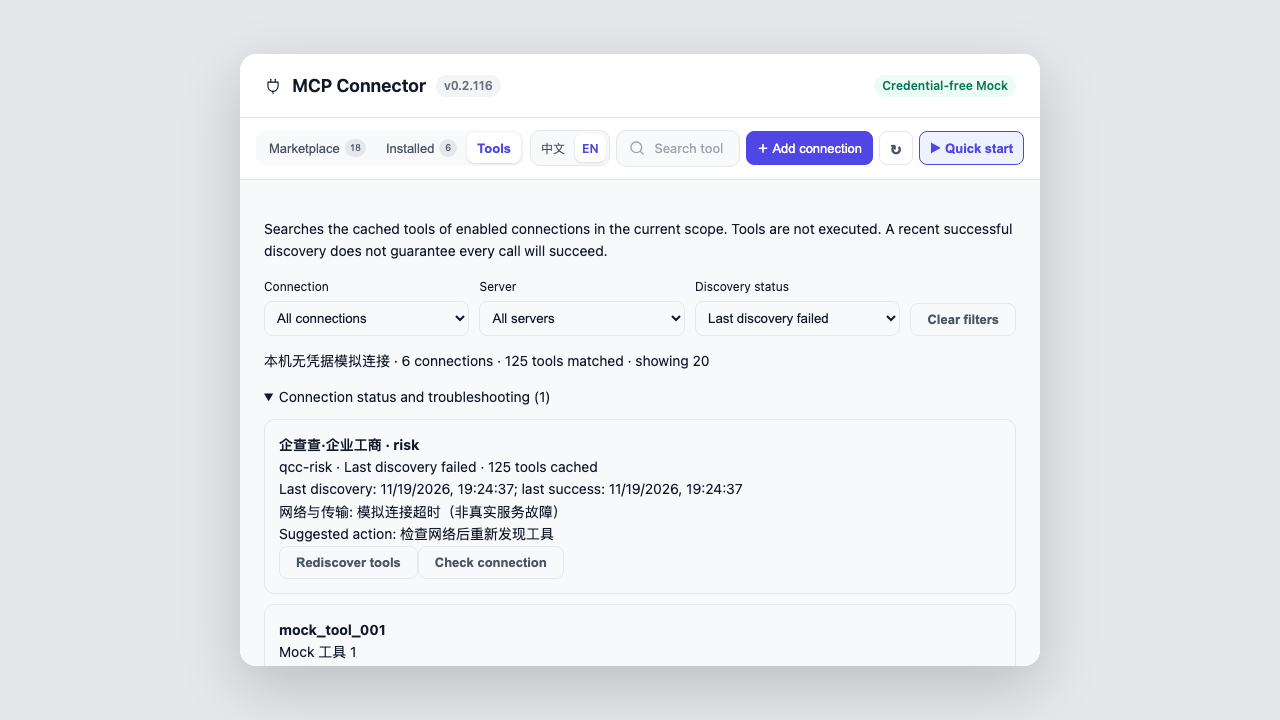 | |
|
|
123
131
|
|
|
124
|
-
<!-- generated:media -->English UI screenshots and GIF were captured from v0.2.
|
|
132
|
+
<!-- generated:media -->English UI screenshots and GIF were captured from v0.2.104 (2026-11-13), using the credential-free Mock harness. Provider content retains its original language. They demonstrate UI, not real business acceptance; counts are fixtures. See [asset provenance](docs/screenshots/README.md).<!-- /generated:media -->
|
|
125
133
|
|
|
126
134
|
## Installation
|
|
127
135
|
|
|
128
136
|
Requirements: DeepSeek Harness Desktop or web profile, and Node.js 20 or later.
|
|
129
137
|
|
|
138
|
+
Desktop requires its own CLI and must be initialized and fully quit before installation. Default Web uses `web`:
|
|
139
|
+
|
|
130
140
|
```bash
|
|
141
|
+
# Desktop-provided CLI
|
|
142
|
+
dsh plugin --profile desktop add dsh-mcp-connector
|
|
143
|
+
# Default Web
|
|
131
144
|
dsh plugin --profile web add dsh-mcp-connector
|
|
132
145
|
```
|
|
133
146
|
|
|
134
|
-
|
|
147
|
+
For custom deployments, use the actual profile name and the host's `DSH_HOME`. Default Web can also use the installer (set `DSH_PROFILE` for other profiles):
|
|
135
148
|
|
|
136
149
|
```bash
|
|
137
150
|
bash <(curl -fsSL https://raw.githubusercontent.com/duhu2000/dsh-mcp-connector/main/install.sh)
|
|
@@ -256,7 +269,7 @@ npm run dev:ui
|
|
|
256
269
|
|
|
257
270
|
Every Registry merge regenerates `catalog-stats.json`; an hourly workflow in this repository synchronizes the Chinese and English product copy plus a local stats snapshot. The static npm README updates with package releases, while the live badges above read the Registry directly and therefore stay current without another npm release.
|
|
258
271
|
|
|
259
|
-
<!-- generated:version -->The current public version is [`dsh-mcp-connector@0.2.
|
|
272
|
+
<!-- generated:version -->The current public version is [`dsh-mcp-connector@0.2.104`](https://www.npmjs.com/package/dsh-mcp-connector), with [GitHub Release v0.2.104](https://github.com/duhu2000/dsh-mcp-connector/releases/tag/v0.2.104).<!-- /generated:version -->
|
|
260
273
|
|
|
261
274
|
See [CHANGELOG.md](CHANGELOG.md) for version history and [docs/DESKTOP-E2E.md](docs/DESKTOP-E2E.md) for the Desktop release checklist.
|
|
262
275
|
|
package/README.md
CHANGED
|
@@ -16,7 +16,7 @@ OAuth 是否可用取决于服务商的客户端注册、账号权限与授权
|
|
|
16
16
|
|
|
17
17
|
**MCP Connector for DeepSeek Harness** is a specialist data marketplace connecting data providers and open data sources, with authorization, cross-connection tool search and troubleshooting in one panel. Browse a continuously updated catalog of 100+ connectors; connect through OAuth 2.0 PKCE, API keys, Streamable HTTP/stdio or `mcpServers` JSON import.
|
|
18
18
|
|
|
19
|
-
Install
|
|
19
|
+
Install into the profile loaded by your host: use `--profile desktop` with the Desktop-provided CLI, or `--profile web` for default Web. See [installation](#安装), then select **EN** in the toolbar. The interface supports Chinese and English; provider descriptions and user content keep their original language. Provider accounts, permissions and any provider fees are separate from this plugin. Saving a connection or discovering tools does not guarantee a successful business call.
|
|
20
20
|
|
|
21
21
|
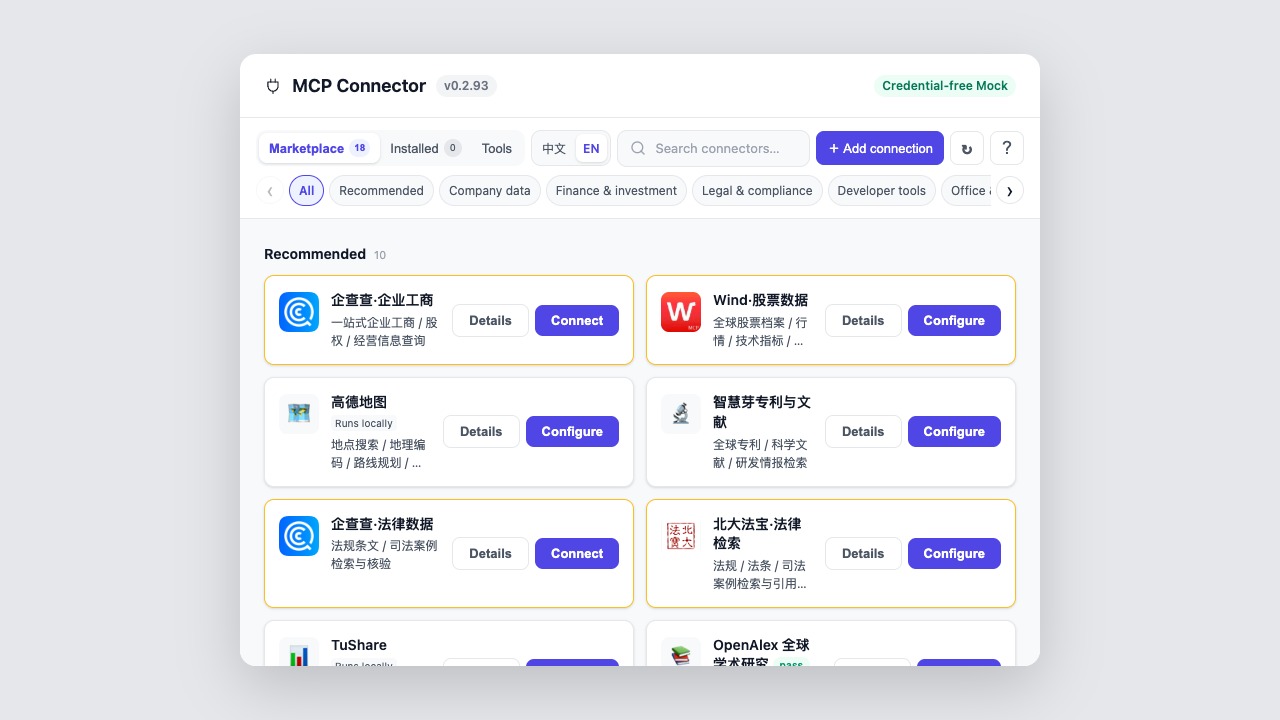
|
|
22
22
|
|
|
@@ -59,12 +59,20 @@ npm 下载次数包含升级、重复安装及自动化下载,不等于独立
|
|
|
59
59
|
|
|
60
60
|
## 开始使用
|
|
61
61
|
|
|
62
|
-
在插件市场搜索完整包名 **`dsh-mcp-connector
|
|
62
|
+
在插件市场搜索完整包名 **`dsh-mcp-connector`**,或按当前宿主实际加载的 profile 安装。Desktop 先启动应用完成初始化,通过应用菜单“管理 dsh 命令…”注册或修复配套 CLI,完全退出应用后在新终端执行:
|
|
63
|
+
|
|
64
|
+
```bash
|
|
65
|
+
dsh plugin --profile desktop add dsh-mcp-connector
|
|
66
|
+
```
|
|
67
|
+
|
|
68
|
+
默认 Web 使用:
|
|
63
69
|
|
|
64
70
|
```bash
|
|
65
71
|
dsh plugin --profile web add dsh-mcp-connector
|
|
66
72
|
```
|
|
67
73
|
|
|
74
|
+
自定义部署请替换 profile 名称;设置了 `DSH_HOME` 时,终端须沿用与宿主相同的值。npm 安装的 CLI 可能拒绝管理 `desktop`,此时应使用 Desktop 配套 CLI。
|
|
75
|
+
|
|
68
76
|
安装或升级后完全重启 DeepSeek Harness Desktop 或 `dsh web`,然后打开左侧「MCP连接器」;也可从“设置 → 插件 → 插件配置 → MCP连接器”直接打开。
|
|
69
77
|
|
|
70
78
|
Desktop 需要完全退出并重新启动应用;Web 需要停止原 `dsh web` 进程再启动,只刷新网页不会重新加载后端插件。
|
|
@@ -135,17 +143,22 @@ Desktop 需要完全退出并重新启动应用;Web 需要停止原 `dsh web`
|
|
|
135
143
|
| 连接诊断与最后成功缓存 | |
|
|
136
144
|
| 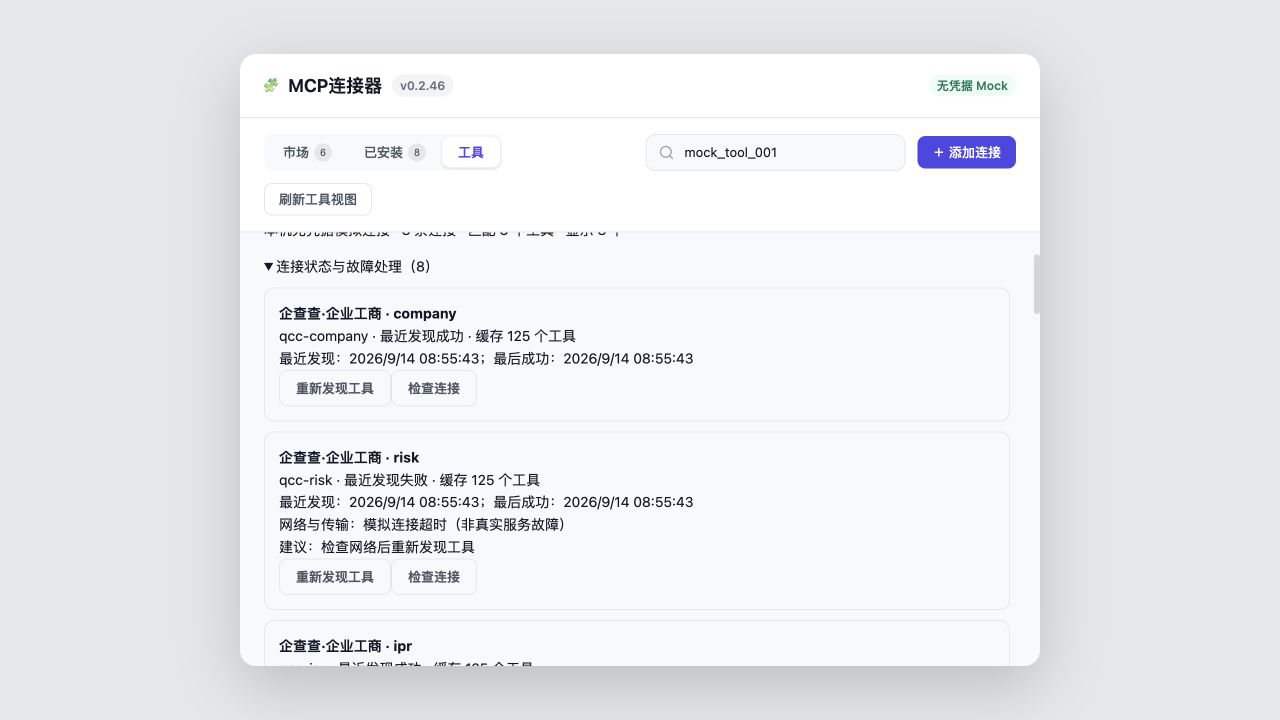 | |
|
|
137
145
|
|
|
138
|
-
<!-- generated:media -->截图与 GIF 采集自 v0.2.
|
|
146
|
+
<!-- generated:media -->截图与 GIF 采集自 v0.2.104(2026-11-13)无凭据 Mock 页面,展示界面而非真实业务验收;市场数量是测试夹具。来源与更新方法见 [素材说明](docs/screenshots/README.md)。<!-- /generated:media -->
|
|
139
147
|
|
|
140
148
|
## 安装
|
|
141
149
|
|
|
142
150
|
要求:DeepSeek Harness Desktop/web profile,Node.js 20 或更高版本。
|
|
143
151
|
|
|
152
|
+
Desktop 使用配套 CLI,初始化后完全退出应用再安装;默认 Web 使用 `web`:
|
|
153
|
+
|
|
144
154
|
```bash
|
|
155
|
+
# Desktop 配套 CLI
|
|
156
|
+
dsh plugin --profile desktop add dsh-mcp-connector
|
|
157
|
+
# 默认 Web
|
|
145
158
|
dsh plugin --profile web add dsh-mcp-connector
|
|
146
159
|
```
|
|
147
160
|
|
|
148
|
-
|
|
161
|
+
自定义部署以实际 profile 为准,并在终端沿用宿主的 `DSH_HOME`。默认 Web 也可使用安装脚本(其他 profile 需设置 `DSH_PROFILE`):
|
|
149
162
|
|
|
150
163
|
```bash
|
|
151
164
|
bash <(curl -fsSL https://raw.githubusercontent.com/duhu2000/dsh-mcp-connector/main/install.sh)
|
|
@@ -263,7 +276,7 @@ npm run dev:ui
|
|
|
263
276
|
|
|
264
277
|
公共 Registry 每次合并后会生成 `catalog-stats.json`;本仓库的定时工作流每小时同步中英文介绍和统计快照。npm 页面中的静态正文随版本发布更新,上方动态统计徽标则直接读取 Registry,可在不发布新 npm 版本时保持实时数量一致。
|
|
265
278
|
|
|
266
|
-
<!-- generated:version -->当前公开版本为 [`dsh-mcp-connector@0.2.
|
|
279
|
+
<!-- generated:version -->当前公开版本为 [`dsh-mcp-connector@0.2.104`](https://www.npmjs.com/package/dsh-mcp-connector),对应 [GitHub Release v0.2.104](https://github.com/duhu2000/dsh-mcp-connector/releases/tag/v0.2.104)。<!-- /generated:version -->
|
|
267
280
|
|
|
268
281
|
版本能力与变更记录见 [CHANGELOG.md](CHANGELOG.md)。
|
|
269
282
|
Desktop 发版回归见 [docs/DESKTOP-E2E.md](docs/DESKTOP-E2E.md)。
|
package/docs/PLUGIN-UPDATE.md
CHANGED
|
@@ -14,7 +14,7 @@ MCP连接器把“刷新连接器目录”和“升级插件代码”视为两
|
|
|
14
14
|
|
|
15
15
|
每个 Provider 适配器只硬编码自己的 capabilities 入口,其余更新、任务、回滚和重启端点均从能力响应中读取。客户端只接受当前 DSH 页面的相对同源端点,拒绝跨域 URL、协议不匹配、缺少必要端点或未声明 `features.update` 的 Provider。
|
|
16
16
|
|
|
17
|
-
DSH Market 适配器从 `GET /dsh-market/api/v1/capabilities` 开始,要求 `schema: dsh-market/update-api/v1` 与 `apiVersion: 1`。未安装任何可用 Provider、接口返回 404
|
|
17
|
+
DSH Market 适配器从 `GET /dsh-market/api/v1/capabilities` 开始,要求 `schema: dsh-market/update-api/v1` 与 `apiVersion: 1`。未安装任何可用 Provider、接口返回 404、协议不兼容或检查失败时,页面进入下述手动升级流程,不会尝试私有更新路由。已有 Provider 的失败流程仍可通过“查看更新方式”打开宿主插件市场或 npm 页面。
|
|
18
18
|
|
|
19
19
|
## 更新流程
|
|
20
20
|
|
|
@@ -29,7 +29,41 @@ Provider 读取的是 profile 中已经落盘的插件版本,标题版本来
|
|
|
29
29
|
|
|
30
30
|
失败结果使用稳定代码区分正在运行的 Agent、其他安装任务占用、发布安全等待、镜像同步、版本未变化、超时和权限拒绝,以及 `DOWNGRADE_DETECTED`、`RESOLVED_VERSION_MISMATCH`、`INVALID_UPDATE_RESULT` 三类完整性故障。`RELEASE_TOO_FRESH` 明确显示为约 24 小时的发布安全等待期,并提供“立即更新(跳过等待)”;真正的镜像同步故障保留独立提示,不再混用同一文案。
|
|
31
31
|
|
|
32
|
-
当 DSH Desktop 或其他宿主没有兼容 Update Provider
|
|
32
|
+
当 DSH Desktop 或其他宿主没有兼容 Update Provider 时,标题区展示绑定 npm 精确版本和当前 profile 的 CLI 命令,并提供复制按钮与 npm 页面入口。服务端每次请求只读取一次可选的 `profileContext.name`。`versionStatus.detail.profileName` 继续只返回可安全生成命令的名称或 `null`;新增的 `profileInfo` 只包含实际读取到的字符串 `detectedName`(或 `null`)和固定的 `status`,不包含本机目录、环境变量或异常原文。客户端不会根据窗口类型、网址或插件目录猜测 profile。
|
|
33
|
+
|
|
34
|
+
| `profileInfo.status` | 含义与界面行为 |
|
|
35
|
+
| --- | --- |
|
|
36
|
+
| `ready` | 已取得可安全生成命令的名称,沿用现有命令与复制按钮,不增加常驻说明 |
|
|
37
|
+
| `unavailable` | 宿主没有提供读取入口或 profile 服务,显示“宿主未提供 profile 信息” |
|
|
38
|
+
| `read-error` | 读取服务或名称发生异常,显示“读取当前 profile 失败” |
|
|
39
|
+
| `invalid-value` | 服务存在,但名称缺失、为空或不是字符串,显示“宿主未返回有效的 profile 名称” |
|
|
40
|
+
| `unsupported-name` | 已取得名称,但不符合自动生成命令的规则;显示名称及保留名称、首尾空白或字符规则原因,不提供默认候选命令 |
|
|
41
|
+
|
|
42
|
+
未取得有效名称时,客户可以通过“默认安装方式”选择“默认 Web(web)”或“默认 Desktop(desktop)”。初始不预选,也不显示命令;选择后才显示一条对应的候选命令与复制按钮,并注明“仅适用于默认安装;自定义部署请使用实际 profile”。这是客户选择的默认候选,不代表程序已识别当前 profile;不要依次执行两种命令。
|
|
43
|
+
|
|
44
|
+
Desktop 配套 CLI 示例:
|
|
45
|
+
|
|
46
|
+
```bash
|
|
47
|
+
dsh plugin --profile desktop add --config.minimumReleaseAge=0 dsh-mcp-connector@<目标版本>
|
|
48
|
+
```
|
|
49
|
+
|
|
50
|
+
默认 Web 示例:
|
|
51
|
+
|
|
52
|
+
```bash
|
|
53
|
+
dsh plugin --profile web add --config.minimumReleaseAge=0 dsh-mcp-connector@<目标版本>
|
|
54
|
+
```
|
|
55
|
+
|
|
56
|
+
运行时将 `<目标版本>` 替换为 npm 已发布的确切版本。自动识别的 profile 名称须满足 `^[A-Za-z0-9][A-Za-z0-9._-]*$`,且不能是保留名称 `node_modules`;不受支持的名称只作为普通文本展示,空白和控制字符使用可见转义,不能进入命令。旧接口只有 `profileName` 时仍由客户端校验;缺失时按未取得信息处理。
|
|
57
|
+
|
|
58
|
+
未取得有效目标版本时,显示“未取得有效的目标版本,请点击‘检查更新’后重试”,不归因于 profile,也不显示命令或默认安装方式选择。手动升级诊断区保留“查看更新说明”和“查看 npm”;“查看更新说明”打开本文,不是查询客户 profile 的入口。
|
|
59
|
+
|
|
60
|
+
默认安装方式选择仅用于当前面板,不修改宿主配置。面板关闭、目标版本或诊断信息变化时清除选择;命令变化时清除“已复制”和复制失败提示,忽略旧命令迟到的复制结果。命令展示与复制使用同一字符串。
|
|
61
|
+
|
|
62
|
+
English: When the host cannot supply a usable profile name, the panel explains whether the information is unavailable, could not be read, or has an invalid value. No installation type is preselected. Choose **Default Web (web)** or **Default Desktop (desktop)** to reveal one candidate command for a default installation; custom deployments must use their actual profile. A detected but unsupported name is displayed as text with its reason and is never inserted into a command. Invalid target versions show a version-specific message. **View update instructions** opens this document; it does not look up the local profile. Closing the panel or changing the version or diagnostics clears the choice and copy feedback.
|
|
63
|
+
|
|
64
|
+
Desktop:先启动应用完成初始化,通过应用菜单“管理 dsh 命令…”注册或修复 Desktop 配套 CLI,然后完全退出应用,在新终端执行命令,完成后重新打开。[官方命令运行时说明](https://github.com/deepseek-ai/deepseek-harness/blob/HEAD/apps/desktop/README.zh.md#bundled-command-runtime)。npm 安装的 CLI 可能拒绝管理 `desktop`,不要改用 `web` 绕过限制。关闭窗口可能只会隐藏应用,请从应用或托盘菜单退出。设置了 `DSH_HOME` 时,终端必须沿用与宿主相同的值。
|
|
65
|
+
|
|
66
|
+
命令中的单次覆盖只用于用户主动跳过本次发布安全等待。Connector 仍不自行执行包管理器命令。
|
|
33
67
|
|
|
34
68
|
## 安全边界
|
|
35
69
|
|
package/docs/USER-GUIDE.md
CHANGED
|
@@ -17,11 +17,21 @@
|
|
|
17
17
|
|
|
18
18
|
要求:DSH Desktop 或 `web` profile,Node.js 20 或更高版本。
|
|
19
19
|
|
|
20
|
+
Desktop:启动应用完成初始化,通过应用菜单“管理 dsh 命令…”注册或修复配套 CLI,再完全退出应用,在新终端执行:
|
|
21
|
+
|
|
22
|
+
```bash
|
|
23
|
+
dsh plugin --profile desktop add dsh-mcp-connector
|
|
24
|
+
```
|
|
25
|
+
|
|
26
|
+
默认 Web:
|
|
27
|
+
|
|
20
28
|
```bash
|
|
21
29
|
dsh plugin --profile web add dsh-mcp-connector
|
|
22
30
|
```
|
|
23
31
|
|
|
24
|
-
|
|
32
|
+
自定义部署以宿主实际加载的 profile 为准;设置了 `DSH_HOME` 时,终端须沿用相同值。npm 安装的 CLI 可能拒绝管理 `desktop`,此时请使用 Desktop 配套 CLI,不要改用 `web`。
|
|
33
|
+
|
|
34
|
+
默认 Web 也可以运行一键安装脚本(其他 profile 需设置 `DSH_PROFILE`):
|
|
25
35
|
|
|
26
36
|
```bash
|
|
27
37
|
bash <(curl -fsSL https://raw.githubusercontent.com/duhu2000/dsh-mcp-connector/main/install.sh)
|
|
Binary file
|
|
Binary file
|
|
Binary file
|
|
Binary file
|
|
Binary file
|
|
Binary file
|
|
Binary file
|
|
Binary file
|
|
@@ -1,6 +1,6 @@
|
|
|
1
1
|
# 产品截图与演示的来源及更新
|
|
2
2
|
|
|
3
|
-
<!-- generated:media -->本组 8 张截图和 GIF 均从 v0.2.
|
|
3
|
+
<!-- generated:media -->本组 8 张截图和 GIF 均从 v0.2.104 于 2026-11-13 重新采集,未修改截图中的版本文字。<!-- /generated:media -->
|
|
4
4
|
|
|
5
5
|
前七张素材由真实产品 UI 的无凭据 Mock harness 渲染:1280×720 浏览器视口、800px 产品面板、桌面两列卡片。顶部保留“无凭据 Mock”标识;目录数、连接数与工具数是演示夹具,不代表生产统计或真实授权、业务验收。不会读取用户 profile、调用服务商或上传业务数据。
|
|
6
6
|
|
|
@@ -3,7 +3,7 @@
|
|
|
3
3
|
"capture": {
|
|
4
4
|
"locale": "zh-CN",
|
|
5
5
|
"capturedOn": "2026-11-13",
|
|
6
|
-
"sourceVersion": "0.2.
|
|
6
|
+
"sourceVersion": "0.2.104",
|
|
7
7
|
"sourceFingerprint": "4d8135cd206dcb890002f8dee5b64bd1664806d68b1b9e5393743d47b1a5aa8b",
|
|
8
8
|
"browserViewport": {
|
|
9
9
|
"width": 1280,
|
|
@@ -17,63 +17,63 @@
|
|
|
17
17
|
"screenshots": [
|
|
18
18
|
{
|
|
19
19
|
"path": "docs/screenshots/01-market-overview.jpg",
|
|
20
|
-
"sha256": "
|
|
20
|
+
"sha256": "c140d1e3ffb0b2bfe71801c5ff12320aec7c47f651c21cb669c6cacd52ce1fe3",
|
|
21
21
|
"width": 1280,
|
|
22
22
|
"height": 720,
|
|
23
23
|
"capturedOn": "2026-11-13",
|
|
24
|
-
"sourceVersion": "0.2.
|
|
24
|
+
"sourceVersion": "0.2.104"
|
|
25
25
|
},
|
|
26
26
|
{
|
|
27
27
|
"path": "docs/screenshots/02-connector-detail.jpg",
|
|
28
|
-
"sha256": "
|
|
28
|
+
"sha256": "06e789c5c44a5973a59df7f1b9176738b1a7e291120b006b2aca80cdc110435f",
|
|
29
29
|
"width": 1280,
|
|
30
30
|
"height": 720,
|
|
31
31
|
"capturedOn": "2026-11-13",
|
|
32
|
-
"sourceVersion": "0.2.
|
|
32
|
+
"sourceVersion": "0.2.104"
|
|
33
33
|
},
|
|
34
34
|
{
|
|
35
35
|
"path": "docs/screenshots/03-tool-discovery.jpg",
|
|
36
|
-
"sha256": "
|
|
36
|
+
"sha256": "a425170deb947873d9a6811e6367e0b016c5f9eec357902cda420c987cc908d9",
|
|
37
37
|
"width": 1280,
|
|
38
38
|
"height": 720,
|
|
39
39
|
"capturedOn": "2026-11-13",
|
|
40
|
-
"sourceVersion": "0.2.
|
|
40
|
+
"sourceVersion": "0.2.104"
|
|
41
41
|
},
|
|
42
42
|
{
|
|
43
43
|
"path": "docs/screenshots/04-json-import.jpg",
|
|
44
|
-
"sha256": "
|
|
44
|
+
"sha256": "8e90bc1cbe338ebac2d227456f4cd7fdc15a5e4545966335faf4cecd916fe47f",
|
|
45
45
|
"width": 1280,
|
|
46
46
|
"height": 720,
|
|
47
47
|
"capturedOn": "2026-11-13",
|
|
48
|
-
"sourceVersion": "0.2.
|
|
48
|
+
"sourceVersion": "0.2.104"
|
|
49
49
|
},
|
|
50
50
|
{
|
|
51
51
|
"path": "docs/screenshots/05-unified-tool-search.png",
|
|
52
|
-
"sha256": "
|
|
52
|
+
"sha256": "1b22923925f1d8d564cb0c4f449caddcc2010efdb80bdae9da20906217d07945",
|
|
53
53
|
"width": 1280,
|
|
54
54
|
"height": 720,
|
|
55
55
|
"capturedOn": "2026-11-13",
|
|
56
|
-
"sourceVersion": "0.2.
|
|
56
|
+
"sourceVersion": "0.2.104"
|
|
57
57
|
},
|
|
58
58
|
{
|
|
59
59
|
"path": "docs/screenshots/06-tool-parameters.png",
|
|
60
|
-
"sha256": "
|
|
60
|
+
"sha256": "20dcb0804c161a9cb5bacbf6fab5b5541d4f883530871eb5196660d990931c1e",
|
|
61
61
|
"width": 1280,
|
|
62
62
|
"height": 720,
|
|
63
63
|
"capturedOn": "2026-11-13",
|
|
64
|
-
"sourceVersion": "0.2.
|
|
64
|
+
"sourceVersion": "0.2.104"
|
|
65
65
|
},
|
|
66
66
|
{
|
|
67
67
|
"path": "docs/screenshots/07-connection-diagnostics.png",
|
|
68
|
-
"sha256": "
|
|
68
|
+
"sha256": "9fa6338cf3b3a92c9159d3de5aa5f7ad7e203c4851f7fc68e6801de48f00f920",
|
|
69
69
|
"width": 1280,
|
|
70
70
|
"height": 720,
|
|
71
71
|
"capturedOn": "2026-11-13",
|
|
72
|
-
"sourceVersion": "0.2.
|
|
72
|
+
"sourceVersion": "0.2.104"
|
|
73
73
|
},
|
|
74
74
|
{
|
|
75
75
|
"path": "docs/screenshots/08-ten-recommendations.jpg",
|
|
76
|
-
"sha256": "
|
|
76
|
+
"sha256": "25d5ec342c5d62952eab03412737d3535d284f597f0276efa25cb2046b6452d5",
|
|
77
77
|
"width": 1280,
|
|
78
78
|
"height": 1400,
|
|
79
79
|
"browserViewport": {
|
|
@@ -82,16 +82,16 @@
|
|
|
82
82
|
},
|
|
83
83
|
"panelHeight": 1280,
|
|
84
84
|
"capturedOn": "2026-11-13",
|
|
85
|
-
"sourceVersion": "0.2.
|
|
85
|
+
"sourceVersion": "0.2.104"
|
|
86
86
|
}
|
|
87
87
|
],
|
|
88
88
|
"demo": {
|
|
89
89
|
"path": "docs/demo.gif",
|
|
90
|
-
"sha256": "
|
|
90
|
+
"sha256": "57c9c582b34357e3ae458b61ed7b66fb6a239e9561feb24ab718d9c29721bfe7",
|
|
91
91
|
"width": 960,
|
|
92
92
|
"height": 540,
|
|
93
93
|
"capturedOn": "2026-11-13",
|
|
94
|
-
"sourceVersion": "0.2.
|
|
94
|
+
"sourceVersion": "0.2.104",
|
|
95
95
|
"durationSeconds": 36
|
|
96
96
|
}
|
|
97
97
|
}
|
|
Binary file
|
|
Binary file
|
|
Binary file
|
|
Binary file
|
|
Binary file
|
|
Binary file
|
|
Binary file
|
|
Binary file
|
|
@@ -3,7 +3,7 @@
|
|
|
3
3
|
"capture": {
|
|
4
4
|
"locale": "en",
|
|
5
5
|
"capturedOn": "2026-11-13",
|
|
6
|
-
"sourceVersion": "0.2.
|
|
6
|
+
"sourceVersion": "0.2.104",
|
|
7
7
|
"sourceFingerprint": "4d8135cd206dcb890002f8dee5b64bd1664806d68b1b9e5393743d47b1a5aa8b",
|
|
8
8
|
"browserViewport": {
|
|
9
9
|
"width": 1280,
|
|
@@ -17,63 +17,63 @@
|
|
|
17
17
|
"screenshots": [
|
|
18
18
|
{
|
|
19
19
|
"path": "docs/screenshots/en/01-market-overview.jpg",
|
|
20
|
-
"sha256": "
|
|
20
|
+
"sha256": "5001a3d0c903645769eebe65a411153a8fa29ae71968011facf18df393661768",
|
|
21
21
|
"width": 1280,
|
|
22
22
|
"height": 720,
|
|
23
23
|
"capturedOn": "2026-11-13",
|
|
24
|
-
"sourceVersion": "0.2.
|
|
24
|
+
"sourceVersion": "0.2.104"
|
|
25
25
|
},
|
|
26
26
|
{
|
|
27
27
|
"path": "docs/screenshots/en/02-connector-detail.jpg",
|
|
28
|
-
"sha256": "
|
|
28
|
+
"sha256": "bd3f15cbc57989a6b3cc575b8e0be395870ccff6a0895f20d29b92f9351b46a1",
|
|
29
29
|
"width": 1280,
|
|
30
30
|
"height": 720,
|
|
31
31
|
"capturedOn": "2026-11-13",
|
|
32
|
-
"sourceVersion": "0.2.
|
|
32
|
+
"sourceVersion": "0.2.104"
|
|
33
33
|
},
|
|
34
34
|
{
|
|
35
35
|
"path": "docs/screenshots/en/03-tool-discovery.jpg",
|
|
36
|
-
"sha256": "
|
|
36
|
+
"sha256": "b3fa8dfd2e13e09c8b5e316e907cb9ce7c52043bb273d9c46db9465f06a5eed3",
|
|
37
37
|
"width": 1280,
|
|
38
38
|
"height": 720,
|
|
39
39
|
"capturedOn": "2026-11-13",
|
|
40
|
-
"sourceVersion": "0.2.
|
|
40
|
+
"sourceVersion": "0.2.104"
|
|
41
41
|
},
|
|
42
42
|
{
|
|
43
43
|
"path": "docs/screenshots/en/04-json-import.jpg",
|
|
44
|
-
"sha256": "
|
|
44
|
+
"sha256": "c51464f0a99f9cd861bb85f0af9f48c2e44ea5fb7dedb5c9aa55edf97a2ae40a",
|
|
45
45
|
"width": 1280,
|
|
46
46
|
"height": 720,
|
|
47
47
|
"capturedOn": "2026-11-13",
|
|
48
|
-
"sourceVersion": "0.2.
|
|
48
|
+
"sourceVersion": "0.2.104"
|
|
49
49
|
},
|
|
50
50
|
{
|
|
51
51
|
"path": "docs/screenshots/en/05-unified-tool-search.png",
|
|
52
|
-
"sha256": "
|
|
52
|
+
"sha256": "1837a356d4fa1c8db03ea3665b38518c263c629d1c15315137e785189debdf69",
|
|
53
53
|
"width": 1280,
|
|
54
54
|
"height": 720,
|
|
55
55
|
"capturedOn": "2026-11-13",
|
|
56
|
-
"sourceVersion": "0.2.
|
|
56
|
+
"sourceVersion": "0.2.104"
|
|
57
57
|
},
|
|
58
58
|
{
|
|
59
59
|
"path": "docs/screenshots/en/06-tool-parameters.png",
|
|
60
|
-
"sha256": "
|
|
60
|
+
"sha256": "8637812369a3fc1e0af445fd8604d72e3367ec37b939d83684224b48b78b1407",
|
|
61
61
|
"width": 1280,
|
|
62
62
|
"height": 720,
|
|
63
63
|
"capturedOn": "2026-11-13",
|
|
64
|
-
"sourceVersion": "0.2.
|
|
64
|
+
"sourceVersion": "0.2.104"
|
|
65
65
|
},
|
|
66
66
|
{
|
|
67
67
|
"path": "docs/screenshots/en/07-connection-diagnostics.png",
|
|
68
|
-
"sha256": "
|
|
68
|
+
"sha256": "b2f601c2d6d83b575da7a046a4acc49f73182c05dfd157a2562115f6e7f84c8c",
|
|
69
69
|
"width": 1280,
|
|
70
70
|
"height": 720,
|
|
71
71
|
"capturedOn": "2026-11-13",
|
|
72
|
-
"sourceVersion": "0.2.
|
|
72
|
+
"sourceVersion": "0.2.104"
|
|
73
73
|
},
|
|
74
74
|
{
|
|
75
75
|
"path": "docs/screenshots/en/08-ten-recommendations.jpg",
|
|
76
|
-
"sha256": "
|
|
76
|
+
"sha256": "dc27a1c85c01774b34d7d2840cb41d14046f5bfb1d28a487d5896e006ad63bfb",
|
|
77
77
|
"width": 1280,
|
|
78
78
|
"height": 1400,
|
|
79
79
|
"browserViewport": {
|
|
@@ -82,16 +82,16 @@
|
|
|
82
82
|
},
|
|
83
83
|
"panelHeight": 1280,
|
|
84
84
|
"capturedOn": "2026-11-13",
|
|
85
|
-
"sourceVersion": "0.2.
|
|
85
|
+
"sourceVersion": "0.2.104"
|
|
86
86
|
}
|
|
87
87
|
],
|
|
88
88
|
"demo": {
|
|
89
89
|
"path": "docs/screenshots/en/demo.gif",
|
|
90
|
-
"sha256": "
|
|
90
|
+
"sha256": "df36467aaa4b9d0fe4e1bbb96a4dcdfad1e37fa701f0f8e6d0287c9c90c923a7",
|
|
91
91
|
"width": 960,
|
|
92
92
|
"height": 540,
|
|
93
93
|
"capturedOn": "2026-11-13",
|
|
94
|
-
"sourceVersion": "0.2.
|
|
94
|
+
"sourceVersion": "0.2.104",
|
|
95
95
|
"durationSeconds": 36
|
|
96
96
|
}
|
|
97
97
|
}
|
|
Binary file
|
|
@@ -8,7 +8,7 @@
|
|
|
8
8
|
|
|
9
9
|
| 项目 | 验收要求 |
|
|
10
10
|
|---|---|
|
|
11
|
-
| 前提 | <!-- generated:version -->正式 `dsh-mcp-connector@0.2.
|
|
11
|
+
| 前提 | <!-- generated:version -->正式 `dsh-mcp-connector@0.2.104`<!-- /generated:version -->;当前 Workspace;企查查 OAuth 可用;测试账号具有目标企业数据权限 |
|
|
12
12
|
| 权限/管理员 | 账号权限、组织授权和可见字段由服务商控制;企业组织可能需要管理员开通,当前文档不能替代审批 |
|
|
13
13
|
| 费用 | 可能受套餐、次数或字段权限影响;MCP连接器无法确认本次费用,调用前在服务商侧核对 |
|
|
14
14
|
| 运行/数据去向 | 远程 MCP Server;企业名称、查询参数和调用结果经 DSH Host 发送到/返回自 `agent.qcc.com` |
|
package/docs/tutorials/README.md
CHANGED
|
@@ -23,12 +23,22 @@
|
|
|
23
23
|
|
|
24
24
|
## 1. 安装并重启正确的 profile
|
|
25
25
|
|
|
26
|
-
|
|
26
|
+
使用宿主实际加载的 profile。当前 Desktop 配套 CLI 使用 `desktop`,默认 `dsh web` 使用 `web`;自定义部署以宿主配置为准。
|
|
27
|
+
|
|
28
|
+
Desktop:先启动应用完成初始化,通过应用菜单“管理 dsh 命令…”注册或修复 Desktop 配套 CLI,再完全退出应用,在新终端执行:
|
|
29
|
+
|
|
30
|
+
```bash
|
|
31
|
+
dsh plugin --profile desktop add dsh-mcp-connector
|
|
32
|
+
```
|
|
33
|
+
|
|
34
|
+
默认 Web:
|
|
27
35
|
|
|
28
36
|
```bash
|
|
29
37
|
dsh plugin --profile web add dsh-mcp-connector
|
|
30
38
|
```
|
|
31
39
|
|
|
40
|
+
自定义 profile 请替换命令中的名称。设置了 `DSH_HOME` 时,终端须沿用与宿主相同的值。npm 安装的 CLI 可能拒绝管理 `desktop`,此时应使用 Desktop 配套 CLI;不要改用其他 profile。
|
|
41
|
+
|
|
32
42
|
安装或升级后,只重启你正在使用的宿主:DSH Desktop 需完全退出应用后重新打开;`dsh web` 需停止原进程后重新启动。打开左侧“MCP连接器”;若侧边栏入口已隐藏,从“设置 → 插件 → 插件配置 → MCP连接器”点击“打开 MCP连接器”。自定义过 profile 布局的部署应以其宿主配置为准。
|
|
33
43
|
|
|
34
44
|
## 2. 只选一条连接路径
|
package/lib/client.js
CHANGED
|
@@ -115,6 +115,20 @@ window.__ModuleLoader__.load({
|
|
|
115
115
|
"复制升级命令": "Copy upgrade command",
|
|
116
116
|
"无法写入剪贴板,请点击上方命令全选后手动复制": "Could not write to the clipboard. Click the command above to select it, then copy it manually.",
|
|
117
117
|
"查看 npm": "View on npm",
|
|
118
|
+
"宿主未提供 profile 信息": "The host did not provide profile information.",
|
|
119
|
+
"读取当前 profile 失败": "Could not read the current profile.",
|
|
120
|
+
"宿主未返回有效的 profile 名称": "The host did not return a valid profile name.",
|
|
121
|
+
"已读取的 profile:{name}": "Detected profile: {name}",
|
|
122
|
+
"该 profile 名称为保留名称,不能自动生成升级命令": "This profile name is reserved, so an upgrade command cannot be generated automatically.",
|
|
123
|
+
"该 profile 名称含首尾空白,不能自动生成升级命令": "This profile name has leading or trailing whitespace, so an upgrade command cannot be generated automatically.",
|
|
124
|
+
"该 profile 名称不符合命令规则:须以字母或数字开头,且仅包含字母、数字、点、下划线或短横线": "To generate a command, the profile name must start with a letter or digit and contain only letters, digits, dots, underscores or hyphens.",
|
|
125
|
+
"未取得有效的目标版本,请点击“检查更新”后重试": "No valid target version was received. Click Check for updates and try again.",
|
|
126
|
+
"默认安装方式": "Default installation type",
|
|
127
|
+
"请选择安装方式": "Select an installation type",
|
|
128
|
+
"默认 Web(web)": "Default Web (web)",
|
|
129
|
+
"默认 Desktop(desktop)": "Default Desktop (desktop)",
|
|
130
|
+
"仅适用于默认安装;自定义部署请使用实际 profile": "For default installations only; custom deployments must use their actual profile.",
|
|
131
|
+
"查看更新说明": "View update instructions",
|
|
118
132
|
"正在检查插件版本": "Checking the plugin version",
|
|
119
133
|
"当前版本 v{version}": "Current version v{version}",
|
|
120
134
|
"上次检查:{time}": "Last checked: {time}",
|
|
@@ -240,6 +254,7 @@ window.__ModuleLoader__.load({
|
|
|
240
254
|
const VERSION_CHECK_INTERVAL_MS = 6 * 60 * 60 * 1e3;
|
|
241
255
|
const VERSION_CHECK_RETRY_MS = 5 * 60 * 1e3;
|
|
242
256
|
const NPM_PACKAGE_URL = "https://www.npmjs.com/package/dsh-mcp-connector";
|
|
257
|
+
const PLUGIN_UPDATE_GUIDE_URL = "https://github.com/duhu2000/dsh-mcp-connector/blob/main/docs/PLUGIN-UPDATE.md";
|
|
243
258
|
const PLUGIN_PACKAGE_NAME = "dsh-mcp-connector";
|
|
244
259
|
const CONNECTOR_SETTINGS_NAMESPACE = "mcp-connector";
|
|
245
260
|
const SHOW_SIDEBAR_ENTRY_FIELD = "showSidebarEntry";
|
|
@@ -416,11 +431,23 @@ window.__ModuleLoader__.load({
|
|
|
416
431
|
}
|
|
417
432
|
.mcpConnectorManualUpdate {
|
|
418
433
|
display: flex;
|
|
434
|
+
flex-wrap: wrap;
|
|
419
435
|
align-items: center;
|
|
420
436
|
gap: 6px;
|
|
421
437
|
min-width: 0;
|
|
422
438
|
flex: 1 1 360px;
|
|
423
439
|
}
|
|
440
|
+
.mcpConnectorUpdateHint {
|
|
441
|
+
flex-basis: 100%;
|
|
442
|
+
font-size: 12px;
|
|
443
|
+
line-height: 1.5;
|
|
444
|
+
overflow-wrap: anywhere;
|
|
445
|
+
}
|
|
446
|
+
.mcpConnectorProfileChoice {
|
|
447
|
+
display: inline-flex;
|
|
448
|
+
align-items: center;
|
|
449
|
+
gap: 6px;
|
|
450
|
+
}
|
|
424
451
|
.mcpConnectorManualCommand {
|
|
425
452
|
box-sizing: border-box;
|
|
426
453
|
min-width: 0;
|
|
@@ -859,10 +886,46 @@ window.__ModuleLoader__.load({
|
|
|
859
886
|
return labels[failure?.code] ?? failure?.message ?? t("更新失败");
|
|
860
887
|
}
|
|
861
888
|
|
|
862
|
-
function
|
|
889
|
+
function profileNameIssue(name) {
|
|
890
|
+
if (typeof name !== "string" || name === "") return "invalid-value";
|
|
891
|
+
if (name === "node_modules") return "reserved-name";
|
|
892
|
+
if (name !== name.trim()) return "name-whitespace";
|
|
893
|
+
return /^[A-Za-z0-9][A-Za-z0-9._-]*$/.test(name) ? null : "name-characters";
|
|
894
|
+
}
|
|
895
|
+
|
|
896
|
+
function clientProfileInfo(status) {
|
|
897
|
+
const info = status?.profileInfo;
|
|
898
|
+
const hasInfo = info !== null && typeof info === "object" && !Array.isArray(info);
|
|
899
|
+
const name = hasInfo ? info.detectedName : status?.profileName;
|
|
900
|
+
const issue = profileNameIssue(name);
|
|
901
|
+
if (typeof name === "string" && name !== "") {
|
|
902
|
+
return { detectedName: name, status: issue === null ? "ready" : "unsupported-name", issue };
|
|
903
|
+
}
|
|
904
|
+
const reason = hasInfo && ["unavailable", "read-error", "invalid-value"].includes(info.status)
|
|
905
|
+
? info.status : name == null ? "unavailable" : "invalid-value";
|
|
906
|
+
return { detectedName: typeof name === "string" ? name : null, status: reason, issue };
|
|
907
|
+
}
|
|
908
|
+
|
|
909
|
+
function profileFailureLabel(info) {
|
|
910
|
+
const labels = {
|
|
911
|
+
unavailable: t("宿主未提供 profile 信息"),
|
|
912
|
+
"read-error": t("读取当前 profile 失败"),
|
|
913
|
+
"invalid-value": t("宿主未返回有效的 profile 名称"),
|
|
914
|
+
"reserved-name": t("该 profile 名称为保留名称,不能自动生成升级命令"),
|
|
915
|
+
"name-whitespace": t("该 profile 名称含首尾空白,不能自动生成升级命令"),
|
|
916
|
+
"name-characters": t("该 profile 名称不符合命令规则:须以字母或数字开头,且仅包含字母、数字、点、下划线或短横线")
|
|
917
|
+
};
|
|
918
|
+
return labels[info.status === "unsupported-name" ? info.issue : info.status];
|
|
919
|
+
}
|
|
920
|
+
|
|
921
|
+
function displayProfileName(name) {
|
|
922
|
+
return JSON.stringify(name).replace(/[\s\u007f-\u009f]/g, (character) => `\\u${character.charCodeAt(0).toString(16).padStart(4, "0")}`);
|
|
923
|
+
}
|
|
924
|
+
|
|
925
|
+
function manualUpgradeCommand(version, profileName) {
|
|
863
926
|
const parsed = parseClientVersion(version);
|
|
864
|
-
if (parsed === null) return null;
|
|
865
|
-
return `dsh plugin --profile
|
|
927
|
+
if (parsed === null || profileNameIssue(profileName) !== null) return null;
|
|
928
|
+
return `dsh plugin --profile ${profileName} add --config.minimumReleaseAge=0 ${PLUGIN_PACKAGE_NAME}@${parsed.normalized}`;
|
|
866
929
|
}
|
|
867
930
|
|
|
868
931
|
/** 尝试写入剪贴板;失败时调用方把命令展示在页面内,不退回原生 prompt。 */
|
|
@@ -1599,8 +1662,24 @@ window.__ModuleLoader__.load({
|
|
|
1599
1662
|
const [versionCheckRequest, setVersionCheckRequest] = (0, react.useState)(0);
|
|
1600
1663
|
const [versionCheckBusy, setVersionCheckBusy] = (0, react.useState)(false);
|
|
1601
1664
|
const [versionCheckFailed, setVersionCheckFailed] = (0, react.useState)(false);
|
|
1665
|
+
const [manualProfileChoice, setManualProfileChoice] = (0, react.useState)(null);
|
|
1602
1666
|
const frameRef = (0, react.useRef)(null);
|
|
1603
1667
|
const closeRef = (0, react.useRef)(null);
|
|
1668
|
+
const profileInfo = clientProfileInfo(versionStatus);
|
|
1669
|
+
const manualProfileContext = JSON.stringify([open, versionStatus?.latestVersion, profileInfo]);
|
|
1670
|
+
const needsManualProfileChoice = ["unavailable", "read-error", "invalid-value"].includes(profileInfo.status);
|
|
1671
|
+
const selectedProfile = manualProfileChoice?.context === manualProfileContext ? manualProfileChoice.name : null;
|
|
1672
|
+
const commandProfile = profileInfo.status === "ready" ? profileInfo.detectedName
|
|
1673
|
+
: needsManualProfileChoice ? selectedProfile : null;
|
|
1674
|
+
const manualCommandKey = JSON.stringify([manualProfileContext, selectedProfile]);
|
|
1675
|
+
const manualCommandRef = (0, react.useRef)(null);
|
|
1676
|
+
if (manualCommandRef.current?.key !== manualCommandKey) {
|
|
1677
|
+
manualCommandRef.current = {
|
|
1678
|
+
key: manualCommandKey,
|
|
1679
|
+
command: open ? manualUpgradeCommand(versionStatus?.latestVersion, commandProfile) : null
|
|
1680
|
+
};
|
|
1681
|
+
}
|
|
1682
|
+
const manualCommandState = manualCommandRef.current;
|
|
1604
1683
|
(0, react.useEffect)(() => {
|
|
1605
1684
|
const sendWorkspaceContext = () => {
|
|
1606
1685
|
frameRef.current?.contentWindow?.postMessage({
|
|
@@ -1690,8 +1769,12 @@ window.__ModuleLoader__.load({
|
|
|
1690
1769
|
};
|
|
1691
1770
|
}, [open, versionCheckRequest]);
|
|
1692
1771
|
(0, react.useEffect)(() => {
|
|
1693
|
-
|
|
1694
|
-
}, [
|
|
1772
|
+
setManualProfileChoice(null);
|
|
1773
|
+
}, [manualProfileContext]);
|
|
1774
|
+
(0, react.useEffect)(() => {
|
|
1775
|
+
setManualCommandCopied(false);
|
|
1776
|
+
setManualCommandVisible(false);
|
|
1777
|
+
}, [manualCommandState]);
|
|
1695
1778
|
(0, react.useEffect)(() => {
|
|
1696
1779
|
if (!open) return void 0;
|
|
1697
1780
|
let disposed = false;
|
|
@@ -2031,51 +2114,80 @@ window.__ModuleLoader__.load({
|
|
|
2031
2114
|
]
|
|
2032
2115
|
});
|
|
2033
2116
|
}
|
|
2034
|
-
const command =
|
|
2035
|
-
|
|
2036
|
-
|
|
2037
|
-
|
|
2038
|
-
|
|
2039
|
-
|
|
2040
|
-
|
|
2041
|
-
|
|
2042
|
-
|
|
2043
|
-
|
|
2044
|
-
|
|
2045
|
-
|
|
2046
|
-
|
|
2047
|
-
|
|
2048
|
-
|
|
2049
|
-
|
|
2050
|
-
|
|
2051
|
-
|
|
2052
|
-
|
|
2053
|
-
|
|
2054
|
-
|
|
2055
|
-
|
|
2056
|
-
|
|
2057
|
-
|
|
2058
|
-
|
|
2059
|
-
|
|
2060
|
-
|
|
2061
|
-
|
|
2062
|
-
|
|
2063
|
-
|
|
2064
|
-
|
|
2065
|
-
|
|
2066
|
-
|
|
2067
|
-
|
|
2068
|
-
|
|
2069
|
-
|
|
2070
|
-
|
|
2071
|
-
|
|
2072
|
-
|
|
2073
|
-
|
|
2074
|
-
|
|
2075
|
-
|
|
2076
|
-
|
|
2077
|
-
|
|
2078
|
-
|
|
2117
|
+
const command = manualCommandState.command;
|
|
2118
|
+
const validTarget = parseClientVersion(versionStatus?.latestVersion) !== null;
|
|
2119
|
+
const showDiagnosis = !validTarget || profileInfo.status !== "ready";
|
|
2120
|
+
return /* @__PURE__ */ (0, react_jsx_runtime.jsxs)("div", {
|
|
2121
|
+
className: "mcpConnectorManualUpdate",
|
|
2122
|
+
children: [
|
|
2123
|
+
validTarget && profileInfo.status !== "ready" && profileInfo.detectedName !== null && /* @__PURE__ */ (0, react_jsx_runtime.jsx)("span", {
|
|
2124
|
+
className: "mcpConnectorUpdateHint",
|
|
2125
|
+
children: t("已读取的 profile:{name}", { name: displayProfileName(profileInfo.detectedName) })
|
|
2126
|
+
}),
|
|
2127
|
+
showDiagnosis && /* @__PURE__ */ (0, react_jsx_runtime.jsx)("span", {
|
|
2128
|
+
className: "mcpConnectorUpdateHint",
|
|
2129
|
+
children: validTarget ? profileFailureLabel(profileInfo) : t("未取得有效的目标版本,请点击“检查更新”后重试")
|
|
2130
|
+
}),
|
|
2131
|
+
validTarget && needsManualProfileChoice && /* @__PURE__ */ (0, react_jsx_runtime.jsxs)("label", {
|
|
2132
|
+
className: "mcpConnectorProfileChoice",
|
|
2133
|
+
children: [
|
|
2134
|
+
t("默认安装方式"),
|
|
2135
|
+
/* @__PURE__ */ (0, react_jsx_runtime.jsxs)("select", {
|
|
2136
|
+
className: "mcpConnectorUpdateButton",
|
|
2137
|
+
"aria-label": t("默认安装方式"),
|
|
2138
|
+
value: selectedProfile ?? "",
|
|
2139
|
+
onChange: (event) => {
|
|
2140
|
+
const name = event.target.value;
|
|
2141
|
+
setManualProfileChoice(["web", "desktop"].includes(name) ? { context: manualProfileContext, name } : null);
|
|
2142
|
+
},
|
|
2143
|
+
children: [
|
|
2144
|
+
/* @__PURE__ */ (0, react_jsx_runtime.jsx)("option", { value: "", children: t("请选择安装方式") }),
|
|
2145
|
+
/* @__PURE__ */ (0, react_jsx_runtime.jsx)("option", { value: "web", children: t("默认 Web(web)") }),
|
|
2146
|
+
/* @__PURE__ */ (0, react_jsx_runtime.jsx)("option", { value: "desktop", children: t("默认 Desktop(desktop)") })
|
|
2147
|
+
]
|
|
2148
|
+
})
|
|
2149
|
+
]
|
|
2150
|
+
}),
|
|
2151
|
+
validTarget && needsManualProfileChoice && /* @__PURE__ */ (0, react_jsx_runtime.jsx)("span", {
|
|
2152
|
+
className: "mcpConnectorUpdateHint",
|
|
2153
|
+
children: t("仅适用于默认安装;自定义部署请使用实际 profile")
|
|
2154
|
+
}),
|
|
2155
|
+
command !== null && /* @__PURE__ */ (0, react_jsx_runtime.jsx)("code", {
|
|
2156
|
+
className: "mcpConnectorManualCommand",
|
|
2157
|
+
title: command,
|
|
2158
|
+
onClick: (event) => window.getSelection?.()?.selectAllChildren?.(event.currentTarget),
|
|
2159
|
+
children: command
|
|
2160
|
+
}),
|
|
2161
|
+
command !== null && /* @__PURE__ */ (0, react_jsx_runtime.jsx)("button", {
|
|
2162
|
+
type: "button",
|
|
2163
|
+
className: "mcpConnectorUpdateButton",
|
|
2164
|
+
onClick: () => {
|
|
2165
|
+
copyManualUpgradeCommand(command).then((copied) => {
|
|
2166
|
+
if (manualCommandRef.current !== manualCommandState) return;
|
|
2167
|
+
setManualCommandCopied(copied);
|
|
2168
|
+
setManualCommandVisible(!copied);
|
|
2169
|
+
});
|
|
2170
|
+
},
|
|
2171
|
+
children: manualCommandCopied ? t("已复制") : t("复制升级命令")
|
|
2172
|
+
}),
|
|
2173
|
+
command !== null && manualCommandVisible && /* @__PURE__ */ (0, react_jsx_runtime.jsx)("span", {
|
|
2174
|
+
className: "mcpConnectorUpdateStatus",
|
|
2175
|
+
"data-tone": "error",
|
|
2176
|
+
children: t("无法写入剪贴板,请点击上方命令全选后手动复制")
|
|
2177
|
+
}),
|
|
2178
|
+
showDiagnosis && /* @__PURE__ */ (0, react_jsx_runtime.jsx)("button", {
|
|
2179
|
+
type: "button",
|
|
2180
|
+
className: "mcpConnectorUpdateButton",
|
|
2181
|
+
onClick: () => window.open(PLUGIN_UPDATE_GUIDE_URL, "_blank", "noopener,noreferrer"),
|
|
2182
|
+
children: t("查看更新说明")
|
|
2183
|
+
}),
|
|
2184
|
+
/* @__PURE__ */ (0, react_jsx_runtime.jsx)("button", {
|
|
2185
|
+
type: "button",
|
|
2186
|
+
className: "mcpConnectorUpdateButton mcpConnectorUpdateSecondary",
|
|
2187
|
+
onClick: () => window.open(NPM_PACKAGE_URL, "_blank", "noopener,noreferrer"),
|
|
2188
|
+
children: t("查看 npm")
|
|
2189
|
+
})
|
|
2190
|
+
]
|
|
2079
2191
|
});
|
|
2080
2192
|
};
|
|
2081
2193
|
// `iframeLocale` 可以是取值函数:语言服务晚于 apply() 就绪时,
|
|
@@ -95,6 +95,20 @@ export default {
|
|
|
95
95
|
"复制升级命令": "Copy upgrade command",
|
|
96
96
|
"无法写入剪贴板,请点击上方命令全选后手动复制": "Could not write to the clipboard. Click the command above to select it, then copy it manually.",
|
|
97
97
|
"查看 npm": "View on npm",
|
|
98
|
+
"宿主未提供 profile 信息": "The host did not provide profile information.",
|
|
99
|
+
"读取当前 profile 失败": "Could not read the current profile.",
|
|
100
|
+
"宿主未返回有效的 profile 名称": "The host did not return a valid profile name.",
|
|
101
|
+
"已读取的 profile:{name}": "Detected profile: {name}",
|
|
102
|
+
"该 profile 名称为保留名称,不能自动生成升级命令": "This profile name is reserved, so an upgrade command cannot be generated automatically.",
|
|
103
|
+
"该 profile 名称含首尾空白,不能自动生成升级命令": "This profile name has leading or trailing whitespace, so an upgrade command cannot be generated automatically.",
|
|
104
|
+
"该 profile 名称不符合命令规则:须以字母或数字开头,且仅包含字母、数字、点、下划线或短横线": "To generate a command, the profile name must start with a letter or digit and contain only letters, digits, dots, underscores or hyphens.",
|
|
105
|
+
"未取得有效的目标版本,请点击“检查更新”后重试": "No valid target version was received. Click Check for updates and try again.",
|
|
106
|
+
"默认安装方式": "Default installation type",
|
|
107
|
+
"请选择安装方式": "Select an installation type",
|
|
108
|
+
"默认 Web(web)": "Default Web (web)",
|
|
109
|
+
"默认 Desktop(desktop)": "Default Desktop (desktop)",
|
|
110
|
+
"仅适用于默认安装;自定义部署请使用实际 profile": "For default installations only; custom deployments must use their actual profile.",
|
|
111
|
+
"查看更新说明": "View update instructions",
|
|
98
112
|
"正在检查插件版本": "Checking the plugin version",
|
|
99
113
|
"当前版本 v{version}": "Current version v{version}",
|
|
100
114
|
"上次检查:{time}": "Last checked: {time}",
|
package/lib/index.js
CHANGED
|
@@ -44,7 +44,7 @@ import { classifyConnectionError, validateConnectionRecords } from './mcp-valida
|
|
|
44
44
|
import { listMcpTools, McpHttpError } from './mcp-http.js';
|
|
45
45
|
import { registerTools } from './tools.js';
|
|
46
46
|
import { injectWebRoutes } from './web.js';
|
|
47
|
-
import { createVersionStatusService } from './version-status.js';
|
|
47
|
+
import { createVersionStatusService, readHostProfileInfo } from './version-status.js';
|
|
48
48
|
import { assertSafeUrl, normalizeConnectionDisplayName, shortHash } from './util.js';
|
|
49
49
|
import { readLegacyGrantCandidates, planLegacyMigration, toConnectorGrant, toConnectionRecords } from './migration.js';
|
|
50
50
|
import { classifyRefreshFailure, refreshRetryDelay } from './grant-lifecycle.js';
|
|
@@ -1975,7 +1975,12 @@ export async function apply(ctx, config) {
|
|
|
1975
1975
|
return { ok: true, detail: { ...connectionStatistics.snapshot(), persistent: config.persistSecrets === true }, message: t("本 profile 成功连接过的卡片数;不是连接次数或社区总量,不上传数据") };
|
|
1976
1976
|
},
|
|
1977
1977
|
async versionStatus(force = false) {
|
|
1978
|
-
const
|
|
1978
|
+
const profileInfo = readHostProfileInfo(ctx);
|
|
1979
|
+
const detail = {
|
|
1980
|
+
...versionStatusService.status({ force }),
|
|
1981
|
+
profileName: profileInfo.status === 'ready' ? profileInfo.detectedName : null,
|
|
1982
|
+
profileInfo,
|
|
1983
|
+
};
|
|
1979
1984
|
let message = t('当前版本 v{version}', { version: detail.installedVersion });
|
|
1980
1985
|
if (detail.checking) message += t(',正在检查更新');
|
|
1981
1986
|
else if (detail.updateAvailable) message += t(',可更新到 v{version}', { version: detail.latestVersion });
|
package/lib/version-status.js
CHANGED
|
@@ -15,6 +15,29 @@ export const GITHUB_RELEASES_URL = 'https://github.com/duhu2000/dsh-mcp-connecto
|
|
|
15
15
|
export const VERSION_CHECK_TTL_MS = 6 * 60 * 60 * 1000;
|
|
16
16
|
export const VERSION_CHECK_FAILURE_TTL_MS = 5 * 60 * 1000;
|
|
17
17
|
|
|
18
|
+
/** Read only launcher-owned diagnostics, without exposing paths or exception details. */
|
|
19
|
+
export function readHostProfileInfo(ctx) {
|
|
20
|
+
try {
|
|
21
|
+
if (typeof ctx?.get !== 'function') return { detectedName: null, status: 'unavailable' };
|
|
22
|
+
const profile = ctx.get('profileContext');
|
|
23
|
+
if (profile == null) return { detectedName: null, status: 'unavailable' };
|
|
24
|
+
const name = profile.name;
|
|
25
|
+
if (typeof name !== 'string' || name === '') {
|
|
26
|
+
return { detectedName: typeof name === 'string' ? name : null, status: 'invalid-value' };
|
|
27
|
+
}
|
|
28
|
+
const safe = name === name.trim() && /^[A-Za-z0-9][A-Za-z0-9._-]*$/.test(name) && name !== 'node_modules';
|
|
29
|
+
return { detectedName: name, status: safe ? 'ready' : 'unsupported-name' };
|
|
30
|
+
} catch {
|
|
31
|
+
return { detectedName: null, status: 'read-error' };
|
|
32
|
+
}
|
|
33
|
+
}
|
|
34
|
+
|
|
35
|
+
/** Compatibility helper: only names safe for a CLI argument are returned. */
|
|
36
|
+
export function readHostProfileName(ctx) {
|
|
37
|
+
const info = readHostProfileInfo(ctx);
|
|
38
|
+
return info.status === 'ready' ? info.detectedName : null;
|
|
39
|
+
}
|
|
40
|
+
|
|
18
41
|
function normalizeVersion(value) {
|
|
19
42
|
if (typeof value !== 'string') return undefined;
|
|
20
43
|
const normalized = value.trim().replace(/^v/i, '');
|
package/package.json
CHANGED
|
@@ -1,6 +1,6 @@
|
|
|
1
1
|
{
|
|
2
2
|
"name": "dsh-mcp-connector",
|
|
3
|
-
"version": "0.2.
|
|
3
|
+
"version": "0.2.104",
|
|
4
4
|
"description": "MCP Connector for DeepSeek Harness: a data marketplace connecting enterprise, financial, legal, patent and research data. Manage authorization, search tools and troubleshoot MCP connections. Supports OAuth, API keys and HTTP/stdio.",
|
|
5
5
|
"type": "module",
|
|
6
6
|
"main": "lib/index.js",
|
|
@@ -49,11 +49,12 @@
|
|
|
49
49
|
],
|
|
50
50
|
"scripts": {
|
|
51
51
|
"test": "node --test",
|
|
52
|
-
"lint": "node --check lib/discovery-policy.js && node --check lib/index.js && node --check lib/web.js && node --check lib/client.js && node --check lib/settings.js && node --check lib/version-status.js && node --check lib/schema.js && node --check lib/catalog.js && node --check lib/prompts.js && node --check lib/probe.js && node --check lib/diagnostics.js && node --check lib/connection-backup.js && node --check lib/shareable-connection-template.js && node --check lib/connection-editor.js && node --check lib/connection-scopes.js && node --check lib/governance.js && node --check lib/session-injection.js && node --check lib/tool-catalog-cache.js && node --check lib/status-events.js && node --check lib/mcp-validation.js && node --check lib/mcp-http.js && node --check lib/mcp-sse.js && node --check lib/migration.js && node --check lib/stores.js && node --check lib/grant-journal.js && node --check lib/oauth.js && node --check lib/grant-lifecycle.js && node --check lib/callback-server.js && node --check lib/mcp-provision.js && node --check lib/stdio-startup-guard.js && node --check lib/cli-providers.js && node --check lib/util.js && node --check lib/constants.js && node --check lib/tools.js && node --check lib/connectors/oauth-connector.js && node --check lib/connectors/manual-connector.js && node --check lib/connectors/json-connector.js && node --check ui/sharing-experience.js && node --check ui/connection-template-sharing.js && node --check scripts/probe-connector.mjs && node --check scripts/cli-bridge.mjs && node --check scripts/build-registry.mjs && node --check scripts/ui-harness.mjs && node --check scripts/check-market-registration.mjs && node --check scripts/check-distribution-sync.mjs && node --check scripts/check-readme-version.mjs && node --check scripts/check-first-use-docs.mjs && node --check scripts/check-marketing-metadata.mjs && node --check scripts/check-storefront-screenshots.mjs && node --check scripts/sync-registry-stats.mjs && node --check scripts/verify-pack.mjs && node --check scripts/check-tutorial-links.mjs",
|
|
52
|
+
"lint": "node --check lib/discovery-policy.js && node --check lib/index.js && node --check lib/web.js && node --check lib/client.js && node --check lib/settings.js && node --check lib/version-status.js && node --check lib/schema.js && node --check lib/catalog.js && node --check lib/prompts.js && node --check lib/probe.js && node --check lib/diagnostics.js && node --check lib/connection-backup.js && node --check lib/shareable-connection-template.js && node --check lib/connection-editor.js && node --check lib/connection-scopes.js && node --check lib/governance.js && node --check lib/session-injection.js && node --check lib/tool-catalog-cache.js && node --check lib/status-events.js && node --check lib/mcp-validation.js && node --check lib/mcp-http.js && node --check lib/mcp-sse.js && node --check lib/migration.js && node --check lib/stores.js && node --check lib/grant-journal.js && node --check lib/oauth.js && node --check lib/grant-lifecycle.js && node --check lib/callback-server.js && node --check lib/mcp-provision.js && node --check lib/stdio-startup-guard.js && node --check lib/cli-providers.js && node --check lib/util.js && node --check lib/constants.js && node --check lib/tools.js && node --check lib/connectors/oauth-connector.js && node --check lib/connectors/manual-connector.js && node --check lib/connectors/json-connector.js && node --check ui/sharing-experience.js && node --check ui/connection-template-sharing.js && node --check scripts/probe-connector.mjs && node --check scripts/cli-bridge.mjs && node --check scripts/build-registry.mjs && node --check scripts/ui-harness.mjs && node --check scripts/check-market-registration.mjs && node --check scripts/check-market-search-rank.mjs && node --check scripts/check-distribution-sync.mjs && node --check scripts/check-readme-version.mjs && node --check scripts/check-first-use-docs.mjs && node --check scripts/check-marketing-metadata.mjs && node --check scripts/check-storefront-screenshots.mjs && node --check scripts/sync-registry-stats.mjs && node --check scripts/verify-pack.mjs && node --check scripts/check-tutorial-links.mjs",
|
|
53
53
|
"registry:build": "node scripts/build-registry.mjs",
|
|
54
54
|
"registry:validate": "node scripts/probe-connector.mjs catalog/catalog.json --validate-only",
|
|
55
55
|
"dev:ui": "node scripts/ui-harness.mjs",
|
|
56
56
|
"market:check": "node scripts/check-market-registration.mjs",
|
|
57
|
+
"market:rank:live": "node scripts/check-market-search-rank.mjs --strict",
|
|
57
58
|
"distribution:check:live": "node scripts/check-distribution-sync.mjs --strict-sync",
|
|
58
59
|
"registry:stats:sync": "node scripts/sync-registry-stats.mjs",
|
|
59
60
|
"docs:check": "node scripts/check-readme-version.mjs && node scripts/sync-product-docs.mjs --check",
|