dsh-mcp-connector 0.2.1 → 0.2.3
This diff represents the content of publicly available package versions that have been released to one of the supported registries. The information contained in this diff is provided for informational purposes only and reflects changes between package versions as they appear in their respective public registries.
- package/CHANGELOG.md +25 -1
- package/README.en.md +115 -0
- package/README.md +19 -3
- package/package.json +14 -3
- package/ui/index.html +17 -42
package/CHANGELOG.md
CHANGED
|
@@ -4,6 +4,28 @@
|
|
|
4
4
|
|
|
5
5
|
## [Unreleased]
|
|
6
6
|
|
|
7
|
+
## [0.2.3] - 2026-08-21
|
|
8
|
+
|
|
9
|
+
### Added
|
|
10
|
+
|
|
11
|
+
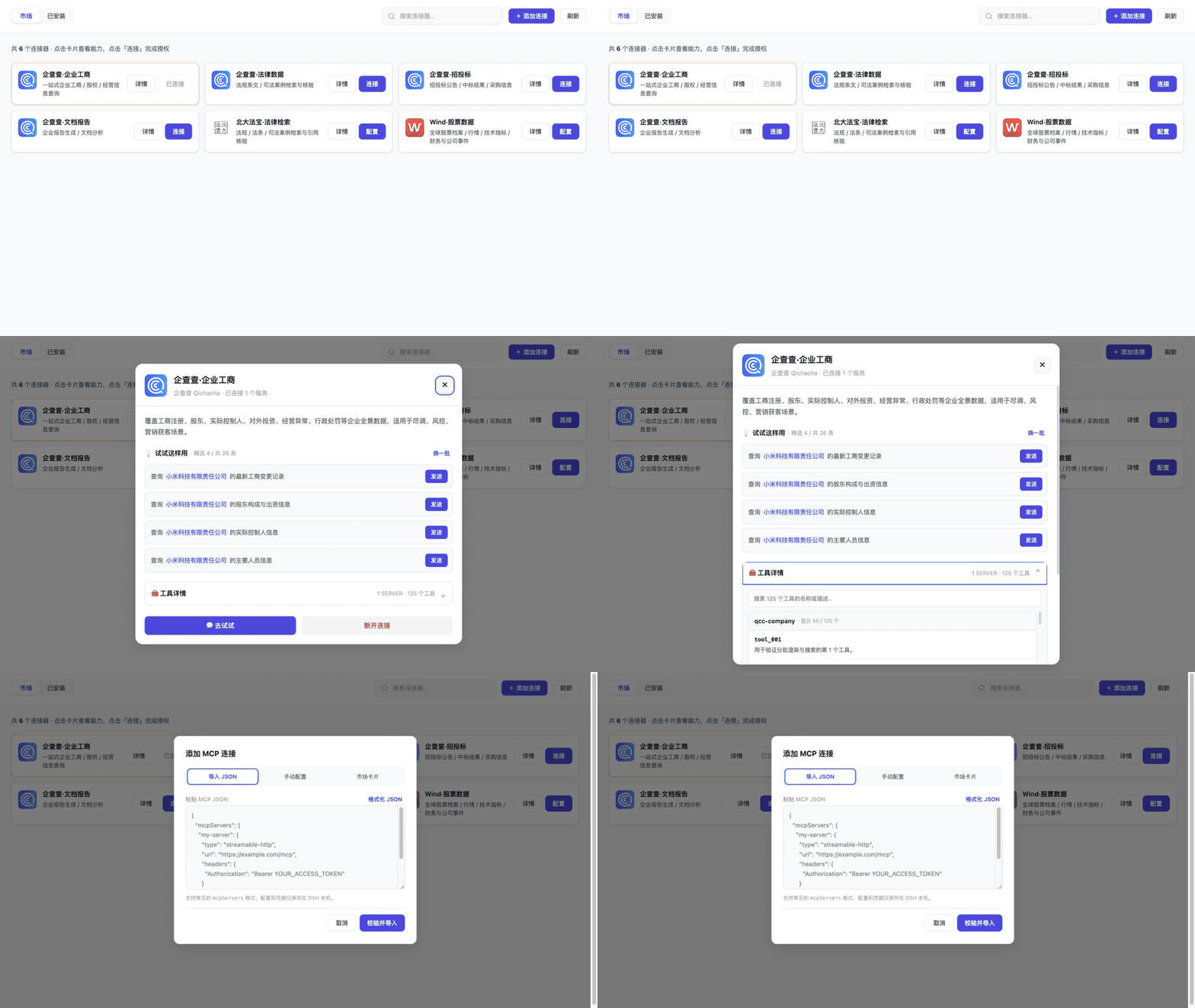
- 新增 4 张由无真实凭据 UI harness 生成的核心界面截图,以及约 30 秒的演示 GIF;中英文 README 均可直接预览市场、详情 Prompt、工具发现和 JSON 导入体验。
|
|
12
|
+
|
|
13
|
+
### Changed
|
|
14
|
+
|
|
15
|
+
- 面向中国市场将 MCP 连接器运行界面固定为中文,移除顶部 `EN` 按钮、英文 UI 字典、语言偏好持久化和切换事件;英文 README 继续作为项目文档保留。
|
|
16
|
+
|
|
17
|
+
## [0.2.2] - 2026-08-21
|
|
18
|
+
|
|
19
|
+
### Added
|
|
20
|
+
|
|
21
|
+
- 新增英文版 README,便于国际用户了解安装、连接方式、市场目录和发布流程。
|
|
22
|
+
|
|
23
|
+
### Changed
|
|
24
|
+
|
|
25
|
+
- 产品名称和介绍统一为通用 MCP Connector Marketplace;企查查作为项目发起方、维护方和首批连接器提供方,不限定可接入厂商。
|
|
26
|
+
- 重构 npm 关键词,保留 DSH、Cordis、MCP、OAuth/PKCE 和企查查检索入口,并补充 `dsh-plugin`、`mcp-client`、`oauth2`、`enterprise-data`。
|
|
27
|
+
- 更新市场注册移交文档、测试数量和 awesome-dsh-plugin 注册描述,移除易过期的工具与 Prompt 数量。
|
|
28
|
+
|
|
7
29
|
## [0.2.1] - 2026-08-21
|
|
8
30
|
|
|
9
31
|
### Added
|
|
@@ -80,7 +102,9 @@
|
|
|
80
102
|
- 外部 URL 与导入 Header 执行安全校验。
|
|
81
103
|
- iframe 消息校验同源和消息来源。
|
|
82
104
|
|
|
83
|
-
[Unreleased]: https://github.com/duhu2000/dsh-mcp-connector/compare/v0.2.
|
|
105
|
+
[Unreleased]: https://github.com/duhu2000/dsh-mcp-connector/compare/v0.2.3...HEAD
|
|
106
|
+
[0.2.3]: https://github.com/duhu2000/dsh-mcp-connector/compare/v0.2.2...v0.2.3
|
|
107
|
+
[0.2.2]: https://github.com/duhu2000/dsh-mcp-connector/compare/v0.2.1...v0.2.2
|
|
84
108
|
[0.2.1]: https://github.com/duhu2000/dsh-mcp-connector/compare/v0.2.0...v0.2.1
|
|
85
109
|
[0.2.0]: https://github.com/duhu2000/dsh-mcp-connector/compare/v0.1.0...v0.2.0
|
|
86
110
|
[0.1.0]: https://github.com/duhu2000/dsh-mcp-connector/releases/tag/v0.1.0
|
package/README.en.md
ADDED
|
@@ -0,0 +1,115 @@
|
|
|
1
|
+
# MCP Connector Marketplace for DeepSeek Harness
|
|
2
|
+
|
|
3
|
+
> A general-purpose MCP connector marketplace initiated and maintained by the Qichacha team
|
|
4
|
+
|
|
5
|
+
Browse and install MCP connectors from different providers in DeepSeek Harness Desktop. Connect through OAuth, API key/URL configuration, JSON import, or a connector descriptor URL; discover tools, start a new conversation from an example prompt, and manage installed connections.
|
|
6
|
+
|
|
7
|
+
[简体中文](README.md)
|
|
8
|
+
|
|
9
|
+
[](https://github.com/duhu2000/dsh-mcp-connector/actions/workflows/ci.yml)
|
|
10
|
+
[](https://www.npmjs.com/package/dsh-mcp-connector)
|
|
11
|
+
[](LICENSE)
|
|
12
|
+
|
|
13
|
+
## Features
|
|
14
|
+
|
|
15
|
+
- A primary sidebar entry below New Conversation and above workspaces/conversations, with a public footer-slot fallback for incompatible DSH DOM versions.
|
|
16
|
+
- Searchable Marketplace and Installed views with connection status and catalog refresh.
|
|
17
|
+
- OAuth 2.0 Authorization Code with PKCE, API key/Bearer/unauthenticated URL configuration, and `mcpServers` JSON import.
|
|
18
|
+
- Installation from a credential-free connector descriptor URL.
|
|
19
|
+
- Credential and MCP initialize validation before API-key connectors are saved as installed.
|
|
20
|
+
- Dynamic tool discovery grouped by MCP server, including descriptions, search, batched rendering, and an independent scroll region.
|
|
21
|
+
- Curated prompt templates that can open a DSH conversation and prefill its draft; missing variables are requested before the prompt is sent.
|
|
22
|
+
- Persistent connection lifecycle management: restore on restart, enable/disable, disconnect, refresh OAuth tokens, and revoke authorization.
|
|
23
|
+
- Built-in, remote, and local catalogs with `published` and `featured` controls.
|
|
24
|
+
- A standalone remote Registry, allowing new marketplace cards to appear after refresh without publishing a new npm version.
|
|
25
|
+
- Explicit, non-destructive migration of authorization from the two earlier Qichacha OAuth plugins.
|
|
26
|
+
|
|
27
|
+
The first four bundled cards are Qichacha connectors. The public catalog also includes PKULaw and Wind connectors; the architecture is provider-neutral.
|
|
28
|
+
|
|
29
|
+
## Interface and demo
|
|
30
|
+
|
|
31
|
+
|
|
32
|
+
|
|
33
|
+
| Marketplace overview | Connector details and curated prompts |
|
|
34
|
+
|---|---|
|
|
35
|
+
| 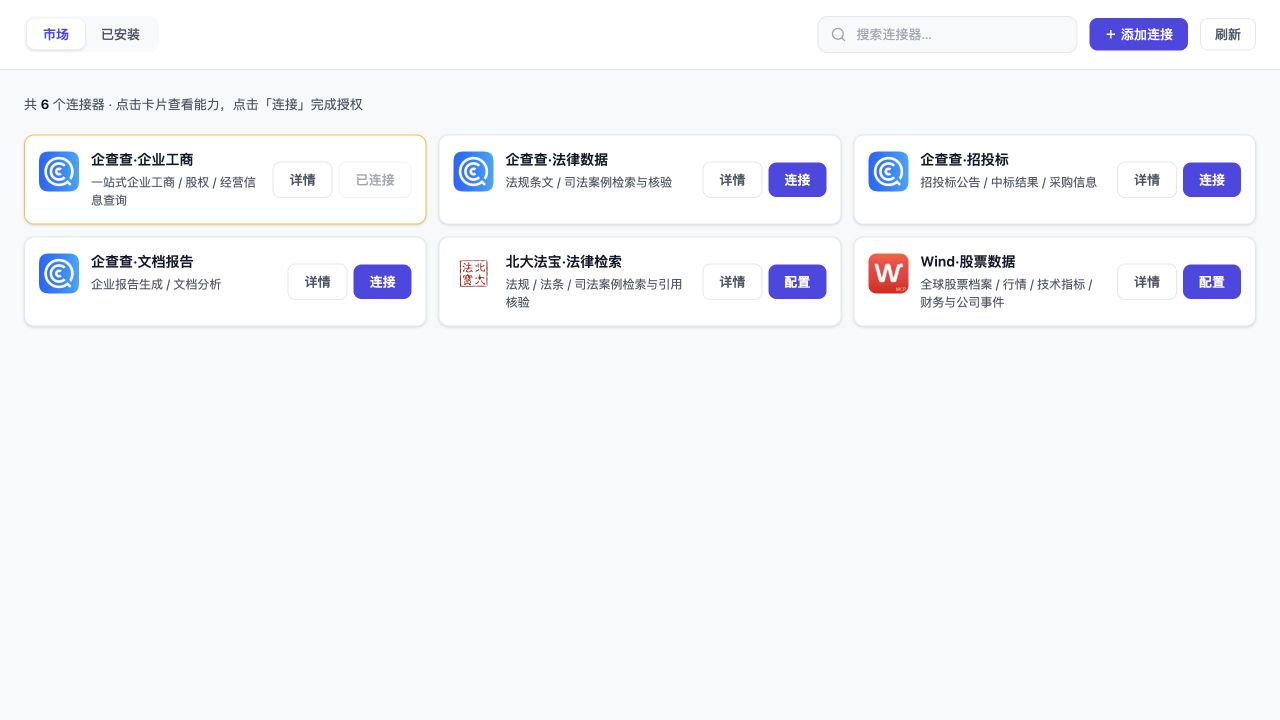 | 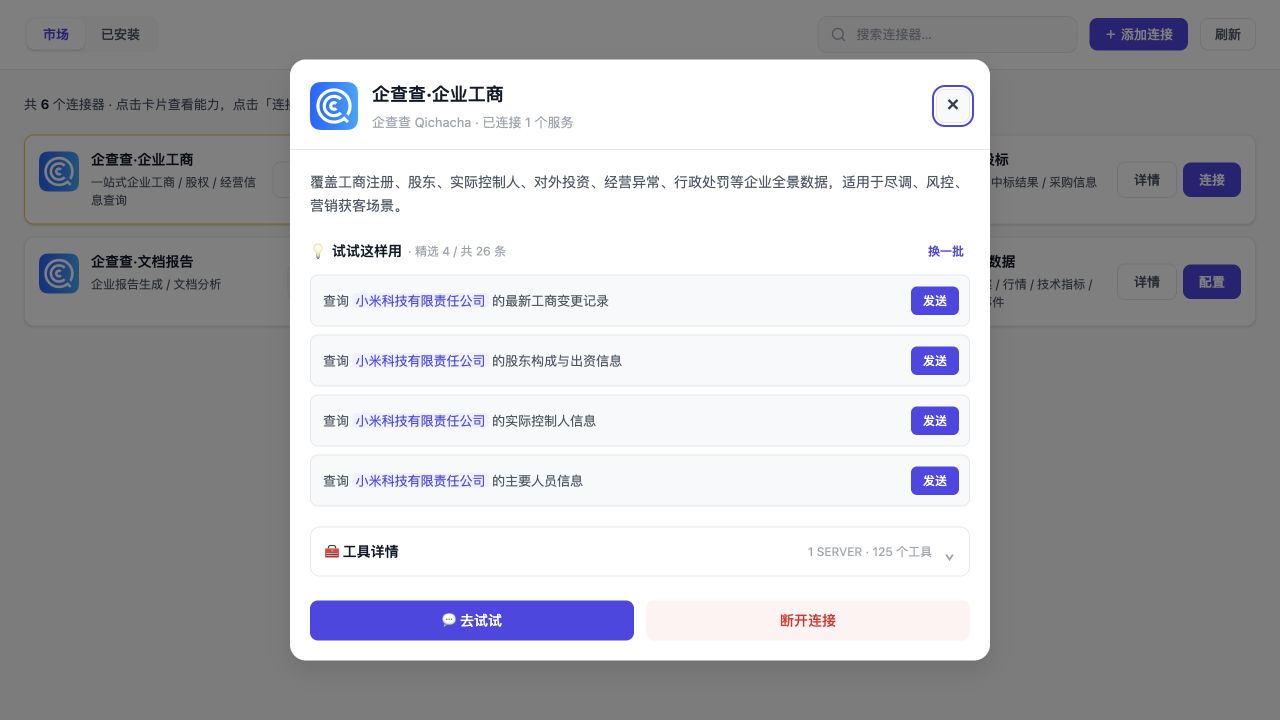 |
|
|
36
|
+
| Tool discovery, descriptions, and scrolling | JSON import |
|
|
37
|
+
| 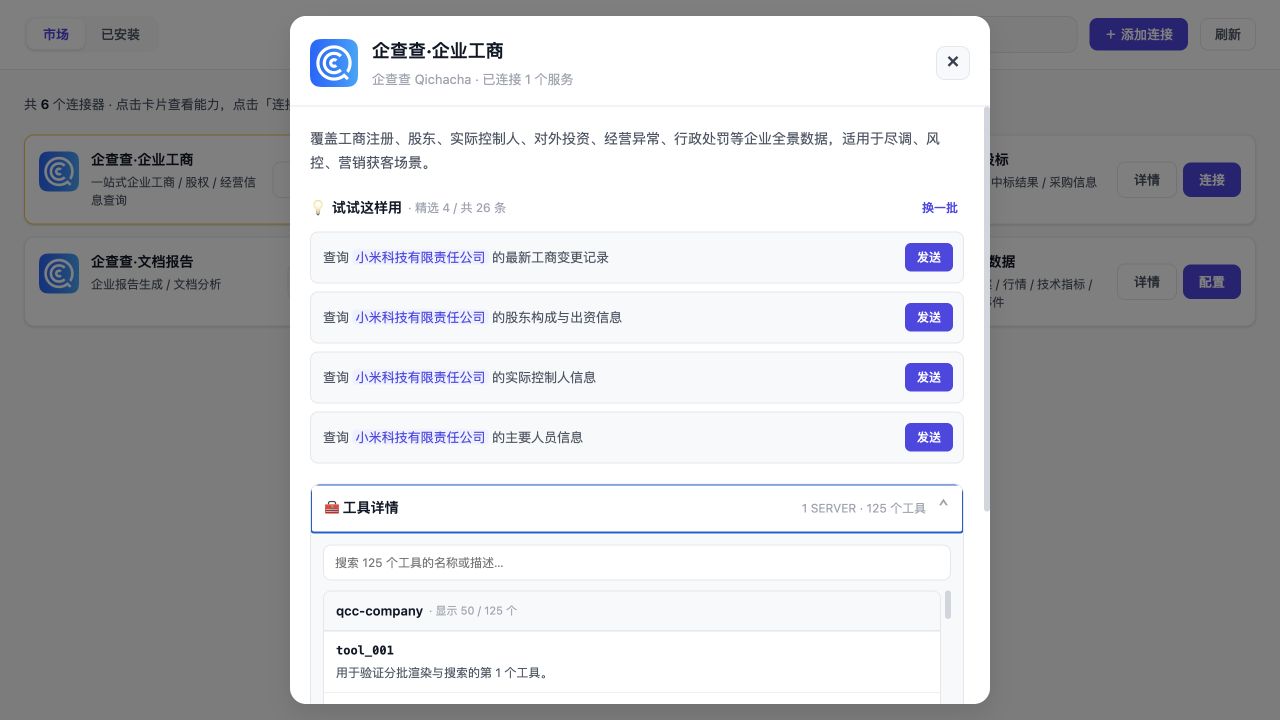 | 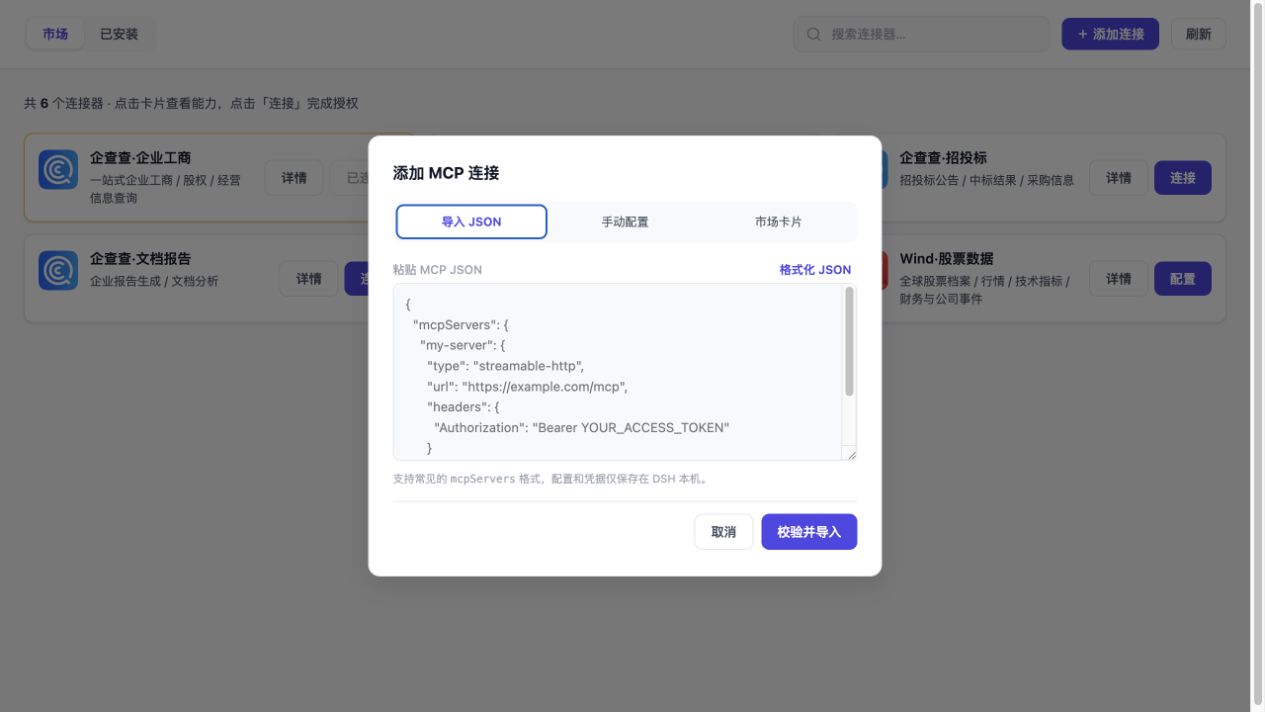 |
|
|
38
|
+
|
|
39
|
+
The assets are captured from the credential-free local UI harness. See [`docs/screenshots/README.md`](docs/screenshots/README.md) for provenance.
|
|
40
|
+
|
|
41
|
+
## Installation
|
|
42
|
+
|
|
43
|
+
Requirements: DeepSeek Harness Desktop or web profile, and Node.js 20 or later.
|
|
44
|
+
|
|
45
|
+
```bash
|
|
46
|
+
dsh plugin --profile web add dsh-mcp-connector
|
|
47
|
+
```
|
|
48
|
+
|
|
49
|
+
Or use the installer:
|
|
50
|
+
|
|
51
|
+
```bash
|
|
52
|
+
bash <(curl -fsSL https://raw.githubusercontent.com/duhu2000/dsh-mcp-connector/main/install.sh)
|
|
53
|
+
```
|
|
54
|
+
|
|
55
|
+
Fully quit and restart DeepSeek Harness Desktop after installation or upgrade.
|
|
56
|
+
|
|
57
|
+
## Usage
|
|
58
|
+
|
|
59
|
+
1. Select **MCP Connector** in the primary sidebar.
|
|
60
|
+
2. Choose a connector in Marketplace and complete authorization or configuration.
|
|
61
|
+
3. Open its details to inspect tools or send an example prompt to a new conversation draft.
|
|
62
|
+
4. Use Installed or the conversation tools to enable, disable, inspect, or disconnect a connection.
|
|
63
|
+
|
|
64
|
+
Connected tools are exposed to the model with the `mcp__<serverName>__*` prefix.
|
|
65
|
+
|
|
66
|
+
## Connector catalog
|
|
67
|
+
|
|
68
|
+
The package contains a bundled fallback catalog. By default, it refreshes from the public [dsh-mcp-connector-registry](https://github.com/duhu2000/dsh-mcp-connector-registry); cached or bundled data remains available if the remote registry cannot be reached.
|
|
69
|
+
|
|
70
|
+
The public connector registration process and descriptor requirements are documented in [docs/MARKET-REGISTRATION.md](docs/MARKET-REGISTRATION.md).
|
|
71
|
+
|
|
72
|
+
## Configuration
|
|
73
|
+
|
|
74
|
+
The default bundle configuration is in `cordis.patch.yml`:
|
|
75
|
+
|
|
76
|
+
```yaml
|
|
77
|
+
- id: mcp-connector
|
|
78
|
+
name: dsh-mcp-connector
|
|
79
|
+
config:
|
|
80
|
+
catalogUrl: 'https://raw.githubusercontent.com/duhu2000/dsh-mcp-connector-registry/main/catalog.json'
|
|
81
|
+
persistSecrets: true
|
|
82
|
+
entryPrefix: mcp
|
|
83
|
+
refreshSkewMs: 300000
|
|
84
|
+
openBrowser: true
|
|
85
|
+
```
|
|
86
|
+
|
|
87
|
+
Set `catalogUrl` to an empty string for an explicitly offline/private setup.
|
|
88
|
+
|
|
89
|
+
## Development and release checks
|
|
90
|
+
|
|
91
|
+
```bash
|
|
92
|
+
npm run check
|
|
93
|
+
npm run registry:build
|
|
94
|
+
npm run registry:validate
|
|
95
|
+
npm run dev:ui
|
|
96
|
+
```
|
|
97
|
+
|
|
98
|
+
`npm run check` performs syntax checks, automated tests, and an npm package allowlist/sensitive-content audit. Tags matching `v*` trigger GitHub Actions; the tag must match `package.json`. npm releases use Trusted Publishing through GitHub OIDC and do not require a long-lived `NPM_TOKEN`.
|
|
99
|
+
|
|
100
|
+
The current public version is [`dsh-mcp-connector@0.2.2`](https://www.npmjs.com/package/dsh-mcp-connector), with [GitHub Release v0.2.2](https://github.com/duhu2000/dsh-mcp-connector/releases/tag/v0.2.2).
|
|
101
|
+
|
|
102
|
+
See [CHANGELOG.md](CHANGELOG.md) for version history and [docs/DESKTOP-E2E.md](docs/DESKTOP-E2E.md) for the Desktop release checklist.
|
|
103
|
+
|
|
104
|
+
## Security and limitations
|
|
105
|
+
|
|
106
|
+
- Credentials are stored only in the DSH storage domain and are not written to the catalog, Git repository, or conversation history.
|
|
107
|
+
- Failed API key/token validation is not persisted; authentication, timeout, DNS, and TLS/network errors are reported separately.
|
|
108
|
+
- External URLs must use HTTPS; HTTP is allowed only for loopback development.
|
|
109
|
+
- Remote descriptors and catalogs are limited to 2 MiB, Web API requests to 1 MiB, and imported JSON is scanned for credential fields before normalization.
|
|
110
|
+
- Streamable HTTP is the primary transport with SSE compatibility. stdio entries are explicitly skipped.
|
|
111
|
+
- The primary sidebar placement uses the stable DSH `data-slot` marker and falls back to the footer if that marker is removed.
|
|
112
|
+
|
|
113
|
+
## License
|
|
114
|
+
|
|
115
|
+
MIT
|
package/README.md
CHANGED
|
@@ -1,6 +1,10 @@
|
|
|
1
|
-
# MCP
|
|
1
|
+
# MCP 连接器市场(DeepSeek Harness 插件)
|
|
2
2
|
|
|
3
|
-
|
|
3
|
+
> 通用 MCP Connector Marketplace,由企查查团队发起并维护
|
|
4
|
+
|
|
5
|
+
在 DeepSeek Harness Desktop 中浏览和安装不同厂商的 MCP 连接器,通过 OAuth、API Key/URL 或 JSON 接入服务,发现工具、使用示例 Prompt 发起新会话,并管理已安装连接。
|
|
6
|
+
|
|
7
|
+
[English](README.en.md)
|
|
4
8
|
|
|
5
9
|
[](https://github.com/duhu2000/dsh-mcp-connector/actions/workflows/ci.yml)
|
|
6
10
|
[](https://www.npmjs.com/package/dsh-mcp-connector)
|
|
@@ -24,6 +28,18 @@
|
|
|
24
28
|
|
|
25
29
|
当前市场前 4 张为企查查连接器,第 5 张为“北大法宝·法律检索”,第 6 张为“Wind·股票数据”;插件架构不限定厂商。
|
|
26
30
|
|
|
31
|
+
## 界面与演示
|
|
32
|
+
|
|
33
|
+

|
|
34
|
+
|
|
35
|
+
| 市场总览 | 连接器详情与精选 Prompt |
|
|
36
|
+
|---|---|
|
|
37
|
+
|  |  |
|
|
38
|
+
| 工具发现、描述与独立滚动 | JSON 导入 |
|
|
39
|
+
|  |  |
|
|
40
|
+
|
|
41
|
+
素材由无真实凭据的本地 UI harness 生成,详见 [`docs/screenshots/README.md`](docs/screenshots/README.md)。
|
|
42
|
+
|
|
27
43
|
## 安装
|
|
28
44
|
|
|
29
45
|
要求:DeepSeek Harness Desktop/web profile,Node.js 20 或更高版本。
|
|
@@ -77,7 +93,7 @@ npm run dev:ui
|
|
|
77
93
|
|
|
78
94
|
`check` 执行语法检查、自动测试和 npm 发布包白名单校验;`dev:ui` 启动不含真实凭据的本地 mock 市场。CI 使用 `--legacy-peer-deps` 安装显式测试依赖,DSH 运行期 peer 仍由 Host 提供。`v*` Tag 会触发 GitHub Actions;Tag 必须与 `package.json` 版本一致。Release 通过 npm Trusted Publishing (GitHub OIDC) 发布,不依赖长期 `NPM_TOKEN`。
|
|
79
95
|
|
|
80
|
-
当前公开版本为 [`dsh-mcp-connector@0.2.
|
|
96
|
+
当前公开版本为 [`dsh-mcp-connector@0.2.2`](https://www.npmjs.com/package/dsh-mcp-connector),对应 [GitHub Release v0.2.2](https://github.com/duhu2000/dsh-mcp-connector/releases/tag/v0.2.2)。
|
|
81
97
|
|
|
82
98
|
版本能力与变更记录见 [CHANGELOG.md](CHANGELOG.md)。
|
|
83
99
|
Desktop 发版回归见 [docs/DESKTOP-E2E.md](docs/DESKTOP-E2E.md)。
|
package/package.json
CHANGED
|
@@ -1,7 +1,7 @@
|
|
|
1
1
|
{
|
|
2
2
|
"name": "dsh-mcp-connector",
|
|
3
|
-
"version": "0.2.
|
|
4
|
-
"description": "DeepSeek Harness
|
|
3
|
+
"version": "0.2.3",
|
|
4
|
+
"description": "General-purpose MCP Connector Marketplace for DeepSeek Harness with OAuth 2.0 PKCE, API key/URL, JSON import, tool discovery, prompt templates, and connection management.",
|
|
5
5
|
"type": "module",
|
|
6
6
|
"main": "lib/index.js",
|
|
7
7
|
"exports": {
|
|
@@ -21,6 +21,7 @@
|
|
|
21
21
|
"docs/MARKET-REGISTRATION.md",
|
|
22
22
|
"cordis.patch.yml",
|
|
23
23
|
"README.md",
|
|
24
|
+
"README.en.md",
|
|
24
25
|
"CHANGELOG.md",
|
|
25
26
|
"LICENSE",
|
|
26
27
|
"install.sh",
|
|
@@ -41,12 +42,22 @@
|
|
|
41
42
|
"keywords": [
|
|
42
43
|
"deepseek-harness",
|
|
43
44
|
"dsh",
|
|
45
|
+
"dsh-plugin",
|
|
44
46
|
"cordis",
|
|
45
47
|
"mcp",
|
|
48
|
+
"mcp-client",
|
|
49
|
+
"mcp-connector",
|
|
46
50
|
"connector",
|
|
51
|
+
"marketplace",
|
|
47
52
|
"oauth",
|
|
53
|
+
"oauth2",
|
|
48
54
|
"pkce",
|
|
49
|
-
"
|
|
55
|
+
"json-import",
|
|
56
|
+
"enterprise-data",
|
|
57
|
+
"qichacha",
|
|
58
|
+
"qcc",
|
|
59
|
+
"tools",
|
|
60
|
+
"prompts"
|
|
50
61
|
],
|
|
51
62
|
"license": "MIT",
|
|
52
63
|
"publishConfig": {
|
package/ui/index.html
CHANGED
|
@@ -355,17 +355,16 @@
|
|
|
355
355
|
<div class="app">
|
|
356
356
|
<header>
|
|
357
357
|
<div class="tabs" id="tabs">
|
|
358
|
-
<button data-view="market"
|
|
359
|
-
<button data-view="installed"
|
|
358
|
+
<button data-view="market" class="active">市场</button>
|
|
359
|
+
<button data-view="installed">已安装</button>
|
|
360
360
|
</div>
|
|
361
361
|
<div class="header-spacer"></div>
|
|
362
362
|
<div class="search-box">
|
|
363
363
|
<svg width="16" height="16" viewBox="0 0 24 24" fill="none" stroke="currentColor" stroke-width="2" stroke-linecap="round" stroke-linejoin="round" style="color:var(--muted);flex-shrink:0"><circle cx="11" cy="11" r="8"/><line x1="21" y1="21" x2="16.65" y2="16.65"/></svg>
|
|
364
|
-
<input id="search" type="text" placeholder="搜索连接器…"
|
|
364
|
+
<input id="search" type="text" placeholder="搜索连接器…" />
|
|
365
365
|
</div>
|
|
366
|
-
<button class="icon-btn primary" id="add-connection" type="button"
|
|
367
|
-
<button class="icon-btn" id="
|
|
368
|
-
<button class="icon-btn" id="refresh" data-i18n="refresh">刷新</button>
|
|
366
|
+
<button class="icon-btn primary" id="add-connection" type="button">+ 添加连接</button>
|
|
367
|
+
<button class="icon-btn" id="refresh">刷新</button>
|
|
369
368
|
</header>
|
|
370
369
|
<main id="main"></main>
|
|
371
370
|
|
|
@@ -384,17 +383,17 @@
|
|
|
384
383
|
<div class="detail-desc" id="detail-desc"></div>
|
|
385
384
|
<div class="detail-section">
|
|
386
385
|
<div class="detail-section-head">
|
|
387
|
-
<div class="detail-section-title"><span class="emoji">💡</span> <span
|
|
386
|
+
<div class="detail-section-title"><span class="emoji">💡</span> <span>试试这样用</span> <span class="detail-section-meta" id="prompt-meta"></span></div>
|
|
388
387
|
<div class="detail-section-spacer"></div>
|
|
389
|
-
<button class="text-btn" id="prompt-next" type="button"
|
|
388
|
+
<button class="text-btn" id="prompt-next" type="button" hidden>换一批</button>
|
|
390
389
|
</div>
|
|
391
390
|
<div class="prompt-list" id="detail-prompts"></div>
|
|
392
391
|
</div>
|
|
393
392
|
<details class="tools-disclosure" id="tools-disclosure">
|
|
394
|
-
<summary><span>🧰 <span
|
|
393
|
+
<summary><span>🧰 <span>工具详情</span></span><span class="tools-summary" id="tools-summary">加载中…</span></summary>
|
|
395
394
|
<div class="tools-panel">
|
|
396
395
|
<div class="tools-toolbar">
|
|
397
|
-
<input class="tools-search" id="tools-search" type="search" placeholder="搜索工具名称或描述…"
|
|
396
|
+
<input class="tools-search" id="tools-search" type="search" placeholder="搜索工具名称或描述…" autocomplete="off" />
|
|
398
397
|
</div>
|
|
399
398
|
<div class="tools-list" id="detail-tools">
|
|
400
399
|
<div class="tools-loading">加载中...</div>
|
|
@@ -403,7 +402,7 @@
|
|
|
403
402
|
</details>
|
|
404
403
|
<div class="detail-actions">
|
|
405
404
|
<button class="btn-primary" id="detail-try-btn">💬 去试试</button>
|
|
406
|
-
<button class="btn-danger" id="detail-disconnect-btn"
|
|
405
|
+
<button class="btn-danger" id="detail-disconnect-btn">断开连接</button>
|
|
407
406
|
</div>
|
|
408
407
|
</div>
|
|
409
408
|
</div>
|
|
@@ -423,23 +422,13 @@
|
|
|
423
422
|
const main = $('#main');
|
|
424
423
|
const toast = $('#toast');
|
|
425
424
|
const searchInput = $('#search');
|
|
426
|
-
const
|
|
427
|
-
|
|
428
|
-
|
|
429
|
-
|
|
430
|
-
|
|
431
|
-
send: '发送', fillSend: '填写并发送', connectToUse: '连接后使用', try: '💬 去试试', connectTry: '🔗 连接后试用', configureConnect: '🔑 录入凭据并连接', reconfigureCredential: '🔑 重新配置凭据', loading: '加载中…',
|
|
432
|
-
},
|
|
433
|
-
en: {
|
|
434
|
-
market: 'Marketplace', installed: 'Installed', search: 'Search connectors…', add: '+ Add connector', refresh: 'Refresh',
|
|
435
|
-
tryExamples: 'Try these prompts', next: 'Next', tools: 'Tool details', toolSearch: 'Search tool name or description…',
|
|
436
|
-
disconnect: 'Disconnect', details: 'Details', connect: 'Connect', connected: 'Connected', configure: 'Configure',
|
|
437
|
-
send: 'Send', fillSend: 'Fill & send', connectToUse: 'Connect to use', try: '💬 Try it', connectTry: '🔗 Connect to try', configureConnect: '🔑 Add key & connect', reconfigureCredential: '🔑 Reconfigure key', loading: 'Loading…',
|
|
438
|
-
},
|
|
425
|
+
const LABELS = {
|
|
426
|
+
details: '详情', connect: '连接', connected: '已连接', configure: '配置',
|
|
427
|
+
send: '发送', fillSend: '填写并发送', connectToUse: '连接后使用', try: '💬 去试试',
|
|
428
|
+
connectTry: '🔗 连接后试用', configureConnect: '🔑 录入凭据并连接',
|
|
429
|
+
reconfigureCredential: '🔑 重新配置凭据', loading: '加载中…',
|
|
439
430
|
};
|
|
440
|
-
|
|
441
|
-
try { locale = localStorage.getItem('mcp-connector:locale') === 'en' ? 'en' : 'zh'; } catch {}
|
|
442
|
-
const t = (key) => I18N[locale]?.[key] || I18N.zh[key] || key;
|
|
431
|
+
const t = (key) => LABELS[key] || key;
|
|
443
432
|
const MCP_JSON_EXAMPLE = JSON.stringify({
|
|
444
433
|
mcpServers: {
|
|
445
434
|
'my-server': {
|
|
@@ -450,12 +439,6 @@
|
|
|
450
439
|
},
|
|
451
440
|
}, null, 2);
|
|
452
441
|
|
|
453
|
-
function applyLocale() {
|
|
454
|
-
document.documentElement.lang = locale === 'en' ? 'en' : 'zh-CN';
|
|
455
|
-
document.querySelectorAll('[data-i18n]').forEach((node) => { node.textContent = t(node.dataset.i18n); });
|
|
456
|
-
document.querySelectorAll('[data-i18n-placeholder]').forEach((node) => { node.placeholder = t(node.dataset.i18nPlaceholder); });
|
|
457
|
-
$('#locale-toggle').textContent = locale === 'zh' ? 'EN' : '中';
|
|
458
|
-
}
|
|
459
442
|
let view = 'market';
|
|
460
443
|
let marketItems = {};
|
|
461
444
|
let searchQuery = '';
|
|
@@ -510,7 +493,7 @@
|
|
|
510
493
|
button.disabled = pending;
|
|
511
494
|
if (pending) {
|
|
512
495
|
button.dataset.idleLabel = button.textContent;
|
|
513
|
-
button.textContent =
|
|
496
|
+
button.textContent = '正在发送…';
|
|
514
497
|
} else if (button.dataset.idleLabel) {
|
|
515
498
|
button.textContent = button.dataset.idleLabel;
|
|
516
499
|
delete button.dataset.idleLabel;
|
|
@@ -1162,13 +1145,6 @@
|
|
|
1162
1145
|
}
|
|
1163
1146
|
|
|
1164
1147
|
$('#add-connection').addEventListener('click', () => openAddConnection('json'));
|
|
1165
|
-
$('#locale-toggle').addEventListener('click', () => {
|
|
1166
|
-
locale = locale === 'zh' ? 'en' : 'zh';
|
|
1167
|
-
try { localStorage.setItem('mcp-connector:locale', locale); } catch {}
|
|
1168
|
-
applyLocale();
|
|
1169
|
-
refresh();
|
|
1170
|
-
if ($('#detail-overlay').classList.contains('active')) renderPromptPage();
|
|
1171
|
-
});
|
|
1172
1148
|
main.addEventListener('click', (event) => {
|
|
1173
1149
|
if (!event.target.closest('#catalog-more')) return;
|
|
1174
1150
|
catalogRenderLimit += 60;
|
|
@@ -1195,7 +1171,6 @@
|
|
|
1195
1171
|
refresh();
|
|
1196
1172
|
});
|
|
1197
1173
|
|
|
1198
|
-
applyLocale();
|
|
1199
1174
|
refresh();
|
|
1200
1175
|
})();
|
|
1201
1176
|
</script>
|