dsh-liquid-glass 0.5.0 → 0.6.0
This diff represents the content of publicly available package versions that have been released to one of the supported registries. The information contained in this diff is provided for informational purposes only and reflects changes between package versions as they appear in their respective public registries.
- package/README.de.md +56 -0
- package/README.es.md +56 -0
- package/README.fr.md +56 -0
- package/README.ja.md +56 -0
- package/README.md +52 -56
- package/README.pt-BR.md +56 -0
- package/README.ru.md +56 -0
- package/README.zh.md +53 -55
- package/lib/client.js +795 -367
- package/package.json +1 -1
package/README.de.md
ADDED
|
@@ -0,0 +1,56 @@
|
|
|
1
|
+
<div align="center">
|
|
2
|
+
|
|
3
|
+
<h1>Liquid Glass</h1>
|
|
4
|
+
<p><strong>Transparente Oberflächen und eigene Hintergründe für DeepSeek Harness.</strong></p>
|
|
5
|
+
<p><code>dsh-liquid-glass</code></p>
|
|
6
|
+
|
|
7
|
+
<p><a href="README.zh.md">简体中文</a> · <a href="README.md">English</a> · <a href="README.ja.md">日本語</a> · <a href="README.es.md">Español</a> · <a href="README.fr.md">Français</a> · <strong>Deutsch</strong> · <a href="README.ru.md">Русский</a> · <a href="README.pt-BR.md">Português (Brasil)</a></p>
|
|
8
|
+
<p><a href="CHANGELOG.md">Änderungsprotokoll</a> · <a href="LICENSE">MIT-Lizenz</a></p>
|
|
9
|
+
|
|
10
|
+
<p>
|
|
11
|
+
<a href="https://www.npmjs.com/package/dsh-liquid-glass"><img alt="npm-Version" src="https://img.shields.io/npm/v/dsh-liquid-glass?style=flat-square"></a>
|
|
12
|
+
<a href="https://www.npmjs.com/package/dsh-liquid-glass"><img alt="npm-Downloads insgesamt" src="https://img.shields.io/npm/dt/dsh-liquid-glass?style=flat-square&label=total%20downloads"></a>
|
|
13
|
+
<a href="https://github.com/Ultroncn/dsh-liquid-glass/actions/workflows/ci.yml"><img alt="CI" src="https://img.shields.io/github/actions/workflow/status/Ultroncn/dsh-liquid-glass/ci.yml?branch=main&style=flat-square&label=CI"></a>
|
|
14
|
+
<a href="docs/v0.4.0-validation.md"><img alt="DSH Web" src="https://img.shields.io/badge/DSH-Web-2563eb?style=flat-square"></a>
|
|
15
|
+
<a href="LICENSE"><img alt="MIT-Lizenz" src="https://img.shields.io/badge/License-MIT-2ea44f?style=flat-square"></a>
|
|
16
|
+
<a href="https://dsh-insights.com/p/Ultroncn/dsh-liquid-glass/"><img alt="DSH Insights" src="https://dsh-insights.com/badge/Ultroncn/dsh-liquid-glass.svg"></a>
|
|
17
|
+
</p>
|
|
18
|
+
|
|
19
|
+
<p><a href="https://awesome-dsh-plugin.com/p/Ultroncn/dsh-liquid-glass/">Plugin-Marktplatz</a> · <a href="https://www.npmjs.com/package/dsh-liquid-glass">npm</a> · <a href="https://github.com/Ultroncn/dsh-liquid-glass/releases">Veröffentlichungen</a> · <a href="https://github.com/Ultroncn/dsh-liquid-glass/issues">Fehler melden</a></p>
|
|
20
|
+
|
|
21
|
+
</div>
|
|
22
|
+
|
|
23
|
+
Liquid Glass ergänzt [DeepSeek Harness](https://github.com/deepseek-ai/deepseek-harness) (DSH) um einstellbare Glasflächen und Hintergründe aus Bildern oder Videos. Das Plugin wird von der Community gepflegt.
|
|
24
|
+
|
|
25
|
+
> **Version 0.6.0.** Die Rotation befindet sich jetzt im Hintergrundbereich. Füge mehrere Bilder gleichzeitig hinzu, ersetze einzelne Bilder und scrolle horizontal durch bis zu sechs Vorschaubilder in einer Reihe. Das [Änderungsprotokoll](CHANGELOG.md) beschreibt den Wegfall des Imports und Exports der Darstellungseinstellungen und die weiteren Änderungen.
|
|
26
|
+
|
|
27
|
+
## Installieren und öffnen
|
|
28
|
+
|
|
29
|
+
Suche im DSH-Plugin-Marktplatz nach `dsh-liquid-glass` und prüfe, ob **Ultroncn** als Autor angegeben ist. Gib im Eingabefeld zum Hinzufügen von Plugins `dsh-liquid-glass@0.6.0` ein. Ersetze bei der Installation im Terminal `web` durch dein DSH-Profil.
|
|
30
|
+
|
|
31
|
+
```sh
|
|
32
|
+
dsh plugin --profile web add dsh-liquid-glass@0.6.0 --registry=https://registry.npmjs.org/
|
|
33
|
+
```
|
|
34
|
+
|
|
35
|
+
Starte DSH nach der Installation oder Aktualisierung neu. Öffne **Settings → General → Theme background** (**设置 → 通用 → 主题背景**) unterhalb von **Appearance**. Der Hauptschalter steuert den Glaseffekt und den Hintergrund gemeinsam. Deine Einstellungen bleiben beim Ausschalten gespeichert.
|
|
36
|
+
|
|
37
|
+
Zum Update auf 0.6.0 führst du denselben Befehl aus. Er gibt die Version vor und nutzt die offizielle npm-Registry. Bei `ERR_PNPM_ADDING_TO_ROOT` füge nach `add` die Option `-w` ein.
|
|
38
|
+
|
|
39
|
+
## Bedienung
|
|
40
|
+
|
|
41
|
+
1. Wähle **Regular**, **Clear** oder **Frost** und stelle die Transparenz der Oberfläche zwischen 3 % und 95 % ein.
|
|
42
|
+
2. Wähle unter **Background** ein lokales Bild, eine Bild-URL oder ein lokales MP4-/WebM-Video bis 100 MiB. Der Browser muss den Videocodec unterstützen. Prüfe die Vorschau im Hauptbereich und klicke dann auf **Save**. Das Video läuft ohne Ton in einer Schleife und lässt sich anhalten.
|
|
43
|
+
3. Wähle unter **Background** mit **Add images** mehrere Fotos gleichzeitig. Klicke auf ein Vorschaubild, um es zu verwenden, oder nutze die Schaltfläche zum Ersetzen. Unter **Rotation settings** legst du Reihenfolge und Zeitpunkt fest. DSH prüft beim Start, ob der Hintergrund gewechselt wird.
|
|
44
|
+
4. In **Advanced settings** findest du separate Stile für hell und dunkel, Leseschutz, Farbton, Menüunschärfe, Skalierung, Position, Helligkeit und Abdunklung. Für Videos kannst du ein Standbild wählen.
|
|
45
|
+
|
|
46
|
+
## Bildschirmfoto
|
|
47
|
+
|
|
48
|
+
Oberfläche der Version 0.4.0 in DSH 0.2.2-rc.2 Web.
|
|
49
|
+
|
|
50
|
+
|
|
51
|
+
|
|
52
|
+
## Kompatibilität und Daten
|
|
53
|
+
|
|
54
|
+
Das Plugin ist für DSH Web vorgesehen. Die Plugin-Oberfläche ist auf Englisch und vereinfachtem Chinesisch verfügbar. Einzelheiten stehen in den [Testergebnissen](docs/v0.4.0-validation.md) und im [Änderungsprotokoll](CHANGELOG.md).
|
|
55
|
+
|
|
56
|
+
Einstellungen und Bilder liegen im `localStorage` der Website, Videos in IndexedDB. Das Plugin hat keinen eigenen Server und sendet keine Telemetrie. Verwende zum Deinstallieren dasselbe Profil mit `dsh plugin --profile web remove dsh-liquid-glass`. Entferne gespeicherte Hintergründe vorher in den Einstellungen, um den belegten Speicher freizugeben.
|
package/README.es.md
ADDED
|
@@ -0,0 +1,56 @@
|
|
|
1
|
+
<div align="center">
|
|
2
|
+
|
|
3
|
+
<h1>Liquid Glass</h1>
|
|
4
|
+
<p><strong>Superficies translúcidas y fondos personalizados para DeepSeek Harness.</strong></p>
|
|
5
|
+
<p><code>dsh-liquid-glass</code></p>
|
|
6
|
+
|
|
7
|
+
<p><a href="README.zh.md">简体中文</a> · <a href="README.md">English</a> · <a href="README.ja.md">日本語</a> · <strong>Español</strong> · <a href="README.fr.md">Français</a> · <a href="README.de.md">Deutsch</a> · <a href="README.ru.md">Русский</a> · <a href="README.pt-BR.md">Português (Brasil)</a></p>
|
|
8
|
+
<p><a href="CHANGELOG.md">Historial de cambios</a> · <a href="LICENSE">Licencia MIT</a></p>
|
|
9
|
+
|
|
10
|
+
<p>
|
|
11
|
+
<a href="https://www.npmjs.com/package/dsh-liquid-glass"><img alt="Versión en npm" src="https://img.shields.io/npm/v/dsh-liquid-glass?style=flat-square"></a>
|
|
12
|
+
<a href="https://www.npmjs.com/package/dsh-liquid-glass"><img alt="Descargas totales en npm" src="https://img.shields.io/npm/dt/dsh-liquid-glass?style=flat-square&label=total%20downloads"></a>
|
|
13
|
+
<a href="https://github.com/Ultroncn/dsh-liquid-glass/actions/workflows/ci.yml"><img alt="CI" src="https://img.shields.io/github/actions/workflow/status/Ultroncn/dsh-liquid-glass/ci.yml?branch=main&style=flat-square&label=CI"></a>
|
|
14
|
+
<a href="docs/v0.4.0-validation.md"><img alt="DSH Web" src="https://img.shields.io/badge/DSH-Web-2563eb?style=flat-square"></a>
|
|
15
|
+
<a href="LICENSE"><img alt="Licencia MIT" src="https://img.shields.io/badge/License-MIT-2ea44f?style=flat-square"></a>
|
|
16
|
+
<a href="https://dsh-insights.com/p/Ultroncn/dsh-liquid-glass/"><img alt="DSH Insights" src="https://dsh-insights.com/badge/Ultroncn/dsh-liquid-glass.svg"></a>
|
|
17
|
+
</p>
|
|
18
|
+
|
|
19
|
+
<p><a href="https://awesome-dsh-plugin.com/p/Ultroncn/dsh-liquid-glass/">Catálogo de complementos</a> · <a href="https://www.npmjs.com/package/dsh-liquid-glass">npm</a> · <a href="https://github.com/Ultroncn/dsh-liquid-glass/releases">Versiones</a> · <a href="https://github.com/Ultroncn/dsh-liquid-glass/issues">Incidencias</a></p>
|
|
20
|
+
|
|
21
|
+
</div>
|
|
22
|
+
|
|
23
|
+
Liquid Glass añade superficies translúcidas y fondos con imágenes o vídeos a [DeepSeek Harness](https://github.com/deepseek-ai/deepseek-harness) (DSH). Es un complemento mantenido por la comunidad.
|
|
24
|
+
|
|
25
|
+
> **Versión 0.6.0.** La rotación está integrada en la sección de fondos. Puedes añadir varias imágenes a la vez, sustituirlas individualmente y recorrer hasta seis miniaturas en una sola fila con desplazamiento horizontal. Consulta el [historial de cambios](CHANGELOG.md) para ver la retirada de la importación y exportación de apariencia y las demás novedades.
|
|
26
|
+
|
|
27
|
+
## Instalación y acceso
|
|
28
|
+
|
|
29
|
+
Busca `dsh-liquid-glass` en el catálogo de complementos de DSH y comprueba que el autor sea **Ultroncn**. En el campo para añadir complementos, introduce `dsh-liquid-glass@0.6.0`. Para usar la terminal, sustituye `web` por el perfil con el que ejecutas DSH.
|
|
30
|
+
|
|
31
|
+
```sh
|
|
32
|
+
dsh plugin --profile web add dsh-liquid-glass@0.6.0 --registry=https://registry.npmjs.org/
|
|
33
|
+
```
|
|
34
|
+
|
|
35
|
+
Reinicia DSH tras instalar o actualizar. Abre **Settings → General → Theme background** (**设置 → 通用 → 主题背景**), debajo de **Appearance**. El interruptor principal activa juntos el efecto de cristal y el fondo. Tus preferencias se conservan al desactivarlo.
|
|
36
|
+
|
|
37
|
+
Para actualizar a 0.6.0, ejecuta el mismo comando. Fija la versión y usa el registro oficial de npm. Si aparece `ERR_PNPM_ADDING_TO_ROOT`, añade `-w` después de `add`.
|
|
38
|
+
|
|
39
|
+
## Uso
|
|
40
|
+
|
|
41
|
+
1. Elige **Regular**, **Clear** o **Frost** y ajusta la transparencia de la interfaz entre el 3 % y el 95 %.
|
|
42
|
+
2. En **Background**, selecciona una imagen local, una URL de imagen o un vídeo local MP4/WebM de hasta 100 MiB. El navegador debe admitir el códec. En el selector de fondo principal, revisa la vista previa y pulsa **Save**. Los vídeos se repiten sin sonido y se pueden pausar.
|
|
43
|
+
3. En **Background**, usa **Add images** para seleccionar varias fotos de una vez. Pulsa una miniatura para aplicarla o usa su botón de reemplazo. En **Rotation settings** puedes elegir el orden y el intervalo. DSH comprueba si debe cambiar de fondo al abrirse.
|
|
44
|
+
4. En **Advanced settings** puedes guardar ajustes distintos para el modo claro y oscuro y configurar la protección de lectura, el tono, el desenfoque de los menús, el encuadre, la posición, el brillo y el oscurecimiento. También puedes mostrar un fotograma fijo del vídeo.
|
|
45
|
+
|
|
46
|
+
## Vista previa
|
|
47
|
+
|
|
48
|
+
Interfaz de la versión 0.4.0 en DSH 0.2.2-rc.2 Web.
|
|
49
|
+
|
|
50
|
+

|
|
51
|
+
|
|
52
|
+
## Compatibilidad y datos
|
|
53
|
+
|
|
54
|
+
El complemento está pensado para DSH Web. La interfaz está disponible en inglés y chino simplificado. Consulta las [pruebas de compatibilidad](docs/v0.4.0-validation.md) y el [historial de cambios](CHANGELOG.md).
|
|
55
|
+
|
|
56
|
+
Las preferencias y las imágenes se guardan en el `localStorage` del sitio y los vídeos en IndexedDB. El complemento funciona sin servidor propio ni telemetría. Para desinstalarlo, ejecuta `dsh plugin --profile web remove dsh-liquid-glass` con el mismo perfil. Para liberar el espacio ocupado por los fondos guardados, elimínalos desde los ajustes antes de desinstalar.
|
package/README.fr.md
ADDED
|
@@ -0,0 +1,56 @@
|
|
|
1
|
+
<div align="center">
|
|
2
|
+
|
|
3
|
+
<h1>Liquid Glass</h1>
|
|
4
|
+
<p><strong>Surfaces translucides et fonds d’écran personnalisés pour DeepSeek Harness.</strong></p>
|
|
5
|
+
<p><code>dsh-liquid-glass</code></p>
|
|
6
|
+
|
|
7
|
+
<p><a href="README.zh.md">简体中文</a> · <a href="README.md">English</a> · <a href="README.ja.md">日本語</a> · <a href="README.es.md">Español</a> · <strong>Français</strong> · <a href="README.de.md">Deutsch</a> · <a href="README.ru.md">Русский</a> · <a href="README.pt-BR.md">Português (Brasil)</a></p>
|
|
8
|
+
<p><a href="CHANGELOG.md">Journal des modifications</a> · <a href="LICENSE">Licence MIT</a></p>
|
|
9
|
+
|
|
10
|
+
<p>
|
|
11
|
+
<a href="https://www.npmjs.com/package/dsh-liquid-glass"><img alt="Version npm" src="https://img.shields.io/npm/v/dsh-liquid-glass?style=flat-square"></a>
|
|
12
|
+
<a href="https://www.npmjs.com/package/dsh-liquid-glass"><img alt="Téléchargements npm au total" src="https://img.shields.io/npm/dt/dsh-liquid-glass?style=flat-square&label=total%20downloads"></a>
|
|
13
|
+
<a href="https://github.com/Ultroncn/dsh-liquid-glass/actions/workflows/ci.yml"><img alt="CI" src="https://img.shields.io/github/actions/workflow/status/Ultroncn/dsh-liquid-glass/ci.yml?branch=main&style=flat-square&label=CI"></a>
|
|
14
|
+
<a href="docs/v0.4.0-validation.md"><img alt="DSH Web" src="https://img.shields.io/badge/DSH-Web-2563eb?style=flat-square"></a>
|
|
15
|
+
<a href="LICENSE"><img alt="Licence MIT" src="https://img.shields.io/badge/License-MIT-2ea44f?style=flat-square"></a>
|
|
16
|
+
<a href="https://dsh-insights.com/p/Ultroncn/dsh-liquid-glass/"><img alt="DSH Insights" src="https://dsh-insights.com/badge/Ultroncn/dsh-liquid-glass.svg"></a>
|
|
17
|
+
</p>
|
|
18
|
+
|
|
19
|
+
<p><a href="https://awesome-dsh-plugin.com/p/Ultroncn/dsh-liquid-glass/">Catalogue des modules</a> · <a href="https://www.npmjs.com/package/dsh-liquid-glass">npm</a> · <a href="https://github.com/Ultroncn/dsh-liquid-glass/releases">Versions</a> · <a href="https://github.com/Ultroncn/dsh-liquid-glass/issues">Tickets</a></p>
|
|
20
|
+
|
|
21
|
+
</div>
|
|
22
|
+
|
|
23
|
+
Liquid Glass ajoute des surfaces translucides et des fonds d’écran avec des images ou des vidéos à [DeepSeek Harness](https://github.com/deepseek-ai/deepseek-harness) (DSH). Ce module est maintenu par la communauté.
|
|
24
|
+
|
|
25
|
+
> **Version 0.6.0.** La rotation se trouve dans la section des fonds d’écran. Vous pouvez ajouter plusieurs images, les remplacer une par une et parcourir jusqu’à six vignettes sur une seule ligne à défilement horizontal. Le [journal des modifications](CHANGELOG.md) décrit la suppression de l’importation et de l’exportation de l’apparence ainsi que les autres nouveautés.
|
|
26
|
+
|
|
27
|
+
## Installation et ouverture
|
|
28
|
+
|
|
29
|
+
Cherchez `dsh-liquid-glass` dans le catalogue de modules de DSH et vérifiez que l’auteur est **Ultroncn**. Dans le champ d’ajout de l’application, saisissez `dsh-liquid-glass@0.6.0`. En ligne de commande, remplacez `web` par le profil que vous utilisez pour DSH.
|
|
30
|
+
|
|
31
|
+
```sh
|
|
32
|
+
dsh plugin --profile web add dsh-liquid-glass@0.6.0 --registry=https://registry.npmjs.org/
|
|
33
|
+
```
|
|
34
|
+
|
|
35
|
+
Redémarrez DSH après l’installation ou la mise à jour. Ouvrez **Settings → General → Theme background** (**设置 → 通用 → 主题背景**), sous **Appearance**. L’interrupteur principal commande à la fois l’effet de verre et le fond d’écran. Vos réglages restent enregistrés lorsqu’il est désactivé.
|
|
36
|
+
|
|
37
|
+
Pour passer à la version 0.6.0, exécutez la même commande. Elle fixe la version et utilise le registre npm officiel. En cas d’erreur `ERR_PNPM_ADDING_TO_ROOT`, ajoutez `-w` après `add`.
|
|
38
|
+
|
|
39
|
+
## Utilisation
|
|
40
|
+
|
|
41
|
+
1. Choisissez **Regular**, **Clear** ou **Frost**, puis ajustez la transparence de l’interface entre 3 % et 95 %.
|
|
42
|
+
2. Dans **Background**, choisissez une image locale, une URL d’image ou une vidéo MP4/WebM locale de 100 MiB maximum. Le navigateur doit prendre en charge le codec. Dans le sélecteur principal, prévisualisez le fond puis cliquez sur **Save**. Les vidéos tournent en boucle sans son et peuvent être mises en pause.
|
|
43
|
+
3. Dans **Background**, cliquez sur **Add images** pour sélectionner plusieurs photos. Cliquez sur une vignette pour l’appliquer ou utilisez le bouton de remplacement. **Rotation settings** règle l’ordre et le moment du changement. La rotation est évaluée à l’ouverture de DSH.
|
|
44
|
+
4. Ouvrez **Advanced settings** pour régler les modes clair et sombre séparément, la lisibilité, la teinte, le flou des menus, le cadrage, la position, la luminosité, l’assombrissement et l’affichage d’une image fixe tirée de la vidéo.
|
|
45
|
+
|
|
46
|
+
## Aperçu
|
|
47
|
+
|
|
48
|
+
Interface de la version 0.4.0 dans DSH 0.2.2-rc.2 Web.
|
|
49
|
+
|
|
50
|
+

|
|
51
|
+
|
|
52
|
+
## Compatibilité et données
|
|
53
|
+
|
|
54
|
+
Le module est conçu pour DSH Web. L’interface du module est disponible en anglais et en chinois simplifié. Consultez les [résultats de validation](docs/v0.4.0-validation.md) et le [journal des modifications](CHANGELOG.md).
|
|
55
|
+
|
|
56
|
+
Les réglages et images sont conservés dans le `localStorage` du site, et les vidéos dans IndexedDB. Le module fonctionne sans serveur propre ni télémétrie. Exécutez `dsh plugin --profile web remove dsh-liquid-glass` avec le même profil pour le désinstaller. Supprimez les fonds enregistrés dans les réglages au préalable pour libérer l’espace occupé.
|
package/README.ja.md
ADDED
|
@@ -0,0 +1,56 @@
|
|
|
1
|
+
<div align="center">
|
|
2
|
+
|
|
3
|
+
<h1>Liquid Glass</h1>
|
|
4
|
+
<p><strong>DeepSeek Harness にガラス効果と画像・動画の背景を追加。</strong></p>
|
|
5
|
+
<p><code>dsh-liquid-glass</code></p>
|
|
6
|
+
|
|
7
|
+
<p><a href="README.zh.md">简体中文</a> · <a href="README.md">English</a> · <strong>日本語</strong> · <a href="README.es.md">Español</a> · <a href="README.fr.md">Français</a> · <a href="README.de.md">Deutsch</a> · <a href="README.ru.md">Русский</a> · <a href="README.pt-BR.md">Português (Brasil)</a></p>
|
|
8
|
+
<p><a href="CHANGELOG.md">変更履歴</a> · <a href="LICENSE">MIT ライセンス</a></p>
|
|
9
|
+
|
|
10
|
+
<p>
|
|
11
|
+
<a href="https://www.npmjs.com/package/dsh-liquid-glass"><img alt="npm バージョン" src="https://img.shields.io/npm/v/dsh-liquid-glass?style=flat-square"></a>
|
|
12
|
+
<a href="https://www.npmjs.com/package/dsh-liquid-glass"><img alt="npm の総ダウンロード数" src="https://img.shields.io/npm/dt/dsh-liquid-glass?style=flat-square&label=total%20downloads"></a>
|
|
13
|
+
<a href="https://github.com/Ultroncn/dsh-liquid-glass/actions/workflows/ci.yml"><img alt="CI" src="https://img.shields.io/github/actions/workflow/status/Ultroncn/dsh-liquid-glass/ci.yml?branch=main&style=flat-square&label=CI"></a>
|
|
14
|
+
<a href="docs/v0.4.0-validation.md"><img alt="DSH Web" src="https://img.shields.io/badge/DSH-Web-2563eb?style=flat-square"></a>
|
|
15
|
+
<a href="LICENSE"><img alt="MIT ライセンス" src="https://img.shields.io/badge/License-MIT-2ea44f?style=flat-square"></a>
|
|
16
|
+
<a href="https://dsh-insights.com/p/Ultroncn/dsh-liquid-glass/"><img alt="DSH Insights" src="https://dsh-insights.com/badge/Ultroncn/dsh-liquid-glass.svg"></a>
|
|
17
|
+
</p>
|
|
18
|
+
|
|
19
|
+
<p><a href="https://awesome-dsh-plugin.com/p/Ultroncn/dsh-liquid-glass/">プラグインマーケット</a> · <a href="https://www.npmjs.com/package/dsh-liquid-glass">npm</a> · <a href="https://github.com/Ultroncn/dsh-liquid-glass/releases">リリース</a> · <a href="https://github.com/Ultroncn/dsh-liquid-glass/issues">問題報告</a></p>
|
|
20
|
+
|
|
21
|
+
</div>
|
|
22
|
+
|
|
23
|
+
Liquid Glass は [DeepSeek Harness](https://github.com/deepseek-ai/deepseek-harness)(DSH)の画面に、透明度を調整できるガラス効果と画像・動画の背景を追加するコミュニティ製プラグインです。
|
|
24
|
+
|
|
25
|
+
> **バージョン 0.6.0** では、壁紙ローテーションが背景欄に移りました。画像をまとめて追加したり個別に置き換えたりでき、最大 6 件のサムネイルが横スクロールできる 1 行に並びます。外観設定のインポートとエクスポートの削除など、詳しくは[変更履歴](CHANGELOG.md)を参照してください。
|
|
26
|
+
|
|
27
|
+
## インストールと起動
|
|
28
|
+
|
|
29
|
+
DSH のプラグインマーケットで `dsh-liquid-glass` を検索し、作者が **Ultroncn** であることを確認します。アプリのプラグイン追加欄には `dsh-liquid-glass@0.6.0` と入力します。CLI の例では `web` プロファイルを使っています。実際のプロファイル名に置き換えてください。
|
|
30
|
+
|
|
31
|
+
```sh
|
|
32
|
+
dsh plugin --profile web add dsh-liquid-glass@0.6.0 --registry=https://registry.npmjs.org/
|
|
33
|
+
```
|
|
34
|
+
|
|
35
|
+
インストールや更新のあとに DSH を再起動し、**Settings → General → Theme background**(**设置 → 通用 → 主题背景**)を開きます。メインスイッチでガラス効果と背景をまとめて切り替えます。オフにしても設定は保持されます。
|
|
36
|
+
|
|
37
|
+
0.6.0 に更新するときも同じコマンドを実行します。バージョンを指定し、公式の npm レジストリを利用します。`ERR_PNPM_ADDING_TO_ROOT` が出た場合は、`add` のあとに `-w` を追加します。
|
|
38
|
+
|
|
39
|
+
## 使い方
|
|
40
|
+
|
|
41
|
+
1. **Regular**、**Clear**、**Frost** から質感を選び、画面の透明度を 3%〜95% の範囲で調整します。
|
|
42
|
+
2. **Background** でローカル画像、画像 URL、100 MiB 以下のローカル MP4/WebM を選びます。動画はブラウザーが対応する形式に限ります。メインの背景選択ではプレビューしてから **Save** を押します。動画は無音でループ再生され、一時停止もできます。
|
|
43
|
+
3. **Background** の **Add images** から画像をまとめて選びます。サムネイルをクリックして適用し、置き換えボタンで個別に変更できます。**Rotation settings** で順番と間隔を選びます。ローテーションは DSH を開くときに判定されます。
|
|
44
|
+
4. **Advanced settings** では明暗テーマごとの外観、読みやすさの保護、色合い、メニューのぼかし、背景の大きさ・位置・明るさ・暗さ、動画の静止画を設定できます。
|
|
45
|
+
|
|
46
|
+
## スクリーンショット
|
|
47
|
+
|
|
48
|
+
DSH 0.2.2-rc.2 Web で撮影した 0.4.0 の画面です。
|
|
49
|
+
|
|
50
|
+

|
|
51
|
+
|
|
52
|
+
## 互換性とデータ
|
|
53
|
+
|
|
54
|
+
DSH Web 用です。表示言語は英語と簡体字中国語です。[検証記録](docs/v0.4.0-validation.md)と[変更履歴](CHANGELOG.md)で動作確認の詳細を参照できます。
|
|
55
|
+
|
|
56
|
+
設定と画像はサイトの `localStorage`、動画は IndexedDB に保存されます。サーバー機能やテレメトリーはありません。アンインストールには同じプロファイルで `dsh plugin --profile web remove dsh-liquid-glass` を実行します。保存済みのメディアを削除するには、先に設定で背景を取り除いてください。
|
package/README.md
CHANGED
|
@@ -1,91 +1,87 @@
|
|
|
1
|
-
|
|
1
|
+
<div align="center">
|
|
2
2
|
|
|
3
|
-
|
|
3
|
+
<h1>Liquid Glass</h1>
|
|
4
|
+
<p><strong>Translucent surfaces and custom backgrounds for DeepSeek Harness.</strong></p>
|
|
5
|
+
<p><code>dsh-liquid-glass</code></p>
|
|
4
6
|
|
|
5
|
-
|
|
6
|
-
|
|
7
|
-
[](https://github.com/deepseek-ai/deepseek-harness)
|
|
7
|
+
<p><a href="README.zh.md">简体中文</a> · <strong>English</strong> · <a href="README.ja.md">日本語</a> · <a href="README.es.md">Español</a> · <a href="README.fr.md">Français</a> · <a href="README.de.md">Deutsch</a> · <a href="README.ru.md">Русский</a> · <a href="README.pt-BR.md">Português (Brasil)</a></p>
|
|
8
|
+
<p><a href="CHANGELOG.md">Changelog</a> · <a href="LICENSE">MIT License</a></p>
|
|
8
9
|
|
|
9
|
-
|
|
10
|
+
<p>
|
|
11
|
+
<a href="https://www.npmjs.com/package/dsh-liquid-glass"><img alt="npm version" src="https://img.shields.io/npm/v/dsh-liquid-glass?style=flat-square"></a>
|
|
12
|
+
<a href="https://www.npmjs.com/package/dsh-liquid-glass"><img alt="npm total downloads" src="https://img.shields.io/npm/dt/dsh-liquid-glass?style=flat-square&label=total%20downloads"></a>
|
|
13
|
+
<a href="https://github.com/Ultroncn/dsh-liquid-glass/actions/workflows/ci.yml"><img alt="CI" src="https://img.shields.io/github/actions/workflow/status/Ultroncn/dsh-liquid-glass/ci.yml?branch=main&style=flat-square&label=CI"></a>
|
|
14
|
+
<a href="docs/v0.4.0-validation.md"><img alt="DSH Web" src="https://img.shields.io/badge/DSH-Web-2563eb?style=flat-square"></a>
|
|
15
|
+
<a href="LICENSE"><img alt="MIT License" src="https://img.shields.io/badge/License-MIT-2ea44f?style=flat-square"></a>
|
|
16
|
+
<a href="https://dsh-insights.com/p/Ultroncn/dsh-liquid-glass/"><img alt="DSH Insights" src="https://dsh-insights.com/badge/Ultroncn/dsh-liquid-glass.svg"></a>
|
|
17
|
+
</p>
|
|
10
18
|
|
|
11
|
-
|
|
19
|
+
<p><a href="https://awesome-dsh-plugin.com/p/Ultroncn/dsh-liquid-glass/">Plugin market</a> · <a href="https://www.npmjs.com/package/dsh-liquid-glass">npm</a> · <a href="https://github.com/Ultroncn/dsh-liquid-glass/releases">Releases</a> · <a href="https://github.com/Ultroncn/dsh-liquid-glass/issues">Issues</a></p>
|
|
12
20
|
|
|
13
|
-
|
|
21
|
+
</div>
|
|
14
22
|
|
|
15
|
-
|
|
23
|
+
Liquid Glass adds adjustable glass surfaces and image or video backgrounds to [DeepSeek Harness](https://github.com/deepseek-ai/deepseek-harness) (DSH). It is maintained by the community.
|
|
24
|
+
|
|
25
|
+
> **Version 0.6.0** puts wallpaper rotation inside Background. Add several images, replace them individually, and browse up to six thumbnails in a single scrollable row. See the [changelog](CHANGELOG.md) for the removal of appearance import and export and the rest of the release.
|
|
26
|
+
|
|
27
|
+
## Install and open
|
|
28
|
+
|
|
29
|
+
Search for `dsh-liquid-glass` in the DSH plugin market and check the author **Ultroncn**. In the app’s **Add plugin** field, enter `dsh-liquid-glass@0.6.0`.
|
|
30
|
+
|
|
31
|
+
For the CLI, use the profile your DSH instance runs under. The examples use `web`.
|
|
16
32
|
|
|
17
33
|
```sh
|
|
18
|
-
dsh plugin --profile web add dsh-liquid-glass
|
|
34
|
+
dsh plugin --profile web add dsh-liquid-glass@0.6.0 --registry=https://registry.npmjs.org/
|
|
19
35
|
```
|
|
20
36
|
|
|
21
|
-
|
|
37
|
+
Restart DSH after installing or updating. Open **Settings → General → Theme background**, just below **Appearance**, and expand the row. The switch applies the glass and background effects together and retains your preferences.
|
|
22
38
|
|
|
23
|
-
|
|
39
|
+
Run the same command to upgrade to 0.6.0. It pins the version and uses the official npm registry. If pnpm reports `ERR_PNPM_ADDING_TO_ROOT`, add `-w` after `add`.
|
|
24
40
|
|
|
25
|
-
##
|
|
41
|
+
## Use Liquid Glass
|
|
26
42
|
|
|
27
|
-
|
|
43
|
+
1. Choose **Regular**, **Clear**, or **Frost**, then fine-tune the surface transparency (3%–95%). Selecting a preset previews it. **Apply preset** saves it, **Cancel preview** restores the saved look, and **Undo preset change** restores the previous appearance during the current session.
|
|
44
|
+
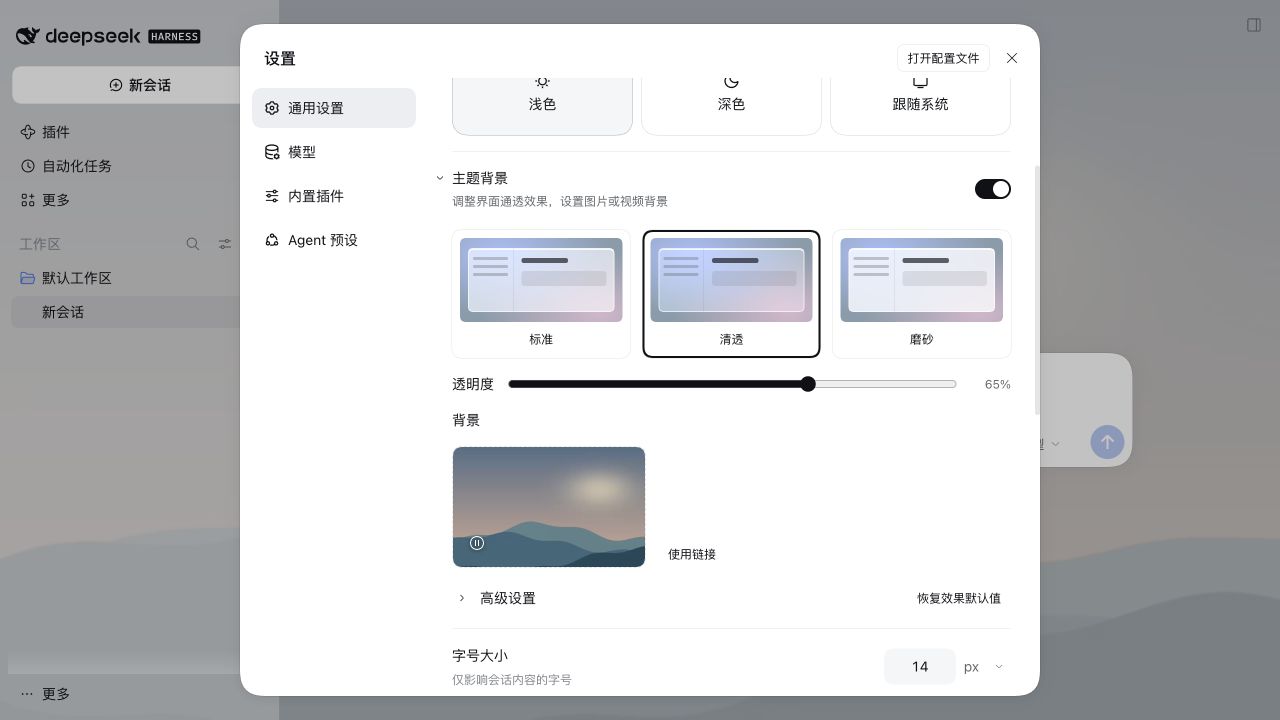
2. Under **Background**, add a local image, an image URL, or a local MP4/WebM video up to 100 MiB. Video decoding depends on your browser. Preview the background, then select **Save** for the main background picker. Videos loop muted and can be paused.
|
|
45
|
+
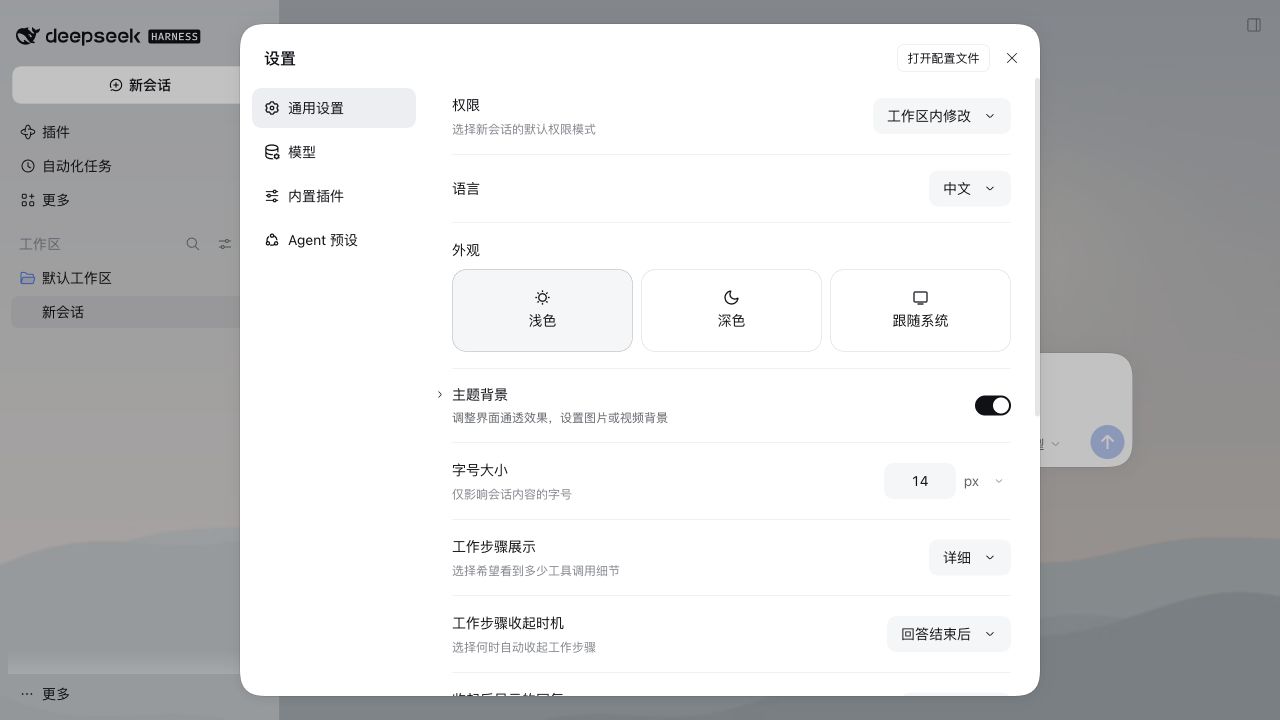
3. **Add images** in **Background** selects several photos at once. Click a thumbnail to use it, or replace it in place. Open **Rotation settings** to change the order and timing. Rotation is evaluated when DSH opens. **Recent images** retains up to 12 saved images and their composition. **Adjust wallpaper composition** supports dragging, wheel zoom, and keyboard-accessible sliders, with a save or cancel step.
|
|
46
|
+
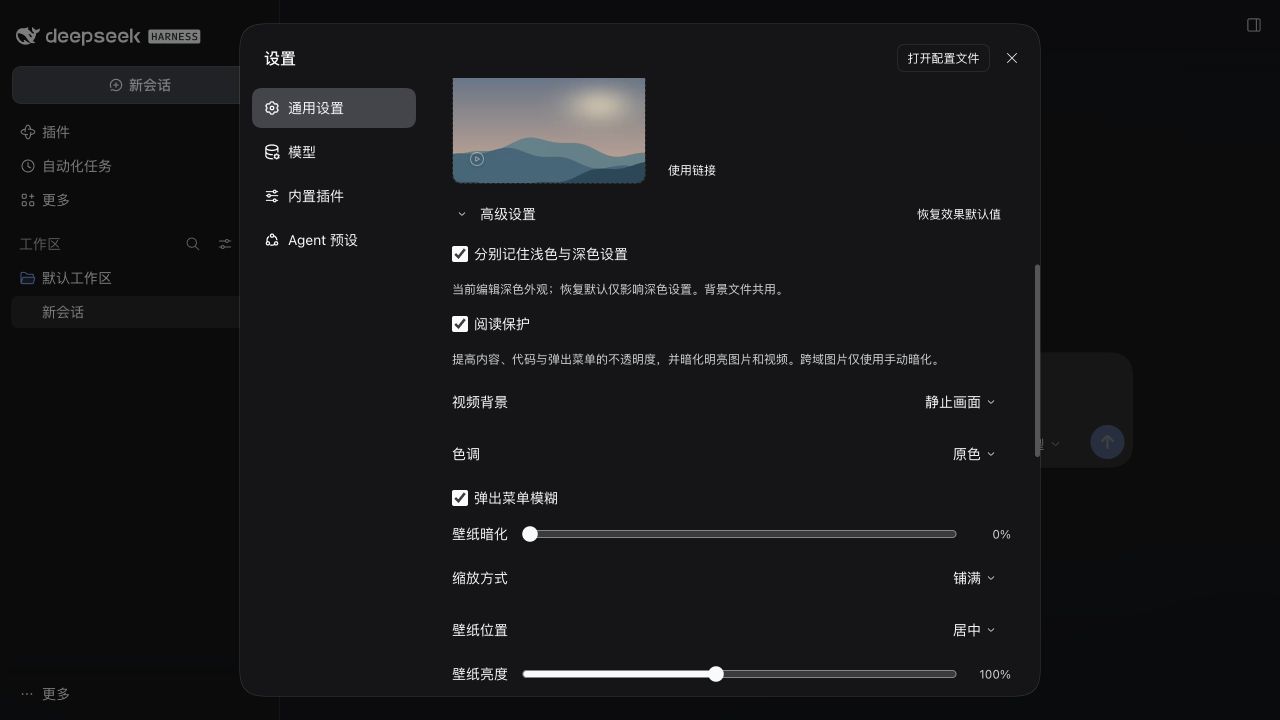
4. Open **Advanced settings** for separate light and dark appearances, reading protection, tint, menu frost, fit, position, brightness, and dimming. Saved videos can use a still frame. Resetting the effects preserves the background and the main switch.
|
|
28
47
|
|
|
29
|
-
|
|
48
|
+
Turn off **Glass surfaces** to keep the background with the host’s native surfaces. **Restore native appearance** asks for confirmation, then clears the active background and restores appearance defaults while retaining the saved rotation gallery.
|
|
30
49
|
|
|
31
|
-
|
|
50
|
+
**Wallpaper opacity** fades the image or video. **Menu glass blur** only affects the supported menu and material preview filters.
|
|
32
51
|
|
|
33
|
-
|
|
52
|
+
Reading protection is on by default. It keeps dialogs and overlays opaque and content, code, and menus at least 94% opaque while leaving the base and sidebar adjustable. It also dims bright local or same-origin media. Cross-origin images are excluded from automatic sampling. Advanced settings provides independent automatic dim and vignette controls and an [estimated content contrast readout](docs/reading-protection-contrast.md). Increased contrast temporarily selects Frost and caps transparency at 50%.
|
|
34
53
|
|
|
35
|
-
|
|
54
|
+
Use **Ctrl/Cmd+Shift+G** to toggle the effects, or find **Toggle Liquid Glass** in DSH’s keyboard-shortcut settings. Linux Web and conflicting defaults start without a binding.
|
|
36
55
|
|
|
37
|
-
##
|
|
56
|
+
## Screenshots
|
|
38
57
|
|
|
39
|
-
|
|
40
|
-
- **Separate light/dark settings**: optionally enable in Advanced. Both start from your current appearance; subsequent edits and Reset affect only the active scheme, including system and custom theme switching. Disabling applies the current appearance to both. Background files and the manual video pause are shared.
|
|
41
|
-
- **Still video frame**: choose Motion or Still frame in Advanced after saving a video. Still frame retains the current frame, or loads the first frame after reopening. It keeps the video element loaded; no CPU/GPU or battery-saving claim is made.
|
|
58
|
+
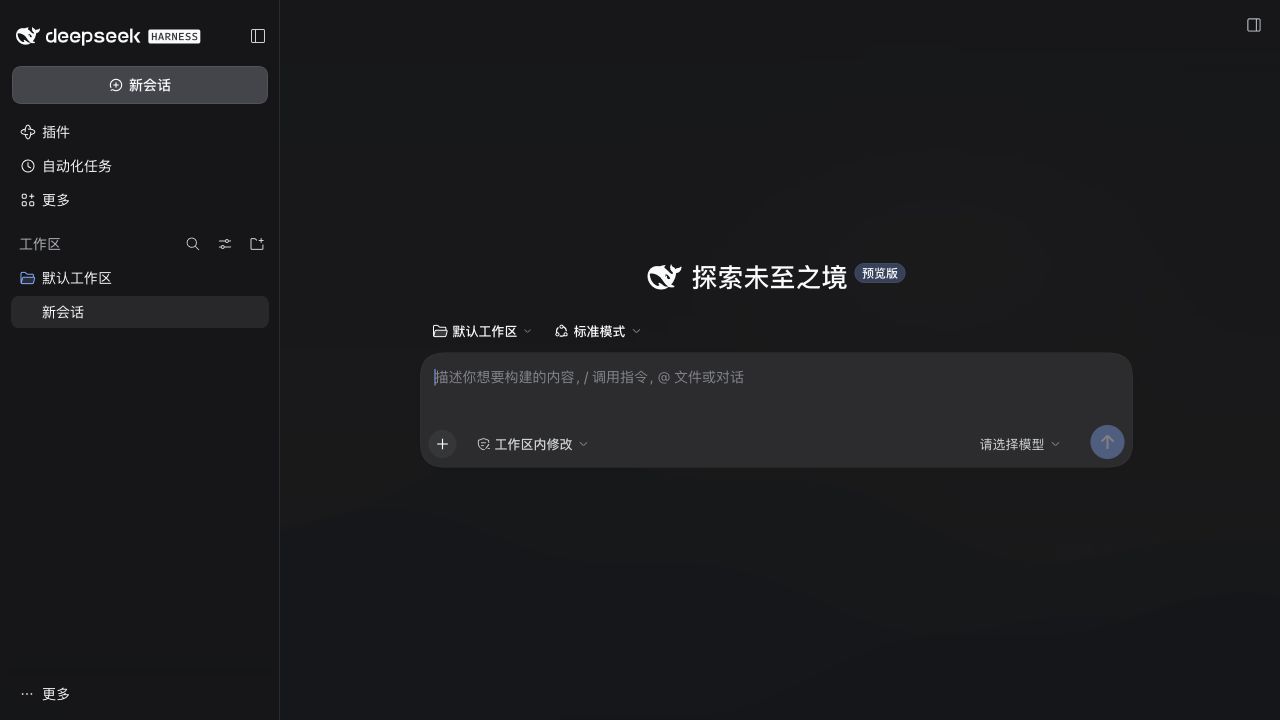
These screenshots show the 0.4.0 interface in DSH 0.2.2-rc.2 Web.
|
|
42
59
|
|
|
43
|
-
|
|
44
|
-
- **Local video backgrounds**: select MP4/WebM up to 100 MiB, with a browser-supported codec. Validated files preview immediately and are saved locally only after Save; playback loops muted; pause, resume and removal are available. Hidden pages and reduced-motion preferences pause playback. No video URLs, audio or playlists.
|
|
45
|
-
- **Visual cards**: three material previews and one permanent image/video uploader, with click or drag-and-drop selection. Replace and red remove controls sit over the thumbnail; no separate filename or media-description row.
|
|
46
|
-
- **Background drafts**: add, replace or remove to preview immediately; Save commits the selection. Closing settings, switching menus or collapsing the section prompts Save and leave, Discard changes or Keep editing. Discard restores the saved background.
|
|
47
|
-
- **Wallpaper rotation**: keep several saved image or video backgrounds in a rotation pool and cycle through them in order or at random — on every open, hourly, daily, or by time of day (morning/afternoon/evening/night). Off by default; turning it off restores the single background. Pool images share the browser's local storage budget; rotation is evaluated when the app opens.
|
|
48
|
-
- **Compact defaults**: presets, transparency and background selection; tint, frost, fit and reading protection live under Advanced. Reset preserves the background and master switch.
|
|
60
|
+

|
|
49
61
|
|
|
50
|
-
|
|
51
|
-
|
|
52
|
-
- **Scoped menu frost** with an independent switch, a settings-card rim color, and a material preview with an inset highlight. Host filter placement stays unchanged.
|
|
53
|
-
- **Wallpaper controls**: cover/contain/fill, nine positions, brightness 20%–200%, and manual dim 0%–60%. With reading protection enabled, videos and bright local or same-origin images receive at least 35% dim; cross-origin links use manual dim only. Large static uploads are compressed; GIF data is preserved.
|
|
54
|
-
- **System accessibility response**: reduced transparency or increased contrast selects effective Frost material and limits transparency to 50%, without overwriting saved preferences.
|
|
55
|
-
- **Keyboard toggle**: Ctrl/Cmd+Shift+G through the host shortcut service. Change or remove “Toggle Liquid Glass” in the host Keyboard shortcuts settings. Linux Web starts unbound; conflicting defaults fall back to an unbound command.
|
|
62
|
+
<details>
|
|
63
|
+
<summary>More screenshots</summary>
|
|
56
64
|
|
|
57
|
-
|
|
65
|
+
|
|
66
|
+
|
|
67
|
+
|
|
58
68
|
|
|
59
|
-
|
|
69
|
+
</details>
|
|
60
70
|
|
|
61
|
-
|
|
71
|
+
## Compatibility and data
|
|
62
72
|
|
|
63
|
-
|
|
73
|
+
The client bundle targets DSH Web. Validation includes [DSH 0.2.2-rc.2](docs/v0.4.0-validation.md), the published release checks in the [changelog](CHANGELOG.md), and the Web checks for the [gallery update](https://github.com/Ultroncn/dsh-liquid-glass/pull/30). See the [host API notes](docs/v0.2.0-local-evidence.md) for integration details. The plugin interface provides English and Simplified Chinese. **Advanced settings → Diagnostics and compatibility** shows the verified host version, test date and live hook status. Its copyable JSON report includes capability and appearance status. With the system’s reduced transparency preference enabled, the plugin uses opaque surfaces and hides wallpaper until the preference is cleared.
|
|
64
74
|
|
|
65
|
-
|
|
75
|
+
Preferences and images are stored in the site’s `localStorage`. Videos and the recent image history are stored in IndexedDB. The plugin has no server component or telemetry.
|
|
66
76
|
|
|
67
|
-
|
|
68
|
-
- The UI integrates through DeepSeek Harness's public client runtime, locale, slot, theme, and shortcut APIs. Shortcut bindings use host-managed device-local storage (localStorage on Web; keybindings.json on Desktop).
|
|
69
|
-
- Light and dark color schemes are supported. Appearance profiles use a versioned local record; legacy settings remain intact, but downgrading to 0.3.x restores those older values. A DSH restart is required once after installation so the client bundle can be loaded.
|
|
77
|
+
To uninstall, run `dsh plugin --profile web remove dsh-liquid-glass` with the same profile. Remove saved backgrounds before uninstalling if you want to free the media storage. Uninstalling retains the site’s local records.
|
|
70
78
|
|
|
71
79
|
## Verify from source
|
|
72
80
|
|
|
73
|
-
The smoke test runs the published client bundle inside a mocked DSH browser runtime and exercises registration, lifecycle, settings, persistence, wallpaper controls and slider bounds:
|
|
74
|
-
|
|
75
81
|
```sh
|
|
76
82
|
npm ci
|
|
77
|
-
|
|
83
|
+
npm test
|
|
78
84
|
npm pack --dry-run --json
|
|
79
85
|
```
|
|
80
86
|
|
|
81
|
-
|
|
82
|
-
|
|
83
|
-
```sh
|
|
84
|
-
dsh plugin --profile web remove dsh-liquid-glass
|
|
85
|
-
```
|
|
86
|
-
|
|
87
|
-
Remove the background in settings before uninstalling if desired. Uninstalling does not automatically clear localStorage or IndexedDB; saved videos still consume local storage. Do not erase all host site data just to clean this plugin.
|
|
88
|
-
|
|
89
|
-
## License
|
|
90
|
-
|
|
91
|
-
MIT
|
|
87
|
+
The smoke tests exercise the client bundle in a mocked DSH Web runtime. GitHub CI uses Node.js 24.
|
package/README.pt-BR.md
ADDED
|
@@ -0,0 +1,56 @@
|
|
|
1
|
+
<div align="center">
|
|
2
|
+
|
|
3
|
+
<h1>Liquid Glass</h1>
|
|
4
|
+
<p><strong>Superfícies translúcidas e fundos personalizados para DeepSeek Harness.</strong></p>
|
|
5
|
+
<p><code>dsh-liquid-glass</code></p>
|
|
6
|
+
|
|
7
|
+
<p><a href="README.zh.md">简体中文</a> · <a href="README.md">English</a> · <a href="README.ja.md">日本語</a> · <a href="README.es.md">Español</a> · <a href="README.fr.md">Français</a> · <a href="README.de.md">Deutsch</a> · <a href="README.ru.md">Русский</a> · <strong>Português (Brasil)</strong></p>
|
|
8
|
+
<p><a href="CHANGELOG.md">Histórico de alterações</a> · <a href="LICENSE">Licença MIT</a></p>
|
|
9
|
+
|
|
10
|
+
<p>
|
|
11
|
+
<a href="https://www.npmjs.com/package/dsh-liquid-glass"><img alt="Versão no npm" src="https://img.shields.io/npm/v/dsh-liquid-glass?style=flat-square"></a>
|
|
12
|
+
<a href="https://www.npmjs.com/package/dsh-liquid-glass"><img alt="Total de downloads no npm" src="https://img.shields.io/npm/dt/dsh-liquid-glass?style=flat-square&label=total%20downloads"></a>
|
|
13
|
+
<a href="https://github.com/Ultroncn/dsh-liquid-glass/actions/workflows/ci.yml"><img alt="CI" src="https://img.shields.io/github/actions/workflow/status/Ultroncn/dsh-liquid-glass/ci.yml?branch=main&style=flat-square&label=CI"></a>
|
|
14
|
+
<a href="docs/v0.4.0-validation.md"><img alt="DSH Web" src="https://img.shields.io/badge/DSH-Web-2563eb?style=flat-square"></a>
|
|
15
|
+
<a href="LICENSE"><img alt="Licença MIT" src="https://img.shields.io/badge/License-MIT-2ea44f?style=flat-square"></a>
|
|
16
|
+
<a href="https://dsh-insights.com/p/Ultroncn/dsh-liquid-glass/"><img alt="DSH Insights" src="https://dsh-insights.com/badge/Ultroncn/dsh-liquid-glass.svg"></a>
|
|
17
|
+
</p>
|
|
18
|
+
|
|
19
|
+
<p><a href="https://awesome-dsh-plugin.com/p/Ultroncn/dsh-liquid-glass/">Catálogo de plugins</a> · <a href="https://www.npmjs.com/package/dsh-liquid-glass">npm</a> · <a href="https://github.com/Ultroncn/dsh-liquid-glass/releases">Versões</a> · <a href="https://github.com/Ultroncn/dsh-liquid-glass/issues">Relatar problemas</a></p>
|
|
20
|
+
|
|
21
|
+
</div>
|
|
22
|
+
|
|
23
|
+
O Liquid Glass adiciona superfícies translúcidas e fundos com imagens ou vídeos ao [DeepSeek Harness](https://github.com/deepseek-ai/deepseek-harness) (DSH). É um plugin mantido pela comunidade.
|
|
24
|
+
|
|
25
|
+
> **Versão 0.6.0.** A rotação fica na seção de fundos. Você pode adicionar várias imagens, substituí-las individualmente e percorrer até seis miniaturas em uma única linha com rolagem horizontal. O [histórico de alterações](CHANGELOG.md) detalha a remoção da importação e exportação de aparência e as demais novidades.
|
|
26
|
+
|
|
27
|
+
## Instalação e acesso
|
|
28
|
+
|
|
29
|
+
Procure por `dsh-liquid-glass` no catálogo de plugins do DSH e confira se o autor é **Ultroncn**. No campo de adição de plugins do aplicativo, digite `dsh-liquid-glass@0.6.0`. Ao usar o terminal, substitua `web` pelo perfil em que você executa o DSH.
|
|
30
|
+
|
|
31
|
+
```sh
|
|
32
|
+
dsh plugin --profile web add dsh-liquid-glass@0.6.0 --registry=https://registry.npmjs.org/
|
|
33
|
+
```
|
|
34
|
+
|
|
35
|
+
Reinicie o DSH após instalar ou atualizar. Abra **Settings → General → Theme background** (**设置 → 通用 → 主题背景**), logo abaixo de **Appearance**. O interruptor principal controla o efeito de vidro e o fundo em conjunto. Suas preferências ficam salvas ao desativá-lo.
|
|
36
|
+
|
|
37
|
+
Para atualizar para 0.6.0, execute o mesmo comando. Ele especifica a versão e usa o registro oficial do npm. Se aparecer `ERR_PNPM_ADDING_TO_ROOT`, adicione `-w` depois de `add`.
|
|
38
|
+
|
|
39
|
+
## Como usar
|
|
40
|
+
|
|
41
|
+
1. Escolha **Regular**, **Clear** ou **Frost** e ajuste a transparência da interface entre 3% e 95%.
|
|
42
|
+
2. Em **Background**, escolha uma imagem local, um link de imagem ou um vídeo local MP4/WebM de até 100 MiB. O navegador precisa oferecer suporte ao codec. No seletor de fundo principal, confira a prévia e clique em **Save**. Os vídeos se repetem sem som e podem ser pausados.
|
|
43
|
+
3. Em **Background**, use **Add images** para selecionar várias fotos. Clique em uma miniatura para aplicar o fundo ou use o botão de substituição. Em **Rotation settings**, ajuste a ordem e o momento da troca. O DSH avalia a rotação ao ser aberto.
|
|
44
|
+
4. Abra **Advanced settings** para configurar separadamente os modos claro e escuro e ajustar a proteção de leitura, a tonalidade, o desfoque dos menus, o enquadramento, a posição, o brilho e o escurecimento. Você também pode exibir um quadro estático do vídeo.
|
|
45
|
+
|
|
46
|
+
## Captura de tela
|
|
47
|
+
|
|
48
|
+
Interface da versão 0.4.0 no DSH 0.2.2-rc.2 Web.
|
|
49
|
+
|
|
50
|
+

|
|
51
|
+
|
|
52
|
+
## Compatibilidade e dados
|
|
53
|
+
|
|
54
|
+
O plugin é voltado para o DSH Web. A interface está disponível em inglês e chinês simplificado. Consulte os [resultados de validação](docs/v0.4.0-validation.md) e o [histórico de alterações](CHANGELOG.md).
|
|
55
|
+
|
|
56
|
+
As preferências e imagens ficam no `localStorage` do site. Os vídeos ficam no IndexedDB. O plugin funciona sem servidor próprio nem telemetria. Para desinstalar, execute `dsh plugin --profile web remove dsh-liquid-glass` com o mesmo perfil. Para liberar o armazenamento, remova os fundos salvos nas configurações antes de desinstalar.
|
package/README.ru.md
ADDED
|
@@ -0,0 +1,56 @@
|
|
|
1
|
+
<div align="center">
|
|
2
|
+
|
|
3
|
+
<h1>Liquid Glass</h1>
|
|
4
|
+
<p><strong>Полупрозрачный интерфейс и собственные фоны для DeepSeek Harness.</strong></p>
|
|
5
|
+
<p><code>dsh-liquid-glass</code></p>
|
|
6
|
+
|
|
7
|
+
<p><a href="README.zh.md">简体中文</a> · <a href="README.md">English</a> · <a href="README.ja.md">日本語</a> · <a href="README.es.md">Español</a> · <a href="README.fr.md">Français</a> · <a href="README.de.md">Deutsch</a> · <strong>Русский</strong> · <a href="README.pt-BR.md">Português (Brasil)</a></p>
|
|
8
|
+
<p><a href="CHANGELOG.md">История изменений</a> · <a href="LICENSE">Лицензия MIT</a></p>
|
|
9
|
+
|
|
10
|
+
<p>
|
|
11
|
+
<a href="https://www.npmjs.com/package/dsh-liquid-glass"><img alt="Версия в npm" src="https://img.shields.io/npm/v/dsh-liquid-glass?style=flat-square"></a>
|
|
12
|
+
<a href="https://www.npmjs.com/package/dsh-liquid-glass"><img alt="Всего загрузок из npm" src="https://img.shields.io/npm/dt/dsh-liquid-glass?style=flat-square&label=total%20downloads"></a>
|
|
13
|
+
<a href="https://github.com/Ultroncn/dsh-liquid-glass/actions/workflows/ci.yml"><img alt="CI" src="https://img.shields.io/github/actions/workflow/status/Ultroncn/dsh-liquid-glass/ci.yml?branch=main&style=flat-square&label=CI"></a>
|
|
14
|
+
<a href="docs/v0.4.0-validation.md"><img alt="DSH Web" src="https://img.shields.io/badge/DSH-Web-2563eb?style=flat-square"></a>
|
|
15
|
+
<a href="LICENSE"><img alt="Лицензия MIT" src="https://img.shields.io/badge/License-MIT-2ea44f?style=flat-square"></a>
|
|
16
|
+
<a href="https://dsh-insights.com/p/Ultroncn/dsh-liquid-glass/"><img alt="DSH Insights" src="https://dsh-insights.com/badge/Ultroncn/dsh-liquid-glass.svg"></a>
|
|
17
|
+
</p>
|
|
18
|
+
|
|
19
|
+
<p><a href="https://awesome-dsh-plugin.com/p/Ultroncn/dsh-liquid-glass/">Каталог плагинов</a> · <a href="https://www.npmjs.com/package/dsh-liquid-glass">npm</a> · <a href="https://github.com/Ultroncn/dsh-liquid-glass/releases">Релизы</a> · <a href="https://github.com/Ultroncn/dsh-liquid-glass/issues">Сообщить о проблеме</a></p>
|
|
20
|
+
|
|
21
|
+
</div>
|
|
22
|
+
|
|
23
|
+
Liquid Glass добавляет в [DeepSeek Harness](https://github.com/deepseek-ai/deepseek-harness) (DSH) полупрозрачные поверхности и фоны из изображений или видео. Плагин поддерживает сообщество.
|
|
24
|
+
|
|
25
|
+
> **Версия 0.6.0.** Смена обоев теперь находится в разделе фона. Изображения можно добавлять сразу по несколько и заменять по одному. До шести миниатюр отображаются в одном ряду с горизонтальной прокруткой. Удаление импорта и экспорта оформления и другие изменения описаны в [истории изменений](CHANGELOG.md).
|
|
26
|
+
|
|
27
|
+
## Установка и запуск
|
|
28
|
+
|
|
29
|
+
Найдите `dsh-liquid-glass` в каталоге плагинов DSH и убедитесь, что автор — **Ultroncn**. В поле добавления плагина введите `dsh-liquid-glass@0.6.0`. При установке из терминала замените `web` на профиль, с которым запускаете DSH.
|
|
30
|
+
|
|
31
|
+
```sh
|
|
32
|
+
dsh plugin --profile web add dsh-liquid-glass@0.6.0 --registry=https://registry.npmjs.org/
|
|
33
|
+
```
|
|
34
|
+
|
|
35
|
+
Перезапустите DSH после установки или обновления. Откройте **Settings → General → Theme background** (**设置 → 通用 → 主题背景**) под разделом **Appearance**. Главный переключатель управляет эффектом стекла и фоном одновременно. При выключении настройки сохраняются.
|
|
36
|
+
|
|
37
|
+
Для обновления до 0.6.0 выполните ту же команду. В ней указана нужная версия и официальный реестр npm. При ошибке `ERR_PNPM_ADDING_TO_ROOT` добавьте `-w` после `add`.
|
|
38
|
+
|
|
39
|
+
## Использование
|
|
40
|
+
|
|
41
|
+
1. Выберите **Regular**, **Clear** или **Frost** и настройте прозрачность интерфейса в пределах 3–95 %.
|
|
42
|
+
2. В разделе **Background** выберите локальное изображение, ссылку на изображение или локальное видео MP4/WebM размером до 100 MiB. Браузер должен поддерживать видеокодек. Проверьте предпросмотр основного фона и нажмите **Save**. Видео воспроизводится без звука по кругу, его можно приостановить.
|
|
43
|
+
3. В разделе **Background** нажмите **Add images**, чтобы выбрать несколько фотографий. Нажмите на миниатюру, чтобы применить фон, или используйте кнопку замены. В **Rotation settings** можно настроить порядок и время смены. DSH проверяет необходимость смены при запуске.
|
|
44
|
+
4. В **Advanced settings** доступны отдельные настройки светлой и тёмной тем, режим для удобства чтения, оттенок, размытие меню, масштаб, положение, яркость и затемнение фона. Для видео можно выбрать стоп-кадр.
|
|
45
|
+
|
|
46
|
+
## Снимок экрана
|
|
47
|
+
|
|
48
|
+
Интерфейс версии 0.4.0 в DSH 0.2.2-rc.2 Web.
|
|
49
|
+
|
|
50
|
+

|
|
51
|
+
|
|
52
|
+
## Совместимость и данные
|
|
53
|
+
|
|
54
|
+
Плагин предназначен для DSH Web. Интерфейс доступен на английском и упрощённом китайском. См. [результаты проверки](docs/v0.4.0-validation.md) и [историю изменений](CHANGELOG.md).
|
|
55
|
+
|
|
56
|
+
Настройки и изображения хранятся в `localStorage` сайта, видео — в IndexedDB. У плагина нет собственного сервера или телеметрии. Для удаления выполните `dsh plugin --profile web remove dsh-liquid-glass` в том же профиле. Если нужно освободить место, перед удалением плагина уберите сохранённые фоны в настройках.
|