dsh-liquid-glass 0.3.0 → 0.4.0
This diff represents the content of publicly available package versions that have been released to one of the supported registries. The information contained in this diff is provided for informational purposes only and reflects changes between package versions as they appear in their respective public registries.
- package/README.md +13 -9
- package/README.zh.md +13 -9
- package/lib/client.js +94 -24
- package/package.json +1 -1
package/README.md
CHANGED
|
@@ -8,7 +8,7 @@ English | [中文](README.zh.md)
|
|
|
8
8
|
|
|
9
9
|
**Theme backgrounds for [DeepSeek Harness](https://github.com/deepseek-ai/deepseek-harness)** — translucent surfaces with image or local video backgrounds.
|
|
10
10
|
|
|
11
|
-
Translucent theme surfaces and scoped frosted menus over your own background image, with material presets, tint, wallpaper controls, and system accessibility response. Current version: **0.
|
|
11
|
+
Translucent theme surfaces and scoped frosted menus over your own background image, with material presets, tint, wallpaper controls, and system accessibility response. Current version: **0.4.0**. A community plugin that reuses the host’s official controls where available.
|
|
12
12
|
|
|
13
13
|
## Install
|
|
14
14
|
|
|
@@ -18,22 +18,26 @@ dsh plugin --profile web add dsh-liquid-glass
|
|
|
18
18
|
|
|
19
19
|
Run the command in a terminal. In the app’s Add plugin field, enter only `dsh-liquid-glass`.
|
|
20
20
|
|
|
21
|
-
Open **Settings → General → Theme background**, immediately below Appearance. Expand the official chevron for basic options; advanced options remain collapsed. The switch controls glass and image/video backgrounds together, retaining preferences when disabled. Restart the host after upgrading. Enter `dsh-liquid-glass@0.
|
|
21
|
+
Open **Settings → General → Theme background**, immediately below Appearance. Expand the official chevron for basic options; advanced options remain collapsed. The switch controls glass and image/video backgrounds together, retaining preferences when disabled. Restart the host after upgrading. Enter `dsh-liquid-glass@0.4.0` in the app’s plugin field, not the full terminal command.
|
|
22
22
|
|
|
23
23
|
## Screenshots
|
|
24
24
|
|
|
25
|
-
Captured from the actual package in official DSH 0.2.2-rc.2 Web, using original local demonstration media.
|
|
25
|
+
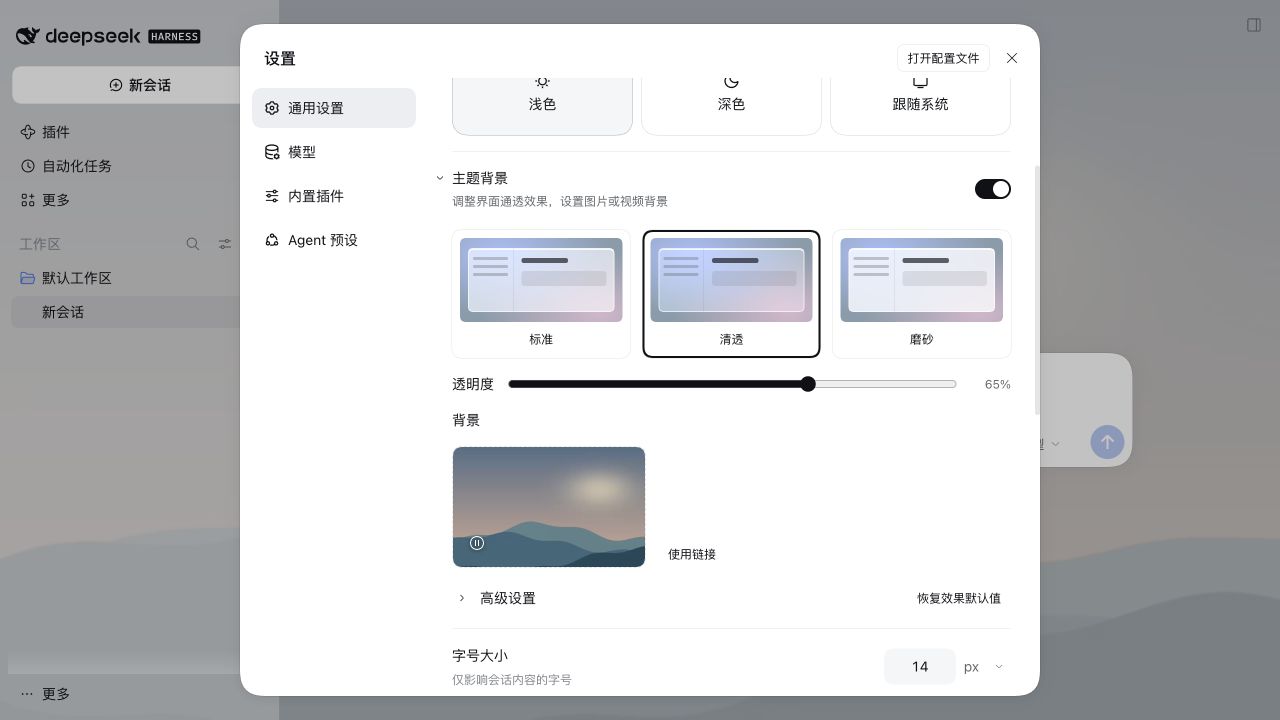
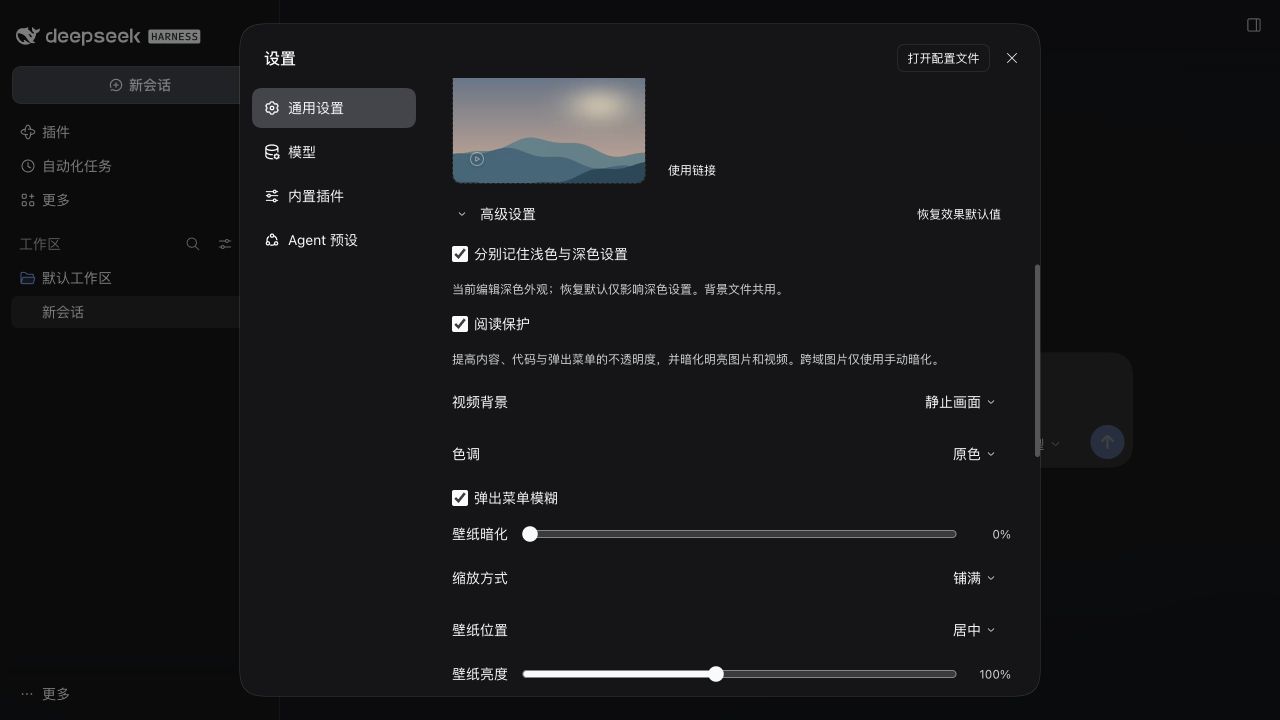
Captured from the actual package in official DSH 0.2.2-rc.2 Web, using original local demonstration media. Reading protection is enabled. Light appearance uses Clear (65% transparency); dark appearance uses Frost (22%) with a still video frame.
|
|
26
26
|
|
|
27
|
-

|
|
28
28
|
|
|
29
|
-
|
|
30
30
|
|
|
31
|
-

|
|
32
32
|
|
|
33
|
-
|
|
34
34
|
|
|
35
35
|
## What you get
|
|
36
36
|
|
|
37
|
+
- **Reading protection**: enabled by default, now keeps dialogs and overlay surfaces opaque and content/code/menu surfaces at least 94% opaque. Base and sidebar transparency remain adjustable. Turn it off in Advanced for the previous fully translucent style. It also retains automatic background dimming.
|
|
38
|
+
- **Separate light/dark settings**: optionally enable in Advanced. Both start from your current appearance; subsequent edits and Reset affect only the active scheme, including system and custom theme switching. Disabling applies the current appearance to both. Background files and the manual video pause are shared.
|
|
39
|
+
- **Still video frame**: choose Motion or Still frame in Advanced after saving a video. Still frame retains the current frame, or loads the first frame after reopening. It keeps the video element loaded; no CPU/GPU or battery-saving claim is made.
|
|
40
|
+
|
|
37
41
|
- **Host controls**: reuse Switch, Button, Input, Checkbox, Menu, Modal and chevron icons. No public settings-row or slider component exists; a small layout adapter handles these without private CSS classes.
|
|
38
42
|
- **Local video backgrounds**: select MP4/WebM up to 100 MiB, with a browser-supported codec. Validated files preview immediately and are saved locally only after Save; playback loops muted; pause, resume and removal are available. Hidden pages and reduced-motion preferences pause playback. No video URLs, audio or playlists.
|
|
39
43
|
- **Visual cards**: three material previews and one permanent image/video uploader, with click or drag-and-drop selection. Replace and red remove controls sit over the thumbnail; no separate filename or media-description row.
|
|
@@ -47,7 +51,7 @@ Captured from the actual package in official DSH 0.2.2-rc.2 Web, using original
|
|
|
47
51
|
- **System accessibility response**: reduced transparency or increased contrast selects effective Frost material and limits transparency to 50%, without overwriting saved preferences.
|
|
48
52
|
- **Keyboard toggle**: Ctrl/Cmd+Shift+G through the host shortcut service. Change or remove “Toggle Liquid Glass” in the host Keyboard shortcuts settings. Linux Web starts unbound; conflicting defaults fall back to an unbound command.
|
|
49
53
|
|
|
50
|
-
Independent user/assistant opacity floors and general host-panel blur/highlights are not implemented: verified official extension hooks are missing. See [local API evidence and validation limits](docs/v0.2.0-local-evidence.md). See [
|
|
54
|
+
Independent user/assistant opacity floors and general host-panel blur/highlights are not implemented: verified official extension hooks are missing. See [local API evidence and validation limits](docs/v0.2.0-local-evidence.md). See [0.4.0 validation](docs/v0.4.0-validation.md) for this release.
|
|
51
55
|
|
|
52
56
|
## Privacy and compatibility
|
|
53
57
|
|
|
@@ -55,7 +59,7 @@ The host has no public settings leave-guard API. Unsaved-change protection uses
|
|
|
55
59
|
|
|
56
60
|
- Preferences and images use origin-local `localStorage`; video Blobs use IndexedDB. Media is not shared across browsers or origins, and clearing site data deletes saved videos; the plugin has no server component and sends no telemetry.
|
|
57
61
|
- The UI integrates through DeepSeek Harness's public client runtime, locale, slot, theme, and shortcut APIs. Shortcut bindings use host-managed device-local storage (localStorage on Web; keybindings.json on Desktop).
|
|
58
|
-
- Light and dark color schemes are supported. A DSH restart is required once after installation so the client bundle can be loaded.
|
|
62
|
+
- Light and dark color schemes are supported. Appearance profiles use a versioned local record; legacy settings remain intact, but downgrading to 0.3.x restores those older values. A DSH restart is required once after installation so the client bundle can be loaded.
|
|
59
63
|
|
|
60
64
|
## Verify from source
|
|
61
65
|
|
package/README.zh.md
CHANGED
|
@@ -8,7 +8,7 @@
|
|
|
8
8
|
|
|
9
9
|
**[DeepSeek Harness](https://github.com/deepseek-ai/deepseek-harness) 的主题背景插件**:调整界面通透效果,设置图片或视频背景。
|
|
10
10
|
|
|
11
|
-
通过官方主题接口提供表面透明化、弹出菜单模糊、自定义壁纸、质感预设、色调和系统无障碍响应。当前版本 **0.
|
|
11
|
+
通过官方主题接口提供表面透明化、弹出菜单模糊、自定义壁纸、质感预设、色调和系统无障碍响应。当前版本 **0.4.0**。社区插件,界面尽量复用宿主提供的官方组件。
|
|
12
12
|
|
|
13
13
|
## 安装
|
|
14
14
|
|
|
@@ -18,22 +18,26 @@ dsh plugin --profile web add dsh-liquid-glass
|
|
|
18
18
|
|
|
19
19
|
终端中运行上面的命令;如果使用应用的「添加插件」输入框,只填 `dsh-liquid-glass`。
|
|
20
20
|
|
|
21
|
-
入口为 **设置 → 通用 → 外观下方的「主题背景」**,默认折叠。点击官方箭头展开基础选项;高级选项再次折叠。开关同时控制透明效果和图片/视频背景,关闭不丢失偏好。升级后重启宿主。应用内安装框填写 `dsh-liquid-glass@0.
|
|
21
|
+
入口为 **设置 → 通用 → 外观下方的「主题背景」**,默认折叠。点击官方箭头展开基础选项;高级选项再次折叠。开关同时控制透明效果和图片/视频背景,关闭不丢失偏好。升级后重启宿主。应用内安装框填写 `dsh-liquid-glass@0.4.0`,不要粘贴完整终端命令。
|
|
22
22
|
|
|
23
23
|
## 截图
|
|
24
24
|
|
|
25
|
-
实际安装包在官方 DSH 0.2.2-rc.2 Web
|
|
25
|
+
实际安装包在官方 DSH 0.2.2-rc.2 Web 宿主中的截图;背景为本地原创演示素材。开启阅读保护;浅色使用“清透”(65% 透明度),深色使用“磨砂”(22%)与视频静止画面。
|
|
26
26
|
|
|
27
|
-

|
|
28
28
|
|
|
29
|
-

|
|
30
30
|
|
|
31
|
-

|
|
32
32
|
|
|
33
|
-

|
|
34
34
|
|
|
35
35
|
## 功能
|
|
36
36
|
|
|
37
|
+
- **阅读保护**:默认开启;现在让对话框与浮层保持不透明,内容、代码与菜单至少 94% 不透明,主背景和侧边栏继续跟随透明度。高级设置中关闭后恢复原来的全透明风格,并保留原有背景自动暗化功能。
|
|
38
|
+
- **浅深色分别记忆**:在高级设置中选用;开启时两套设置都复制当前外观,之后编辑或恢复默认只影响当前浅色/深色方案,跟随系统和自定义主题同样适用。关闭后两种方案都使用当前外观。背景文件和手动暂停状态共用。
|
|
39
|
+
- **视频静止画面**:保存视频后,在高级设置中选择“动态播放/静止画面”。静止模式保留当前帧,重新打开时显示首帧;仍保留视频元素,不承诺未经测量的省电或性能收益。
|
|
40
|
+
|
|
37
41
|
- **统一的设置控件**:复用宿主 Switch、Button、Input、Checkbox、Menu、Modal 和折叠图标。宿主没有公开设置行或滑块组件,相关布局仅作小范围适配,不导入内部样式类。
|
|
38
42
|
- **本地视频背景**:选择 MP4/WebM(不超过 100 MiB,需浏览器支持对应编码)验证后立即预览,点击“保存”后写入本地;静音循环,可暂停/播放、移除。页面不可见或系统启用“减少动态效果”时自动暂停。暂不支持视频 URL、声音、播放列表。
|
|
39
43
|
- **卡片式选择**:三张质感预览卡片;图片和视频共用常驻上传卡片,支持点击或拖放。更换和红色移除按钮位于缩略图浮层内,不再额外显示文件名或媒体描述。
|
|
@@ -47,13 +51,13 @@ dsh plugin --profile web add dsh-liquid-glass
|
|
|
47
51
|
- **系统无障碍响应**:减透明或增强对比度启用时,临时使用磨砂质感并将透明度限制为最高 50%,不覆盖用户保存的偏好。
|
|
48
52
|
- **快捷键切换**:经宿主快捷键服务注册 Ctrl/Cmd+Shift+G,在宿主「键盘快捷键」设置中可更改或移除「切换液态玻璃」。Linux 网页端默认不绑定;默认组合冲突时退为未绑定命令。
|
|
49
53
|
|
|
50
|
-
人/助手独立消息不透明度下限,以及任意宿主面板的磨砂/内侧高光,因缺少已核实的官方扩展接口而未实现。参见[本地 API 证据与验证限制](docs/v0.2.0-local-evidence.md)
|
|
54
|
+
人/助手独立消息不透明度下限,以及任意宿主面板的磨砂/内侧高光,因缺少已核实的官方扩展接口而未实现。参见[本地 API 证据与验证限制](docs/v0.2.0-local-evidence.md)。本版验证记录见 [0.4.0 验证](docs/v0.4.0-validation.md)。
|
|
51
55
|
|
|
52
56
|
## 隐私与兼容性
|
|
53
57
|
|
|
54
58
|
- 偏好和图片保存在当前站点的 `localStorage`,视频 Blob 保存在 IndexedDB 中;不同浏览器或站点不共享,清除站点数据会删除保存的视频;插件没有服务端组件,也不发送遥测数据。
|
|
55
59
|
- 主要通过 DeepSeek Harness 的公开客户端运行时、语言、插槽、主题和快捷键 API 集成。宿主暂未公开设置离开拦截接口,未保存提示使用面向 0.2.2-rc.2 设置结构的小范围适配,宿主升级后需回归验证。快捷键绑定由宿主管理,网页端用 localStorage,桌面端用设备本地 keybindings.json。
|
|
56
|
-
-
|
|
60
|
+
- 支持亮色和暗色方案。独立外观使用带版本的本地记录,旧设置保留;降级至 0.3.x 会恢复旧版本保存的值。安装后需要重启一次 DSH,以便加载客户端 bundle。
|
|
57
61
|
|
|
58
62
|
## 从源码验证
|
|
59
63
|
|
package/lib/client.js
CHANGED
|
@@ -31,6 +31,8 @@ window.__ModuleLoader__.load({
|
|
|
31
31
|
const GLASS_CSS_ID = "dsh-liquid-glass-glass-css";
|
|
32
32
|
const MATERIAL_SOURCE = "dsh-liquid-glass:material";
|
|
33
33
|
const KEY_OPTIONS = "dsh-liquid-glass:options";
|
|
34
|
+
const KEY_APPEARANCES = "dsh-liquid-glass:appearances";
|
|
35
|
+
let activeScheme = "light";
|
|
34
36
|
const PRESETS = {
|
|
35
37
|
regular: { alpha: 0.62, blur: 12, saturate: 180 },
|
|
36
38
|
clear: { alpha: 0.35, blur: 6, saturate: 140 },
|
|
@@ -43,12 +45,10 @@ window.__ModuleLoader__.load({
|
|
|
43
45
|
ink: { light: "#dce2eb", dark: "#10141c" }
|
|
44
46
|
};
|
|
45
47
|
const POSITIONS = ["left top", "center top", "right top", "left center", "center center", "right center", "left bottom", "center bottom", "right bottom"];
|
|
46
|
-
const DEFAULT_OPTIONS = { preset: "regular", tint: "neutral", filter: true, dim: 0, autoDim: true, fit: "cover", position: "center center", brightness: 100 };
|
|
48
|
+
const DEFAULT_OPTIONS = { preset: "regular", tint: "neutral", filter: true, dim: 0, autoDim: true, fit: "cover", position: "center center", brightness: 100, videoMode: "motion" };
|
|
47
49
|
const enumValue = (value, choices, fallback) => choices.includes(value) ? value : fallback;
|
|
48
50
|
const numberValue = (value, min, max, fallback) => typeof value === "number" && Number.isFinite(value) ? Math.round(Math.min(max, Math.max(min, value))) : fallback;
|
|
49
|
-
function
|
|
50
|
-
let saved;
|
|
51
|
-
try { saved = JSON.parse(readStorage(KEY_OPTIONS)); } catch { /* Invalid preferences use defaults. */ }
|
|
51
|
+
function sanitizeOptions(saved) {
|
|
52
52
|
const o = saved && typeof saved === "object" ? saved : {};
|
|
53
53
|
return {
|
|
54
54
|
preset: enumValue(o.preset, Object.keys(PRESETS), "regular"),
|
|
@@ -58,9 +58,32 @@ window.__ModuleLoader__.load({
|
|
|
58
58
|
autoDim: typeof o.autoDim === "boolean" ? o.autoDim : true,
|
|
59
59
|
fit: enumValue(o.fit, ["cover", "contain", "fill"], "cover"),
|
|
60
60
|
position: enumValue(o.position, POSITIONS, "center center"),
|
|
61
|
-
brightness: numberValue(o.brightness, 20, 200, 100)
|
|
61
|
+
brightness: numberValue(o.brightness, 20, 200, 100),
|
|
62
|
+
videoMode: enumValue(o.videoMode, ["motion", "still"], "motion")
|
|
62
63
|
};
|
|
63
64
|
}
|
|
65
|
+
function readProfiles() {
|
|
66
|
+
try {
|
|
67
|
+
const saved = JSON.parse(readStorage(KEY_APPEARANCES));
|
|
68
|
+
if (saved?.version !== 1 || typeof saved.separate !== "boolean") return null;
|
|
69
|
+
for (const scheme of ["light", "dark"]) {
|
|
70
|
+
const profile = saved[scheme];
|
|
71
|
+
if (!profile || !Number.isFinite(profile.alpha) || !profile.options || typeof profile.options !== "object" || Array.isArray(profile.options)) return null;
|
|
72
|
+
}
|
|
73
|
+
return saved;
|
|
74
|
+
} catch { return null; }
|
|
75
|
+
}
|
|
76
|
+
function currentProfile() {
|
|
77
|
+
const profiles = readProfiles();
|
|
78
|
+
return profiles?.[profiles.separate ? activeScheme : "light"];
|
|
79
|
+
}
|
|
80
|
+
function readOptions() {
|
|
81
|
+
const profile = currentProfile();
|
|
82
|
+
if (profile) return sanitizeOptions(profile.options);
|
|
83
|
+
try { return sanitizeOptions(JSON.parse(readStorage(KEY_OPTIONS))); }
|
|
84
|
+
catch { return { ...DEFAULT_OPTIONS }; }
|
|
85
|
+
}
|
|
86
|
+
|
|
64
87
|
let accessibilityActive = false;
|
|
65
88
|
function appearance() {
|
|
66
89
|
const options = readOptions();
|
|
@@ -70,7 +93,7 @@ window.__ModuleLoader__.load({
|
|
|
70
93
|
// A preset's exact recipe holds at its default opacity. Making it
|
|
71
94
|
// more transparent reduces blur; increased opacity never adds cost.
|
|
72
95
|
const blur = accessibilityActive ? material.blur : Math.round(material.blur * Math.min(1, alpha / material.alpha) * 10) / 10;
|
|
73
|
-
return { ...options, preset, alpha, blur, saturate: material.saturate, accessibility: accessibilityActive };
|
|
96
|
+
return { ...options, preset, alpha, blur, saturate: material.saturate, accessibility: accessibilityActive, scheme: activeScheme, separateAppearance: readProfiles()?.separate === true };
|
|
74
97
|
}
|
|
75
98
|
/** Glass defaults to ON: transparency is the whole point of the plugin. */
|
|
76
99
|
const DEFAULT_GLASS_ON = true;
|
|
@@ -106,7 +129,8 @@ window.__ModuleLoader__.load({
|
|
|
106
129
|
return raw === "on";
|
|
107
130
|
};
|
|
108
131
|
const readAlpha = () => {
|
|
109
|
-
const
|
|
132
|
+
const profile = currentProfile();
|
|
133
|
+
const raw = profile ? profile.alpha : readStorage(KEY_ALPHA);
|
|
110
134
|
if (raw === null) return DEFAULT_ALPHA;
|
|
111
135
|
const n = Number(raw);
|
|
112
136
|
return Number.isFinite(n) && n > 0 ? Math.min(0.97, Math.max(0.05, n)) : DEFAULT_ALPHA;
|
|
@@ -169,7 +193,14 @@ window.__ModuleLoader__.load({
|
|
|
169
193
|
"glass.shortcutUnavailable": "快捷键服务不可用,仍可使用上方开关。",
|
|
170
194
|
"wallpaper.dim": "壁纸暗化",
|
|
171
195
|
"wallpaper.autoDim": "阅读保护",
|
|
172
|
-
"wallpaper.autoDimHint": "
|
|
196
|
+
"wallpaper.autoDimHint": "提高内容、代码与弹出菜单的不透明度,并暗化明亮图片和视频。跨域图片仅使用手动暗化。",
|
|
197
|
+
"glass.separateAppearance": "分别记住浅色与深色设置",
|
|
198
|
+
"glass.editing.light": "当前编辑浅色外观;恢复默认仅影响浅色设置。背景文件共用。",
|
|
199
|
+
"glass.editing.dark": "当前编辑深色外观;恢复默认仅影响深色设置。背景文件共用。",
|
|
200
|
+
"video.mode": "视频背景",
|
|
201
|
+
"video.motion": "动态播放",
|
|
202
|
+
"video.still": "静止画面",
|
|
203
|
+
"video.stillHint": "已启用静止画面;可在高级设置中切换为动态播放。",
|
|
173
204
|
"wallpaper.fit": "缩放方式",
|
|
174
205
|
"wallpaper.cover": "铺满",
|
|
175
206
|
"wallpaper.contain": "完整显示",
|
|
@@ -253,7 +284,14 @@ window.__ModuleLoader__.load({
|
|
|
253
284
|
"glass.shortcutUnavailable": "Keyboard shortcuts are unavailable; use the switch above.",
|
|
254
285
|
"wallpaper.dim": "Wallpaper dim",
|
|
255
286
|
"wallpaper.autoDim": "Reading protection",
|
|
256
|
-
"wallpaper.autoDimHint": "
|
|
287
|
+
"wallpaper.autoDimHint": "Increase content, code and menu opacity and dim bright images and videos. Cross-origin images use manual dimming only.",
|
|
288
|
+
"glass.separateAppearance": "Remember light and dark settings separately",
|
|
289
|
+
"glass.editing.light": "Editing light appearance. Reset affects light settings only. Background files are shared.",
|
|
290
|
+
"glass.editing.dark": "Editing dark appearance. Reset affects dark settings only. Background files are shared.",
|
|
291
|
+
"video.mode": "Video background",
|
|
292
|
+
"video.motion": "Motion",
|
|
293
|
+
"video.still": "Still frame",
|
|
294
|
+
"video.stillHint": "Still frame is enabled. Choose Motion in Advanced settings to play.",
|
|
257
295
|
"wallpaper.fit": "Wallpaper fit",
|
|
258
296
|
"wallpaper.cover": "Cover",
|
|
259
297
|
"wallpaper.contain": "Contain",
|
|
@@ -360,7 +398,7 @@ window.__ModuleLoader__.load({
|
|
|
360
398
|
let videoPlaybackError = "";
|
|
361
399
|
let notifyVideo = () => {};
|
|
362
400
|
let reducedMotion = false;
|
|
363
|
-
function videoShouldPause() { return !readGlassOn() || readStorage(KEY_VIDEO_PAUSED) === "on" || document.hidden || reducedMotion; }
|
|
401
|
+
function videoShouldPause() { return !readGlassOn() || readStorage(KEY_VIDEO_PAUSED) === "on" || document.hidden || reducedMotion || readOptions().videoMode === "still"; }
|
|
364
402
|
function updateVideoPlayback() {
|
|
365
403
|
const element = videoEl;
|
|
366
404
|
if (!element) return;
|
|
@@ -546,9 +584,9 @@ window.__ModuleLoader__.load({
|
|
|
546
584
|
|
|
547
585
|
//#region liquid glass layer
|
|
548
586
|
/**
|
|
549
|
-
*
|
|
550
|
-
*
|
|
551
|
-
*
|
|
587
|
+
* Public shell surfaces use the selected tint and opacity. Reading
|
|
588
|
+
* protection shields content and dialogs while the base and sidebar
|
|
589
|
+
* retain the chosen transparency.
|
|
552
590
|
*/
|
|
553
591
|
const GLASS_TOKENS = [
|
|
554
592
|
"--dsw-alias-bg-base",
|
|
@@ -593,20 +631,23 @@ window.__ModuleLoader__.load({
|
|
|
593
631
|
if (!readGlassOn()) return;
|
|
594
632
|
const material = appearance();
|
|
595
633
|
const { alpha } = material;
|
|
634
|
+
const contentAlpha = material.autoDim ? Math.max(0.94, alpha) : alpha;
|
|
596
635
|
const tint = TINTS[material.tint];
|
|
597
636
|
const filter = material.filter ? `blur(${material.blur}px) saturate(${material.saturate}%)` : "none";
|
|
598
637
|
// These are existing host material tokens, not inferred DOM classes.
|
|
599
638
|
materialDispose = ctx.theme.overrideTokens(MATERIAL_SOURCE, {
|
|
600
639
|
"--dsw-menu-backdrop-filter": { light: filter, dark: filter },
|
|
601
|
-
"--dsw-menu-surface-fill": { light: toRgba(tint.light, Math.max(0.55,
|
|
602
|
-
"--dsw-specific-menu": { light: toRgba(tint.light, Math.max(0.55,
|
|
640
|
+
"--dsw-menu-surface-fill": { light: toRgba(tint.light, Math.max(0.55, contentAlpha)), dark: toRgba(tint.dark, Math.max(0.55, contentAlpha)) },
|
|
641
|
+
"--dsw-specific-menu": { light: toRgba(tint.light, Math.max(0.55, contentAlpha)), dark: toRgba(tint.dark, Math.max(0.55, contentAlpha)) },
|
|
603
642
|
"--dsw-alias-settings-card-stroke": { light: "rgba(255, 255, 255, 0.65)", dark: "rgba(255, 255, 255, 0.18)" }
|
|
604
643
|
});
|
|
605
644
|
const overrides = {};
|
|
606
645
|
for (const key of GLASS_TOKENS) {
|
|
646
|
+
const surfaceAlpha = key === "--dsw-alias-bg-base" || key === "--dsw-specific-sidebar-fill" ? alpha
|
|
647
|
+
: material.autoDim && (key === "--dsw-alias-bg-layer-2" || key === "--dsw-alias-bg-overlay") ? 1 : contentAlpha;
|
|
607
648
|
overrides[key] = {
|
|
608
|
-
light: toRgba(tint.light,
|
|
609
|
-
dark: toRgba(tint.dark,
|
|
649
|
+
light: toRgba(tint.light, surfaceAlpha),
|
|
650
|
+
dark: toRgba(tint.dark, surfaceAlpha)
|
|
610
651
|
};
|
|
611
652
|
}
|
|
612
653
|
glassDispose = ctx.theme.overrideTokens(GLASS_SOURCE, overrides);
|
|
@@ -828,7 +869,7 @@ window.__ModuleLoader__.load({
|
|
|
828
869
|
hasMedia && h("div", { className: "dsh-background-overlay", children: [
|
|
829
870
|
iconButton("wallpaper.replace", UI.IconRefreshOutlineRegular, () => fileRef.current?.click()),
|
|
830
871
|
iconButton("wallpaper.remove", UI.IconTrashOutlineRegular, () => stage({ kind: "image", url: null }), true)] }),
|
|
831
|
-
hasMedia && isVideo && h("div", { style: { position: "absolute", left: "8px", bottom: "8px" }, children: iconButton(video?.reducedMotion ? "video.reduced" : video?.status === "playing" ? "video.pause" : "video.play", video?.status === "playing" ? UI.IconPauseOutlineRegular : UI.IconPlayOutlineRegular, () => setVideoPaused(video?.status === "playing"), false, video?.reducedMotion) }),
|
|
872
|
+
hasMedia && isVideo && h("div", { style: { position: "absolute", left: "8px", bottom: "8px" }, children: iconButton(video?.still ? "video.stillHint" : video?.reducedMotion ? "video.reduced" : video?.status === "playing" ? "video.pause" : "video.play", video?.status === "playing" ? UI.IconPauseOutlineRegular : UI.IconPlayOutlineRegular, () => setVideoPaused(video?.status === "playing"), false, video?.reducedMotion || video?.still) }),
|
|
832
873
|
busy && h("div", { role: "status", style: { position: "absolute", bottom: 0, background: "rgba(0,0,0,.7)", color: "white", width: "100%", textAlign: "center", fontSize: "12px" }, children: t("wallpaper.checking") })] }),
|
|
833
874
|
h(UI.Button, { size: "sm", disabled: busy, onClick: () => setLinkOpen(!linkOpen), children: t("wallpaper.link") }),
|
|
834
875
|
dirty && h(UI.Button, { variant: "primary", size: "sm", disabled: busy, onClick: save, children: t("wallpaper.save") })] }),
|
|
@@ -886,7 +927,7 @@ window.__ModuleLoader__.load({
|
|
|
886
927
|
style: { background: "transparent", padding: 0, minWidth: "20px", width: "20px", height: "20px", ...(gutter ? { position: "absolute", left: "-22px", top: 0 } : {}) },
|
|
887
928
|
icon: h(open ? UI.IconChevronDownOutlineRegular : UI.IconChevronRightOutlineRegular, { size: 12 }) });
|
|
888
929
|
}
|
|
889
|
-
function GlassRow({ t, useStore, setGlass, setAlpha, setWallpaper, setOption, setPreset, resetAppearance, setVideo, setVideoPaused, previewBackground }) {
|
|
930
|
+
function GlassRow({ t, useStore, setGlass, setAlpha, setWallpaper, setOption, setPreset, resetAppearance, setVideo, setVideoPaused, previewBackground, setSeparateAppearance }) {
|
|
890
931
|
const on = useStore(s => s.on);
|
|
891
932
|
const alpha = useStore(s => s.alpha);
|
|
892
933
|
const wallpaper = useStore(s => s.wallpaper);
|
|
@@ -931,15 +972,18 @@ window.__ModuleLoader__.load({
|
|
|
931
972
|
h("span", { style: styles.sectionLabel, children: t("row.advanced") })] }),
|
|
932
973
|
h(UI.Button, { size: "sm", onClick: resetAppearance, children: t("glass.reset") })] }),
|
|
933
974
|
advanced && h("div", { id: `${id}-advanced`, style: styles.stack, children: [
|
|
975
|
+
h(Check, { label: t("glass.separateAppearance"), checked: options.separateAppearance, onChange: setSeparateAppearance }),
|
|
976
|
+
options.separateAppearance && h("div", { style: styles.hint, children: t(`glass.editing.${options.scheme}`) }),
|
|
977
|
+
h(Check, { label: t("wallpaper.autoDim"), checked: options.autoDim, onChange: v => setOption("autoDim", v) }),
|
|
978
|
+
h("div", { style: styles.hint, children: t("wallpaper.autoDimHint") }),
|
|
979
|
+
video?.meta && choice("video.mode", options.videoMode, ["motion", "still"], "videoMode", "video"),
|
|
934
980
|
choice("glass.tint", options.tint, Object.keys(TINTS), "tint", "glass"),
|
|
935
981
|
h(Check, { label: t("glass.filter"), checked: options.filter, onChange: v => setOption("filter", v) }),
|
|
936
982
|
(wallpaper || video?.meta) && h("div", { style: styles.stack, children: [
|
|
937
|
-
h(Check, { label: t("wallpaper.autoDim"), checked: options.autoDim, onChange: v => setOption("autoDim", v) }),
|
|
938
983
|
slider("wallpaper.dim", options.dim, 0, 60, v => setOption("dim", v)),
|
|
939
984
|
choice("wallpaper.fit", options.fit, ["cover", "contain", "fill"], "fit", "wallpaper"),
|
|
940
985
|
choice("wallpaper.position", options.position, POSITIONS, "position", "position"),
|
|
941
|
-
slider("wallpaper.brightness", options.brightness, 20, 200, v => setOption("brightness", v)),
|
|
942
|
-
h("div", { style: styles.hint, children: t("wallpaper.autoDimHint") })] }),
|
|
986
|
+
slider("wallpaper.brightness", options.brightness, 20, 200, v => setOption("brightness", v))] }),
|
|
943
987
|
shortcutStatus === "unavailable" && h("div", { style: styles.hint, children: t("glass.shortcutUnavailable") })] })] })] });
|
|
944
988
|
}
|
|
945
989
|
//#endregion
|
|
@@ -950,6 +994,8 @@ window.__ModuleLoader__.load({
|
|
|
950
994
|
let stopRuntime = null;
|
|
951
995
|
function apply(ctx) {
|
|
952
996
|
stopRuntime?.();
|
|
997
|
+
const readScheme = () => ctx.theme.getTheme().active.colorScheme === "dark" ? "dark" : "light";
|
|
998
|
+
activeScheme = readScheme();
|
|
953
999
|
let active = true;
|
|
954
1000
|
let settingsError = false;
|
|
955
1001
|
let shortcutStatus = "unavailable";
|
|
@@ -964,7 +1010,7 @@ window.__ModuleLoader__.load({
|
|
|
964
1010
|
const sync = () => {
|
|
965
1011
|
revision += 1;
|
|
966
1012
|
const material = appearance();
|
|
967
|
-
bound?.sync(readGlassOn(), material.alpha, readWallpaper(), revision, material, accessibilityActive, settingsError, shortcutStatus, { meta: readVideo(), status: videoStatus, error: videoSaveError || videoPlaybackError, saving: videoSaving, reducedMotion });
|
|
1013
|
+
bound?.sync(readGlassOn(), material.alpha, readWallpaper(), revision, material, accessibilityActive, settingsError, shortcutStatus, { meta: readVideo(), status: videoStatus, error: videoSaveError || videoPlaybackError, saving: videoSaving, reducedMotion, still: material.videoMode === "still" });
|
|
968
1014
|
};
|
|
969
1015
|
|
|
970
1016
|
notifyVideo = () => { if (active) sync(); };
|
|
@@ -1016,7 +1062,12 @@ window.__ModuleLoader__.load({
|
|
|
1016
1062
|
// A ThemeRuntime rebuild can drop our override layer; re-apply on
|
|
1017
1063
|
// every theme change event, retaining explicit light/dark tint pairs.
|
|
1018
1064
|
ctx.on("theme/change", () => {
|
|
1019
|
-
if (active
|
|
1065
|
+
if (!active || applyingGlass) return;
|
|
1066
|
+
const scheme = readScheme();
|
|
1067
|
+
const changed = scheme !== activeScheme;
|
|
1068
|
+
activeScheme = scheme;
|
|
1069
|
+
if (readGlassOn()) applyGlass(ctx);
|
|
1070
|
+
if (changed) { applyWallpaper(); sync(); }
|
|
1020
1071
|
});
|
|
1021
1072
|
|
|
1022
1073
|
ctx.effect(() => stop, "liquid-glass: cleanup");
|
|
@@ -1068,6 +1119,15 @@ window.__ModuleLoader__.load({
|
|
|
1068
1119
|
});
|
|
1069
1120
|
|
|
1070
1121
|
const saveOptions = (next, presetAlpha) => {
|
|
1122
|
+
if (!active) return false;
|
|
1123
|
+
const profiles = readProfiles();
|
|
1124
|
+
if (profiles) {
|
|
1125
|
+
const profile = { alpha: presetAlpha ?? readAlpha(), options: sanitizeOptions(next) };
|
|
1126
|
+
const updated = profiles.separate ? { ...profiles, [activeScheme]: profile } : { ...profiles, light: profile, dark: profile };
|
|
1127
|
+
settingsError = !writeStorage(KEY_APPEARANCES, JSON.stringify(updated));
|
|
1128
|
+
if (!settingsError) { applyGlass(ctx); applyWallpaper(); }
|
|
1129
|
+
sync(); return !settingsError;
|
|
1130
|
+
}
|
|
1071
1131
|
const previousAlpha = readStorage(KEY_ALPHA);
|
|
1072
1132
|
settingsError = false;
|
|
1073
1133
|
if (presetAlpha !== undefined && !writeStorage(KEY_ALPHA, String(presetAlpha))) settingsError = true;
|
|
@@ -1084,11 +1144,19 @@ window.__ModuleLoader__.load({
|
|
|
1084
1144
|
bound = actions;
|
|
1085
1145
|
sync();
|
|
1086
1146
|
return {
|
|
1147
|
+
setSeparateAppearance: (separate) => {
|
|
1148
|
+
if (!active || typeof separate !== "boolean") return false;
|
|
1149
|
+
if ((readProfiles()?.separate === true) === separate) return true;
|
|
1150
|
+
const profile = { alpha: readAlpha(), options: readOptions() };
|
|
1151
|
+
settingsError = !writeStorage(KEY_APPEARANCES, JSON.stringify({ version: 1, separate, light: profile, dark: profile }));
|
|
1152
|
+
sync(); return !settingsError;
|
|
1153
|
+
},
|
|
1087
1154
|
setOption: (key, value) => {
|
|
1088
1155
|
const options = readOptions();
|
|
1089
1156
|
if (!Object.hasOwn(DEFAULT_OPTIONS, key) || key === "preset") return false;
|
|
1090
1157
|
const valid = key === "tint" ? Object.keys(TINTS).includes(value)
|
|
1091
1158
|
: key === "fit" ? ["cover", "contain", "fill"].includes(value)
|
|
1159
|
+
: key === "videoMode" ? ["motion", "still"].includes(value)
|
|
1092
1160
|
: key === "position" ? POSITIONS.includes(value)
|
|
1093
1161
|
: key === "filter" || key === "autoDim" ? typeof value === "boolean"
|
|
1094
1162
|
: typeof value === "number" && Number.isFinite(value);
|
|
@@ -1110,7 +1178,9 @@ window.__ModuleLoader__.load({
|
|
|
1110
1178
|
setAlpha: (percent) => {
|
|
1111
1179
|
// UI speaks "transparency %" (bigger = more see-through);
|
|
1112
1180
|
// the surface token alpha is the inverse (1 - t/100).
|
|
1181
|
+
if (!active || typeof percent !== "number" || !Number.isFinite(percent)) return false;
|
|
1113
1182
|
const alpha = Math.min(0.97, Math.max(0.05, 1 - percent / 100));
|
|
1183
|
+
if (readProfiles()) return saveOptions(readOptions(), Math.round(alpha * 1000) / 1000);
|
|
1114
1184
|
settingsError = !writeStorage(KEY_ALPHA, String(Math.round(alpha * 1000) / 1000));
|
|
1115
1185
|
applyGlass(ctx);
|
|
1116
1186
|
sync();
|
package/package.json
CHANGED
|
@@ -1,6 +1,6 @@
|
|
|
1
1
|
{
|
|
2
2
|
"name": "dsh-liquid-glass",
|
|
3
|
-
"version": "0.
|
|
3
|
+
"version": "0.4.0",
|
|
4
4
|
"description": "Theme backgrounds for DeepSeek Harness: native-style collapsible settings, translucent surfaces, and local image/video wallpapers. 主题背景:官方风格折叠设置、通透界面与本地图片/视频背景。",
|
|
5
5
|
"license": "MIT",
|
|
6
6
|
"author": "Ultronen",
|