dsh-knit 0.23.0 → 0.23.1
This diff represents the content of publicly available package versions that have been released to one of the supported registries. The information contained in this diff is provided for informational purposes only and reflects changes between package versions as they appear in their respective public registries.
- package/CHANGELOG.md +92 -0
- package/README.en.md +38 -37
- package/README.md +27 -28
- package/SECURITY.md +5 -2
- package/package.json +4 -2
- package/src/client/client.js +153 -133
- package/test/client.test.mjs +364 -328
package/CHANGELOG.md
CHANGED
|
@@ -3,6 +3,87 @@
|
|
|
3
3
|
本项目的重要变更都记在这里。格式参考 [Keep a Changelog](https://keepachangelog.com/),
|
|
4
4
|
版本号遵循[语义化版本](https://semver.org/lang/zh-CN/)。
|
|
5
5
|
|
|
6
|
+
## [0.23.1] - 2026-10-13
|
|
7
|
+
|
|
8
|
+
> **本版定位**:这一版**不是纯 patch** —— 它一边修包装/文案,一边带了一次**用户可见的工具栏收敛**。
|
|
9
|
+
> 之所以仍出 `0.23` 这条线而不走 `0.24.0`(按 semver,用户可见的行为变化该是 minor):
|
|
10
|
+
> ① 它存在的**首要理由是包装修复**(已发布 `0.23.0` 的 tarball 内 `README.md` 写错测试数、`description`
|
|
11
|
+
> 把「零网络」说成绝对)—— 与 `v0.20.1 包装热修` 同一档;
|
|
12
|
+
> ② **`v0.24` 这个号已被文档预留给别的主题**(本文件 v0.20.0 节:「语义/向量检索、把片段当排序基本实体、
|
|
13
|
+
> 第二套预览框架 —— 留 v0.24」),拿它发一次工具栏整理会让「留 v0.24」的指向落空。
|
|
14
|
+
>
|
|
15
|
+
> **工具栏收敛** ——
|
|
16
|
+
> 类型档去掉「**全部**」(只剩 `文档 / 代码 / 媒体` 三档);**检索方式(词法 / 混合)从第二行整块搬进
|
|
17
|
+
> 第三行状态摘要**,做成一个**可点状态格**(`BM25 检索 ›`,点开菜单相对它弹出);`package.json` 描述与
|
|
18
|
+
> 两份 README 改成如实区分「**默认词法(完全本地)**」与「**可选混合(可能发往你自己配置的服务)**」。
|
|
19
|
+
> **这一版删的是一个 UI 视图,不是检索能力** —— 宿主检索 / 装配 / `knit_docs` / 统一 Context Pack / BM25 / 语义通道**一行未改**。
|
|
20
|
+
|
|
21
|
+
### 变化
|
|
22
|
+
|
|
23
|
+
- **类型档:四档 → 三档** `文档 / 代码 / 媒体`(等距,下划线式页签不变,不留空位)。
|
|
24
|
+
老用户 `localStorage` 里存着的 `'all'` **回落到 `文档`** —— 不空白、不抛错(有守卫)。
|
|
25
|
+
- **删掉「全部」这个 UI 视图**:v0.23.0 它刚被改成「整份包的原样」(三层混排文档 + 代码 + 末尾媒体网格),
|
|
26
|
+
本版又从界面上整个删除 —— 视图、渲染分支、`kind.all` / `count.all` 文案与相关守卫一并清掉。
|
|
27
|
+
⚠️ **内部跨类型检索能力保留**:宿主 `contextPayload()` 的 `kind === 'all'` 分支、`knit_docs`
|
|
28
|
+
与统一 Context Pack 都不动(`host-http.test.mjs` 里那条 `kind=all` e2e 仍在跑)。
|
|
29
|
+
- **检索方式从工具栏搬进状态行**(当日第二次裁决,推翻本版早先「挪到搜索框左侧」的中间版):
|
|
30
|
+
工具栏第二行只剩 `[相关|最新] [文档|代码|媒体] … [ ……搜索框…… ]`(搜索框仍是**唯一可伸缩项**,
|
|
31
|
+
窄面板先缩它 180–240px);状态摘要里原来那格静态文本 `BM25 词法检索` 变成**可点状态格**
|
|
32
|
+
`BM25 检索 ›` —— 点开菜单**相对这一格**弹出(`left:0;top:22px`,不是工具栏那套 `right:0/top:32px`),
|
|
33
|
+
菜单内容逐字沿用原来的:两个选项(`词法检索` / `混合检索 · 实验`)+ 当前生效状态说明 +
|
|
34
|
+
「混合没生效」时的就地配置入口。
|
|
35
|
+
- **箭头改成横向翻转**(2026-10-13 用户裁决「修改成横向翻转……默认箭头向下,交互展开箭头向上」):
|
|
36
|
+
展开态 `rotate(90deg)` → `rotate(90deg) scaleX(-1)`。两个终态是「关=朝下、开=朝上」,变的是那 0.14s
|
|
37
|
+
的过程:对调角度会让箭头**原地转 180°**(像风车),横向翻转则是「同一个字形左右翻个面」。
|
|
38
|
+
⚠️ **这里写错过一次**:先写成 `scaleY(-1)`(「垂直翻转」),文本上像有翻转、实际是**空操作** ——
|
|
39
|
+
`›` 本来就沿水平轴对称,上下镜像后还是它自己,矩阵算出来仍朝下;用户当场抓到。
|
|
40
|
+
⇒ 守卫从此是**几何**的:把 `transform` 真算成 2×2 矩阵、作用在「右箭头」的方向向量上,
|
|
41
|
+
断言关闭态 = 朝下 `(0,1)`、展开态 = 朝上 `(0,-1)`;只盯 CSS 文本的守卫**抓不到**这个空操作
|
|
42
|
+
(三条突变 —— 换回 `scaleY(-1)`、不翻转、对调角度 —— 都已确认会红)。
|
|
43
|
+
- **下划线只划文字层**(2026-10-13 用户裁决「› 悬停时不用带下划线」):下划线从按钮挪到包文字的那层
|
|
44
|
+
`.knit-pipe-method-label` —— CSS 里父级的 `text-decoration` 会传播到全部子节点、子级又取消不掉,
|
|
45
|
+
写在按钮上必然把箭头 `›` 一起划上。守卫有两面:CSS 面(按钮 hover 里**不许**出现 `text-decoration`)
|
|
46
|
+
与结构面(箭头必须是文字层的**兄弟**,不许塞进文字层里)。
|
|
47
|
+
- **状态格外观**(同日第三次、第四次裁决):文案从 `BM25 词法检索` 缩到 **`BM25 检索`**;
|
|
48
|
+
视觉**照命中段(`.knit-hit`)那套**逐条对齐 —— 底 `--knit-chip-bg`(三档灰底最深那档)、
|
|
49
|
+
**圆角 6px**、内边距 `1px 6px`、次级灰字、hover / 键盘焦点出下划线、**描边一根都没有**;
|
|
50
|
+
字号 / 行高 / 字重也与命中段**逐字同值**(`font:inherit` + `font-size:11px` + `line-height:15px`、不自己定字重)
|
|
51
|
+
—— 2026-10-13 用户裁决「字号与背景胶囊修改成命中段一样」;这一格因此比它所在的状态行(10.5px)大 0.5px,
|
|
52
|
+
那是有意的:它是这一行里唯一的可点控件,与命中段同一档才认得出「这是同一类东西」。
|
|
53
|
+
**菜单里那两个选项与「就地配置」入口同样沿用这套**(圆角 6px、选中态底 `--knit-chip-bg`);
|
|
54
|
+
菜单**面板本身保持浮层**(`bg-base` + `l3` 描边 + 阴影 + 10px 圆角)—— 浮层要读起来像浮层,
|
|
55
|
+
压成灰胶囊就没有层级了。守卫除钉数值外,还**逐值比对 `.knit-hit`**(圆角、底色两处都是取出来比,
|
|
56
|
+
不是写死常量):谁改了命中段而没改这一族控件,测试就红。行为照旧:默认词法;**「最新」档整条状态行不渲染**
|
|
57
|
+
(时间序没有 Context Pack)⇒ 格子不在,但**不重置**已存偏好 —— 切回「相关」仍是你上次选的模式。
|
|
58
|
+
- **`package.json` 描述重写**:原句「… Zero model calls, zero network, nothing leaves the machine.」**不准确**。
|
|
59
|
+
新描述说清三件事:① 默认是**纯词法**、完全本地、零模型调用、零网络出口;② **混合模式可选且默认关闭**,
|
|
60
|
+
需要你自己配置 provider;③ 配了**远程** provider 时,发出去的是工作区文件的**标题与摘要(不是正文)**,
|
|
61
|
+
指向**本机服务(loopback)**时内容不出这台机器。**不含**任何「更准 / 召回更高」的说法。
|
|
62
|
+
- **两份 README 同步**:加上「**默认词法模式下**」的限定、写明混合模式的发送范围(标题 + 摘要,正文不发送;
|
|
63
|
+
向量只在内存、配置存在 DSH 存储的独立单元 `knit_semantic`),并如实写上
|
|
64
|
+
「语义收益仍待真 provider 实测(`value-evidence: pending`)」;README.md 里「全部」视图的说明与截图段整段删除。
|
|
65
|
+
- **包内数字修正**:包内 `README.md` 的测试数改为 **775**(删掉 7 条「全部」用例、新增 4 条 → 778 − 3;
|
|
66
|
+
已发布的 `0.23.0` tarball 里那份写的还是 **728** —— 本版重新发一次把它换掉);`README.en.md` 里两处陈旧的
|
|
67
|
+
`641 tests` 也一并改成 775,并补上英文目录树缺的两个宿主文件。
|
|
68
|
+
⚠️ 这一条**连 `CHANGELOG.md` 自己也算在内**(它随包一起发):发版前核一遍**包内 README 的测试数与
|
|
69
|
+
`npm test` 的实测数一致、且旧数字 `728` 为 0 次**(`CHANGELOG.md` 里出现旧数字属于叙事,允许存在 ——
|
|
70
|
+
所以别拿 CHANGELOG 做 grep 判据,那个会自相矛盾)。
|
|
71
|
+
|
|
72
|
+
- **工具栏两处微调**(同日裁决):① 排序组与类型组之间**那根竖线删掉了**(类名与 CSS 规则整体移除,靠间距分界,
|
|
73
|
+
不留空位、不用 `display:none` 糊);② 检索模式下拉的箭头**重画** —— 不再自造向下的文本字形,改用
|
|
74
|
+
**「最近读取」行最右端那个 `›`** 旋转 90°(展开时转回朝上),箭头是 `aria-hidden` 的装饰节点,
|
|
75
|
+
可访问名仍由按钮的 `title` 承担。两条都有守卫,并各自做了突变证伪(加回竖线 / 把旧字形放回词典 ⇒ 都变红)。
|
|
76
|
+
|
|
77
|
+
**验证(2026-10-13 实测)**:`npm test` → **775 / 775**(33 个测试文件);
|
|
78
|
+
`node tools/clean-room-test.mjs` → `dsh-knit-0.23.1.tgz` · **65 个文件** · 解包后 **775 pass / 0 fail**;
|
|
79
|
+
包内核对:`version` = **0.23.1**、`README.md` 里 `728` 出现 **0** 次 / `775` 2 次、`screenshot-all` **0** 次。
|
|
80
|
+
|
|
81
|
+
### 刻意不做
|
|
82
|
+
|
|
83
|
+
- **不动宿主检索 / 装配 / BM25 / 语义通道**;不新增仪表盘、图谱、设置页;不显示分数 / 百分比 / 置信度;
|
|
84
|
+
不做禁用态的死控件;不重排三层、编号、预览与键盘导航的既有纪律。
|
|
85
|
+
- **不承诺**语义收益:真 provider 的实测仍未跑(`value-evidence: pending`),本版只改**信息准确性**与**工具栏形状**。
|
|
86
|
+
|
|
6
87
|
## [0.23.0] - 2026-10-12
|
|
7
88
|
|
|
8
89
|
> **Optional Hybrid Retrieval(可选混合检索)** —— 在**保留「可解释的词法检索」为默认**的前提下,
|
|
@@ -111,6 +192,17 @@
|
|
|
111
192
|
> 解包目录里 `npm test` **778 pass / 0 fail** ⇒ exit 0。
|
|
112
193
|
> ⚠️ 这组读数取自「界面第二条决定(「全部」档)落地过程中」的时刻;**提交 / 打包前必须重跑**
|
|
113
194
|
> (`knit/` 里任何一个在包内的字节被改,文件数与这一行都要重测)。
|
|
195
|
+
> ✅ **2026-10-12 已发布**:轻量 tag `v0.23.0` = 发布提交 `e4f5507` = npm `gitHead`;OIDC 可信发布
|
|
196
|
+
> run `38226035554`(**第 2 次尝试**才绿 —— 第 1 次红在 `test/index-incremental.test.mjs` 的抽验用例上,
|
|
197
|
+
> 那是 v0.22 带来的**间歇性**用例、不是本版回归,见该用例自己的注释)job **23 s**、
|
|
198
|
+
> `conclusion=success`、**带 SLSA provenance**;registry `latest = 0.23.0`(共 **20 个**版本);
|
|
199
|
+
> GitHub Release `published_at 2026-10-12T08:57:26Z`。
|
|
200
|
+
> registry 上的真包 = **65 文件 / 737 841 B tarball / 2 166 006 B 解包**、
|
|
201
|
+
> shasum `11efcf4ff2521c60e98c4d57c7eca77ac3a7ab81`(= registry `dist.shasum`),下载解包后 `npm test` **778 / 0**。
|
|
202
|
+
> ⚠️ **这一行不在已发布的 tarball 里** —— 改它的提交只能在 `npm publish` 之后(同一版本号不能再发一次)。
|
|
203
|
+
> ⚠️ **已发布的 tarball 里 `README.md` 仍写着「728 项」(两处)**:那是 v0.22 的数,本版漏更,
|
|
204
|
+
> 发版前没人跑内容判据、是 `check-published.mjs --online` 事后抓到的。修它的提交同样只能在发布之后
|
|
205
|
+
> ⇒ **要换掉 npm 上渲染的那份 README,必须再发一个版本。**
|
|
114
206
|
|
|
115
207
|
## [0.22.0] - 2026-10-10
|
|
116
208
|
|
package/README.en.md
CHANGED
|
@@ -9,8 +9,10 @@ relevant documents, source files and media, organises them into **Primary / Supp
|
|
|
9
9
|
context (the Context Pack) for both the panel and the agent, and keeps tracking **whether they were
|
|
10
10
|
read, and whether they changed after being read**.
|
|
11
11
|
|
|
12
|
-
**Find → Organise → Track**, all of it plain string work on your own machine
|
|
13
|
-
network, no latency, nothing leaves the machine.
|
|
12
|
+
**Find → Organise → Track**, all of it plain string work on your own machine in the **default lexical
|
|
13
|
+
mode** — no model calls, no network, no latency, nothing leaves the machine. The optional **hybrid mode
|
|
14
|
+
is off by default** (it needs a provider you configure; with a **remote** provider it receives file
|
|
15
|
+
**titles and summaries**, never bodies) — see below.
|
|
14
16
|
|
|
15
17
|
```text
|
|
16
18
|
Current task
|
|
@@ -63,7 +65,7 @@ headings and the **continuous rank numbers across all tiers**, with a one-line "
|
|
|
63
65
|
only swapped once that turn had moved along (the tens of seconds in between were cut out).
|
|
64
66
|
The GIF runs faster than real time.*
|
|
65
67
|
|
|
66
|
-
Scans Markdown / images / video across the project folder · Order follows the conversation · No model calls, no network
|
|
68
|
+
Scans Markdown / images / video across the project folder · Order follows the conversation · No model calls, no network in the default lexical mode
|
|
67
69
|
|
|
68
70
|
```sh
|
|
69
71
|
dsh plugin --profile web add dsh-knit
|
|
@@ -114,7 +116,11 @@ The three differences that matter:
|
|
|
114
116
|
3. **It does not stop at finding**: after finding comes **organising** (three tiers, each with a
|
|
115
117
|
verifiable reason) and **tracking** (which were really read, and whether they changed).
|
|
116
118
|
|
|
117
|
-
**No model calls, no network
|
|
119
|
+
**No model calls, no network** in the default lexical mode: all plain string work, no latency, no cost,
|
|
120
|
+
nothing leaves the machine. Optional hybrid mode is off by default; with a **remote** provider it sends
|
|
121
|
+
file **titles and summaries** (never bodies) to that service, and a **loopback** provider keeps
|
|
122
|
+
everything on this machine. ⚠️ The **benefit** of semantic retrieval still awaits a real-provider run
|
|
123
|
+
(tracked in-repo as `value-evidence: pending`) — no recall improvement is claimed.
|
|
118
124
|
|
|
119
125
|
---
|
|
120
126
|
|
|
@@ -149,7 +155,7 @@ as one of its tabs. Each host is an independent optional dependency; missing one
|
|
|
149
155
|
| **Relation evidence** (v0.21): every row carries `retrieval` / `relation` / `pinned`; "why" expands **line-level evidence** (references / imports / tests / documents, with the other file and the line number — at most 3 per item in the panel, 2 through the tool). Every one of them can be grepped back to its original line: not a word of the reasoning is invented | ✅ |
|
|
150
156
|
| **Pin / exclude** (v0.21): pinning moves an item into its own section at the top (unnumbered — the three tiers keep their numbering); excluding takes effect **before retrieval** (the counts and the status summary move together, and it is undoable); with host storage it **survives restarts**, without it the panel says "this session only (not persisted)" instead of pretending | ✅ |
|
|
151
157
|
| **Retrieval status summary** (v0.21.x): one honest line in the panel header — `collected · excluded · candidates | BM25 lexical retrieval · relations · pinned | in pack` (mid-dots inside a group, one thin rule between groups, no arrows); it follows the task, the kind tab, pins and exclusions | ✅ |
|
|
152
|
-
| **Toolbar in one row** (
|
|
158
|
+
| **Toolbar in one row** (2026-10-12): `Relevance / Newest` (sort) `Docs / Code / Media` (kind) — **no rule between the two groups**, spacing separates them | the filter box sits at the right (the only flexible item — 180–240px, shrinking first when the panel narrows). **Retrieval mode is not in this row**: it is a **clickable status cell** in the third row (`BM25 retrieval ›`); the **four options are independent** — switching sort / kind / retrieval mode never touches the query | ✅ |
|
|
153
159
|
| **Header count** (v0.21.x): digits only (`9`, or `3 / 79` while filtering) — the quantifier changes with the kind, so it stays off screen; hovering still gives the full phrase (`9 code files`) | ✅ |
|
|
154
160
|
| One-click toggle between relevance / modification time (preference kept in localStorage) | ✅ |
|
|
155
161
|
| Scans **documents and code** in the session workspace (recursive, depth ≤ 6, skips `node_modules` / `.git` / `dist` / `build` / `out` / `coverage`) | ✅ |
|
|
@@ -157,11 +163,10 @@ as one of its tabs. Each host is an independent optional dependency; missing one
|
|
|
157
163
|
| The document list is **always one column** (v0.14 — the multi-column layout was deleted outright, not switched off); the **number sits in its own column on the far left** and is **vertically centred with the title line**, everything else stacks to its right starting with **one line: Primary dot + title + relative time** (the time is pushed to the right edge), then the summary. **The path is no longer shown in the list** — it duplicates the clickable **path** in the preview header, which is the one that stays | ✅ |
|
|
158
164
|
| Click to preview inline, click again to collapse | ✅ |
|
|
159
165
|
| Relative-path images actually render (`./img/a.png`, `../assets/b.png`) | ✅ |
|
|
160
|
-
| One-click switch between **Docs / Code / Media
|
|
166
|
+
| One-click switch between **Docs / Code / Media** (v0.19 adds Code; remembered, defaults to Docs); the selected tab is an **underline tab**, deliberately different from the list row's grey fill. The **All** tab was removed from the UI in v0.23.1 | ✅ |
|
|
161
167
|
| Images & video: square thumbnail grid — cells have a **fixed 104px baseline independent of the item count**, columns come from CSS `repeat(auto-fill, minmax(104px, 1fr))`, and **as many rows as there are items are laid out** (no max height, the grid never scrolls itself — scrolling belongs to the list); videos auto-grab the first frame with a play glyph and duration badge (no deps, no transcoding) | ✅ |
|
|
162
168
|
| **"Web preview" for `.html`** (v0.19): the preview header hands the file to DSH's own document-preview tab (`openResource`) instead of showing source; the inline preview still shows source, so the two do not duplicate. Knit itself sends no request | ✅ |
|
|
163
169
|
| Click an image / video to preview **inline**: large image, playable & seekable video streamed over HTTP Range (no full download) | ✅ |
|
|
164
|
-
| The **All** view splits into **three stacked sections**: docs (max 4, with "View all →" when truncated), **code** (max 4), then images & video (**never truncated**, count only) | ✅ |
|
|
165
170
|
| Preview pane is height-draggable (20%–80%, remembered), fullscreen-able, `Esc` to exit | ✅ |
|
|
166
171
|
| **"Open locally"** opens the document in your default app; the **path in the preview header is clickable** and now opens the system file manager with the file **selected** (`action:'reveal'`), and its tooltip carries the full relative path | ✅ |
|
|
167
172
|
| Double-click opens in a new tab (the official document preview, with its PDF renderer and renderer switching) | ✅ |
|
|
@@ -171,13 +176,14 @@ as one of its tabs. Each host is an independent optional dependency; missing one
|
|
|
171
176
|
| Keyboard: `↑` `↓` move-and-preview, `Enter` toggle, `Esc` collapse (`←` `→` span rows in the **media grid only** — the document list is always one column, so they have no spatial meaning there) | ✅ |
|
|
172
177
|
| Auto-refresh every 5s plus a manual button; docs changed in the last 2 min get 🆕 | ✅ |
|
|
173
178
|
| Bilingual (zh/en), follows the DSH language live — no plugin reload needed | ✅ |
|
|
174
|
-
| Zero model calls
|
|
179
|
+
| **Zero model calls / zero network egress by default**: the default **lexical mode** is plain string work on this machine | ✅ |
|
|
180
|
+
| **Optional hybrid mode (off by default)** (v0.23): needs a provider you configure (Ollama / OpenAI-compatible). With a **remote** provider, what leaves the machine is the workspace files' **titles and summaries** (**never bodies**); vectors live in memory only and the config sits in its own DSH storage unit (`knit_semantic`). A **loopback** provider keeps everything local. ⚠️ The **benefit** of semantic retrieval still awaits a real-provider run (`value-evidence: pending`) — no recall improvement is claimed | ✅ |
|
|
175
181
|
| **A `knit_docs` tool for the agent** — read-only, so the model can find this project's relevant docs itself | ✅ |
|
|
176
182
|
|
|
177
183
|
> Relevance is deliberately **not visualised** (no percentages, no bars) — the ranking itself is
|
|
178
184
|
> the answer; position is relevance.
|
|
179
185
|
|
|
180
|
-
### The
|
|
186
|
+
### The Media view
|
|
181
187
|
|
|
182
188
|
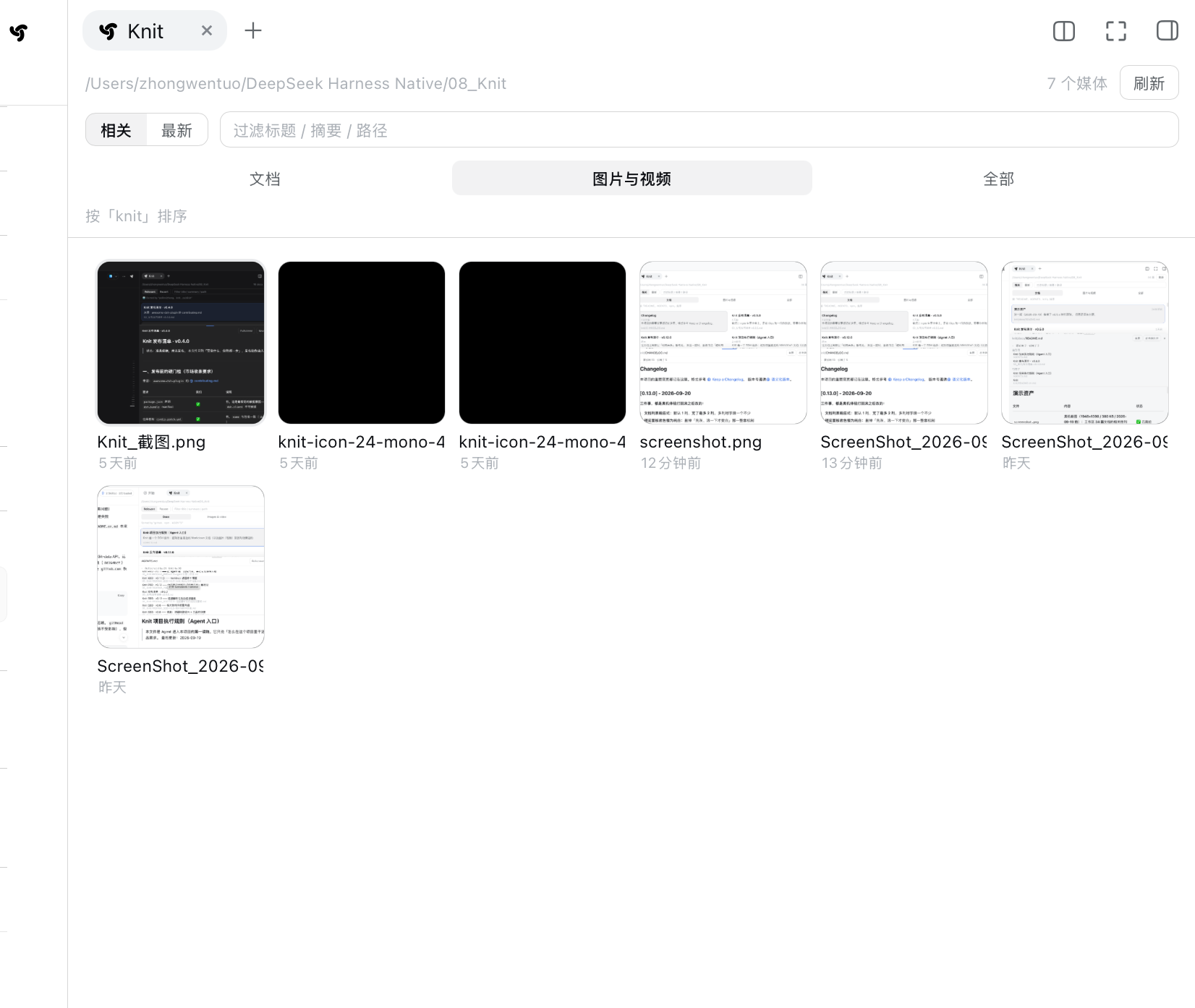
|
|
183
189
|
|
|
@@ -188,18 +194,6 @@ single-colour SVG icon (the solid black square is that icon, not a failed load).
|
|
|
188
194
|
frame as a poster with a play glyph and a duration badge — this workspace simply has no video, so none
|
|
189
195
|
shows here.*
|
|
190
196
|
|
|
191
|
-
|
|
192
|
-
|
|
193
|
-
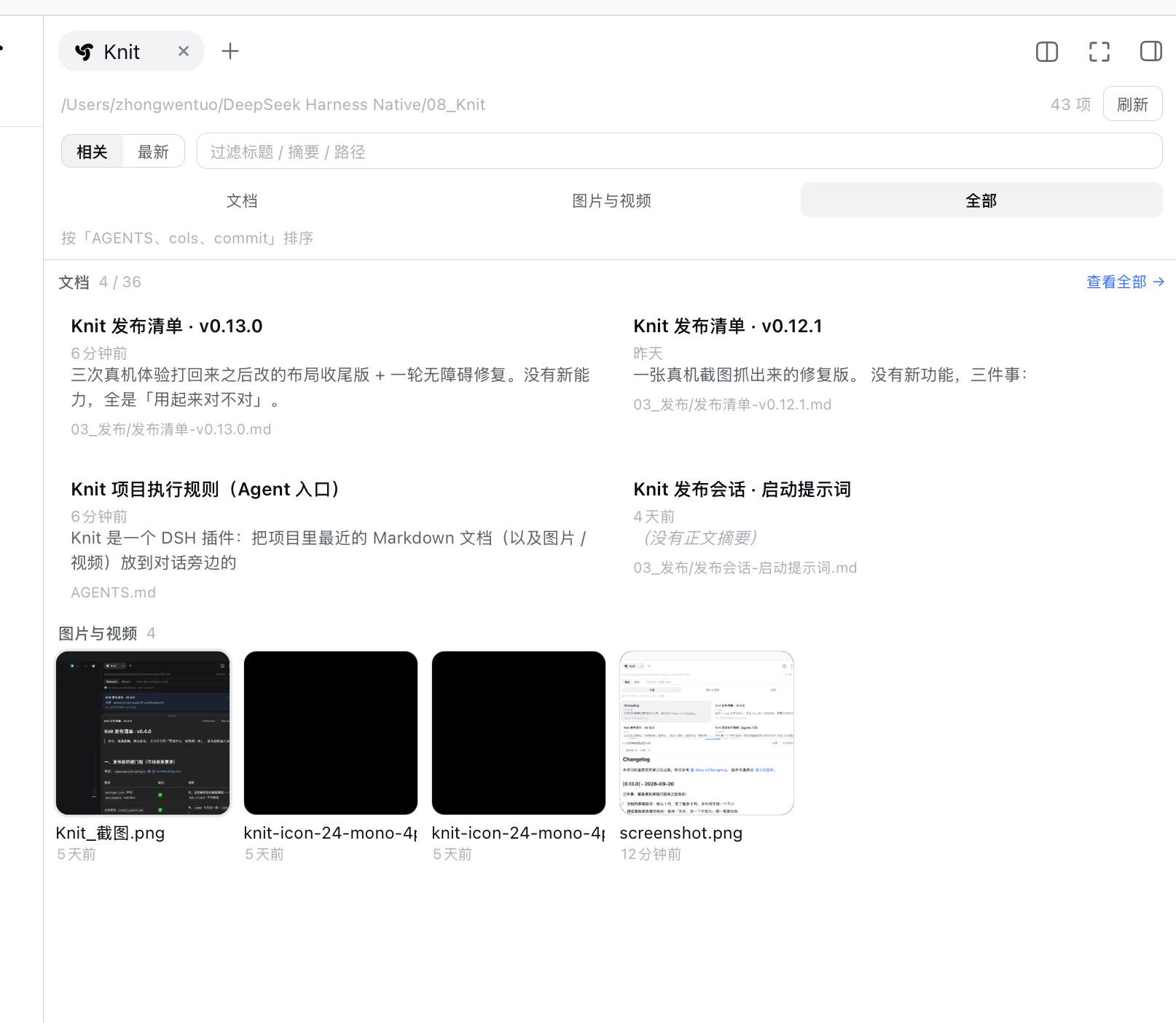
*All: the documents section shows at most 4, the **code section** shows at most 4 (each gets its own
|
|
194
|
-
"View all →" when truncated — here "4 / 21" and "4 / 8"), and the media grid (11 rows) comes last.*
|
|
195
|
-
|
|
196
|
-
⚠️ All three sections share the **same 40-item window** the host returns — a category that ranks past
|
|
197
|
-
40th by relevance drops out of the All view entirely. This screenshot uses the **Newest** sort: in this
|
|
198
|
-
workspace, under the default Relevance sort, media rank outside that window every time (at `limit=40`
|
|
199
|
-
those 40 rows are documents + code files). The **Media** and **Code** tabs are unaffected — they
|
|
200
|
-
request their own kind. A known defect, with reproduction and the fix recorded in
|
|
201
|
-
[`docs/README.md`](docs/README.md).*
|
|
202
|
-
|
|
203
197
|
---
|
|
204
198
|
|
|
205
199
|
## Current task context (v0.14)
|
|
@@ -396,7 +390,7 @@ no percentage, no colour scale; in the flat list and under **Newest** none of th
|
|
|
396
390
|
### The retrieval status summary in the header
|
|
397
391
|
|
|
398
392
|
One line of fact in the panel header:
|
|
399
|
-
`collected N · excluded N · candidates N | BM25
|
|
393
|
+
`collected N · excluded N · candidates N | BM25 retrieval · relations N · pinned N | in pack N`.
|
|
400
394
|
The three groups are the reading order: **workspace candidates** (how many were scanned, how many
|
|
401
395
|
this batch really ruled out, how many went on into retrieval), **retrieval and adjustment** (this
|
|
402
396
|
path is plain local BM25, followed by how many relation evidence items are in the pack and how many
|
|
@@ -411,19 +405,24 @@ note → notice → lens → list).
|
|
|
411
405
|
|
|
412
406
|
### The toolbar row (v0.21.x)
|
|
413
407
|
|
|
414
|
-
`Relevance / Newest` (sort) | one light-grey rule | `Docs / Code / Media
|
|
415
|
-
box (
|
|
416
|
-
|
|
417
|
-
|
|
418
|
-
|
|
419
|
-
|
|
420
|
-
|
|
421
|
-
|
|
422
|
-
|
|
423
|
-
|
|
424
|
-
|
|
425
|
-
|
|
426
|
-
|
|
408
|
+
`Relevance / Newest` (sort) | one light-grey rule | `Docs / Code / Media` (kind) | a **right-aligned
|
|
409
|
+
group**: only the filter box (the **only flexible item**). **No rule between sort and kind** (the `.knit-bar-sep` class is gone).
|
|
410
|
+
**Retrieval mode lives in the status summary** as a clickable cell: `BM25 retrieval ›` (**visually the same recipe as the hit segment `.knit-hit`**: `--knit-chip-bg` background, 6px radius, `1px 6px` padding, secondary grey text, **font size / line-height / weight identical to the hit segment** (11px / 15px, no local font-weight); on hover only the **label** brightens and gets the underline — the `›` arrow never does; the arrow is the `›` from the Recent-read row, flipped horizontally when open). Its menu opens **relative to that cell** and holds the two options (same hit-segment recipe: 6px radius, `--knit-chip-bg` when selected), the current effective state, and the inline config entry when hybrid is unavailable. The menu **panel** itself stays a floating surface (`bg-base` + `l3` border + shadow).
|
|
411
|
+
|
|
412
|
+
- **Sort / kind / retrieval mode are three conditions, not one segmented control** (the rule that used to sit between sort and kind was removed on 2026-10-12, `.knit-bar-sep` no longer exists): the former `.knit-bar-sep`
|
|
413
|
+
(1px, `border-l3`, `aria-hidden`) is the boundary. The kind group used to sit on its own row; its
|
|
414
|
+
selected state is still the v0.14 **underline tab** — it did not fall back to a grey-filled button.
|
|
415
|
+
- **The far right is one right-aligned container (`.knit-bar-right`)**: it holds the **retrieval-mode**
|
|
416
|
+
dropdown (`flex:none`, compact) and the **filter box** (`flex:1 1 180px` + `min-width:0` +
|
|
417
|
+
`max-width:240px`). The filter box is the **only flexible item** ⇒ it sits at 180–240px against the
|
|
418
|
+
right edge and **shrinks first** when the panel narrows; sort / kind / retrieval mode are all
|
|
419
|
+
`flex:none` and are **never squeezed**.
|
|
420
|
+
- **The four conditions are independent**: pick Code and then Newest and you get the newest code;
|
|
421
|
+
switching retrieval mode does not touch the sort or the query; the query only filters the current
|
|
422
|
+
scope (`sort` / `kind` / `query` / `retrieval` are four separate pieces of state).
|
|
423
|
+
- ⚠️ **The retrieval-mode dropdown is not shown under Newest** (time order has no Context Pack, so there
|
|
424
|
+
is nowhere for semantic candidates to land), but it is **not reset** — switching back to Relevance
|
|
425
|
+
keeps the mode you picked.
|
|
427
426
|
- No icons, no loud pills; the other entries use secondary text, the selected one an underline plus
|
|
428
427
|
the primary text colour.
|
|
429
428
|
|
|
@@ -799,7 +798,7 @@ feature request.
|
|
|
799
798
|
git clone https://github.com/PolinniZhong/dsh-knit.git
|
|
800
799
|
cd dsh-knit
|
|
801
800
|
|
|
802
|
-
npm test #
|
|
801
|
+
npm test # 775 tests, zero dependencies, no npm install needed
|
|
803
802
|
```
|
|
804
803
|
|
|
805
804
|
**How changes take effect**: the host half (`src/host/`) **requires a DSH restart** (no hot reload);
|
|
@@ -822,10 +821,12 @@ knit/
|
|
|
822
821
|
│ ├── host/classification.js # v0.19 file classification: kind / language / searchable / contextual
|
|
823
822
|
│ ├── host/passage.js # passage layer: chunking / passage scoring / line mapping (pure, zero I/O)
|
|
824
823
|
│ ├── host/context.js # context assembly: the three-tier Context Pack (pure, zero I/O)
|
|
824
|
+
│ ├── host/index-store.js # incremental index store: per-record KV + head fingerprint + fallback (v0.22)
|
|
825
|
+
│ ├── host/semantic.js # optional semantic candidates: two provider protocols / bounded embedding / honest fallback (v0.23)
|
|
825
826
|
│ ├── host/feedback.js # usage feedback: read-time attribution / Context Epoch / delta (pure)
|
|
826
827
|
│ ├── host/tool.js # the agent tool knit_docs (hand-written ToolDefinition)
|
|
827
828
|
│ └── client/client.js # dual-host registration + panel UI
|
|
828
|
-
└── test/ #
|
|
829
|
+
└── test/ # 775 tests
|
|
829
830
|
├── eval/ # retrieval quality: corpus + cases + frozen v0.5.2 baseline
|
|
830
831
|
└── context/ # context tiering: 24-doc corpus + 12 real-task cases
|
|
831
832
|
```
|
package/README.md
CHANGED
|
@@ -8,7 +8,8 @@ Knit 接的是**当前任务**和**整个工作区**之间那一层:从工作
|
|
|
8
8
|
组织成 **主要 / 辅助 / 相关** 三层上下文(Context Pack),交给面板、也交给 agent;
|
|
9
9
|
再持续追踪这些上下文**有没有被读、被读之后有没有变**。
|
|
10
10
|
|
|
11
|
-
**找到 → 组织 →
|
|
11
|
+
**找到 → 组织 → 追踪**,默认的**词法模式**三步都在本机用字符串运算完成 —— 不调模型、不联网、零延迟、内容不出本机。
|
|
12
|
+
可选的**混合模式默认关闭**(需你自己配置 provider;配了**远程** provider 时它会收到文件的**标题与摘要**,正文不发送),见下。
|
|
12
13
|
|
|
13
14
|
```text
|
|
14
15
|
当前任务
|
|
@@ -55,7 +56,7 @@ Knit 接的是**当前任务**和**整个工作区**之间那一层:从工作
|
|
|
55
56
|
*⚠️ 面板是**每 5 秒轮询一次**的,重排不是发消息那一瞬间:这一屏里顶上几条是这一轮对话推进之后才整个换掉的*
|
|
56
57
|
*(中间那几十秒被剪掉了)。动图比真实时间快。*
|
|
57
58
|
|
|
58
|
-
扫整个项目文件夹的文档 / 代码 / 图片 / 视频 · 排序跟着对话走 ·
|
|
59
|
+
扫整个项目文件夹的文档 / 代码 / 图片 / 视频 · 排序跟着对话走 · 默认词法模式下不调模型、不联网
|
|
59
60
|
|
|
60
61
|
```sh
|
|
61
62
|
dsh plugin --profile web add dsh-knit
|
|
@@ -103,7 +104,9 @@ v0.19 起代码进了同一条链路。再往后,「排在前面」也不够
|
|
|
103
104
|
聊架构,架构文档浮上来;聊 loader 的 bug,`plugin-loader.ts` 浮上来。
|
|
104
105
|
3. **它不止于「找」**:找完还要**组织**(三层 + 可核验的理由)和**追踪**(哪些真被读了、读完有没有变)。
|
|
105
106
|
|
|
106
|
-
|
|
107
|
+
**默认词法模式下不调模型、不联网**:全是本地字符串运算,零延迟、零成本、内容不出本机。
|
|
108
|
+
可选的**混合模式默认关闭**:配了**远程** provider 时它只把文件的**标题与摘要**发过去(正文不发送),
|
|
109
|
+
指向**本机服务(loopback)**时内容不出这台机器。⚠️ 语义收益仍待真 provider 实测(`value-evidence: pending`),不承诺召回提升。
|
|
107
110
|
|
|
108
111
|
---
|
|
109
112
|
|
|
@@ -131,12 +134,12 @@ dsh plugin --profile web add dsh-knit
|
|
|
131
134
|
|
|
132
135
|
| 能力 | |
|
|
133
136
|
|---|---|
|
|
134
|
-
| **按当前对话相关性排序**(BM25 + IDF
|
|
137
|
+
| **按当前对话相关性排序**(BM25 + IDF)—— **默认纯本地、零模型调用**;可选的混合模式默认关闭,见下 | ✅ |
|
|
135
138
|
| **当前任务上下文**:把排序结果拆成 **主要 / 辅助 / 相关** 三层,每条都写明「为什么在这里」 | ✅ |
|
|
136
139
|
| **关系证据**(v0.21):每行标出 `检索` / `关系` / `用户固定`;「为什么」展开**行级证据**(引用 / 导入 / 测试 / 文档,带对方文件与行号,面板最多 3 条、工具最多 2 条)—— 每条都能按行号 grep 回原文,一个字的理由都不是编的 | ✅ |
|
|
137
140
|
| **固定 / 排除**(v0.21):固定进最上方独立区(不编号,三层编号不变);排除在**检索之前**生效(计数与状态摘要同时变,可恢复);宿主给了存储就**活过重启**,没给就写明「本会话有效(未持久化)」 | ✅ |
|
|
138
141
|
| **检索状态摘要**(v0.21.x):面板头部一行如实显示 `收集 · 排除 · 候选 | BM25 词法检索 · 关系 · 固定 | 入包`(组内中点、组间细竖线、没有箭头),换任务 / 换档都跟着变 | ✅ |
|
|
139
|
-
| **工具栏一行**(
|
|
142
|
+
| **工具栏一行**(2026-10-12):`相关 / 最新`(排序)`文档 / 代码 / 媒体`(类型)—— 两组之间**没有竖线**,靠间距分界 | 右侧是搜索框(唯一可伸缩项,常规 180–240px,面板窄了先缩它,其余按钮永不被挤)。**检索方式不在这行** —— 它是第三行状态摘要里的**可点状态格**(`BM25 检索 ›`,见下一条);**四项彼此独立** —— 切排序 / 切类型 / 切检索方式都不动搜索词 | ✅ |
|
|
140
143
|
| **顶行计数**(v0.21.x):只显示阿拉伯数字(`9` / 过滤时 `3 / 79`)—— 量词随类型档变,索性不上屏;悬停提示里仍是完整那句(`9 个代码文件`) | ✅ |
|
|
141
144
|
| **给 agent 用的 `knit_docs` 工具**:让模型拿回**三层任务上下文**(不是一条平铺列表) | ✅ |
|
|
142
145
|
| **文档生命周期**(v0.17):每篇推荐文档现在处于 `未读 / 已读 / 读后已更新 / 修改后已重新读取` 哪一档,另外给出最近读了哪篇、包外读了哪几篇、上下文最近一次怎么变 | ✅ |
|
|
@@ -149,10 +152,9 @@ dsh plugin --profile web add dsh-knit
|
|
|
149
152
|
| 单击就地展开预览,再点收起 | ✅ |
|
|
150
153
|
| 相对路径图片真正渲染(`./img/a.png`、`../assets/b.png`) | ✅ |
|
|
151
154
|
| **代码上下文**(v0.19):`.js .mjs .cjs .ts .tsx .jsx .py .json .html .htm .css .scss .yaml .yml .sh .bash .zsh` 与 Markdown **进同一个检索池**,共用同一份 BM25、同一个 Context Pack、同一套生命周期 —— 不是第二套「代码搜索」 | ✅ |
|
|
152
|
-
| **文档 / 代码 /
|
|
155
|
+
| **文档 / 代码 / 媒体** 三类一键切换(偏好记住,默认仍是文档,老体验不变);选中态是**下划线式页签**(v0.14 起就是这个;不带品牌色描边、也**没**退回灰底按钮 —— 2026-09-29 明确裁定过;页签「媒体」2026-10-06 由「图片与视频」改短,「代码」v0.19 加入;**「全部」档 v0.23.1 已从 UI 删除**) | ✅ |
|
|
153
156
|
| 图片与视频:方形缩略图网格,**格子基准固定 104px、列数由宽度连续数出来**(320px → 2 列 / 632px → 5 列 / 1200px → 10 列),格子大小基本不变;**纵向有多少行就铺多少行**,超出交给列表滚动;视频自动取首帧、叠播放三角与时长角标(零依赖、不转码) | ✅ |
|
|
154
157
|
| 点图片 / 视频在面板内**就地预览**:图片大图、视频可播放可拖动(HTTP Range 流式,不全量下载) | ✅ |
|
|
155
|
-
| 「全部」视图**分上下两区**:文档最多 4 条(超出给「查看全部 →」);图片视频**不截断**,只给计数 | ✅ |
|
|
156
158
|
| 预览面板可拖高度(20%–80%,位置记住)、可全屏,`Esc` 退出;**全屏时头部 / 排序条 / 类型档 / 使用情况 / 列表全部让位**,预览铺满整个面板 | ✅ |
|
|
157
159
|
| **「本地打开」**:用系统默认应用打开当前预览的这篇文档;**预览头那条路径点开的是它「所在的文件夹」并顺带选中这个文件**(reveal,macOS 是 Finder 里 `open -R`;与顶部那行工作区路径同一套机制,差别只在「打开目录」vs「定位到文件」,完整相对路径在悬停提示里) | ✅ |
|
|
158
160
|
| 双击在新标签页打开(官方文档预览,带 PDF 渲染器与渲染方式切换) | ✅ |
|
|
@@ -164,11 +166,12 @@ dsh plugin --profile web add dsh-knit
|
|
|
164
166
|
| 每 5 秒自动刷新 + 手动刷新;2 分钟内改动过的文档打 🆕 | ✅ |
|
|
165
167
|
| 中英双语,跟随 DSH 语言实时切换(不用重载插件) | ✅ |
|
|
166
168
|
| 列表是标准 `listbox`/`option` 语义,选中项用 `aria-activedescendant` 播报;媒体网格里的键盘焦点有可见描边 | ✅ |
|
|
167
|
-
|
|
|
169
|
+
| **默认零模型 / 零网络出口**:默认的**词法模式**全程在本机做字符串运算 —— 不调模型、不联网、零延迟 | ✅ |
|
|
170
|
+
| **可选混合模式(默认关闭)**(v0.23):需你自己配置 provider(Ollama / OpenAI 兼容)。配了**远程** provider 时,发出去的是工作区文件的**标题与摘要**(**不发送正文**);向量只在内存里,配置存在 DSH 存储的独立单元 `knit_semantic`。指向**本机服务(loopback)**时内容不出这台机器。⚠️ **语义收益的证据仍待真 provider 实测**(`value-evidence: pending`)—— 本项目**不承诺**召回提升 | ✅ |
|
|
168
171
|
|
|
169
172
|
> 相关度**不做可视化**(不显示百分比、不画长条)—— 排序本身就是答案,名次即相关度。
|
|
170
173
|
|
|
171
|
-
###
|
|
174
|
+
### 媒体档长什么样
|
|
172
175
|
|
|
173
176
|

|
|
174
177
|
|
|
@@ -177,14 +180,6 @@ dsh plugin --profile web add dsh-knit
|
|
|
177
180
|
*(那个纯黑方块是单色 SVG 图标本身,不是加载失败)。*
|
|
178
181
|
*视频会取首帧当海报、中央叠播放三角、右下角叠时长,只是这个工作区里没有视频,所以这一屏看不到。*
|
|
179
182
|
|
|
180
|
-

|
|
181
|
-
|
|
182
|
-
*全部:**文档区最多 4 条**、**代码区最多 4 条**(超出时各区右侧给「查看全部 →」,这一屏是「4 / 21」与「4 / 8」),最后是媒体网格(11 条)。*
|
|
183
|
-
*⚠️ 三个区共用宿主返回的**同一个 40 条窗口**:某一类如果按相关性排到第 40 名之外,「全部」档就整个看不到它。*
|
|
184
|
-
*这张图用的是**「最新」排序** —— 在这个工作区里,默认的「相关」排序下媒体恒定掉在 40 条窗口之外*
|
|
185
|
-
*(`limit=40` 时那 40 条全是文档 + 代码)。**「媒体」/「代码」档不受影响**,它们各自单独取。*
|
|
186
|
-
*这是已知缺陷,复现与修法记在 [`docs/README.md`](docs/README.md)。*
|
|
187
|
-
|
|
188
183
|
---
|
|
189
184
|
|
|
190
185
|
## 当前任务上下文(v0.14)
|
|
@@ -259,7 +254,7 @@ Context Pack 是对这个问题的回答,但它是**数据层的结构**(主
|
|
|
259
254
|
(top-1 / MRR / 陷阱用例)一行没动。如果检索没把对的那篇找出来,分层也只能在
|
|
260
255
|
找到的那几篇里分 —— 它救不了召回。
|
|
261
256
|
- **不做任务理解。** Context Pack 里那个「当前任务」字段放的是**最近一条用户消息的原文**,
|
|
262
|
-
不是任何概括 —— Knit 不解一句话的意思,只是把它如实摆出来。真去概括需要模型,而 Knit
|
|
257
|
+
不是任何概括 —— Knit 不解一句话的意思,只是把它如实摆出来。真去概括需要模型,而 Knit 的默认词法模式不调模型。
|
|
263
258
|
|
|
264
259
|
---
|
|
265
260
|
|
|
@@ -386,7 +381,7 @@ Markdown 仍是 `title ×4 / summary ×2 / body ×1`。**两套字段权重,
|
|
|
386
381
|
|
|
387
382
|
### 头部那条检索状态摘要
|
|
388
383
|
|
|
389
|
-
面板头部一行事实:`收集 N · 排除 N · 候选 N | BM25
|
|
384
|
+
面板头部一行事实:`收集 N · 排除 N · 候选 N | BM25 检索 · 关系 N 条 · 固定 N | 入包 N`。
|
|
390
385
|
三组就是阅读顺序 —— **工作区候选**(扫描到多少、这一批真的排掉几篇、排除之后剩几篇进入检索)、
|
|
391
386
|
**检索与调整**(这一路是纯本地 BM25 词法检索,后面跟着包里的关系证据条数与被固定移出三层的篇数)、
|
|
392
387
|
**最终结果**(三层现有条目数)。
|
|
@@ -398,15 +393,18 @@ Markdown 仍是 `title ×4 / summary ×2 / body ×1`。**两套字段权重,
|
|
|
398
393
|
|
|
399
394
|
### 工具栏那一行(v0.21.x)
|
|
400
395
|
|
|
401
|
-
`相关 /
|
|
396
|
+
`相关 / 最新`(排序)`文档 / 代码 / 媒体`(类型)(**两组之间没有竖线**)|右侧只有搜索框(**唯一可伸缩项**)。
|
|
397
|
+
**检索方式 = 状态摘要里的可点状态格**:(`BM25 检索 ›`;视觉**照命中段 `.knit-hit` 那套**:底 `--knit-chip-bg`、圆角 6px、内边距 `1px 6px`、次级灰字、**字号 / 行高 / 字重与命中段逐字同值**(11px / 15px、不自己定字重);hover 只提亮文字并给**文字**加下划线,右边的箭头 `›` **不划线**(2026-10-13 用户裁决:那一格的下划线只属于文字层);箭头复用「最近读取」行那个 `›`,展开时**横向翻转**向上);点开菜单**相对这一格**弹出,里面是 `词法检索 / 混合检索 · 实验` 两个选项(**同样沿用命中段那套**:圆角 6px、选中态底 `--knit-chip-bg`)、当前生效状态的说明,以及「混合没生效」时的就地配置入口。菜单**面板本身**仍是浮层(`bg-base` 底 + `l3` 描边 + 阴影)—— 浮层要读起来像浮层。
|
|
402
398
|
|
|
403
|
-
-
|
|
399
|
+
- **排序 / 类型 / 检索方式是三个条件,不做成一个整体**:排序与类型之间的竖线 2026-10-12 已删除(`.knit-bar-sep` 整个类名不复存在,靠 `.knit-bar` 的间距分界);检索方式则**搬进了状态行**(第三行),不再占工具栏的位置 —— 从前那根线(1px、`border-l3`、`aria-hidden`)
|
|
404
400
|
就是边界。类型组原先自己占一行,现在并进工具栏 —— 选中态仍是 v0.14 的下划线式页签,没退回灰底按钮。
|
|
405
|
-
-
|
|
406
|
-
`
|
|
407
|
-
|
|
408
|
-
-
|
|
409
|
-
|
|
401
|
+
- **最右是一个右对齐容器(`.knit-bar-right`)**:里面是**检索模式**(`flex:none`,紧凑下拉)与**搜索框**
|
|
402
|
+
(`flex:1 1 180px` + `min-width:0` + `max-width:240px`)。搜索框是**唯一可伸缩项** ⇒
|
|
403
|
+
常规面板里它就是 180–240px 并贴住右端,面板变窄时**先缩它**;排序 / 类型 / 检索模式都是 `flex:none`,**永不被挤**。
|
|
404
|
+
- **四个条件彼此独立**:选「代码」再选「最新」= 最新的代码;切检索模式不动排序与搜索词;搜索只过滤当前范围
|
|
405
|
+
(`sort` / `kind` / `query` / `retrieval` 四个独立 state)。
|
|
406
|
+
- ⚠️ **「最新」档不显示检索模式**(时间序没有 Context Pack,语义无处可落),但**不重置**已存的偏好 ——
|
|
407
|
+
切回「相关」时仍是你上次选的那个模式。
|
|
410
408
|
- 没有图标、没有醒目的胶囊;其余项用次级文本,选中项用下划线 + 主色文字。
|
|
411
409
|
|
|
412
410
|
---
|
|
@@ -739,7 +737,7 @@ v0.17 的信息都在,但**摞在一行字和几个折叠块里**,读不出
|
|
|
739
737
|
git clone https://github.com/PolinniZhong/dsh-knit.git
|
|
740
738
|
cd dsh-knit
|
|
741
739
|
|
|
742
|
-
npm test #
|
|
740
|
+
npm test # 775 项,零依赖,不需要先 npm install
|
|
743
741
|
node tools/clean-room-test.mjs # 发版前闸门:npm pack → 解包 → 在解包目录里再跑一遍测试
|
|
744
742
|
```
|
|
745
743
|
|
|
@@ -766,10 +764,11 @@ knit/
|
|
|
766
764
|
│ ├── host/context.js # 上下文装配:Context Pack 三层(纯函数,零 I/O)
|
|
767
765
|
│ ├── host/control.js # 固定 / 排除:纯逻辑 + 可选 ctx.storage 持久化
|
|
768
766
|
│ ├── host/index-store.js # 增量索引持久层:per-record KV + 头部指纹 + 降级 + 遗留键清理(v0.22)
|
|
767
|
+
│ ├── host/semantic.js # 可选语义候选:provider 两协议 / 有界嵌入 / 明着回退(v0.23)
|
|
769
768
|
│ ├── host/feedback.js # 使用反馈:读时归因 / Context Epoch / Delta(纯逻辑,只读事件流)
|
|
770
769
|
│ ├── host/tool.js # agent 文档工具 knit_docs(手写 ToolDefinition)
|
|
771
770
|
│ └── client/client.js # 双宿主注册 + 面板 UI
|
|
772
|
-
└── test/ #
|
|
771
|
+
└── test/ # 775 项测试
|
|
773
772
|
├── eval/ # 检索质量评测:语料 + 用例 + 冻结的 v0.5.2 基线 + Deep Context 四指标
|
|
774
773
|
└── context/ # 上下文分层评测:24 篇语料 + 12 条任务型用例
|
|
775
774
|
```
|
package/SECURITY.md
CHANGED
|
@@ -2,9 +2,12 @@
|
|
|
2
2
|
|
|
3
3
|
> **Knit 的安全属性 —— 每一条都指向一个真实存在的检查。**
|
|
4
4
|
>
|
|
5
|
-
> 最后更新:2026-10-
|
|
5
|
+
> 最后更新:2026-10-13(v0.23.1)—— 本版**无安全相关改动**(只动客户端工具栏与产品文案);
|
|
6
|
+
> 版本号随每版前移,好让「安全表被漏掉」与「本版没动安全面」在版本一致性检查里能分开
|
|
7
|
+
>
|
|
8
|
+
> 📌 **v0.23.0(2026-10-12)那次改了什么**:写通道由一条变两条(新增 `POST /knit/api/semantic`,只存 provider 配置)、
|
|
6
9
|
> 会落盘的单元由两个变三个(`knit_index` 起于 v0.22、`knit_semantic` 起于 v0.23);
|
|
7
|
-
> 「**唯一的**写动作」那条从 v0.22
|
|
10
|
+
> 「**唯一的**写动作」那条从 v0.22 起就已经不成立,那次按实际改写,并补一条 ⚠️ 说明第二条写通道的守卫缺口
|
|
8
11
|
|
|
9
12
|
## 为什么有这份文件
|
|
10
13
|
|
package/package.json
CHANGED
|
@@ -1,8 +1,8 @@
|
|
|
1
1
|
{
|
|
2
2
|
"name": "dsh-knit",
|
|
3
|
-
"version": "0.23.
|
|
3
|
+
"version": "0.23.1",
|
|
4
4
|
"type": "module",
|
|
5
|
-
"description": "
|
|
5
|
+
"description": "Workspace context retrieval for DeepSeek Harness: ranks documents, source files and media by relevance to the current conversation into a sidebar Context Pack with inline preview. Lexical and fully local by default — zero model calls, zero network. Optional hybrid mode is off by default and needs a provider you configure; a remote provider receives file titles and summaries (not bodies). Loopback stays local.",
|
|
6
6
|
"main": "./src/host/index.js",
|
|
7
7
|
"exports": {
|
|
8
8
|
".": "./src/host/index.js",
|
|
@@ -56,6 +56,8 @@
|
|
|
56
56
|
"context-pack",
|
|
57
57
|
"workspace-context",
|
|
58
58
|
"context-retrieval",
|
|
59
|
+
"hybrid-retrieval",
|
|
60
|
+
"semantic-retrieval",
|
|
59
61
|
"context-lifecycle",
|
|
60
62
|
"task-context",
|
|
61
63
|
"images",
|