dsh-knit 0.17.0 → 0.18.0
This diff represents the content of publicly available package versions that have been released to one of the supported registries. The information contained in this diff is provided for informational purposes only and reflects changes between package versions as they appear in their respective public registries.
- package/CHANGELOG.md +147 -2
- package/README.en.md +66 -16
- package/README.md +53 -12
- package/package.json +1 -1
- package/src/client/client.js +695 -147
- package/test/client.test.mjs +552 -52
- package/test/harness.mjs +4 -1
- package/test/i18n.test.mjs +188 -5
package/CHANGELOG.md
CHANGED
|
@@ -3,10 +3,155 @@
|
|
|
3
3
|
本项目的重要变更都记在这里。格式参考 [Keep a Changelog](https://keepachangelog.com/),
|
|
4
4
|
版本号遵循[语义化版本](https://semver.org/lang/zh-CN/)。
|
|
5
5
|
|
|
6
|
+
## [0.18.0] - 2026-10-06
|
|
7
|
+
|
|
8
|
+
> **状态:已备好发布**(`0.18.0`,2026-10-06)—— 纯客户端重构:宿主(`src/host/*`)**一行未改**,
|
|
9
|
+
> v0.17 的 517 条测试照旧通过。发布动作(跑 `knit/.github/workflows/publish.yml` / 打 tag)
|
|
10
|
+
> **只能由人执行**(`AGENTS.md` §11 规则 7);tag / `gitHead` / `dist-tags` 的逐条核对见
|
|
11
|
+
> `03_发布/发布清单-v0.18.0.md`。
|
|
12
|
+
> ⚠️ **这次不留「尚未发布」的尾巴**:v0.16 / v0.17 把 🚧 行留到 publish **之后**才改
|
|
13
|
+
> (`0.17.0` 那节的 ⚠️ 就是那处瑕疵,改不了)—— 本行写成**发布前后都成立**的说法,
|
|
14
|
+
> 真实发布状态以 `AGENTS.md` §1 与 npm `dist-tags` 为准。
|
|
15
|
+
|
|
16
|
+
**Context Usage Lens(依据 2026-10-05 用户给的 V0.18 规格)**:
|
|
17
|
+
v0.17 的「使用情况」是一行统计文字 + 三块折叠列表 —— 信息都在,但**读不出结构**:
|
|
18
|
+
哪一层读得多、最近读的是哪一篇、包外那二十篇里哪几篇被反复读、这次变化是进是出。
|
|
19
|
+
这一版把它重做成文档列表**上方**的一块轻量观察层 —— 不是弹窗、不是新页面、不是 Dashboard:
|
|
20
|
+
|
|
21
|
+
```
|
|
22
|
+
使用情况 Epoch 5 ˄
|
|
23
|
+
335 次读取 · 29 篇包外 · 上下文变化 1 次
|
|
24
|
+
当前上下文
|
|
25
|
+
主要 1 / 1 辅助 2 / 3 相关 0 / 5
|
|
26
|
+
● ● ○ ○ ○ ○ ○ ○
|
|
27
|
+
最近读取 docs/eval.md 12分钟前 ›
|
|
28
|
+
上下文外读取 20 ›
|
|
29
|
+
上下文变化 最近一次 ›
|
|
30
|
+
```
|
|
31
|
+
|
|
32
|
+
展开包外 / 变化那两行之后(菜单式,`›` 变 `⌃`):
|
|
33
|
+
|
|
34
|
+
```
|
|
35
|
+
上下文外读取 20 ⌃
|
|
36
|
+
01 docs/old-plan.md ×3 已读
|
|
37
|
+
02 docs/test-case.md ×1 已读
|
|
38
|
+
还有 10 篇
|
|
39
|
+
上下文变化 最近一次 ⌃
|
|
40
|
+
进入
|
|
41
|
+
+ docs/algo.md
|
|
42
|
+
换层
|
|
43
|
+
↔ docs/eval.md · 辅助 → 相关
|
|
44
|
+
```
|
|
45
|
+
|
|
46
|
+
**没有分数、没有百分比、没有进度条、没有图表、没有新 Store、没有新采集**:
|
|
47
|
+
数据全部来自 v0.17 已有的 `usage.lifecycle / recentRead / outsideDocs / latestDelta` 与
|
|
48
|
+
`context` 的三层 rels,Coverage 是**派生**出来的(`coverageOf`)。
|
|
49
|
+
|
|
50
|
+
### 变化
|
|
51
|
+
- 新增 **Context Coverage**:主要 / 辅助 / 相关三层各给「状态点 + `已读数 / 本层总数`」,
|
|
52
|
+
点某一层 → 滚到那一层并**短暂高亮**(`data-knit-tier` + `.flash`,1200ms 自己收掉)。
|
|
53
|
+
Primary 不存在时整列不显示(**不画 `0 / 0` 的假层**);没有进度条、没有百分比。
|
|
54
|
+
- 文档行新增**行内生命周期 glyph**:未读 `○` / 已读 `●` / 读后已更新 `△` / 修改后已重新读取 `↻`
|
|
55
|
+
(形态在「UI 迭代」一节里改成 **6px 真圆点**,只有 `↻` 还是字符;四态靠 `data-mark` 区分)。
|
|
56
|
+
glyph 与原来那行文字**同时**存在(glyph 说状态,文字说次数 `×3`)。glyph 是真 `button`,
|
|
57
|
+
带 `title` / `aria-label`,点它=打开 / 选中这一篇(**已经打开则保持原预览**)。
|
|
58
|
+
统计**关掉**时这一格退回 v0.17 的 Primary 黑点 —— 与 v0.17 逐字一致。
|
|
59
|
+
- 最近读取从「一行文字」改成**一行可点的事实**(`文件名 · 相对时间 ›`),点它直接打开该篇,
|
|
60
|
+
点的那一下**不敲宿主**(走已有的 `requestPreview`)。语义仍是「**最近一次成功 read**」,
|
|
61
|
+
没有改成「正在阅读 / Agent 正在查看」。
|
|
62
|
+
- 上下文外读取改成可浏览集合:默认最多 10 篇 + 「还有 N 篇」,每行是可点对象并带生命周期;
|
|
63
|
+
排序改成 **`count DESC`**(同次数再按 `lastReadAt` / `seq`)—— 这是**事实排序**,不是相关度评分。
|
|
64
|
+
⚠️ 宿主给的顺序是「首次读的先后」(`outsideDocsOf` 按 `seq` 升序),所以排序发生在客户端纯函数
|
|
65
|
+
`groupOutsideDocs` 里,宿主不改。
|
|
66
|
+
- 上下文变化:默认只给一条菜单行(`上下文变化 最近一次 ›`,UI 迭代后条数不再写在按钮上),
|
|
67
|
+
展开后按 **进入 / 离开 / 换层** 分三组,
|
|
68
|
+
每组最多 5 条(沿用 v0.17 规则)。
|
|
69
|
+
- 顺手修掉一个潜在 bug:`moved` 的**真实载荷是 `{tier, rank}`**(v0.17 新增的宿主形状),
|
|
70
|
+
v0.17 的渲染直接把它当层名用 —— 真机上会渲染出空层名(`↔ x.md · →`)。现在两种载荷都认。
|
|
71
|
+
- Lens 自己可以展开 / 收起(`.knit-lens-head`,`aria-expanded`)。
|
|
72
|
+
**收起 ≠ 关掉统计**:收起只收起细节,标题 / Epoch / 摘要仍在;关掉才一个统计 DOM 都不产生。
|
|
73
|
+
- 面板矮(< `COMPACT_PANEL_PX` = 420px)时降级:不铺变化摘要,其余照旧。
|
|
74
|
+
滚动**仍然只交给 `.knit-list`** —— Lens 自己不滚动、**没有第二个滚动容器**。
|
|
75
|
+
- 新增纯函数 `coverageOf` / `groupOutsideDocs` / `groupDelta` / `lifeStatusOf`(能派生就不存储)。
|
|
76
|
+
- 验收取证时(2026-10-05)拿**真实会话载荷**跑了一次渲染,抓到三处「同一份事实讲两遍 /
|
|
77
|
+
讲不齐」,在发布前修掉 —— 都不是新功能,是这一版自己的渲染问题:
|
|
78
|
+
- 上下文变化**展开**后,折叠时那三行摘要 + 「还有 N 条」还在,后面又接了一遍分组明细
|
|
79
|
+
(同一批进出/换层条目出现两次)。现在展开就只渲染分组那一份(`deltaOpen ? null : …`)。
|
|
80
|
+
- 包外读取的行里次数说了两遍:`.knit-out-count` 已经是 `×71`,生命周期又用短次数说了一遍
|
|
81
|
+
→ 真机渲染成 `client.js ×71 ×71`。新增 `lifeWord()`:**次数已经在同一行时只用状态词**
|
|
82
|
+
(`… ×71 已读`),次数是这一档的排序键,必须留着;文档行的 `● ×3` 不受影响。
|
|
83
|
+
- 反过来的一处**讲不齐**:`任务上下文已更新` 只进了折叠摘要,展开后不见了 ——
|
|
84
|
+
可是当时按钮上的数字(`上下文变化 · N`)算上了它,于是「说 6 条、只列 5 行」。
|
|
85
|
+
现在展开时它也照常列一行(它在摘要里本来就是最后一条)。
|
|
86
|
+
- 顺手补了两条**英文渲染**守卫:v0.18 之前那条「英文整棵树里一个汉字都没有」用的是
|
|
87
|
+
没有 `usage` 的语料 ⇒ **Lens 整块没进渲染树**,几十条新文案(含 `title` / `aria-label`)
|
|
88
|
+
其实不在覆盖里。现在英文下把 Lens 真的打开、把两块折叠集合也点开再查一遍(空态另有一条)。
|
|
89
|
+
- 发布前又拿同一份真实载荷做了一次**不变式对账**(14 条:摘要 / Epoch / Coverage / 展开行数与唯一性 /
|
|
90
|
+
折叠尾巴 / 包外计数 / 四态同屏 / 无百分比与评分 / 不自己滚动)⇒ **14/14 通过**,
|
|
91
|
+
并把它里最通用的一条(**展开后列出的行 + 每条组内尾巴里的数字,必须等于载荷算出的总数**)立成了守卫,
|
|
92
|
+
这样上面那处「讲不齐」不会再从别的分支回来。
|
|
93
|
+
- 变化按钮上不再写条数(`上下文变化 · N` → `上下文变化 最近一次 ›`),账目改由
|
|
94
|
+
**展开后的行 + 尾巴**承担 —— 这样「说 N 条」与「列了几行」不可能再不一致。
|
|
95
|
+
|
|
96
|
+
### v0.18 UI 迭代(2026-10-06)
|
|
97
|
+
|
|
98
|
+
> 依据:用户给的 `02_方案与 Demo/dsh-knit V0.18 UI 重构开发提示词.md` + 同名 Demo HTML。
|
|
99
|
+
> 只动客户端外观(`src/client/client.js` 的 CSS / JSX / i18n 与对应测试),宿主一行未改;
|
|
100
|
+
> 功能、数据来源、DOM 的**语义**都不变 —— 这是把 v0.18 的 Lens 从「能用」改到「好看」。
|
|
101
|
+
|
|
102
|
+
- **字体尺度收成一套**:15(Usage 标题)/ 14(文档标题、Tabs)/ 13(Segmented、过滤框、
|
|
103
|
+
「当前上下文」分节标题)/ 12(摘要行、Coverage 层名与数字、最近读取)/ 11(生命周期、时间、
|
|
104
|
+
包外与变化的行)—— 不再有 10.5px / 11.5px 这类半档。
|
|
105
|
+
- **控件尺寸与描边**:`使用情况` / `刷新` 24px→**28px**(radius 8px);Segmented 与过滤框
|
|
106
|
+
22px / 24px → **28px**、radius 10px、字号 13px —— 原来那两个「迷你胶囊」是这一版最显眼的审美缺口。
|
|
107
|
+
Segmented 内部只保留控件自己的边框;Tab 下划线仍是 2px。
|
|
108
|
+
(提示词文档写的是 36px;2026-10-06 用户看了真机后定成 28px:「太高了,不需要这么高」。)
|
|
109
|
+
这两个控件的**描边色改用 `--dsw-alias-border-l3`** —— 与 DSH 主区「对话」页签下面那条横线
|
|
110
|
+
(官方 header 的 `border-bottom`,浅色 `rgba(0,0,0,.12)`)同一档;原来的 `l4` 重一档,
|
|
111
|
+
摆在页签下面像两个输入框把内容框住了(2026-10-06 用户要求「跟那条横一样」)。
|
|
112
|
+
描边**粗细也跟那条横对齐:0.5px**(官方那条本身就是 `.5px`;2026-10-06 用户第二轮要求
|
|
113
|
+
「描边色值修改成 0.5px」)。色对上了粗细没对上,高分屏上会比旁边那条横粗一倍 —— 三处
|
|
114
|
+
(Segmented 外框、内部竖线、过滤框)一起 0.5px,有守卫不许只改其中一处。
|
|
115
|
+
- **类型页签文案「图片与视频」→「媒体」**(2026-10-06 用户定;英文 `Images & video` → `Media`):
|
|
116
|
+
同一档的计数本来就是 `{n} 个媒体` / `{n} media`,页签是唯一的例外;「多媒体」暗示音频,
|
|
117
|
+
而这一档只扫图片与视频;含义由空态兜住(`list.emptyMedia` = 这个工作区里还没有图片或视频。)。
|
|
118
|
+
一个 i18n 键 `kind.media` 同时供页签与「全部」档的分区标题 ⇒ 改一处即两处,有守卫钉着。
|
|
119
|
+
- **状态点统一成 6px 真圆**:Coverage 的空心 / 实心点与文档行左侧的生命周期点
|
|
120
|
+
**同一套 token、同一个直径**(未读 = 透明 + 1px `label-caption` 边框,已读 = 同色填充,
|
|
121
|
+
读后已更新 = 实心 + 内圈,修改后已重新读取 = `↻` 字符)。没有任何绿 / 红 / 黄 / 蓝。
|
|
122
|
+
(文档写 9px,2026-10-06 用户定成 6px;守卫改为**比对两处直径**,不再各写各的。)
|
|
123
|
+
- **两处折叠集合改成菜单行**:`上下文外读取 20 ›` 与 `上下文变化 最近一次 ›`
|
|
124
|
+
(label 左、数量 / 说明右、`›` 展开变 `⌃`),行高 38px、hover 只改背景、无位移;
|
|
125
|
+
包外明细每行带 `01` / `02` 序号。**条数不再写在变化按钮上**(见上)。
|
|
126
|
+
- **定位手感**:点 Coverage 某层 → 平滑滚到**视口中部**(`block: 'center'`),高亮 **1200ms**
|
|
127
|
+
(原 900ms → 650ms → 2026-10-06 用户看真机后定成 1200ms);`prefers-reduced-motion: reduce`
|
|
128
|
+
下改为瞬时滚动、所有新过渡 `none`。⚠️ `FLASH_MS` 与 `.knit-tier{transition:background 1.2s}`
|
|
129
|
+
**必须同一个数**(有守卫;只改一个不会报错,只会看见「高亮已取消、背景还在慢慢褪」的错帧)。
|
|
130
|
+
- **窄侧栏不撑破**:Coverage 三列改成 `minmax(0, …)` 轨道,层名超长时省略号截断。
|
|
131
|
+
- **没做**(提示词文档明确禁止或与既有设计冲突):没有卡片化、没有阴影、没有上浮 / 缩放 /
|
|
132
|
+
连续脉冲、没有新滚动容器、没有新增数据、没有新模型或网络请求。
|
|
133
|
+
- **与 Demo 不一致的三处,按提示词文档办**:① Demo 给 Coverage 组画了淡底 + 1px 边框 +
|
|
134
|
+
hover `translateY(-1px)`,文档要求「默认不要 border、hover 最多很淡背景、不许 translate」;
|
|
135
|
+
② Demo 有可见的「未读 / N 篇已读」帮助行,文档要求那句只给读屏(现在只在 `aria-label` 里);
|
|
136
|
+
③ Demo 的 Usage 块有全宽 `border-bottom`,文档要求 Usage 内部不画全宽线。三处都听文档。
|
|
137
|
+
|
|
138
|
+
### 测试
|
|
139
|
+
- `npm test`:**532 / 532 通过**(v0.17 是 517)。新增 15 条 v0.18 守卫:
|
|
140
|
+
Coverage 三层数值与「点它定位到那一层」、Primary 缺席不画假层、Lens 收起、空使用情况、
|
|
141
|
+
小高度面板的降级判据、点状态点 / 包外行不直接请求列表、轮询不重播动画、
|
|
142
|
+
样式(语义 token / 自己不滚动 / `prefers-reduced-motion`)、纯函数层、
|
|
143
|
+
以及英文 Lens(打开态 / 空态)里没有汉字(文字 + 属性)。
|
|
144
|
+
- 一条**账目**守卫(刻意给 8 条换层以跨过组内上限):载荷算出的总数必须等于
|
|
145
|
+
「展开后列出的行数 + 每条组内尾巴里写的数字」—— 证伪过(把那一行改回 `false && …` 会有 3 条变红)。
|
|
146
|
+
- 宿主侧一行未改:v0.17 的 517 条全部照旧通过。
|
|
147
|
+
|
|
6
148
|
## [0.17.0] - 2026-10-03
|
|
7
149
|
|
|
8
|
-
>
|
|
9
|
-
>
|
|
150
|
+
> ✅ **2026-10-05 已发布**:`v0.17.0` = 轻量 tag = npm `gitHead` = `4d0c74e` · npm `latest = 0.17.0`
|
|
151
|
+
> · **43 文件 / 394.6 kB 打包 / 1.2 MB 解包** / shasum `33bf6faac4de75170e2378ff9096dd4cdb1da81a`。
|
|
152
|
+
> 由 **npm 可信发布(Trusted Publisher / OIDC)** 经 GitHub Actions 发出(带 provenance),不再用 token。
|
|
153
|
+
> ⚠️ **包内这份 CHANGELOG 里对应的那两行仍写着「🚧 尚未发布」** —— 本次改它的提交在 publish 之后,
|
|
154
|
+
> **同一版本号不能再发一次**(与 v0.16 同一个坑)。
|
|
10
155
|
|
|
11
156
|
**Document Lifecycle(依据 `01_ Knit PRD/Knit-PRD-SDD-v0.17-Document-Lifecycle.md`)**:
|
|
12
157
|
前面几版回答的是「Knit 推荐了什么 → Agent 有没有读 → 读落在哪一层」;
|
package/README.en.md
CHANGED
|
@@ -306,7 +306,7 @@ feature request.
|
|
|
306
306
|
| The document list is **always one column** (v0.14 — the multi-column layout was deleted outright, not switched off); the **number sits in its own column on the far left** and is **vertically centred with the title line**, everything else stacks to its right starting with **one line: Primary dot + title + relative time** (the time is pushed to the right edge), then the summary. **The path is no longer shown in the list** — it duplicates the clickable **path** in the preview header, which is the one that stays | ✅ |
|
|
307
307
|
| Click to preview inline, click again to collapse | ✅ |
|
|
308
308
|
| Relative-path images actually render (`./img/a.png`, `../assets/b.png`) | ✅ |
|
|
309
|
-
| One-click switch between **Docs /
|
|
309
|
+
| One-click switch between **Docs / Media / All** (remembered; defaults to Docs, unchanged); the selected tab is a **neutral grey fill**, with no coloured outline (the tab label became "Media" on 2026-10-06, was "Images & video") | ✅ |
|
|
310
310
|
| Images & video: square thumbnail grid — **at least 3 columns, more only as the pane gets wider**; cells start at 64px and the baseline is **8 per screen**; past 8 nothing is hidden, the whole grid scales down proportionally; videos auto-grab the first frame with a play glyph and duration badge (no deps, no transcoding) | ✅ |
|
|
311
311
|
| Click an image / video to preview **inline**: large image, playable & seekable video streamed over HTTP Range (no full download) | ✅ |
|
|
312
312
|
| The **All** view splits into **two stacked sections**: docs (max 4, with "View all →" when truncated) and images & video (**never truncated**, count only) | ✅ |
|
|
@@ -327,23 +327,23 @@ feature request.
|
|
|
327
327
|
|
|
328
328
|
### The other two views
|
|
329
329
|
|
|
330
|
-
|
|
331
331
|
|
|
332
|
-
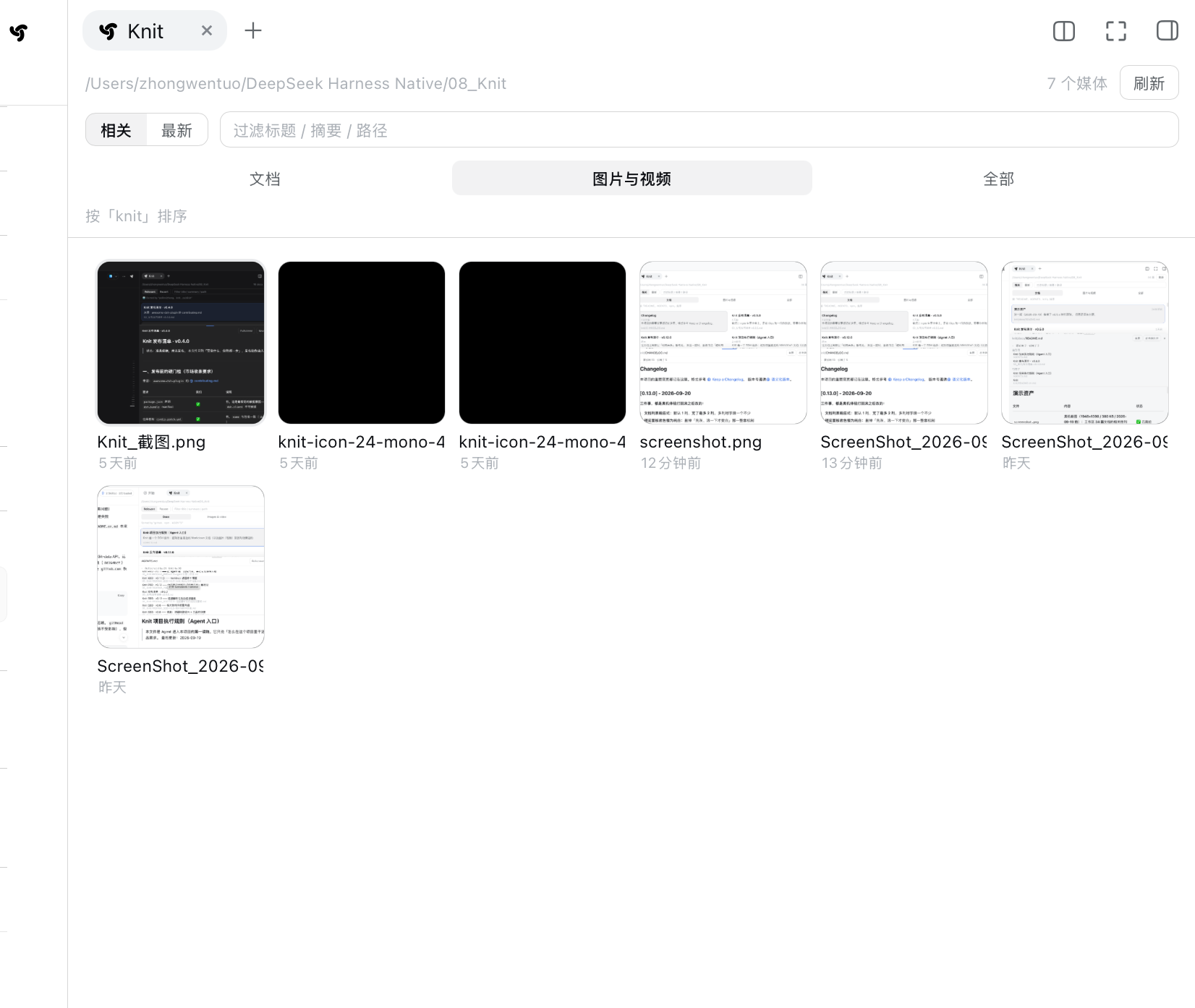
*
|
|
332
|
+
*Media: square thumbnails, with the **column count following the panel width continuously** —
|
|
333
333
|
six columns at this width, cells about 112px. These are the workspace's real image and SVG files; this
|
|
334
334
|
particular workspace happens to hold several screenshots, one demo GIF and one single-colour SVG icon
|
|
335
335
|
(the solid black square is that icon, not a failed load). Videos get their first frame as a poster with
|
|
336
336
|
a play glyph and a duration badge — this workspace simply has no video, so none shows here.*
|
|
337
337
|
|
|
338
|
-
|
|
339
339
|
|
|
340
|
-
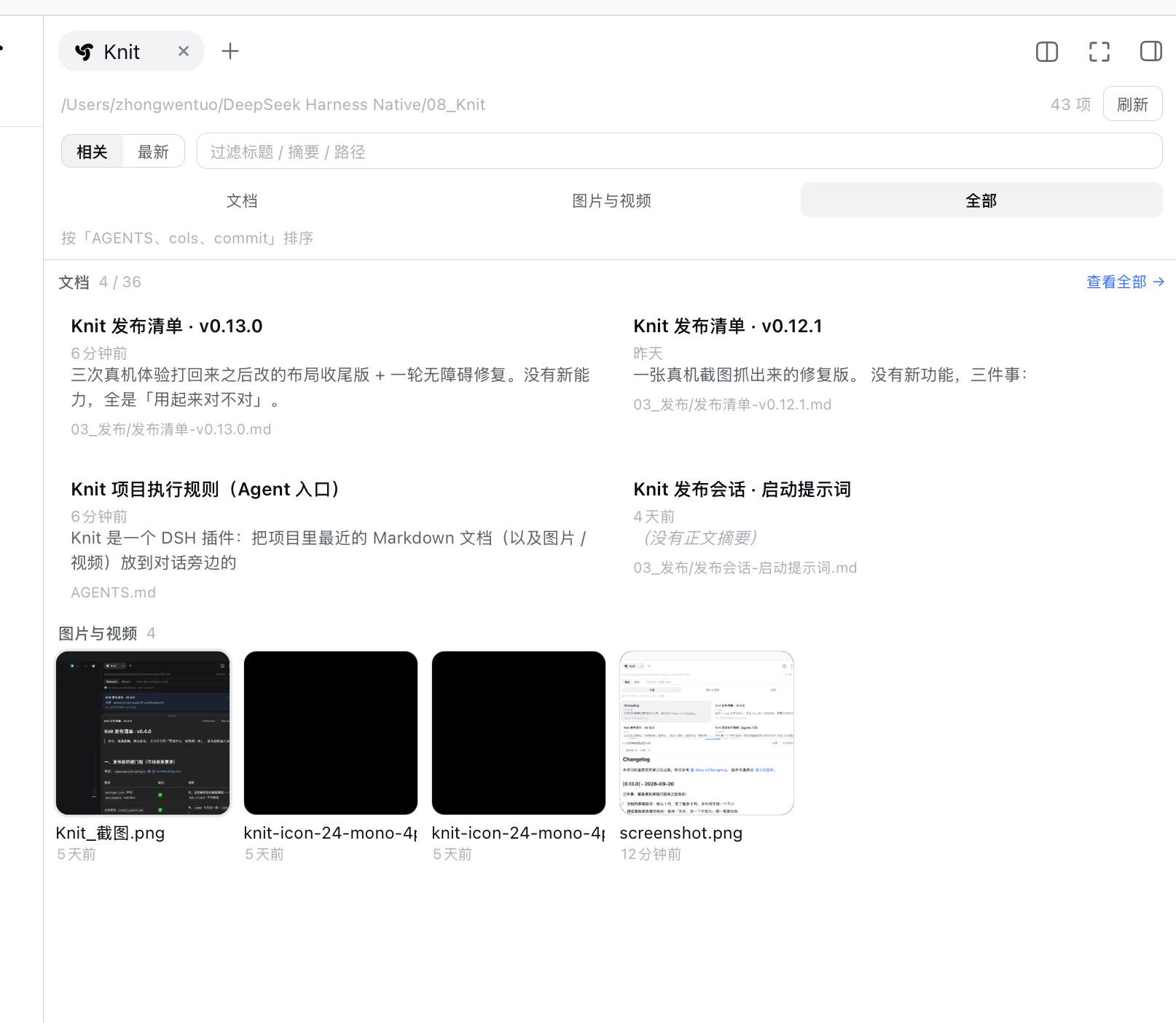
*All: the documents section shows at most 4, with a "View all →" link when truncated (here "4 /
|
|
341
|
-
and the
|
|
340
|
+
*All: the documents section shows at most 4, with a "View all →" link when truncated (here "4 / 39"),
|
|
341
|
+
and the media grid below it.*
|
|
342
342
|
|
|
343
|
-
⚠️ Both sections share the **same 40-item window** the host returns —
|
|
344
|
-
|
|
345
|
-
because it requests media on its own). A known defect, with reproduction and the
|
|
346
|
-
[`docs/README.md`](docs/README.md).*
|
|
343
|
+
⚠️ Both sections share the **same 40-item window** the host returns — when media rank past 40th by
|
|
344
|
+
relevance, the All view keeps only the few inside that window (this screen keeps just one; the Media
|
|
345
|
+
tab is unaffected, because it requests media on its own). A known defect, with reproduction and the
|
|
346
|
+
fix recorded in [`docs/README.md`](docs/README.md).*
|
|
347
347
|
|
|
348
348
|
---
|
|
349
349
|
|
|
@@ -356,11 +356,13 @@ v0.16 nails that down: **attribution is settled and frozen at read time** — ho
|
|
|
356
356
|
changes later, the historical numbers never change their story (in v0.15 a read could be
|
|
357
357
|
re-judged as "outside" by the present, which was a bug).
|
|
358
358
|
|
|
359
|
-
**Off by default.** There is a "Usage" toggle in the panel head; turning it on adds
|
|
360
|
-
above the list
|
|
359
|
+
**Off by default.** There is a "Usage" toggle in the panel head; turning it on adds a lightweight
|
|
360
|
+
**lens** above the list (called the Usage Lens since v0.18 — see "reading the usage" below).
|
|
361
|
+
Its top line still reports facts only:
|
|
361
362
|
|
|
362
363
|
```
|
|
363
|
-
|
|
364
|
+
Usage Epoch 5 ˄
|
|
365
|
+
174 reads · 28 outside the pack · context changed 3×
|
|
364
366
|
```
|
|
365
367
|
|
|
366
368
|
- **Context Epoch**: one **content-changed** context equals one epoch (identical content creates
|
|
@@ -401,10 +403,14 @@ To check offline: `node tools/context-feedback-eval.mjs` replays the latest real
|
|
|
401
403
|
|
|
402
404
|
### v0.17: what state is a document in, after it has been read?
|
|
403
405
|
|
|
404
|
-
Turning "Usage" on adds two more things besides the
|
|
406
|
+
Turning "Usage" on adds two more things besides the counts: **a status on each recommended
|
|
405
407
|
document**, and "which one was read last / what was read outside the pack / how the context last
|
|
406
408
|
changed".
|
|
407
409
|
|
|
410
|
+
> ⚠️ The ASCII below is the **v0.17 shape** of this UI. v0.18 rebuilt it into the Usage Lens above
|
|
411
|
+
> the list (next section) — **the criteria, the four states and the data sources did not change**;
|
|
412
|
+
> this section is about the data and the judgement.
|
|
413
|
+
|
|
408
414
|
```
|
|
409
415
|
Context · Epoch 4
|
|
410
416
|
Recently read: SDD-v0.17.md · 12 min ago
|
|
@@ -455,6 +461,50 @@ All four states are **facts**, not scores:
|
|
|
455
461
|
for reduced motion. This is not a new feature — it only makes "who arrived, who left, who moved"
|
|
456
462
|
visible. Indexing, ranking, tiers and the `knit_docs` output are unchanged.
|
|
457
463
|
|
|
464
|
+
### v0.18: reading the usage (Context Usage Lens)
|
|
465
|
+
|
|
466
|
+
v0.17 had all the information, but **crammed into one line and a few collapsed blocks** — you could
|
|
467
|
+
not read the structure: which tier got read, which document was read last, which of those twenty
|
|
468
|
+
outside documents were read over and over, whether the last change was an arrival or a departure.
|
|
469
|
+
v0.18 rebuilds it as a lightweight **lens above the list** — not a dialog, not a new page, and not a
|
|
470
|
+
dashboard:
|
|
471
|
+
|
|
472
|
+
```
|
|
473
|
+
Usage Epoch 5 ˄
|
|
474
|
+
174 reads · 28 outside the pack · context changed 3×
|
|
475
|
+
Current context
|
|
476
|
+
Primary 1 / 1 Supporting 2 / 3 Related 0 / 5
|
|
477
|
+
● ● ○ ○ ○ ○ ○ ○
|
|
478
|
+
Recent read docs/eval.md 12 min ago ›
|
|
479
|
+
Reads outside context 20 ›
|
|
480
|
+
Context changes Latest ›
|
|
481
|
+
```
|
|
482
|
+
|
|
483
|
+
- **Current-context coverage**: each tier gives "a state dot + `read / total in that tier`". Clicking
|
|
484
|
+
a tier scrolls to that tier and **flashes it briefly** (no arrows, no rules — space says "here").
|
|
485
|
+
**Facts only**: no progress bar, no percentage — Knit does not judge whether a context is "used up",
|
|
486
|
+
and when there is no Primary the whole column is hidden rather than drawing a fake `0 / 0`.
|
|
487
|
+
- **Inline state dot**: unread = hollow circle / read = filled circle / updated after read = filled
|
|
488
|
+
circle with an inner ring / re-read after update = `↻`, shown **alongside** the text (the dot states
|
|
489
|
+
the state, the text states the count). Clicking it opens that document. No red/green, no badge.
|
|
490
|
+
The coverage dots and this one share **the same tokens and the same 6px diameter** — one state language.
|
|
491
|
+
- **Recent read** is a clickable fact row (`file · relative time ›`) that opens that document directly
|
|
492
|
+
and **does not refetch the list**. It is still "the **last successful read**" — never "currently reading".
|
|
493
|
+
- **Reads outside context** shows up to 10 by default plus "N more"; every row is clickable and carries
|
|
494
|
+
its state, sorted by **most-read first** (`count DESC`) — a fact order, not a relevance score. You
|
|
495
|
+
**cannot** promote a document into the context from here (V0.18 does no context control).
|
|
496
|
+
- **Context changes** is collapsed by default; expanding groups it into Entered / Left / Moved tier,
|
|
497
|
+
at most 5 per group, and only the **latest** delta is shown.
|
|
498
|
+
- The lens itself expands / collapses. **Collapsing is not turning usage off** — collapsing means
|
|
499
|
+
"counting, but I do not want the details"; switching the toggle off produces no usage DOM at all.
|
|
500
|
+
- On a short panel (< 420px) it degrades to summary + coverage + recent read; the change details are
|
|
501
|
+
still one click away, and **scrolling always belongs to the list** — there is no second scroll
|
|
502
|
+
container, so a narrow sidebar never gets scroll-inside-scroll.
|
|
503
|
+
|
|
504
|
+
Not one new fact was added: everything comes from the v0.17 `lifecycle / recentRead / outsideDocs /
|
|
505
|
+
latestDelta` fields plus the current `context` tiers, and coverage is **derived** from them (pure
|
|
506
|
+
functions `coverageOf` / `groupOutsideDocs` / `groupDelta`).
|
|
507
|
+
|
|
458
508
|
The `knit_docs` tool output **did not grow**: it still only finds context.
|
|
459
509
|
|
|
460
510
|
---
|
|
@@ -514,7 +564,7 @@ The relevance figure only affects ordering — it is **never displayed and never
|
|
|
514
564
|
git clone https://github.com/PolinniZhong/dsh-knit.git
|
|
515
565
|
cd dsh-knit
|
|
516
566
|
|
|
517
|
-
npm test #
|
|
567
|
+
npm test # 532 tests, zero dependencies, no npm install needed
|
|
518
568
|
```
|
|
519
569
|
|
|
520
570
|
**How changes take effect**: the host half (`src/host/`) **requires a DSH restart** (no hot reload);
|
|
@@ -538,7 +588,7 @@ knit/
|
|
|
538
588
|
│ ├── host/feedback.js # usage feedback: read-time attribution / Context Epoch / delta (pure)
|
|
539
589
|
│ ├── host/tool.js # the agent tool knit_docs (hand-written ToolDefinition)
|
|
540
590
|
│ └── client/client.js # dual-host registration + panel UI
|
|
541
|
-
└── test/ #
|
|
591
|
+
└── test/ # 532 tests
|
|
542
592
|
├── eval/ # retrieval quality: corpus + cases + frozen v0.5.2 baseline
|
|
543
593
|
└── context/ # context tiering: 24-doc corpus + 12 real-task cases
|
|
544
594
|
```
|
package/README.md
CHANGED
|
@@ -171,7 +171,7 @@ dsh plugin --profile web add dsh-knit
|
|
|
171
171
|
| 文档列表**永远单列**(v0.14 起,多列那套已整体删除);**序号在每行最左边独立成一列**(与标题第一行**垂直居中**),其余数据全在右边堆叠(右边第一行=Primary 点 + 标题 + 相对时间,**时间靠右**),摘要再往下;**列表行里不再有路径** —— 它和预览头那行可点的**路径**重复,只保留后者 | ✅ |
|
|
172
172
|
| 单击就地展开预览,再点收起 | ✅ |
|
|
173
173
|
| 相对路径图片真正渲染(`./img/a.png`、`../assets/b.png`) | ✅ |
|
|
174
|
-
| **文档 /
|
|
174
|
+
| **文档 / 媒体 / 全部** 三类一键切换(偏好记住,默认仍是文档,老体验不变);选中态是**中性灰填充**,不带品牌色描边(页签「媒体」2026-10-06 由「图片与视频」改短) | ✅ |
|
|
175
175
|
| 图片与视频:方形缩略图网格,**格子基准固定 104px、列数由宽度连续数出来**(320px → 2 列 / 632px → 5 列 / 1200px → 10 列),格子大小基本不变;**纵向有多少行就铺多少行**,超出交给列表滚动;视频自动取首帧、叠播放三角与时长角标(零依赖、不转码) | ✅ |
|
|
176
176
|
| 点图片 / 视频在面板内**就地预览**:图片大图、视频可播放可拖动(HTTP Range 流式,不全量下载) | ✅ |
|
|
177
177
|
| 「全部」视图**分上下两区**:文档最多 4 条(超出给「查看全部 →」);图片视频**不截断**,只给计数 | ✅ |
|
|
@@ -191,18 +191,18 @@ dsh plugin --profile web add dsh-knit
|
|
|
191
191
|
|
|
192
192
|
### 另外两档长什么样
|
|
193
193
|
|
|
194
|
-

|
|
195
195
|
|
|
196
|
-
|
|
196
|
+
*媒体:方形缩略图,**列数跟着面板宽度连续变** —— 这一屏是 6 列,格子约 112px。*
|
|
197
197
|
*列出的就是工作区里真实的图片与 SVG 文件 —— 这个工作区正好有几张截图、一张演示动图和一个*
|
|
198
198
|
*单色 SVG 图标,所以看起来像一屏文件缩略图(那个纯黑方块就是图标本身,不是加载失败)。*
|
|
199
199
|
*视频会取首帧当海报、中央叠播放三角、右下角叠时长,只是这个工作区里没有视频,所以这一屏看不到。*
|
|
200
200
|
|
|
201
|
-

|
|
202
202
|
|
|
203
|
-
*全部:上区文档最多 4 条,超出时右侧给「查看全部 →」(这一屏是「4 /
|
|
204
|
-
*⚠️ 上下两区共用宿主返回的**同一个 40
|
|
205
|
-
|
|
203
|
+
*全部:上区文档最多 4 条,超出时右侧给「查看全部 →」(这一屏是「4 / 39」),下区是媒体网格。*
|
|
204
|
+
*⚠️ 上下两区共用宿主返回的**同一个 40 条窗口**:媒体如果按相关性排到第 40 名之外,*
|
|
205
|
+
*「全部」档就只剩窗口里那几个(这一屏只剩 1 个;「媒体」档不受影响,它单独取媒体)。*
|
|
206
206
|
*这是已知缺陷,复现与修法记在 [`docs/README.md`](docs/README.md)。*
|
|
207
207
|
|
|
208
208
|
---
|
|
@@ -325,10 +325,12 @@ v0.15 起有一层**可核验的使用反馈**:把 agent 真实读过的文件
|
|
|
325
325
|
v0.16 把这件事钉死:**归因在读发生那一刻结算并冻结** —— 之后上下文怎么换,历史数字都不会改口
|
|
326
326
|
(v0.15 里同一个读会被「现在」重判成包外,那是 bug)。
|
|
327
327
|
|
|
328
|
-
**默认关。**
|
|
328
|
+
**默认关。** 面板头部有一个「使用情况」开关,打开之后列表上方会多出一块**观察层**
|
|
329
|
+
(v0.18 起叫 Usage Lens,形状见下面「把使用情况读出来」一节)。它最上面一行仍然只报事实:
|
|
329
330
|
|
|
330
331
|
```
|
|
331
|
-
|
|
332
|
+
使用情况 Epoch 5 ˄
|
|
333
|
+
174 次读取 · 28 篇包外 · 上下文变化 3 次
|
|
332
334
|
```
|
|
333
335
|
|
|
334
336
|
- **Context Epoch**:一份**内容有变化**的上下文 = 一个 Epoch(内容没变就不新建,轮询不会灌进几十个)。
|
|
@@ -362,9 +364,12 @@ agent 侧同样可选:`knit_docs` 加 `audit: true`(默认 `false`),工
|
|
|
362
364
|
|
|
363
365
|
### v0.17:读完之后,这篇文档现在是什么状态
|
|
364
366
|
|
|
365
|
-
|
|
367
|
+
打开「使用情况」之后,除了统计,还会多两样东西:**每篇推荐文档的状态**,
|
|
366
368
|
以及「最近读了哪篇 / 包外读了哪几篇 / 上下文最近一次怎么变」。
|
|
367
369
|
|
|
370
|
+
> ⚠️ 下面这段 ASCII 是 **v0.17 当时的界面形状**。v0.18 把这一块重做成了列表上方的 Usage Lens
|
|
371
|
+
> (形状见下一节)—— **判据、四档状态、数据来源一个字没变**,这一节讲的是数据与判据。
|
|
372
|
+
|
|
368
373
|
```
|
|
369
374
|
当前上下文 · Epoch 4
|
|
370
375
|
最近读取:SDD-v0.17.md · 12 分钟前
|
|
@@ -410,6 +415,42 @@ agent 侧同样可选:`knit_docs` 加 `audit: true`(默认 `false`),工
|
|
|
410
415
|
以及系统开了「减弱动态效果」时都**不播**。这不是新功能,只是把「谁进来了、谁走了、
|
|
411
416
|
谁挪了位置」演给人看 —— 索引、排序、分层与 `knit_docs` 的输出一个字都没改。
|
|
412
417
|
|
|
418
|
+
### v0.18:把「使用情况」读出来(Context Usage Lens)
|
|
419
|
+
|
|
420
|
+
v0.17 的信息都在,但**摞在一行字和几个折叠块里**,读不出结构:哪一层读得多、最近读的是哪一篇、
|
|
421
|
+
包外那二十篇里哪几篇被反复读、这次变化是进是出。v0.18 把它重做成列表**上方的一块观察层**
|
|
422
|
+
—— 不是弹窗、不是新页面、也不是 Dashboard:
|
|
423
|
+
|
|
424
|
+
```
|
|
425
|
+
使用情况 Epoch 5 ˄
|
|
426
|
+
174 次读取 · 28 篇包外 · 上下文变化 3 次
|
|
427
|
+
当前上下文
|
|
428
|
+
主要 1 / 1 辅助 2 / 3 相关 0 / 5
|
|
429
|
+
● ● ○ ○ ○ ○ ○ ○
|
|
430
|
+
最近读取 docs/eval.md 12分钟前 ›
|
|
431
|
+
上下文外读取 20 ›
|
|
432
|
+
上下文变化 最近一次 ›
|
|
433
|
+
```
|
|
434
|
+
|
|
435
|
+
- **当前上下文 Coverage**:三层各给「状态点 + `已读数 / 本层总数`」。点某一层会**滚到那一层并短暂亮一下**
|
|
436
|
+
(不画箭头、不画横线 —— 用空间说「就是这里」)。**只报事实**:没有进度条、没有百分比
|
|
437
|
+
—— Knit 不评价「这份上下文用完了没有」;Primary 不存在时整列不显示,不画 `0 / 0` 的假层。
|
|
438
|
+
- **行内状态点**:未读=空心圆 / 已读=实心圆 / 读后已更新=实心圆套内圈 / 修改后已重新读取=`↻`,
|
|
439
|
+
与原来那行文字**同时**存在(状态点说状态、文字说次数)。点它=打开这一篇。不用红绿、不加徽章。
|
|
440
|
+
Coverage 的三层圆点与文档行这一颗**同一套 token、同一个 6px 直径** —— 两处说的是同一种状态语言。
|
|
441
|
+
- **最近读取**是一行可点的事实(`文件名 · 相对时间 ›`),点它直接打开该篇,**不重新请求列表**。
|
|
442
|
+
它仍然是「**最近一次成功 read**」—— 没有改成「正在阅读」。
|
|
443
|
+
- **上下文外读取**默认最多 10 篇 + 「还有 N 篇」,每行可点、带状态;按**读得最多的**排
|
|
444
|
+
(`count DESC`)—— 这是事实排序,不是相关度。**不许**从这里把文档加进 Context(V0.18 不做 Context Control)。
|
|
445
|
+
- **上下文变化**默认折叠,展开按 进入 / 离开 / 换层 分组,每组最多 5 条;只展示**最近一次**。
|
|
446
|
+
- Lens 自己能展开 / 收起。**收起不等于关掉统计** —— 收起只是「统计开着、暂时不想看细节」;
|
|
447
|
+
关掉开关才真的一个统计 DOM 都不产生。
|
|
448
|
+
- 面板很矮(< 420px)时降级成「摘要 + Coverage + 最近读取」,变化明细点开仍在;
|
|
449
|
+
滚动**始终只交给列表** —— 没有第二个滚动容器,窄侧栏里不会滚轮套滚轮。
|
|
450
|
+
|
|
451
|
+
数据一个字都没新加:全部来自 v0.17 已有的 `lifecycle / recentRead / outsideDocs / latestDelta`
|
|
452
|
+
与当前 `context` 的三层,Coverage 是从它们**派生**的(纯函数 `coverageOf` / `groupOutsideDocs` / `groupDelta`)。
|
|
453
|
+
|
|
413
454
|
`knit_docs` 的工具输出**没有跟着变大**:它仍然只负责找上下文。
|
|
414
455
|
|
|
415
456
|
---
|
|
@@ -467,7 +508,7 @@ agent 侧同样可选:`knit_docs` 加 `audit: true`(默认 `false`),工
|
|
|
467
508
|
git clone https://github.com/PolinniZhong/dsh-knit.git
|
|
468
509
|
cd dsh-knit
|
|
469
510
|
|
|
470
|
-
npm test #
|
|
511
|
+
npm test # 532 项,零依赖,不需要先 npm install
|
|
471
512
|
```
|
|
472
513
|
|
|
473
514
|
**改动生效方式**:宿主半边(`src/host/`)改了**必须重启 DSH**(实测不热加载);
|
|
@@ -491,7 +532,7 @@ knit/
|
|
|
491
532
|
│ ├── host/feedback.js # 使用反馈:读时归因 / Context Epoch / Delta(纯逻辑,只读事件流)
|
|
492
533
|
│ ├── host/tool.js # agent 文档工具 knit_docs(手写 ToolDefinition)
|
|
493
534
|
│ └── client/client.js # 双宿主注册 + 面板 UI
|
|
494
|
-
└── test/ #
|
|
535
|
+
└── test/ # 532 项测试
|
|
495
536
|
├── eval/ # 检索质量评测:语料 + 用例 + 冻结的 v0.5.2 基线
|
|
496
537
|
└── context/ # 上下文分层评测:24 篇语料 + 12 条任务型用例
|
|
497
538
|
```
|
package/package.json
CHANGED
|
@@ -1,6 +1,6 @@
|
|
|
1
1
|
{
|
|
2
2
|
"name": "dsh-knit",
|
|
3
|
-
"version": "0.
|
|
3
|
+
"version": "0.18.0",
|
|
4
4
|
"type": "module",
|
|
5
5
|
"description": "Find the doc your agent just wrote. Lists the DSH workspace's Markdown, images and video in the sidebar, ranked by relevance to the current conversation, with inline preview — and hands the same ranking to the agent as a tool, returning the passage that matched in each document. Zero model calls, zero network.",
|
|
6
6
|
"main": "./src/host/index.js",
|