dsh-inkpond 0.1.0 → 0.2.0
This diff represents the content of publicly available package versions that have been released to one of the supported registries. The information contained in this diff is provided for informational purposes only and reflects changes between package versions as they appear in their respective public registries.
- package/README.en.md +41 -11
- package/README.md +37 -14
- package/THIRD_PARTY_NOTICES.md +3 -2
- package/lib/build-info.json +2 -2
- package/lib/client.js +2442 -22
- package/lib/licenses/OFL.txt +3 -2
- package/package.json +4 -4
package/README.en.md
CHANGED
|
@@ -4,9 +4,11 @@
|
|
|
4
4
|
|
|
5
5
|
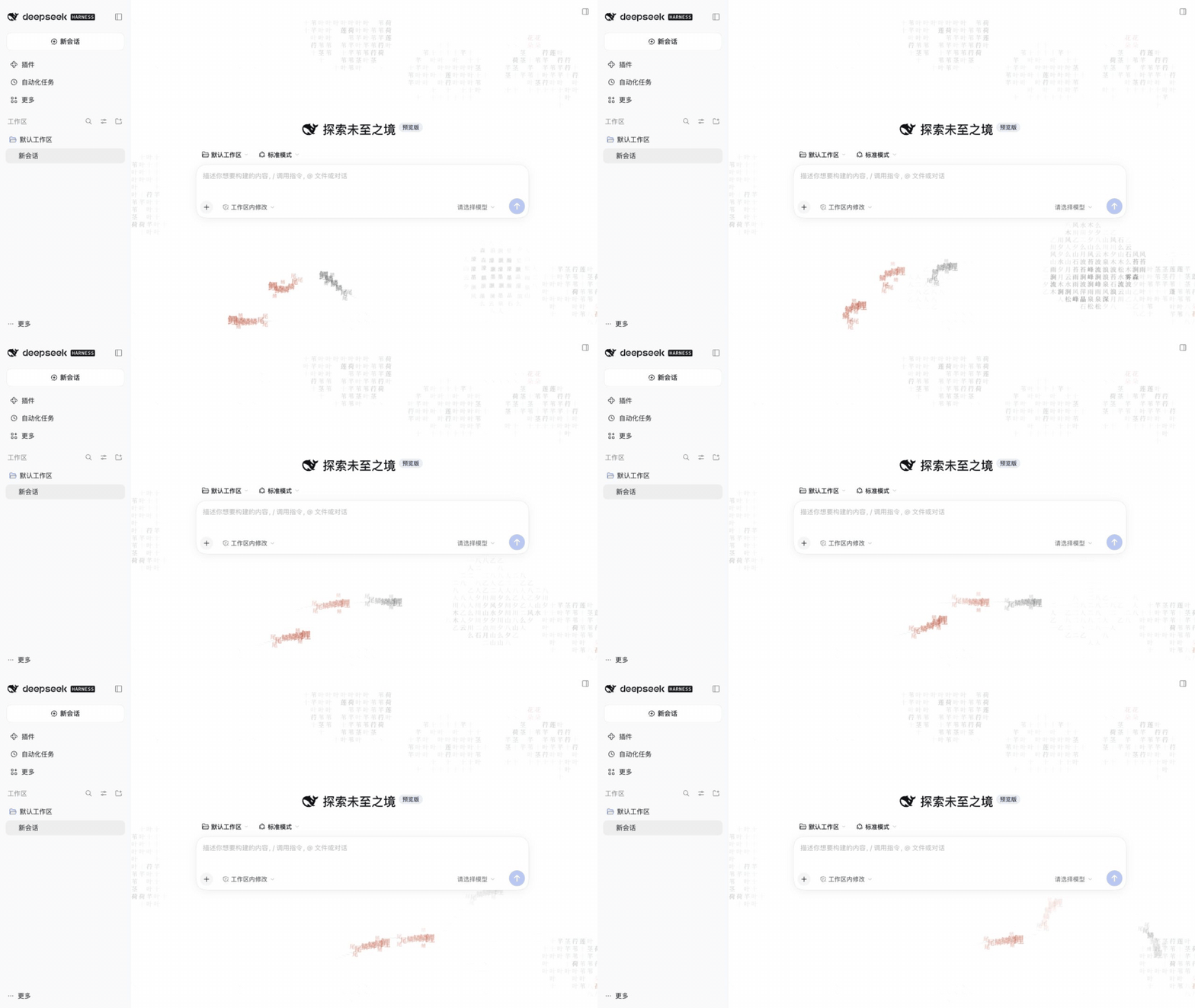
Interactive Chinese glyph ink-wash backgrounds for DeepSeek Harness.
|
|
6
6
|
The default **lotus pond** has drifting koi, lotus leaves and flowers. Pointer movement makes ripples;
|
|
7
|
-
clicking empty space drops ink. Misty hills
|
|
7
|
+
clicking empty space drops ink. Misty hills, a Qingming handscroll, the 24 solar terms and the Northern sea are also included.
|
|
8
8
|
|
|
9
|
-
|
|
10
|
+
|
|
11
|
+
[View the 16:9 still screenshot](https://raw.githubusercontent.com/shin4/inkpond-dsh/main/docs/images/lotus-preview.png) · Actual capture, approximately 10 seconds, with the default lotus scene and 45% strength.
|
|
10
12
|
|
|
11
13
|
## Compatibility
|
|
12
14
|
|
|
@@ -17,23 +19,50 @@ markers; host layout/API changes need validation before widening compatibility.
|
|
|
17
19
|
|
|
18
20
|
## Install
|
|
19
21
|
|
|
20
|
-
|
|
21
|
-
|
|
22
|
+
### Desktop or Web: use the Add plugin wizard (recommended)
|
|
23
|
+
|
|
24
|
+
1. Open **Plugins → Add plugin → Install a third-party plugin** in DSH.
|
|
25
|
+
2. Enter the npm package name in the **Package name or address** field:
|
|
26
|
+
|
|
27
|
+
```text
|
|
28
|
+
dsh-inkpond
|
|
29
|
+
```
|
|
30
|
+
|
|
31
|
+
To pin the current version, enter `dsh-inkpond@0.2.0` instead.
|
|
32
|
+
3. Select **Official npm registry** under the installation registry options, then click **Install**.
|
|
33
|
+
Mirrors may not have synchronized a newly published version yet.
|
|
34
|
+
4. Start a new empty conversation to see the default lotus pond. If DSH requests a restart,
|
|
35
|
+
fully quit and reopen the application.
|
|
36
|
+
|
|
37
|
+
The wizard installs directly from npm, independently of listings in 1024 Store or dshmarket.
|
|
38
|
+
No source checkout or local compilation is needed. The compatibility limits above still apply.
|
|
39
|
+
|
|
40
|
+
### Install into a Web profile with the CLI
|
|
22
41
|
|
|
23
42
|
```bash
|
|
24
|
-
dsh plugin --profile web add
|
|
43
|
+
dsh plugin --profile web add dsh-inkpond@0.2.0
|
|
25
44
|
```
|
|
26
45
|
|
|
27
|
-
|
|
28
|
-
|
|
29
|
-
|
|
46
|
+
For Desktop, prefer the in-app wizard above, which targets the current application's profile.
|
|
47
|
+
The terminal's `web` profile is not necessarily the Desktop profile.
|
|
48
|
+
The package is published on [npm](https://www.npmjs.com/package/dsh-inkpond).
|
|
30
49
|
|
|
31
|
-
|
|
50
|
+
### Install a Release tarball
|
|
51
|
+
|
|
52
|
+
Download `dsh-inkpond-0.2.0.tgz` from [Releases](https://github.com/shin4/inkpond-dsh/releases).
|
|
53
|
+
Enter its absolute local path in the host plugin manager, or install into a regular Web profile:
|
|
54
|
+
|
|
55
|
+
```bash
|
|
56
|
+
dsh plugin --profile web add /absolute/path/to/dsh-inkpond-0.2.0.tgz
|
|
57
|
+
```
|
|
58
|
+
|
|
59
|
+
Refresh the page; restart the instance if it does not hot-load. The tarball is prebuilt and
|
|
60
|
+
does not compile code at installation time.
|
|
32
61
|
A GitHub source checkout requires `npm ci && npm run build` before installation.
|
|
33
62
|
|
|
34
63
|
## Preferences
|
|
35
64
|
|
|
36
|
-
Open Plugins → Installed → dsh-inkpond. Select Lotus pond (default), Misty hills or
|
|
65
|
+
Open Plugins → Installed → dsh-inkpond. Select Lotus pond (default), Misty hills, Qingming handscroll, 24 solar terms (selected by the current date) or Northern sea (waves and a whale);
|
|
37
66
|
choose new conversations only (default) or all conversations, toggle color accents, adjust ink strength,
|
|
38
67
|
and select system animation preferences or a still image. All-conversation mode needs further long-chat testing.
|
|
39
68
|
Restore defaults returns to Lotus pond, 45% strength, new conversations only and system motion preferences.
|
|
@@ -57,7 +86,8 @@ npm pack
|
|
|
57
86
|
```
|
|
58
87
|
|
|
59
88
|
`check` runs type checking, tests and the build. The tarball contains the Host entry, DSH client factory,
|
|
60
|
-
offline fonts and licenses. React comes from DSH; the renderer is pinned to `
|
|
89
|
+
offline fonts and licenses. React comes from DSH; the renderer is pinned to local inkpond commit `c502ef8ba4a898b22f321a5dba3e2255736bc60c`
|
|
90
|
+
(an independent dependency tarball; see `vendor/README.md`).
|
|
61
91
|
Test tarballs in a separate `DSH_HOME`. Avoid uninstall tests in a daily profile. DSH local-link removal
|
|
62
92
|
was observed cleaning the linked target's development dependencies, so use tarballs for acceptance testing.
|
|
63
93
|
See the [verification record](docs/verification.md) and [release checklist](docs/release.md).
|
package/README.md
CHANGED
|
@@ -5,12 +5,11 @@
|
|
|
5
5
|
以字为墨,以页为池。为 DeepSeek Harness 会话界面铺一层可交互的汉字水墨背景。
|
|
6
6
|
|
|
7
7
|
默认是**莲池**:荷叶与荷花之间,鲤鱼缓缓游动。鼠标划过起涟漪,点击空白处落墨。
|
|
8
|
-
|
|
8
|
+
可切换山水、清明上河、二十四节气和北冥,保留输入区留白、明暗主题跟随及自动性能降级。
|
|
9
9
|
|
|
10
|
-
|
|
11
|
-
|
|
12
|
-
|
|
13
|
-
</picture>
|
|
10
|
+

|
|
11
|
+
|
|
12
|
+
[查看 16:9 静态截图](https://raw.githubusercontent.com/shin4/inkpond-dsh/main/docs/images/lotus-preview.png) · 实际录屏,约 10 秒,默认莲池与 45% 浓度。
|
|
14
13
|
|
|
15
14
|
## 兼容性
|
|
16
15
|
|
|
@@ -20,24 +19,48 @@
|
|
|
20
19
|
|
|
21
20
|
## 安装
|
|
22
21
|
|
|
23
|
-
|
|
24
|
-
|
|
22
|
+
### 桌面版或网页版:通过添加插件向导安装(推荐)
|
|
23
|
+
|
|
24
|
+
1. 打开 DSH 的 **插件 → 添加插件 → 安装第三方插件**(Add plugin)。
|
|
25
|
+
2. 在向导的「包名或地址」输入框中填写 npm 包名:
|
|
26
|
+
|
|
27
|
+
```text
|
|
28
|
+
dsh-inkpond
|
|
29
|
+
```
|
|
30
|
+
|
|
31
|
+
如需固定当前版本,填写 `dsh-inkpond@0.2.0`。
|
|
32
|
+
3. 在「安装源」中选择 **npm 官方源**,点击 **安装**(Install)。新版本可能尚未同步到镜像源。
|
|
33
|
+
4. 安装后新建空白会话,即可看到默认莲池。若宿主提示重启,请完全退出并重新打开 DSH。
|
|
34
|
+
|
|
35
|
+
此入口直接从 npm 安装,不依赖 1024 Store 或 dshmarket 是否已收录。
|
|
36
|
+
无需下载源码或在本机编译。适用版本仍以本文的兼容性说明为准。
|
|
37
|
+
|
|
38
|
+
### 使用 CLI 安装到 Web profile
|
|
25
39
|
|
|
26
40
|
```bash
|
|
27
|
-
dsh plugin --profile web add
|
|
41
|
+
dsh plugin --profile web add dsh-inkpond@0.2.0
|
|
28
42
|
```
|
|
29
43
|
|
|
30
|
-
|
|
31
|
-
不要假定终端的 `web` profile
|
|
44
|
+
桌面版推荐使用上述应用内向导,它会安装到当前应用的 profile;
|
|
45
|
+
不要假定终端的 `web` profile 就是桌面配置。包发布于 [npm](https://www.npmjs.com/package/dsh-inkpond)。
|
|
46
|
+
|
|
47
|
+
### 使用 Release 安装包
|
|
48
|
+
|
|
49
|
+
从 [GitHub Releases](https://github.com/shin4/inkpond-dsh/releases) 下载 `dsh-inkpond-0.2.0.tgz`。
|
|
50
|
+
在 DSH 插件管理页填入本地安装包的绝对路径,或使用普通 Web profile:
|
|
51
|
+
|
|
52
|
+
```bash
|
|
53
|
+
dsh plugin --profile web add /absolute/path/to/dsh-inkpond-0.2.0.tgz
|
|
54
|
+
```
|
|
32
55
|
|
|
33
|
-
|
|
56
|
+
刷新页面;若宿主未热加载,重启对应实例。安装包包含构建产物,不执行安装期编译。
|
|
34
57
|
GitHub 源码 checkout 需要先 `npm ci && npm run build`,不能直接从未构建源码安装。
|
|
35
58
|
|
|
36
59
|
## 使用
|
|
37
60
|
|
|
38
61
|
插件 → 已安装 → dsh-inkpond:
|
|
39
62
|
|
|
40
|
-
-
|
|
63
|
+
- 默认莲池,亦可选山水、清明上河、二十四节气和北冥。节气随当前日期选择画面;北冥呈现海浪与鲸影。
|
|
41
64
|
- 默认仅新会话显示;可选择所有会话(长对话兼容性仍需更多实测)。
|
|
42
65
|
- 调整淡彩、墨色浓淡,选择跟随系统动画或静态画面。
|
|
43
66
|
- 恢复默认会回到莲池、45% 浓度、仅新会话、跟随系统动画。
|
|
@@ -61,7 +84,7 @@ npm pack
|
|
|
61
84
|
```
|
|
62
85
|
|
|
63
86
|
`check` 执行类型检查、单元测试和构建。`npm pack` 生成独立安装包,包含 Host 入口、
|
|
64
|
-
DSH 客户端工厂、内嵌字体和许可证。React 由宿主提供,绘制引擎固定使用 `
|
|
87
|
+
DSH 客户端工厂、内嵌字体和许可证。React 由宿主提供,绘制引擎固定使用 本地 inkpond 提交 `c502ef8ba4a898b22f321a5dba3e2255736bc60c`(独立依赖包,详见 `vendor/README.md`)。
|
|
65
88
|
|
|
66
89
|
使用独立 `DSH_HOME` 验证安装包;不要在日常 profile 中进行卸载测试。
|
|
67
90
|
已观察到 DSH 本地链接卸载可能清理链接目标的开发依赖,因此推荐始终用 `.tgz` 做安装验收。
|
|
@@ -71,7 +94,7 @@ DSH 客户端工厂、内嵌字体和许可证。React 由宿主提供,绘制
|
|
|
71
94
|
## 范围与许可
|
|
72
95
|
|
|
73
96
|
本插件只提供背景和外观设置,没有模型工具、遥测、消息读取或第三方网络请求。
|
|
74
|
-
|
|
97
|
+
五个字体子集随包提供,无需 CDN。宿主自身的网络行为不由本插件控制。
|
|
75
98
|
|
|
76
99
|
代码采用 MIT;绘制核心来自 [inkpond](https://github.com/shin4/inkpond),
|
|
77
100
|
字体采用 SIL OFL 1.1,见 [第三方声明](THIRD_PARTY_NOTICES.md)。
|
package/THIRD_PARTY_NOTICES.md
CHANGED
|
@@ -1,10 +1,11 @@
|
|
|
1
1
|
# Third-party notices
|
|
2
2
|
|
|
3
3
|
The browser artifact bundles Inkpond 0.1.0 (https://github.com/shin4/inkpond),
|
|
4
|
-
Copyright (c) 2026 Shin, under the MIT license.
|
|
4
|
+
Copyright (c) 2026 Shin, under the MIT license. Built from local upstream commit c502ef8ba4a898b22f321a5dba3e2255736bc60c,
|
|
5
|
+
not the published npm 0.1.0 artifact. Its vendored tarball integrity is pinned in
|
|
5
6
|
package-lock.json. The upstream library remains independently maintained.
|
|
6
7
|
|
|
7
|
-
The
|
|
8
|
+
The five bundled Inkpond Glyphs font subsets derive from Source Han Serif SC
|
|
8
9
|
Medium and are licensed under SIL OFL 1.1. They retain their modified names.
|
|
9
10
|
The complete license, copyright and modification notice is shipped in
|
|
10
11
|
lib/licenses/OFL.txt; the upstream code license is in lib/licenses/inkpond-MIT.txt.
|
package/lib/build-info.json
CHANGED