dsh-herdr-bridge 0.1.1 → 0.2.0
This diff represents the content of publicly available package versions that have been released to one of the supported registries. The information contained in this diff is provided for informational purposes only and reflects changes between package versions as they appear in their respective public registries.
- package/README.md +20 -20
- package/README.zh-CN.md +20 -20
- package/client.js +151 -0
- package/docs/DETAIL.md +3 -0
- package/docs/DETAIL.zh.md +3 -0
- package/index.js +107 -5
- package/install.js +79 -0
- package/locale/en.json +7 -0
- package/locale/zh.json +7 -0
- package/package.json +19 -4
- package/proxy.js +9 -49
package/README.md
CHANGED
|
@@ -15,7 +15,7 @@ The plugin runs inside DSH's own process. It needs no second copy of DSH and cha
|
|
|
15
15
|
|
|
16
16
|
## What it looks like
|
|
17
17
|
|
|
18
|
-

|
|
18
|
+
|
|
19
19
|
|
|
20
20
|
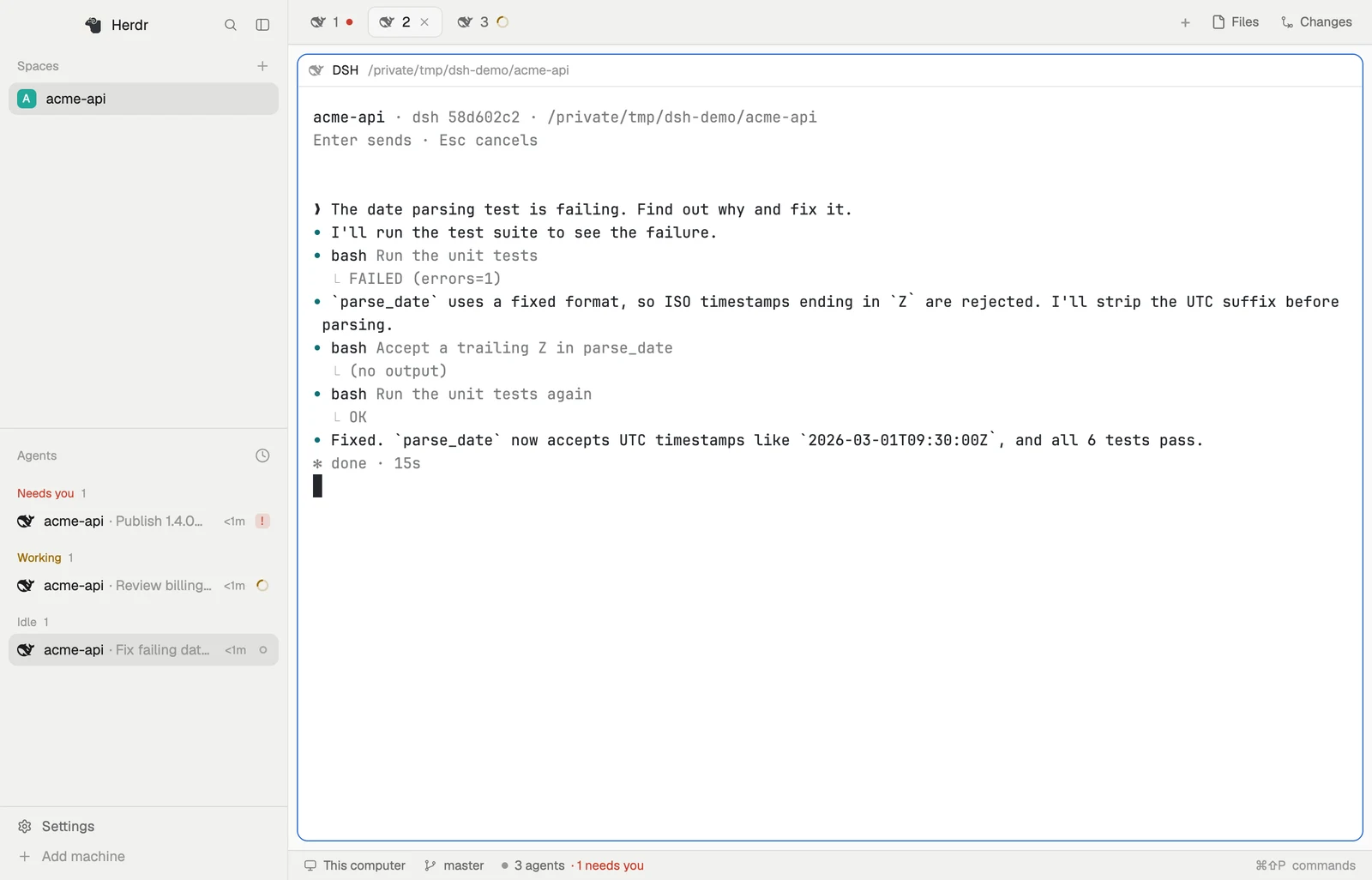
Three DSH sessions in Herdr App, each in a different state. On the right is one session as it looks in its hc terminal: the prompt, the reply, tool calls with their descriptions, and how long the turn took, in the same format as native TUI agents.
|
|
21
21
|
|
|
@@ -35,19 +35,14 @@ Platforms: tested on macOS only. Windows and Linux are implemented but untested.
|
|
|
35
35
|
|
|
36
36
|
1. Add the plugin to the DSH profile you use: `desktop` for Desktop (quit Desktop fully with ⌘Q first), or `web` for `dsh web` (stop it first):
|
|
37
37
|
```sh
|
|
38
|
-
dsh plugin --profile desktop add dsh-herdr-bridge
|
|
39
|
-
```
|
|
40
|
-
2. Reopen Desktop or start `dsh web`. When the plugin loads, it creates the command `~/.dsh/herdr-bridge/bin/dsh-hc`.
|
|
41
|
-
3. Add it to your PATH (the examples below assume you did), then run `install-template`. This installs the hc template so that `hc run dsh "task"` works. If Herdr App is installed, it also adds DSH's name and icon to Herdr App's program table, so DSH sessions don't show a generic icon in the agents list:
|
|
42
|
-
```sh
|
|
43
|
-
fish_add_path ~/.dsh/herdr-bridge/bin # fish; for zsh/bash add export PATH="$HOME/.dsh/herdr-bridge/bin:$PATH" to your rc file
|
|
44
|
-
dsh-hc install-template # writes the hc template; with Herdr App, also its programs.json and icon
|
|
38
|
+
dsh plugin --profile desktop add dsh-herdr-bridge # or --profile web
|
|
45
39
|
```
|
|
40
|
+
2. Reopen Desktop or start `dsh web`. That's all: when the plugin loads, it installs the hc template, so Herdr agents can run `hc run dsh "task"`, and, if you use Herdr App, DSH's name and icon there.
|
|
46
41
|
|
|
47
42
|
**Check that it works:**
|
|
48
43
|
|
|
49
44
|
```sh
|
|
50
|
-
|
|
45
|
+
hc templates # lists dsh
|
|
51
46
|
```
|
|
52
47
|
|
|
53
48
|
Then send any message in DSH. A `dsh-<short id>` terminal should appear in `hc ls`.
|
|
@@ -72,11 +67,13 @@ Where the new session goes depends on its folder. If the folder is exactly one o
|
|
|
72
67
|
**3. Take over an existing session.**
|
|
73
68
|
|
|
74
69
|
```sh
|
|
75
|
-
dsh-hc ls --days 7
|
|
76
|
-
hc run --bg --name login dsh-hc attach 3b729fc9
|
|
77
|
-
hc read login
|
|
70
|
+
~/.dsh/herdr-bridge/bin/dsh-hc ls --days 7 # session id, title, folder, and whether it's already in hc
|
|
71
|
+
hc run --bg --name login ~/.dsh/herdr-bridge/bin/dsh-hc attach 3b729fc9 # by id, id prefix, or part of the title
|
|
72
|
+
hc read login # the earlier conversation first, then anything new
|
|
78
73
|
```
|
|
79
74
|
|
|
75
|
+
`dsh-hc` is the small command the plugin creates; it doesn't need to be on your PATH. Herdr agents find its full path in the `dsh` template's description (`hc templates`).
|
|
76
|
+
|
|
80
77
|
If the session already has an automatic `dsh-<short id>` terminal, that terminal exits and the one taking over replaces it.
|
|
81
78
|
|
|
82
79
|
**4. Cancel when needed.** `hc interrupt fix` cancels the current turn, like pressing stop in DSH.
|
|
@@ -85,7 +82,7 @@ If the session already has an automatic `dsh-<short id>` terminal, that terminal
|
|
|
85
82
|
|
|
86
83
|
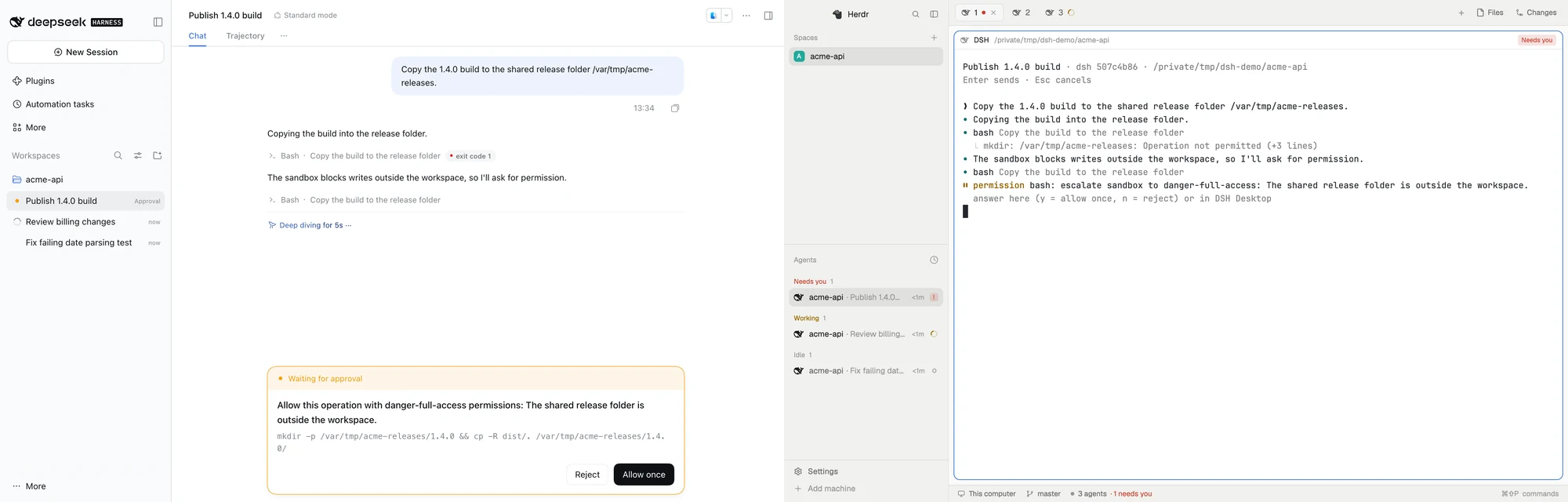
When a session waits for an approval or a question, DSH shows its dialog as usual. The hc terminal shows the same question, with status `blocked`.
|
|
87
84
|
|
|
88
|
-

|
|
85
|
+
|
|
89
86
|
|
|
90
87
|
Answering from hc needs `--force`:
|
|
91
88
|
|
|
@@ -114,26 +111,29 @@ General hc usage comes from `~/.agents/skills/herdr-core`, which DSH discovers a
|
|
|
114
111
|
|
|
115
112
|
## Configuration
|
|
116
113
|
|
|
117
|
-
|
|
114
|
+
Open **Plugins → Herdr Bridge** in DSH to choose where sessions show in Herdr App; changes apply without a restart. Everything can also be set, all optional, under the `herdr-bridge` entry in `~/.dsh/profiles/<profile>/cordis.patch.yml`:
|
|
118
115
|
|
|
119
116
|
```yaml
|
|
120
117
|
- id: herdr-bridge
|
|
121
118
|
config:
|
|
119
|
+
herdrPlacement: folder # where Herdr App shows sessions started in DSH: folder (default), dsh, or none
|
|
120
|
+
herdrSpace: sp123 # a fixed Herdr App space id; overrides herdrPlacement
|
|
122
121
|
reconnectGraceSeconds: 30 # how long a terminal waits for the plugin to come back before exiting (default 30)
|
|
123
|
-
herdrSpace: s3 # label terminals herdr.space=<id> so they show in that Herdr App space
|
|
124
122
|
hc: /path/to/hc # the hc executable; default: hc on PATH
|
|
125
123
|
```
|
|
126
124
|
|
|
125
|
+
Herdr App only shows hc terminals placed in one of its spaces. With `folder`, a session started in DSH joins the Herdr App space that already has a terminal in the same folder; if there is none, Herdr App opens a new space for that folder. With `dsh`, all of them share one space named DSH; Herdr App names new spaces after a folder, so the plugin renames it through Herdr App's own command line, and leaves a name you chose alone. With `none`, they stay out of Herdr App but still show in `hc ls` and other clients. Sessions a Herdr agent starts with `hc run dsh` show under that agent either way.
|
|
126
|
+
|
|
127
127
|
## Troubleshooting
|
|
128
128
|
|
|
129
129
|
Start with the log, `~/.dsh/herdr-bridge/bridge.log`.
|
|
130
130
|
|
|
131
131
|
| Symptom | Check |
|
|
132
132
|
|---|---|
|
|
133
|
+
| A session you started in DSH shows in `hc ls` but not in Herdr App | Check `herdrPlacement` isn't `none`. Herdr App only shows terminals placed in a space; terminals from an older plugin version are placed when they reconnect |
|
|
133
134
|
| A session you're using in DSH isn't in `hc ls` | The log, for plugin load or terminal start failures. Whether DSH can find `hc`: Desktop uses your login shell's PATH and `dsh web` uses the PATH of the shell that started it; if needed, set `hc` in the config. Whether Desktop and `dsh web` are both running (see Known limitations) |
|
|
134
|
-
| `
|
|
135
|
-
|
|
|
136
|
-
| DSH sessions show a generic robot icon in Herdr App | Start Herdr App once, then run `dsh-hc install-template`. It reports whether it wrote the `dsh` entry to `programs.json` or kept one that was already there |
|
|
135
|
+
| `hc run dsh …` can't find the template, or `~/.dsh/herdr-bridge/bin/dsh-hc` doesn't exist | The plugin didn't load; check the log. A `dsh` template you wrote yourself is never replaced; delete it to get ours, or run `~/.dsh/herdr-bridge/bin/dsh-hc install-template` |
|
|
136
|
+
| DSH sessions show a generic robot icon in Herdr App | Herdr App had never been started when the plugin loaded: restart DSH, or run `~/.dsh/herdr-bridge/bin/dsh-hc install-template`. A `dsh` entry already in `programs.json` is kept |
|
|
137
137
|
| The terminal shows "disconnected → reconnected" | The plugin reloaded (for example, you changed a setting in DSH). This is expected, and the address stays the same |
|
|
138
138
|
| A `dsh-*` terminal exits suddenly | DSH quit, or the plugin didn't come back within `reconnectGraceSeconds`. Reopen DSH; the session is mirrored again the next time it runs |
|
|
139
139
|
| A terminal reports a protocol version mismatch | It's still running the proxy from before a plugin upgrade. Close it and `attach` again |
|
|
@@ -162,8 +162,8 @@ Installing from source, the dev loop and the isolated test environment are in [d
|
|
|
162
162
|
```sh
|
|
163
163
|
scripts/dev.sh up # isolated world: mock LLM + isolated hc core + isolated dsh web (Desktop stand-in)
|
|
164
164
|
scripts/dev.sh reload # hot-reload the plugin
|
|
165
|
-
scripts/e2e.sh #
|
|
166
|
-
scripts/e2e-ui.sh #
|
|
165
|
+
scripts/e2e.sh # 39 hc-side checks
|
|
166
|
+
scripts/e2e-ui.sh # 14 UI-side checks (ego-browser)
|
|
167
167
|
scripts/dev.sh down
|
|
168
168
|
scripts/desktop.sh reload # hot-reload changes into your real Desktop (only touches the herdr-bridge entry in cordis.patch.yml; backs it up the first time)
|
|
169
169
|
scripts/demo-media.py # regenerate the README media from a scripted, fully isolated demo
|
package/README.zh-CN.md
CHANGED
|
@@ -15,7 +15,7 @@
|
|
|
15
15
|
|
|
16
16
|
## 效果
|
|
17
17
|
|
|
18
|
-

|
|
18
|
+

|
|
19
19
|
|
|
20
20
|
Herdr App 里的三个 DSH 会话,状态各不相同。右侧是其中一个会话在 hc 终端里的样子:提示、回复、带描述的工具调用和回合用时,格式和原生 TUI Agent 一样。
|
|
21
21
|
|
|
@@ -35,19 +35,14 @@ Desktop 和 `dsh web` 同一时间只能有一个接入 Herdr(见已知限制
|
|
|
35
35
|
|
|
36
36
|
1. 装进你使用的 DSH profile。Desktop 用 `desktop`,要先完全退出 Desktop(⌘Q);Web 用 `web`,要先停掉 `dsh web`:
|
|
37
37
|
```sh
|
|
38
|
-
dsh plugin --profile desktop add dsh-herdr-bridge
|
|
39
|
-
```
|
|
40
|
-
2. 重新打开 Desktop 或启动 `dsh web`。插件加载时会生成命令 `~/.dsh/herdr-bridge/bin/dsh-hc`。
|
|
41
|
-
3. 把它加进 PATH(下文的示例都假设已经加好),然后执行 `install-template`。它安装 hc template,让 `hc run dsh "任务"` 可用;装了 Herdr App 的话,还会在 Herdr App 的程序表里加上 DSH 的名字和图标,DSH 会话在 Agent 列表里就不再是通用图标:
|
|
42
|
-
```sh
|
|
43
|
-
fish_add_path ~/.dsh/herdr-bridge/bin # fish;zsh/bash 在 rc 文件里加 export PATH="$HOME/.dsh/herdr-bridge/bin:$PATH"
|
|
44
|
-
dsh-hc install-template # 写入 hc template;有 Herdr App 时再写入它的 programs.json 和图标
|
|
38
|
+
dsh plugin --profile desktop add dsh-herdr-bridge # 或 --profile web
|
|
45
39
|
```
|
|
40
|
+
2. 重新打开 Desktop 或启动 `dsh web`。这就装好了:插件加载时会自己安装 hc template,Herdr Agent 就能用 `hc run dsh "任务"`;如果你用 Herdr App,还会在它那里加上 DSH 的名字和图标。
|
|
46
41
|
|
|
47
42
|
**确认安装成功**:
|
|
48
43
|
|
|
49
44
|
```sh
|
|
50
|
-
|
|
45
|
+
hc templates # 能看到 dsh
|
|
51
46
|
```
|
|
52
47
|
|
|
53
48
|
然后在 DSH 里随便发一条消息,`hc ls` 里应该出现 `dsh-<短 id>` 终端。
|
|
@@ -72,11 +67,13 @@ hc send --wait fix "继续,把边界情况也测了"
|
|
|
72
67
|
**3. 接管一个已有会话。**
|
|
73
68
|
|
|
74
69
|
```sh
|
|
75
|
-
dsh-hc ls --days 7
|
|
76
|
-
hc run --bg --name login dsh-hc attach 3b729fc9
|
|
77
|
-
hc read login
|
|
70
|
+
~/.dsh/herdr-bridge/bin/dsh-hc ls --days 7 # 会话 id、标题、目录、是否已在 hc 里
|
|
71
|
+
hc run --bg --name login ~/.dsh/herdr-bridge/bin/dsh-hc attach 3b729fc9 # 用 id、id 前缀或标题片段
|
|
72
|
+
hc read login # 先看到之前的对话,再看到新的
|
|
78
73
|
```
|
|
79
74
|
|
|
75
|
+
`dsh-hc` 是插件生成的一个小命令,不需要加进 PATH。Herdr Agent 从 `dsh` template 的描述里(`hc templates`)就能看到它的完整路径。
|
|
76
|
+
|
|
80
77
|
如果这个会话已经有自动映射的 `dsh-<短 id>` 终端,那个终端会退出,由接管的终端代替。
|
|
81
78
|
|
|
82
79
|
**4. 需要时取消。** `hc interrupt fix` 取消当前回合,相当于在 DSH 里点停止。
|
|
@@ -85,7 +82,7 @@ hc read login # 先看到之前的对话
|
|
|
85
82
|
|
|
86
83
|
会话等待审批或提问时,DSH 界面照常弹出对话框,hc 终端里也显示同一个问题,状态为 `blocked`。
|
|
87
84
|
|
|
88
|
-

|
|
85
|
+

|
|
89
86
|
|
|
90
87
|
在 hc 侧回答必须加 `--force`:
|
|
91
88
|
|
|
@@ -114,26 +111,29 @@ hc run --bg --parent "$DSH_HC_TERMINAL" --name helper --cwd /repo claude "…完
|
|
|
114
111
|
|
|
115
112
|
## 配置
|
|
116
113
|
|
|
117
|
-
|
|
114
|
+
在 DSH 里打开 **插件 → Herdr 桥接**,就能在插件页上直接选择会话在 Herdr App 里放在哪里,改完不用重启就生效。所有设置也都可以写在 `~/.dsh/profiles/<profile>/cordis.patch.yml` 的 `herdr-bridge` 条目下,全部可选:
|
|
118
115
|
|
|
119
116
|
```yaml
|
|
120
117
|
- id: herdr-bridge
|
|
121
118
|
config:
|
|
119
|
+
herdrPlacement: folder # 在 DSH 里发起的会话放进 Herdr App 的哪个 space:folder(默认)、dsh 或 none
|
|
120
|
+
herdrSpace: sp123 # 固定的 Herdr App space id;填了就以它为准
|
|
122
121
|
reconnectGraceSeconds: 30 # 插件断开后,终端等待重连的秒数,超时退出(默认 30)
|
|
123
|
-
herdrSpace: s3 # 给终端打 herdr.space 标签,在 Herdr App 的这个 space 里显示
|
|
124
122
|
hc: /path/to/hc # hc 可执行文件,默认是 PATH 上的 hc
|
|
125
123
|
```
|
|
126
124
|
|
|
125
|
+
Herdr App 只显示放进它某个 space 的 hc 终端。`folder`:在 DSH 里发起的会话,加入 Herdr App 里已经有终端在同一文件夹的那个 space;没有的话,Herdr App 为这个文件夹新开一个 space。`dsh`:所有会话共用一个名为 DSH 的 space。Herdr App 新建 space 时会用文件夹名命名,所以插件会通过 Herdr App 自己的命令行把它改名为 DSH;你自己改过的名字不会被覆盖。`none`:不放进 Herdr App,但 `hc ls` 和其他客户端照样能看到。Herdr Agent 用 `hc run dsh` 发起的会话,无论哪种设置,都显示在那个 Agent 下面。
|
|
126
|
+
|
|
127
127
|
## 故障排查
|
|
128
128
|
|
|
129
129
|
先看日志 `~/.dsh/herdr-bridge/bridge.log`。
|
|
130
130
|
|
|
131
131
|
| 现象 | 检查 |
|
|
132
132
|
|---|---|
|
|
133
|
+
| 在 DSH 里发起的会话 `hc ls` 里有,但 Herdr App 里没有 | 检查 `herdrPlacement` 不是 `none`。Herdr App 只显示放进 space 的终端;旧版插件开出的终端会在重连时补上 |
|
|
133
134
|
| DSH 里在用的会话,`hc ls` 里没有 | 日志里有没有插件加载和开终端失败的记录;DSH 进程能否找到 `hc`(Desktop 用登录 shell 的 PATH,`dsh web` 用启动它的 shell 的 PATH;找不到就在配置里设 `hc`);是否同时开着 Desktop 和 `dsh web`(见已知限制) |
|
|
134
|
-
| `dsh-hc
|
|
135
|
-
|
|
|
136
|
-
| Herdr App 里 DSH 会话显示通用的机器人图标 | 先启动过一次 Herdr App,再执行 `dsh-hc install-template`;它会提示 `programs.json` 是否写入或保留了已有的 `dsh` 条目 |
|
|
135
|
+
| `hc run dsh …` 提示找不到 template,或 `~/.dsh/herdr-bridge/bin/dsh-hc` 不存在 | 插件没加载,看日志。你自己写的 `dsh` template 不会被替换;删掉它就会换成插件的,或执行 `~/.dsh/herdr-bridge/bin/dsh-hc install-template` |
|
|
136
|
+
| Herdr App 里 DSH 会话显示通用的机器人图标 | 插件加载时 Herdr App 还从没启动过:重启 DSH,或执行 `~/.dsh/herdr-bridge/bin/dsh-hc install-template`。`programs.json` 里已有的 `dsh` 条目会保留 |
|
|
137
137
|
| 终端显示“断开 → 重新连接” | 插件重载了(比如你在 DSH 里改了设置),正常现象,地址不变 |
|
|
138
138
|
| `dsh-*` 终端突然退出 | DSH 退出或插件超过 `reconnectGraceSeconds` 没回来;重开 DSH 后,会话下次运行时会重新映射 |
|
|
139
139
|
| 终端报协议版本不符 | 插件升级后旧终端还在跑旧代理;关掉终端重新 `attach` |
|
|
@@ -162,8 +162,8 @@ hc run --bg --parent "$DSH_HC_TERMINAL" --name helper --cwd /repo claude "…完
|
|
|
162
162
|
```sh
|
|
163
163
|
scripts/dev.sh up # 隔离环境:模拟 LLM + 隔离 hc core + 隔离 dsh web(Desktop 替身)
|
|
164
164
|
scripts/dev.sh reload # 热重载插件
|
|
165
|
-
scripts/e2e.sh #
|
|
166
|
-
scripts/e2e-ui.sh #
|
|
165
|
+
scripts/e2e.sh # 39 项 hc 侧回归
|
|
166
|
+
scripts/e2e-ui.sh # 14 项 UI 侧回归(ego-browser)
|
|
167
167
|
scripts/dev.sh down
|
|
168
168
|
scripts/desktop.sh reload # 把改动热重载进真实 Desktop(只改 cordis.patch.yml 里 herdr-bridge 这一项,首次会备份)
|
|
169
169
|
```
|
package/client.js
ADDED
|
@@ -0,0 +1,151 @@
|
|
|
1
|
+
// dsh-herdr-bridge, browser half: this plugin's settings, shown on its own page under Plugins.
|
|
2
|
+
// Hand-written in the client module system's lazy-CJS factory format (the format DSH's own tsdown
|
|
3
|
+
// preset emits), so the package needs no build. It edits the volatile fields of the plugin's
|
|
4
|
+
// Config (`herdrPlacement`, `herdrSpace`) through the Host's settings form for the `herdr-bridge`
|
|
5
|
+
// profile entry; the Host validates and persists them, and the plugin reads them live.
|
|
6
|
+
window.__ModuleLoader__.load({
|
|
7
|
+
id: "dsh-herdr-bridge",
|
|
8
|
+
factory: (require) => {
|
|
9
|
+
var module = { exports: {} };
|
|
10
|
+
var exports = module.exports;
|
|
11
|
+
Object.defineProperty(exports, Symbol.toStringTag, { value: "Module" });
|
|
12
|
+
const { createElement: h, useId } = require("react");
|
|
13
|
+
const { Button, SettingsForm, SettingsFormModel, SettingsValueField, Tag, settingsTextField } = require("@deepseek-ai/dsh-client-ui-primitives");
|
|
14
|
+
|
|
15
|
+
/** Dictionary namespace owned by this page. */
|
|
16
|
+
const NS = "herdrBridge";
|
|
17
|
+
/** Settings namespace: the plugin's profile entry id. */
|
|
18
|
+
const SETTINGS = "herdr-bridge";
|
|
19
|
+
/** Plugins page key of this bundle: its package name. */
|
|
20
|
+
const BUNDLE = "dsh-herdr-bridge";
|
|
21
|
+
const PLACEMENTS = ["folder", "dsh", "none"];
|
|
22
|
+
|
|
23
|
+
const en = {
|
|
24
|
+
placement: "Where Herdr App shows sessions started in DSH",
|
|
25
|
+
folder: "By folder",
|
|
26
|
+
folderHint: "A session joins the Herdr App space that already has a terminal in its folder, or opens a new space for that folder.",
|
|
27
|
+
dsh: "One space for all DSH sessions",
|
|
28
|
+
dshHint: "All sessions share one space, named DSH. Rename it in Herdr App if you like; the new name is kept.",
|
|
29
|
+
none: "Not in Herdr App",
|
|
30
|
+
noneHint: "Sessions stay out of Herdr App, but still show in hc and other Herdr clients.",
|
|
31
|
+
space: "Fixed space id",
|
|
32
|
+
spaceHint: "A Herdr App space id. When set, it replaces the choice above.",
|
|
33
|
+
applies: "Applies to terminals opened after you save; open ones stay where they are.",
|
|
34
|
+
overridden: "Custom",
|
|
35
|
+
reset: "Reset",
|
|
36
|
+
invalid: "Not a valid value",
|
|
37
|
+
unavailable: "This profile doesn't expose herdr-bridge settings.",
|
|
38
|
+
readOnly: "This profile's configuration is read-only.",
|
|
39
|
+
saveFailed: "Couldn't save. Try again.",
|
|
40
|
+
save: "Save",
|
|
41
|
+
saving: "Saving…",
|
|
42
|
+
};
|
|
43
|
+
const zh = {
|
|
44
|
+
placement: "在 DSH 里发起的会话放在 Herdr App 的哪里",
|
|
45
|
+
folder: "按文件夹归位",
|
|
46
|
+
folderHint: "加入 Herdr App 里已经有终端在同一文件夹的那个 space;没有的话,为这个文件夹新开一个 space。",
|
|
47
|
+
dsh: "统一放进一个 DSH space",
|
|
48
|
+
dshHint: "所有会话共用一个名为 DSH 的 space。你可以在 Herdr App 里给它改名,改过的名字会保留。",
|
|
49
|
+
none: "不放进 Herdr App",
|
|
50
|
+
noneHint: "会话不出现在 Herdr App 里,但 hc 和其他 Herdr 客户端照样能看到。",
|
|
51
|
+
space: "固定 space id",
|
|
52
|
+
spaceHint: "Herdr App 的 space id。填了就以它为准,忽略上面的选择。",
|
|
53
|
+
applies: "保存后新开的终端按新设置放置;已经开着的终端位置不变。",
|
|
54
|
+
overridden: "已自定义",
|
|
55
|
+
reset: "重置",
|
|
56
|
+
invalid: "不是有效的值",
|
|
57
|
+
unavailable: "当前 profile 没有暴露 herdr-bridge 的设置。",
|
|
58
|
+
readOnly: "当前 profile 的配置是只读的。",
|
|
59
|
+
saveFailed: "保存失败,请重试。",
|
|
60
|
+
save: "保存",
|
|
61
|
+
saving: "保存中…",
|
|
62
|
+
};
|
|
63
|
+
|
|
64
|
+
const css = {
|
|
65
|
+
field: { display: "flex", flexDirection: "column", gap: "6px", padding: "8px 0" },
|
|
66
|
+
toolbar: { display: "flex", alignItems: "center", gap: "8px" },
|
|
67
|
+
label: { fontSize: "13px", fontWeight: "600", color: "var(--dsw-alias-label-primary)" },
|
|
68
|
+
select: {
|
|
69
|
+
height: "34px", padding: "0 10px", maxWidth: "360px",
|
|
70
|
+
border: "0.5px solid var(--dsw-alias-border-l4)", borderRadius: "var(--dsw-radius-md)",
|
|
71
|
+
background: "var(--dsw-alias-bg-layer-3)", color: "var(--dsw-alias-label-primary)", font: "inherit", fontSize: "13px",
|
|
72
|
+
},
|
|
73
|
+
hint: { margin: 0, fontSize: "12px", lineHeight: "1.6", color: "var(--dsw-alias-label-secondary)" },
|
|
74
|
+
};
|
|
75
|
+
|
|
76
|
+
/** Staged edits of the two placement settings over the Host's form for this profile entry. */
|
|
77
|
+
function placementForm(scope) {
|
|
78
|
+
const form = new SettingsFormModel(scope, [{
|
|
79
|
+
...settingsTextField("herdrPlacement"),
|
|
80
|
+
parse: (text) => {
|
|
81
|
+
const value = text.trim();
|
|
82
|
+
if (value === "") return { kind: "clear" };
|
|
83
|
+
return PLACEMENTS.includes(value) ? { kind: "set", value } : undefined;
|
|
84
|
+
},
|
|
85
|
+
}, settingsTextField("herdrSpace")]);
|
|
86
|
+
const store = form.bind(() => ({
|
|
87
|
+
...form.shell(),
|
|
88
|
+
herdrPlacement: form.field("herdrPlacement"),
|
|
89
|
+
herdrSpace: form.field("herdrSpace"),
|
|
90
|
+
}));
|
|
91
|
+
return { face: { hooks: { herdrBridgeForm: store }, ...form.actions() }, dispose: () => { form.dispose(); } };
|
|
92
|
+
}
|
|
93
|
+
|
|
94
|
+
/** The page: placement choice, optional fixed space id, and the shared save footer. */
|
|
95
|
+
function SettingsPage(props) {
|
|
96
|
+
const t = props.t;
|
|
97
|
+
const state = props.useHerdrBridgeForm((snapshot) => snapshot);
|
|
98
|
+
const id = useId();
|
|
99
|
+
const disabled = !state.writable || state.saving;
|
|
100
|
+
const placement = PLACEMENTS.includes(state.herdrPlacement.text) ? state.herdrPlacement.text : "folder";
|
|
101
|
+
return h(SettingsForm, {
|
|
102
|
+
labels: { unavailable: t("unavailable"), readOnly: t("readOnly"), saveFailed: t("saveFailed"), save: t("save"), saving: t("saving") },
|
|
103
|
+
state,
|
|
104
|
+
onSave: props.save,
|
|
105
|
+
onDiscard: props.discard,
|
|
106
|
+
},
|
|
107
|
+
h("div", { style: css.field },
|
|
108
|
+
h("div", { style: css.toolbar },
|
|
109
|
+
h("label", { htmlFor: `${id}-placement`, style: css.label }, t("placement")),
|
|
110
|
+
state.herdrPlacement.overridden ? h(Tag, { tone: "neutral" }, t("overridden")) : null,
|
|
111
|
+
state.herdrPlacement.overridden
|
|
112
|
+
? h(Button, { size: "sm", disabled, onClick: () => { props.resetField("herdrPlacement"); } }, t("reset"))
|
|
113
|
+
: null,
|
|
114
|
+
),
|
|
115
|
+
h("select", {
|
|
116
|
+
id: `${id}-placement`, value: placement, disabled, style: css.select,
|
|
117
|
+
"aria-invalid": state.herdrPlacement.invalid || undefined,
|
|
118
|
+
onChange: (event) => { props.edit("herdrPlacement", event.target.value); },
|
|
119
|
+
}, PLACEMENTS.map((value) => h("option", { key: value, value }, t(value)))),
|
|
120
|
+
h("p", { style: css.hint }, t(`${placement}Hint`)),
|
|
121
|
+
),
|
|
122
|
+
h(SettingsValueField, {
|
|
123
|
+
id: `${id}-space`, label: t("space"), hint: t("spaceHint"), ...state.herdrSpace,
|
|
124
|
+
overriddenLabel: t("overridden"), resetLabel: t("reset"), invalidLabel: t("invalid"), disabled,
|
|
125
|
+
onEdit: (text) => { props.edit("herdrSpace", text); },
|
|
126
|
+
onReset: () => { props.resetField("herdrSpace"); },
|
|
127
|
+
}),
|
|
128
|
+
h("p", { style: css.hint }, t("applies")),
|
|
129
|
+
);
|
|
130
|
+
}
|
|
131
|
+
|
|
132
|
+
const inject = ["slots", "locale", "configForms"];
|
|
133
|
+
|
|
134
|
+
/** Register the dictionaries and, while the Host serves the namespace, the settings on the bundle's page (between its detail and its components). */
|
|
135
|
+
function apply(ctx) {
|
|
136
|
+
ctx.effect(() => ctx.locale.register(NS, { en, zh }), "herdr-bridge: dictionaries");
|
|
137
|
+
const form = placementForm(ctx.configForms.get(SETTINGS));
|
|
138
|
+
ctx.effect(() => () => { form.dispose(); }, "herdr-bridge: settings form");
|
|
139
|
+
ctx.effect(() => ctx.configForms.whileServed([SETTINGS], () => ctx.slots.inject("plugins.bundle.config", () => ctx.slots.register({
|
|
140
|
+
name: "plugins.bundle.config",
|
|
141
|
+
key: BUNDLE,
|
|
142
|
+
locale: NS,
|
|
143
|
+
inject: () => form.face,
|
|
144
|
+
}, SettingsPage))), "herdr-bridge: settings page");
|
|
145
|
+
}
|
|
146
|
+
|
|
147
|
+
exports.apply = apply;
|
|
148
|
+
exports.inject = inject;
|
|
149
|
+
return module.exports;
|
|
150
|
+
}
|
|
151
|
+
});
|
package/docs/DETAIL.md
ADDED
package/index.js
CHANGED
|
@@ -6,15 +6,28 @@
|
|
|
6
6
|
// See README.md for the design.
|
|
7
7
|
import net from 'node:net'
|
|
8
8
|
import { execFile } from 'node:child_process'
|
|
9
|
-
import { appendFileSync, chmodSync, mkdirSync, realpathSync, rmSync, writeFileSync } from 'node:fs'
|
|
9
|
+
import { appendFileSync, chmodSync, existsSync, mkdirSync, realpathSync, rmSync, writeFileSync } from 'node:fs'
|
|
10
10
|
import { basename, join, sep } from 'node:path'
|
|
11
11
|
import { homedir } from 'node:os'
|
|
12
12
|
import { createHash, randomUUID } from 'node:crypto'
|
|
13
13
|
import { fileURLToPath } from 'node:url'
|
|
14
14
|
import { Renderer, crlf, oneLine, osc, style, windowTitle } from './render.js'
|
|
15
|
+
import { installHerdrApp, installTemplate } from './install.js'
|
|
15
16
|
|
|
16
17
|
export const name = 'herdr-bridge'
|
|
17
18
|
|
|
19
|
+
// Settings DSH validates and edits. Schemastery ships with DSH but may not resolve from a linked
|
|
20
|
+
// checkout; without it the settings still work from cordis.patch.yml, just unvalidated and not live.
|
|
21
|
+
// The volatile fields are what the Plugins page form (client.js) edits; they apply without a reload.
|
|
22
|
+
const Schema = await import('@deepseek-ai/schemastery').then(m => m.default, () => null)
|
|
23
|
+
export const Config = Schema?.object({
|
|
24
|
+
herdrPlacement: Schema.union(['folder', 'dsh', 'none']).default('folder').volatile()
|
|
25
|
+
.description('Where Herdr App shows the terminals of sessions started in DSH: by folder, in one space, or not at all'),
|
|
26
|
+
herdrSpace: Schema.string().volatile().description('A fixed Herdr App space id; overrides herdrPlacement when set'),
|
|
27
|
+
reconnectGraceSeconds: Schema.natural().default(30).description('How long a terminal waits for the plugin to come back before it exits'),
|
|
28
|
+
hc: Schema.string().description('The hc executable (default: hc on PATH)'),
|
|
29
|
+
})
|
|
30
|
+
|
|
18
31
|
const PROTOCOL = 1
|
|
19
32
|
const PASTE_START = '\x1b[200~'
|
|
20
33
|
const PASTE_END = '\x1b[201~'
|
|
@@ -101,7 +114,10 @@ This DSH session is mirrored into Herdr Core (hc) as an ordinary terminal, so yo
|
|
|
101
114
|
|
|
102
115
|
export function apply(ctx, config = {}) {
|
|
103
116
|
const hc = config.hc || 'hc'
|
|
104
|
-
|
|
117
|
+
// Volatile settings are references read at each use; a linked checkout passes plain values.
|
|
118
|
+
const live = value => typeof value?.get === 'function' ? value.get() : value
|
|
119
|
+
const herdrSpace = () => live(config.herdrSpace) || ''
|
|
120
|
+
const herdrPlacement = () => live(config.herdrPlacement) || 'folder'
|
|
105
121
|
const grace = Number(config.reconnectGraceSeconds ?? 30)
|
|
106
122
|
const home = join(process.env.DSH_HOME ?? join(homedir(), '.dsh'), 'herdr-bridge')
|
|
107
123
|
mkdirSync(home, { recursive: true })
|
|
@@ -127,10 +143,82 @@ export function apply(ctx, config = {}) {
|
|
|
127
143
|
return file
|
|
128
144
|
})()
|
|
129
145
|
|
|
146
|
+
// hc's `dsh` template and Herdr App's DSH entry, kept current so nobody runs an install step.
|
|
147
|
+
for (const install of [() => installTemplate(launcher), installHerdrApp]) {
|
|
148
|
+
try {
|
|
149
|
+
const { file, result } = install()
|
|
150
|
+
if (result !== 'unchanged' && result !== 'absent') log('install', file, result)
|
|
151
|
+
} catch (error) {
|
|
152
|
+
log('install failed:', error?.message ?? error)
|
|
153
|
+
}
|
|
154
|
+
}
|
|
155
|
+
|
|
130
156
|
const runHc = (args, done) => execFile(hc, args, (error, stdout, stderr) => {
|
|
131
157
|
if (error) log('hc', args[0], 'failed:', oneLine(stderr || error.message, 300))
|
|
132
158
|
done?.(error, stdout)
|
|
133
159
|
})
|
|
160
|
+
const hcJson = args => new Promise(resolve => runHc([...args, '--json'], (error, stdout) => {
|
|
161
|
+
try { resolve(error ? null : JSON.parse(stdout)) } catch { resolve(null) }
|
|
162
|
+
}))
|
|
163
|
+
|
|
164
|
+
// Herdr App names a space it doesn't know after its first terminal's folder, and no hc label can
|
|
165
|
+
// name one; only its own CLI (`herdr-app do space.rename`) can. So the shared space is named DSH
|
|
166
|
+
// through that CLI, once Herdr App has made it, while its name is still the automatic folder name
|
|
167
|
+
// (a name the person chose is left alone). Skipped when Herdr App isn't installed or running.
|
|
168
|
+
const DSH_SPACE = 'dsh'
|
|
169
|
+
const herdrAppCandidates = [process.env.HERDR_APP_BIN, '/Applications/Herdr.app/Contents/MacOS/Herdr',
|
|
170
|
+
join(homedir(), 'Applications/Herdr.app/Contents/MacOS/Herdr')].filter(file => file && existsSync(file))
|
|
171
|
+
const herdrApp = args => new Promise(resolve => execFile(herdrAppCandidates[0] ?? 'herdr-app', args, { timeout: 5000 },
|
|
172
|
+
(error, stdout) => resolve(error ? null : stdout)))
|
|
173
|
+
let naming = false
|
|
174
|
+
async function nameDshSpace(cwd) {
|
|
175
|
+
if (naming) return
|
|
176
|
+
naming = true
|
|
177
|
+
try {
|
|
178
|
+
// Herdr App places a newly labeled terminal on its next listing, so the space can take a moment to exist.
|
|
179
|
+
for (let attempt = 0; attempt < 15; attempt++) {
|
|
180
|
+
const listed = await herdrApp(['ls'])
|
|
181
|
+
if (listed === null) return
|
|
182
|
+
const space = JSON.parse(listed).spaces?.find(s => s.id === DSH_SPACE)
|
|
183
|
+
if (space) {
|
|
184
|
+
const automatic = [space.folder, cwd].filter(Boolean).map(folder => basename(folder))
|
|
185
|
+
if (space.name !== 'DSH' && automatic.includes(space.name)) {
|
|
186
|
+
const done = await herdrApp(['do', 'space.rename', JSON.stringify({ id: DSH_SPACE, name: 'DSH' })])
|
|
187
|
+
log('herdr app: named the shared space DSH', done === null ? '(failed)' : '')
|
|
188
|
+
}
|
|
189
|
+
return
|
|
190
|
+
}
|
|
191
|
+
await new Promise(resolve => setTimeout(resolve, 1000))
|
|
192
|
+
}
|
|
193
|
+
} catch (error) {
|
|
194
|
+
log('herdr app: naming the shared space failed:', error?.message ?? error)
|
|
195
|
+
} finally {
|
|
196
|
+
naming = false
|
|
197
|
+
}
|
|
198
|
+
}
|
|
199
|
+
|
|
200
|
+
/**
|
|
201
|
+
* The Herdr App space for a session started in DSH (`herdr.space` label; Herdr App only shows
|
|
202
|
+
* hc terminals that carry one, and makes a new space for an id it doesn't know).
|
|
203
|
+
* By folder: the space a live terminal in the same folder is already in (the person's own space
|
|
204
|
+
* first), else one per folder. `dsh`: one space for every session. `none`: not placed.
|
|
205
|
+
*/
|
|
206
|
+
async function herdrSpaceFor(cwd) {
|
|
207
|
+
if (herdrSpace()) return herdrSpace()
|
|
208
|
+
if (herdrPlacement() === 'none') return ''
|
|
209
|
+
if (herdrPlacement() === 'dsh') return DSH_SPACE
|
|
210
|
+
const here = realpath(cwd || homedir())
|
|
211
|
+
const spaces = []
|
|
212
|
+
for (const t of (await hcJson(['ls']))?.terminals ?? []) {
|
|
213
|
+
if (!t.cwd || realpath(t.cwd) !== here) continue
|
|
214
|
+
const space = (await hcJson(['get', t.address]))?.labels?.['herdr.space']
|
|
215
|
+
if (space) spaces.push(space)
|
|
216
|
+
}
|
|
217
|
+
// The person's own space first; the plugin's (`dsh`, `dsh-…`) never count, so switching back
|
|
218
|
+
// from one shared space doesn't keep pulling sessions into it.
|
|
219
|
+
return spaces.find(s => s !== DSH_SPACE && !s.startsWith('dsh-'))
|
|
220
|
+
?? `dsh-${createHash('sha1').update(here).digest('hex').slice(0, 12)}`
|
|
221
|
+
}
|
|
134
222
|
|
|
135
223
|
/** Host session services, present only in hosts that have them (Desktop, `dsh web`). */
|
|
136
224
|
let sessions = null
|
|
@@ -222,6 +310,7 @@ export function apply(ctx, config = {}) {
|
|
|
222
310
|
const changed = this.terminal !== hello.term
|
|
223
311
|
this.terminal = hello.term
|
|
224
312
|
if (changed) runHc(['label', this.terminal, `dsh.session=${this.sessionId}`, `dsh.title=${this.title}`])
|
|
313
|
+
if (hello.auto || origin === 'desktop') this.place(hello.term)
|
|
225
314
|
}
|
|
226
315
|
if (hello.cols) this.renderer.cols = hello.cols
|
|
227
316
|
socket.on('close', () => this.conns.delete(socket))
|
|
@@ -291,18 +380,28 @@ export function apply(ctx, config = {}) {
|
|
|
291
380
|
}
|
|
292
381
|
|
|
293
382
|
/** Mirror into hc: a terminal named dsh-<short id> running `dsh-hc attach`. */
|
|
294
|
-
launch() {
|
|
383
|
+
async launch() {
|
|
295
384
|
if (this.mirrored) return
|
|
296
385
|
this.launching = true
|
|
297
386
|
const args = ['run', '--bg', '--rm', '--no-parent', '--json', '--name', `dsh-${this.short}`,
|
|
298
387
|
'--label', `dsh.session=${this.sessionId}`, '--label', `dsh.title=${this.title}`]
|
|
299
|
-
|
|
388
|
+
const space = await herdrSpaceFor(this.cwd)
|
|
389
|
+
if (space) args.push('--label', `herdr.space=${space}`)
|
|
390
|
+
if (space === DSH_SPACE) nameDshSpace(this.cwd)
|
|
300
391
|
if (this.cwd) args.push('--cwd', this.cwd)
|
|
301
392
|
args.push('--', launcher, 'attach', '--session', this.sessionId, '--auto')
|
|
302
393
|
// A failure is usually the name being taken: that terminal is still ours and reconnecting.
|
|
303
394
|
runHc(args, error => { if (error) this.launching = false })
|
|
304
395
|
}
|
|
305
396
|
|
|
397
|
+
/** Put an automatic mirror into a Herdr App space, unless it is in one already (placed by us before, or moved by the person). */
|
|
398
|
+
async place(term) {
|
|
399
|
+
if ((await hcJson(['get', term]))?.labels?.['herdr.space']) return
|
|
400
|
+
const space = await herdrSpaceFor(this.cwd)
|
|
401
|
+
if (space) runHc(['label', term, `herdr.space=${space}`])
|
|
402
|
+
if (space === DSH_SPACE) nameDshSpace(this.cwd)
|
|
403
|
+
}
|
|
404
|
+
|
|
306
405
|
/** Close every terminal mirroring this session; `except` keeps one. */
|
|
307
406
|
release(reason, except) {
|
|
308
407
|
for (const socket of this.conns.keys()) {
|
|
@@ -545,6 +644,9 @@ export function apply(ctx, config = {}) {
|
|
|
545
644
|
})
|
|
546
645
|
|
|
547
646
|
// /herdr: mirror this session into Herdr now and show its hc address.
|
|
647
|
+
// The Plugins page shows this plugin's own settings page (client.js), not a generated one.
|
|
648
|
+
ctx.inject(['settings'], c => { c.effect(() => c.settings.configure({ auto: false }, ctx.fiber), 'herdr-bridge: own settings page') })
|
|
649
|
+
|
|
548
650
|
ctx.inject(['commands'], c => {
|
|
549
651
|
c.commands.register({
|
|
550
652
|
name: 'herdr',
|
|
@@ -600,5 +702,5 @@ export function apply(ctx, config = {}) {
|
|
|
600
702
|
}
|
|
601
703
|
bridges.clear()
|
|
602
704
|
}, 'herdr-bridge: drop connections')
|
|
603
|
-
log('loaded')
|
|
705
|
+
log('loaded', Schema ? '(settings schema on)' : '(settings schema off: schemastery not found)', `herdrPlacement=${herdrPlacement()}`)
|
|
604
706
|
}
|
package/install.js
ADDED
|
@@ -0,0 +1,79 @@
|
|
|
1
|
+
// What hc and Herdr App need on disk to know about DSH: the hc template `dsh` and Herdr App's
|
|
2
|
+
// program entry. The plugin installs both whenever it loads; `dsh-hc install-template` runs the
|
|
3
|
+
// same code by hand. Both leave a file or entry the person made themselves alone.
|
|
4
|
+
import { copyFileSync, existsSync, mkdirSync, readFileSync, renameSync, writeFileSync } from 'node:fs'
|
|
5
|
+
import { homedir } from 'node:os'
|
|
6
|
+
import { join } from 'node:path'
|
|
7
|
+
import { fileURLToPath } from 'node:url'
|
|
8
|
+
|
|
9
|
+
/** Marks a template this package wrote (hc ignores unknown header fields). */
|
|
10
|
+
const GENERATOR = 'dsh-herdr-bridge'
|
|
11
|
+
|
|
12
|
+
function writeAtomic(file, text) {
|
|
13
|
+
writeFileSync(`${file}.tmp`, text)
|
|
14
|
+
renameSync(`${file}.tmp`, file)
|
|
15
|
+
}
|
|
16
|
+
|
|
17
|
+
function templateDir() {
|
|
18
|
+
if (process.platform === 'win32') return join(process.env.APPDATA ?? join(homedir(), 'AppData', 'Roaming'), 'herdr-core', 'templates')
|
|
19
|
+
return join(process.env.XDG_CONFIG_HOME || join(homedir(), '.config'), 'herdr-core', 'templates')
|
|
20
|
+
}
|
|
21
|
+
|
|
22
|
+
/**
|
|
23
|
+
* Install the hc template `dsh`, so `hc run dsh "task"` starts a DSH session. Its description tells
|
|
24
|
+
* Herdr agents (`hc templates`) the launcher's full path for listing and taking over sessions, so
|
|
25
|
+
* nobody needs `dsh-hc` on PATH.
|
|
26
|
+
* @param launcher - absolute path of the dsh-hc launcher.
|
|
27
|
+
* @returns the template file and `written`, `unchanged`, or `kept` (a template the person made).
|
|
28
|
+
*/
|
|
29
|
+
export function installTemplate(launcher) {
|
|
30
|
+
const quoted = /\s/.test(launcher) ? `"${launcher}"` : launcher
|
|
31
|
+
const dir = templateDir()
|
|
32
|
+
const file = join(dir, 'dsh.md')
|
|
33
|
+
const text = `---
|
|
34
|
+
description: A DeepSeek Harness (DSH) session in this folder, via dsh-herdr-bridge; reports status. List recent sessions with \`${quoted} ls\`; take one over with \`hc run --bg --name <name> ${quoted} attach <id|title>\`.
|
|
35
|
+
command: ${quoted} new
|
|
36
|
+
generator: ${GENERATOR}
|
|
37
|
+
---
|
|
38
|
+
`
|
|
39
|
+
if (existsSync(file)) {
|
|
40
|
+
const current = readFileSync(file, 'utf8')
|
|
41
|
+
if (current === text) return { file, result: 'unchanged' }
|
|
42
|
+
if (!current.includes(GENERATOR)) return { file, result: 'kept' }
|
|
43
|
+
}
|
|
44
|
+
mkdirSync(dir, { recursive: true })
|
|
45
|
+
writeAtomic(file, text)
|
|
46
|
+
return { file, result: 'written' }
|
|
47
|
+
}
|
|
48
|
+
|
|
49
|
+
// Herdr App names and draws agents from its program table: the built-in one, with the person's
|
|
50
|
+
// programs.json on top, entry by entry. DSH isn't built in, so add an entry for 7501 app `dsh`.
|
|
51
|
+
// Same folder on every platform: $HERDR_APP_HOME, else $XDG_CONFIG_HOME/herdr-app, else ~/.config/herdr-app.
|
|
52
|
+
const HERDR_PROGRAM = { name: 'DSH', icon: 'icons/dsh-herdr-bridge.svg', tint: true, tile: '#4d6bfe', color: '#ffffff' }
|
|
53
|
+
|
|
54
|
+
/**
|
|
55
|
+
* Give DSH its name and icon in Herdr App, when Herdr App has been started here.
|
|
56
|
+
* @returns the programs.json file and `written`, `kept` (a dsh entry is already there), `absent`
|
|
57
|
+
* (no Herdr App), or `invalid` (not valid JSON; left alone).
|
|
58
|
+
*/
|
|
59
|
+
export function installHerdrApp() {
|
|
60
|
+
const dir = process.env.HERDR_APP_HOME || join(process.env.XDG_CONFIG_HOME || join(homedir(), '.config'), 'herdr-app')
|
|
61
|
+
const file = join(dir, 'programs.json')
|
|
62
|
+
if (!existsSync(dir)) return { file, result: 'absent' } // Herdr App creates the folder on first start
|
|
63
|
+
let table = {}
|
|
64
|
+
try {
|
|
65
|
+
if (existsSync(file)) table = JSON.parse(readFileSync(file, 'utf8'))
|
|
66
|
+
} catch {
|
|
67
|
+
return { file, result: 'invalid' }
|
|
68
|
+
}
|
|
69
|
+
const icon = join(dir, HERDR_PROGRAM.icon)
|
|
70
|
+
const ours = fileURLToPath(new URL('./assets/dsh.svg', import.meta.url))
|
|
71
|
+
if (!existsSync(icon) || readFileSync(icon, 'utf8') !== readFileSync(ours, 'utf8')) {
|
|
72
|
+
mkdirSync(join(dir, 'icons'), { recursive: true })
|
|
73
|
+
copyFileSync(ours, icon)
|
|
74
|
+
}
|
|
75
|
+
if (table.programs?.dsh) return { file, result: 'kept' }
|
|
76
|
+
table.programs = { ...table.programs, dsh: HERDR_PROGRAM }
|
|
77
|
+
writeAtomic(file, `${JSON.stringify(table, null, 2)}\n`)
|
|
78
|
+
return { file, result: 'written' }
|
|
79
|
+
}
|
package/locale/en.json
ADDED
package/locale/zh.json
ADDED
package/package.json
CHANGED
|
@@ -1,19 +1,26 @@
|
|
|
1
1
|
{
|
|
2
2
|
"name": "dsh-herdr-bridge",
|
|
3
|
-
"version": "0.
|
|
3
|
+
"version": "0.2.0",
|
|
4
4
|
"description": "Bridge DeepSeek Harness (DSH) sessions into Herdr Core as hc terminals",
|
|
5
5
|
"type": "module",
|
|
6
6
|
"main": "index.js",
|
|
7
7
|
"exports": {
|
|
8
|
-
".": "./index.js"
|
|
8
|
+
".": "./index.js",
|
|
9
|
+
"./client": "./client.js",
|
|
10
|
+
"./locale/*.json": "./locale/*.json"
|
|
9
11
|
},
|
|
10
12
|
"files": [
|
|
11
13
|
"index.js",
|
|
12
14
|
"render.js",
|
|
15
|
+
"client.js",
|
|
13
16
|
"proxy.js",
|
|
17
|
+
"install.js",
|
|
14
18
|
"assets/dsh.svg",
|
|
15
19
|
"cordis.patch.yml",
|
|
16
|
-
"README.md"
|
|
20
|
+
"README.md",
|
|
21
|
+
"locale/*.json",
|
|
22
|
+
"docs/DETAIL.md",
|
|
23
|
+
"docs/DETAIL.zh.md"
|
|
17
24
|
],
|
|
18
25
|
"engines": {
|
|
19
26
|
"node": ">=24.9"
|
|
@@ -21,12 +28,20 @@
|
|
|
21
28
|
"dsh": {
|
|
22
29
|
"bundle": {
|
|
23
30
|
"patch": "./cordis.patch.yml"
|
|
31
|
+
},
|
|
32
|
+
"client": {
|
|
33
|
+
"platform": "web",
|
|
34
|
+
"inject": [
|
|
35
|
+
"@deepseek-ai/dsh-client-locale",
|
|
36
|
+
"@deepseek-ai/dsh-client-ui-plugin-manager",
|
|
37
|
+
"@deepseek-ai/dsh-client-ui-settings"
|
|
38
|
+
]
|
|
24
39
|
}
|
|
25
40
|
},
|
|
26
41
|
"license": "MIT",
|
|
27
42
|
"repository": {
|
|
28
43
|
"type": "git",
|
|
29
|
-
"url": "https://github.com/Hariketsu/dsh-herdr-bridge.git"
|
|
44
|
+
"url": "git+https://github.com/Hariketsu/dsh-herdr-bridge.git"
|
|
30
45
|
},
|
|
31
46
|
"keywords": [
|
|
32
47
|
"dsh",
|
package/proxy.js
CHANGED
|
@@ -6,16 +6,13 @@
|
|
|
6
6
|
// dsh-hc new a new DSH session in the current folder (hc template `dsh`)
|
|
7
7
|
// dsh-hc attach <session id | title> take over an existing DSH session
|
|
8
8
|
// dsh-hc ls [--days N] [--json] recent DSH sessions
|
|
9
|
-
// dsh-hc install-template install the hc template `dsh
|
|
10
|
-
//
|
|
9
|
+
// dsh-hc install-template install the hc template `dsh` and DSH's Herdr App entry again
|
|
10
|
+
// (the plugin does this itself whenever it loads)
|
|
11
11
|
//
|
|
12
12
|
// Started through the launcher the plugin writes ($DSH_HOME/herdr-bridge/bin/dsh-hc), which sets
|
|
13
13
|
// DSH_HERDR_SOCKET and runs this file with the Node that ships with DSH Desktop.
|
|
14
14
|
import net from 'node:net'
|
|
15
|
-
import {
|
|
16
|
-
import { homedir } from 'node:os'
|
|
17
|
-
import { join } from 'node:path'
|
|
18
|
-
import { fileURLToPath } from 'node:url'
|
|
15
|
+
import { installHerdrApp, installTemplate } from './install.js'
|
|
19
16
|
|
|
20
17
|
const PROTOCOL = 1
|
|
21
18
|
const SOCKET = process.env.DSH_HERDR_SOCKET
|
|
@@ -146,50 +143,13 @@ function lastStatus(text) {
|
|
|
146
143
|
return { state: fields.state, msg: fields.msg ? Buffer.from(fields.msg, 'base64').toString() : '' }
|
|
147
144
|
}
|
|
148
145
|
|
|
149
|
-
function
|
|
150
|
-
if (process.platform === 'win32') return join(process.env.APPDATA ?? join(homedir(), 'AppData', 'Roaming'), 'herdr-core', 'templates')
|
|
151
|
-
return join(process.env.XDG_CONFIG_HOME || join(homedir(), '.config'), 'herdr-core', 'templates')
|
|
152
|
-
}
|
|
153
|
-
|
|
154
|
-
function installTemplate() {
|
|
146
|
+
function installAll() {
|
|
155
147
|
if (!LAUNCHER) fail('DSH_HERDR_LAUNCHER is not set; run dsh-hc through its launcher')
|
|
156
|
-
const
|
|
157
|
-
|
|
158
|
-
|
|
159
|
-
|
|
160
|
-
writeFileSync(file, `---
|
|
161
|
-
name: dsh
|
|
162
|
-
description: A DeepSeek Harness Desktop session in this folder (via dsh-herdr-bridge). Interactive; reports status. Find existing sessions with \`dsh-hc ls\` and take one over with \`hc run … ${quoted} attach <id|title>\`.
|
|
163
|
-
command: ${quoted} new
|
|
164
|
-
---
|
|
165
|
-
`)
|
|
166
|
-
process.stdout.write(`${file}\n`)
|
|
167
|
-
installHerdrApp()
|
|
168
|
-
}
|
|
169
|
-
|
|
170
|
-
// Herdr App names and draws agents from its program table: the built-in one, with the person's
|
|
171
|
-
// programs.json on top, entry by entry. DSH isn't built in, so add an entry for 7501 app `dsh`.
|
|
172
|
-
// Same folder on every platform: $HERDR_APP_HOME, else $XDG_CONFIG_HOME/herdr-app, else ~/.config/herdr-app.
|
|
173
|
-
const HERDR_PROGRAM = { name: 'DSH', icon: 'icons/dsh-herdr-bridge.svg', tint: true, tile: '#4d6bfe', color: '#ffffff' }
|
|
174
|
-
|
|
175
|
-
function installHerdrApp() {
|
|
176
|
-
const dir = process.env.HERDR_APP_HOME || join(process.env.XDG_CONFIG_HOME || join(homedir(), '.config'), 'herdr-app')
|
|
177
|
-
if (!existsSync(dir)) return // no Herdr App here (it creates the folder on first start)
|
|
178
|
-
const file = join(dir, 'programs.json')
|
|
179
|
-
let table = {}
|
|
180
|
-
try {
|
|
181
|
-
if (existsSync(file)) table = JSON.parse(readFileSync(file, 'utf8'))
|
|
182
|
-
} catch (error) {
|
|
183
|
-
return process.stderr.write(`dsh-hc: left ${file} alone, it isn't valid JSON (${error.message})\n`)
|
|
148
|
+
for (const { file, result } of [installTemplate(LAUNCHER), installHerdrApp()]) {
|
|
149
|
+
const note = { written: '', unchanged: ' (already up to date)', kept: ' (kept: you made this one)',
|
|
150
|
+
absent: ' (skipped: Herdr App not started here yet)', invalid: ' (left alone: not valid JSON)' }[result]
|
|
151
|
+
process.stdout.write(`${file}${note}\n`)
|
|
184
152
|
}
|
|
185
|
-
mkdirSync(join(dir, 'icons'), { recursive: true })
|
|
186
|
-
copyFileSync(fileURLToPath(new URL('./assets/dsh.svg', import.meta.url)), join(dir, HERDR_PROGRAM.icon))
|
|
187
|
-
// An entry already there is the person's (or ours from before): keep it.
|
|
188
|
-
if (table.programs?.dsh) return process.stdout.write(`${file} (kept its dsh entry)\n`)
|
|
189
|
-
table.programs = { ...table.programs, dsh: HERDR_PROGRAM }
|
|
190
|
-
writeFileSync(`${file}.tmp`, `${JSON.stringify(table, null, 2)}\n`)
|
|
191
|
-
renameSync(`${file}.tmp`, file)
|
|
192
|
-
process.stdout.write(`${file}\n`)
|
|
193
153
|
}
|
|
194
154
|
|
|
195
155
|
// Terminal columns a string takes: East Asian wide and full-width characters take two.
|
|
@@ -235,7 +195,7 @@ switch (command) {
|
|
|
235
195
|
break
|
|
236
196
|
}
|
|
237
197
|
case 'install-template':
|
|
238
|
-
|
|
198
|
+
installAll()
|
|
239
199
|
break
|
|
240
200
|
default:
|
|
241
201
|
fail('usage: dsh-hc new | attach <session id | title> | ls [--days N] [--json] | install-template', 2)
|