dsh-gui-control 0.1.0 → 0.1.2
This diff represents the content of publicly available package versions that have been released to one of the supported registries. The information contained in this diff is provided for informational purposes only and reflects changes between package versions as they appear in their respective public registries.
- package/README.md +121 -92
- package/lib/scripts/gui-daemon.log +4 -0
- package/package.json +1 -1
package/README.md
CHANGED
|
@@ -1,97 +1,91 @@
|
|
|
1
|
-
|
|
2
|
-
|
|
3
|
-
**给 DeepSeek Harness 的 Windows 桌面操控:不是"帮我点一下这个按钮",而是"以后这个活都交给你"。**
|
|
1
|
+
<div align="center">
|
|
4
2
|
|
|
5
|
-
|
|
3
|
+
<img src="https://raw.githubusercontent.com/seetown/dsh-gui-control/main/assets/icon-180.png" width="88" alt="dsh-gui-control">
|
|
6
4
|
|
|
7
|
-
|
|
8
|
-
|
|
9
|
-
## 演示
|
|
5
|
+
# dsh-gui-control
|
|
10
6
|
|
|
11
|
-
|
|
7
|
+
**给 DeepSeek Harness 的 Windows 桌面操控:不是「帮我点一下」,而是「以后这个活都交给你」。**
|
|
12
8
|
|
|
13
|
-
|
|
9
|
+
<p>
|
|
10
|
+
<a href="https://www.npmjs.com/package/dsh-gui-control"><img alt="npm" src="https://img.shields.io/npm/v/dsh-gui-control.svg?color=cb3837"></a>
|
|
11
|
+
<img alt="platform" src="https://img.shields.io/badge/platform-Windows-0078d4.svg">
|
|
12
|
+
<img alt="license" src="https://img.shields.io/badge/license-MIT-blue.svg">
|
|
13
|
+
<a href="https://github.com/topics/dsh-plugin"><img alt="dsh-plugin" src="https://img.shields.io/badge/topic-dsh--plugin-6f42c1.svg"></a>
|
|
14
|
+
</p>
|
|
14
15
|
|
|
15
|
-
|
|
16
|
+
[中文说明](#中文说明) · [English](#english)
|
|
16
17
|
|
|
17
|
-
|
|
18
|
+
</div>
|
|
18
19
|
|
|
19
|
-
|
|
20
|
+
---
|
|
20
21
|
|
|
21
|
-
|
|
22
|
+
<div align="center">
|
|
22
23
|
|
|
23
|
-
|
|
24
|
+
<img src="https://raw.githubusercontent.com/seetown/dsh-gui-control/main/demo/0-hero.gif" width="820" alt="一句话把数据填进表格">
|
|
24
25
|
|
|
25
|
-
|
|
26
|
+
</div>
|
|
26
27
|
|
|
27
|
-
|
|
28
|
-
|---|---|
|
|
29
|
-
| `gui_snapshot` | 读窗口的无障碍树(文本,精确、便宜、与位置无关),或带屏幕坐标刻度尺的截图 |
|
|
30
|
-
| `gui_act` | 做一个动作,带**身份校验**和**投递判定** |
|
|
31
|
-
| `gui_task` | 跑一个声明式任务文件:一步调用完成多步,带条件等待、重试、风险闸门 |
|
|
28
|
+
---
|
|
32
29
|
|
|
33
|
-
##
|
|
30
|
+
## 中文说明
|
|
34
31
|
|
|
35
|
-
###
|
|
32
|
+
### 它和别的桌面 Agent 有什么不同
|
|
36
33
|
|
|
37
|
-
|
|
34
|
+
大多数桌面自动化解决的是**一次性操作**:看一眼屏幕、点一下、再看一眼。这个插件多做一层——**把一套动作固化成任务文件**,跑的时候模型完全不参与。
|
|
38
35
|
|
|
39
|
-
|
|
|
36
|
+
| | 常见做法 | dsh-gui-control |
|
|
40
37
|
|---|---|---|
|
|
41
|
-
|
|
|
42
|
-
|
|
|
43
|
-
|
|
|
38
|
+
| 感知 | 截图 → 模型猜坐标 | **无障碍树优先**,按控件名定位;树不可用时才截图 |
|
|
39
|
+
| 一次任务的往返 | 每步一次模型调用 | 一次调用跑完整个任务文件 |
|
|
40
|
+
| 失败之后 | 不知道点没点上 | **投递判定**:没发出去 / 可能发出去了 / 已验证 |
|
|
41
|
+
| 重复执行 | 每次重跑一遍 | 任务文件可复用,带条件等待与重试 |
|
|
44
42
|
|
|
45
|
-
|
|
43
|
+
### 演示
|
|
46
44
|
|
|
47
|
-
|
|
45
|
+
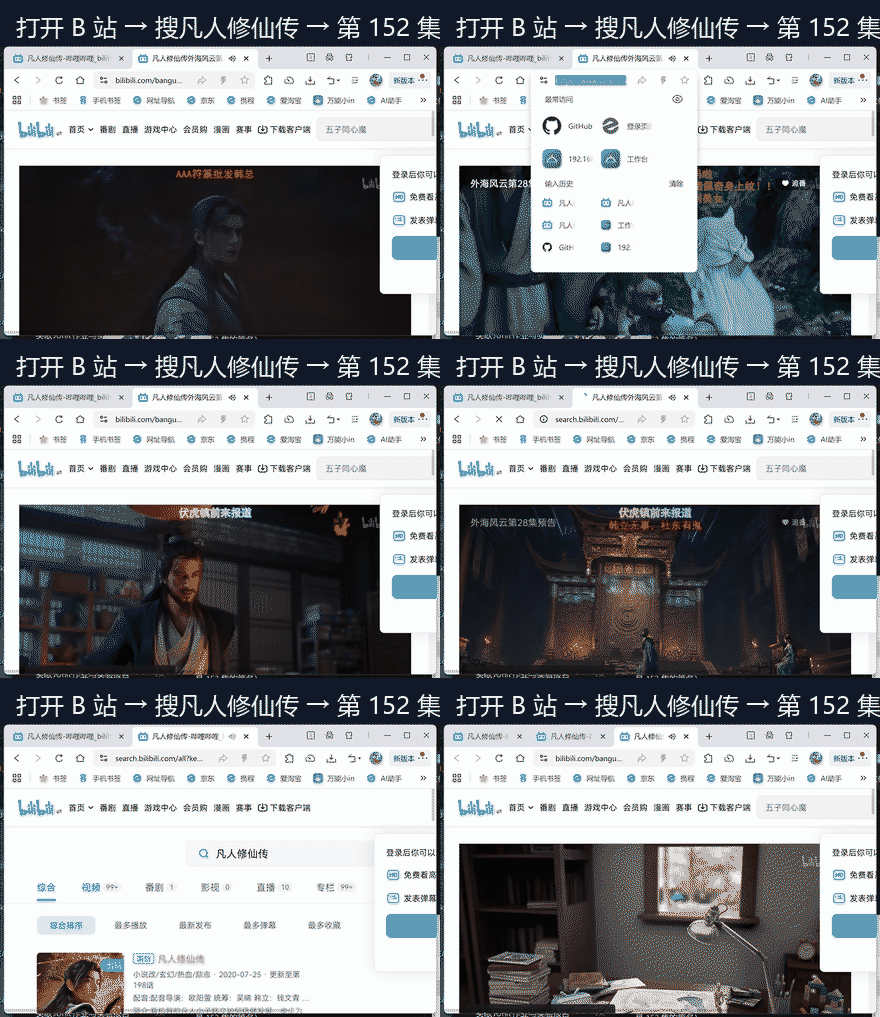
**① 打开 B 站 → 搜番剧 → 播到指定集数**
|
|
48
46
|
|
|
49
|
-
|
|
47
|
+
|
|
50
48
|
|
|
51
|
-
|
|
52
|
-
identity mismatch at index 0: expected id "NoSuchAutomationId", found "CloseButton"
|
|
53
|
-
```
|
|
49
|
+
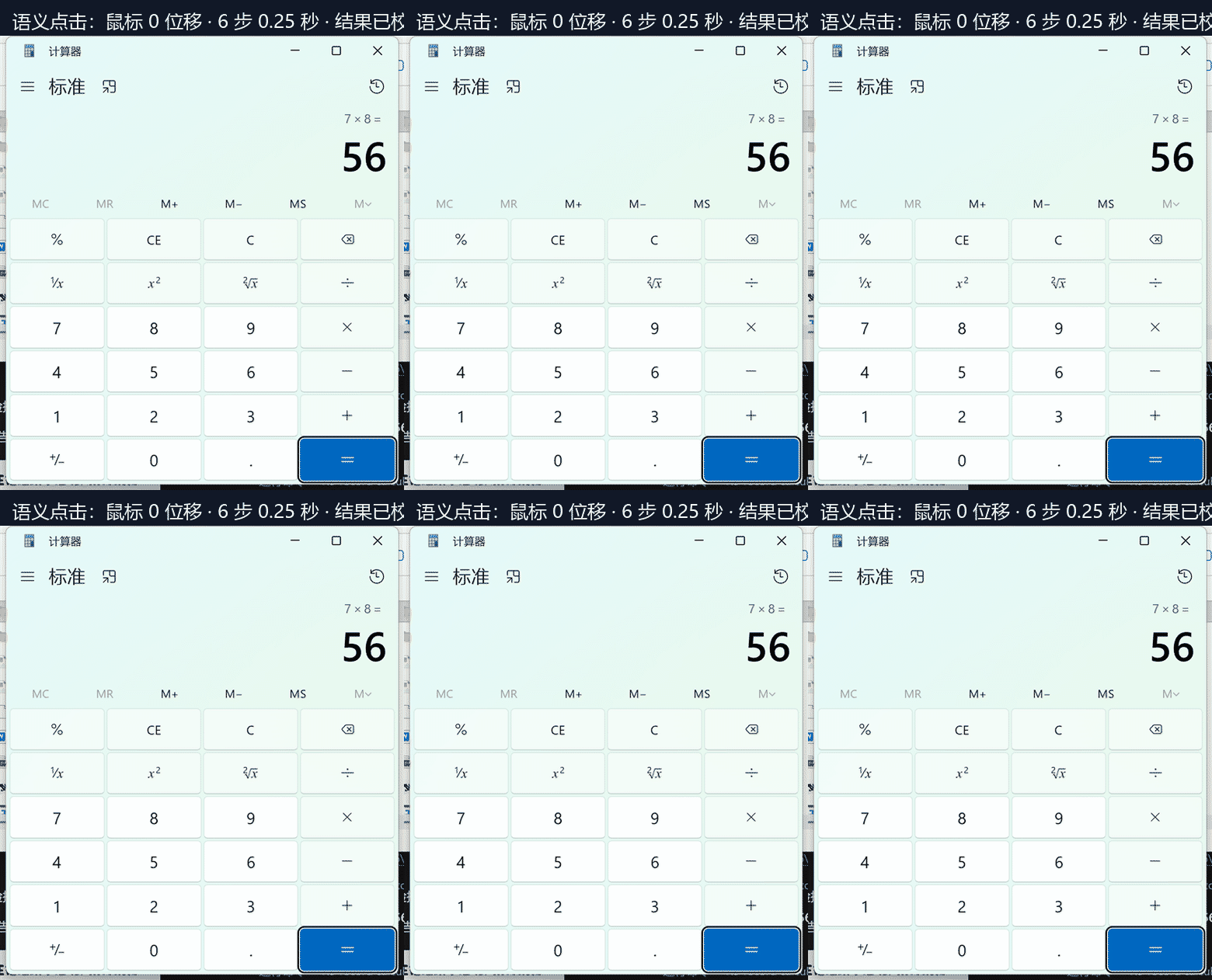
**② 语义点击:鼠标位移 0 像素**(直接调用控件的 Invoke,鼠标不动、窗口在后台也能点)
|
|
54
50
|
|
|
55
|
-
|
|
51
|
+
|
|
56
52
|
|
|
57
|
-
|
|
58
|
-
- **OCR**:文字密集但无树的界面(本地 Windows.Media.Ocr,不外传图片)
|
|
59
|
-
- **坐标 + 刻度尺截图**:画布、游戏、自绘列表
|
|
53
|
+
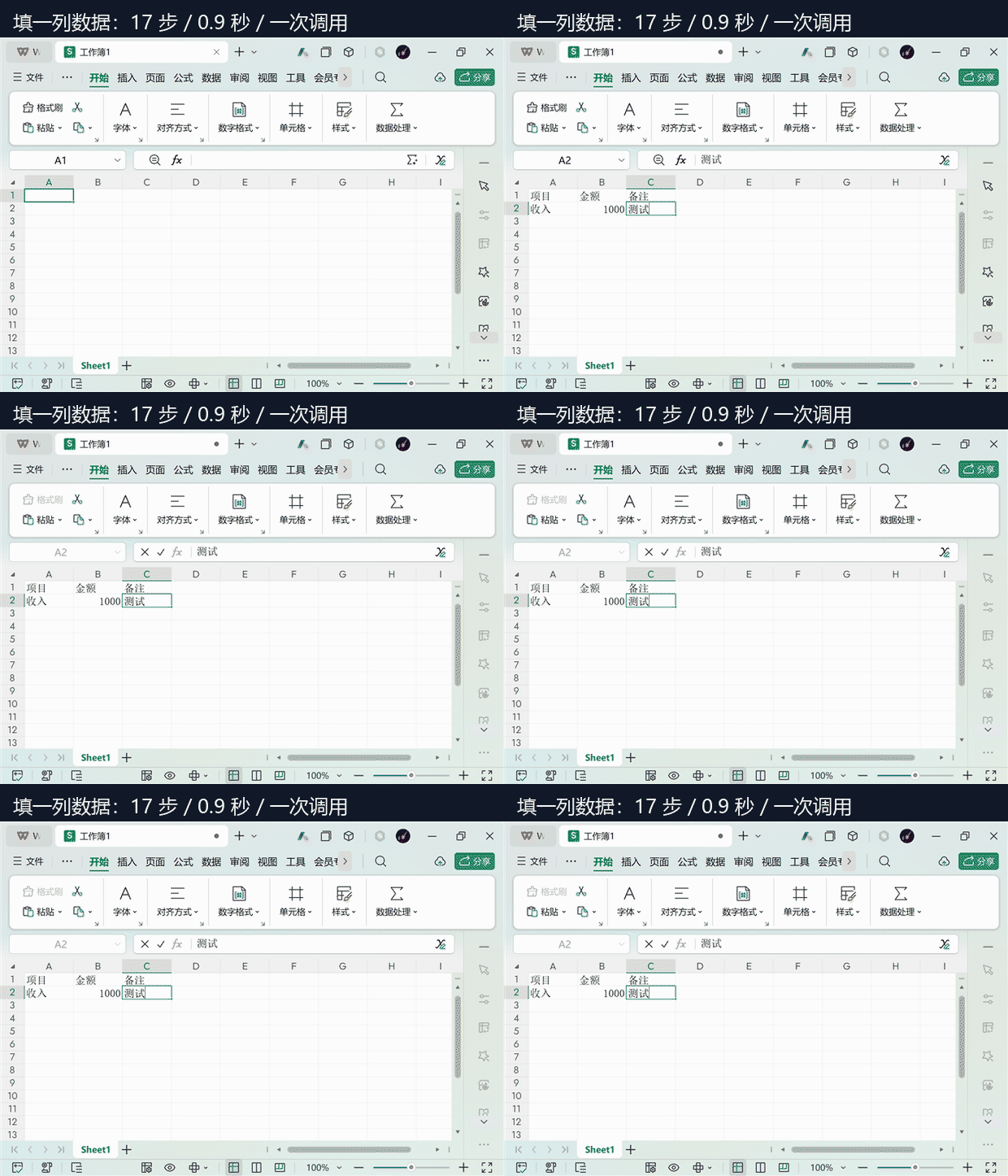
**③ 填一列数据**(17 步 / 0.9 秒 / 一次调用)
|
|
60
54
|
|
|
61
|
-
|
|
55
|
+
|
|
62
56
|
|
|
63
|
-
|
|
57
|
+
### 安装
|
|
64
58
|
|
|
65
59
|
```bash
|
|
66
|
-
# 从本地目录(开发时)
|
|
67
|
-
dsh plugin add /absolute/path/to/dsh-gui-control
|
|
68
|
-
|
|
69
|
-
# 从 npm
|
|
70
60
|
dsh plugin add dsh-gui-control
|
|
71
61
|
```
|
|
72
62
|
|
|
73
|
-
|
|
63
|
+
或从源码:
|
|
74
64
|
|
|
75
|
-
|
|
65
|
+
```bash
|
|
66
|
+
dsh plugin add seetown/dsh-gui-control
|
|
67
|
+
```
|
|
76
68
|
|
|
77
|
-
|
|
69
|
+
要求:Windows 10 1809+、PowerShell 5.1、DeepSeek Harness 0.1.5-rc.2 ~ 0.2.x。装完不需要重启。
|
|
70
|
+
|
|
71
|
+
### 三个工具
|
|
72
|
+
|
|
73
|
+
| 工具 | 作用 |
|
|
74
|
+
|---|---|
|
|
75
|
+
| `gui_snapshot` | 读窗口的无障碍树(文本,精确、便宜、与位置无关),或带屏幕坐标刻度尺的截图 |
|
|
76
|
+
| `gui_act` | 执行一个动作,带身份校验和投递判定 |
|
|
77
|
+
| `gui_task` | 跑声明式任务文件:一次调用完成多步,带条件、重试、风险闸门 |
|
|
78
78
|
|
|
79
79
|
```
|
|
80
80
|
gui_snapshot { window: "Notepad", mode: "tree" }
|
|
81
|
-
→ MenuI 文件
|
|
82
|
-
Butto 关闭标签页
|
|
83
|
-
Docum 文本编辑器
|
|
84
|
-
...
|
|
81
|
+
→ Butto 关闭标签页 / Docum 文本编辑器 / MenuI 文件 ...
|
|
85
82
|
|
|
86
83
|
gui_act { action: "click_text", window: "Notepad", text: "最大化" }
|
|
87
84
|
→ click ok via InvokePattern | verified: text appeared
|
|
88
|
-
|
|
89
|
-
gui_task { file: "C:\\tasks\\fill-sheet.json", dryRun: true }
|
|
90
|
-
→ task fill-sheet ok in 0 ms
|
|
91
|
-
1. ok click 412 ms not_delivered
|
|
92
|
-
2. ok type 380 ms delivered_unverified
|
|
93
85
|
```
|
|
94
86
|
|
|
87
|
+
**优先用 `click_text` 而不是坐标**:它按控件名定位,鼠标不动,窗口布局变了也不会点错。
|
|
88
|
+
|
|
95
89
|
### 任务文件
|
|
96
90
|
|
|
97
91
|
```json
|
|
@@ -99,7 +93,6 @@ gui_task { file: "C:\\tasks\\fill-sheet.json", dryRun: true }
|
|
|
99
93
|
"name": "fill-sheet",
|
|
100
94
|
"steps": [
|
|
101
95
|
{ "do": "activate", "win": "工作簿1" },
|
|
102
|
-
{ "do": "click", "x": 129, "y": 449 },
|
|
103
96
|
{ "do": "type", "text": "项目" },
|
|
104
97
|
{ "do": "key", "key": "tab" },
|
|
105
98
|
{ "do": "type", "text": "金额" },
|
|
@@ -109,57 +102,85 @@ gui_task { file: "C:\\tasks\\fill-sheet.json", dryRun: true }
|
|
|
109
102
|
}
|
|
110
103
|
```
|
|
111
104
|
|
|
112
|
-
|
|
105
|
+
每步字段:`do` + 该动作参数,外加 `until`(轮询到条件成立才算过)、`untilTimeout`、`retry`、`risk`。
|
|
113
106
|
|
|
114
|
-
`risk: "high"` 的步骤默认**拒绝执行**,必须显式 `confirm: true
|
|
107
|
+
- `risk: "high"` 的步骤默认**拒绝执行**,必须显式 `confirm: true`
|
|
108
|
+
- `dryRun: true` 只返回计划,不碰桌面
|
|
115
109
|
|
|
116
|
-
|
|
110
|
+
### 投递语义
|
|
117
111
|
|
|
118
|
-
|
|
119
|
-
|
|
120
|
-
|
|
|
121
|
-
|
|
122
|
-
|
|
|
123
|
-
|
|
|
124
|
-
|
|
|
112
|
+
每个动作返回三选一:
|
|
113
|
+
|
|
114
|
+
| 判定 | 含义 | 能否重试 |
|
|
115
|
+
|---|---|---|
|
|
116
|
+
| `not_delivered` | 什么都没发出去(派发前就被拒) | ✅ 安全 |
|
|
117
|
+
| `delivered_unverified` | 发出去了,效果未确认 | ❌ 不能盲目重放 |
|
|
118
|
+
| `delivered_verified` | 发出去了,且后置条件验证通过 | ❌ |
|
|
125
119
|
|
|
126
|
-
|
|
120
|
+
这一条决定了「发消息 / 删文件 / 提交表单」这类不可逆操作是否安全。
|
|
127
121
|
|
|
128
|
-
|
|
122
|
+
### 安全
|
|
129
123
|
|
|
130
124
|
- 只监听 `127.0.0.1:38471`,不对外暴露
|
|
131
|
-
-
|
|
125
|
+
- 密码字段一律输出 `<redacted>`
|
|
132
126
|
- 高风险步骤需要显式确认
|
|
133
|
-
-
|
|
127
|
+
- 结果不明时**绝不自动重试**
|
|
134
128
|
|
|
135
|
-
|
|
129
|
+
> 这个插件能操控整台机器的鼠标键盘。装之前请知情,只在可信环境使用。
|
|
136
130
|
|
|
137
|
-
|
|
131
|
+
### 实测数据
|
|
132
|
+
|
|
133
|
+
| 操作 | 耗时 |
|
|
134
|
+
|---|---|
|
|
135
|
+
| 单步动作(常驻进程) | 10.8 ms |
|
|
136
|
+
| 语义点击(UIA 树) | 26–34 ms |
|
|
137
|
+
| 紧凑树读取 | 86 ms,865 字符(比完整 dump 省 88%) |
|
|
138
|
+
| 7 步任务(含启动计算器) | 680 ms,一次调用 |
|
|
139
|
+
| 桌面建 3 个文件夹 | 3.45 s,3/3 成功 |
|
|
140
|
+
| WPS 填 2×3 表格 | 0.9 s,17 步 |
|
|
141
|
+
|
|
142
|
+
首次调用会预热常驻进程(约 1 秒),之后每个动作是一次 loopback 往返。
|
|
143
|
+
|
|
144
|
+
### 已知限制
|
|
138
145
|
|
|
139
146
|
- **仅 Windows**(Win32 + UI Automation)
|
|
140
|
-
- 需要 PowerShell 5.1
|
|
141
|
-
-
|
|
142
|
-
-
|
|
147
|
+
- 需要 PowerShell 5.1
|
|
148
|
+
- 画布类应用(WPS 表格、游戏、自绘列表)没有无障碍树,只能截图 + OCR,准确率下降
|
|
149
|
+
- 网页任务目前基于截图;CDP 通道已实现但尚未接入工具
|
|
143
150
|
|
|
144
|
-
|
|
151
|
+
### Roadmap
|
|
145
152
|
|
|
146
153
|
- [ ] 截图自动编号(Set-of-Marks),把坐标估计降级成编号分类
|
|
154
|
+
- [ ] 接入 CDP:网页任务按选择器操作,而不是按坐标
|
|
147
155
|
- [ ] 任务库与意图路由:一句话命中现成任务
|
|
148
|
-
- [ ] macOS / Linux
|
|
149
|
-
|
|
150
|
-
## License
|
|
151
|
-
|
|
152
|
-
MIT
|
|
156
|
+
- [ ] macOS / Linux 适配
|
|
153
157
|
|
|
154
158
|
---
|
|
155
159
|
|
|
156
|
-
|
|
160
|
+
## English
|
|
157
161
|
|
|
158
162
|
**Windows desktop control for DeepSeek Harness.** Not "click that button for me" — "this job is yours from now on."
|
|
159
163
|
|
|
160
|
-
Most desktop agents do one-off operations: look, click, look again. This
|
|
164
|
+
Most desktop agents do one-off operations: look, click, look again. This one adds a layer underneath: **it turns a sequence into a task file** that runs with no model in the loop.
|
|
165
|
+
|
|
166
|
+
### What makes it different
|
|
167
|
+
|
|
168
|
+
| | Typical approach | dsh-gui-control |
|
|
169
|
+
|---|---|---|
|
|
170
|
+
| Perception | Screenshot, then the model guesses coordinates | **Accessibility tree first**, addressed by control name; screenshots only when no tree exists |
|
|
171
|
+
| Round trips per task | One model call per step | One call runs the whole task file |
|
|
172
|
+
| After a failure | Unknown whether it landed | **Delivery verdict**: not delivered / may have landed / verified |
|
|
173
|
+
| Repeating a flow | Replay it by hand | Task files are reusable, with conditions and retries |
|
|
174
|
+
|
|
175
|
+
### Install
|
|
176
|
+
|
|
177
|
+
```bash
|
|
178
|
+
dsh plugin add dsh-gui-control
|
|
179
|
+
```
|
|
180
|
+
|
|
181
|
+
Windows 10 1809+, PowerShell 5.1, DeepSeek Harness 0.1.5-rc.2 – 0.2.x. No restart needed.
|
|
161
182
|
|
|
162
|
-
|
|
183
|
+
### Three tools
|
|
163
184
|
|
|
164
185
|
| Tool | Purpose |
|
|
165
186
|
|---|---|
|
|
@@ -167,22 +188,30 @@ Most desktop agents do one-off operations: look, click, look again. This plugin
|
|
|
167
188
|
| `gui_act` | One action, with an identity check and a delivery verdict |
|
|
168
189
|
| `gui_task` | Run a declarative task file: many steps in one call, with conditions, retries and a risk gate |
|
|
169
190
|
|
|
170
|
-
|
|
191
|
+
### Delivery semantics
|
|
171
192
|
|
|
172
193
|
| Verdict | Meaning | Retry |
|
|
173
194
|
|---|---|---|
|
|
174
195
|
| `not_delivered` | Nothing was sent | ✅ safe |
|
|
175
196
|
| `delivered_unverified` | Input may have landed, effect unconfirmed | ❌ never blind-retry |
|
|
176
|
-
| `delivered_verified` | Landed and the post-condition held | ❌ |
|
|
197
|
+
| `delivered_verified` | Landed, and the post-condition held | ❌ |
|
|
177
198
|
|
|
178
199
|
That distinction is what makes "send a message / delete a file / submit a form" safe to automate.
|
|
179
200
|
|
|
180
|
-
|
|
201
|
+
### Security
|
|
181
202
|
|
|
182
|
-
|
|
183
|
-
|
|
184
|
-
|
|
203
|
+
Loopback-only (`127.0.0.1:38471`), password fields are redacted, high-risk steps require explicit confirmation, and an uncertain outcome is never retried automatically.
|
|
204
|
+
|
|
205
|
+
> This plugin drives the real mouse and keyboard of the whole machine. Install it knowingly, in a trusted environment.
|
|
206
|
+
|
|
207
|
+
### Limitations
|
|
208
|
+
|
|
209
|
+
Windows only; PowerShell 5.1 required; canvas-like apps (spreadsheets, games, self-drawn lists) expose no accessibility tree and fall back to screenshot + OCR with lower accuracy; web tasks currently use screenshots (the CDP path exists but is not wired into the tools yet).
|
|
210
|
+
|
|
211
|
+
---
|
|
212
|
+
|
|
213
|
+
<div align="center">
|
|
185
214
|
|
|
186
|
-
|
|
215
|
+
MIT © [seetown](https://github.com/seetown)
|
|
187
216
|
|
|
188
|
-
|
|
217
|
+
</div>
|
package/package.json
CHANGED
|
@@ -1,6 +1,6 @@
|
|
|
1
1
|
{
|
|
2
2
|
"name": "dsh-gui-control",
|
|
3
|
-
"version": "0.1.
|
|
3
|
+
"version": "0.1.2",
|
|
4
4
|
"description": "Windows desktop control for DeepSeek Harness: read a window's accessibility tree, act with identity checks and delivery semantics, and run repeatable task files.",
|
|
5
5
|
"license": "MIT",
|
|
6
6
|
"type": "module",
|