dsh-game-material-master 0.9.1 → 0.10.0
This diff represents the content of publicly available package versions that have been released to one of the supported registries. The information contained in this diff is provided for informational purposes only and reflects changes between package versions as they appear in their respective public registries.
- package/README.en.md +64 -35
- package/README.md +55 -32
- package/lib/bitmap.js +2 -2
- package/lib/client.js +1839 -2016
- package/lib/config.js +25 -3
- package/lib/imagegen.js +3 -3
- package/lib/imageprovider.js +28 -0
- package/lib/index.js +176 -302
- package/lib/isocompose.js +256 -0
- package/lib/isodoc.js +705 -0
- package/lib/isoexport.js +140 -0
- package/lib/isogen.js +1475 -0
- package/lib/isogeom.js +359 -0
- package/lib/isorender.js +471 -0
- package/lib/isosamplegen.js +296 -0
- package/lib/isotiles.js +243 -0
- package/lib/links.js +13 -12
- package/lib/mapexport.js +1 -1
- package/lib/mapgeom.js +1 -1
- package/lib/maprender.js +1 -1
- package/lib/musicguide.js +1 -1
- package/lib/musicscoreguide.js +4 -4
- package/lib/riggen.js +6 -6
- package/lib/seqgen.js +7 -7
- package/lib/sfxapi.js +56 -21
- package/lib/sfxgen.js +4 -4
- package/lib/store.js +1 -1
- package/lib/toapis.js +338 -0
- package/lib/toolguides.js +488 -0
- package/lib/tools.js +448 -417
- package/lib/videogen.js +15 -1
- package/lib/wire.js +110 -70
- package/package.json +6 -3
- package/lib/tilegen.js +0 -1699
- package/lib/tilegeom.js +0 -1392
- package/lib/tilemap.js +0 -560
package/README.en.md
CHANGED
|
@@ -12,14 +12,17 @@ third-party service.
|
|
|
12
12
|
[](https://www.npmjs.com/package/dsh-game-material-master)
|
|
13
13
|
[](LICENSE)
|
|
14
14
|
|
|
15
|
-
> **🆕 0.
|
|
16
|
-
>
|
|
17
|
-
>
|
|
18
|
-
>
|
|
19
|
-
>
|
|
20
|
-
>
|
|
21
|
-
>
|
|
22
|
-
>
|
|
15
|
+
> **🆕 0.10.0 update**: the conversational surface is now a single **`game_material`** tool
|
|
16
|
+
> (`action` picks `guide / intake / call / status / wait / review / approve / reviewMode / upload`).
|
|
17
|
+
> The always-resident context drops from **49 KB to about 4 KB**; flows and method tables are loaded on demand
|
|
18
|
+
> through `action:"guide"`. Module ⑤ is replaced by a fully local **45° isometric map editor** (2:1 diamonds,
|
|
19
|
+
> 4×4 auto-tiling, multi-cell / elevated objects, animated tiles, markers, wraparound, one-click generation,
|
|
20
|
+
> plus **Generate with AI** which opens a chat and links the result back into "Add tileset" for confirmation).
|
|
21
|
+
> A new **optional ToAPIs asynchronous image / video backend** lands via
|
|
22
|
+
> [PR #7](https://github.com/universe-st/dsh-game-material-master/pull/7) — thanks
|
|
23
|
+
> [@ToAPIs-2025](https://github.com/ToAPIs-2025). The 0.9.x **sound-effect generator** (Seed-Audio) and its
|
|
24
|
+
> network-retry fixes remain. See the
|
|
25
|
+
> [release notes in AGENTS.md](https://github.com/universe-st/dsh-game-material-master/blob/main/AGENTS.md#已发布版本).
|
|
23
26
|
|
|
24
27
|
|
|
25
28
|
|
|
@@ -42,20 +45,20 @@ and move on automatically, or stop at every step and wait for your go-ahead.
|
|
|
42
45
|
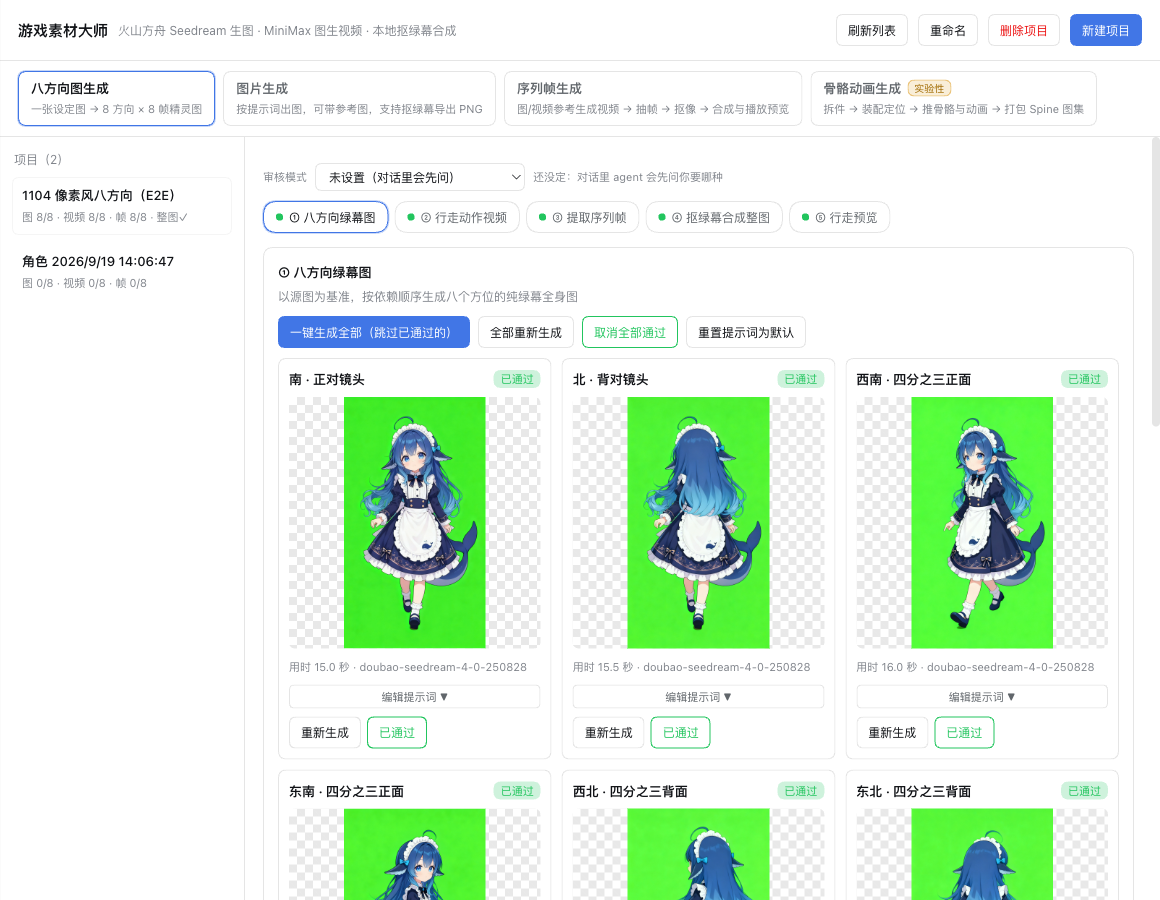
| **① Eight-direction sprite sheet** | One character sheet → 8 directions × 8 frames (default "turn capture": eight directions cut from one rotation video; both videos can also be **a local file of your own**) | A walk spritesheet you can drive with WASD (every intermediate image can be saved individually or as one zip) |
|
|
43
46
|
| **② Image generation** | Prompt (optionally with reference images) → images → green-screen keying | Clean transparent PNG character art / props |
|
|
44
47
|
| **③ Sequence frames** | First/last frame or a reference video → generate video → extract frames → key | A horizontally laid out, loopable sequence |
|
|
45
|
-
| **⑤
|
|
46
|
-
| **⑥
|
|
48
|
+
| **⑤ 45° map editor** (**fully local, zero cost**) | Import your own 45° diamond tiles (or use the built-in set) → paint ground / auto-connecting tiles / multi-cell objects / markers on a 2:1 isometric canvas → export. The assets card also has **Generate with AI** for ground / object assets (new chat → host assembles → click the link to confirm; 4×4 autotiling is not AI-generated in v1). Asset properties are fixed at import time (object size can be previewed against the cells and adjusted while adding); afterwards only name / playback speed / loop mode can change. Built-in set: grass, dirt, stone, water, shoreline autotile, tree / rock / bush / barrel / stone house | PNG + save-file JSON (isometric grid, auto-connect, animated tiles, multi-cell objects, markers, passability); tick what to export and multiple files come as one ZIP |
|
|
49
|
+
| **⑥ Top-down map editor** (**fully local, zero cost**) | Pick a tileset → paint directly (rebuilt after AsLib's RPG Map Maker: one screen, icon-only, no jargon; three default layers — terrain / decor / buildings — that you can rename and reorder; a **marker layer**: one nameable marker per cell, drawn as a numbered circle; **Generate with AI** lives in the assets window: give a prompt, a name, a frame count, a method and a usage, and the plugin **opens a new chat** to generate it — it picks the tile type (plain / whole-cell / quadrant) from the prompt itself, asks the model for **one seamless tile** and assembles all 16 connections / 5 shape rows in code (so the tiles actually line up on the map). Animated assets use quadrant tiles (frames become variants, still auto-connecting) or plain tiles (flipbook), and each asset can be given its own playback speed in "Add asset" (otherwise it follows the global speed in Settings) plus a **clarity** mode for the 2K-to-32px downscale (area average / nearest / average + sharpen) , a **loop mode** (forward / reverse / ping-pong), and **stamps** (one picture stamping N x M cells at once - statues, murals, carpets - rotated with a right-click, green screen keyed to transparency, with per-cell walkability set at import), a **tile size** choice when creating a project (16 / 32 / 48 / 64 - pick 48 / 64 for sharper AI assets) and automatic trimming of the white border models like to add; whole-cell tiles are just 16 connection cases with no animation, so the dialog locks the frame count and the video model, then posts a link; click it and the image and its usage are already filled in on "Add asset") | PNG + save-file JSON (wrapping map, auto-tiling, animated tiles, markers); tick what to export and multiple files come as one ZIP download |
|
|
47
50
|
| **⑦ Music generation & editing** (Puyue AI) | An inspiration prompt or full lyrics → a new chat that is **not attached to any project**; the agent there reads the built-in creation guide, expands the prompt, chooses Suno / Mureka / MiniMax / ACE-Step and a mode, generates → back in the UI, trim / adjust gain / fade / normalize → save versions and export. Also **Compose mode**: analyse the idea, present a style/key/section/instrumentation plan, write MIDI with scoremill, render a local preview, revise version by version, then optionally hand it to Suno | MP3 / WAV / M4A (multiple outputs can be zipped); compose mode also exports a score bundle (MIDI / preview / plan / compose.py). The original is kept and every edit or score version is new |
|
|
48
51
|
| **⑧ Sound effects** (Volcengine Seed-Audio) | Describe the source / environment / intensity / duration → sound effects, ambience, UI sounds, creature roars or character voices; optionally 1 reference image or up to 3 reference audio clips (mutually exclusive); every run adds a take without overwriting earlier ones | WAV / MP3 / Ogg Opus; export one take or zip all. Up to 120 seconds per run; every generation is billed |
|
|
49
52
|
| ~~④ Rigged animation~~ | Part extraction → assembly → skeletal animation → Spine / DragonBones atlas | **Experimental, not covered in this document** |
|
|
50
53
|
|
|
51
|
-
> 💡 **Module ⑤ "
|
|
52
|
-
> The
|
|
53
|
-
>
|
|
54
|
-
>
|
|
55
|
-
>
|
|
56
|
-
>
|
|
54
|
+
> 💡 **Module ⑤ "45° map editor" gets its geometry from code and its content from your images.**
|
|
55
|
+
> The 2:1 step, diamond placement, object base centre and occlusion order are all computed on the host;
|
|
56
|
+
> the UI only executes the drawing plan, so preview and export cannot drift apart. Auto-connect is an exact
|
|
57
|
+
> 4×4 = 16 tile layout (N/E/S/W bits), objects may rise above their cell (tree canopy / roof), and ground,
|
|
58
|
+
> markers and auto-connect neighbours wrap around the edges.
|
|
59
|
+
> **Not a single model call — completely free.**
|
|
57
60
|
|
|
58
|
-
> 💡 **Module ⑥ "
|
|
61
|
+
> 💡 **Module ⑥ "Top-down map editor" is modelled after the RPG Map Maker in [AsPJT/AsLib](https://github.com/AsPJT/AsLib/tree/master) and rebuilt as one screen, icon-only, with no jargon.**
|
|
59
62
|
> The asset palette and twelve icon buttons sit on the left, the canvas on the right. **Pick one tileset image and start
|
|
60
63
|
> painting**. "Assets" opens a **list of images plus an "Add image" button**: the dialog asks for the
|
|
61
64
|
> **image file / name / cell size / usage / animation** (hover any control for an explanation) and the properties
|
|
@@ -330,20 +333,34 @@ Generate (billed).
|
|
|
330
333
|
|
|
331
334
|
## Driving it from chat
|
|
332
335
|
|
|
333
|
-
**Every feature of all eight modules** (including the experimental rigged animation and map
|
|
334
|
-
chat**. The plugin registers
|
|
335
|
-
|
|
336
|
+
**Every feature of all eight modules** (including the experimental rigged animation and the fully local 45° map editor) **is available through
|
|
337
|
+
chat**. The plugin registers exactly **one** tool, `game_material`: first read the guide for the topic, then call the
|
|
338
|
+
methods it lists. Detailed workflows, method tables and parameters are loaded **on demand**, so unrelated tasks do
|
|
339
|
+
not pay for them in context.
|
|
336
340
|
|
|
337
|
-
|
|
|
341
|
+
| action | What it does |
|
|
338
342
|
|---|---|
|
|
339
|
-
| `
|
|
340
|
-
| `
|
|
341
|
-
| `
|
|
342
|
-
| `
|
|
343
|
-
| `
|
|
344
|
-
| `
|
|
345
|
-
| `
|
|
346
|
-
| `
|
|
343
|
+
| `guide` | Read the manual: `overview` / `workflow` / `config` / `methods` / `ai-asset` / eight module topics |
|
|
344
|
+
| `intake` | **Step 0 of the fixed workflow**: nail down the key parameters and review mode before doing anything |
|
|
345
|
+
| `call` | Universal channel: every remote method of the plugin is individually callable (`{method, payload}`) |
|
|
346
|
+
| `upload` | Upload assets by local file path (character sheet / reference image / first and last frames / parts…) |
|
|
347
|
+
| `reviewMode` | Record the review mode: `auto` approves automatically / `manual` requires human approval at each step |
|
|
348
|
+
| `status` | See the current progress and which step to do now |
|
|
349
|
+
| `wait` | Block until "no task is running"; what comes back is a reviewable state |
|
|
350
|
+
| `review` | Produce a **review package**: absolute URL, status, approval flag and deep link for every asset |
|
|
351
|
+
| `approve` | Approve / un-approve |
|
|
352
|
+
|
|
353
|
+
For example:
|
|
354
|
+
|
|
355
|
+
```js
|
|
356
|
+
game_material({ action: "guide", topic: "sprite" }) // read the sprite guide first
|
|
357
|
+
game_material({ action: "intake", module: "sprite" }) // ask for parameters and review mode
|
|
358
|
+
game_material({ action: "call", method: "runTurnVideo", payload: { projectId } })
|
|
359
|
+
game_material({ action: "wait", module: "sprite", id: projectId })
|
|
360
|
+
```
|
|
361
|
+
|
|
362
|
+
The old per-tool registrations (`game_material_call` / `game_material_status` / …) have been merged into this single
|
|
363
|
+
tool; see [docs/ENGINEERING.md](docs/ENGINEERING.md#对话调用agent-也能驱动整条流水线) for the migration mapping.
|
|
347
364
|
|
|
348
365
|
Review links are **deep links**: an `openUrl` posted by the agent in its reply takes you straight to the
|
|
349
366
|
matching plugin page when clicked, landing on the right module / project / stage without any navigating
|
|
@@ -362,7 +379,7 @@ dsh plugin --profile web add /path/to/dsh-game-material-master
|
|
|
362
379
|
```
|
|
363
380
|
|
|
364
381
|
The package is published to npm: [dsh-game-material-master](https://www.npmjs.com/package/dsh-game-material-master)
|
|
365
|
-
(currently `0.
|
|
382
|
+
(currently `0.10.0`, `latest`). It has no runtime dependencies, so `dsh plugin add` is all you need.
|
|
366
383
|
|
|
367
384
|
**DSH version**: `>=0.2.0-rc.2 <0.3.0` (the `engines.dsh` field; since DSH 0.2.1 the plugin manager checks it first).
|
|
368
385
|
When a Web deployment uses `--public-url https://host/prefix/`, deep links and asset URLs include that path prefix.
|
|
@@ -470,7 +487,7 @@ Existing project data is never deleted.
|
|
|
470
487
|
|
|
471
488
|
- **UI**: the module disappears from the workbench tabs and from the sidebar shortcut menu. If you were
|
|
472
489
|
sitting on that module, the workbench falls back to the first visible one.
|
|
473
|
-
- **Chat**: `
|
|
490
|
+
- **Chat**: `game_material`'s `guide` / `call` / `status` / `intake` / `upload` / `wait` / `review` / `approve` all refuse,
|
|
474
491
|
and the error says where to turn the feature back on. Hiding only the UI would not be hiding at all: the
|
|
475
492
|
agent cannot see the tab but could still call generation methods and spend real money, so the host half
|
|
476
493
|
re-checks the current setting on every call.
|
|
@@ -528,14 +545,15 @@ Everything in the UI that you can click, change or approve is bilingual.
|
|
|
528
545
|
├── image-jobs/<id>/ image generation
|
|
529
546
|
├── sequence-jobs/<id>/ sequence frames
|
|
530
547
|
├── rig-jobs/<id>/ rigged animation (experimental: sheet / parts / layout / rig / atlas)
|
|
531
|
-
├──
|
|
548
|
+
├── iso-jobs/<id>/ 45° map editor (project.json / map.json / tilesets / preview / export)
|
|
532
549
|
├── map-jobs/<id>/ map editor (project.json / map.json / tilesets / ai / preview / export)
|
|
533
550
|
├── music-jobs/<id>/ music generation & editing (songs / versions / peaks / tools / out)
|
|
534
551
|
└── sfx-jobs/<id>/ sound effects (refs / takes / out)
|
|
535
552
|
```
|
|
536
553
|
|
|
537
|
-
>
|
|
538
|
-
> the
|
|
554
|
+
> The old "map tile generation" `tile-jobs/` directory is **no longer read** and is left on disk for manual archiving;
|
|
555
|
+
> the new module stores data in `iso-jobs/` with no migration.
|
|
556
|
+
|
|
539
557
|
|
|
540
558
|
## Development
|
|
541
559
|
|
|
@@ -594,7 +612,7 @@ The screenshots in this document were taken by Playwright against the real UI; t
|
|
|
594
612
|
|
|
595
613
|
## Credits
|
|
596
614
|
|
|
597
|
-
- **Module ⑥ "
|
|
615
|
+
- **Module ⑥ "Top-down map editor" is modelled after the RPG Map Maker in
|
|
598
616
|
[AsPJT/AsLib](https://github.com/AsPJT/AsLib/tree/master).** What was borrowed is its **interaction and
|
|
599
617
|
layout** (one screen: tile palette plus an icon toolbar on the left, canvas on the right; the pen / eraser /
|
|
600
618
|
bucket / pipette / hand tools together with single-layer preview, layer up-down and undo-redo; click a
|
|
@@ -619,6 +637,11 @@ The screenshots in this document were taken by Playwright against the real UI; t
|
|
|
619
637
|
notation and pitfalls, and the user's/agent's `compose.py` is executed by the local Python. The product
|
|
620
638
|
idea also references [XIAODUOLU/Midra](https://github.com/XIAODUOLU/Midra) ("prompt-to-code MIDI,
|
|
621
639
|
editable, then decide whether to generate audio"). All rights remain with the original authors. With thanks.
|
|
640
|
+
- **The optional ToAPIs asynchronous image / video backend was contributed by
|
|
641
|
+
[@ToAPIs-2025](https://github.com/ToAPIs-2025) in
|
|
642
|
+
[PR #7](https://github.com/universe-st/dsh-game-material-master/pull/7)** (`feat(toapis)`): independent
|
|
643
|
+
settings, receipts that block duplicate paid submissions, credentials kept on the host, and Ark / MiniMax
|
|
644
|
+
still the defaults. Thanks for the implementation.
|
|
622
645
|
- ⚠️ **The `Picture/MapChip/*_pipo.png` tiles shipped in the AsLib repository belong to a third party and are
|
|
623
646
|
not bundled here** (its README states "Third party content is copyrighted by its respective owners").
|
|
624
647
|
The built-in tileset is generated procedurally on this machine by `scripts/make-map-sample-tileset.mjs`,
|
|
@@ -630,3 +653,9 @@ The screenshots in this document were taken by Playwright against the real UI; t
|
|
|
630
653
|
|
|
631
654
|
> Full engineering documentation (algorithm details, self-check contracts, history of pitfalls) is in
|
|
632
655
|
> [docs/ENGINEERING.md](docs/ENGINEERING.md).
|
|
656
|
+
|
|
657
|
+
## Optional ToAPIs image/video backend
|
|
658
|
+
|
|
659
|
+
Configure ToAPIs in settings, then select ToAPIs as the image backend and/or enable its video option. Ark/MiniMax remain the defaults; ComfyUI, custom protocols and local processing remain available. Use `https://toapis.cn/v1` in China or `https://toapis.com/v1` internationally. ToAPIs uses asynchronous media endpoints, not a drop-in synchronous OpenAI image URL.
|
|
660
|
+
|
|
661
|
+
[Configuration, billing and task recovery](https://github.com/universe-st/dsh-game-material-master/blob/main/docs/TOAPIS.md). Keys stay on the host; generation is billable. Check account pricing and model settings first.
|
package/README.md
CHANGED
|
@@ -10,13 +10,13 @@
|
|
|
10
10
|
[](https://www.npmjs.com/package/dsh-game-material-master)
|
|
11
11
|
[](LICENSE)
|
|
12
12
|
|
|
13
|
-
> **🆕 0.
|
|
14
|
-
>
|
|
15
|
-
>
|
|
16
|
-
>
|
|
17
|
-
>
|
|
18
|
-
>
|
|
19
|
-
>
|
|
13
|
+
> **🆕 0.10.0 更新**:对话工具面收成一个 **`game_material`**(`action` 选 `guide / intake / call / status /
|
|
14
|
+
> wait / review / approve / reviewMode / upload`),常驻上下文从 **49 KB 降到约 4 KB**,流程与方法表改成按需读手册;
|
|
15
|
+
> 模块⑤换成**全本地的 45° 地图编辑器**(2:1 等距、4×4 自动连接、多格 / 高处物件、动画地块、标记层、环绕、
|
|
16
|
+
> 一键生成;还能「**AI 生成素材**」:自动开对话生成,整理好回链到「新增素材」确认导入);
|
|
17
|
+
> 新增**可选 ToAPIs 异步图片 / 视频后端**(感谢 [PR #7](https://github.com/universe-st/dsh-game-material-master/pull/7),
|
|
18
|
+
> 来自 [@ToAPIs-2025](https://github.com/ToAPIs-2025))。
|
|
19
|
+
> 0.9.x 的 **音效生成**(Seed-Audio)与网络重试修复继续保留。
|
|
20
20
|
> 完整变更见 [AGENTS.md 发布记录](https://github.com/universe-st/dsh-game-material-master/blob/main/AGENTS.md#已发布版本)。
|
|
21
21
|
|
|
22
22
|

|
|
@@ -36,19 +36,19 @@
|
|
|
36
36
|
| **① 八方向图生成** | 一张设定图 → 8 方位 × 8 帧(默认「转圈截帧」:一段转圈视频截出八个方向;两处视频都能**自己选本地文件**顶替生成) | 可用 WASD 操控预览的行走精灵图(中间每一张图都能单独存或整包 zip) |
|
|
37
37
|
| **② 图片生成** | 提示词(可带参考图)→ 出图 → 抠绿幕 | 干净透明的 PNG 立绘 / 道具 |
|
|
38
38
|
| **③ 序列帧生成** | 首尾帧或参考视频 → 生成视频 → 抽帧 → 抠像 | 横向排布、可循环播放的序列帧 |
|
|
39
|
-
| **⑤ 45
|
|
40
|
-
| **⑥
|
|
39
|
+
| **⑤ 45°地图编辑器**(**全本地零计费**) | 导入自己的 45° 菱形素材(或用内置素材)→ 2:1 等距画布上画地面 / 自动连接 / 多格物件 / 标记 → 导出。素材属性在导入时一次定死(物件大小可在「新增素材」里按地格实时预览并自己调),之后只能改名字 / 播放速度 / 循环方式;内置草地、泥土、石地、水面、水岸自动连接与树 / 石 / 灌木 / 木桶 / 石屋 | PNG + 存档 JSON(等距网格、自动连接、动画地块、多格物件、标记点、通行性);勾几项导几项,多个产物自动打成 ZIP |
|
|
40
|
+
| **⑥ 俯视地图编辑器**(**全本地零计费**) | 选一张素材图 → 直接画(参照 AsLib 的 RPG Map Maker 重做:一屏、纯图标、零术语;默认「地理层 / 装饰层 / 建筑层」三层且可改名换序;**标记层**:每格放一个可命名的标记,画成圆圈里的数字;素材窗口里还有 **AI 生成素材**:填提示词 / 名字 / 帧数 / 方式 / 用法,插件会**自动开一个新对话**去生成 —— 用哪种素材(普通 / 整格 / 拼块)由它按提示词自动判断,只让模型画**一块无缝的砖**,16 种接法 / 5 种形状与断口收口都由插件用代码拼出来(这样拼到地图上才不会有缝)。会动的素材走「拼块」(帧数 = 变体,会自动连接)或「普通」(翻页图),每张素材还能在「新增素材」里单独设自己的播放速度(不设就跟设置里的全局速度走)、**清晰度**(2K 大图缩到 32px 格子时用面积平均 / 最近邻 / 平均+锐化,细节差很多)、**循环方式**(正放 / 倒放 / 来回);另有**整图**(一张画一次占 N×M 格:雕像 / 壁画 / 地毯,右键转 90°、绿幕自动抠成透明、导入时逐格点通行区域);新建项目还能选**一格多大**(16 / 32 / 48 / 64,想让 AI 素材更清楚就用 48 / 64),模型在四周留的白框会被自动裁掉;整格只有 16 种接法、没有动画,界面里会把帧数与视频模型锁住,回来点链接这张图与用法就填在「新增素材」里) | PNG + 存档 JSON(地图四周环绕、自动连接、动画地块、标记点);勾几项就导几项,多个产物自动打成一个 ZIP 下载 |
|
|
41
41
|
| **⑦ 音乐生成编辑**(谱乐 AI) | 灵感提示词或完整歌词 → 自动开一个**不挂靠项目**的新对话;对话里的 agent 读内置创作指南、扩写提示词、选 Suno / Mureka / MiniMax / ACE-Step 与模式并生成 → 回界面裁剪 / 调音量 / 淡入淡出 / 标准化 → 保存版本与导出。另有**谱曲模式**:先分析想法、给出曲风/调性/段落/配器方案,再用 scoremill 写 MIDI、本地渲染试听、逐版修改,满意后可选交给 Suno 生成正式版 | MP3 / WAV / M4A(多产物可打 zip);谱曲模式另有 MIDI / 试听 / 方案 / compose.py 的乐谱包。原曲保留,编辑与谱曲结果都是新版本 |
|
|
42
42
|
| **⑧ 音效生成**(火山引擎 Seed-Audio) | 一句话描述声源 / 环境 / 强度 / 时长 → 生成音效、环境音、UI 声、生物吼叫或角色配音;可带 1 张参考图或最多 3 条参考音频(两者互斥);每次生成新增一条 take,旧 take 不覆盖 | WAV / MP3 / Ogg Opus;可单条导出或全部打 zip。单次最长 120 秒;每次生成真实计费 |
|
|
43
43
|
| ~~④ 骨骼动画生成~~ | 拆件 → 装配 → 骨骼动画 → Spine / DragonBones 图集 | **实验性功能,本文不展示** |
|
|
44
44
|
|
|
45
|
-
> 💡 **模块⑤「45
|
|
46
|
-
>
|
|
47
|
-
>
|
|
48
|
-
>
|
|
49
|
-
>
|
|
45
|
+
> 💡 **模块⑤「45°地图编辑器」的几何由代码保证,内容由你导入。**
|
|
46
|
+
> 2:1 等距的步进、菱形位置、物件底面中心、遮挡顺序全部由宿主算好;
|
|
47
|
+
> 界面只执行绘制计划,所以预览与导出不会错位。自动连接是严格的 4×4 = 16 块
|
|
48
|
+
> (N/E/S/W 位序),物件可以高出一格(树冠 / 屋顶),地面与标记四周环绕。
|
|
49
|
+
> **一次模型调用都没有,也就不花钱。**
|
|
50
50
|
|
|
51
|
-
> 💡
|
|
51
|
+
> 💡 **模块⑥「俯视地图编辑器」借鉴了 [AsPJT/AsLib](https://github.com/AsPJT/AsLib/tree/master) 的 RPG Map Maker,按它重做为一屏、纯图标、零术语。**
|
|
52
52
|
> 左边是素材调色板与 12 个图标按钮,右边就是画布。**「素材」点开是一张素材列表 + 一个「新增素材」**:
|
|
53
53
|
> 新增时弹窗口填**素材图 / 名字 / 格子大小 / 用法 / 会动吗**(鼠标移上去都有解释),一步填完
|
|
54
54
|
> **属性就定下来了,之后只能删掉重来**;尺寸不用你算,留空就按图片尺寸自动识别。
|
|
@@ -269,19 +269,33 @@ flowchart LR
|
|
|
269
269
|
|
|
270
270
|
## 用对话驱动
|
|
271
271
|
|
|
272
|
-
|
|
273
|
-
`
|
|
272
|
+
八个模块(含实验性的骨骼动画与全本地的 45° 地图编辑器)的**全部功能都能通过对话调用**。插件只注册**一个**工具
|
|
273
|
+
`game_material`:先按主题读手册,再按手册里的方法名调用。详细的流程、方法表与参数**按需加载**,
|
|
274
|
+
不会在无关任务里常驻上下文。
|
|
274
275
|
|
|
275
|
-
|
|
|
276
|
+
| action | 作用 |
|
|
276
277
|
|---|---|
|
|
277
|
-
| `
|
|
278
|
-
| `
|
|
279
|
-
| `
|
|
280
|
-
| `
|
|
281
|
-
| `
|
|
282
|
-
| `
|
|
283
|
-
| `
|
|
284
|
-
| `
|
|
278
|
+
| `guide` | 读手册:`overview` / `workflow` / `config` / `methods` / `ai-asset` / 八个模块主题 |
|
|
279
|
+
| `intake` | **固定流程第 0 步**:先把关键参数与审核模式问清楚,再动手 |
|
|
280
|
+
| `call` | 万能通道:插件全部远程方法逐个可调(`{method, payload}`) |
|
|
281
|
+
| `upload` | 按本机文件路径上传素材(设定图 / 参考图 / 首尾帧 / 部件…) |
|
|
282
|
+
| `reviewMode` | 记下审核模式:`auto` 自动审核 / `manual` 每一步人工审核 |
|
|
283
|
+
| `status` | 看一眼当前进度,以及现在该做哪一步 |
|
|
284
|
+
| `wait` | 阻塞等到「没有任务在跑」,回来就是可审查状态 |
|
|
285
|
+
| `review` | 出**验收包**:每个产物的绝对 URL、状态、通过标记、深链接 |
|
|
286
|
+
| `approve` | 打「通过 / 取消通过」 |
|
|
287
|
+
|
|
288
|
+
例如:
|
|
289
|
+
|
|
290
|
+
```js
|
|
291
|
+
game_material({ action: "guide", topic: "sprite" }) // 先读八方向图手册
|
|
292
|
+
game_material({ action: "intake", module: "sprite" }) // 问清参数与审核模式
|
|
293
|
+
game_material({ action: "call", method: "runTurnVideo", payload: { projectId } })
|
|
294
|
+
game_material({ action: "wait", module: "sprite", id: projectId })
|
|
295
|
+
```
|
|
296
|
+
|
|
297
|
+
旧版按 `game_material_call` / `game_material_status` / … 逐个注册的工具已经合并到上面这一个工具,
|
|
298
|
+
迁移对照见 [docs/ENGINEERING.md](docs/ENGINEERING.md#对话调用agent-也能驱动整条流水线)。
|
|
285
299
|
|
|
286
300
|
验收链接是**深链接**:agent 在回复里贴出的 `openUrl` 点一下就切到插件对应页面,原地落到
|
|
287
301
|
对应模块 / 项目 / 阶段上,不需要你自己翻。
|
|
@@ -299,7 +313,7 @@ dsh plugin --profile web add /path/to/dsh-game-material-master
|
|
|
299
313
|
```
|
|
300
314
|
|
|
301
315
|
包已发布到 npm:[dsh-game-material-master](https://www.npmjs.com/package/dsh-game-material-master)
|
|
302
|
-
(当前 `0.
|
|
316
|
+
(当前 `0.10.0`,`latest`)。本包没有运行时依赖,`dsh plugin add` 拉下来即可用。
|
|
303
317
|
|
|
304
318
|
**DSH 版本**:`>=0.2.0-rc.2 <0.3.0`(`package.json` 的 `engines.dsh`;DSH 0.2.1 起插件管理器优先按它判断兼容性)。
|
|
305
319
|
Web 部署用 `--public-url https://host/prefix/` 时,深链接与产物地址会跟着补路径前缀。
|
|
@@ -390,7 +404,7 @@ Key 只写入本机 `<DSH_HOME>/game-material-master/config.json`,界面回显
|
|
|
390
404
|
不用的模块可以在**设置 → 游戏素材大师 → 功能管理**里关掉,随时再打开,已有项目数据不会删:
|
|
391
405
|
|
|
392
406
|
- **界面**:工作台页签、侧栏快捷菜单里都不再出现它;如果当时正停在这个模块,会自动落到第一个可见模块。
|
|
393
|
-
- **对话**:`
|
|
407
|
+
- **对话**:`game_material` 的 `guide` / `call` / `status` / `intake` / `upload` / `wait` / `review` / `approve`
|
|
394
408
|
一律拒绝,报错里说明去哪里打开。只藏界面不拦工具等于没藏——模型看不见页签,
|
|
395
409
|
照样能调生成类方法真实计费,所以宿主半区每次都按最新配置再拦一次。
|
|
396
410
|
- 可见性**只能由用户在设置页里改**:工具面拒绝 `saveConfig({hiddenModules})`,
|
|
@@ -438,14 +452,14 @@ Key 只写入本机 `<DSH_HOME>/game-material-master/config.json`,界面回显
|
|
|
438
452
|
├── image-jobs/<id>/ 图片生成
|
|
439
453
|
├── sequence-jobs/<id>/ 序列帧生成
|
|
440
454
|
├── rig-jobs/<id>/ 骨骼动画(实验性:sheet / parts / layout / rig / atlas)
|
|
441
|
-
├──
|
|
455
|
+
├── iso-jobs/<id>/ 45° 地图编辑器(project.json / map.json / tilesets / preview / export)
|
|
442
456
|
├── map-jobs/<id>/ 地图编辑器(project.json / map.json / tilesets / ai / preview / export)
|
|
443
457
|
├── music-jobs/<id>/ 音乐生成编辑(songs / versions / peaks / tools / out)
|
|
444
458
|
└── sfx-jobs/<id>/ 音效生成(refs / takes / out)
|
|
445
459
|
```
|
|
446
460
|
|
|
447
|
-
>
|
|
448
|
-
>
|
|
461
|
+
> 旧版「45°地图地块生成」的 `tile-jobs/` **不再被读取**,原样留在磁盘上,可手动归档;
|
|
462
|
+
> 新模块的数据在 `iso-jobs/`,两者不迁移。
|
|
449
463
|
|
|
450
464
|
## 开发
|
|
451
465
|
|
|
@@ -503,7 +517,7 @@ T("第 {n0} 帧", { n0: index + 1 }) // 带插值,英
|
|
|
503
517
|
|
|
504
518
|
## 致谢
|
|
505
519
|
|
|
506
|
-
-
|
|
520
|
+
- **模块⑥「俯视地图编辑器」借鉴了 [AsPJT/AsLib](https://github.com/AsPJT/AsLib/tree/master) 的 RPG Map Maker。**
|
|
507
521
|
具体借鉴的是它的**交互与界面**(一屏:左边素材调色板 + 图标工具栏、右边画布;画笔 / 橡皮 / 油漆桶 /
|
|
508
522
|
吸管 / 抓手 + 单层预览 + 图层上下 + 撤销重做这一组工具;点调色板选笔刷、红框标当前笔刷、
|
|
509
523
|
滚轮缩放、拖动平移)和两处**几何约定**:
|
|
@@ -523,6 +537,9 @@ T("第 {n0} 帧", { n0: index + 1 }) // 带插值,英
|
|
|
523
537
|
并由本机 Python 执行用户/agent 写的 `compose.py`。产品思路另参考
|
|
524
538
|
[XIAODUOLU/Midra](https://github.com/XIAODUOLU/Midra) 的「prompt-to-code MIDI、可编辑、再决定是否生成音频」。
|
|
525
539
|
原仓库版权归其作者所有,特此致谢。
|
|
540
|
+
- **可选 ToAPIs 异步图片 / 视频后端由 [@ToAPIs-2025](https://github.com/ToAPIs-2025) 通过
|
|
541
|
+
[PR #7](https://github.com/universe-st/dsh-game-material-master/pull/7) 贡献**(`feat(toapis)`):
|
|
542
|
+
设置页独立配置、异步任务回执防重复提交、凭证只在宿主保存,默认后端仍是火山方舟 / MiniMax。感谢这份实现。
|
|
526
543
|
- ⚠️ **AsLib 仓库里的 `Picture/MapChip/*_pipo.png` 素材属于第三方,没有打包进本插件**
|
|
527
544
|
(它的 README 写明 "Third party content is copyrighted by its respective owners")。
|
|
528
545
|
内置素材由 `scripts/make-map-sample-tileset.mjs` 按同样的 A2 规格在本机程序化生成。
|
|
@@ -532,3 +549,9 @@ T("第 {n0} 帧", { n0: index + 1 }) // 带插值,英
|
|
|
532
549
|
[MIT](LICENSE)
|
|
533
550
|
|
|
534
551
|
> 完整工程文档(算法细节、自检契约、历史踩坑)见 [docs/ENGINEERING.md](docs/ENGINEERING.md)。
|
|
552
|
+
|
|
553
|
+
## 可选 ToAPIs 图片/视频后端
|
|
554
|
+
|
|
555
|
+
设置页可独立配置 ToAPIs,再将生图后端切为 ToAPIs,或打开「使用 ToAPIs 生成视频」。默认仍是火山方舟/MiniMax,ComfyUI、自定义协议和本地处理保持可选。国内 `https://toapis.cn/v1`,国际 `https://toapis.com/v1`;异步任务需要专用协议,不是把 OpenAI 的地址换一下即可。
|
|
556
|
+
|
|
557
|
+
[配置、计费与恢复说明](https://github.com/universe-st/dsh-game-material-master/blob/main/docs/TOAPIS.md)。API Key仅在宿主保存,生成真实计费;先在自己的账号核对报价和参数。
|
package/lib/bitmap.js
CHANGED
|
@@ -2,8 +2,8 @@
|
|
|
2
2
|
* 图像编解码与基础像素操作 —— **全插件共用**(原名 `tilemedia.ts`)。
|
|
3
3
|
*
|
|
4
4
|
* 这一层只做「字节 ↔ RGBA 缓冲区」和几个与业务无关的原语
|
|
5
|
-
* (PNG 头、颜色统计、前景/背景掩码、包围盒)。地块几何在 `
|
|
6
|
-
* 拼图在 `
|
|
5
|
+
* (PNG 头、颜色统计、前景/背景掩码、包围盒)。地块几何在 `isogeom.ts`、
|
|
6
|
+
* 拼图在 `mapgeom.ts` / `maprender.ts` ——
|
|
7
7
|
* 它们都只是这里的调用方,所以这个文件不叫 `tile*`。
|
|
8
8
|
*
|
|
9
9
|
* 为什么 PNG 解码走 ffmpeg:仓库**没有任何运行时依赖**(见 AGENTS.md),
|