dsh-game-material-master 0.4.0 → 0.7.0
This diff represents the content of publicly available package versions that have been released to one of the supported registries. The information contained in this diff is provided for informational purposes only and reflects changes between package versions as they appear in their respective public registries.
- package/README.en.md +101 -12
- package/README.md +86 -11
- package/lib/ark.js +1 -1
- package/lib/{tilemedia.js → bitmap.js} +21 -3
- package/lib/client.js +3295 -158
- package/lib/config.js +70 -2
- package/lib/customimage.js +518 -0
- package/lib/imagegen.js +15 -15
- package/lib/imageprovider.js +151 -0
- package/lib/index.js +305 -9
- package/lib/jsonio.js +24 -3
- package/lib/links.js +11 -2
- package/lib/mapauto.js +126 -0
- package/lib/mapdoc.js +617 -0
- package/lib/mapexport.js +188 -0
- package/lib/mapgen.js +1591 -0
- package/lib/mapgeom.js +320 -0
- package/lib/maprender.js +484 -0
- package/lib/mapsample.js +36 -0
- package/lib/mapsamplegen.js +760 -0
- package/lib/maptiles.js +253 -0
- package/lib/media.js +34 -0
- package/lib/pipeline.js +197 -15
- package/lib/rigexport.js +29 -98
- package/lib/riggen.js +34 -30
- package/lib/rigpath.js +47 -10
- package/lib/rigpreview.js +91 -84
- package/lib/rigsemantics.js +4 -4
- package/lib/rigvalidate.js +72 -14
- package/lib/spine.js +147 -80
- package/lib/store.js +12 -3
- package/lib/tilegen.js +7 -11
- package/lib/tilegeom.js +1 -1
- package/lib/tools.js +253 -29
- package/lib/wire.js +198 -3
- package/lib/zip.js +127 -0
- package/package.json +10 -4
package/README.en.md
CHANGED
|
@@ -19,20 +19,21 @@ no system image libraries required, and your assets are never uploaded to a thir
|
|
|
19
19
|
> in place for one full turn, then the eight directions are cut out automatically; switch the method in
|
|
20
20
|
> stage ① if you'd rather generate each direction separately).
|
|
21
21
|
>
|
|
22
|
-
> The sidebar entry also carries a **small chevron menu button**: click it to pop up the
|
|
22
|
+
> The sidebar entry also carries a **small chevron menu button**: click it to pop up the six features and
|
|
23
23
|
> jump straight into the one you want. Features you do not use can be turned off in settings (see
|
|
24
24
|
> "Feature management").
|
|
25
25
|
|
|
26
|
-
All
|
|
26
|
+
All six modules share the same "generate → review → re-run" workbench. Every stage can be **redone on its
|
|
27
27
|
own**, and every asset can be **approved item by item**. The "review mode" lets an agent approve each step
|
|
28
28
|
and move on automatically, or stop at every step and wait for your go-ahead.
|
|
29
29
|
|
|
30
30
|
| Module | What it does | What you get |
|
|
31
31
|
|---|---|---|
|
|
32
|
-
| **① Eight-direction sprite sheet** | One character sheet → 8 directions × 8 frames (default "turn capture": eight directions cut from one rotation video) | A walk spritesheet you can drive with WASD |
|
|
32
|
+
| **① Eight-direction sprite sheet** | One character sheet → 8 directions × 8 frames (default "turn capture": eight directions cut from one rotation video; both videos can also be **a local file of your own**) | A walk spritesheet you can drive with WASD (every intermediate image can be saved individually or as one zip) |
|
|
33
33
|
| **② Image generation** | Prompt (optionally with reference images) → images → green-screen keying | Clean transparent PNG character art / props |
|
|
34
34
|
| **③ Sequence frames** | First/last frame or a reference video → generate video → extract frames → key | A horizontally laid out, loopable sequence |
|
|
35
35
|
| **⑤ Map tile generation** | Isometric tiles → assemble a whole map | A tile pack (PNGs) + map PNG + layout JSON |
|
|
36
|
+
| **⑥ Map editor** (**fully local, zero cost**) | Pick a tileset → paint directly (rebuilt after AsLib's RPG Map Maker: one screen, icon-only, no jargon; three default layers — terrain / decor / buildings — that you can rename and reorder; a **marker layer**: one nameable marker per cell, drawn as a numbered circle) | PNG + save-file JSON (wrapping map, auto-tiling, animated tiles, markers); tick what to export and multiple files come as one ZIP download |
|
|
36
37
|
| ~~④ Rigged animation~~ | Part extraction → assembly → skeletal animation → Spine / DragonBones atlas | **Experimental, not covered in this document** |
|
|
37
38
|
|
|
38
39
|
> 💡 **Module ⑤ "Map tile generation" is built on one idea: geometry by code, content by AI.**
|
|
@@ -42,6 +43,28 @@ and move on automatically, or stop at every step and wait for your go-ahead.
|
|
|
42
43
|
> re-assembling with the same seed is pixel-identical. Measured: letting the model draw the diamond freely
|
|
43
44
|
> gives ratios of 1.03–1.55 (nowhere near 2:1), while template filling hits 100%.
|
|
44
45
|
|
|
46
|
+
> 💡 **Module ⑥ "Map editor" is modelled after the RPG Map Maker in [AsPJT/AsLib](https://github.com/AsPJT/AsLib/tree/master) and rebuilt as one screen, icon-only, with no jargon.**
|
|
47
|
+
> The asset palette and twelve icon buttons sit on the left, the canvas on the right. **Pick one tileset image and start
|
|
48
|
+
> painting**. "Assets" opens a **list of images plus an "Add image" button**: the dialog asks for the
|
|
49
|
+
> **image file / name / cell size / usage / animation** (hover any control for an explanation) and the properties
|
|
50
|
+
> are then **fixed for good -- delete the image and add it again to change them**. Leave the cell size empty and
|
|
51
|
+
> it is detected from the image. The built-in set (4 autotile sheets + 1 prop grid, the water animating on 2
|
|
52
|
+
> frames) is in the list by default, can be deleted just like your own, and "Restore built-ins" brings it back;
|
|
53
|
+
> its properties cannot be edited. To animate **your own plain sheets**, pick "**Flip-book**" when adding (one
|
|
54
|
+
> row per page); autotile sheets need no setting -- their variants are the frames, and the list shows
|
|
55
|
+
> "Animates: N frames". Map size and cell size are both free-form; the map **wraps around on all four sides** at
|
|
56
|
+
> the data level (auto-tiling joins the top/bottom and left/right edges). The canvas cannot be dragged off the
|
|
57
|
+
> map — it stops at the edge and the map's top-left lines up with the canvas — and the blank area outside cannot
|
|
58
|
+
> be painted
|
|
59
|
+
> ("try the built-in tileset" — its water already has a 2-frame animation). To animate **your own plain
|
|
60
|
+
> sheets**, pick "**Flip-book**" under "Does it animate?" in the Assets card: like a flip-book, each row is one
|
|
61
|
+
> page, and the card states the result ("Animates: N rows = N frames"). Autotile-block sheets need no setting —
|
|
62
|
+
> their variants are the frames. You can also generate random terrain, a maze or a continent in one go.
|
|
63
|
+
> **Not a single model call is made — so nothing is billed.**
|
|
64
|
+
|
|
65
|
+
> 🏷️ **Creating anything in any of the six modules asks for a name first**: the field is pre-filled with the
|
|
66
|
+
> default (just press Enter to keep it), and cancelling creates nothing. Map projects can also be renamed later.
|
|
67
|
+
|
|
45
68
|
> ⚠️ **Module ④ "Rigged animation" is still experimental and not yet finished**: the quality of part extraction
|
|
46
69
|
> depends on the image model, automatic assembly and bone inference frequently need manual correction on real
|
|
47
70
|
> character art (agent visual priors or manual dragging), and the exported Spine / DragonBones output has not
|
|
@@ -82,6 +105,31 @@ so old and new orientations never get mixed together). The default positions ass
|
|
|
82
105
|
direction or at a different pace, just drag the circles, or click "turn direction" to re-order them. Changing
|
|
83
106
|
the candidate frame count (8–64) re-extracts automatically and rescales any positions you have dragged.
|
|
84
107
|
|
|
108
|
+
### You can also use **a video from your own computer** (steps ① and ②)
|
|
109
|
+
|
|
110
|
+
Neither of the two "generate a video" places only has the "call the model" path: when you already have a
|
|
111
|
+
suitable video, click **Choose a local video** and pick it — the result is identical to a generated one and
|
|
112
|
+
the later steps work exactly the same.
|
|
113
|
+
|
|
114
|
+
- **Step ① · turn video**: pick a chroma-key video of the character turning a full circle in place; the plugin
|
|
115
|
+
extracts the candidate frames and cuts out the eight directions **immediately**, then you just drag the
|
|
116
|
+
circles to adjust positions.
|
|
117
|
+
- **Step ② · the walk video of one direction**: each cell can pick its own file (fixed camera, walking in
|
|
118
|
+
place), and step 3 "extract all sequence frames" still applies.
|
|
119
|
+
- MP4 / MOV / M4V / WebM / MKV / AVI are supported (detected by **file header**, not by extension), up to
|
|
120
|
+
100MB each; this path is processed locally with ffmpeg and is never uploaded to any model.
|
|
121
|
+
- Replacing a video invalidates the frames and sheet already derived from it, so frames from the previous
|
|
122
|
+
video can never leak into the new one.
|
|
123
|
+
|
|
124
|
+
### Every intermediate image can be saved
|
|
125
|
+
|
|
126
|
+
**Every image** produced along the way can be saved: the eight chroma-key images, the turn candidate frames
|
|
127
|
+
and the full-rotation strip, the chroma-key frames and manual-pick candidates extracted from each video, the
|
|
128
|
+
keyed frames, and the final sheet. Every product you can see in the UI has a "Save" link; since one candidate
|
|
129
|
+
extraction produces 32–64 images at once, the bottom toolbar also has **Save all images (zip)** — one archive
|
|
130
|
+
laid out like the project directory (`images/…`, `turn/…`, `frames/…`, `keyed/…`, `out/sheet.png`).
|
|
131
|
+
The generated videos (the turn video and the eight walk videos) each have a "Save video" link too.
|
|
132
|
+
|
|
85
133
|
### How to use it
|
|
86
134
|
|
|
87
135
|
1. **Create a project → upload a character sheet**, then write your prompts (turn capture uses **one turn-video
|
|
@@ -149,8 +197,8 @@ without spending anything on generation.
|
|
|
149
197
|
2. Optional: drop in **reference images** (up to 10); with references present, it runs image-to-image. To cite
|
|
150
198
|
several of them, refer to "image one", "image two" in the prompt.
|
|
151
199
|
3. Pick the model / size / count and click **Generate**.
|
|
152
|
-
4. In the results area, review **image by image**: approve, download the
|
|
153
|
-
percentage is shown right there so you can judge how clean the keying is.
|
|
200
|
+
4. In the results area, review **image by image**: approve, download the original / download the PNG (the keyed
|
|
201
|
+
result), regenerate, delete. The background percentage is shown right there so you can judge how clean the keying is.
|
|
154
202
|
|
|
155
203
|
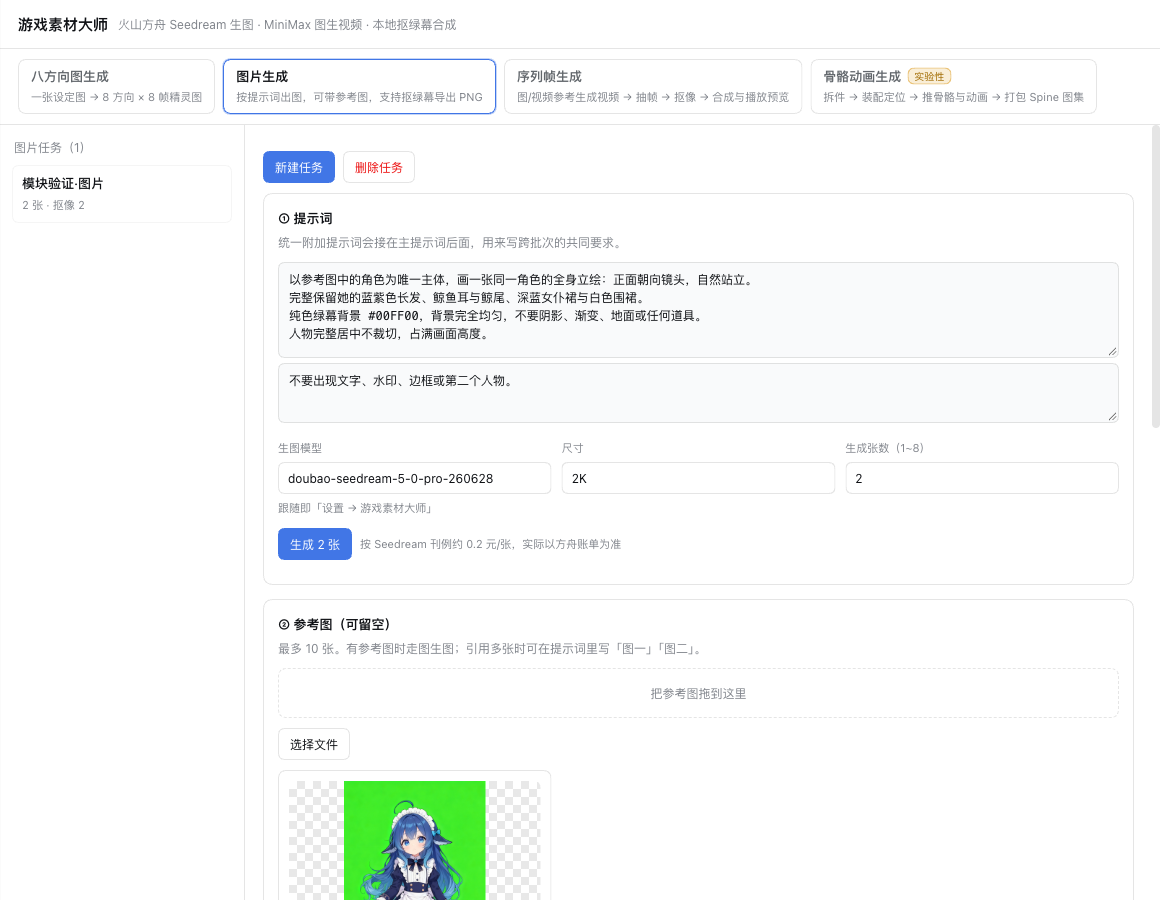
|
|
156
204
|
|
|
@@ -189,7 +237,7 @@ flowchart LR
|
|
|
189
237
|
|
|
190
238
|
## Driving it from chat
|
|
191
239
|
|
|
192
|
-
**Every feature of all
|
|
240
|
+
**Every feature of all six modules** (including the experimental rigged animation and map tiles) **is available through
|
|
193
241
|
chat**. The plugin registers the whole pipeline as `game_material_*` tools, so an agent can drive it forward,
|
|
194
242
|
wait, review, and also stop at each step for you to approve.
|
|
195
243
|
|
|
@@ -221,7 +269,7 @@ dsh plugin --profile web add /path/to/dsh-game-material-master
|
|
|
221
269
|
```
|
|
222
270
|
|
|
223
271
|
The package is published to npm: [dsh-game-material-master](https://www.npmjs.com/package/dsh-game-material-master)
|
|
224
|
-
(currently `0.
|
|
272
|
+
(currently `0.7.0`, `latest`). It has no runtime dependencies, so `dsh plugin add` is all you need.
|
|
225
273
|
|
|
226
274
|
After installing, **restart DSH** (the host half is loaded at startup). The browser half is read from
|
|
227
275
|
`lib/client.js` on disk on each request, so refreshing the browser is enough for it to take effect.
|
|
@@ -241,8 +289,12 @@ point `FFMPEG_PATH` / `FFPROBE_PATH` at absolute paths. The package has **no run
|
|
|
241
289
|
|
|
242
290
|
| Item | Description |
|
|
243
291
|
|---|---|
|
|
292
|
+
| Image backend | Pick **Volcengine Ark Seedream** (default) or a **custom image model**; switching here redirects every image-generating module |
|
|
244
293
|
| Volcengine Ark API Key | "Test connection" really generates a 1K thumbnail (a small charge) and validates both the key and the model |
|
|
245
294
|
| Image model | Defaults to `doubao-seedream-5-0-flash-260915`; switchable to 5.0 Pro / Lite / 4.5 |
|
|
295
|
+
| Custom protocol | One of `OpenAI API` / `ComfyUI API` / `Stable Diffusion WebUI API`; just give the host root URL |
|
|
296
|
+
| Custom parameters | Model name, output size (width x height), negative prompt, steps / CFG / sampler, img2img denoising, seed, timeout |
|
|
297
|
+
| ComfyUI workflow | Paste the whole JSON from "Export (API)"; placeholders `{{prompt}}` `{{width}}` `{{seed}}` `{{image}}` and friends are supported, and a workflow with none runs as-is |
|
|
246
298
|
| MiniMax API Key | "Test connection" is free and can tell an invalid key apart from other errors |
|
|
247
299
|
| Video model | Defaults to `MiniMax-H3` (v2 protocol); Hailuo / I2V use v1; the UCloud version of H3 is selected explicitly |
|
|
248
300
|
| Base URL | Host root, without `/v1` or `/v2`. `api.minimax.cn` in mainland China, `api.minimaxi.com` internationally |
|
|
@@ -250,8 +302,23 @@ point `FFMPEG_PATH` / `FFPROBE_PATH` at absolute paths. The package has **no run
|
|
|
250
302
|
| Feature management | Per-module switches: a disabled module disappears from the UI **and the agent cannot call it either** (see below) |
|
|
251
303
|
|
|
252
304
|
Keys are written only to `<DSH_HOME>/game-material-master/config.json` on your machine, and the UI always
|
|
253
|
-
masks them when displaying them back. **The model
|
|
254
|
-
after you switch
|
|
305
|
+
masks them when displaying them back. **The image backend and model are plugin-level settings shared by
|
|
306
|
+
every module that generates images**; after you switch, tasks align to the new tier automatically.
|
|
307
|
+
Image-to-video always goes through MiniMax and is unaffected by the image backend.
|
|
308
|
+
|
|
309
|
+
### Custom image backend
|
|
310
|
+
|
|
311
|
+
Besides Volcengine Ark you can plug in **your own image service** (Settings → Game Material Master → Image backend):
|
|
312
|
+
|
|
313
|
+
| Protocol | Text-to-image | With reference images | Notes |
|
|
314
|
+
|---|---|---|---|
|
|
315
|
+
| OpenAI API | `POST {base}/images/generations` | `POST {base}/images/edits` (falls back to the `image` field of generations when the endpoint does not exist) | Works with OpenAI itself and compatible gateways; both `b64_json` and `url` responses are accepted |
|
|
316
|
+
| ComfyUI API | `POST {base}/prompt` → poll `/history` → `GET /view` | `POST {base}/upload/image` first, then the file name goes into the workflow | Needs an **API-format** workflow JSON; when `{{image}}` is absent the `LoadImage` node is patched automatically |
|
|
317
|
+
| Stable Diffusion WebUI API | `POST {base}/sdapi/v1/txt2img` | `POST {base}/sdapi/v1/img2img` (`init_images` + denoising strength) | WebUI must be started with `--api`; an API key of `user:pass` uses HTTP Basic |
|
|
318
|
+
|
|
319
|
+
Local servers usually need no API key; enter the **host root** (for example `http://127.0.0.1:8188`) and the
|
|
320
|
+
plugin appends the protocol-specific endpoint. Hit "Test connection" to really generate one test image and
|
|
321
|
+
prove the whole path works.
|
|
255
322
|
|
|
256
323
|
### Feature management (hiding modules you do not use)
|
|
257
324
|
|
|
@@ -288,7 +355,7 @@ the host side (the host has no access to the locale service), so the browser hal
|
|
|
288
355
|
along every time it reads a project or resets prompts.
|
|
289
356
|
|
|
290
357
|
Scope note: **localization covers the browser half's UI text and the built-in default prompts** — the workbench
|
|
291
|
-
title, the
|
|
358
|
+
title, the six module tabs, every card's buttons and notice bars, dialogs, the settings page, the review
|
|
292
359
|
controls, and the default prompts. Two categories remain in Chinese, because DSH currently only exposes the
|
|
293
360
|
locale service to the browser half:
|
|
294
361
|
|
|
@@ -317,8 +384,9 @@ Everything in the UI that you can click, change or approve is bilingual.
|
|
|
317
384
|
├── projects/<id>/ eight-direction sheet (source / images / videos / frames / keyed / preview / out)
|
|
318
385
|
├── image-jobs/<id>/ image generation
|
|
319
386
|
├── sequence-jobs/<id>/ sequence frames
|
|
320
|
-
|
|
321
|
-
|
|
387
|
+
├── rig-jobs/<id>/ rigged animation (experimental: sheet / parts / layout / rig / atlas)
|
|
388
|
+
├── tile-jobs/<id>/ map tiles (template / raw / cell / decor / map / export)
|
|
389
|
+
└── map-jobs/<id>/ map editor (project.json / map.json / tilesets / preview / export)
|
|
322
390
|
```
|
|
323
391
|
|
|
324
392
|
> Map tiles keep the **raw generation output** in `raw/`: after changing regularisation parameters such as
|
|
@@ -375,6 +443,27 @@ The screenshots in this document were taken by Playwright against the real UI; t
|
|
|
375
443
|
- MiniMax occasionally rejects content on moderation (about 10% in practice); just reword to a more neutral
|
|
376
444
|
prompt and retry.
|
|
377
445
|
|
|
446
|
+
## Credits
|
|
447
|
+
|
|
448
|
+
- **Module ⑥ "Map editor" is modelled after the RPG Map Maker in
|
|
449
|
+
[AsPJT/AsLib](https://github.com/AsPJT/AsLib/tree/master).** What was borrowed is its **interaction and
|
|
450
|
+
layout** (one screen: tile palette plus an icon toolbar on the left, canvas on the right; the pen / eraser /
|
|
451
|
+
bucket / pipette / hand tools together with single-layer preview, layer up-down and undo-redo; click a
|
|
452
|
+
palette tile to pick a brush, a red frame marking the current one, wheel to zoom, drag to pan) and two
|
|
453
|
+
**geometry conventions**:
|
|
454
|
+
1. **The map wraps around** — auto-tiling works modulo the map size, so the top/bottom and left/right
|
|
455
|
+
edges join up (a data-level property); the camera is clamped inside the map (dragging stops at the
|
|
456
|
+
edge, with the map's top-left aligned to the canvas) and nothing can be painted outside it;
|
|
457
|
+
2. **A2 auto-tiling** — a 64×160 sheet is 2 variants × 5 shapes; each cell is drawn as four 16px quadrants,
|
|
458
|
+
and each quadrant is picked from one 5-state table over left / up / up-left. Both the small-cell index
|
|
459
|
+
formula and the fact that "1-based index − 1 == AsLib's chip index" come from its `AsMap.hpp`.
|
|
460
|
+
|
|
461
|
+
Its code is **CC0**; this plugin re-implements the behaviour in TypeScript and **does not copy its source**.
|
|
462
|
+
- ⚠️ **The `Picture/MapChip/*_pipo.png` tiles shipped in the AsLib repository belong to a third party and are
|
|
463
|
+
not bundled here** (its README states "Third party content is copyrighted by its respective owners").
|
|
464
|
+
The built-in tileset is generated procedurally on this machine by `scripts/make-map-sample-tileset.mjs`,
|
|
465
|
+
to the same A2 spec.
|
|
466
|
+
|
|
378
467
|
## License
|
|
379
468
|
|
|
380
469
|
[MIT](LICENSE)
|
package/README.md
CHANGED
|
@@ -16,18 +16,19 @@
|
|
|
16
16
|
> 侧栏点「游戏素材大师」→ 设置里填两个 API Key → 新建项目、上传设定图 → 点「生成转圈视频」
|
|
17
17
|
>(默认路径:角色原地匀速转一圈,再自动截出八个方向;要逐方向生图就在阶段①切一下方式)。
|
|
18
18
|
>
|
|
19
|
-
>
|
|
19
|
+
> 侧栏那个入口上还有一个**小折角菜单按钮**:点它直接弹出六个功能,一步跳进要用的那个;
|
|
20
20
|
> 不用的功能可以在设置里关掉(见「功能管理」)。
|
|
21
21
|
|
|
22
|
-
|
|
22
|
+
六个模块共用同一套「生成 → 验收 → 重跑」工作台。每个阶段都能**单独重做**,每份产物都能
|
|
23
23
|
**逐项打「通过」**;「审核模式」可以选 agent 自动审完就往下走,也可以选每一步停下来等你点头。
|
|
24
24
|
|
|
25
25
|
| 模块 | 做什么 | 走完能拿到 |
|
|
26
26
|
|---|---|---|
|
|
27
|
-
| **① 八方向图生成** | 一张设定图 → 8 方位 × 8
|
|
27
|
+
| **① 八方向图生成** | 一张设定图 → 8 方位 × 8 帧(默认「转圈截帧」:一段转圈视频截出八个方向;两处视频都能**自己选本地文件**顶替生成) | 可用 WASD 操控预览的行走精灵图(中间每一张图都能单独存或整包 zip) |
|
|
28
28
|
| **② 图片生成** | 提示词(可带参考图)→ 出图 → 抠绿幕 | 干净透明的 PNG 立绘 / 道具 |
|
|
29
29
|
| **③ 序列帧生成** | 首尾帧或参考视频 → 生成视频 → 抽帧 → 抠像 | 横向排布、可循环播放的序列帧 |
|
|
30
30
|
| **⑤ 45°地图地块生成**(实验性) | 45° 等距地块 → 铺成整张地图 | 地块包(PNG)+ 地图 PNG + 布局 JSON |
|
|
31
|
+
| **⑥ 地图编辑器**(**全本地零计费**) | 选一张素材图 → 直接画(参照 AsLib 的 RPG Map Maker 重做:一屏、纯图标、零术语;默认「地理层 / 装饰层 / 建筑层」三层且可改名换序;**标记层**:每格放一个可命名的标记,画成圆圈里的数字) | PNG + 存档 JSON(地图四周环绕、自动连接、动画地块、标记点);勾几项就导几项,多个产物自动打成一个 ZIP 下载 |
|
|
31
32
|
| ~~④ 骨骼动画生成~~ | 拆件 → 装配 → 骨骼动画 → Spine / DragonBones 图集 | **实验性功能,本文不展示** |
|
|
32
33
|
|
|
33
34
|
> 💡 **模块⑤「45°地图地块生成」的核心思路是「几何交给代码,内容交给 AI」。**
|
|
@@ -36,6 +37,23 @@
|
|
|
36
37
|
> 好处是**几何永远精确**——地块拼起来不会有缝,换种子重铺逐像素可复现。
|
|
37
38
|
> 实测「让模型自由画菱形」的比例只有 1.03~1.55(对不上 2:1),而模板填充的达标率是 100%。
|
|
38
39
|
|
|
40
|
+
> 💡 **模块⑥「地图编辑器」借鉴了 [AsPJT/AsLib](https://github.com/AsPJT/AsLib/tree/master) 的 RPG Map Maker,按它重做为一屏、纯图标、零术语。**
|
|
41
|
+
> 左边是素材调色板与 12 个图标按钮,右边就是画布。**「素材」点开是一张素材列表 + 一个「新增素材」**:
|
|
42
|
+
> 新增时弹窗口填**素材图 / 名字 / 格子大小 / 用法 / 会动吗**(鼠标移上去都有解释),一步填完
|
|
43
|
+
> **属性就定下来了,之后只能删掉重来**;尺寸不用你算,留空就按图片尺寸自动识别。
|
|
44
|
+
> 内置素材默认就在列表里(自带 4 张自动连接图 + 1 张道具,水自带 2 帧动画),
|
|
45
|
+
> 同样可以删,删错了点「恢复默认素材」一键拿回来 —— 它的属性不允许改。
|
|
46
|
+
> 想让**自己的普通素材**也动,新增时选「**翻页图**」—— 像手翻书,每一行是一页;
|
|
47
|
+
> 拼块自动连接素材不用设,它的变体本来就是帧,列表上直接标出「会动 N 帧」。
|
|
48
|
+
> 地图大小、格子大小都能随便填(宽高各填各的);
|
|
49
|
+
> **四周环绕**在数据层:自动连接会把上下、左右两边接起来。画布拖不出地图 —— 拖到边就停,
|
|
50
|
+
> 地图左上角对齐后不会再乱动,图外那片空白也画不上;
|
|
51
|
+
> 还能一键生成随机地形 / 迷宫 / 大陆。
|
|
52
|
+
> **一次模型调用都没有,也就不花钱。**
|
|
53
|
+
|
|
54
|
+
> 🏷️ **六个模块的新建都先问一个名字**:输入框里已经填好默认名(直接回车就用默认值),点取消则不会创建;
|
|
55
|
+
> 地图项目还能随时「重命名」。
|
|
56
|
+
|
|
39
57
|
> ⚠️ **模块④「骨骼动画生成」仍是实验性功能,尚未完善**:拆件质量取决于生图模型,自动装配与骨骼推导
|
|
40
58
|
> 对真实立绘经常需要人工校正(agent 视觉先验或手工拖放),导出的 Spine / DragonBones 产物也还没经过
|
|
41
59
|
> 足够的引擎侧验证。界面上该模块带「实验性」角标,并在每次进入时弹窗说明。本文只展示前三个模块。
|
|
@@ -70,6 +88,27 @@ flowchart LR
|
|
|
70
88
|
默认位置是「从正面开始、匀速转满一圈」的等分假设;模型实际转的方向或快慢不一样时,
|
|
71
89
|
直接拖圆圈,或点一下「转圈方向」重排。改变候选帧数(8~64)会自动重抽,并把拖过的位置按比例换算。
|
|
72
90
|
|
|
91
|
+
### 也可以直接用**自己电脑上的视频**(阶段①、②都能)
|
|
92
|
+
|
|
93
|
+
两处「要生成视频」的地方都不只有「调模型生成」一条路:手上已经有一段合适的视频时,
|
|
94
|
+
点**选择本地视频**把它选进来即可,产物和生成出来的完全一样,后面几步照旧走。
|
|
95
|
+
|
|
96
|
+
- **阶段①·转圈视频**:选进来的是「角色原地匀速转一圈」的绿幕视频,导入后插件会**立刻**
|
|
97
|
+
自动抽候选帧并切出八个方向,接着拖圆圈调位置就行。
|
|
98
|
+
- **阶段②·某个方位的行走视频**:每一格都能单独选自己的一段(固定机位、原地走),
|
|
99
|
+
之后照旧在第 3 步「提取全部序列帧」。
|
|
100
|
+
- 支持 MP4 / MOV / M4V / WebM / MKV / AVI(按**文件头**认,不看扩展名),单个 ≤100MB;
|
|
101
|
+
这一段只在本机用 ffmpeg 处理,不会上传到任何模型。
|
|
102
|
+
- 换掉某一段视频时,它下游已经抽出来的帧与整图会自动作废,避免拿上一段视频的帧去合成。
|
|
103
|
+
|
|
104
|
+
### 中间图片都能存下来
|
|
105
|
+
|
|
106
|
+
一路生成下来的**每一张图**都能保存:八方向绿幕图、转圈候选帧与整圈条带、每段视频抽出来的
|
|
107
|
+
绿幕帧与手动选帧候选、抠完绿幕的帧、合成整图。界面里看得见的产物每张都有「保存」链接;
|
|
108
|
+
候选帧一抽就是 32~64 张,所以底部另有一个 **保存全部图片(zip)**——打成一个包,里面按项目
|
|
109
|
+
目录的结构摆好(`images/…`、`turn/…`、`frames/…`、`keyed/…`、`out/sheet.png`)。
|
|
110
|
+
生成出来的成片(转圈视频、八段行走视频)同样各自有一个「保存视频」链接。
|
|
111
|
+
|
|
73
112
|
### 怎么用
|
|
74
113
|
|
|
75
114
|
1. **新建项目 → 上传设定图**,写提示词(转圈截帧用的是**一份转圈视频提示词**;逐方向生图是每个方位一份,
|
|
@@ -123,7 +162,7 @@ flowchart LR
|
|
|
123
162
|
1. 写主提示词;需要跨批次复用的共同要求(比如「不要出现文字水印」)写进**统一附加提示词**。
|
|
124
163
|
2. 可选:拖入**参考图**(最多 10 张),有参考图时走图生图;引用多张可在提示词里写「图一」「图二」。
|
|
125
164
|
3. 选好模型 / 尺寸 / 张数,点**生成**。
|
|
126
|
-
4.
|
|
165
|
+
4. 结果区**逐张**看:通过、下载原图 / 下载 PNG(抠像结果)、重新生成、删除;背景占比会直接标出来,判断抠像干不干净。
|
|
127
166
|
|
|
128
167
|

|
|
129
168
|
|
|
@@ -160,7 +199,7 @@ flowchart LR
|
|
|
160
199
|
|
|
161
200
|
## 用对话驱动
|
|
162
201
|
|
|
163
|
-
|
|
202
|
+
六个模块(含实验性的骨骼动画与地图地块)的**全部功能都能通过对话调用**。插件把整条流水线注册成
|
|
164
203
|
`game_material_*` 工具,agent 能自己推进、等待、审查,也可以在每一步停下来让你验收。
|
|
165
204
|
|
|
166
205
|
| 工具 | 作用 |
|
|
@@ -190,7 +229,7 @@ dsh plugin --profile web add /path/to/dsh-game-material-master
|
|
|
190
229
|
```
|
|
191
230
|
|
|
192
231
|
包已发布到 npm:[dsh-game-material-master](https://www.npmjs.com/package/dsh-game-material-master)
|
|
193
|
-
(当前 `0.
|
|
232
|
+
(当前 `0.7.0`,`latest`)。本包没有运行时依赖,`dsh plugin add` 拉下来即可用。
|
|
194
233
|
|
|
195
234
|
装完**重启 DSH**(宿主半区在启动时装入)。浏览器半区按磁盘上的 `lib/client.js` 现取,
|
|
196
235
|
刷新浏览器即可生效。
|
|
@@ -209,16 +248,34 @@ dsh plugin --profile web add /path/to/dsh-game-material-master
|
|
|
209
248
|
|
|
210
249
|
| 项 | 说明 |
|
|
211
250
|
|---|---|
|
|
251
|
+
| 生图后端 | 选**火山方舟 Seedream**(默认)或**自定义生图模型**;换后端只改这一处,所有生图模块都跟着走 |
|
|
212
252
|
| 火山方舟 API Key | 「测试连接」会真实生成一张 1K 小图(少量费用),同时验证 Key 与模型 |
|
|
213
253
|
| 生图模型 | 默认 `doubao-seedream-5-0-flash-260915`,可切 5.0 Pro / Lite / 4.5 |
|
|
254
|
+
| 自定义生图协议 | `OpenAI API` / `ComfyUI API` / `Stable Diffusion WebUI API` 三选一,填主机根地址即可 |
|
|
255
|
+
| 自定义生图参数 | 模型名、输出尺寸(宽x高)、负面提示词、采样步数 / CFG / 采样器、图生图重绘强度、种子、超时 |
|
|
256
|
+
| ComfyUI 工作流 | 整段粘贴「导出(API)」的 JSON;支持 `{{prompt}}` `{{width}}` `{{seed}}` `{{image}}` 等占位符,不写占位符就原样跑 |
|
|
214
257
|
| MiniMax API Key | 「测试连接」免费,能区分 Key 无效与其它错误 |
|
|
215
258
|
| 视频模型 | 默认 `MiniMax-H3`(v2 协议);Hailuo / I2V 走 v1;优云智算版 H3 显式选择 |
|
|
216
259
|
| Base URL | 主机根,不含 `/v1` `/v2`。国内 `api.minimax.cn`,国际 `api.minimaxi.com` |
|
|
217
260
|
| 默认参数 | 单格宽高、抽帧张数、像素块边长、抠像阈值等 |
|
|
218
|
-
| 功能管理 |
|
|
261
|
+
| 功能管理 | 逐个开关六个模块:关掉的模块界面上不再出现,**对话里的 AI 也调不到**(见下) |
|
|
219
262
|
|
|
220
263
|
Key 只写入本机 `<DSH_HOME>/game-material-master/config.json`,界面回显始终脱敏。
|
|
221
|
-
|
|
264
|
+
**生图后端与模型是插件级设置,所有需要生图的模块共用**,切换后任务自动对齐新档位。
|
|
265
|
+
图生视频始终只走 MiniMax,不受生图后端影响。
|
|
266
|
+
|
|
267
|
+
### 自定义生图后端
|
|
268
|
+
|
|
269
|
+
除了火山方舟,插件也支持把你的**自己的生图服务**接进来(设置 → 游戏素材大师 → 生图后端):
|
|
270
|
+
|
|
271
|
+
| 协议 | 生图 | 带参考图 | 说明 |
|
|
272
|
+
|---|---|---|---|
|
|
273
|
+
| OpenAI API | `POST {base}/images/generations` | `POST {base}/images/edits`(端点不存在时退回 generations 的 `image` 字段) | 兼容 OpenAI 官方与各家兼容网关;`b64_json` / `url` 两种返回都认 |
|
|
274
|
+
| ComfyUI API | `POST {base}/prompt` → 轮询 `/history` → `GET /view` | 先 `POST {base}/upload/image`,把文件名写进工作流 | 需要**API 格式**的工作流 JSON;`{{image}}` 占位符没写时自动改 `LoadImage` 节点 |
|
|
275
|
+
| Stable Diffusion WebUI API | `POST {base}/sdapi/v1/txt2img` | `POST {base}/sdapi/v1/img2img`(`init_images` + 重绘强度) | 需要 WebUI 以 `--api` 启动;API Key 填 `user:pass` 走 HTTP Basic |
|
|
276
|
+
|
|
277
|
+
本地服务通常不需要 API Key;地址填**主机根**(例如 `http://127.0.0.1:8188`),具体端点由插件按协议拼。
|
|
278
|
+
配好点「测试连接」即可真跑一张测试图确认链路通。
|
|
222
279
|
|
|
223
280
|
### 功能管理(隐藏不用的模块)
|
|
224
281
|
|
|
@@ -235,7 +292,7 @@ Key 只写入本机 `<DSH_HOME>/game-material-master/config.json`,界面回显
|
|
|
235
292
|
## 界面语言
|
|
236
293
|
|
|
237
294
|
**插件界面跟随 DSH 自身的语言设置**(设置 → 通用 → 语言),中文 / 英文都是一等公民,
|
|
238
|
-
|
|
295
|
+
切换**即时生效**、不用刷新页面:工作台标题、六个模块页签、每一张卡片的按钮、提示条、
|
|
239
296
|
弹窗与设置页全部跟着走。
|
|
240
297
|
|
|
241
298
|
实现上不猜也不复制 DSH 的语言状态,而是接 DSH 的 `locale` 服务
|
|
@@ -249,7 +306,7 @@ Key 只写入本机 `<DSH_HOME>/game-material-master/config.json`,界面回显
|
|
|
249
306
|
所以浏览器半区每次读项目、重置提示词时把当前语言一起带过去。
|
|
250
307
|
|
|
251
308
|
范围说明:**多语言覆盖的是浏览器半区的界面文案与内置默认提示词**——工作台标题、
|
|
252
|
-
|
|
309
|
+
六个模块页签、每一张卡片的按钮与提示条、弹窗、设置页、验收控件、默认提示词。
|
|
253
310
|
以下两类仍是中文,因为 DSH 目前只把 locale 服务提供给浏览器半区:
|
|
254
311
|
|
|
255
312
|
- **运行日志里由宿主写入的行**(「开始生成「南 · 正对镜头」」「…生成完成,用时 12.3 秒」等)
|
|
@@ -273,7 +330,8 @@ Key 只写入本机 `<DSH_HOME>/game-material-master/config.json`,界面回显
|
|
|
273
330
|
├── image-jobs/<id>/ 图片生成
|
|
274
331
|
├── sequence-jobs/<id>/ 序列帧生成
|
|
275
332
|
├── rig-jobs/<id>/ 骨骼动画(实验性:sheet / parts / layout / rig / atlas)
|
|
276
|
-
|
|
333
|
+
├── tile-jobs/<id>/ 地图地块(template / raw / cell / decor / map / export)
|
|
334
|
+
└── map-jobs/<id>/ 地图编辑器(project.json / map.json / tilesets / preview / export)
|
|
277
335
|
```
|
|
278
336
|
|
|
279
337
|
> 地图地块的 `raw/` 会**保留原始生成结果**:改了单元格尺寸之类的规整参数后,
|
|
@@ -330,6 +388,23 @@ T("第 {n0} 帧", { n0: index + 1 }) // 带插值,英
|
|
|
330
388
|
- 也可以在 [GitHub Issues](https://github.com/universe-st/dsh-game-material-master/issues)
|
|
331
389
|
提 issue 或直接发 PR。
|
|
332
390
|
|
|
391
|
+
## 致谢
|
|
392
|
+
|
|
393
|
+
- **模块⑥「地图编辑器」借鉴了 [AsPJT/AsLib](https://github.com/AsPJT/AsLib/tree/master) 的 RPG Map Maker。**
|
|
394
|
+
具体借鉴的是它的**交互与界面**(一屏:左边素材调色板 + 图标工具栏、右边画布;画笔 / 橡皮 / 油漆桶 /
|
|
395
|
+
吸管 / 抓手 + 单层预览 + 图层上下 + 撤销重做这一组工具;点调色板选笔刷、红框标当前笔刷、
|
|
396
|
+
滚轮缩放、拖动平移)和两处**几何约定**:
|
|
397
|
+
1. **地图四周环绕** —— 自动连接的邻域判断取模,上下 / 左右两边接得上(数据层语义);
|
|
398
|
+
相机被夹在地图内(拖到边就停、地图左上角与画布左上角对齐),图外不落笔;
|
|
399
|
+
2. **A2 拼块自动连接** —— 一张 64×160 的图 = 2 变体 × 5 形状,一格拆成四个 16px 象限,
|
|
400
|
+
每个象限按「左 / 上 / 左上」查同一张 5 状态表;小格的挑选公式,以及
|
|
401
|
+
「1-based 序号 − 1 == AsLib 的 chip 下标」这条对应关系,都出自它的 `AsMap.hpp`。
|
|
402
|
+
|
|
403
|
+
它的代码是 **CC0**;本插件是照它的行为用 TypeScript 重写的,**没有拷贝它的源码**。
|
|
404
|
+
- ⚠️ **AsLib 仓库里的 `Picture/MapChip/*_pipo.png` 素材属于第三方,没有打包进本插件**
|
|
405
|
+
(它的 README 写明 "Third party content is copyrighted by its respective owners")。
|
|
406
|
+
内置素材由 `scripts/make-map-sample-tileset.mjs` 按同样的 A2 规格在本机程序化生成。
|
|
407
|
+
|
|
333
408
|
## 许可
|
|
334
409
|
|
|
335
410
|
[MIT](LICENSE)
|
package/lib/ark.js
CHANGED
|
@@ -18,7 +18,7 @@ export class ArkError extends Error {
|
|
|
18
18
|
function isFiveSeries(model) {
|
|
19
19
|
return /seedream-5-0/i.test(model);
|
|
20
20
|
}
|
|
21
|
-
function sniffExt(bytes) {
|
|
21
|
+
export function sniffExt(bytes) {
|
|
22
22
|
if (bytes.length >= 8 && bytes[0] === 0x89 && bytes[1] === 0x50 && bytes[2] === 0x4e && bytes[3] === 0x47)
|
|
23
23
|
return "png";
|
|
24
24
|
if (bytes.length >= 3 && bytes[0] === 0xff && bytes[1] === 0xd8 && bytes[2] === 0xff)
|
|
@@ -1,14 +1,17 @@
|
|
|
1
1
|
/**
|
|
2
|
-
*
|
|
2
|
+
* 图像编解码与基础像素操作 —— **全插件共用**(原名 `tilemedia.ts`)。
|
|
3
3
|
*
|
|
4
|
-
* 这一层只做「字节 ↔ RGBA
|
|
5
|
-
*
|
|
4
|
+
* 这一层只做「字节 ↔ RGBA 缓冲区」和几个与业务无关的原语
|
|
5
|
+
* (PNG 头、颜色统计、前景/背景掩码、包围盒)。地块几何在 `tilegeom.ts`、
|
|
6
|
+
* 拼图在 `tilemap.ts`、地图编辑器在 `mapgeom.ts` / `maprender.ts` ——
|
|
7
|
+
* 它们都只是这里的调用方,所以这个文件不叫 `tile*`。
|
|
6
8
|
*
|
|
7
9
|
* 为什么 PNG 解码走 ffmpeg:仓库**没有任何运行时依赖**(见 AGENTS.md),
|
|
8
10
|
* 手写 PNG 解码器要处理 5 种 filter 类型,而 ffmpeg 已经是本插件的既有依赖
|
|
9
11
|
* (抽帧、抠像都用它)。这里把调用集中成一个函数,以后要换只改一处。
|
|
10
12
|
*/
|
|
11
13
|
import { spawn } from "node:child_process";
|
|
14
|
+
import { readFile } from "node:fs/promises";
|
|
12
15
|
import { encodePng } from "./png.js";
|
|
13
16
|
import { ffmpegPath } from "./media.js";
|
|
14
17
|
/** PNG 头里的尺寸(不解码像素,用来做廉价校验)。 */
|
|
@@ -86,6 +89,21 @@ function runFfmpeg(args) {
|
|
|
86
89
|
export async function decodeFile(file, maxEdge = 0) {
|
|
87
90
|
return decodeImage(file, maxEdge);
|
|
88
91
|
}
|
|
92
|
+
/**
|
|
93
|
+
* 只问尺寸、不要像素。
|
|
94
|
+
*
|
|
95
|
+
* PNG 直接读文件头(零成本);JPEG / WebP / GIF 让 ffmpeg 解一帧成 PNG 再读头。
|
|
96
|
+
* 图集导入只需要知道「几乘几」,为了这个把几千万像素全解出来是白等。
|
|
97
|
+
*/
|
|
98
|
+
export async function probeImageSize(file) {
|
|
99
|
+
const head = await readFile(file).catch(() => undefined);
|
|
100
|
+
if (head !== undefined) {
|
|
101
|
+
const size = pngSize(head);
|
|
102
|
+
if (size !== undefined)
|
|
103
|
+
return size;
|
|
104
|
+
}
|
|
105
|
+
return probeDecodedSize(file, 0);
|
|
106
|
+
}
|
|
89
107
|
/** 编码落盘用的 PNG 字节。 */
|
|
90
108
|
export function encodeBitmap(bitmap) {
|
|
91
109
|
return encodePng(bitmap.rgba, bitmap.width, bitmap.height);
|