dsh-game-material-master 0.2.0 → 0.3.0
This diff represents the content of publicly available package versions that have been released to one of the supported registries. The information contained in this diff is provided for informational purposes only and reflects changes between package versions as they appear in their respective public registries.
- package/README.en.md +363 -0
- package/README.md +66 -5
- package/lib/client.js +4358 -873
- package/lib/config.js +25 -4
- package/lib/directions.js +120 -5
- package/lib/index.js +390 -12
- package/lib/jsonio.js +49 -3
- package/lib/links.js +10 -2
- package/lib/pipeline.js +285 -0
- package/lib/store.js +21 -1
- package/lib/tilegen.js +1702 -0
- package/lib/tilegeom.js +1392 -0
- package/lib/tilemap.js +560 -0
- package/lib/tilemedia.js +243 -0
- package/lib/tools.js +191 -15
- package/lib/wire.js +137 -6
- package/package.json +3 -2
package/README.en.md
ADDED
|
@@ -0,0 +1,363 @@
|
|
|
1
|
+
English | [中文](https://github.com/universe-st/dsh-game-material-master/blob/main/README.md)
|
|
2
|
+
|
|
3
|
+
# Game Material Master
|
|
4
|
+
|
|
5
|
+
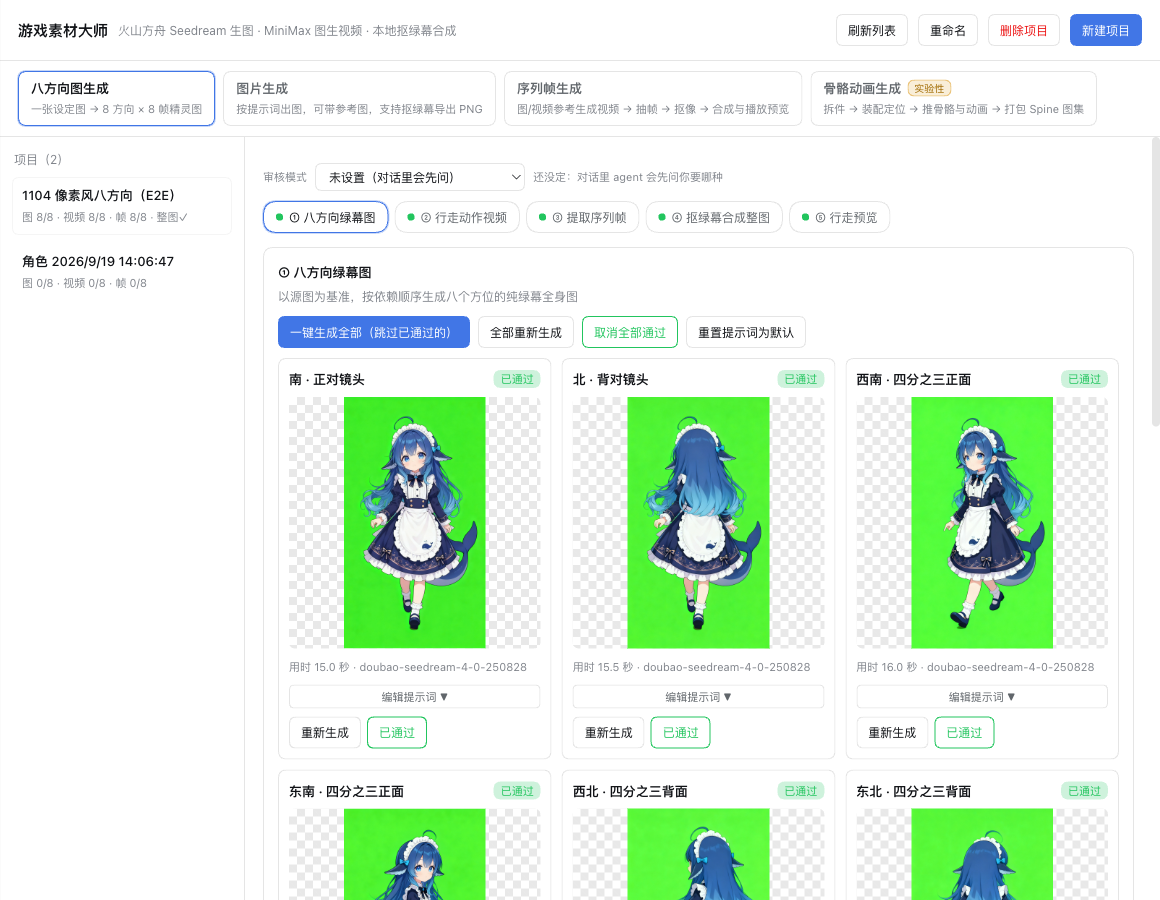
**Start from a single character sheet and batch-produce the assets your game actually needs.**
|
|
6
|
+
|
|
7
|
+
Volcengine Ark **Seedream** handles image generation, **MiniMax** handles image-to-video, and keying,
|
|
8
|
+
frame extraction, pixel quantization and spritesheet composition all happen locally through `ffmpeg` —
|
|
9
|
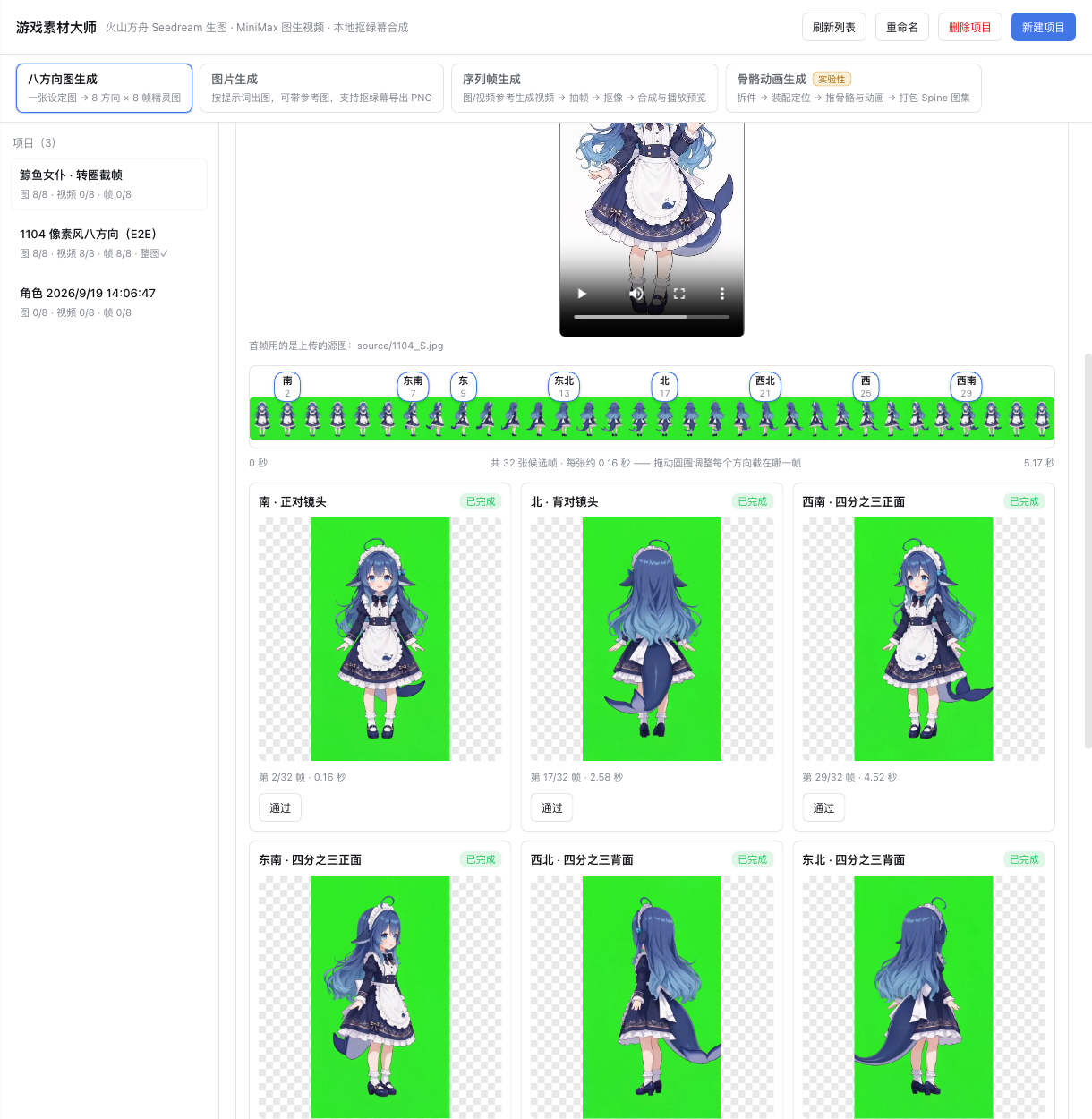
+
no system image libraries required, and your assets are never uploaded to a third-party service.
|
|
10
|
+
|
|
11
|
+
[](https://www.npmjs.com/package/dsh-game-material-master)
|
|
12
|
+
[](LICENSE)
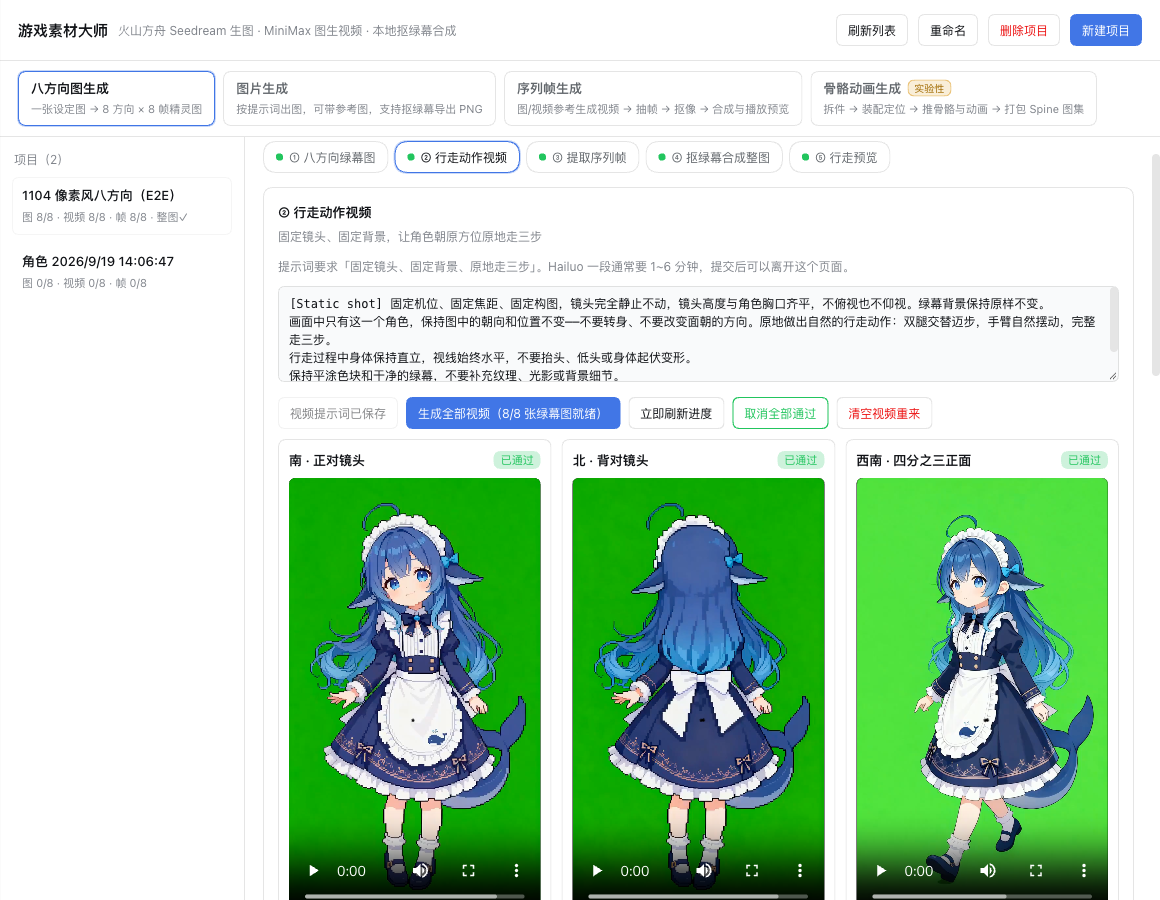
|
|
13
|
+
|
|
14
|
+
|
|
15
|
+
|
|
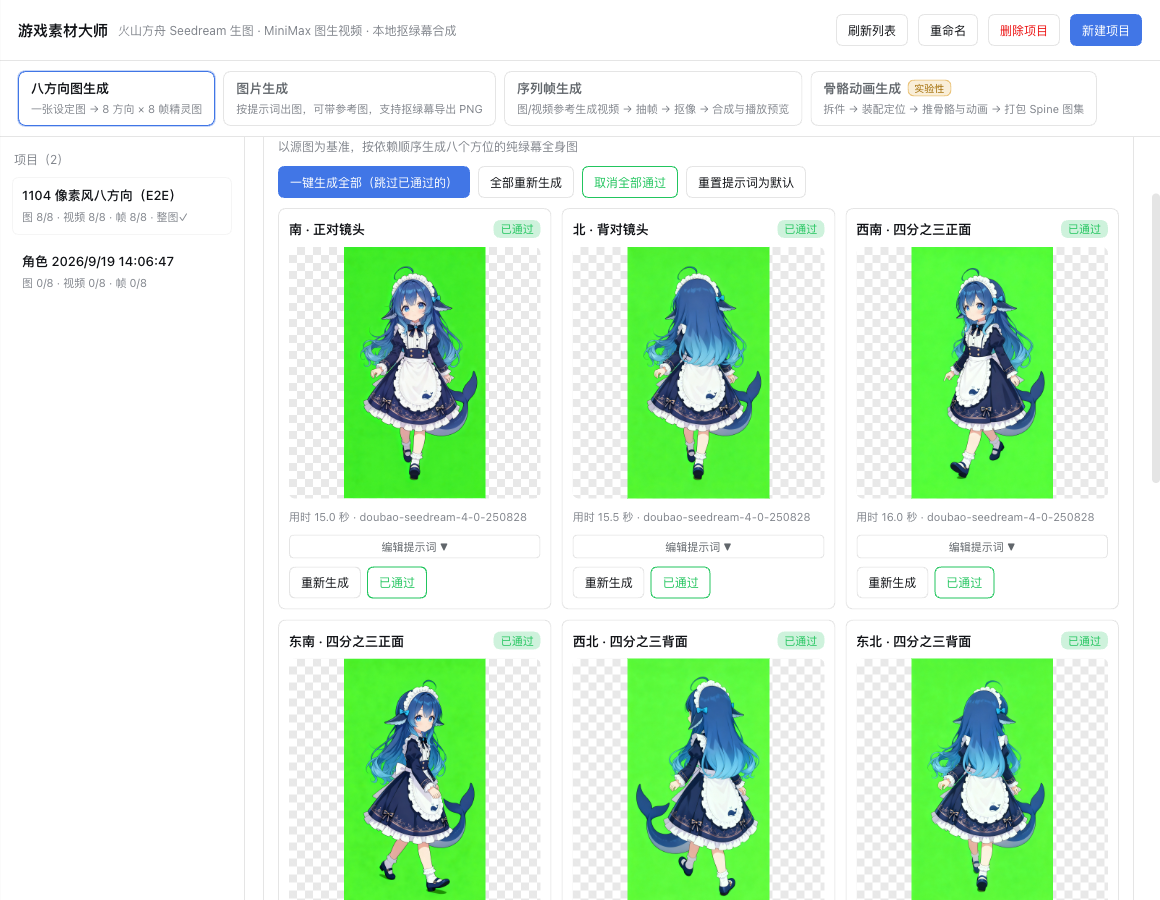
16
|
+
> **Up and running in 30 seconds**: `dsh plugin --profile web add dsh-game-material-master` → restart DSH →
|
|
17
|
+
> click "Game Material Master" in the sidebar → enter the two API keys in settings → create a project,
|
|
18
|
+
> upload your character sheet → click "Generate turn video" (the default path: the character rotates steadily
|
|
19
|
+
> in place for one full turn, then the eight directions are cut out automatically; switch the method in
|
|
20
|
+
> stage ① if you'd rather generate each direction separately).
|
|
21
|
+
|
|
22
|
+
All four modules share the same "generate → review → re-run" workbench. Every stage can be **redone on its
|
|
23
|
+
own**, and every asset can be **approved item by item**. The "review mode" lets an agent approve each step
|
|
24
|
+
and move on automatically, or stop at every step and wait for your go-ahead.
|
|
25
|
+
|
|
26
|
+
| Module | What it does | What you get |
|
|
27
|
+
|---|---|---|
|
|
28
|
+
| **① Eight-direction sprite sheet** | One character sheet → 8 directions × 8 frames (default "turn capture": eight directions cut from one rotation video) | A walk spritesheet you can drive with WASD |
|
|
29
|
+
| **② Image generation** | Prompt (optionally with reference images) → images → green-screen keying | Clean transparent PNG character art / props |
|
|
30
|
+
| **③ Sequence frames** | First/last frame or a reference video → generate video → extract frames → key | A horizontally laid out, loopable sequence |
|
|
31
|
+
| **⑤ Map tile generation** | Isometric tiles → assemble a whole map | A tile pack (PNGs) + map PNG + layout JSON |
|
|
32
|
+
| ~~④ Rigged animation~~ | Part extraction → assembly → skeletal animation → Spine / DragonBones atlas | **Experimental, not covered in this document** |
|
|
33
|
+
|
|
34
|
+
> 💡 **Module ⑤ "Map tile generation" is built on one idea: geometry by code, content by AI.**
|
|
35
|
+
> The diamond template is rendered locally (strict 2:1 isometric) and the AI only fills its interior with the
|
|
36
|
+
> requested terrain. Each result is then measured and affine-aligned back to the standard diamond, and the map
|
|
37
|
+
> is assembled locally on the isometric grid. Geometry is therefore always exact — tiles never show seams, and
|
|
38
|
+
> re-assembling with the same seed is pixel-identical. Measured: letting the model draw the diamond freely
|
|
39
|
+
> gives ratios of 1.03–1.55 (nowhere near 2:1), while template filling hits 100%.
|
|
40
|
+
|
|
41
|
+
> ⚠️ **Module ④ "Rigged animation" is still experimental and not yet finished**: the quality of part extraction
|
|
42
|
+
> depends on the image model, automatic assembly and bone inference frequently need manual correction on real
|
|
43
|
+
> character art (agent visual priors or manual dragging), and the exported Spine / DragonBones output has not
|
|
44
|
+
> seen enough engine-side validation. The module carries an "experimental" badge in the UI and shows a dialog
|
|
45
|
+
> every time you enter it. This document only covers the first three modules.
|
|
46
|
+
> If you need it — or want to help make it solid — you're welcome to join in at the
|
|
47
|
+
> [GitHub repository](https://github.com/universe-st/dsh-game-material-master).
|
|
48
|
+
|
|
49
|
+
---
|
|
50
|
+
|
|
51
|
+
## ① Eight-direction sprite sheet
|
|
52
|
+
|
|
53
|
+
Feed in one front-facing character sheet and get all eight directions in one pass:
|
|
54
|
+
**green-screen images → walk videos → sequence frames → final spritesheet → interactive preview**.
|
|
55
|
+
|
|
56
|
+
```mermaid
|
|
57
|
+
flowchart LR
|
|
58
|
+
S(["Character sheet"]) --> I["① Eight green-screen directions"] --> V["② Walk videos"] --> F["③ Extract sequence frames"] --> P["④ Compose spritesheet"] --> W(["⑤ WASD preview"])
|
|
59
|
+
```
|
|
60
|
+
|
|
61
|
+
### The two generation methods: turn capture (default) / per-direction generation
|
|
62
|
+
|
|
63
|
+
There are two ways to produce the eight direction images, and the output is identical either way
|
|
64
|
+
(`images/<direction>.png`), so the next four steps don't change:
|
|
65
|
+
|
|
66
|
+
| | **Turn capture (default)** | Per-direction generation (alternative) |
|
|
67
|
+
|---|---|---|
|
|
68
|
+
| How | Generate **one** green-screen video of the character turning steadily in place for a full rotation, then cut frames for the eight directions along the timeline | Generate each of the eight directions separately, in dependency order |
|
|
69
|
+
| Cost | One video call | Eight image calls |
|
|
70
|
+
| Consistency | **All eight directions share one source**: same character, same lighting, same art style | The model has to re-interpret the character every time, so face shape, hair color and clothing tend to drift |
|
|
71
|
+
| Adjusting position | The timeline has **eight draggable circles** — drag to a frame and that frame is cut (re-cut locally, free and instant) | Regenerate each image |
|
|
72
|
+
|
|
73
|
+
The row of circles in the UI is the capture position for each of the eight directions, and the thumbnail
|
|
74
|
+
strip below it is the candidate frames for the whole rotation — drag against the picture and release to
|
|
75
|
+
re-cut that one image (this also invalidates that direction's walk video and sequence frames automatically,
|
|
76
|
+
so old and new orientations never get mixed together). The default positions assume an even split
|
|
77
|
+
"starting from the front, one full rotation at constant speed"; when the model actually turns in a different
|
|
78
|
+
direction or at a different pace, just drag the circles, or click "turn direction" to re-order them. Changing
|
|
79
|
+
the candidate frame count (8–64) re-extracts automatically and rescales any positions you have dragged.
|
|
80
|
+
|
|
81
|
+
### How to use it
|
|
82
|
+
|
|
83
|
+
1. **Create a project → upload a character sheet**, then write your prompts (turn capture uses **one turn-video
|
|
84
|
+
prompt**; per-direction generation uses one prompt per direction, plus a shared "common suffix prompt" for
|
|
85
|
+
all eight).
|
|
86
|
+
2. **Generate turn video** (the default path): the character rotates steadily in place for one full turn
|
|
87
|
+
against a green screen. Once the video arrives, the plugin extracts candidate frames and cuts out the eight
|
|
88
|
+
directions automatically — you usually don't need to touch anything. **Per-direction generation** (the
|
|
89
|
+
alternative) is **generate all in one click**: the eight directions produce green-screen full-body images in
|
|
90
|
+
dependency order. Per image you can see the elapsed time and which model was used; if you don't like one,
|
|
91
|
+
**regenerate** that image, or expand **edit prompt** to change just that one.
|
|
92
|
+
3. **Generate all videos**: make the character walk three steps in place in each direction. This is the most
|
|
93
|
+
expensive and slowest step (1–6 minutes per clip).
|
|
94
|
+
4. **Extract all sequence frames**: each video is sampled evenly across its duration; uniform cropping, scaling
|
|
95
|
+
and **pixel-art quantization** all happen here too.
|
|
96
|
+
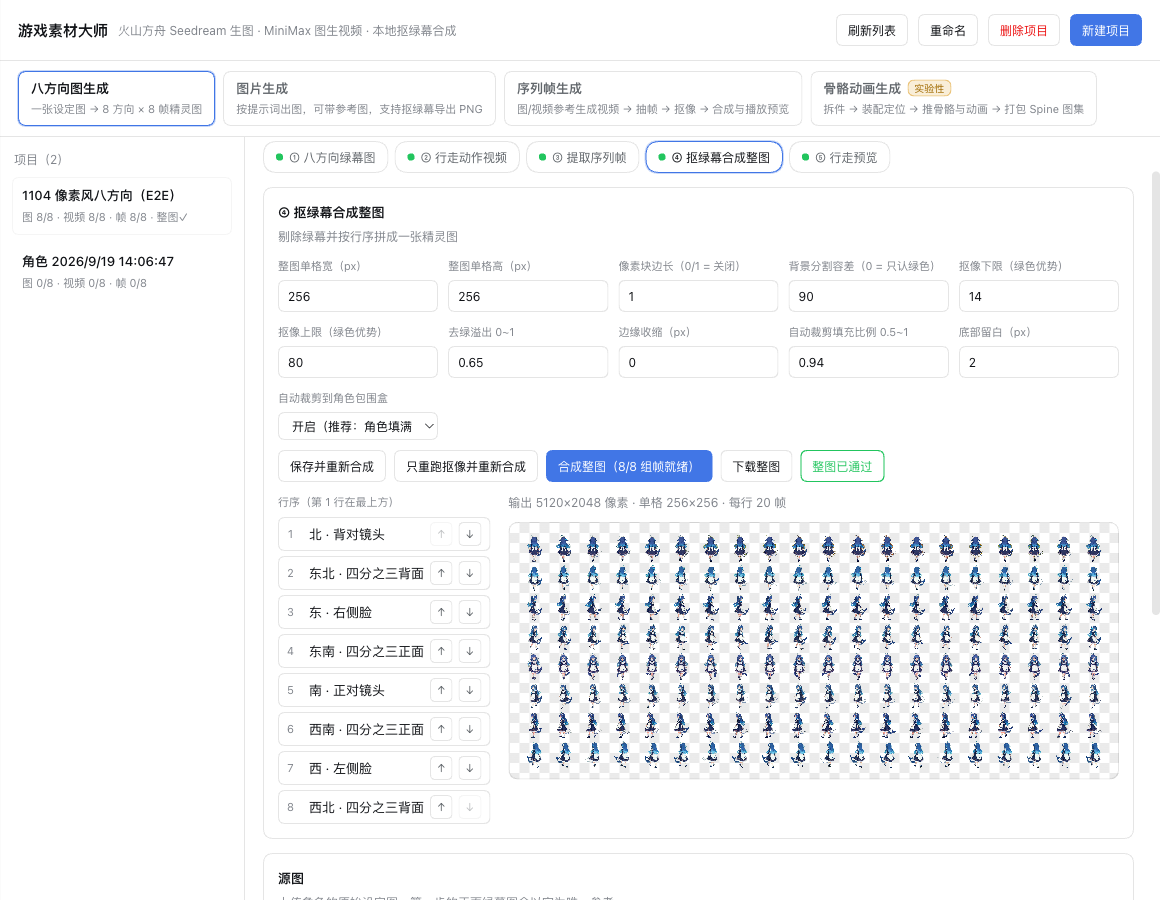
5. **Compose spritesheet**: remove the green screen and stitch the rows into one spritesheet; drag rows with
|
|
97
|
+
↑↓ to reorder, and you can save parameters before composing.
|
|
98
|
+
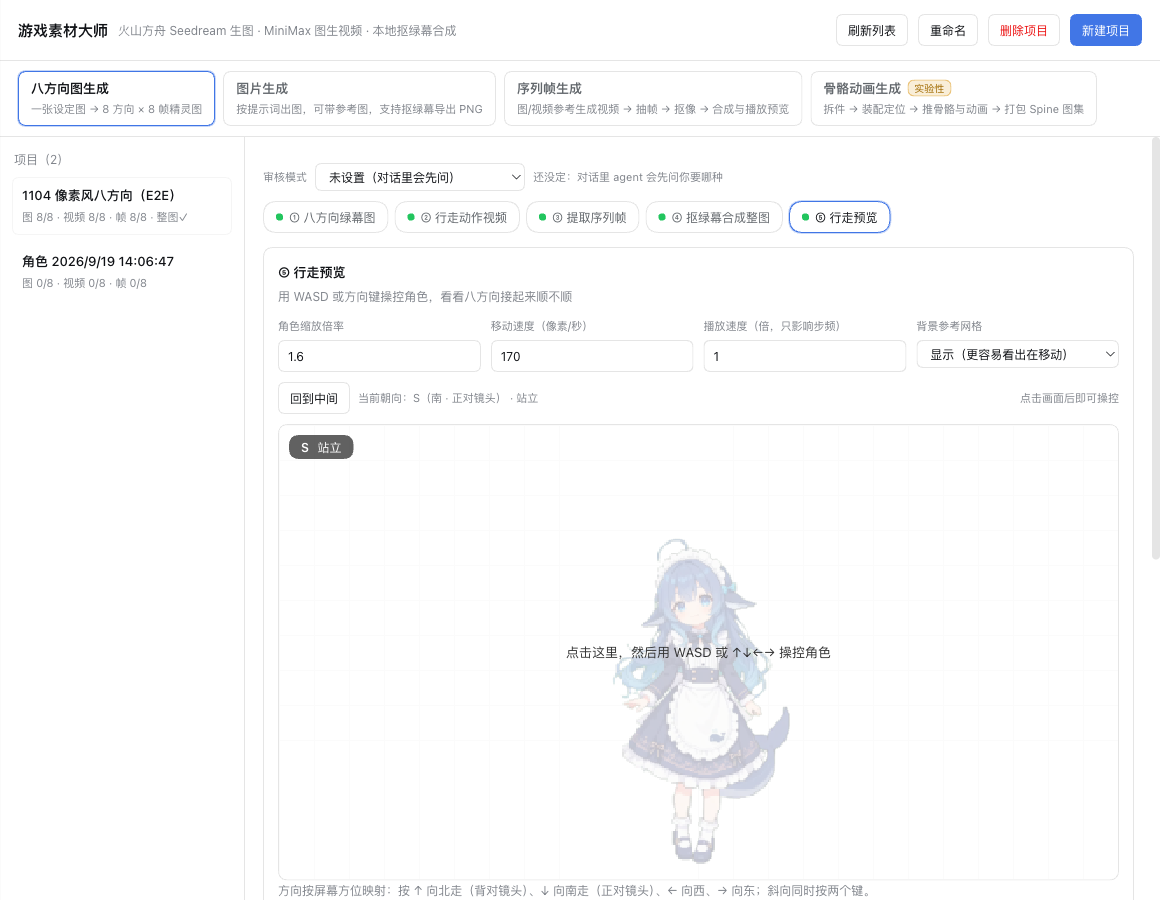
6. **Walk preview**: drive the character with WASD or the arrow keys — whether the eight directions blend
|
|
99
|
+
smoothly is obvious at a glance.
|
|
100
|
+
|
|
101
|
+
### ① Eight green-screen directions
|
|
102
|
+
|
|
103
|
+
**Turn capture (default)**: one green-screen video of "a steady full rotation in place", cut into eight
|
|
104
|
+
directions along the timeline; the eight circles on the axis are their capture positions — drag to change
|
|
105
|
+
them and release to re-cut instantly (locally, free).
|
|
106
|
+
|
|
107
|
+
|
|
108
|
+
|
|
109
|
+
**Per-direction generation (alternative)**: each of the eight directions is generated separately; single
|
|
110
|
+
images are sharper, which suits cases where you only need a few directions or want maximum per-image quality.
|
|
111
|
+
|
|
112
|
+
|
|
113
|
+
|
|
114
|
+
### ② Walk videos
|
|
115
|
+
|
|
116
|
+
|
|
117
|
+
|
|
118
|
+
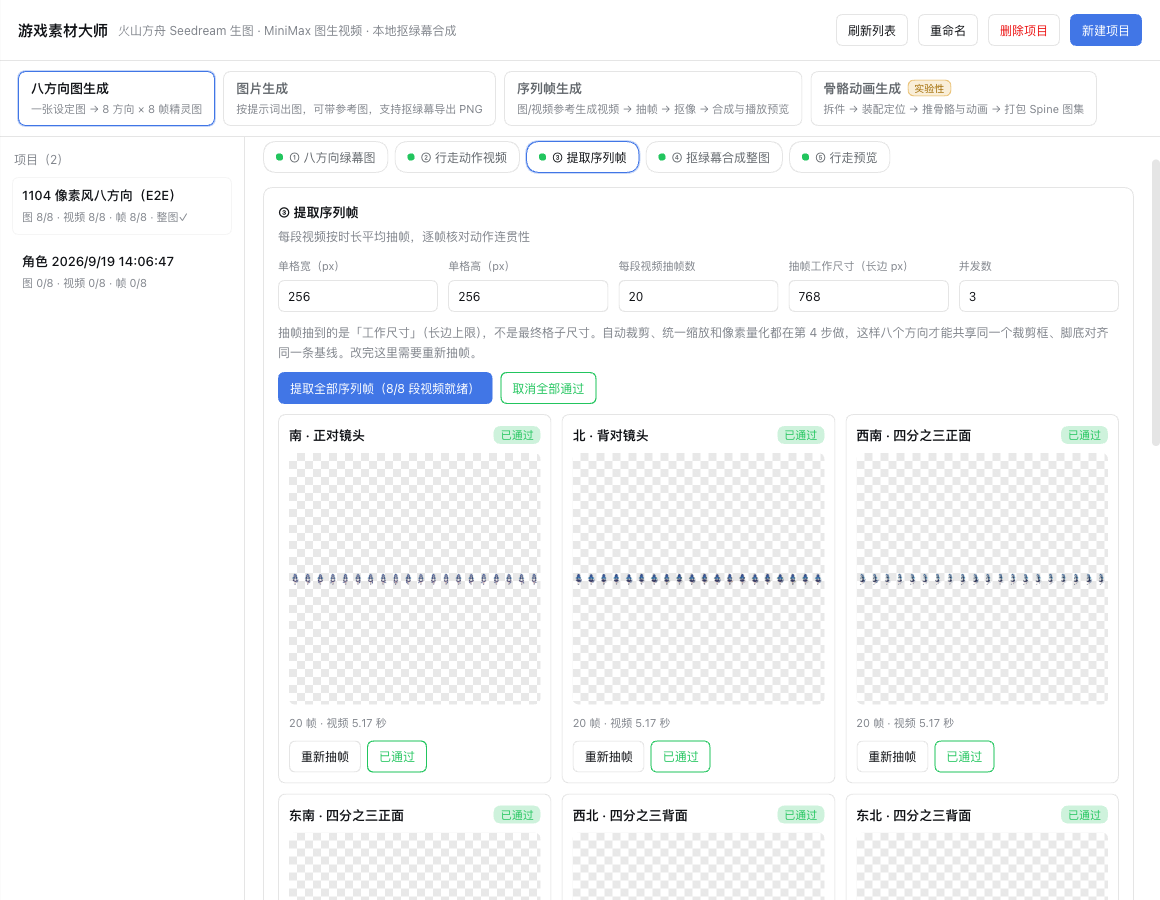
### ③ Extract sequence frames
|
|
119
|
+
|
|
120
|
+
|
|
121
|
+
|
|
122
|
+
### ④ Key green screen and compose spritesheet
|
|
123
|
+
|
|
124
|
+
|
|
125
|
+
|
|
126
|
+
### ⑤ Walk preview
|
|
127
|
+
|
|
128
|
+
|
|
129
|
+
|
|
130
|
+
> **Re-running a single step**: if any step isn't right, redo just that step — a single direction or a single
|
|
131
|
+
> stage — instead of starting the whole batch over.
|
|
132
|
+
|
|
133
|
+
---
|
|
134
|
+
|
|
135
|
+
## ② Image generation
|
|
136
|
+
|
|
137
|
+
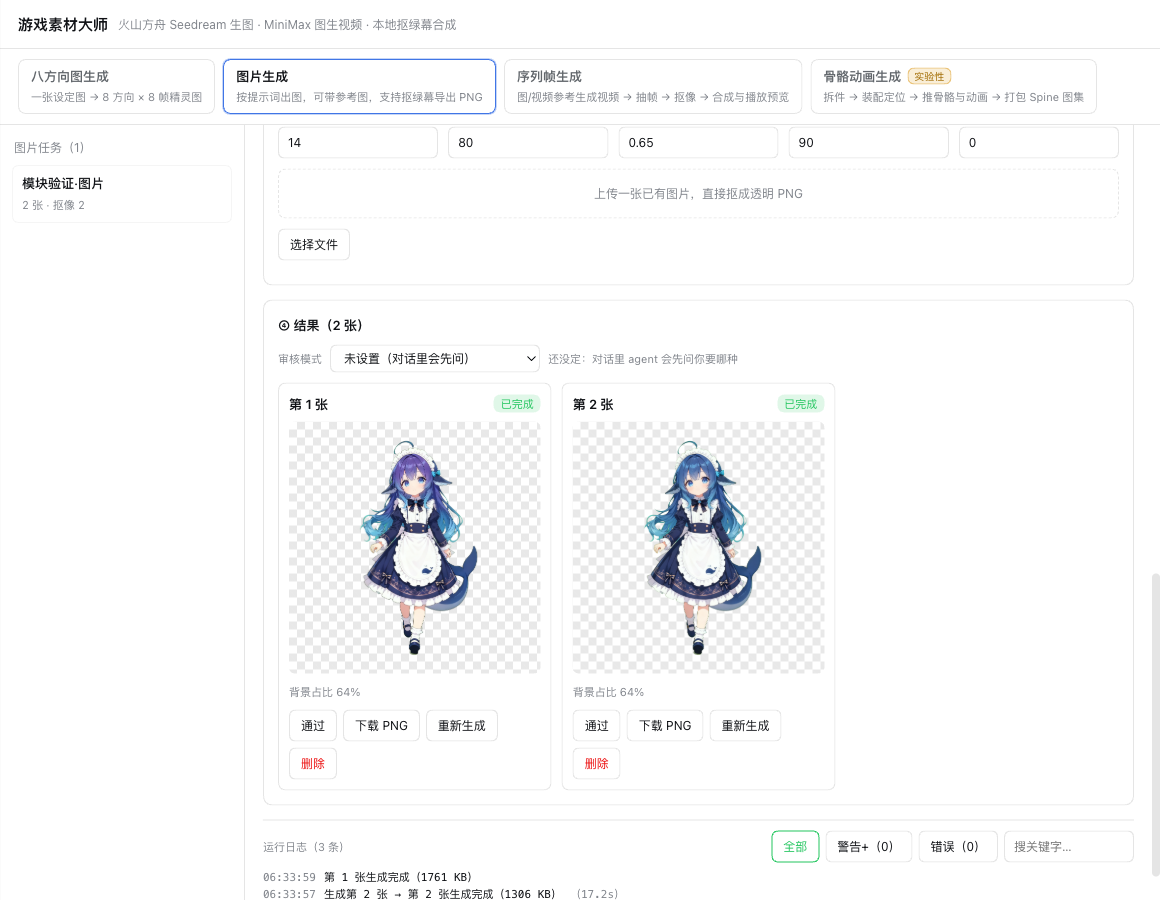
Generate images from a prompt, with optional reference images. After generation the green screen is
|
|
138
|
+
**keyed automatically** into a transparent PNG — or you can upload an existing image and run only the keying,
|
|
139
|
+
without spending anything on generation.
|
|
140
|
+
|
|
141
|
+
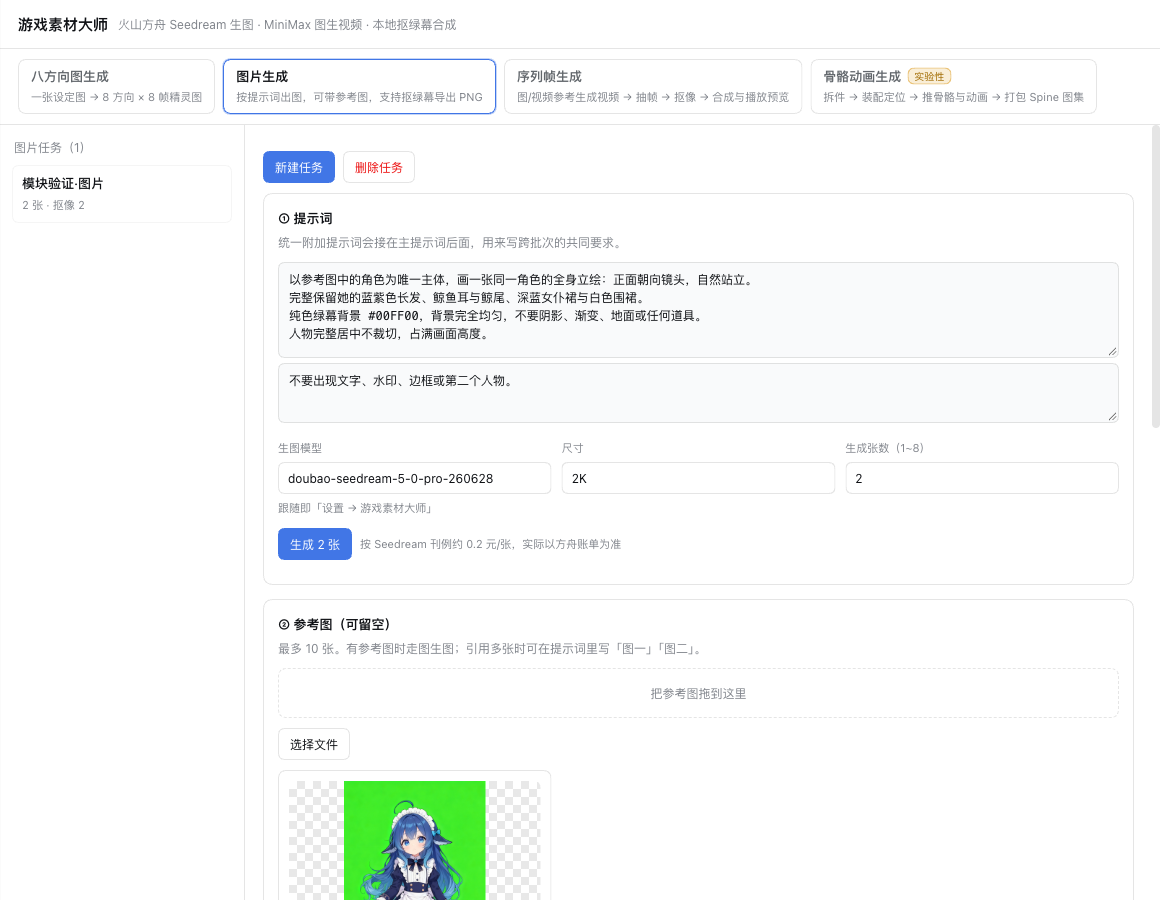
### How to use it
|
|
142
|
+
|
|
143
|
+
1. Write the main prompt; put requirements you reuse across batches (for example "no text watermarks") into the
|
|
144
|
+
**common suffix prompt**.
|
|
145
|
+
2. Optional: drop in **reference images** (up to 10); with references present, it runs image-to-image. To cite
|
|
146
|
+
several of them, refer to "image one", "image two" in the prompt.
|
|
147
|
+
3. Pick the model / size / count and click **Generate**.
|
|
148
|
+
4. In the results area, review **image by image**: approve, download the PNG, regenerate, delete. The background
|
|
149
|
+
percentage is shown right there so you can judge how clean the keying is.
|
|
150
|
+
|
|
151
|
+
|
|
152
|
+
|
|
153
|
+
|
|
154
|
+
|
|
155
|
+
---
|
|
156
|
+
|
|
157
|
+
## ③ Sequence frames
|
|
158
|
+
|
|
159
|
+
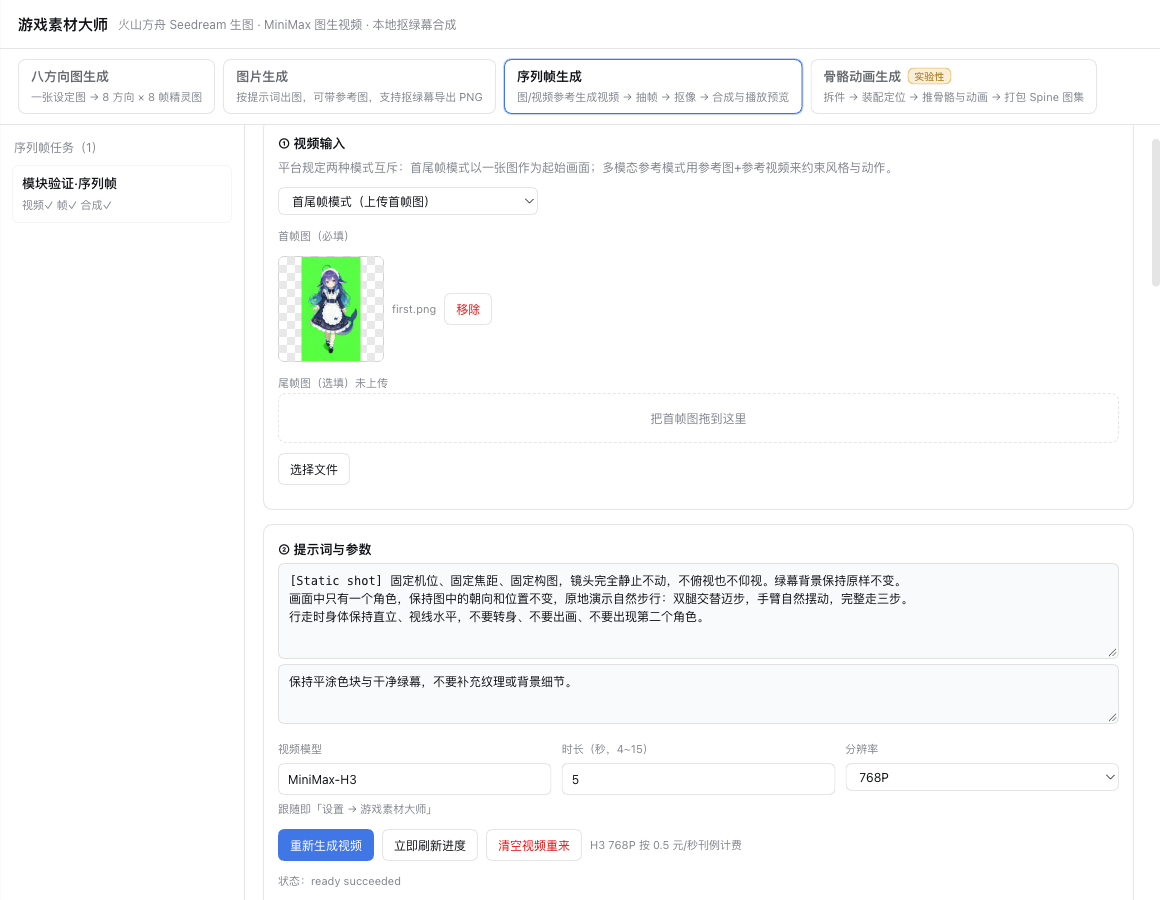
A more "one shot" path than the eight-direction sheet: give it a first-frame image (or a reference image plus a
|
|
160
|
+
reference video) and it generates a looping motion directly, then extracts frames, keys them, composes them
|
|
161
|
+
horizontally and **plays the loop in place for preview**.
|
|
162
|
+
|
|
163
|
+
```mermaid
|
|
164
|
+
flowchart LR
|
|
165
|
+
A(["First/last frame or reference image + reference video"]) --> V["Generate video"] --> F["Extract sequence frames"] --> K["Key green screen + compose horizontally"] --> L(["Loop playback review"])
|
|
166
|
+
```
|
|
167
|
+
|
|
168
|
+
### How to use it
|
|
169
|
+
|
|
170
|
+
1. Pick a mode — the platform makes the two mutually exclusive:
|
|
171
|
+
- **First/last frame mode**: one image as the starting frame (the last frame is optional);
|
|
172
|
+
- **Multimodal reference mode**: reference image + reference video, used to constrain style and motion.
|
|
173
|
+
2. Write a prompt, pick the model / duration (4–15 seconds) / resolution, and click **Generate video**.
|
|
174
|
+
3. **Extract sequence frames**: frame extraction, uniform cropping, pixel quantization.
|
|
175
|
+
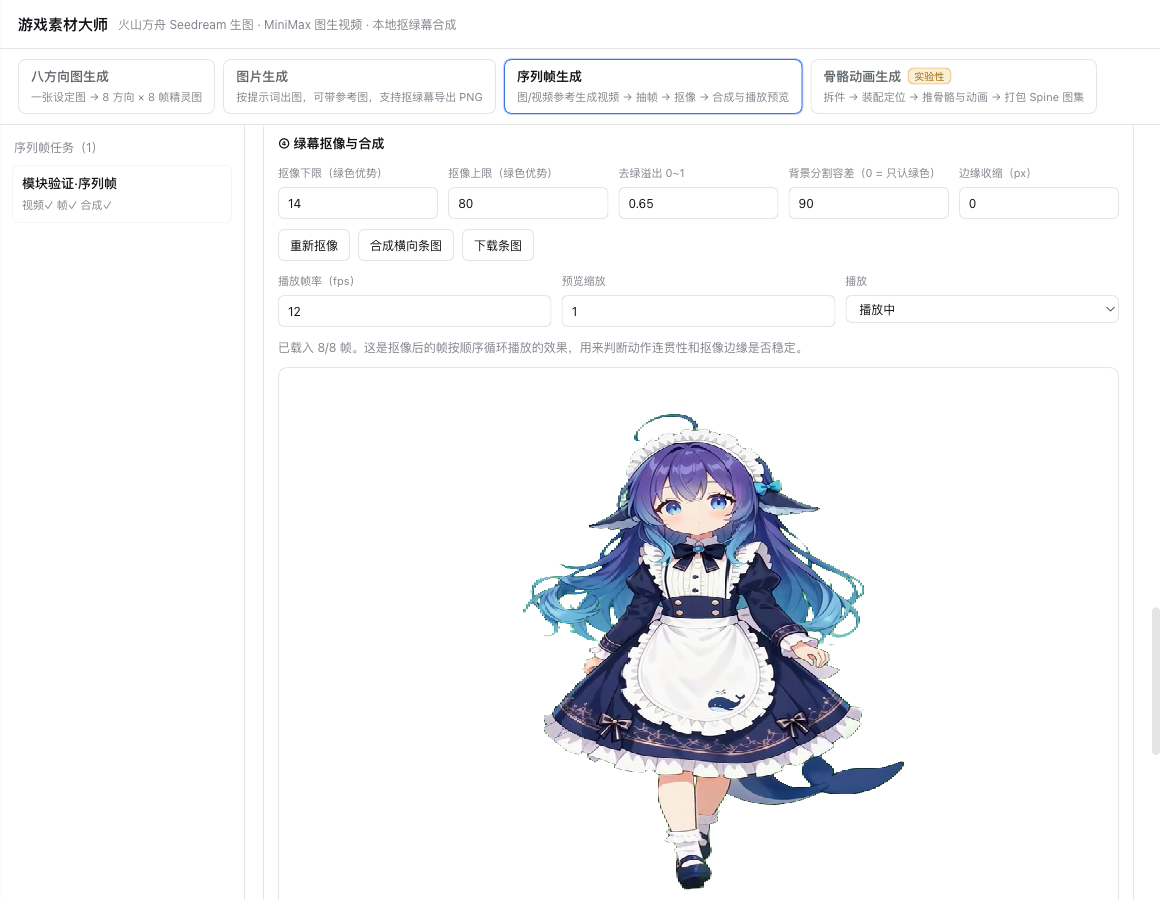
4. **Green-screen keying and composition**: tune the keying parameters and compose the horizontal strip; the
|
|
176
|
+
preview area on the right plays it back in a loop at the frame rate — **whether the motion flows and whether
|
|
177
|
+
the keyed edges stay stable is immediately visible in playback**.
|
|
178
|
+
5. **Review**: approve each of the three steps.
|
|
179
|
+
|
|
180
|
+
|
|
181
|
+
|
|
182
|
+
|
|
183
|
+
|
|
184
|
+
---
|
|
185
|
+
|
|
186
|
+
## Driving it from chat
|
|
187
|
+
|
|
188
|
+
**Every feature of all four modules** (including the experimental rigged animation) **is available through
|
|
189
|
+
chat**. The plugin registers the whole pipeline as `game_material_*` tools, so an agent can drive it forward,
|
|
190
|
+
wait, review, and also stop at each step for you to approve.
|
|
191
|
+
|
|
192
|
+
| Tool | What it does |
|
|
193
|
+
|---|---|
|
|
194
|
+
| `game_material_intake` | **Step 0 of the fixed workflow**: nail down the key parameters and review mode before doing anything |
|
|
195
|
+
| `game_material_call` | Universal channel: every remote method of the plugin is individually callable, covering all features |
|
|
196
|
+
| `game_material_upload` | Upload assets by local file path (character sheet / reference image / first and last frames / parts…) |
|
|
197
|
+
| `game_material_reviewMode` | Record the review mode: `auto` approves automatically / `manual` requires human approval at each step |
|
|
198
|
+
| `game_material_status` | See the current progress and which step to do now |
|
|
199
|
+
| `game_material_wait` | Block until "no task is running"; what comes back is a reviewable state |
|
|
200
|
+
| `game_material_review` | Produce a **review package**: absolute URL, status, approval flag and deep link for every asset |
|
|
201
|
+
| `game_material_approve` | Approve / un-approve |
|
|
202
|
+
|
|
203
|
+
Review links are **deep links**: an `openUrl` posted by the agent in its reply takes you straight to the
|
|
204
|
+
matching plugin page when clicked, landing on the right module / project / stage without any navigating
|
|
205
|
+
on your part.
|
|
206
|
+
|
|
207
|
+
---
|
|
208
|
+
|
|
209
|
+
## Installation
|
|
210
|
+
|
|
211
|
+
```bash
|
|
212
|
+
# install from npm
|
|
213
|
+
dsh plugin --profile web add dsh-game-material-master
|
|
214
|
+
|
|
215
|
+
# install from a local directory (during development)
|
|
216
|
+
dsh plugin --profile web add /path/to/dsh-game-material-master
|
|
217
|
+
```
|
|
218
|
+
|
|
219
|
+
The package is published to npm: [dsh-game-material-master](https://www.npmjs.com/package/dsh-game-material-master)
|
|
220
|
+
(currently `0.1.1`, `latest`). It has no runtime dependencies, so `dsh plugin add` is all you need.
|
|
221
|
+
|
|
222
|
+
After installing, **restart DSH** (the host half is loaded at startup). The browser half is read from
|
|
223
|
+
`lib/client.js` on disk on each request, so refreshing the browser is enough for it to take effect.
|
|
224
|
+
|
|
225
|
+
**Dependencies**: `ffmpeg` / `ffprobe` must be on your `PATH` (macOS: `brew install ffmpeg`), or you can
|
|
226
|
+
point `FFMPEG_PATH` / `FFPROBE_PATH` at absolute paths. The package has **no runtime npm dependencies** —
|
|
227
|
+
`zod`, `cordis` and friends all resolve from DSH's own installation tree.
|
|
228
|
+
|
|
229
|
+
> When upgrading from the older `dsh-8dir-sprites`, the first startup migrates the data directory
|
|
230
|
+
> automatically and your existing projects carry over seamlessly.
|
|
231
|
+
|
|
232
|
+
## Configuration
|
|
233
|
+
|
|
234
|
+
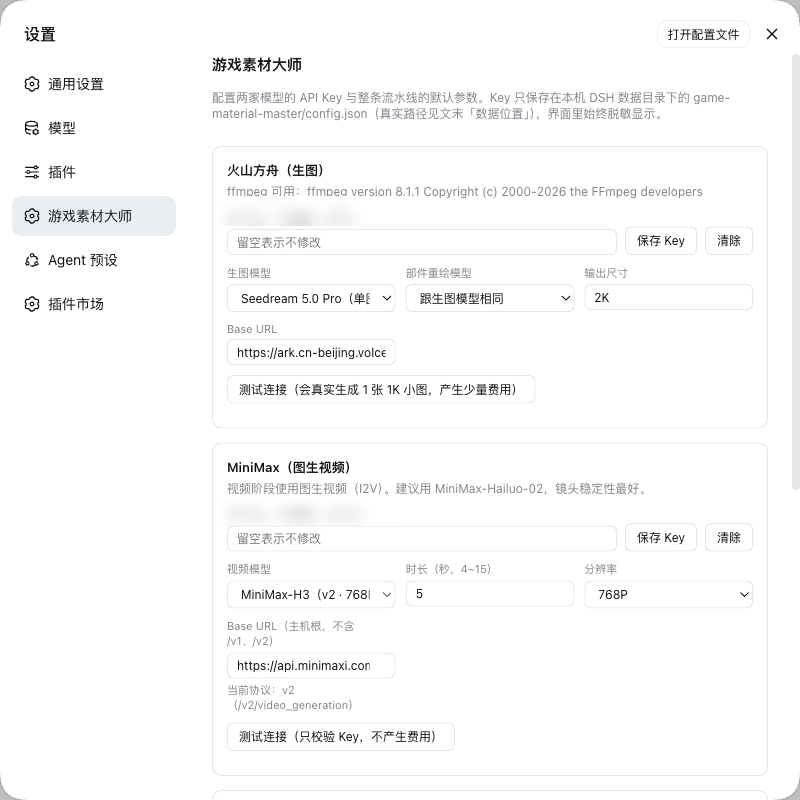
**Settings → Game Material Master**:
|
|
235
|
+
|
|
236
|
+
|
|
237
|
+
|
|
238
|
+
| Item | Description |
|
|
239
|
+
|---|---|
|
|
240
|
+
| Volcengine Ark API Key | "Test connection" really generates a 1K thumbnail (a small charge) and validates both the key and the model |
|
|
241
|
+
| Image model | Defaults to `doubao-seedream-4-0-250828`; switchable to 4.5 / 5.0 Lite / Pro |
|
|
242
|
+
| MiniMax API Key | "Test connection" is free and can tell an invalid key apart from other errors |
|
|
243
|
+
| Video model | Defaults to `MiniMax-H3` (v2 protocol); Hailuo / I2V use v1; the UCloud version of H3 is selected explicitly |
|
|
244
|
+
| Base URL | Host root, without `/v1` or `/v2`. `api.minimax.cn` in mainland China, `api.minimaxi.com` internationally |
|
|
245
|
+
| Default parameters | Cell width and height, frame count, pixel block size, keying threshold, and so on |
|
|
246
|
+
|
|
247
|
+
Keys are written only to `<DSH_HOME>/game-material-master/config.json` on your machine, and the UI always
|
|
248
|
+
masks them when displaying them back. **The model is a plugin-level setting shared by all three modules**;
|
|
249
|
+
after you switch models, tasks align to the new tier automatically.
|
|
250
|
+
|
|
251
|
+
## UI language
|
|
252
|
+
|
|
253
|
+
**The plugin UI follows DSH's own language setting** (Settings → General → Language). Chinese and English are
|
|
254
|
+
both first-class, and switching takes effect **immediately** with no page refresh: the workbench title, the four
|
|
255
|
+
module tabs, every card's buttons, notice bars, dialogs and the settings page all follow along.
|
|
256
|
+
|
|
257
|
+
Implementation-wise it neither guesses nor copies DSH's language state; instead it hooks into DSH's `locale`
|
|
258
|
+
service (`@deepseek-ai/dsh-client-locale`): the plugin registers its Chinese/English string table there and
|
|
259
|
+
afterwards pulls every piece of UI text from it. If the service isn't there, nothing errors and the UI falls
|
|
260
|
+
back to the original Chinese.
|
|
261
|
+
|
|
262
|
+
**The built-in default prompts switch too.** The eight-direction image prompts, walk-video prompts and
|
|
263
|
+
turn-video prompts have English versions when the UI is in English — they really do get sent to
|
|
264
|
+
Seedream / MiniMax, so the language has to match the UI, otherwise you can't tell what you're tuning. The rule
|
|
265
|
+
is "only swap the ones you haven't edited": prompts you have edited by hand don't change a single character when
|
|
266
|
+
you switch languages, and "Reset to default" gives you the default for the **current** language. Prompts live on
|
|
267
|
+
the host side (the host has no access to the locale service), so the browser half passes the current language
|
|
268
|
+
along every time it reads a project or resets prompts.
|
|
269
|
+
|
|
270
|
+
Scope note: **localization covers the browser half's UI text and the built-in default prompts** — the workbench
|
|
271
|
+
title, the four module tabs, every card's buttons and notice bars, dialogs, the settings page, the review
|
|
272
|
+
controls, and the default prompts. Two categories remain in Chinese, because DSH currently only exposes the
|
|
273
|
+
locale service to the browser half:
|
|
274
|
+
|
|
275
|
+
- **Lines the host writes into the run log** (the host emits Chinese, so they actually look like
|
|
276
|
+
`开始生成「南 · 正对镜头」`, `「南 · 正对镜头」生成完成,用时 12.3 秒`) plus the dynamic conclusions from
|
|
277
|
+
part-extraction QA;
|
|
278
|
+
- Text that chat tools return for the model to read (the rendering of `game_material_status` / `review`, the
|
|
279
|
+
follow-up questions from `intake`).
|
|
280
|
+
|
|
281
|
+
Everything in the UI that you can click, change or approve is bilingual.
|
|
282
|
+
|
|
283
|
+
## Common pitfalls
|
|
284
|
+
|
|
285
|
+
- Don't use "silhouette" in a prompt — the image model takes it literally and paints the character as a solid
|
|
286
|
+
black outline.
|
|
287
|
+
- Distinguish "turning" from "gaze": when writing a direction, add "rotate around the vertical axis only, gaze
|
|
288
|
+
stays level", or the character ends up looking up at the sky.
|
|
289
|
+
- Image-to-video doesn't guarantee it will preserve a flat background (lighting can turn it into a gradient), so
|
|
290
|
+
the keying doesn't rely on a single green value.
|
|
291
|
+
- Duplicate submissions are blocked (both in the UI and in chat) so you don't burn money for nothing.
|
|
292
|
+
|
|
293
|
+
## Where the output goes
|
|
294
|
+
|
|
295
|
+
```
|
|
296
|
+
<DSH_HOME>/game-material-master/
|
|
297
|
+
├── projects/<id>/ eight-direction sheet (source / images / videos / frames / keyed / preview / out)
|
|
298
|
+
├── image-jobs/<id>/ image generation
|
|
299
|
+
├── sequence-jobs/<id>/ sequence frames
|
|
300
|
+
└── rig-jobs/<id>/ rigged animation (experimental: sheet / parts / layout / rig / atlas)
|
|
301
|
+
└── tile-jobs/<id>/ map tiles (template / raw / cell / decor / map / export)
|
|
302
|
+
```
|
|
303
|
+
|
|
304
|
+
> Map tiles keep the **raw generation output** in `raw/`: after changing regularisation parameters such as
|
|
305
|
+
> the cell size you can re-run regularisation for free, without paying to generate again.
|
|
306
|
+
|
|
307
|
+
## Development
|
|
308
|
+
|
|
309
|
+
```bash
|
|
310
|
+
npm run build # tsc → lib/, and strip the trailing export from the browser bundle
|
|
311
|
+
npm run typecheck # type checking only
|
|
312
|
+
```
|
|
313
|
+
|
|
314
|
+
Local self-checks (no network, no cost): `scripts/verify-host.mjs` (host pipeline), `verify-tools.mjs`
|
|
315
|
+
(chat-facing tool surface), `verify-pipeline.mjs` (frame extraction / keying / composition), `verify-client.mjs`
|
|
316
|
+
+ `verify-feedback.mjs` (browser-half contracts and real rendering), `verify-i18n.mjs` (Chinese/English string
|
|
317
|
+
table completeness), `verify-rig.mjs` (the rigging algorithm layer), and more. End-to-end scripts that hit the
|
|
318
|
+
real API cost money — run them only when you mean to.
|
|
319
|
+
|
|
320
|
+
### Adding a piece of UI text
|
|
321
|
+
|
|
322
|
+
The **Chinese source text you write is itself the key** in the string table, so you just write code
|
|
323
|
+
normally (yes, the key stays Chinese even in the English build — that is the point: the call site reads
|
|
324
|
+
as the copy, and a missing translation falls back to the key instead of showing a code name):
|
|
325
|
+
|
|
326
|
+
```ts
|
|
327
|
+
h("span", null, T("正在装配定位…")) // plain copy
|
|
328
|
+
T("第 {n0} 帧", { n0: index + 1 }) // with interpolation; English may reorder freely
|
|
329
|
+
```
|
|
330
|
+
|
|
331
|
+
Then add an English entry to the string table in `src/client.ts` (between `i18n-ignore-start` /
|
|
332
|
+
`i18n-ignore-end`); if you miss one nothing crashes, but `verify-i18n.mjs` will catch it. To wrap legacy code
|
|
333
|
+
in bulk, use `node scripts/i18n-wrap.mjs src/client.ts --write` (lexical, idempotent, safe to run repeatedly).
|
|
334
|
+
|
|
335
|
+
How changes take effect after you edit code:
|
|
336
|
+
|
|
337
|
+
| What you changed | How it takes effect |
|
|
338
|
+
|---|---|
|
|
339
|
+
| `src/client.ts` (browser half) | Just refresh the browser |
|
|
340
|
+
| `src/*.ts` host half | Restart DSH (or hot-reload with `--patch`) |
|
|
341
|
+
|
|
342
|
+
The screenshots in this document were taken by Playwright against the real UI; the originals live in
|
|
343
|
+
[`docs/images/`](https://github.com/universe-st/dsh-game-material-master/tree/main/docs/images).
|
|
344
|
+
|
|
345
|
+
## Known trade-offs
|
|
346
|
+
|
|
347
|
+
- **The pixel-art look comes from post-processing** (pixel quantization during frame extraction), not from the
|
|
348
|
+
prompt — Seedream ignores "pixel art"-style instructions.
|
|
349
|
+
- **Part-extraction quality is determined by the image model** and is the biggest bottleneck right now. The
|
|
350
|
+
model occasionally "swaps the character" or splits them into clothing pieces; the most reliable path is
|
|
351
|
+
"upload your own part PNGs" (the filename is the part name), which skips generation entirely.
|
|
352
|
+
- **Automatic assembly is only reliable when each part really is a whole limb from the reference image**; when
|
|
353
|
+
real character art goes through generated part extraction, prefer correcting it with agent visual priors or
|
|
354
|
+
manual dragging (neither of those steps costs anything).
|
|
355
|
+
- MiniMax occasionally rejects content on moderation (about 10% in practice); just reword to a more neutral
|
|
356
|
+
prompt and retry.
|
|
357
|
+
|
|
358
|
+
## License
|
|
359
|
+
|
|
360
|
+
[MIT](LICENSE)
|
|
361
|
+
|
|
362
|
+
> Full engineering documentation (algorithm details, self-check contracts, history of pitfalls) is in
|
|
363
|
+
> [docs/ENGINEERING.md](docs/ENGINEERING.md).
|
package/README.md
CHANGED
|
@@ -1,3 +1,5 @@
|
|
|
1
|
+
[English](https://github.com/universe-st/dsh-game-material-master/blob/main/README.en.md) | 中文
|
|
2
|
+
|
|
1
3
|
# 游戏素材大师
|
|
2
4
|
|
|
3
5
|
**从一张角色设定图出发,批量做出游戏里真正要用的素材。**
|
|
@@ -14,7 +16,7 @@
|
|
|
14
16
|
> 侧栏点「游戏素材大师」→ 设置里填两个 API Key → 新建项目、上传设定图 → 点「生成转圈视频」
|
|
15
17
|
>(默认路径:角色原地匀速转一圈,再自动截出八个方向;要逐方向生图就在阶段①切一下方式)。
|
|
16
18
|
|
|
17
|
-
|
|
19
|
+
四个模块共用同一套「生成 → 验收 → 重跑」工作台。每个阶段都能**单独重做**,每份产物都能
|
|
18
20
|
**逐项打「通过」**;「审核模式」可以选 agent 自动审完就往下走,也可以选每一步停下来等你点头。
|
|
19
21
|
|
|
20
22
|
| 模块 | 做什么 | 走完能拿到 |
|
|
@@ -22,13 +24,21 @@
|
|
|
22
24
|
| **① 八方向图生成** | 一张设定图 → 8 方位 × 8 帧(默认「转圈截帧」:一段转圈视频截出八个方向) | 可用 WASD 操控预览的行走精灵图 |
|
|
23
25
|
| **② 图片生成** | 提示词(可带参考图)→ 出图 → 抠绿幕 | 干净透明的 PNG 立绘 / 道具 |
|
|
24
26
|
| **③ 序列帧生成** | 首尾帧或参考视频 → 生成视频 → 抽帧 → 抠像 | 横向排布、可循环播放的序列帧 |
|
|
27
|
+
| **⑤ 45°地图地块生成**(实验性) | 45° 等距地块 → 铺成整张地图 | 地块包(PNG)+ 地图 PNG + 布局 JSON |
|
|
25
28
|
| ~~④ 骨骼动画生成~~ | 拆件 → 装配 → 骨骼动画 → Spine / DragonBones 图集 | **实验性功能,本文不展示** |
|
|
26
29
|
|
|
30
|
+
> 💡 **模块⑤「45°地图地块生成」的核心思路是「几何交给代码,内容交给 AI」。**
|
|
31
|
+
> 菱形模板由本机代码渲染(严格 2:1 等距),AI 只负责把菱形内部填成指定地貌;
|
|
32
|
+
> 生成完再本地量一次、仿射对齐到标准菱形,最后本地按等距网格铺图。
|
|
33
|
+
> 好处是**几何永远精确**——地块拼起来不会有缝,换种子重铺逐像素可复现。
|
|
34
|
+
> 实测「让模型自由画菱形」的比例只有 1.03~1.55(对不上 2:1),而模板填充的达标率是 100%。
|
|
35
|
+
|
|
27
36
|
> ⚠️ **模块④「骨骼动画生成」仍是实验性功能,尚未完善**:拆件质量取决于生图模型,自动装配与骨骼推导
|
|
28
37
|
> 对真实立绘经常需要人工校正(agent 视觉先验或手工拖放),导出的 Spine / DragonBones 产物也还没经过
|
|
29
38
|
> 足够的引擎侧验证。界面上该模块带「实验性」角标,并在每次进入时弹窗说明。本文只展示前三个模块。
|
|
30
39
|
> 如果你需要它、或者想一起把它做扎实,欢迎到
|
|
31
|
-
> [GitHub 仓库](https://github.com/universe-st/dsh-game-material-master)
|
|
40
|
+
> [GitHub 仓库](https://github.com/universe-st/dsh-game-material-master) 参与开发,
|
|
41
|
+
> 或加入 **QQ 群 `1126382236`**(见文末「交流与反馈」)。
|
|
32
42
|
|
|
33
43
|
---
|
|
34
44
|
|
|
@@ -206,6 +216,32 @@ dsh plugin --profile web add /path/to/dsh-game-material-master
|
|
|
206
216
|
Key 只写入本机 `<DSH_HOME>/game-material-master/config.json`,界面回显始终脱敏。
|
|
207
217
|
**模型是插件级设置,三个模块共用**,切换模型后任务自动对齐新档位。
|
|
208
218
|
|
|
219
|
+
## 界面语言
|
|
220
|
+
|
|
221
|
+
**插件界面跟随 DSH 自身的语言设置**(设置 → 通用 → 语言),中文 / 英文都是一等公民,
|
|
222
|
+
切换**即时生效**、不用刷新页面:工作台标题、四个模块页签、每一张卡片的按钮、提示条、
|
|
223
|
+
弹窗与设置页全部跟着走。
|
|
224
|
+
|
|
225
|
+
实现上不猜也不复制 DSH 的语言状态,而是接 DSH 的 `locale` 服务
|
|
226
|
+
(`@deepseek-ai/dsh-client-locale`):插件把中英词条表注册进去,之后所有界面文案都从它取。
|
|
227
|
+
服务不在时不报错,界面退回中文原文。
|
|
228
|
+
|
|
229
|
+
**内置默认提示词也跟着切。** 八方向生图提示词、行走视频提示词、转圈视频提示词在英文界面下
|
|
230
|
+
就是英文版——它们会真的发给 Seedream / MiniMax,所以语言得跟界面一致,不然用户读不懂
|
|
231
|
+
自己在调什么。规则是「只换没改过的那些」:手改过的提示词切语言时一个字都不动,
|
|
232
|
+
点「重置为默认」得到的是**当前语言**的默认值。提示词存在宿主侧(宿主拿不到 locale 服务),
|
|
233
|
+
所以浏览器半区每次读项目、重置提示词时把当前语言一起带过去。
|
|
234
|
+
|
|
235
|
+
范围说明:**多语言覆盖的是浏览器半区的界面文案与内置默认提示词**——工作台标题、
|
|
236
|
+
四个模块页签、每一张卡片的按钮与提示条、弹窗、设置页、验收控件、默认提示词。
|
|
237
|
+
以下两类仍是中文,因为 DSH 目前只把 locale 服务提供给浏览器半区:
|
|
238
|
+
|
|
239
|
+
- **运行日志里由宿主写入的行**(「开始生成「南 · 正对镜头」」「…生成完成,用时 12.3 秒」等)
|
|
240
|
+
以及拆件质检给出的动态结论;
|
|
241
|
+
- 对话工具返回给模型看的文本(`game_material_status` / `review` 的渲染、`intake` 的追问)。
|
|
242
|
+
|
|
243
|
+
界面上能点、能改、能验收的部分都是双语。
|
|
244
|
+
|
|
209
245
|
## 常见坑
|
|
210
246
|
|
|
211
247
|
- 提示词别用「剪影」——生图模型会照字面把角色画成纯黑轮廓。
|
|
@@ -220,9 +256,13 @@ Key 只写入本机 `<DSH_HOME>/game-material-master/config.json`,界面回显
|
|
|
220
256
|
├── projects/<id>/ 八方向图(source / images / videos / frames / keyed / preview / out)
|
|
221
257
|
├── image-jobs/<id>/ 图片生成
|
|
222
258
|
├── sequence-jobs/<id>/ 序列帧生成
|
|
223
|
-
|
|
259
|
+
├── rig-jobs/<id>/ 骨骼动画(实验性:sheet / parts / layout / rig / atlas)
|
|
260
|
+
└── tile-jobs/<id>/ 地图地块(template / raw / cell / decor / map / export)
|
|
224
261
|
```
|
|
225
262
|
|
|
263
|
+
> 地图地块的 `raw/` 会**保留原始生成结果**:改了单元格尺寸之类的规整参数后,
|
|
264
|
+
> 可以零成本重跑规整,不必重新花钱生成。
|
|
265
|
+
|
|
226
266
|
## 开发
|
|
227
267
|
|
|
228
268
|
```bash
|
|
@@ -231,8 +271,22 @@ npm run typecheck # 只做类型检查
|
|
|
231
271
|
```
|
|
232
272
|
|
|
233
273
|
本地自检(不联网、不花钱):`scripts/verify-host.mjs`(宿主链路)、`verify-tools.mjs`
|
|
234
|
-
(对话调用面)、`verify-pipeline.mjs`(抽帧 / 抠像 / 合成)、`verify-
|
|
235
|
-
|
|
274
|
+
(对话调用面)、`verify-pipeline.mjs`(抽帧 / 抠像 / 合成)、`verify-client.mjs` +
|
|
275
|
+
`verify-feedback.mjs`(浏览器半区契约与真渲染)、`verify-i18n.mjs`(中英词条表完整性)、
|
|
276
|
+
`verify-rig.mjs`(骨骼算法层)等。真实 API 端到端脚本会花钱,按需运行。
|
|
277
|
+
|
|
278
|
+
### 加一条界面文案
|
|
279
|
+
|
|
280
|
+
中文原文**就是**词条表的 key,所以正常写代码即可:
|
|
281
|
+
|
|
282
|
+
```ts
|
|
283
|
+
h("span", null, T("正在装配定位…")) // 纯文案
|
|
284
|
+
T("第 {n0} 帧", { n0: index + 1 }) // 带插值,英文可自由换语序
|
|
285
|
+
```
|
|
286
|
+
|
|
287
|
+
然后在 `src/client.ts` 的词条表(`i18n-ignore-start` / `i18n-ignore-end` 之间)补一条英文;
|
|
288
|
+
漏了也不会崩,`verify-i18n.mjs` 会拦下来。批量包老代码用
|
|
289
|
+
`node scripts/i18n-wrap.mjs src/client.ts --write`(词法级、幂等,可反复跑)。
|
|
236
290
|
|
|
237
291
|
改代码后如何生效:
|
|
238
292
|
|
|
@@ -253,6 +307,13 @@ npm run typecheck # 只做类型检查
|
|
|
253
307
|
建议用 agent 视觉先验或手工拖放校正(这些步骤都不花钱)。
|
|
254
308
|
- MiniMax 偶发内容审核拒绝(实测约 10%),换一版更中性的提示词重试即可。
|
|
255
309
|
|
|
310
|
+
## 交流与反馈
|
|
311
|
+
|
|
312
|
+
- **QQ 群:`1126382236`**(群名「DSH游戏素材大师插件」)——新版本发布、路线图和踩坑经验都在群里同步,
|
|
313
|
+
欢迎进群获取最新动态,也欢迎直接参与开发:提需求、报 bug、认领模块都可以在群里聊。
|
|
314
|
+
- 也可以在 [GitHub Issues](https://github.com/universe-st/dsh-game-material-master/issues)
|
|
315
|
+
提 issue 或直接发 PR。
|
|
316
|
+
|
|
256
317
|
## 许可
|
|
257
318
|
|
|
258
319
|
[MIT](LICENSE)
|