dsh-fps-workbench 0.1.77 → 0.1.79
This diff represents the content of publicly available package versions that have been released to one of the supported registries. The information contained in this diff is provided for informational purposes only and reflects changes between package versions as they appear in their respective public registries.
- package/CHANGELOG.md +36 -0
- package/README.md +106 -46
- package/README.zh.md +106 -46
- package/client.js +474 -53
- package/docs/screenshots/en/01-workspace.jpg +0 -0
- package/docs/screenshots/en/02-tasks.jpg +0 -0
- package/docs/screenshots/en/03-preview.jpg +0 -0
- package/docs/screenshots/en/04-drafts.jpg +0 -0
- package/docs/screenshots/en/05-image-tools.jpg +0 -0
- package/docs/screenshots/en/06-compatibility.jpg +0 -0
- package/docs/screenshots/zh/01-workspace.jpg +0 -0
- package/docs/screenshots/zh/02-tasks.jpg +0 -0
- package/docs/screenshots/zh/03-preview.jpg +0 -0
- package/docs/screenshots/zh/04-drafts.jpg +0 -0
- package/docs/screenshots/zh/05-image-tools.jpg +0 -0
- package/docs/screenshots/zh/06-compatibility.jpg +0 -0
- package/locale/detail.en.md +9 -5
- package/locale/detail.zh.md +9 -5
- package/locale/en.json +1 -1
- package/locale/zh.json +1 -1
- package/package.json +11 -4
- package/provider-usage.js +65 -1
- package/screenshots.json +10 -0
package/CHANGELOG.md
CHANGED
|
@@ -1,5 +1,41 @@
|
|
|
1
1
|
# Changelog · 更新日志
|
|
2
2
|
|
|
3
|
+
## [0.1.79](https://github.com/Blacstar7/dsh-fps-workbench/releases/tag/v0.1.79) — 2026-11-13
|
|
4
|
+
|
|
5
|
+
### English
|
|
6
|
+
|
|
7
|
+
- Persist unsent image/file drafts in device-local IndexedDB, restore them after reload, and keep failed submissions. Accepted drafts and explicit removals are cleared; attachments expire on load after 30 days without an attachment edit. Storage failures offer retry.
|
|
8
|
+
- Add a Context task-status section with native plan steps, live background jobs, elapsed time, and collapsed terminal states. Native job details, logs, permissions, and stop behavior remain in DSH.
|
|
9
|
+
- Add passive compatibility checks and a credential-free diagnostic summary to plugin settings. Fall back to the native composer when the input contract is unavailable or the FPS composer fails to render.
|
|
10
|
+
- Harden native integration cleanup: composer fallback releases the voice mirror and subscription, stale fallback callbacks cannot remove a newer composer, and optional job/voice registration errors stay isolated. Locate the native voice contribution regardless of slot order. Draft storage operations time out after 10 seconds; loading drafts no longer locks text editing or voice input.
|
|
11
|
+
- Rewrite both READMEs around long-task visibility, output discovery, draft recovery, usage, and native integration. Add separate English and Chinese desktop screenshot sets, and update installation/migration guidance.
|
|
12
|
+
- Add optional OpenAI organization spend and token totals when a separate local credential reference is configured. Credentials and personal usage configuration are never bundled.
|
|
13
|
+
- Include 12 fullscreen dark-mode screenshots with visible sidebars, bilingual guides, and a storefront screenshot manifest in the published package.
|
|
14
|
+
- Verified on macOS DSH 0.2.2-rc.2, including real microphone transcription and session switching with attachment drafts. This is not a guarantee of compatibility with every host version or voice provider.
|
|
15
|
+
|
|
16
|
+
### 简体中文
|
|
17
|
+
|
|
18
|
+
- 未发送图片和文件写入本机 IndexedDB,重载后恢复,发送失败保留。发送被接收或手动移除后清除;连续 30 天未修改的附件在下次加载时过期。存储失败支持重试。
|
|
19
|
+
- 上下文新增任务状态区,显示原生计划步骤、后台任务、实际用时和折叠的结束状态。详情、日志、权限和停止逻辑继续使用 DSH 原生实现。
|
|
20
|
+
- 插件设置新增兼容性自检和不含凭据的诊断摘要。输入框接口不匹配或 FPS 输入框渲染失败时回退原生输入框。
|
|
21
|
+
- 加固原生接口清理:输入框回退时同时释放语音镜像及订阅,旧回退回调不会撤下新输入框,后台任务和语音插槽注册异常独立隔离。语音入口不再依赖插槽排序。草稿存储单次操作超过 10 秒会报错并允许重试,加载草稿不再锁住文字编辑和语音输入。
|
|
22
|
+
- 重写中英文 README,突出长任务、产物、草稿、用量和原生集成,分别配套中英文桌面截图,并更新安装与迁移说明。
|
|
23
|
+
- 当用户另行配置本机凭据引用时,可显示 OpenAI 组织花费与 Token 统计;安装包不包含凭据或个人用量配置。
|
|
24
|
+
- 发布包包含 12 张展开侧栏的全屏深色截图、双语指南和市场截图清单。
|
|
25
|
+
- 已在 macOS DSH 0.2.2-rc.2 验证,包括真实麦克风转写、切换会话和附件草稿共存;不代表所有宿主版本和语音服务均已验证。
|
|
26
|
+
|
|
27
|
+
## [0.1.78](https://github.com/Blacstar7/dsh-fps-workbench/releases/tag/v0.1.78) — 2026-11-13
|
|
28
|
+
|
|
29
|
+
### English
|
|
30
|
+
|
|
31
|
+
- Releases from version tags use npm Trusted Publishing. The workflow waits for the exact npm version to become public and verifies the archive before attaching it to GitHub Releases.
|
|
32
|
+
- If you are still using the old `@local/claude-code-workbench` package, follow the one-time switch described in v0.1.77 below.
|
|
33
|
+
|
|
34
|
+
### 简体中文
|
|
35
|
+
|
|
36
|
+
- 推送版本标签后,GitHub Actions 通过 npm 可信发布发包。流程会等 npm 公开对应版本并核对安装包,再将同一份包上传到 GitHub Releases。
|
|
37
|
+
- 仍在使用旧包 `@local/claude-code-workbench` 的用户,可按下方 v0.1.77 的说明完成一次换装。
|
|
38
|
+
|
|
3
39
|
## [0.1.77](https://github.com/Blacstar7/dsh-fps-workbench/releases/tag/v0.1.77)
|
|
4
40
|
|
|
5
41
|
### English
|
package/README.md
CHANGED
|
@@ -1,81 +1,141 @@
|
|
|
1
1
|
# Four-pointed star (FPS)
|
|
2
2
|
|
|
3
|
-
|
|
3
|
+
**Follow the work. Keep the draft. Find the result.**
|
|
4
4
|
|
|
5
|
-
|
|
5
|
+
[简体中文](README.zh.md) · [Install](#install) · [Changelog](CHANGELOG.md) · [Detailed guide](locale/detail.en.md)
|
|
6
6
|
|
|
7
|
-
|
|
7
|
+
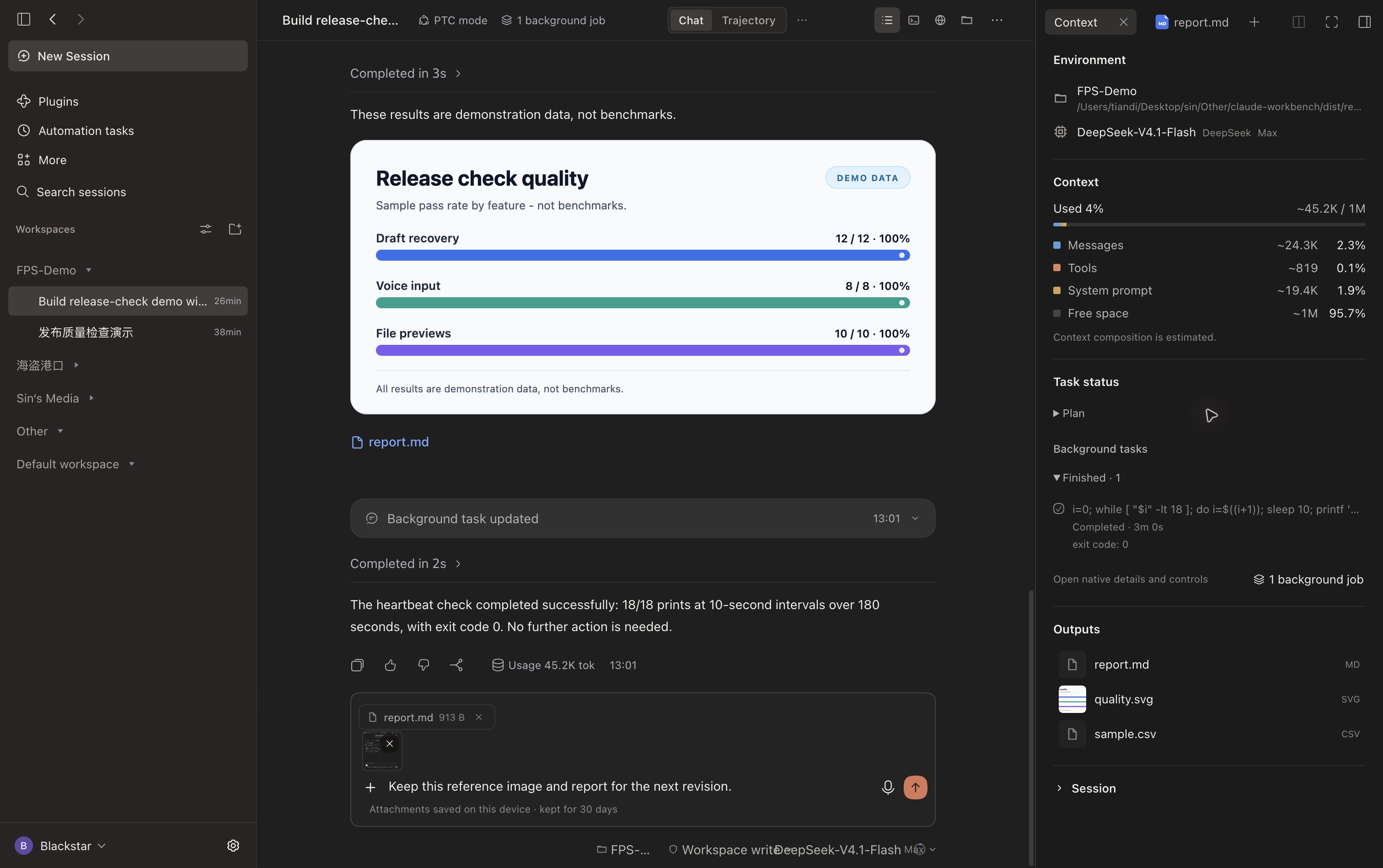
FPS is a conversation workbench for **DeepSeek Harness (DSH)**. It brings tool summaries, long-task status, session outputs, recoverable attachment drafts, and provider usage into the conversation. A quiet interface in light and dark mode helps you follow an agent from the first instruction to the finished files.
|
|
8
8
|
|
|
9
|
-
|
|
9
|
+
DSH continues to own sessions, tool execution, permissions, voice transcription, and file previews. FPS makes that work easier to follow and adds practical tools around it.
|
|
10
10
|
|
|
11
|
-
|
|
11
|
+
|
|
12
12
|
|
|
13
|
-
|
|
13
|
+
> Captured fullscreen in dark mode with the left sidebar expanded in DSH Desktop, using a dedicated demonstration workspace and the development build used to validate v0.1.79 (its local package label may show an older version). This README uses English UI and demo text; the Chinese README has separate Chinese captures. Sample quality-check results illustrate the interface, not a product benchmark.
|
|
14
14
|
|
|
15
|
-
|
|
15
|
+
## What makes FPS useful
|
|
16
16
|
|
|
17
|
-
|
|
17
|
+
| When you… | FPS helps you… |
|
|
18
|
+
| --- | --- |
|
|
19
|
+
| Leave an agent on a long task | See plan steps and background jobs separately, with actual states and elapsed time. |
|
|
20
|
+
| Return to a busy conversation | Read a compact summary of file reads, commands, and edits; expand native details when needed. |
|
|
21
|
+
| Need the deliverable | Find images, reports, and source files together in **Outputs**, then open native previews. |
|
|
22
|
+
| Switch sessions before sending | Recover text, images, and files, including saved attachments after a reload. |
|
|
23
|
+
| Use several providers | See supported balances, spending, and quotas without configuring a fixed list of vendors. |
|
|
24
|
+
| Update DSH | Inspect integration availability with a passive compatibility check and copy a clean diagnostic summary. |
|
|
18
25
|
|
|
19
|
-
|
|
26
|
+
## Install
|
|
20
27
|
|
|
21
|
-
|
|
28
|
+
Requires **DSH 0.2.2-rc.1 or later**, with the desktop or Web conversation components. Current desktop changes were validated on macOS with DSH `0.2.2-rc.2`; other hosts may expose different optional capabilities.
|
|
22
29
|
|
|
23
|
-
|
|
30
|
+
In **Plugins → Add plugin**, choose the npm registry and enter **`dsh-fps-workbench`**, or use:
|
|
24
31
|
|
|
25
|
-
|
|
26
|
-
|
|
27
|
-
|
|
28
|
-
- **Images with text-only models.** When the selected model does not support images, FPS looks for an available model with image input in DSH. It sends the image and prompt to that model and passes the resulting description to the current session. If no suitable model is available, the composer keeps the draft and shows an error.
|
|
29
|
-
- **Sessions and workspaces.** The sidebar keeps DSH's workspaces, session search, and settings. Use the back and forward arrows beside the sidebar toggle to revisit sessions opened in the current window.
|
|
30
|
-
- **Commands, references, and voice.** Type `/` to find commands and `@` to reference files or sessions. The composer footer gives you access to the workspace, permissions, model, reasoning effort, and usage. Enable Voice input in DSH’s Plugins page. The microphone appears next to Send and opens voice setup on first use if needed.
|
|
32
|
+
```sh
|
|
33
|
+
dsh plugin --profile desktop add dsh-fps-workbench
|
|
34
|
+
```
|
|
31
35
|
|
|
32
|
-
|
|
36
|
+
Use `web` instead of `desktop` for a Web profile. A prebuilt `.tgz` is also available from [GitHub Releases](https://github.com/Blacstar7/dsh-fps-workbench/releases/latest). Restart DSH if prompted. Published releases and unreleased changes are distinguished in the [changelog](CHANGELOG.md).
|
|
33
37
|
|
|
34
|
-
##
|
|
38
|
+
## Follow long tasks without losing the details
|
|
35
39
|
|
|
36
|
-
|
|
40
|
+
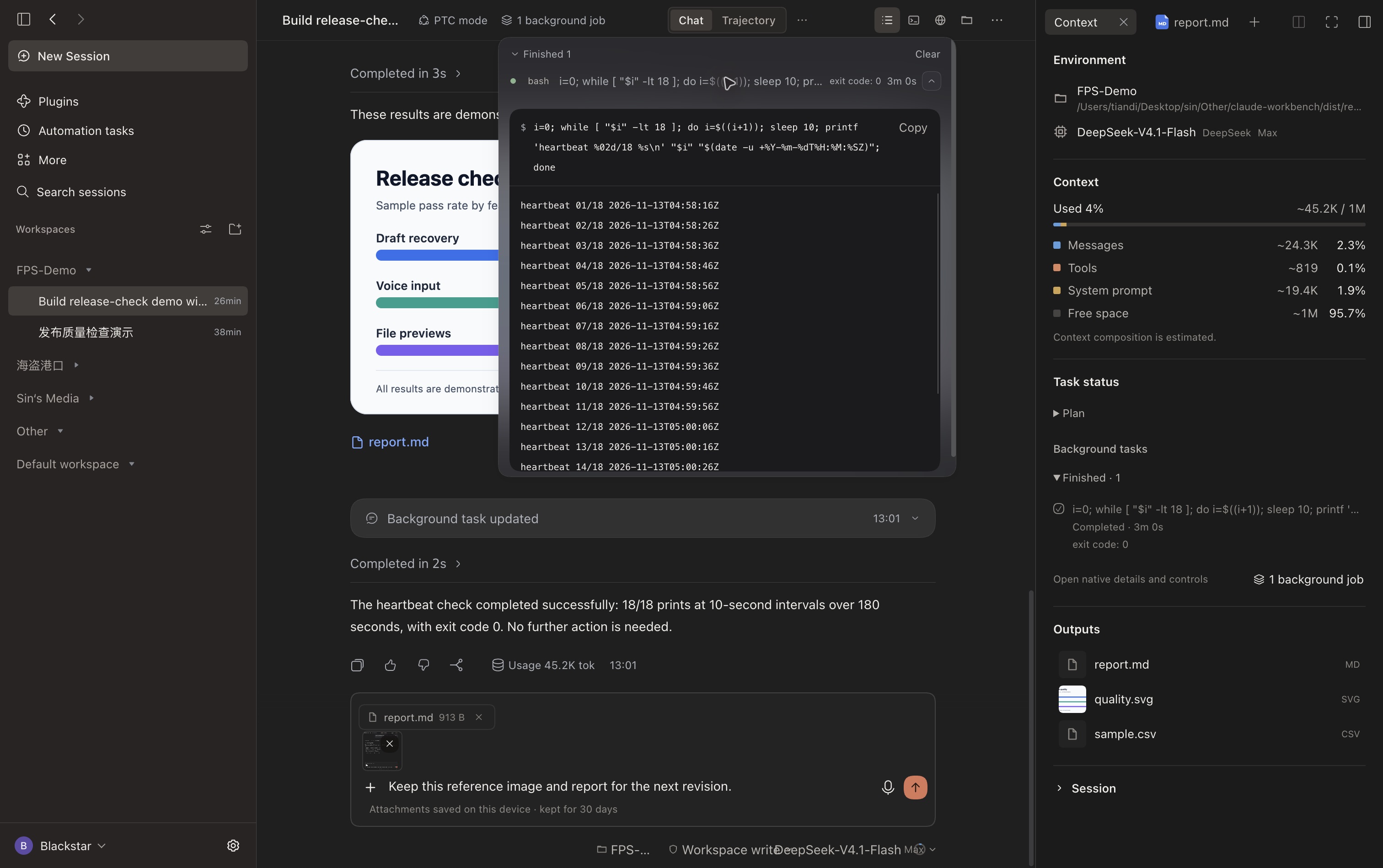
The **Context** button in the conversation header opens workspace and model information, estimated context composition, task status, and outputs.
|
|
37
41
|
|
|
38
|
-
|
|
42
|
+
**Plan steps** show the plan currently reported by DSH. A later turn can replace or clear that plan; this is not a permanent checklist for the whole session. **Background jobs** show reported states and elapsed time, with finished jobs collected into a collapsed group. Open the native job controls to inspect logs or stop a job. A running render alone does not create a plan, and FPS does not invent a percentage when DSH has not supplied progress.
|
|
39
43
|
|
|
40
|
-
|
|
44
|
+
|
|
41
45
|
|
|
42
|
-
|
|
46
|
+
Consecutive tool operations are summarized as files read, commands run, and filenames changed. Click a summary to expand the original DSH details and tool inspector. The animated FPS mark and `ThinKing` elapsed-time line make ongoing work visible; reduced-motion preferences are respected.
|
|
43
47
|
|
|
44
|
-
|
|
48
|
+
## Keep results within reach
|
|
45
49
|
|
|
46
|
-
|
|
47
|
-
- **CogView-3-Flash.** Standard-quality generation on Zhipu's free Flash tier. Requires a Zhipu BigModel API key and is subject to rate limits.
|
|
48
|
-
- **Pollinations.** Requires your own API key. FPS uses SDXL Lightning for quick drafts when the live catalog lists it at zero price. Pollinations may still require a positive available balance.
|
|
49
|
-
- **ComfyUI + Comfy MCP.** Local generation with ComfyUI and its official MCP integration. Switch it on, then start the download explicitly. The included SD 1.5 workflow is suitable for roughly 512 px drafts. Setup needs Python, Git, internet access, and 16 GiB of free disk space.
|
|
50
|
+
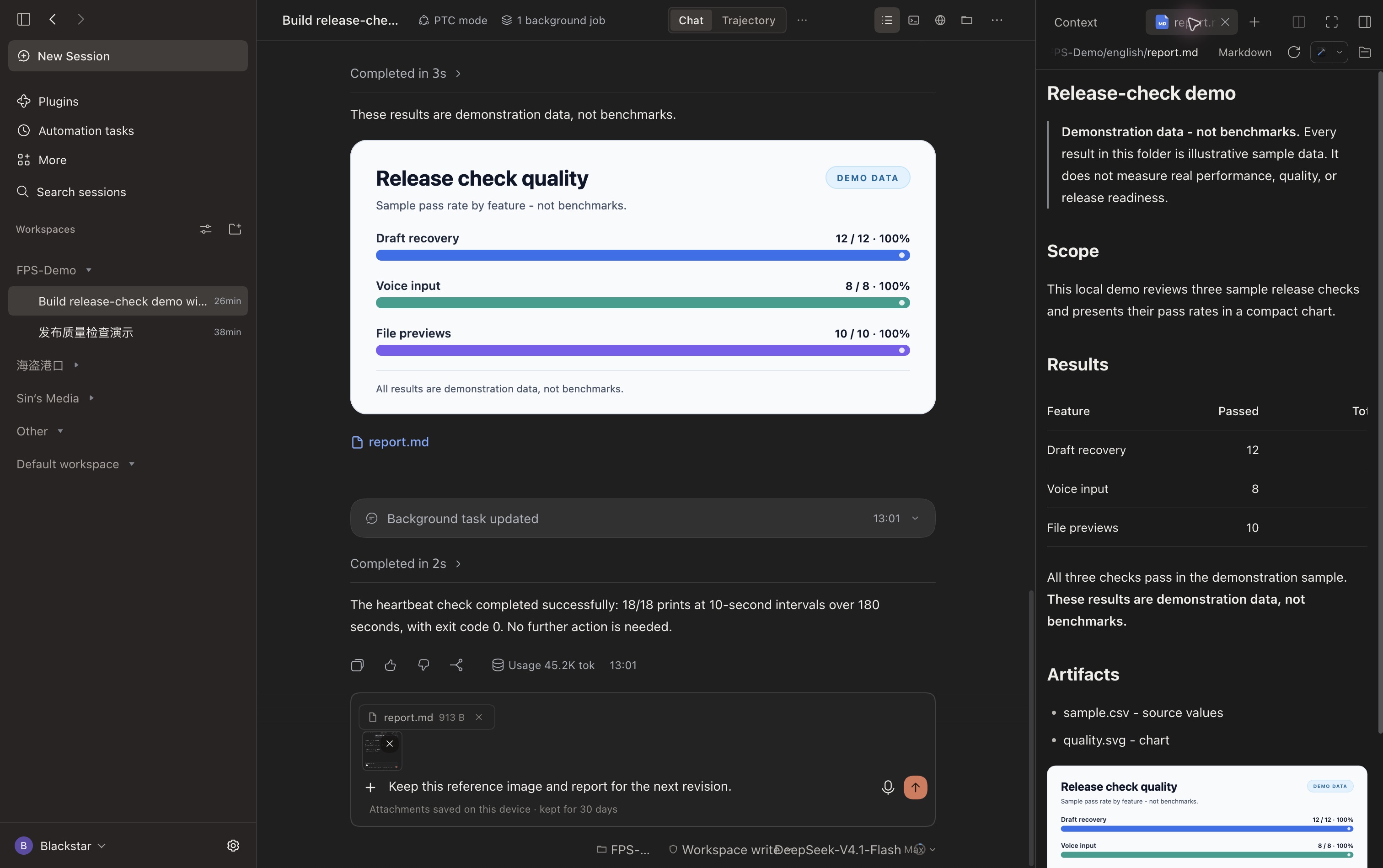
**Outputs** collects local files produced or explicitly linked in the current session. Open an image, report, or source file directly in DSH's native preview instead of hunting through the conversation. Files, Terminal, Browser, and native conversation views remain available from the header.
|
|
50
51
|
|
|
51
|
-
|
|
52
|
+
|
|
52
53
|
|
|
53
|
-
|
|
54
|
+
Context categories are **estimates**, not a provider billing statement. The panel shows messages, tools, system prompt, and available space, alongside session information.
|
|
54
55
|
|
|
55
|
-
|
|
56
|
-
- **Models and usage.** In DSH, open Settings → Models to add or edit your providers, API endpoints, models, and API keys. Reopen the usage panel to query the updated configuration. A custom endpoint needs a matching usage integration to show balances or quotas. If you use a text-only model, you can add a model that supports image input here for FPS to select automatically.
|
|
57
|
-
- **Tools and permissions.** Manage plugins that provide tools in DSH's Plugins page. Use the composer footer to select your session model and permissions. Tool availability depends on the model's capabilities and the session permissions.
|
|
56
|
+
## Drafts that survive a detour
|
|
58
57
|
|
|
59
|
-
|
|
58
|
+
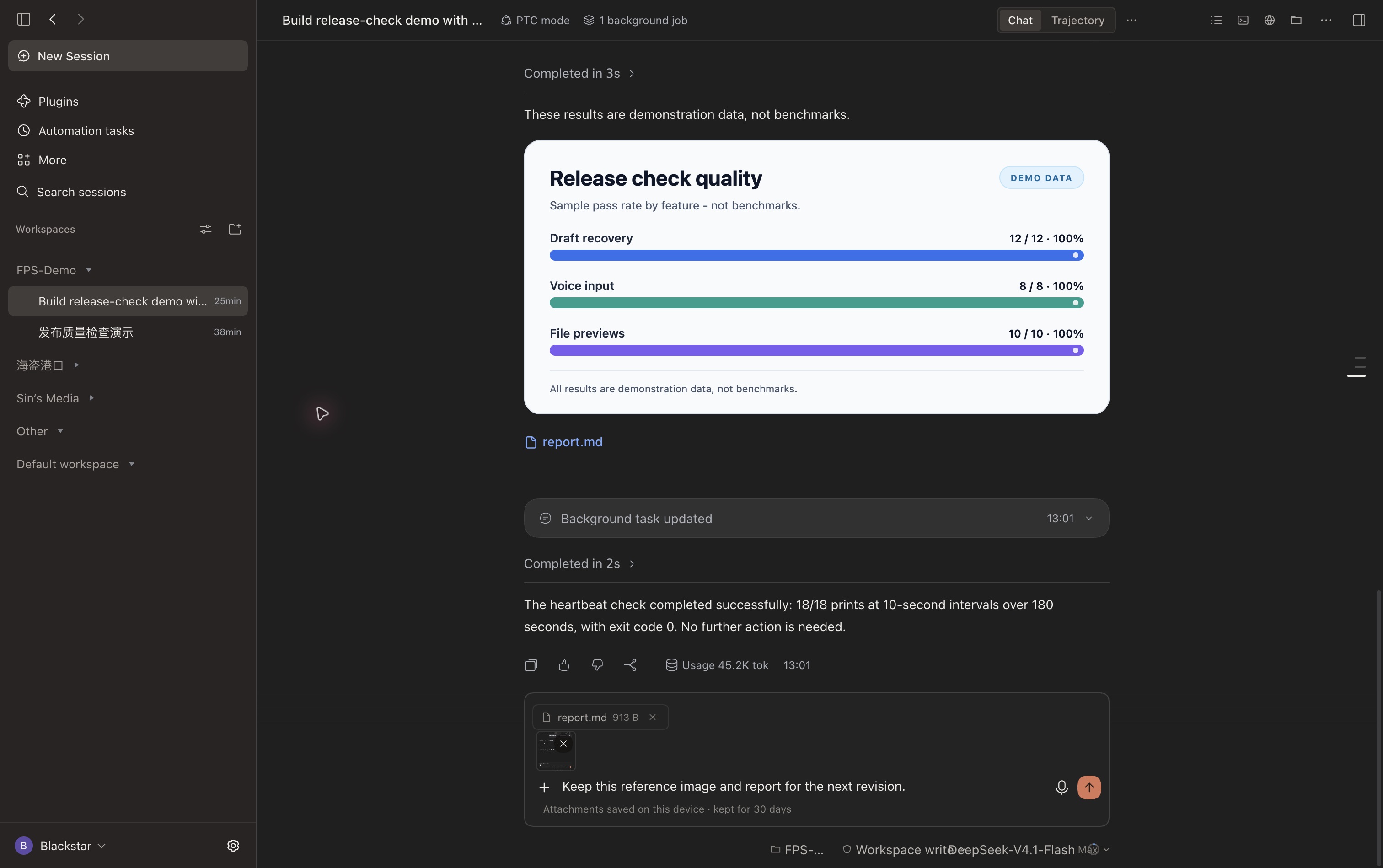
Paste an image, attach a file, type `/` for commands, or use `@` for file and session references. Each session keeps its own draft. Saved image and file attachments return after switching sessions **and after reloading the same client profile**.
|
|
60
59
|
|
|
61
|
-
|
|
60
|
+
|
|
62
61
|
|
|
63
|
-
|
|
62
|
+
- Up to **4 images × 8 MB** and **6 files × 20 MB** per message.
|
|
63
|
+
- Attachments use local IndexedDB; text uses local browser storage. This is device-local recovery, not cross-device sync.
|
|
64
|
+
- Wait for the saved indicator before closing. Failed storage writes offer **Retry**; failed submissions retain the draft.
|
|
65
|
+
- Attachments clear after DSH accepts the message or you remove them. On a later load, attachments expire after **30 days without an attachment edit**.
|
|
66
|
+
- Text and voice stay available while attachment storage loads. Sending waits for loading to finish or fail; storage operations time out after 10 seconds.
|
|
64
67
|
|
|
65
|
-
|
|
66
|
-
|
|
67
|
-
|
|
68
|
+
Enable DSH's **Voice input** plugin to show the microphone beside Send. Recording and transcription remain native. Transcribed text goes into the originating session's draft, including when you switch sessions while transcription finishes. A working voice provider and microphone permission are still required.
|
|
69
|
+
|
|
70
|
+
Workspace, model, reasoning effort, and permission controls keep native DSH behavior. During a running session, Enter follows DSH's delivery preference; Cmd/Ctrl+Enter uses the alternative delivery mode.
|
|
71
|
+
|
|
72
|
+
## See the usage your provider actually exposes
|
|
73
|
+
|
|
74
|
+
Click the **usage ring beside the model selector**. FPS detects configured providers and queries supported endpoints with the applicable credentials. It displays returned fields: API balance, spending, token usage, remaining credits, rolling quotas, or reset times.
|
|
75
|
+
|
|
76
|
+
Provider sections are separated and sorted alphabetically, ignoring case. Independent billing interfaces can appear as separate sections. The popup grows up to 720 px, subject to screen space; content beyond the available height scrolls.
|
|
77
|
+
|
|
78
|
+
**Unreadable or unsupported fields stay hidden. A real zero stays visible.** Session tokens and context estimates are separate from account-level usage. Some organization-level endpoints need an additional credential; an ordinary model key cannot expose every account metric. FPS does not infer a balance from token counts or promise support for every custom endpoint. See the [configuration guide](locale/detail.en.md).
|
|
79
|
+
|
|
80
|
+
## Work with images on your terms
|
|
81
|
+
|
|
82
|
+
### Image understanding for a text-only session
|
|
83
|
+
|
|
84
|
+
If the selected model cannot accept images, FPS looks for an image-capable model in the user's DSH configuration. It obtains an image description and passes that description to the selected session. There is no hard-coded fallback model. This can make an additional model request and incur that provider's charges. If no suitable model is available, the draft is retained with an error.
|
|
85
|
+
|
|
86
|
+
### Optional cloud and local image generation
|
|
68
87
|
|
|
69
|
-
|
|
88
|
+
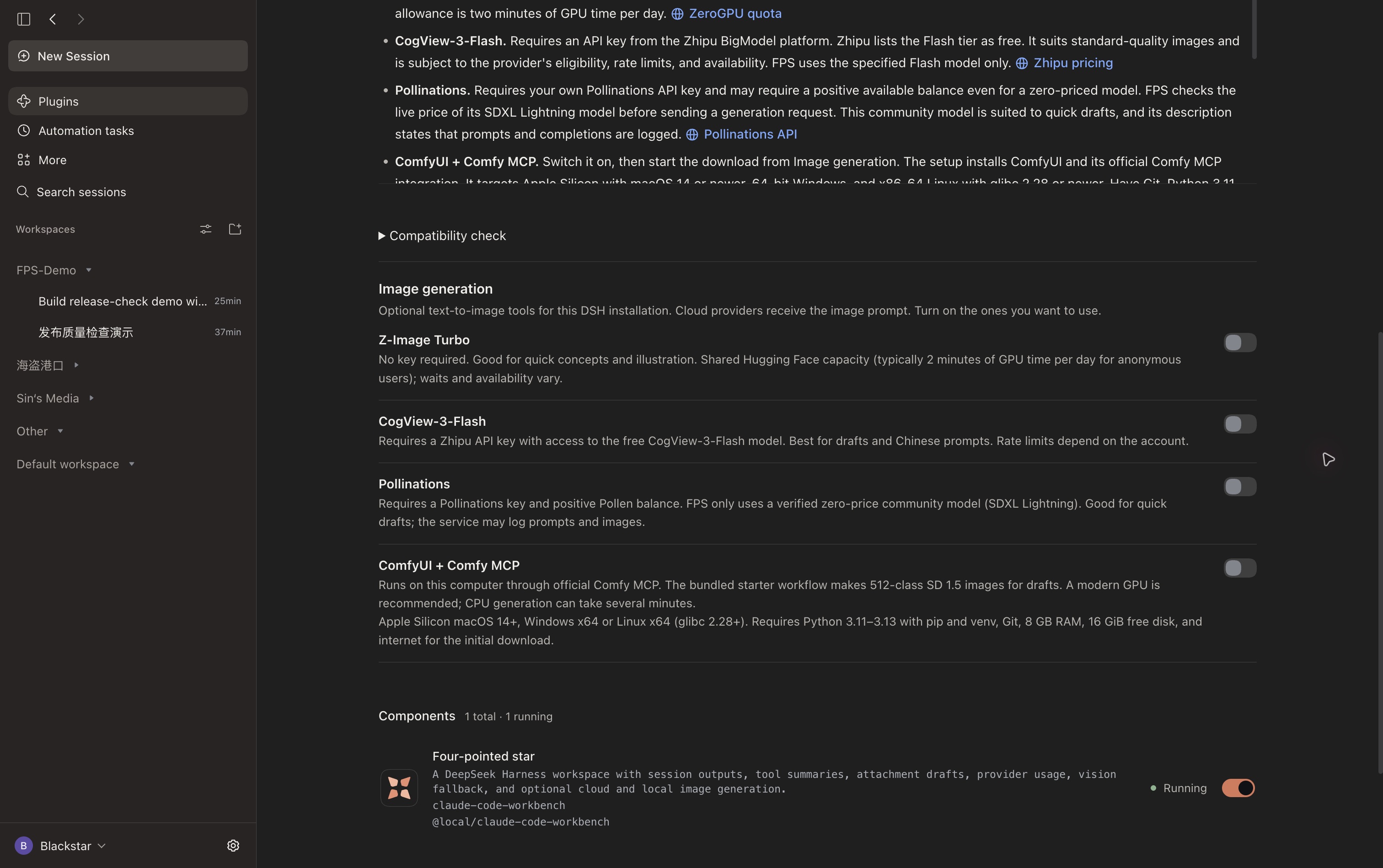
Open **Plugins → Four-pointed star → Image generation**. All four providers are **off by default**. Enable only what you want; an enabled provider becomes callable once setup is complete. Generated images enter session outputs and use the native preview.
|
|
70
89
|
|
|
71
|
-
|
|
90
|
+
|
|
72
91
|
|
|
73
|
-
|
|
92
|
+
| Option | Setup | Intended use and limits |
|
|
93
|
+
| --- | --- | --- |
|
|
94
|
+
| Z-Image Turbo | No key; shared Hugging Face Space | Quick concepts. Shared GPU quotas, queues, and service availability apply. |
|
|
95
|
+
| CogView-3-Flash | Your own provider key | Standard-quality images through the Flash tier; eligibility and rate limits apply. |
|
|
96
|
+
| Pollinations | Your own API key | Quick drafts with SDXL Lightning when its live catalog price is zero. A positive balance may still be required. |
|
|
97
|
+
| ComfyUI + official Comfy MCP | Enable, then explicitly choose download/install | Local SD 1.5 drafts around 512 px. Setup needs Git, compatible Python, internet, and at least 16 GiB free disk space. |
|
|
74
98
|
|
|
75
|
-
|
|
99
|
+
Switching on ComfyUI does **not** start a download by itself. Installation has progress and cancellation; switching it off keeps downloaded files. Apple silicon local generation has been tested; Windows and Linux setup have not been verified on physical devices. Cloud services receive the prompt and apply their own policies. Free tiers and availability can change; no service is promised to be unlimited or permanently free.
|
|
76
100
|
|
|
77
|
-
|
|
101
|
+
See the [image-generation guide](locale/detail.en.md#optional-image-generation) for full requirements, credentials, and expected quality. FPS prefers existing image-generation tools where possible; failures do not silently switch to another service.
|
|
78
102
|
|
|
79
|
-
##
|
|
103
|
+
## Check compatibility before troubleshooting blindly
|
|
104
|
+
|
|
105
|
+
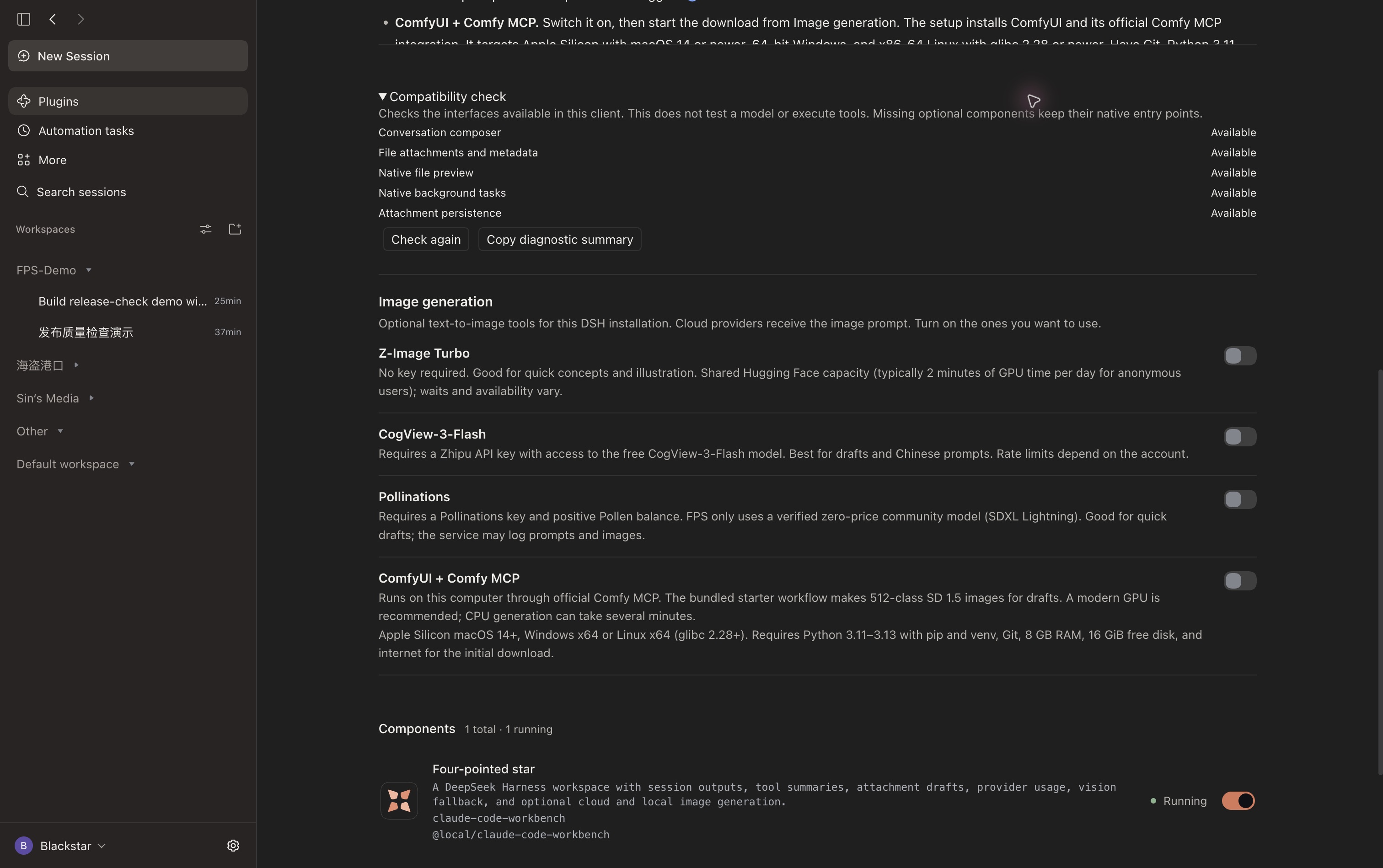
Open **Plugins → Four-pointed star → Compatibility check** to inspect composer, file, preview, background-job, and local draft-storage interfaces. Refresh checks or copy a diagnostic summary without keys, paths, or conversation content.
|
|
106
|
+
|
|
107
|
+
|
|
108
|
+
|
|
109
|
+
This is a **capability check**, not a test of a model's reasoning or tool-calling reliability. Missing composer contracts or an FPS composer render failure trigger a fallback to the native DSH composer for the current page. Optional voice and job integrations are isolated so their absence does not disable the rest of the workbench.
|
|
110
|
+
|
|
111
|
+
## Make it yours
|
|
112
|
+
|
|
113
|
+
| Setting | Where to change it |
|
|
114
|
+
| --- | --- |
|
|
115
|
+
| Light, dark, or system appearance; interface language | DSH **Settings → General**. FPS follows the host setting. |
|
|
116
|
+
| Providers, endpoints, keys, and model capabilities | DSH **Settings → Models**. Usage needs a supported integration; vision fallback needs a configured image-capable model. |
|
|
117
|
+
| Tools and voice input | DSH **Plugins**. Enable the native components you need. |
|
|
118
|
+
| Session model, permissions, and reasoning effort | Composer footer. DSH remains responsible for execution and approvals. |
|
|
119
|
+
| Optional image tools and compatibility diagnostics | **Plugins → Four-pointed star**. |
|
|
120
|
+
|
|
121
|
+
The sidebar retains native workspaces, search, settings, and session actions. Back/forward buttons revisit sessions opened in the current window. FPS does not guarantee that every model can call every tool: model capability, provider protocol, installed tools, and DSH permissions still determine what can run.
|
|
122
|
+
|
|
123
|
+
## Updating an older installation
|
|
124
|
+
|
|
125
|
+
Already using **`dsh-fps-workbench`**? Update that same package. Do not install a second copy alongside it.
|
|
126
|
+
|
|
127
|
+
For **v0.1.76 or earlier** installed as `@local/claude-code-workbench`, save unsent attachments first, remove the old entry, then install `dsh-fps-workbench` in the **same DSH profile**. Existing image-provider settings, credentials, local usage settings, conversations, and workspaces remain available. Text drafts carry over in the same client profile. Older releases held attachments only in memory; the new persistence cannot recover attachments already lost during an earlier reload.
|
|
128
|
+
|
|
129
|
+
### Known host issue
|
|
130
|
+
|
|
131
|
+
After a DSH Desktop upgrade to `0.2.2-rc.2`, an old Computer Use installation can still load the `0.2.2-rc.1` storage dependency, preventing sessions and scheduled tasks from loading with FPS enabled **or disabled**. Back up the affected profile and verify the stale dependency before removing or moving it; DSH should load the components bundled with the installed version. This is distinct from FPS's interface compatibility check.
|
|
132
|
+
|
|
133
|
+
## Development and license
|
|
134
|
+
|
|
135
|
+
Tests cover commands, session navigation, outputs, attachment storage, long-task integration, usage parsing, and image tools. With a current Node.js runtime:
|
|
136
|
+
|
|
137
|
+
```sh
|
|
138
|
+
node --test tests/*.test.mjs
|
|
139
|
+
```
|
|
80
140
|
|
|
81
|
-
|
|
141
|
+
[MIT License](LICENSE). [Source and releases](https://github.com/Blacstar7/dsh-fps-workbench).
|
package/README.zh.md
CHANGED
|
@@ -1,81 +1,141 @@
|
|
|
1
1
|
# Four-pointed star(FPS)
|
|
2
2
|
|
|
3
|
-
|
|
3
|
+
**看清进度,留住草稿,找到产物。**
|
|
4
4
|
|
|
5
|
-
|
|
5
|
+
[English](README.md) · [安装](#安装) · [更新日志](CHANGELOG.md) · [详细指南](locale/detail.zh.md)
|
|
6
6
|
|
|
7
|
-
|
|
7
|
+
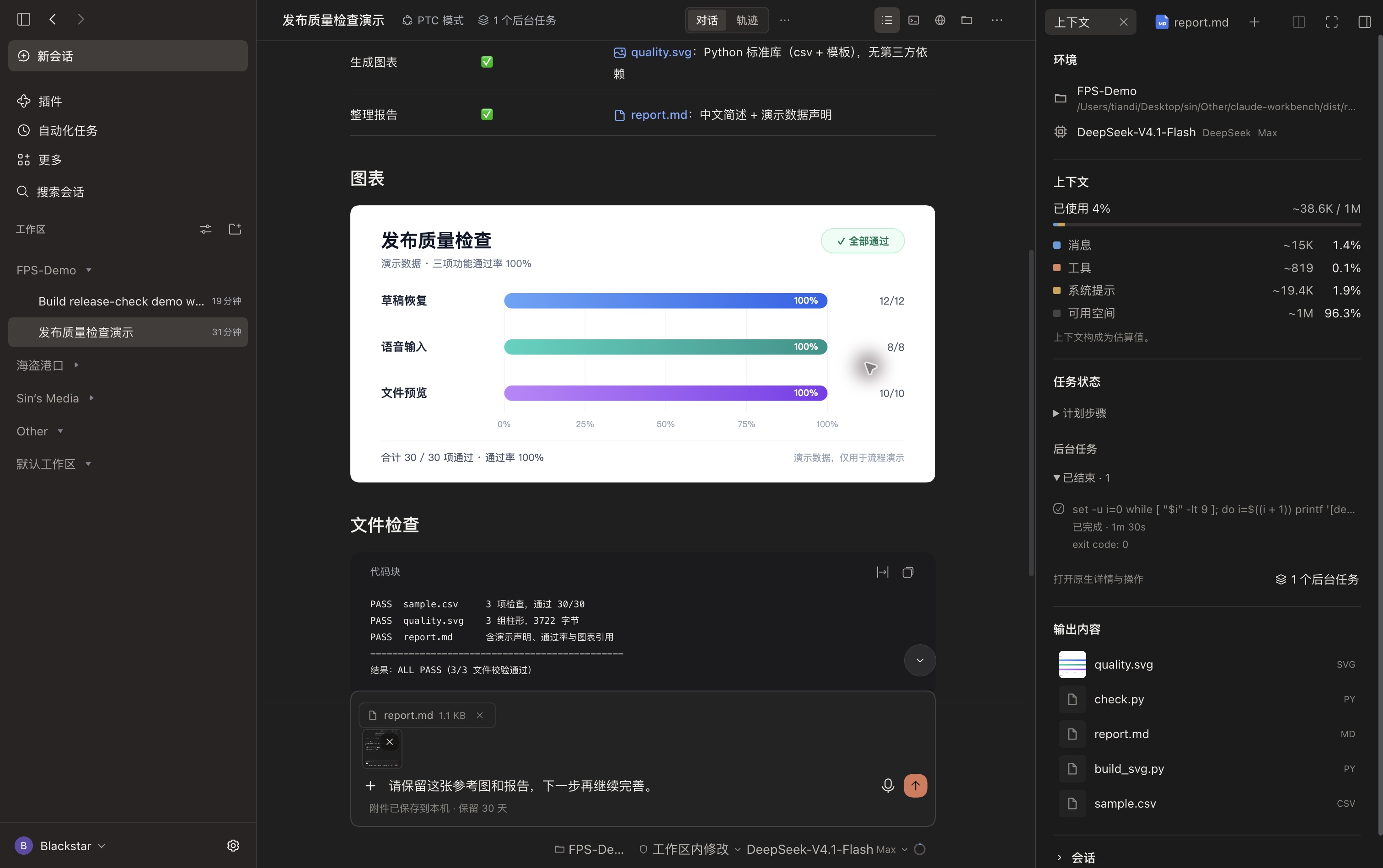
FPS 是 **DeepSeek Harness(DSH)** 的会话工作台。它把工具摘要、长任务状态、会话产物、可恢复的附件草稿和服务商用量放进同一套界面,让你从下达指令到拿到文件,都能看清智能体在做什么。浅色与深色模式保持简洁,重点留给正在进行的工作。
|
|
8
8
|
|
|
9
|
-
|
|
9
|
+
会话、工具执行、权限、语音转写和文件预览继续由 DSH 原生系统负责。FPS 整理这些信息,并补上日常使用中需要的功能。
|
|
10
10
|
|
|
11
|
-
|
|
11
|
+
|
|
12
12
|
|
|
13
|
-
|
|
13
|
+
> 截图均为 DSH 桌面端深色模式全屏实拍,展开左侧栏,使用独立演示工作区和用于验证 v0.1.79 的开发构建(本机包标签可能显示旧版本号)。本页使用中文界面和中文演示内容;英文 README 另配英文截图。图中的质量检查结果为演示数据,不是产品测试成绩。
|
|
14
14
|
|
|
15
|
-
|
|
15
|
+
## FPS 能帮你做什么
|
|
16
16
|
|
|
17
|
-
|
|
17
|
+
| 使用场景 | FPS 提供的帮助 |
|
|
18
|
+
| --- | --- |
|
|
19
|
+
| 把长任务交给智能体 | 分开查看计划步骤与后台任务,了解真实状态和已用时间。 |
|
|
20
|
+
| 回到一段操作繁多的对话 | 一行看完读取文件、运行命令和改动文件的摘要,需要时展开原生详情。 |
|
|
21
|
+
| 想找到最终交付物 | 图片、报告和源码集中到「输出内容」,点击进入原生预览。 |
|
|
22
|
+
| 消息还没发就切换会话 | 恢复各会话的文字、图片和文件;已保存附件在重载后也能找回。 |
|
|
23
|
+
| 同时使用多个服务商 | 自动读取支持的余额、花费与额度,不依赖作者个人的厂商组合。 |
|
|
24
|
+
| 更新 DSH 后需要排查 | 查看接口兼容性,复制不含凭据和对话内容的诊断摘要。 |
|
|
18
25
|
|
|
19
|
-
|
|
26
|
+
## 安装
|
|
20
27
|
|
|
21
|
-
|
|
28
|
+
需要 **DSH 0.2.2-rc.1 或更新版本**,并启用桌面或 Web 会话组件。本次桌面改动在 macOS、DSH `0.2.2-rc.2` 上验证;其他宿主环境可提供的可选能力可能不同。
|
|
22
29
|
|
|
23
|
-
|
|
30
|
+
在「**插件 → 添加插件**」中选择 npm 仓库,输入 **`dsh-fps-workbench`**;也可运行:
|
|
24
31
|
|
|
25
|
-
|
|
26
|
-
|
|
27
|
-
|
|
28
|
-
- **纯文本模型识图**。如果所选模型不支持图片输入,FPS 会从 DSH 的可用模型中查找支持图片的模型,将图片和问题发给它,再把生成的描述交给当前会话。找不到可用模型时,输入框会保留草稿并提示失败。
|
|
29
|
-
- **会话和工作区**。左栏保留 DSH 的原生工作区、会话搜索和设置。侧栏按钮旁的前进、后退箭头可在本次打开窗口后访问过的会话间切换。
|
|
30
|
-
- **命令、引用和语音**。输入 `/` 查找命令,输入 `@` 引用文件或会话。输入框下方可选择工作区、权限、模型和推理强度,也可查看用量。在 DSH「插件」中启用「语音输入」,发送按钮旁会出现麦克风。尚未准备语音模型时,点麦克风会打开设置引导。
|
|
32
|
+
```sh
|
|
33
|
+
dsh plugin --profile desktop add dsh-fps-workbench
|
|
34
|
+
```
|
|
31
35
|
|
|
32
|
-
|
|
36
|
+
Web 配置将 `desktop` 换成 `web`。[GitHub Releases](https://github.com/Blacstar7/dsh-fps-workbench/releases/latest) 也提供预打包的 `.tgz`。如 DSH 提示重启,请重启后使用。[更新日志](CHANGELOG.md) 区分已发布版本和尚未发布的改动。
|
|
33
37
|
|
|
34
|
-
##
|
|
38
|
+
## 长任务看得清,原生详情随时展开
|
|
35
39
|
|
|
36
|
-
|
|
40
|
+
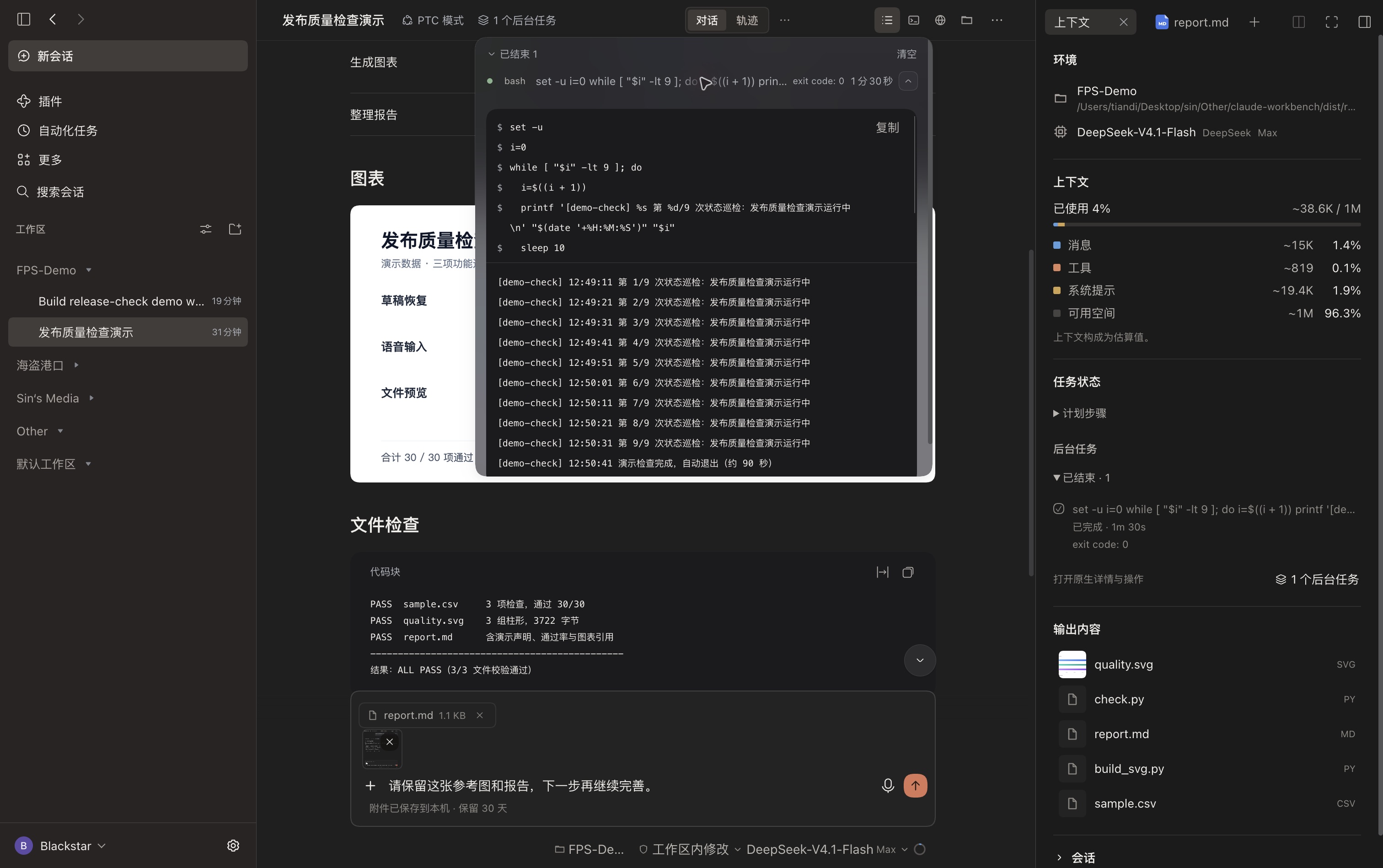
点击会话顶栏的「**上下文**」,查看工作区、模型、上下文占用估算、任务状态和输出内容。
|
|
37
41
|
|
|
38
|
-
|
|
42
|
+
「**计划步骤**」显示 DSH 当前报告的原生计划,后续回合可能替换或清空它,并非整段会话的永久清单;「**后台任务**」显示宿主报告的状态和实际用时,已结束任务单独折叠。需要日志或停止操作时,打开原生任务控制入口。开始渲染并不意味着模型已经创建计划;DSH 没有报告进度时,FPS 不会编造完成百分比。
|
|
39
43
|
|
|
40
|
-
|
|
44
|
+
|
|
41
45
|
|
|
42
|
-
|
|
46
|
+
连续的工具操作汇总为读了几个文件、运行了几条命令、改动了哪些文件。点击摘要可展开 DSH 原生详情与工具检查器。运行时的 FPS 标志动画和 `ThinKing` 用时行帮助辨认进行中的工作,并遵循减少动态效果的系统偏好。
|
|
43
47
|
|
|
44
|
-
|
|
48
|
+
## 产物集中查看,不必翻找消息
|
|
45
49
|
|
|
46
|
-
|
|
47
|
-
- **CogView-3-Flash**。智谱免费 Flash 模型,适合常规画质需求。需要智谱开放平台 API Key,受服务限流约束。
|
|
48
|
-
- **Pollinations**。需要自己的 API Key。FPS 在实时目录标价为零时使用 SDXL Lightning 快速打样,服务仍可能要求账户有正的可用余额。
|
|
49
|
-
- **ComfyUI + Comfy MCP**。通过 ComfyUI 和官方 Comfy MCP 在本机生图。开启后手动启动下载。随附的 SD 1.5 工作流适合约 512 像素的草图,安装需要 Python、Git、网络连接和 16 GiB 可用磁盘空间。
|
|
50
|
+
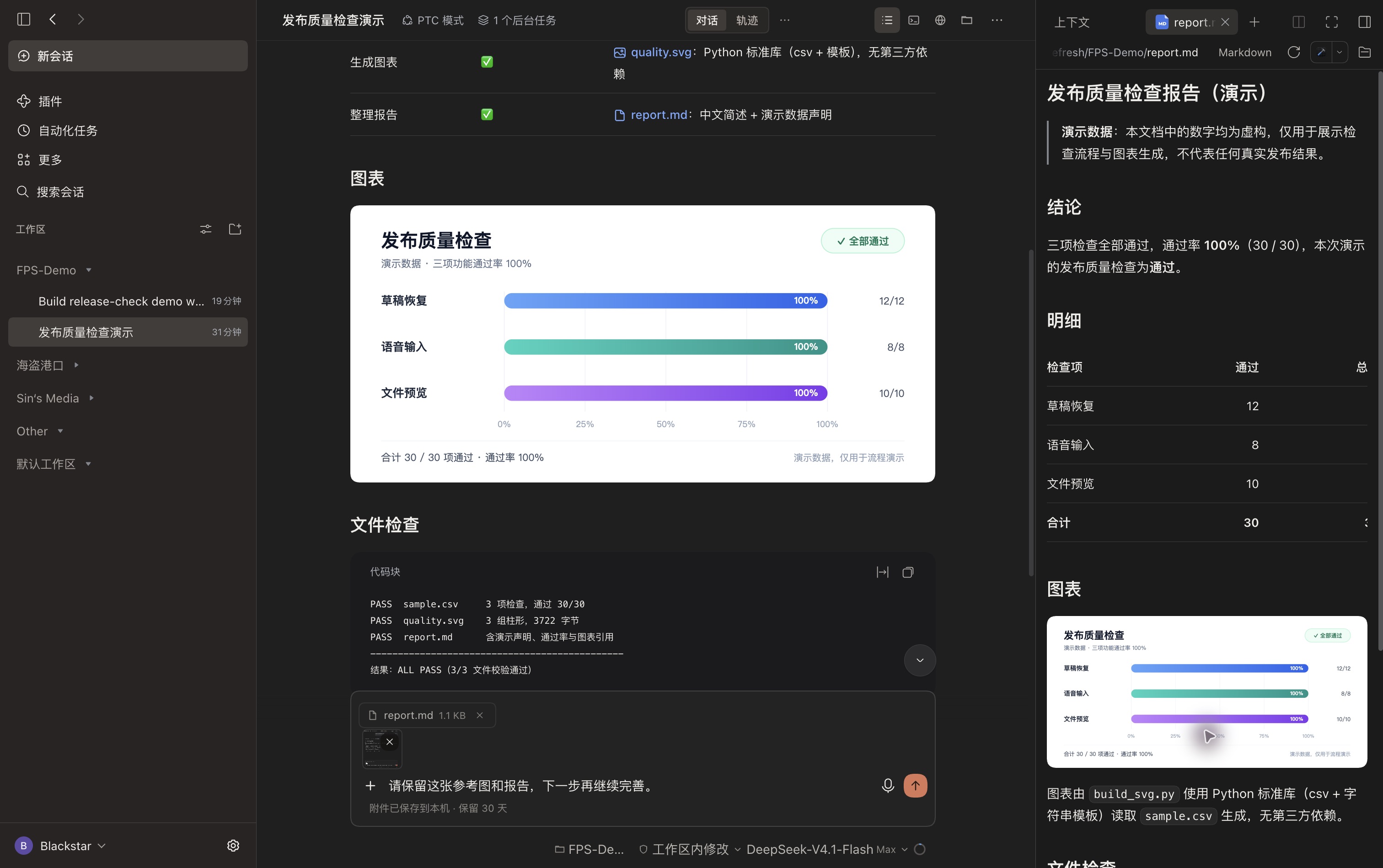
「**输出内容**」汇集当前会话生成或明确链接的本地文件。图片、报告和源码都可以直接在 DSH 原生预览中打开。顶栏仍提供文件、终端、浏览器和原生会话视图入口。
|
|
50
51
|
|
|
51
|
-
|
|
52
|
+
|
|
52
53
|
|
|
53
|
-
|
|
54
|
+
上下文分项是**估算值**,不等同于服务商账单。面板展示消息、工具、系统提示和可用空间,并保留会话信息。
|
|
54
55
|
|
|
55
|
-
|
|
56
|
-
- **模型和用量**。在 DSH「设置 → 模型」中添加或编辑自己的服务商、接口地址、模型和 API Key。再次打开用量面板即可按新配置查询。自定义地址的余额或额度需要对应的用量接口适配。使用纯文本模型时,可在同一处添加支持图片输入的模型,供 FPS 自动选择。
|
|
57
|
-
- **工具和权限**。在 DSH 的「插件」中管理提供工具的插件,并在输入框下方选择会话模型和权限模式。工具能否调用取决于模型能力和当前会话权限。
|
|
56
|
+
## 切换会话,也留得住未发送的内容
|
|
58
57
|
|
|
59
|
-
|
|
58
|
+
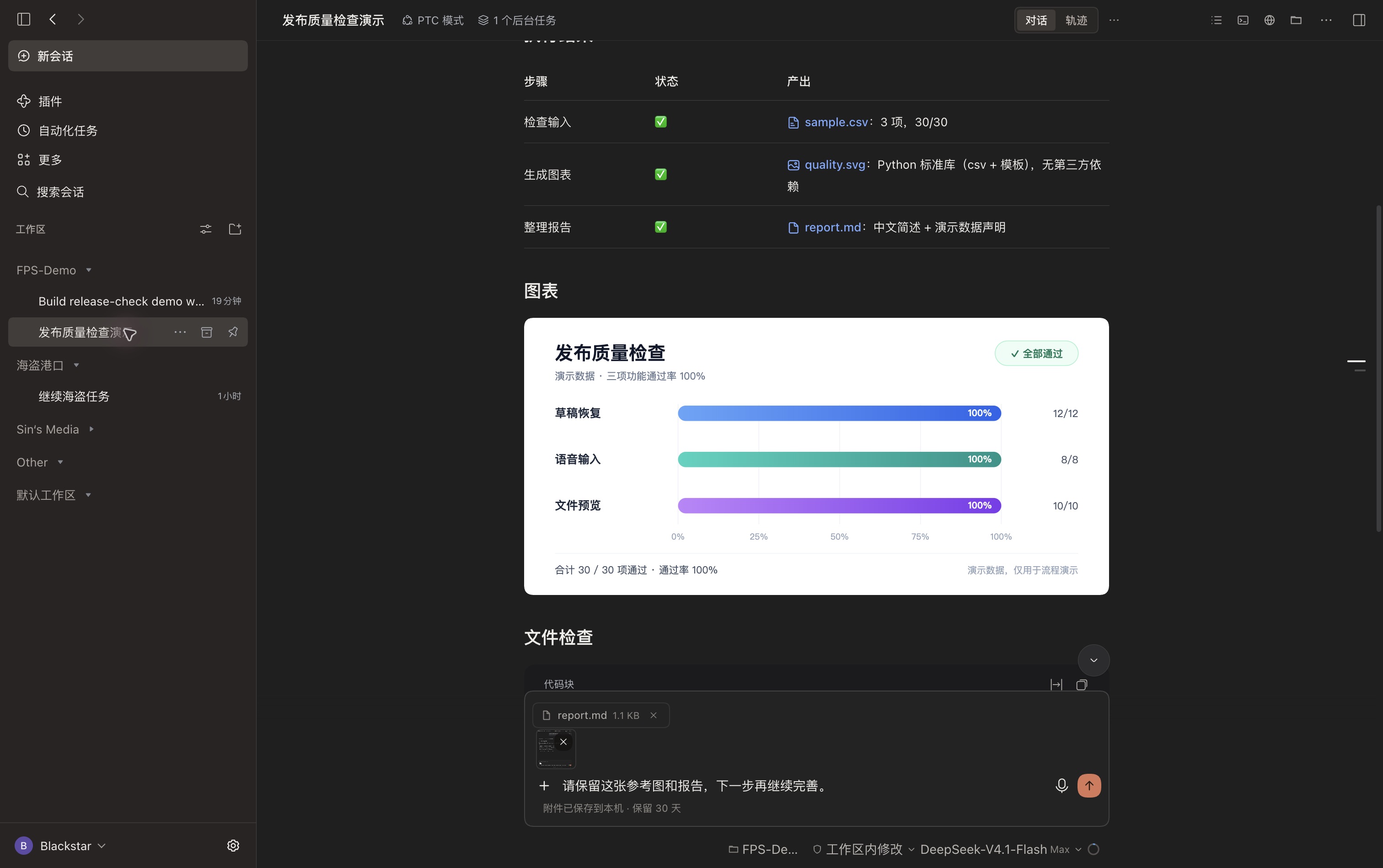
粘贴图片、添加文件,输入 `/` 查找命令,或用 `@` 引用文件与会话。每个会话保留自己的草稿。已保存的图片和文件不仅能在切回会话时恢复,**在同一客户端配置下重载后也能恢复**。
|
|
60
59
|
|
|
61
|
-
|
|
60
|
+
|
|
62
61
|
|
|
63
|
-
|
|
62
|
+
- 每条消息最多 **4 张图片,每张 8 MB**;**6 个文件,每个 20 MB**。
|
|
63
|
+
- 附件存入本机 IndexedDB,文字使用浏览器本地存储;属于本机恢复,不跨设备同步。
|
|
64
|
+
- 关闭前请等待保存完成提示。存储失败提供「**重试**」,提交失败保留草稿。
|
|
65
|
+
- DSH 接收消息或你手动移除附件后清除;附件连续 **30 天未修改**,在之后加载时过期。
|
|
66
|
+
- 加载附件存储时仍可编辑文字和使用语音。发送等待加载完成或报错,存储操作设有 10 秒超时。
|
|
64
67
|
|
|
65
|
-
|
|
66
|
-
|
|
67
|
-
|
|
68
|
+
启用 DSH「**语音输入**」插件后,发送按钮旁会显示麦克风。录音、转写继续使用原生实现;转写结束时,即便已经切换会话,文字也归入原会话草稿。使用前仍需配置可用的语音服务并授权麦克风。
|
|
69
|
+
|
|
70
|
+
工作区、模型、推理强度和权限控制保持 DSH 原生逻辑。会话运行中,Enter 遵循 DSH 的发送偏好,Cmd/Ctrl+Enter 使用另一种投递方式。
|
|
71
|
+
|
|
72
|
+
## 服务商能返回什么,用量面板就显示什么
|
|
73
|
+
|
|
74
|
+
点击**模型选择器旁的用量圆环**。FPS 自动识别已配置的服务商,用适用的凭据访问受支持接口,显示实际返回的 API 余额、花费、Token、剩余额度、周期限额或重置时间。
|
|
75
|
+
|
|
76
|
+
各服务商之间有分隔,按名称字母顺序排列,不区分大小写。同一厂商的独立计费接口可能分成不同区块。弹层高度上限为 720 px,同时受屏幕可用空间限制;内容超过可用高度后才滚动。
|
|
77
|
+
|
|
78
|
+
**不支持、读取失败或缺失的字段隐藏;真实返回的零值正常显示。** 会话 Token 和上下文估算与账号用量分开呈现。一些组织级接口需要额外凭据,普通模型 Key 不一定能读取所有账号指标。FPS 不会根据 Token 推算余额,也不承诺支持任意自定义地址。配置方式见[详细指南](locale/detail.zh.md)。
|
|
79
|
+
|
|
80
|
+
## 识图与生图,按自己的环境选择
|
|
81
|
+
|
|
82
|
+
### 为纯文本会话补充图片理解
|
|
83
|
+
|
|
84
|
+
所选模型不支持图片时,FPS 从用户自己的 DSH 配置中查找可识图模型,取得图片描述,再交给当前会话。没有指定必须使用哪一个模型。这可能额外发起模型请求,并产生对应服务商的费用;没有合适模型时,提示错误并保留草稿。
|
|
85
|
+
|
|
86
|
+
### 可选云端与本地生图
|
|
68
87
|
|
|
69
|
-
|
|
88
|
+
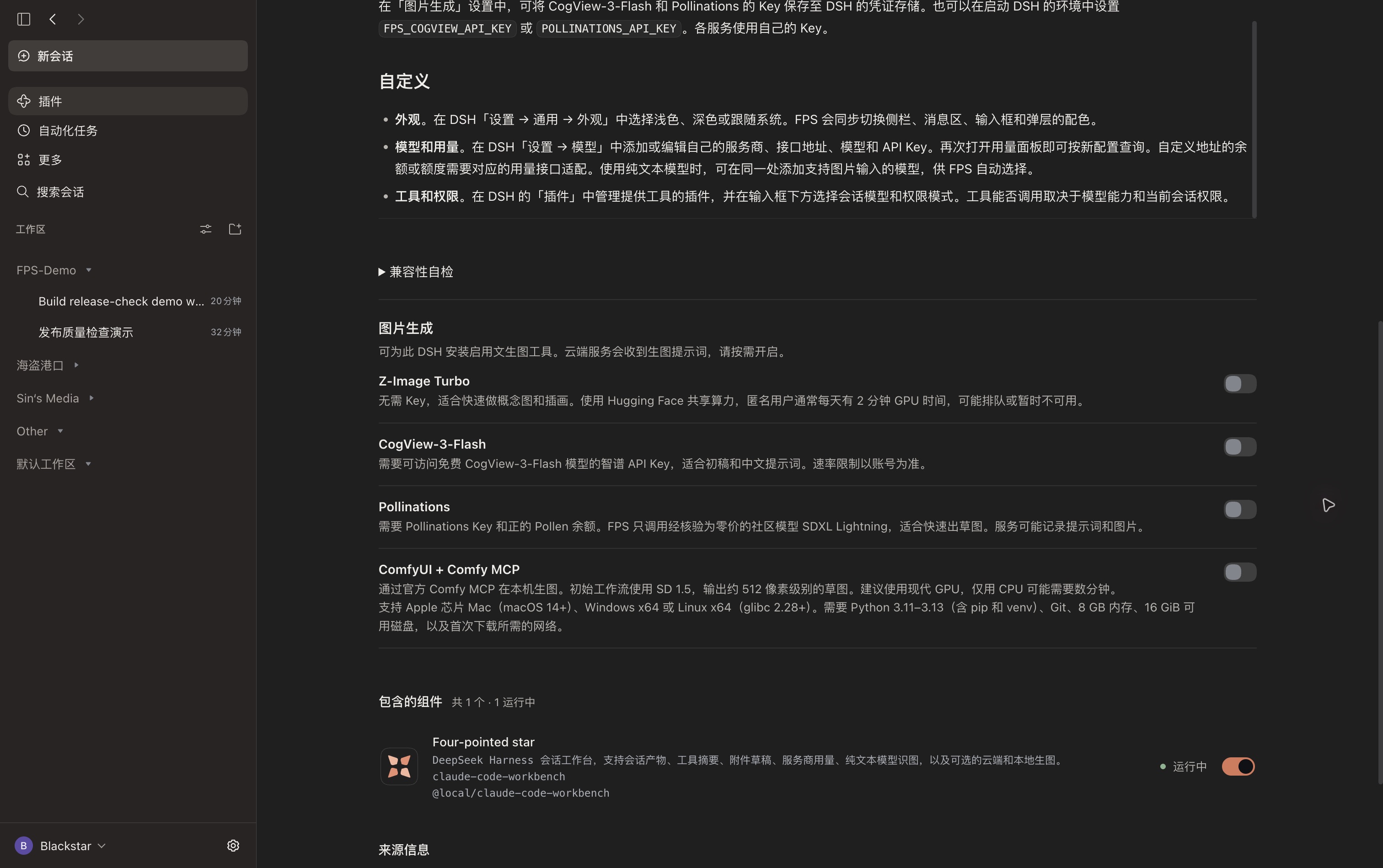
打开「**插件 → Four-pointed star → 图片生成**」。四项服务**默认全部关闭**,按需开启并完成配置后,模型才可调用。生成图片会进入会话产物,通过原生预览打开。
|
|
70
89
|
|
|
71
|
-
|
|
90
|
+
|
|
72
91
|
|
|
73
|
-
|
|
92
|
+
| 选项 | 配置 | 适用范围与限制 |
|
|
93
|
+
| --- | --- | --- |
|
|
94
|
+
| Z-Image Turbo | 无需 Key,使用 Hugging Face 共享 Space | 快速概念图,受共享 GPU 额度、排队和服务可用性限制。 |
|
|
95
|
+
| CogView-3-Flash | 使用自己的服务商 Key | Flash 档标准画质,受账号资格和速率限制影响。 |
|
|
96
|
+
| Pollinations | 使用自己的 API Key | 实时目录标价为零时调用 SDXL Lightning 做草图;仍可能要求账号有正余额。 |
|
|
97
|
+
| ComfyUI + 官方 Comfy MCP | 开启后,主动点击下载与安装 | 本地 SD 1.5 工作流,约 512 像素草图;安装需 Git、兼容 Python、网络和至少 16 GiB 可用磁盘。 |
|
|
74
98
|
|
|
75
|
-
|
|
99
|
+
开启 ComfyUI **不会立即下载**。安装可查看进度和取消,关闭开关保留已下载文件。Apple 芯片 Mac 本地出图已经实测;Windows、Linux 安装尚未实机验证。云端服务会收到提示词并适用各自政策,免费档和可用性也可能改变,不承诺无限或永久免费。
|
|
76
100
|
|
|
77
|
-
|
|
101
|
+
完整要求、凭据配置与画质预期见[生图指南](locale/detail.zh.md#可选生图工具)。FPS 尽量优先使用已有生图工具;请求失败后不会悄悄切换其他服务。
|
|
78
102
|
|
|
79
|
-
##
|
|
103
|
+
## 更新后,先看看哪些接口可用
|
|
104
|
+
|
|
105
|
+
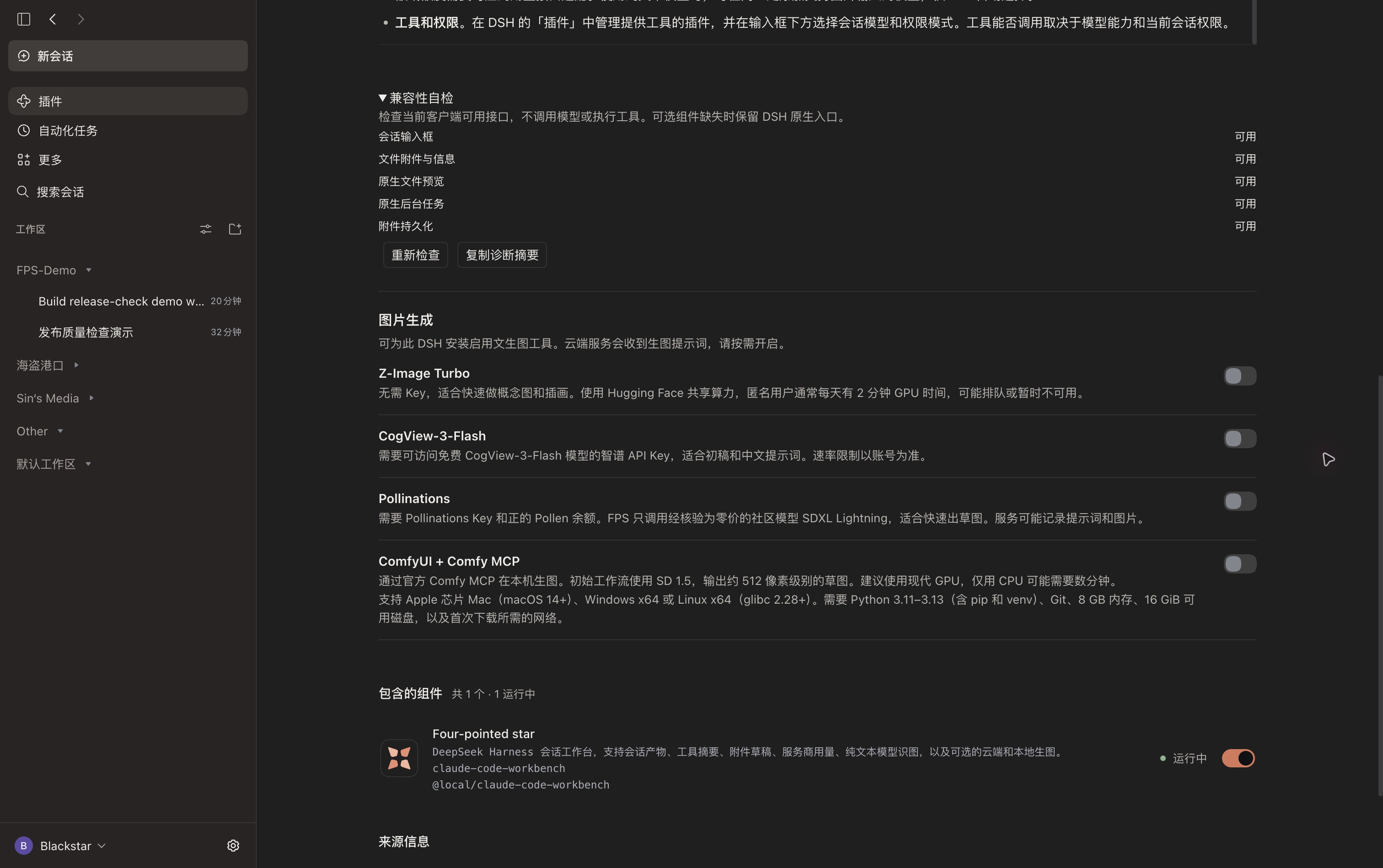
打开「**插件 → Four-pointed star → 兼容性自检**」,检查输入框、文件、预览、后台任务和本机草稿存储接口。可以重新检查,或复制不含 Key、路径和对话内容的诊断摘要。
|
|
106
|
+
|
|
107
|
+
|
|
108
|
+
|
|
109
|
+
这是一项**接口能力检查**,不是模型推理或工具调用可靠性测试。输入框契约缺失或 FPS 输入框渲染失败时,本次页面会回退到 DSH 原生输入框。语音和后台任务等可选集成分别隔离,缺少某项能力不会让整个工作台失效。
|
|
110
|
+
|
|
111
|
+
## 按自己的习惯配置
|
|
112
|
+
|
|
113
|
+
| 想调整什么 | 在哪里设置 |
|
|
114
|
+
| --- | --- |
|
|
115
|
+
| 浅色、深色、跟随系统,以及界面语言 | DSH「**设置 → 通用设置**」,FPS 跟随宿主。 |
|
|
116
|
+
| 服务商、地址、Key 和模型能力 | DSH「**设置 → 模型**」;用量需要对应接口支持,识图回退需要配置可识图模型。 |
|
|
117
|
+
| 工具与语音输入 | DSH「**插件**」,开启需要的原生组件。 |
|
|
118
|
+
| 当前会话模型、权限和推理强度 | 输入框底栏;执行和审批仍由 DSH 管理。 |
|
|
119
|
+
| 可选生图工具与兼容性诊断 | 「**插件 → Four-pointed star**」。 |
|
|
120
|
+
|
|
121
|
+
左栏保留原生工作区、搜索、设置和会话操作;前进、后退可回到当前窗口访问过的会话。FPS 不保证任意模型都能调用所有工具:模型能力、服务商协议、已安装工具和 DSH 权限共同决定实际可执行的操作。
|
|
122
|
+
|
|
123
|
+
## 从旧版更新
|
|
124
|
+
|
|
125
|
+
已经安装 **`dsh-fps-workbench`** 的用户,更新同一个包即可,不要再并排装第二份。
|
|
126
|
+
|
|
127
|
+
**v0.1.76 或更早版本**若使用 `@local/claude-code-workbench`,请先保存未发送附件,卸载旧条目,再在**同一 DSH 配置**安装 `dsh-fps-workbench`。生图设置、凭据、本地用量配置、会话和工作区继续沿用;同一客户端配置中的文字草稿也可保留。旧版本仅在内存保留附件,新版持久化无法找回此前重载时已经丢失的附件。
|
|
128
|
+
|
|
129
|
+
### 已知宿主问题
|
|
130
|
+
|
|
131
|
+
DSH 桌面端升级到 `0.2.2-rc.2` 后,旧 Computer Use 安装可能继续加载 `0.2.2-rc.1` 的存储依赖,导致会话和自动化任务无法加载,FPS 开启或关闭时都可能发生。请先备份受影响配置,再核实具体旧依赖后处理,使 DSH 加载当前版本内置组件。这与 FPS 的界面兼容性检查是不同层面的问题。
|
|
132
|
+
|
|
133
|
+
## 开发与许可
|
|
134
|
+
|
|
135
|
+
仓库包含命令、会话导航、产物、附件存储、长任务集成、用量解析和生图工具的测试。使用当前 Node.js 运行时执行:
|
|
136
|
+
|
|
137
|
+
```sh
|
|
138
|
+
node --test tests/*.test.mjs
|
|
139
|
+
```
|
|
80
140
|
|
|
81
|
-
|
|
141
|
+
采用 [MIT 许可证](LICENSE)。[源码与版本发布](https://github.com/Blacstar7/dsh-fps-workbench)。
|